Windows 7 AppCompatLynn Langithttp://blogs.msdn.com/SoCalDevGalMicrosoft – Developer Evangelist
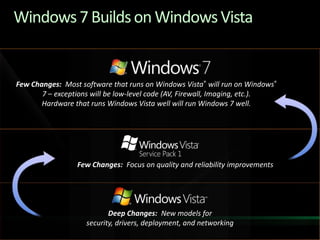
Windows 7 Builds on Windows VistaFew Changes:  Most software that runs on Windows Vista® will run on Windows® 7 – exceptions will be low-level code (AV, Firewall, Imaging, etc.).  Hardware that runs Windows Vista well will run Windows 7 well.Few Changes:  Focus on quality and reliability improvementsDeep Changes:  New models for security, drivers, deployment, and networking
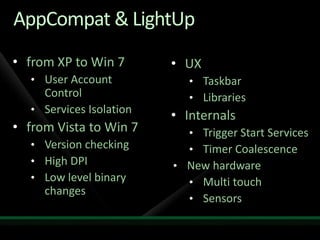
AppCompat & LightUpfrom XP to Win 7
User Account Control
Services Isolation
from Vista to Win 7
Version checking
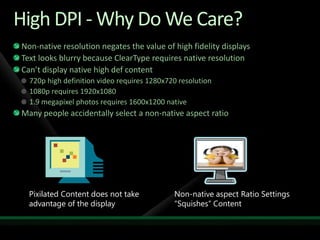
High DPI
Low level binary changes
UX
Taskbar
Libraries
Internals
Trigger Start Services
Timer Coalescence
New hardware
Multi touch
SensorsFrom XP to Windows 7http://code.msdn.microsoft.com/XP2Win7
The ApplicationImage ViewerWPF Application Runs on XP, Vista, Win7On XP basic functionality with no special OS featuresManually Create albumCrawler (expensive) Service searching imagesChange SkinReset DB / Reset configurationLights Up on Windows 7
Application Running on XP
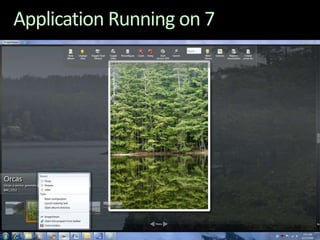
The Application Running on 7Enhancing an existing Windows XP application with Windows 7 featuresIO Background PriorityLibraries Trigger Start ServicesPower ManagementCommand Links Scheduled TasksPowerShell 2Windows 7 MultitouchWindows 7 SensorsOther…Application Restart and RecoveryPreview HandlersWindows SearchWindows 7 Event TracingUser Account ControlWindows 7 TaskbarTransactional NTFSMicrosoft Management Console Snap-In
Application Running on 7
DemoPhoto Viewer on Windows 7
Compat - New Folder Locations“My Documents” folder structure has changed The user data is now stored in: ‘\users\%username%\’ folder structurePictures, Music, Documents, Desktop, and Favorites are all new folders directly under this structureThe “My “ prefix was dropped from Documents, Music, etc.“All Users” became “Public” and “\ProgramData”My Documents still exist as directory junctionUse the SHGetKnownFolderPath APIs
Compat - Application Data Best PracticesWhere to put your data:Place per-user configuration data into %LOCALAPPDATA% (Roaming into %APPDATA%)Place Per-Machine (Shared) configuration data into %ALLUSERSPROFILE%  (e.g. c:\ProgramData)Per-Machine (Shared) user documents into %PUBLIC%Per user documents go to %USERPROFILE%
Compat - User Account Control Applications run as Standard User by default
Standard User has some permissions
Run most applications
Change per user settings
Standard User can NOT do many things
Install applications
Change system components
Change per machine settings
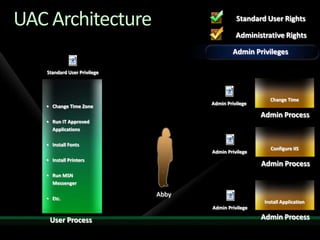
Admin “privileges”Windows UACAll users run as Standard User by defaultFiltered token created during logonOnly specially marked apps get the unfiltered tokenExplicit consent required for elevationPredictable shell elevation pathsHigh application compatibilityData redirectionEnabling legacy apps to run as standard userInstaller DetectionUAC ArchitectureAbbyStandard User RightsAdministrative RightsAdmin logonAdmin Token“Standard User” Token
UAC ArchitectureChange Time Zone
Run IT Approved Applications
Install Fonts
Install Printers
Run MSN Messenger
Etc.AbbyUser ProcessStandard User PrivilegeStandard User RightsAdministrative RightsStandard User Mode
UAC ArchitectureChange Time Zone
Run IT Approved Applications
Install Fonts
Install Printers
Run MSN Messenger
Etc.AbbyUser ProcessChange TimeStandard User PrivilegeAdmin PrivilegeAdmin PrivilegeAdmin PrivilegeAdmin ProcessConfigure IISAdmin ProcessInstall ApplicationAdmin ProcessStandard User RightsAdministrative RightsAdmin Privileges
Consent UIOS ApplicationUnsigned ApplicationSigned Application
Credential UI
UAC Split Tokens Demo
Designing for UAC1st Choice: Make application run as Standard User only2nd Choice: Clearly identify Administrative tasksEnsure Standard users can be fully productiveIdentify tasks that need elevation with a “shield”
UX: The ShieldAttached to controls to indicate that elevation is required to use their associated featureHas only one state (i.e. no hover, disabled etc.)Does not remember elevated stateNot an unlock operationCan be programmatically set:HICON shieldIcon = LoadIcon(NULL, IDI_SHIELD)SendMessage(button, BCM_SETSHIELD, 0, TRUE)       or using the macro in Commctrl.h:Button_SetElevationRequiredState(commandLink, TRUE)
Security Shield UI Examples
Application ManifestsVista-aware applications embed an XML manifestManifest contains a RequestedExecutionLevel:
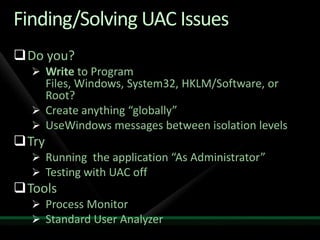
Finding/Solving UAC IssuesDo you?Write to Program Files, Windows, System32, HKLM/Software, or Root?Create anything “globally”UseWindows messages between isolation levelsTryRunning  the application “As Administrator”Testing with UAC offToolsProcess MonitorStandard User Analyzer
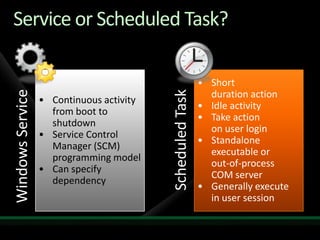
Windows Services BasicsStarted and managed by Service Control ManagerControlled by SCMStarting and stopping servicesDisabled, Manual and AutomaticManaging running servicesMaintaining service-related state informationStarted – Stopped - PausedServices can run in their own process or shared hosted process (e.g. svchost.exe)
Services and SecurityAttractions for malwareMay be configured to auto start on bootPotential to run from boot without using well known auto-start methodsOften run in highly privileged contextsAs mentioned, runs outside of UAC and enables app to potentially take control of UAC behavior (e.g. MSI)Services can run in their own process or shared hosted process
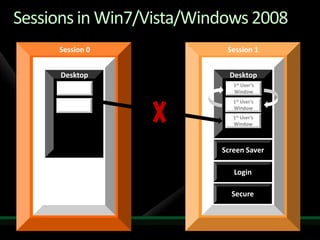
Sessions in XP/W2K/WS03Session 0Window StationDesktopServicesShatter Attack1st User’sWindow1st User’sWindow1st User’sWindowScreen SaverLogin
Sessions in Win7/Vista/Windows 2008Session 0Session 1Window StationWindow StationDesktopDesktopService1st User’sWindow1st User’sWindowService1st User’sWindowScreen SaverLoginSecure
Session 0 Isolationdemo
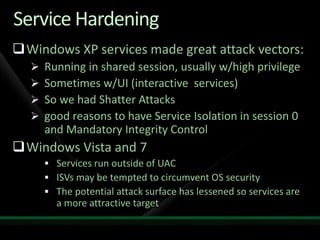
Service HardeningWindows XP services made great attack vectors:Running in shared session, usually w/high privilegeSometimes w/UI (interactive  services)So we had Shatter Attacksgood reasons to have Service Isolation in session 0 and Mandatory Integrity ControlWindows Vista and 7Services run outside of UACISVs may be tempted to circumvent OS securityThe potential attack surface has lessened so services are a more attractive target
Three Service Hardening DesignsServices need to run least privilegedServices can now have their own SIDThis can be used to lock down / sandbox the resources that the Service has access to
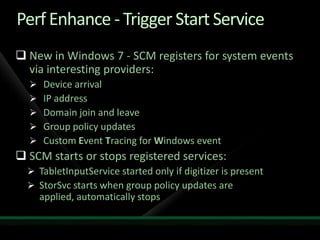
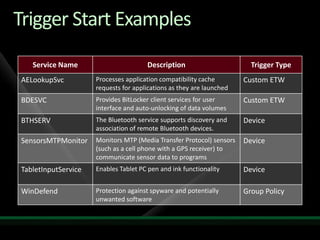
Perf Enhance - Trigger Start ServiceNew in Windows 7 - SCM registers for system events via interesting providers:Device arrivalIP addressDomain join and leaveGroup policy updatesCustom Event Tracing for Windows eventSCM starts or stops registered services:TabletInputService started only if digitizer is presentStorSvc starts when group policy updates are applied, automatically stops

3 App Compat Win7

  • 1.
    Windows 7 AppCompatLynnLangithttp://blogs.msdn.com/SoCalDevGalMicrosoft – Developer Evangelist
  • 2.
    Windows 7 Buildson Windows VistaFew Changes: Most software that runs on Windows Vista® will run on Windows® 7 – exceptions will be low-level code (AV, Firewall, Imaging, etc.). Hardware that runs Windows Vista well will run Windows 7 well.Few Changes: Focus on quality and reliability improvementsDeep Changes: New models for security, drivers, deployment, and networking
  • 3.
  • 4.
  • 5.
  • 6.
  • 7.
  • 8.
  • 9.
  • 10.
  • 11.
  • 12.
  • 13.
  • 14.
  • 15.
  • 16.
  • 17.
  • 18.
    SensorsFrom XP toWindows 7http://code.msdn.microsoft.com/XP2Win7
  • 19.
    The ApplicationImage ViewerWPFApplication Runs on XP, Vista, Win7On XP basic functionality with no special OS featuresManually Create albumCrawler (expensive) Service searching imagesChange SkinReset DB / Reset configurationLights Up on Windows 7
  • 20.
  • 21.
    The Application Runningon 7Enhancing an existing Windows XP application with Windows 7 featuresIO Background PriorityLibraries Trigger Start ServicesPower ManagementCommand Links Scheduled TasksPowerShell 2Windows 7 MultitouchWindows 7 SensorsOther…Application Restart and RecoveryPreview HandlersWindows SearchWindows 7 Event TracingUser Account ControlWindows 7 TaskbarTransactional NTFSMicrosoft Management Console Snap-In
  • 22.
  • 23.
  • 24.
    Compat - NewFolder Locations“My Documents” folder structure has changed The user data is now stored in: ‘\users\%username%\’ folder structurePictures, Music, Documents, Desktop, and Favorites are all new folders directly under this structureThe “My “ prefix was dropped from Documents, Music, etc.“All Users” became “Public” and “\ProgramData”My Documents still exist as directory junctionUse the SHGetKnownFolderPath APIs
  • 25.
    Compat - ApplicationData Best PracticesWhere to put your data:Place per-user configuration data into %LOCALAPPDATA% (Roaming into %APPDATA%)Place Per-Machine (Shared) configuration data into %ALLUSERSPROFILE% (e.g. c:\ProgramData)Per-Machine (Shared) user documents into %PUBLIC%Per user documents go to %USERPROFILE%
  • 26.
    Compat - UserAccount Control Applications run as Standard User by default
  • 27.
    Standard User hassome permissions
  • 28.
  • 29.
  • 30.
    Standard User canNOT do many things
  • 31.
  • 32.
  • 33.
  • 34.
    Admin “privileges”Windows UACAllusers run as Standard User by defaultFiltered token created during logonOnly specially marked apps get the unfiltered tokenExplicit consent required for elevationPredictable shell elevation pathsHigh application compatibilityData redirectionEnabling legacy apps to run as standard userInstaller DetectionUAC ArchitectureAbbyStandard User RightsAdministrative RightsAdmin logonAdmin Token“Standard User” Token
  • 35.
  • 36.
    Run IT ApprovedApplications
  • 37.
  • 38.
  • 39.
  • 40.
    Etc.AbbyUser ProcessStandard UserPrivilegeStandard User RightsAdministrative RightsStandard User Mode
  • 41.
  • 42.
    Run IT ApprovedApplications
  • 43.
  • 44.
  • 45.
  • 46.
    Etc.AbbyUser ProcessChange TimeStandardUser PrivilegeAdmin PrivilegeAdmin PrivilegeAdmin PrivilegeAdmin ProcessConfigure IISAdmin ProcessInstall ApplicationAdmin ProcessStandard User RightsAdministrative RightsAdmin Privileges
  • 47.
    Consent UIOS ApplicationUnsignedApplicationSigned Application
  • 48.
  • 49.
  • 50.
    Designing for UAC1stChoice: Make application run as Standard User only2nd Choice: Clearly identify Administrative tasksEnsure Standard users can be fully productiveIdentify tasks that need elevation with a “shield”
  • 51.
    UX: The ShieldAttachedto controls to indicate that elevation is required to use their associated featureHas only one state (i.e. no hover, disabled etc.)Does not remember elevated stateNot an unlock operationCan be programmatically set:HICON shieldIcon = LoadIcon(NULL, IDI_SHIELD)SendMessage(button, BCM_SETSHIELD, 0, TRUE) or using the macro in Commctrl.h:Button_SetElevationRequiredState(commandLink, TRUE)
  • 52.
  • 53.
    Application ManifestsVista-aware applicationsembed an XML manifestManifest contains a RequestedExecutionLevel:
  • 54.
    Finding/Solving UAC IssuesDoyou?Write to Program Files, Windows, System32, HKLM/Software, or Root?Create anything “globally”UseWindows messages between isolation levelsTryRunning the application “As Administrator”Testing with UAC offToolsProcess MonitorStandard User Analyzer
  • 55.
    Windows Services BasicsStartedand managed by Service Control ManagerControlled by SCMStarting and stopping servicesDisabled, Manual and AutomaticManaging running servicesMaintaining service-related state informationStarted – Stopped - PausedServices can run in their own process or shared hosted process (e.g. svchost.exe)
  • 56.
    Services and SecurityAttractionsfor malwareMay be configured to auto start on bootPotential to run from boot without using well known auto-start methodsOften run in highly privileged contextsAs mentioned, runs outside of UAC and enables app to potentially take control of UAC behavior (e.g. MSI)Services can run in their own process or shared hosted process
  • 57.
    Sessions in XP/W2K/WS03Session0Window StationDesktopServicesShatter Attack1st User’sWindow1st User’sWindow1st User’sWindowScreen SaverLogin
  • 58.
    Sessions in Win7/Vista/Windows2008Session 0Session 1Window StationWindow StationDesktopDesktopService1st User’sWindow1st User’sWindowService1st User’sWindowScreen SaverLoginSecure
  • 59.
  • 60.
    Service HardeningWindows XPservices made great attack vectors:Running in shared session, usually w/high privilegeSometimes w/UI (interactive services)So we had Shatter Attacksgood reasons to have Service Isolation in session 0 and Mandatory Integrity ControlWindows Vista and 7Services run outside of UACISVs may be tempted to circumvent OS securityThe potential attack surface has lessened so services are a more attractive target
  • 61.
    Three Service HardeningDesignsServices need to run least privilegedServices can now have their own SIDThis can be used to lock down / sandbox the resources that the Service has access to
  • 62.
    Perf Enhance -Trigger Start ServiceNew in Windows 7 - SCM registers for system events via interesting providers:Device arrivalIP addressDomain join and leaveGroup policy updatesCustom Event Tracing for Windows eventSCM starts or stops registered services:TabletInputService started only if digitizer is presentStorSvc starts when group policy updates are applied, automatically stops

Editor's Notes

  • #26 Blackhat and recommendation to hijack a utility type service (AV or backup for example).
  • #29 Services IsolationServices will not be able to directly interact with user desktop and applicationsIssuesServices with user interaction may hang as UI will not be visibleTemporary Mitigation: notification sent to current user when there is UI in session 0http://www.msterminalservices.org/faq/WindowsTerminalServices/?page=8 – How to design a service to interact with multiple user sessionsSpawned by service – must track session IdsSimple interaction: Terminal Services APIs (WtsSendMessage) - messagebox type functionalityComplex interaction -spawned by the service: one of the create process as user APIs Client start-up (e.g. run key)Find Session Id - WTSQuerySessionInformation() with WTSSessionId as classPass to service through IPCNamed pipe issuesSpecify FILE_FLAG_FIRST_PIPE_INSTANCE in dwOpenMode parameter to CreateNamedPipe() – prevents “squatting”
  • #33 Performance EnhancementsNotifyServiceStatusChange()XP required query of state through QueryServiceStatusEx() or other APIAllows for callback notification of service status changesLocal or remote clientsShutdownXP – notification (random order from SCM) then 20 sec to shutdownVista pre-shutdown notification for services with more cleanup3 min by default but configurable by serviceRegistration of shutdown dependencies for orderWindows 7 adds Trigger Start:SCM starts or stops registered services when system events triggers.Configuration not accessible via MMC Service Snap-InYou can use the command-line SC.EXE TRIGGERINFO… ChangeServiceConfig2( SERVICE_CONFIG_TRIGGER_INFO )
  • #36 Note: some applications will actively block efforts to shim, so this will not work.
  • #45 Direct 2D – rendering improvementsDirectWrite – cool DirectWrite demoDirect3D - Demo
  • #49 [TDM, DEV][Why - high level overview of Graphics (improvements) in Win7]High-Fidelity Graphics with DirectX Windows application developers have long used DirectX® to provide high-quality, hardware-accelerated, 3D graphics. When the technology debuted in 1995, developers could provide high-quality 3D graphics for games & engineering applications for gamers & professionals willing to pay extra for a 3D-graphics board. Now, even the most inexpensive PCs include capable 3D-graphics hardware.To take advantage of these graphics capabilities, Windows Vista introduced the Windows Display Driver Model (WDDM) infrastructure for DirectX that enabled multiple applications & services to share the resources of the GPU. The Desktop Window Manager (DWM) uses this technology to animate task switching in 3D, provide dynamic thumbnail images of application windows, & to provide Windows® Aero® glass effects for desktop applications.Windows 7 puts even more graphics capability into the h&s of application developers. Through a new set of DirectX APIs, Win32 developers can take advantage of the latest innovations in GPUs to add fast, scalable, high-quality, 2D & 3D graphics, text, & images to their applications. On the latest LCD displays, DirectX APIs can display desktop & window content using color depth greater than 8 bits per color component. With DirectX, Win32 developers can also use the GPU’s parallelism for general-purpose computation such as image processing, & can render to DirectX 10 hardware, DirectX 9 hardware, the CPU, or to a remote Windows computer. These technologies were designed to interoperate with GDI & GDI+, ensuring that developers can easily preserve their existing investments in Win32 code. These enhanced graphics capabilities are provided by the following COM-based APIs:Direct2D for drawing 2D graphics.DirectWrite for arranging & rendering text. Windows Imaging Component for processing & displaying images.Direct3D® 10 for drawing 3D graphics. Direct3D 11 for drawing 3D graphics, & providing access to next-generation GPU technologies, such as tessellation, limited support for texture streaming, & general purpose computing.DirectX Graphics Infrastructure (DXGI) for managing devices & GPU resources, & providing interoperability between DirectX & GDIWindows 7 Usage of the GPUContinues from Windows Vista…Media Center UIVideo Playback Desktop Window Manager (DWM)Windows 7 DWM uses Direct3D10.1 APIScales in performance all the way from low end integrated to high end GPUsShaders are used for blurs in the GlassWindows 7 memory consumption is cut by 50% per windowMore & richer animations of the thumbnails
  • #53 [TDM, DEV][high-level overview of DirectWrite]ClearType is all about drawing text to the screen while preserving maximum fidelity with regards to the character position & shape intended by the font designer.Usability Improvements due to ClearTypeReading perf improvement: 5% faster than non cleartype rendering.  This is normal reading of a document on screen.  Pretty significant (think of 5% of work day).     Word decoding: 17% faster.  When you get flashed a word on a screen really fast & have to figure out what it is. Most importantly – the time you can spend reading on the computer before you get a head-ache is substantially extended. :-)DirectWriteMany of today’s applications need to support high-quality text rendering, resolution-independent outline fonts, & full Unicode text & layout support. DirectWrite, a new DirectX component, provides these features & more:A device-independent text layout system that improves text readability in documents & in UI. High-quality, sub-pixel, ClearType® text rendering that can use GDI, Direct2D, or application-specific rendering technology.Hardware-accelerated text, when used with Direct2D.Support for multi-format text.Support for the advanced typography features of OpenType® fonts.Support for the layout & rendering of text in all supported languages.GDI-compatible layout & rendering.The DirectWrite font system enables ”any font anywhere” font usage, where users don’t have to perform a separate installation step just to use a font, & an improved structural hierarchy of font grouping to help with manual or programmatic font discovery. The APIs support measuring, drawing, & hit-testing of multi-format text. DirectWrite h&les text in all supported languages for global & localized applications, building on the key language infrastructure found in Windows 7. DirectWrite also provides low-level glyph rendering APIs for developers who want to perform their own layout & Unicode-to-glyph processing.
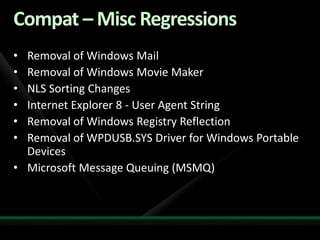
  • #56 [TDM, DEV]The main take away on the Fundamentals it to make sure developer are using Windows 7 as their main dev machine. By running Windows 7 on their machines, they will want to make sure their applications are properly running on Windows 7.
  • #57 Windows 7 & Windows Server 2008 R2 Ecosystem Readiness Program The Windows Ecosystem includes hardware, software, & services partners.  In addition to providing partners with access to the software & tools they need to build & test solutions for Windows 7 & Windows Server 2008 R2, the Ecosystem Readiness Program also facilitates testing multiple components of the ecosystem together to improve the overall user experience. Rather than just focusing on getting a specific OEM product, software application, or hardware device certified, we will be bringing multiple components together to verify a rich user experience that delivers quality, reliability, & performance as well as innovation through new feature adoption. To join the Windows 7 & Windows Server 2008 R2 Ecosystem Readiness Program click here if you are a software developer & here if you develop hardware.herehere