
Endina Putri Purwandari, M.Kom
OOP Concepts :
Illustration Sending Flowers to a Friend
 Suppose I wish to send flowers to a friend, Sally, who
lives in a city many miles away.
 ◦What should I do?
Agents and Communities
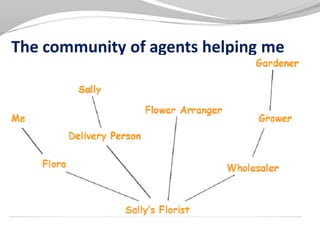
 Solution: Find an appropriate agent, namely Flora, and
pass to her a message containing my request
 It is the responsibility of Flora to satisfy my request
 There is some method–some algorithm or some set of
operations –used to satisfy my request
 This information, i.e., details, is usually hidden from my
inspection.
The community of agents helping me
An observation
 An object-oriented program is structured as a
community of interacting agents, called objects.
 Each object has a role to play.
 Each object provides a service, or performs an action, that
is used by other members of the community.
Messages and Methods
 Action is initiated in OOP by the transmission of a
message to an agent (an object) responsible for the
action.
 The message encodes the request for an action and is
accompanied by any additional information (arguments)
needed to carry out the request.
 The receivers the object to whom the message is sent. If
the receiver accepts the message, it accepts the
responsibility to carry out the indicated action.
 In response to a message, the receiver will perform some
method to satisfy the request.
Classes and Instances
 We can use the term Florist to represent the category (or
class) of all florists.
 I am able to make certain assumptions because I have
information about florists in general, and I expect that
Flora, being an instance of this category, will fit the general
pattern.
 All objects are instances of a class
 The method invoked by an object in response to a
message is determined by the class of the receiver
 All objects of a given class use the same method in
response to similar messages.
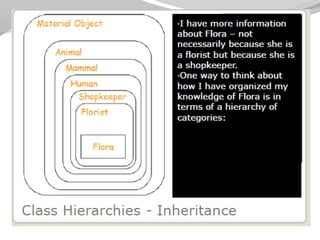
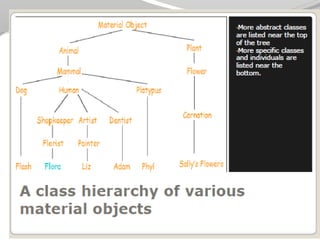
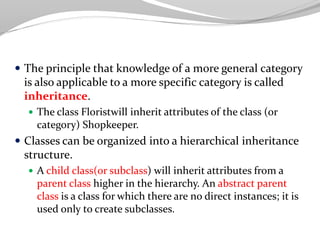
 The principle that knowledge of a more general category
is also applicable to a more specific category is called
inheritance.
 The class Floristwill inherit attributes of the class (or
category) Shopkeeper.
 Classes can be organized into a hierarchical inheritance
structure.
 A child class(or subclass) will inherit attributes from a
parent class higher in the hierarchy. An abstract parent
class is a class for which there are no direct instances; it is
used only to create subclasses.
 That Liz and my florist Flora will respond to my message
by different methods is an example of one form of
Polymorphism.
 ◦That I do not, need not, know exactly what method
Flora will use to honor my message is an example of
information hiding.
Java: Good and Bad
 Good:
 Platform independent execution
 Platform independent binary data (files etc)
 Robust
 Does not allow operator overloading. Some people regard this as a
limitation. Others think operator overloading is not a good idea anyway!
 Comes with a huge class library which allow:
 File input / output
 Graphics
 Event trapping / handling
 3D modelling
 Bad:
 Syntax is adopted from C. This means that some control structures are
primitive and unstructured
 Graphics library still provides problems across different platforms
OO Characteristics
1. Everything is an object.
2. A program is a bunch of objects telling each other what
to do by sending messages.
3. Each object has its own memory made up of other
objects.
4. Every object has a type.
5. All objects of a particular type can receive the same
messages
 Everything is an object.
 Think of an object as a fancy variable; it stores data, but
you can “make requests” to that object, asking it to
perform operations on itself. In theory, you can take any
conceptual component in the problem you’re trying to
solve (dogs, buildings, services, etc.) and represent it as
an object in your program.
 A program is a bunch of objects telling each other
what to do by sending messages.
 To make a request of an object, you “send a message” to
that object. More concretely, you can think of a message as
a request to call a method that belongs to a particular
object.
 Each object has its own memory made up of other
objects.
 Put another way, you create a new kind of object by making
a package containing existing objects. Thus, you can build
complexity into a program while hiding it behind the
simplicity of objects.
 Every object has a type.
 Using the parlance, each object is an instance of a class, in which
“class” is synonymous with “type.” The most important
distinguishing characteristic of a class is: “What messages can
you send to it?”
 All objects of a particular type can receive the same
messages.
 This is actually a loaded statement, as you will see later. Because
an object of type “circle” is also an object of type “shape,” a circle
is guaranteed to accept shape messages. This means you can
write code that talks to shapes and automatically handle
anything that fits the description of a shape. This
substitutability is one of the powerful concepts in OOP.
To be OO or not to be OO?
 There are two basic paradigms for designing algorithms:
 Non Object Oriented:
 Focus is on the steps required to perform the task.
 The design of the steps lead to the types of data structures
that will be required.
 Object Oriented:
 Focus is on the entities required. i.e. what are the things
that need to be represented in the algorithm and:
 what functionality will each thing require.
 how these things will communicate with each other.
 ◦Each entity will be represented as an object.
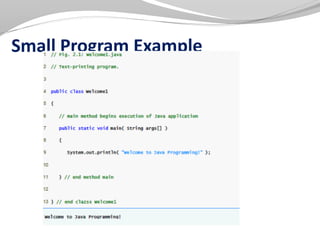
Small Program Example
Creating, Compiling, and Running a Java
Program
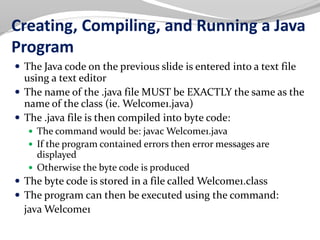
 The Java code on the previous slide is entered into a text file
using a text editor
 The name of the .java file MUST be EXACTLY the same as the
name of the class (ie. Welcome1.java)
 The .java file is then compiled into byte code:
 The command would be: javac Welcome1.java
 If the program contained errors then error messages are
displayed
 Otherwise the byte code is produced
 The byte code is stored in a file called Welcome1.class
 The program can then be executed using the command:
java Welcome1
The main() Method
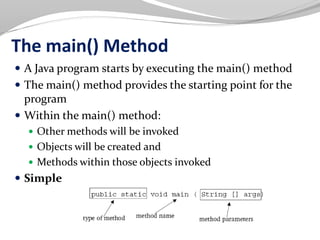
 A Java program starts by executing the main() method
 The main() method provides the starting point for the
program
 Within the main() method:
 Other methods will be invoked
 Objects will be created and
 Methods within those objects invoked
 Simple
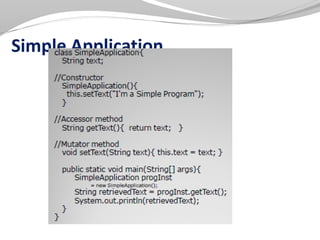
Simple Application
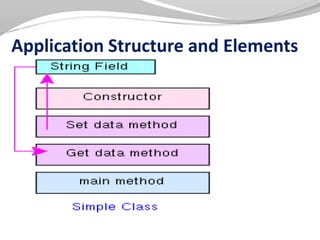
Application Structure and Elements
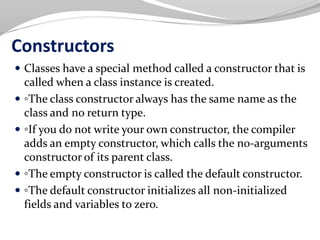
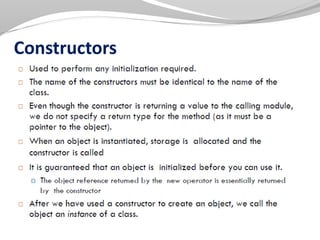
Constructors
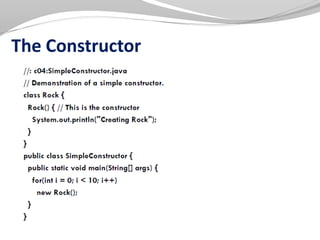
 Classes have a special method called a constructor that is
called when a class instance is created.
 ◦The class constructor always has the same name as the
class and no return type.
 ◦If you do not write your own constructor, the compiler
adds an empty constructor, which calls the no-arguments
constructor of its parent class.
 ◦The empty constructor is called the default constructor.
 ◦The default constructor initializes all non-initialized
fields and variables to zero.
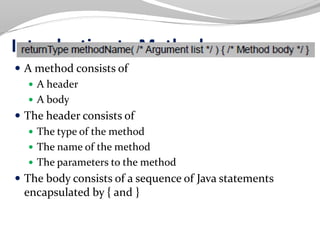
Introduction to Methods
 A method consists of
 A header
 A body
 The header consists of
 The type of the method
 The name of the method
 The parameters to the method
 The body consists of a sequence of Java statements
encapsulated by { and }
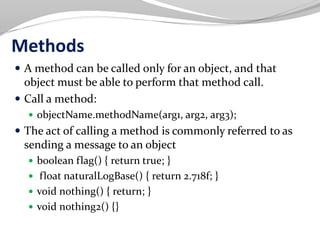
Methods
 A method can be called only for an object, and that
object must be able to perform that method call.
 Call a method:
 objectName.methodName(arg1, arg2, arg3);
 The act of calling a method is commonly referred to as
sending a message to an object
 boolean flag() { return true; }
 float naturalLogBase() { return 2.718f; }
 void nothing() { return; }
 void nothing2() {}
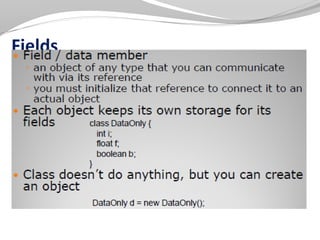
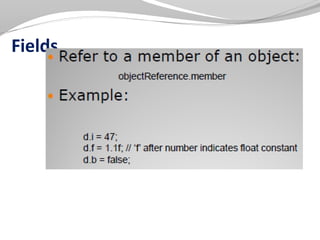
Fields
Fields
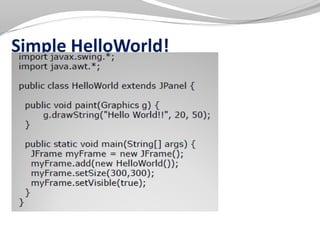
Simple HelloWorld!
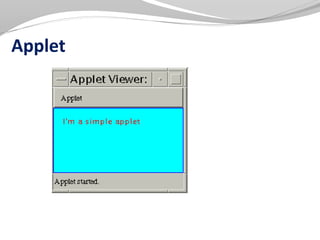
Applet
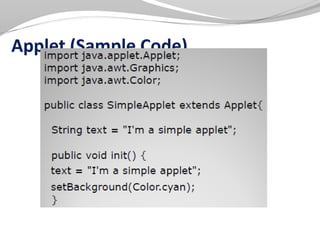
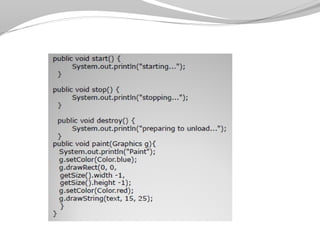
Applet (Sample Code)
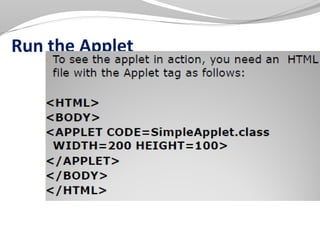
Run the Applet
Object Oriented Technology
 Object-oriented design (OOD)
 ◦Models real-world objects
 ◦Models communication among objects
 ◦Encapsulates attributes and operations (behaviors)
 Information hiding
 Communication through well-defined interfaces
 Object-oriented language
 ◦Programming in object-oriented languages is called
object-oriented programming (OOP)
 ◦Java
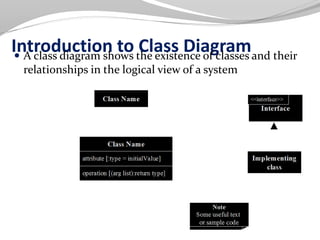
Introduction to Class Diagram A class diagram shows the existence of classes and their
relationships in the logical view of a system
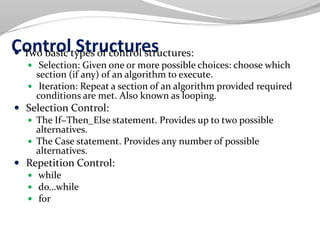
Control Structures Two basic types of control structures:
 Selection: Given one or more possible choices: choose which
section (if any) of an algorithm to execute.
 Iteration: Repeat a section of an algorithm provided required
conditions are met. Also known as looping.
 Selection Control:
 The If−Then_Else statement. Provides up to two possible
alternatives.
 The Case statement. Provides any number of possible
alternatives.
 Repetition Control:
 while
 do…while
 for
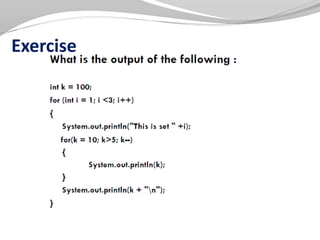
Exercise
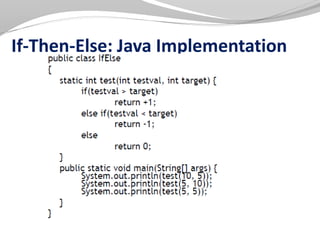
If-Then-Else: Java Implementation
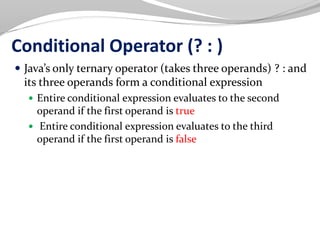
Conditional Operator (? : )
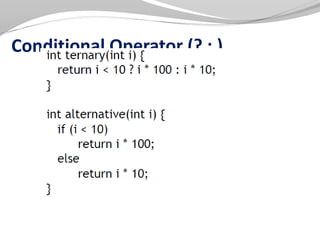
 Java’s only ternary operator (takes three operands) ? : and
its three operands form a conditional expression
 Entire conditional expression evaluates to the second
operand if the first operand is true
 Entire conditional expression evaluates to the third
operand if the first operand is false
Conditional Operator (? : )
switch Multiple Selection Statement
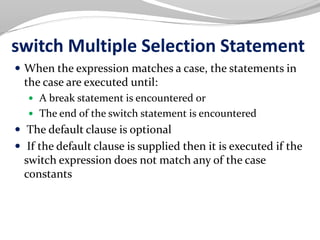
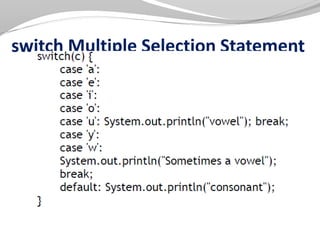
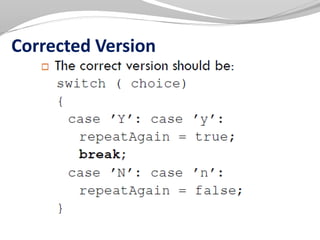
 When the expression matches a case, the statements in
the case are executed until:
 A break statement is encountered or
 The end of the switch statement is encountered
 The default clause is optional
 If the default clause is supplied then it is executed if the
switch expression does not match any of the case
constants
switch Multiple Selection Statement
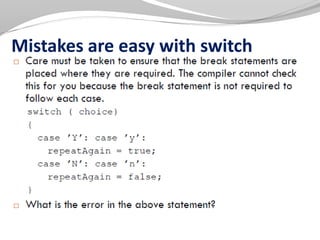
Mistakes are easy with switch
Corrected Version
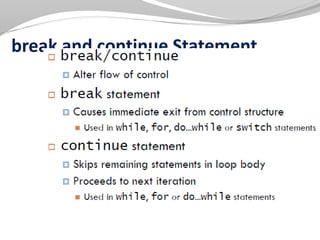
break and continue Statement
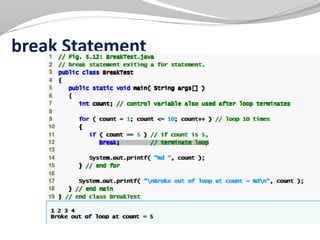
break Statement
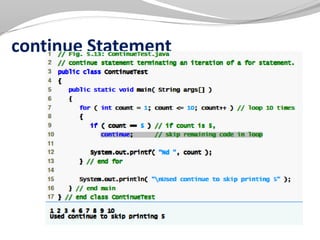
continue Statement
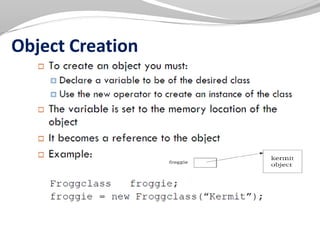
Object Creation
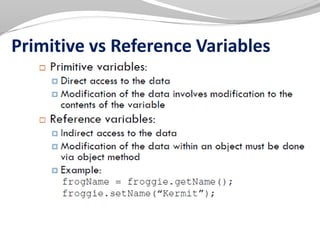
Primitive vs Reference Variables
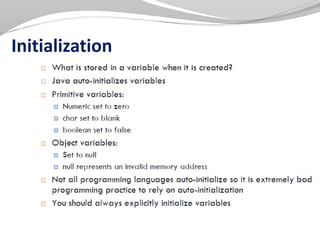
Initialization
Constructors
The Constructor
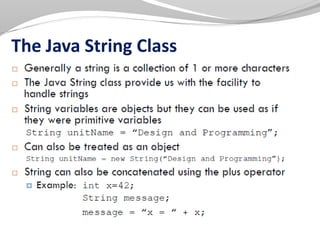
The Java String Class
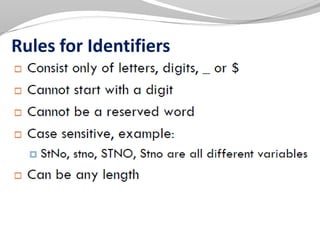
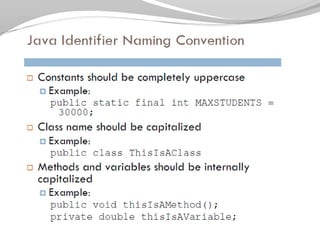
Rules for Identifiers
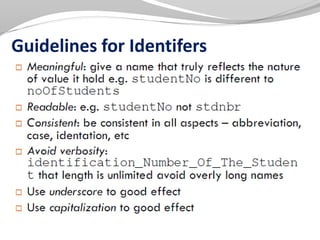
Guidelines for Identifers
2.oop concept
2.oop concept

2.oop concept

  • 1.
  • 2.
    OOP Concepts : IllustrationSending Flowers to a Friend  Suppose I wish to send flowers to a friend, Sally, who lives in a city many miles away.  ◦What should I do?
  • 3.
    Agents and Communities Solution: Find an appropriate agent, namely Flora, and pass to her a message containing my request  It is the responsibility of Flora to satisfy my request  There is some method–some algorithm or some set of operations –used to satisfy my request  This information, i.e., details, is usually hidden from my inspection.
  • 4.
    The community ofagents helping me
  • 5.
    An observation  Anobject-oriented program is structured as a community of interacting agents, called objects.  Each object has a role to play.  Each object provides a service, or performs an action, that is used by other members of the community.
  • 6.
    Messages and Methods Action is initiated in OOP by the transmission of a message to an agent (an object) responsible for the action.  The message encodes the request for an action and is accompanied by any additional information (arguments) needed to carry out the request.  The receivers the object to whom the message is sent. If the receiver accepts the message, it accepts the responsibility to carry out the indicated action.  In response to a message, the receiver will perform some method to satisfy the request.
  • 7.
    Classes and Instances We can use the term Florist to represent the category (or class) of all florists.  I am able to make certain assumptions because I have information about florists in general, and I expect that Flora, being an instance of this category, will fit the general pattern.  All objects are instances of a class  The method invoked by an object in response to a message is determined by the class of the receiver  All objects of a given class use the same method in response to similar messages.
  • 10.
     The principlethat knowledge of a more general category is also applicable to a more specific category is called inheritance.  The class Floristwill inherit attributes of the class (or category) Shopkeeper.  Classes can be organized into a hierarchical inheritance structure.  A child class(or subclass) will inherit attributes from a parent class higher in the hierarchy. An abstract parent class is a class for which there are no direct instances; it is used only to create subclasses.
  • 11.
     That Lizand my florist Flora will respond to my message by different methods is an example of one form of Polymorphism.  ◦That I do not, need not, know exactly what method Flora will use to honor my message is an example of information hiding.
  • 12.
    Java: Good andBad  Good:  Platform independent execution  Platform independent binary data (files etc)  Robust  Does not allow operator overloading. Some people regard this as a limitation. Others think operator overloading is not a good idea anyway!  Comes with a huge class library which allow:  File input / output  Graphics  Event trapping / handling  3D modelling  Bad:  Syntax is adopted from C. This means that some control structures are primitive and unstructured  Graphics library still provides problems across different platforms
  • 13.
    OO Characteristics 1. Everythingis an object. 2. A program is a bunch of objects telling each other what to do by sending messages. 3. Each object has its own memory made up of other objects. 4. Every object has a type. 5. All objects of a particular type can receive the same messages
  • 14.
     Everything isan object.  Think of an object as a fancy variable; it stores data, but you can “make requests” to that object, asking it to perform operations on itself. In theory, you can take any conceptual component in the problem you’re trying to solve (dogs, buildings, services, etc.) and represent it as an object in your program.
  • 15.
     A programis a bunch of objects telling each other what to do by sending messages.  To make a request of an object, you “send a message” to that object. More concretely, you can think of a message as a request to call a method that belongs to a particular object.  Each object has its own memory made up of other objects.  Put another way, you create a new kind of object by making a package containing existing objects. Thus, you can build complexity into a program while hiding it behind the simplicity of objects.
  • 16.
     Every objecthas a type.  Using the parlance, each object is an instance of a class, in which “class” is synonymous with “type.” The most important distinguishing characteristic of a class is: “What messages can you send to it?”  All objects of a particular type can receive the same messages.  This is actually a loaded statement, as you will see later. Because an object of type “circle” is also an object of type “shape,” a circle is guaranteed to accept shape messages. This means you can write code that talks to shapes and automatically handle anything that fits the description of a shape. This substitutability is one of the powerful concepts in OOP.
  • 17.
    To be OOor not to be OO?  There are two basic paradigms for designing algorithms:  Non Object Oriented:  Focus is on the steps required to perform the task.  The design of the steps lead to the types of data structures that will be required.  Object Oriented:  Focus is on the entities required. i.e. what are the things that need to be represented in the algorithm and:  what functionality will each thing require.  how these things will communicate with each other.  ◦Each entity will be represented as an object.
  • 19.
  • 20.
    Creating, Compiling, andRunning a Java Program  The Java code on the previous slide is entered into a text file using a text editor  The name of the .java file MUST be EXACTLY the same as the name of the class (ie. Welcome1.java)  The .java file is then compiled into byte code:  The command would be: javac Welcome1.java  If the program contained errors then error messages are displayed  Otherwise the byte code is produced  The byte code is stored in a file called Welcome1.class  The program can then be executed using the command: java Welcome1
  • 21.
    The main() Method A Java program starts by executing the main() method  The main() method provides the starting point for the program  Within the main() method:  Other methods will be invoked  Objects will be created and  Methods within those objects invoked  Simple
  • 22.
  • 23.
  • 24.
    Constructors  Classes havea special method called a constructor that is called when a class instance is created.  ◦The class constructor always has the same name as the class and no return type.  ◦If you do not write your own constructor, the compiler adds an empty constructor, which calls the no-arguments constructor of its parent class.  ◦The empty constructor is called the default constructor.  ◦The default constructor initializes all non-initialized fields and variables to zero.
  • 25.
    Introduction to Methods A method consists of  A header  A body  The header consists of  The type of the method  The name of the method  The parameters to the method  The body consists of a sequence of Java statements encapsulated by { and }
  • 26.
    Methods  A methodcan be called only for an object, and that object must be able to perform that method call.  Call a method:  objectName.methodName(arg1, arg2, arg3);  The act of calling a method is commonly referred to as sending a message to an object  boolean flag() { return true; }  float naturalLogBase() { return 2.718f; }  void nothing() { return; }  void nothing2() {}
  • 27.
  • 28.
  • 29.
  • 30.
  • 31.
  • 33.
  • 34.
    Object Oriented Technology Object-oriented design (OOD)  ◦Models real-world objects  ◦Models communication among objects  ◦Encapsulates attributes and operations (behaviors)  Information hiding  Communication through well-defined interfaces  Object-oriented language  ◦Programming in object-oriented languages is called object-oriented programming (OOP)  ◦Java
  • 35.
    Introduction to ClassDiagram A class diagram shows the existence of classes and their relationships in the logical view of a system
  • 36.
    Control Structures Twobasic types of control structures:  Selection: Given one or more possible choices: choose which section (if any) of an algorithm to execute.  Iteration: Repeat a section of an algorithm provided required conditions are met. Also known as looping.  Selection Control:  The If−Then_Else statement. Provides up to two possible alternatives.  The Case statement. Provides any number of possible alternatives.  Repetition Control:  while  do…while  for
  • 37.
  • 38.
  • 39.
    Conditional Operator (?: )  Java’s only ternary operator (takes three operands) ? : and its three operands form a conditional expression  Entire conditional expression evaluates to the second operand if the first operand is true  Entire conditional expression evaluates to the third operand if the first operand is false
  • 40.
  • 41.
    switch Multiple SelectionStatement  When the expression matches a case, the statements in the case are executed until:  A break statement is encountered or  The end of the switch statement is encountered  The default clause is optional  If the default clause is supplied then it is executed if the switch expression does not match any of the case constants
  • 42.
  • 43.
    Mistakes are easywith switch
  • 44.
  • 45.
  • 46.
  • 47.
  • 48.
  • 49.
  • 50.
  • 51.
  • 52.
  • 53.
  • 54.
  • 55.