Lecture 5-Java Training
Object-Oriented Programming
Two Paradigms
• all computer programs consist of two elements: code and data.
• a program can be conceptually organized around its code or around
its data.
• programs are written around “what is happening” and others are
written around “who is being affected.”
• The first way is called the process-oriented model. This approach
characterizes a program as a series of linear steps (that is, code).
The process-oriented model can be thought of as code acting on
data.
• Object-oriented programming organizes a program around its data
(that is, objects) and a set of well-defined interfaces to that data
OOP Principles
Encapsulation
1. Encapsulation is the mechanism that binds together code
and the data it manipulates, and keeps both safe from
outside interference and misuse.
2. One way to think about encapsulation is as a protective
wrapper that prevents the code and data from being
arbitrarily accessed by other code defined outside the
wrapper.
3. In Java the basis of encapsulation is the class.
Polymorphism
• Polymorphism (from the Greek, meaning “many
forms”) is a feature that allows one interface to
be used for a general class of actions.
• The specific action is determined by the exact
nature of the situation.
• More generally, the concept of polymorphism is
often expressed by the phrase “one interface,
multiple methods.”
Abstraction
• An essential element of object-oriented programming
is abstraction. Humans manage complexity through
abstraction.
• For example, people do not think of a car as a set of
tens of thousands of individual parts. They think of it as
a well-defined object with its own unique behaviour.
• This abstraction allows people to use a car to drive to
the grocery store without being overwhelmed by the
complexity of the parts that form the car. They can
ignore the details of how the engine, transmission, and
braking systems work. Instead they are free to utilize
the object as a whole.
Inheritance
• Inheritance is the process by which one object acquires the
properties of another object. This is important because it
supports the concept of hierarchical classification.
• However, by use of inheritance, an object need only define
those qualities that make it unique within its class. It can
inherit its general attributes from its parent.
• Thus, it is the inheritance mechanism that makes it possible
for one object to be a specific instance of a more general case.
OOPs Concept Basics
• Object
Any entity that has state and behavior is
known as an object. For example: chair, pen,
table, keyboard, bike etc. It can be physical
and logical.
• Class
Collection of objects is called class. It is a
logical entity.
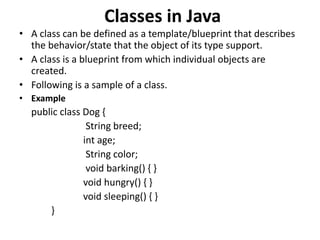
Classes in Java
• A class can be defined as a template/blueprint that describes
the behavior/state that the object of its type support.
• A class is a blueprint from which individual objects are
created.
• Following is a sample of a class.
• Example
public class Dog {
String breed;
int age;
String color;
void barking() { }
void hungry() { }
void sleeping() { }
}
Variables in Classes
• A class can contain any of the following variable types.
• Local variables − Variables defined inside methods,
constructors or blocks are called local variables. The
variable will be declared and initialized within the
method and the variable will be destroyed when the
method has completed.
• Instance variables − Instance variables are variables
within a class but outside any method. These variables
are initialized when the class is instantiated. Instance
variables can be accessed from inside any method,
constructor or blocks of that particular class.
• Class variables − Class variables are variables declared
within a class, outside any method, with the static
keyword.
Objects in Java
• A class provides the blueprints for objects. So
basically, an object is created from a class. In Java,
the new keyword is used to create new objects.
• There are three steps when creating an object
from a class −
– Declaration − A variable declaration with a variable
name with an object type.
– Instantiation − The 'new' keyword is used to create
the object.
– Initialization − The 'new' keyword is followed by a call
to a constructor. This call initializes the new object.
Example For creating an Object
Following is an example of creating an object –
public class Puppy
{
public Puppy(String name)
{ // This constructor has one parameter, name.
System.out.println("Passed Name is :" + name
);
}
public static void main(String []args) {
// Following statement would create an object myPuppy
Puppy myPuppy = new Puppy( "tommy" );
}
}
Output
Passed Name is :tommy
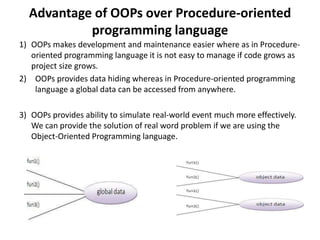
Advantage of OOPs over Procedure-oriented
programming language
1) OOPs makes development and maintenance easier where as in Procedure-
oriented programming language it is not easy to manage if code grows as
project size grows.
2) OOPs provides data hiding whereas in Procedure-oriented programming
language a global data can be accessed from anywhere.
3) OOPs provides ability to simulate real-world event much more effectively.
We can provide the solution of real word problem if we are using the
Object-Oriented Programming language.
Java Reference Variable
• Reference variables are used to refer to an object. They are
declared with a specific type which cannot be changed.
• A reference variable can store the reference value of an
object, and can be used to manipulate the object denoted by
the reference value.
• A variable declaration that specifies a reference type (i.e., a
class, an array, or an interface name) declares a reference
variable.
Object and Reference Variable in Memory
• Basically a reference variable just points to an actual
object. For example if we have a class-
class Person {
String name = "Eric";
int age = 25;
}
If you instantiate the class Person like this-
Person p = new Person();
• Here p is a reference variable which points to
an object of class Person.
• The actual object of class Person created in
that statement resides on the heap.
• The reference variable p only contains the
memory address of Person class object on the
heap.
• So the actual value of p can be said to be an
address on the heap.
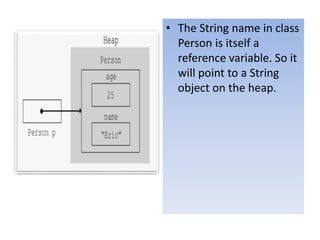
• The String name in class
Person is itself a
reference variable. So it
will point to a String
object on the heap.
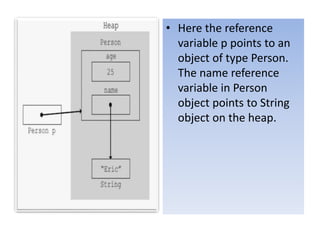
• Here the reference
variable p points to an
object of type Person.
The name reference
variable in Person
object points to String
object on the heap.
Uses of reference variable
– Reference variable can be assigned value null to show that it is
not refering to any object.
Student amit = new Student();
amit=null;
– More than one reference variables may refer to same object.
These are called object aliases.
Student amit=new Student();
Student mady=amit;
Student mihir=mady;
– Default value for refrence variable is null;
– The object can be manipulated via any one of its aliases, as
each one refers to the same object.
– A reference variable can not refer to more then one object.
Class Person{
int age;
String name;
}
Class Demo{
public static void main(String args[])
{
Person p1=new Person();
p1.age=25;
p1.name=“Harry”;
System.out.println(p1.age+ “ :” + p1.name);
Person p2=p1;
System.out.println(p2.age+ “ :” + p2.name);
p2.age=30;
p2.name=“Garry”;
System.out.println(p2.age+ “ :” + p2.name);
System.out.println(p1.age+ “ :” + p1.name);
p1=null;
System.out.println(p1.age+ “ :” + p1.name); // Wrong
}
}
• Reference variable gets memory allocated in
stack.
• Instance variable gets memory allocated in
heap.
• Those Reference variable which are instance
members of an object, also gets memory
allocated in heap.
class College{
Student s1;
String address;
int year;
public static void main(String args[]){
College c1=new College();
}
}
Stack Heap
C1
Name=null
S1=null
Year=0
Types of variables
• Instance
• Class
• Local
Static Variable Example
class test {
static int i;
public static void main(String[] args) {
System.out.println("Value before calling method1: " + i);
test t1 = new test();
t1.method1();
System.out.println("Value after calling method1: " + i);
t1.method2();
System.out.println("Value after calling method2: " + i);
}
void method1() {
i++;
}
void method2() {
i++;
Instance / Local / Method Variable Example
class MPE {
// Instance Variable
int i;
public static void main(String[] args) {
/*Here i is an Instance variable.*/
test t1 = new test();
System.out.println("Value before calling method1: " + t1.i);
}
/* Here j is a method parameter.
And k is a local variable. Note**: Local variables life is only till the end of method*/
void method1(int j) {
int k;
i = j;
/* Local Variable(k)'s life ends once execution for this method completes. As k is local
is variable it needs to be initialized before we can use it. But as it is not getting
used here, it can stay here without initializing*/
}
}
Calling a Method
• For using a method, it should be called. There are two ways in
which a method is called i.e., method returns a value or
returning nothing (no return value).
• The process of method calling is simple. When a program
invokes a method, the program control gets transferred to the
called method. This called method then returns control to the
caller in two conditions, when −
• the return statement is executed.
• it reaches the method ending closing brace.
Example FOR CALLING A METHOD
public class StudentTest {
public static void main ( String[] args ) {
Student s1 = new Student () ;
Student s2 = new Student ( "Sai", 3 );
Student s3 = new Student ( "Gautham" , 4 , 98 , 100,
96);
System.out.println("Student s1: ");
s1.printDetails();  Object s1 calling method
printDetails()
System.out.println("nStudent s2: ");
s2.printDetails();  Object s2 calling method
printDetails()
System.out.println("nStudent s3: ");
s3.printDetails();  Object s3 calling method
printDetails()
}
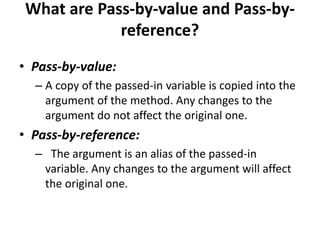
What are Pass-by-value and Pass-by-
reference?
• Pass-by-value:
– A copy of the passed-in variable is copied into the
argument of the method. Any changes to the
argument do not affect the original one.
• Pass-by-reference:
– The argument is an alias of the passed-in
variable. Any changes to the argument will affect
the original one.
The following example proves that Java passes
object references to methods by value:
public class Swap {
public static void swap(int x, int y) {
int temp = x;
x = y;
y = temp;
System.out.println("x(1) = " + x);
System.out.println("y(1) = " + y);
}
public static void main(String[] args) {
int x = 10;
int y = 20;
swap(x, y);
System.out.println("x(2) = " + x);
System.out.println("y(2) = " + y);
}
}
• This result proves that the x and y are swapped to each other in the inside
the swap() method, however the passed-in variables x and y did not get changed.
the above program prints
the following output:
x(1) = 20
y(1) = 10
x(2) = 10
y(2) = 20
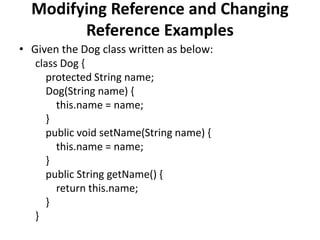
Modifying Reference and Changing
Reference Examples
• Given the Dog class written as below:
class Dog {
protected String name;
Dog(String name) {
this.name = name;
}
public void setName(String name) {
this.name = name;
}
public String getName() {
return this.name;
}
}
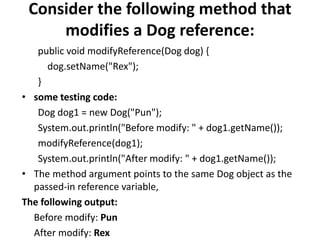
Consider the following method that
modifies a Dog reference:
public void modifyReference(Dog dog) {
dog.setName("Rex");
}
• some testing code:
Dog dog1 = new Dog("Pun");
System.out.println("Before modify: " + dog1.getName());
modifyReference(dog1);
System.out.println("After modify: " + dog1.getName());
• The method argument points to the same Dog object as the
passed-in reference variable,
The following output:
Before modify: Pun
After modify: Rex
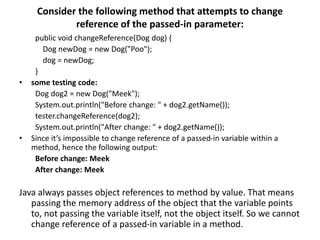
Consider the following method that attempts to change
reference of the passed-in parameter:
public void changeReference(Dog dog) {
Dog newDog = new Dog("Poo");
dog = newDog;
}
• some testing code:
Dog dog2 = new Dog("Meek");
System.out.println("Before change: " + dog2.getName());
tester.changeReference(dog2);
System.out.println("After change: " + dog2.getName());
• Since it’s impossible to change reference of a passed-in variable within a
method, hence the following output:
Before change: Meek
After change: Meek
Java always passes object references to method by value. That means
passing the memory address of the object that the variable points
to, not passing the variable itself, not the object itself. So we cannot
change reference of a passed-in variable in a method.

Lecture 5.pptx

  • 1.
  • 2.
    Object-Oriented Programming Two Paradigms •all computer programs consist of two elements: code and data. • a program can be conceptually organized around its code or around its data. • programs are written around “what is happening” and others are written around “who is being affected.” • The first way is called the process-oriented model. This approach characterizes a program as a series of linear steps (that is, code). The process-oriented model can be thought of as code acting on data. • Object-oriented programming organizes a program around its data (that is, objects) and a set of well-defined interfaces to that data
  • 3.
    OOP Principles Encapsulation 1. Encapsulationis the mechanism that binds together code and the data it manipulates, and keeps both safe from outside interference and misuse. 2. One way to think about encapsulation is as a protective wrapper that prevents the code and data from being arbitrarily accessed by other code defined outside the wrapper. 3. In Java the basis of encapsulation is the class.
  • 4.
    Polymorphism • Polymorphism (fromthe Greek, meaning “many forms”) is a feature that allows one interface to be used for a general class of actions. • The specific action is determined by the exact nature of the situation. • More generally, the concept of polymorphism is often expressed by the phrase “one interface, multiple methods.”
  • 5.
    Abstraction • An essentialelement of object-oriented programming is abstraction. Humans manage complexity through abstraction. • For example, people do not think of a car as a set of tens of thousands of individual parts. They think of it as a well-defined object with its own unique behaviour. • This abstraction allows people to use a car to drive to the grocery store without being overwhelmed by the complexity of the parts that form the car. They can ignore the details of how the engine, transmission, and braking systems work. Instead they are free to utilize the object as a whole.
  • 6.
    Inheritance • Inheritance isthe process by which one object acquires the properties of another object. This is important because it supports the concept of hierarchical classification. • However, by use of inheritance, an object need only define those qualities that make it unique within its class. It can inherit its general attributes from its parent. • Thus, it is the inheritance mechanism that makes it possible for one object to be a specific instance of a more general case.
  • 7.
    OOPs Concept Basics •Object Any entity that has state and behavior is known as an object. For example: chair, pen, table, keyboard, bike etc. It can be physical and logical. • Class Collection of objects is called class. It is a logical entity.
  • 8.
    Classes in Java •A class can be defined as a template/blueprint that describes the behavior/state that the object of its type support. • A class is a blueprint from which individual objects are created. • Following is a sample of a class. • Example public class Dog { String breed; int age; String color; void barking() { } void hungry() { } void sleeping() { } }
  • 9.
    Variables in Classes •A class can contain any of the following variable types. • Local variables − Variables defined inside methods, constructors or blocks are called local variables. The variable will be declared and initialized within the method and the variable will be destroyed when the method has completed. • Instance variables − Instance variables are variables within a class but outside any method. These variables are initialized when the class is instantiated. Instance variables can be accessed from inside any method, constructor or blocks of that particular class. • Class variables − Class variables are variables declared within a class, outside any method, with the static keyword.
  • 10.
    Objects in Java •A class provides the blueprints for objects. So basically, an object is created from a class. In Java, the new keyword is used to create new objects. • There are three steps when creating an object from a class − – Declaration − A variable declaration with a variable name with an object type. – Instantiation − The 'new' keyword is used to create the object. – Initialization − The 'new' keyword is followed by a call to a constructor. This call initializes the new object.
  • 11.
    Example For creatingan Object Following is an example of creating an object – public class Puppy { public Puppy(String name) { // This constructor has one parameter, name. System.out.println("Passed Name is :" + name ); } public static void main(String []args) { // Following statement would create an object myPuppy Puppy myPuppy = new Puppy( "tommy" ); } } Output Passed Name is :tommy
  • 12.
    Advantage of OOPsover Procedure-oriented programming language 1) OOPs makes development and maintenance easier where as in Procedure- oriented programming language it is not easy to manage if code grows as project size grows. 2) OOPs provides data hiding whereas in Procedure-oriented programming language a global data can be accessed from anywhere. 3) OOPs provides ability to simulate real-world event much more effectively. We can provide the solution of real word problem if we are using the Object-Oriented Programming language.
  • 13.
    Java Reference Variable •Reference variables are used to refer to an object. They are declared with a specific type which cannot be changed. • A reference variable can store the reference value of an object, and can be used to manipulate the object denoted by the reference value. • A variable declaration that specifies a reference type (i.e., a class, an array, or an interface name) declares a reference variable.
  • 14.
    Object and ReferenceVariable in Memory • Basically a reference variable just points to an actual object. For example if we have a class- class Person { String name = "Eric"; int age = 25; } If you instantiate the class Person like this- Person p = new Person();
  • 15.
    • Here pis a reference variable which points to an object of class Person. • The actual object of class Person created in that statement resides on the heap. • The reference variable p only contains the memory address of Person class object on the heap. • So the actual value of p can be said to be an address on the heap.
  • 16.
    • The Stringname in class Person is itself a reference variable. So it will point to a String object on the heap.
  • 17.
    • Here thereference variable p points to an object of type Person. The name reference variable in Person object points to String object on the heap.
  • 18.
    Uses of referencevariable – Reference variable can be assigned value null to show that it is not refering to any object. Student amit = new Student(); amit=null; – More than one reference variables may refer to same object. These are called object aliases. Student amit=new Student(); Student mady=amit; Student mihir=mady; – Default value for refrence variable is null; – The object can be manipulated via any one of its aliases, as each one refers to the same object. – A reference variable can not refer to more then one object.
  • 19.
    Class Person{ int age; Stringname; } Class Demo{ public static void main(String args[]) { Person p1=new Person(); p1.age=25; p1.name=“Harry”; System.out.println(p1.age+ “ :” + p1.name); Person p2=p1; System.out.println(p2.age+ “ :” + p2.name); p2.age=30; p2.name=“Garry”; System.out.println(p2.age+ “ :” + p2.name); System.out.println(p1.age+ “ :” + p1.name); p1=null; System.out.println(p1.age+ “ :” + p1.name); // Wrong } }
  • 20.
    • Reference variablegets memory allocated in stack. • Instance variable gets memory allocated in heap. • Those Reference variable which are instance members of an object, also gets memory allocated in heap.
  • 21.
    class College{ Student s1; Stringaddress; int year; public static void main(String args[]){ College c1=new College(); } } Stack Heap C1 Name=null S1=null Year=0
  • 22.
    Types of variables •Instance • Class • Local
  • 23.
    Static Variable Example classtest { static int i; public static void main(String[] args) { System.out.println("Value before calling method1: " + i); test t1 = new test(); t1.method1(); System.out.println("Value after calling method1: " + i); t1.method2(); System.out.println("Value after calling method2: " + i); } void method1() { i++; } void method2() { i++;
  • 24.
    Instance / Local/ Method Variable Example class MPE { // Instance Variable int i; public static void main(String[] args) { /*Here i is an Instance variable.*/ test t1 = new test(); System.out.println("Value before calling method1: " + t1.i); } /* Here j is a method parameter. And k is a local variable. Note**: Local variables life is only till the end of method*/ void method1(int j) { int k; i = j; /* Local Variable(k)'s life ends once execution for this method completes. As k is local is variable it needs to be initialized before we can use it. But as it is not getting used here, it can stay here without initializing*/ } }
  • 25.
    Calling a Method •For using a method, it should be called. There are two ways in which a method is called i.e., method returns a value or returning nothing (no return value). • The process of method calling is simple. When a program invokes a method, the program control gets transferred to the called method. This called method then returns control to the caller in two conditions, when − • the return statement is executed. • it reaches the method ending closing brace.
  • 26.
    Example FOR CALLINGA METHOD public class StudentTest { public static void main ( String[] args ) { Student s1 = new Student () ; Student s2 = new Student ( "Sai", 3 ); Student s3 = new Student ( "Gautham" , 4 , 98 , 100, 96); System.out.println("Student s1: "); s1.printDetails();  Object s1 calling method printDetails() System.out.println("nStudent s2: "); s2.printDetails();  Object s2 calling method printDetails() System.out.println("nStudent s3: "); s3.printDetails();  Object s3 calling method printDetails() }
  • 27.
    What are Pass-by-valueand Pass-by- reference? • Pass-by-value: – A copy of the passed-in variable is copied into the argument of the method. Any changes to the argument do not affect the original one. • Pass-by-reference: – The argument is an alias of the passed-in variable. Any changes to the argument will affect the original one.
  • 28.
    The following exampleproves that Java passes object references to methods by value: public class Swap { public static void swap(int x, int y) { int temp = x; x = y; y = temp; System.out.println("x(1) = " + x); System.out.println("y(1) = " + y); } public static void main(String[] args) { int x = 10; int y = 20; swap(x, y); System.out.println("x(2) = " + x); System.out.println("y(2) = " + y); } } • This result proves that the x and y are swapped to each other in the inside the swap() method, however the passed-in variables x and y did not get changed. the above program prints the following output: x(1) = 20 y(1) = 10 x(2) = 10 y(2) = 20
  • 29.
    Modifying Reference andChanging Reference Examples • Given the Dog class written as below: class Dog { protected String name; Dog(String name) { this.name = name; } public void setName(String name) { this.name = name; } public String getName() { return this.name; } }
  • 30.
    Consider the followingmethod that modifies a Dog reference: public void modifyReference(Dog dog) { dog.setName("Rex"); } • some testing code: Dog dog1 = new Dog("Pun"); System.out.println("Before modify: " + dog1.getName()); modifyReference(dog1); System.out.println("After modify: " + dog1.getName()); • The method argument points to the same Dog object as the passed-in reference variable, The following output: Before modify: Pun After modify: Rex
  • 31.
    Consider the followingmethod that attempts to change reference of the passed-in parameter: public void changeReference(Dog dog) { Dog newDog = new Dog("Poo"); dog = newDog; } • some testing code: Dog dog2 = new Dog("Meek"); System.out.println("Before change: " + dog2.getName()); tester.changeReference(dog2); System.out.println("After change: " + dog2.getName()); • Since it’s impossible to change reference of a passed-in variable within a method, hence the following output: Before change: Meek After change: Meek Java always passes object references to method by value. That means passing the memory address of the object that the variable points to, not passing the variable itself, not the object itself. So we cannot change reference of a passed-in variable in a method.