Slide 1
Slide 2
Expressions
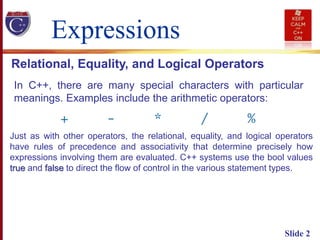
In C++, there are many special characters with particular
meanings. Examples include the arithmetic operators:
Relational, Equality, and Logical Operators
Just as with other operators, the relational, equality, and logical operators
have rules of precedence and associativity that determine precisely how
expressions involving them are evaluated. C++ systems use the bool values
true and false to direct the flow of control in the various statement types.
Slide 3
Expressions
Relational, Equality, and Logical Operators
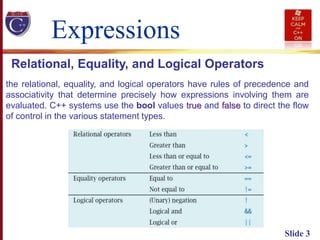
the relational, equality, and logical operators have rules of precedence and
associativity that determine precisely how expressions involving them are
evaluated. C++ systems use the bool values true and false to direct the flow
of control in the various statement types.
Slide 4
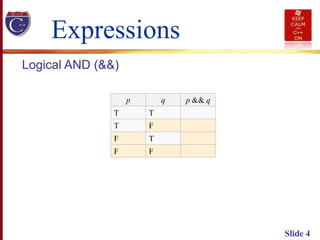
Expressions
Logical AND (&&)
p q p && q
T T
T F
F T
F F
Slide 5
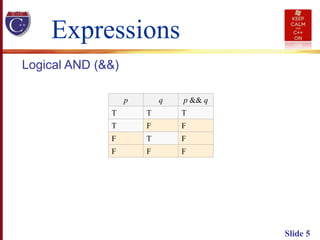
Expressions
Logical AND (&&)
p q p && q
T T T
T F F
F T F
F F F
Slide 6
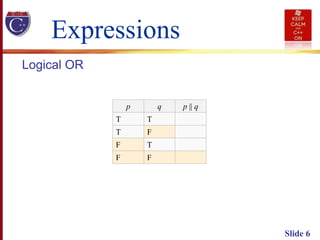
Expressions
Logical OR
p q p || q
T T
T F
F T
F F
Slide 7
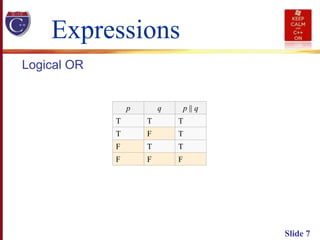
Expressions
Logical OR
p q p || q
T T T
T F T
F T T
F F F
Slide 8
Expressions
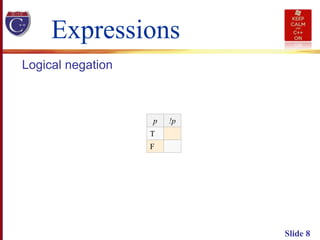
Logical negation
p !p
T
F
Slide 9
Expressions
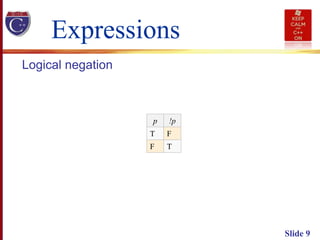
Logical negation
p !p
T F
F T
Bitwise Operators
Slide 10
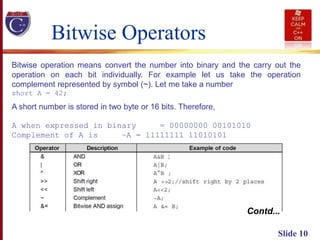
Bitwise operation means convert the number into binary and the carry out the
operation on each bit individually. For example let us take the operation
complement represented by symbol (~). Let me take a number
short A = 42;
A short number is stored in two byte or 16 bits. Therefore,
A when expressed in binary = 00000000 00101010
Complement of A is ~A = 11111111 11010101
Contd...
Slide 11
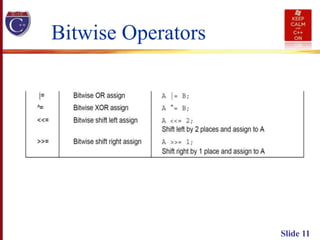
Bitwise Operators
Slide 12
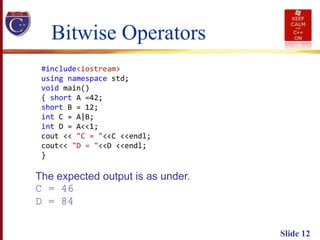
#include<iostream>
using namespace std;
void main()
{ short A =42;
short B = 12;
int C = A|B;
int D = A<<1;
cout << "C = "<<C <<endl;
cout<< "D = "<<D <<endl;
}
Bitwise Operators
The expected output is as under.
C = 46
D = 84
Slide 13
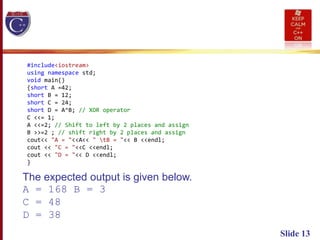
#include<iostream>
using namespace std;
void main()
{short A =42;
short B = 12;
short C = 24;
short D = A^B; // XOR operator
C <<= 1;
A <<=2; // Shift to left by 2 places and assign
B >>=2 ; // shift right by 2 places and assign
cout<< "A = "<<A<< " tB = "<< B <<endl;
cout << "C = "<<C <<endl;
cout << "D = "<< D <<endl;
}
The expected output is given below.
A = 168 B = 3
C = 48
D = 38
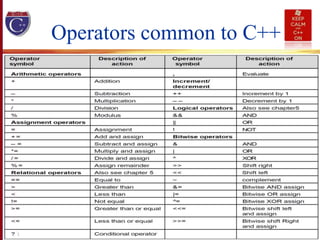
Operators common to C++
Slide 14
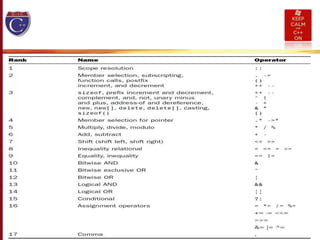
Slide 15
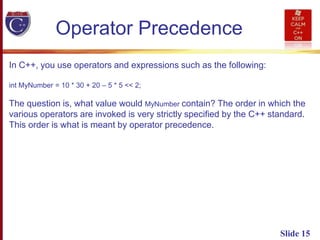
Operator Precedence
In C++, you use operators and expressions such as the following:
int MyNumber = 10 * 30 + 20 – 5 * 5 << 2;
The question is, what value would MyNumber contain? The order in which the
various operators are invoked is very strictly specified by the C++ standard.
This order is what is meant by operator precedence.
Slide 16
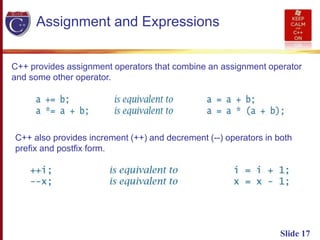
Slide 17
Assignment and Expressions
C++ provides assignment operators that combine an assignment operator
and some other operator.
C++ also provides increment (++) and decrement (--) operators in both
prefix and postfix form.
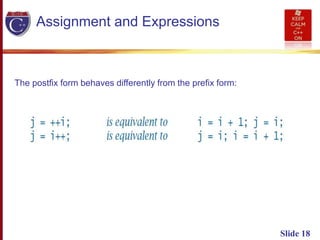
Slide 18
Assignment and Expressions
The postfix form behaves differently from the prefix form:
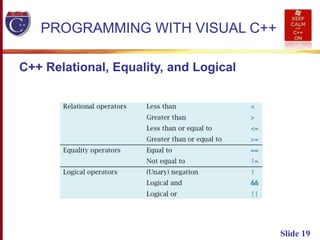
Slide 19
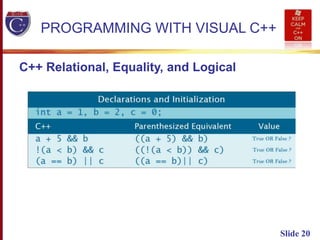
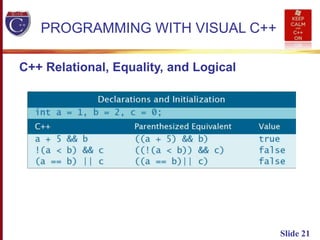
PROGRAMMING WITH VISUAL C++
C++ Relational, Equality, and Logical
Slide 20
PROGRAMMING WITH VISUAL C++
C++ Relational, Equality, and Logical
Slide 21
PROGRAMMING WITH VISUAL C++
C++ Relational, Equality, and Logical
Slide 22
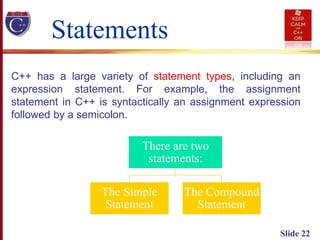
Statements
C++ has a large variety of statement types, including an
expression statement. For example, the assignment
statement in C++ is syntactically an assignment expression
followed by a semicolon.
There are two
statements:
The Simple
Statement
The Compound
Statement
Slide 23
The Compound Statement
• A compound statement in C++ is a series of statements
surrounded by braces { and }.
• The body of a C++ function, for example, is always a compound
statement.
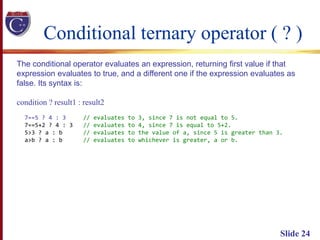
Conditional ternary operator ( ? )
Slide 24
The conditional operator evaluates an expression, returning first value if that
expression evaluates to true, and a different one if the expression evaluates as
false. Its syntax is:
condition ? result1 : result2
7==5 ? 4 : 3 // evaluates to 3, since 7 is not equal to 5.
7==5+2 ? 4 : 3 // evaluates to 4, since 7 is equal to 5+2.
5>3 ? a : b // evaluates to the value of a, since 5 is greater than 3.
a>b ? a : b // evaluates to whichever is greater, a or b.
Slide 25
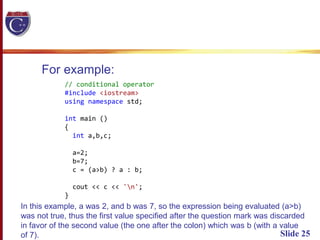
For example:
// conditional operator
#include <iostream>
using namespace std;
int main ()
{
int a,b,c;
a=2;
b=7;
c = (a>b) ? a : b;
cout << c << 'n';
}
In this example, a was 2, and b was 7, so the expression being evaluated (a>b)
was not true, thus the first value specified after the question mark was discarded
in favor of the second value (the one after the colon) which was b (with a value
of 7).
Slide 26
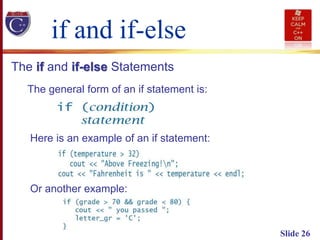
The if and if-else Statements
if and if-else
The general form of an if statement is:
Here is an example of an if statement:
Or another example:
Slide 27
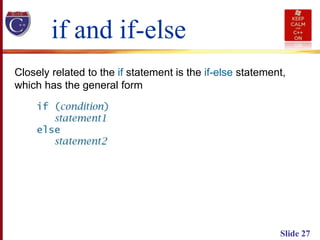
Closely related to the if statement is the if-else statement,
which has the general form
if and if-else
Slide 28
If condition is true, then statement1 is executed and
statement2 is skipped; if condition is false, then
statement1 is skipped and statement2 is executed.
After the if-else statement has been executed, control
passes to the next statement. Consider the next code:
if and if-else
Slide 29
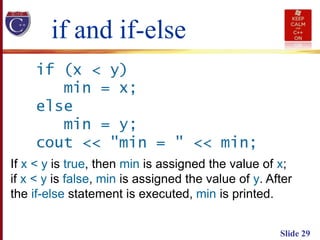
If x < y is true, then min is assigned the value of x;
if x < y is false, min is assigned the value of y. After
the if-else statement is executed, min is printed.
if and if-else
Slide 30
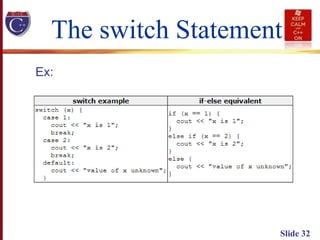
The switch Statement
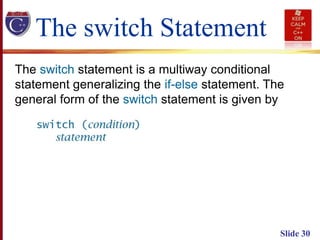
The switch statement is a multiway conditional
statement generalizing the if-else statement. The
general form of the switch statement is given by
Slide 31
The switch Statement
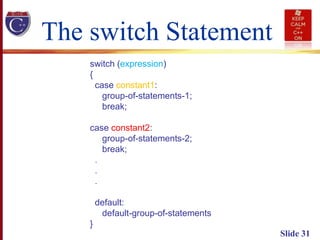
switch (expression)
{
case constant1:
group-of-statements-1;
break;
case constant2:
group-of-statements-2;
break;
.
.
.
default:
default-group-of-statements
}
Slide 32
The switch Statement
Ex:

2621008 - C++ 2

  • 1.
  • 2.
    Slide 2 Expressions In C++,there are many special characters with particular meanings. Examples include the arithmetic operators: Relational, Equality, and Logical Operators Just as with other operators, the relational, equality, and logical operators have rules of precedence and associativity that determine precisely how expressions involving them are evaluated. C++ systems use the bool values true and false to direct the flow of control in the various statement types.
  • 3.
    Slide 3 Expressions Relational, Equality,and Logical Operators the relational, equality, and logical operators have rules of precedence and associativity that determine precisely how expressions involving them are evaluated. C++ systems use the bool values true and false to direct the flow of control in the various statement types.
  • 4.
    Slide 4 Expressions Logical AND(&&) p q p && q T T T F F T F F
  • 5.
    Slide 5 Expressions Logical AND(&&) p q p && q T T T T F F F T F F F F
  • 6.
    Slide 6 Expressions Logical OR pq p || q T T T F F T F F
  • 7.
    Slide 7 Expressions Logical OR pq p || q T T T T F T F T T F F F
  • 8.
  • 9.
  • 10.
    Bitwise Operators Slide 10 Bitwiseoperation means convert the number into binary and the carry out the operation on each bit individually. For example let us take the operation complement represented by symbol (~). Let me take a number short A = 42; A short number is stored in two byte or 16 bits. Therefore, A when expressed in binary = 00000000 00101010 Complement of A is ~A = 11111111 11010101 Contd...
  • 11.
  • 12.
    Slide 12 #include<iostream> using namespacestd; void main() { short A =42; short B = 12; int C = A|B; int D = A<<1; cout << "C = "<<C <<endl; cout<< "D = "<<D <<endl; } Bitwise Operators The expected output is as under. C = 46 D = 84
  • 13.
    Slide 13 #include<iostream> using namespacestd; void main() {short A =42; short B = 12; short C = 24; short D = A^B; // XOR operator C <<= 1; A <<=2; // Shift to left by 2 places and assign B >>=2 ; // shift right by 2 places and assign cout<< "A = "<<A<< " tB = "<< B <<endl; cout << "C = "<<C <<endl; cout << "D = "<< D <<endl; } The expected output is given below. A = 168 B = 3 C = 48 D = 38
  • 14.
    Operators common toC++ Slide 14
  • 15.
    Slide 15 Operator Precedence InC++, you use operators and expressions such as the following: int MyNumber = 10 * 30 + 20 – 5 * 5 << 2; The question is, what value would MyNumber contain? The order in which the various operators are invoked is very strictly specified by the C++ standard. This order is what is meant by operator precedence.
  • 16.
  • 17.
    Slide 17 Assignment andExpressions C++ provides assignment operators that combine an assignment operator and some other operator. C++ also provides increment (++) and decrement (--) operators in both prefix and postfix form.
  • 18.
    Slide 18 Assignment andExpressions The postfix form behaves differently from the prefix form:
  • 19.
    Slide 19 PROGRAMMING WITHVISUAL C++ C++ Relational, Equality, and Logical
  • 20.
    Slide 20 PROGRAMMING WITHVISUAL C++ C++ Relational, Equality, and Logical
  • 21.
    Slide 21 PROGRAMMING WITHVISUAL C++ C++ Relational, Equality, and Logical
  • 22.
    Slide 22 Statements C++ hasa large variety of statement types, including an expression statement. For example, the assignment statement in C++ is syntactically an assignment expression followed by a semicolon. There are two statements: The Simple Statement The Compound Statement
  • 23.
    Slide 23 The CompoundStatement The Compound Statement • A compound statement in C++ is a series of statements surrounded by braces { and }. • The body of a C++ function, for example, is always a compound statement.
  • 24.
    Conditional ternary operator( ? ) Slide 24 The conditional operator evaluates an expression, returning first value if that expression evaluates to true, and a different one if the expression evaluates as false. Its syntax is: condition ? result1 : result2 7==5 ? 4 : 3 // evaluates to 3, since 7 is not equal to 5. 7==5+2 ? 4 : 3 // evaluates to 4, since 7 is equal to 5+2. 5>3 ? a : b // evaluates to the value of a, since 5 is greater than 3. a>b ? a : b // evaluates to whichever is greater, a or b.
  • 25.
    Slide 25 For example: //conditional operator #include <iostream> using namespace std; int main () { int a,b,c; a=2; b=7; c = (a>b) ? a : b; cout << c << 'n'; } In this example, a was 2, and b was 7, so the expression being evaluated (a>b) was not true, thus the first value specified after the question mark was discarded in favor of the second value (the one after the colon) which was b (with a value of 7).
  • 26.
    Slide 26 The ifand if-else Statements if and if-else The general form of an if statement is: Here is an example of an if statement: Or another example:
  • 27.
    Slide 27 Closely relatedto the if statement is the if-else statement, which has the general form if and if-else
  • 28.
    Slide 28 If conditionis true, then statement1 is executed and statement2 is skipped; if condition is false, then statement1 is skipped and statement2 is executed. After the if-else statement has been executed, control passes to the next statement. Consider the next code: if and if-else
  • 29.
    Slide 29 If x< y is true, then min is assigned the value of x; if x < y is false, min is assigned the value of y. After the if-else statement is executed, min is printed. if and if-else
  • 30.
    Slide 30 The switchStatement The switch statement is a multiway conditional statement generalizing the if-else statement. The general form of the switch statement is given by
  • 31.
    Slide 31 The switchStatement switch (expression) { case constant1: group-of-statements-1; break; case constant2: group-of-statements-2; break; . . . default: default-group-of-statements }
  • 32.
    Slide 32 The switchStatement Ex: