1/32
CEIT 22031
Programming Language II
(Object Oriented Programming in C++)
Dept. of Computer Engineering and Information Technology
Yangon Technological University
Department of Computer Engineering and Information Technology
2/32
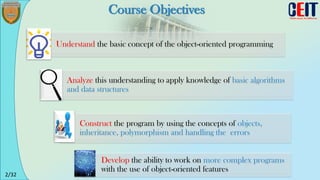
Course Objectives
Understand the basic concept of the object-oriented programming
Analyze this understanding to apply knowledge of basic algorithms
and data structures
Construct the program by using the concepts of objects,
inheritance, polymorphism and handling the errors
Develop the ability to work on more complex programs
with the use of object-oriented features
3/32
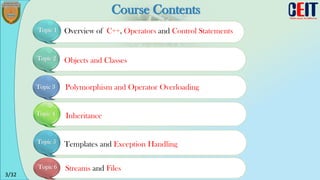
Course Contents
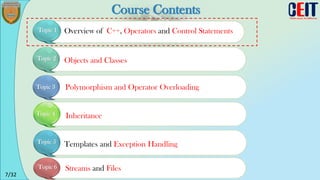
Overview of C++, Operators and Control Statements
Topic 1
Objects and Classes
Polymorphism and Operator Overloading
Inheritance
Templates and Exception Handling
Streams and Files
Topic 2
Topic 3
Topic 4
Topic 5
Topic 6
4/32
Text Book & References
[1] Object-oriented Programming in C++
Fourth Edition, 2002
-------------------------------------
[3] Thinking in C++ Volume 1 and 2,
Bruce Eckel, 2nd Edition
[2] The Complete Reference C++,
Herbert Schildt, 3rd Edition
-------------------------------------
5/32
Learning Aid
[2] SOLOLEARN (Everyone Can Code)
https://www.sololearn.com/Course/CPlusPlus/
------------------------------------------------------------------------------
[3] Learn and Understand C++
https://www.udemy.com/learn-c-plus-plus-from-beginner-to-advanced
[1] Coursera : C++ for Programmers
University of California, Santa Cruz
https://www.coursera.org/learn/c-plus-plus-a
------------------------------------------------------------------------------
6/32
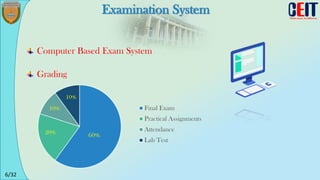
Examination System
Computer Based Exam System
60%
20%
10%
10%
Final Exam
Practical Assignments
Attendance
Lab Test
Grading
7/32
Course Contents
Overview of C++, Operators and Control Statements
Topic 1
Objects and Classes
Polymorphism and Operator Overloading
Inheritance
Templates and Exception Handling
Streams and Files
Topic 2
Topic 3
Topic 4
Topic 5
Topic 6
8/32
Week 1
Overview of C++, Operators and Control
Statements
9/32
Lecture Objectives
To introduce
What is C++?
How C++ is used for?
Features of C++
To write a simple C++ program
10/32
What is C++?
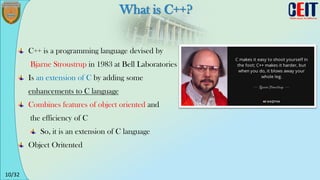
C++ is a programming language devised by
Bjarne Stroustrup in 1983 at Bell Laboratories
Is an extension of C by adding some
enhancements to C language
Combines features of object oriented and
the efficiency of C
So, it is an extension of C language
Object Oritented
11/32
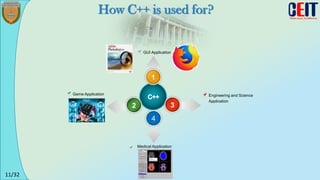
GUI Application
Game Application
1
3
2
Engineering and Science
Application
4
Medical Application
How C++ is used for?
12/32
1
2
3
4
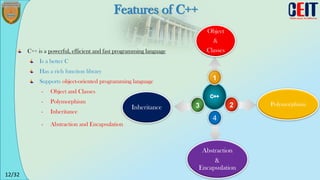
Object
&
Classes
Inheritance Polymorphism
Abstraction
&
Encapsulation
Features of C++
C++ is a powerful, efficient and fast programming language
Is a better C
Has a rich function library
Supports object-oriented programming language
- Object and Classes
- Polymorphism
- Inheritance
- Abstraction and Encapsulation
13/32
Week 1
Overview of C++, Operators and Control
Statements
14/32
First C++ Program
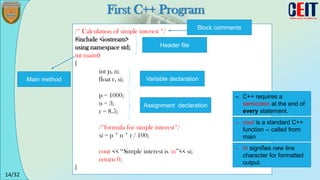
/* Calculation of simple interest */
#include <iostream>
using namespace std;
int main()
{
int p, n;
float r, si;
p = 1000;
n = 3;
r = 8.5;
/*formula for simple interest*/
si = p * n * r / 100;
cout << ‘‘Simple interest is n’’<< si;
return 0;
}
Block comments
Variable declaration
Assignment declaration
Main method
– C++ requires a
semicolon at the end of
every statement.
– cout is a standard C++
function -- called from
main
– n signifies new line
character for formatted
output.
Header file
15/32
Operators
Operator Example Description/Meaning
+ [binary]
- [binary]
* [binary]
/
%
a + b
a - b
a * b
a / b
a % b
a plus b
a minus b
a times b
a divided by b
Remainder of a/b
>>
<<
a >> b
a << b
a, right-shifted b bits
a, left-shifted b bits
<
>
<=
>=
==
!=
a < b
a > b
a <= b
a >= b
a == b
a != b
1 if a < b; 0 otherwise
1 if a > b; 0 otherwise
1 if a <= b; 0 otherwise
1 if a >= b; 0 otherwise
1 if a equal to b; 0 otherwise
1 if a not equal to b; 0 otherwise
& [binary]
|
^
a & b
a | b
a ^ b
Bitwise AND of a and b
Bitwise OR of a and b
Bitwise XOR (exclusive OR) of a and b
&&
||
!
a && b
a || b
!a
Logical AND of a and b (yields 0 or 1)
Logical OR of a and b (yields 0 or 1)
Logical NOT of a (yields 0 or 1)
Arithmetic Operators
Relational
Operators
Logical
Operators
16/32
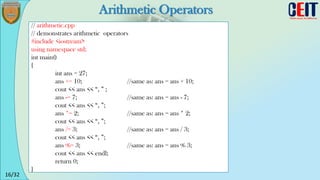
Arithmetic Operators
// arithmetic.cpp
// demonstrates arithmetic operators
#include <iostream>
using namespace std;
int main()
{
int ans = 27;
ans += 10; //same as: ans = ans + 10;
cout << ans << “, ” ;
ans -= 7; //same as: ans = ans - 7;
cout << ans << “, ”;
ans *= 2; //same as: ans = ans * 2;
cout << ans << “, ”;
ans /= 3; //same as: ans = ans / 3;
cout << ans << “, ”;
ans %= 3; //same as: ans = ans % 3;
cout << ans << endl;
return 0;
}
17/32
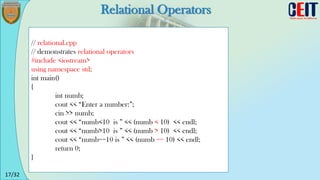
Relational Operators
// relational.cpp
// demonstrates relational operators
#include <iostream>
using namespace std;
int main()
{
int numb;
cout << “Enter a number:”;
cin >> numb;
cout << “numb<10 is ” << (numb < 10) << endl;
cout << “numb>10 is ” << (numb > 10) << endl;
cout << “numb==10 is ” << (numb == 10) << endl;
return 0;
}
18/32
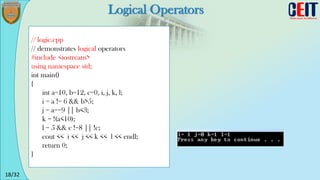
Logical Operators
// logic.cpp
// demonstrates logical operators
#include <iostream>
using namespace std;
int main()
{
int a=10, b=12, c=0, i, j, k, l;
i = a != 6 && b>5;
j = a==9 || b<3;
k = !(a<10);
l = 5 && c !=8 || !c;
cout << i << j << k << l << endl;
return 0;
}
19/32
Week 1
Overview of C++, Operators and Control
Statements
20/32
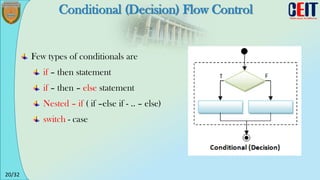
Conditional (Decision) Flow Control
Few types of conditionals are
if – then statement
if – then – else statement
Nested – if ( if –else if - .. – else)
switch - case
21/32
if statement
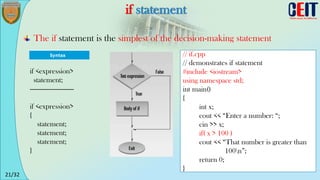
The if statement is the simplest of the decision-making statement
if <expression>
statement;
------------------------
if <expression>
{
statement;
statement;
statement;
}
// if.cpp
// demonstrates if statement
#include <iostream>
using namespace std;
int main()
{
int x;
cout << “Enter a number: “;
cin >> x;
if( x > 100 )
cout << “That number is greater than
100n”;
return 0;
}
22/32
if - else statement
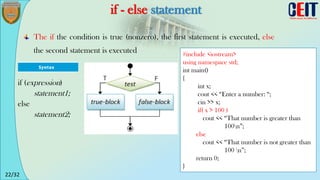
The if the condition is true (nonzero), the first statement is executed, else
the second statement is executed #include <iostream>
using namespace std;
int main()
{
int x;
cout << “Enter a number: “;
cin >> x;
if( x > 100 )
cout << “That number is greater than
100n”;
else
cout << “That number is not greater than
100 n”;
return 0;
}
if (expression)
statement1;
else
statement2;
23/32
Nested - if statement
#include <iostream>
using namespace std;
int main()
{
int mark;
cout << “Enter a mark:”;
cin >> mark;
if (mark >= 80) {
cout << "A" << endl;
} else if (mark >= 70) {
cout << "B" << endl;
} else if (mark >= 60) {
cout << "C" << endl;
} else if (mark >= 50) {
cout << "D" << endl;
} else {
cout << "F" << endl;
} return 0; }
if (expression)
statement1;
else if (expression)
statement2;
else
statement3;
24/32
switch - case statement
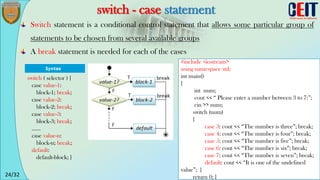
Switch statement is a conditional control statement that allows some particular group of
statements to be chosen from several available groups
A break statement is needed for each of the cases
switch ( selector ) {
case value-1:
block-1; break;
case value-2:
block-2; break;
case value-3:
block-3; break;
......
case value-n:
block-n; break;
default:
default-block; }
#include <iostream>
using namespace std;
int main()
{
int num;
cout << “ Please enter a number between 3 to 7:”;
cin >> num;
switch (num)
{
case 3: cout << “The number is three”; break;
case 4: cout << “The number is four”; break;
case 5: cout << “The number is five”; break;
case 6: cout << “The number is six”; break;
case 7: cout << “The number is seven”; break;
default: cout << “It is one of the undefined
value”; }
return 0; }
25/32
for loop
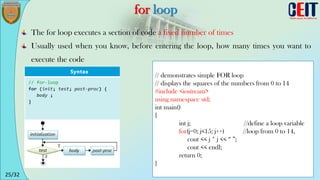
The for loop executes a section of code a fixed number of times
Usually used when you know, before entering the loop, how many times you want to
execute the code
// demonstrates simple FOR loop
// displays the squares of the numbers from 0 to 14
#include <iostream>
using namespace std;
int main()
{
int j; //define a loop variable
for(j=0; j<15; j++) //loop from 0 to 14,
cout << j * j << “ ”;
cout << endl;
return 0;
}
26/32
while loop
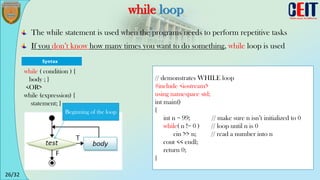
The while statement is used when the programs needs to perform repetitive tasks
If you don’t know how many times you want to do something, while loop is used
// demonstrates WHILE loop
#include <iostream>
using namespace std;
int main()
{
int n = 99; // make sure n isn’t initialized to 0
while( n != 0 ) // loop until n is 0
cin >> n; // read a number into n
cout << endl;
return 0;
}
while ( condition ) {
body ; }
<OR>
while (expression) {
statement; }
Beginning of the loop
27/32
Do-while loop (Repeat – Until)
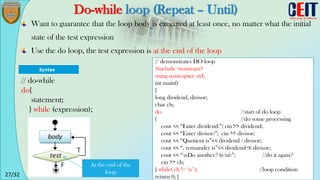
Want to guarantee that the loop body is executed at least once, no matter what the initial
state of the test expression
Use the do loop, the test expression is at the end of the loop
// demonstrates DO loop
#include <iostream>
using namespace std;
int main()
{
long dividend, divisor;
char ch;
do //start of do loop
{ //do some processing
cout << “Enter dividend:”; cin >> dividend;
cout << “Enter divisor:”; cin >> divisor;
cout << “Quotient is”<< dividend / divisor;
cout << “, remainder is”<< dividend % divisor;
cout << “nDo another? (y/n):”; //do it again?
cin >> ch;
} while( ch != ‘n’ ); //loop condition
return 0; }
// do-while
do{
statement;
} while (expression);
At the end of the
loop
28/32
Assignment
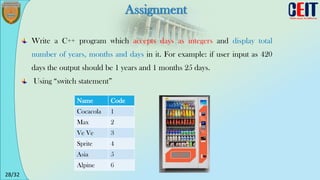
Write a C++ program which accepts days as integers and display total
number of years, months and days in it. For example: if user input as 420
days the output should be 1 years and 1 months 25 days.
Using “switch statement”
Name Code
Cocacola 1
Max 2
Ve Ve 3
Sprite 4
Asia 5
Alpine 6
29/32
Assignment
Consider the example where we read an integer values and process them according to
the following conditions.
- If the value we have read is negative, we wish to print an error message and abandon the
loop.
- If the value read is greater than 100, we wish to ignore it and continue to the next value in
the data.
- If the value is zero, we wish to terminate the loop.
30/32
Summary
Input/Ouput in C++ can be achieved using cin and cout functions
C++ employs the arithmetic operators +, -, *, / and %.
The if, if-else, multiple if, switch statement are a condition based decision
making statement.
Looping (for, while, do-while) allows the program to repeat a section of code
any number of times or until some condition occurs
31/32
Next Lesson
Objects and Classes
32/32
Any Questions?

C++ Topic 1.pdf from Yangon Technological University

  • 1.
    1/32 CEIT 22031 Programming LanguageII (Object Oriented Programming in C++) Dept. of Computer Engineering and Information Technology Yangon Technological University Yangon Technological University Department of Computer Engineering and Information Technology
  • 2.
    2/32 Course Objectives Understand thebasic concept of the object-oriented programming Analyze this understanding to apply knowledge of basic algorithms and data structures Construct the program by using the concepts of objects, inheritance, polymorphism and handling the errors Develop the ability to work on more complex programs with the use of object-oriented features
  • 3.
    3/32 Course Contents Overview ofC++, Operators and Control Statements Topic 1 Objects and Classes Polymorphism and Operator Overloading Inheritance Templates and Exception Handling Streams and Files Topic 2 Topic 3 Topic 4 Topic 5 Topic 6
  • 4.
    4/32 Text Book &References [1] Object-oriented Programming in C++ Fourth Edition, 2002 ------------------------------------- [3] Thinking in C++ Volume 1 and 2, Bruce Eckel, 2nd Edition [2] The Complete Reference C++, Herbert Schildt, 3rd Edition -------------------------------------
  • 5.
    5/32 Learning Aid [2] SOLOLEARN(Everyone Can Code) https://www.sololearn.com/Course/CPlusPlus/ ------------------------------------------------------------------------------ [3] Learn and Understand C++ https://www.udemy.com/learn-c-plus-plus-from-beginner-to-advanced [1] Coursera : C++ for Programmers University of California, Santa Cruz https://www.coursera.org/learn/c-plus-plus-a ------------------------------------------------------------------------------
  • 6.
    6/32 Examination System Computer BasedExam System 60% 20% 10% 10% Final Exam Practical Assignments Attendance Lab Test Grading
  • 7.
    7/32 Course Contents Overview ofC++, Operators and Control Statements Topic 1 Objects and Classes Polymorphism and Operator Overloading Inheritance Templates and Exception Handling Streams and Files Topic 2 Topic 3 Topic 4 Topic 5 Topic 6
  • 8.
    8/32 Week 1 Overview ofC++, Operators and Control Statements
  • 9.
    9/32 Lecture Objectives To introduce Whatis C++? How C++ is used for? Features of C++ To write a simple C++ program
  • 10.
    10/32 What is C++? C++is a programming language devised by Bjarne Stroustrup in 1983 at Bell Laboratories Is an extension of C by adding some enhancements to C language Combines features of object oriented and the efficiency of C So, it is an extension of C language Object Oritented
  • 11.
    11/32 GUI Application Game Application 1 3 2 Engineeringand Science Application 4 Medical Application How C++ is used for?
  • 12.
    12/32 1 2 3 4 Object & Classes Inheritance Polymorphism Abstraction & Encapsulation Features ofC++ C++ is a powerful, efficient and fast programming language Is a better C Has a rich function library Supports object-oriented programming language - Object and Classes - Polymorphism - Inheritance - Abstraction and Encapsulation
  • 13.
    13/32 Week 1 Overview ofC++, Operators and Control Statements
  • 14.
    14/32 First C++ Program /*Calculation of simple interest */ #include <iostream> using namespace std; int main() { int p, n; float r, si; p = 1000; n = 3; r = 8.5; /*formula for simple interest*/ si = p * n * r / 100; cout << ‘‘Simple interest is n’’<< si; return 0; } Block comments Variable declaration Assignment declaration Main method – C++ requires a semicolon at the end of every statement. – cout is a standard C++ function -- called from main – n signifies new line character for formatted output. Header file
  • 15.
    15/32 Operators Operator Example Description/Meaning +[binary] - [binary] * [binary] / % a + b a - b a * b a / b a % b a plus b a minus b a times b a divided by b Remainder of a/b >> << a >> b a << b a, right-shifted b bits a, left-shifted b bits < > <= >= == != a < b a > b a <= b a >= b a == b a != b 1 if a < b; 0 otherwise 1 if a > b; 0 otherwise 1 if a <= b; 0 otherwise 1 if a >= b; 0 otherwise 1 if a equal to b; 0 otherwise 1 if a not equal to b; 0 otherwise & [binary] | ^ a & b a | b a ^ b Bitwise AND of a and b Bitwise OR of a and b Bitwise XOR (exclusive OR) of a and b && || ! a && b a || b !a Logical AND of a and b (yields 0 or 1) Logical OR of a and b (yields 0 or 1) Logical NOT of a (yields 0 or 1) Arithmetic Operators Relational Operators Logical Operators
  • 16.
    16/32 Arithmetic Operators // arithmetic.cpp //demonstrates arithmetic operators #include <iostream> using namespace std; int main() { int ans = 27; ans += 10; //same as: ans = ans + 10; cout << ans << “, ” ; ans -= 7; //same as: ans = ans - 7; cout << ans << “, ”; ans *= 2; //same as: ans = ans * 2; cout << ans << “, ”; ans /= 3; //same as: ans = ans / 3; cout << ans << “, ”; ans %= 3; //same as: ans = ans % 3; cout << ans << endl; return 0; }
  • 17.
    17/32 Relational Operators // relational.cpp //demonstrates relational operators #include <iostream> using namespace std; int main() { int numb; cout << “Enter a number:”; cin >> numb; cout << “numb<10 is ” << (numb < 10) << endl; cout << “numb>10 is ” << (numb > 10) << endl; cout << “numb==10 is ” << (numb == 10) << endl; return 0; }
  • 18.
    18/32 Logical Operators // logic.cpp //demonstrates logical operators #include <iostream> using namespace std; int main() { int a=10, b=12, c=0, i, j, k, l; i = a != 6 && b>5; j = a==9 || b<3; k = !(a<10); l = 5 && c !=8 || !c; cout << i << j << k << l << endl; return 0; }
  • 19.
    19/32 Week 1 Overview ofC++, Operators and Control Statements
  • 20.
    20/32 Conditional (Decision) FlowControl Few types of conditionals are if – then statement if – then – else statement Nested – if ( if –else if - .. – else) switch - case
  • 21.
    21/32 if statement The ifstatement is the simplest of the decision-making statement if <expression> statement; ------------------------ if <expression> { statement; statement; statement; } // if.cpp // demonstrates if statement #include <iostream> using namespace std; int main() { int x; cout << “Enter a number: “; cin >> x; if( x > 100 ) cout << “That number is greater than 100n”; return 0; }
  • 22.
    22/32 if - elsestatement The if the condition is true (nonzero), the first statement is executed, else the second statement is executed #include <iostream> using namespace std; int main() { int x; cout << “Enter a number: “; cin >> x; if( x > 100 ) cout << “That number is greater than 100n”; else cout << “That number is not greater than 100 n”; return 0; } if (expression) statement1; else statement2;
  • 23.
    23/32 Nested - ifstatement #include <iostream> using namespace std; int main() { int mark; cout << “Enter a mark:”; cin >> mark; if (mark >= 80) { cout << "A" << endl; } else if (mark >= 70) { cout << "B" << endl; } else if (mark >= 60) { cout << "C" << endl; } else if (mark >= 50) { cout << "D" << endl; } else { cout << "F" << endl; } return 0; } if (expression) statement1; else if (expression) statement2; else statement3;
  • 24.
    24/32 switch - casestatement Switch statement is a conditional control statement that allows some particular group of statements to be chosen from several available groups A break statement is needed for each of the cases switch ( selector ) { case value-1: block-1; break; case value-2: block-2; break; case value-3: block-3; break; ...... case value-n: block-n; break; default: default-block; } #include <iostream> using namespace std; int main() { int num; cout << “ Please enter a number between 3 to 7:”; cin >> num; switch (num) { case 3: cout << “The number is three”; break; case 4: cout << “The number is four”; break; case 5: cout << “The number is five”; break; case 6: cout << “The number is six”; break; case 7: cout << “The number is seven”; break; default: cout << “It is one of the undefined value”; } return 0; }
  • 25.
    25/32 for loop The forloop executes a section of code a fixed number of times Usually used when you know, before entering the loop, how many times you want to execute the code // demonstrates simple FOR loop // displays the squares of the numbers from 0 to 14 #include <iostream> using namespace std; int main() { int j; //define a loop variable for(j=0; j<15; j++) //loop from 0 to 14, cout << j * j << “ ”; cout << endl; return 0; }
  • 26.
    26/32 while loop The whilestatement is used when the programs needs to perform repetitive tasks If you don’t know how many times you want to do something, while loop is used // demonstrates WHILE loop #include <iostream> using namespace std; int main() { int n = 99; // make sure n isn’t initialized to 0 while( n != 0 ) // loop until n is 0 cin >> n; // read a number into n cout << endl; return 0; } while ( condition ) { body ; } <OR> while (expression) { statement; } Beginning of the loop
  • 27.
    27/32 Do-while loop (Repeat– Until) Want to guarantee that the loop body is executed at least once, no matter what the initial state of the test expression Use the do loop, the test expression is at the end of the loop // demonstrates DO loop #include <iostream> using namespace std; int main() { long dividend, divisor; char ch; do //start of do loop { //do some processing cout << “Enter dividend:”; cin >> dividend; cout << “Enter divisor:”; cin >> divisor; cout << “Quotient is”<< dividend / divisor; cout << “, remainder is”<< dividend % divisor; cout << “nDo another? (y/n):”; //do it again? cin >> ch; } while( ch != ‘n’ ); //loop condition return 0; } // do-while do{ statement; } while (expression); At the end of the loop
  • 28.
    28/32 Assignment Write a C++program which accepts days as integers and display total number of years, months and days in it. For example: if user input as 420 days the output should be 1 years and 1 months 25 days. Using “switch statement” Name Code Cocacola 1 Max 2 Ve Ve 3 Sprite 4 Asia 5 Alpine 6
  • 29.
    29/32 Assignment Consider the examplewhere we read an integer values and process them according to the following conditions. - If the value we have read is negative, we wish to print an error message and abandon the loop. - If the value read is greater than 100, we wish to ignore it and continue to the next value in the data. - If the value is zero, we wish to terminate the loop.
  • 30.
    30/32 Summary Input/Ouput in C++can be achieved using cin and cout functions C++ employs the arithmetic operators +, -, *, / and %. The if, if-else, multiple if, switch statement are a condition based decision making statement. Looping (for, while, do-while) allows the program to repeat a section of code any number of times or until some condition occurs
  • 31.
  • 32.