Operators and Expressions

       www.eshikshak.co.in
Introduction
• An operator indicates an operation to be
  performed on data that yields a new value.
• An operand is a data items on which operators
  perform operations.
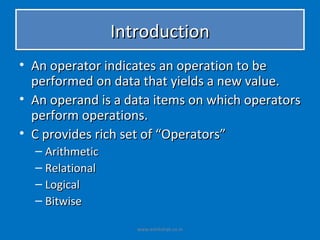
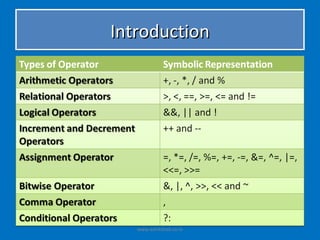
• C provides rich set of “Operators”
  – Arithmetic
  – Relational
  – Logical
  – Bitwise

                    www.eshikshak.co.in
Introduction


   www.eshikshak.co.in
Properties of Operators
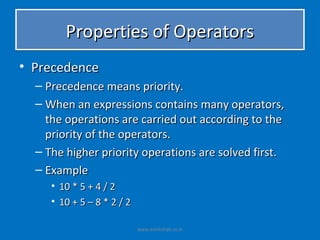
• Precedence
  – Precedence means priority.
  – When an expressions contains many operators,
    the operations are carried out according to the
    priority of the operators.
  – The higher priority operations are solved first.
  – Example
     • 10 * 5 + 4 / 2
     • 10 + 5 – 8 * 2 / 2

                            www.eshikshak.co.in
Properties of Operators
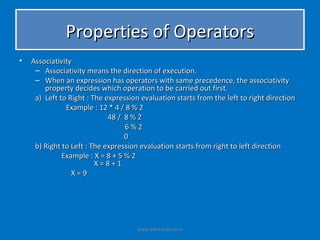
•   Associativity
     – Associativity means the direction of execution.
     – When an expression has operators with same precedence, the associativity
        property decides which operation to be carried out first.
     a) Left to Right : The expression evaluation starts from the left to right direction
               Example : 12 * 4 / 8 % 2
                             48 / 8 % 2
                                  6%2
                                  0
     b) Right to Left : The expression evaluation starts from right to left direction
              Example : X = 8 + 5 % 2
                         X=8+1
                 X=9


                                      www.eshikshak.co.in
Priority of Operators and their clubbing

• Each and every operator in C having its
  priority and precedence fixed on the basis of
  these property expression is solved.
• Operators from the same group may have
  different precedence and associativity.
• If arithmetic expression contains more
  operators, the execution will be performed
  according to their priorities.

                    www.eshikshak.co.in
Priority of Operators and their clubbing

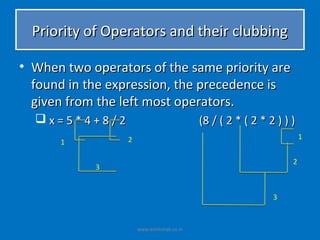
• When two operators of the same priority are
  found in the expression, the precedence is
  given from the left most operators.
  x=5*4+8/2                                (8 / ( 2 * ( 2 * 2 ) ) )
                  2                                                    1
      1

                                                                   2
            3


                                                              3


                      www.eshikshak.co.in
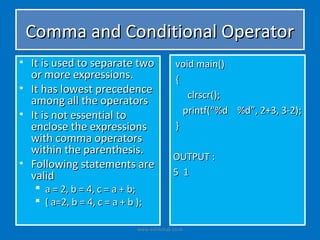
Comma and Conditional Operator
• It is used to separate two                 void main()
  or more expressions.                       {
• It has lowest precedence
                                                clrscr();
  among all the operators
• It is not essential to                       printf(“%d %d”, 2+3, 3-2);
  enclose the expressions                    }
  with comma operators
  within the parenthesis.
                                            OUTPUT :
• Following statements are
  valid                                     5 1
    a = 2, b = 4, c = a + b;
    ( a=2, b = 4, c = a + b );

                             www.eshikshak.co.in
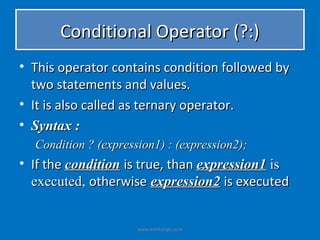
Conditional Operator (?:)
• This operator contains condition followed by
  two statements and values.
• It is also called as ternary operator.
• Syntax :
  Condition ? (expression1) : (expression2);
• If the condition is true, than expression1 is
  executed, otherwise expression2 is executed


                      www.eshikshak.co.in
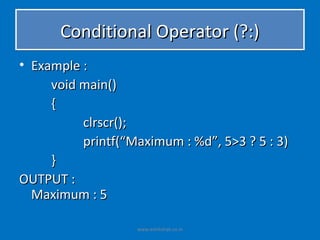
Conditional Operator (?:)
• Example :
     void main()
     {
          clrscr();
          printf(“Maximum : %d”, 5>3 ? 5 : 3)
     }
OUTPUT :
  Maximum : 5

                   www.eshikshak.co.in
Conditional Operator (?:)
• Example :
     void main()
     {
          clrscr();
          printf(“Maximum : %d”, 5>3 ? 5 : 3)
     }
OUTPUT :
  Maximum : 5

                   www.eshikshak.co.in
Conditional Operator (?:)
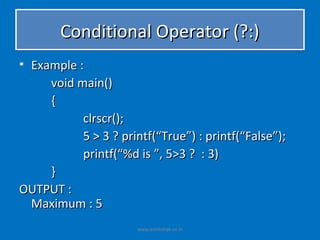
• Example :
     void main()
     {
           clrscr();
           5 > 3 ? printf(“True”) : printf(“False”);
           printf(“%d is ”, 5>3 ? : 3)
     }
OUTPUT :
  Maximum : 5
                      www.eshikshak.co.in
Arithmetic Operator
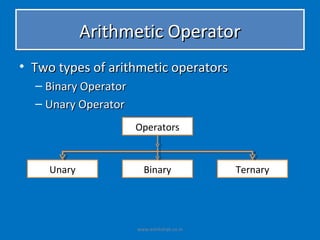
• Two types of arithmetic operators
  – Binary Operator
  – Unary Operator
                      Operators


     Unary              Binary              Ternary


                      www.eshikshak.co.in
Arithmetic Operator
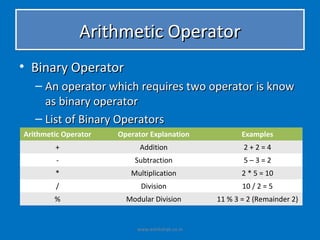
• Binary Operator
   – An operator which requires two operator is know
     as binary operator
   – List of Binary Operators
Arithmetic Operator   Operator Explanation              Examples
        +                   Addition                    2+2=4
         -                Subtraction                   5–3=2
        *                Multiplication                 2 * 5 = 10
         /                  Division                    10 / 2 = 5
        %               Modular Division         11 % 3 = 2 (Remainder 2)


                           www.eshikshak.co.in
Arithmetic Operator
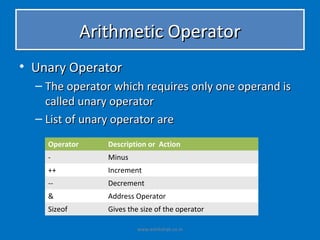
• Unary Operator
  – The operator which requires only one operand is
    called unary operator
  – List of unary operator are
    Operator      Description or Action
    -             Minus
    ++            Increment
    --            Decrement
    &             Address Operator
    Sizeof        Gives the size of the operator

                           www.eshikshak.co.in
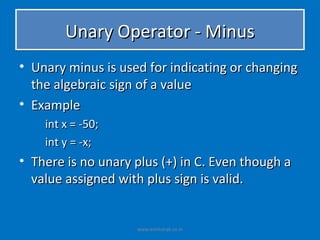
Unary Operator - Minus
• Unary minus is used for indicating or changing
  the algebraic sign of a value
• Example
    int x = -50;
    int y = -x;
• There is no unary plus (+) in C. Even though a
  value assigned with plus sign is valid.


                    www.eshikshak.co.in
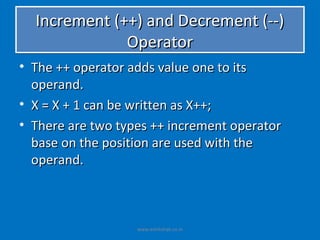
Increment (++) and Decrement (--)
              Operator
• The ++ operator adds value one to its
  operand.
• X = X + 1 can be written as X++;
• There are two types ++ increment operator
  base on the position are used with the
  operand.


                   www.eshikshak.co.in
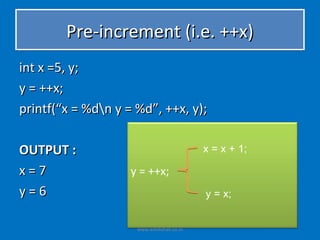
Pre-increment (i.e. ++x)
int x =5, y;
y = ++x;
printf(“x = %dn y = %d”, ++x, y);

OUTPUT :                                   x = x + 1;

x=7                 y = ++x;
y=6                                        y = x;


                     www.eshikshak.co.in
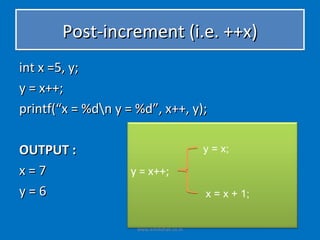
Post-increment (i.e. ++x)
int x =5, y;
y = x++;
printf(“x = %dn y = %d”, x++, y);

OUTPUT :                                   y = x;

x=7                 y = x++;
y=6                                        x = x + 1;


                     www.eshikshak.co.in
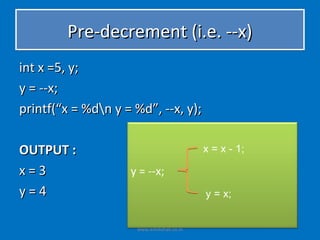
Pre-decrement (i.e. --x)
int x =5, y;
y = --x;
printf(“x = %dn y = %d”, --x, y);

OUTPUT :                                   x = x - 1;

x=3                 y = --x;
y=4                                        y = x;


                     www.eshikshak.co.in
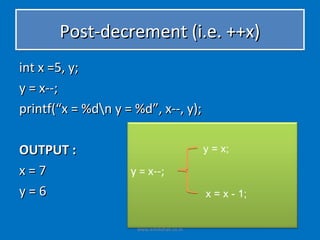
Post-decrement (i.e. ++x)
int x =5, y;
y = x--;
printf(“x = %dn y = %d”, x--, y);

OUTPUT :                                   y = x;

x=7                 y = x--;
y=6                                        x = x - 1;


                     www.eshikshak.co.in
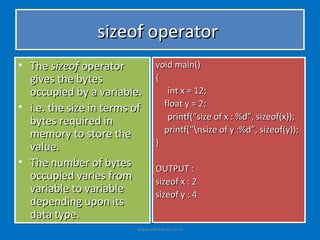
sizeof operator
• The sizeof operator           void main()
  gives the bytes               {
  occupied by a variable.          int x = 12;
• i.e. the size in terms of       float y = 2;
  bytes required in                printf(“size of x : %d”, sizeof(x));
                                  printf(“nsize of y :%d”, sizeof(y));
  memory to store the
  value.                        }

• The number of bytes           OUTPUT :
  occupied varies from          sizeof x : 2
  variable to variable          sizeof y : 4
  depending upon its
  data type.
                         www.eshikshak.co.in
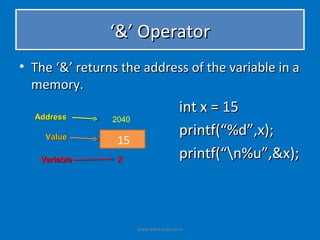
‘&’ Operator
• The ‘&’ returns the address of the variable in a
  memory.

  Address
                                        int x = 15
                2040
                                        printf(“%d”,x);
    Value
                 15
   Variable      X
                                        printf(“n%u”,&x);


                       www.eshikshak.co.in
Relational Operator
• These operators are used to distinguish
  two values depending on their relations.
• These operators provide the relationship
  between two expressions.
• If the relation is true it returns a value 1
  otherwise 0 for false.


                   www.eshikshak.co.in
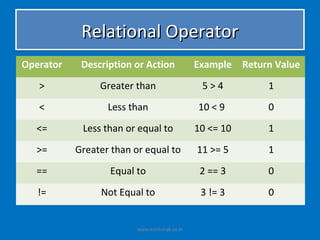
Relational Operator
Operator    Description or Action              Example Return Value
   >            Greater than                    5>4          1
   <              Less than                    10 < 9        0
  <=        Less than or equal to              10 <= 10      1

  >=       Greater than or equal to            11 >= 5       1
  ==              Equal to                      2 == 3       0
   !=           Not Equal to                    3 != 3       0


                         www.eshikshak.co.in
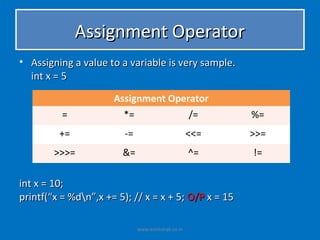
Assignment Operator
• Assigning a value to a variable is very sample.
  int x = 5

                      Assignment Operator
          =             *=                          /=    %=
         +=              -=                         <<=   >>=
        >>>=            &=                          ^=    !=

int x = 10;
printf(“x = %dn”,x += 5); // x = x + 5; O/P x = 15

                              www.eshikshak.co.in
Logical Operators
• The logical operator between the two
  expressions is tested with logical operators.
• Using these operators, two expressions can be
  joined.
• After checking the conditions, it provides
  logical true(1) or false(0) status.
• The operands could be constants, variables
  and expressions.

                   www.eshikshak.co.in
Logical Operators
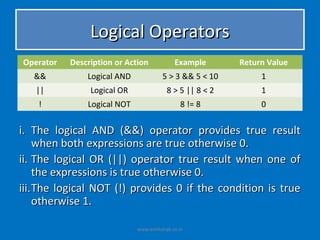
Operator   Description or Action            Example       Return Value
   &&          Logical AND             5 > 3 && 5 < 10         1
   ||           Logical OR               8 > 5 || 8 < 2        1
    !          Logical NOT                    8 != 8           0


i. The logical AND (&&) operator provides true result
     when both expressions are true otherwise 0.
ii. The logical OR (||) operator true result when one of
     the expressions is true otherwise 0.
iii. The logical NOT (!) provides 0 if the condition is true
     otherwise 1.

                             www.eshikshak.co.in
Bitwise Operator
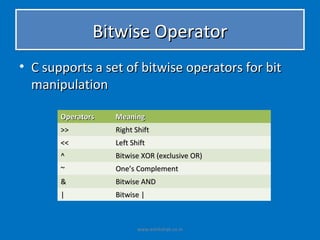
• C supports a set of bitwise operators for bit
  manipulation

       Operators   Meaning
       >>          Right Shift
       <<          Left Shift
       ^           Bitwise XOR (exclusive OR)
       ~           One’s Complement
       &           Bitwise AND
       |           Bitwise |


                          www.eshikshak.co.in
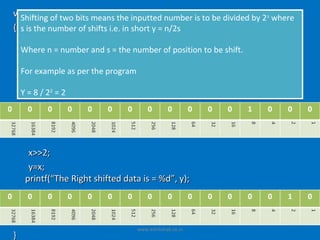
void main() two bits means the inputted number is to be divided by 2 s where
  Shifting of
{ s is the number of shifts i.e. in short y = n/2s
    int x, y;
  Where n = number and s = the number of position to be shift.
     clrscr();
  For example as Thethe program keyword (x) ;
     print(“Read per Integer from
     scanf(“%d”, &x); // input value for x = 8
    Y = 8 / 22 = 2
            2


      x>>2;
      y=x;
     printf(“The Right shifted data is = %d”, y);


                                  www.eshikshak.co.in
}
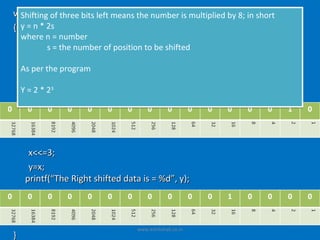
void main() three bits left means the number is multiplied by 8; in short
  Shifting of
{ y = n * 2s
  where n = number
   int x, y;
          s = the number of position to be shifted
    clrscr();
  Asprint(“Read The Integer from keyword (x) ;
     per the program
    scanf(“%d”, &x); // input value for x = 2
    Y=2*2  3


     x<<=3;
     y=x;
    printf(“The Right shifted data is = %d”, y);


                                  www.eshikshak.co.in
}
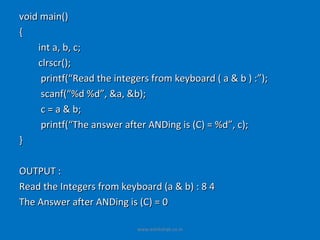
void main()
{
    int a, b, c;
    clrscr();
     printf(“Read the integers from keyboard ( a & b ) :”);
     scanf(“%d %d”, &a, &b);
     c = a & b;
     printf(“The answer after ANDing is (C) = %d”, c);
}

OUTPUT :
Read the Integers from keyboard (a & b) : 8 4
The Answer after ANDing is (C) = 0

                           www.eshikshak.co.in
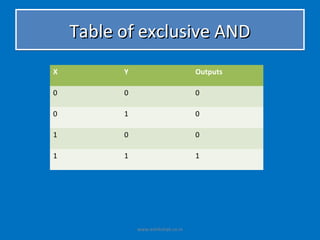
Table of exclusive AND
X         Y                         Outputs

0         0                         0

0         1                         0

1         0                         0

1         1                         1


              www.eshikshak.co.in
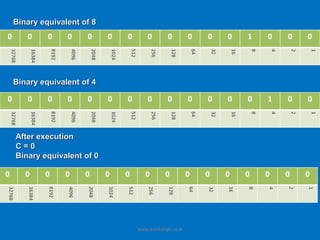
Binary equivalent of 8


Binary equivalent of 4


After execution
C=0
Binary equivalent of 0


                         www.eshikshak.co.in
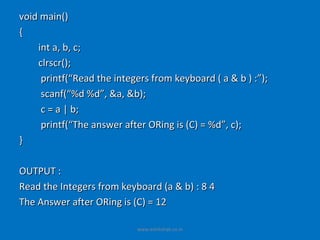
void main()
{
    int a, b, c;
    clrscr();
     printf(“Read the integers from keyboard ( a & b ) :”);
     scanf(“%d %d”, &a, &b);
     c = a | b;
     printf(“The answer after ORing is (C) = %d”, c);
}

OUTPUT :
Read the Integers from keyboard (a & b) : 8 4
The Answer after ORing is (C) = 12

                           www.eshikshak.co.in
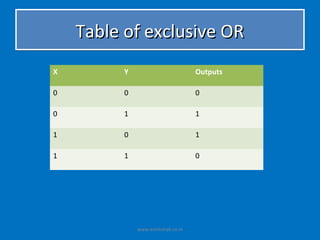
Table of exclusive OR
X         Y                         Outputs

0         0                         0

0         1                         1

1         0                         1

1         1                         0


              www.eshikshak.co.in
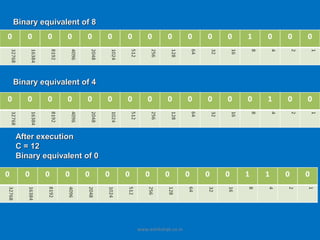
Binary equivalent of 8


Binary equivalent of 4


After execution
C = 12
Binary equivalent of 0


                         www.eshikshak.co.in

Mesics lecture 4 c operators and experssions

  • 1.
    Operators and Expressions www.eshikshak.co.in
  • 2.
    Introduction • An operatorindicates an operation to be performed on data that yields a new value. • An operand is a data items on which operators perform operations. • C provides rich set of “Operators” – Arithmetic – Relational – Logical – Bitwise www.eshikshak.co.in
  • 3.
    Introduction www.eshikshak.co.in
  • 4.
    Properties of Operators •Precedence – Precedence means priority. – When an expressions contains many operators, the operations are carried out according to the priority of the operators. – The higher priority operations are solved first. – Example • 10 * 5 + 4 / 2 • 10 + 5 – 8 * 2 / 2 www.eshikshak.co.in
  • 5.
    Properties of Operators • Associativity – Associativity means the direction of execution. – When an expression has operators with same precedence, the associativity property decides which operation to be carried out first. a) Left to Right : The expression evaluation starts from the left to right direction Example : 12 * 4 / 8 % 2 48 / 8 % 2 6%2 0 b) Right to Left : The expression evaluation starts from right to left direction Example : X = 8 + 5 % 2 X=8+1 X=9 www.eshikshak.co.in
  • 6.
    Priority of Operatorsand their clubbing • Each and every operator in C having its priority and precedence fixed on the basis of these property expression is solved. • Operators from the same group may have different precedence and associativity. • If arithmetic expression contains more operators, the execution will be performed according to their priorities. www.eshikshak.co.in
  • 7.
    Priority of Operatorsand their clubbing • When two operators of the same priority are found in the expression, the precedence is given from the left most operators. x=5*4+8/2 (8 / ( 2 * ( 2 * 2 ) ) ) 2 1 1 2 3 3 www.eshikshak.co.in
  • 8.
    Comma and ConditionalOperator • It is used to separate two void main() or more expressions. { • It has lowest precedence clrscr(); among all the operators • It is not essential to printf(“%d %d”, 2+3, 3-2); enclose the expressions } with comma operators within the parenthesis. OUTPUT : • Following statements are valid 5 1  a = 2, b = 4, c = a + b;  ( a=2, b = 4, c = a + b ); www.eshikshak.co.in
  • 9.
    Conditional Operator (?:) •This operator contains condition followed by two statements and values. • It is also called as ternary operator. • Syntax : Condition ? (expression1) : (expression2); • If the condition is true, than expression1 is executed, otherwise expression2 is executed www.eshikshak.co.in
  • 10.
    Conditional Operator (?:) •Example : void main() { clrscr(); printf(“Maximum : %d”, 5>3 ? 5 : 3) } OUTPUT : Maximum : 5 www.eshikshak.co.in
  • 11.
    Conditional Operator (?:) •Example : void main() { clrscr(); printf(“Maximum : %d”, 5>3 ? 5 : 3) } OUTPUT : Maximum : 5 www.eshikshak.co.in
  • 12.
    Conditional Operator (?:) •Example : void main() { clrscr(); 5 > 3 ? printf(“True”) : printf(“False”); printf(“%d is ”, 5>3 ? : 3) } OUTPUT : Maximum : 5 www.eshikshak.co.in
  • 13.
    Arithmetic Operator • Twotypes of arithmetic operators – Binary Operator – Unary Operator Operators Unary Binary Ternary www.eshikshak.co.in
  • 14.
    Arithmetic Operator • BinaryOperator – An operator which requires two operator is know as binary operator – List of Binary Operators Arithmetic Operator Operator Explanation Examples + Addition 2+2=4 - Subtraction 5–3=2 * Multiplication 2 * 5 = 10 / Division 10 / 2 = 5 % Modular Division 11 % 3 = 2 (Remainder 2) www.eshikshak.co.in
  • 15.
    Arithmetic Operator • UnaryOperator – The operator which requires only one operand is called unary operator – List of unary operator are Operator Description or Action - Minus ++ Increment -- Decrement & Address Operator Sizeof Gives the size of the operator www.eshikshak.co.in
  • 16.
    Unary Operator -Minus • Unary minus is used for indicating or changing the algebraic sign of a value • Example int x = -50; int y = -x; • There is no unary plus (+) in C. Even though a value assigned with plus sign is valid. www.eshikshak.co.in
  • 17.
    Increment (++) andDecrement (--) Operator • The ++ operator adds value one to its operand. • X = X + 1 can be written as X++; • There are two types ++ increment operator base on the position are used with the operand. www.eshikshak.co.in
  • 18.
    Pre-increment (i.e. ++x) intx =5, y; y = ++x; printf(“x = %dn y = %d”, ++x, y); OUTPUT : x = x + 1; x=7 y = ++x; y=6 y = x; www.eshikshak.co.in
  • 19.
    Post-increment (i.e. ++x) intx =5, y; y = x++; printf(“x = %dn y = %d”, x++, y); OUTPUT : y = x; x=7 y = x++; y=6 x = x + 1; www.eshikshak.co.in
  • 20.
    Pre-decrement (i.e. --x) intx =5, y; y = --x; printf(“x = %dn y = %d”, --x, y); OUTPUT : x = x - 1; x=3 y = --x; y=4 y = x; www.eshikshak.co.in
  • 21.
    Post-decrement (i.e. ++x) intx =5, y; y = x--; printf(“x = %dn y = %d”, x--, y); OUTPUT : y = x; x=7 y = x--; y=6 x = x - 1; www.eshikshak.co.in
  • 22.
    sizeof operator • Thesizeof operator void main() gives the bytes { occupied by a variable. int x = 12; • i.e. the size in terms of float y = 2; bytes required in printf(“size of x : %d”, sizeof(x)); printf(“nsize of y :%d”, sizeof(y)); memory to store the value. } • The number of bytes OUTPUT : occupied varies from sizeof x : 2 variable to variable sizeof y : 4 depending upon its data type. www.eshikshak.co.in
  • 23.
    ‘&’ Operator • The‘&’ returns the address of the variable in a memory. Address int x = 15 2040 printf(“%d”,x); Value 15 Variable X printf(“n%u”,&x); www.eshikshak.co.in
  • 24.
    Relational Operator • Theseoperators are used to distinguish two values depending on their relations. • These operators provide the relationship between two expressions. • If the relation is true it returns a value 1 otherwise 0 for false. www.eshikshak.co.in
  • 25.
    Relational Operator Operator Description or Action Example Return Value > Greater than 5>4 1 < Less than 10 < 9 0 <= Less than or equal to 10 <= 10 1 >= Greater than or equal to 11 >= 5 1 == Equal to 2 == 3 0 != Not Equal to 3 != 3 0 www.eshikshak.co.in
  • 26.
    Assignment Operator • Assigninga value to a variable is very sample. int x = 5 Assignment Operator = *= /= %= += -= <<= >>= >>>= &= ^= != int x = 10; printf(“x = %dn”,x += 5); // x = x + 5; O/P x = 15 www.eshikshak.co.in
  • 27.
    Logical Operators • Thelogical operator between the two expressions is tested with logical operators. • Using these operators, two expressions can be joined. • After checking the conditions, it provides logical true(1) or false(0) status. • The operands could be constants, variables and expressions. www.eshikshak.co.in
  • 28.
    Logical Operators Operator Description or Action Example Return Value && Logical AND 5 > 3 && 5 < 10 1 || Logical OR 8 > 5 || 8 < 2 1 ! Logical NOT 8 != 8 0 i. The logical AND (&&) operator provides true result when both expressions are true otherwise 0. ii. The logical OR (||) operator true result when one of the expressions is true otherwise 0. iii. The logical NOT (!) provides 0 if the condition is true otherwise 1. www.eshikshak.co.in
  • 29.
    Bitwise Operator • Csupports a set of bitwise operators for bit manipulation Operators Meaning >> Right Shift << Left Shift ^ Bitwise XOR (exclusive OR) ~ One’s Complement & Bitwise AND | Bitwise | www.eshikshak.co.in
  • 30.
    void main() twobits means the inputted number is to be divided by 2 s where Shifting of { s is the number of shifts i.e. in short y = n/2s int x, y; Where n = number and s = the number of position to be shift. clrscr(); For example as Thethe program keyword (x) ; print(“Read per Integer from scanf(“%d”, &x); // input value for x = 8 Y = 8 / 22 = 2 2 x>>2; y=x; printf(“The Right shifted data is = %d”, y); www.eshikshak.co.in }
  • 31.
    void main() threebits left means the number is multiplied by 8; in short Shifting of { y = n * 2s where n = number int x, y; s = the number of position to be shifted clrscr(); Asprint(“Read The Integer from keyword (x) ; per the program scanf(“%d”, &x); // input value for x = 2 Y=2*2 3 x<<=3; y=x; printf(“The Right shifted data is = %d”, y); www.eshikshak.co.in }
  • 32.
    void main() { int a, b, c; clrscr(); printf(“Read the integers from keyboard ( a & b ) :”); scanf(“%d %d”, &a, &b); c = a & b; printf(“The answer after ANDing is (C) = %d”, c); } OUTPUT : Read the Integers from keyboard (a & b) : 8 4 The Answer after ANDing is (C) = 0 www.eshikshak.co.in
  • 33.
    Table of exclusiveAND X Y Outputs 0 0 0 0 1 0 1 0 0 1 1 1 www.eshikshak.co.in
  • 34.
    Binary equivalent of8 Binary equivalent of 4 After execution C=0 Binary equivalent of 0 www.eshikshak.co.in
  • 35.
    void main() { int a, b, c; clrscr(); printf(“Read the integers from keyboard ( a & b ) :”); scanf(“%d %d”, &a, &b); c = a | b; printf(“The answer after ORing is (C) = %d”, c); } OUTPUT : Read the Integers from keyboard (a & b) : 8 4 The Answer after ORing is (C) = 12 www.eshikshak.co.in
  • 36.
    Table of exclusiveOR X Y Outputs 0 0 0 0 1 1 1 0 1 1 1 0 www.eshikshak.co.in
  • 37.
    Binary equivalent of8 Binary equivalent of 4 After execution C = 12 Binary equivalent of 0 www.eshikshak.co.in