The Solutions Company
Introducing Lifecycle BIM
Solving Data Integration and Normalising Workflows
For the Complete Asset Lifecycle Management
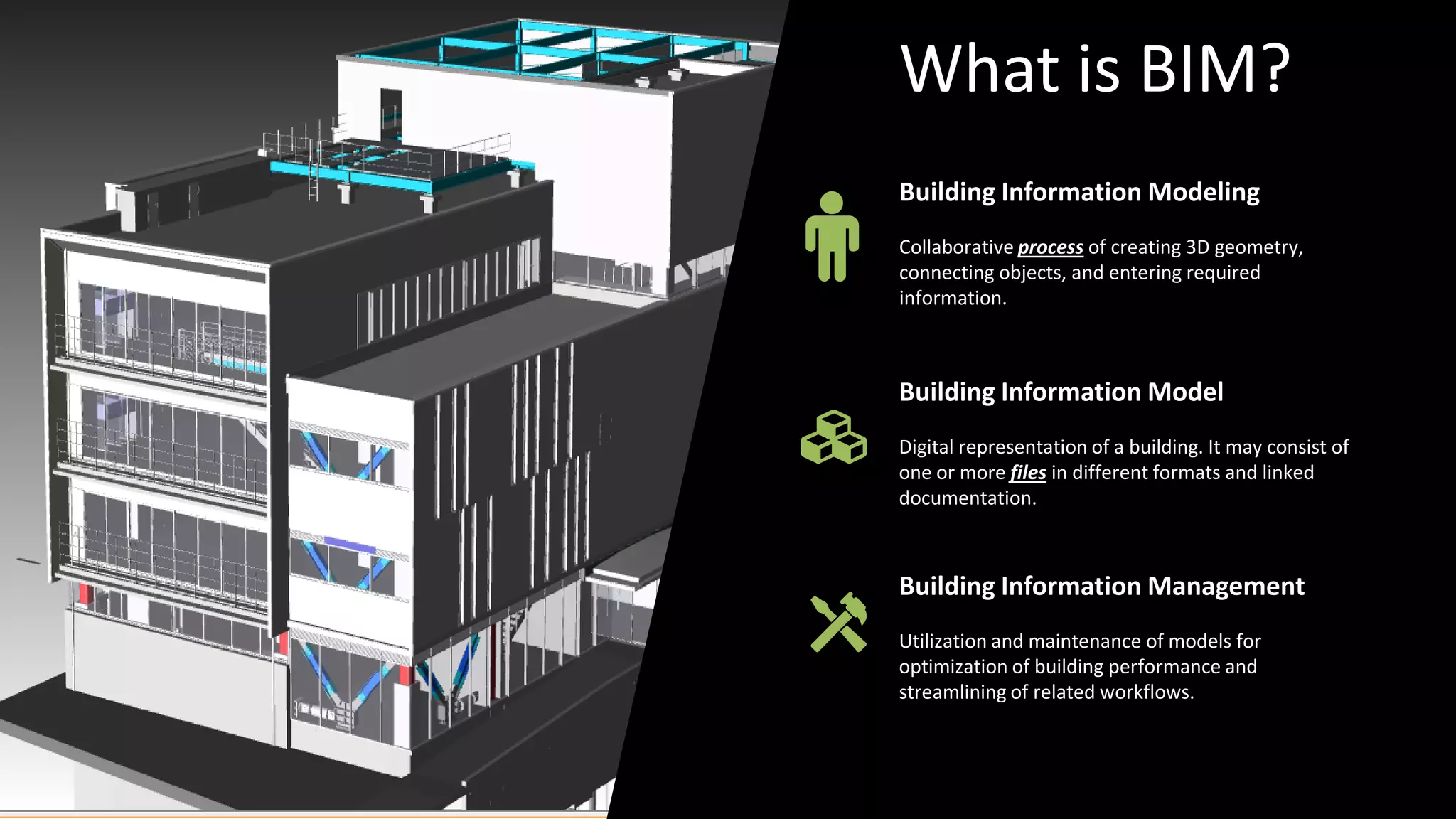
Building Information Modeling
Collaborative process of creating 3D geometry,
connecting objects, and entering required
information.
Building Information Management
Utilization and maintenance of models for
optimization of building performance and
streamlining of related workflows.
Building Information Model
Digital representation of a building. It may consist of
one or more files in different formats and linked
documentation.
What is BIM?
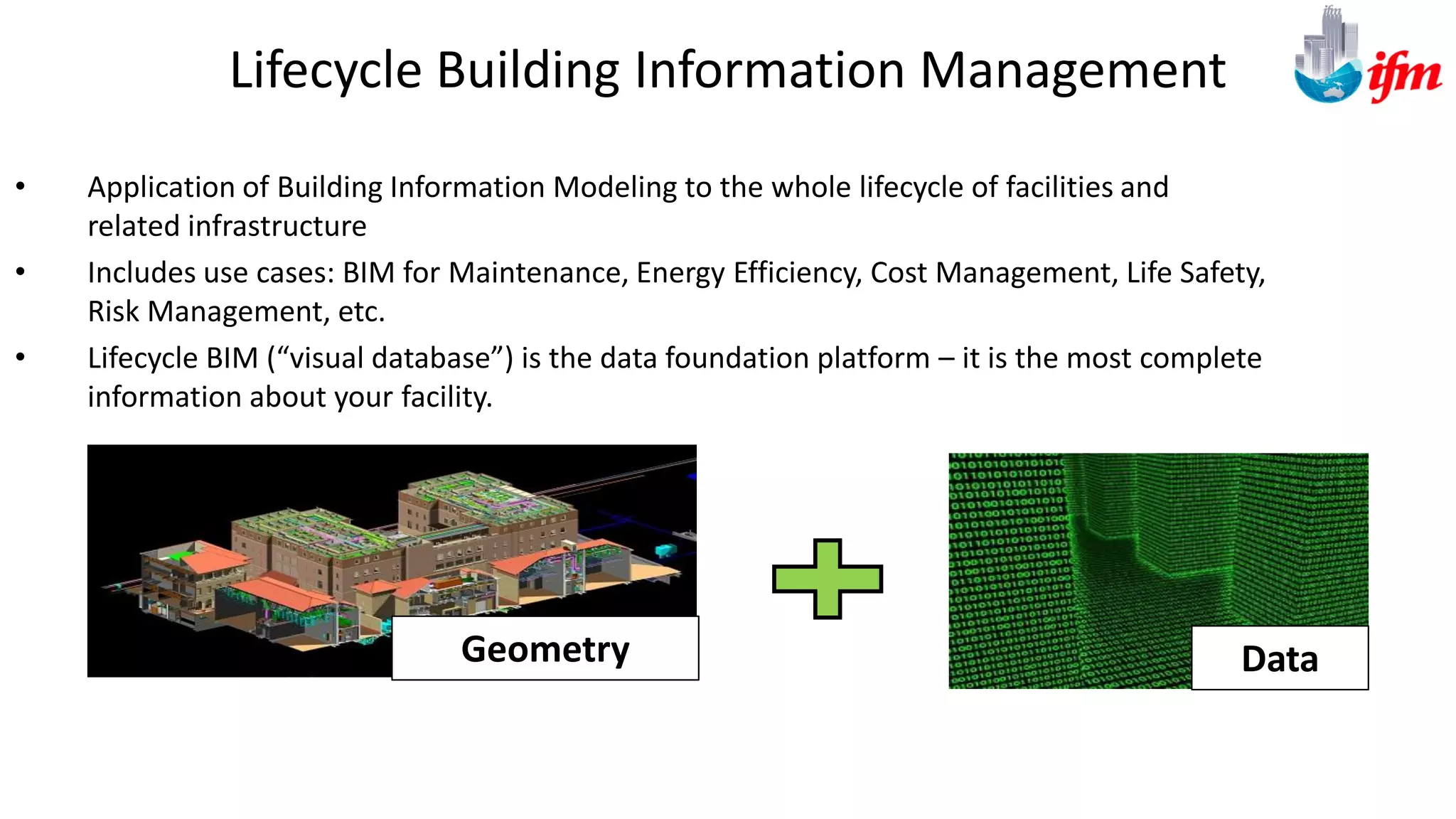
Lifecycle Building Information Management
• Application of Building Information Modeling to the whole lifecycle of facilities and
related infrastructure
• Includes use cases: BIM for Maintenance, Energy Efficiency, Cost Management, Life Safety,
Risk Management, etc.
• Lifecycle BIM (“visual database”) is the data foundation platform – it is the most complete
information about your facility.
DataGeometry
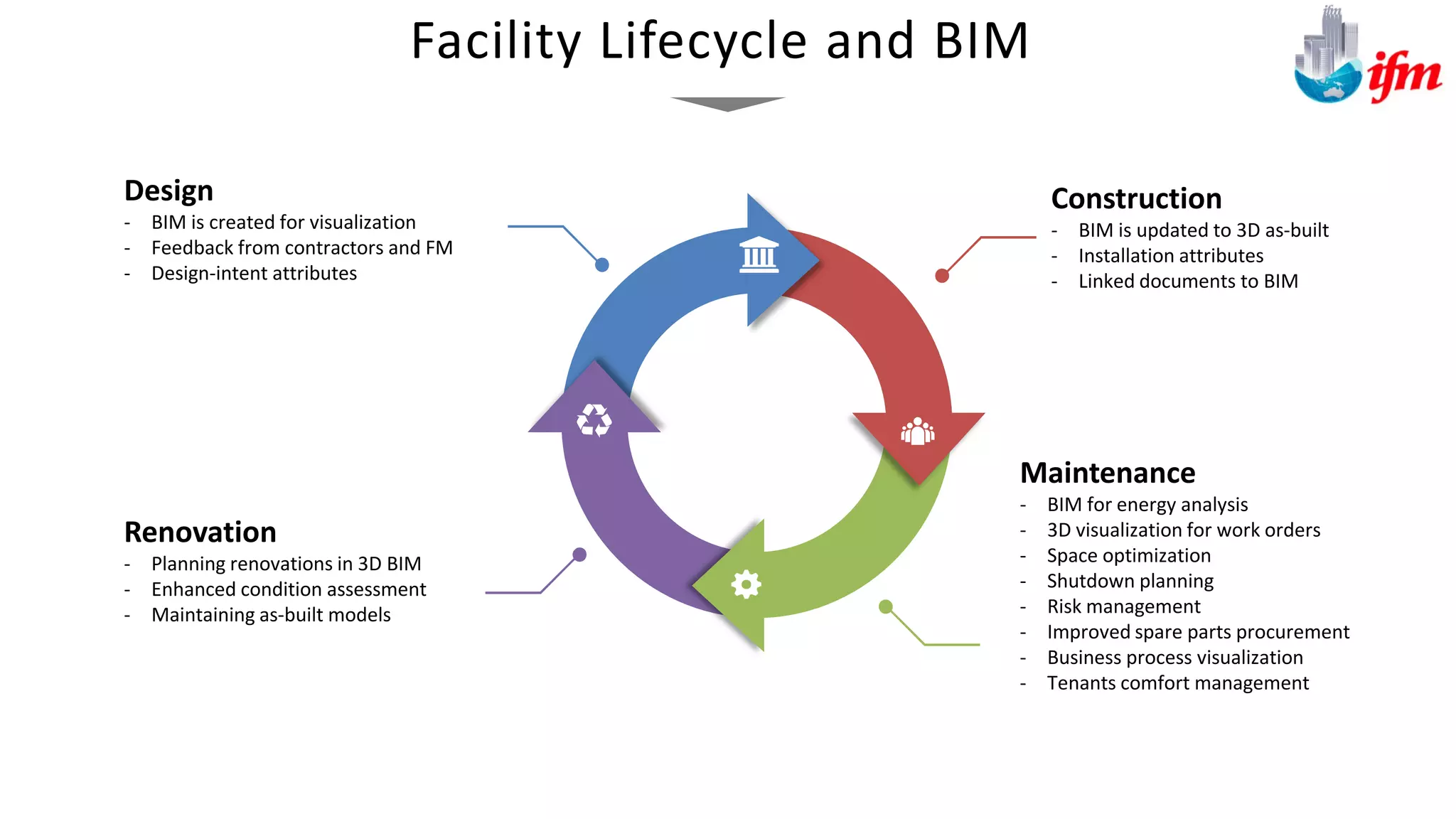
Design
- BIM is created for visualization
- Feedback from contractors and FM
- Design-intent attributes
Construction
- BIM is updated to 3D as-built
- Installation attributes
- Linked documents to BIM
Renovation
- Planning renovations in 3D BIM
- Enhanced condition assessment
- Maintaining as-built models
Maintenance
- BIM for energy analysis
- 3D visualization for work orders
- Space optimization
- Shutdown planning
- Risk management
- Improved spare parts procurement
- Business process visualization
- Tenants comfort management
Facility Lifecycle and BIM
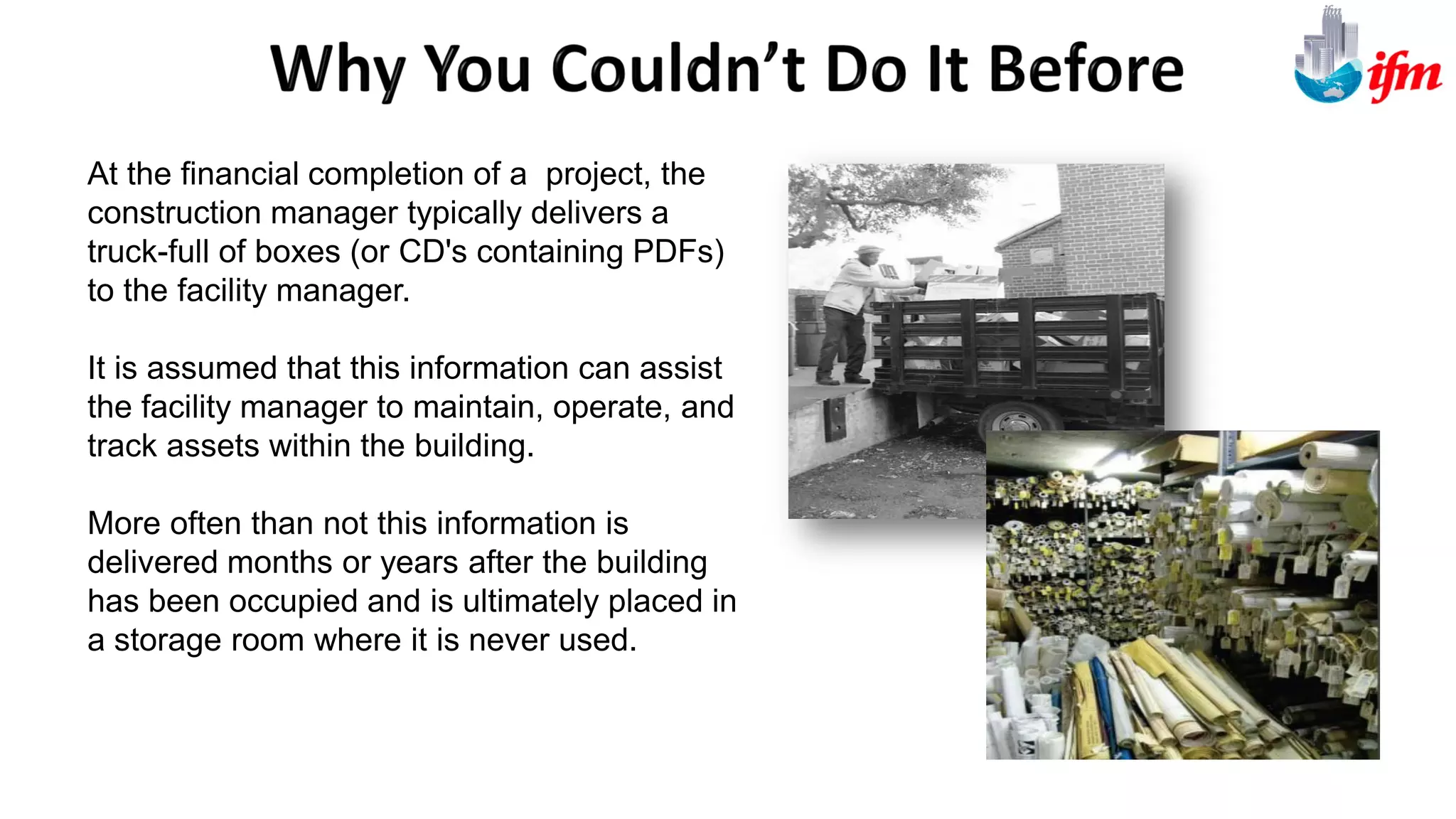
At the financial completion of a project, the
construction manager typically delivers a
truck-full of boxes (or CD's containing PDFs)
to the facility manager.
It is assumed that this information can assist
the facility manager to maintain, operate, and
track assets within the building.
More often than not this information is
delivered months or years after the building
has been occupied and is ultimately placed in
a storage room where it is never used.
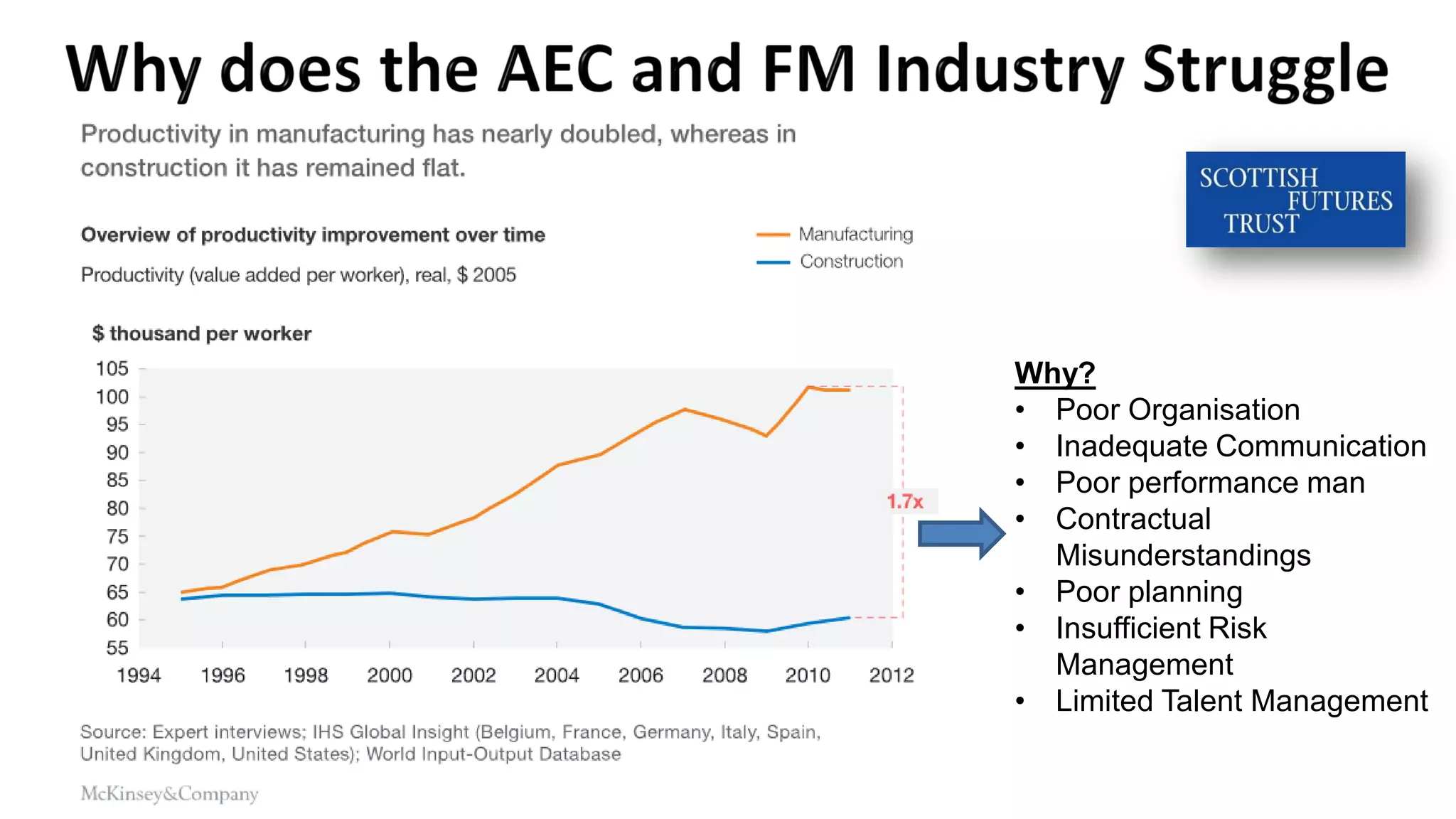
Why?
• Poor Organisation
• Inadequate Communication
• Poor performance man
• Contractual
Misunderstandings
• Poor planning
• Insufficient Risk
Management
• Limited Talent Management
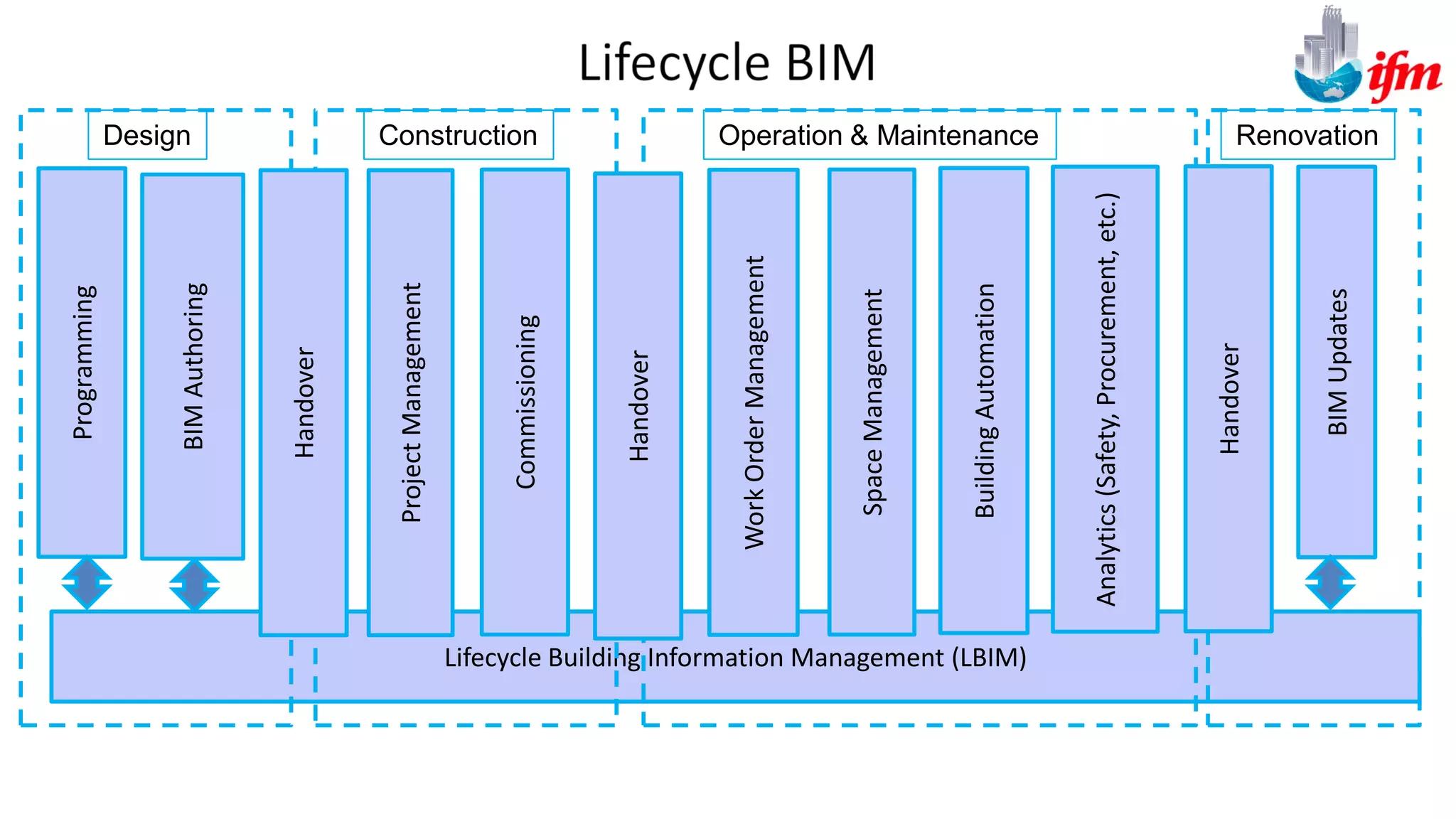
Lifecycle Building Information Management (LBIM)
Design Construction Operation & Maintenance Renovation
WorkOrderManagement
SpaceManagement
BuildingAutomation
ProjectManagement
BIMAuthoring
Programming
Handover
Handover
Handover
BIMUpdates
Commissioning
Analytics(Safety,Procurement,etc.)
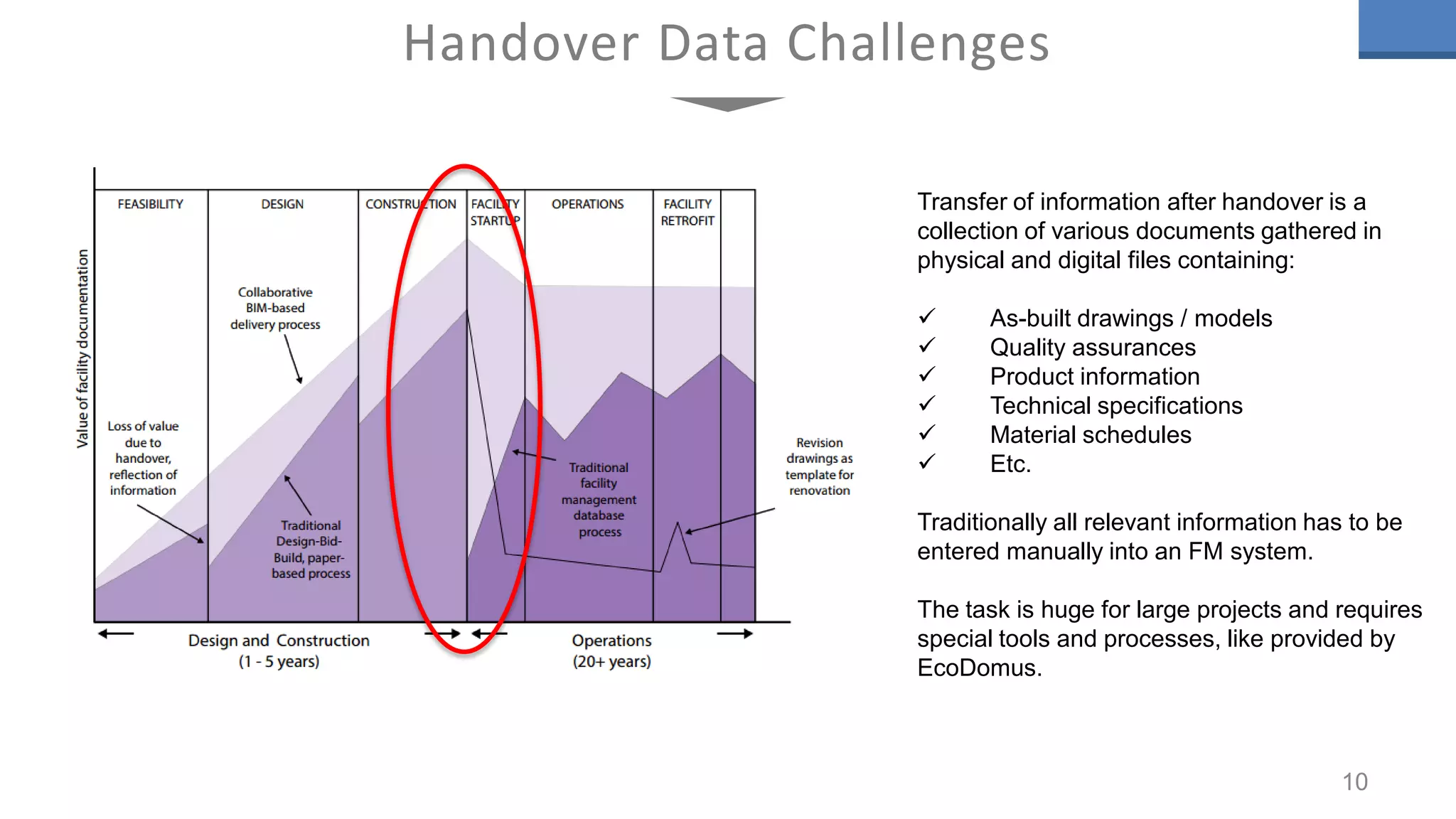
Handover Data Challenges
10
Transfer of information after handover is a
collection of various documents gathered in
physical and digital files containing:
 As-built drawings / models
 Quality assurances
 Product information
 Technical specifications
 Material schedules
 Etc.
Traditionally all relevant information has to be
entered manually into an FM system.
The task is huge for large projects and requires
special tools and processes, like provided by
EcoDomus.
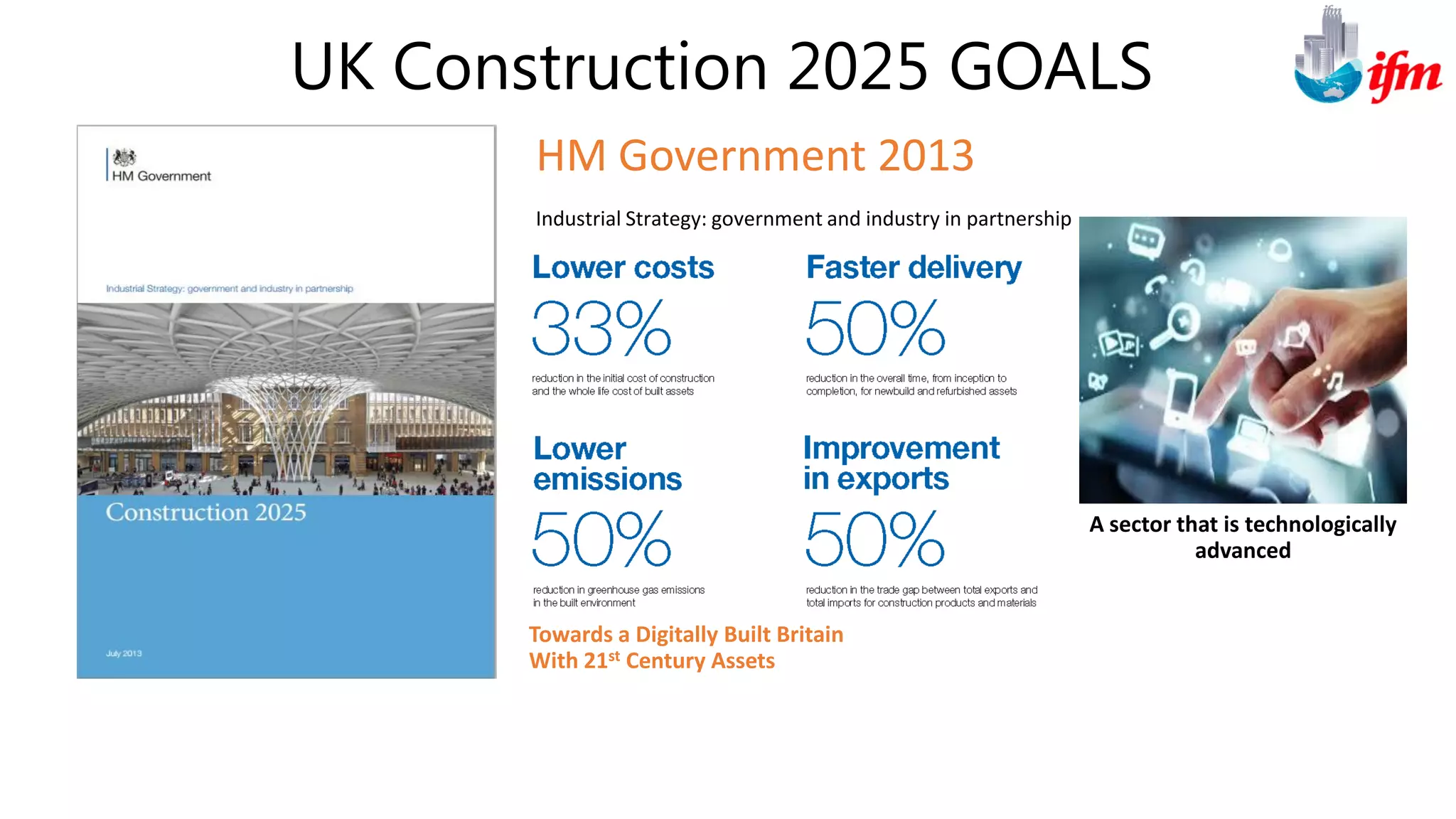
UK Construction 2025 GOALS
HM Government 2013
Industrial Strategy: government and industry in partnership
Towards a Digitally Built Britain
With 21st Century Assets
A sector that is technologically
advanced
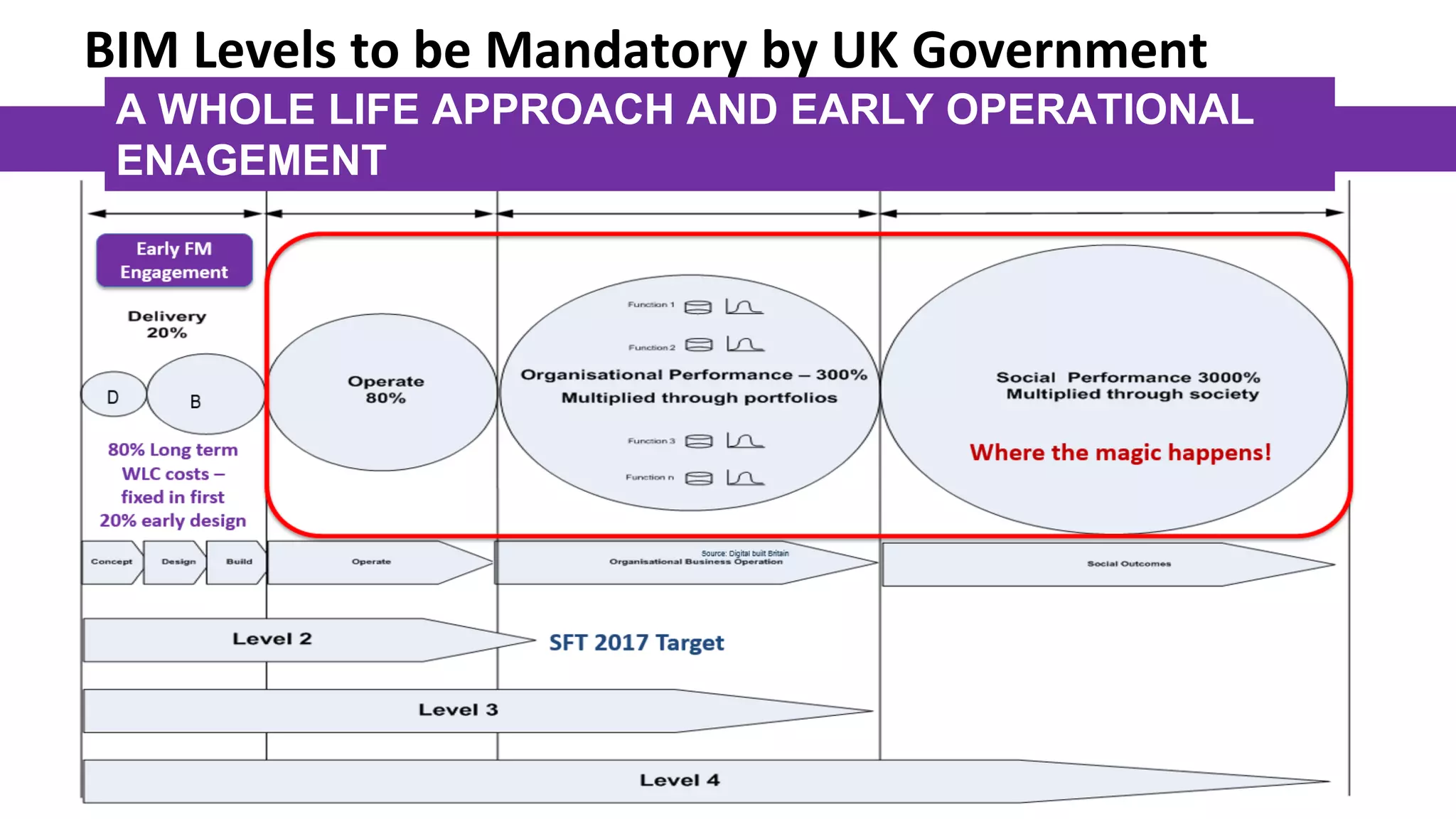
A WHOLE LIFE APPROACH AND EARLY OPERATIONAL
ENAGEMENT
BIM Levels to be Mandatory by UK Government
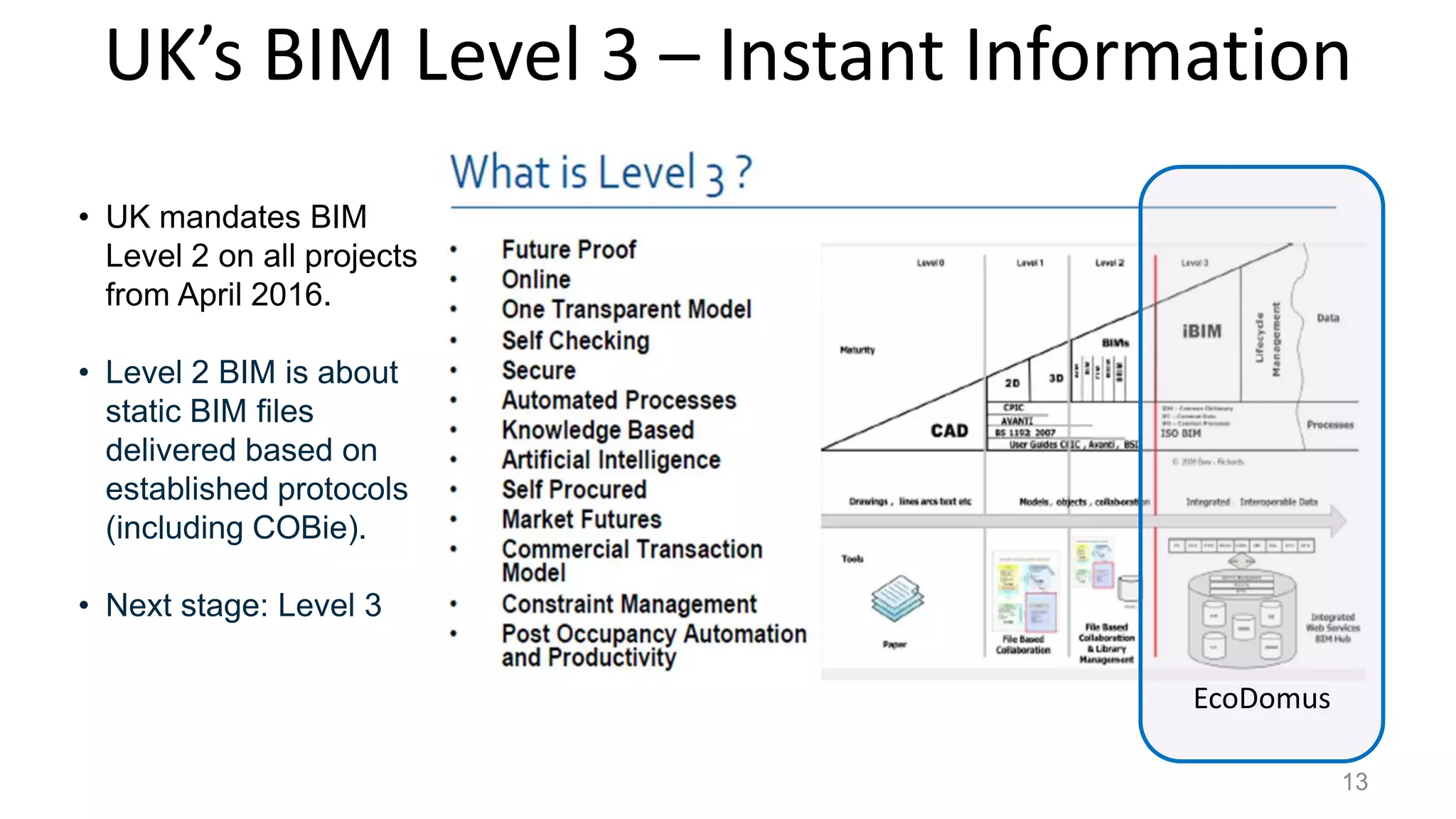
UK’s BIM Level 3 – Instant Information
for Analytics
13
• UK mandates BIM
Level 2 on all projects
from April 2016.
• Level 2 BIM is about
static BIM files
delivered based on
established protocols
(including COBie).
• Next stage: Level 3
EcoDomus
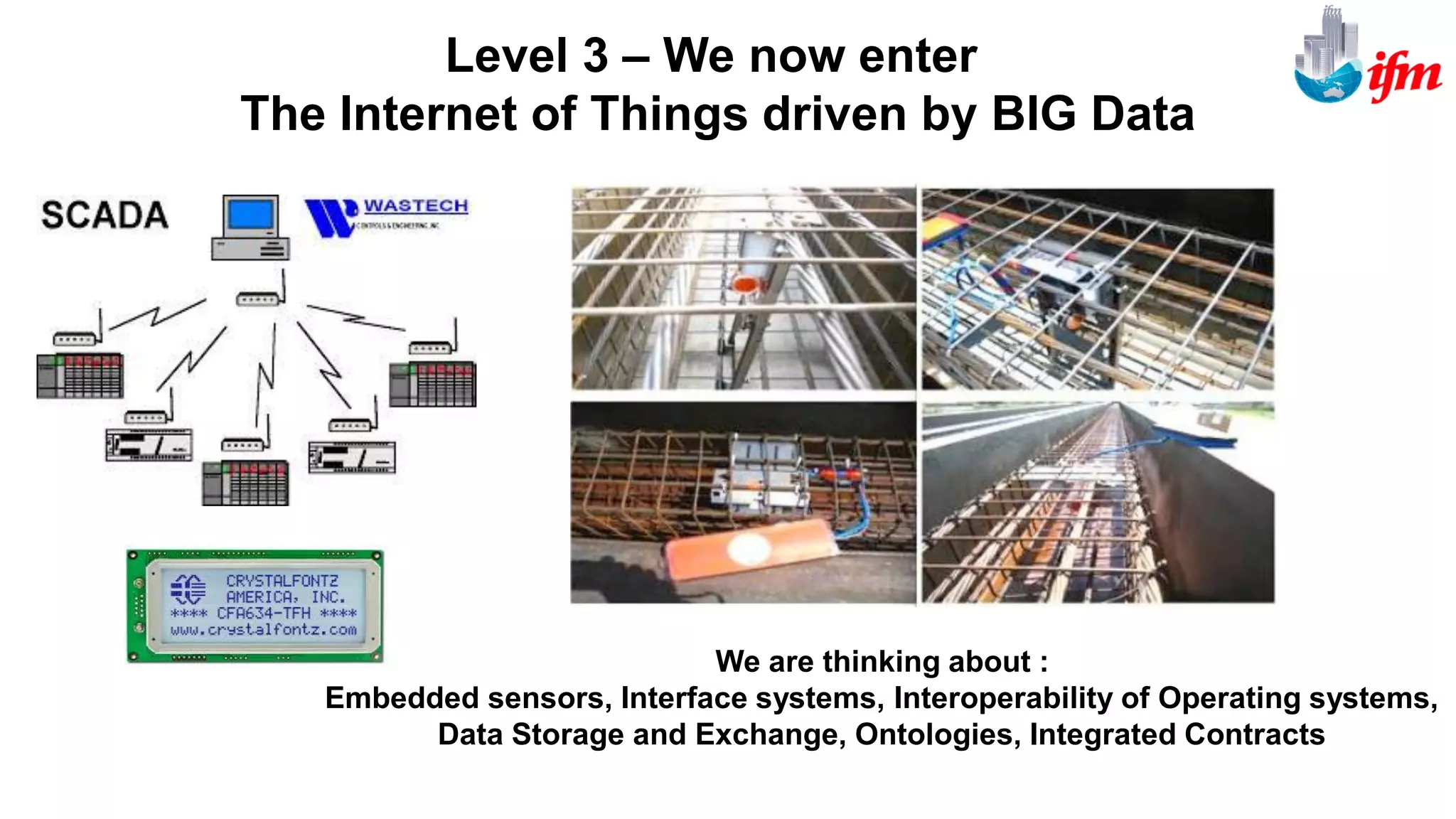
We are thinking about :
Embedded sensors, Interface systems, Interoperability of Operating systems,
Data Storage and Exchange, Ontologies, Integrated Contracts
Level 3 – We now enter
The Internet of Things driven by BIG Data
15
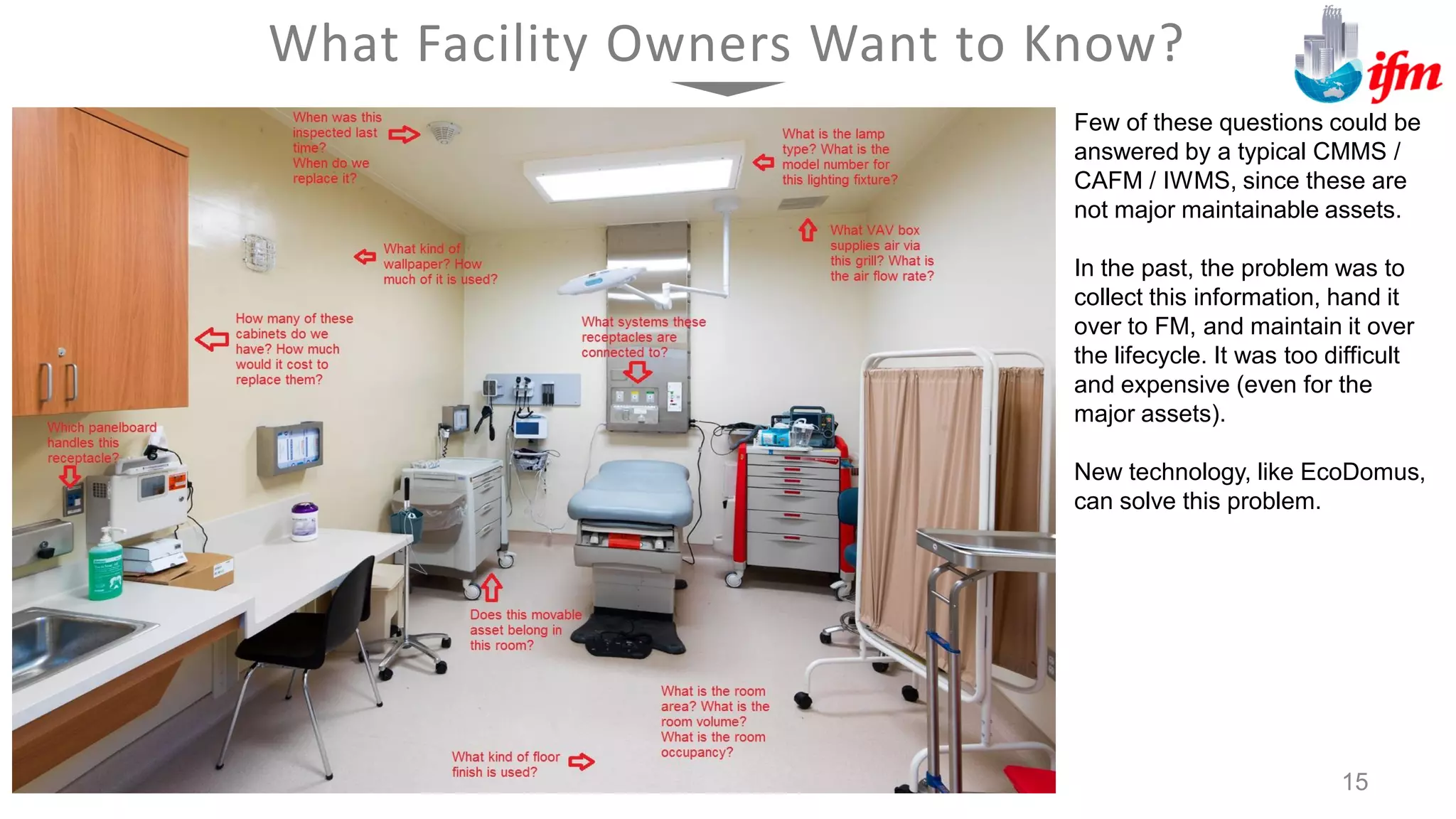
What Facility Owners Want to Know?
Few of these questions could be
answered by a typical CMMS /
CAFM / IWMS, since these are
not major maintainable assets.
In the past, the problem was to
collect this information, hand it
over to FM, and maintain it over
the lifecycle. It was too difficult
and expensive (even for the
major assets).
New technology, like EcoDomus,
can solve this problem.
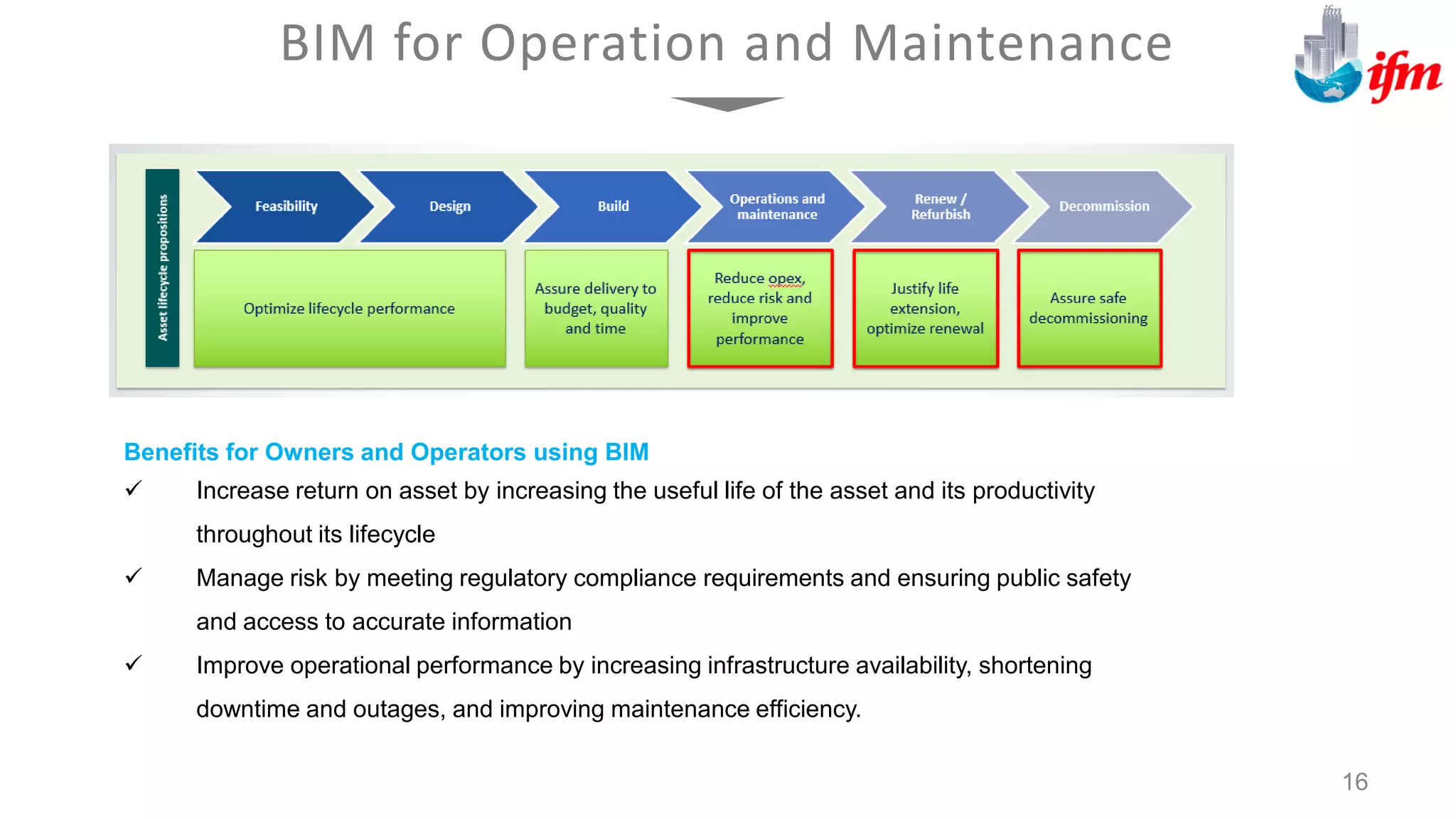
BIM for Operation and Maintenance
16
Benefits for Owners and Operators using BIM
 Increase return on asset by increasing the useful life of the asset and its productivity
throughout its lifecycle
 Manage risk by meeting regulatory compliance requirements and ensuring public safety
and access to accurate information
 Improve operational performance by increasing infrastructure availability, shortening
downtime and outages, and improving maintenance efficiency.
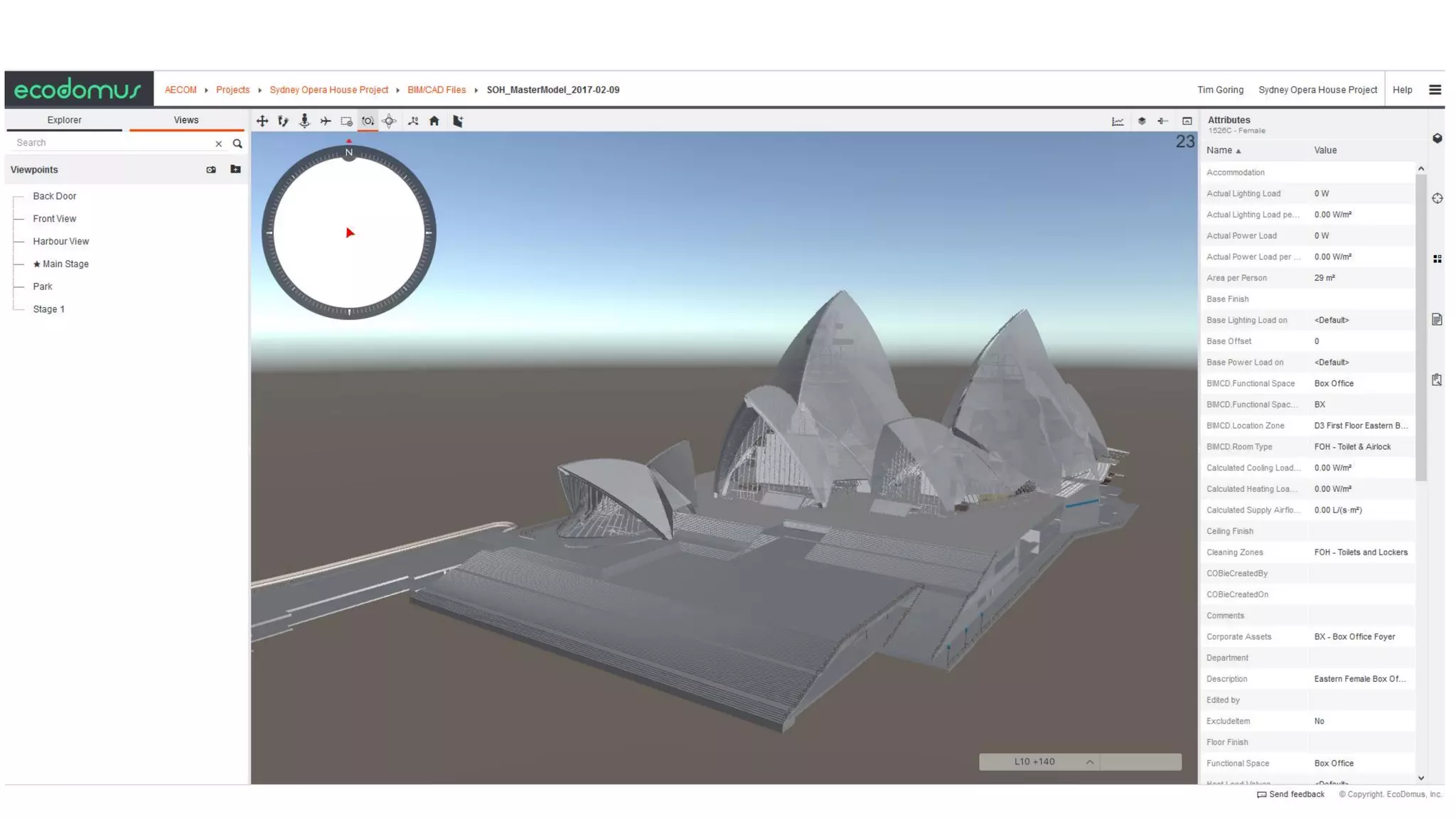
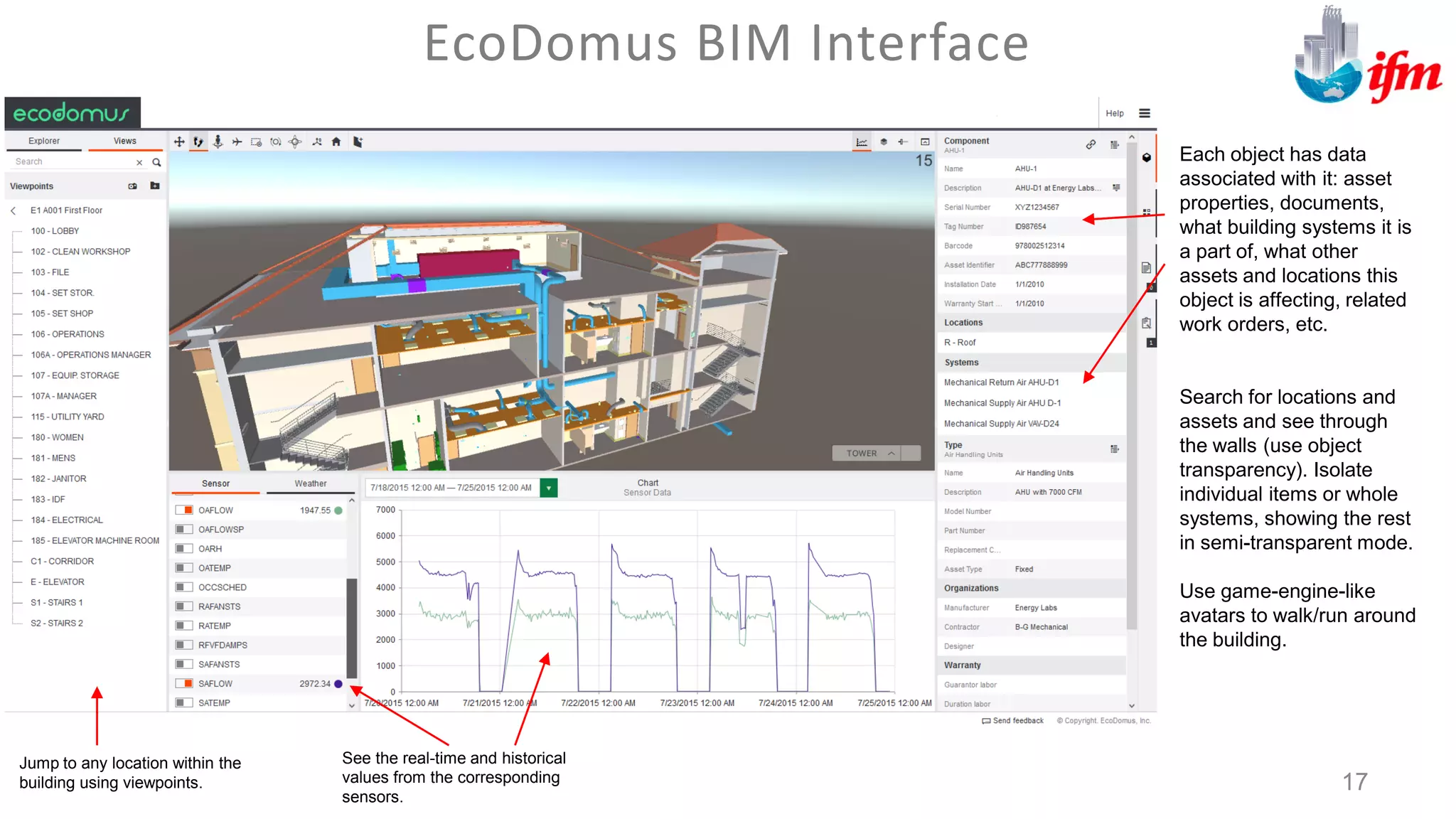
Each object has data
associated with it: asset
properties, documents,
what building systems it is
a part of, what other
assets and locations this
object is affecting, related
work orders, etc.
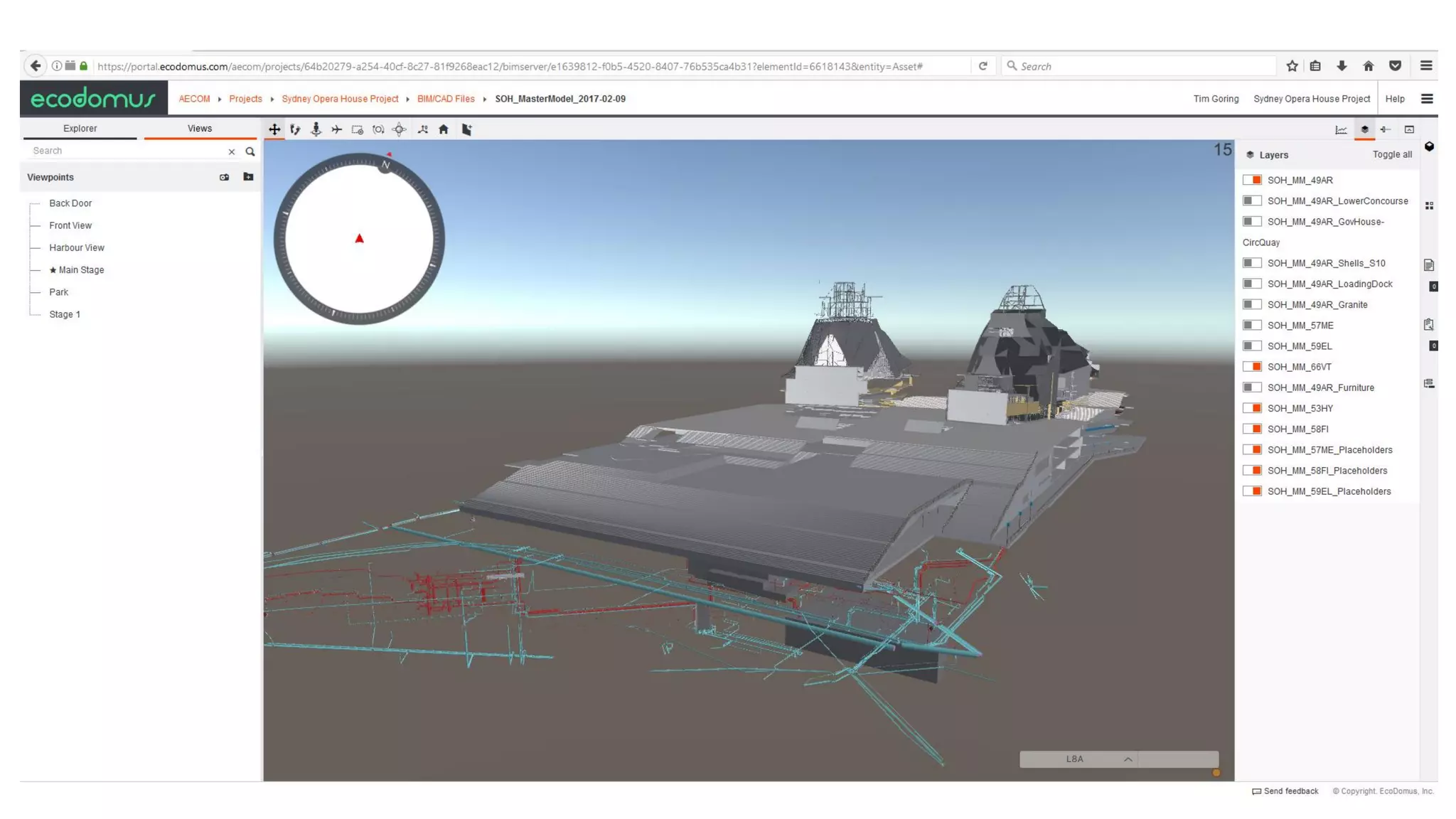
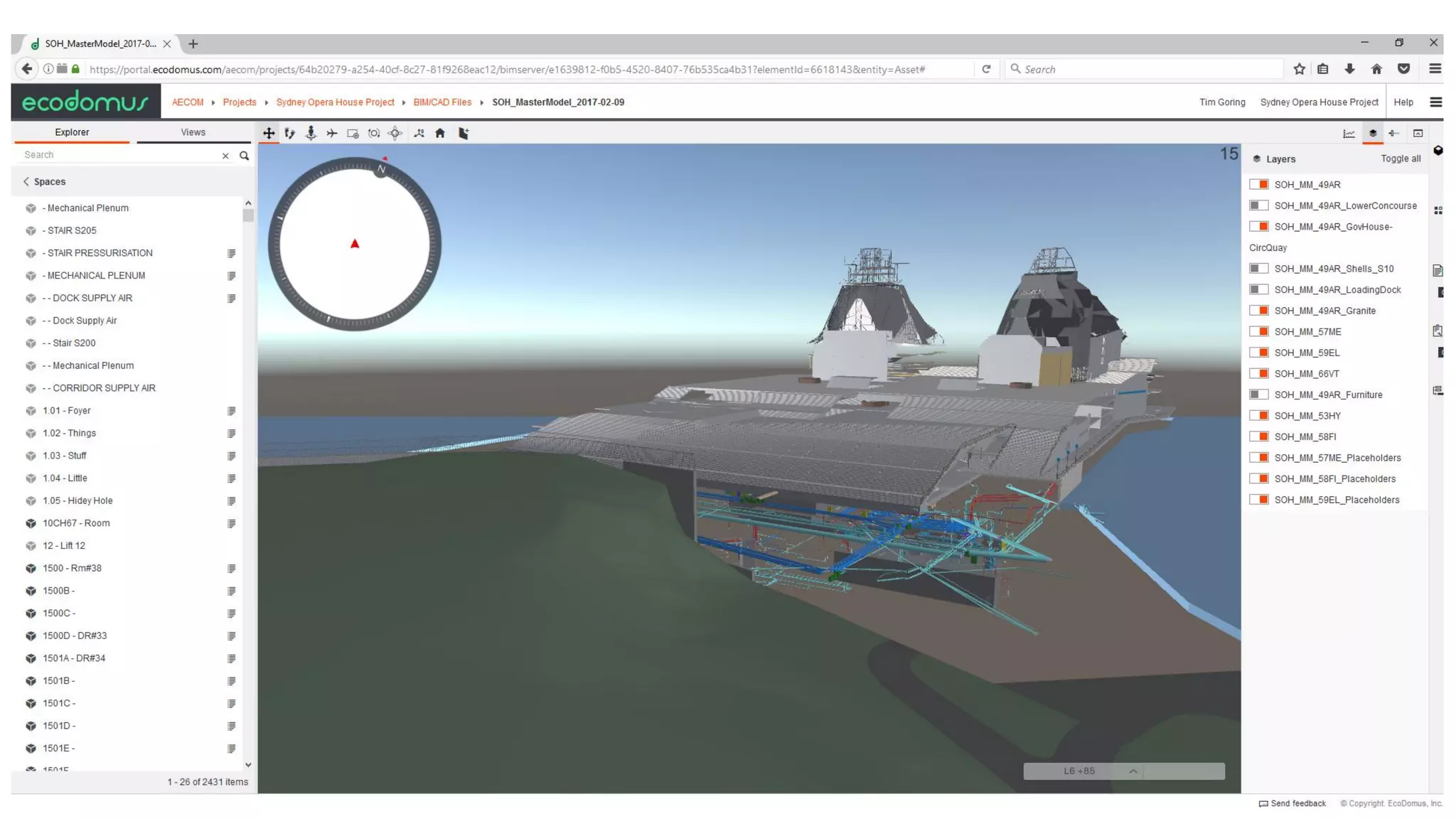
Search for locations and
assets and see through
the walls (use object
transparency). Isolate
individual items or whole
systems, showing the rest
in semi-transparent mode.
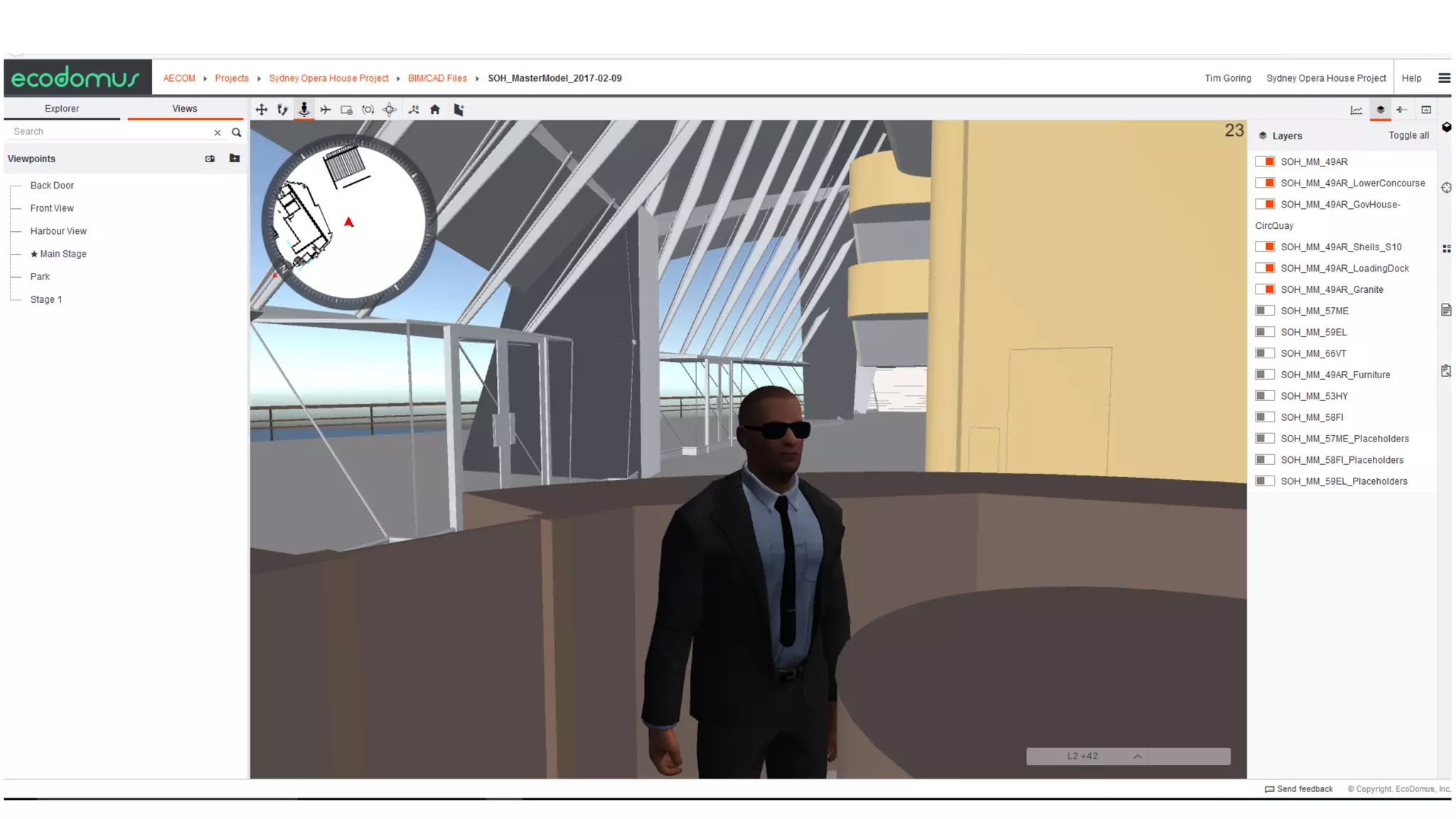
Use game-engine-like
avatars to walk/run around
the building.
EcoDomus BIM Interface
17
Jump to any location within the
building using viewpoints.
See the real-time and historical
values from the corresponding
sensors.
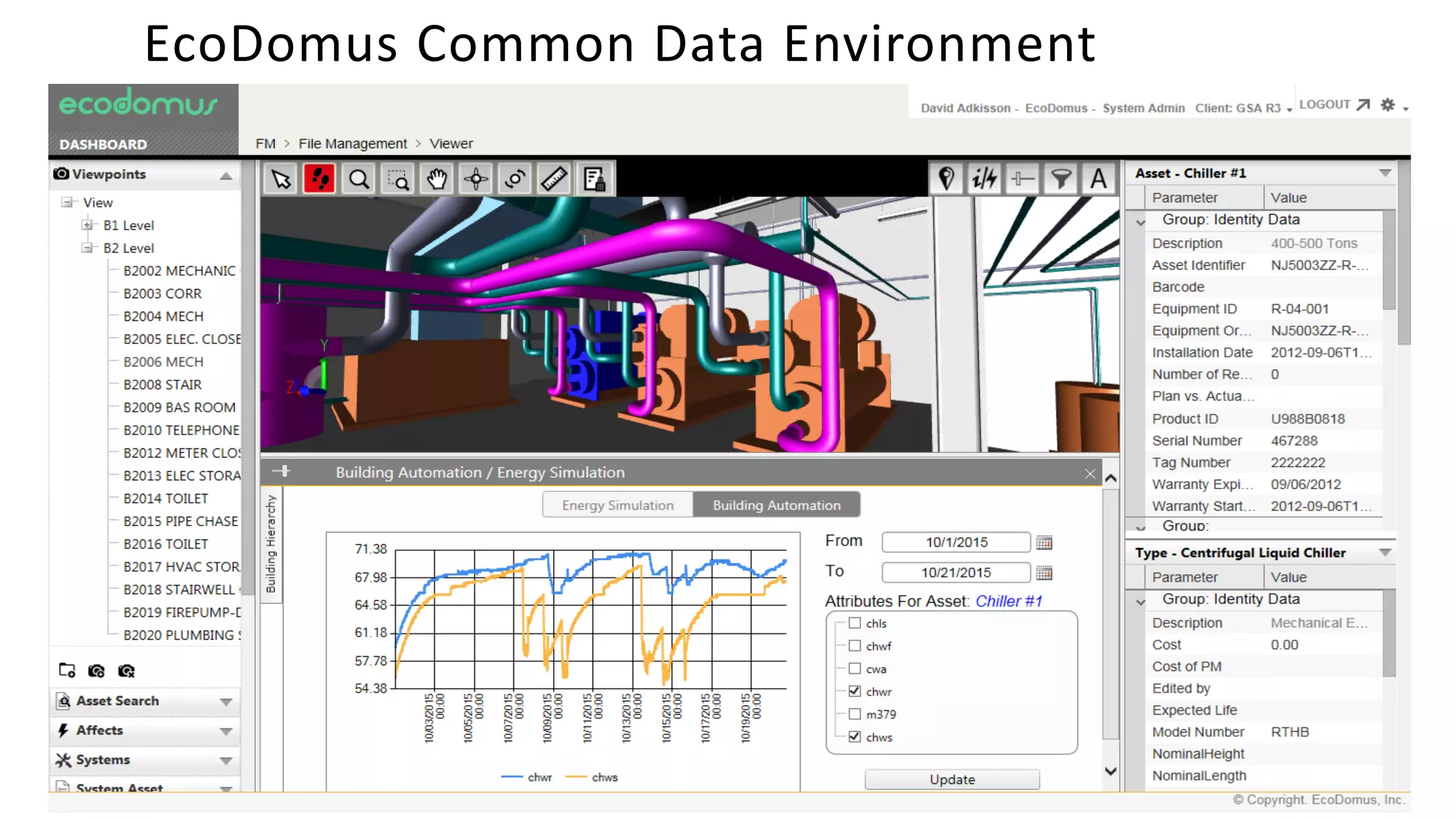
EcoDomus Common Data Environment
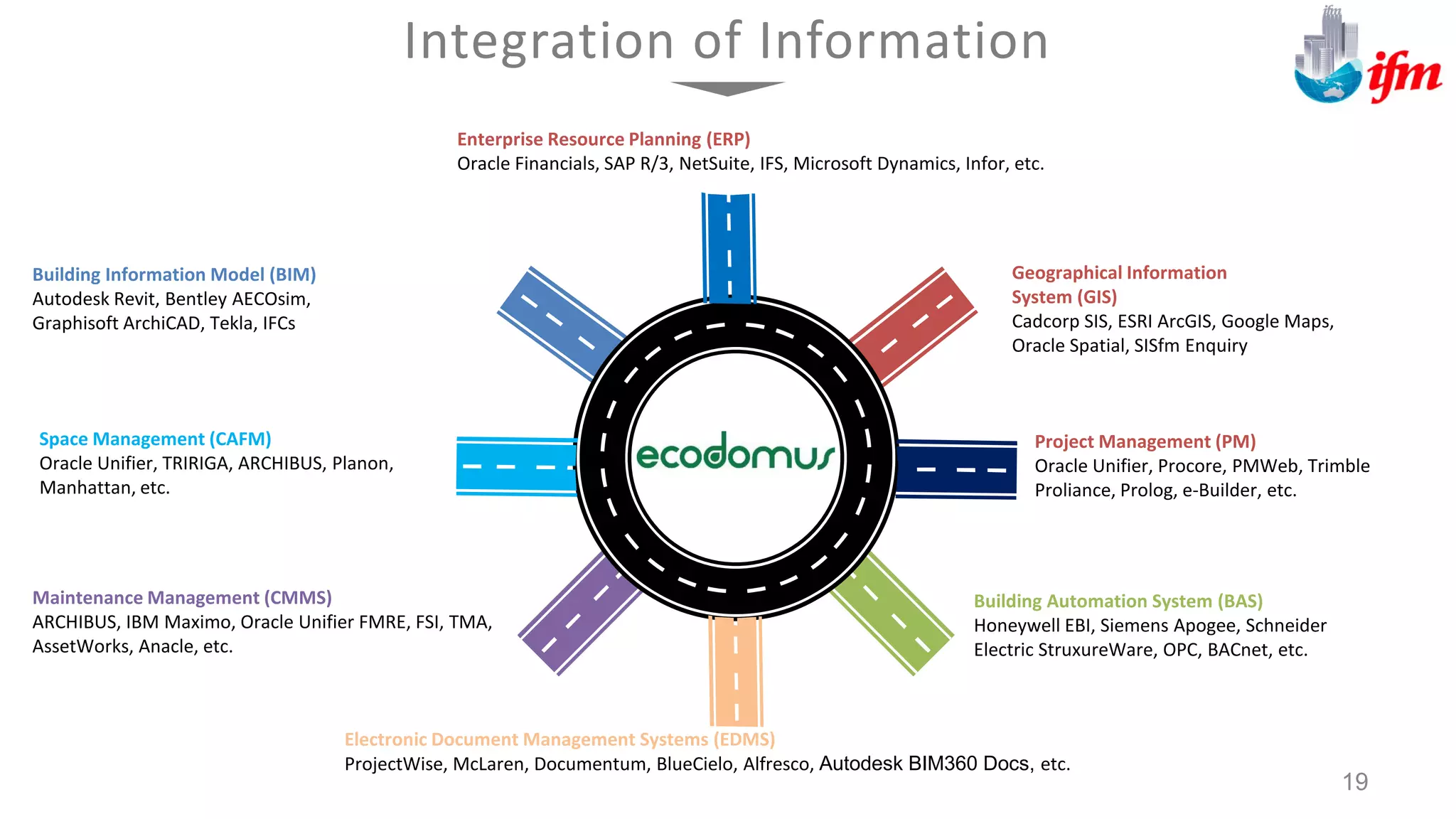
Building Information Model (BIM)
Autodesk Revit, Bentley AECOsim,
Graphisoft ArchiCAD, Tekla, IFCs
Geographical Information
System (GIS)
Cadcorp SIS, ESRI ArcGIS, Google Maps,
Oracle Spatial, SISfm Enquiry
Building Automation System (BAS)
Honeywell EBI, Siemens Apogee, Schneider
Electric StruxureWare, OPC, BACnet, etc.
Maintenance Management (CMMS)
ARCHIBUS, IBM Maximo, Oracle Unifier FMRE, FSI, TMA,
AssetWorks, Anacle, etc.
Integration of Information
Space Management (CAFM)
Oracle Unifier, TRIRIGA, ARCHIBUS, Planon,
Manhattan, etc.
Project Management (PM)
Oracle Unifier, Procore, PMWeb, Trimble
Proliance, Prolog, e-Builder, etc.
19
Electronic Document Management Systems (EDMS)
ProjectWise, McLaren, Documentum, BlueCielo, Alfresco, Autodesk BIM360 Docs, etc.
Enterprise Resource Planning (ERP)
Oracle Financials, SAP R/3, NetSuite, IFS, Microsoft Dynamics, Infor, etc.
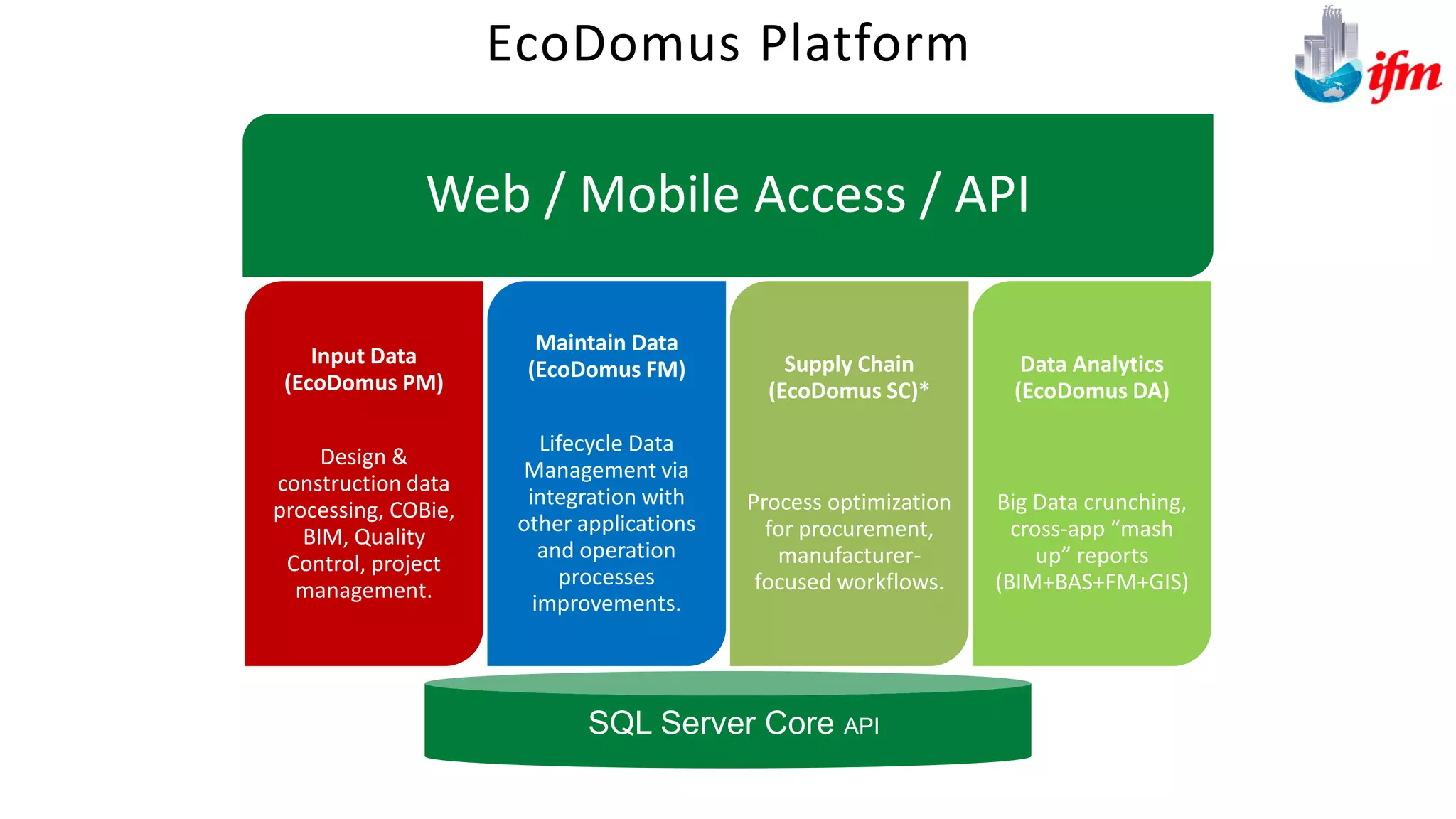
Web / Mobile Access / API
Input Data
(EcoDomus PM)
Design &
construction data
processing, COBie,
BIM, Quality
Control, project
management.
Maintain Data
(EcoDomus FM)
Lifecycle Data
Management via
integration with
other applications
and operation
processes
improvements.
Supply Chain
(EcoDomus SC)*
Process optimization
for procurement,
manufacturer-
focused workflows.
Data Analytics
(EcoDomus DA)
Big Data crunching,
cross-app “mash
up” reports
(BIM+BAS+FM+GIS)
EcoDomus Platform
SQL Server Core API
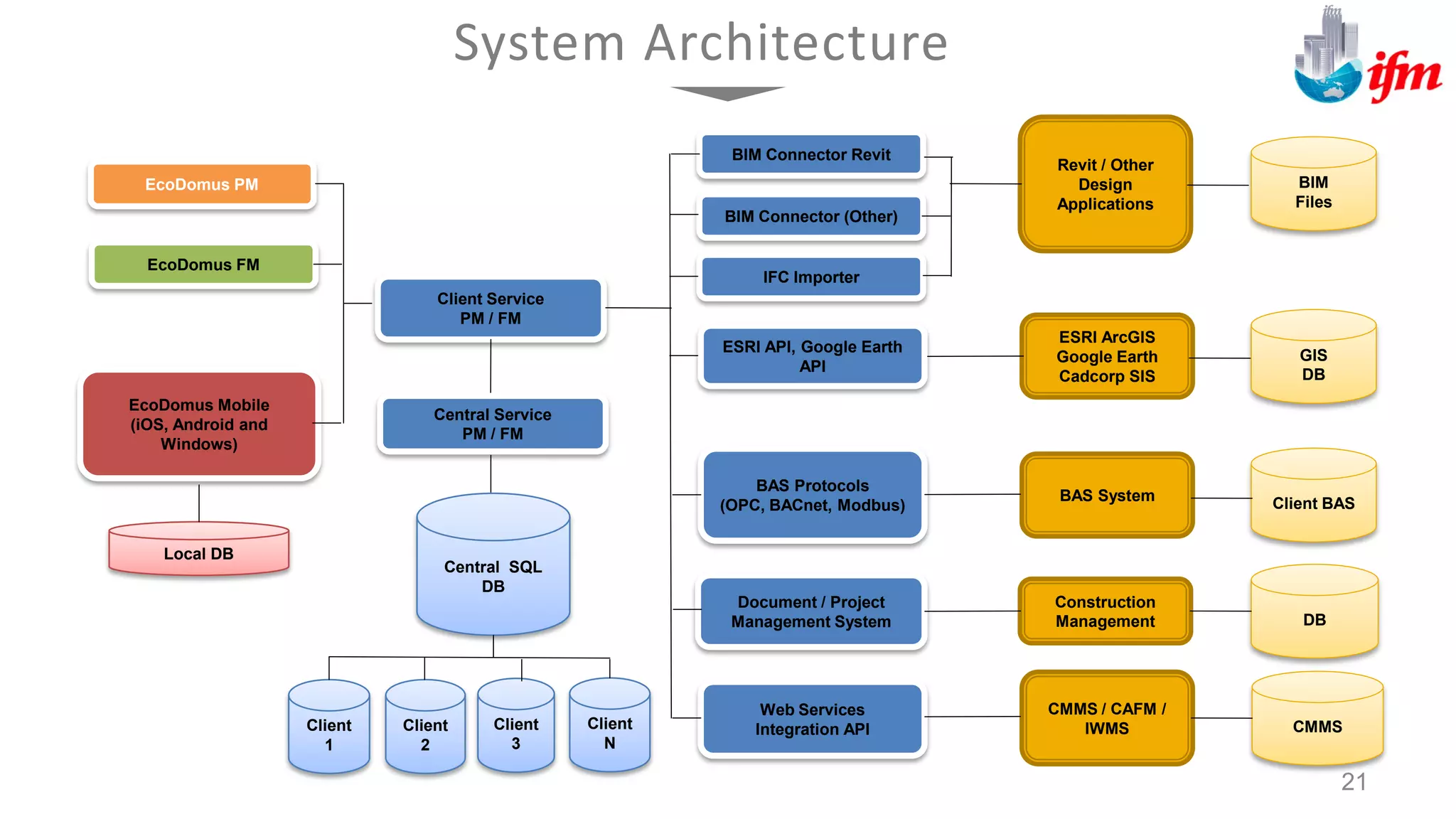
System Architecture
EcoDomus PM
EcoDomus FM
Client Service
PM / FM
Central Service
PM / FM
BIM Connector Revit
EcoDomus Mobile
(iOS, Android and
Windows)
Central SQL
DB
Client
N
Client
3
Client
2
Client
1
Revit / Other
Design
Applications
Local DB
BIM
Files
BIM Connector (Other)
IFC Importer
ESRI API, Google Earth
API
ESRI ArcGIS
Google Earth
Cadcorp SIS
GIS
DB
BAS Protocols
(OPC, BACnet, Modbus)
BAS System Client BAS
Document / Project
Management System
Construction
Management
Web Services
Integration API
CMMS / CAFM /
IWMS CMMS
DB
21
ARCHIBUS/FM Data Schema & IFM Document Management
& EcoDomus COBie and SMART Building
[Oracle – MS SQL Server]
EcoDomus Core Application
SISfm Enquiry Administrator
APIs (Application Program Interfaces)
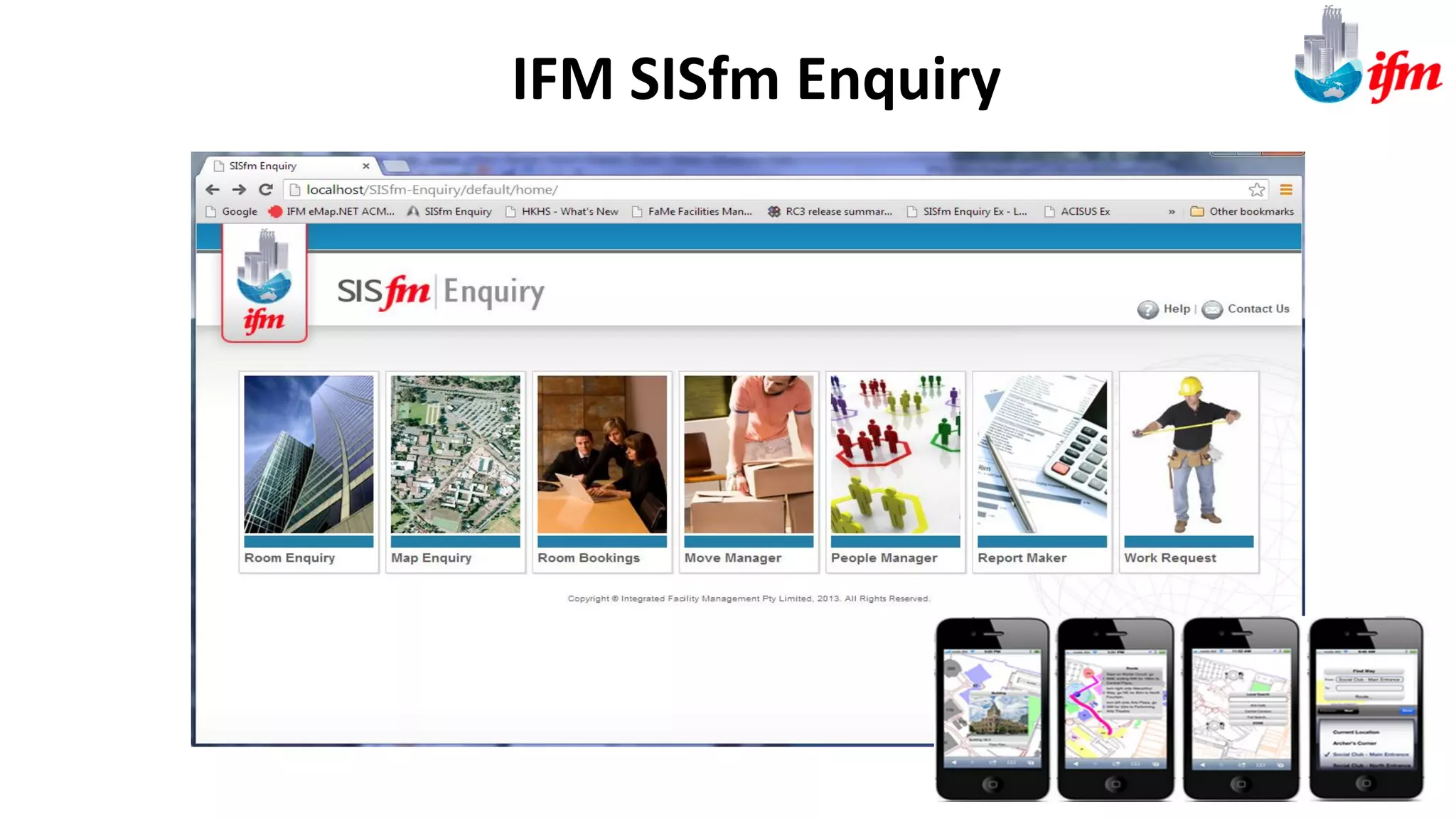
IFM SISfm Enquiry
Room Enquiry
Map Enquiry
Room Booking
Move Manager
People Manger
Works Request
Report Maker
Map Mobile
EcoDomus PM/FM
BIM Connectors
Project Management
COBie
Design Management
FM Asset capture
Lifecycle BIM
Virtual Environments
Energy Management
BusinessIntelligence&Integration,Workflow
ControllersandAnalytics
Process Navigator
IFM SISfm Enquiry
Browser/Mobile
EcoDomus PM/FM
Browser/Mobile
Integrated Solution Based on open Web Services architecture
Archibus Web Central
Browser/Mobile
ARCHIBUS/FM
Works & Maintenance
Asset Management
Space Management
Project Management
Lease Management
Environmental Management
OHS Management
ARCHIBUS/FM Core Application
General
Student &
Staff Access
API Web
Services
(SOA)
FM
Staff Access
Shared
RDBMS
Common Tables
Modules and
Functionality
Low level Integration
between FM, Assets Works,
Space (SAM), BIM, CAD, GIS
Archibus FM
Platform
(FM Staff Access)
IFM SISfm Enquiry
(Public, Staff and Student
access) EcoDomus FM
(FM Staff Access)
Spatial Data
CAD, BIM,
Plans, GIS ,
Mapping
Cadcorp SIS
Autodesk
Revit
Autodesk
AutoCAD
Archibus Modules
• Space Management
• Personnel and Occupancy
• Space Chargeback
• Strategic Space Planning
• Project Management
• Asset Management
• Mobile Framework
IFM SISfm Enquiry (GIS &
Mapping)
• Room Enquiry
• Map Enquiry
• Move Manager
• People Manager
• Works Request
• Room Booking
• Report Maker
• Parking Management
• Map Mobile
EcoDomus PM/FM (BIM QA
and Enterprise Viewing)
• Project Commissioning
• BIMCAD Lifecycle
Integration
• COBie Integration
• Document Management
Cadcorp SIS / Revit (Authoring
tools)
• CAD
• GIS/Mapping
• BIM
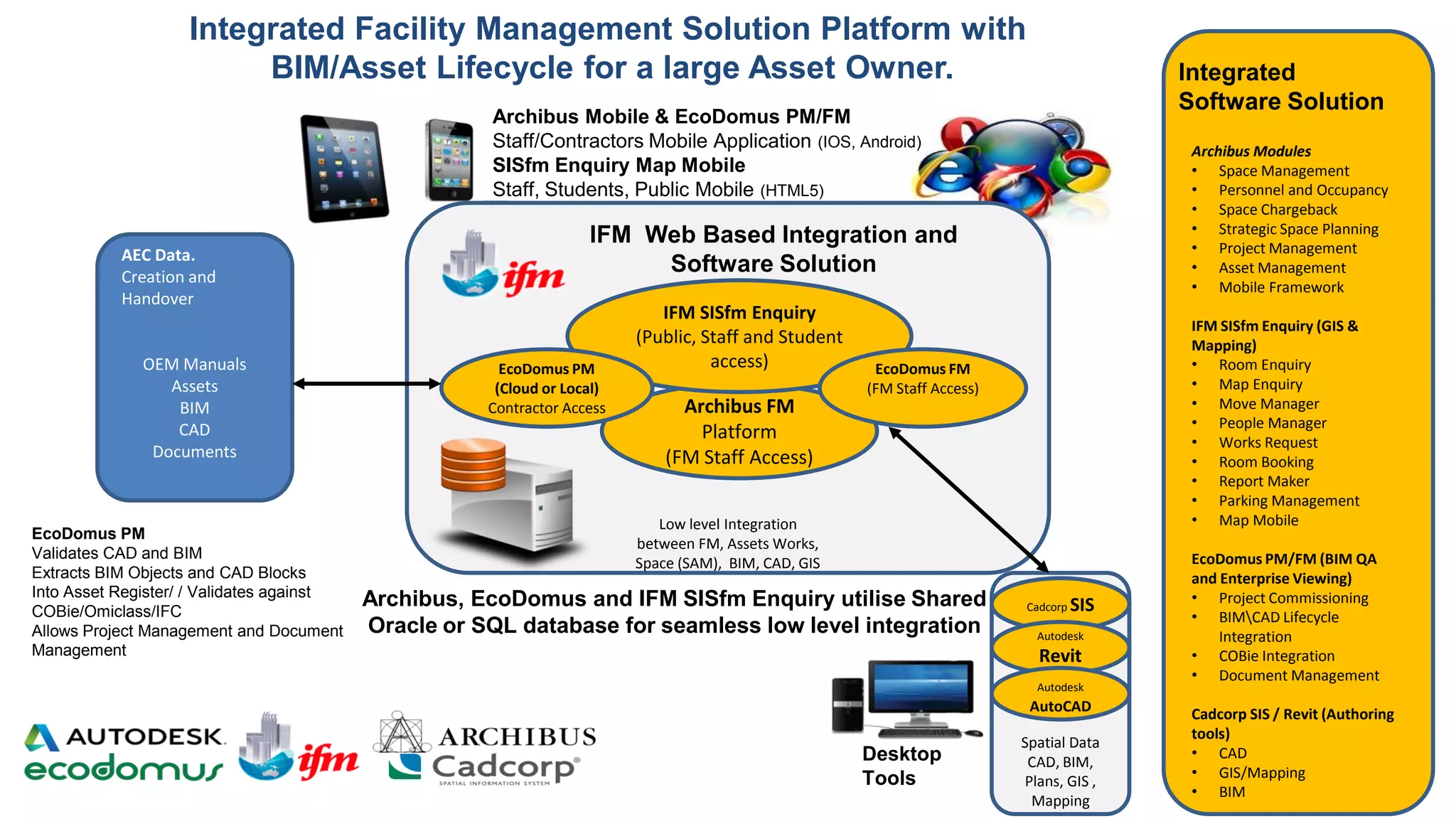
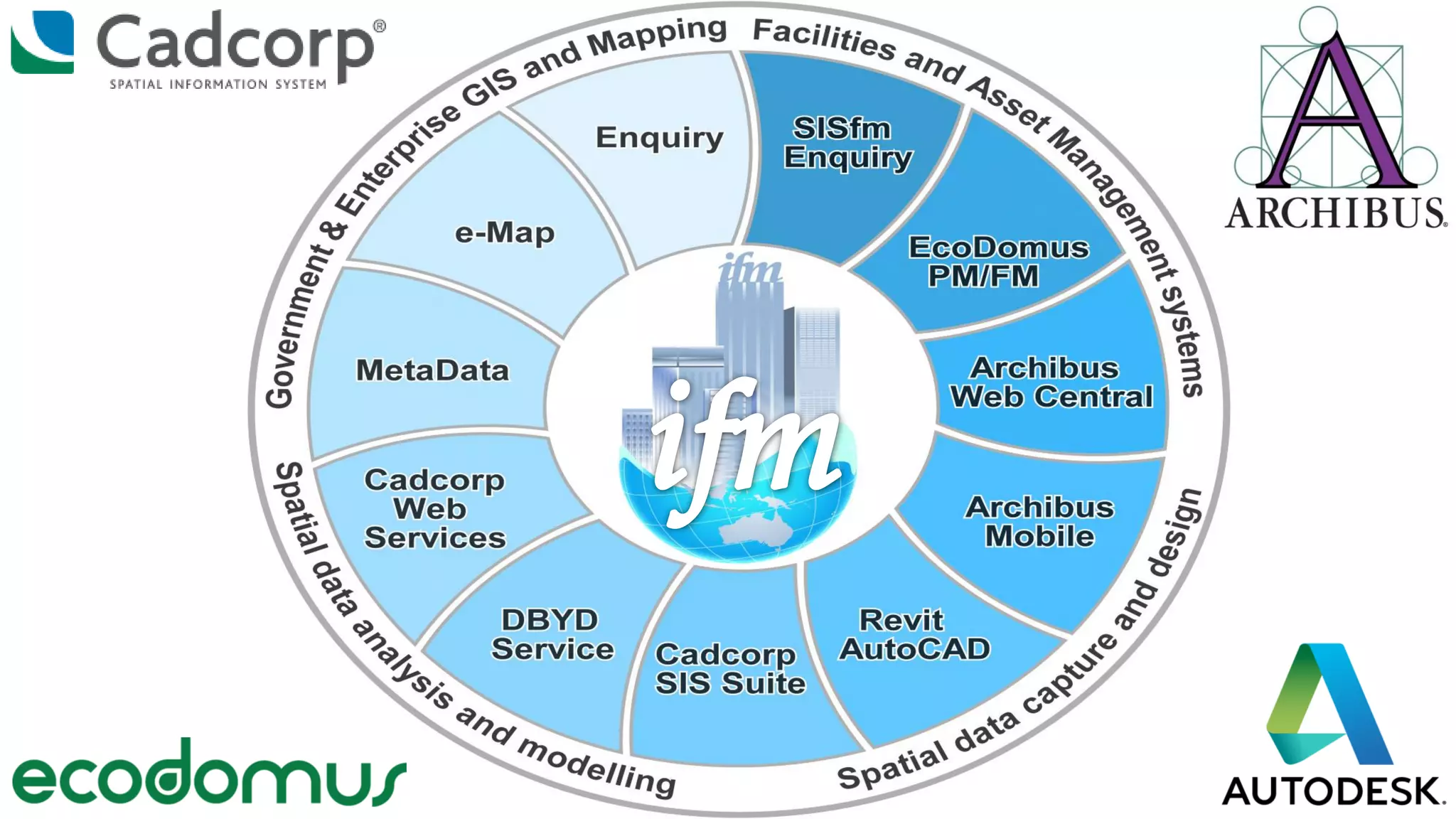
IFM Web Based Integration and
Software Solution
Integrated Facility Management Solution Platform with
BIM/Asset Lifecycle for a large Asset Owner. Integrated
Software Solution
EcoDomus PM
(Cloud or Local)
Contractor Access
AEC Data.
Creation and
Handover
OEM Manuals
Assets
BIM
CAD
Documents
EcoDomus PM
Validates CAD and BIM
Extracts BIM Objects and CAD Blocks
Into Asset Register/ / Validates against
COBie/Omiclass/IFC
Allows Project Management and Document
Management
Archibus, EcoDomus and IFM SISfm Enquiry utilise Shared
Oracle or SQL database for seamless low level integration
Archibus Mobile & EcoDomus PM/FM
Staff/Contractors Mobile Application (IOS, Android)
SISfm Enquiry Map Mobile
Staff, Students, Public Mobile (HTML5)
Desktop
Tools
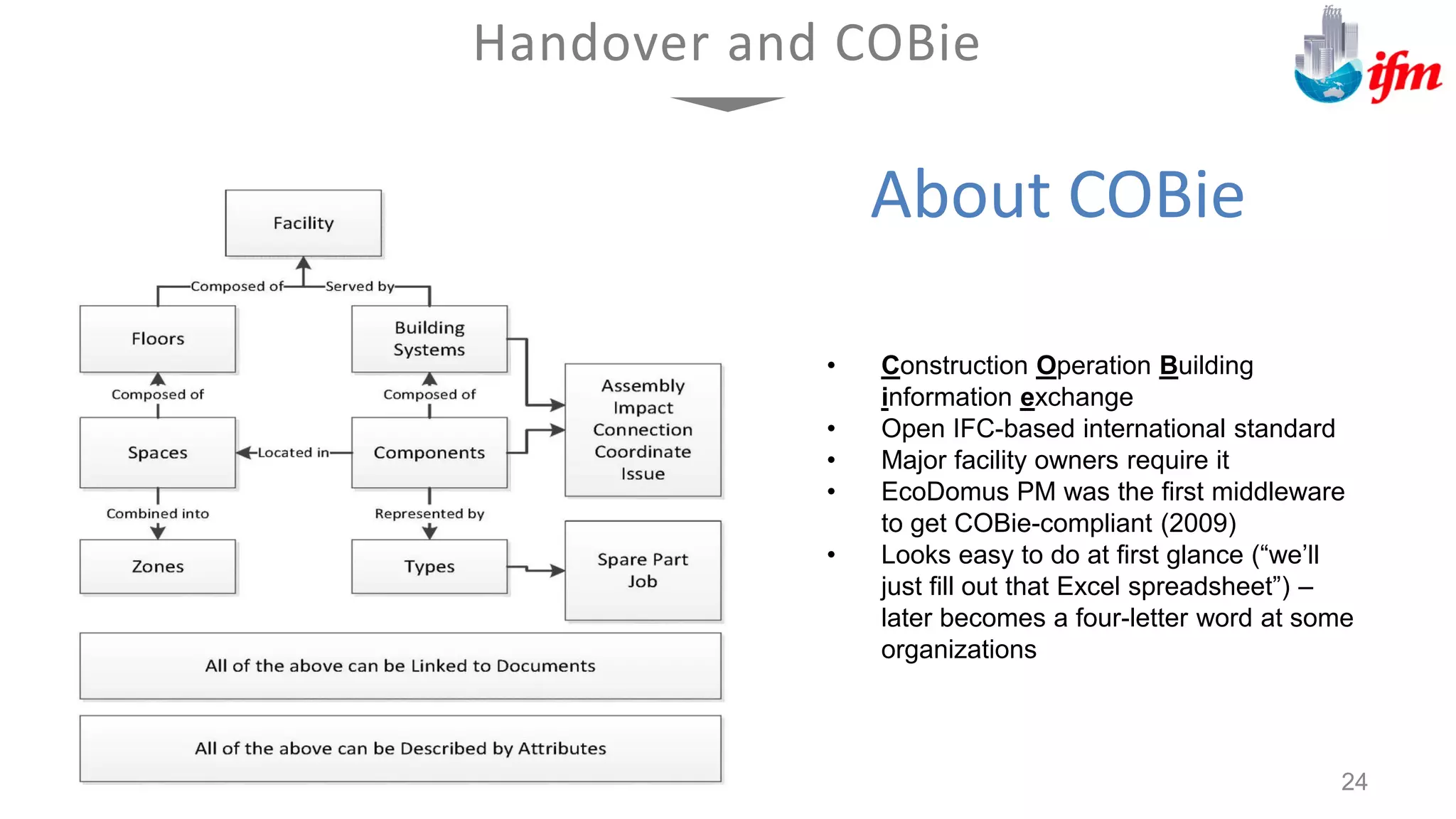
About COBie
• Construction Operation Building
information exchange
• Open IFC-based international standard
• Major facility owners require it
• EcoDomus PM was the first middleware
to get COBie-compliant (2009)
• Looks easy to do at first glance (“we’ll
just fill out that Excel spreadsheet”) –
later becomes a four-letter word at some
organizations
Handover and COBie
24
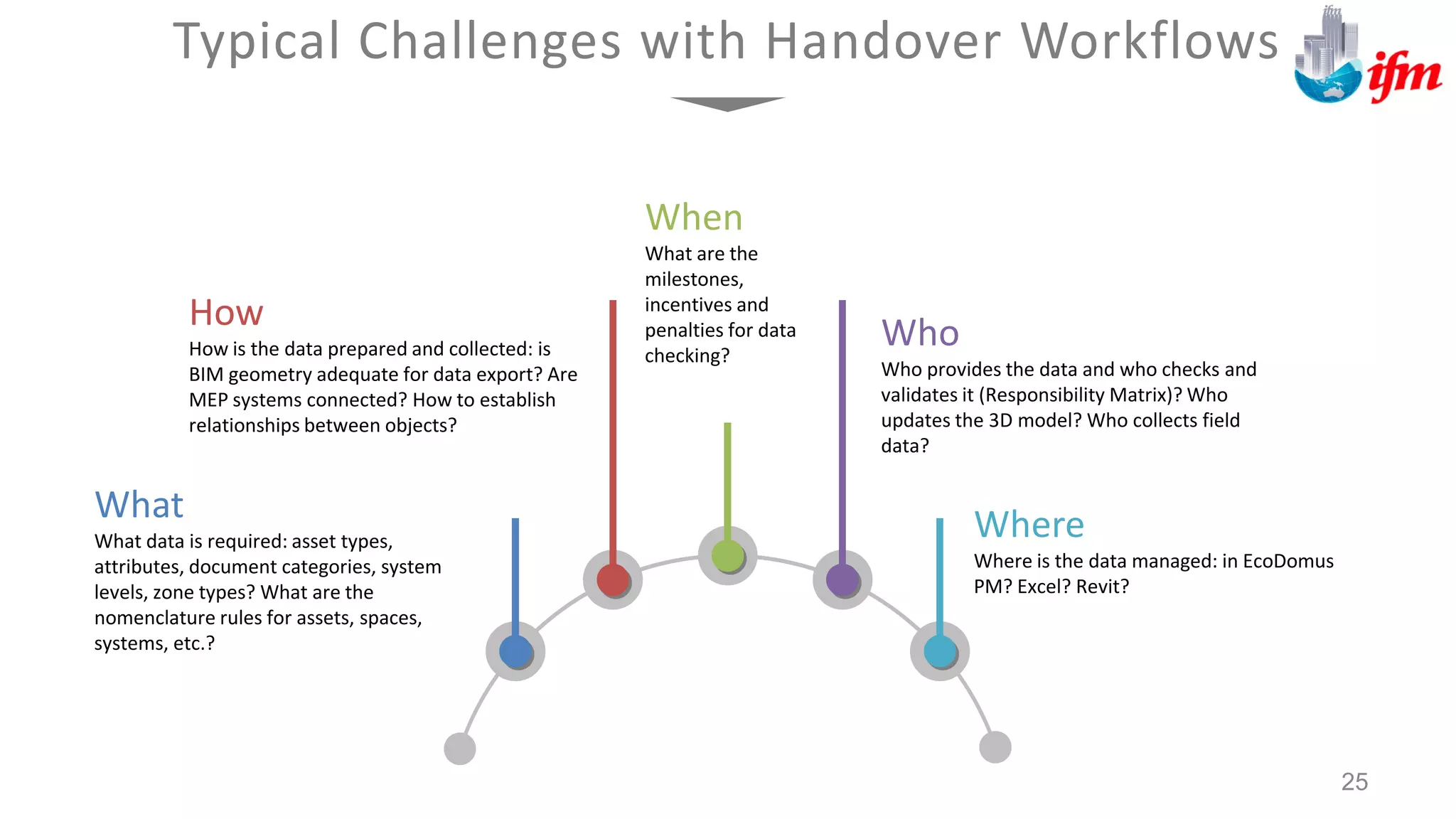
What
What data is required: asset types,
attributes, document categories, system
levels, zone types? What are the
nomenclature rules for assets, spaces,
systems, etc.?
How
How is the data prepared and collected: is
BIM geometry adequate for data export? Are
MEP systems connected? How to establish
relationships between objects?
Where
Where is the data managed: in EcoDomus
PM? Excel? Revit?
Who
Who provides the data and who checks and
validates it (Responsibility Matrix)? Who
updates the 3D model? Who collects field
data?
When
What are the
milestones,
incentives and
penalties for data
checking?
Typical Challenges with Handover Workflows
25
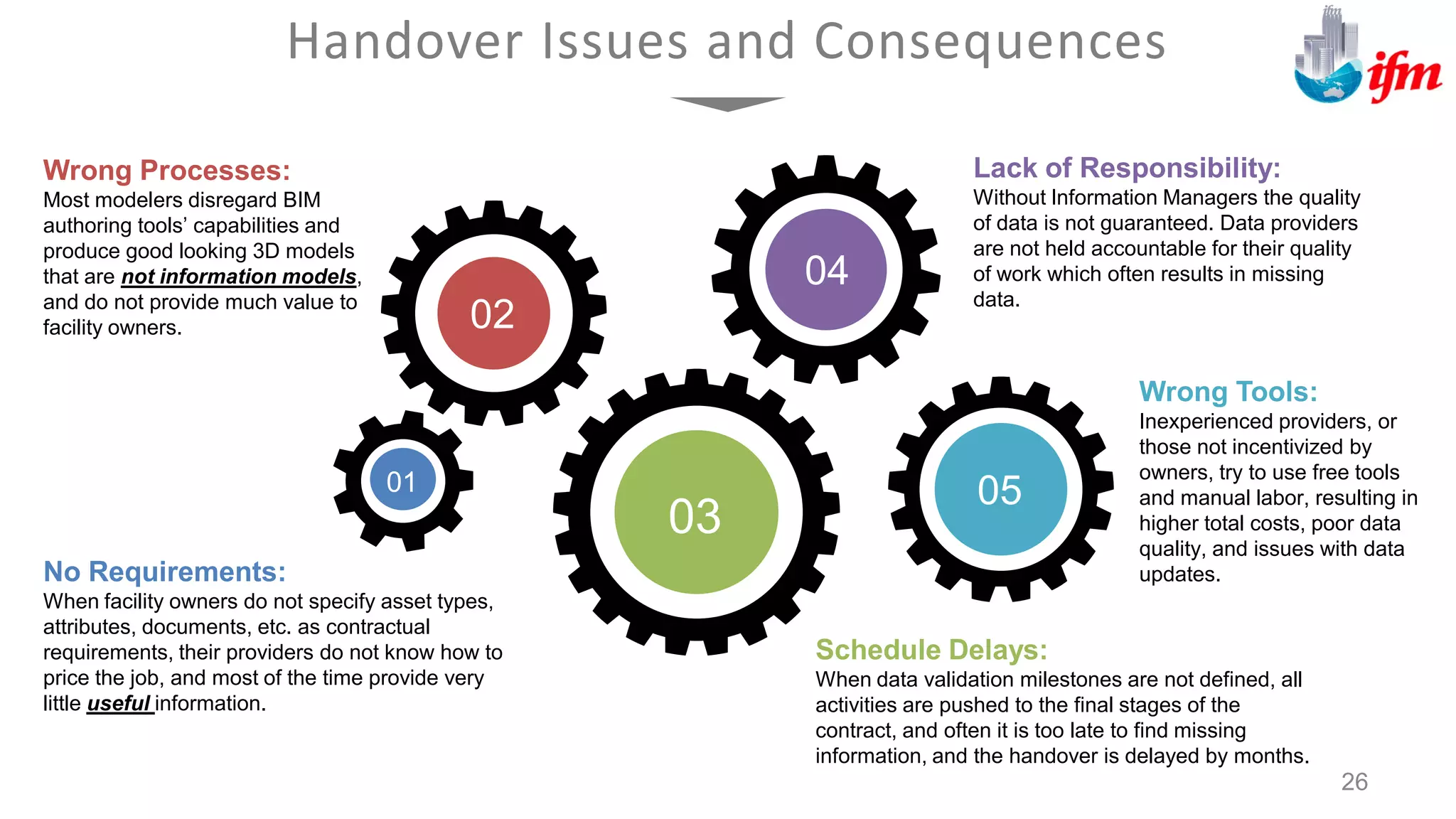
Handover Issues and Consequences
26
01
02
03
04
05
No Requirements:
When facility owners do not specify asset types,
attributes, documents, etc. as contractual
requirements, their providers do not know how to
price the job, and most of the time provide very
little useful information.
Wrong Processes:
Most modelers disregard BIM
authoring tools’ capabilities and
produce good looking 3D models
that are not information models,
and do not provide much value to
facility owners.
Schedule Delays:
When data validation milestones are not defined, all
activities are pushed to the final stages of the
contract, and often it is too late to find missing
information, and the handover is delayed by months.
Lack of Responsibility:
Without Information Managers the quality
of data is not guaranteed. Data providers
are not held accountable for their quality
of work which often results in missing
data.
Wrong Tools:
Inexperienced providers, or
those not incentivized by
owners, try to use free tools
and manual labor, resulting in
higher total costs, poor data
quality, and issues with data
updates.
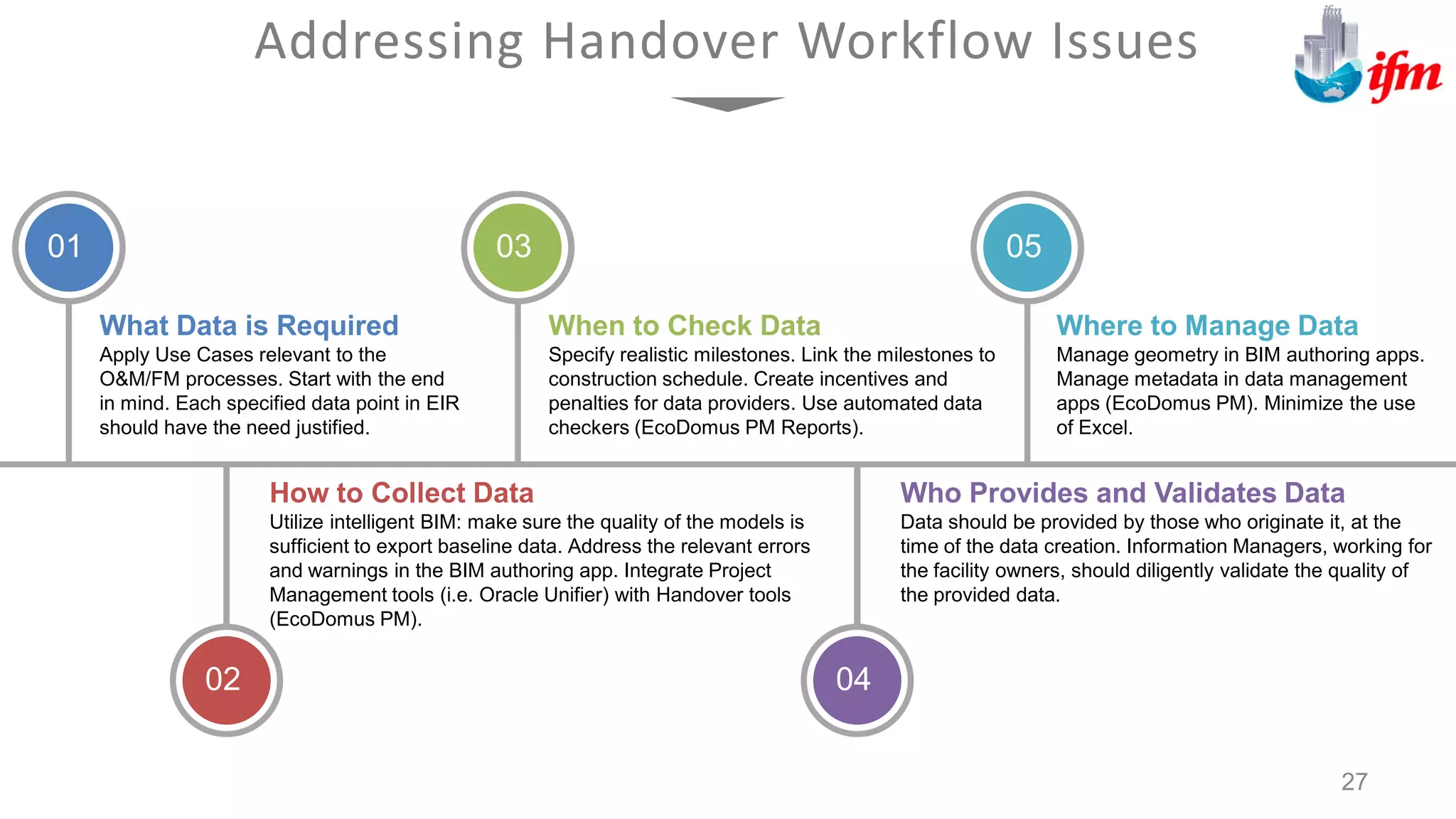
Addressing Handover Workflow Issues
27
What Data is Required
Apply Use Cases relevant to the
O&M/FM processes. Start with the end
in mind. Each specified data point in EIR
should have the need justified.
How to Collect Data
Utilize intelligent BIM: make sure the quality of the models is
sufficient to export baseline data. Address the relevant errors
and warnings in the BIM authoring app. Integrate Project
Management tools (i.e. Oracle Unifier) with Handover tools
(EcoDomus PM).
When to Check Data
Specify realistic milestones. Link the milestones to
construction schedule. Create incentives and
penalties for data providers. Use automated data
checkers (EcoDomus PM Reports).
Who Provides and Validates Data
Data should be provided by those who originate it, at the
time of the data creation. Information Managers, working for
the facility owners, should diligently validate the quality of
the provided data.
Where to Manage Data
Manage geometry in BIM authoring apps.
Manage metadata in data management
apps (EcoDomus PM). Minimize the use
of Excel.
01
02
03
04
05
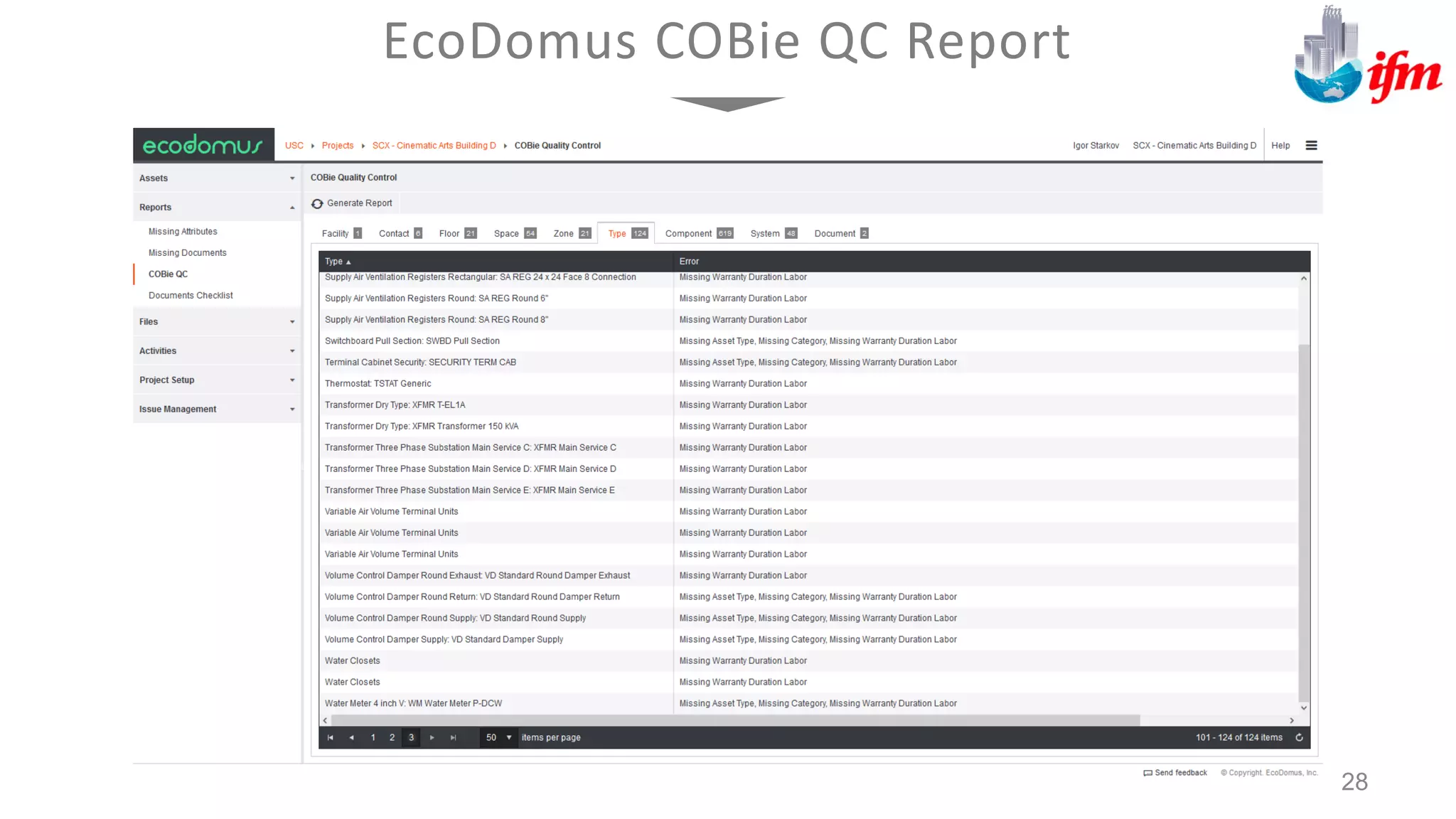
EcoDomus COBie QC Report
28
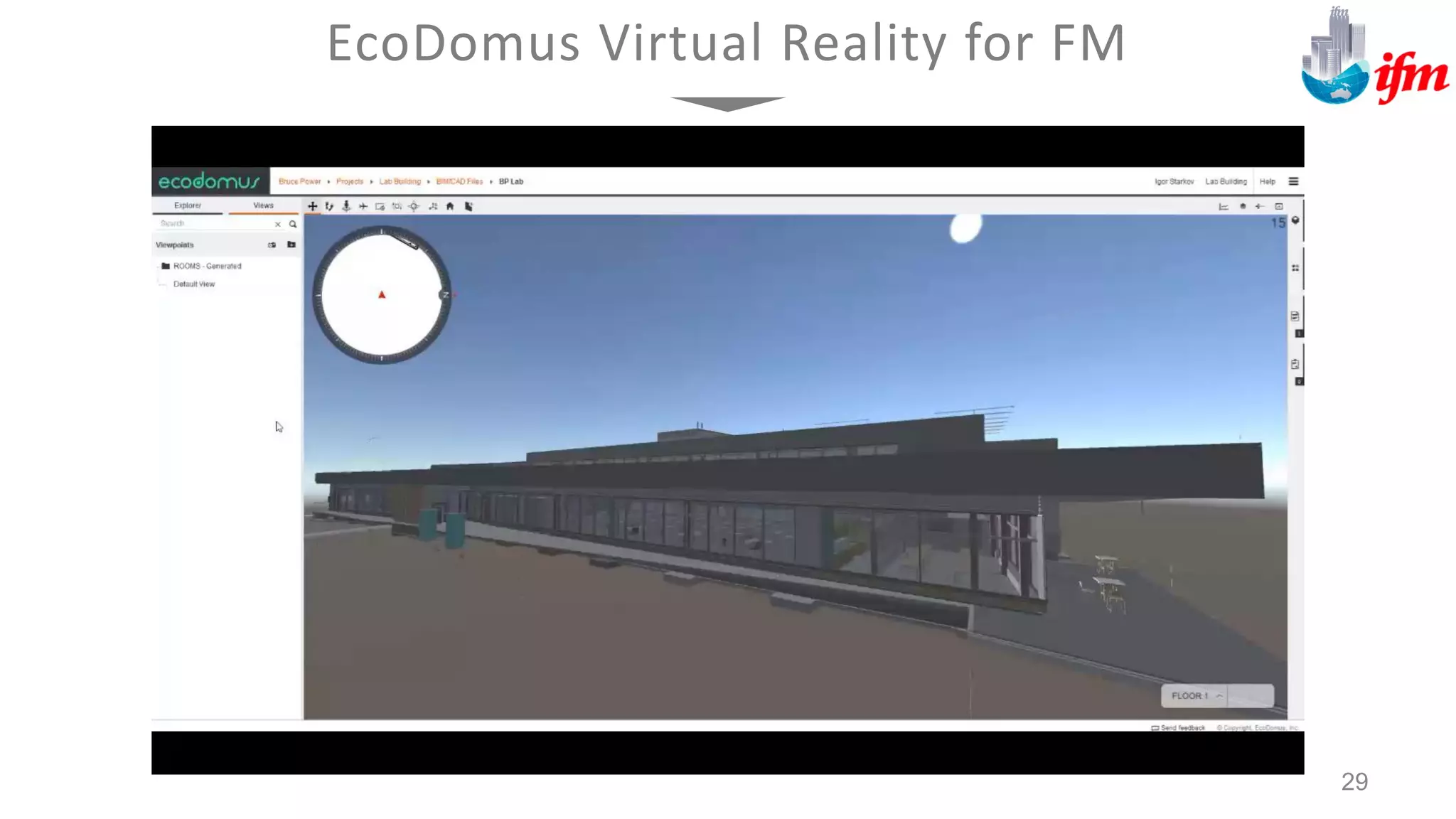
EcoDomus Virtual Reality for FM
29
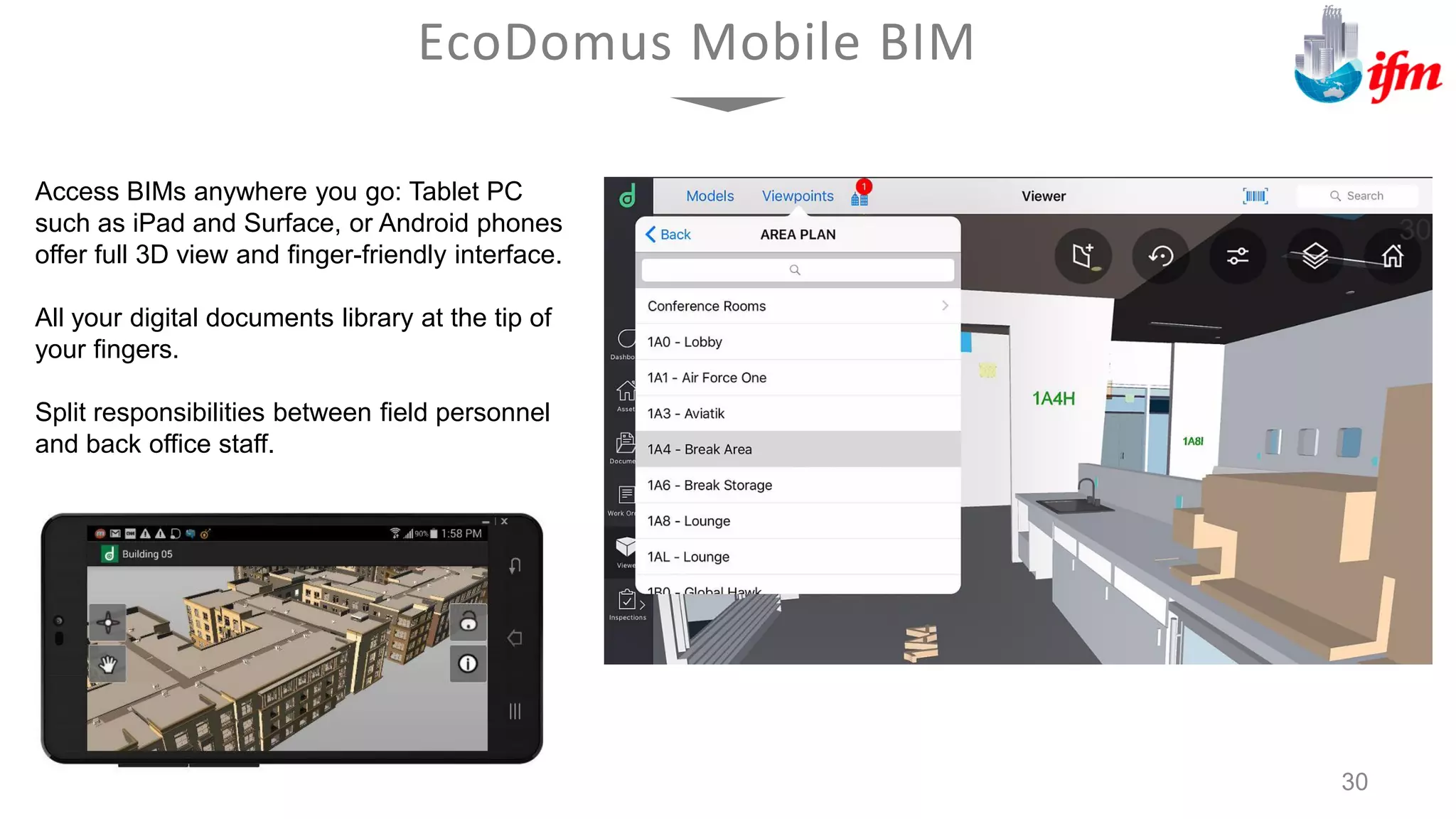
Access BIMs anywhere you go: Tablet PC
such as iPad and Surface, or Android phones
offer full 3D view and finger-friendly interface.
All your digital documents library at the tip of
your fingers.
Split responsibilities between field personnel
and back office staff.
EcoDomus Mobile BIM
30
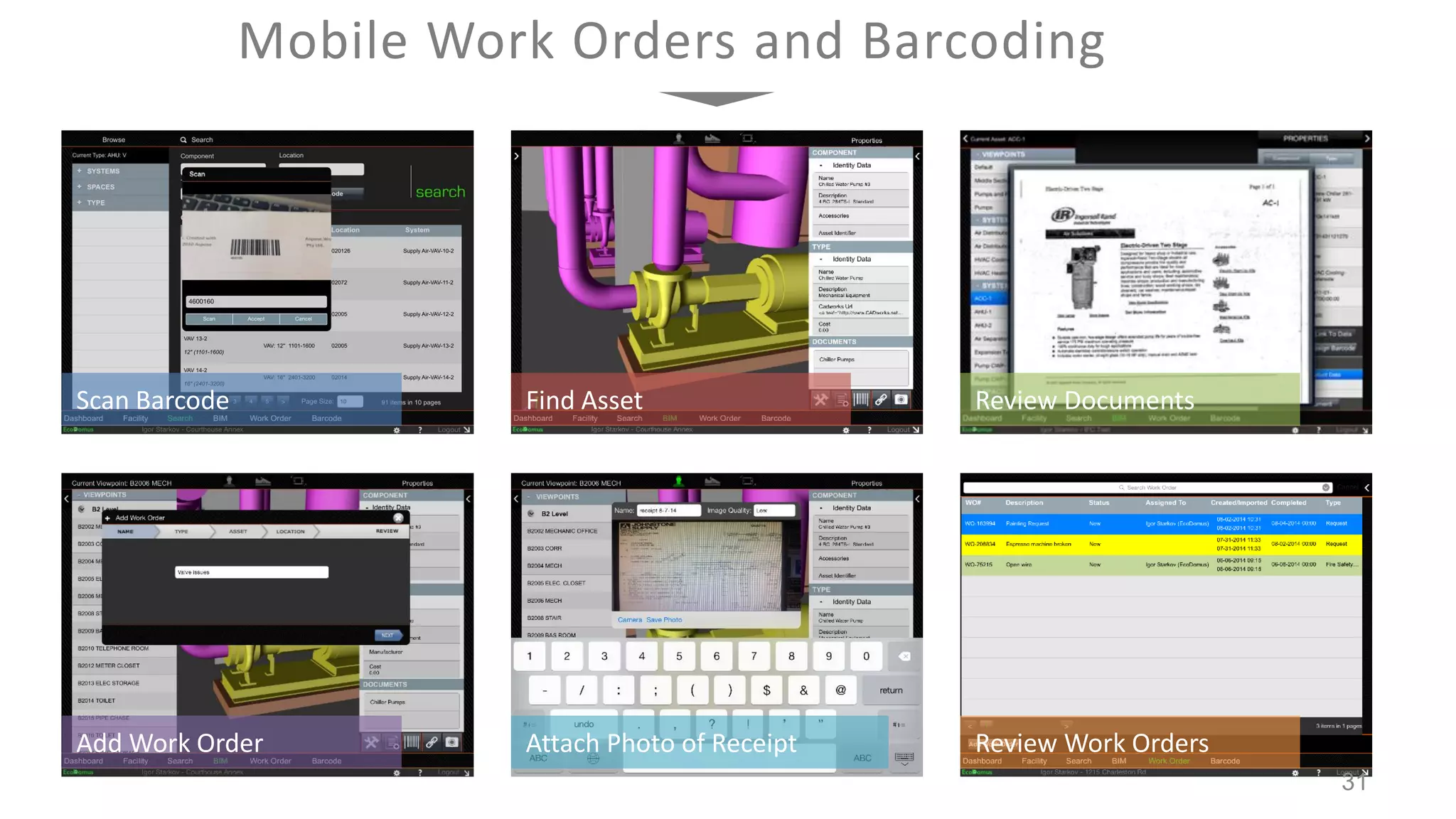
Scan Barcode Find Asset Review Documents
Add Work Order Attach Photo of Receipt Review Work Orders
Mobile Work Orders and Barcoding
31
IFM SISfm Enquiry
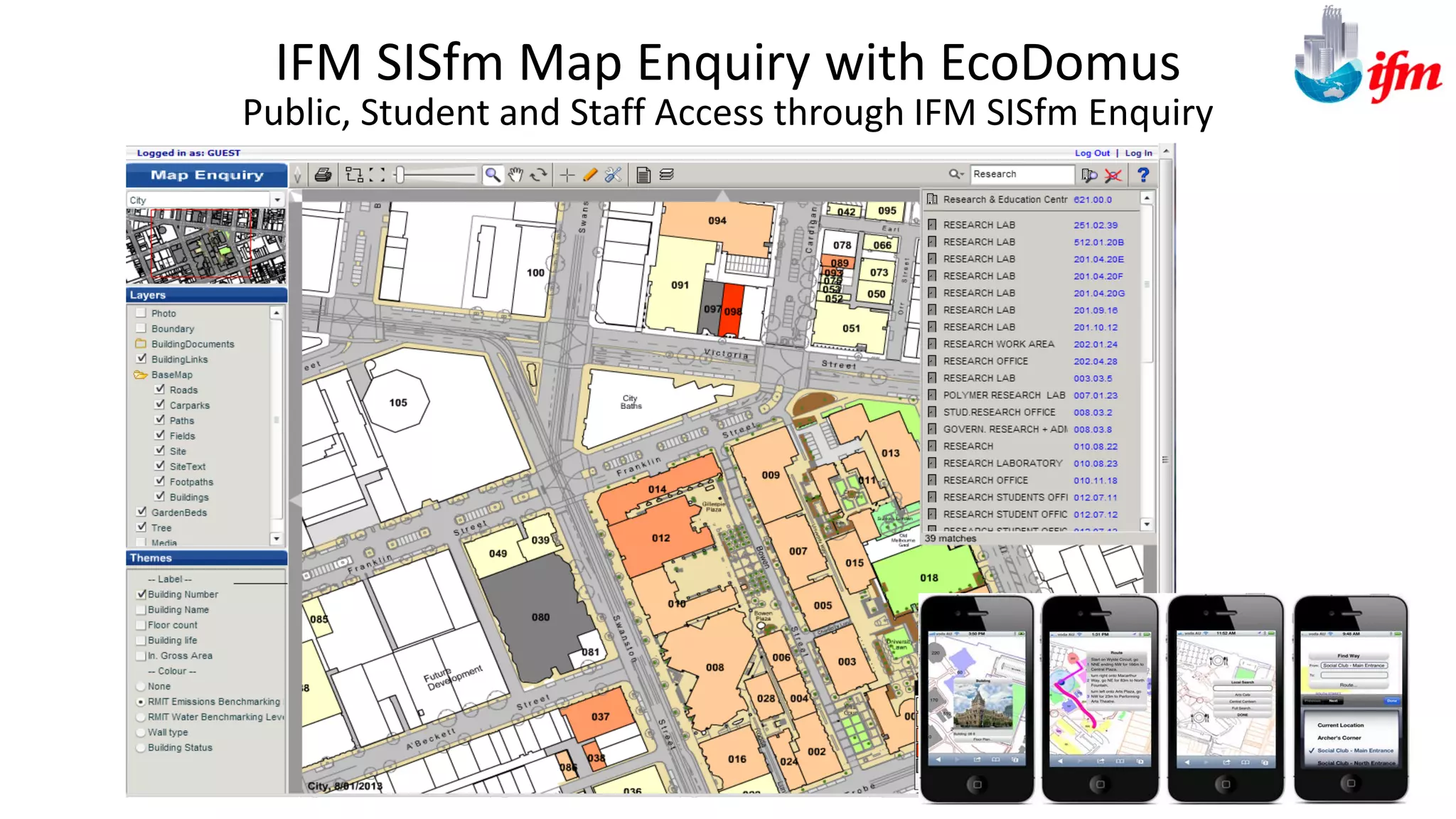
Public, Student and Staff Access through IFM SISfm Enquiry
IFM SISfm Map Enquiry with EcoDomus
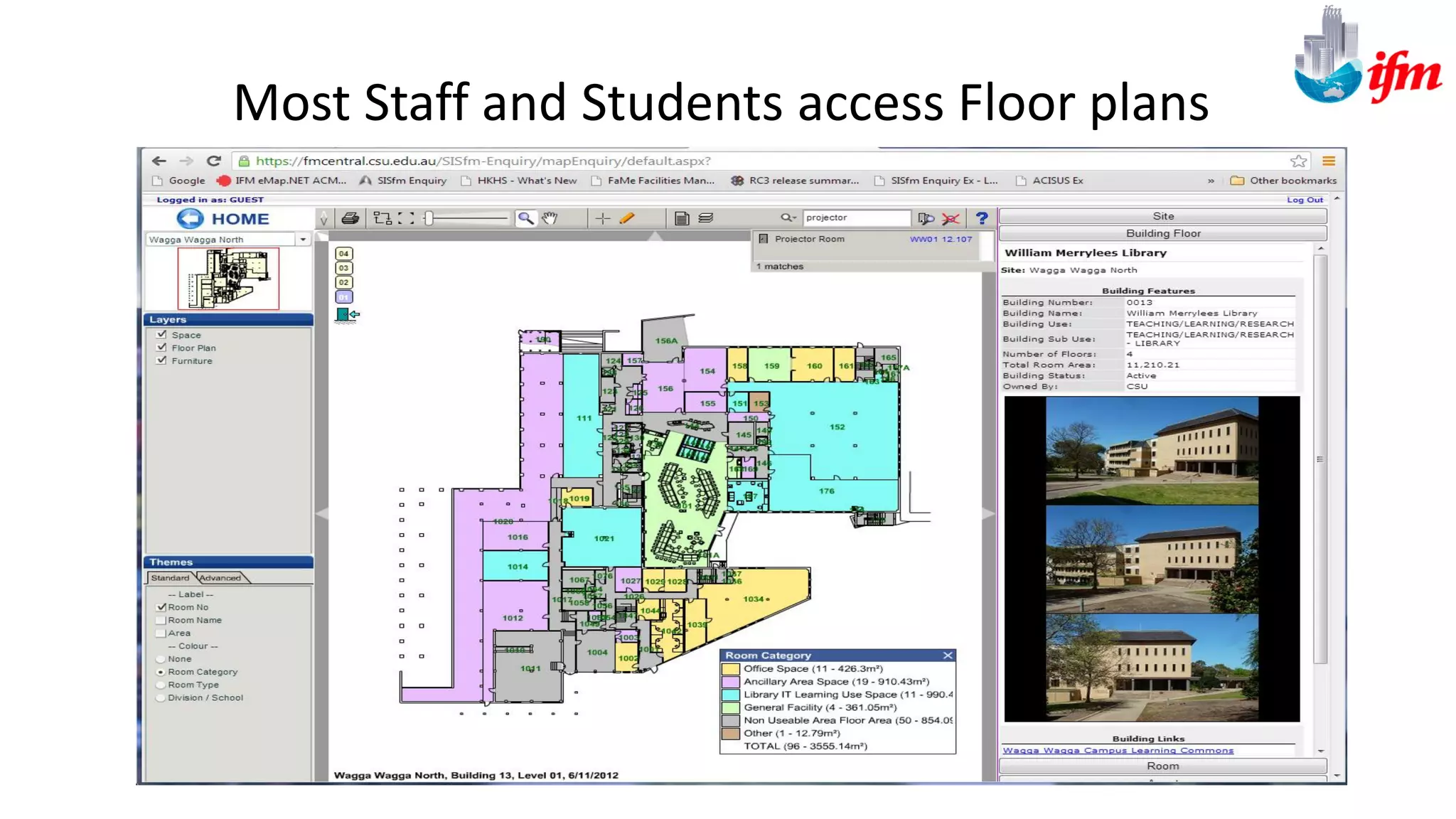
Most Staff and Students access Floor plans
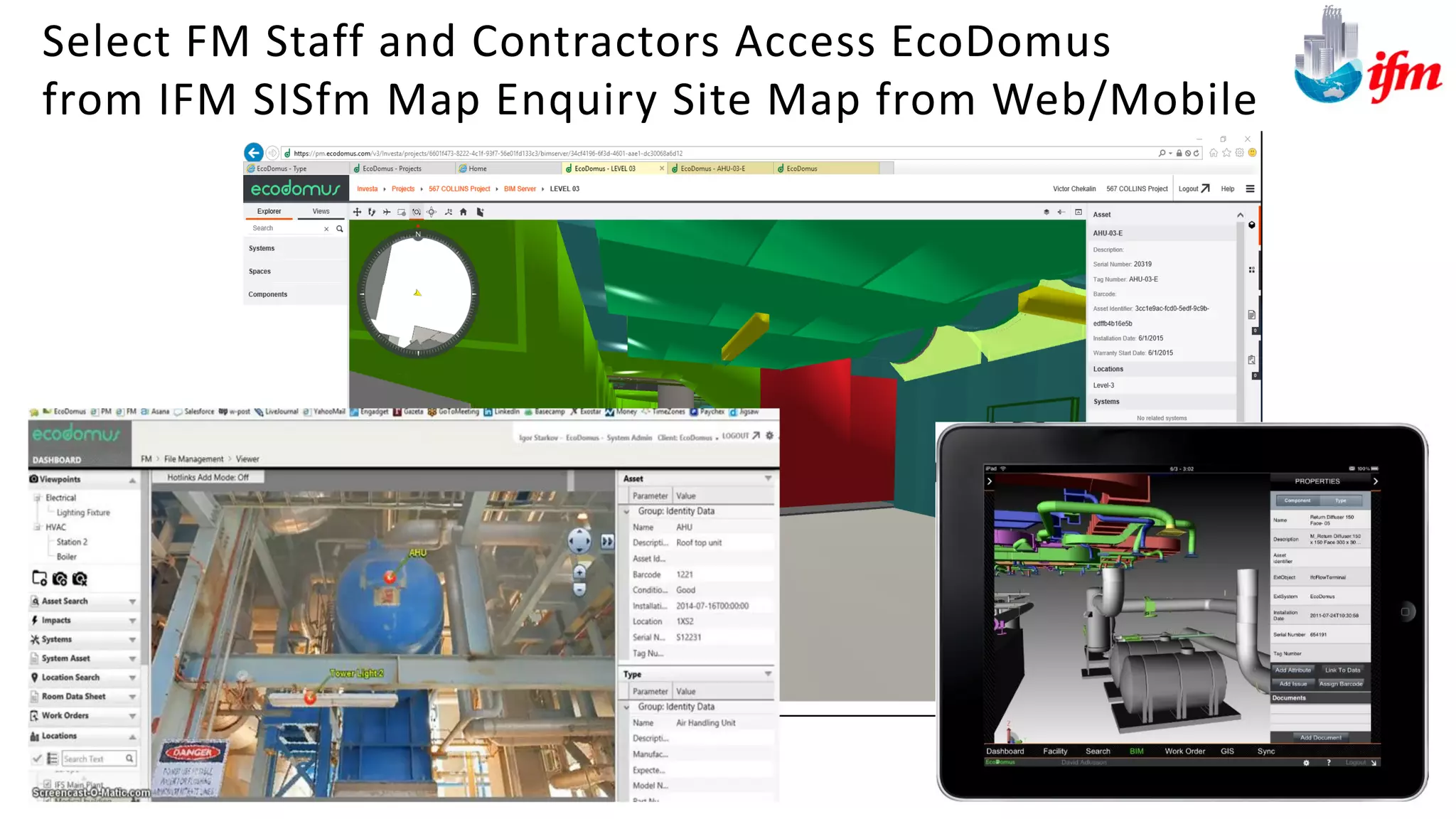
Select FM Staff and Contractors Access EcoDomus
from IFM SISfm Map Enquiry Site Map from Web/Mobile
35
1. Creating BIM requires well thought out data collection rules and
stringent Quality Control – otherwise it’s all just nice 3D pictures, no
business value. Software Tools should be used for data collection and
quality control, the more enterprise the better
2. BIM Lifecycle tools provide an easy-to-use, visual (3D/2D) access to
the complete set of data about physical structures (buildings, civil
infrastructure), equipment/locations and their interdependencies.
3. BIM Lifecycle FM acts as a platform enabling integration of all facility
systems – BAS, CMMS, CAFM, GIS, ERP, HR, etc. providing
significant savings via improved data flow and analytics.
Sydney Opera House
Asset Lifecycl e Project
BIM 4 FM
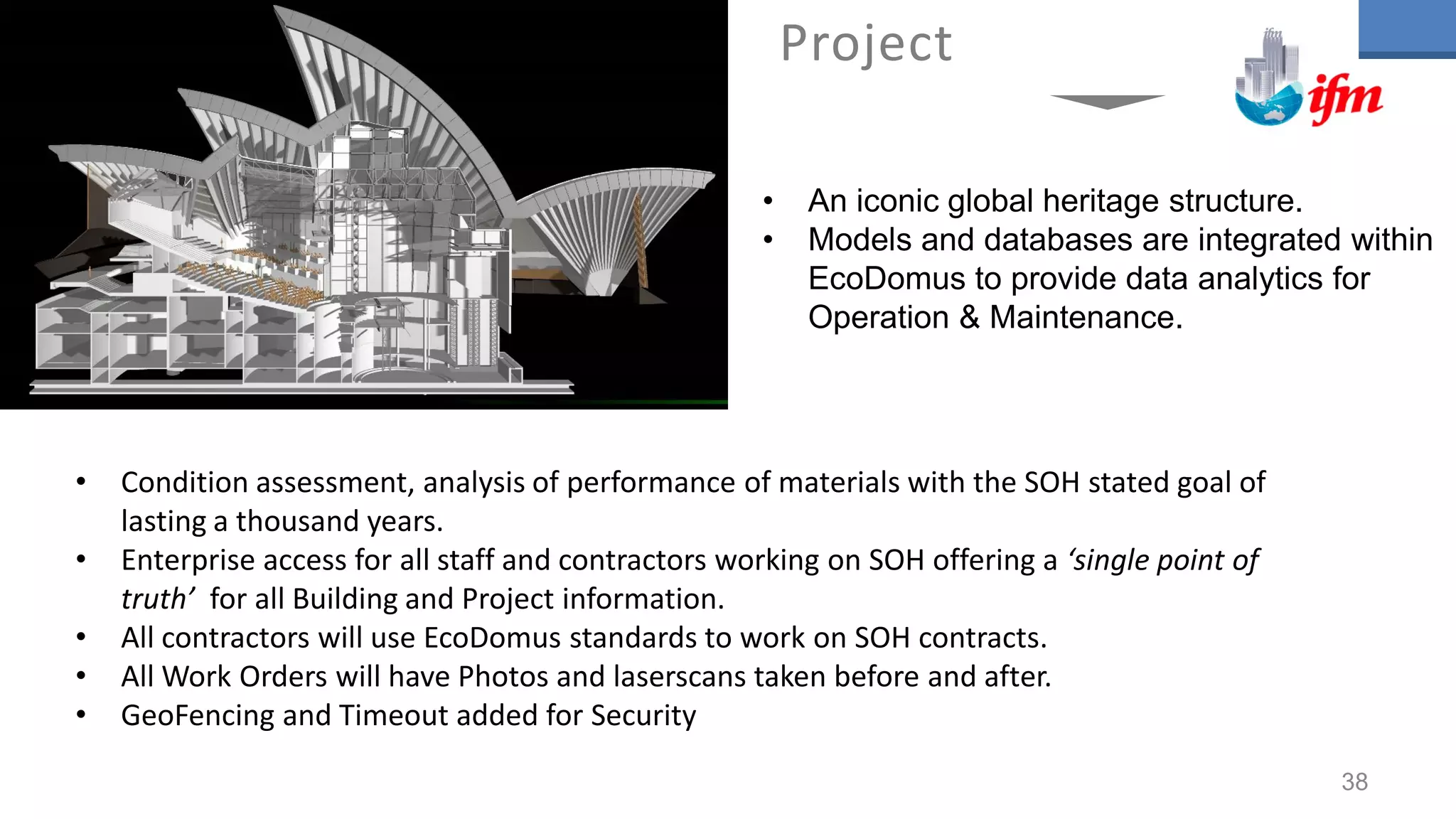
• Condition assessment, analysis of performance of materials with the SOH stated goal of
lasting a thousand years.
• Enterprise access for all staff and contractors working on SOH offering a ‘single point of
truth’ for all Building and Project information.
• All contractors will use EcoDomus standards to work on SOH contracts.
• All Work Orders will have Photos and laserscans taken before and after.
• GeoFencing and Timeout added for Security
Project
• An iconic global heritage structure.
• Models and databases are integrated within
EcoDomus to provide data analytics for
Operation & Maintenance.
38
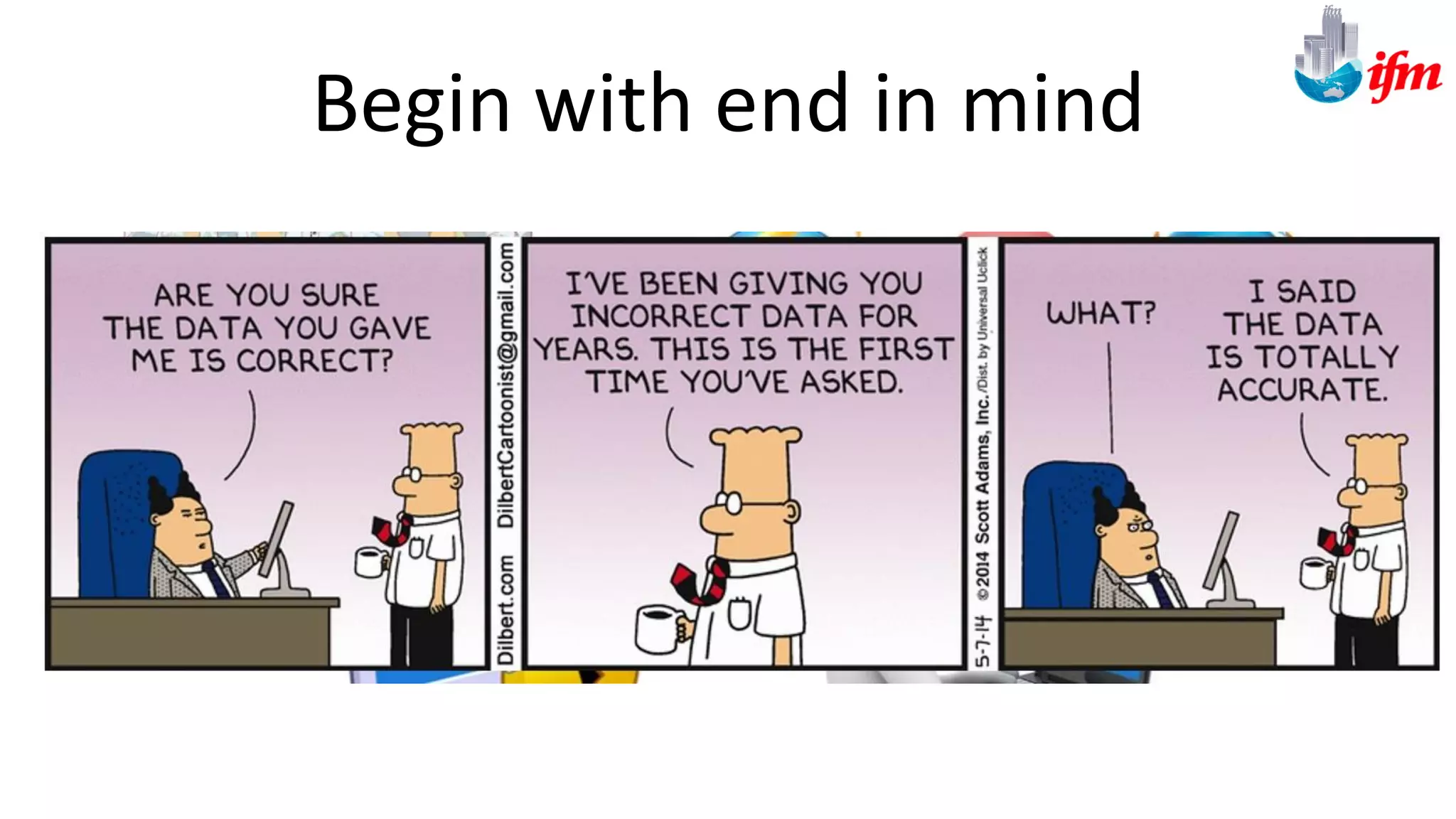
Begin with end in mind
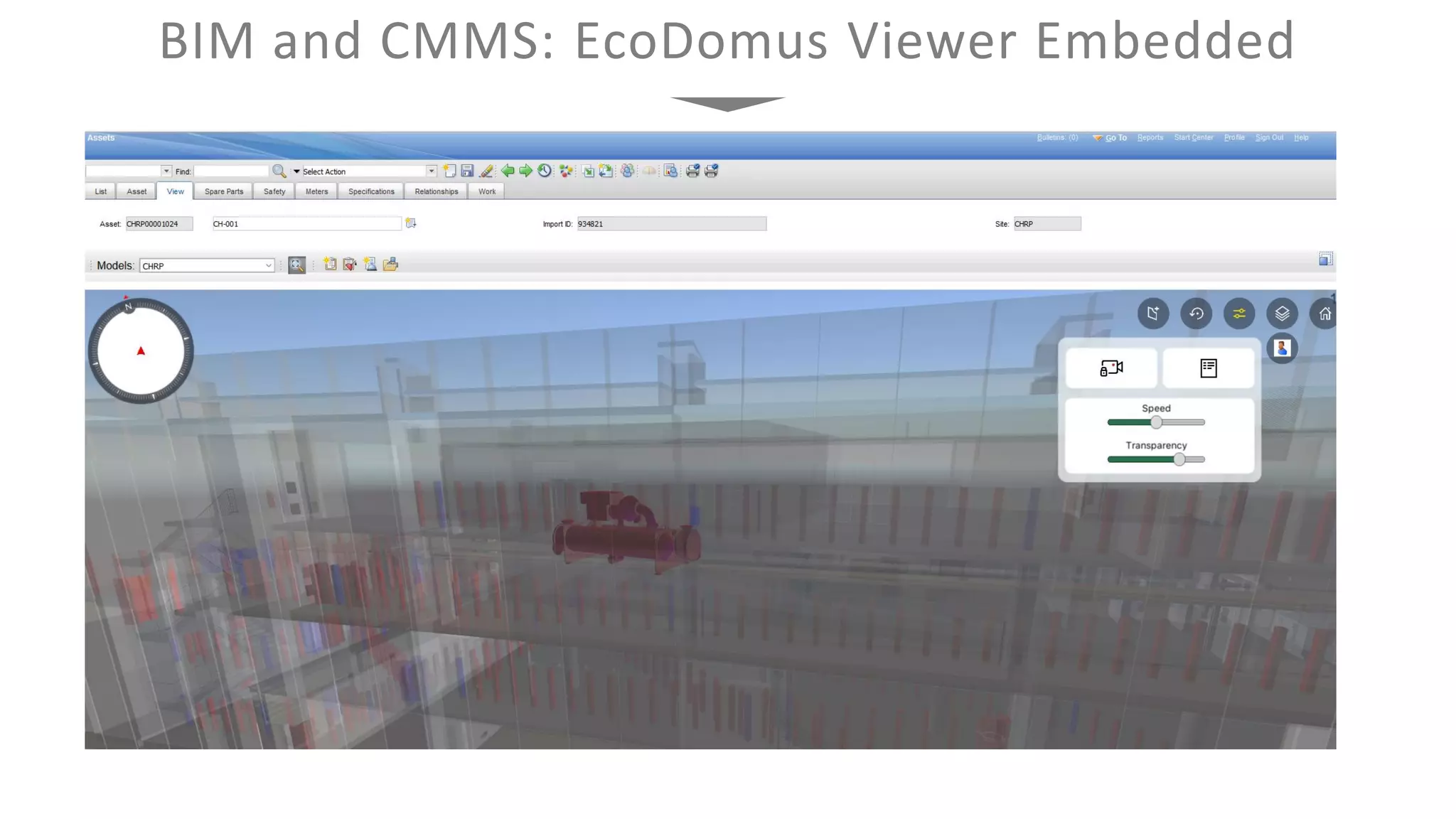
BIM and CMMS: EcoDomus Viewer Embedded
Tim Goring
E-mail: tim@integratedfm.com.au

lifecycle-bim-gis-user-group-april-2017

  • 1.
  • 3.
    Introducing Lifecycle BIM SolvingData Integration and Normalising Workflows For the Complete Asset Lifecycle Management
  • 4.
    Building Information Modeling Collaborativeprocess of creating 3D geometry, connecting objects, and entering required information. Building Information Management Utilization and maintenance of models for optimization of building performance and streamlining of related workflows. Building Information Model Digital representation of a building. It may consist of one or more files in different formats and linked documentation. What is BIM?
  • 5.
    Lifecycle Building InformationManagement • Application of Building Information Modeling to the whole lifecycle of facilities and related infrastructure • Includes use cases: BIM for Maintenance, Energy Efficiency, Cost Management, Life Safety, Risk Management, etc. • Lifecycle BIM (“visual database”) is the data foundation platform – it is the most complete information about your facility. DataGeometry
  • 6.
    Design - BIM iscreated for visualization - Feedback from contractors and FM - Design-intent attributes Construction - BIM is updated to 3D as-built - Installation attributes - Linked documents to BIM Renovation - Planning renovations in 3D BIM - Enhanced condition assessment - Maintaining as-built models Maintenance - BIM for energy analysis - 3D visualization for work orders - Space optimization - Shutdown planning - Risk management - Improved spare parts procurement - Business process visualization - Tenants comfort management Facility Lifecycle and BIM
  • 7.
    At the financialcompletion of a project, the construction manager typically delivers a truck-full of boxes (or CD's containing PDFs) to the facility manager. It is assumed that this information can assist the facility manager to maintain, operate, and track assets within the building. More often than not this information is delivered months or years after the building has been occupied and is ultimately placed in a storage room where it is never used.
  • 8.
    Why? • Poor Organisation •Inadequate Communication • Poor performance man • Contractual Misunderstandings • Poor planning • Insufficient Risk Management • Limited Talent Management
  • 9.
    Lifecycle Building InformationManagement (LBIM) Design Construction Operation & Maintenance Renovation WorkOrderManagement SpaceManagement BuildingAutomation ProjectManagement BIMAuthoring Programming Handover Handover Handover BIMUpdates Commissioning Analytics(Safety,Procurement,etc.)
  • 10.
    Handover Data Challenges 10 Transferof information after handover is a collection of various documents gathered in physical and digital files containing:  As-built drawings / models  Quality assurances  Product information  Technical specifications  Material schedules  Etc. Traditionally all relevant information has to be entered manually into an FM system. The task is huge for large projects and requires special tools and processes, like provided by EcoDomus.
  • 11.
    UK Construction 2025GOALS HM Government 2013 Industrial Strategy: government and industry in partnership Towards a Digitally Built Britain With 21st Century Assets A sector that is technologically advanced
  • 12.
    A WHOLE LIFEAPPROACH AND EARLY OPERATIONAL ENAGEMENT BIM Levels to be Mandatory by UK Government
  • 13.
    UK’s BIM Level3 – Instant Information for Analytics 13 • UK mandates BIM Level 2 on all projects from April 2016. • Level 2 BIM is about static BIM files delivered based on established protocols (including COBie). • Next stage: Level 3 EcoDomus
  • 14.
    We are thinkingabout : Embedded sensors, Interface systems, Interoperability of Operating systems, Data Storage and Exchange, Ontologies, Integrated Contracts Level 3 – We now enter The Internet of Things driven by BIG Data
  • 15.
    15 What Facility OwnersWant to Know? Few of these questions could be answered by a typical CMMS / CAFM / IWMS, since these are not major maintainable assets. In the past, the problem was to collect this information, hand it over to FM, and maintain it over the lifecycle. It was too difficult and expensive (even for the major assets). New technology, like EcoDomus, can solve this problem.
  • 16.
    BIM for Operationand Maintenance 16 Benefits for Owners and Operators using BIM  Increase return on asset by increasing the useful life of the asset and its productivity throughout its lifecycle  Manage risk by meeting regulatory compliance requirements and ensuring public safety and access to accurate information  Improve operational performance by increasing infrastructure availability, shortening downtime and outages, and improving maintenance efficiency.
  • 17.
    Each object hasdata associated with it: asset properties, documents, what building systems it is a part of, what other assets and locations this object is affecting, related work orders, etc. Search for locations and assets and see through the walls (use object transparency). Isolate individual items or whole systems, showing the rest in semi-transparent mode. Use game-engine-like avatars to walk/run around the building. EcoDomus BIM Interface 17 Jump to any location within the building using viewpoints. See the real-time and historical values from the corresponding sensors.
  • 18.
  • 19.
    Building Information Model(BIM) Autodesk Revit, Bentley AECOsim, Graphisoft ArchiCAD, Tekla, IFCs Geographical Information System (GIS) Cadcorp SIS, ESRI ArcGIS, Google Maps, Oracle Spatial, SISfm Enquiry Building Automation System (BAS) Honeywell EBI, Siemens Apogee, Schneider Electric StruxureWare, OPC, BACnet, etc. Maintenance Management (CMMS) ARCHIBUS, IBM Maximo, Oracle Unifier FMRE, FSI, TMA, AssetWorks, Anacle, etc. Integration of Information Space Management (CAFM) Oracle Unifier, TRIRIGA, ARCHIBUS, Planon, Manhattan, etc. Project Management (PM) Oracle Unifier, Procore, PMWeb, Trimble Proliance, Prolog, e-Builder, etc. 19 Electronic Document Management Systems (EDMS) ProjectWise, McLaren, Documentum, BlueCielo, Alfresco, Autodesk BIM360 Docs, etc. Enterprise Resource Planning (ERP) Oracle Financials, SAP R/3, NetSuite, IFS, Microsoft Dynamics, Infor, etc.
  • 20.
    Web / MobileAccess / API Input Data (EcoDomus PM) Design & construction data processing, COBie, BIM, Quality Control, project management. Maintain Data (EcoDomus FM) Lifecycle Data Management via integration with other applications and operation processes improvements. Supply Chain (EcoDomus SC)* Process optimization for procurement, manufacturer- focused workflows. Data Analytics (EcoDomus DA) Big Data crunching, cross-app “mash up” reports (BIM+BAS+FM+GIS) EcoDomus Platform SQL Server Core API
  • 21.
    System Architecture EcoDomus PM EcoDomusFM Client Service PM / FM Central Service PM / FM BIM Connector Revit EcoDomus Mobile (iOS, Android and Windows) Central SQL DB Client N Client 3 Client 2 Client 1 Revit / Other Design Applications Local DB BIM Files BIM Connector (Other) IFC Importer ESRI API, Google Earth API ESRI ArcGIS Google Earth Cadcorp SIS GIS DB BAS Protocols (OPC, BACnet, Modbus) BAS System Client BAS Document / Project Management System Construction Management Web Services Integration API CMMS / CAFM / IWMS CMMS DB 21
  • 22.
    ARCHIBUS/FM Data Schema& IFM Document Management & EcoDomus COBie and SMART Building [Oracle – MS SQL Server] EcoDomus Core Application SISfm Enquiry Administrator APIs (Application Program Interfaces) IFM SISfm Enquiry Room Enquiry Map Enquiry Room Booking Move Manager People Manger Works Request Report Maker Map Mobile EcoDomus PM/FM BIM Connectors Project Management COBie Design Management FM Asset capture Lifecycle BIM Virtual Environments Energy Management BusinessIntelligence&Integration,Workflow ControllersandAnalytics Process Navigator IFM SISfm Enquiry Browser/Mobile EcoDomus PM/FM Browser/Mobile Integrated Solution Based on open Web Services architecture Archibus Web Central Browser/Mobile ARCHIBUS/FM Works & Maintenance Asset Management Space Management Project Management Lease Management Environmental Management OHS Management ARCHIBUS/FM Core Application General Student & Staff Access API Web Services (SOA) FM Staff Access Shared RDBMS Common Tables Modules and Functionality
  • 23.
    Low level Integration betweenFM, Assets Works, Space (SAM), BIM, CAD, GIS Archibus FM Platform (FM Staff Access) IFM SISfm Enquiry (Public, Staff and Student access) EcoDomus FM (FM Staff Access) Spatial Data CAD, BIM, Plans, GIS , Mapping Cadcorp SIS Autodesk Revit Autodesk AutoCAD Archibus Modules • Space Management • Personnel and Occupancy • Space Chargeback • Strategic Space Planning • Project Management • Asset Management • Mobile Framework IFM SISfm Enquiry (GIS & Mapping) • Room Enquiry • Map Enquiry • Move Manager • People Manager • Works Request • Room Booking • Report Maker • Parking Management • Map Mobile EcoDomus PM/FM (BIM QA and Enterprise Viewing) • Project Commissioning • BIMCAD Lifecycle Integration • COBie Integration • Document Management Cadcorp SIS / Revit (Authoring tools) • CAD • GIS/Mapping • BIM IFM Web Based Integration and Software Solution Integrated Facility Management Solution Platform with BIM/Asset Lifecycle for a large Asset Owner. Integrated Software Solution EcoDomus PM (Cloud or Local) Contractor Access AEC Data. Creation and Handover OEM Manuals Assets BIM CAD Documents EcoDomus PM Validates CAD and BIM Extracts BIM Objects and CAD Blocks Into Asset Register/ / Validates against COBie/Omiclass/IFC Allows Project Management and Document Management Archibus, EcoDomus and IFM SISfm Enquiry utilise Shared Oracle or SQL database for seamless low level integration Archibus Mobile & EcoDomus PM/FM Staff/Contractors Mobile Application (IOS, Android) SISfm Enquiry Map Mobile Staff, Students, Public Mobile (HTML5) Desktop Tools
  • 24.
    About COBie • ConstructionOperation Building information exchange • Open IFC-based international standard • Major facility owners require it • EcoDomus PM was the first middleware to get COBie-compliant (2009) • Looks easy to do at first glance (“we’ll just fill out that Excel spreadsheet”) – later becomes a four-letter word at some organizations Handover and COBie 24
  • 25.
    What What data isrequired: asset types, attributes, document categories, system levels, zone types? What are the nomenclature rules for assets, spaces, systems, etc.? How How is the data prepared and collected: is BIM geometry adequate for data export? Are MEP systems connected? How to establish relationships between objects? Where Where is the data managed: in EcoDomus PM? Excel? Revit? Who Who provides the data and who checks and validates it (Responsibility Matrix)? Who updates the 3D model? Who collects field data? When What are the milestones, incentives and penalties for data checking? Typical Challenges with Handover Workflows 25
  • 26.
    Handover Issues andConsequences 26 01 02 03 04 05 No Requirements: When facility owners do not specify asset types, attributes, documents, etc. as contractual requirements, their providers do not know how to price the job, and most of the time provide very little useful information. Wrong Processes: Most modelers disregard BIM authoring tools’ capabilities and produce good looking 3D models that are not information models, and do not provide much value to facility owners. Schedule Delays: When data validation milestones are not defined, all activities are pushed to the final stages of the contract, and often it is too late to find missing information, and the handover is delayed by months. Lack of Responsibility: Without Information Managers the quality of data is not guaranteed. Data providers are not held accountable for their quality of work which often results in missing data. Wrong Tools: Inexperienced providers, or those not incentivized by owners, try to use free tools and manual labor, resulting in higher total costs, poor data quality, and issues with data updates.
  • 27.
    Addressing Handover WorkflowIssues 27 What Data is Required Apply Use Cases relevant to the O&M/FM processes. Start with the end in mind. Each specified data point in EIR should have the need justified. How to Collect Data Utilize intelligent BIM: make sure the quality of the models is sufficient to export baseline data. Address the relevant errors and warnings in the BIM authoring app. Integrate Project Management tools (i.e. Oracle Unifier) with Handover tools (EcoDomus PM). When to Check Data Specify realistic milestones. Link the milestones to construction schedule. Create incentives and penalties for data providers. Use automated data checkers (EcoDomus PM Reports). Who Provides and Validates Data Data should be provided by those who originate it, at the time of the data creation. Information Managers, working for the facility owners, should diligently validate the quality of the provided data. Where to Manage Data Manage geometry in BIM authoring apps. Manage metadata in data management apps (EcoDomus PM). Minimize the use of Excel. 01 02 03 04 05
  • 28.
  • 29.
  • 30.
    Access BIMs anywhereyou go: Tablet PC such as iPad and Surface, or Android phones offer full 3D view and finger-friendly interface. All your digital documents library at the tip of your fingers. Split responsibilities between field personnel and back office staff. EcoDomus Mobile BIM 30
  • 31.
    Scan Barcode FindAsset Review Documents Add Work Order Attach Photo of Receipt Review Work Orders Mobile Work Orders and Barcoding 31
  • 32.
  • 33.
    Public, Student andStaff Access through IFM SISfm Enquiry IFM SISfm Map Enquiry with EcoDomus
  • 34.
    Most Staff andStudents access Floor plans
  • 35.
    Select FM Staffand Contractors Access EcoDomus from IFM SISfm Map Enquiry Site Map from Web/Mobile 35
  • 36.
    1. Creating BIMrequires well thought out data collection rules and stringent Quality Control – otherwise it’s all just nice 3D pictures, no business value. Software Tools should be used for data collection and quality control, the more enterprise the better 2. BIM Lifecycle tools provide an easy-to-use, visual (3D/2D) access to the complete set of data about physical structures (buildings, civil infrastructure), equipment/locations and their interdependencies. 3. BIM Lifecycle FM acts as a platform enabling integration of all facility systems – BAS, CMMS, CAFM, GIS, ERP, HR, etc. providing significant savings via improved data flow and analytics.
  • 37.
    Sydney Opera House AssetLifecycl e Project BIM 4 FM
  • 38.
    • Condition assessment,analysis of performance of materials with the SOH stated goal of lasting a thousand years. • Enterprise access for all staff and contractors working on SOH offering a ‘single point of truth’ for all Building and Project information. • All contractors will use EcoDomus standards to work on SOH contracts. • All Work Orders will have Photos and laserscans taken before and after. • GeoFencing and Timeout added for Security Project • An iconic global heritage structure. • Models and databases are integrated within EcoDomus to provide data analytics for Operation & Maintenance. 38
  • 42.
  • 47.
    BIM and CMMS:EcoDomus Viewer Embedded
  • 48.