REMINDER
Check in on the
COLLABORATE mobile app
Improving the Unifier User Experience
Prepared by:
Chad Brady
Project Executive
Foresee Consulting
The Importance of QA/QC in Configurations & Upgrades
Accommodating the Casual User & the Power User
Leveraging Alternative Technologies
Unifiers Future in Construction
Session ID#: 200120
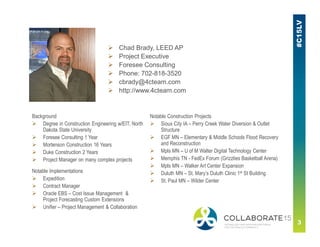
 Chad Brady, LEED AP
 Project Executive
 Foresee Consulting
 Phone: 702-818-3520
 cbrady@4cteam.com
 http://www.4cteam.com
Background
 Degree in Construction Engineering w/EIT, North
Dakota State University
 Foresee Consulting 1 Year
 Mortenson Construction 16 Years
 Duke Construction 2 Years
 Project Manager on many complex projects
Notable Construction Projects
 Sioux City IA – Perry Creek Water Diversion & Outlet
Structure
 EGF MN – Elementary & Middle Schools Flood Recovery
and Reconstruction
 Mpls MN – U of M Walter Digital Technology Center
 Memphis TN - FedEx Forum (Grizzlies Basketball Arena)
 Mpls MN – Walker Art Center Expansion
 Duluth MN – St. Mary’s Duluth Clinic 1st St Building
 St. Paul MN – Wilder Center
Notable Implementations
 Expedition
 Contract Manager
 Oracle EBS – Cost Issue Management &
Project Forecasting Custom Extensions
 Unifier – Project Management & Collaboration
Agenda
■ Next steps after the initial implementation
■ User experience as the key to success
■ “Simple” change management
■ Alternative technologies to improve the user’s experience
■ Unifiers Future in Construction
Next Steps – after the initial
implementation
Phases of an implementation, Self Evaluation, Think
outside the box – avoid the “Status Quo” mindset,
Must have vs. nice to have – prioritize
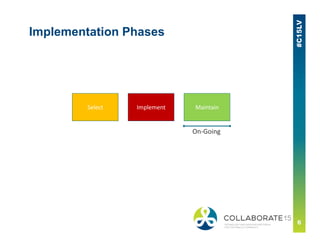
ImplementSelect Maintain
Implementation Phases
On‐Going
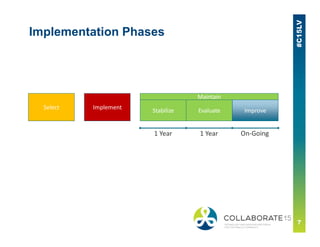
ImplementSelect
MaintainMaintain
Stabilize ImproveEvaluate
Implementation Phases
1 Year 1 Year On‐Going
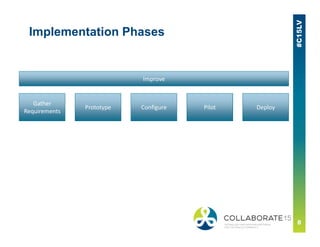
Prototype
Gather 
Requirements
Configure Pilot Deploy
Improve
Implementation Phases
■ Figure out what’s important to the users and the “Business”
■ Process map from cradle to grave – SIPOC
▪ First, figure out what’s actually done in the process, not what should be done
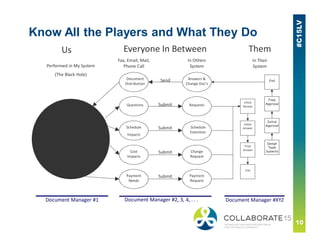
▪ Understand who ALL the players are and what they do
■ Understand the scenarios and find the gaps
■ Refer back to the Critical Success Factors and goals of the
original initiative.
■ Identify must haves
▪ Keep an open mind – don’t get stuck in the status quo
▪ Separate out the nice to haves
▪ Weight and prioritize them – let the users vote to determine this
▪ Don’t forget the low hanging fruit – nailing these can have a significant effect
on user acceptance
Self Evaluation
Know All the Players and What They Do
Us Them
Cost 
Impacts
Change 
Request
Schedule
Impacts
Schedule 
Extention
Answers & 
Change Doc’s
Document 
Distribution
In Their
System
In Others
SystemPerformed in My System
(The Black Hole)
Send
Submit
Submit
Payment 
Needs
Payment 
Request
Submit
RequestsQuestions Submit
Design
Team
Submits
Initial
Approval
Final
Approval
End
Initial 
Review
Initial 
Answer
Final 
Answer
End
Document Manager #1 Document Manager #2, 3, 4, . . .  Document Manager #XYZ
Fax, Email, Mail, 
Phone Call
Everyone In Between
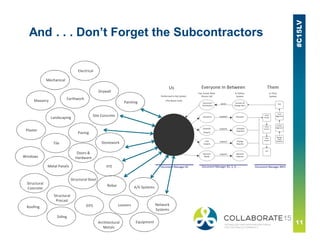
And . . . Don’t Forget the Subcontractors
Mechanical
Electrical
Drywall
Earthwork
Site Concrete
Masonry
Landscaping
Paving
Painting
Plaster
Tile
Doors & 
Hardware
Stonework
FFE
Windows
Metal Panels
Structural Steel
Structural 
Concrete
Structural 
Precast
Roofing
Siding
EIFS
Architectural 
Metals
Louvers
Rebar
Equipment
A/V Systems
Network 
Systems
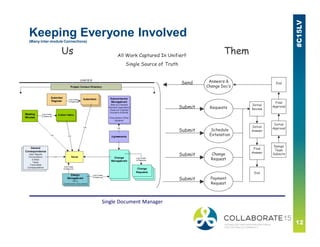
Keeping Everyone Involved
(Many Inter-module Connections)
Change
Request
Schedule
Extenstion
Answers &
Change Doc’s
All Work Captured In Unifier!!
Single Source of Truth
Design
Team
Submits
Initial
Approval
Final
Approval
EndSend
Submit
Submit
Payment
Request
Submit
RequestsSubmit
Initial
Review
Initial
Answer
Final
Answer
End
Us Them
Single Document Manager
The Must Haves
■ Simplify the Workflows or Add New BP’s
■ Consolidate or Eliminate BP’s
■ Expand user base to include more external users
■ New Workflows
■ New Forms
■ Eliminate Fields
■ Add Fields
■ Minimize or Add Dynamic Data Sets (DDS)
■ Remove auto-creates
■ Add auto-creates
■ Remember – Automated DOES NOT always mean Efficient and
Intuitive
The User Experience – the key
to success
User Knowledge curve, Remember the casual vs.
power user, Intuitiveness vs. Complexity
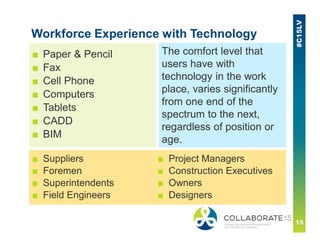
Workforce Experience with Technology
■ Paper & Pencil
■ Fax
■ Cell Phone
■ Computers
■ Tablets
■ CADD
■ BIM
The comfort level that
users have with
technology in the work
place, varies significantly
from one end of the
spectrum to the next,
regardless of position or
age.
■ Suppliers
■ Foremen
■ Superintendents
■ Field Engineers
■ Project Managers
■ Construction Executives
■ Owners
■ Designers
Capitalize on the Power of Unifier
■ Links via portlets & dashboards
■ Graphical dashboards
■ Links to step specific documentation
“Simple” Change Management
Importance of QA/QC in configurations and
upgrades - don’t take upgrades/updates for granted,
Utilize the testing environment(s), Be
methodical/meticulous/systematic/comprehensive
Quality Assurance & Quality Control
■ Quality Assurance - to ensure what will be configured meets
the customers needs
■ Quality Control - to verify what was configured meets the
design requirements
Keep it in Perspective
■ Is Unifier a mission critical application?
■ How important is change management?
■ How important is testing?
■ Do you want a place for end users to submit their requests?
■ Are there certain things where you need leadership approval?
■ Who are all the players that need to be involved?
■ Does this need to be included in a much larger change management
process?
Utilize the Testing Environment(s)
■ You get Prod and uStage, but if you want a place to really test:
▪ Development – for a sandbox environment, the ‘Playground’.
▪ Training – a place you can train your users as well as external users on
what is currently in production
▪ Testing – with integrations it is best to have a separate environment
where you can keep the upgrade testing running concurrently
■ Refresh your non-Prod environment(s) often.
▪ Facilitates troubleshooting when you have more recent data to look at
where you can see what something looked like before a config push or
a change in data.
Test, Test, and Test . . .
■ Don’t rely on the software developer to have tested everything
■ Don’t rely on only yourself to have tested everything – more eyes the better
■ Take a methodical approach to your testing – have a thorough test plan
■ Be meticulous in how you test – leave no stone unturned
■ Test systematically through the entire process from the users perspective
– especially where integrations are concerned
■ Ensure you are comprehensive – Multiple testers and multiple scenarios is
critical
Leveraging Alternative
Technologies - improving the
user experience
Don’t fall into the shiny ball trap, What are your
gaps, Addressing the Easy vs. Effective
■ Bluebeam
■ Box
■ Native Mobile Apps
■ Sharepoint
■ BIM 360 Field & Glue
■ Word Press/You Tube
■ UPK
■ Web Development
■ Etc.
Some Alternative Technologies
Unifiers Future in Construction
Necessary Enhancements & Needed Functionality
Enhancements – Must Haves
■ Key Functionality Currently In EXP & PCM
■ Needed User Interface Improvements
■ Other User Experience Improvements
▪ Improved Smartform & Custom Print Functionality
▪ Native Mobile Apps
▪ Reporting Improvements
▪ Workflow Improvements
▪ Improved Request for Bid functionality
■ Interoperability with Other Systems
▪ Email consolidation/integrations
▪ BIM & VDC Integrations
▪ Tie to Social Collaboration Sites
▪ Environment to Environment Communications
■ Document Storage & Management Improvements
■ Improved Task Management
Some Ideas . . . That Will Help Everyone!
Key Functionality Currently In EXP/PCM
■ Easy process to manually 'Generate' individual or groups of
records and select assignees in real time
■ Can print the screen of a filtered/sorted/grouped log view
■ There is a tight connection between the project level contact and
licensed user database
■ Can add companies & users to the global directory from the project
level
■ Letters module has a tight integration to Word
■ Able to send record creation/update data between different
instances
■ Has Cost & Revenue Mark-ups as well as Multiple Budgets
■ Built-in procurement & bid management modules are available
■ Can access records directly from the dashboard and take action
■ Able to delete records
Needed User Interface Improvements
■ Provide browser neutrality
■ Update to current navigation standards of design
■ Capitalize on HTML 5 Functionality
▪ Browser based drag and drop of attachments
▪ Drag and drop web page layout
▪ Ability to embed HTML scripts & widgets into standard dashboards
▪ Enable HTML based custom dashboards and include integrations to data in
Unifier (similar to SWF today) and other systems
■ Provide improved navigation for selecting projects
■ Project level search across all modules
■ User definable Log views - Sorts, Filters, Layouts, etc.
■ Enable Maximize/Minimize of any window
■ Eliminate redundant pop up windows
Other User Experience Improvements
■ Improved Smartform & Custom Print Functionality
▪ Ability to include smartform in email notifications
▪ Support drag/drop and pasting of clipboard images into smartforms
▪ Usable Pickers, DDS, pull-downs and other form functionality on smartforms
▪ Able to include Logos & other images on custom prints & smartforms
▪ Added setup function for limiting selection of certain custom prints & by step
■ Native Mobile Apps
▪ Support for disconnected data access
▪ Granular mobile app rather than all inclusive, align with smartform technology
■ Reporting Improvements
▪ Ability to format UDR’s with logos, margins, fonts, etc
▪ Dataviews and UDR’s based on record permissions
■ Workflow Improvements
▪ Publish path improvements on workflow & non-workflow business processes
▪ Workflow selection redundancy
■ Request for Bid Improvements
▪ Ability to modify the scope on the fly
▪ Ability to efficiently issue addendums to the bid documents
▪ Allow for changing the bid date
Interoperability with Other Systems
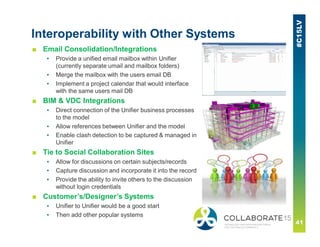
■ Email Consolidation/Integrations
▪ Provide a unified email mailbox within Unifier
(currently separate umail and mailbox folders)
▪ Merge the mailbox with the users email DB
▪ Implement a project calendar that would interface
with the same users mail DB
■ BIM & VDC Integrations
▪ Direct connection of the Unifier business processes
to the model
▪ Allow references between Unifier and the model
▪ Enable clash detection to be captured & managed in
Unifier
■ Tie to Social Collaboration Sites
▪ Allow for discussions on certain subjects/records
▪ Capture discussion and incorporate it into the record
▪ Provide the ability to invite others to the discussion
without login credentials
■ Customer’s/Designer’s Systems
▪ Unifier to Unifier would be a good start
▪ Then add other popular systems
Document Storage & Management
■ Improved attachments & Document Manager navigation/search/layout
■ Neutral solution for document markups
■ Simultaneous document markup functionality
■ Ability to download documents with markups
■ ‘Combine to PDF’ functionality – from various file types
■ Dynamic save/update/upload of documents
■ URL based Document Manager – with relative path functionality
■ Ability to share documents with non-users
■ Real time syncing capabilities between the DB and users devices
■ Document Manager integrations with other CMS’ – Folder to Folder
integrations with same folder structure
■ Document permissions also based on record permissions if auto-published
■ Include other attributes in log for attachments on a record
■ When moving a document or adding attachments, allow versioning if it
already exists
■ Allow renaming of documents
Improved Task Management
■ Incorporate Project Superuser concept and ability to propagate project
access from the company or intermediate shell levels
■ Provide the sender and record editors the ability to add assignees
& CC’s to a sent record
■ Incorporate a permission set to allow users to take control of a
record and advance it (needs to be more dynamic than proxie)
■ Allow more than one proxie to a user and be project specific
■ Ability to share records with non-users via URL
Take-Aways
Take-Aways
■ Next steps after the initial implementation
▪ Phases of an implementation, Self evaluation
■ User experience as the key to success
▪ User knowledge curve, Think outside the box – avoid the “Status Quo”
mindset, Must have vs. nice to have – prioritize, Remembering the casual
vs. power user, Intuitiveness vs. Complexity
■ “Simple” change management
▪ Importance of QA/QC in configurations and upgrades - don’t take
upgrades/updates for granted, Utilize the testing environment, Be
methodical/meticulous/systematic/comprehensive
■ Alternative technologies to improve the user’s experience
▪ Don’t fall into the shiny ball trap, What are your gaps, Addressing the Easy
vs. Effective
■ Unifiers Future in Construction
▪ Necessary enhancements & needed functionality
THANK 
YOU
Please complete the session
evaluation
We appreciate your feedback and insight
You may complete the session evaluation either
on paper or online via the mobile app

Improving the Unifier User Experience

  • 1.
    REMINDER Check in onthe COLLABORATE mobile app Improving the Unifier User Experience Prepared by: Chad Brady Project Executive Foresee Consulting The Importance of QA/QC in Configurations & Upgrades Accommodating the Casual User & the Power User Leveraging Alternative Technologies Unifiers Future in Construction Session ID#: 200120
  • 3.
     Chad Brady,LEED AP  Project Executive  Foresee Consulting  Phone: 702-818-3520  cbrady@4cteam.com  http://www.4cteam.com Background  Degree in Construction Engineering w/EIT, North Dakota State University  Foresee Consulting 1 Year  Mortenson Construction 16 Years  Duke Construction 2 Years  Project Manager on many complex projects Notable Construction Projects  Sioux City IA – Perry Creek Water Diversion & Outlet Structure  EGF MN – Elementary & Middle Schools Flood Recovery and Reconstruction  Mpls MN – U of M Walter Digital Technology Center  Memphis TN - FedEx Forum (Grizzlies Basketball Arena)  Mpls MN – Walker Art Center Expansion  Duluth MN – St. Mary’s Duluth Clinic 1st St Building  St. Paul MN – Wilder Center Notable Implementations  Expedition  Contract Manager  Oracle EBS – Cost Issue Management & Project Forecasting Custom Extensions  Unifier – Project Management & Collaboration
  • 4.
    Agenda ■ Next stepsafter the initial implementation ■ User experience as the key to success ■ “Simple” change management ■ Alternative technologies to improve the user’s experience ■ Unifiers Future in Construction
  • 5.
    Next Steps –after the initial implementation Phases of an implementation, Self Evaluation, Think outside the box – avoid the “Status Quo” mindset, Must have vs. nice to have – prioritize
  • 6.
  • 7.
  • 8.
  • 9.
    ■ Figure outwhat’s important to the users and the “Business” ■ Process map from cradle to grave – SIPOC ▪ First, figure out what’s actually done in the process, not what should be done ▪ Understand who ALL the players are and what they do ■ Understand the scenarios and find the gaps ■ Refer back to the Critical Success Factors and goals of the original initiative. ■ Identify must haves ▪ Keep an open mind – don’t get stuck in the status quo ▪ Separate out the nice to haves ▪ Weight and prioritize them – let the users vote to determine this ▪ Don’t forget the low hanging fruit – nailing these can have a significant effect on user acceptance Self Evaluation
  • 10.
    Know All thePlayers and What They Do Us Them Cost  Impacts Change  Request Schedule Impacts Schedule  Extention Answers &  Change Doc’s Document  Distribution In Their System In Others SystemPerformed in My System (The Black Hole) Send Submit Submit Payment  Needs Payment  Request Submit RequestsQuestions Submit Design Team Submits Initial Approval Final Approval End Initial  Review Initial  Answer Final  Answer End Document Manager #1 Document Manager #2, 3, 4, . . .  Document Manager #XYZ Fax, Email, Mail,  Phone Call Everyone In Between
  • 11.
    And . .. Don’t Forget the Subcontractors Mechanical Electrical Drywall Earthwork Site Concrete Masonry Landscaping Paving Painting Plaster Tile Doors &  Hardware Stonework FFE Windows Metal Panels Structural Steel Structural  Concrete Structural  Precast Roofing Siding EIFS Architectural  Metals Louvers Rebar Equipment A/V Systems Network  Systems
  • 12.
    Keeping Everyone Involved (ManyInter-module Connections) Change Request Schedule Extenstion Answers & Change Doc’s All Work Captured In Unifier!! Single Source of Truth Design Team Submits Initial Approval Final Approval EndSend Submit Submit Payment Request Submit RequestsSubmit Initial Review Initial Answer Final Answer End Us Them Single Document Manager
  • 13.
    The Must Haves ■Simplify the Workflows or Add New BP’s ■ Consolidate or Eliminate BP’s ■ Expand user base to include more external users ■ New Workflows ■ New Forms ■ Eliminate Fields ■ Add Fields ■ Minimize or Add Dynamic Data Sets (DDS) ■ Remove auto-creates ■ Add auto-creates ■ Remember – Automated DOES NOT always mean Efficient and Intuitive
  • 14.
    The User Experience– the key to success User Knowledge curve, Remember the casual vs. power user, Intuitiveness vs. Complexity
  • 15.
    Workforce Experience withTechnology ■ Paper & Pencil ■ Fax ■ Cell Phone ■ Computers ■ Tablets ■ CADD ■ BIM The comfort level that users have with technology in the work place, varies significantly from one end of the spectrum to the next, regardless of position or age. ■ Suppliers ■ Foremen ■ Superintendents ■ Field Engineers ■ Project Managers ■ Construction Executives ■ Owners ■ Designers
  • 16.
    Capitalize on thePower of Unifier ■ Links via portlets & dashboards ■ Graphical dashboards ■ Links to step specific documentation
  • 17.
    “Simple” Change Management Importanceof QA/QC in configurations and upgrades - don’t take upgrades/updates for granted, Utilize the testing environment(s), Be methodical/meticulous/systematic/comprehensive
  • 18.
    Quality Assurance &Quality Control ■ Quality Assurance - to ensure what will be configured meets the customers needs ■ Quality Control - to verify what was configured meets the design requirements
  • 19.
    Keep it inPerspective ■ Is Unifier a mission critical application? ■ How important is change management? ■ How important is testing? ■ Do you want a place for end users to submit their requests? ■ Are there certain things where you need leadership approval? ■ Who are all the players that need to be involved? ■ Does this need to be included in a much larger change management process?
  • 20.
    Utilize the TestingEnvironment(s) ■ You get Prod and uStage, but if you want a place to really test: ▪ Development – for a sandbox environment, the ‘Playground’. ▪ Training – a place you can train your users as well as external users on what is currently in production ▪ Testing – with integrations it is best to have a separate environment where you can keep the upgrade testing running concurrently ■ Refresh your non-Prod environment(s) often. ▪ Facilitates troubleshooting when you have more recent data to look at where you can see what something looked like before a config push or a change in data.
  • 21.
    Test, Test, andTest . . . ■ Don’t rely on the software developer to have tested everything ■ Don’t rely on only yourself to have tested everything – more eyes the better ■ Take a methodical approach to your testing – have a thorough test plan ■ Be meticulous in how you test – leave no stone unturned ■ Test systematically through the entire process from the users perspective – especially where integrations are concerned ■ Ensure you are comprehensive – Multiple testers and multiple scenarios is critical
  • 22.
    Leveraging Alternative Technologies -improving the user experience Don’t fall into the shiny ball trap, What are your gaps, Addressing the Easy vs. Effective
  • 23.
    ■ Bluebeam ■ Box ■Native Mobile Apps ■ Sharepoint ■ BIM 360 Field & Glue ■ Word Press/You Tube ■ UPK ■ Web Development ■ Etc. Some Alternative Technologies
  • 24.
    Unifiers Future inConstruction Necessary Enhancements & Needed Functionality
  • 25.
    Enhancements – MustHaves ■ Key Functionality Currently In EXP & PCM ■ Needed User Interface Improvements ■ Other User Experience Improvements ▪ Improved Smartform & Custom Print Functionality ▪ Native Mobile Apps ▪ Reporting Improvements ▪ Workflow Improvements ▪ Improved Request for Bid functionality ■ Interoperability with Other Systems ▪ Email consolidation/integrations ▪ BIM & VDC Integrations ▪ Tie to Social Collaboration Sites ▪ Environment to Environment Communications ■ Document Storage & Management Improvements ■ Improved Task Management
  • 26.
    Some Ideas .. . That Will Help Everyone!
  • 27.
    Key Functionality CurrentlyIn EXP/PCM ■ Easy process to manually 'Generate' individual or groups of records and select assignees in real time ■ Can print the screen of a filtered/sorted/grouped log view ■ There is a tight connection between the project level contact and licensed user database ■ Can add companies & users to the global directory from the project level ■ Letters module has a tight integration to Word ■ Able to send record creation/update data between different instances ■ Has Cost & Revenue Mark-ups as well as Multiple Budgets ■ Built-in procurement & bid management modules are available ■ Can access records directly from the dashboard and take action ■ Able to delete records
  • 28.
    Needed User InterfaceImprovements ■ Provide browser neutrality ■ Update to current navigation standards of design ■ Capitalize on HTML 5 Functionality ▪ Browser based drag and drop of attachments ▪ Drag and drop web page layout ▪ Ability to embed HTML scripts & widgets into standard dashboards ▪ Enable HTML based custom dashboards and include integrations to data in Unifier (similar to SWF today) and other systems ■ Provide improved navigation for selecting projects ■ Project level search across all modules ■ User definable Log views - Sorts, Filters, Layouts, etc. ■ Enable Maximize/Minimize of any window ■ Eliminate redundant pop up windows
  • 29.
    Other User ExperienceImprovements ■ Improved Smartform & Custom Print Functionality ▪ Ability to include smartform in email notifications ▪ Support drag/drop and pasting of clipboard images into smartforms ▪ Usable Pickers, DDS, pull-downs and other form functionality on smartforms ▪ Able to include Logos & other images on custom prints & smartforms ▪ Added setup function for limiting selection of certain custom prints & by step ■ Native Mobile Apps ▪ Support for disconnected data access ▪ Granular mobile app rather than all inclusive, align with smartform technology ■ Reporting Improvements ▪ Ability to format UDR’s with logos, margins, fonts, etc ▪ Dataviews and UDR’s based on record permissions ■ Workflow Improvements ▪ Publish path improvements on workflow & non-workflow business processes ▪ Workflow selection redundancy ■ Request for Bid Improvements ▪ Ability to modify the scope on the fly ▪ Ability to efficiently issue addendums to the bid documents ▪ Allow for changing the bid date
  • 30.
    Interoperability with OtherSystems ■ Email Consolidation/Integrations ▪ Provide a unified email mailbox within Unifier (currently separate umail and mailbox folders) ▪ Merge the mailbox with the users email DB ▪ Implement a project calendar that would interface with the same users mail DB ■ BIM & VDC Integrations ▪ Direct connection of the Unifier business processes to the model ▪ Allow references between Unifier and the model ▪ Enable clash detection to be captured & managed in Unifier ■ Tie to Social Collaboration Sites ▪ Allow for discussions on certain subjects/records ▪ Capture discussion and incorporate it into the record ▪ Provide the ability to invite others to the discussion without login credentials ■ Customer’s/Designer’s Systems ▪ Unifier to Unifier would be a good start ▪ Then add other popular systems
  • 31.
    Document Storage &Management ■ Improved attachments & Document Manager navigation/search/layout ■ Neutral solution for document markups ■ Simultaneous document markup functionality ■ Ability to download documents with markups ■ ‘Combine to PDF’ functionality – from various file types ■ Dynamic save/update/upload of documents ■ URL based Document Manager – with relative path functionality ■ Ability to share documents with non-users ■ Real time syncing capabilities between the DB and users devices ■ Document Manager integrations with other CMS’ – Folder to Folder integrations with same folder structure ■ Document permissions also based on record permissions if auto-published ■ Include other attributes in log for attachments on a record ■ When moving a document or adding attachments, allow versioning if it already exists ■ Allow renaming of documents
  • 32.
    Improved Task Management ■Incorporate Project Superuser concept and ability to propagate project access from the company or intermediate shell levels ■ Provide the sender and record editors the ability to add assignees & CC’s to a sent record ■ Incorporate a permission set to allow users to take control of a record and advance it (needs to be more dynamic than proxie) ■ Allow more than one proxie to a user and be project specific ■ Ability to share records with non-users via URL
  • 33.
  • 34.
    Take-Aways ■ Next stepsafter the initial implementation ▪ Phases of an implementation, Self evaluation ■ User experience as the key to success ▪ User knowledge curve, Think outside the box – avoid the “Status Quo” mindset, Must have vs. nice to have – prioritize, Remembering the casual vs. power user, Intuitiveness vs. Complexity ■ “Simple” change management ▪ Importance of QA/QC in configurations and upgrades - don’t take upgrades/updates for granted, Utilize the testing environment, Be methodical/meticulous/systematic/comprehensive ■ Alternative technologies to improve the user’s experience ▪ Don’t fall into the shiny ball trap, What are your gaps, Addressing the Easy vs. Effective ■ Unifiers Future in Construction ▪ Necessary enhancements & needed functionality
  • 35.
  • 36.
    Please complete thesession evaluation We appreciate your feedback and insight You may complete the session evaluation either on paper or online via the mobile app