

Webinar:
Do The Right Thing –
Empowering Your Test Teams

Twitter: #SBevent

Guest Speaker: Margo Visitacion,
Vice President, Forrester Research

Host: Derek Langone,
President, SmartBear Software
  © 2011 Forrester Research, Inc. Reproduction Prohibited
Agenda


 Introductions
 Do The Right Thing
  - Empowering Your Test Teams

 Q+A


    © 2011 Forrester Research, Inc. Reproduction Prohibited
FAQ


 Questions
   – You can submit questions at any time
   – Use the “Questions” feature in your GoToWebinar Panel


 Twitter: Share the event live using #SBevent


 Replay will be available at SmartBear.com


    © 2011 Forrester Research, Inc. Reproduction Prohibited
Guest Speaker


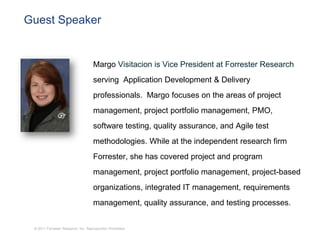
                                    Margo Visitacion is Vice President at Forrester Research
                                    serving Application Development & Delivery
                                    professionals. Margo focuses on the areas of project
                                    management, project portfolio management, PMO,
                                    software testing, quality assurance, and Agile test
                                    methodologies. While at the independent research firm
                                    Forrester, she has covered project and program
                                    management, project portfolio management, project-based
                                    organizations, integrated IT management, requirements
                                    management, quality assurance, and testing processes.


 © 2011 Forrester Research, Inc. Reproduction Prohibited
Do The Right Thing - Empowering Your Test Teams

Margo Visitacion, Vice President


March 1, 2011


   © 2009 Forrester Research, Inc. Reproduction Prohibited
     2011
Agenda


Quality is hard – it’s time to step up

Empower your QA team to make a difference

Taking a team approach to build on positive change

Adopt tools to streamline the process

Recommendations


  © 2011 Forrester Research, Inc. Reproduction Prohibited
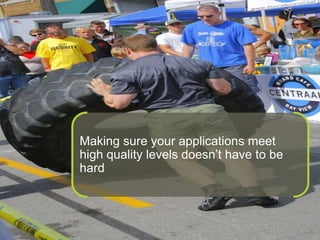
Making sure your applications meet
                           high quality levels doesn’t have to be
                           hard


© 2011 Forrester Research, Inc. Reproduction Prohibited
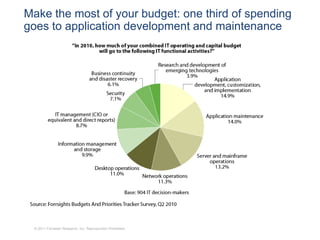
Make the most of your budget: one third of spending
goes to application development and maintenance


 © 2011 Forrester Research, Inc. Reproduction Prohibited
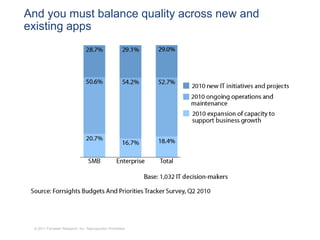
And you must balance quality across new and
existing apps


 © 2011 Forrester Research, Inc. Reproduction Prohibited
Agenda


Quality is hard – it’s time to step up

Empower your QA team to make a difference

Taking a team approach to build on positive change

Adopt tools to streamline the process

Recommendations


   © 2011 Forrester Research, Inc. Reproduction Prohibited
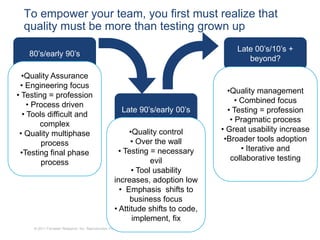
To empower your team, you first must realize that
  quality must be more than testing grown up
                                                                                      Late 00’s/10’s +
   80’s/early 90’s
                                                                                         beyond?

  •Quality Assurance
 • Engineering focus
                                                                                    •Quality management
• Testing = profession
                                                                                       • Combined focus
    • Process driven
                                                          Late 90’s/early 00’s      • Testing = profession
  • Tools difficult and
                                                                                     • Pragmatic process
        complex
                                                          •Quality control        • Great usability increase
 • Quality multiphase
                                                           • Over the wall         •Broader tools adoption
        process
                                                       • Testing = necessary             • Iterative and
 •Testing final phase
                                                                 evil                collaborative testing
        process
                                                           • Tool usability
                                                     increases, adoption low
                                                       • Emphasis shifts to
                                                           business focus
                                                     • Attitude shifts to code,
                                                           implement, fix
     © 2011 Forrester Research, Inc. Reproduction Prohibited
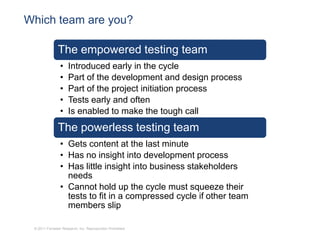
Which team are you?

               The empowered testing team
                •    Introduced early in the cycle
                •    Part of the development and design process
                •    Part of the project initiation process
                •    Tests early and often
                •    Is enabled to make the tough call
               The powerless testing team
                • Gets content at the last minute
                • Has no insight into development process
                • Has little insight into business stakeholders
                  needs
                • Cannot hold up the cycle must squeeze their
                  tests to fit in a compressed cycle if other team
                  members slip

 © 2011 Forrester Research, Inc. Reproduction Prohibited
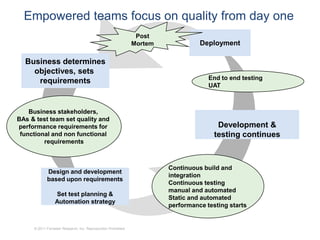
Empowered teams focus on quality from day one
                                                                Post
                                                               Mortem             Deployment

  Business determines
    objectives, sets
                                                                                     End to end testing
     requirements
                                                                                     UAT


    Business stakeholders,
BAs & test team set quality and
performance requirements for                                                            Development &
 functional and non functional                                                         testing continues
         requirements


                                                                        Continuous build and
            Design and development
                                                                        integration
            based upon requirements
                                                                        Continuous testing
                                                                        manual and automated
                 Set test planning &
                                                                        Static and automated
                 Automation strategy
                                                                        performance testing starts


     © 2011 Forrester Research, Inc. Reproduction Prohibited
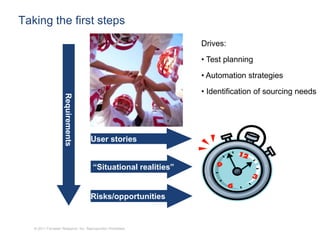
Taking the first steps
                                                                Drives:
                                                                • Test planning

                                                                • Automation strategies
                                                                • Identification of sourcing needs
                     Requirements


                                     User stories


                                      “Situational realities”


                                     Risks/opportunities


   © 2011 Forrester Research, Inc. Reproduction Prohibited
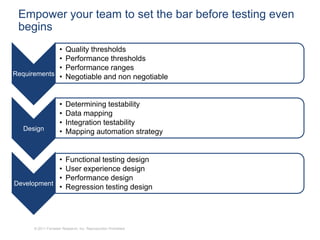
Empower your team to set the bar before testing even
 begins
             •           Quality thresholds
             •           Performance thresholds
             •           Performance ranges
Requirements •           Negotiable and non negotiable


                     •   Determining testability
                     •   Data mapping
                     •   Integration testability
  Design             •   Mapping automation strategy


            •            Functional testing design
            •            User experience design
            •            Performance design
Development
            •            Regression testing design


      © 2011 Forrester Research, Inc. Reproduction Prohibited
Agenda


Quality is hard – it’s time to step up

Empower your QA team to make a difference

Taking a team approach to build on positive change

Adopt tools to streamline the process

Recommendations


   © 2011 Forrester Research, Inc. Reproduction Prohibited
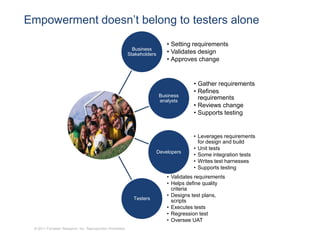
Empowerment doesn’t belong to testers alone
                                                                              • Setting requirements
                                                             Business
                                                           Stakeholders       • Validates design
                                                                              • Approves change


                                                                                         • Gather requirements
                                                                                         • Refines
                                                                          Business         requirements
                                                                          analysts
                                                                                         • Reviews change
                                                                                         • Supports testing


                                                                                         • Leverages requirements
                                                                                           for design and build
                                                                                         • Unit tests
                                                                          Developers
                                                                                         • Some integration tests
                                                                                         • Writes test harnesses
                                                                                         • Supports testing
                                                                              • Validates requirements
                                                                              • Helps define quality
                                                                                criteria
                                                                              • Designs test plans,
                                                             Testers            scripts
                                                                              • Executes tests
                                                                              • Regression test
                                                                              • Oversee UAT
 © 2011 Forrester Research, Inc. Reproduction Prohibited
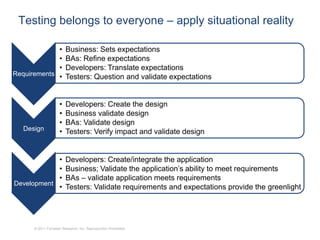
Testing belongs to everyone – apply situational reality

             •           Business: Sets expectations
             •           BAs: Refine expectations
             •           Developers: Translate expectations
Requirements •           Testers: Question and validate expectations


                     •   Developers: Create the design
                     •   Business validate design
                     •   BAs: Validate design
  Design             •   Testers: Verify impact and validate design


            •            Developers: Create/integrate the application
            •            Business; Validate the application’s ability to meet requirements
            •            BAs – validate application meets requirements
Development
            •            Testers: Validate requirements and expectations provide the greenlight


      © 2011 Forrester Research, Inc. Reproduction Prohibited
Agenda


Quality is hard – it’s time to step up

Empower your QA team to make a difference

Taking a team approach to build on positive change

Adopt tools to streamline the process

Recommendations


   © 2011 Forrester Research, Inc. Reproduction Prohibited
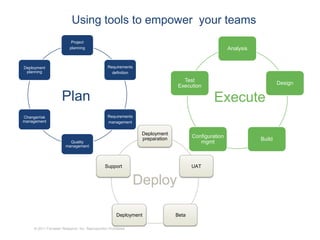
Using tools to empower your teams
                           Project
                          planning                                                                   Analysis


Deployment                                       Requirements
 planning                                          definition
                                                                                Test
                                                                                                                        Design
                                                                              Execution

                     Plan                                                                     Execute
Change/risk                                      Requirements
management                                       management

                                                                Deployment
                                                                preparation          Configuration
                                                                                                                Build
                          Quality                                                       mgmt
                        management


                                                Support                              UAT


                                                               Deploy

                                                      Deployment              Beta

     © 2011 Forrester Research, Inc. Reproduction Prohibited
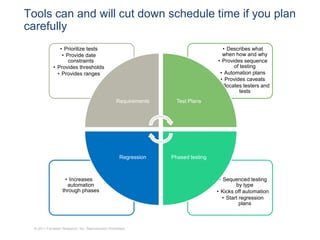
Tools can and will cut down schedule time if you plan
carefully
                • Prioritize tests                                                    • Describes what
                 • Provide date                                                       when how and why
                    constraints                                                     • Provides sequence
             • Provides thresholds                                                         of testing
               • Provides ranges                                                     • Automation plans
                                                                                     • Provides caveats
                                                                                   • Allocates testers and
                                                                                              tests
                                                   Requirements     Test Plans


                                                     Regression   Phased testing


                    • Increases                                                     • Sequenced testing
                     automation                                                             by type
                   through phases                                                  • Kicks off automation
                                                                                      • Start regression
                                                                                              plans


  © 2011 Forrester Research, Inc. Reproduction Prohibited
Agenda


Quality is hard – it’s time to step up

Empower your QA team to make a difference

Taking a team approach to build on positive change

Adopt tools to streamline the process

Recommendations


   © 2011 Forrester Research, Inc. Reproduction Prohibited
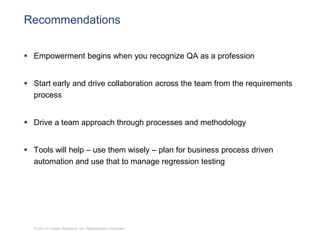
Recommendations


 Empowerment begins when you recognize QA as a profession


 Start early and drive collaboration across the team from the requirements
  process


 Drive a team approach through processes and methodology


 Tools will help – use them wisely – plan for business process driven
  automation and use that to manage regression testing


  © 2011 Forrester Research, Inc. Reproduction Prohibited
Thank you


Margo Visitacion
Mvisitacion@forrester.com
www.forrester.com


  © 2009 Forrester Research, Inc. Reproduction Prohibited
Questions?


                                                            Please type your
                                                             questions into the
                                                             chat window


 © 2011 Forrester Research, Inc. Reproduction Prohibited
Thank You!


 © 2011 Forrester Research, Inc. Reproduction Prohibited

Do The Right Thing - Empowering Your Test Teams

  • 1.
    Webinar: Do The RightThing – Empowering Your Test Teams Twitter: #SBevent Guest Speaker: Margo Visitacion, Vice President, Forrester Research Host: Derek Langone, President, SmartBear Software © 2011 Forrester Research, Inc. Reproduction Prohibited
  • 2.
    Agenda  Introductions  DoThe Right Thing - Empowering Your Test Teams  Q+A © 2011 Forrester Research, Inc. Reproduction Prohibited
  • 3.
    FAQ  Questions – You can submit questions at any time – Use the “Questions” feature in your GoToWebinar Panel  Twitter: Share the event live using #SBevent  Replay will be available at SmartBear.com © 2011 Forrester Research, Inc. Reproduction Prohibited
  • 4.
    Guest Speaker Margo Visitacion is Vice President at Forrester Research serving Application Development & Delivery professionals. Margo focuses on the areas of project management, project portfolio management, PMO, software testing, quality assurance, and Agile test methodologies. While at the independent research firm Forrester, she has covered project and program management, project portfolio management, project-based organizations, integrated IT management, requirements management, quality assurance, and testing processes. © 2011 Forrester Research, Inc. Reproduction Prohibited
  • 5.
    Do The RightThing - Empowering Your Test Teams Margo Visitacion, Vice President March 1, 2011 © 2009 Forrester Research, Inc. Reproduction Prohibited 2011
  • 6.
    Agenda Quality is hard– it’s time to step up Empower your QA team to make a difference Taking a team approach to build on positive change Adopt tools to streamline the process Recommendations © 2011 Forrester Research, Inc. Reproduction Prohibited
  • 7.
    Making sure yourapplications meet high quality levels doesn’t have to be hard © 2011 Forrester Research, Inc. Reproduction Prohibited
  • 8.
    Make the mostof your budget: one third of spending goes to application development and maintenance © 2011 Forrester Research, Inc. Reproduction Prohibited
  • 9.
    And you mustbalance quality across new and existing apps © 2011 Forrester Research, Inc. Reproduction Prohibited
  • 10.
    Agenda Quality is hard– it’s time to step up Empower your QA team to make a difference Taking a team approach to build on positive change Adopt tools to streamline the process Recommendations © 2011 Forrester Research, Inc. Reproduction Prohibited
  • 11.
    To empower yourteam, you first must realize that quality must be more than testing grown up Late 00’s/10’s + 80’s/early 90’s beyond? •Quality Assurance • Engineering focus •Quality management • Testing = profession • Combined focus • Process driven Late 90’s/early 00’s • Testing = profession • Tools difficult and • Pragmatic process complex •Quality control • Great usability increase • Quality multiphase • Over the wall •Broader tools adoption process • Testing = necessary • Iterative and •Testing final phase evil collaborative testing process • Tool usability increases, adoption low • Emphasis shifts to business focus • Attitude shifts to code, implement, fix © 2011 Forrester Research, Inc. Reproduction Prohibited
  • 12.
    Which team areyou? The empowered testing team • Introduced early in the cycle • Part of the development and design process • Part of the project initiation process • Tests early and often • Is enabled to make the tough call The powerless testing team • Gets content at the last minute • Has no insight into development process • Has little insight into business stakeholders needs • Cannot hold up the cycle must squeeze their tests to fit in a compressed cycle if other team members slip © 2011 Forrester Research, Inc. Reproduction Prohibited
  • 13.
    Empowered teams focuson quality from day one Post Mortem Deployment Business determines objectives, sets End to end testing requirements UAT Business stakeholders, BAs & test team set quality and performance requirements for Development & functional and non functional testing continues requirements Continuous build and Design and development integration based upon requirements Continuous testing manual and automated Set test planning & Static and automated Automation strategy performance testing starts © 2011 Forrester Research, Inc. Reproduction Prohibited
  • 14.
    Taking the firststeps Drives: • Test planning • Automation strategies • Identification of sourcing needs Requirements User stories “Situational realities” Risks/opportunities © 2011 Forrester Research, Inc. Reproduction Prohibited
  • 15.
    Empower your teamto set the bar before testing even begins • Quality thresholds • Performance thresholds • Performance ranges Requirements • Negotiable and non negotiable • Determining testability • Data mapping • Integration testability Design • Mapping automation strategy • Functional testing design • User experience design • Performance design Development • Regression testing design © 2011 Forrester Research, Inc. Reproduction Prohibited
  • 16.
    Agenda Quality is hard– it’s time to step up Empower your QA team to make a difference Taking a team approach to build on positive change Adopt tools to streamline the process Recommendations © 2011 Forrester Research, Inc. Reproduction Prohibited
  • 17.
    Empowerment doesn’t belongto testers alone • Setting requirements Business Stakeholders • Validates design • Approves change • Gather requirements • Refines Business requirements analysts • Reviews change • Supports testing • Leverages requirements for design and build • Unit tests Developers • Some integration tests • Writes test harnesses • Supports testing • Validates requirements • Helps define quality criteria • Designs test plans, Testers scripts • Executes tests • Regression test • Oversee UAT © 2011 Forrester Research, Inc. Reproduction Prohibited
  • 18.
    Testing belongs toeveryone – apply situational reality • Business: Sets expectations • BAs: Refine expectations • Developers: Translate expectations Requirements • Testers: Question and validate expectations • Developers: Create the design • Business validate design • BAs: Validate design Design • Testers: Verify impact and validate design • Developers: Create/integrate the application • Business; Validate the application’s ability to meet requirements • BAs – validate application meets requirements Development • Testers: Validate requirements and expectations provide the greenlight © 2011 Forrester Research, Inc. Reproduction Prohibited
  • 19.
    Agenda Quality is hard– it’s time to step up Empower your QA team to make a difference Taking a team approach to build on positive change Adopt tools to streamline the process Recommendations © 2011 Forrester Research, Inc. Reproduction Prohibited
  • 20.
    Using tools toempower your teams Project planning Analysis Deployment Requirements planning definition Test Design Execution Plan Execute Change/risk Requirements management management Deployment preparation Configuration Build Quality mgmt management Support UAT Deploy Deployment Beta © 2011 Forrester Research, Inc. Reproduction Prohibited
  • 21.
    Tools can andwill cut down schedule time if you plan carefully • Prioritize tests • Describes what • Provide date when how and why constraints • Provides sequence • Provides thresholds of testing • Provides ranges • Automation plans • Provides caveats • Allocates testers and tests Requirements Test Plans Regression Phased testing • Increases • Sequenced testing automation by type through phases • Kicks off automation • Start regression plans © 2011 Forrester Research, Inc. Reproduction Prohibited
  • 22.
    Agenda Quality is hard– it’s time to step up Empower your QA team to make a difference Taking a team approach to build on positive change Adopt tools to streamline the process Recommendations © 2011 Forrester Research, Inc. Reproduction Prohibited
  • 23.
    Recommendations  Empowerment beginswhen you recognize QA as a profession  Start early and drive collaboration across the team from the requirements process  Drive a team approach through processes and methodology  Tools will help – use them wisely – plan for business process driven automation and use that to manage regression testing © 2011 Forrester Research, Inc. Reproduction Prohibited
  • 24.
    Thank you Margo Visitacion Mvisitacion@forrester.com www.forrester.com © 2009 Forrester Research, Inc. Reproduction Prohibited
  • 25.
    Questions?  Please type your questions into the chat window © 2011 Forrester Research, Inc. Reproduction Prohibited
  • 26.
    Thank You! ©2011 Forrester Research, Inc. Reproduction Prohibited

Editor's Notes

  • #6 Delete second Name/Title if not needed, but be sure to keep the Month Day, Year information. For a teleconference, after the date, add a period and “Call in at XX:55 p.m. Eastern time” (change the time to five minutes prior to the start of the teleconference).
  • #7 To add or remove rows in the table:Select the table. Your cursor will change to an icon of two lines and an arrow above and below will appear on mouse-over of the baseline of the row.Right-click and select INSERT > ROW BELOW. Or DELETE ROW.To add a row after the last row, you can press [Tab], and the cursor will go to a new row.Highlighting new areas:Select the bracket group from the right bracket. Hold SHIFT and pull cursor down over the next bullet item. Select the previously highlighted text and in the HOME tab unclick the [B] button for bold, and click on the [A]buttonand choose the gray swatch (Gray-50%, Accent 5) second to last in the top row of the palette. Select the text for the newly highlighted area and click the [B] button for bold, and click on the [A]buttonand choose black.
  • #8 Custom LayoutTo apply custom layout: Duplicate this slide, then edit text and image background.This image is a placeholder only. It should be replaced by an image appropriate to your presentation. The text placeholder is suitable for use on dark images.
  • #11 To add or remove rows in the table:Select the table. Your cursor will change to an icon of two lines and an arrow above and below will appear on mouse-over of the baseline of the row.Right-click and select INSERT > ROW BELOW. Or DELETE ROW.To add a row after the last row, you can press [Tab], and the cursor will go to a new row.Highlighting new areas:Select the bracket group from the right bracket. Hold SHIFT and pull cursor down over the next bullet item. Select the previously highlighted text and in the HOME tab unclick the [B] button for bold, and click on the [A]buttonand choose the gray swatch (Gray-50%, Accent 5) second to last in the top row of the palette. Select the text for the newly highlighted area and click the [B] button for bold, and click on the [A]buttonand choose black.
  • #17 To add or remove rows in the table:Select the table. Your cursor will change to an icon of two lines and an arrow above and below will appear on mouse-over of the baseline of the row.Right-click and select INSERT > ROW BELOW. Or DELETE ROW.To add a row after the last row, you can press [Tab], and the cursor will go to a new row.Highlighting new areas:Select the bracket group from the right bracket. Hold SHIFT and pull cursor down over the next bullet item. Select the previously highlighted text and in the HOME tab unclick the [B] button for bold, and click on the [A]buttonand choose the gray swatch (Gray-50%, Accent 5) second to last in the top row of the palette. Select the text for the newly highlighted area and click the [B] button for bold, and click on the [A]buttonand choose black.
  • #20 To add or remove rows in the table:Select the table. Your cursor will change to an icon of two lines and an arrow above and below will appear on mouse-over of the baseline of the row.Right-click and select INSERT > ROW BELOW. Or DELETE ROW.To add a row after the last row, you can press [Tab], and the cursor will go to a new row.Highlighting new areas:Select the bracket group from the right bracket. Hold SHIFT and pull cursor down over the next bullet item. Select the previously highlighted text and in the HOME tab unclick the [B] button for bold, and click on the [A]buttonand choose the gray swatch (Gray-50%, Accent 5) second to last in the top row of the palette. Select the text for the newly highlighted area and click the [B] button for bold, and click on the [A]buttonand choose black.
  • #23 To add or remove rows in the table:Select the table. Your cursor will change to an icon of two lines and an arrow above and below will appear on mouse-over of the baseline of the row.Right-click and select INSERT > ROW BELOW. Or DELETE ROW.To add a row after the last row, you can press [Tab], and the cursor will go to a new row.Highlighting new areas:Select the bracket group from the right bracket. Hold SHIFT and pull cursor down over the next bullet item. Select the previously highlighted text and in the HOME tab unclick the [B] button for bold, and click on the [A]buttonand choose the gray swatch (Gray-50%, Accent 5) second to last in the top row of the palette. Select the text for the newly highlighted area and click the [B] button for bold, and click on the [A]buttonand choose black.