2. Data types, Variables and Operators
1ARULKUMAR V AP/CSE SECE
Motivations
Suppose, for example, that you need to take out a
student loan. Given the loan amount, loan term,
and annual interest rate, can you write a program
to compute the monthly payment and total
payment? This chapter shows you how to write
programs like this. Along the way, you learn the
basic steps that go into analyzing a problem,
designing a solution, and implementing the
solution by creating a program.
2ARULKUMAR V AP/CSE SECE
Objectives
• To use identifiers to name variables (§2.4).
• To assign data to variables (§2.5).
• To define named constants (§2.6).
• To use the operators +, -, *, /, //, %, and ** (§2.7).
• To write and evaluate numeric expressions (§2.8).
• To use augmented assignment operators to simplify coding (§2.9).
• To perform numeric type conversion and rounding with the int and
round functions (§2.10).
• To obtain the current system time by using time.time() (§2.11).
• To describe the software development process and apply it to
develop the loan payment program (§2.12).
• To compute and display the distance between two points (§2.13).
3ARULKUMAR V AP/CSE SECE
Identifiers
• An identifier is a sequence of characters that
consists of letters, digits, underscores (_), and
asterisk (*).
• An identifier must start with a letter or an
underscore. It cannot start with a digit.
• An identifier cannot be a reserved word. (See
Appendix A, "Python Keywords," for a list of
reserved words.) Reserved words have special
meanings in Python, which we will later.
• An identifier can be of any length.
4ARULKUMAR V AP/CSE SECE
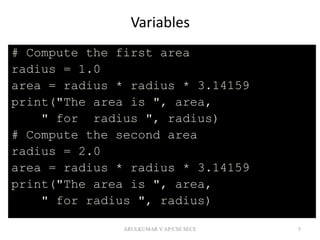
Variables
# Compute the first area
radius = 1.0
area = radius * radius * 3.14159
print("The area is ", area,
" for radius ", radius)
# Compute the second area
radius = 2.0
area = radius * radius * 3.14159
print("The area is ", area,
" for radius ", radius)
5ARULKUMAR V AP/CSE SECE
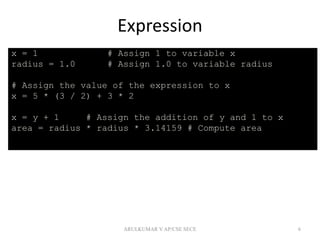
Expression
x = 1 # Assign 1 to variable x
radius = 1.0 # Assign 1.0 to variable radius
# Assign the value of the expression to x
x = 5 * (3 / 2) + 3 * 2
x = y + 1 # Assign the addition of y and 1 to x
area = radius * radius * 3.14159 # Compute area
6ARULKUMAR V AP/CSE SECE
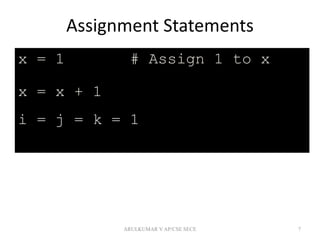
Assignment Statements
x = 1 # Assign 1 to x
x = x + 1
i = j = k = 1
7ARULKUMAR V AP/CSE SECE
Simultaneous Assignment
var1, var2, ..., varn = exp1, exp2, ..., expn
8
x, y = y, x # Swap x with y
ComputeAverageWithSimultaneousAssignment
Run
ARULKUMAR V AP/CSE SECE
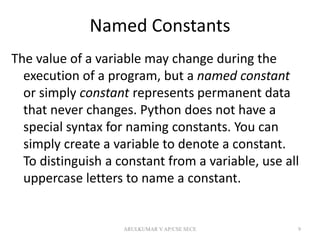
Named Constants
The value of a variable may change during the
execution of a program, but a named constant
or simply constant represents permanent data
that never changes. Python does not have a
special syntax for naming constants. You can
simply create a variable to denote a constant.
To distinguish a constant from a variable, use all
uppercase letters to name a constant.
9ARULKUMAR V AP/CSE SECE
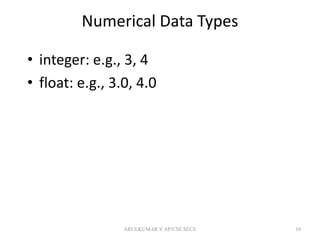
Numerical Data Types
• integer: e.g., 3, 4
• float: e.g., 3.0, 4.0
10ARULKUMAR V AP/CSE SECE
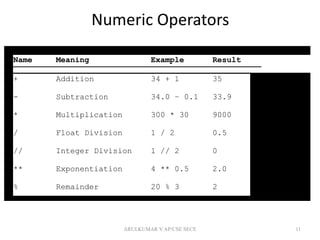
Numeric Operators
11
Name Meaning Example Result
+ Addition 34 + 1 35
- Subtraction 34.0 – 0.1 33.9
* Multiplication 300 * 30 9000
/ Float Division 1 / 2 0.5
// Integer Division 1 // 2 0
** Exponentiation 4 ** 0.5 2.0
% Remainder 20 % 3 2
ARULKUMAR V AP/CSE SECE
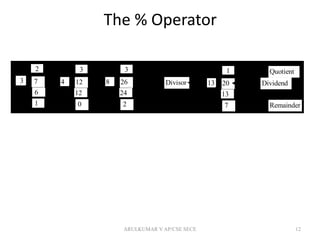
The % Operator
12
124
3
12
0
73
2
6
1
268
3
24
2 Remainder
Quotient
2013
1
13
7
DividendDivisor
ARULKUMAR V AP/CSE SECE
Remainder Operator
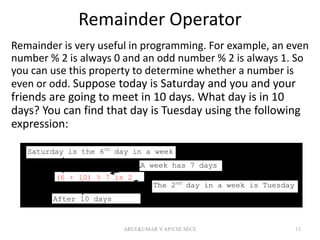
Remainder is very useful in programming. For example, an even
number % 2 is always 0 and an odd number % 2 is always 1. So
you can use this property to determine whether a number is
even or odd. Suppose today is Saturday and you and your
friends are going to meet in 10 days. What day is in 10
days? You can find that day is Tuesday using the following
expression:
13
Saturday is the 6th
day in a week
A week has 7 days
After 10 days
The 2nd
day in a week is Tuesday
(6 + 10) % 7 is 2
ARULKUMAR V AP/CSE SECE
Problem: Displaying Time
Write a program that obtains hours and
minutes from seconds.
14
DisplayTime Run
ARULKUMAR V AP/CSE SECE
Overflow
When a variable is assigned a value that is too
large (in size) to be stored, it causes overflow.
For example, executing the following
statement causes overflow.
15
>>>245.0 ** 1000
OverflowError: 'Result too large'
ARULKUMAR V AP/CSE SECE
Underflow
When a floating-point number is too small (i.e., too
close to zero) to be stored, it causes underflow.
Python approximates it to zero. So normally you
should not be concerned with underflow.
16ARULKUMAR V AP/CSE SECE
Scientific Notation
Floating-point literals can also be specified in
scientific notation, for example, 1.23456e+2,
same as 1.23456e2, is equivalent to 123.456,
and 1.23456e-2 is equivalent to 0.0123456. E (or
e) represents an exponent and it can be either in
lowercase or uppercase.
17ARULKUMAR V AP/CSE SECE
Arithmetic Expressions
18
)
94
(9
))(5(10
5
43
y
x
xx
cbayx 




is translated to
(3+4*x)/5 – 10*(y-5)*(a+b+c)/x + 9*(4/x + (9+x)/y)
ARULKUMAR V AP/CSE SECE
How to Evaluate an Expression
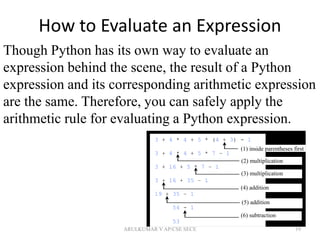
19
Though Python has its own way to evaluate an
expression behind the scene, the result of a Python
expression and its corresponding arithmetic expression
are the same. Therefore, you can safely apply the
arithmetic rule for evaluating a Python expression.
3 + 4 * 4 + 5 * (4 + 3) - 1
3 + 4 * 4 + 5 * 7 – 1
3 + 16 + 5 * 7 – 1
3 + 16 + 35 – 1
19 + 35 – 1
54 - 1
53
(1) inside parentheses first
(2) multiplication
(3) multiplication
(4) addition
(6) subtraction
(5) addition
ARULKUMAR V AP/CSE SECE
Augmented Assignment Operators
20
Operator Example Equivalent
+= i += 8 i = i + 8
-= f -= 8.0 f = f - 8.0
*= i *= 8 i = i * 8
/= i /= 8 i = i / 8
%= i %= 8 i = i % 8
ARULKUMAR V AP/CSE SECE
Type Conversion and Rounding
datatype(value)
i.e., int(4.5) => 4
float(4) => 4.0
str(4) => “4”
round(4.6) => 5
round(4.5) => 4
21ARULKUMAR V AP/CSE SECE
Problem: Keeping Two Digits After
Decimal Points
Write a program that displays the sales tax with
two digits after the decimal point.
22
SalesTax Run
ARULKUMAR V AP/CSE SECE
Problem: Displaying Current Time
23
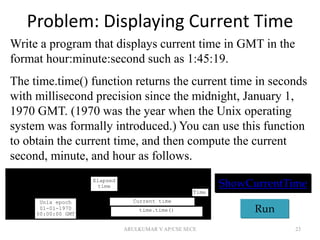
Write a program that displays current time in GMT in the
format hour:minute:second such as 1:45:19.
The time.time() function returns the current time in seconds
with millisecond precision since the midnight, January 1,
1970 GMT. (1970 was the year when the Unix operating
system was formally introduced.) You can use this function
to obtain the current time, and then compute the current
second, minute, and hour as follows.
ShowCurrentTime
Run
Elapsed
time
Unix epoch
01-01-1970
00:00:00 GMT
Current time
Time
time.time()
ARULKUMAR V AP/CSE SECE

2. data types, variables and operators

  • 1.
    2. Data types,Variables and Operators 1ARULKUMAR V AP/CSE SECE
  • 2.
    Motivations Suppose, for example,that you need to take out a student loan. Given the loan amount, loan term, and annual interest rate, can you write a program to compute the monthly payment and total payment? This chapter shows you how to write programs like this. Along the way, you learn the basic steps that go into analyzing a problem, designing a solution, and implementing the solution by creating a program. 2ARULKUMAR V AP/CSE SECE
  • 3.
    Objectives • To useidentifiers to name variables (§2.4). • To assign data to variables (§2.5). • To define named constants (§2.6). • To use the operators +, -, *, /, //, %, and ** (§2.7). • To write and evaluate numeric expressions (§2.8). • To use augmented assignment operators to simplify coding (§2.9). • To perform numeric type conversion and rounding with the int and round functions (§2.10). • To obtain the current system time by using time.time() (§2.11). • To describe the software development process and apply it to develop the loan payment program (§2.12). • To compute and display the distance between two points (§2.13). 3ARULKUMAR V AP/CSE SECE
  • 4.
    Identifiers • An identifieris a sequence of characters that consists of letters, digits, underscores (_), and asterisk (*). • An identifier must start with a letter or an underscore. It cannot start with a digit. • An identifier cannot be a reserved word. (See Appendix A, "Python Keywords," for a list of reserved words.) Reserved words have special meanings in Python, which we will later. • An identifier can be of any length. 4ARULKUMAR V AP/CSE SECE
  • 5.
    Variables # Compute thefirst area radius = 1.0 area = radius * radius * 3.14159 print("The area is ", area, " for radius ", radius) # Compute the second area radius = 2.0 area = radius * radius * 3.14159 print("The area is ", area, " for radius ", radius) 5ARULKUMAR V AP/CSE SECE
  • 6.
    Expression x = 1# Assign 1 to variable x radius = 1.0 # Assign 1.0 to variable radius # Assign the value of the expression to x x = 5 * (3 / 2) + 3 * 2 x = y + 1 # Assign the addition of y and 1 to x area = radius * radius * 3.14159 # Compute area 6ARULKUMAR V AP/CSE SECE
  • 7.
    Assignment Statements x =1 # Assign 1 to x x = x + 1 i = j = k = 1 7ARULKUMAR V AP/CSE SECE
  • 8.
    Simultaneous Assignment var1, var2,..., varn = exp1, exp2, ..., expn 8 x, y = y, x # Swap x with y ComputeAverageWithSimultaneousAssignment Run ARULKUMAR V AP/CSE SECE
  • 9.
    Named Constants The valueof a variable may change during the execution of a program, but a named constant or simply constant represents permanent data that never changes. Python does not have a special syntax for naming constants. You can simply create a variable to denote a constant. To distinguish a constant from a variable, use all uppercase letters to name a constant. 9ARULKUMAR V AP/CSE SECE
  • 10.
    Numerical Data Types •integer: e.g., 3, 4 • float: e.g., 3.0, 4.0 10ARULKUMAR V AP/CSE SECE
  • 11.
    Numeric Operators 11 Name MeaningExample Result + Addition 34 + 1 35 - Subtraction 34.0 – 0.1 33.9 * Multiplication 300 * 30 9000 / Float Division 1 / 2 0.5 // Integer Division 1 // 2 0 ** Exponentiation 4 ** 0.5 2.0 % Remainder 20 % 3 2 ARULKUMAR V AP/CSE SECE
  • 12.
    The % Operator 12 124 3 12 0 73 2 6 1 268 3 24 2Remainder Quotient 2013 1 13 7 DividendDivisor ARULKUMAR V AP/CSE SECE
  • 13.
    Remainder Operator Remainder isvery useful in programming. For example, an even number % 2 is always 0 and an odd number % 2 is always 1. So you can use this property to determine whether a number is even or odd. Suppose today is Saturday and you and your friends are going to meet in 10 days. What day is in 10 days? You can find that day is Tuesday using the following expression: 13 Saturday is the 6th day in a week A week has 7 days After 10 days The 2nd day in a week is Tuesday (6 + 10) % 7 is 2 ARULKUMAR V AP/CSE SECE
  • 14.
    Problem: Displaying Time Writea program that obtains hours and minutes from seconds. 14 DisplayTime Run ARULKUMAR V AP/CSE SECE
  • 15.
    Overflow When a variableis assigned a value that is too large (in size) to be stored, it causes overflow. For example, executing the following statement causes overflow. 15 >>>245.0 ** 1000 OverflowError: 'Result too large' ARULKUMAR V AP/CSE SECE
  • 16.
    Underflow When a floating-pointnumber is too small (i.e., too close to zero) to be stored, it causes underflow. Python approximates it to zero. So normally you should not be concerned with underflow. 16ARULKUMAR V AP/CSE SECE
  • 17.
    Scientific Notation Floating-point literalscan also be specified in scientific notation, for example, 1.23456e+2, same as 1.23456e2, is equivalent to 123.456, and 1.23456e-2 is equivalent to 0.0123456. E (or e) represents an exponent and it can be either in lowercase or uppercase. 17ARULKUMAR V AP/CSE SECE
  • 18.
    Arithmetic Expressions 18 ) 94 (9 ))(5(10 5 43 y x xx cbayx      istranslated to (3+4*x)/5 – 10*(y-5)*(a+b+c)/x + 9*(4/x + (9+x)/y) ARULKUMAR V AP/CSE SECE
  • 19.
    How to Evaluatean Expression 19 Though Python has its own way to evaluate an expression behind the scene, the result of a Python expression and its corresponding arithmetic expression are the same. Therefore, you can safely apply the arithmetic rule for evaluating a Python expression. 3 + 4 * 4 + 5 * (4 + 3) - 1 3 + 4 * 4 + 5 * 7 – 1 3 + 16 + 5 * 7 – 1 3 + 16 + 35 – 1 19 + 35 – 1 54 - 1 53 (1) inside parentheses first (2) multiplication (3) multiplication (4) addition (6) subtraction (5) addition ARULKUMAR V AP/CSE SECE
  • 20.
    Augmented Assignment Operators 20 OperatorExample Equivalent += i += 8 i = i + 8 -= f -= 8.0 f = f - 8.0 *= i *= 8 i = i * 8 /= i /= 8 i = i / 8 %= i %= 8 i = i % 8 ARULKUMAR V AP/CSE SECE
  • 21.
    Type Conversion andRounding datatype(value) i.e., int(4.5) => 4 float(4) => 4.0 str(4) => “4” round(4.6) => 5 round(4.5) => 4 21ARULKUMAR V AP/CSE SECE
  • 22.
    Problem: Keeping TwoDigits After Decimal Points Write a program that displays the sales tax with two digits after the decimal point. 22 SalesTax Run ARULKUMAR V AP/CSE SECE
  • 23.
    Problem: Displaying CurrentTime 23 Write a program that displays current time in GMT in the format hour:minute:second such as 1:45:19. The time.time() function returns the current time in seconds with millisecond precision since the midnight, January 1, 1970 GMT. (1970 was the year when the Unix operating system was formally introduced.) You can use this function to obtain the current time, and then compute the current second, minute, and hour as follows. ShowCurrentTime Run Elapsed time Unix epoch 01-01-1970 00:00:00 GMT Current time Time time.time() ARULKUMAR V AP/CSE SECE