Python Programming
Variables, Expressions and Statements
Python for Everybody
www.py4e.com
Constants
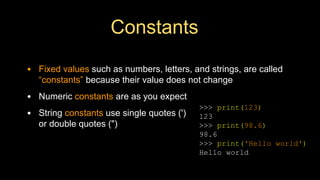
• Fixed values such as numbers, letters, and strings, are called
“constants” because their value does not change
• Numeric constants are as you expect
• String constants use single quotes (')
or double quotes (")
>>> print(123)
123
>>> print(98.6)
98.6
>>> print('Hello world')
Hello world
Reserved Words
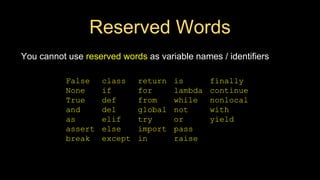
You cannot use reserved words as variable names / identifiers
False class return is finally
None if for lambda continue
True def from while nonlocal
and del global not with
as elif try or yield
assert else import pass
break except in raise
Variables
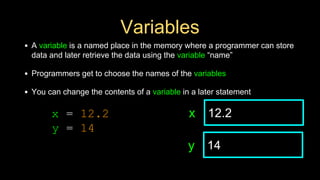
• A variable is a named place in the memory where a programmer can store
data and later retrieve the data using the variable “name”
• Programmers get to choose the names of the variables
• You can change the contents of a variable in a later statement
12.2
x
14
y
x = 12.2
y = 14
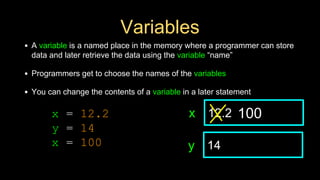
Variables
• A variable is a named place in the memory where a programmer can store
data and later retrieve the data using the variable “name”
• Programmers get to choose the names of the variables
• You can change the contents of a variable in a later statement
12.2
x
14
y
100
x = 12.2
y = 14
x = 100
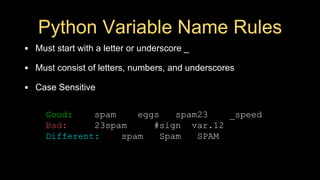
Python Variable Name Rules
• Must start with a letter or underscore _
• Must consist of letters, numbers, and underscores
• Case Sensitive
Good: spam eggs spam23 _speed
Bad: 23spam #sign var.12
Different: spam Spam SPAM
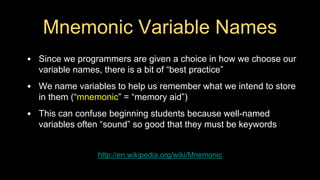
Mnemonic Variable Names
• Since we programmers are given a choice in how we choose our
variable names, there is a bit of “best practice”
• We name variables to help us remember what we intend to store
in them (“mnemonic” = “memory aid”)
• This can confuse beginning students because well-named
variables often “sound” so good that they must be keywords
http://en.wikipedia.org/wiki/Mnemonic
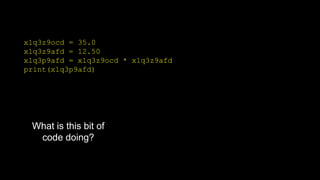
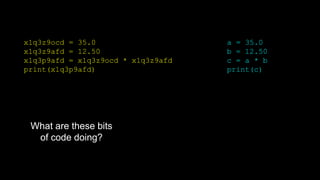
x1q3z9ocd = 35.0
x1q3z9afd = 12.50
x1q3p9afd = x1q3z9ocd * x1q3z9afd
print(x1q3p9afd)
What is this bit of
code doing?
x1q3z9ocd = 35.0
x1q3z9afd = 12.50
x1q3p9afd = x1q3z9ocd * x1q3z9afd
print(x1q3p9afd)
a = 35.0
b = 12.50
c = a * b
print(c)
What are these bits
of code doing?
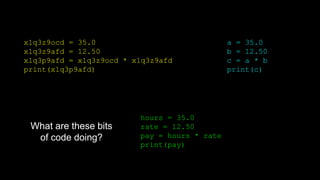
x1q3z9ocd = 35.0
x1q3z9afd = 12.50
x1q3p9afd = x1q3z9ocd * x1q3z9afd
print(x1q3p9afd)
hours = 35.0
rate = 12.50
pay = hours * rate
print(pay)
a = 35.0
b = 12.50
c = a * b
print(c)
What are these bits
of code doing?
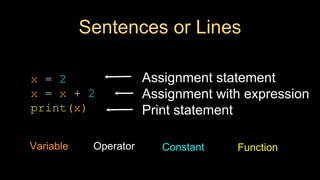
Sentences or Lines
x = 2
x = x + 2
print(x)
Variable Operator Constant Function
Assignment statement
Assignment with expression
Print statement
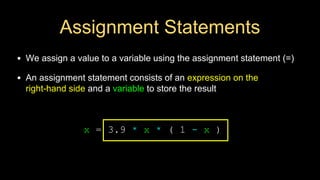
Assignment Statements
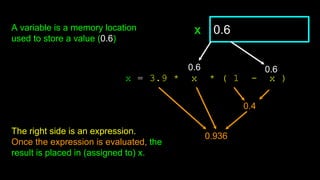
• We assign a value to a variable using the assignment statement (=)
• An assignment statement consists of an expression on the
right-hand side and a variable to store the result
x = 3.9 * x * ( 1 - x )
0.6
x
The right side is an expression.
Once the expression is evaluated, the
result is placed in (assigned to) x.
0.6 0.6
0.4
0.936
A variable is a memory location
used to store a value (0.6)
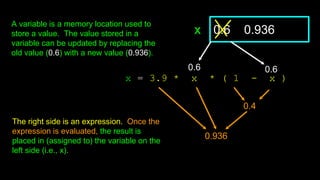
x = 3.9 * x * ( 1 - x )
0.6 0.936
x
0.4
0.936
The right side is an expression. Once the
expression is evaluated, the result is
placed in (assigned to) the variable on the
left side (i.e., x).
A variable is a memory location used to
store a value. The value stored in a
variable can be updated by replacing the
old value (0.6) with a new value (0.936).
0.6 0.6
Expressions…
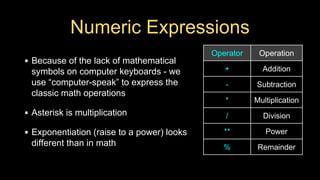
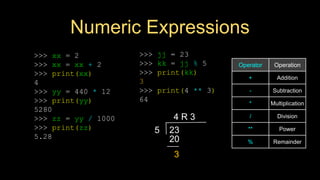
Numeric Expressions
• Because of the lack of mathematical
symbols on computer keyboards - we
use “computer-speak” to express the
classic math operations
• Asterisk is multiplication
• Exponentiation (raise to a power) looks
different than in math
Operator Operation
+ Addition
- Subtraction
* Multiplication
/ Division
** Power
% Remainder
>>> xx = 2
>>> xx = xx + 2
>>> print(xx)
4
>>> yy = 440 * 12
>>> print(yy)
5280
>>> zz = yy / 1000
>>> print(zz)
5.28
>>> jj = 23
>>> kk = jj % 5
>>> print(kk)
3
>>> print(4 ** 3)
64
Operator Operation
+ Addition
- Subtraction
* Multiplication
/ Division
** Power
% Remainder
5 23
4 R 3
20
3
Numeric Expressions
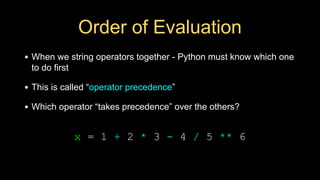
Order of Evaluation
• When we string operators together - Python must know which one
to do first
• This is called “operator precedence”
• Which operator “takes precedence” over the others?
x = 1 + 2 * 3 - 4 / 5 ** 6
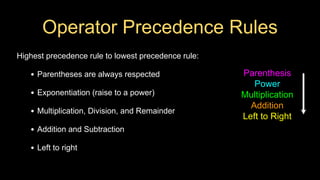
Operator Precedence Rules
Highest precedence rule to lowest precedence rule:
• Parentheses are always respected
• Exponentiation (raise to a power)
• Multiplication, Division, and Remainder
• Addition and Subtraction
• Left to right
Parenthesis
Power
Multiplication
Addition
Left to Right
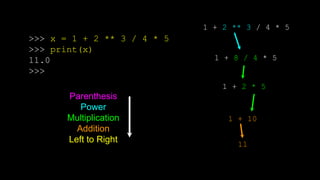
1 + 2 ** 3 / 4 * 5
1 + 8 / 4 * 5
1 + 2 * 5
1 + 10
11
>>> x = 1 + 2 ** 3 / 4 * 5
>>> print(x)
11.0
>>>
Parenthesis
Power
Multiplication
Addition
Left to Right
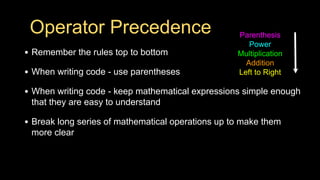
Operator Precedence
• Remember the rules top to bottom
• When writing code - use parentheses
• When writing code - keep mathematical expressions simple enough
that they are easy to understand
• Break long series of mathematical operations up to make them
more clear
Parenthesis
Power
Multiplication
Addition
Left to Right
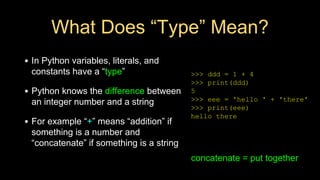
What Does “Type” Mean?
• In Python variables, literals, and
constants have a “type”
• Python knows the difference between
an integer number and a string
• For example “+” means “addition” if
something is a number and
“concatenate” if something is a string
>>> ddd = 1 + 4
>>> print(ddd)
5
>>> eee = 'hello ' + 'there'
>>> print(eee)
hello there
concatenate = put together
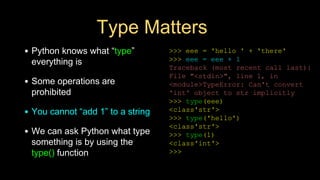
Type Matters
• Python knows what “type”
everything is
• Some operations are
prohibited
• You cannot “add 1” to a string
• We can ask Python what type
something is by using the
type() function
>>> eee = 'hello ' + 'there'
>>> eee = eee + 1
Traceback (most recent call last):
File "<stdin>", line 1, in
<module>TypeError: Can't convert
'int' object to str implicitly
>>> type(eee)
<class'str'>
>>> type('hello')
<class'str'>
>>> type(1)
<class'int'>
>>>
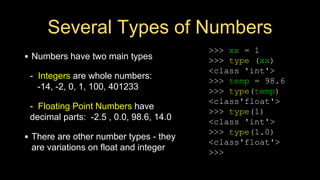
Several Types of Numbers
• Numbers have two main types
- Integers are whole numbers:
-14, -2, 0, 1, 100, 401233
- Floating Point Numbers have
decimal parts: -2.5 , 0.0, 98.6, 14.0
• There are other number types - they
are variations on float and integer
>>> xx = 1
>>> type (xx)
<class 'int'>
>>> temp = 98.6
>>> type(temp)
<class'float'>
>>> type(1)
<class 'int'>
>>> type(1.0)
<class'float'>
>>>
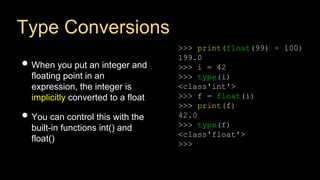
Type Conversions
• When you put an integer and
floating point in an
expression, the integer is
implicitly converted to a float
• You can control this with the
built-in functions int() and
float()
>>> print(float(99) + 100)
199.0
>>> i = 42
>>> type(i)
<class'int'>
>>> f = float(i)
>>> print(f)
42.0
>>> type(f)
<class'float'>
>>>
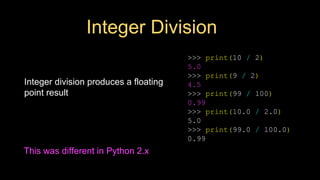
Integer Division
Integer division produces a floating
point result
>>> print(10 / 2)
5.0
>>> print(9 / 2)
4.5
>>> print(99 / 100)
0.99
>>> print(10.0 / 2.0)
5.0
>>> print(99.0 / 100.0)
0.99
This was different in Python 2.x
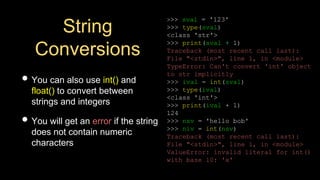
String
Conversions
• You can also use int() and
float() to convert between
strings and integers
• You will get an error if the string
does not contain numeric
characters
>>> sval = '123'
>>> type(sval)
<class 'str'>
>>> print(sval + 1)
Traceback (most recent call last):
File "<stdin>", line 1, in <module>
TypeError: Can't convert 'int' object
to str implicitly
>>> ival = int(sval)
>>> type(ival)
<class 'int'>
>>> print(ival + 1)
124
>>> nsv = 'hello bob'
>>> niv = int(nsv)
Traceback (most recent call last):
File "<stdin>", line 1, in <module>
ValueError: invalid literal for int()
with base 10: 'x'
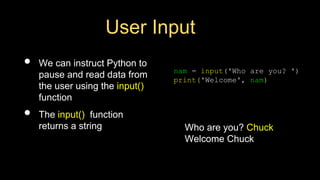
User Input
• We can instruct Python to
pause and read data from
the user using the input()
function
• The input() function
returns a string
nam = input('Who are you? ')
print('Welcome', nam)
Who are you? Chuck
Welcome Chuck
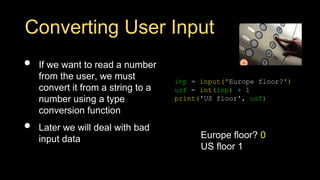
Converting User Input
• If we want to read a number
from the user, we must
convert it from a string to a
number using a type
conversion function
• Later we will deal with bad
input data
inp = input('Europe floor?')
usf = int(inp) + 1
print('US floor', usf)
Europe floor? 0
US floor 1
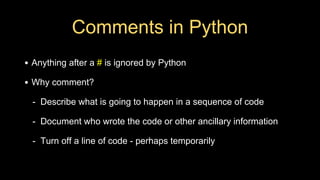
Comments in Python
• Anything after a # is ignored by Python
• Why comment?
- Describe what is going to happen in a sequence of code
- Document who wrote the code or other ancillary information
- Turn off a line of code - perhaps temporarily
# Get the name of the file and open it
name = input('Enter file:')
handle = open(name, 'r')
# Count word frequency
counts = dict()
for line in handle:
words = line.split()
for word in words:
counts[word] = counts.get(word,0) + 1
# Find the most common word
bigcount = None
bigword = None
for word,count in counts.items():
if bigcount is None or count > bigcount:
bigword = word
bigcount = count
# All done
print(bigword, bigcount)
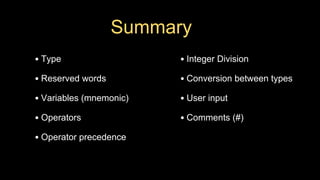
Summary
• Type
• Reserved words
• Variables (mnemonic)
• Operators
• Operator precedence
• Integer Division
• Conversion between types
• User input
• Comments (#)
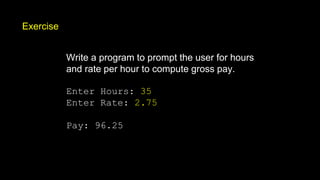
Exercise
Write a program to prompt the user for hours
and rate per hour to compute gross pay.
Enter Hours: 35
Enter Rate: 2.75
Pay: 96.25
Acknowledgements / Contributions
These slides are Copyright 2010- Charles R. Severance
(www.dr-chuck.com) of the University of Michigan School of
Information and made available under a Creative Commons
Attribution 4.0 License. Please maintain this last slide in all
copies of the document to comply with the attribution
requirements of the license. If you make a change, feel free to
add your name and organization to the list of contributors on this
page as you republish the materials.
Initial Development: Charles Severance, University of Michigan
School of Information
… Insert new Contributors and Translators here
...

03-Variables, Expressions and Statements (1).pdf

  • 1.
    Python Programming Variables, Expressionsand Statements Python for Everybody www.py4e.com
  • 2.
    Constants • Fixed valuessuch as numbers, letters, and strings, are called “constants” because their value does not change • Numeric constants are as you expect • String constants use single quotes (') or double quotes (") >>> print(123) 123 >>> print(98.6) 98.6 >>> print('Hello world') Hello world
  • 3.
    Reserved Words You cannotuse reserved words as variable names / identifiers False class return is finally None if for lambda continue True def from while nonlocal and del global not with as elif try or yield assert else import pass break except in raise
  • 4.
    Variables • A variableis a named place in the memory where a programmer can store data and later retrieve the data using the variable “name” • Programmers get to choose the names of the variables • You can change the contents of a variable in a later statement 12.2 x 14 y x = 12.2 y = 14
  • 5.
    Variables • A variableis a named place in the memory where a programmer can store data and later retrieve the data using the variable “name” • Programmers get to choose the names of the variables • You can change the contents of a variable in a later statement 12.2 x 14 y 100 x = 12.2 y = 14 x = 100
  • 6.
    Python Variable NameRules • Must start with a letter or underscore _ • Must consist of letters, numbers, and underscores • Case Sensitive Good: spam eggs spam23 _speed Bad: 23spam #sign var.12 Different: spam Spam SPAM
  • 7.
    Mnemonic Variable Names •Since we programmers are given a choice in how we choose our variable names, there is a bit of “best practice” • We name variables to help us remember what we intend to store in them (“mnemonic” = “memory aid”) • This can confuse beginning students because well-named variables often “sound” so good that they must be keywords http://en.wikipedia.org/wiki/Mnemonic
  • 8.
    x1q3z9ocd = 35.0 x1q3z9afd= 12.50 x1q3p9afd = x1q3z9ocd * x1q3z9afd print(x1q3p9afd) What is this bit of code doing?
  • 9.
    x1q3z9ocd = 35.0 x1q3z9afd= 12.50 x1q3p9afd = x1q3z9ocd * x1q3z9afd print(x1q3p9afd) a = 35.0 b = 12.50 c = a * b print(c) What are these bits of code doing?
  • 10.
    x1q3z9ocd = 35.0 x1q3z9afd= 12.50 x1q3p9afd = x1q3z9ocd * x1q3z9afd print(x1q3p9afd) hours = 35.0 rate = 12.50 pay = hours * rate print(pay) a = 35.0 b = 12.50 c = a * b print(c) What are these bits of code doing?
  • 11.
    Sentences or Lines x= 2 x = x + 2 print(x) Variable Operator Constant Function Assignment statement Assignment with expression Print statement
  • 12.
    Assignment Statements • Weassign a value to a variable using the assignment statement (=) • An assignment statement consists of an expression on the right-hand side and a variable to store the result x = 3.9 * x * ( 1 - x )
  • 13.
    x = 3.9* x * ( 1 - x ) 0.6 x The right side is an expression. Once the expression is evaluated, the result is placed in (assigned to) x. 0.6 0.6 0.4 0.936 A variable is a memory location used to store a value (0.6)
  • 14.
    x = 3.9* x * ( 1 - x ) 0.6 0.936 x 0.4 0.936 The right side is an expression. Once the expression is evaluated, the result is placed in (assigned to) the variable on the left side (i.e., x). A variable is a memory location used to store a value. The value stored in a variable can be updated by replacing the old value (0.6) with a new value (0.936). 0.6 0.6
  • 15.
  • 16.
    Numeric Expressions • Becauseof the lack of mathematical symbols on computer keyboards - we use “computer-speak” to express the classic math operations • Asterisk is multiplication • Exponentiation (raise to a power) looks different than in math Operator Operation + Addition - Subtraction * Multiplication / Division ** Power % Remainder
  • 17.
    >>> xx =2 >>> xx = xx + 2 >>> print(xx) 4 >>> yy = 440 * 12 >>> print(yy) 5280 >>> zz = yy / 1000 >>> print(zz) 5.28 >>> jj = 23 >>> kk = jj % 5 >>> print(kk) 3 >>> print(4 ** 3) 64 Operator Operation + Addition - Subtraction * Multiplication / Division ** Power % Remainder 5 23 4 R 3 20 3 Numeric Expressions
  • 18.
    Order of Evaluation •When we string operators together - Python must know which one to do first • This is called “operator precedence” • Which operator “takes precedence” over the others? x = 1 + 2 * 3 - 4 / 5 ** 6
  • 19.
    Operator Precedence Rules Highestprecedence rule to lowest precedence rule: • Parentheses are always respected • Exponentiation (raise to a power) • Multiplication, Division, and Remainder • Addition and Subtraction • Left to right Parenthesis Power Multiplication Addition Left to Right
  • 20.
    1 + 2** 3 / 4 * 5 1 + 8 / 4 * 5 1 + 2 * 5 1 + 10 11 >>> x = 1 + 2 ** 3 / 4 * 5 >>> print(x) 11.0 >>> Parenthesis Power Multiplication Addition Left to Right
  • 21.
    Operator Precedence • Rememberthe rules top to bottom • When writing code - use parentheses • When writing code - keep mathematical expressions simple enough that they are easy to understand • Break long series of mathematical operations up to make them more clear Parenthesis Power Multiplication Addition Left to Right
  • 22.
    What Does “Type”Mean? • In Python variables, literals, and constants have a “type” • Python knows the difference between an integer number and a string • For example “+” means “addition” if something is a number and “concatenate” if something is a string >>> ddd = 1 + 4 >>> print(ddd) 5 >>> eee = 'hello ' + 'there' >>> print(eee) hello there concatenate = put together
  • 23.
    Type Matters • Pythonknows what “type” everything is • Some operations are prohibited • You cannot “add 1” to a string • We can ask Python what type something is by using the type() function >>> eee = 'hello ' + 'there' >>> eee = eee + 1 Traceback (most recent call last): File "<stdin>", line 1, in <module>TypeError: Can't convert 'int' object to str implicitly >>> type(eee) <class'str'> >>> type('hello') <class'str'> >>> type(1) <class'int'> >>>
  • 24.
    Several Types ofNumbers • Numbers have two main types - Integers are whole numbers: -14, -2, 0, 1, 100, 401233 - Floating Point Numbers have decimal parts: -2.5 , 0.0, 98.6, 14.0 • There are other number types - they are variations on float and integer >>> xx = 1 >>> type (xx) <class 'int'> >>> temp = 98.6 >>> type(temp) <class'float'> >>> type(1) <class 'int'> >>> type(1.0) <class'float'> >>>
  • 25.
    Type Conversions • Whenyou put an integer and floating point in an expression, the integer is implicitly converted to a float • You can control this with the built-in functions int() and float() >>> print(float(99) + 100) 199.0 >>> i = 42 >>> type(i) <class'int'> >>> f = float(i) >>> print(f) 42.0 >>> type(f) <class'float'> >>>
  • 26.
    Integer Division Integer divisionproduces a floating point result >>> print(10 / 2) 5.0 >>> print(9 / 2) 4.5 >>> print(99 / 100) 0.99 >>> print(10.0 / 2.0) 5.0 >>> print(99.0 / 100.0) 0.99 This was different in Python 2.x
  • 27.
    String Conversions • You canalso use int() and float() to convert between strings and integers • You will get an error if the string does not contain numeric characters >>> sval = '123' >>> type(sval) <class 'str'> >>> print(sval + 1) Traceback (most recent call last): File "<stdin>", line 1, in <module> TypeError: Can't convert 'int' object to str implicitly >>> ival = int(sval) >>> type(ival) <class 'int'> >>> print(ival + 1) 124 >>> nsv = 'hello bob' >>> niv = int(nsv) Traceback (most recent call last): File "<stdin>", line 1, in <module> ValueError: invalid literal for int() with base 10: 'x'
  • 28.
    User Input • Wecan instruct Python to pause and read data from the user using the input() function • The input() function returns a string nam = input('Who are you? ') print('Welcome', nam) Who are you? Chuck Welcome Chuck
  • 29.
    Converting User Input •If we want to read a number from the user, we must convert it from a string to a number using a type conversion function • Later we will deal with bad input data inp = input('Europe floor?') usf = int(inp) + 1 print('US floor', usf) Europe floor? 0 US floor 1
  • 30.
    Comments in Python •Anything after a # is ignored by Python • Why comment? - Describe what is going to happen in a sequence of code - Document who wrote the code or other ancillary information - Turn off a line of code - perhaps temporarily
  • 31.
    # Get thename of the file and open it name = input('Enter file:') handle = open(name, 'r') # Count word frequency counts = dict() for line in handle: words = line.split() for word in words: counts[word] = counts.get(word,0) + 1 # Find the most common word bigcount = None bigword = None for word,count in counts.items(): if bigcount is None or count > bigcount: bigword = word bigcount = count # All done print(bigword, bigcount)
  • 32.
    Summary • Type • Reservedwords • Variables (mnemonic) • Operators • Operator precedence • Integer Division • Conversion between types • User input • Comments (#)
  • 33.
    Exercise Write a programto prompt the user for hours and rate per hour to compute gross pay. Enter Hours: 35 Enter Rate: 2.75 Pay: 96.25
  • 34.
    Acknowledgements / Contributions Theseslides are Copyright 2010- Charles R. Severance (www.dr-chuck.com) of the University of Michigan School of Information and made available under a Creative Commons Attribution 4.0 License. Please maintain this last slide in all copies of the document to comply with the attribution requirements of the license. If you make a change, feel free to add your name and organization to the list of contributors on this page as you republish the materials. Initial Development: Charles Severance, University of Michigan School of Information … Insert new Contributors and Translators here ...