‫استاد‬:ُ‫زاد‬ ‫اهام‬ ‫هحود‬
‫درس‬:ِ‫هقده‬‫هحاسباتی‬ ‫سیاالت‬ ‫بر‬ ‫ای‬
‫دٍم‬ ‫ًیوسال‬94-95
‫ّریس‬ ُ‫زاد‬ ‫کاظن‬ ‫پَریا‬
910284261
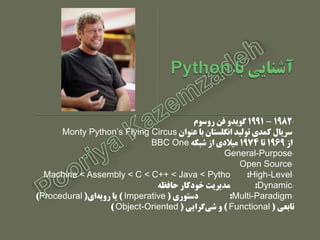
•1982–1991‫رٍسَم‬ ‫في‬ ٍ‫گَید‬
•‫عٌَاى‬ ‫با‬ ‫اًگلستاى‬ ‫تَلید‬ ‫کودی‬ ‫سریال‬Monty Python’s Flying Circus
‫از‬1969‫تا‬1974ِ‫شبک‬ ‫از‬ ‫هیالدی‬BBC One
•General-Purpose
•Open Source
•High-Level:Machine < Assembly < C < C++ < Java < Pytho
•Dynamic:ِ‫حافظ‬ ‫خَدکار‬ ‫هدیریت‬
•Multi-Paradigm:‫دستَری‬(Imperative)‫ای‬ِ‫رٍی‬ ‫یا‬(Procedural)
‫تابعی‬(Functional)‫گرایی‬‫شی‬ ٍ(Object-Oriented)
MoinMoin
،‫ٍرٍدی‬‫خرٍجی‬‫ٍارد‬ ٍ‫کردى‬(I/O/I)
‫ّا‬ ‫هتغیر‬
‫عولگر‬‫ّا‬
‫شرط‬if
ِ‫حلق‬for
Input
Output
Import
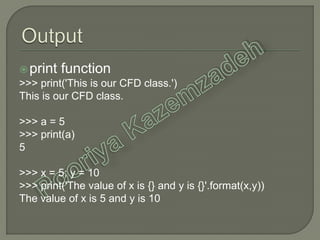
print function
>>> print('This is our CFD class.')
This is our CFD class.
>>> a = 5
>>> print(a)
5
>>> x = 5; y = 10
>>> print('The value of x is {} and y is {}'.format(x,y))
The value of x is 5 and y is 10
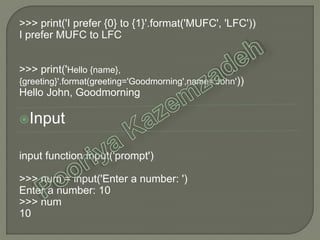
>>> print('I prefer {0} to {1}'.format('MUFC', 'LFC'))
I prefer MUFC to LFC
>>> print('Hello {name},
{greeting}'.format(greeting='Goodmorning',name='John'))
Hello John, Goodmorning
Input
input function input('prompt')
>>> num = input('Enter a number: ')
Enter a number: 10
>>> num
10
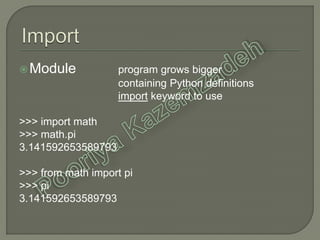
Module program grows bigger
containing Python definitions
import keyword to use
>>> import math
>>> math.pi
3.141592653589793
>>> from math import pi
>>> pi
3.141592653589793
>>> import sys
>>> sys.path
['', 'C:Python27Libidlelib',
'C:Windowssystem32python27.zip',
'C:Python27DLLs', 'C:Python27lib',
'C:Python27libplat-win', 'C:Python27liblib-tk',
'C:Python27', 'C:Python27libsite-packages']
Variable
Datatype
Conversion
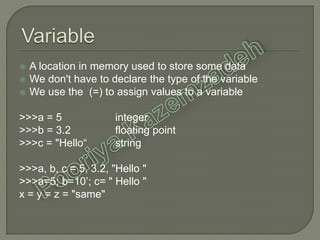
 A location in memory used to store some data
 We don't have to declare the type of the variable
 We use the (=) to assign values to a variable
>>>a = 5 integer
>>>b = 3.2 floating point
>>>c = "Hello“ string
>>>a, b, c = 5, 3.2, "Hello "
>>>a=5; b=10’; c= " Hello "
x = y = z = "same"
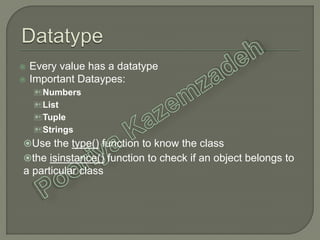
 Every value has a datatype
 Important Dataypes:
Numbers
List
Tuple
Strings
Use the type() function to know the class
the isinstance() function to check if an object belongs to
a particular class
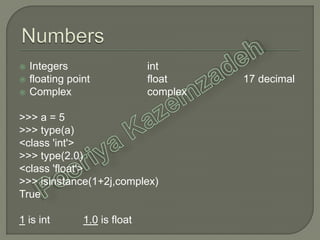
 Integers int
 floating point float 17 decimal
 Complex complex
>>> a = 5
>>> type(a)
<class 'int'>
>>> type(2.0)
<class 'float'>
>>> isinstance(1+2j,complex)
True
1 is int 1.0 is float
 An ordered sequence of items
 Flexible
 The items in a list do not need to be of the same type
>>> a = [1, 2.2, 'python']
>>> type(a)
<class 'list'>
>>> a = [5,10,15,20,25,30,35,40]
>>> a[2]
15
>>> a[0:3]
[5, 10, 15]
>>> a[5:]
[30, 35, 40]
>>> a[2]=21
>>> a
[5, 10, ,20,25,30,35,40]
 An ordered sequence of items
 Immutable so faster than list
 Write-protect data
 Defined within parentheses ()
>>> t = (5,'program', 1+3j)
>>> type(t)
<class 'tuple'>
>>> t[1]
'program'
>>> t[0:3]
(5, 'program', (1+3j))
>>> t[0] = 10
Traceback (most recent call last):
File "<string>", line 301, in runcode
File "<interactive input>", line 1, in
<module>
TypeError: 'tuple' object does not support
item assignment
 sequence of Unicode characters
 ' … ' or " … “
>>> s = "This is our CFD calss"
>>> type(s)
<class 'str'>
>>> s = 'Hello world!'
>>> s[4]
'o'
>>> s[6:11]
'world'
>>> s[5] ='d'
Traceback (most recent call last):
File "<string>", line 301, in runcode
File "<interactive input>", line 1, in <module>
TypeError: 'str' object does not support item assignment
>>> float(5)
5.0
>>> int(10.6)
10
>>> int(-10.6)
-10
>>> float('2.5')
2.5
>>> str(25)
'25'
>>> int('1p')
Traceback (most recent call last):
File "<string>", line 301, in runcode
File "<interactive input>", line 1, in <module>
ValueError: invalid literal for int() with base 10: '1p'
>>> tuple([5,6,7])
(5, 6, 7)
>>> list('hello')
['h', 'e', 'l', 'l', 'o']
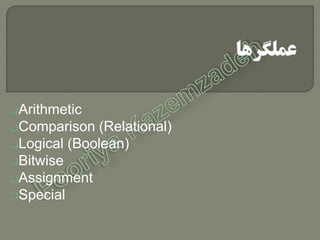
Arithmetic
Comparison (Relational)
Logical (Boolean)
Bitwise
Assignment
Special
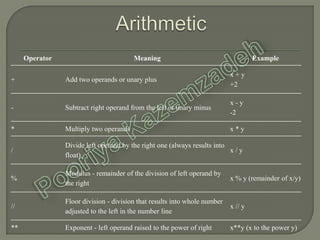
Operator Meaning Example
+ Add two operands or unary plus
x + y
+2
- Subtract right operand from the left or unary minus
x - y
-2
* Multiply two operands x * y
/
Divide left operand by the right one (always results into
float)
x / y
%
Modulus - remainder of the division of left operand by
the right
x % y (remainder of x/y)
//
Floor division - division that results into whole number
adjusted to the left in the number line
x // y
** Exponent - left operand raised to the power of right x**y (x to the power y)
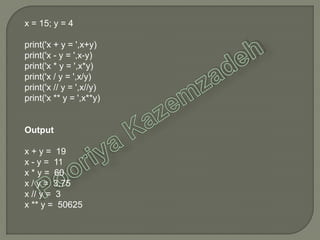
x = 15; y = 4
print('x + y = ',x+y)
print('x - y = ',x-y)
print('x * y = ',x*y)
print('x / y = ',x/y)
print('x // y = ',x//y)
print('x ** y = ',x**y)
Output
x + y = 19
x - y = 11
x * y = 60
x / y = 3.75
x // y = 3
x ** y = 50625
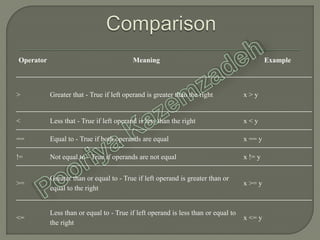
Operator Meaning Example
> Greater that - True if left operand is greater than the right x > y
< Less that - True if left operand is less than the right x < y
== Equal to - True if both operands are equal x == y
!= Not equal to - True if operands are not equal x != y
>=
Greater than or equal to - True if left operand is greater than or
equal to the right
x >= y
<=
Less than or equal to - True if left operand is less than or equal to
the right
x <= y
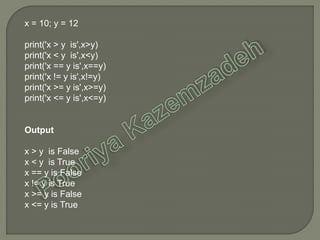
x = 10; y = 12
print('x > y is',x>y)
print('x < y is',x<y)
print('x == y is',x==y)
print('x != y is',x!=y)
print('x >= y is',x>=y)
print('x <= y is',x<=y)
Output
x > y is False
x < y is True
x == y is False
x != y is True
x >= y is False
x <= y is True
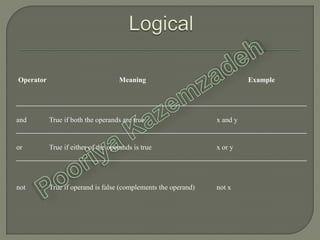
Operator Meaning Example
and True if both the operands are true x and y
or True if either of the operands is true x or y
not True if operand is false (complements the operand) not x
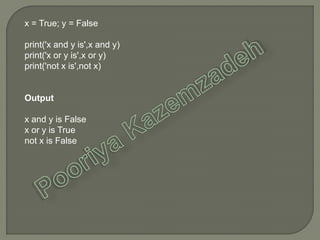
x = True; y = False
print('x and y is',x and y)
print('x or y is',x or y)
print('not x is',not x)
Output
x and y is False
x or y is True
not x is False
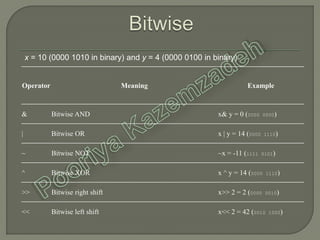
Operator Meaning Example
& Bitwise AND x& y = 0 (0000 0000)
| Bitwise OR x | y = 14 (0000 1110)
~ Bitwise NOT ~x = -11 (1111 0101)
^ Bitwise XOR x ^ y = 14 (0000 1110)
>> Bitwise right shift x>> 2 = 2 (0000 0010)
<< Bitwise left shift x<< 2 = 42 (0010 1000)
x = 10 (0000 1010 in binary) and y = 4 (0000 0100 in binary)
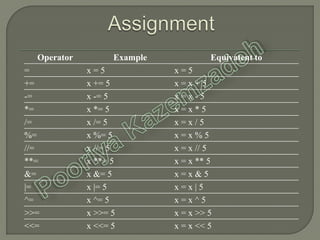
Operator Example Equivatent to
= x = 5 x = 5
+= x += 5 x = x + 5
-= x -= 5 x = x - 5
*= x *= 5 x = x * 5
/= x /= 5 x = x / 5
%= x %= 5 x = x % 5
//= x //= 5 x = x // 5
**= x **= 5 x = x ** 5
&= x &= 5 x = x & 5
|= x |= 5 x = x | 5
^= x ^= 5 x = x ^ 5
>>= x >>= 5 x = x >> 5
<<= x <<= 5 x = x << 5
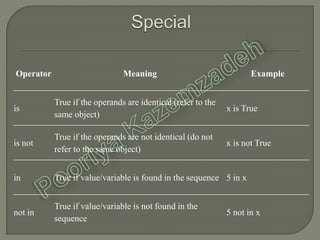
Operator Meaning Example
is
True if the operands are identical (refer to the
same object)
x is True
is not
True if the operands are not identical (do not
refer to the same object)
x is not True
in True if value/variable is found in the sequence 5 in x
not in
True if value/variable is not found in the
sequence
5 not in x
x1 = 5
y1 = 5
x2 = 'Hello'
y2 = 'Hello'
x3 = [1,2,3]
y3 = [1,2,3]
print(x1 is not y1)
print(x2 is y2)
print(x3 is y3)
Output
False
True
False
If
Else
Elif
Nesting
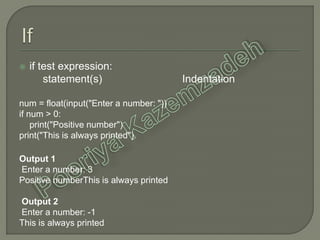
 if test expression:
statement(s) Indentation
num = float(input("Enter a number: "))
if num > 0:
print("Positive number")
print("This is always printed")
Output 1
Enter a number: 3
Positive numberThis is always printed
Output 2
Enter a number: -1
This is always printed
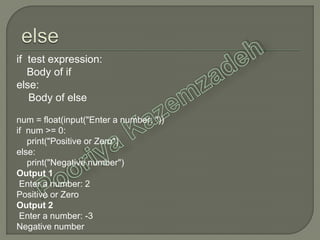
if test expression:
Body of if
else:
Body of else
num = float(input("Enter a number: "))
if num >= 0:
print("Positive or Zero")
else:
print("Negative number")
Output 1
Enter a number: 2
Positive or Zero
Output 2
Enter a number: -3
Negative number
if test expression:
Body of if
else:
Body of else
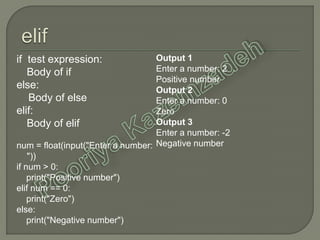
elif:
Body of elif
num = float(input("Enter a number:
"))
if num > 0:
print("Positive number")
elif num == 0:
print("Zero")
else:
print("Negative number")
Output 1
Enter a number: 2
Positive number
Output 2
Enter a number: 0
Zero
Output 3
Enter a number: -2
Negative number
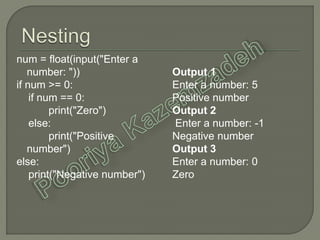
num = float(input("Enter a
number: "))
if num >= 0:
if num == 0:
print("Zero")
else:
print("Positive
number")
else:
print("Negative number")
Output 1
Enter a number: 5
Positive number
Output 2
Enter a number: -1
Negative number
Output 3
Enter a number: 0
Zero
For
Range
For loop with else
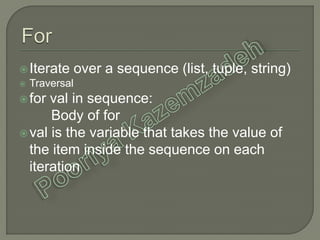
Iterate over a sequence (list, tuple, string)
 Traversal
for val in sequence:
Body of for
val is the variable that takes the value of
the item inside the sequence on each
iteration
# List of numbers
numbers = [6,5,3,8,4,2,5,4,11]
# variable to store the sum
sum = 0
# iterate over the list
for val in numbers:
sum = sum+val
# print the sum
print("The sum is{}“.format(sum))
Output
The sum is 48
 generate a sequence of
numbers
 range(start,stop,step)
 Just save
start, stop and step
>>> range(10)
[0, 1, 2, 3, 4, 5, 6, 7, 8, 9]
>>> range(2,5)
[2, 3, 4]
>>> range(2,15,2)
[2, 4, 6, 8, 10, 12, 14]
player = ['pop','rock','jazz']
# iterate over the list using index
for i in range(len(player)):
print("I like",genre[i])
Output
I like pop
I like rock
I like jazz
 The else part is executed if
the items in the sequence
used in for loop exhausts
 break statement use to
stop a for loop
# a list of digit
LOD = [0,1,2,3,4,5,6]
#take input from user
input_digit = int(input("Enter a
digit: "))
# search the input digit in our list
for i in LOD:
If input_digit == i:
print("Digit is in the list")
break
else:
print("Digit not found in list")
Output 1
Enter a digit: 3
Digit is in the list
Output 2
Enter a digit: 9
Digit not found in list
‫ّریس‬ ُ‫زاد‬ ‫کاظن‬ ‫پَریا‬

Python

  • 1.
    ‫استاد‬:ُ‫زاد‬ ‫اهام‬ ‫هحود‬ ‫درس‬:ِ‫هقده‬‫هحاسباتی‬‫سیاالت‬ ‫بر‬ ‫ای‬ ‫دٍم‬ ‫ًیوسال‬94-95 ‫ّریس‬ ُ‫زاد‬ ‫کاظن‬ ‫پَریا‬ 910284261
  • 2.
    •1982–1991‫رٍسَم‬ ‫في‬ ٍ‫گَید‬ •‫عٌَاى‬‫با‬ ‫اًگلستاى‬ ‫تَلید‬ ‫کودی‬ ‫سریال‬Monty Python’s Flying Circus ‫از‬1969‫تا‬1974ِ‫شبک‬ ‫از‬ ‫هیالدی‬BBC One •General-Purpose •Open Source •High-Level:Machine < Assembly < C < C++ < Java < Pytho •Dynamic:ِ‫حافظ‬ ‫خَدکار‬ ‫هدیریت‬ •Multi-Paradigm:‫دستَری‬(Imperative)‫ای‬ِ‫رٍی‬ ‫یا‬(Procedural) ‫تابعی‬(Functional)‫گرایی‬‫شی‬ ٍ(Object-Oriented)
  • 7.
  • 8.
  • 9.
  • 10.
    print function >>> print('Thisis our CFD class.') This is our CFD class. >>> a = 5 >>> print(a) 5 >>> x = 5; y = 10 >>> print('The value of x is {} and y is {}'.format(x,y)) The value of x is 5 and y is 10
  • 11.
    >>> print('I prefer{0} to {1}'.format('MUFC', 'LFC')) I prefer MUFC to LFC >>> print('Hello {name}, {greeting}'.format(greeting='Goodmorning',name='John')) Hello John, Goodmorning Input input function input('prompt') >>> num = input('Enter a number: ') Enter a number: 10 >>> num 10
  • 12.
    Module program growsbigger containing Python definitions import keyword to use >>> import math >>> math.pi 3.141592653589793 >>> from math import pi >>> pi 3.141592653589793
  • 13.
    >>> import sys >>>sys.path ['', 'C:Python27Libidlelib', 'C:Windowssystem32python27.zip', 'C:Python27DLLs', 'C:Python27lib', 'C:Python27libplat-win', 'C:Python27liblib-tk', 'C:Python27', 'C:Python27libsite-packages']
  • 15.
  • 16.
     A locationin memory used to store some data  We don't have to declare the type of the variable  We use the (=) to assign values to a variable >>>a = 5 integer >>>b = 3.2 floating point >>>c = "Hello“ string >>>a, b, c = 5, 3.2, "Hello " >>>a=5; b=10’; c= " Hello " x = y = z = "same"
  • 17.
     Every valuehas a datatype  Important Dataypes: Numbers List Tuple Strings Use the type() function to know the class the isinstance() function to check if an object belongs to a particular class
  • 18.
     Integers int floating point float 17 decimal  Complex complex >>> a = 5 >>> type(a) <class 'int'> >>> type(2.0) <class 'float'> >>> isinstance(1+2j,complex) True 1 is int 1.0 is float
  • 19.
     An orderedsequence of items  Flexible  The items in a list do not need to be of the same type >>> a = [1, 2.2, 'python'] >>> type(a) <class 'list'> >>> a = [5,10,15,20,25,30,35,40] >>> a[2] 15 >>> a[0:3] [5, 10, 15] >>> a[5:] [30, 35, 40] >>> a[2]=21 >>> a [5, 10, ,20,25,30,35,40]
  • 20.
     An orderedsequence of items  Immutable so faster than list  Write-protect data  Defined within parentheses () >>> t = (5,'program', 1+3j) >>> type(t) <class 'tuple'> >>> t[1] 'program' >>> t[0:3] (5, 'program', (1+3j)) >>> t[0] = 10 Traceback (most recent call last): File "<string>", line 301, in runcode File "<interactive input>", line 1, in <module> TypeError: 'tuple' object does not support item assignment
  • 21.
     sequence ofUnicode characters  ' … ' or " … “ >>> s = "This is our CFD calss" >>> type(s) <class 'str'> >>> s = 'Hello world!' >>> s[4] 'o' >>> s[6:11] 'world' >>> s[5] ='d' Traceback (most recent call last): File "<string>", line 301, in runcode File "<interactive input>", line 1, in <module> TypeError: 'str' object does not support item assignment
  • 22.
    >>> float(5) 5.0 >>> int(10.6) 10 >>>int(-10.6) -10 >>> float('2.5') 2.5 >>> str(25) '25' >>> int('1p') Traceback (most recent call last): File "<string>", line 301, in runcode File "<interactive input>", line 1, in <module> ValueError: invalid literal for int() with base 10: '1p' >>> tuple([5,6,7]) (5, 6, 7) >>> list('hello') ['h', 'e', 'l', 'l', 'o']
  • 23.
  • 24.
    Operator Meaning Example +Add two operands or unary plus x + y +2 - Subtract right operand from the left or unary minus x - y -2 * Multiply two operands x * y / Divide left operand by the right one (always results into float) x / y % Modulus - remainder of the division of left operand by the right x % y (remainder of x/y) // Floor division - division that results into whole number adjusted to the left in the number line x // y ** Exponent - left operand raised to the power of right x**y (x to the power y)
  • 25.
    x = 15;y = 4 print('x + y = ',x+y) print('x - y = ',x-y) print('x * y = ',x*y) print('x / y = ',x/y) print('x // y = ',x//y) print('x ** y = ',x**y) Output x + y = 19 x - y = 11 x * y = 60 x / y = 3.75 x // y = 3 x ** y = 50625
  • 26.
    Operator Meaning Example >Greater that - True if left operand is greater than the right x > y < Less that - True if left operand is less than the right x < y == Equal to - True if both operands are equal x == y != Not equal to - True if operands are not equal x != y >= Greater than or equal to - True if left operand is greater than or equal to the right x >= y <= Less than or equal to - True if left operand is less than or equal to the right x <= y
  • 27.
    x = 10;y = 12 print('x > y is',x>y) print('x < y is',x<y) print('x == y is',x==y) print('x != y is',x!=y) print('x >= y is',x>=y) print('x <= y is',x<=y) Output x > y is False x < y is True x == y is False x != y is True x >= y is False x <= y is True
  • 28.
    Operator Meaning Example andTrue if both the operands are true x and y or True if either of the operands is true x or y not True if operand is false (complements the operand) not x
  • 29.
    x = True;y = False print('x and y is',x and y) print('x or y is',x or y) print('not x is',not x) Output x and y is False x or y is True not x is False
  • 30.
    Operator Meaning Example &Bitwise AND x& y = 0 (0000 0000) | Bitwise OR x | y = 14 (0000 1110) ~ Bitwise NOT ~x = -11 (1111 0101) ^ Bitwise XOR x ^ y = 14 (0000 1110) >> Bitwise right shift x>> 2 = 2 (0000 0010) << Bitwise left shift x<< 2 = 42 (0010 1000) x = 10 (0000 1010 in binary) and y = 4 (0000 0100 in binary)
  • 31.
    Operator Example Equivatentto = x = 5 x = 5 += x += 5 x = x + 5 -= x -= 5 x = x - 5 *= x *= 5 x = x * 5 /= x /= 5 x = x / 5 %= x %= 5 x = x % 5 //= x //= 5 x = x // 5 **= x **= 5 x = x ** 5 &= x &= 5 x = x & 5 |= x |= 5 x = x | 5 ^= x ^= 5 x = x ^ 5 >>= x >>= 5 x = x >> 5 <<= x <<= 5 x = x << 5
  • 32.
    Operator Meaning Example is Trueif the operands are identical (refer to the same object) x is True is not True if the operands are not identical (do not refer to the same object) x is not True in True if value/variable is found in the sequence 5 in x not in True if value/variable is not found in the sequence 5 not in x
  • 33.
    x1 = 5 y1= 5 x2 = 'Hello' y2 = 'Hello' x3 = [1,2,3] y3 = [1,2,3] print(x1 is not y1) print(x2 is y2) print(x3 is y3) Output False True False
  • 35.
  • 36.
     if testexpression: statement(s) Indentation num = float(input("Enter a number: ")) if num > 0: print("Positive number") print("This is always printed") Output 1 Enter a number: 3 Positive numberThis is always printed Output 2 Enter a number: -1 This is always printed
  • 37.
    if test expression: Bodyof if else: Body of else num = float(input("Enter a number: ")) if num >= 0: print("Positive or Zero") else: print("Negative number") Output 1 Enter a number: 2 Positive or Zero Output 2 Enter a number: -3 Negative number
  • 38.
    if test expression: Bodyof if else: Body of else elif: Body of elif num = float(input("Enter a number: ")) if num > 0: print("Positive number") elif num == 0: print("Zero") else: print("Negative number") Output 1 Enter a number: 2 Positive number Output 2 Enter a number: 0 Zero Output 3 Enter a number: -2 Negative number
  • 39.
    num = float(input("Entera number: ")) if num >= 0: if num == 0: print("Zero") else: print("Positive number") else: print("Negative number") Output 1 Enter a number: 5 Positive number Output 2 Enter a number: -1 Negative number Output 3 Enter a number: 0 Zero
  • 41.
  • 42.
    Iterate over asequence (list, tuple, string)  Traversal for val in sequence: Body of for val is the variable that takes the value of the item inside the sequence on each iteration
  • 43.
    # List ofnumbers numbers = [6,5,3,8,4,2,5,4,11] # variable to store the sum sum = 0 # iterate over the list for val in numbers: sum = sum+val # print the sum print("The sum is{}“.format(sum)) Output The sum is 48
  • 44.
     generate asequence of numbers  range(start,stop,step)  Just save start, stop and step >>> range(10) [0, 1, 2, 3, 4, 5, 6, 7, 8, 9] >>> range(2,5) [2, 3, 4] >>> range(2,15,2) [2, 4, 6, 8, 10, 12, 14] player = ['pop','rock','jazz'] # iterate over the list using index for i in range(len(player)): print("I like",genre[i]) Output I like pop I like rock I like jazz
  • 45.
     The elsepart is executed if the items in the sequence used in for loop exhausts  break statement use to stop a for loop # a list of digit LOD = [0,1,2,3,4,5,6] #take input from user input_digit = int(input("Enter a digit: ")) # search the input digit in our list for i in LOD: If input_digit == i: print("Digit is in the list") break else: print("Digit not found in list") Output 1 Enter a digit: 3 Digit is in the list Output 2 Enter a digit: 9 Digit not found in list
  • 47.