Oxygine 2D
Objects,Events,Debug and Resources
● Based on SDL2. Valve Support.Cross Platform Support
● Got Flash Event System and SceneGraph Hierarchy
● Cross platform. Template generate
● Models system
Game Object
(In General)
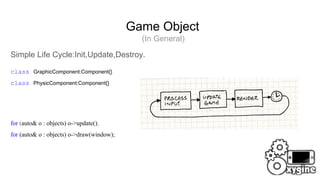
Simple Life Cycle:Init,Update,Destroy.
class GraphicComponent:Component{}
class PhysicComponent:Component{}
for (auto& o : objects) o->update();
for (auto& o : objects) o->draw(window);
world
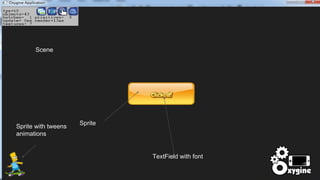
Scene
Sprite
TextField with font
Sprite with tweens
animations
Game Object
Components(Physics,Graphic,Sound,Effects,Events)
DebugMacros(_Debug,_TraceLeak,_TraceLifeCycle)
SafeMemory and Cast
Unique Information and id
Good Perfomance
Game Object
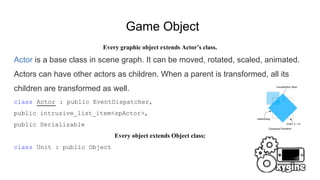
Every graphic object extends Actor’s class.
Actor is a base class in scene graph. It can be moved, rotated, scaled, animated.
Actors can have other actors as children. When a parent is transformed, all its
children are transformed as well.
class Actor : public EventDispatcher,
public intrusive_list_item<spActor>,
public Serializable
Every object extends Object class;
class Unit : public Object
Game Object
class NightStalker:public Actor;{...}; // Actor is a base graphic object
int main(){
_factory.registerItem(&nightStalker,”nightstalker”);
_factory.find(“nightstalker”); // bad case
// game loop start here
while(true){
// game loop running and update's calls
}
//terminate
}
Game Object
NightStalker.h
DECLARE_SMART(NightStalker, spNightStalker);
class NightStalker:public Object
{public:
FACTORY_UNIT(NightStalker, "nightstalker", layer_enemies);
}
NightStalker.cpp
NightStalker::NightStalker(){}
REGISTER_UNIT(NightStalker);
int main(){
const unit_desc* desc = Factory<unit_desc>::find(“nightstalker”);// now better
OX_ASSERT(desc);
}
Events
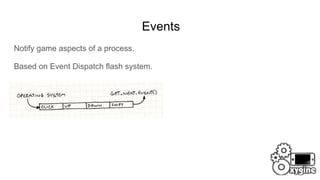
Notify game aspects of a process.
Based on Event Dispatch flash system.
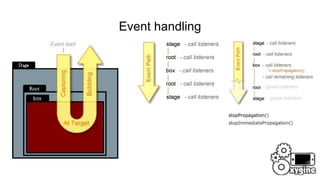
Event handling
void clickHandler(Event*) {}
submitButton->addEventListener(TouchEvent::CLICK, CLOSURE(this, &SomeClass::clickHandler));
submitButton->removeEventListener(TouchEvent::CLICK, CLOSURE(this, &SomeClass::clickHandler));
submitButton->dispatchEvent(Event *event);
submitButton->addEventListener(TouchEvent::CLICK, [](Event*){ // slower then CLOSURE
log::messageln("button clicked");
});
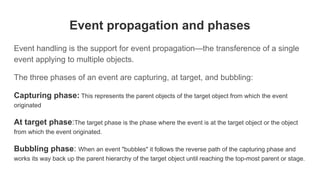
Event propagation and phases
Event handling is the support for event propagation—the transference of a single
event applying to multiple objects.
The three phases of an event are capturing, at target, and bubbling:
Capturing phase: This represents the parent objects of the target object from which the event
originated
At target phase:The target phase is the phase where the event is at the target object or the object
from which the event originated.
Bubbling phase: When an event "bubbles" it follows the reverse path of the capturing phase and
works its way back up the parent hierarchy of the target object until reaching the top-most parent or stage.
Event handling
stopPropagation()
stopImmediatePropagation()
stopPropagation()
stopImmediatePropagation()
Event Properties
eventType type;
Phase phase;
bool bubbles;
spEventDispatcher target;
spEventDispatcher currentTarget;
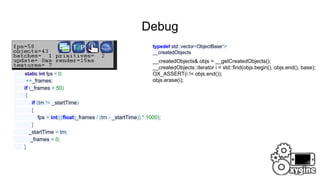
Debug
timeMS tm = getTimeMS();
static int fps = 0;
++_frames;
if (_frames > 50)
{
if (tm != _startTime)
{
fps = int(((float)_frames / (tm - _startTime)) * 1000);
}
_startTime = tm;
_frames = 0;
}
typedef std::vector<ObjectBase*>
__createdObjects
__createdObjects& objs = __getCreatedObjects();
__createdObjects::iterator i = std::find(objs.begin(), objs.end(), base);
OX_ASSERT(i != objs.end());
objs.erase(i);
Debug
int primitives = 0;
primitives += vstats.elements[IVideoDriver::PT_TRIANGLES] / 3;
if (vstats.elements[IVideoDriver::PT_TRIANGLE_STRIP]
primitives += vstats.elements[IVideoDriver::PT_TRIANGLE_STRIP] - 2;
2 primitivies
16 primitivies
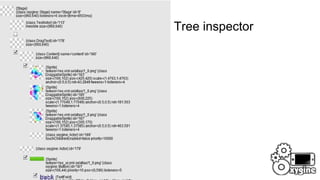
Debug Tree inspector
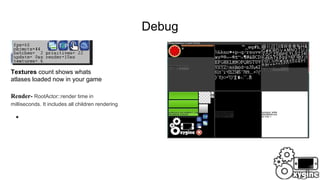
Debug
●
Textures count shows whats
atlases loaded now in your game
Render- RootActor::render time in
milliseconds. It includes all children rendering
●
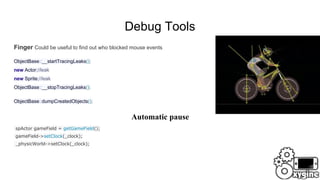
Debug Tools
Finger Could be useful to find out who blocked mouse events
ObjectBase::__startTracingLeaks();
new Actor;//leak
new Sprite;//leak
ObjectBase::__stopTracingLeaks();
ObjectBase::dumpCreatedObjects();
spActor gameField = getGameField();
gameField->setClock(_clock);
_physicWorld->setClock(_clock);
Automatic pause
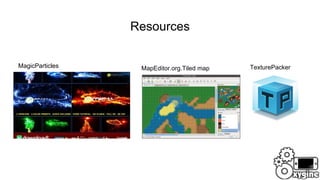
Resources
MapEditor.org.Tiled mapMagicParticles TexturePacker
Resources
spTmxMap map =
TmxMap::loadMap("level1.tmx", resources, [](Tile* t,
oxygine::Sprite* sp)
{
});
float length = rangeX *
resources.getResAnim("images/enviroment/leaves_tile")->getSize().x;
RectF gameSquare(0, 0, length, length);// just load tiles without Map
Magic Particles Api
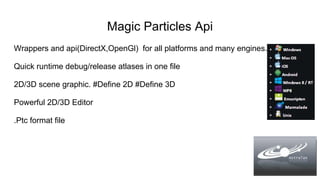
Wrappers and api(DirectX,OpenGl) for all platforms and many engines.
Quick runtime debug/release atlases in one file
2D/3D scene graphic. #Define 2D #Define 3D
Powerful 2D/3D Editor
.Ptc format file
Magic Particles Api
Export in AVI,TGA,PNG,BMP, JGP;
More then 100 examples for 2D/3D
Plugins for Game Engines
Magic Particles Api
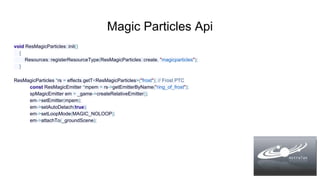
void ResMagicParticles::init()
{
Resources::registerResourceType(ResMagicParticles::create, "magicparticles");
}
ResMagicParticles *rs = effects.getT<ResMagicParticles>("frost"); // Frost PTC
const ResMagicEmitter *mpem = rs->getEmitterByName("ring_of_frost");
spMagicEmitter em = _game->createRelativeEmitter();
em->setEmitter(mpem);
em->setAutoDetach(true);
em->setLoopMode(MAGIC_NOLOOP);
em->attachTo(_groundScene);
Oxygine Resources
const Json::Value &bg = level["background"];
if (!bg.empty())
{
spSprite back = new Sprite;
back->setResAnim(resources.getResAnim(bg.asString()));
back->attachTo(parent);
_background = back;
}
// load resources in separate thread
// use oxygine atlas build tool
Support PVRTC, ETC and more.
Works like mobile native compress.
<atlas>
<image file="close.png" />
<image file="button.png" />
<image file="anim/run.png" />
</atlas>
<set scale_factor = "0.5f" />
<atlas>
<image file="background.png" />
</atlas>
oxygine-framework/tools/oxyresbuild.py
Oxygine.org/community.php
Thanks for listening

Oxygine 2 d objects,events,debug and resources

  • 1.
    Oxygine 2D Objects,Events,Debug andResources ● Based on SDL2. Valve Support.Cross Platform Support ● Got Flash Event System and SceneGraph Hierarchy ● Cross platform. Template generate ● Models system
  • 2.
    Game Object (In General) SimpleLife Cycle:Init,Update,Destroy. class GraphicComponent:Component{} class PhysicComponent:Component{} for (auto& o : objects) o->update(); for (auto& o : objects) o->draw(window);
  • 3.
  • 4.
  • 5.
    Game Object Every graphicobject extends Actor’s class. Actor is a base class in scene graph. It can be moved, rotated, scaled, animated. Actors can have other actors as children. When a parent is transformed, all its children are transformed as well. class Actor : public EventDispatcher, public intrusive_list_item<spActor>, public Serializable Every object extends Object class; class Unit : public Object
  • 6.
    Game Object class NightStalker:publicActor;{...}; // Actor is a base graphic object int main(){ _factory.registerItem(&nightStalker,”nightstalker”); _factory.find(“nightstalker”); // bad case // game loop start here while(true){ // game loop running and update's calls } //terminate }
  • 7.
    Game Object NightStalker.h DECLARE_SMART(NightStalker, spNightStalker); classNightStalker:public Object {public: FACTORY_UNIT(NightStalker, "nightstalker", layer_enemies); } NightStalker.cpp NightStalker::NightStalker(){} REGISTER_UNIT(NightStalker); int main(){ const unit_desc* desc = Factory<unit_desc>::find(“nightstalker”);// now better OX_ASSERT(desc); }
  • 8.
    Events Notify game aspectsof a process. Based on Event Dispatch flash system.
  • 9.
    Event handling void clickHandler(Event*){} submitButton->addEventListener(TouchEvent::CLICK, CLOSURE(this, &SomeClass::clickHandler)); submitButton->removeEventListener(TouchEvent::CLICK, CLOSURE(this, &SomeClass::clickHandler)); submitButton->dispatchEvent(Event *event); submitButton->addEventListener(TouchEvent::CLICK, [](Event*){ // slower then CLOSURE log::messageln("button clicked"); });
  • 10.
    Event propagation andphases Event handling is the support for event propagation—the transference of a single event applying to multiple objects. The three phases of an event are capturing, at target, and bubbling: Capturing phase: This represents the parent objects of the target object from which the event originated At target phase:The target phase is the phase where the event is at the target object or the object from which the event originated. Bubbling phase: When an event "bubbles" it follows the reverse path of the capturing phase and works its way back up the parent hierarchy of the target object until reaching the top-most parent or stage.
  • 11.
  • 12.
    Event Properties eventType type; Phasephase; bool bubbles; spEventDispatcher target; spEventDispatcher currentTarget;
  • 13.
    Debug timeMS tm =getTimeMS(); static int fps = 0; ++_frames; if (_frames > 50) { if (tm != _startTime) { fps = int(((float)_frames / (tm - _startTime)) * 1000); } _startTime = tm; _frames = 0; } typedef std::vector<ObjectBase*> __createdObjects __createdObjects& objs = __getCreatedObjects(); __createdObjects::iterator i = std::find(objs.begin(), objs.end(), base); OX_ASSERT(i != objs.end()); objs.erase(i);
  • 14.
    Debug int primitives =0; primitives += vstats.elements[IVideoDriver::PT_TRIANGLES] / 3; if (vstats.elements[IVideoDriver::PT_TRIANGLE_STRIP] primitives += vstats.elements[IVideoDriver::PT_TRIANGLE_STRIP] - 2; 2 primitivies 16 primitivies
  • 15.
  • 16.
    Debug ● Textures count showswhats atlases loaded now in your game Render- RootActor::render time in milliseconds. It includes all children rendering ●
  • 17.
    Debug Tools Finger Couldbe useful to find out who blocked mouse events ObjectBase::__startTracingLeaks(); new Actor;//leak new Sprite;//leak ObjectBase::__stopTracingLeaks(); ObjectBase::dumpCreatedObjects(); spActor gameField = getGameField(); gameField->setClock(_clock); _physicWorld->setClock(_clock); Automatic pause
  • 18.
  • 19.
    Resources spTmxMap map = TmxMap::loadMap("level1.tmx",resources, [](Tile* t, oxygine::Sprite* sp) { }); float length = rangeX * resources.getResAnim("images/enviroment/leaves_tile")->getSize().x; RectF gameSquare(0, 0, length, length);// just load tiles without Map
  • 20.
    Magic Particles Api Wrappersand api(DirectX,OpenGl) for all platforms and many engines. Quick runtime debug/release atlases in one file 2D/3D scene graphic. #Define 2D #Define 3D Powerful 2D/3D Editor .Ptc format file
  • 21.
    Magic Particles Api Exportin AVI,TGA,PNG,BMP, JGP; More then 100 examples for 2D/3D Plugins for Game Engines
  • 22.
    Magic Particles Api voidResMagicParticles::init() { Resources::registerResourceType(ResMagicParticles::create, "magicparticles"); } ResMagicParticles *rs = effects.getT<ResMagicParticles>("frost"); // Frost PTC const ResMagicEmitter *mpem = rs->getEmitterByName("ring_of_frost"); spMagicEmitter em = _game->createRelativeEmitter(); em->setEmitter(mpem); em->setAutoDetach(true); em->setLoopMode(MAGIC_NOLOOP); em->attachTo(_groundScene);
  • 23.
    Oxygine Resources const Json::Value&bg = level["background"]; if (!bg.empty()) { spSprite back = new Sprite; back->setResAnim(resources.getResAnim(bg.asString())); back->attachTo(parent); _background = back; } // load resources in separate thread // use oxygine atlas build tool Support PVRTC, ETC and more. Works like mobile native compress. <atlas> <image file="close.png" /> <image file="button.png" /> <image file="anim/run.png" /> </atlas> <set scale_factor = "0.5f" /> <atlas> <image file="background.png" /> </atlas> oxygine-framework/tools/oxyresbuild.py
  • 24.