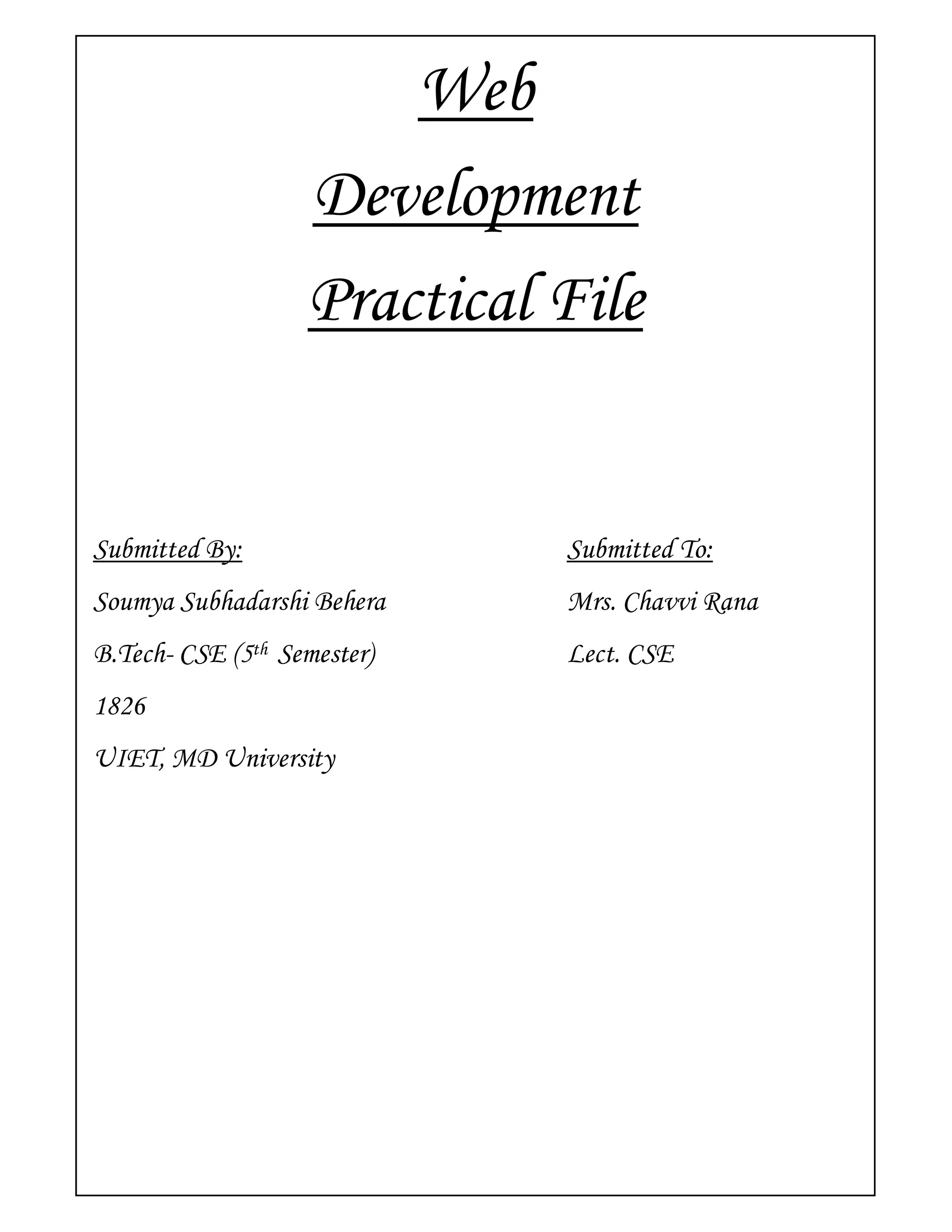
Web
                   Development
                   Practical File


Submitted By:                Submitted To:
Soumya Subhadarshi Behera    Mrs. Chavvi Rana
B.Tech- CSE (5th Semester)   Lect. CSE
1826
UIET, MD University
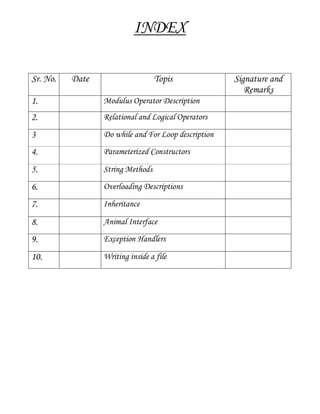
INDEX

Sr. No.   Date                    Topis              Signature and
                                                        Remarks
1.               Modulus Operator Description
2.               Relational and Logical Operators

3                Do while and For Loop description

4.               Parameterized Constructors

5.               String Methods

6.               Overloading Descriptions

7.               Inheritance

8.               Animal Interface

9.               Exception Handlers

10.              Writing inside a file
1. Modulus Operator Description
  class Remainder
  {
         public static void main (String args[])
         {
                 int i = 12;
                 int j = 4;
                 int k = 0;
                 System.out.println("i is " + i);
                 System.out.println("j is " + j);
                 k = i % j;
                 System.out.println("Its Remainder is " + k);
         }
  }


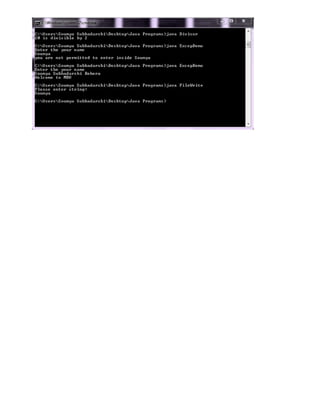
  class Divisor
  {
         public static void main(String[] args)
         {
         int a = 10;
         int b = 2;
         if ( a % b == 0 )
         {
                        System.out.println(a + " is divisible by "+ b);
         }
         else
         {
                        System.out.println(a + " is not divisible by " + b);
         }
         }
  }
2. Relational and Logical Operators
  class RelationalProgram
  {
          public static void main(String[] args)
          {                                      //a few numbers
                  int i = 3;
                  int j = 4;
                  int k = 4;
                  System.out.println("Greater than...");                   //greater than
                  System.out.println(" i > j = " + (i > j));       //false
                  System.out.println(" j > i = " + (j > i));       //true
                  System.out.println(" k > j = " + (k > j));       //false(equal) //greater than or equal to
                  System.out.println("Greater than or equal to...");
                  System.out.println(" i >= j = " + (i >= j)); //false
                  System.out.println(" j >= i = " + (j >= i)); //true
                  System.out.println(" k >= j = " + (k >= j)); //true
  //less than
                  System.out.println("Less than...");
                  System.out.println(" i < j = " + (i < j)); //true
                  System.out.println(" j < i = " + (j < i)); //false
                  System.out.println(" k < j = " + (k < j)); //false
  //less than or equal to
                  System.out.println("Less than or equal to...");
                  System.out.println(" i <= j = " + (i <= j)); //true
                  System.out.println(" j <= i = " + (j <= i)); //false
                  System.out.println(" k <= j = " + (k <= j)); //true
  //equal to
                  System.out.println("Equal to...");
                  System.out.println(" i is equivalent to j = " + (i == j));
                  System.out.println(" k is equivalent to j = " + (k == j));
  //not equal to
                  System.out.println("Not equal to...");
System.out.println(" i not equal to j = " + (i != j)); //true
               System.out.println(" k not equal to j = " + (k != j)); //false
       }
}


class ConditionalOperator
{
       public static void main(String[] args)
       {
               int x = 2;
               int y = 20, result=0;
               boolean bl = true;
               if((x == 5) && (x < y))
               {
                       System.out.println("value of x is "+ x);
               }
               if((x == y) || (y > 1))
               {
                       System.out.println("value of y is greater than the value of x");
               }
               result = bl ? x : y;
               System.out.println("The returned value is "+ result);
       }
}
3. Do while and For loop presentation
  class DoWhile
  {
         public static void main(String[] args)
         {
                 int count = 1;
                 do
                 {
                         System.out.println("Count is: " + count);
                         count++;
                 } while (count < 11);
         }
  }


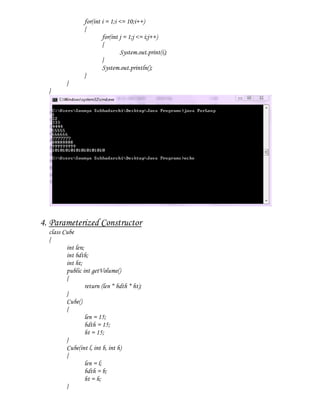
  class ForLoop
  {
         public static void main(String[] args)
         {
for(int i = 1;i <= 10;i++)
                 {
                         for(int j = 1;j <= i;j++)
                         {
                                  System.out.print(i);
                         }
                         System.out.println();
                 }
         }
  }


4. Parameterized Constructor
  class Cube
  {
         int len;
         int bdth;
         int ht;
         public int getVolume()
         {
                  return (len * bdth * ht);
         }
         Cube()
         {
                  len = 15;
                  bdth = 15;
                  ht = 15;
         }
         Cube(int l, int b, int h)
         {
                  len = l;
                  bdth = b;
                  ht = h;
         }
public static void main(String[] args)
         {
                 Cube cubeObj1, cubeObj2;
                 cubeObj1 = new Cube();
                 cubeObj2 = new Cube(10, 20, 30);
                 System.out.println("Volume of Cube is : " + cubeObj1.getVolume());
                 System.out.println("Volume of Cube is : " + cubeObj2.getVolume());
         }
  }


5. String Methods
  import java.lang.*;

  class StrStartWith
  {
          public static void main(String[] args)
          {
                  System.out.println("String start with example!");
                  String str = "Welcome to my Coding!!!";
                  String start = "Welcome";
                  System.out.println("Given String : " + str);
                  System.out.println("Start with : " + start);
                  if (str.startsWith(start))
                  {
                           System.out.println("The given string is start with Welcome");
                  }
                  else
                  {
                           System.out.println("The given string is not start with Welcome");
                  }
          }
  }
import java.lang.*;
import java.io.*;
class StringLength
{
        public static void main(String[] args) throws IOException
        {
                System.out.println("String lenght example!");
                BufferedReader bf = new BufferedReader(new InputStreamReader(System.in));
                System.out.println("Please enter string:");
                String str = bf.readLine();
                int len = str.length();
                System.out.println("String lenght : " + len);
        }
}


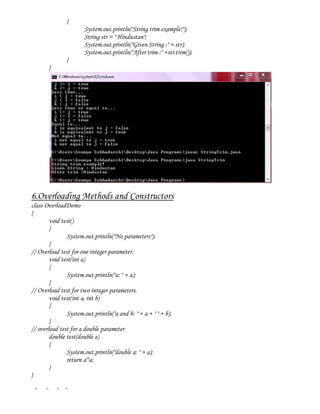
import java.lang.*;

class StringTrim
{
        public static void main(String[] args)
{
                       System.out.println("String trim example!");
                       String str = " Hindustan";
                       System.out.println("Given String :" + str);
                       System.out.println("After trim :" +str.trim());
                 }
       }


6.Overloading Methods and Constructors
class OverloadDemo
{
        void test()
        {
               System.out.println("No parameters");
        }
// Overload test for one integer parameter.
        void test(int a)
        {
               System.out.println("a: " + a);
        }
// Overload test for two integer parameters.
        void test(int a, int b)
        {
               System.out.println("a and b: " + a + " " + b);
        }
// overload test for a double parameter
        double test(double a)
        {
               System.out.println("double a: " + a);
               return a*a;
        }
}

class Overload
{
        public static void main(String args[])
        {
                 OverloadDemo ob = new OverloadDemo();
                 double result;
// call all versions of test()
                 ob.test();
                 ob.test(11);
                 ob.test(11, 2);
                 result = ob.test(11.2);
                 System.out.println("Result of ob.test(11.2): " + result);
        }
}


7. Inheritance
class Base
{
        int a = 11;
        void show()
        {
                System.out.println(a);
        }
}
class Super extends Base
{
        int a = 22;
        void show()
        {
                super.show();
                System.out.println(a);
        }
        public static void main(String[] args)
        {
                new Super().show();
}
}


8.executing speak() and eat() methods using animal interface
interface IAnimal
{
        public void speak();
}
public class Cat implements IAnimal
{
        public void speak()
        {
                System.out.println("Cat speaks meaown!!!");
        }
        public static void main(String args[])
        {
                Cat c = new Cat();
                c.speak();
        }
}
public class Dog implements IAnimal
{
        public void speak()
        {
                System.out.println("Dog eats Cat!!!");
        }
        public static void main(String args[])
        {
                Dog d = new Dog();
                d.speak();
        }
}
9. Exception handling
import java.io.*;
import java.util.*;

class MyException extends Exception
{
       private String ssb="";
       public String getMessage(String s)
       {
               ssb=s;
               return ("you are not permitted to enter inside "+ ssb);
       }
}
class ExcepDemo
{
       public static void main(String args[]) throws MyException,IOException
       {
               String temp="";
               try
               {
                       String str="Soumya Subhadarshi Behera";
                       System.out.println("Enter your name");
                       BufferedReader br= new BufferedReader(new InputStreamReader(System.in));
                       temp=br.readLine();
                       if(!temp.equals(str))
                       throw new MyException();
                       else
                       System.out.println("Welcome to MDU");
               }
               catch(MyException e)
               {
                       System.err.println(e.getMessage(temp));
               }
catch(Exception e)
             {
                    System.err.println(e);
             }
      }
}


10.Writing inside a file
import java.lang.*;
import java.io.*;
class FileWrite
{
       public static void main(String args[])
       {
               try
               {
                      FileWriter fstream = new FileWriter("KeyboardInput.txt");
                      BufferedWriter out = new BufferedWriter(fstream);
                      BufferedReader bf = new BufferedReader(new InputStreamReader(System.in));
                      System.out.println("Please enter string:");
                      String str = bf.readLine();
                      out.write(str);
                      out.close();
               }
               catch (Exception e)
               {
               System.err.println("Error: " + e.getMessage());
               }
       }
}
Sam wd programs

Sam wd programs

  • 1.
    Web Development Practical File Submitted By: Submitted To: Soumya Subhadarshi Behera Mrs. Chavvi Rana B.Tech- CSE (5th Semester) Lect. CSE 1826 UIET, MD University
  • 2.
    INDEX Sr. No. Date Topis Signature and Remarks 1. Modulus Operator Description 2. Relational and Logical Operators 3 Do while and For Loop description 4. Parameterized Constructors 5. String Methods 6. Overloading Descriptions 7. Inheritance 8. Animal Interface 9. Exception Handlers 10. Writing inside a file
  • 3.
    1. Modulus OperatorDescription class Remainder { public static void main (String args[]) { int i = 12; int j = 4; int k = 0; System.out.println("i is " + i); System.out.println("j is " + j); k = i % j; System.out.println("Its Remainder is " + k); } } class Divisor { public static void main(String[] args) { int a = 10; int b = 2; if ( a % b == 0 ) { System.out.println(a + " is divisible by "+ b); } else { System.out.println(a + " is not divisible by " + b); } } }
  • 4.
    2. Relational andLogical Operators class RelationalProgram { public static void main(String[] args) { //a few numbers int i = 3; int j = 4; int k = 4; System.out.println("Greater than..."); //greater than System.out.println(" i > j = " + (i > j)); //false System.out.println(" j > i = " + (j > i)); //true System.out.println(" k > j = " + (k > j)); //false(equal) //greater than or equal to System.out.println("Greater than or equal to..."); System.out.println(" i >= j = " + (i >= j)); //false System.out.println(" j >= i = " + (j >= i)); //true System.out.println(" k >= j = " + (k >= j)); //true //less than System.out.println("Less than..."); System.out.println(" i < j = " + (i < j)); //true System.out.println(" j < i = " + (j < i)); //false System.out.println(" k < j = " + (k < j)); //false //less than or equal to System.out.println("Less than or equal to..."); System.out.println(" i <= j = " + (i <= j)); //true System.out.println(" j <= i = " + (j <= i)); //false System.out.println(" k <= j = " + (k <= j)); //true //equal to System.out.println("Equal to..."); System.out.println(" i is equivalent to j = " + (i == j)); System.out.println(" k is equivalent to j = " + (k == j)); //not equal to System.out.println("Not equal to...");
  • 5.
    System.out.println(" i notequal to j = " + (i != j)); //true System.out.println(" k not equal to j = " + (k != j)); //false } } class ConditionalOperator { public static void main(String[] args) { int x = 2; int y = 20, result=0; boolean bl = true; if((x == 5) && (x < y)) { System.out.println("value of x is "+ x); } if((x == y) || (y > 1)) { System.out.println("value of y is greater than the value of x"); } result = bl ? x : y; System.out.println("The returned value is "+ result); } }
  • 6.
    3. Do whileand For loop presentation class DoWhile { public static void main(String[] args) { int count = 1; do { System.out.println("Count is: " + count); count++; } while (count < 11); } } class ForLoop { public static void main(String[] args) {
  • 7.
    for(int i =1;i <= 10;i++) { for(int j = 1;j <= i;j++) { System.out.print(i); } System.out.println(); } } } 4. Parameterized Constructor class Cube { int len; int bdth; int ht; public int getVolume() { return (len * bdth * ht); } Cube() { len = 15; bdth = 15; ht = 15; } Cube(int l, int b, int h) { len = l; bdth = b; ht = h; }
  • 8.
    public static voidmain(String[] args) { Cube cubeObj1, cubeObj2; cubeObj1 = new Cube(); cubeObj2 = new Cube(10, 20, 30); System.out.println("Volume of Cube is : " + cubeObj1.getVolume()); System.out.println("Volume of Cube is : " + cubeObj2.getVolume()); } } 5. String Methods import java.lang.*; class StrStartWith { public static void main(String[] args) { System.out.println("String start with example!"); String str = "Welcome to my Coding!!!"; String start = "Welcome"; System.out.println("Given String : " + str); System.out.println("Start with : " + start); if (str.startsWith(start)) { System.out.println("The given string is start with Welcome"); } else { System.out.println("The given string is not start with Welcome"); } } }
  • 9.
    import java.lang.*; import java.io.*; classStringLength { public static void main(String[] args) throws IOException { System.out.println("String lenght example!"); BufferedReader bf = new BufferedReader(new InputStreamReader(System.in)); System.out.println("Please enter string:"); String str = bf.readLine(); int len = str.length(); System.out.println("String lenght : " + len); } } import java.lang.*; class StringTrim { public static void main(String[] args)
  • 10.
    { System.out.println("String trim example!"); String str = " Hindustan"; System.out.println("Given String :" + str); System.out.println("After trim :" +str.trim()); } } 6.Overloading Methods and Constructors class OverloadDemo { void test() { System.out.println("No parameters"); } // Overload test for one integer parameter. void test(int a) { System.out.println("a: " + a); } // Overload test for two integer parameters. void test(int a, int b) { System.out.println("a and b: " + a + " " + b); } // overload test for a double parameter double test(double a) { System.out.println("double a: " + a); return a*a; } } class Overload
  • 11.
    { public static void main(String args[]) { OverloadDemo ob = new OverloadDemo(); double result; // call all versions of test() ob.test(); ob.test(11); ob.test(11, 2); result = ob.test(11.2); System.out.println("Result of ob.test(11.2): " + result); } } 7. Inheritance class Base { int a = 11; void show() { System.out.println(a); } } class Super extends Base { int a = 22; void show() { super.show(); System.out.println(a); } public static void main(String[] args) { new Super().show();
  • 12.
    } } 8.executing speak() andeat() methods using animal interface interface IAnimal { public void speak(); } public class Cat implements IAnimal { public void speak() { System.out.println("Cat speaks meaown!!!"); } public static void main(String args[]) { Cat c = new Cat(); c.speak(); } } public class Dog implements IAnimal { public void speak() { System.out.println("Dog eats Cat!!!"); } public static void main(String args[]) { Dog d = new Dog(); d.speak(); } }
  • 13.
    9. Exception handling importjava.io.*; import java.util.*; class MyException extends Exception { private String ssb=""; public String getMessage(String s) { ssb=s; return ("you are not permitted to enter inside "+ ssb); } } class ExcepDemo { public static void main(String args[]) throws MyException,IOException { String temp=""; try { String str="Soumya Subhadarshi Behera"; System.out.println("Enter your name"); BufferedReader br= new BufferedReader(new InputStreamReader(System.in)); temp=br.readLine(); if(!temp.equals(str)) throw new MyException(); else System.out.println("Welcome to MDU"); } catch(MyException e) { System.err.println(e.getMessage(temp)); }
  • 14.
    catch(Exception e) { System.err.println(e); } } } 10.Writing inside a file import java.lang.*; import java.io.*; class FileWrite { public static void main(String args[]) { try { FileWriter fstream = new FileWriter("KeyboardInput.txt"); BufferedWriter out = new BufferedWriter(fstream); BufferedReader bf = new BufferedReader(new InputStreamReader(System.in)); System.out.println("Please enter string:"); String str = bf.readLine(); out.write(str); out.close(); } catch (Exception e) { System.err.println("Error: " + e.getMessage()); } } }