1
Computers in our
everyday lives
Module 1.1
2
Content (1)
Why we use computers
Efficiency, accuracy and reli
ability
Communication
Types of computer systems
Non‑portable computers
Portable computers
3
Content (2)
Categories of users
Personal users
SOHO users
Power users
Mobile users
Convergence
Test and improve
Written module activity
4
Why we use computers
5
Efficiency, accuracy
and reliability
Efficiency – computers save the following:
 Time
 Labour
 Resources
Accuracy – ensured by quality programs and quality data
 mass production on assembly lines
 performing same tasks over and over with 100% accuracy
Reliability – Computers can be relied on to do tasks
 accurately
 without tiring
 without getting bored, etc.
6
Communication
Efficiency, accuracy and reliability of computers
combined with ability to communicate, enable us to
...
 virtually eliminate time and distance as business
constraints
 communicate and share information in many different
ways globally
 save on communication costs
 interact socially on a world-wide scale
7
Types of computer systems
8
When comparing computers you
should look at:
 How powerful they are – e.g. speed of CPU
and how much RAM
 What they are used for – servers / basic
office applications
 Their size (mobility) – range from huge
mainframe computers to hand‑held devices
 Software they use – we refer to operating
systems as ‘platforms’ and to computers as
‘Linux machines’ or ‘Windows machines’
9
Non‑portable computers
Generally consist of a system unit,
monitor, mouse and keyboard.
They are ...
 Large in size
 Not meant to be moved around
 Generally more powerful than
mobile or portable computers
All‑in‑one units are easier to
transport and take up less space — but
are more difficult to fix or upgrade
10
Desktop
computer
Server
Entry-level computer
• Cheapest to purchase
in range
• Lower hardware
specifications
• Come with ‘Home
editions’ of software
Non‑portable computers
11
All‑in‑one design includes screen,
keyboard and pointing device
Incorporated in casing designed
— to fold (to take up less space)
— to be easy to carry
— to protect delicate parts
Portable computers
12
Laptop / Notebook
Tablet
Hybrid computer
Smartphone
Phablet
Portable computers — types
13
Categories of users
14
Personal users
 limited office tasks
 internet banking
 email and browsing the web
 social networking
 to skype with family and friends
 viewing and sharing photos
 for entertainment — gaming,
music, viewing movies, etc.
15
SOHO users
(Small Office Home Office)
Depends on type of business the user runs
General entry-level computer for
administrative functions:
 accounting or billing
 databases with clients, suppliers,
stock, etc.
 electronic document archiving
 planning and scheduling, etc.
16
Power users
Top‑of‑the‑
range
hardware &
software
Hardcore
gamers
Architects
Engineers
Video editing
professionals
Scientists
17
Mobile users
Want and need to have their technology with
them wherever they are.
They use a smartphone or tablet for ...
 browsing the internet and using email
 playing games
 reading books
 navigating with GPS
 taking quick notes
 taking photos/video and recording sound
18
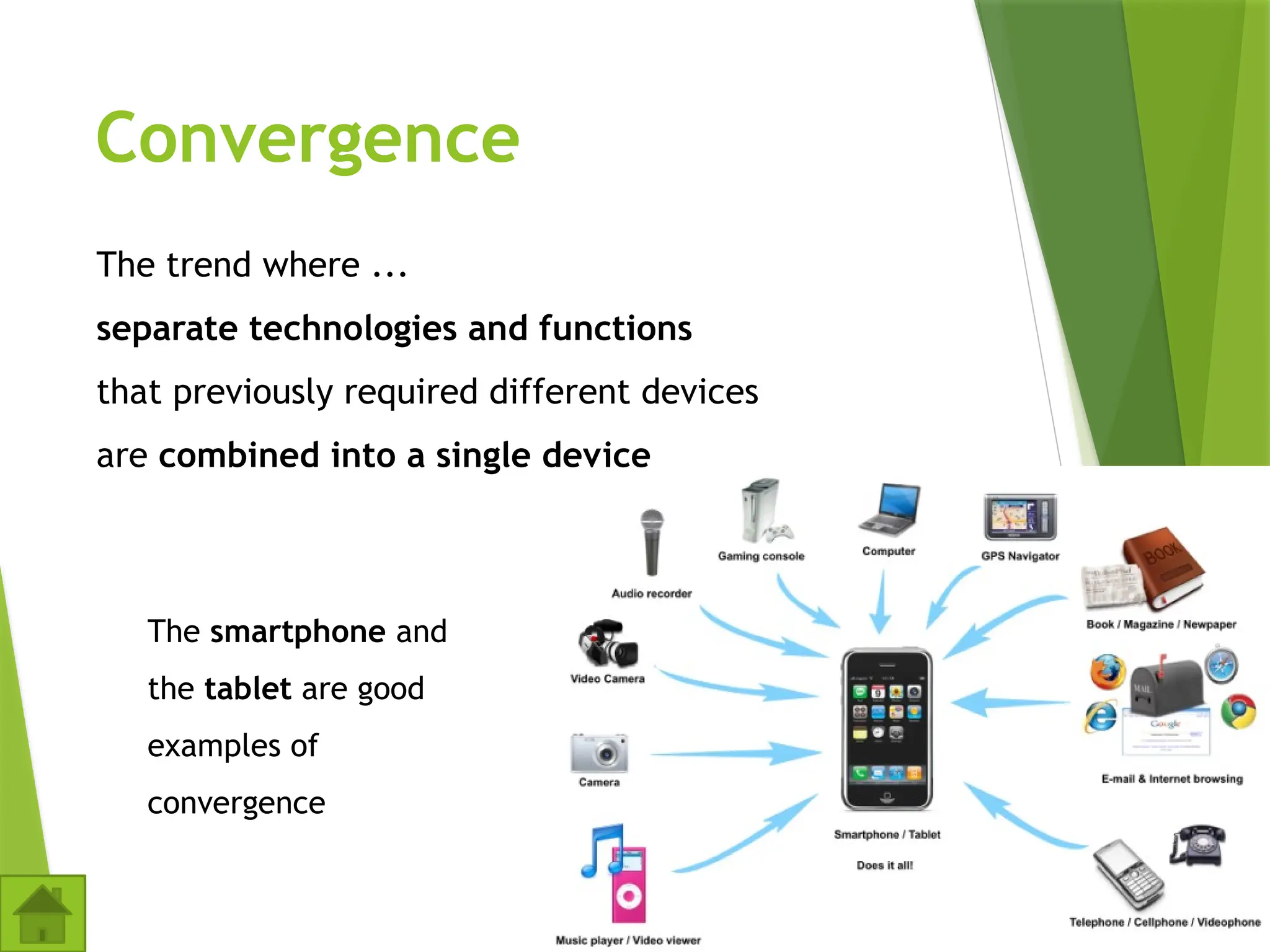
Convergence
The trend where ...
separate technologies and functions
that previously required different devices
are combined into a single device
The smartphone and
the tablet are good
examples of
convergence
19
Computers, part of your life Grade 12 2nd edition 2018.
Sandra Jacobs et al. 2018 – Study Opportunities

1_1 Computers in our Everyday Lives.pptx

  • 1.
  • 2.
    2 Content (1) Why weuse computers Efficiency, accuracy and reli ability Communication Types of computer systems Non‑portable computers Portable computers
  • 3.
    3 Content (2) Categories ofusers Personal users SOHO users Power users Mobile users Convergence Test and improve Written module activity
  • 4.
    4 Why we usecomputers
  • 5.
    5 Efficiency, accuracy and reliability Efficiency– computers save the following:  Time  Labour  Resources Accuracy – ensured by quality programs and quality data  mass production on assembly lines  performing same tasks over and over with 100% accuracy Reliability – Computers can be relied on to do tasks  accurately  without tiring  without getting bored, etc.
  • 6.
    6 Communication Efficiency, accuracy andreliability of computers combined with ability to communicate, enable us to ...  virtually eliminate time and distance as business constraints  communicate and share information in many different ways globally  save on communication costs  interact socially on a world-wide scale
  • 7.
  • 8.
    8 When comparing computersyou should look at:  How powerful they are – e.g. speed of CPU and how much RAM  What they are used for – servers / basic office applications  Their size (mobility) – range from huge mainframe computers to hand‑held devices  Software they use – we refer to operating systems as ‘platforms’ and to computers as ‘Linux machines’ or ‘Windows machines’
  • 9.
    9 Non‑portable computers Generally consistof a system unit, monitor, mouse and keyboard. They are ...  Large in size  Not meant to be moved around  Generally more powerful than mobile or portable computers All‑in‑one units are easier to transport and take up less space — but are more difficult to fix or upgrade
  • 10.
    10 Desktop computer Server Entry-level computer • Cheapestto purchase in range • Lower hardware specifications • Come with ‘Home editions’ of software Non‑portable computers
  • 11.
    11 All‑in‑one design includesscreen, keyboard and pointing device Incorporated in casing designed — to fold (to take up less space) — to be easy to carry — to protect delicate parts Portable computers
  • 12.
    12 Laptop / Notebook Tablet Hybridcomputer Smartphone Phablet Portable computers — types
  • 13.
  • 14.
    14 Personal users  limitedoffice tasks  internet banking  email and browsing the web  social networking  to skype with family and friends  viewing and sharing photos  for entertainment — gaming, music, viewing movies, etc.
  • 15.
    15 SOHO users (Small OfficeHome Office) Depends on type of business the user runs General entry-level computer for administrative functions:  accounting or billing  databases with clients, suppliers, stock, etc.  electronic document archiving  planning and scheduling, etc.
  • 16.
  • 17.
    17 Mobile users Want andneed to have their technology with them wherever they are. They use a smartphone or tablet for ...  browsing the internet and using email  playing games  reading books  navigating with GPS  taking quick notes  taking photos/video and recording sound
  • 18.
    18 Convergence The trend where... separate technologies and functions that previously required different devices are combined into a single device The smartphone and the tablet are good examples of convergence
  • 19.
    19 Computers, part ofyour life Grade 12 2nd edition 2018. Sandra Jacobs et al. 2018 – Study Opportunities