Basic Computer
Skills
BSc. IT
Institute of International Management
science
Index
 Fundamental of Computer
1.Introduction
2.Input, Output & Processing of Computer
3.components of computer
4.Memory Device
5.Types of Computer
6.Characteristices of Computer
7.Generation of Computer
8.Application of Computer
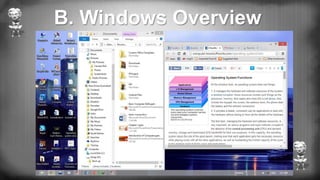
 Windows Overview
1.Some Basic Terminology
2.Function of Keys
3.Some basic terms related to start button
4.Basic terms related to windows
A. Fundamentals of Computer
1. Introduction
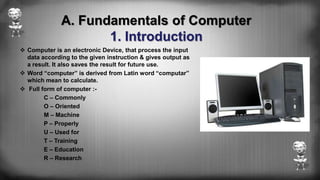
 Computer is an electronic Device, that process the input
data according to the given instruction & gives output as
a result. It also saves the result for future use.
 Word “computer” is derived from Latin word “computar”
which mean to calculate.
 Full form of computer :-
C – Commonly
O – Oriented
M – Machine
P – Properly
U – Used for
T – Training
E – Education
R – Research
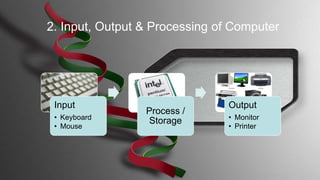
Input
• Keyboard
• Mouse
Process /
Storage
Output
• Monitor
• Printer
2. Input, Output & Processing of Computer
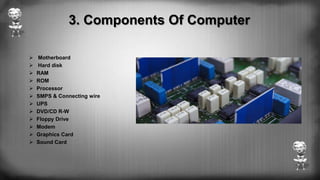
3. Components Of Computer
 Motherboard
 Hard disk
 RAM
 ROM
 Processor
 SMPS & Connecting wire
 UPS
 DVD/CD R-W
 Floppy Drive
 Modem
 Graphics Card
 Sound Card
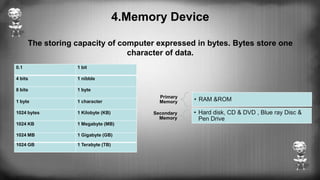
4.Memory Device
The storing capacity of computer expressed in bytes. Bytes store one
character of data.
Primary
Memory • RAM &ROM
Secondary
Memory
• Hard disk, CD & DVD , Blue ray Disc &
Pen Drive
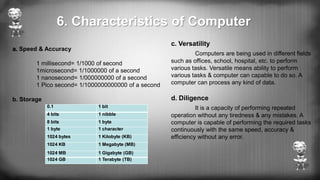
0.1 1 bit
4 bits 1 nibble
8 bits 1 byte
1 byte 1 character
1024 bytes 1 Kilobyte (KB)
1024 KB 1 Megabyte (MB)
1024 MB 1 Gigabyte (GB)
1024 GB 1 Terabyte (TB)
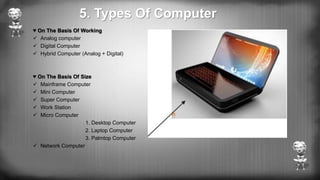
5. Types Of Computer
♥ On The Basis Of Working
 Analog computer
 Digital Computer
 Hybrid Computer (Analog + Digital)
♥ On The Basis Of Size
 Mainframe Computer
 Mini Computer
 Super Computer
 Work Station
 Micro Computer
1. Desktop Computer
2. Laptop Computer
3. Palmtop Computer
 Network Computer
♥ On The Basis Of Brand
 IBM PC
 IBM Compatible
 Apple / Macintosh
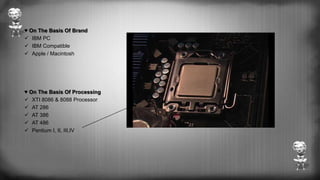
♥ On The Basis Of Processing
 XTI 8086 & 8088 Processor
 AT 286
 AT 386
 AT 486
 Pentium I, II, III,IV
a. Speed & Accuracy
1 millisecond= 1/1000 of second
1microsecond= 1/1000000 of a second
1 nanosecond= 1/000000000 of a second
1 Pico second= 1/1000000000000 of a second
b. Storage
c. Versatility
Computers are being used in different fields
such as offices, school, hospital, etc. to perform
various tasks. Versatile means ability to perform
various tasks & computer can capable to do so. A
computer can process any kind of data.
d. Diligence
It is a capacity of performing repeated
operation without any tiredness & any mistakes. A
computer is capable of performing the required tasks
continuously with the same speed, accuracy &
efficiency without any error.
0.1 1 bit
4 bits 1 nibble
8 bits 1 byte
1 byte 1 character
1024 bytes 1 Kilobyte (KB)
1024 KB 1 Megabyte (MB)
1024 MB 1 Gigabyte (GB)
1024 GB 1 Terabyte (TB)
6. Characteristics of Computer
7. Generation of computer
First Generation Of Computer
 Vacuum tubes are used to electronic
circuit.
 Storage capacity was limited (1kb to
4kb).
 Slow processing (millisecond).
 High voltage needed up to 150000 volts.
 large in size (51002 feet).
Second generation Of computer
 Transistor were used.
 processing speed was faster.
 Smaller in size(512 feet).
 Input and output device were faster.
Third generation Of Computer
 ICs were used in place of transistor.
 processing speed is faster than second
generation.
 minicomputer were in produced during this
generation.
 Storage capacity in measured in mega byte.
Forth Generation of computer
 VLSI and micro processer are used.
 processing speed is very high Giga bytes.
 very smaller size.
 input and output devices were versatile.
Fifth Generation Of Computer
 Intelligent processing.
 Easy human computing.
 computer will understand natural language.
 They have artificial intelligence.
Now a days, it is difficult to find the field or the criteria in which there is no
use of computer. Directly or indirectly there is vast use of computer.
However some of the major fields of Computers are given below:
1. Personal Use
2. Hospital
3. School & College
4. Satellites & Networking System
5. Research Center
6. Entertainment
7. Design & Modeling
8. Graphic designing, Audio/ Video mixing
9. National & Multinational Organizations
10. Robotics
11. Banks & other offices.
8. Application of Computer
B. Windows Overview
1. Some Basic Terminology
 ROM : read only memory
 RAM : random access memory
 DVD : digital video disk
 CU : control unit
 ISP : internet service provider
 WWW : world wide web
 LCD : liquid crystal display
 NTFS : network transfer file system
 USB : universal serial bus
 XT : extended technology
 AC : Alternating current
 ALU : Arithmetic and logical unit
 CD-RW : compact disk re-writable
 BIOS : basic input and output system
 CPU : central processing unit
 FDD : floppy disk drive
 HDD : hard disk drive
 MS : Microsoft
 MS-DOS : Microsoft disk operating system
 PC : personal computer
2. Function Of Keys
 End: - It is used to move the cursor at the end of the
line.
 Home: - It is used to move the cursor at the beginning
of the line.
 Page up: - It is used to move the cursor one page up.
 Page down: - It is used to move the cursor one page
down.
 Esc: - It is used to cancel any job function.
 Num lock: - It is used to lock and unlock the numeric
pad.
 Alt + ctrl: - For special purposes only
 Arrows: - There are 4arrow keys
 Down arrow: - It is used to move the one line down
 UP arrow: - it is used to move the one line up
 Right: - It is used to move the cursor one character
right
 Left arrow: - It is used to move the cursor one
character left.
 Caps lock: - It is used to make the
alphabets capital or small. When it is
pressed on it gives capital alphabets and
when it is off it gives small alphabets. In
case of Nepali font it shows half
character, when it is on.
 Enter: - It is used to break the lines,
paragraph or columns.
 Shift: - it is used to display capital and
small alphabets by holding shift we can
bring changes in the character.
 Tab: - It is used to give long space
between two character and words
 Space bar: - It is used to give space
between two character and word.
 Back space: - It is used to remove
character at the back of the cursor.
3.Some basic terms related to start button
 Start button: It is the especial button, is used to start almost all of the programs based
on the windows. When you click the start button, you will see a menu, which contains
everything you need to begin using windows.
 Program: It display a list of program's name and program group that can be directory
used
 Document: It displays a list of 15 files, which are recently created or opened.
 Setting: It displays a list of system component's, which lets you to change the
configuration as your requirement.
 Find: It provides online help
 Run: It helps to run any program by browsing the location and also used to setup any
new program.
 Shut down: It enables you to shutdown or restarts your computer
 Log off: It enables your close the multi user's desktop setting
4.Basic terms related to windows
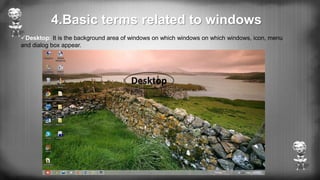
Desktop: It is the background area of windows on which windows on which windows, icon, menu
and dialog box appear.
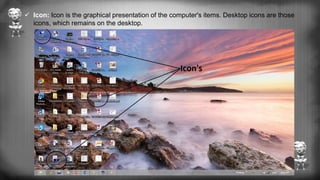
 Icon: Icon is the graphical presentation of the computer's items. Desktop icons are those
icons, which remains on the desktop.
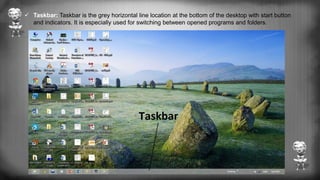
 Taskbar: Taskbar is the grey horizontal line location at the bottom of the desktop with start button
and indicators. It is especially used for switching between opened programs and folders.
By:- Ram Krishna Dumrakoti

Basic computer skills of BSc IT

  • 1.
    Basic Computer Skills BSc. IT Instituteof International Management science
  • 2.
    Index  Fundamental ofComputer 1.Introduction 2.Input, Output & Processing of Computer 3.components of computer 4.Memory Device 5.Types of Computer 6.Characteristices of Computer 7.Generation of Computer 8.Application of Computer  Windows Overview 1.Some Basic Terminology 2.Function of Keys 3.Some basic terms related to start button 4.Basic terms related to windows
  • 3.
    A. Fundamentals ofComputer 1. Introduction  Computer is an electronic Device, that process the input data according to the given instruction & gives output as a result. It also saves the result for future use.  Word “computer” is derived from Latin word “computar” which mean to calculate.  Full form of computer :- C – Commonly O – Oriented M – Machine P – Properly U – Used for T – Training E – Education R – Research
  • 4.
    Input • Keyboard • Mouse Process/ Storage Output • Monitor • Printer 2. Input, Output & Processing of Computer
  • 5.
    3. Components OfComputer  Motherboard  Hard disk  RAM  ROM  Processor  SMPS & Connecting wire  UPS  DVD/CD R-W  Floppy Drive  Modem  Graphics Card  Sound Card
  • 6.
    4.Memory Device The storingcapacity of computer expressed in bytes. Bytes store one character of data. Primary Memory • RAM &ROM Secondary Memory • Hard disk, CD & DVD , Blue ray Disc & Pen Drive 0.1 1 bit 4 bits 1 nibble 8 bits 1 byte 1 byte 1 character 1024 bytes 1 Kilobyte (KB) 1024 KB 1 Megabyte (MB) 1024 MB 1 Gigabyte (GB) 1024 GB 1 Terabyte (TB)
  • 7.
    5. Types OfComputer ♥ On The Basis Of Working  Analog computer  Digital Computer  Hybrid Computer (Analog + Digital) ♥ On The Basis Of Size  Mainframe Computer  Mini Computer  Super Computer  Work Station  Micro Computer 1. Desktop Computer 2. Laptop Computer 3. Palmtop Computer  Network Computer
  • 8.
    ♥ On TheBasis Of Brand  IBM PC  IBM Compatible  Apple / Macintosh ♥ On The Basis Of Processing  XTI 8086 & 8088 Processor  AT 286  AT 386  AT 486  Pentium I, II, III,IV
  • 9.
    a. Speed &Accuracy 1 millisecond= 1/1000 of second 1microsecond= 1/1000000 of a second 1 nanosecond= 1/000000000 of a second 1 Pico second= 1/1000000000000 of a second b. Storage c. Versatility Computers are being used in different fields such as offices, school, hospital, etc. to perform various tasks. Versatile means ability to perform various tasks & computer can capable to do so. A computer can process any kind of data. d. Diligence It is a capacity of performing repeated operation without any tiredness & any mistakes. A computer is capable of performing the required tasks continuously with the same speed, accuracy & efficiency without any error. 0.1 1 bit 4 bits 1 nibble 8 bits 1 byte 1 byte 1 character 1024 bytes 1 Kilobyte (KB) 1024 KB 1 Megabyte (MB) 1024 MB 1 Gigabyte (GB) 1024 GB 1 Terabyte (TB) 6. Characteristics of Computer
  • 10.
    7. Generation ofcomputer First Generation Of Computer  Vacuum tubes are used to electronic circuit.  Storage capacity was limited (1kb to 4kb).  Slow processing (millisecond).  High voltage needed up to 150000 volts.  large in size (51002 feet). Second generation Of computer  Transistor were used.  processing speed was faster.  Smaller in size(512 feet).  Input and output device were faster. Third generation Of Computer  ICs were used in place of transistor.  processing speed is faster than second generation.  minicomputer were in produced during this generation.  Storage capacity in measured in mega byte. Forth Generation of computer  VLSI and micro processer are used.  processing speed is very high Giga bytes.  very smaller size.  input and output devices were versatile. Fifth Generation Of Computer  Intelligent processing.  Easy human computing.  computer will understand natural language.  They have artificial intelligence.
  • 11.
    Now a days,it is difficult to find the field or the criteria in which there is no use of computer. Directly or indirectly there is vast use of computer. However some of the major fields of Computers are given below: 1. Personal Use 2. Hospital 3. School & College 4. Satellites & Networking System 5. Research Center 6. Entertainment 7. Design & Modeling 8. Graphic designing, Audio/ Video mixing 9. National & Multinational Organizations 10. Robotics 11. Banks & other offices. 8. Application of Computer
  • 12.
  • 13.
    1. Some BasicTerminology  ROM : read only memory  RAM : random access memory  DVD : digital video disk  CU : control unit  ISP : internet service provider  WWW : world wide web  LCD : liquid crystal display  NTFS : network transfer file system  USB : universal serial bus  XT : extended technology  AC : Alternating current  ALU : Arithmetic and logical unit  CD-RW : compact disk re-writable  BIOS : basic input and output system  CPU : central processing unit  FDD : floppy disk drive  HDD : hard disk drive  MS : Microsoft  MS-DOS : Microsoft disk operating system  PC : personal computer
  • 14.
    2. Function OfKeys  End: - It is used to move the cursor at the end of the line.  Home: - It is used to move the cursor at the beginning of the line.  Page up: - It is used to move the cursor one page up.  Page down: - It is used to move the cursor one page down.  Esc: - It is used to cancel any job function.  Num lock: - It is used to lock and unlock the numeric pad.  Alt + ctrl: - For special purposes only  Arrows: - There are 4arrow keys  Down arrow: - It is used to move the one line down  UP arrow: - it is used to move the one line up  Right: - It is used to move the cursor one character right  Left arrow: - It is used to move the cursor one character left.  Caps lock: - It is used to make the alphabets capital or small. When it is pressed on it gives capital alphabets and when it is off it gives small alphabets. In case of Nepali font it shows half character, when it is on.  Enter: - It is used to break the lines, paragraph or columns.  Shift: - it is used to display capital and small alphabets by holding shift we can bring changes in the character.  Tab: - It is used to give long space between two character and words  Space bar: - It is used to give space between two character and word.  Back space: - It is used to remove character at the back of the cursor.
  • 15.
    3.Some basic termsrelated to start button  Start button: It is the especial button, is used to start almost all of the programs based on the windows. When you click the start button, you will see a menu, which contains everything you need to begin using windows.  Program: It display a list of program's name and program group that can be directory used  Document: It displays a list of 15 files, which are recently created or opened.  Setting: It displays a list of system component's, which lets you to change the configuration as your requirement.  Find: It provides online help  Run: It helps to run any program by browsing the location and also used to setup any new program.  Shut down: It enables you to shutdown or restarts your computer  Log off: It enables your close the multi user's desktop setting
  • 16.
    4.Basic terms relatedto windows Desktop: It is the background area of windows on which windows on which windows, icon, menu and dialog box appear.
  • 17.
     Icon: Iconis the graphical presentation of the computer's items. Desktop icons are those icons, which remains on the desktop.
  • 18.
     Taskbar: Taskbaris the grey horizontal line location at the bottom of the desktop with start button and indicators. It is especially used for switching between opened programs and folders.
  • 19.