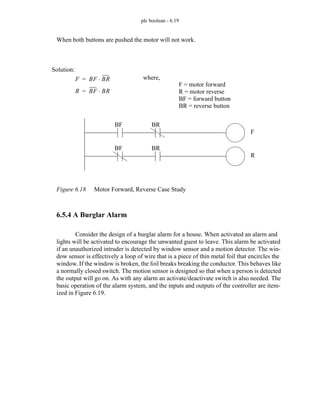
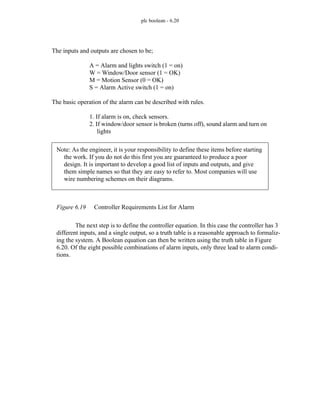
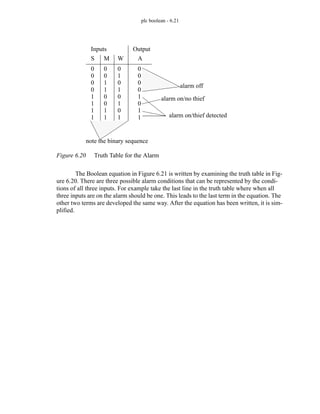
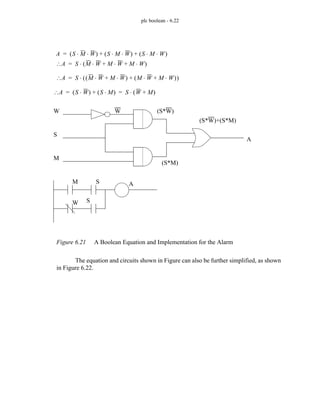
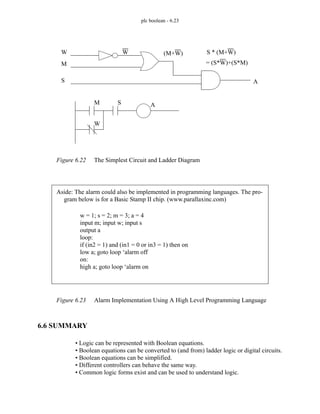
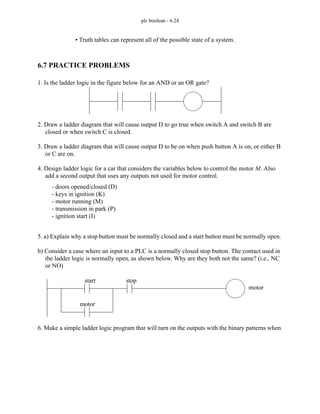
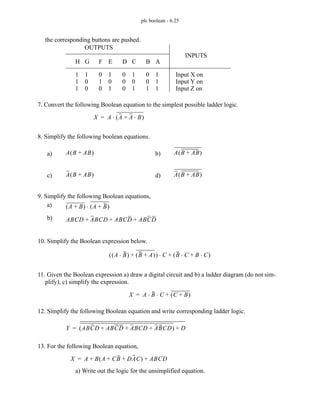
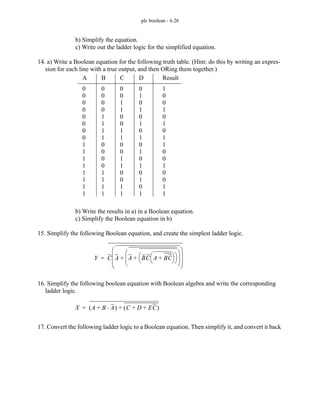
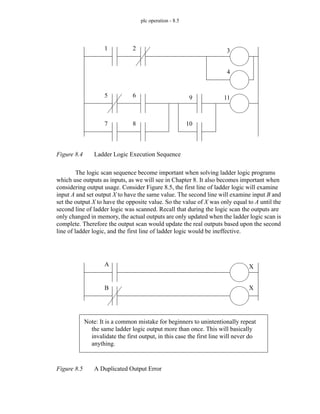
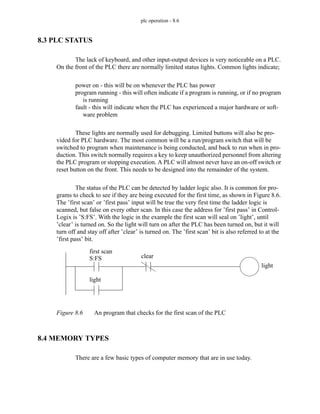
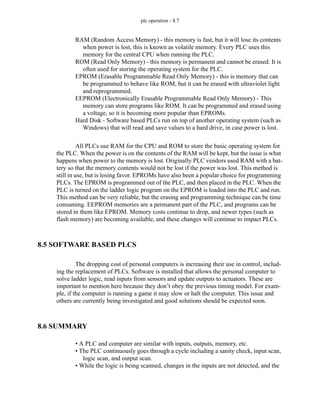
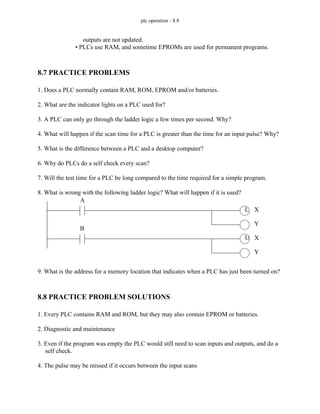
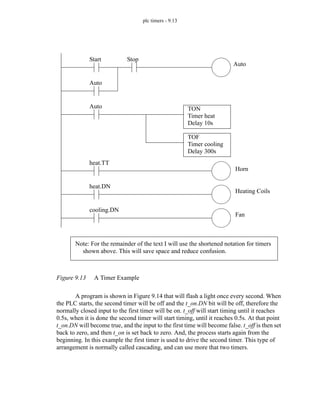
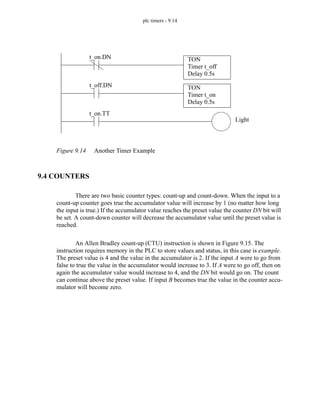
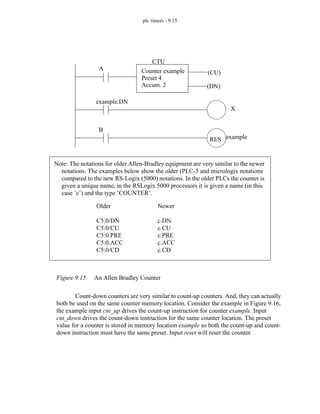
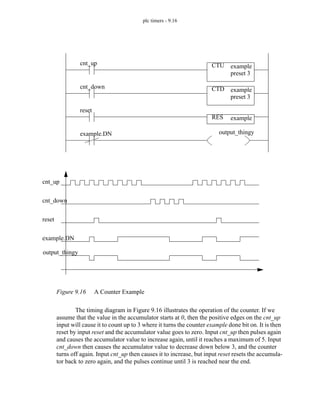
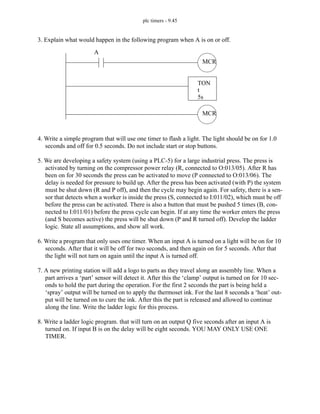
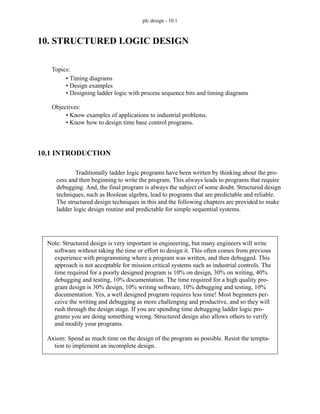
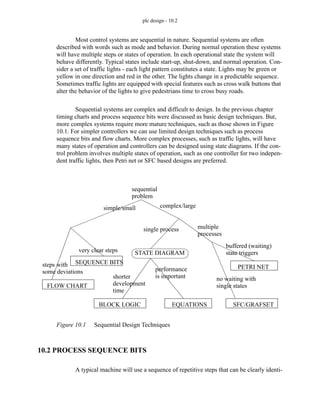
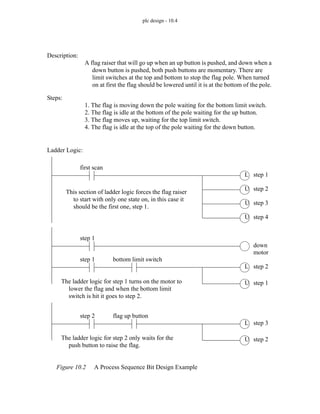
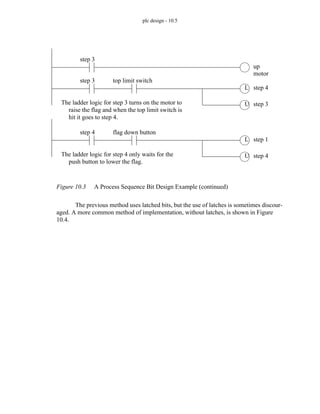
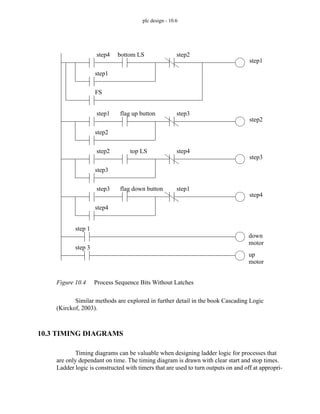
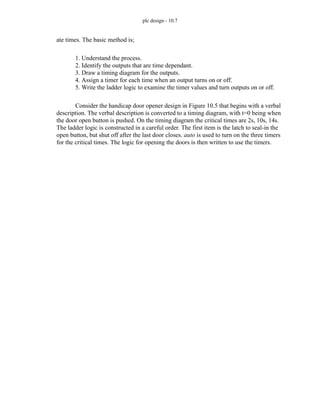
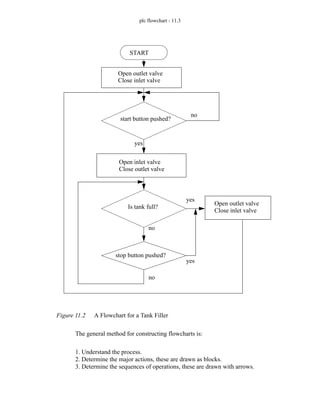
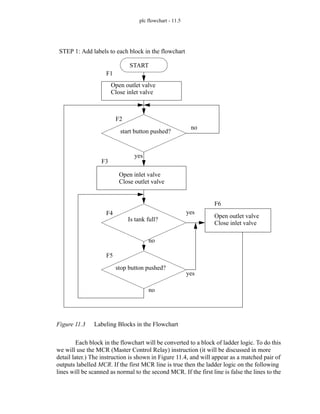
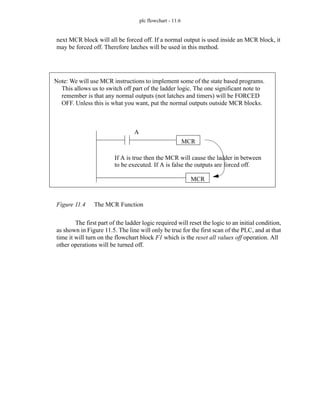
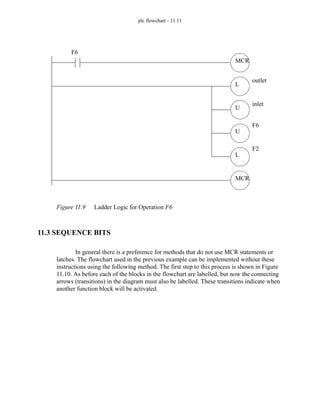
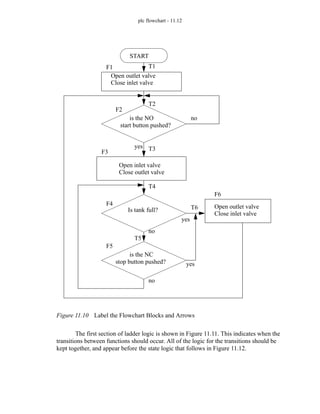
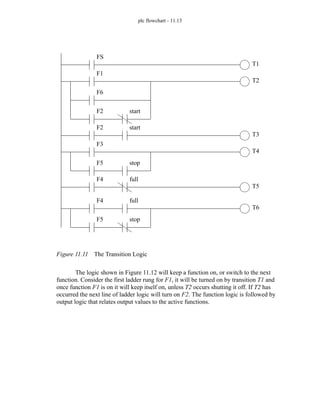
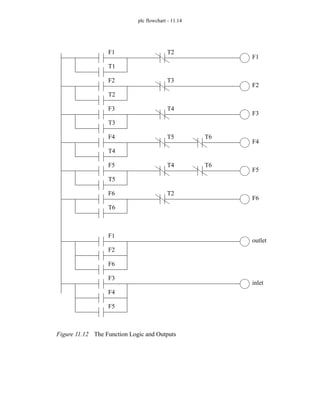
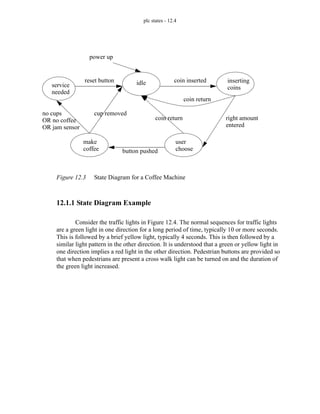
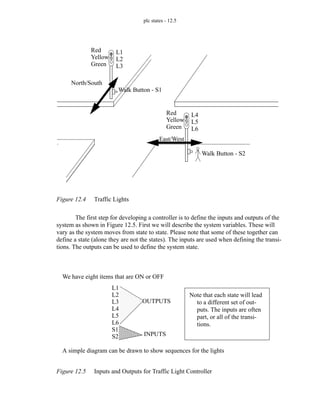
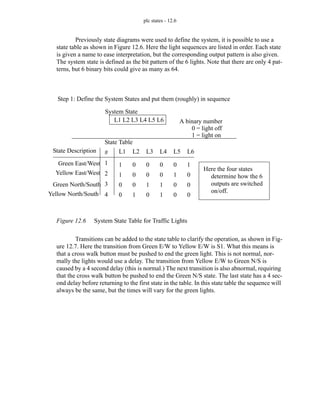
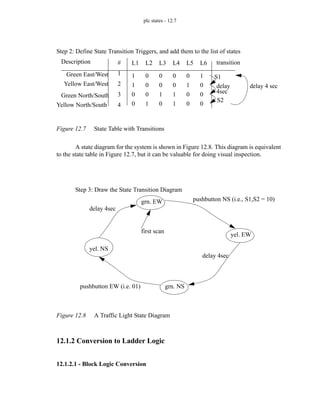
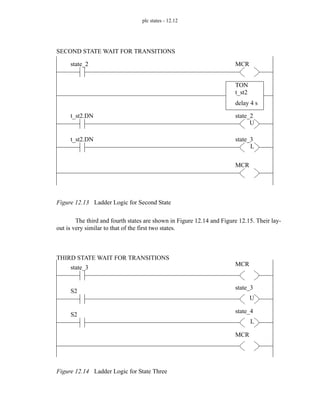
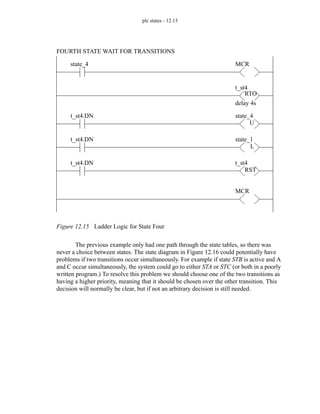
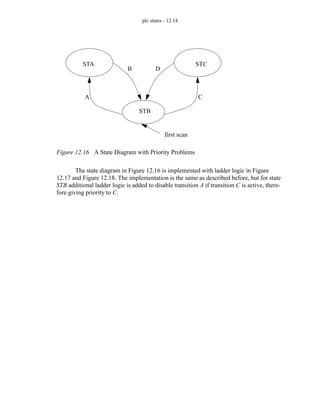
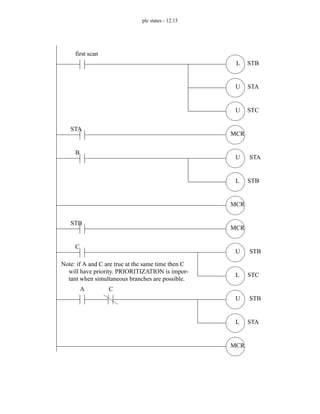
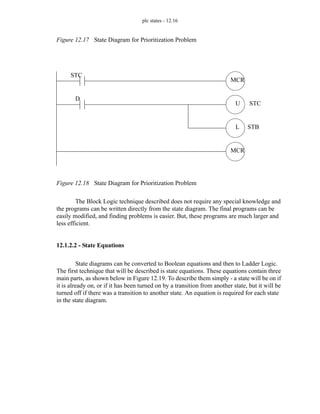
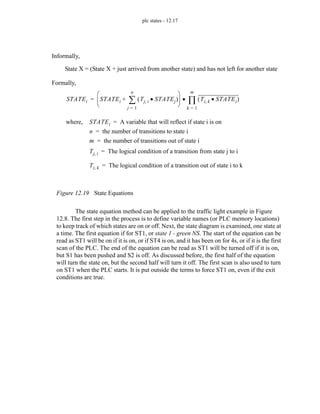
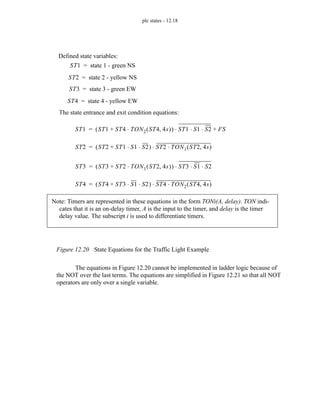
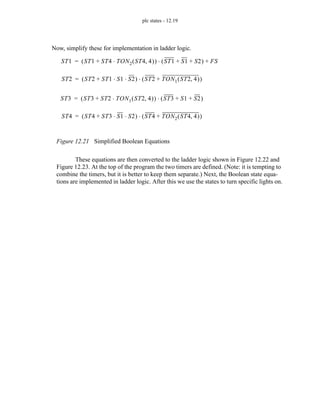
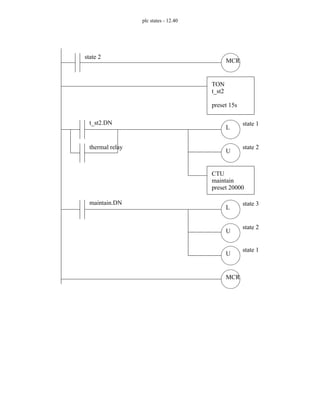
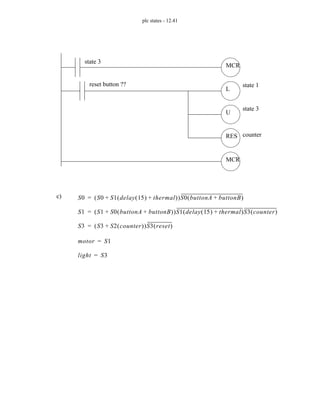
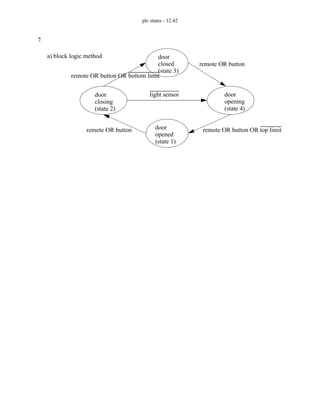
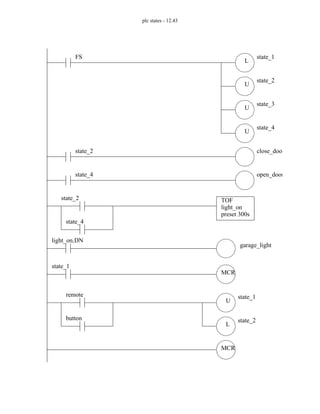
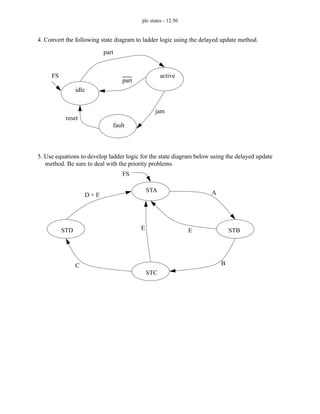
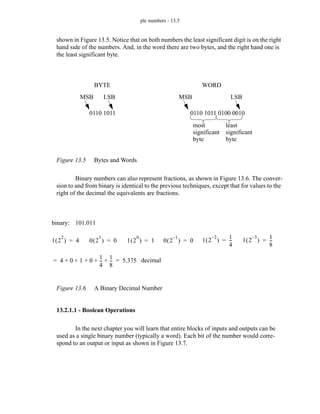
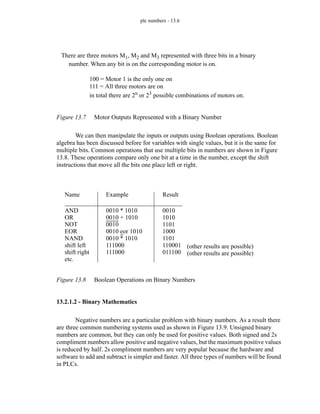
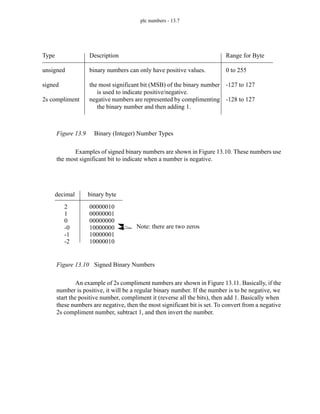
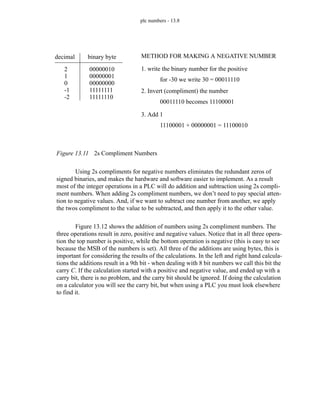
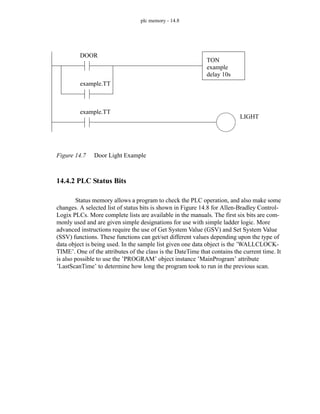
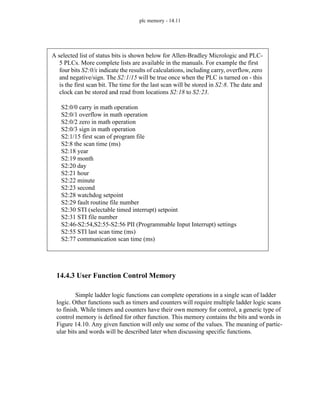
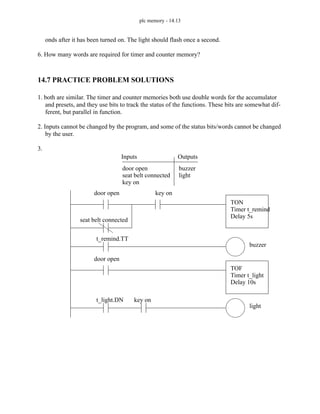
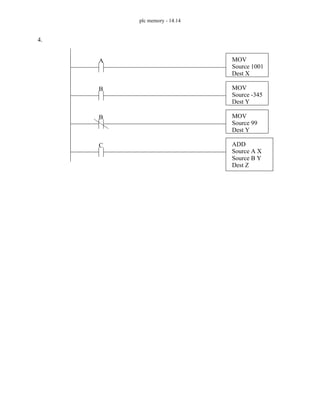
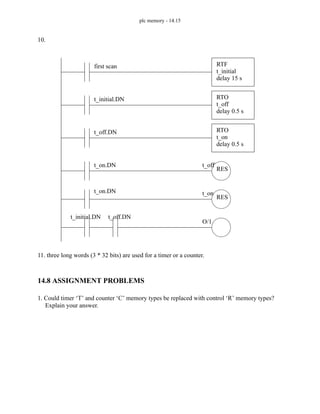
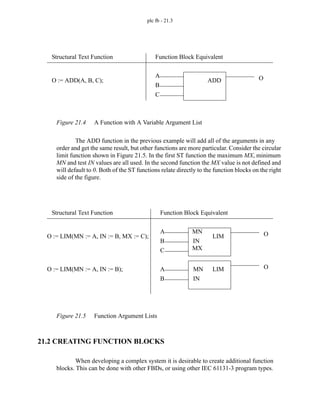
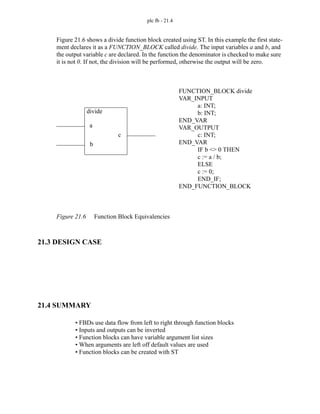
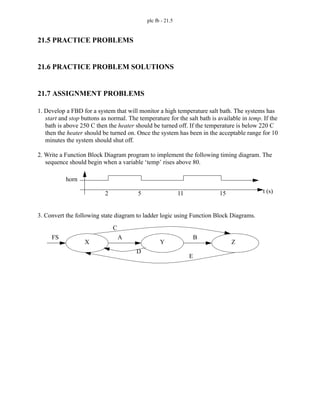
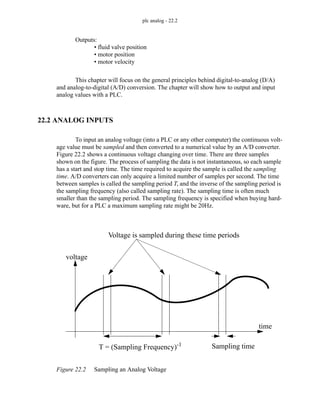
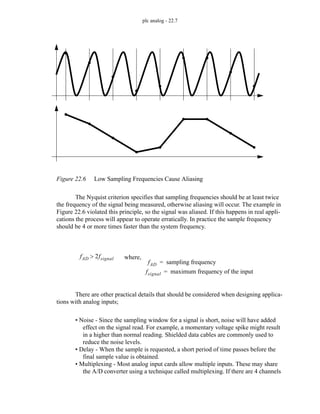
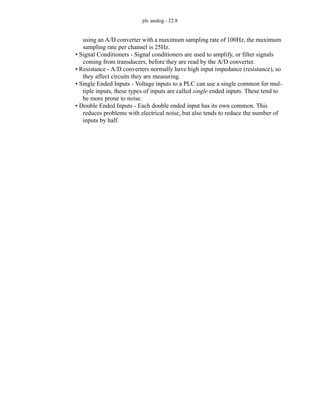
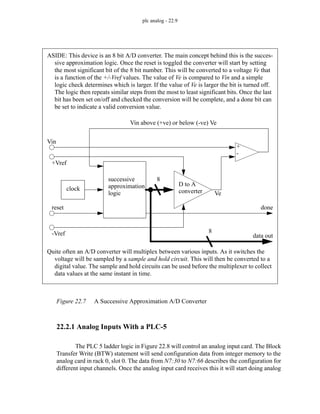
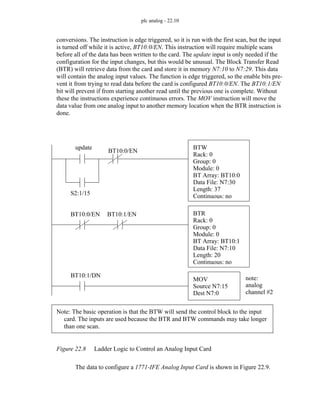
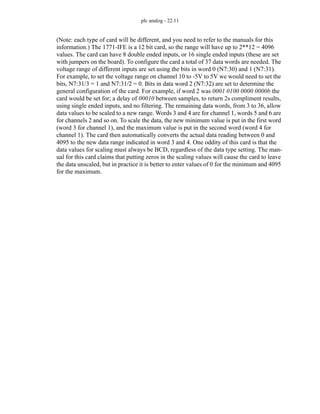
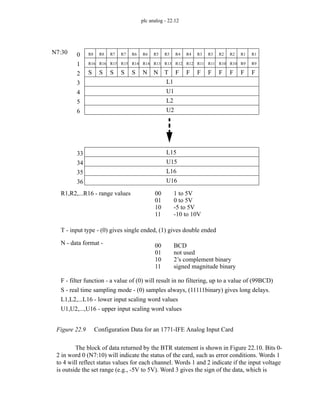
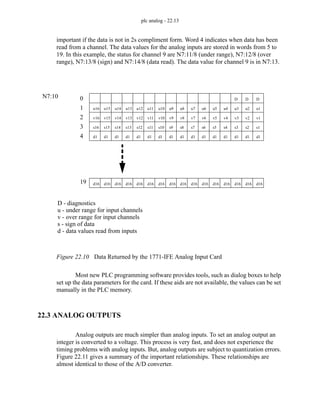
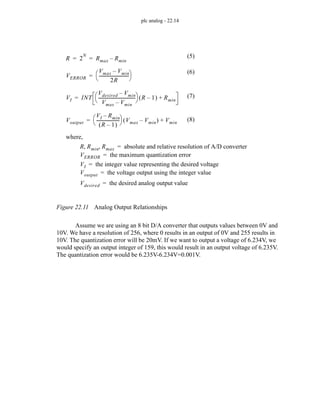
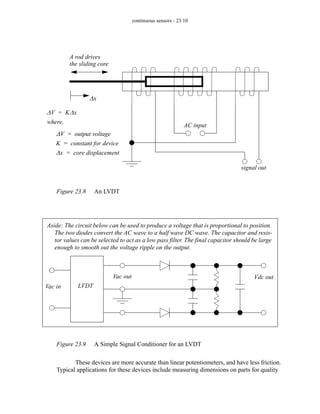
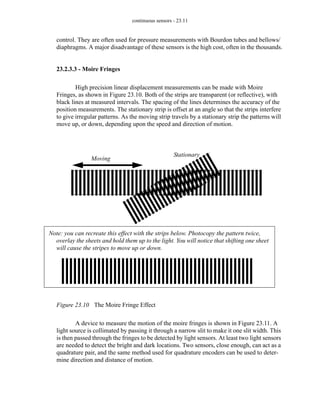
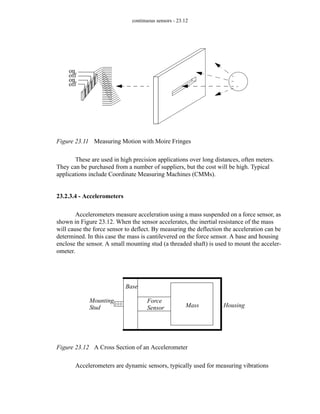
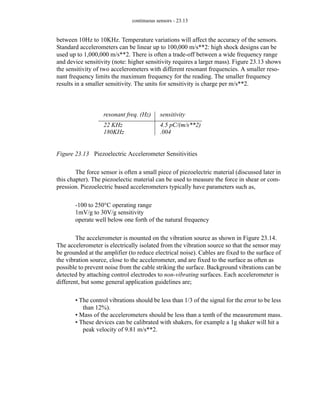
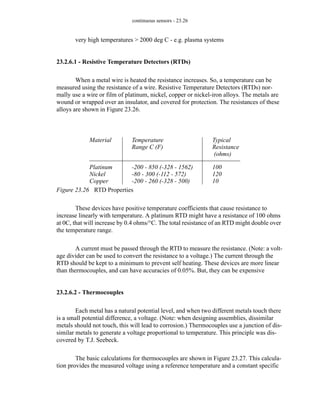
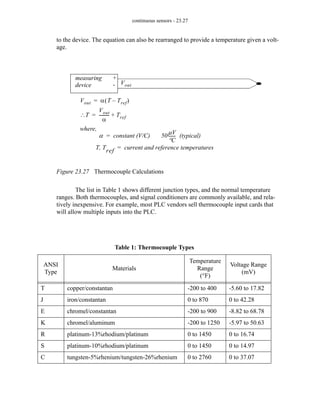
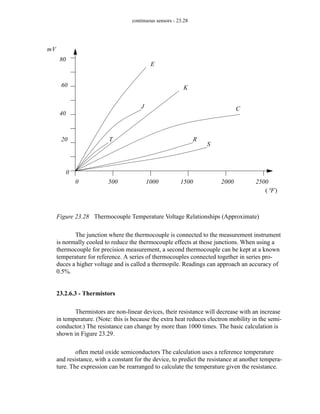
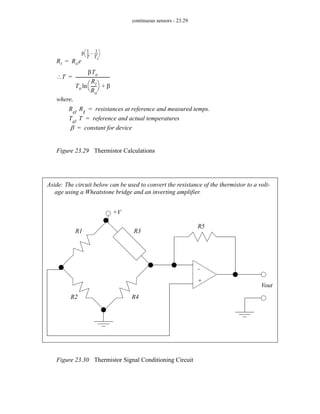
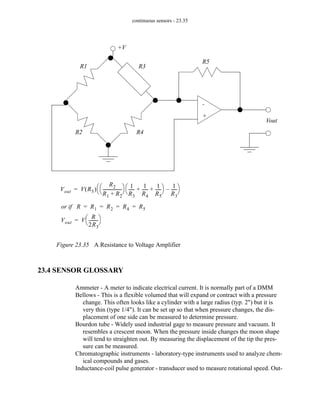
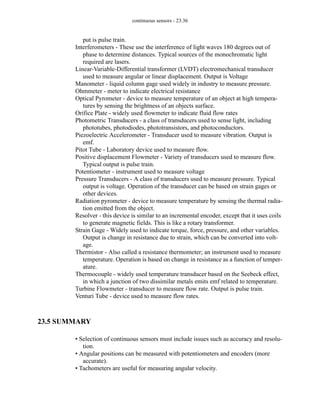
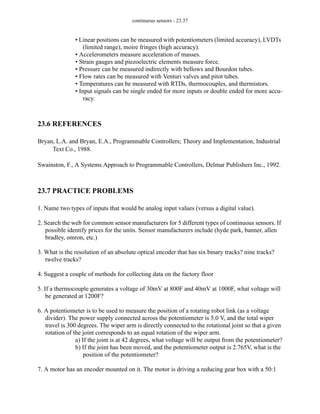
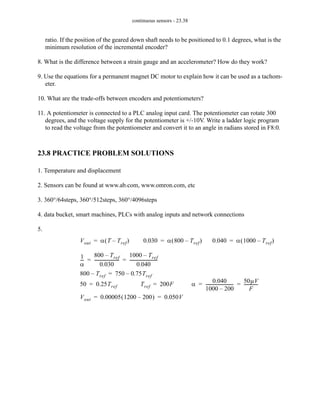
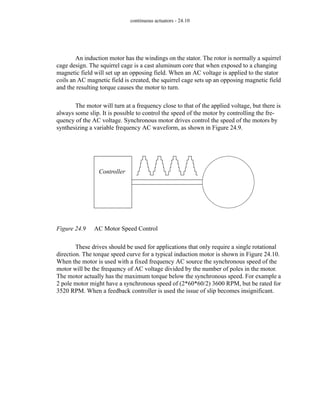
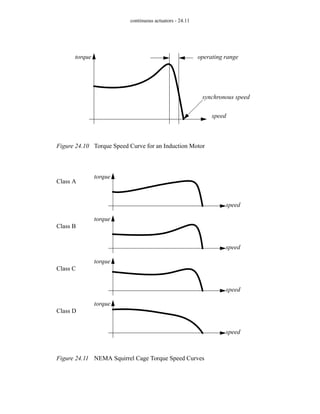
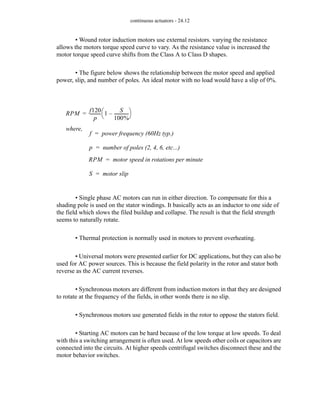
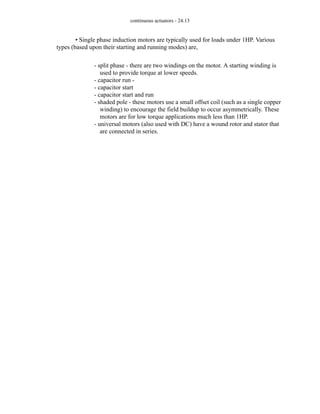
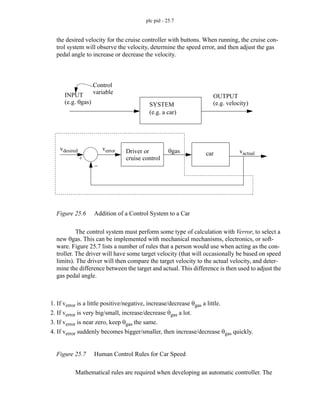
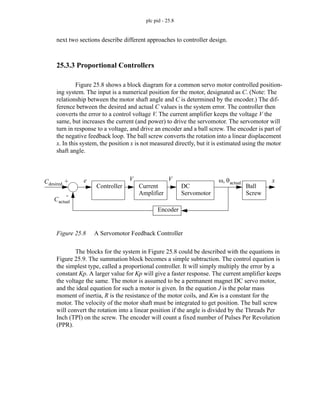
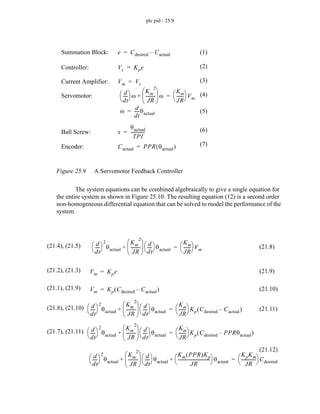
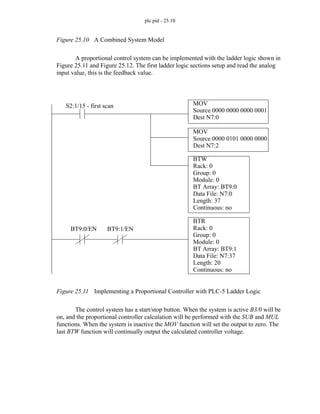
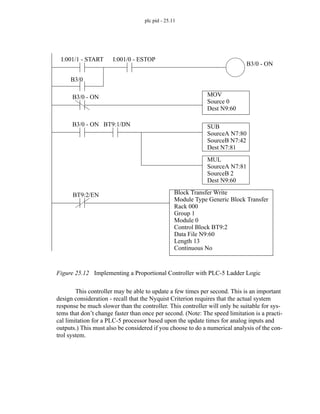
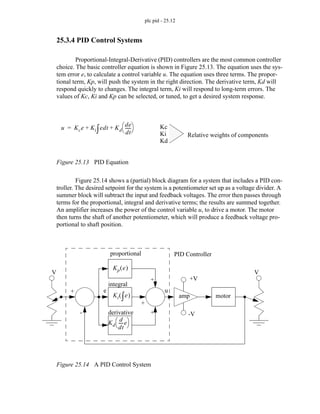
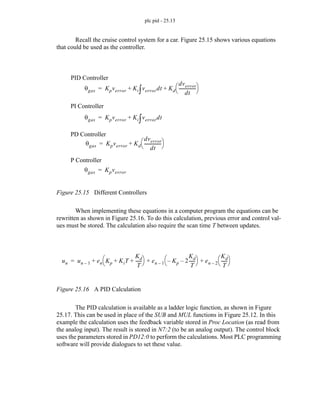
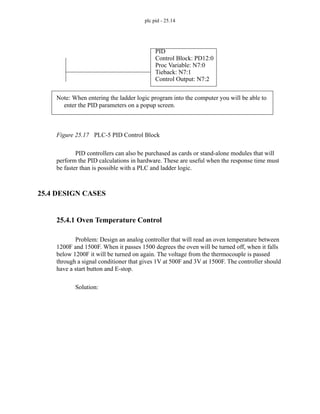
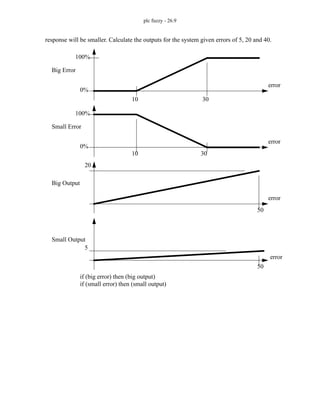
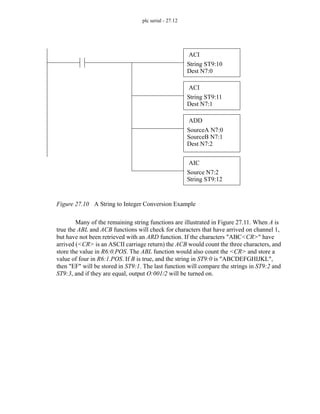
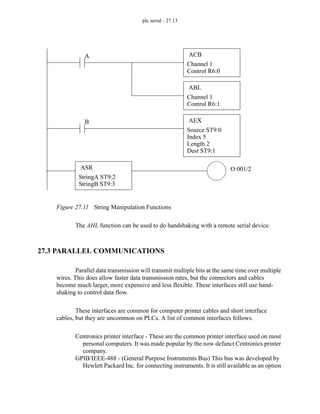
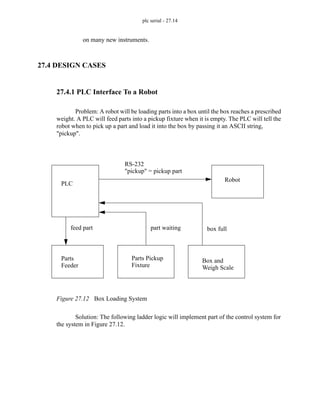
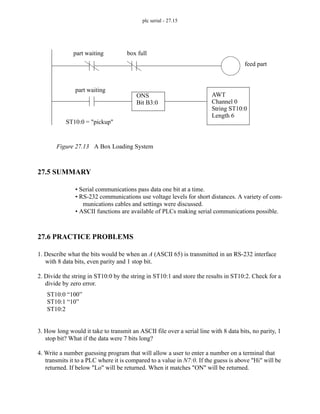
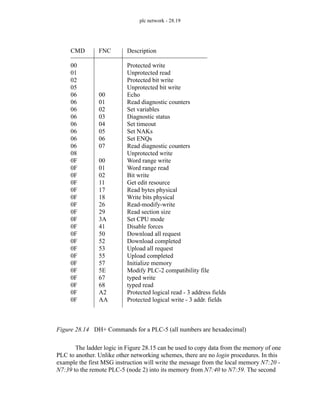
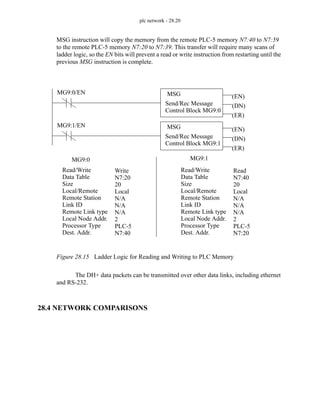
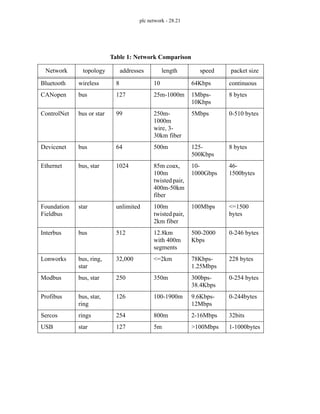
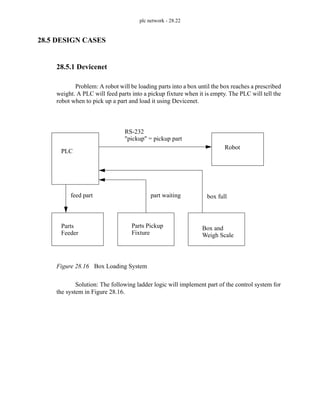
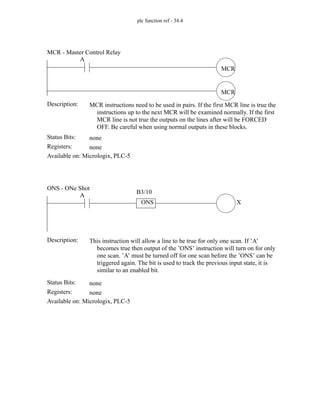
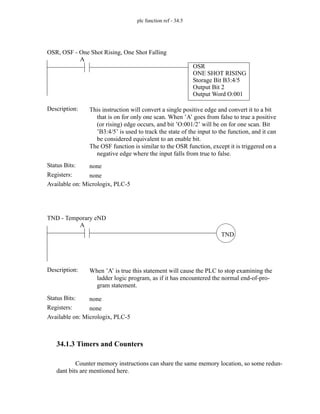
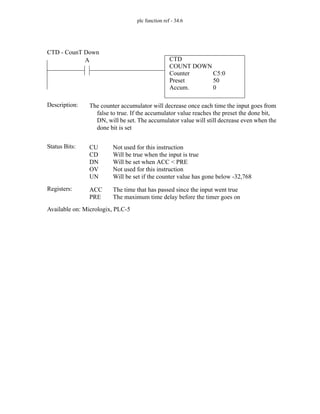
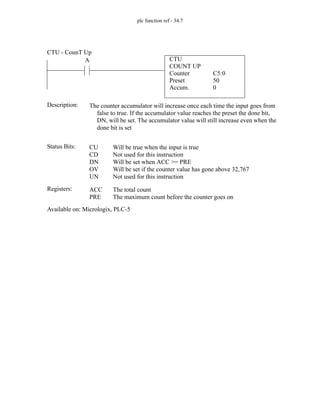
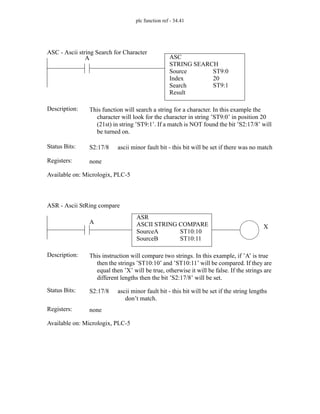
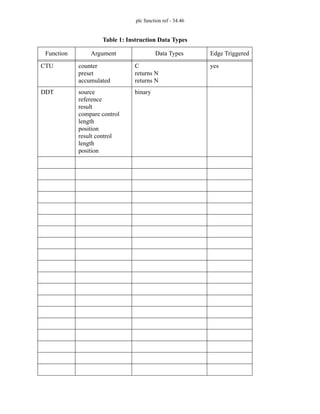
page 0
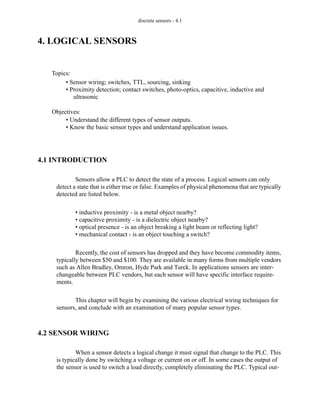
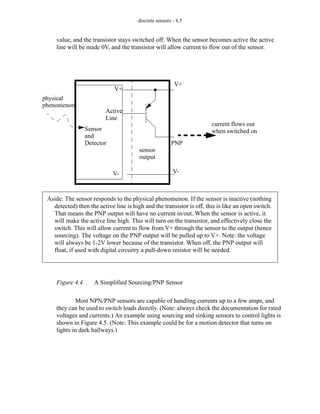
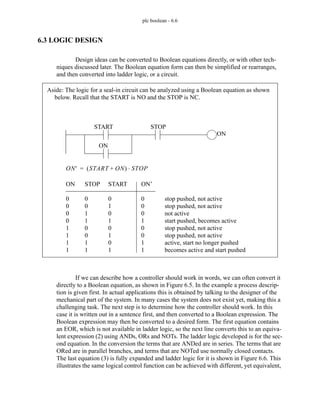
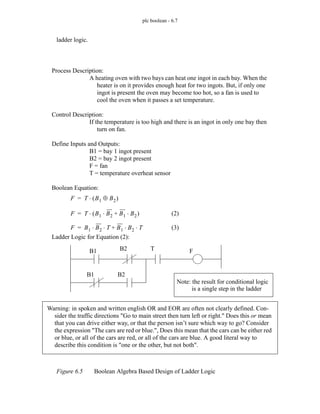
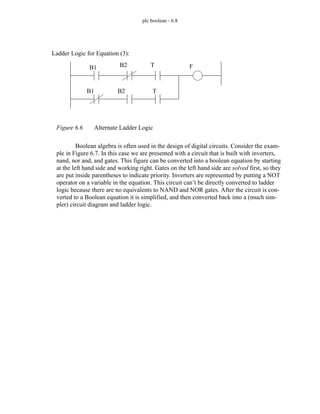
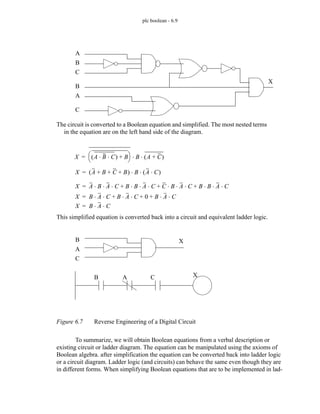
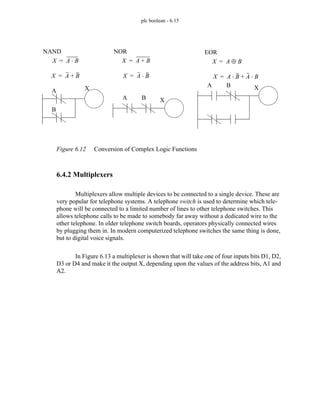
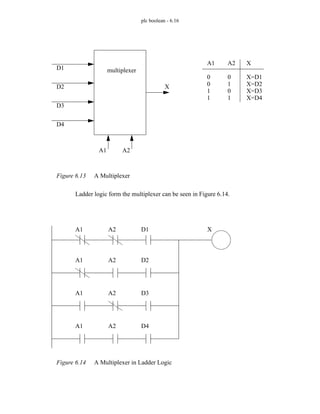
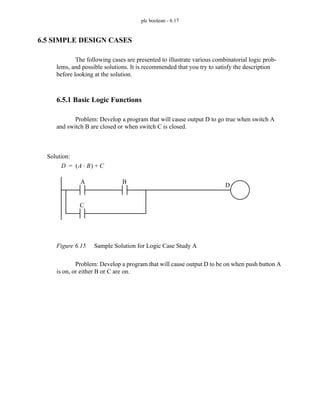
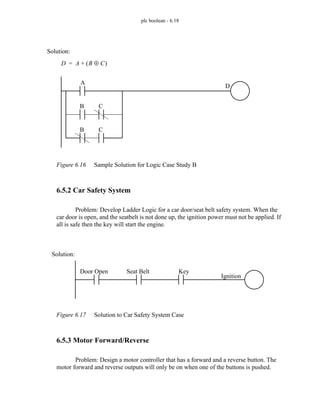
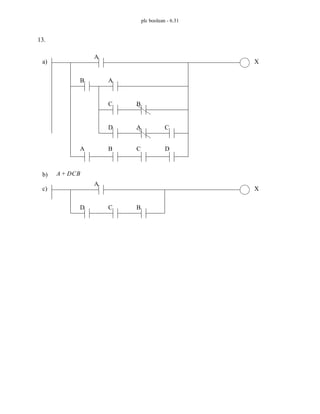
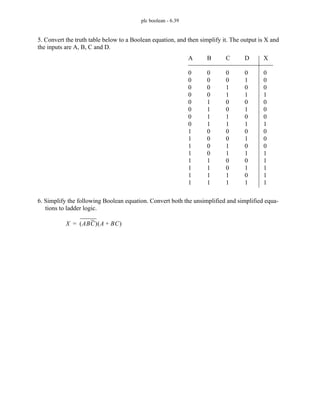
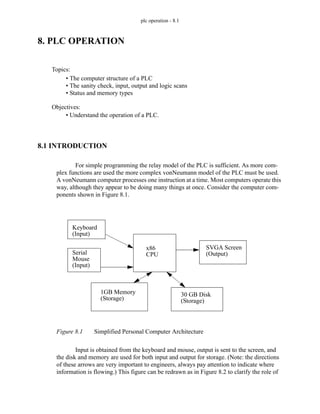
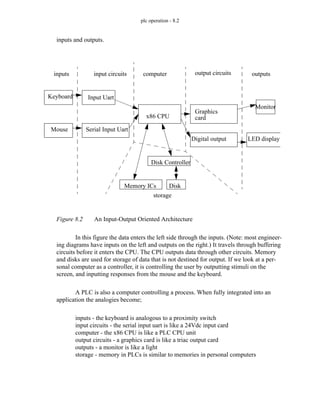
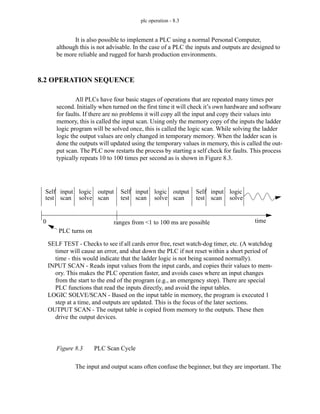
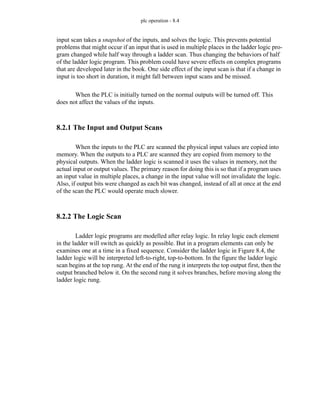
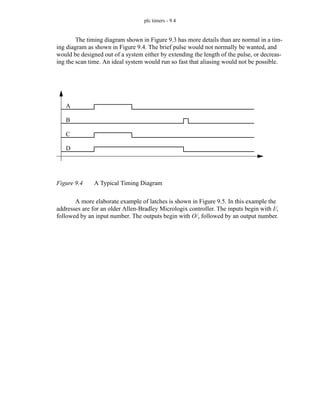
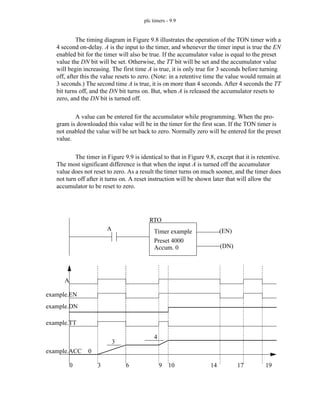
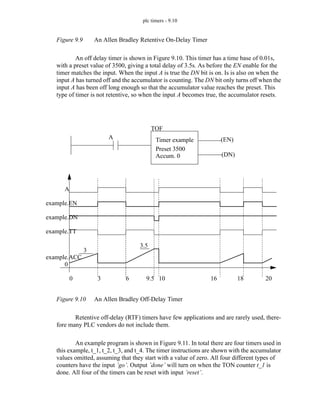
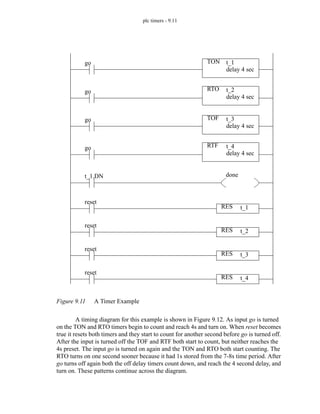
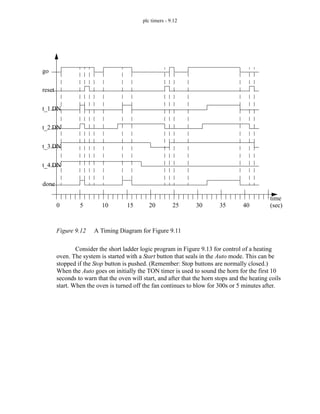
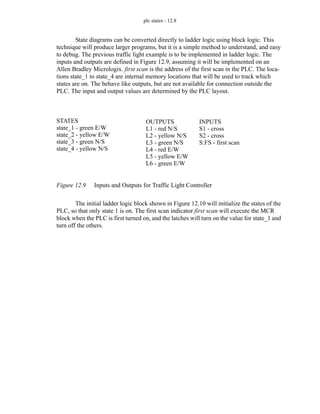
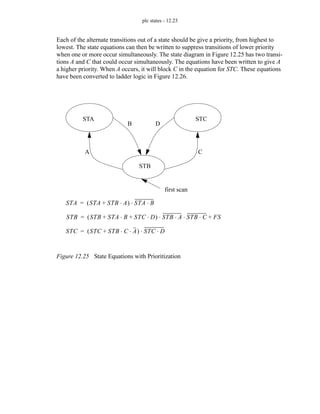
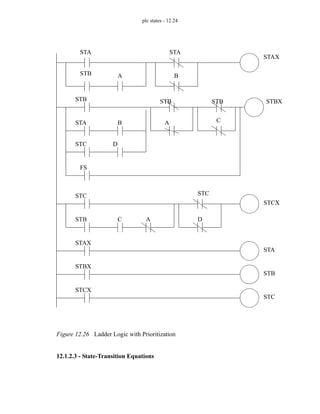
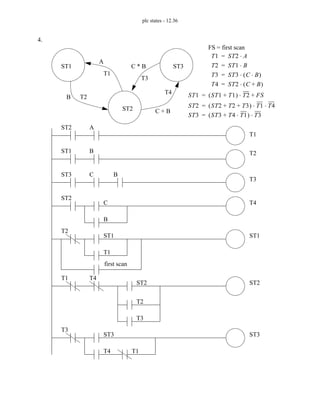
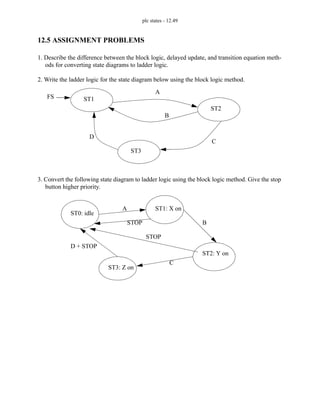
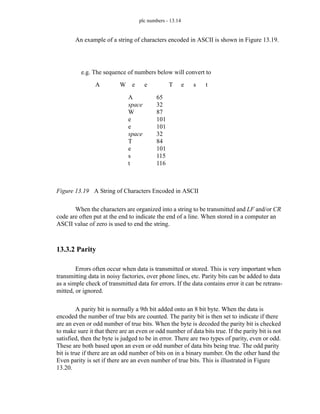
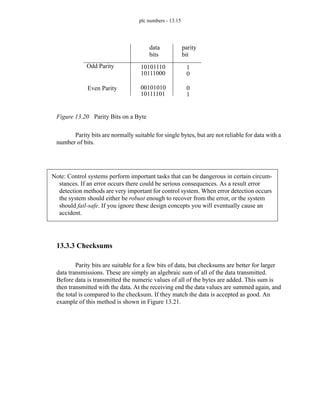
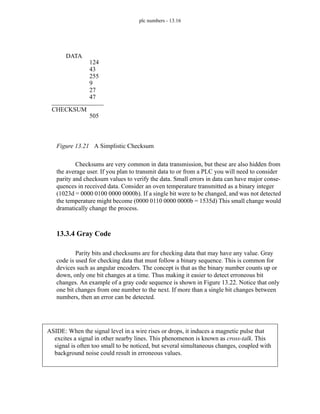
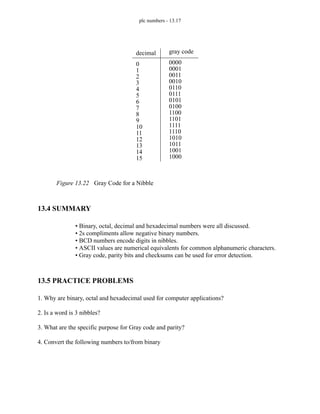
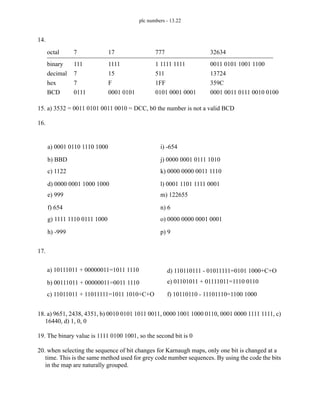
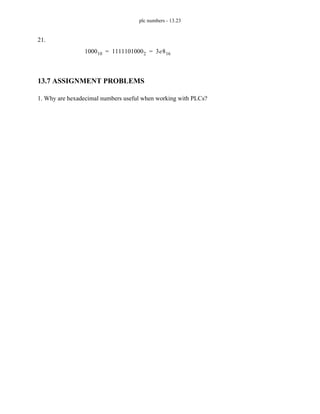
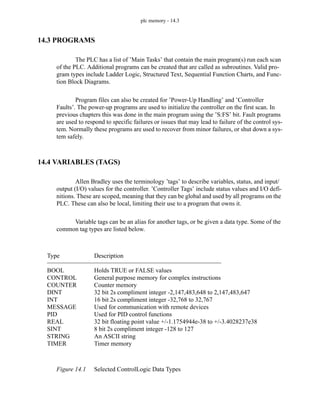
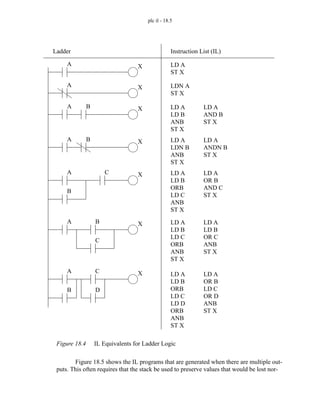
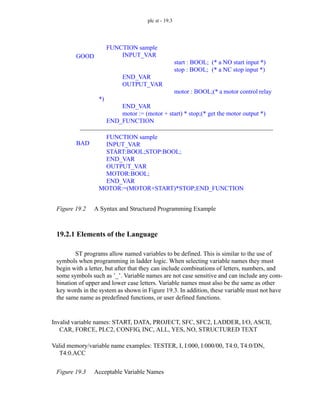
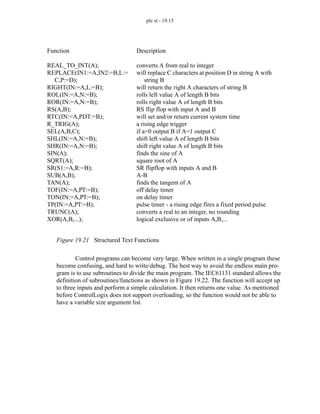
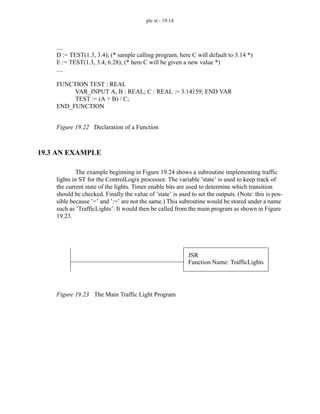
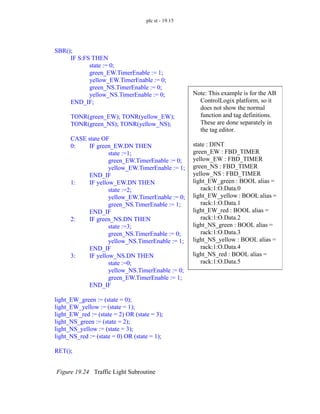
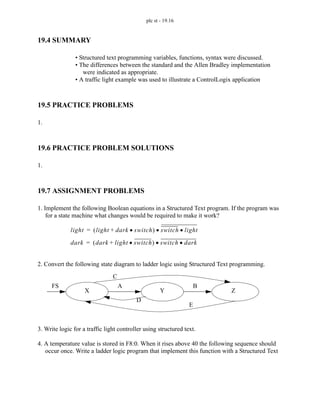
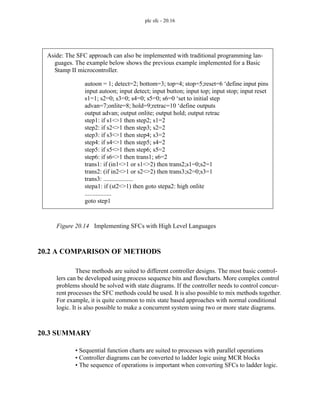
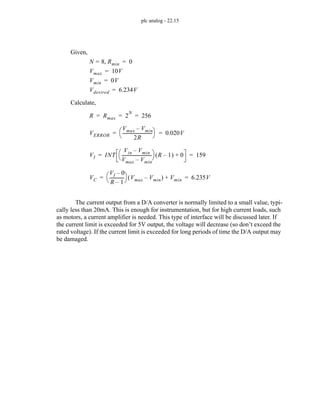
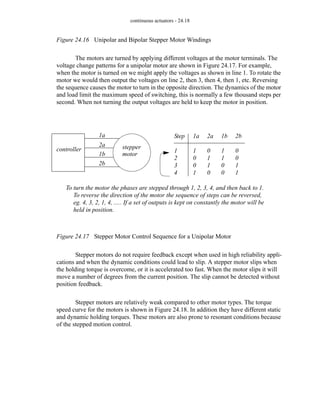
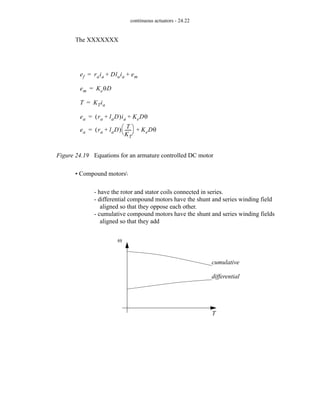
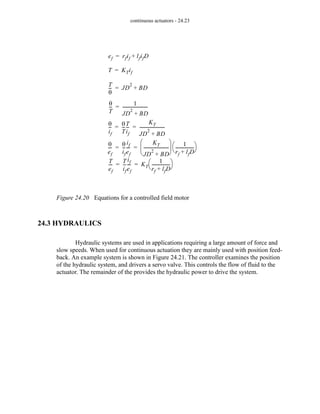
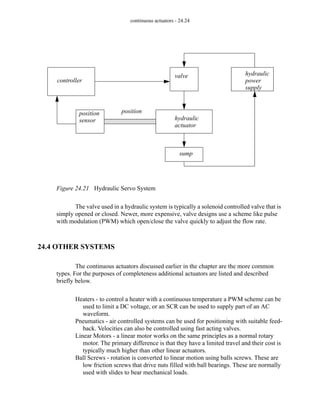
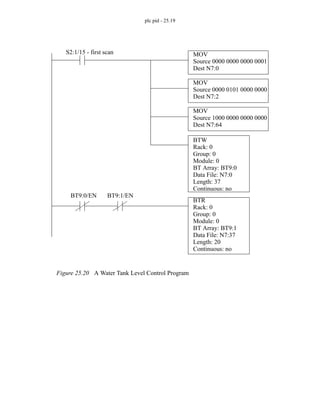
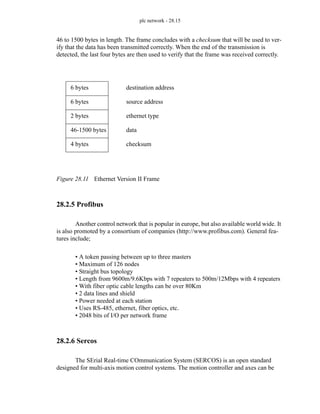
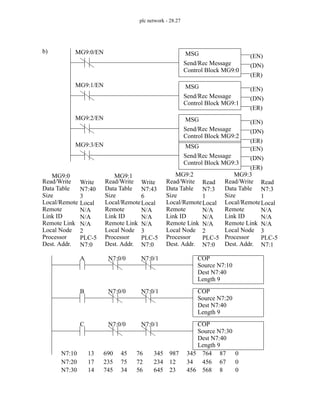
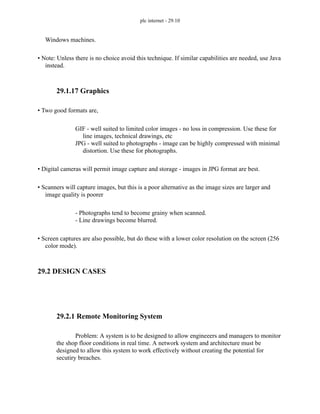
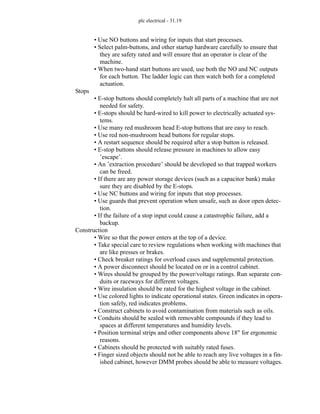
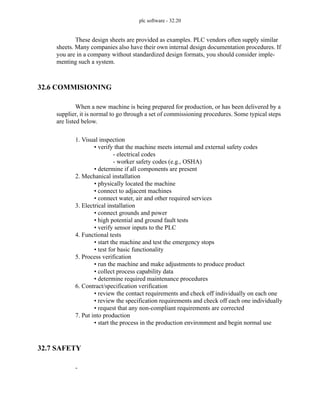
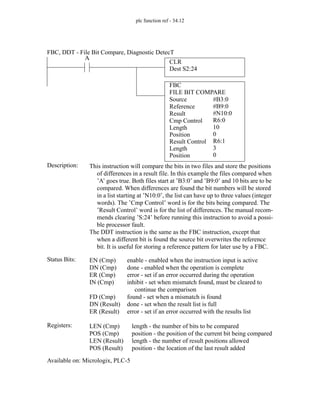
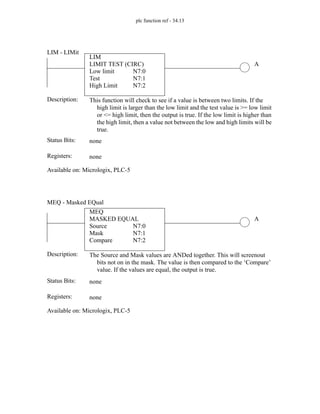
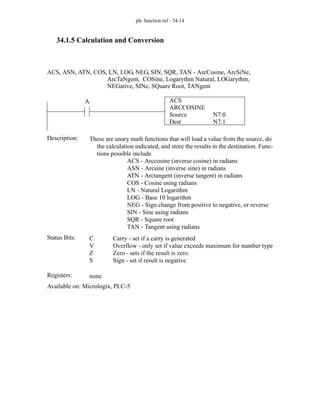
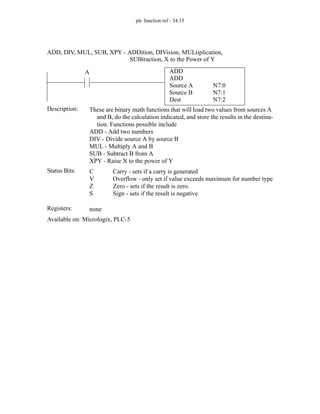
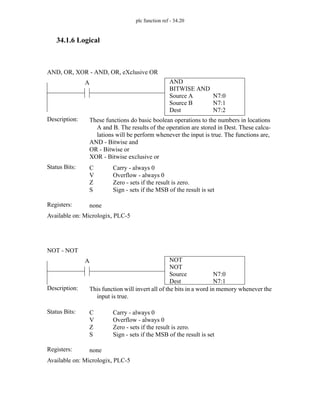
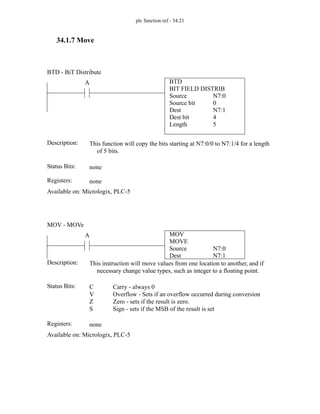
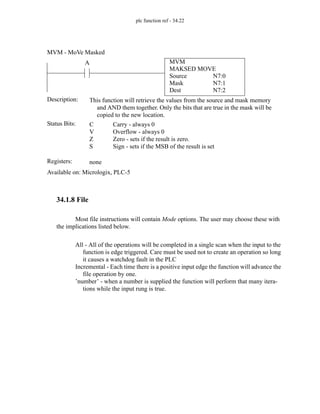
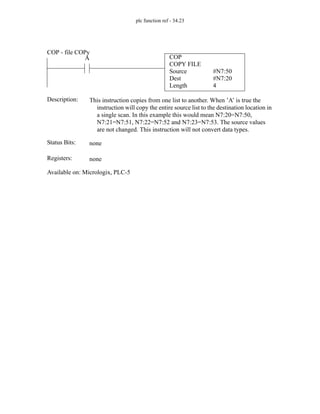
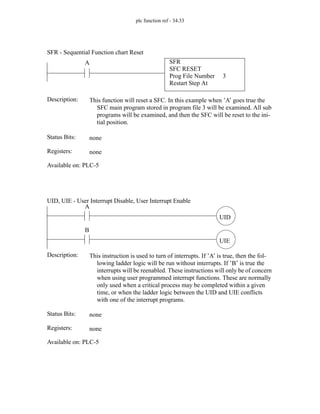
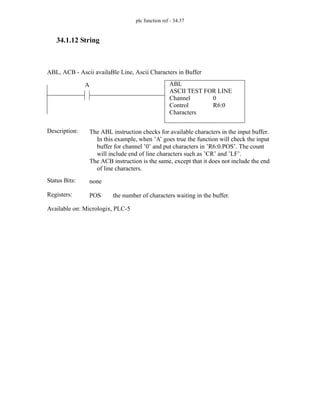
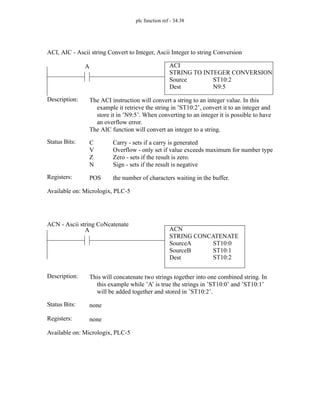
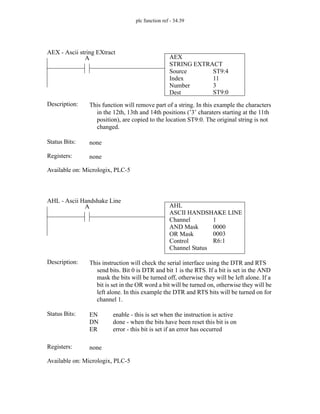
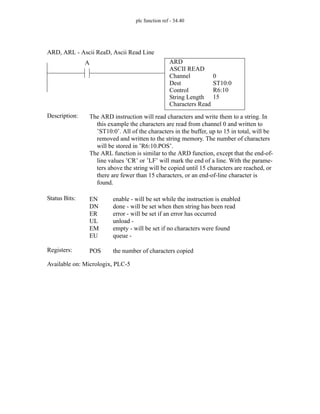
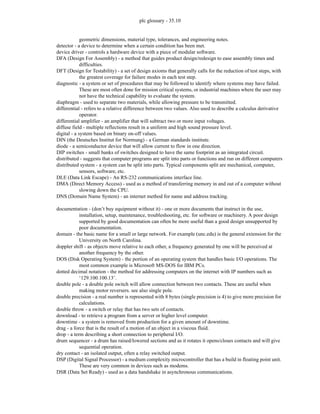
A
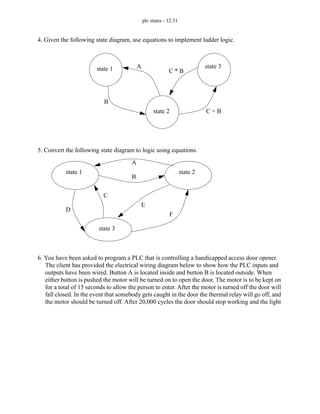
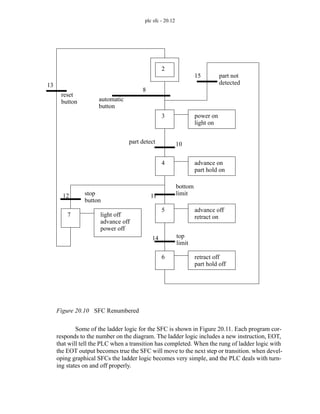
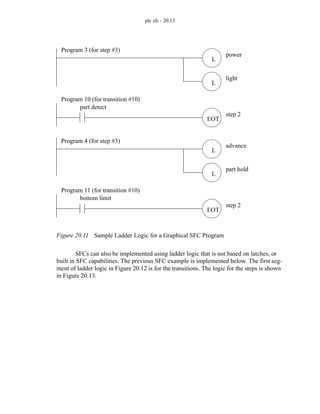
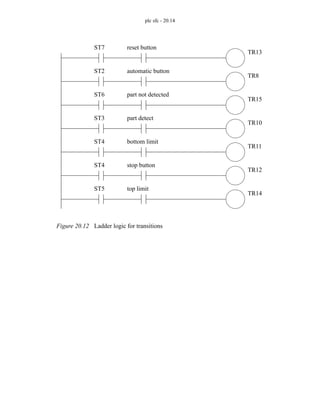
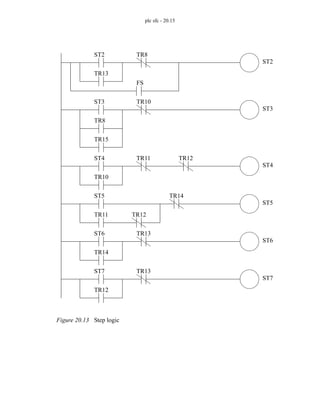
C + B
C * B
B
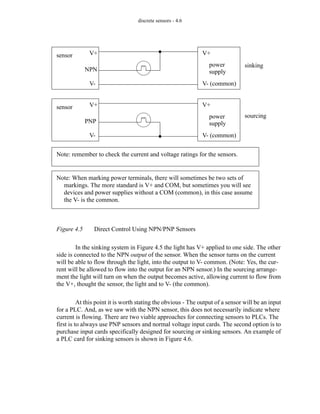
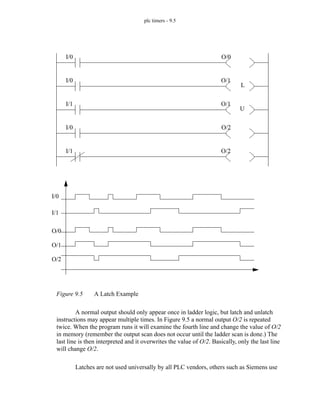
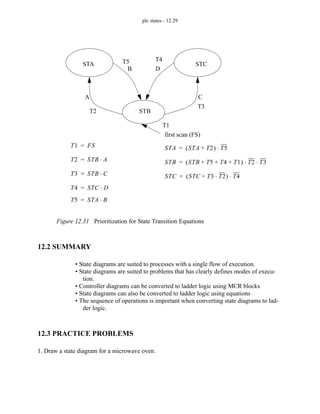
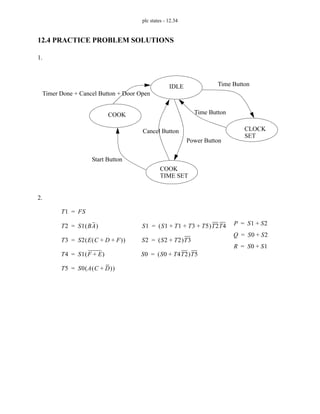
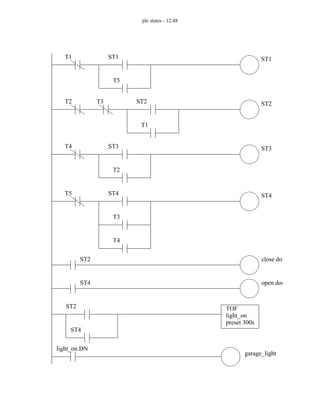
T1 ST2 A
⋅
=
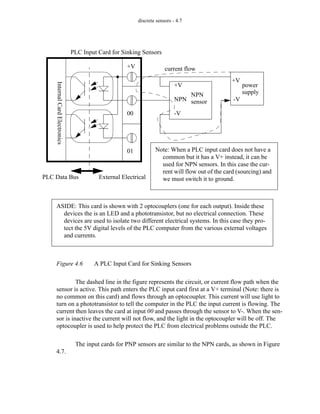
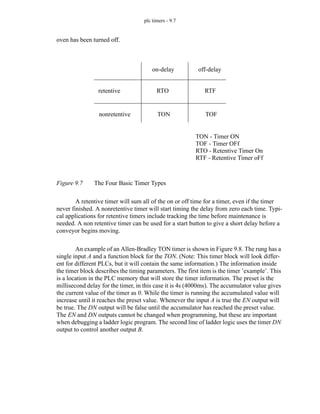
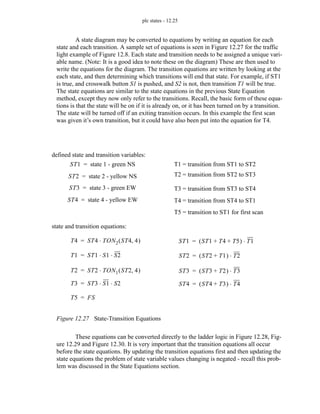
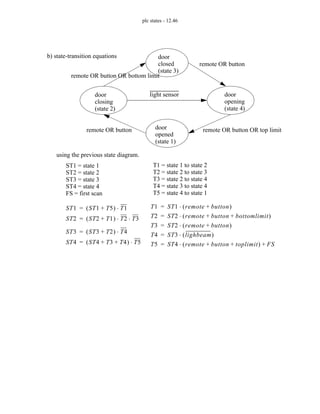
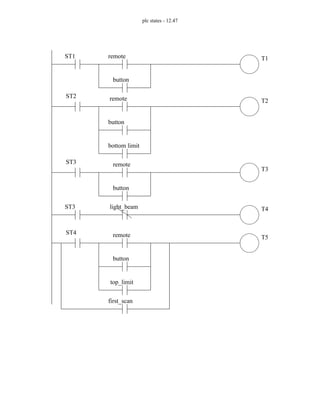
T1
T2
T3
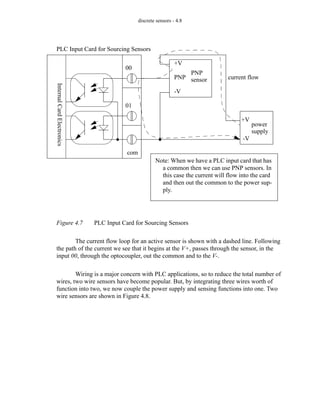
T4
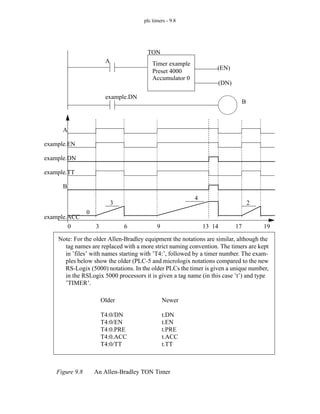
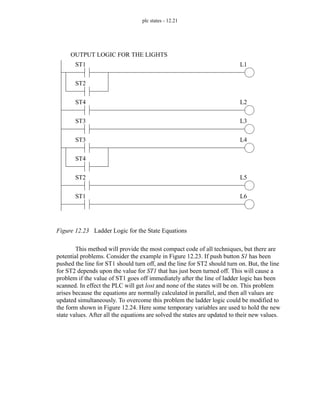
ST1
ST2
ST3
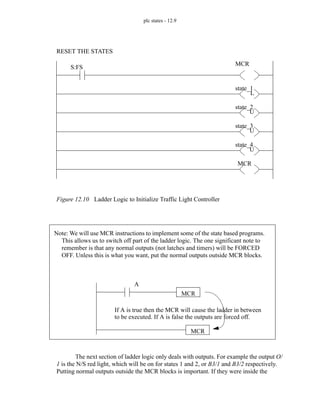
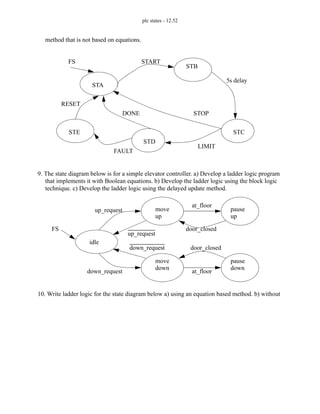
FS = first scan
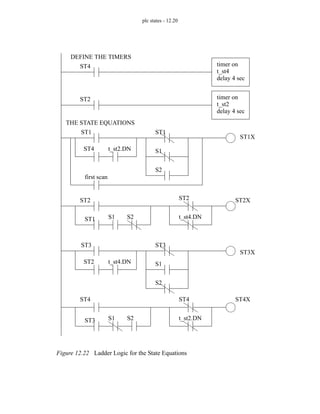
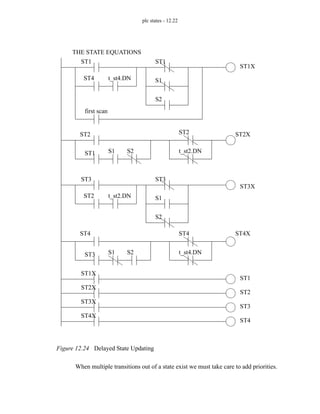
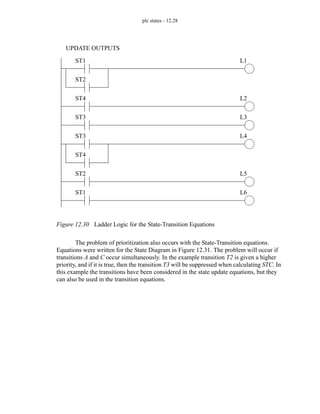
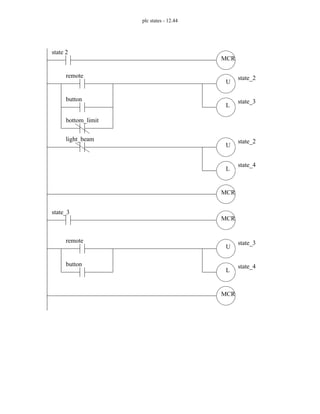
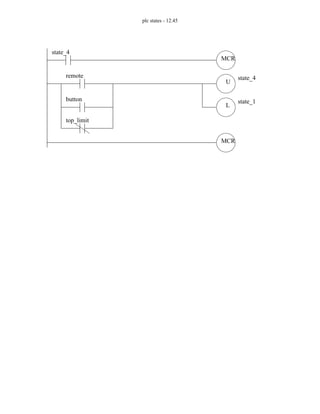
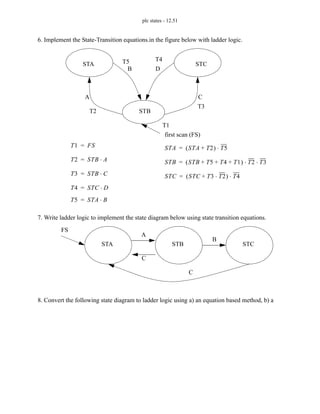
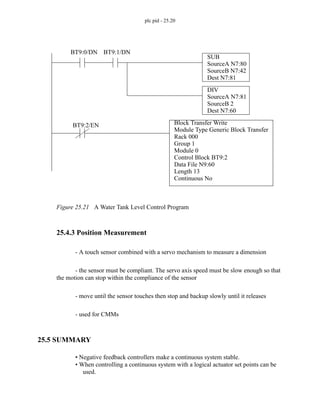
ST1 ST1 T1
+
( ) T2
⋅ FS
+
=
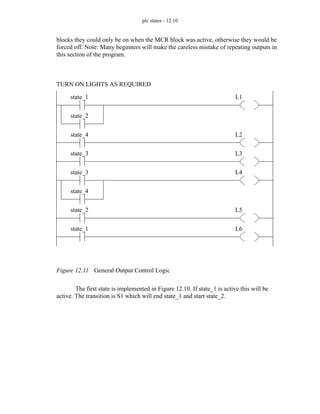
ST2 ST2 T2 T3
+ +
( ) T1 T4
⋅ ⋅
=
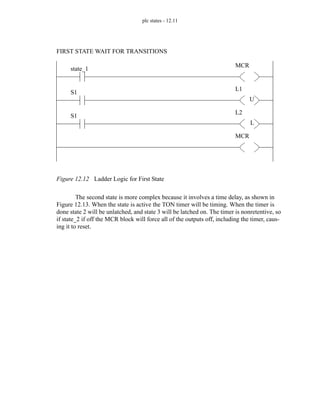
ST3 ST3 T4 T1
⋅
+
( ) T3
⋅
=
T2 ST1 B
⋅
=
T3 ST3 C B
⋅
( )
⋅
=
T4 ST2 C B
+
( )
⋅
=
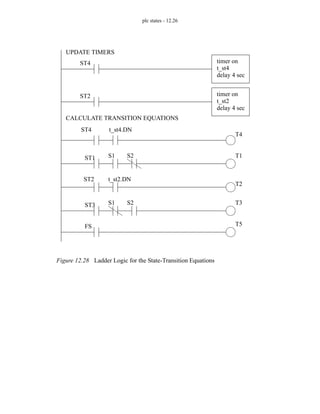
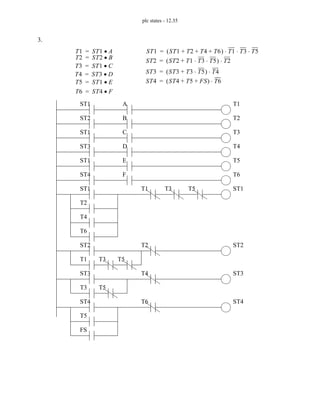
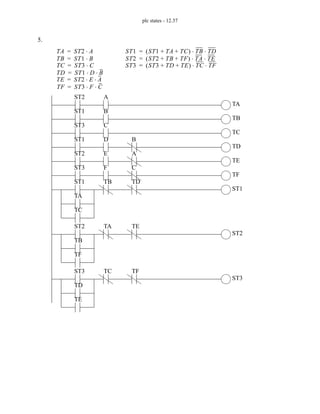
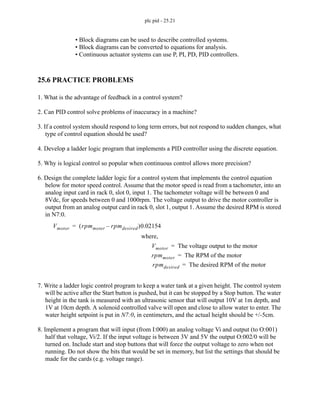
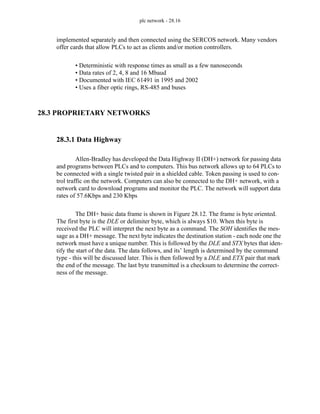
ST2 A
ST1 B
ST3 C B
T1
T2
T3
T4
ST2
C
B
ST1
T2
ST1
T1
first scan
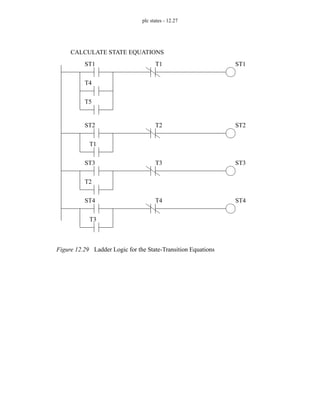
ST2
T1
ST2
T2
T3
ST3
T3
ST3
T4
T4
T1
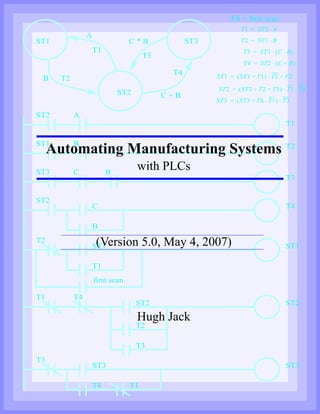
Automating Manufacturing Systems
with PLCs
(Version 5.0, May 4, 2007)
Hugh Jack
page 0
Copyright (c) 1993-2007 Hugh Jack (jackh@gvsu.edu).
Permission is granted to copy, distribute and/or modify this document under the
terms of the GNU Free Documentation License, Version 1.2 or any later version
published by the Free Software Foundation; with no Invariant Sections, no
Front-Cover Texts, and no Back-Cover Texts. A copy of the license is included
in the section entitled "GNU Free Documentation License".
This document is provided as-is with no warranty, implied or otherwise. There
have been attempts to eliminate errors from this document, but there is no doubt
that errors remain. As a result, the author does not assume any responsibility for
errors and omissions, or damages resulting from the use of the information pro-
vided.
Additional materials and updates for this work will be available at http://clay-
more.engineer.gvsu.edu/~jackh/books.html
page i
1.1 TODO LIST 1.3
2. PROGRAMMABLE LOGIC CONTROLLERS . . . . . . . . . . . . . 2.1
2.1 INTRODUCTION 2.1
2.1.1 Ladder Logic 2.1
2.1.2 Programming 2.6
2.1.3 PLC Connections 2.10
2.1.4 Ladder Logic Inputs 2.11
2.1.5 Ladder Logic Outputs 2.12
2.2 A CASE STUDY 2.13
2.3 SUMMARY 2.14
2.4 PRACTICE PROBLEMS 2.15
2.5 PRACTICE PROBLEM SOLUTIONS 2.15
2.6 ASSIGNMENT PROBLEMS 2.16
3. PLC HARDWARE . . . . . . . . . . . . . . . . . . . . . . . . . . . . . . . . . . . . 3.1
3.1 INTRODUCTION 3.1
3.2 INPUTS AND OUTPUTS 3.2
3.2.1 Inputs 3.3
3.2.2 Output Modules 3.7
3.3 RELAYS 3.13
3.4 A CASE STUDY 3.14
3.5 ELECTRICAL WIRING DIAGRAMS 3.15
3.5.1 JIC Wiring Symbols 3.18
3.6 SUMMARY 3.22
3.7 PRACTICE PROBLEMS 3.22
3.8 PRACTICE PROBLEM SOLUTIONS 3.25
3.9 ASSIGNMENT PROBLEMS 3.28
4. LOGICAL SENSORS . . . . . . . . . . . . . . . . . . . . . . . . . . . . . . . . . . 4.1
4.1 INTRODUCTION 4.1
4.2 SENSOR WIRING 4.1
4.2.1 Switches 4.2
4.2.2 Transistor Transistor Logic (TTL) 4.3
4.2.3 Sinking/Sourcing 4.3
4.2.4 Solid State Relays 4.10
4.3 PRESENCE DETECTION 4.11
4.3.1 Contact Switches 4.11
4.3.2 Reed Switches 4.11
4.3.3 Optical (Photoelectric) Sensors 4.12
4.3.4 Capacitive Sensors 4.19
4.3.5 Inductive Sensors 4.23
4.3.6 Ultrasonic 4.25
4.3.7 Hall Effect 4.25
page ii
4.3.8 Fluid Flow 4.26
4.4 SUMMARY 4.26
4.5 PRACTICE PROBLEMS 4.27
4.6 PRACTICE PROBLEM SOLUTIONS 4.30
4.7 ASSIGNMENT PROBLEMS 4.36
5. LOGICAL ACTUATORS . . . . . . . . . . . . . . . . . . . . . . . . . . . . . . 5.1
5.1 INTRODUCTION 5.1
5.2 SOLENOIDS 5.1
5.3 VALVES 5.2
5.4 CYLINDERS 5.4
5.5 HYDRAULICS 5.6
5.6 PNEUMATICS 5.8
5.7 MOTORS 5.9
5.8 OTHERS 5.10
5.9 SUMMARY 5.10
5.10 PRACTICE PROBLEMS 5.10
5.11 PRACTICE PROBLEM SOLUTIONS 5.11
5.12 ASSIGNMENT PROBLEMS 5.12
6. BOOLEAN LOGIC DESIGN . . . . . . . . . . . . . . . . . . . . . . . . . . . . 6.1
6.1 INTRODUCTION 6.1
6.2 BOOLEAN ALGEBRA 6.1
6.3 LOGIC DESIGN 6.6
6.3.1 Boolean Algebra Techniques 6.13
6.4 COMMON LOGIC FORMS 6.14
6.4.1 Complex Gate Forms 6.14
6.4.2 Multiplexers 6.15
6.5 SIMPLE DESIGN CASES 6.17
6.5.1 Basic Logic Functions 6.17
6.5.2 Car Safety System 6.18
6.5.3 Motor Forward/Reverse 6.18
6.5.4 A Burglar Alarm 6.19
6.6 SUMMARY 6.23
6.7 PRACTICE PROBLEMS 6.24
6.8 PRACTICE PROBLEM SOLUTIONS 6.27
6.9 ASSIGNMENT PROBLEMS 6.37
7. KARNAUGH MAPS . . . . . . . . . . . . . . . . . . . . . . . . . . . . . . . . . . 7.1
7.1 INTRODUCTION 7.1
7.2 SUMMARY 7.4
7.3 PRACTICE PROBLEMS 7.5
7.4 PRACTICE PROBLEM SOLUTIONS 7.11
page iii
7.5 ASSIGNMENT PROBLEMS 7.17
8. PLC OPERATION . . . . . . . . . . . . . . . . . . . . . . . . . . . . . . . . . . . . 8.1
8.1 INTRODUCTION 8.1
8.2 OPERATION SEQUENCE 8.3
8.2.1 The Input and Output Scans 8.4
8.2.2 The Logic Scan 8.4
8.3 PLC STATUS 8.6
8.4 MEMORY TYPES 8.6
8.5 SOFTWARE BASED PLCS 8.7
8.6 SUMMARY 8.7
8.7 PRACTICE PROBLEMS 8.8
8.8 PRACTICE PROBLEM SOLUTIONS 8.8
8.9 ASSIGNMENT PROBLEMS 8.9
9. LATCHES, TIMERS, COUNTERS AND MORE . . . . . . . . . . . . 9.1
9.1 INTRODUCTION 9.1
9.2 LATCHES 9.2
9.3 TIMERS 9.6
9.4 COUNTERS 9.14
9.5 MASTER CONTROL RELAYS (MCRs) 9.17
9.6 INTERNAL BITS 9.19
9.7 DESIGN CASES 9.20
9.7.1 Basic Counters And Timers 9.20
9.7.2 More Timers And Counters 9.21
9.7.3 Deadman Switch 9.22
9.7.4 Conveyor 9.23
9.7.5 Accept/Reject Sorting 9.24
9.7.6 Shear Press 9.26
9.8 SUMMARY 9.27
9.9 PRACTICE PROBLEMS 9.28
9.10 PRACTICE PROBLEM SOLUTIONS 9.32
9.11 ASSIGNMENT PROBLEMS 9.43
10. STRUCTURED LOGIC DESIGN . . . . . . . . . . . . . . . . . . . . . . . 10.1
10.1 INTRODUCTION 10.1
10.2 PROCESS SEQUENCE BITS 10.2
10.3 TIMING DIAGRAMS 10.6
10.4 DESIGN CASES 10.9
10.5 SUMMARY 10.9
10.6 PRACTICE PROBLEMS 10.9
10.7 PRACTICE PROBLEM SOLUTIONS 10.10
10.8 ASSIGNMENT PROBLEMS 10.14
page iv
11. FLOWCHART BASED DESIGN . . . . . . . . . . . . . . . . . . . . . . . 11.1
11.1 INTRODUCTION 11.1
11.2 BLOCK LOGIC 11.4
11.3 SEQUENCE BITS 11.11
11.4 SUMMARY 11.15
11.5 PRACTICE PROBLEMS 11.15
11.6 PRACTICE PROBLEM SOLUTIONS 11.16
11.7 ASSIGNMENT PROBLEMS 11.26
12. STATE BASED DESIGN . . . . . . . . . . . . . . . . . . . . . . . . . . . . . . 12.1
12.1 INTRODUCTION 12.1
12.1.1 State Diagram Example 12.4
12.1.2 Conversion to Ladder Logic 12.7
Block Logic Conversion 12.7
State Equations 12.16
State-Transition Equations 12.24
12.2 SUMMARY 12.29
12.3 PRACTICE PROBLEMS 12.29
12.4 PRACTICE PROBLEM SOLUTIONS 12.34
12.5 ASSIGNMENT PROBLEMS 12.49
13. NUMBERS AND DATA . . . . . . . . . . . . . . . . . . . . . . . . . . . . . . 13.1
13.1 INTRODUCTION 13.1
13.2 NUMERICAL VALUES 13.2
13.2.1 Binary 13.2
Boolean Operations 13.5
Binary Mathematics 13.6
13.2.2 Other Base Number Systems 13.10
13.2.3 BCD (Binary Coded Decimal) 13.11
13.3 DATA CHARACTERIZATION 13.11
13.3.1 ASCII (American Standard Code for Information Interchange)
13.11
13.3.2 Parity 13.14
13.3.3 Checksums 13.15
13.3.4 Gray Code 13.16
13.4 SUMMARY 13.17
13.5 PRACTICE PROBLEMS 13.17
13.6 PRACTICE PROBLEM SOLUTIONS 13.20
13.7 ASSIGNMENT PROBLEMS 13.23
14. PLC MEMORY . . . . . . . . . . . . . . . . . . . . . . . . . . . . . . . . . . . . . . 14.1
14.1 INTRODUCTION 14.1
14.2 PROGRAM VS VARIABLE MEMORY 14.1
page v
14.3 PROGRAMS 14.3
14.4 VARIABLES (TAGS) 14.3
14.4.1 Timer and Counter Memory 14.6
14.4.2 PLC Status Bits 14.8
14.4.3 User Function Control Memory 14.11
14.5 SUMMARY 14.12
14.6 PRACTICE PROBLEMS 14.12
14.7 PRACTICE PROBLEM SOLUTIONS 14.13
14.8 ASSIGNMENT PROBLEMS 14.15
15. LADDER LOGIC FUNCTIONS . . . . . . . . . . . . . . . . . . . . . . . . 15.1
15.1 INTRODUCTION 15.1
15.2 DATA HANDLING 15.3
15.2.1 Move Functions 15.3
15.2.2 Mathematical Functions 15.5
15.2.3 Conversions 15.10
15.2.4 Array Data Functions 15.11
Statistics 15.12
Block Operations 15.13
15.3 LOGICAL FUNCTIONS 15.15
15.3.1 Comparison of Values 15.15
15.3.2 Boolean Functions 15.21
15.4 DESIGN CASES 15.22
15.4.1 Simple Calculation 15.22
15.4.2 For-Next 15.23
15.4.3 Series Calculation 15.24
15.4.4 Flashing Lights 15.25
15.5 SUMMARY 15.25
15.6 PRACTICE PROBLEMS 15.26
15.7 PRACTICE PROBLEM SOLUTIONS 15.28
15.8 ASSIGNMENT PROBLEMS 15.34
16. ADVANCED LADDER LOGIC FUNCTIONS . . . . . . . . . . . . . 16.1
16.1 INTRODUCTION 16.1
16.2 LIST FUNCTIONS 16.1
16.2.1 Shift Registers 16.1
16.2.2 Stacks 16.3
16.2.3 Sequencers 16.6
16.3 PROGRAM CONTROL 16.9
16.3.1 Branching and Looping 16.9
16.3.2 Fault Handling 16.14
16.3.3 Interrupts 16.15
16.4 INPUT AND OUTPUT FUNCTIONS 16.17
16.4.1 Immediate I/O Instructions 16.17
page vi
16.5 DESIGN TECHNIQUES 16.19
16.5.1 State Diagrams 16.19
16.6 DESIGN CASES 16.24
16.6.1 If-Then 16.24
16.6.2 Traffic Light 16.25
16.7 SUMMARY 16.25
16.8 PRACTICE PROBLEMS 16.26
16.9 PRACTICE PROBLEM SOLUTIONS 16.28
16.10 ASSIGNMENT PROBLEMS 16.37
17. OPEN CONTROLLERS . . . . . . . . . . . . . . . . . . . . . . . . . . . . . . . 17.1
17.1 INTRODUCTION 17.1
17.2 IEC 61131 17.2
17.3 OPEN ARCHITECTURE CONTROLLERS 17.3
17.4 SUMMARY 17.4
17.5 PRACTICE PROBLEMS 17.4
17.6 PRACTICE PROBLEM SOLUTIONS 17.4
17.7 ASSIGNMENT PROBLEMS 17.4
18. INSTRUCTION LIST PROGRAMMING . . . . . . . . . . . . . . . . . 18.1
18.1 INTRODUCTION 18.1
18.2 THE IEC 61131 VERSION 18.1
18.3 THE ALLEN-BRADLEY VERSION 18.4
18.4 SUMMARY 18.9
18.5 PRACTICE PROBLEMS 18.10
18.6 PRACTICE PROBLEM SOLUTIONS 18.10
18.7 ASSIGNMENT PROBLEMS 18.10
19. STRUCTURED TEXT PROGRAMMING . . . . . . . . . . . . . . . . 19.1
19.1 INTRODUCTION 19.1
19.2 THE LANGUAGE 19.2
19.2.1 Elements of the Language 19.3
19.2.2 Putting Things Together in a Program 19.9
19.3 AN EXAMPLE 19.14
19.4 SUMMARY 19.16
19.5 PRACTICE PROBLEMS 19.16
19.6 PRACTICE PROBLEM SOLUTIONS 19.16
19.7 ASSIGNMENT PROBLEMS 19.16
20. SEQUENTIAL FUNCTION CHARTS . . . . . . . . . . . . . . . . . . . 20.1
20.1 INTRODUCTION 20.1
20.2 A COMPARISON OF METHODS 20.16
20.3 SUMMARY 20.16
page vii
20.4 PRACTICE PROBLEMS 20.17
20.5 PRACTICE PROBLEM SOLUTIONS 20.18
20.6 ASSIGNMENT PROBLEMS 20.25
21. FUNCTION BLOCK PROGRAMMING . . . . . . . . . . . . . . . . . . 21.1
21.1 INTRODUCTION 21.1
21.2 CREATING FUNCTION BLOCKS 21.3
21.3 DESIGN CASE 21.4
21.4 SUMMARY 21.4
21.5 PRACTICE PROBLEMS 21.5
21.6 PRACTICE PROBLEM SOLUTIONS 21.5
21.7 ASSIGNMENT PROBLEMS 21.5
22. ANALOG INPUTS AND OUTPUTS . . . . . . . . . . . . . . . . . . . . 22.1
22.1 INTRODUCTION 22.1
22.2 ANALOG INPUTS 22.2
22.2.1 Analog Inputs With a PLC-5 22.9
22.3 ANALOG OUTPUTS 22.13
22.3.1 Analog Outputs With A PLC-5 22.16
22.3.2 Pulse Width Modulation (PWM) Outputs 22.18
22.3.3 Shielding 22.20
22.4 DESIGN CASES 22.22
22.4.1 Process Monitor 22.22
22.5 SUMMARY 22.22
22.6 PRACTICE PROBLEMS 22.23
22.7 PRACTICE PROBLEM SOLUTIONS 22.24
22.8 ASSIGNMENT PROBLEMS 22.29
23. CONTINUOUS SENSORS . . . . . . . . . . . . . . . . . . . . . . . . . . . . 23.1
23.1 INTRODUCTION 23.1
23.2 INDUSTRIAL SENSORS 23.2
23.2.1 Angular Displacement 23.3
Potentiometers 23.3
23.2.2 Encoders 23.4
Tachometers 23.8
23.2.3 Linear Position 23.8
Potentiometers 23.8
Linear Variable Differential Transformers (LVDT)23.9
Moire Fringes 23.11
Accelerometers 23.12
23.2.4 Forces and Moments 23.15
Strain Gages 23.15
Piezoelectric 23.18
23.2.5 Liquids and Gases 23.20
page viii
Pressure 23.21
Venturi Valves 23.22
Coriolis Flow Meter 23.23
Magnetic Flow Meter 23.24
Ultrasonic Flow Meter 23.24
Vortex Flow Meter 23.24
Positive Displacement Meters 23.25
Pitot Tubes 23.25
23.2.6 Temperature 23.25
Resistive Temperature Detectors (RTDs) 23.26
Thermocouples 23.26
Thermistors 23.28
Other Sensors 23.30
23.2.7 Light 23.30
Light Dependant Resistors (LDR) 23.30
23.2.8 Chemical 23.31
pH 23.31
Conductivity 23.31
23.2.9 Others 23.32
23.3 INPUT ISSUES 23.32
23.4 SENSOR GLOSSARY 23.35
23.5 SUMMARY 23.36
23.6 REFERENCES 23.37
23.7 PRACTICE PROBLEMS 23.37
23.8 PRACTICE PROBLEM SOLUTIONS 23.38
23.9 ASSIGNMENT PROBLEMS 23.40
24. CONTINUOUS ACTUATORS . . . . . . . . . . . . . . . . . . . . . . . . . 24.1
24.1 INTRODUCTION 24.1
24.2 ELECTRIC MOTORS 24.1
24.2.1 Basic Brushed DC Motors 24.3
24.2.2 AC Motors 24.7
24.2.3 Brushless DC Motors 24.15
24.2.4 Stepper Motors 24.17
24.2.5 Wound Field Motors 24.19
24.3 HYDRAULICS 24.23
24.4 OTHER SYSTEMS 24.24
24.5 SUMMARY 24.25
24.6 PRACTICE PROBLEMS 24.25
24.7 PRACTICE PROBLEM SOLUTIONS 24.26
24.8 ASSIGNMENT PROBLEMS 24.27
25. CONTINUOUS CONTROL . . . . . . . . . . . . . . . . . . . . . . . . . . . . 25.1
25.1 INTRODUCTION 25.1
page ix
25.2 CONTROL OF LOGICAL ACTUATOR SYSTEMS 25.4
25.3 CONTROL OF CONTINUOUS ACTUATOR SYSTEMS 25.5
25.3.1 Block Diagrams 25.5
25.3.2 Feedback Control Systems 25.6
25.3.3 Proportional Controllers 25.8
25.3.4 PID Control Systems 25.12
25.4 DESIGN CASES 25.14
25.4.1 Oven Temperature Control 25.14
25.4.2 Water Tank Level Control 25.17
25.4.3 Position Measurement 25.20
25.5 SUMMARY 25.20
25.6 PRACTICE PROBLEMS 25.21
25.7 PRACTICE PROBLEM SOLUTIONS 25.22
25.8 ASSIGNMENT PROBLEMS 25.26
26. FUZZY LOGIC . . . . . . . . . . . . . . . . . . . . . . . . . . . . . . . . . . . . . . 26.1
26.1 INTRODUCTION 26.1
26.2 COMMERCIAL CONTROLLERS 26.7
26.3 REFERENCES 26.7
26.4 SUMMARY 26.7
26.5 PRACTICE PROBLEMS 26.8
26.6 PRACTICE PROBLEM SOLUTIONS 26.8
26.7 ASSIGNMENT PROBLEMS 26.8
27. SERIAL COMMUNICATION . . . . . . . . . . . . . . . . . . . . . . . . . . 27.1
27.1 INTRODUCTION 27.1
27.2 SERIAL COMMUNICATIONS 27.2
27.2.1 RS-232 27.5
ASCII Functions 27.9
27.3 PARALLEL COMMUNICATIONS 27.13
27.4 DESIGN CASES 27.14
27.4.1 PLC Interface To a Robot 27.14
27.5 SUMMARY 27.15
27.6 PRACTICE PROBLEMS 27.15
27.7 PRACTICE PROBLEM SOLUTIONS 27.16
27.8 ASSIGNMENT PROBLEMS 27.18
28. NETWORKING . . . . . . . . . . . . . . . . . . . . . . . . . . . . . . . . . . . . . 28.1
28.1 INTRODUCTION 28.1
28.1.1 Topology 28.2
28.1.2 OSI Network Model 28.3
28.1.3 Networking Hardware 28.5
28.1.4 Control Network Issues 28.7
28.2 NETWORK STANDARDS 28.8
page x
28.2.1 Devicenet 28.8
28.2.2 CANbus 28.12
28.2.3 Controlnet 28.13
28.2.4 Ethernet 28.14
28.2.5 Profibus 28.15
28.2.6 Sercos 28.15
28.3 PROPRIETARY NETWORKS 28.16
28.3.1 Data Highway 28.16
28.4 NETWORK COMPARISONS 28.20
28.5 DESIGN CASES 28.22
28.5.1 Devicenet 28.22
28.6 SUMMARY 28.23
28.7 PRACTICE PROBLEMS 28.23
28.8 PRACTICE PROBLEM SOLUTIONS 28.24
28.9 ASSIGNMENT PROBLEMS 28.28
29. INTERNET . . . . . . . . . . . . . . . . . . . . . . . . . . . . . . . . . . . . . . . . . 29.1
29.1 INTRODUCTION 29.1
29.1.1 Computer Addresses 29.2
IPV6 29.3
29.1.2 Phone Lines 29.3
29.1.3 Mail Transfer Protocols 29.3
29.1.4 FTP - File Transfer Protocol 29.4
29.1.5 HTTP - Hypertext Transfer Protocol 29.4
29.1.6 Novell 29.4
29.1.7 Security 29.5
Firewall 29.5
IP Masquerading 29.5
29.1.8 HTML - Hyper Text Markup Language 29.5
29.1.9 URLs 29.6
29.1.10 Encryption 29.6
29.1.11 Compression 29.7
29.1.12 Clients and Servers 29.7
29.1.13 Java 29.9
29.1.14 Javascript 29.9
29.1.15 CGI 29.9
29.1.16 ActiveX 29.9
29.1.17 Graphics 29.10
29.2 DESIGN CASES 29.10
29.2.1 Remote Monitoring System 29.10
29.3 SUMMARY 29.11
29.4 PRACTICE PROBLEMS 29.11
29.5 PRACTICE PROBLEM SOLUTIONS 29.11
29.6 ASSIGNMENT PROBLEMS 29.11
page xi
30. HUMAN MACHINE INTERFACES (HMI) . . . . . . . . . . . . . . . 30.1
30.1 INTRODUCTION 30.1
30.2 HMI/MMI DESIGN 30.2
30.3 DESIGN CASES 30.3
30.4 SUMMARY 30.3
30.5 PRACTICE PROBLEMS 30.4
30.6 PRACTICE PROBLEM SOLUTIONS 30.4
30.7 ASSIGNMENT PROBLEMS 30.4
31. ELECTRICAL DESIGN AND CONSTRUCTION . . . . . . . . . . 31.1
31.1 INTRODUCTION 31.1
31.2 ELECTRICAL WIRING DIAGRAMS 31.1
31.2.1 Selecting Voltages 31.8
31.2.2 Grounding 31.9
31.2.3 Wiring 31.12
31.2.4 Suppressors 31.13
31.2.5 PLC Enclosures 31.14
31.2.6 Wire and Cable Grouping 31.16
31.3 FAIL-SAFE DESIGN 31.17
31.4 SAFETY RULES SUMMARY 31.18
31.5 REFERENCES 31.20
31.6 SUMMARY 31.20
31.7 PRACTICE PROBLEMS 31.20
31.8 PRACTICE PROBLEM SOLUTIONS 31.20
31.9 ASSIGNMENT PROBLEMS 31.20
32. SOFTWARE ENGINEERING . . . . . . . . . . . . . . . . . . . . . . . . . . 32.1
32.1 INTRODUCTION 32.1
32.1.1 Fail Safe Design 32.1
32.2 DEBUGGING 32.2
32.2.1 Troubleshooting 32.3
32.2.2 Forcing 32.3
32.3 PROCESS MODELLING 32.3
32.4 PROGRAMMING FOR LARGE SYSTEMS 32.8
32.4.1 Developing a Program Structure 32.8
32.4.2 Program Verification and Simulation 32.11
32.5 DOCUMENTATION 32.12
32.6 COMMISIONING 32.20
32.7 SAFETY 32.20
32.7.1 IEC 61508/61511 safety standards 32.21
32.8 LEAN MANUFACTURING 32.22
32.9 REFERENCES 32.23
32.10 SUMMARY 32.23
page xii
32.11 PRACTICE PROBLEMS 32.23
32.12 PRACTICE PROBLEM SOLUTIONS 32.23
32.13 ASSIGNMENT PROBLEMS 32.23
33. SELECTING A PLC . . . . . . . . . . . . . . . . . . . . . . . . . . . . . . . . . . 33.1
33.1 INTRODUCTION 33.1
33.2 SPECIAL I/O MODULES 33.6
33.3 SUMMARY 33.9
33.4 PRACTICE PROBLEMS 33.10
33.5 PRACTICE PROBLEM SOLUTIONS 33.10
33.6 ASSIGNMENT PROBLEMS 33.10
34. FUNCTION REFERENCE . . . . . . . . . . . . . . . . . . . . . . . . . . . . . 34.1
34.1 FUNCTION DESCRIPTIONS 34.1
34.1.1 General Functions 34.1
34.1.2 Program Control 34.3
34.1.3 Timers and Counters 34.5
34.1.4 Compare 34.10
34.1.5 Calculation and Conversion 34.14
34.1.6 Logical 34.20
34.1.7 Move 34.21
34.1.8 File 34.22
34.1.9 List 34.27
34.1.10 Program Control 34.30
34.1.11 Advanced Input/Output 34.34
34.1.12 String 34.37
34.2 DATA TYPES 34.42
35. COMBINED GLOSSARY OF TERMS . . . . . . . . . . . . . . . . . . . 35.1
35.1 A 35.1
35.2 B 35.2
35.3 C 35.5
35.4 D 35.9
35.5 E 35.11
35.6 F 35.12
35.7 G 35.13
35.8 H 35.14
35.9 I 35.14
35.10 J 35.16
35.11 K 35.16
35.12 L 35.17
35.13 M 35.17
35.14 N 35.19
35.15 O 35.20
page xiii
35.16 P 35.21
35.17 Q 35.23
35.18 R 35.23
35.19 S 35.25
35.20 T 35.27
35.21 U 35.28
35.22 V 35.29
35.23 W 35.29
35.24 X 35.30
35.25 Y 35.30
35.26 Z 35.30
36. PLC REFERENCES . . . . . . . . . . . . . . . . . . . . . . . . . . . . . . . . . . 36.1
36.1 SUPPLIERS 36.1
36.2 PROFESSIONAL INTEREST GROUPS 36.2
36.3 PLC/DISCRETE CONTROL REFERENCES 36.2
37. GNU Free Documentation License . . . . . . . . . . . . . . . . . . . . . . . 37.1
37.1 PREAMBLE 37.1
37.2 APPLICABILITY AND DEFINITIONS 37.1
37.3 VERBATIM COPYING 37.2
37.4 COPYING IN QUANTITY 37.3
37.5 MODIFICATIONS 37.3
37.6 COMBINING DOCUMENTS 37.5
37.7 COLLECTIONS OF DOCUMENTS 37.5
37.8 AGGREGATION WITH INDEPENDENT WORKS 37.6
37.9 TRANSLATION 37.6
37.10 TERMINATION 37.6
37.11 FUTURE REVISIONS OF THIS LICENSE 37.6
37.12 How to use this License for your documents 37.7
plc wiring - 1.1
PREFACE
Designing software for control systems is difficult. Experienced controls engineers
have learned many techniques that allow them to solve problems. This book was written to
present methods for designing controls software using Programmable Logic Controllers
(PLCs). It is my personal hope that by employing the knowledge in the book that you will
be able to quickly write controls programs that work as expected (and avoid having to
learn by costly mistakes.)
This book has been designed for students with some knowledge of technology,
including limited electricity, who wish to learn the discipline of practical control system
design on commonly used hardware. To this end the book will use the Allen Bradley Con-
trolLogix processors to allow depth. Although the chapters will focus on specific hard-
ware, the techniques are portable to other PLCs. Whenever possible the IEC 61131
programming standards will be used to help in the use of other PLCs.
In some cases the material will build upon the content found in a linear controls
course. But, a heavy emphasis is placed on discrete control systems. Figure 1.1 crudely
shows some of the basic categories of control system problems.
Figure 1.1 Control Dichotomy
• Continuous - The values to be controlled change smoothly. e.g. the speed of a car.
• Logical/Discrete - The value to be controlled are easily described as on-off. e.g.
the car motor is on-off. NOTE: all systems are continuous but they can be
treated as logical for simplicity.
e.g. “When I do this, that always happens!” For example, when the power
is turned on, the press closes!
CONTROL
CONTINUOUS DISCRETE
LINEAR NON_LINEAR CONDITIONAL SEQUENTIAL
e.g. PID
e.g. MRAC
e.g. FUZZY LOGIC
BOOLEAN
TEMPORAL
e.g. TIMERS
e.g. COUNTERS
EVENT BASED
EXPERT SYSTEMS
plc wiring - 1.2
• Linear - Can be described with a simple differential equation. This is the pre-
ferred starting point for simplicity, and a common approximation for real world
problems.
e.g. A car can be driving around a track and can pass same the same spot at
a constant velocity. But, the longer the car runs, the mass decreases, and
it travels faster, but requires less gas, etc. Basically, the math gets
tougher, and the problem becomes non-linear.
e.g. We are driving the perfect car with no friction, with no drag, and can
predict how it will work perfectly.
• Non-Linear - Not Linear. This is how the world works and the mathematics
become much more complex.
e.g. As rocket approaches sun, gravity increases, so control must change.
• Sequential - A logical controller that will keep track of time and previous events.
The difference between these control systems can be emphasized by considering a
simple elevator. An elevator is a car that travels between floors, stopping at precise
heights. There are certain logical constraints used for safety and convenience. The points
below emphasize different types of control problems in the elevator.
Logical:
1. The elevator must move towards a floor when a button is pushed.
2. The elevator must open a door when it is at a floor.
3. It must have the door closed before it moves.
etc.
Linear:
1. If the desired position changes to a new value, accelerate quickly
towards the new position.
2. As the elevator approaches the correct position, slow down.
Non-linear:
1 Accelerate slowly to start.
2. Decelerate as you approach the final position.
3. Allow faster motion while moving.
4. Compensate for cable stretch, and changing spring constant, etc.
Logical and sequential control is preferred for system design. These systems are
more stable, and often lower cost. Most continuous systems can be controlled logically.
But, some times we will encounter a system that must be controlled continuously. When
this occurs the control system design becomes more demanding. When improperly con-
trolled, continuous systems may be unstable and become dangerous.
When a system is well behaved we say it is self regulating. These systems don’t
need to be closely monitored, and we use open loop control. An open loop controller will
set a desired position for a system, but no sensors are used to verify the position. When a
plc wiring - 1.3
system must be constantly monitored and the control output adjusted we say it is closed
loop. A cruise control in a car is an excellent example. This will monitor the actual speed
of a car, and adjust the speed to meet a set target speed.
Many control technologies are available for control. Early control systems relied
upon mechanisms and electronics to build controlled. Most modern controllers use a com-
puter to achieve control. The most flexible of these controllers is the PLC (Programmable
Logic Controller).
The book has been set up to aid the reader, as outlined below.
Sections labeled Aside: are for topics that would be of interest to one disci-
pline, such as electrical or mechanical.
Sections labeled Note: are for clarification, to provide hints, or to add
explanation.
Each chapter supports about 1-4 lecture hours depending upon students
background and level in the curriculum.
Topics are organized to allow students to start laboratory work earlier in the
semester.
Sections begin with a topic list to help set thoughts.
Objective given at the beginning of each chapter.
Summary at the end of each chapter to give big picture.
Significant use of figures to emphasize physical implementations.
Worked examples and case studies.
Problems at ends of chapters with solutions.
Glossary.
1.1 TODO LIST
- Finish writing chapters
* - structured text chapter
* - FBD chapter
- fuzzy logic chapter
* - internet chapter
- hmi chapter
- modify chapters
* - add topic hierarchies to this chapter. split into basics, logic design tech-
niques, new stuff, integration, professional design for curriculum design
* - electrical wiring chapter
- fix wiring and other issues in the implementation chapter
- software chapter - improve P&ID section
- appendices - complete list of instruction data types in appendix
- small items
plc wiring - 1.4
- update serial IO slides
- all chapters
* - grammar and spelling check
* - update powerpoint slides
* - add a resources web page with links
- links to software/hardware vendors, iec1131, etc.
- pictures of hardware and controls cabinet
plc wiring - 2.1
2. PROGRAMMABLE LOGIC CONTROLLERS
2.1 INTRODUCTION
Control engineering has evolved over time. In the past humans were the main
method for controlling a system. More recently electricity has been used for control and
early electrical control was based on relays. These relays allow power to be switched on
and off without a mechanical switch. It is common to use relays to make simple logical
control decisions. The development of low cost computer has brought the most recent rev-
olution, the Programmable Logic Controller (PLC). The advent of the PLC began in the
1970s, and has become the most common choice for manufacturing controls.
PLCs have been gaining popularity on the factory floor and will probably remain
predominant for some time to come. Most of this is because of the advantages they offer.
• Cost effective for controlling complex systems.
• Flexible and can be reapplied to control other systems quickly and easily.
• Computational abilities allow more sophisticated control.
• Trouble shooting aids make programming easier and reduce downtime.
• Reliable components make these likely to operate for years before failure.
2.1.1 Ladder Logic
Ladder logic is the main programming method used for PLCs. As mentioned
before, ladder logic has been developed to mimic relay logic. The decision to use the relay
Topics:
Objectives:
• Know general PLC issues
• To be able to write simple ladder logic programs
• Understand the operation of a PLC
• PLC History
• Ladder Logic and Relays
• PLC Programming
• PLC Operation
• An Example
plc wiring - 2.2
logic diagrams was a strategic one. By selecting ladder logic as the main programming
method, the amount of retraining needed for engineers and tradespeople was greatly
reduced.
Modern control systems still include relays, but these are rarely used for logic. A
relay is a simple device that uses a magnetic field to control a switch, as pictured in Figure
2.1. When a voltage is applied to the input coil, the resulting current creates a magnetic
field. The magnetic field pulls a metal switch (or reed) towards it and the contacts touch,
closing the switch. The contact that closes when the coil is energized is called normally
open. The normally closed contacts touch when the input coil is not energized. Relays are
normally drawn in schematic form using a circle to represent the input coil. The output
contacts are shown with two parallel lines. Normally open contacts are shown as two
lines, and will be open (non-conducting) when the input is not energized. Normally closed
contacts are shown with two lines with a diagonal line through them. When the input coil
is not energized the normally closed contacts will be closed (conducting).
plc wiring - 2.3
Figure 2.1 Simple Relay Layouts and Schematics
Relays are used to let one power source close a switch for another (often high cur-
rent) power source, while keeping them isolated. An example of a relay in a simple control
application is shown in Figure 2.2. In this system the first relay on the left is used as nor-
mally closed, and will allow current to flow until a voltage is applied to the input A. The
second relay is normally open and will not allow current to flow until a voltage is applied
to the input B. If current is flowing through the first two relays then current will flow
through the coil in the third relay, and close the switch for output C. This circuit would
normally be drawn in the ladder logic form. This can be read logically as C will be on if A
is off and B is on.
normally
open
normally
closed
input coil
OR
OR
plc wiring - 2.4
Figure 2.2 A Simple Relay Controller
The example in Figure 2.2 does not show the entire control system, but only the
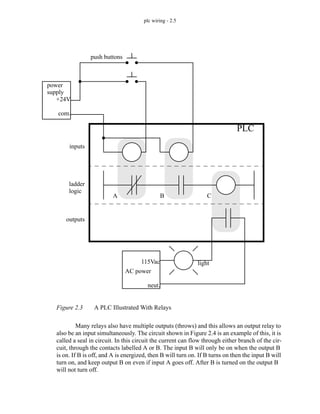
logic. When we consider a PLC there are inputs, outputs, and the logic. Figure 2.3 shows a
more complete representation of the PLC. Here there are two inputs from push buttons.
We can imagine the inputs as activating 24V DC relay coils in the PLC. This in turn drives
an output relay that switches 115V AC, that will turn on a light. Note, in actual PLCs
inputs are never relays, but outputs are often relays. The ladder logic in the PLC is actually
a computer program that the user can enter and change. Notice that both of the input push
buttons are normally open, but the ladder logic inside the PLC has one normally open con-
tact, and one normally closed contact. Do not think that the ladder logic in the PLC needs
to match the inputs or outputs. Many beginners will get caught trying to make the ladder
logic match the input types.
115VAC
wall plug
relay logic
input A
(normally closed)
input B
(normally open)
output C
(normally open)
ladder logic
A B C
plc wiring - 2.5
Figure 2.3 A PLC Illustrated With Relays
Many relays also have multiple outputs (throws) and this allows an output relay to
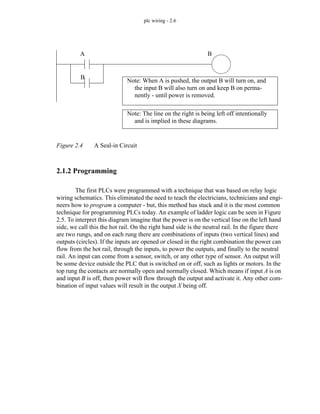
also be an input simultaneously. The circuit shown in Figure 2.4 is an example of this, it is
called a seal in circuit. In this circuit the current can flow through either branch of the cir-
cuit, through the contacts labelled A or B. The input B will only be on when the output B
is on. If B is off, and A is energized, then B will turn on. If B turns on then the input B will
turn on, and keep output B on even if input A goes off. After B is turned on the output B
will not turn off.
ladder
power
supply
+24V
com.
inputs
outputs
push buttons
logic
PLC
AC power
115Vac
neut.
A B C
light
plc wiring - 2.6
Figure 2.4 A Seal-in Circuit
2.1.2 Programming
The first PLCs were programmed with a technique that was based on relay logic
wiring schematics. This eliminated the need to teach the electricians, technicians and engi-
neers how to program a computer - but, this method has stuck and it is the most common
technique for programming PLCs today. An example of ladder logic can be seen in Figure
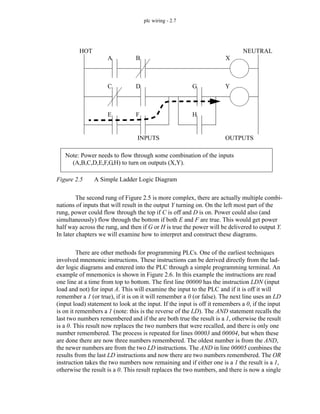
2.5. To interpret this diagram imagine that the power is on the vertical line on the left hand
side, we call this the hot rail. On the right hand side is the neutral rail. In the figure there
are two rungs, and on each rung there are combinations of inputs (two vertical lines) and
outputs (circles). If the inputs are opened or closed in the right combination the power can
flow from the hot rail, through the inputs, to power the outputs, and finally to the neutral
rail. An input can come from a sensor, switch, or any other type of sensor. An output will
be some device outside the PLC that is switched on or off, such as lights or motors. In the
top rung the contacts are normally open and normally closed. Which means if input A is on
and input B is off, then power will flow through the output and activate it. Any other com-
bination of input values will result in the output X being off.
Note: When A is pushed, the output B will turn on, and
the input B will also turn on and keep B on perma-
nently - until power is removed.
A
B
B
Note: The line on the right is being left off intentionally
and is implied in these diagrams.
plc wiring - 2.7
Figure 2.5 A Simple Ladder Logic Diagram
The second rung of Figure 2.5 is more complex, there are actually multiple combi-
nations of inputs that will result in the output Y turning on. On the left most part of the
rung, power could flow through the top if C is off and D is on. Power could also (and
simultaneously) flow through the bottom if both E and F are true. This would get power
half way across the rung, and then if G or H is true the power will be delivered to output Y.
In later chapters we will examine how to interpret and construct these diagrams.
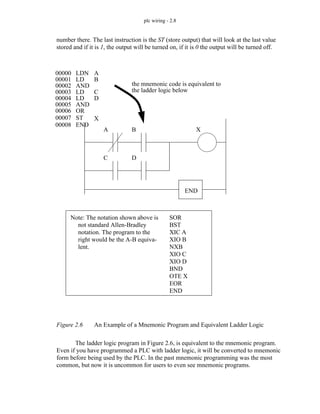
There are other methods for programming PLCs. One of the earliest techniques
involved mnemonic instructions. These instructions can be derived directly from the lad-
der logic diagrams and entered into the PLC through a simple programming terminal. An
example of mnemonics is shown in Figure 2.6. In this example the instructions are read
one line at a time from top to bottom. The first line 00000 has the instruction LDN (input
load and not) for input A. This will examine the input to the PLC and if it is off it will
remember a 1 (or true), if it is on it will remember a 0 (or false). The next line uses an LD
(input load) statement to look at the input. If the input is off it remembers a 0, if the input
is on it remembers a 1 (note: this is the reverse of the LD). The AND statement recalls the
last two numbers remembered and if the are both true the result is a 1, otherwise the result
is a 0. This result now replaces the two numbers that were recalled, and there is only one
number remembered. The process is repeated for lines 00003 and 00004, but when these
are done there are now three numbers remembered. The oldest number is from the AND,
the newer numbers are from the two LD instructions. The AND in line 00005 combines the
results from the last LD instructions and now there are two numbers remembered. The OR
instruction takes the two numbers now remaining and if either one is a 1 the result is a 1,
otherwise the result is a 0. This result replaces the two numbers, and there is now a single
HOT NEUTRAL
INPUTS OUTPUTS
A B X
C D
E F
G
H
Y
Note: Power needs to flow through some combination of the inputs
(A,B,C,D,E,F,G,H) to turn on outputs (X,Y).
plc wiring - 2.8
number there. The last instruction is the ST (store output) that will look at the last value
stored and if it is 1, the output will be turned on, if it is 0 the output will be turned off.
Figure 2.6 An Example of a Mnemonic Program and Equivalent Ladder Logic
The ladder logic program in Figure 2.6, is equivalent to the mnemonic program.
Even if you have programmed a PLC with ladder logic, it will be converted to mnemonic
form before being used by the PLC. In the past mnemonic programming was the most
common, but now it is uncommon for users to even see mnemonic programs.
00000
00001
00002
00003
00004
00005
00006
LDN
LD
AND
LD
LD
AND
OR
A
B
C
D
A B
C D
X
END
the mnemonic code is equivalent to
the ladder logic below
ST
00007 X
END
00008
Note: The notation shown above is
not standard Allen-Bradley
notation. The program to the
right would be the A-B equiva-
lent.
SOR
BST
XIC A
XIO B
NXB
XIO C
XIO D
BND
OTE X
EOR
END
plc wiring - 2.9
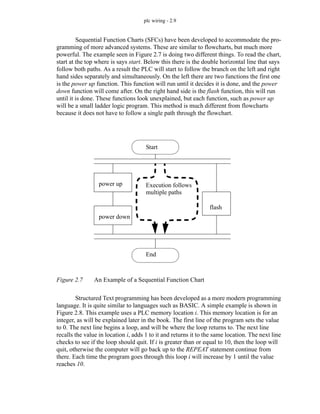
Sequential Function Charts (SFCs) have been developed to accommodate the pro-
gramming of more advanced systems. These are similar to flowcharts, but much more
powerful. The example seen in Figure 2.7 is doing two different things. To read the chart,
start at the top where is says start. Below this there is the double horizontal line that says
follow both paths. As a result the PLC will start to follow the branch on the left and right
hand sides separately and simultaneously. On the left there are two functions the first one
is the power up function. This function will run until it decides it is done, and the power
down function will come after. On the right hand side is the flash function, this will run
until it is done. These functions look unexplained, but each function, such as power up
will be a small ladder logic program. This method is much different from flowcharts
because it does not have to follow a single path through the flowchart.
Figure 2.7 An Example of a Sequential Function Chart
Structured Text programming has been developed as a more modern programming
language. It is quite similar to languages such as BASIC. A simple example is shown in
Figure 2.8. This example uses a PLC memory location i. This memory location is for an
integer, as will be explained later in the book. The first line of the program sets the value
to 0. The next line begins a loop, and will be where the loop returns to. The next line
recalls the value in location i, adds 1 to it and returns it to the same location. The next line
checks to see if the loop should quit. If i is greater than or equal to 10, then the loop will
quit, otherwise the computer will go back up to the REPEAT statement continue from
there. Each time the program goes through this loop i will increase by 1 until the value
reaches 10.
Start
End
power up
power down
flash
Execution follows
multiple paths
plc wiring - 2.10
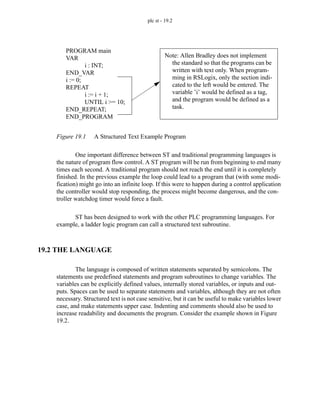
Figure 2.8 An Example of a Structured Text Program
2.1.3 PLC Connections
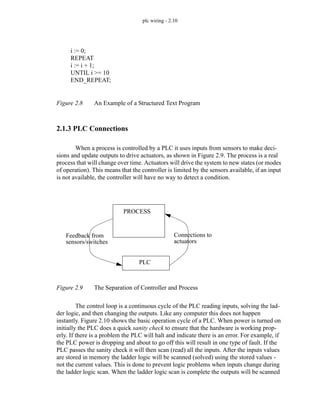
When a process is controlled by a PLC it uses inputs from sensors to make deci-
sions and update outputs to drive actuators, as shown in Figure 2.9. The process is a real
process that will change over time. Actuators will drive the system to new states (or modes
of operation). This means that the controller is limited by the sensors available, if an input
is not available, the controller will have no way to detect a condition.
Figure 2.9 The Separation of Controller and Process
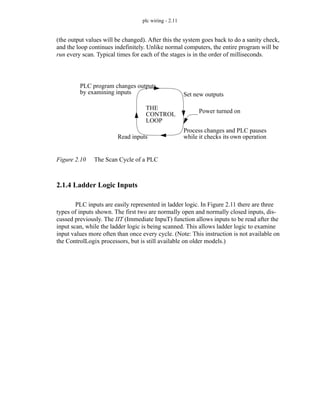
The control loop is a continuous cycle of the PLC reading inputs, solving the lad-
der logic, and then changing the outputs. Like any computer this does not happen
instantly. Figure 2.10 shows the basic operation cycle of a PLC. When power is turned on
initially the PLC does a quick sanity check to ensure that the hardware is working prop-
erly. If there is a problem the PLC will halt and indicate there is an error. For example, if
the PLC power is dropping and about to go off this will result in one type of fault. If the
PLC passes the sanity check it will then scan (read) all the inputs. After the inputs values
are stored in memory the ladder logic will be scanned (solved) using the stored values -
not the current values. This is done to prevent logic problems when inputs change during
the ladder logic scan. When the ladder logic scan is complete the outputs will be scanned
i := 0;
REPEAT
i := i + 1;
UNTIL i >= 10
END_REPEAT;
PROCESS
Feedback from
sensors/switches
PLC
Connections to
actuators
plc wiring - 2.11
(the output values will be changed). After this the system goes back to do a sanity check,
and the loop continues indefinitely. Unlike normal computers, the entire program will be
run every scan. Typical times for each of the stages is in the order of milliseconds.
Figure 2.10 The Scan Cycle of a PLC
2.1.4 Ladder Logic Inputs
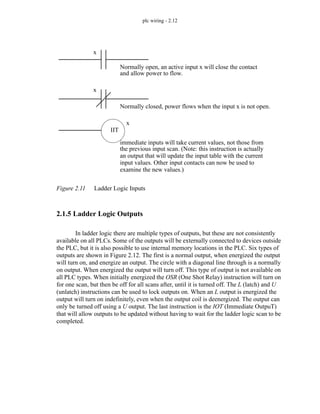
PLC inputs are easily represented in ladder logic. In Figure 2.11 there are three
types of inputs shown. The first two are normally open and normally closed inputs, dis-
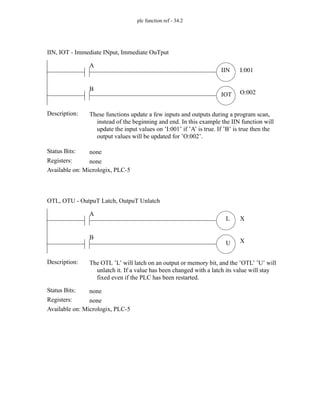
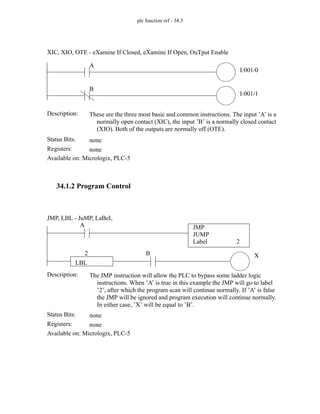
cussed previously. The IIT (Immediate InpuT) function allows inputs to be read after the
input scan, while the ladder logic is being scanned. This allows ladder logic to examine
input values more often than once every cycle. (Note: This instruction is not available on
the ControlLogix processors, but is still available on older models.)
Read inputs
PLC program changes outputs
by examining inputs Set new outputs
Process changes and PLC pauses
while it checks its own operation
THE
CONTROL
LOOP
Power turned on
plc wiring - 2.12
Figure 2.11 Ladder Logic Inputs
2.1.5 Ladder Logic Outputs
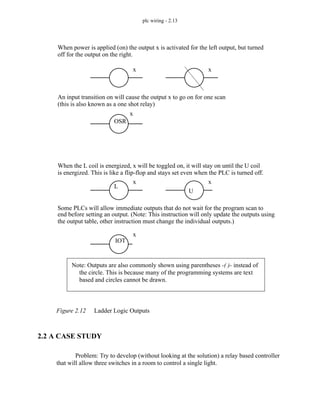
In ladder logic there are multiple types of outputs, but these are not consistently
available on all PLCs. Some of the outputs will be externally connected to devices outside
the PLC, but it is also possible to use internal memory locations in the PLC. Six types of
outputs are shown in Figure 2.12. The first is a normal output, when energized the output
will turn on, and energize an output. The circle with a diagonal line through is a normally
on output. When energized the output will turn off. This type of output is not available on
all PLC types. When initially energized the OSR (One Shot Relay) instruction will turn on
for one scan, but then be off for all scans after, until it is turned off. The L (latch) and U
(unlatch) instructions can be used to lock outputs on. When an L output is energized the
output will turn on indefinitely, even when the output coil is deenergized. The output can
only be turned off using a U output. The last instruction is the IOT (Immediate OutpuT)
that will allow outputs to be updated without having to wait for the ladder logic scan to be
completed.
Normally open, an active input x will close the contact
and allow power to flow.
Normally closed, power flows when the input x is not open.
x
x
immediate inputs will take current values, not those from
the previous input scan. (Note: this instruction is actually
x
IIT
an output that will update the input table with the current
input values. Other input contacts can now be used to
examine the new values.)
plc wiring - 2.13
Figure 2.12 Ladder Logic Outputs
2.2 A CASE STUDY
Problem: Try to develop (without looking at the solution) a relay based controller
that will allow three switches in a room to control a single light.
When power is applied (on) the output x is activated for the left output, but turned
An input transition on will cause the output x to go on for one scan
x x
OSR
x
(this is also known as a one shot relay)
off for the output on the right.
When the L coil is energized, x will be toggled on, it will stay on until the U coil
Some PLCs will allow immediate outputs that do not wait for the program scan to
L
U
IOT
end before setting an output. (Note: This instruction will only update the outputs using
is energized. This is like a flip-flop and stays set even when the PLC is turned off.
x
x
x
the output table, other instruction must change the individual outputs.)
Note: Outputs are also commonly shown using parentheses -( )- instead of
the circle. This is because many of the programming systems are text
based and circles cannot be drawn.
plc wiring - 2.14
2.3 SUMMARY
• Normally open and closed contacts.
• Relays and their relationship to ladder logic.
• PLC outputs can be inputs, as shown by the seal in circuit.
• Programming can be done with ladder logic, mnemonics, SFCs, and structured
text.
• There are multiple ways to write a PLC program.
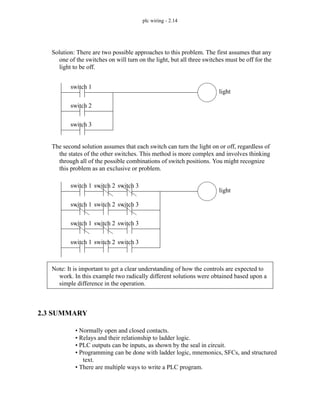
Solution: There are two possible approaches to this problem. The first assumes that any
one of the switches on will turn on the light, but all three switches must be off for the
light to be off.
switch 1
switch 2
switch 3
light
The second solution assumes that each switch can turn the light on or off, regardless of
the states of the other switches. This method is more complex and involves thinking
through all of the possible combinations of switch positions. You might recognize
this problem as an exclusive or problem.
switch 1
switch 1
switch 1
light
switch 2
switch 2
switch 2
switch 3
switch 3
switch 3
switch 1 switch 2 switch 3
Note: It is important to get a clear understanding of how the controls are expected to
work. In this example two radically different solutions were obtained based upon a
simple difference in the operation.
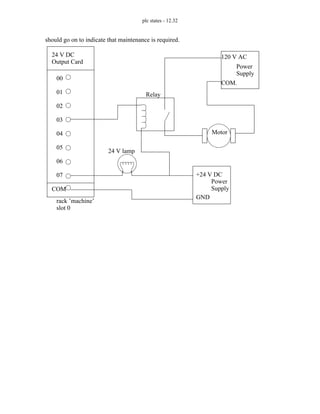
plc wiring - 2.15
2.4 PRACTICE PROBLEMS
1. Give an example of where a PLC could be used.
2. Why would relays be used in place of PLCs?
3. Give a concise description of a PLC.
4. List the advantages of a PLC over relays.
5. A PLC can effectively replace a number of components. Give examples and discuss some good
and bad applications of PLCs.
6. Explain why ladder logic outputs are coils?
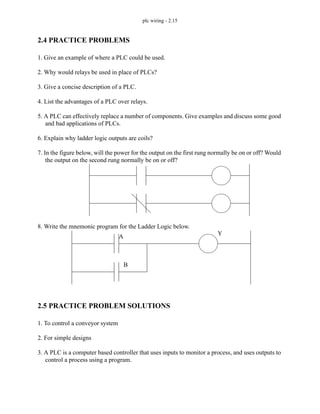
7. In the figure below, will the power for the output on the first rung normally be on or off? Would
the output on the second rung normally be on or off?
8. Write the mnemonic program for the Ladder Logic below.
2.5 PRACTICE PROBLEM SOLUTIONS
1. To control a conveyor system
2. For simple designs
3. A PLC is a computer based controller that uses inputs to monitor a process, and uses outputs to
control a process using a program.
A
B
Y
plc wiring - 2.16
4. Less expensive for complex processes, debugging tools, reliable, flexible, easy to expand, etc.
5. A PLC could replace a few relays. In this case the relays might be easier to install and less
expensive. To control a more complex system the controller might need timing, counting and
other mathematical calculations. In this case a PLC would be a better choice.
6. The ladder logic outputs were modelled on relay logic diagrams. The output in a relay ladder
diagram is a relay coil that switches a set of output contacts.
7. off, on
8. Generic: LD A, LD B, OR, ST Y, END; Allen Bradley: SOR, BST, XIO A, NXB, XIO B,
BND, OTE Y, EOR, END
2.6 ASSIGNMENT PROBLEMS
1. Explain the trade-offs between relays and PLCs for control applications.
2. Develop a simple ladder logic program that will turn on an output X if inputs A and B, or input
C is on.
plc wiring - 3.1
3. PLC HARDWARE
3.1 INTRODUCTION
Many PLC configurations are available, even from a single vendor. But, in each of
these there are common components and concepts. The most essential components are:
Power Supply - This can be built into the PLC or be an external unit. Common
voltage levels required by the PLC (with and without the power supply) are
24Vdc, 120Vac, 220Vac.
CPU (Central Processing Unit) - This is a computer where ladder logic is stored
and processed.
I/O (Input/Output) - A number of input/output terminals must be provided so that
the PLC can monitor the process and initiate actions.
Indicator lights - These indicate the status of the PLC including power on, program
running, and a fault. These are essential when diagnosing problems.
The configuration of the PLC refers to the packaging of the components. Typical
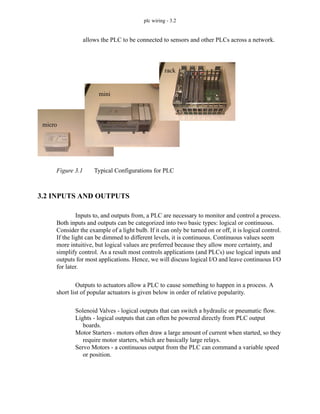
configurations are listed below from largest to smallest as shown in Figure 3.1.
Rack - A rack is often large (up to 18” by 30” by 10”) and can hold multiple cards.
When necessary, multiple racks can be connected together. These tend to be the
highest cost, but also the most flexible and easy to maintain.
Mini - These are smaller than full sized PLC racks, but can have the same IO
capacity.
Micro - These units can be as small as a deck of cards. They tend to have fixed
quantities of I/O and limited abilities, but costs will be the lowest.
Software - A software based PLC requires a computer with an interface card, but
Topics:
Objectives:
• Be able to understand and design basic input and output wiring.
• Be able to produce industrial wiring diagrams.
• PLC hardware configurations
• Input and outputs types
• Electrical wiring for inputs and outputs
• Relays
• Electrical Ladder Diagrams and JIC wiring symbols
plc wiring - 3.2
allows the PLC to be connected to sensors and other PLCs across a network.
Figure 3.1 Typical Configurations for PLC
3.2 INPUTS AND OUTPUTS
Inputs to, and outputs from, a PLC are necessary to monitor and control a process.
Both inputs and outputs can be categorized into two basic types: logical or continuous.
Consider the example of a light bulb. If it can only be turned on or off, it is logical control.
If the light can be dimmed to different levels, it is continuous. Continuous values seem
more intuitive, but logical values are preferred because they allow more certainty, and
simplify control. As a result most controls applications (and PLCs) use logical inputs and
outputs for most applications. Hence, we will discuss logical I/O and leave continuous I/O
for later.
Outputs to actuators allow a PLC to cause something to happen in a process. A
short list of popular actuators is given below in order of relative popularity.
Solenoid Valves - logical outputs that can switch a hydraulic or pneumatic flow.
Lights - logical outputs that can often be powered directly from PLC output
boards.
Motor Starters - motors often draw a large amount of current when started, so they
require motor starters, which are basically large relays.
Servo Motors - a continuous output from the PLC can command a variable speed
or position.
rack
mini
micro
plc wiring - 3.3
Outputs from PLCs are often relays, but they can also be solid state electronics
such as transistors for DC outputs or Triacs for AC outputs. Continuous outputs require
special output cards with digital to analog converters.
Inputs come from sensors that translate physical phenomena into electrical signals.
Typical examples of sensors are listed below in relative order of popularity.
Proximity Switches - use inductance, capacitance or light to detect an object logi-
cally.
Switches - mechanical mechanisms will open or close electrical contacts for a log-
ical signal.
Potentiometer - measures angular positions continuously, using resistance.
LVDT (linear variable differential transformer) - measures linear displacement
continuously using magnetic coupling.
Inputs for a PLC come in a few basic varieties, the simplest are AC and DC inputs.
Sourcing and sinking inputs are also popular. This output method dictates that a device
does not supply any power. Instead, the device only switches current on or off, like a sim-
ple switch.
Sinking - When active the output allows current to flow to a common ground. This
is best selected when different voltages are supplied.
Sourcing - When active, current flows from a supply, through the output device
and to ground. This method is best used when all devices use a single supply
voltage.
This is also referred to as NPN (sinking) and PNP (sourcing). PNP is more popu-
lar. This will be covered in detail in the chapter on sensors.
3.2.1 Inputs
In smaller PLCs the inputs are normally built in and are specified when purchasing
the PLC. For larger PLCs the inputs are purchased as modules, or cards, with 8 or 16
inputs of the same type on each card. For discussion purposes we will discuss all inputs as
if they have been purchased as cards. The list below shows typical ranges for input volt-
ages, and is roughly in order of popularity.
12-24 Vdc
100-120 Vac
10-60 Vdc
12-24 Vac/dc
plc wiring - 3.4
5 Vdc (TTL)
200-240 Vac
48 Vdc
24 Vac
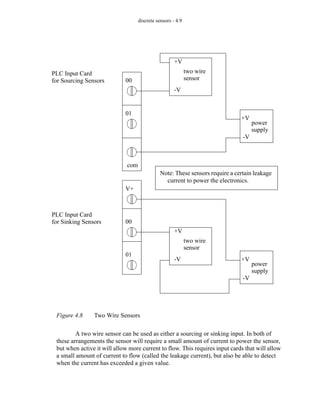
PLC input cards rarely supply power, this means that an external power supply is
needed to supply power for the inputs and sensors. The example in Figure 3.2 shows how
to connect an AC input card.
Figure 3.2 An AC Input Card and Ladder Logic
24 V AC
Power
Supply
normally open push-button
normally open
temperature switch
PLC Input Card
24V AC
it is in rack "bob"
slot 3
00
01
02
03
04
05
06
07
Pushbutton (bob:3:I.Data.1)
Tempsensor (bob:3:I.Data.3)
COM
Note: inputs are normally high impedance. This means that they will
use very little current.
Hot
Neut.
plc wiring - 3.5
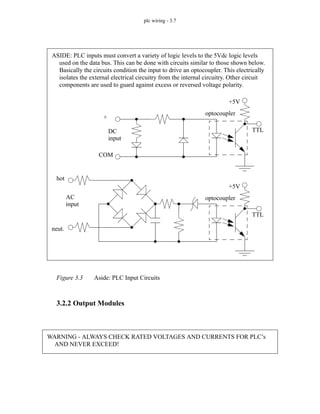
In the example there are two inputs, one is a normally open push button, and the
second is a temperature switch, or thermal relay. (NOTE: These symbols are standard and
will be discussed later in this chapter.) Both of the switches are powered by the positive/
hot output of the 24Vac power supply - this is like the positive terminal on a DC supply.
Power is supplied to the left side of both of the switches. When the switches are open there
is no voltage passed to the input card. If either of the switches are closed power will be
supplied to the input card. In this case inputs 1 and 3 are used - notice that the inputs start
at 0. The input card compares these voltages to the common. If the input voltage is within
a given tolerance range the inputs will switch on. Ladder logic is shown in the figure for
the inputs. Here it uses Allen Bradley notation for ControlLogix. At the top is the tag
(variable name) for the rack. The input card (’I’) is in slot 3, so the address for the card is
bob:3.I.Data.x, where ’x’ is the input bit number. These addresses can also be given alias
tags to make the ladder logic less confusing.
Many beginners become confused about where connections are needed in the cir-
cuit above. The key word to remember is circuit, which means that there is a full loop that
the voltage must be able to follow. In Figure 3.2 we can start following the circuit (loop) at
the power supply. The path goes through the switches, through the input card, and back to
the power supply where it flows back through to the start. In a full PLC implementation
there will be many circuits that must each be complete.
A second important concept is the common. Here the neutral on the power supply
is the common, or reference voltage. In effect we have chosen this to be our 0V reference,
and all other voltages are measured relative to it. If we had a second power supply, we
would also need to connect the neutral so that both neutrals would be connected to the
same common. Often common and ground will be confused. The common is a reference,
or datum voltage that is used for 0V, but the ground is used to prevent shocks and damage
to equipment. The ground is connected under a building to a metal pipe or grid in the
ground. This is connected to the electrical system of a building, to the power outlets,
where the metal cases of electrical equipment are connected. When power flows through
the ground it is bad. Unfortunately many engineers, and manufacturers mix up ground and
common. It is very common to find a power supply with the ground and common misla-
beled.
NOTE: The design process will be much easier if the inputs and outputs are planned first,
and the tags are entered before the ladder logic. Then the program is entered using the
much simpler tag names.
plc wiring - 3.6
One final concept that tends to trap beginners is that each input card is isolated.
This means that if you have connected a common to only one card, then the other cards are
not connected. When this happens the other cards will not work properly. You must con-
nect a common for each of the output cards.
There are many trade-offs when deciding which type of input cards to use.
• DC voltages are usually lower, and therefore safer (i.e., 12-24V).
• DC inputs are very fast, AC inputs require a longer on-time. For example, a 60Hz
wave may require up to 1/60sec for reasonable recognition.
• DC voltages can be connected to larger variety of electrical systems.
• AC signals are more immune to noise than DC, so they are suited to long dis-
tances, and noisy (magnetic) environments.
• AC power is easier and less expensive to supply to equipment.
• AC signals are very common in many existing automation devices.
Remember - Don’t mix up the ground and common. Don’t connect them together if the
common of your device is connected to a common on another device.
plc wiring - 3.7
Figure 3.3 Aside: PLC Input Circuits
3.2.2 Output Modules
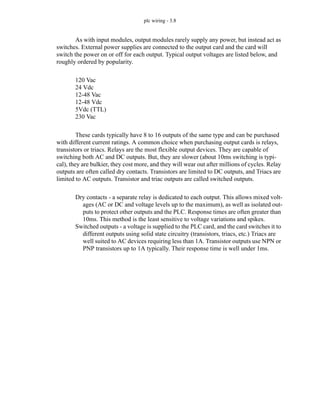
ASIDE: PLC inputs must convert a variety of logic levels to the 5Vdc logic levels
used on the data bus. This can be done with circuits similar to those shown below.
Basically the circuits condition the input to drive an optocoupler. This electrically
isolates the external electrical circuitry from the internal circuitry. Other circuit
components are used to guard against excess or reversed voltage polarity.
TTL
+5V
optocoupler
TTL
+5V
optocoupler
DC
input
AC
input
+
COM
hot
neut.
WARNING - ALWAYS CHECK RATED VOLTAGES AND CURRENTS FOR PLC’s
AND NEVER EXCEED!
plc wiring - 3.8
As with input modules, output modules rarely supply any power, but instead act as
switches. External power supplies are connected to the output card and the card will
switch the power on or off for each output. Typical output voltages are listed below, and
roughly ordered by popularity.
120 Vac
24 Vdc
12-48 Vac
12-48 Vdc
5Vdc (TTL)
230 Vac
These cards typically have 8 to 16 outputs of the same type and can be purchased
with different current ratings. A common choice when purchasing output cards is relays,
transistors or triacs. Relays are the most flexible output devices. They are capable of
switching both AC and DC outputs. But, they are slower (about 10ms switching is typi-
cal), they are bulkier, they cost more, and they will wear out after millions of cycles. Relay
outputs are often called dry contacts. Transistors are limited to DC outputs, and Triacs are
limited to AC outputs. Transistor and triac outputs are called switched outputs.
Dry contacts - a separate relay is dedicated to each output. This allows mixed volt-
ages (AC or DC and voltage levels up to the maximum), as well as isolated out-
puts to protect other outputs and the PLC. Response times are often greater than
10ms. This method is the least sensitive to voltage variations and spikes.
Switched outputs - a voltage is supplied to the PLC card, and the card switches it to
different outputs using solid state circuitry (transistors, triacs, etc.) Triacs are
well suited to AC devices requiring less than 1A. Transistor outputs use NPN or
PNP transistors up to 1A typically. Their response time is well under 1ms.
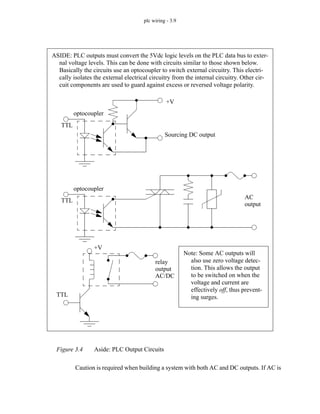
plc wiring - 3.9
Figure 3.4 Aside: PLC Output Circuits
Caution is required when building a system with both AC and DC outputs. If AC is
ASIDE: PLC outputs must convert the 5Vdc logic levels on the PLC data bus to exter-
nal voltage levels. This can be done with circuits similar to those shown below.
Basically the circuits use an optocoupler to switch external circuitry. This electri-
cally isolates the external electrical circuitry from the internal circuitry. Other cir-
cuit components are used to guard against excess or reversed voltage polarity.
TTL
+V
optocoupler
Sourcing DC output
TTL
optocoupler
AC
output
TTL
+V
relay
output
AC/DC
Note: Some AC outputs will
also use zero voltage detec-
tion. This allows the output
to be switched on when the
voltage and current are
effectively off, thus prevent-
ing surges.
plc wiring - 3.10
accidentally connected to a DC transistor output it will only be on for the positive half of
the cycle, and appear to be working with a diminished voltage. If DC is connected to an
AC triac output it will turn on and appear to work, but you will not be able to turn it off
without turning off the entire PLC.
A major issue with outputs is mixed power sources. It is good practice to isolate all
power supplies and keep their commons separate, but this is not always feasible. Some
output modules, such as relays, allow each output to have its own common. Other output
cards require that multiple, or all, outputs on each card share the same common. Each out-
put card will be isolated from the rest, so each common will have to be connected. It is
common for beginners to only connect the common to one card, and forget the other cards
- then only one card seems to work!
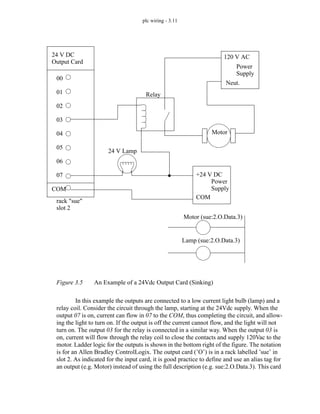
The output card shown in Figure 3.5 is an example of a 24Vdc output card that has
a shared common. This type of output card would typically use transistors for the outputs.
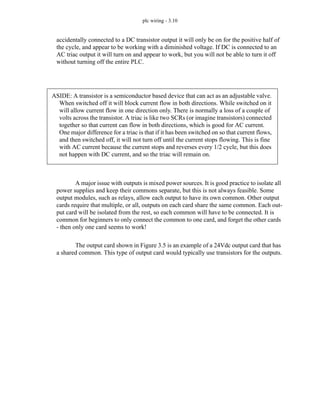
ASIDE: A transistor is a semiconductor based device that can act as an adjustable valve.
When switched off it will block current flow in both directions. While switched on it
will allow current flow in one direction only. There is normally a loss of a couple of
volts across the transistor. A triac is like two SCRs (or imagine transistors) connected
together so that current can flow in both directions, which is good for AC current.
One major difference for a triac is that if it has been switched on so that current flows,
and then switched off, it will not turn off until the current stops flowing. This is fine
with AC current because the current stops and reverses every 1/2 cycle, but this does
not happen with DC current, and so the triac will remain on.
plc wiring - 3.11
Figure 3.5 An Example of a 24Vdc Output Card (Sinking)
In this example the outputs are connected to a low current light bulb (lamp) and a
relay coil. Consider the circuit through the lamp, starting at the 24Vdc supply. When the
output 07 is on, current can flow in 07 to the COM, thus completing the circuit, and allow-
ing the light to turn on. If the output is off the current cannot flow, and the light will not
turn on. The output 03 for the relay is connected in a similar way. When the output 03 is
on, current will flow through the relay coil to close the contacts and supply 120Vac to the
motor. Ladder logic for the outputs is shown in the bottom right of the figure. The notation
is for an Allen Bradley ControlLogix. The output card (’O’) is in a rack labelled ’sue’ in
slot 2. As indicated for the input card, it is good practice to define and use an alias tag for
an output (e.g. Motor) instead of using the full description (e.g. sue:2.O.Data.3). This card
24 V DC
Output Card
rack "sue"
slot 2
COM
00
01
02
03
04
05
06
07
24 V Lamp
Relay
+24 V DC
Power
120 V AC
Power
Motor
Supply
Supply
Motor (sue:2.O.Data.3)
Lamp (sue:2.O.Data.3)
Neut.
COM
plc wiring - 3.12
could have many different voltages applied from different sources, but all the power sup-
plies would need a single shared common.
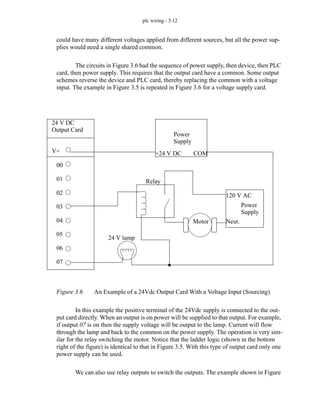
The circuits in Figure 3.6 had the sequence of power supply, then device, then PLC
card, then power supply. This requires that the output card have a common. Some output
schemes reverse the device and PLC card, thereby replacing the common with a voltage
input. The example in Figure 3.5 is repeated in Figure 3.6 for a voltage supply card.
Figure 3.6 An Example of a 24Vdc Output Card With a Voltage Input (Sourcing)
In this example the positive terminal of the 24Vdc supply is connected to the out-
put card directly. When an output is on power will be supplied to that output. For example,
if output 07 is on then the supply voltage will be output to the lamp. Current will flow
through the lamp and back to the common on the power supply. The operation is very sim-
ilar for the relay switching the motor. Notice that the ladder logic (shown in the bottom
right of the figure) is identical to that in Figure 3.5. With this type of output card only one
power supply can be used.
We can also use relay outputs to switch the outputs. The example shown in Figure
24 V DC
Output Card
V+
00
01
02
03
04
05
06
07
24 V lamp
Relay
+24 V DC
Power
120 V AC
Power
Motor
Supply
Supply
Neut.
COM
plc wiring - 3.13
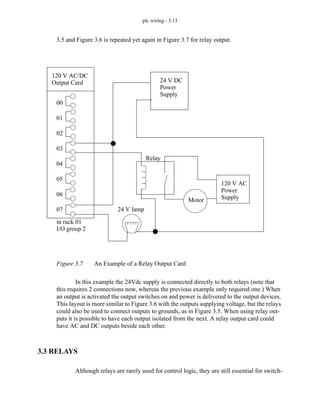
3.5 and Figure 3.6 is repeated yet again in Figure 3.7 for relay output.
Figure 3.7 An Example of a Relay Output Card
In this example the 24Vdc supply is connected directly to both relays (note that
this requires 2 connections now, whereas the previous example only required one.) When
an output is activated the output switches on and power is delivered to the output devices.
This layout is more similar to Figure 3.6 with the outputs supplying voltage, but the relays
could also be used to connect outputs to grounds, as in Figure 3.5. When using relay out-
puts it is possible to have each output isolated from the next. A relay output card could
have AC and DC outputs beside each other.
3.3 RELAYS
Although relays are rarely used for control logic, they are still essential for switch-
120 V AC/DC
Output Card
in rack 01
I/O group 2
00
01
02
03
04
05
06
07 24 V lamp
Relay
24 V DC
Power
120 V AC
Power
Motor Supply
Supply
plc wiring - 3.14
ing large power loads. Some important terminology for relays is given below.
Contactor - Special relays for switching large current loads.
Motor Starter - Basically a contactor in series with an overload relay to cut off
when too much current is drawn.
Arc Suppression - when any relay is opened or closed an arc will jump. This
becomes a major problem with large relays. On relays switching AC this prob-
lem can be overcome by opening the relay when the voltage goes to zero (while
crossing between negative and positive). When switching DC loads this prob-
lem can be minimized by blowing pressurized gas across during opening to sup-
press the arc formation.
AC coils - If a normal coil is driven by AC power the contacts will vibrate open
and closed at the frequency of the AC power. This problem is overcome by
relay manufacturers by adding a shading pole to the internal construction of the
relay.
The most important consideration when selecting relays, or relay outputs on a
PLC, is the rated current and voltage. If the rated voltage is exceeded, the contacts will
wear out prematurely, or if the voltage is too high fire is possible. The rated current is the
maximum current that should be used. When this is exceeded the device will become too
hot, and it will fail sooner. The rated values are typically given for both AC and DC,
although DC ratings are lower than AC. If the actual loads used are below the rated values
the relays should work well indefinitely. If the values are exceeded a small amount the life
of the relay will be shortened accordingly. Exceeding the values significantly may lead to
immediate failure and permanent damage. Please note that relays may also include mini-
mum ratings that should also be observed to ensure proper operation and long life.
• Rated Voltage - The suggested operation voltage for the coil. Lower levels can
result in failure to operate, voltages above shorten life.
• Rated Current - The maximum current before contact damage occurs (welding or
melting).
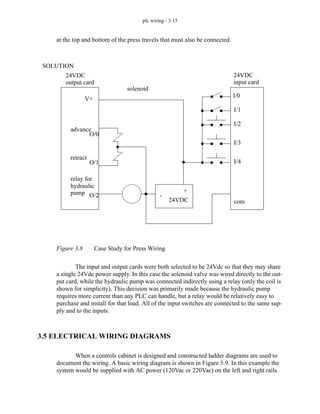
3.4 A CASE STUDY
(Try the following case without looking at the solution in Figure 3.8.) An electrical
layout is needed for a hydraulic press. The press uses a 24Vdc double actuated solenoid
valve to advance and retract the press. This device has a single common and two input
wires. Putting 24Vdc on one wire will cause the press to advance, putting 24Vdc on the
second wire will cause it to retract. The press is driven by a large hydraulic pump that
requires 220Vac rated at 20A, this should be running as long as the press is on. The press
is outfitted with three push buttons, one is a NC stop button, the other is a NO manual
retract button, and the third is a NO start automatic cycle button. There are limit switches
plc wiring - 3.15
at the top and bottom of the press travels that must also be connected.
Figure 3.8 Case Study for Press Wiring
The input and output cards were both selected to be 24Vdc so that they may share
a single 24Vdc power supply. In this case the solenoid valve was wired directly to the out-
put card, while the hydraulic pump was connected indirectly using a relay (only the coil is
shown for simplicity). This decision was primarily made because the hydraulic pump
requires more current than any PLC can handle, but a relay would be relatively easy to
purchase and install for that load. All of the input switches are connected to the same sup-
ply and to the inputs.
3.5 ELECTRICAL WIRING DIAGRAMS
When a controls cabinet is designed and constructed ladder diagrams are used to
document the wiring. A basic wiring diagram is shown in Figure 3.9. In this example the
system would be supplied with AC power (120Vac or 220Vac) on the left and right rails.
24VDC
24VDC
advance
retract
solenoid
V+
24VDC
+
-
O/0
O/1
O/2
I/0
I/1
I/2
I/3
I/4
com
SOLUTION
relay for
hydraulic
output card input card
pump
plc wiring - 3.16
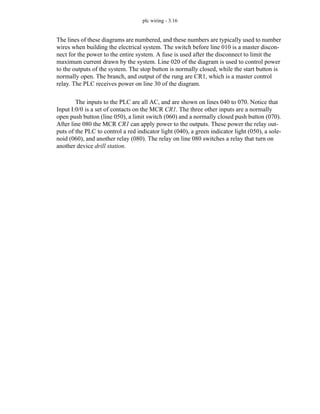
The lines of these diagrams are numbered, and these numbers are typically used to number
wires when building the electrical system. The switch before line 010 is a master discon-
nect for the power to the entire system. A fuse is used after the disconnect to limit the
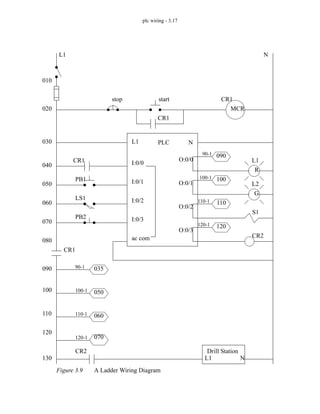
maximum current drawn by the system. Line 020 of the diagram is used to control power
to the outputs of the system. The stop button is normally closed, while the start button is
normally open. The branch, and output of the rung are CR1, which is a master control
relay. The PLC receives power on line 30 of the diagram.
The inputs to the PLC are all AC, and are shown on lines 040 to 070. Notice that
Input I:0/0 is a set of contacts on the MCR CR1. The three other inputs are a normally
open push button (line 050), a limit switch (060) and a normally closed push button (070).
After line 080 the MCR CR1 can apply power to the outputs. These power the relay out-
puts of the PLC to control a red indicator light (040), a green indicator light (050), a sole-
noid (060), and another relay (080). The relay on line 080 switches a relay that turn on
another device drill station.
plc wiring - 3.17
Figure 3.9 A Ladder Wiring Diagram
L1 N
PLC
L1 N
I:0/0
I:0/1
I:0/2
I:0/3
ac com
O:0/0
O:0/1
O:0/2
O:0/3
stop start
CR1
CR1
CR1
CR1
MCR
PB1
LS1
PB2
CR2
CR2
L1 N
Drill Station
010
020
030
040
050
060
070
080
090
100
110
120
130
R
G
L1
L2
S1
035
050
060
070
090
100
110
120
90-1
100-1
110-1
120-1
90-1
100-1
110-1
120-1
plc wiring - 3.18
In the wiring diagram the choice of a normally close stop button and a normally
open start button are intentional. Consider line 020 in the wiring diagram. If the stop but-
ton is pushed it will open the switch, and power will not be able to flow to the control
relay and output power will shut off. If the stop button is damaged, say by a wire falling
off, the power will also be lost and the system will shut down - safely. If the stop button
used was normally open and this happened the system would continue to operate while the
stop button was unable to shut down the power. Now consider the start button. If the but-
ton was damaged, say a wire was disconnected, it would be unable to start the system, thus
leaving the system unstarted and safe. In summary, all buttons that stop a system should be
normally closed, while all buttons that start a system should be normally open.
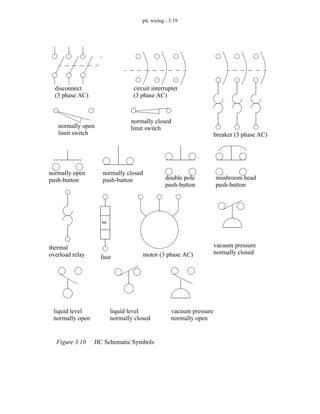
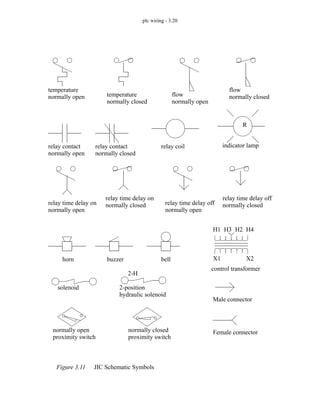
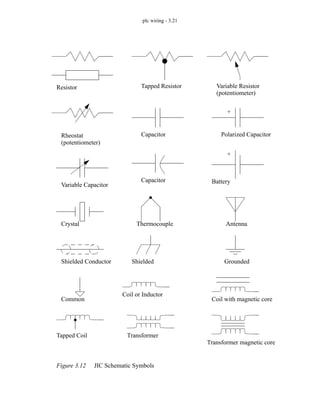
3.5.1 JIC Wiring Symbols
To standardize electrical schematics, the Joint International Committee (JIC) sym-
bols were developed, these are shown in Figure 3.10, Figure 3.11 and Figure 3.12.
plc wiring - 3.19
Figure 3.10 JIC Schematic Symbols
disconnect circuit interrupter
breaker (3 phase AC)
normally open
limit switch
normally closed
limit switch
normally open
push-button
normally closed
push-button double pole
push-button
mushroom head
push-button
F
fuse
thermal
motor (3 phase AC)
(3 phase AC) (3 phase AC)
liquid level
normally open
liquid level
normally closed
vacuum pressure
normally open
vacuum pressure
normally closed
overload relay
plc wiring - 3.20
Figure 3.11 JIC Schematic Symbols
temperature
normally open temperature
normally closed
flow
normally open
flow
normally closed
relay contact
normally open
relay contact
normally closed
relay coil
relay time delay on
normally open
relay time delay on
normally closed relay time delay off
normally open
relay time delay off
normally closed
H1 H2
H3 H4
X1 X2
horn buzzer bell
control transformer
2-H
solenoid 2-position
hydraulic solenoid
R
indicator lamp
Female connector
Male connector
normally open
proximity switch
normally closed
proximity switch
plc wiring - 3.21
Figure 3.12 JIC Schematic Symbols
Resistor Tapped Resistor Variable Resistor
(potentiometer)
Rheostat
(potentiometer)
Capacitor Polarized Capacitor
+
Variable Capacitor
Capacitor Battery
+
Crystal Thermocouple Antenna
Shielded Conductor Shielded Grounded
Common
Coil or Inductor
Coil with magnetic core
Tapped Coil Transformer
Transformer magnetic core
plc wiring - 3.22
3.6 SUMMARY
• PLC inputs condition AC or DC inputs to be detected by the logic of the PLC.
• Outputs are transistors (DC), triacs (AC) or relays (AC and DC).
• Input and output addresses are a function of the card location/tag name and input
bit number.
• Electrical system schematics are documented with diagrams that look like ladder
logic.
3.7 PRACTICE PROBLEMS
1. Can a PLC input switch a relay coil to control a motor?
2. How do input and output cards act as an interface between the PLC and external devices?
3. What is the difference between wiring a sourcing and sinking output?
4. What is the difference between a motor starter and a contactor?
5. Is AC or DC easier to interrupt?
6. What can happen if the rated voltage on a device is exceeded?
7. What are the benefits of input/output modules?
8. (for electrical engineers) Explain the operation of AC input and output conditioning circuits.
9. What will happen if a DC output is switched by an AC output.
10. Explain why a stop button must be normally closed and a start button must be normally open.
11. For the circuit shown in the figure below, list the input and output addresses for the PLC. If
switch A controls the light, switch B the motor, and C the solenoid, write a simple ladder logic
plc wiring - 3.23
program.
12. We have a PLC rack with a 24 VDC input card in slot 3, and a 120VAC output card in slot 2.
The inputs are to be connected to 4 push buttons. The outputs are to drive a 120VAC light bulb,
a 240VAC motor, and a 24VDC operated hydraulic valve. Draw the electrical connections for
the inputs and outputs. Show all other power supplies and other equipment/components
required.
13. You are planning a project that will be controlled by a PLC. Before ordering parts you decide
to plan the basic wiring and select appropriate input and output cards. The devices that we will
use for inputs are 2 limit switches, a push button and a thermal switch. The output will be for a
24Vdc solenoid valve, a 110Vac light bulb, and a 220Vac 50HP motor. Sketch the basic wiring
below including PLC cards.
14. Add three push buttons as inputs to the figure below. You must also select a power supply, and
200
201
202
203
204
205
206
207
com
100
101
102
103
104
105
106
107
com
A
B
C
12VDC
+
solenoid
valve
24VDC
+
plc wiring - 3.24
show all necessary wiring.
15. Three 120Vac outputs are to be connected to the output card below. Show the 120Vac source,
and all wiring.
16. Sketch the wiring for PLC outputs that are listed below.
- a double acting hydraulic solenoid valve (with two coils)
- a 24Vdc lamp
- a 120 Vac high current lamp
- a low current 12Vdc motor
1
com
2
com
3
com
4
com
5
com
V
00
01
02
03
04
05
06
07
plc wiring - 3.25
3.8 PRACTICE PROBLEM SOLUTIONS
1. no - a plc OUTPUT can switch a relay
2. input cards are connected to sensors to determine the state of the system. Output cards are con-
nected to actuators that can drive the process.
3. sourcing outputs supply current that will pass through an electrical load to ground. Sinking
inputs allow current to flow from the electrical load, to the common.
4. a motor starter typically has three phases
5. AC is easier, it has a zero crossing
6. it will lead to premature failure
7. by using separate modules, a PLC can be customized for different applications. If a single mod-
ule fails, it can be replaced quickly, without having to replace the entire controller.
8. AC input conditioning circuits will rectify an AC input to a DC waveform with a ripple. This
will be smoothed, and reduced to a reasonable voltage level to drive an optocoupler. An AC
output circuit will switch an AC output with a triac, or a relay.
9. an AC output is a triac. When a triac output is turned off, it will not actually turn off until the
AC voltage goes to 0V. Because DC voltages don’t go to 0V, it will never turn off.
10. If a NC stop button is damaged, the machine will act as if the stop button was pushed and shut
down safely. If a NO start button is damaged the machine will not be able to start.
11.
outputs:
200 - light
202 - motor
204 - solenoid
inputs:
100 - switch A
102 - switch B
104 - switch C
200
202
210
100
102
104
plc wiring - 3.26
12.
13.
0
1
2
3
4
5
6
7
com
24VDC
+
-
0
1
2
3
4
5
6
7
com
0
1
2
3
4
5
6
7
com
24VDC
+
-
0
1
2
3
4
5
6
7
24Vdc
+
-
Note: relays are used to reduce the total
number of output cards
120Vac
hot
neut.
220Vac
hot
neut.
plc wiring - 3.27
14.
15.
1
com
2
com
3
com
4
com
5
com
24Vdc
+
-
V
00
01
02
03
04
05
06
07
120Vac
hot
neut.
Load 1
Load 2
Load 3
plc wiring - 3.28
16.
3.9 ASSIGNMENT PROBLEMS
1. Describe what could happen if a normally closed start button was used on a system, and the
wires to the button were cut.
2. Describe what could happen if a normally open stop button was used on a system and the wires
to the button were cut.
3. a) For the input (’in’) and output (’out’) cards below, add three output lights and three normally
00
01
02
03
relay output card
04
power
supply
24Vdc
+
-
power
supply
120Vac
hot
neut.
power
supply
12Vdc
+
-
plc wiring - 3.29
open push button inputs. b) Redraw the outputs so that it uses a relay output card.
4. Draw an electrical wiring (ladder) diagram for PLC outputs that are listed below.
- a solenoid controlled hydraulic valve
- a 24Vdc lamp
- a 120 Vac high current lamp
- a low current 12Vdc motor
5. Draw an electrical ladder diagram for a PLC that has a PNP and an NPN sensor for inputs. The
outputs are two small indicator lights. You should use proper symbols for all components. You
must also include all safety devices including fuses, disconnects, MCRs, etc...
6. Draw an electrical wiring diagram for a PLC controlling a system with an NPN and PNP input
sensor. The outputs include an indicator light and a relay to control a 20A motor load. Include
ALL safety circuitry.
0
1
2
3
4
5
6
7
com
V
0
1
2
3
4
5
6
7
-
+
-
+
in:0.I.Data.x out:1.O.Data.x
discrete sensors - 4.1
4. LOGICAL SENSORS
4.1 INTRODUCTION
Sensors allow a PLC to detect the state of a process. Logical sensors can only
detect a state that is either true or false. Examples of physical phenomena that are typically
detected are listed below.
• inductive proximity - is a metal object nearby?
• capacitive proximity - is a dielectric object nearby?
• optical presence - is an object breaking a light beam or reflecting light?
• mechanical contact - is an object touching a switch?
Recently, the cost of sensors has dropped and they have become commodity items,
typically between $50 and $100. They are available in many forms from multiple vendors
such as Allen Bradley, Omron, Hyde Park and Turck. In applications sensors are inter-
changeable between PLC vendors, but each sensor will have specific interface require-
ments.
This chapter will begin by examining the various electrical wiring techniques for
sensors, and conclude with an examination of many popular sensor types.
4.2 SENSOR WIRING
When a sensor detects a logical change it must signal that change to the PLC. This
is typically done by switching a voltage or current on or off. In some cases the output of
the sensor is used to switch a load directly, completely eliminating the PLC. Typical out-
Topics:
Objectives:
• Understand the different types of sensor outputs.
• Know the basic sensor types and understand application issues.
• Sensor wiring; switches, TTL, sourcing, sinking
• Proximity detection; contact switches, photo-optics, capacitive, inductive and
ultrasonic
discrete sensors - 4.2
puts from sensors (and inputs to PLCs) are listed below in relative popularity.
Sinking/Sourcing - Switches current on or off.
Plain Switches - Switches voltage on or off.
Solid State Relays - These switch AC outputs.
TTL (Transistor Transistor Logic) - Uses 0V and 5V to indicate logic levels.
4.2.1 Switches
The simplest example of sensor outputs are switches and relays. A simple example
is shown in Figure 4.1.
Figure 4.1 An Example of Switched Sensors
In the figure a NO contact switch is connected to input 01. A sensor with a relay
output is also shown. The sensor must be powered separately, therefore the V+ and V- ter-
minals are connected to the power supply. The output of the sensor will become active
when a phenomenon has been detected. This means the internal switch (probably a relay)
will be closed allowing current to flow and the positive voltage will be applied to input 06.
24 Vdc
Power
Supply
normally open push-button
PLC Input Card
24V DC
00
01
02
03
04
05
06
07
COM
+
-
sensor
V+
V-
relay
output
discrete sensors - 4.3
4.2.2 Transistor Transistor Logic (TTL)
Transistor-Transistor Logic (TTL) is based on two voltage levels, 0V for false and
5V for true. The voltages can actually be slightly larger than 0V, or lower than 5V and still
be detected correctly. This method is very susceptible to electrical noise on the factory
floor, and should only be used when necessary. TTL outputs are common on electronic
devices and computers, and will be necessary sometimes. When connecting to other
devices simple circuits can be used to improve the signal, such as the Schmitt trigger in
Figure 4.2.
Figure 4.2 A Schmitt Trigger
A Schmitt trigger will receive an input voltage between 0-5V and convert it to 0V
or 5V. If the voltage is in an ambiguous range, about 1.5-3.5V it will be ignored.
If a sensor has a TTL output the PLC must use a TTL input card to read the values.
If the TTL sensor is being used for other applications it should be noted that the maximum
current output is normally about 20mA.
4.2.3 Sinking/Sourcing
Sinking sensors allow current to flow into the sensor to the voltage common, while
sourcing sensors allow current to flow out of the sensor from a positive source. For both of
these methods the emphasis is on current flow, not voltage. By using current flow, instead
of voltage, many of the electrical noise problems are reduced.
When discussing sourcing and sinking we are referring to the output of the sensor
that is acting like a switch. In fact the output of the sensor is normally a transistor, that will
act like a switch (with some voltage loss). A PNP transistor is used for the sourcing out-
put, and an NPN transistor is used for the sinking input. When discussing these sensors the
Vi Vo
Vi
Vo
discrete sensors - 4.4
term sourcing is often interchanged with PNP, and sinking with NPN. A simplified exam-
ple of a sinking output sensor is shown in Figure 4.3. The sensor will have some part that
deals with detection, this is on the left. The sensor needs a voltage supply to operate, so a
voltage supply is needed for the sensor. If the sensor has detected some phenomenon then
it will trigger the active line. The active line is directly connected to an NPN transistor.
(Note: for an NPN transistor the arrow always points away from the center.) If the voltage
to the transistor on the active line is 0V, then the transistor will not allow current to flow
into the sensor. If the voltage on the active line becomes larger (say 12V) then the transis-
tor will switch on and allow current to flow into the sensor to the common.
Figure 4.3 A Simplified NPN/Sinking Sensor
Sourcing sensors are the complement to sinking sensors. The sourcing sensors use
a PNP transistor, as shown in Figure 4.4. (Note: PNP transistors are always drawn with the
arrow pointing to the center.) When the sensor is inactive the active line stays at the V+
Sensor
V+
V-
Active
physical
phenomenon
Aside: The sensor responds to a physical phenomenon. If the sensor is inactive (nothing
detected) then the active line is low and the transistor is off, this is like an open
switch. That means the NPN output will have no current in/out. When the sensor is
active, it will make the active line high. This will turn on the transistor, and effec-
tively close the switch. This will allow current to flow into the sensor to ground
(hence sinking). The voltage on the NPN output will be pulled down to V-. Note: the
voltage will always be 1-2V higher because of the transistor. When the sensor is off,
the NPN output will float, and any digital circuitry needs to contain a pull-up resistor.
V+
NPN
V-
sensor
output
and
Detector
Line
current flows in
when switched on
discrete sensors - 4.5
value, and the transistor stays switched off. When the sensor becomes active the active
line will be made 0V, and the transistor will allow current to flow out of the sensor.
Figure 4.4 A Simplified Sourcing/PNP Sensor
Most NPN/PNP sensors are capable of handling currents up to a few amps, and
they can be used to switch loads directly. (Note: always check the documentation for rated
voltages and currents.) An example using sourcing and sinking sensors to control lights is
shown in Figure 4.5. (Note: This example could be for a motion detector that turns on
lights in dark hallways.)
Sensor
V+
V-
Active
physical
phenomenon
Aside: The sensor responds to the physical phenomenon. If the sensor is inactive (nothing
detected) then the active line is high and the transistor is off, this is like an open switch.
That means the PNP output will have no current in/out. When the sensor is active, it
will make the active line high. This will turn on the transistor, and effectively close the
switch. This will allow current to flow from V+ through the sensor to the output (hence
sourcing). The voltage on the PNP output will be pulled up to V+. Note: the voltage
will always be 1-2V lower because of the transistor. When off, the PNP output will
float, if used with digital circuitry a pull-down resistor will be needed.
V+
PNP
V-
sensor
output
and
Detector
Line
current flows out
when switched on
discrete sensors - 4.6
Figure 4.5 Direct Control Using NPN/PNP Sensors
In the sinking system in Figure 4.5 the light has V+ applied to one side. The other
side is connected to the NPN output of the sensor. When the sensor turns on the current
will be able to flow through the light, into the output to V- common. (Note: Yes, the cur-
rent will be allowed to flow into the output for an NPN sensor.) In the sourcing arrange-
ment the light will turn on when the output becomes active, allowing current to flow from
the V+, thought the sensor, the light and to V- (the common).
At this point it is worth stating the obvious - The output of a sensor will be an input
for a PLC. And, as we saw with the NPN sensor, this does not necessarily indicate where
current is flowing. There are two viable approaches for connecting sensors to PLCs. The
first is to always use PNP sensors and normal voltage input cards. The second option is to
purchase input cards specifically designed for sourcing or sinking sensors. An example of
a PLC card for sinking sensors is shown in Figure 4.6.
power
supply
sensor V+
V- (common)
V+
V-
NPN
power
supply
sensor V+
V- (common)
V+
V-
PNP
Note: remember to check the current and voltage ratings for the sensors.
sinking
sourcing
Note: When marking power terminals, there will sometimes be two sets of
markings. The more standard is V+ and COM, but sometimes you will see
devices and power supplies without a COM (common), in this case assume
the V- is the common.
discrete sensors - 4.7
Figure 4.6 A PLC Input Card for Sinking Sensors
The dashed line in the figure represents the circuit, or current flow path when the
sensor is active. This path enters the PLC input card first at a V+ terminal (Note: there is
no common on this card) and flows through an optocoupler. This current will use light to
turn on a phototransistor to tell the computer in the PLC the input current is flowing. The
current then leaves the card at input 00 and passes through the sensor to V-. When the sen-
sor is inactive the current will not flow, and the light in the optocoupler will be off. The
optocoupler is used to help protect the PLC from electrical problems outside the PLC.
The input cards for PNP sensors are similar to the NPN cards, as shown in Figure
4.7.
PLC Input Card for Sinking Sensors
Internal
Card
Electronics
PLC Data Bus External Electrical
NPN
sensor
power
supply
+V
-V
+V
NPN
-V
current flow
+V
00
01 Note: When a PLC input card does not have a
common but it has a V+ instead, it can be
used for NPN sensors. In this case the cur-
rent will flow out of the card (sourcing) and
we must switch it to ground.
ASIDE: This card is shown with 2 optocouplers (one for each output). Inside these
devices the is an LED and a phototransistor, but no electrical connection. These
devices are used to isolate two different electrical systems. In this case they pro-
tect the 5V digital levels of the PLC computer from the various external voltages
and currents.
discrete sensors - 4.8
Figure 4.7 PLC Input Card for Sourcing Sensors
The current flow loop for an active sensor is shown with a dashed line. Following
the path of the current we see that it begins at the V+, passes through the sensor, in the
input 00, through the optocoupler, out the common and to the V-.
Wiring is a major concern with PLC applications, so to reduce the total number of
wires, two wire sensors have become popular. But, by integrating three wires worth of
function into two, we now couple the power supply and sensing functions into one. Two
wire sensors are shown in Figure 4.8.
PLC Input Card for Sourcing Sensors
Internal
Card
Electronics
PNP
sensor
power
supply
+V
-V
+V
PNP
-V
current flow
00
01
com
Note: When we have a PLC input card that has
a common then we can use PNP sensors. In
this case the current will flow into the card
and then out the common to the power sup-
ply.
discrete sensors - 4.9
Figure 4.8 Two Wire Sensors
A two wire sensor can be used as either a sourcing or sinking input. In both of
these arrangements the sensor will require a small amount of current to power the sensor,
but when active it will allow more current to flow. This requires input cards that will allow
a small amount of current to flow (called the leakage current), but also be able to detect
when the current has exceeded a given value.
PLC Input Card two wire
sensor
power
supply
+V
-V
+V
-V
00
01
com
Note: These sensors require a certain leakage
current to power the electronics.
PLC Input Card
two wire
sensor
power
supply
+V
-V
+V
-V
00
01
V+
for Sourcing Sensors
for Sinking Sensors
discrete sensors - 4.10
When purchasing sensors and input cards there are some important considerations.
Most modern sensors have both PNP and NPN outputs, although if the choice is not avail-
able, PNP is the more popular choice. PLC cards can be confusing to buy, as each vendor
refers to the cards differently. To avoid problems, look to see if the card is specifically for
sinking or sourcing sensors, or look for a V+ (sinking) or COM (sourcing). Some vendors
also sell cards that will allow you to have NPN and PNP inputs mixed on the same card.
When drawing wiring diagrams the symbols in Figure 4.9 are used for sinking and
sourcing proximity sensors. Notice that in the sinking sensor when the switch closes
(moves up to the terminal) it contacts the common. Closing the switch in the sourcing sen-
sor connects the output to the V+. On the physical sensor the wires are color coded as indi-
cated in the diagram. The brown wire is positive, the blue wire is negative and the output
is white for sinking and black for sourcing. The outside shape of the sensor may change
for other devices, such as photo sensors which are often shown as round circles.
Figure 4.9 Sourcing and Sinking Schematic Symbols
4.2.4 Solid State Relays
Solid state relays switch AC currents. These are relatively inexpensive and are
available for large loads. Some sensors and devices are available with these as outputs.
NPN (sinking)
PNP (sourcing)
V+
V-
NPN
V-
V+ PNP
black
brown
white
brown
blue
blue
discrete sensors - 4.11
4.3 PRESENCE DETECTION
There are two basic ways to detect object presence; contact and proximity. Contact
implies that there is mechanical contact and a resulting force between the sensor and the
object. Proximity indicates that the object is near, but contact is not required. The follow-
ing sections examine different types of sensors for detecting object presence. These sen-
sors account for a majority of the sensors used in applications.
4.3.1 Contact Switches
Contact switches are available as normally open and normally closed. Their hous-
ings are reinforced so that they can take repeated mechanical forces. These often have roll-
ers and wear pads for the point of contact. Lightweight contact switches can be purchased
for less than a dollar, but heavy duty contact switches will have much higher costs. Exam-
ples of applications include motion limit switches and part present detectors.
4.3.2 Reed Switches
Reed switches are very similar to relays, except a permanent magnet is used
instead of a wire coil. When the magnet is far away the switch is open, but when the mag-
net is brought near the switch is closed as shown in Figure 4.10. These are very inexpen-
sive an can be purchased for a few dollars. They are commonly used for safety screens and
doors because they are harder to trick than other sensors.
Figure 4.10 Reed Switch
Note: With this device the magnet is moved towards the reed switch. As it gets
closer the switch will close. This allows proximity detection without contact, but
requires that a separate magnet be attached to a moving part.
discrete sensors - 4.12
4.3.3 Optical (Photoelectric) Sensors
Light sensors have been used for almost a century - originally photocells were
used for applications such as reading audio tracks on motion pictures. But modern optical
sensors are much more sophisticated.
Optical sensors require both a light source (emitter) and detector. Emitters will
produce light beams in the visible and invisible spectrums using LEDs and laser diodes.
Detectors are typically built with photodiodes or phototransistors. The emitter and detec-
tor are positioned so that an object will block or reflect a beam when present. A basic opti-
cal sensor is shown in Figure 4.11.
Figure 4.11 A Basic Optical Sensor
In the figure the light beam is generated on the left, focused through a lens. At the
detector side the beam is focused on the detector with a second lens. If the beam is broken
the detector will indicate an object is present. The oscillating light wave is used so that the
sensor can filter out normal light in the room. The light from the emitter is turned on and
off at a set frequency. When the detector receives the light it checks to make sure that it is
at the same frequency. If light is being received at the right frequency then the beam is not
broken. The frequency of oscillation is in the KHz range, and too fast to be noticed. A side
effect of the frequency method is that the sensors can be used with lower power at longer
distances.
An emitter can be set up to point directly at a detector, this is known as opposed
mode. When the beam is broken the part will be detected. This sensor needs two separate
oscillator
+V +V
lens lens
square wave
light
LED
phototransistor
amplifier
demodulator
detector and
switching circuits
smaller signal
discrete sensors - 4.13
components, as shown in Figure 4.12. This arrangement works well with opaque and
reflective objects with the emitter and detector separated by distances of up to hundreds of
feet.
Figure 4.12 Opposed Mode Optical Sensor
Having the emitter and detector separate increases maintenance problems, and
alignment is required. A preferred solution is to house the emitter and detector in one unit.
But, this requires that light be reflected back as shown in Figure 4.13. These sensors are
well suited to larger objects up to a few feet away.
Figure 4.13 Retroreflective Optical Sensor
emitter object detector
Note: the reflector is constructed with polarizing screens oriented at 90 deg. angles. If
the light is reflected back directly the light does not pass through the screen in front
of the detector. The reflector is designed to rotate the phase of the light by 90 deg.,
so it will now pass through the screen in front of the detector.
emitter
detector
object
reflector
emitter
detector
reflector
discrete sensors - 4.14
In the figure, the emitter sends out a beam of light. If the light is returned from the
reflector most of the light beam is returned to the detector. When an object interrupts the
beam between the emitter and the reflector the beam is no longer reflected back to the
detector, and the sensor becomes active. A potential problem with this sensor is that
reflective objects could return a good beam. This problem is overcome by polarizing the
light at the emitter (with a filter), and then using a polarized filter at the detector. The
reflector uses small cubic reflectors and when the light is reflected the polarity is rotated
by 90 degrees. If the light is reflected off the object the light will not be rotated by 90
degrees. So the polarizing filters on the emitter and detector are rotated by 90 degrees, as
shown in Figure 4.14. The reflector is very similar to reflectors used on bicycles.
Figure 4.14 Polarized Light in Retroreflective Sensors
For retroreflectors the reflectors are quite easy to align, but this method still
requires two mounted components. A diffuse sensors is a single unit that does not use a
reflector, but uses focused light as shown in Figure 4.15.
object reflector
emitter
detector
have filters for
emitted light
rotated by 90 deg.
reflector
emitter
detector
light reflected with
same polarity
light rotated by 90 deg.
discrete sensors - 4.15
Figure 4.15 Diffuse Optical Sensor
Diffuse sensors use light focused over a given range, and a sensitivity adjustment
is used to select a distance. These sensors are the easiest to set up, but they require well
controlled conditions. For example if it is to pick up light and dark colored objects prob-
lems would result.
When using opposed mode sensors the emitter and detector must be aligned so that
the emitter beam and detector window overlap, as shown in Figure 4.16. Emitter beams
normally have a cone shape with a small angle of divergence (a few degrees of less).
Detectors also have a cone shaped volume of detection. Therefore when aligning opposed
mode sensor care is required not just to point the emitter at the detector, but also the detec-
tor at the emitter. Another factor that must be considered with this and other sensors is that
the light intensity decreases over distance, so the sensors will have a limit to separation
distance.
Note: with diffuse reflection the light is scattered. This reduces the quantity of light
returned. As a result the light needs to be amplified using lenses.
emitter
detector
object
discrete sensors - 4.16
Figure 4.16 Beam Divergence and Alignment
If an object is smaller than the width of the light beam it will not be able to block
the beam entirely when it is in front as shown in Figure 4.17. This will create difficulties
in detection, or possibly stop detection altogether. Solutions to this problem are to use nar-
rower beams, or wider objects. Fiber optic cables may be used with an opposed mode opti-
cal sensor to solve this problem, however the maximum effective distance is reduced to a
couple feet.
Figure 4.17 The Relationship Between Beam Width and Object Size
Separated sensors can detect reflective parts using reflection as shown in Figure
4.18. The emitter and detector are positioned so that when a reflective surface is in posi-
tion the light is returned to the detector. When the surface is not present the light does not
return.
effective
beam angle
emitter
detector
effective
detector
angle
effective beam
alignment
is required
intensity
1
r
2
----
∝
the smaller beam width is good (but harder to align
emitter detector
object
discrete sensors - 4.17
Figure 4.18 Detecting Reflecting Parts
Other types of optical sensors can also focus on a single point using beams that
converge instead of diverge. The emitter beam is focused at a distance so that the light
intensity is greatest at the focal distance. The detector can look at the point from another
angle so that the two centerlines of the emitter and detector intersect at the point of inter-
est. If an object is present before or after the focal point the detector will not see the
reflected light. This technique can also be used to detect multiple points and ranges, as
shown in Figure 4.20 where the net angle of refraction by the lens determines which detec-
tor is used. This type of approach, with many more detectors, is used for range sensing
systems.
Figure 4.19 Point Detection Using Focused Optics
e
m
i
t
t
e
r
d
e
t
e
c
t
o
r
reflective surface
emitter
detector
focal point
discrete sensors - 4.18
Figure 4.20 Multiple Point Detection Using Optics
Some applications do not permit full sized photooptic sensors to be used. Fiber
optics can be used to separate the emitters and detectors from the application. Some ven-
dors also sell photosensors that have the phototransistors and LEDs separated from the
electronics.
Light curtains are an array of beams, set up as shown in Figure 4.21. If any of the
beams are broken it indicates that somebody has entered a workcell and the machine needs
to be shut down. This is an inexpensive replacement for some mechanical cages and barri-
ers.
Figure 4.21 A Light Curtain
The optical reflectivity of objects varies from material to material as shown in Fig-
emitter
detector 2
detector 1
distance 1 distance 2
lens
lens
discrete sensors - 4.19
ure 4.22. These values show the percentage of incident light on a surface that is reflected.
These values can be used for relative comparisons of materials and estimating changes in
sensitivity settings for sensors.
Figure 4.22 Table of Reflectivity Values for Different Materials [Banner Handbook of
Photoelectric Sensing]
4.3.4 Capacitive Sensors
Capacitive sensors are able to detect most materials at distances up to a few centi-
meters. Recall the basic relationship for capacitance.
Kodak white test card
white paper
kraft paper, cardboard
lumber (pine, dry, clean)
rough wood pallet
beer foam
opaque black nylon
black neoprene
black rubber tire wall
clear plastic bottle
translucent brown plastic bottle
opaque white plastic
unfinished aluminum
straightened aluminum
unfinished black anodized aluminum
stainless steel microfinished
stainless steel brushed
Reflectivity
90%
80%
70%
75%
20%
70%
14%
4%
1.5%
40%
60%
87%
140%
105%
115%
400%
120%
nonshiny materials
shiny/transparent materials
Note: For shiny and transparent materials the reflectivity can be higher
than 100% because of the return of ambient light.
discrete sensors - 4.20
In the sensor the area of the plates and distance between them is fixed. But, the
dielectric constant of the space around them will vary as different materials are brought
near the sensor. An illustration of a capacitive sensor is shown in Figure 4.23. an oscillat-
ing field is used to determine the capacitance of the plates. When this changes beyond a
selected sensitivity the sensor output is activated.
Figure 4.23 A Capacitive Sensor
These sensors work well for insulators (such as plastics) that tend to have high
dielectric coefficients, thus increasing the capacitance. But, they also work well for metals
because the conductive materials in the target appear as larger electrodes, thus increasing
the capacitance as shown in Figure 4.24. In total the capacitance changes are normally in
the order of pF.
C
Ak
d
-----
-
= where, C = capacitance (Farads)
k = dielectric constant
A = area of plates
d = distance between plates (electrodes)
electric
field
object
electrode
electrode
oscillator
detector
load
switching
+V
NOTE: For this sensor the proximity of any material near the electrodes will
increase the capacitance. This will vary the magnitude of the oscillating signal
and the detector will decide when this is great enough to determine proximity.
discrete sensors - 4.21
Figure 4.24 Dielectrics and Metals Increase the Capacitance
The sensors are normally made with rings (not plates) in the configuration shown
in Figure 4.25. In the figure the two inner metal rings are the capacitor electrodes, but a
third outer ring is added to compensate for variations. Without the compensator ring the
sensor would be very sensitive to dirt, oil and other contaminants that might stick to the
sensor.
Figure 4.25 Electrode Arrangement for Capacitive Sensors
A table of dielectric properties is given in Figure 4.26. This table can be used for
estimating the relative size and sensitivity of sensors. Also, consider a case where a pipe
would carry different fluids. If their dielectric constants are not very close, a second sensor
may be desired for the second fluid.
electrode
electrode
electrode
electrode
metal dielectric
electrode
compensating
electrode
Note: the compensating electrode is used for
negative feedback to make the sensor
more resistant to variations, such as con-
taminations on the face of the sensor.
discrete sensors - 4.22
Material
ABS resin pellet
acetone
acetyl bromide
acrylic resin
air
alcohol, industrial
alcohol, isopropyl
ammonia
aniline
aqueous solutions
ash (fly)
bakelite
barley powder
benzene
benzyl acetate
butane
cable sealing compound
calcium carbonate
carbon tetrachloride
celluloid
cellulose
cement
cement powder
cereal
charcoal
chlorine, liquid
coke
corn
ebonite
epoxy resin
ethanol
ethyl bromide
ethylene glycol
flour
FreonTM R22,R502 liq.
gasoline
glass
glass, raw material
glycerine
Constant
1.5-2.5
19.5
16.5
2.7-4.5
1.0
16-31
18.3
15-25
5.5-7.8
50-80
1.7
3.6
3.0-4.0
2.3
5
1.4
2.5
9.1
2.2
3.0
3.2-7.5
1.5-2.1
5-10
3-5
1.2-1.8
2.0
1.1-2.2
5-10
2.7-2.9
2.5-6
24
4.9
38.7
2.5-3.0
6.1
2.2
3.1-10
2.0-2.5
47
Material
hexane
hydrogen cyanide
hydrogen peroxide
isobutylamine
lime, shell
marble
melamine resin
methane liquid
methanol
mica, white
milk, powdered
nitrobenzene
neoprene
nylon
oil, for transformer
oil, paraffin
oil, peanut
oil, petroleum
oil, soybean
oil, turpentine
paint
paraffin
paper
paper, hard
paper, oil saturated
perspex
petroleum
phenol
phenol resin
polyacetal (Delrin TM)
polyamide (nylon)
polycarbonate
polyester resin
polyethylene
polypropylene
polystyrene
polyvinyl chloride resin
porcelain
press board
Constant
1.9
95.4
84.2
4.5
1.2
8.0-8.5
4.7-10.2
1.7
33.6
4.5-9.6
3.5-4
36
6-9
4-5
2.2-2.4
2.2-4.8
3.0
2.1
2.9-3.5
2.2
5-8
1.9-2.5
1.6-2.6
4.5
4.0
3.2-3.5
2.0-2.2
9.9-15
4.9
3.6
2.5
2.9
2.8-8.1
2.3
2.0-2.3
3.0
2.8-3.1
4.4-7
2-5
discrete sensors - 4.23
Figure 4.26 Dielectric Constants of Various Materials [Turck Proximity Sensors Guide]
The range and accuracy of these sensors are determined mainly by their size.
Larger sensors can have diameters of a few centimeters. Smaller ones can be less than a
centimeter across, and have smaller ranges, but more accuracy.
4.3.5 Inductive Sensors
Inductive sensors use currents induced by magnetic fields to detect nearby metal
objects. The inductive sensor uses a coil (an inductor) to generate a high frequency mag-
netic field as shown in Figure 4.27. If there is a metal object near the changing magnetic
field, current will flow in the object. This resulting current flow sets up a new magnetic
field that opposes the original magnetic field. The net effect is that it changes the induc-
tance of the coil in the inductive sensor. By measuring the inductance the sensor can deter-
mine when a metal have been brought nearby.
These sensors will detect any metals, when detecting multiple types of metal mul-
tiple sensors are often used.
Material
quartz glass
rubber
salt
sand
shellac
silicon dioxide
silicone rubber
silicone varnish
styrene resin
sugar
sugar, granulated
sulfur
sulfuric acid
Constant
3.7
2.5-35
6.0
3-5
2.0-3.8
4.5
3.2-9.8
2.8-3.3
2.3-3.4
3.0
1.5-2.2
3.4
84
Material
Teflon (TM), PCTFE
Teflon (TM), PTFE
toluene
trichloroethylene
urea resin
urethane
vaseline
water
wax
wood, dry
wood, pressed board
wood, wet
xylene
Constant
2.3-2.8
2.0
2.3
3.4
6.2-9.5
3.2
2.2-2.9
48-88
2.4-6.5
2-7
2.0-2.6
10-30
2.4
discrete sensors - 4.24
Figure 4.27 Inductive Proximity Sensor
The sensors can detect objects a few centimeters away from the end. But, the
direction to the object can be arbitrary as shown in Figure 4.28. The magnetic field of the
unshielded sensor covers a larger volume around the head of the coil. By adding a shield
(a metal jacket around the sides of the coil) the magnetic field becomes smaller, but also
more directed. Shields will often be available for inductive sensors to improve their direc-
tionality and accuracy.
oscillator
and level
detector
output
switching
inductive coil
metal
+V
Note: these work by setting up a high frequency field. If a target nears the field will
induce eddy currents. These currents consume power because of resistance, so
energy is in the field is lost, and the signal amplitude decreases. The detector exam-
ines filed magnitude to determine when it has decreased enough to switch.
discrete sensors - 4.25
Figure 4.28 Shielded and Unshielded Sensors
4.3.6 Ultrasonic
An ultrasonic sensor emits a sound above the normal hearing threshold of 16KHz.
The time that is required for the sound to travel to the target and reflect back is propor-
tional to the distance to the target. The two common types of sensors are;
electrostatic - uses capacitive effects. It has longer ranges and wider bandwidth,
but is more sensitive to factors such as humidity.
piezoelectric - based on charge displacement during strain in crystal lattices. These
are rugged and inexpensive.
These sensors can be very effective for applications such as fluid levels in tanks
and crude distance measurement.
4.3.7 Hall Effect
Hall effect switches are basically transistors that can be switched by magnetic
fields. Their applications are very similar to reed switches, but because they are solid state
they tend to be more rugged and resist vibration. Automated machines often use these to
do initial calibration and detect end stops.
shielded
unshielded
discrete sensors - 4.26
4.3.8 Fluid Flow
We can also build more complex sensors out of simpler sensors. The example in
Figure 4.29 shows a metal float in a tapered channel. As the fluid flow rate increases the
pressure forces the float upwards. The tapered shape of the float ensures an equilibrium
position proportional to flowrate. An inductive proximity sensor can be positioned so that
it will detect when the float has reached a certain height, and the system has reached a
given flowrate.
Figure 4.29 Flow Rate Detection With an Inductive Proximity Switch
4.4 SUMMARY
• Sourcing sensors allow current to flow out from the V+ supply.
• Sinking sensors allow current to flow in to the V- supply.
• Photo-optical sensors can use reflected beams (retroreflective), an emitter and
detector (opposed mode) and reflected light (diffuse) to detect a part.
• Capacitive sensors can detect metals and other materials.
• Inductive sensors can detect metals.
• Hall effect and reed switches can detect magnets.
• Ultrasonic sensors use sound waves to detect parts up to meters away.
fluid flow in
fluid flow out
metal inductive proximity sensor
As the fluid flow increases the float is forced higher. A proximity sensor
can be used to detect when the float reaches a certain height.
float
discrete sensors - 4.27
4.5 PRACTICE PROBLEMS
1. Given a clear plastic bottle, list 3 different types of sensors that could be used to detect it.
2. List 3 significant trade-offs between inductive, capacitive and photooptic sensors.
3. Why is a sinking output on a sensor not like a normal switch?
4. a) Sketch the connections needed for the PLC inputs and outputs below. The outputs include a
24Vdc light and a 120Vac light. The inputs are from 2 NO push buttons, and also from an opti-
cal sensor that has both PNP and NPN outputs.
b) State why you used either the NPN or PNP output on the sensor.
5. Select a sensor to pick up a transparent plastic bottle from a manufacturer. Copy or print the
specifications, and then draw a wiring diagram that shows how it will be wired to an appropri-
ate PLC input card.
6. Sketch the wiring to connect a power supply and PNP sensor to the PLC input card shown
0
1
2
3
4
5
6
7
com
24VDC
+
-
V+
0
1
2
3
4
5
6
7
24Vdc
outputs
24Vdc
inputs
OR
discrete sensors - 4.28
below.
7. Sketch the wiring for inputs that include the following items.
3 normally open push buttons
1 thermal relay
3 sinking sensors
1 sourcing sensor
8. A PLC has eight 10-60Vdc inputs, and four relay outputs. It is to be connected to the following
devices. Draw the required wiring.
• Two inductive proximity sensors with sourcing and sinking outputs.
• A NO run button and NC stop button.
• A 120Vac light.
• A 24Vdc solenoid.
00
01
02
03
04
05
06
07
COM
24VDC
+
-
discrete sensors - 4.29
9. Draw a ladder wiring diagram (as done in the lab) for a system that has two push-buttons and a
sourcing/sinking proximity sensors for 10-60Vdc inputs and two 120Vac output lights. Don’t
0
1
2
3
4
5
6
7
com
0
1
2
3
out:4.O.Data.x
in:2.I.Data.x
discrete sensors - 4.30
forget to include hard-wired start and stop buttons with an MCR.
4.6 PRACTICE PROBLEM SOLUTIONS
1. capacitive proximity, contact switch, photo-optic retroreflective/diffuse, ultrasonic
2. materials that can be sensed, environmental factors such as dirt, distance to object
3. the sinking output will pass only DC in a single direction, whereas a switch can pass AC and
DC.
PLC
L1 N
I.1
I.2
I.3
com
I.0
O.0
O.1
O.2
O.3
Vac
L1 N
discrete sensors - 4.31
4.
0
1
2
3
4
5
6
7
com
24VDC
+
-
V+
0
1
2
3
4
5
6
7
24Vdc
outputs
24Vdc
inputs
hot
120Vac
neut.
b) the PNP output was selected. because it will supply current, while the input card
requires it. The dashed line indicates the current flow through the sensor and input card.
discrete sensors - 4.32
5.
A transparent bottle can be picked up with a capacitive, ultrasonic, diffuse optical sen-
sor. A particular model can be selected at a manufacturers web site (eg., www.ban-
ner.com, www.hydepark.com, www.ab.com, etc.) The figure below shows the
sensor connected to a sourcing PLC input card - therefore the sensor must be sink-
ing, NPN.
V+
0
1
2
3
4
5
6
7
24VDC
+
-
discrete sensors - 4.33
6.
00
01
02
03
04
05
06
07
COM
24VDC
+
-
discrete sensors - 4.34
7.
00
01
02
03
COM
04
05
06
07
power
supply
+
-
24Vdc
V+
00
01
02
03
power
supply
+
-
24Vdc
discrete sensors - 4.35
8.
0
1
2
3
4
5
6
7
com
0
1
2
3
power
supply
+
-
V+
PNP
V-
V+
PNP
V-
power
supply
+
-
power
supply
120Vac
neut.
out:4.O.Data.x
in:2.I.Data.x
discrete sensors - 4.36
9.
4.7 ASSIGNMENT PROBLEMS
1. What type of sensor should be used if it is to detect small cosmetic case mirrors as they pass
along a belt. Explain your choice.
2. Summarize the tradeoffs between capacitive, inductive and optical sensors in a table.
3. Clearly and concisely explain the difference between wiring PNP and NPN sensors.
PLC
L1 N
I.1
I.2
I.3
com
I.0
O.0
O.1
O.2
O.3
Vac
L1 N
MCR
start
stop C1
C1
PB1
PB2
PR1
L1
L2
L1 N
V+ V-
C1
discrete sensors - 4.37
4. a) Show the wiring for the following sensor, and circle the output that you are using, NPN or
PNP. Redraw the sensor using the correct symbol for the sourcing or sinking sensor chosen.
5. A PLC has three NPN and two PNP sensors as inputs, and outputs to control a 24Vdc solenoid
and a small 115Vac motor. Develop the required wiring for the inputs and outputs.
V+
0
1
2
3
4
5
6
7
24VDC
+
-
24Vdc
inputs
discrete actuators - 5.1
5. LOGICAL ACTUATORS
5.1 INTRODUCTION
Actuators Drive motions in mechanical systems. Most often this is by converting
electrical energy into some form of mechanical motion.
5.2 SOLENOIDS
Solenoids are the most common actuator components. The basic principle of oper-
ation is there is a moving ferrous core (a piston) that will move inside wire coil as shown
in Figure 5.1. Normally the piston is held outside the coil by a spring. When a voltage is
applied to the coil and current flows, the coil builds up a magnetic field that attracts the
piston and pulls it into the center of the coil. The piston can be used to supply a linear
force. Well known applications of these include pneumatic values and car door openers.
Figure 5.1 A Solenoid
Topics:
Objectives:
• Be aware of various actuators available.
• Solenoids, valves and cylinders
• Hydraulics and pneumatics
• Other actuators
current off current on
discrete actuators - 5.2
As mentioned before, inductive devices can create voltage spikes and may need
snubbers, although most industrial applications have low enough voltage and current rat-
ings they can be connected directly to the PLC outputs. Most industrial solenoids will be
powered by 24Vdc and draw a few hundred mA.
5.3 VALVES
The flow of fluids and air can be controlled with solenoid controlled valves. An
example of a solenoid controlled valve is shown in Figure 5.2. The solenoid is mounted on
the side. When actuated it will drive the central spool left. The top of the valve body has
two ports that will be connected to a device such as a hydraulic cylinder. The bottom of the
valve body has a single pressure line in the center with two exhausts to the side. In the top
drawing the power flows in through the center to the right hand cylinder port. The left
hand cylinder port is allowed to exit through an exhaust port. In the bottom drawing the
solenoid is in a new position and the pressure is now applied to the left hand port on the
top, and the right hand port can exhaust. The symbols to the left of the figure show the
schematic equivalent of the actual valve positions. Valves are also available that allow the
valves to be blocked when unused.
Figure 5.2 A Solenoid Controlled 5 Ported, 4 Way 2 Position Valve
solenoid
solenoid
power in
exhaust out
power in exhaust out
The solenoid has two positions and when
actuated will change the direction that
fluid flows to the device. The symbols
shown here are commonly used to
represent this type of valve.
discrete actuators - 5.3
Valve types are listed below. In the standard terminology, the ’n-way’ designates
the number of connections for inlets and outlets. In some cases there are redundant ports
for exhausts. The normally open/closed designation indicates the valve condition when
power is off. All of the valves listed are two position valve, but three position valves are
also available.
2-way normally closed - these have one inlet, and one outlet. When unenergized,
the valve is closed. When energized, the valve will open, allowing flow. These
are used to permit flows.
2-way normally open - these have one inlet, and one outlet. When unenergized, the
valve is open, allowing flow. When energized, the valve will close. These are
used to stop flows. When system power is off, flow will be allowed.
3-way normally closed - these have inlet, outlet, and exhaust ports. When unener-
gized, the outlet port is connected to the exhaust port. When energized, the inlet
is connected to the outlet port. These are used for single acting cylinders.
3-way normally open - these have inlet, outlet and exhaust ports. When unener-
gized, the inlet is connected to the outlet. Energizing the valve connects the out-
let to the exhaust. These are used for single acting cylinders
3-way universal - these have three ports. One of the ports acts as an inlet or outlet,
and is connected to one of the other two, when energized/unenergized. These
can be used to divert flows, or select alternating sources.
4-way - These valves have four ports, two inlets and two outlets. Energizing the
valve causes connection between the inlets and outlets to be reversed. These are
used for double acting cylinders.
Some of the ISO symbols for valves are shown in Figure 5.3. When using the sym-
bols in drawings the connections are shown for the unenergized state. The arrows show
the flow paths in different positions. The small triangles indicate an exhaust port.
discrete actuators - 5.4
Figure 5.3 ISO Valve Symbols
When selecting valves there are a number of details that should be considered, as
listed below.
pipe size - inlets and outlets are typically threaded to accept NPT (national pipe
thread).
flow rate - the maximum flow rate is often provided to hydraulic valves.
operating pressure - a maximum operating pressure will be indicated. Some valves
will also require a minimum pressure to operate.
electrical - the solenoid coil will have a fixed supply voltage (AC or DC) and cur-
rent.
response time - this is the time for the valve to fully open/close. Typical times for
valves range from 5ms to 150ms.
enclosure - the housing for the valve will be rated as,
type 1 or 2 - for indoor use, requires protection against splashes
type 3 - for outdoor use, will resists some dirt and weathering
type 3R or 3S or 4 - water and dirt tight
type 4X - water and dirt tight, corrosion resistant
5.4 CYLINDERS
A cylinder uses pressurized fluid or air to create a linear force/motion as shown in
Figure 5.4. In the figure a fluid is pumped into one side of the cylinder under pressure,
Two way, two position
normally closed normally open
Three way, two position
Four way, two position
discrete actuators - 5.5
causing that side of the cylinder to expand, and advancing the piston. The fluid on the
other side of the piston must be allowed to escape freely - if the incompressible fluid was
trapped the cylinder could not advance. The force the cylinder can exert is proportional to
the cross sectional area of the cylinder.
Figure 5.4 A Cross Section of a Hydraulic Cylinder
Single acting cylinders apply force when extending and typically use a spring to
retract the cylinder. Double acting cylinders apply force in both direction.
For Force:
F PA
=
P
F
A
--
-
=
Fluid pumped in
at pressure P
Fluid flows out
at low pressure
F
Fluid pumped in
at pressure P
Fluid flows out
at low pressure
F
where,
P = the pressure of the hydraulic fluid
A = the area of the piston
F = the force available from the piston rod
advancing
retracting
discrete actuators - 5.6
Figure 5.5 Schematic Symbols for Cylinders
Magnetic cylinders are often used that have a magnet on the piston head. When it
moves to the limits of motion, reed switches will detect it.
5.5 HYDRAULICS
Hydraulics use incompressible fluids to supply very large forces at slower speeds
and limited ranges of motion. If the fluid flow rate is kept low enough, many of the effects
predicted by Bernoulli’s equation can be avoided. The system uses hydraulic fluid (nor-
mally an oil) pressurized by a pump and passed through hoses and valves to drive cylin-
ders. At the heart of the system is a pump that will give pressures up to hundreds or
thousands of psi. These are delivered to a cylinder that converts it to a linear force and dis-
placement.
single acting spring return cylinder
double acting cylinder
discrete actuators - 5.7
Hydraulic systems normally contain the following components;
1. Hydraulic Fluid
2. An Oil Reservoir
3. A Pump to Move Oil, and Apply Pressure
4. Pressure Lines
5. Control Valves - to regulate fluid flow
6. Piston and Cylinder - to actuate external mechanisms
The hydraulic fluid is often a noncorrosive oil chosen so that it lubricates the com-
ponents. This is normally stored in a reservoir as shown in Figure 5.6. Fluid is drawn from
the reservoir to a pump where it is pressurized. This is normally a geared pump so that it
may deliver fluid at a high pressure at a constant flow rate. A flow regulator is normally
placed at the high pressure outlet from the pump. If fluid is not flowing in other parts of
the system this will allow fluid to recirculate back to the reservoir to reduce wear on the
pump. The high pressure fluid is delivered to solenoid controlled vales that can switch
fluid flow on or off. From the vales fluid will be delivered to the hydraulics at high pres-
sure, or exhausted back to the reservoir.
fluid return
air filter
outlet tube
level
refill oil filter
access hatch
gauge
for cleaning
baffle - isolates the
outlet fluid from
turbulence in the inlet
discrete actuators - 5.8
Figure 5.6 A Hydraulic Fluid Reservoir
Hydraulic systems can be very effective for high power applications, but the use of
fluids, and high pressures can make this method awkward, messy, and noisy for other
applications.
5.6 PNEUMATICS
Pneumatic systems are very common, and have much in common with hydraulic
systems with a few key differences. The reservoir is eliminated as there is no need to col-
lect and store the air between uses in the system. Also because air is a gas it is compress-
ible and regulators are not needed to recirculate flow. But, the compressibility also means
that the systems are not as stiff or strong. Pneumatic systems respond very quickly, and are
commonly used for low force applications in many locations on the factory floor.
Some basic characteristics of pneumatic systems are,
- stroke from a few millimeters to meters in length (longer strokes have more
springiness
- the actuators will give a bit - they are springy
- pressures are typically up to 85psi above normal atmosphere
- the weight of cylinders can be quite low
- additional equipment is required for a pressurized air supply- linear and rotatory
actuators are available.
- dampers can be used to cushion impact at ends of cylinder travel.
When designing pneumatic systems care must be taken to verify the operating
location. In particular the elevation above sea level will result in a dramatically different
air pressure. For example, at sea level the air pressure is about 14.7 psi, but at a height of
7,800 ft (Mexico City) the air pressure is 11.1 psi. Other operating environments, such as
in submersibles, the air pressure might be higher than at sea level.
Some symbols for pneumatic systems are shown in Figure 5.7. The flow control
valve is used to restrict the flow, typically to slow motions. The shuttle valve allows flow
in one direction, but blocks it in the other. The receiver tank allows pressurized air to be
accumulated. The dryer and filter help remove dust and moisture from the air, prolonging
the life of the valves and cylinders.
discrete actuators - 5.9
Figure 5.7 Pneumatics Components
5.7 MOTORS
Motors are common actuators, but for logical control applications their properties
are not that important. Typically logical control of motors consists of switching low cur-
rent motors directly with a PLC, or for more powerful motors using a relay or motor
starter. Motors will be discussed in greater detail in the chapter on continuous actuators.
Flow control valve
Shuttle valve
Receiver tank
Pump
Dryer
Filter
Pressure regulator
discrete actuators - 5.10
5.8 OTHERS
There are many other types of actuators including those on the brief list below.
Heaters - The are often controlled with a relay and turned on and off to maintain a
temperature within a range.
Lights - Lights are used on almost all machines to indicate the machine state and
provide feedback to the operator. most lights are low current and are connected
directly to the PLC.
Sirens/Horns - Sirens or horns can be useful for unattended or dangerous machines
to make conditions well known. These can often be connected directly to the
PLC.
Computers - some computer based devices may use TTL 0/5V logic levels to trig-
ger actions. Generally these are prone to electrical noise and should be avoided
if possible.
5.9 SUMMARY
• Solenoids can be used to convert an electric current to a limited linear motion.
• Hydraulics and pneumatics use cylinders to convert fluid and gas flows to limited
linear motions.
• Solenoid valves can be used to redirect fluid and gas flows.
• Pneumatics provides smaller forces at higher speeds, but is not stiff. Hydraulics
provides large forces and is rigid, but at lower speeds.
• Many other types of actuators can be used.
5.10 PRACTICE PROBLEMS
1. A piston is to be designed to exert an actuation force of 120 lbs on its extension stroke. The
inside diameter of the cylinder is 2.0” and the ram diameter is 0.375”. What shop air pressure
will be required to provide this actuation force? Use a safety factor of 1.3.
2. Draw a simple hydraulic system that will advance and retract a cylinder using PLC outputs.
Sketches should include details from the PLC output card to the hydraulic cylinder.
3. Develop an electrical ladder diagram and pneumatic diagram for a PLC controlled system. The
system includes the components listed below. The system should include all required safety
and wiring considerations.
a 3 phase 50 HP motor
1 NPN sensor
1 NO push button
discrete actuators - 5.11
1 NC limit switch
1 indicator light
a doubly acting pneumatic cylinder
5.11 PRACTICE PROBLEM SOLUTIONS
1. A = pi*r^2 = 3.14159in^2, P=FS*(F/A)=1.3(120/3.14159)=49.7psi. Note, if the cylinder were
retracting we would need to subtract the rod area from the piston area. Note: this air pressure is
much higher than normally found in a shop, so it would not be practical, and a redesign would
be needed.
2.
+
24Vdc
-
V
00
01
02
03
sump pump
cylinder
regulator
pressure
release
S1
S1
discrete actuators - 5.12
3.
5.12 ASSIGNMENT PROBLEMS
1. Draw a schematic symbol for a solenoid controlled pneumatic valve and explain how the valve
operates.
2. A PLC based system has 3 proximity sensors, a start button, and an E-stop as inputs. The sys-
tem controls a pneumatic system with a solenoid controlled valve. It also controls a robot with
a TTL output. Develop a complete wiring diagram including all safety elements.
3. A system contains a pneumatic cylinder with two inductive proximity sensors that will detect
when the cylinder is fully advanced or retracted. The cylinder is controlled by a solenoid con-
trolled valve. Draw electrical and pneumatic schematics for a system.
4. Draw an electrical ladder wiring diagram for a PLC controlled system that contains 2 PNP sen-
sors, a NO push button, a NC limit switch, a contactor controlled AC motor and an indicator
light. Include all safety circuitry.
5. We are to connect a PLC to detect boxes moving down an assembly line and divert larger
boxes. The line is 12 inches wide and slanted so the boxes fall to one side as they travel by.
One sensor will be mounted on the lower side of the conveyor to detect when a box is present.
A second sensor will be mounted on the upper side of the conveyor to determine when a larger
box is present. If the box is present, an output to a pneumatic solenoid will be actuated to divert
the box. Your job is to select a specific PLC, sensors, and solenoid valve. Details (the absolute
minimum being model numbers) are expected with a ladder wiring diagram. (Note: take
advantage of manufacturers web sites.)
ADD SOLUTION
plc boolean - 6.1
6. BOOLEAN LOGIC DESIGN
6.1 INTRODUCTION
The process of converting control objectives into a ladder logic program requires
structured thought. Boolean algebra provides the tools needed to analyze and design these
systems.
6.2 BOOLEAN ALGEBRA
Boolean algebra was developed in the 1800’s by James Bool, an Irish mathemati-
cian. It was found to be extremely useful for designing digital circuits, and it is still
heavily used by electrical engineers and computer scientists. The techniques can model a
logical system with a single equation. The equation can then be simplified and/or manipu-
lated into new forms. The same techniques developed for circuit designers adapt very well
to ladder logic programming.
Boolean equations consist of variables and operations and look very similar to nor-
mal algebraic equations. The three basic operators are AND, OR and NOT; more complex
operators include exclusive or (EOR), not and (NAND), not or (NOR). Small truth tables
for these functions are shown in Figure 6.1. Each operator is shown in a simple equation
with the variables A and B being used to calculate a value for X. Truth tables are a simple
(but bulky) method for showing all of the possible combinations that will turn an output
on or off.
Topics:
Objectives:
• Be able to simplify designs with Boolean algebra
• Boolean algebra
• Converting between Boolean algebra and logic gates and ladder logic
• Logic examples
plc boolean - 6.2
Figure 6.1 Boolean Operations with Truth Tables and Gates
In a Boolean equation the operators will be put in a more complex form as shown
in Figure 6.2. The variable for these equations can only have a value of 0 for false, or 1 for
AND
A
0
0
1
1
B
0
1
0
1
X
0
0
0
1
X A B
⋅
=
OR
A
0
0
1
1
B
0
1
0
1
X
0
1
1
1
X A B
+
=
NOT
A
0
1
X
1
0
X A
=
EOR
A
0
0
1
1
B
0
1
0
1
X
0
1
1
0
X A B
⊕
=
NAND
A
0
0
1
1
B
0
1
0
1
X
1
1
1
0
X A B
⋅
=
NOR
A
0
0
1
1
B
0
1
0
1
X
1
0
0
0
X A B
+
=
Note: The symbols used in these equations, such as + for OR are not universal stan-
dards and some authors will use different notations.
A
B
A
B
A
B
A
B
A
B
A
X X X
X X X
Note: The EOR function is available in gate form, but it is more often converted to
its equivalent, as shown below.
X A B
⊕ A B
⋅ A B
⋅
+
= =
Note: By convention a false state is also called off or 0 (zero). A true state is also
called on or 1.
plc boolean - 6.3
true. The solution of the equation follows rules similar to normal algebra. Parts of the
equation inside parenthesis are to be solved first. Operations are to be done in the
sequence NOT, AND, OR. In the example the NOT function for C is done first, but the
NOT over the first set of parentheses must wait until a single value is available. When
there is a choice the AND operations are done before the OR operations. For the given set
of variable values the result of the calculation is false.
Figure 6.2 A Boolean Equation
The equations can be manipulated using the basic axioms of Boolean shown in
Figure 6.3. A few of the axioms (associative, distributive, commutative) behave like nor-
mal algebra, but the other axioms have subtle differences that must not be ignored.
X A B C
⋅
+
( ) A B C
+
( )
⋅
+
=
assuming A=1, B=0, C=1
X 1 0 1
⋅
+
( ) 1 0 1
+
( )
⋅
+
=
given
X 1 0
+
( ) 1 0 0
+
( )
⋅
+
=
X 1
( ) 1 0
( )
⋅
+
=
X 0 0
+
=
X 0
=
plc boolean - 6.4
Figure 6.3 The Basic Axioms of Boolean Algebra
An example of equation manipulation is shown in Figure 6.4. The distributive
axiom is applied to get equation (1). The idempotent axiom is used to get equation (2).
Equation (3) is obtained by using the distributive axiom to move C outside the parenthe-
ses, but the identity axiom is used to deal with the lone C. The identity axiom is then used
to simplify the contents of the parentheses to get equation (4). Finally the Identity axiom is
A A
+ A
= A A
⋅ A
=
Idempotent
A B
+
( ) C
+ A B C
+
( )
+
= A B
⋅
( ) C
⋅ A B C
⋅
( )
⋅
=
Associative
A B
+ B A
+
= A B
⋅ B A
⋅
=
Commutative
A B C
⋅
( )
+ A B
+
( ) A C
+
( )
⋅
= A B C
+
( )
⋅ A B
⋅
( ) A C
⋅
( )
+
=
Distributive
A 0
+ A
= A 1
+ 1
=
Identity
A 0
⋅ 0
= A 1
⋅ A
=
A A
+ 1
= A
( ) A
=
Complement
A A
⋅ 0
= 1 0
=
A B
+
( ) A B
⋅
= A B
⋅
( ) A B
+
=
DeMorgan’s
Duality
interchange AND and OR operators, as well as all Universal, and Null
sets. The resulting equation is equivalent to the original.
plc boolean - 6.5
used to get the final, simplified equation. Notice that using Boolean algebra has shown
that 3 of the variables are entirely unneeded.
Figure 6.4 Simplification of a Boolean Equation
A B C D E C
+ +
( )
⋅ F C
⋅
+
( )
⋅
=
A B D C
⋅ E C
⋅ C C
⋅ F C
⋅
+ + +
( )
⋅
=
A B D C
⋅ E C
⋅ C F C
⋅
+ + +
( )
⋅
=
A B C D E 1 F
+ + +
( )
⋅ ⋅
=
A B C 1
( )
⋅ ⋅
=
A B C
⋅
=
(1)
(2)
(3)
(4)
(5)
X A B C
⋅
+
( ) A B C
+
( )
⋅
+
=
Note: When simplifying Boolean algebra, OR operators have a lower priority, so they
should be manipulated first. NOT operators have the highest priority, so they should be
simplified last. Consider the example from before.
X A
( ) B C
⋅
( )
+ A B C
+
( )
⋅
+
=
X A
( ) B C
⋅
( )
⋅ A B C
+
( )
⋅
+
=
The higher priority operators are
put in parentheses
DeMorgan’s theorem is applied
X A B C
+
( )
⋅ A B C
+
( )
⋅
+
=
DeMorgan’s theorem is applied again
X A B A C
⋅
+
⋅ A B
⋅ A C
⋅
+ +
=
The equation is expanded
X A B A C
⋅ A C
⋅
+
( )
+
⋅ A B
⋅
+
=
Terms with common terms are
collected, here it is only NOT C
X A B C A A
+
( )
⋅
+
⋅ A B
⋅
+
=
The redundant term is eliminated
X A B C
+
⋅ A B
⋅
+
=
A Boolean axiom is applied to
simplify the equation further
plc boolean - 6.6
6.3 LOGIC DESIGN
Design ideas can be converted to Boolean equations directly, or with other tech-
niques discussed later. The Boolean equation form can then be simplified or rearranges,
and then converted into ladder logic, or a circuit.
If we can describe how a controller should work in words, we can often convert it
directly to a Boolean equation, as shown in Figure 6.5. In the example a process descrip-
tion is given first. In actual applications this is obtained by talking to the designer of the
mechanical part of the system. In many cases the system does not exist yet, making this a
challenging task. The next step is to determine how the controller should work. In this
case it is written out in a sentence first, and then converted to a Boolean expression. The
Boolean expression may then be converted to a desired form. The first equation contains
an EOR, which is not available in ladder logic, so the next line converts this to an equiva-
lent expression (2) using ANDs, ORs and NOTs. The ladder logic developed is for the sec-
ond equation. In the conversion the terms that are ANDed are in series. The terms that are
ORed are in parallel branches, and terms that are NOTed use normally closed contacts.
The last equation (3) is fully expanded and ladder logic for it is shown in Figure 6.6. This
illustrates the same logical control function can be achieved with different, yet equivalent,
Aside: The logic for a seal-in circuit can be analyzed using a Boolean equation as shown
below. Recall that the START is NO and the STOP is NC.
ON′ START ON
+
( ) STOP
⋅
=
ON
START STOP
ON
ON
0
0
0
0
1
1
1
1
STOP
0
0
1
1
0
0
1
1
START
0
1
0
1
0
1
0
1
ON’
0
0
0
1
0
0
1
1
stop pushed, not active
not active
start pushed, becomes active
stop pushed, not active
active, start no longer pushed
becomes active and start pushed
plc boolean - 6.7
ladder logic.
Figure 6.5 Boolean Algebra Based Design of Ladder Logic
Process Description:
A heating oven with two bays can heat one ingot in each bay. When the
heater is on it provides enough heat for two ingots. But, if only one
ingot is present the oven may become too hot, so a fan is used to
cool the oven when it passes a set temperature.
Control Description:
If the temperature is too high and there is an ingot in only one bay then
turn on fan.
Define Inputs and Outputs:
B1 = bay 1 ingot present
B2 = bay 2 ingot present
F = fan
T = temperature overheat sensor
Boolean Equation:
F T B1 B2
⊕
( )
⋅
=
F T B1 B2
⋅ B1 B2
⋅
+
( )
⋅
=
F B1 B2 T
⋅ ⋅ B1 B2 T
⋅ ⋅
+
=
B1 B2
B1 B2
T F
Note: the result for conditional logic
is a single step in the ladder
Ladder Logic for Equation (2):
Warning: in spoken and written english OR and EOR are often not clearly defined. Con-
sider the traffic directions "Go to main street then turn left or right." Does this or mean
that you can drive either way, or that the person isn’t sure which way to go? Consider
the expression "The cars are red or blue.", Does this mean that the cars can be either red
or blue, or all of the cars are red, or all of the cars are blue. A good literal way to
describe this condition is "one or the other, but not both".
(2)
(3)
plc boolean - 6.8
Figure 6.6 Alternate Ladder Logic
Boolean algebra is often used in the design of digital circuits. Consider the exam-
ple in Figure 6.7. In this case we are presented with a circuit that is built with inverters,
nand, nor and, and gates. This figure can be converted into a boolean equation by starting
at the left hand side and working right. Gates on the left hand side are solved first, so they
are put inside parentheses to indicate priority. Inverters are represented by putting a NOT
operator on a variable in the equation. This circuit can’t be directly converted to ladder
logic because there are no equivalents to NAND and NOR gates. After the circuit is con-
verted to a Boolean equation it is simplified, and then converted back into a (much sim-
pler) circuit diagram and ladder logic.
B1 B2
B1 B2
T F
Ladder Logic for Equation (3):
T
plc boolean - 6.9
Figure 6.7 Reverse Engineering of a Digital Circuit
To summarize, we will obtain Boolean equations from a verbal description or
existing circuit or ladder diagram. The equation can be manipulated using the axioms of
Boolean algebra. after simplification the equation can be converted back into ladder logic
or a circuit diagram. Ladder logic (and circuits) can behave the same even though they are
in different forms. When simplifying Boolean equations that are to be implemented in lad-
A
B
C
B
C
A
X
The circuit is converted to a Boolean equation and simplified. The most nested terms
in the equation are on the left hand side of the diagram.
X A B C
⋅ ⋅
( ) B
+
⎝ ⎠
⎛ ⎞ B A C
+
( )
⋅ ⋅
=
X A B C B
+ + +
( ) B A C
⋅
( )
⋅ ⋅
=
X A B A C
⋅ ⋅ ⋅ B B A C
⋅ ⋅ ⋅ C B A C
⋅ ⋅ ⋅ B B A C
⋅ ⋅ ⋅
+ + +
=
X B A C
⋅ ⋅ B A C
⋅ ⋅ 0 B A C
⋅ ⋅
+ + +
=
X B A C
⋅ ⋅
=
B
A
C
X
This simplified equation is converted back into a circuit and equivalent ladder logic.
A
B C X
plc boolean - 6.10
der logic there are a few basic rules.
1. Eliminate NOTs that are for more than one variable. This normally includes
replacing NAND and NOR functions with simpler ones using DeMorgan’s the-
orem.
2. Eliminate complex functions such as EORs with their equivalent.
These principles are reinforced with another design that begins in Figure 6.8.
Assume that the Boolean equation that describes the controller is already known. This
equation can be converted into both a circuit diagram and ladder logic. The circuit dia-
gram contains about two dollars worth of integrated circuits. If the design was mass pro-
duced the final cost for the entire controller would be under $50. The prototype of the
controller would cost thousands of dollars. If implemented in ladder logic the cost for each
controller would be approximately $500. Therefore a large number of circuit based con-
trollers need to be produced before the break even occurs. This number is normally in the
range of hundreds of units. There are some particular advantages of a PLC over digital cir-
cuits for the factory and some other applications.
• the PLC will be more rugged,
• the program can be changed easily
• less skill is needed to maintain the equipment
plc boolean - 6.11
Figure 6.8 A Boolean Equation and Derived Circuit and Ladder Logic
The initial equation is not the simplest. It is possible to simplify the equation to the
form seen in Figure 6.8. If you are a visual learner you may want to notice that some sim-
plifications are obvious with ladder logic - consider the C on both branches of the ladder
logic in Figure 6.9.
D
F
B
E
C
A
D C
E
X
C
The gates can be purchased for
about $0.25 each in bulk.
Inputs and outputs are
typically 5V
An inexpensive PLC is worth
at least a few hundred dollars
Consider the cost trade-off!
A B C D E C
+ +
( )
⋅ F C
⋅
+
( )
⋅
=
Given the controller equation;
The circuit is given below, and equivalent ladder logic is shown.
X A
F C
B
plc boolean - 6.12
Figure 6.9 The Simplified Form of the Example
The equation can also be manipulated to other forms that are more routine but less
efficient as shown in Figure 6.10. The equation shown is in disjunctive normal form - in
simpler words this is ANDed terms ORed together. This is also an example of a canonical
form - in simpler terms this means a standard form. This form is more important for digital
logic, but it can also make some PLC programming issues easier. For example, when an
equation is simplified, it may not look like the original design intention, and therefore
becomes harder to rework without starting from the beginning.
D
F
B
E
C
A
D C
E
A
F
B
A B C D E F
+ +
( )
⋅ ⋅
=
plc boolean - 6.13
Figure 6.10 A Canonical Logic Form
6.3.1 Boolean Algebra Techniques
There are some common Boolean algebra techniques that are used when simplify-
ing equations. Recognizing these forms are important to simplifying Boolean Algebra
with ease. These are itemized, with proofs in Figure 6.11.
B
D
F
C
E
A
B C A
D
B C E
B C F
A B C D
⋅ ⋅
( ) B C E
⋅ ⋅
( ) B C F
⋅ ⋅
( )
+ +
=
plc boolean - 6.14
Figure 6.11 Common Boolean Algebra Techniques
6.4 COMMON LOGIC FORMS
Knowing a simple set of logic forms will support a designer when categorizing
control problems. The following forms are provided to be used directly, or provide ideas
when designing.
6.4.1 Complex Gate Forms
In total there are 16 different possible types of 2-input logic gates. The simplest are
AND and OR, the other gates we will refer to as complex to differentiate. The three popu-
lar complex gates that have been discussed before are NAND, NOR and EOR. All of these
can be reduced to simpler forms with only ANDs and ORs that are suitable for ladder
logic, as shown in Figure 6.12.
A CA
+ A C
+
= proof: A CA
+
A C
+
( ) A A
+
( )
A C
+
( ) 1
( )
A C
+
AB A
+ A
= proof: AB A
+
AB A1
+
A B 1
+
( )
A 1
( )
A
A B C
+ + ABC
= proof: A B C
+ +
A B
+
( ) C
+
A B
+
( )C
AB
( )C
ABC
plc boolean - 6.15
Figure 6.12 Conversion of Complex Logic Functions
6.4.2 Multiplexers
Multiplexers allow multiple devices to be connected to a single device. These are
very popular for telephone systems. A telephone switch is used to determine which tele-
phone will be connected to a limited number of lines to other telephone switches. This
allows telephone calls to be made to somebody far away without a dedicated wire to the
other telephone. In older telephone switch boards, operators physically connected wires
by plugging them in. In modern computerized telephone switches the same thing is done,
but to digital voice signals.
In Figure 6.13 a multiplexer is shown that will take one of four inputs bits D1, D2,
D3 or D4 and make it the output X, depending upon the values of the address bits, A1 and
A2.
NAND
X A B
⋅
=
X A B
+
=
NOR
X A B
+
=
X A B
⋅
=
A
B
X
A B X
EOR
X A B
⊕
=
X A B
⋅ A B
⋅
+
=
A B X
plc boolean - 6.16
Figure 6.13 A Multiplexer
Ladder logic form the multiplexer can be seen in Figure 6.14.
Figure 6.14 A Multiplexer in Ladder Logic
A1 A2
D1
D2
D3
D4
X
A1 A2 X
0
0
1
1
0
1
0
1
X=D1
X=D2
X=D3
X=D4
multiplexer
A1 A2 D1 X
A1 A2 D2
A1 A2 D3
A1 A2 D4
plc boolean - 6.17
6.5 SIMPLE DESIGN CASES
The following cases are presented to illustrate various combinatorial logic prob-
lems, and possible solutions. It is recommended that you try to satisfy the description
before looking at the solution.
6.5.1 Basic Logic Functions
Problem: Develop a program that will cause output D to go true when switch A
and switch B are closed or when switch C is closed.
Figure 6.15 Sample Solution for Logic Case Study A
Problem: Develop a program that will cause output D to be on when push button A
is on, or either B or C are on.
D
C
A B
Solution:
D A B
⋅
( ) C
+
=
plc boolean - 6.18
Figure 6.16 Sample Solution for Logic Case Study B
6.5.2 Car Safety System
Problem: Develop Ladder Logic for a car door/seat belt safety system. When the
car door is open, and the seatbelt is not done up, the ignition power must not be applied. If
all is safe then the key will start the engine.
Figure 6.17 Solution to Car Safety System Case
6.5.3 Motor Forward/Reverse
Problem: Design a motor controller that has a forward and a reverse button. The
motor forward and reverse outputs will only be on when one of the buttons is pushed.
D
B
A
B
Solution:
D A B C
⊕
( )
+
=
C
C
Ignition
Door Open Seat Belt Key
Solution:
plc boolean - 6.19
When both buttons are pushed the motor will not work.
Figure 6.18 Motor Forward, Reverse Case Study
6.5.4 A Burglar Alarm
Consider the design of a burglar alarm for a house. When activated an alarm and
lights will be activated to encourage the unwanted guest to leave. This alarm be activated
if an unauthorized intruder is detected by window sensor and a motion detector. The win-
dow sensor is effectively a loop of wire that is a piece of thin metal foil that encircles the
window. If the window is broken, the foil breaks breaking the conductor. This behaves like
a normally closed switch. The motion sensor is designed so that when a person is detected
the output will go on. As with any alarm an activate/deactivate switch is also needed. The
basic operation of the alarm system, and the inputs and outputs of the controller are item-
ized in Figure 6.19.
Solution:
F BF BR
⋅
=
R BF BR
⋅
=
where,
F = motor forward
R = motor reverse
BF = forward button
BR = reverse button
BF BR
F
BF BR
R
plc boolean - 6.20
Figure 6.19 Controller Requirements List for Alarm
The next step is to define the controller equation. In this case the controller has 3
different inputs, and a single output, so a truth table is a reasonable approach to formaliz-
ing the system. A Boolean equation can then be written using the truth table in Figure
6.20. Of the eight possible combinations of alarm inputs, only three lead to alarm condi-
tions.
The inputs and outputs are chosen to be;
A = Alarm and lights switch (1 = on)
W = Window/Door sensor (1 = OK)
M = Motion Sensor (0 = OK)
S = Alarm Active switch (1 = on)
The basic operation of the alarm can be described with rules.
1. If alarm is on, check sensors.
2. If window/door sensor is broken (turns off), sound alarm and turn on
lights
Note: As the engineer, it is your responsibility to define these items before starting
the work. If you do not do this first you are guaranteed to produce a poor
design. It is important to develop a good list of inputs and outputs, and give
them simple names so that they are easy to refer to. Most companies will use
wire numbering schemes on their diagrams.
plc boolean - 6.21
Figure 6.20 Truth Table for the Alarm
The Boolean equation in Figure 6.21 is written by examining the truth table in Fig-
ure 6.20. There are three possible alarm conditions that can be represented by the condi-
tions of all three inputs. For example take the last line in the truth table where when all
three inputs are on the alarm should be one. This leads to the last term in the equation. The
other two terms are developed the same way. After the equation has been written, it is sim-
plified.
Inputs Output
S M W A
0
0
0
0
1
1
1
1
0
0
1
1
0
0
1
1
0
1
0
1
0
1
0
1
0
0
0
0
1
0
1
1
alarm off
alarm on/no thief
alarm on/thief detected
note the binary sequence
plc boolean - 6.22
Figure 6.21 A Boolean Equation and Implementation for the Alarm
The equation and circuits shown in Figure can also be further simplified, as shown
in Figure 6.22.
A S M W
⋅ ⋅
( ) S M W
⋅ ⋅
( ) S M W
⋅ ⋅
( )
+ +
=
A
∴ S W
⋅
( ) S M
⋅
( )
+ S W M
+
( )
⋅
= =
W
S
M
W (S*W)
(S*M)
(S*W)+(S*M)
A
A
∴ S M W
⋅ M W
⋅ M W
⋅
+ +
( )
⋅
=
A
∴ S M W
⋅ M W
⋅
+
( ) M W
⋅ M W
⋅
+
( )
+
( )
⋅
=
M S
W S
A
plc boolean - 6.23
Figure 6.22 The Simplest Circuit and Ladder Diagram
Figure 6.23 Alarm Implementation Using A High Level Programming Language
6.6 SUMMARY
• Logic can be represented with Boolean equations.
• Boolean equations can be converted to (and from) ladder logic or digital circuits.
• Boolean equations can be simplified.
• Different controllers can behave the same way.
• Common logic forms exist and can be used to understand logic.
W
S
M
W (M+W)
= (S*W)+(S*M)
A
M S
W
A
S * (M+W)
w = 1; s = 2; m = 3; a = 4
input m; input w; input s
output a
loop:
if (in2 = 1) and (in1 = 0 or in3 = 1) then on
low a; goto loop ‘alarm off
on:
high a; goto loop ‘alarm on
Aside: The alarm could also be implemented in programming languages. The pro-
gram below is for a Basic Stamp II chip. (www.parallaxinc.com)
plc boolean - 6.24
• Truth tables can represent all of the possible state of a system.
6.7 PRACTICE PROBLEMS
1. Is the ladder logic in the figure below for an AND or an OR gate?
2. Draw a ladder diagram that will cause output D to go true when switch A and switch B are
closed or when switch C is closed.
3. Draw a ladder diagram that will cause output D to be on when push button A is on, or either B
or C are on.
4. Design ladder logic for a car that considers the variables below to control the motor M. Also
add a second output that uses any outputs not used for motor control.
5. a) Explain why a stop button must be normally closed and a start button must be normally open.
b) Consider a case where an input to a PLC is a normally closed stop button. The contact used in
the ladder logic is normally open, as shown below. Why are they both not the same? (i.e., NC
or NO)
6. Make a simple ladder logic program that will turn on the outputs with the binary patterns when
- doors opened/closed (D)
- keys in ignition (K)
- motor running (M)
- transmission in park (P)
- ignition start (I)
start stop
motor
motor
plc boolean - 6.25
the corresponding buttons are pushed.
7. Convert the following Boolean equation to the simplest possible ladder logic.
8. Simplify the following boolean equations.
9. Simplify the following Boolean equations,
10. Simplify the Boolean expression below.
11. Given the Boolean expression a) draw a digital circuit and b) a ladder diagram (do not sim-
plify), c) simplify the expression.
12. Simplify the following Boolean equation and write corresponding ladder logic.
13. For the following Boolean equation,
a) Write out the logic for the unsimplified equation.
H
1
1
1
G
1
0
0
F
0
1
0
E
1
0
1
D
0
0
0
C
1
0
1
B
0
0
1
A
1
1
1
Input X on
Input Y on
Input Z on
OUTPUTS
INPUTS
X A A A B
⋅
+
( )
⋅
=
A B AB
+
( ) A B AB
+
( )
A B AB
+
( ) A B AB
+
( )
a) b)
c) d)
A B
+
( ) A B
+
( )
⋅
a)
ABCD ABCD ABCD ABCD
+ + +
b)
A B
⋅
( ) B A
+
( )
+
( ) C B C B C
⋅
+
⋅
( )
+
⋅
X A B C C B
+
( )
+
⋅ ⋅
=
Y ABCD ABCD ABCD ABCD
+ + +
( ) D
+
=
X A B A CB DAC
+ +
( ) ABCD
+ +
=
plc boolean - 6.26
b) Simplify the equation.
c) Write out the ladder logic for the simplified equation.
14. a) Write a Boolean equation for the following truth table. (Hint: do this by writing an expres-
sion for each line with a true output, and then ORing them together.)
b) Write the results in a) in a Boolean equation.
c) Simplify the Boolean equation in b)
15. Simplify the following Boolean equation, and create the simplest ladder logic.
16. Simplify the following boolean equation with Boolean algebra and write the corresponding
ladder logic.
17. Convert the following ladder logic to a Boolean equation. Then simplify it, and convert it back
A B C D Result
0
1
0
1
0
1
0
1
0
1
0
1
0
1
0
1
0
0
1
1
0
0
1
1
0
0
1
1
0
0
1
1
0
0
0
0
1
1
1
1
0
0
0
0
1
1
1
1
0
0
0
0
0
0
0
0
1
1
1
1
1
1
1
1
1
0
0
1
0
1
0
1
1
0
0
1
0
0
1
1
Y C A A BC A BC
+
⎝ ⎠
⎛ ⎞
⎝ ⎠
⎛ ⎞
+
⎝ ⎠
⎜ ⎟
⎛ ⎞
+
⎝ ⎠
⎜ ⎟
⎜ ⎟
⎛ ⎞
=
X A B A
⋅
+
( ) C D EC
+ +
( )
+
=
plc boolean - 6.27
to simpler ladder logic.
18. a) Develop the Boolean expression for the circuit below.
b) Simplify the Boolean expression.
c) Draw a simpler circuit for the equation in b).
19. Given a system that is described with the following equation,
a) Simplify the equation using Boolean Algebra.
b) Implement the original and then the simplified equation with a digital circuit.
c) Implement the original and then the simplified equation in ladder logic.
20. Simplify the following and implement the original and simplified equations with gates and
ladder logic.
6.8 PRACTICE PROBLEM SOLUTIONS
1. AND
A B D D
B A
A C D
Y
A
B
C
B
C
A
X
X A B A C
+
( )
⋅ C
+
( ) A B D E
+
( )
⋅ ⋅
+ +
=
A B C D
+ +
( ) B C
+
( ) A B C D
+
( )
⋅ ⋅
+
⋅
+
plc boolean - 6.28
2.
3.
4.
5. a) If a NC stop button is damaged, the machine will act as if the stop button was pushed and
shut down safely. If a NO start button is damaged the machine will not be able to start.)
b) For the actual estop which is NC, when all is ok the power to the input is on, when there is a
problem the power to the input is off. In the ladder logic an input that is on (indicating all is ok)
A B
C
D
A
B C
B C
D
M
I
M
P K
B
K D
where,
B = the alarm that goes "Bing" to warn that the keys are still in the car.
plc boolean - 6.29
will allow the rung to turn on the motor, otherwise an input that is off (indicating a stop) will
break the rung and cut the power.)
6.
7.
8.
X
Y
Z
H
X G
Y F
X
Z
E
ETC....
A X
a) AB b) A B
+ c) AB d) A B
+
plc boolean - 6.30
9.
10. C
11.
12.
a) A B
+
( ) A B
+
( )
⋅ AB
( ) AB
( ) 0
= =
b) ABCD ABCD ABCD ABCD
+ + + BCD ABD
+ B CD AD
+
( )
= =
X B A C C
+
⋅
( )
⋅
=
Y ABCD ABCD ABCD ABCD
+ + +
( ) D
+
=
Y ABCD ABCD ABCD ABCD
+ + +
( )D
=
Y 0 ABCD 0 0
+ + +
( )D
=
Y ABCD
=
A B C D
plc boolean - 6.31
13.
a)
A
B A
C B
D A C
A B C D
X
b) A DCB
+
c)
A
D C
X
B
plc boolean - 6.32
14.
A
B
C
D
B
C
A B
C
D
A
D
B
C
ABCD ABCD ABCD ABCD ABCD ABCD ABCD ABCD
+ + + + + + +
BCD ACD BCD ABD BCD ACD ABC
+ + + + + +
BCD CD A A
+
( ) CD B B
+
( ) ABD ABC
+ + + +
BCD D C AB
+
( ) ABC
+ +
plc boolean - 6.33
15.
16.
Y C A A BC A BC
+
⎝ ⎠
⎛ ⎞
⎝ ⎠
⎛ ⎞
+
⎝ ⎠
⎜ ⎟
⎛ ⎞
+
⎝ ⎠
⎜ ⎟
⎜ ⎟
⎛ ⎞
=
Y C A A BC A B C
+ +
( )
( )
+
⎝ ⎠
⎛ ⎞
+
⎝ ⎠
⎜ ⎟
⎛ ⎞
=
Y C A A BCABC
( )
+
⎝ ⎠
⎛ ⎞
+
⎝ ⎠
⎜ ⎟
⎛ ⎞
=
Y C A A 0
+
( )
+
⎝ ⎠
⎛ ⎞
=
Y C A A 1
+
( )
+
⎝ ⎠
⎛ ⎞
=
Y C A 1
( )
+
( )
=
Y C A 0
+
( )
=
Y CA
=
Y C A
+
=
C
A
Y
X A B A
⋅
+
( ) C D EC
+ +
( )
+
=
X A B A
⋅
+
( ) C D EC
+ +
( )
=
X A
( ) B A
⋅
( ) C D EC
+ +
( )
=
X A
( ) B A
⋅
( ) C D EC
+ +
( )
=
X AB C D EC
+ +
( )
=
X A B A
⋅
+
( ) C D EC
+ +
( )
+
=
X A B A
⋅
+ CD E C
+
( )
+
=
X A B
+ CDE
+
=
X AB CDE
( )
=
X AB C D E
+ +
( )
=
OR
X AB C D E
+ +
( )
=
plc boolean - 6.34
17.
18.
D A
Y
CAB
C
A
B
X
A B C
X
plc boolean - 6.35
19.
a) X A B A C
+
( )
⋅ C
+
( ) A B D E
+
( )
⋅ ⋅
+ +
=
b)
X A B A B C
⋅
+
⋅ C
+
( ) A B D A B E
⋅ ⋅
+
⋅ ⋅
+ +
=
X A 1 B D
⋅ B E
⋅
+ +
( ) B A
⋅ C B 1
+
( )
⋅
+ +
⋅
=
X A B A
⋅ C
+ +
=
ABCDE
X
X
plc boolean - 6.36
20.
c) A
B A
C
C
A B D
E
X
X
A
B A
C
A B C D
+ +
( ) B C
+
( ) A B C D
+
( )
⋅ ⋅
+
⋅
+
A 1 B C D
+
( )
⋅
+
( )
⋅ B C D
+ +
( ) B
⋅ B C D
+ +
( ) C
⋅
+ +
A C D
+
( ) B
⋅ C
+ +
A C B
⋅ D B
⋅ C
+ + +
A D B
⋅ C
+ +
plc boolean - 6.37
6.9 ASSIGNMENT PROBLEMS
1. Simplify the following Boolean equation and implement it in ladder logic.
A D B
⋅ C
+ +
A
B
C
D
B
C
A
B
C
D
A
B
C
D
X A BA BC D C
+
+ + +
=
plc boolean - 6.38
2. Simplify the following Boolean equation and write a ladder logic program to implement it.
3. Convert the following ladder logic to a Boolean equation. Simplify the equation using Boolean
algebra, and then convert the simplified equation back to ladder logic.
4. Use Boolean equations to develop simplified ladder logic for the following truth table where A,
B, C and D are inputs, and X and Y are outputs.
X ABC ABC ABC ABC ABC
+ + + +
( )
=
A B
B A
C D
D D
X
A
0
0
0
0
0
0
0
0
1
1
1
1
1
1
1
1
B
0
0
0
0
1
1
1
1
0
0
0
0
1
1
1
1
C
0
0
1
1
0
0
1
1
0
0
1
1
0
0
1
1
D
0
1
0
1
0
1
0
1
0
1
0
1
0
1
0
1
X
0
1
0
1
0
0
0
0
0
1
0
1
0
1
0
1
Y
0
0
0
0
0
1
1
1
0
0
0
0
0
1
1
1
plc boolean - 6.39
5. Convert the truth table below to a Boolean equation, and then simplify it. The output is X and
the inputs are A, B, C and D.
6. Simplify the following Boolean equation. Convert both the unsimplified and simplified equa-
tions to ladder logic.
A
0
0
0
0
0
0
0
0
1
1
1
1
1
1
1
1
B
0
0
0
0
1
1
1
1
0
0
0
0
1
1
1
1
C
0
0
1
1
0
0
1
1
0
0
1
1
0
0
1
1
D
0
1
0
1
0
1
0
1
0
1
0
1
0
1
0
1
X
0
0
0
1
0
0
0
1
0
0
0
1
1
1
1
1
X ABC
( ) A BC
+
( )
=
plc karnaugh - 7.1
7. KARNAUGH MAPS
7.1 INTRODUCTION
Karnaugh maps allow us to convert a truth table to a simplified Boolean expres-
sion without using Boolean Algebra. The truth table in Figure 7.1 is an extension of the
previous burglar alarm example, an alarm quiet input has been added.
Topics:
Objectives:
• Be able to simplify designs with Boolean algebra and Karnaugh maps
• Truth tables and Karnaugh maps
Given
A, W, M, S as before
Q = Alarm Quiet (0 = quiet)
Step1: Draw the truth table
S M W Q A
0
0
0
0
0
0
0
0
1
1
1
1
1
1
1
1
0
0
0
0
1
1
1
1
0
0
0
0
1
1
1
1
0
0
1
1
0
0
1
1
0
0
1
1
0
0
1
1
0
1
0
1
0
1
0
1
0
1
0
1
0
1
0
1
0
0
0
0
0
0
0
0
0
1
0
0
0
1
0
1
plc karnaugh - 7.2
Figure 7.1 Truth Table for a Burglar Alarm
Instead of converting this directly to a Boolean equation, it is put into a tabular
form as shown in Figure 7.2. The rows and columns are chosen from the input variables.
The decision of which variables to use for rows or columns can be arbitrary - the table will
look different, but you will still get a similar solution. For both the rows and columns the
variables are ordered to show the values of the bits using NOTs. The sequence is not
binary, but it is organized so that only one of the bits changes at a time, so the sequence of
bits is 00, 01, 11, 10 - this step is very important. Next the values from the truth table that
are true are entered into the Karnaugh map. Zeros can also be entered, but are not neces-
sary. In the example the three true values from the truth table have been entered in the
table.
Figure 7.2 The Karnaugh Map
When bits have been entered into the Karnaugh map there should be some obvious
patterns. These patterns typically have some sort of symmetry. In Figure 7.3 there are two
patterns that have been circled. In this case one of the patterns is because there are two bits
beside each other. The second pattern is harder to see because the bits in the left and right
hand side columns are beside each other. (Note: Even though the table has a left and right
hand column, the sides and top/bottom wrap around.) Some of the bits are used more than
once, this will lead to some redundancy in the final equation, but it will also give a simpler
Step 2: Divide the input variables up. I choose SQ and MW
Step 3: Draw a Karnaugh map based on the input variables
M W (=00) MW (=01) MW (=11) MW (=10)
S Q (=00)
SQ (=01)
SQ (=11)
SQ (=10)
1 1 1
Added for clarity
Note: The inputs are arranged so that only one bit changes at a time for the Karnaugh
map. In the example above notice that any adjacent location, even the top/bottom
and left/right extremes follow this rule. This is done so that changes are visually
grouped. If this pattern is not used then it is much more difficult to group the bits.
plc karnaugh - 7.3
expression.
The patterns can then be converted into a Boolean equation. This is done by first
observing that all of the patterns sit in the third row, therefore the expression will be
ANDed with SQ. There are two patterns in the third row, one has M as the common term,
the second has W as the common term. These can now be combined into the equation.
Finally the equation is converted to ladder logic.
Figure 7.3 Recognition of the Boolean Equation from the Karnaugh Map
Karnaugh maps are an alternative method to simplifying equations with Boolean
algebra. It is well suited to visual learners, and is an excellent way to verify Boolean alge-
bra calculations. The example shown was for four variables, thus giving two variables for
the rows and two variables for the columns. More variables can also be used. If there were
five input variables there could be three variables used for the rows or columns with the
pattern 000, 001, 011, 010, 110, 111, 101, 100. If there is more than one output, a Kar-
naugh map is needed for each output.
Step 4: Look for patterns in the map
M W MW MW MW
S Q
SQ
SQ
SQ
1 1 1
M is the common term
W is the common term
all are in row SQ
M S A
Q
W
Step 5: Write the equation using the patterns
Step 6: Convert the equation into ladder logic
A S Q M W
+
( )
⋅ ⋅
=
plc karnaugh - 7.4
Figure 7.4 Aside: An Alternate Approach
7.2 SUMMARY
• Karnaugh maps can be used to convert a truth table to a simplified Boolean equa-
tion.
Aside: A method developed by David Luque Sacaluga uses a circular format for the table.
A brief example is shown below for comparison.
A
0
0
0
0
0
0
0
0
1
1
1
1
1
1
1
1
B
0
0
0
0
1
1
1
1
0
0
0
0
1
1
1
1
C
0
0
1
1
0
0
1
1
0
0
1
1
0
0
1
1
D
0
1
0
1
0
1
0
1
0
1
0
1
0
1
0
1
X
0
0
0
0
0
0
1
1
0
0
0
0
0
0
1
1
0000
0001
0010
0011
0111
0101
0110
0100
1000
1010
1001
1011
1111
1110
1101
1100
Convert the truth table to a circle using the Gray code
for sequence. Bits that are true in the truth table are
shaded in the circle.
Look for large groups of repeated patterns.
1. In this case ’B’ is true in the bottom half of the circle, so the equation becomes,
X B …
( )
⋅
=
2. There is left-right symmetry, with ’C’ as the common term, so the equation becomes
X B C …
( )
⋅ ⋅
=
3. The equation covers all four values, so the final equation is,
X B C
⋅
=
plc karnaugh - 7.5
7.3 PRACTICE PROBLEMS
1. Setup the Karnaugh map for the truth table below.
2. Use a Karnaugh map to simplify the following truth table, and implement it in ladder logic.
A B C D Result
0
1
0
1
0
1
0
1
0
1
0
1
0
1
0
1
0
0
1
1
0
0
1
1
0
0
1
1
0
0
1
1
0
0
0
0
1
1
1
1
0
0
0
0
1
1
1
1
0
0
0
0
0
0
0
0
1
1
1
1
1
1
1
1
0
0
0
1
1
1
1
1
0
0
1
1
0
0
1
1
A
0
0
0
0
0
0
0
0
1
1
1
1
1
1
1
1
B
0
0
0
0
1
1
1
1
0
0
0
0
1
1
1
1
C
0
0
1
1
0
0
1
1
0
0
1
1
0
0
1
1
D
0
1
0
1
0
1
0
1
0
1
0
1
0
1
0
1
X
0
0
0
0
0
0
1
1
0
0
0
0
0
0
1
1
plc karnaugh - 7.6
3. Write the simplest Boolean equation for the Karnaugh map below,
4. Given the truth table below find the most efficient ladder logic to implement it. Use a structured
technique such as Boolean algebra or Karnaugh maps.
AB
AB
AB
AB
CD CD CD CD
1
0
0
0
0
0
0
1
0
0
0
1
1
0
0
0
A
0
0
0
0
0
0
0
0
1
1
1
1
1
1
1
1
B
0
0
0
0
1
1
1
1
0
0
0
0
1
1
1
1
C
0
0
1
1
0
0
1
1
0
0
1
1
0
0
1
1
D
0
1
0
1
0
1
0
1
0
1
0
1
0
1
0
1
X
0
0
0
0
0
0
0
0
1
1
0
0
1
1
0
0
Y
0
1
0
0
0
0
1
1
0
1
0
0
0
0
1
1
plc karnaugh - 7.7
5. Examine the truth table below and design the simplest ladder logic using a Karnaugh map.
6. Find the simplest Boolean equation for the Karnaugh map below without using Boolean alge-
bra to simplify it. Draw the ladder logic.
7. Given the following truth table for inputs A, B, C and D and output X. Convert it to simplified
D
0
0
0
0
0
0
0
0
1
1
1
1
1
1
1
1
E
0
0
0
0
1
1
1
1
0
0
0
0
1
1
1
1
F
0
0
1
1
0
0
1
1
0
0
1
1
0
0
1
1
G
0
1
0
1
0
1
0
1
0
1
0
1
0
1
0
1
Y
0
0
0
0
0
1
0
1
0
1
0
1
0
1
0
1
1
1
1
1
1
1
1
1
0
0
0
0
1
0
0
1
0
0
0
0
0
0
0
0
0
0
0
0
0
0
0
0
ABC
ABC
ABC
ABC ABC
ABC
ABC
ABC
DE
DE
DE
DE
plc karnaugh - 7.8
ladder logic using a Karnaugh map.
8. Consider the following truth table. Convert it to a Karnaugh map and develop a simplified
A
0
0
0
0
0
0
0
0
1
1
1
1
1
1
1
1
B
0
0
0
0
1
1
1
1
0
0
0
0
1
1
1
1
C
0
0
1
1
0
0
1
1
0
0
1
1
0
0
1
1
D
0
1
0
1
0
1
0
1
0
1
0
1
0
1
0
1
X
0
0
0
0
0
1
0
1
0
0
0
0
1
1
1
1
plc karnaugh - 7.9
Boolean equation (without Boolean algebra). Draw the corresponding ladder logic.
A
0
0
0
0
0
0
0
0
0
0
0
0
0
0
0
0
1
1
1
1
1
1
1
1
1
1
1
1
1
1
1
1
B
0
0
0
0
0
0
0
0
1
1
1
1
1
1
1
1
0
0
0
0
0
0
0
0
1
1
1
1
1
1
1
1
C
0
0
0
0
1
1
1
1
0
0
0
0
1
1
1
1
0
0
0
0
1
1
1
1
0
0
0
0
1
1
1
1
D
0
0
1
1
0
0
1
1
0
0
1
1
0
0
1
1
0
0
1
1
0
0
1
1
0
0
1
1
0
0
1
1
E
0
1
0
1
0
1
0
1
0
1
0
1
0
1
0
1
0
1
0
1
0
1
0
1
0
1
0
1
0
1
0
1
X
1
1
1
1
1
1
1
1
1
1
inputs output
plc karnaugh - 7.10
9. Given the truth table below
a) find a Boolean algebra expression using a Karnaugh map.
b) draw a ladder diagram using the truth table (not the Boolean expression).
10. Convert the following ladder logic to a Karnaugh map.
11. a) Construct a truth table for the following problem.
i) there are three buttons A, B, C.
ii) the output is on if any two buttons are pushed.
iii) if C is pressed the output will always turn on.
b) Develop a Boolean expression.
c) Develop a Boolean expression using a Karnaugh map.
12. Develop the simplest Boolean expression for the Karnaugh map below,
a) graphically.
b) by Boolean Algebra
0
0
0
0
0
0
0
0
1
1
1
1
1
1
1
1
A
0
0
0
0
1
1
1
1
0
0
0
0
1
1
1
1
0
0
1
1
0
0
1
1
0
0
1
1
0
0
1
1
0
1
0
1
0
1
0
1
0
1
0
1
0
1
0
1
B C D Z
0
0
0
0
0
1
1
1
0
1
0
0
0
1
1
1
A
B
C A
D
X
A B AB AB AB
CD
CD
C D
CD
1
1
1 1
1
1
plc karnaugh - 7.11
13. Consider the following boolean equation.
a) Can this Boolean equation be converted directly ladder logic. Explain your
answer, and if necessary, make any changes required so that it may be converted
to ladder logic.
b) Write out ladder logic, based on the result in step a).
c) Simplify the equation using Boolean algebra and write out new ladder logic.
d) Write a Karnaugh map for the Boolean equation, and show how it can be used to
obtain a simplified Boolean equation.
7.4 PRACTICE PROBLEM SOLUTIONS
1.
2.
X A BA
+
( )A CD CD CD
+ +
( )
+
=
1
1
0
0
1
1
0
0
1
0
0
0
1
1
1
1
AB AB A B AB
CD
CD
C D
CD
00
01
11
10
00
0
0
0
0
01
0
0
0
0
11
0
1
1
0
10
0
1
1
0
AB
CD
X BC
=
B C
X
plc karnaugh - 7.12
3.
4.
AB
AB
AB
AB
CD CD CD CD
1
0
0
0
0
0
0
1
0
0
0
1
1
0
0
0
-For all, B is true
B AD AD
+
( )
00
01
11
10
00
0
0
1
1
01
0
0
1
1
11
0
0
0
0
10
0
0
0
0
AB
CD
FOR X
00
01
11
10
00
0
0
0
0
01
1
0
0
1
11
0
1
1
0
10
0
1
1
0
AB
CD
FOR Y
X A C
⋅
= Y B C D
⋅ ⋅ B C
⋅
+
=
A C X
B C D
B C
Y
plc karnaugh - 7.13
5.
6.
7.
00
01
11
10
00
0
0
0
0
01
0
1
1
1
11
0
1
1
1
10
0
0
0
0
DE
FG
Y G E D
+
( )
=
G E
D
Y
1
1
1
1
1
1
1
1
0
0
0
0
1
0
0
1
0
0
0
0
0
0
0
0
0
0
0
0
0
0
0
0
ABC
ABC
ABC
ABC ABC
ABC
ABC
ABC
DE
DE
DE
DE
AB
ABCE
output AB ABCE
+
=
A B
A B C E
output
A B
D B
X
plc karnaugh - 7.14
8.
0
0
0
0
0
0
1
1
0
0
1
0
0
0
1
1
0
0
0
0
1
1
1
1
0
0
1
0
0
0
0
0
ABC
ABC
ABC
ABC ABC
ABC
ABC
ABC
DE
DE
DE
DE
X ABC D ABC ABC EC
+ +
( )
+
=
X
A B C
D A B C
A B C
E C
plc karnaugh - 7.15
9.
1
1
0
1
0
0
0
1
0
0
0
0
1
1
0
1
AB AB A B AB
CD
CD
C D
CD
Z=B*(C+D)+A B C D
A B C D Z
A B C D
A B C D
A B C D
A B C D
A B C D
A B C D
plc karnaugh - 7.16
10.
11.
A
0
0
0
0
0
0
0
0
1
1
1
1
1
1
1
1
B
0
0
0
0
1
1
1
1
0
0
0
0
1
1
1
1
C
0
0
1
1
0
0
1
1
0
0
1
1
0
0
1
1
D
0
1
0
1
0
1
0
1
0
1
0
1
0
1
0
1
X
0
0
0
0
0
0
1
1
0
0
1
0
0
0
1
0
AB
AB
AB
AB
CD CD CD CD
0
0
0
1
1
1
0
1
0
0
0
0
0
0
0
0
A
0
0
0
0
1
1
1
1
B
0
0
1
1
0
0
1
1
C
0
1
0
1
0
1
0
1
out
0
1
0
1
0
1
1
1
C A B
⋅
+
1
1
1
0
1
0
1
0
AB AB A B AB
C
C
plc karnaugh - 7.17
12.
13.
7.5 ASSIGNMENT PROBLEMS
1. Use the Karnaugh map below to create a simplified Boolean equation. Then use the equation to
create ladder logic.
DA ACD
+
ABCD ABCD ABCD ABCD ABCD ABCD
+ + + + +
ACD ACD ACD
+ +
AD ACD
+
X AB A C D
+
( ) C D
+
( ) C D
+
( )
+ +
=
a)
X A B CD
+ +
=
c)
1
1
1
1
1
0
1
1
1
0
1
1
1
0
1
1
d)
AB
CD CD CD CD
AB
AB
AB
1
1
0
0
1
0
0
0
1
0
0
0
1
1
1
1
AB AB AB AB
CD
CD
CD
CD
plc karnaugh - 7.18
2. Use a Karnaugh map to develop simplified ladder logic for the following truth table where A,
B, C and D are inputs, and X and Y are outputs.
3. You are planning the basic layout for a control system with the criteria provided below. You
need to plan the wiring for the input and output cards, and then write the ladder logic for the
controller. You decide to use a Boolean logic design technique to design the ladder logic.
AND, your design will be laid out on the design sheets found later in this book.
• There are two inputs from PNP photoelectric sensors part and busy.
• There is a NO cycle button, and NC stop button.
• There are two outputs to indicator lights, the running light and the stopped light.
• There is an output to a conveyor, that will drive a high current 120Vac motor.
• The conveyor is to run when the part sensor is on and while the cycle button is
pushed, but the busy sensor is off. If the stop button is pushed the conveyor will
stop.
• While the conveyor is running the running light will be on, otherwise the stopped
light will be on.
A
0
0
0
0
0
0
0
0
1
1
1
1
1
1
1
1
B
0
0
0
0
1
1
1
1
0
0
0
0
1
1
1
1
C
0
0
1
1
0
0
1
1
0
0
1
1
0
0
1
1
D
0
1
0
1
0
1
0
1
0
1
0
1
0
1
0
1
X
0
1
0
1
0
0
0
0
0
1
0
1
0
1
0
1
Y
0
0
0
0
0
1
1
1
0
0
0
0
0
1
1
1
plc karnaugh - 7.19
4. Convert the following truth table to simplified ladder logic using a Karnaugh map AND Bool-
ean equations. The inputs are A, B, C and D and the output is X.
A
0
0
0
0
0
0
0
0
1
1
1
1
1
1
1
1
B
0
0
0
0
1
1
1
1
0
0
0
0
1
1
1
1
C
0
0
1
1
0
0
1
1
0
0
1
1
0
0
1
1
D
0
1
0
1
0
1
0
1
0
1
0
1
0
1
0
1
X
1
1
0
0
1
1
0
0
1
0
1
0
1
0
1
0
plc operation - 8.1
8. PLC OPERATION
8.1 INTRODUCTION
For simple programming the relay model of the PLC is sufficient. As more com-
plex functions are used the more complex vonNeumann model of the PLC must be used.
A vonNeumann computer processes one instruction at a time. Most computers operate this
way, although they appear to be doing many things at once. Consider the computer com-
ponents shown in Figure 8.1.
Figure 8.1 Simplified Personal Computer Architecture
Input is obtained from the keyboard and mouse, output is sent to the screen, and
the disk and memory are used for both input and output for storage. (Note: the directions
of these arrows are very important to engineers, always pay attention to indicate where
information is flowing.) This figure can be redrawn as in Figure 8.2 to clarify the role of
Topics:
Objectives:
• Understand the operation of a PLC.
• The computer structure of a PLC
• The sanity check, input, output and logic scans
• Status and memory types
Keyboard
(Input)
x86
CPU
Serial
Mouse
(Input)
1GB Memory
(Storage)
SVGA Screen
(Output)
30 GB Disk
(Storage)
plc operation - 8.2
inputs and outputs.
Figure 8.2 An Input-Output Oriented Architecture
In this figure the data enters the left side through the inputs. (Note: most engineer-
ing diagrams have inputs on the left and outputs on the right.) It travels through buffering
circuits before it enters the CPU. The CPU outputs data through other circuits. Memory
and disks are used for storage of data that is not destined for output. If we look at a per-
sonal computer as a controller, it is controlling the user by outputting stimuli on the
screen, and inputting responses from the mouse and the keyboard.
A PLC is also a computer controlling a process. When fully integrated into an
application the analogies become;
inputs - the keyboard is analogous to a proximity switch
input circuits - the serial input uart is like a 24Vdc input card
computer - the x86 CPU is like a PLC CPU unit
output circuits - a graphics card is like a triac output card
outputs - a monitor is like a light
storage - memory in PLCs is similar to memories in personal computers
Keyboard
Mouse
Input Uart
Serial Input Uart
x86 CPU
Disk Controller
Memory ICs Disk
Graphics
Digital output
Monitor
LED display
inputs input circuits computer
storage
output circuits outputs
card
plc operation - 8.3
It is also possible to implement a PLC using a normal Personal Computer,
although this is not advisable. In the case of a PLC the inputs and outputs are designed to
be more reliable and rugged for harsh production environments.
8.2 OPERATION SEQUENCE
All PLCs have four basic stages of operations that are repeated many times per
second. Initially when turned on the first time it will check it’s own hardware and software
for faults. If there are no problems it will copy all the input and copy their values into
memory, this is called the input scan. Using only the memory copy of the inputs the ladder
logic program will be solved once, this is called the logic scan. While solving the ladder
logic the output values are only changed in temporary memory. When the ladder scan is
done the outputs will updated using the temporary values in memory, this is called the out-
put scan. The PLC now restarts the process by starting a self check for faults. This process
typically repeats 10 to 100 times per second as is shown in Figure 8.3.
Figure 8.3 PLC Scan Cycle
The input and output scans often confuse the beginner, but they are important. The
Self
test
input
scan
logic
solve
output
scan
Self
test
input
scan
logic
solve
output
scan
Self
test
input
scan
logic
solve
0
PLC turns on
ranges from <1 to 100 ms are possible time
SELF TEST - Checks to see if all cards error free, reset watch-dog timer, etc. (A watchdog
timer will cause an error, and shut down the PLC if not reset within a short period of
time - this would indicate that the ladder logic is not being scanned normally).
INPUT SCAN - Reads input values from the input cards, and copies their values to mem-
ory. This makes the PLC operation faster, and avoids cases where an input changes
from the start to the end of the program (e.g., an emergency stop). There are special
PLC functions that read the inputs directly, and avoid the input tables.
LOGIC SOLVE/SCAN - Based on the input table in memory, the program is executed 1
step at a time, and outputs are updated. This is the focus of the later sections.
OUTPUT SCAN - The output table is copied from memory to the outputs. These then
drive the output devices.
plc operation - 8.4
input scan takes a snapshot of the inputs, and solves the logic. This prevents potential
problems that might occur if an input that is used in multiple places in the ladder logic pro-
gram changed while half way through a ladder scan. Thus changing the behaviors of half
of the ladder logic program. This problem could have severe effects on complex programs
that are developed later in the book. One side effect of the input scan is that if a change in
input is too short in duration, it might fall between input scans and be missed.
When the PLC is initially turned on the normal outputs will be turned off. This
does not affect the values of the inputs.
8.2.1 The Input and Output Scans
When the inputs to the PLC are scanned the physical input values are copied into
memory. When the outputs to a PLC are scanned they are copied from memory to the
physical outputs. When the ladder logic is scanned it uses the values in memory, not the
actual input or output values. The primary reason for doing this is so that if a program uses
an input value in multiple places, a change in the input value will not invalidate the logic.
Also, if output bits were changed as each bit was changed, instead of all at once at the end
of the scan the PLC would operate much slower.
8.2.2 The Logic Scan
Ladder logic programs are modelled after relay logic. In relay logic each element
in the ladder will switch as quickly as possible. But in a program elements can only be
examines one at a time in a fixed sequence. Consider the ladder logic in Figure 8.4, the
ladder logic will be interpreted left-to-right, top-to-bottom. In the figure the ladder logic
scan begins at the top rung. At the end of the rung it interprets the top output first, then the
output branched below it. On the second rung it solves branches, before moving along the
ladder logic rung.
plc operation - 8.5
Figure 8.4 Ladder Logic Execution Sequence
The logic scan sequence become important when solving ladder logic programs
which use outputs as inputs, as we will see in Chapter 8. It also becomes important when
considering output usage. Consider Figure 8.5, the first line of ladder logic will examine
input A and set output X to have the same value. The second line will examine input B and
set the output X to have the opposite value. So the value of X was only equal to A until the
second line of ladder logic was scanned. Recall that during the logic scan the outputs are
only changed in memory, the actual outputs are only updated when the ladder logic scan is
complete. Therefore the output scan would update the real outputs based upon the second
line of ladder logic, and the first line of ladder logic would be ineffective.
Figure 8.5 A Duplicated Output Error
1 2 3
4
5 6
7 8
9
10
11
A
X
B
X
Note: It is a common mistake for beginners to unintentionally repeat
the same ladder logic output more than once. This will basically
invalidate the first output, in this case the first line will never do
anything.
plc operation - 8.6
8.3 PLC STATUS
The lack of keyboard, and other input-output devices is very noticeable on a PLC.
On the front of the PLC there are normally limited status lights. Common lights indicate;
power on - this will be on whenever the PLC has power
program running - this will often indicate if a program is running, or if no program
is running
fault - this will indicate when the PLC has experienced a major hardware or soft-
ware problem
These lights are normally used for debugging. Limited buttons will also be pro-
vided for PLC hardware. The most common will be a run/program switch that will be
switched to program when maintenance is being conducted, and back to run when in pro-
duction. This switch normally requires a key to keep unauthorized personnel from altering
the PLC program or stopping execution. A PLC will almost never have an on-off switch or
reset button on the front. This needs to be designed into the remainder of the system.
The status of the PLC can be detected by ladder logic also. It is common for pro-
grams to check to see if they are being executed for the first time, as shown in Figure 8.6.
The ’first scan’ or ’first pass’ input will be true the very first time the ladder logic is
scanned, but false on every other scan. In this case the address for ’first pass’ in Control-
Logix is ’S:FS’. With the logic in the example the first scan will seal on ’light’, until
’clear’ is turned on. So the light will turn on after the PLC has been turned on, but it will
turn off and stay off after ’clear’ is turned on. The ’first scan’ bit is also referred to at the
’first pass’ bit.
Figure 8.6 An program that checks for the first scan of the PLC
8.4 MEMORY TYPES
There are a few basic types of computer memory that are in use today.
first scan
S:FS
light
light
clear
plc operation - 8.7
RAM (Random Access Memory) - this memory is fast, but it will lose its contents
when power is lost, this is known as volatile memory. Every PLC uses this
memory for the central CPU when running the PLC.
ROM (Read Only Memory) - this memory is permanent and cannot be erased. It is
often used for storing the operating system for the PLC.
EPROM (Erasable Programmable Read Only Memory) - this is memory that can
be programmed to behave like ROM, but it can be erased with ultraviolet light
and reprogrammed.
EEPROM (Electronically Erasable Programmable Read Only Memory) - This
memory can store programs like ROM. It can be programmed and erased using
a voltage, so it is becoming more popular than EPROMs.
Hard Disk - Software based PLCs run on top of another operating system (such as
Windows) that will read and save values to a hard drive, in case power is lost.
All PLCs use RAM for the CPU and ROM to store the basic operating system for
the PLC. When the power is on the contents of the RAM will be kept, but the issue is what
happens when power to the memory is lost. Originally PLC vendors used RAM with a bat-
tery so that the memory contents would not be lost if the power was lost. This method is
still in use, but is losing favor. EPROMs have also been a popular choice for programming
PLCs. The EPROM is programmed out of the PLC, and then placed in the PLC. When the
PLC is turned on the ladder logic program on the EPROM is loaded into the PLC and run.
This method can be very reliable, but the erasing and programming technique can be time
consuming. EEPROM memories are a permanent part of the PLC, and programs can be
stored in them like EPROM. Memory costs continue to drop, and newer types (such as
flash memory) are becoming available, and these changes will continue to impact PLCs.
8.5 SOFTWARE BASED PLCS
The dropping cost of personal computers is increasing their use in control, includ-
ing the replacement of PLCs. Software is installed that allows the personal computer to
solve ladder logic, read inputs from sensors and update outputs to actuators. These are
important to mention here because they don’t obey the previous timing model. For exam-
ple, if the computer is running a game it may slow or halt the computer. This issue and
others are currently being investigated and good solutions should be expected soon.
8.6 SUMMARY
• A PLC and computer are similar with inputs, outputs, memory, etc.
• The PLC continuously goes through a cycle including a sanity check, input scan,
logic scan, and output scan.
• While the logic is being scanned, changes in the inputs are not detected, and the
plc operation - 8.8
outputs are not updated.
• PLCs use RAM, and sometime EPROMs are used for permanent programs.
8.7 PRACTICE PROBLEMS
1. Does a PLC normally contain RAM, ROM, EPROM and/or batteries.
2. What are the indicator lights on a PLC used for?
3. A PLC can only go through the ladder logic a few times per second. Why?
4. What will happen if the scan time for a PLC is greater than the time for an input pulse? Why?
5. What is the difference between a PLC and a desktop computer?
6. Why do PLCs do a self check every scan?
7. Will the test time for a PLC be long compared to the time required for a simple program.
8. What is wrong with the following ladder logic? What will happen if it is used?
9. What is the address for a memory location that indicates when a PLC has just been turned on?
8.8 PRACTICE PROBLEM SOLUTIONS
1. Every PLC contains RAM and ROM, but they may also contain EPROM or batteries.
2. Diagnostic and maintenance
3. Even if the program was empty the PLC would still need to scan inputs and outputs, and do a
self check.
4. The pulse may be missed if it occurs between the input scans
L
U
A
B
X
Y
X
Y
plc operation - 8.9
5. Some key differences include inputs, outputs, and uses. A PLC has been designed for the fac-
tory floor, so it does not have inputs such as keyboards and mice (although some newer types
can). They also do not have outputs such as a screen or sound. Instead they have inputs and
outputs for voltages and current. The PLC runs user designed programs for specialized tasks,
whereas on a personal computer it is uncommon for a user to program their system.
6. This helps detect faulty hardware or software. If an error were to occur, and the PLC continued
operating, the controller might behave in an unpredictable way and become dangerous to peo-
ple and equipment. The self check helps detect these types of faults, and shut the system down
safely.
7. Yes, the self check is equivalent to about 1ms in many PLCs, but a single program instruction is
about 1 micro second.
8. The normal output Y is repeated twice. In this example the value of Y would always match B,
and the earlier rung with A would have no effect on Y.
9. S2:1/14 for micrologix, S2:1/15 for PLC-5, S:FS for ControlLogix processor
8.9 ASSIGNMENT PROBLEMS
1. Describe the basic steps of operation for a PLC after it is turned on.
2. Repeating a normal output in ladder logic should not be done normally. Discuss why.
3. Why does removing a battery from some older PLCs clear the memory?
plc timers - 9.1
9. LATCHES, TIMERS, COUNTERS AND MORE
9.1 INTRODUCTION
More complex systems cannot be controlled with combinatorial logic alone. The
main reason for this is that we cannot, or choose not to add sensors to detect all conditions.
In these cases we can use events to estimate the condition of the system. Typical events
used by a PLC include;
first scan of the PLC - indicating the PLC has just been turned on
time since an input turned on/off - a delay
count of events - to wait until set number of events have occurred
latch on or unlatch - to lock something on or turn it off
The common theme for all of these events is that they are based upon one of two
questions "How many?" or "How long?". An example of an event based device is shown
in Figure 9.1. The input to the device is a push button. When the push button is pushed the
input to the device turns on. If the push button is then released and the device turns off, it
is a logical device. If when the push button is release the device stays on, is will be one
type of event based device. To reiterate, the device is event based if it can respond to one
or more things that have happened before. If the device responds only one way to the
immediate set of inputs, it is logical.
Topics:
Objectives:
• Understand latches, timers, counters and MCRs.
• To be able to select simple internal memory bits.
• Latches, timers, counters and MCRs
• Design examples
• Internal memory locations are available, and act like outputs
plc timers - 9.2
Figure 9.1 An Event Driven Device
9.2 LATCHES
A latch is like a sticky switch - when pushed it will turn on, but stick in place, it
must be pulled to release it and turn it off. A latch in ladder logic uses one instruction to
latch, and a second instruction to unlatch, as shown in Figure 9.2. The output with an L
inside will turn the output D on when the input A becomes true. D will stay on even if A
turns off. Output D will turn off if input B becomes true and the output with a U inside
becomes true (Note: this will seem a little backwards at first). If an output has been latched
on, it will keep its value, even if the power has been turned off.
Figure 9.2 A Ladder Logic Latch
e.g. A Start Push Button
+V
Push Button
Device
Push Button
Device
Device
(Logical Response)
(Event Response)
On/Off
time
A
D
A C
B
D
L
U
plc timers - 9.3
The operation of the ladder logic in Figure 9.2 is illustrated with a timing diagram
in Figure 9.3. A timing diagram shows values of inputs and outputs over time. For exam-
ple the value of input A starts low (false) and becomes high (true) for a short while, and
then goes low again. Here when input A turns on both the outputs turn on. There is a slight
delay between the change in inputs and the resulting changes in outputs, due to the pro-
gram scan time. Here the dashed lines represent the output scan, sanity check and input
scan (assuming they are very short.) The space between the dashed lines is the ladder logic
scan. Consider that when A turns on initially it is not detected until the first dashed line.
There is then a delay to the next dashed line while the ladder is scanned, and then the out-
put at the next dashed line. When A eventually turns off, the normal output C turns off, but
the latched output D stays on. Input B will unlatch the output D. Input B turns on twice,
but the first time it is on is not long enough to be detected by an input scan, so it is ignored.
The second time it is on it unlatches output D and output D turns off.
Figure 9.3 A Timing Diagram for the Ladder Logic in Figure 9.2
A
B
C
D
event too short to be noticed (aliasing)
These lines indicate PLC input/output refresh times. At this time
all of the outputs are updated, and all of the inputs are read.
The space between the lines is the scan time for the ladder logic.
The spaces may vary if different parts of the ladder diagram are
executed each time through the ladder (as with state space code).
Notice that some inputs can be ignored if at the wrong time,
and there can be a delay between a change in input, and a change
in output.
Timing Diagram
The space is a function of the speed of the PLC, and the number of
Ladder logic elements in the program.
plc timers - 9.4
The timing diagram shown in Figure 9.3 has more details than are normal in a tim-
ing diagram as shown in Figure 9.4. The brief pulse would not normally be wanted, and
would be designed out of a system either by extending the length of the pulse, or decreas-
ing the scan time. An ideal system would run so fast that aliasing would not be possible.
Figure 9.4 A Typical Timing Diagram
A more elaborate example of latches is shown in Figure 9.5. In this example the
addresses are for an older Allen-Bradley Micrologix controller. The inputs begin with I/,
followed by an input number. The outputs begin with O/, followed by an output number.
A
B
C
D
plc timers - 9.5
Figure 9.5 A Latch Example
A normal output should only appear once in ladder logic, but latch and unlatch
instructions may appear multiple times. In Figure 9.5 a normal output O/2 is repeated
twice. When the program runs it will examine the fourth line and change the value of O/2
in memory (remember the output scan does not occur until the ladder scan is done.) The
last line is then interpreted and it overwrites the value of O/2. Basically, only the last line
will change O/2.
Latches are not used universally by all PLC vendors, others such as Siemens use
I/0
I/1
I/0
I/0
I/1
O/0
O/1
O/1
O/2
O/2
L
U
I/0
I/1
O/0
O/1
O/2
plc timers - 9.6
flip-flops. These have a similar behavior to latches, but a different notation as illustrated in
Figure 9.6. Here the flip-flop is an output block that is connected to two different logic
rungs. The first rung shown has an input A connected to the S setting terminal. When A
goes true the output value Q will go true. The second rung has an input B connected to the
R resetting terminal. When B goes true the output value Q will be turned off. The output Q
will always be the inverse of Q. Notice that the S and R values are equivalent to the L and
U values from earlier examples.
Figure 9.6 Flip-Flops for Latching Values
9.3 TIMERS
There are four fundamental types of timers shown in Figure 9.7. An on-delay timer
will wait for a set time after a line of ladder logic has been true before turning on, but it
will turn off immediately. An off-delay timer will turn on immediately when a line of lad-
der logic is true, but it will delay before turning off. Consider the example of an old car. If
you turn the key in the ignition and the car does not start immediately, that is an on-delay.
If you turn the key to stop the engine but the engine doesn’t stop for a few seconds, that is
an off delay. An on-delay timer can be used to allow an oven to reach temperature before
starting production. An off delay timer can keep cooling fans on for a set time after the
S
R
Q
Q
A
B
Q
Q
A
B
plc timers - 9.7
oven has been turned off.
Figure 9.7 The Four Basic Timer Types
A retentive timer will sum all of the on or off time for a timer, even if the timer
never finished. A nonretentive timer will start timing the delay from zero each time. Typi-
cal applications for retentive timers include tracking the time before maintenance is
needed. A non retentive timer can be used for a start button to give a short delay before a
conveyor begins moving.
An example of an Allen-Bradley TON timer is shown in Figure 9.8. The rung has a
single input A and a function block for the TON. (Note: This timer block will look differ-
ent for different PLCs, but it will contain the same information.) The information inside
the timer block describes the timing parameters. The first item is the timer ’example’. This
is a location in the PLC memory that will store the timer information. The preset is the
millisecond delay for the timer, in this case it is 4s (4000ms). The accumulator value gives
the current value of the timer as 0. While the timer is running the accumulated value will
increase until it reaches the preset value. Whenever the input A is true the EN output will
be true. The DN output will be false until the accumulator has reached the preset value.
The EN and DN outputs cannot be changed when programming, but these are important
when debugging a ladder logic program. The second line of ladder logic uses the timer DN
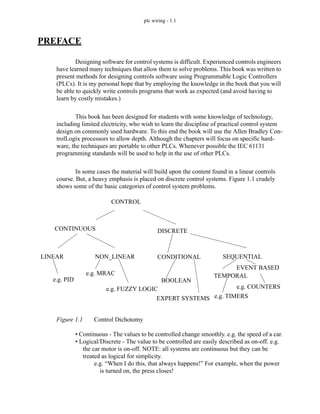
output to control another output B.
retentive
nonretentive
on-delay off-delay
RTO
TON
RTF
TOF
TON - Timer ON
TOF - Timer OFf
RTO - Retentive Timer On
RTF - Retentive Timer oFf
plc timers - 9.8
Figure 9.8 An Allen-Bradley TON Timer
A
TON
Timer example
Preset 4000
Accumulator 0
A
example.DN
(EN)
(DN)
example.ACC
0
3
4
0 3 6 9 14 17 19
example.EN
2
13
example.TT
example.DN
B
B
Note: For the older Allen-Bradley equipment the notations are similar, although the
tag names are replaced with a more strict naming convention. The timers are kept
in ’files’ with names starting with ’T4:’, followed by a timer number. The exam-
ples below show the older (PLC-5 and micrologix notations compared to the new
RS-Logix (5000) notations. In the older PLCs the timer is given a unique number,
in the RSLogix 5000 processors it is given a tag name (in this case ’t’) and type
’TIMER’.
Older
T4:0/DN
T4:0/EN
T4:0.PRE
T4:0.ACC
T4:0/TT
Newer
t.DN
t.EN
t.PRE
t.ACC
t.TT
plc timers - 9.9
The timing diagram in Figure 9.8 illustrates the operation of the TON timer with a
4 second on-delay. A is the input to the timer, and whenever the timer input is true the EN
enabled bit for the timer will also be true. If the accumulator value is equal to the preset
value the DN bit will be set. Otherwise, the TT bit will be set and the accumulator value
will begin increasing. The first time A is true, it is only true for 3 seconds before turning
off, after this the value resets to zero. (Note: in a retentive time the value would remain at
3 seconds.) The second time A is true, it is on more than 4 seconds. After 4 seconds the TT
bit turns off, and the DN bit turns on. But, when A is released the accumulator resets to
zero, and the DN bit is turned off.
A value can be entered for the accumulator while programming. When the pro-
gram is downloaded this value will be in the timer for the first scan. If the TON timer is
not enabled the value will be set back to zero. Normally zero will be entered for the preset
value.
The timer in Figure 9.9 is identical to that in Figure 9.8, except that it is retentive.
The most significant difference is that when the input A is turned off the accumulator
value does not reset to zero. As a result the timer turns on much sooner, and the timer does
not turn off after it turns on. A reset instruction will be shown later that will allow the
accumulator to be reset to zero.
A
RTO
Timer example
Preset 4000
Accum. 0
A
example.DN
(EN)
(DN)
example.ACC 0
3
4
0 3 6 9 14 17 19
example.EN
10
example.TT
plc timers - 9.10
Figure 9.9 An Allen Bradley Retentive On-Delay Timer
An off delay timer is shown in Figure 9.10. This timer has a time base of 0.01s,
with a preset value of 3500, giving a total delay of 3.5s. As before the EN enable for the
timer matches the input. When the input A is true the DN bit is on. Is is also on when the
input A has turned off and the accumulator is counting. The DN bit only turns off when the
input A has been off long enough so that the accumulator value reaches the preset. This
type of timer is not retentive, so when the input A becomes true, the accumulator resets.
Figure 9.10 An Allen Bradley Off-Delay Timer
Retentive off-delay (RTF) timers have few applications and are rarely used, there-
fore many PLC vendors do not include them.
An example program is shown in Figure 9.11. In total there are four timers used in
this example, t_1, t_2, t_3, and t_4. The timer instructions are shown with the accumulator
values omitted, assuming that they start with a value of zero. All four different types of
counters have the input ’go’. Output ’done’ will turn on when the TON counter t_1 is
done. All four of the timers can be reset with input ’reset’.
A
TOF
Timer example
Preset 3500
Accum. 0
example.DN
(EN)
(DN)
example.ACC
0
3
3.5
0 3 6 10 16 18 20
example.EN
9.5
example.TT
A
plc timers - 9.11
Figure 9.11 A Timer Example
A timing diagram for this example is shown in Figure 9.12. As input go is turned
on the TON and RTO timers begin to count and reach 4s and turn on. When reset becomes
true it resets both timers and they start to count for another second before go is turned off.
After the input is turned off the TOF and RTF both start to count, but neither reaches the
4s preset. The input go is turned on again and the TON and RTO both start counting. The
RTO turns on one second sooner because it had 1s stored from the 7-8s time period. After
go turns off again both the off delay timers count down, and reach the 4 second delay, and
turn on. These patterns continue across the diagram.
go
go
go
go
done
t_1.DN
reset
reset
reset
reset
RTO t_2
delay 4 sec
TON t_1
delay 4 sec
RTF t_4
delay 4 sec
TOF t_3
delay 4 sec
RES t_1
RES t_2
RES t_3
RES t_4
plc timers - 9.12
Figure 9.12 A Timing Diagram for Figure 9.11
Consider the short ladder logic program in Figure 9.13 for control of a heating
oven. The system is started with a Start button that seals in the Auto mode. This can be
stopped if the Stop button is pushed. (Remember: Stop buttons are normally closed.)
When the Auto goes on initially the TON timer is used to sound the horn for the first 10
seconds to warn that the oven will start, and after that the horn stops and the heating coils
start. When the oven is turned off the fan continues to blow for 300s or 5 minutes after.
0 5 10 15 20 25 30 35 40
time
(sec)
go
t_1.DN
t_2.DN
t_3.DN
t_4.DN
done
reset
plc timers - 9.13
Figure 9.13 A Timer Example
A program is shown in Figure 9.14 that will flash a light once every second. When
the PLC starts, the second timer will be off and the t_on.DN bit will be off, therefore the
normally closed input to the first timer will be on. t_off will start timing until it reaches
0.5s, when it is done the second timer will start timing, until it reaches 0.5s. At that point
t_on.DN will become true, and the input to the first time will become false. t_off is then set
back to zero, and then t_on is set back to zero. And, the process starts again from the
beginning. In this example the first timer is used to drive the second timer. This type of
arrangement is normally called cascading, and can use more that two timers.
TON
Timer heat
Delay 10s
Note: For the remainder of the text I will use the shortened notation for timers
shown above. This will save space and reduce confusion.
TOF
Timer cooling
Delay 300s
Horn
Heating Coils
Auto
heat.TT
heat.DN
Auto
Auto
Stop
Start
Fan
cooling.DN
plc timers - 9.14
Figure 9.14 Another Timer Example
9.4 COUNTERS
There are two basic counter types: count-up and count-down. When the input to a
count-up counter goes true the accumulator value will increase by 1 (no matter how long
the input is true.) If the accumulator value reaches the preset value the counter DN bit will
be set. A count-down counter will decrease the accumulator value until the preset value is
reached.
An Allen Bradley count-up (CTU) instruction is shown in Figure 9.15. The
instruction requires memory in the PLC to store values and status, in this case is example.
The preset value is 4 and the value in the accumulator is 2. If the input A were to go from
false to true the value in the accumulator would increase to 3. If A were to go off, then on
again the accumulator value would increase to 4, and the DN bit would go on. The count
can continue above the preset value. If input B becomes true the value in the counter accu-
mulator will become zero.
TON
Timer t_off
Delay 0.5s
Light
t_on.DN
t_on.TT
TON
Timer t_on
Delay 0.5s
t_off.DN
plc timers - 9.15
Figure 9.15 An Allen Bradley Counter
Count-down counters are very similar to count-up counters. And, they can actually
both be used on the same counter memory location. Consider the example in Figure 9.16,
the example input cnt_up drives the count-up instruction for counter example. Input
cnt_down drives the count-down instruction for the same counter location. The preset
value for a counter is stored in memory location example so both the count-up and count-
down instruction must have the same preset. Input reset will reset the counter.
CTU
A Counter example
Preset 4
Accum. 2
(CU)
(DN)
example.DN
example
RES
X
B
Note: The notations for older Allen-Bradley equipment are very similar to the newer
notations. The examples below show the older (PLC-5 and micrologix notations
compared to the new RS-Logix (5000) notations. In the older PLCs the counter is
given a unique name, in the RSLogix 5000 processors it is given a name (in this
case ’c’) and the type ’COUNTER’.
Older
C5:0/DN
C5:0/CU
C5:0.PRE
C5:0.ACC
C5:0/CD
Newer
c.DN
c.CU
c.PRE
c.ACC
c.CD
plc timers - 9.16
Figure 9.16 A Counter Example
The timing diagram in Figure 9.16 illustrates the operation of the counter. If we
assume that the value in the accumulator starts at 0, then the positive edges on the cnt_up
input will cause it to count up to 3 where it turns the counter example done bit on. It is then
reset by input reset and the accumulator value goes to zero. Input cnt_up then pulses again
and causes the accumulator value to increase again, until it reaches a maximum of 5. Input
cnt_down then causes the accumulator value to decrease down below 3, and the counter
turns off again. Input cnt_up then causes it to increase, but input reset resets the accumula-
tor back to zero again, and the pulses continue until 3 is reached near the end.
cnt_up
cnt_down
reset
output_thingy
example.DN
cnt_up
cnt_down
reset
example.DN
output_thingy
CTU example
preset 3
CTD example
preset 3
RES example
plc timers - 9.17
The program in Figure 9.17 is used to remove 5 out of every 10 parts from a con-
veyor with a pneumatic cylinder. When the part is detected both counters will increase
their values by 1. When the sixth part arrives the first counter will then be done, thereby
allowing the pneumatic cylinder to actuate for any part after the fifth. The second counter
will continue until the eleventh part is detected and then both of the counters will be reset.
Figure 9.17 A Counter Example
9.5 MASTER CONTROL RELAYS (MCRs)
In an electrical control system a Master Control Relay (MCR) is used to shut down
a section of an electrical system, as shown earlier in the electrical wiring chapter. This
concept has been implemented in ladder logic also. A section of ladder logic can be put
between two lines containing MCR’s. When the first MCR coil is active, all of the inter-
mediate ladder logic is executed up to the second line with an MCR coil. When the first
MCR coil in inactive, the ladder logic is still examined, but all of the outputs are forced
off.
Consider the example in Figure 9.18. If A is true, then the ladder logic after will be
CTU
Counter parts_cnt
Preset 6
CTU
Counter parts_max
Preset 11
part_present
parts_cnt.DN part present pneumatic
cylinder
parts_max.DN
parts_cnt
parts_max
RES
RES
plc timers - 9.18
executed as normal. If A is false the following ladder logic will be examined, but all of the
outputs will be forced off. The second MCR function appears on a line by itself and marks
the end of the MCR block. After the second MCR the program execution returns to nor-
mal. While A is true, X will equal B, and Y can be turned on by C, and off by D. But, if A
becomes false X will be forced off, and Y will be left in its last state. Using MCR blocks to
remove sections of programs will not increase the speed of program execution signifi-
cantly because the logic is still examined.
Figure 9.18 MCR Instructions
If the MCR block contained another function, such as a TON timer, turning off the
MCR block would force the timer off. As a general rule normal outputs should be outside
MCR blocks, unless they must be forced off when the MCR block is off.
A
MCR
MCR
Note: If a normal input is used inside an MCR block it will be forced off. If the
output is also used in other MCR blocks the last one will be forced off. The
MCR is designed to fully stop an entire section of ladder logic, and is best
used this way in ladder logic designs.
B
C
L
D
U
X
Y
Y
plc timers - 9.19
9.6 INTERNAL BITS
Simple programs can use inputs to set outputs. More complex programs also use
internal memory locations that are not inputs or outputs. These Boolean memory locations
are sometimes referred to as ’internal relays’ or ’control relays’. Knowledgeable program-
mers will often refer to these as ’bit memory’. In the newer Allen Bradley PLCs these can
be defined as variables with the type ’BOOL’. The programmer is free to use these mem-
ory locations however they see fit.
An example of bit memory usage is shown in Figure 9.19. The first ladder logic
rung will turn on the internal memory bit ’A_pushed’ (e.g., B3:0/0) when input ’hand_A’
is activated, and input ’clear’ is off. (Notice that the Boolean memory is being used as
both an input and output.) The second line of ladder logic similar. In this case when both
inputs have been activated, the output ’press on’ is active.
bit
number
0
1
2
3
4
5
6
7
8
9
10
11
12
13
14
15
16
17
memory
location
B3:0/0
B3:0/1
B3:0/2
B3:0/3
B3:0/4
B3:0/5
B3:0/6
B3:0/7
B3:0/8
B3:0/9
B3:0/10
B3:0/11
B3:0/12
B3:0/13
B3:0/14
B3:0/15
B3:1/0
B3:1/1
bit
number
18
19
20
21
22
23
24
25
26
27
28
29
30
31
32
33
34
etc...
memory
location
B3:1/2
B3:1/3
B3:1/4
B3:1/5
B3:1/6
B3:1/7
B3:1/8
B3:1/9
B3:1/10
B3:1/11
B3:1/12
B3:1/13
B3:1/14
B3:1/15
B3:2/0
B3:2/1
B3:2/2
etc...
NOTE: In the older Allen Brad-
ley PLCs these addresses
begin with ’B3’ by default.
The first bit in memory is
’B3:0/0’, where the first zero
represents the first 16 bit
word, and the second zero
represents the first bit in the
word. The sequence of bits
is shown to the right.
plc timers - 9.20
Figure 9.19 An example using bit memory (older notations are in parentheses)
Bit memory was presented briefly here because it is important for design tech-
niques in the following chapters, but it will be presented in greater depth after that.
9.7 DESIGN CASES
The following design cases are presented to help emphasize the principles pre-
sented in this chapter. I suggest that you try to develop the ladder logic before looking at
the provided solutions.
9.7.1 Basic Counters And Timers
Problem: Develop the ladder logic that will turn on an output light, 15 seconds
after switch A has been turned on.
hand_A
hand_B
clear
clear
A_pushed
B_pushed
A_pushed
B_pushed
A_pushed B_pushed
press_on
(I:0/0)
(I:0/1)
(I:0/2)
(I:0/2)
(B3:0/0)
(B3:0/0)
(B3:0/1)
(B3:0/1)
(B3:0/0) (B3:0/1)
(O:0/0)
plc timers - 9.21
Figure 9.20 A Simple Timer Example
Problem: Develop the ladder logic that will turn on a light, after switch A has been
closed 10 times. Push button B will reset the counters.
Figure 9.21 A Simple Counter Example
9.7.2 More Timers And Counters
Problem: Develop a program that will latch on an output B 20 seconds after input
A has been turned on. After A is pushed, there will be a 10 second delay until A can have
any effect again. After A has been pushed 3 times, B will be turned off.
A TON
Preset 15s
delay
delay.DN
Light
Solution:
A CTU
Preset 10
Accum. 0
count
B count
RES
count.DN
Light
Solution:
plc timers - 9.22
Figure 9.22 A More Complex Timer Counter Example
9.7.3 Deadman Switch
Problem: A motor will be controlled by two switches. The Go switch will start the
motor and the Stop switch will stop it. If the Stop switch was used to stop the motor, the
Go switch must be thrown twice to start the motor. When the motor is active a light should
be turned on. The Stop switch will be wired as normally closed.
On CTU
Preset 3
Accum. 0
count
On TON
Time base: 1.0
Preset 20
t_0
On
A
L
Light
t_0.DN
L
t_0.DN TON
Time base: 1.0
Preset 10
t_1
On
t_1.DN
U
Light
count.DN
U
Solution:
plc timers - 9.23
Figure 9.23 A Motor Starter Example
9.7.4 Conveyor
Problem: A conveyor is run by switching on or off a motor. We are positioning
parts on the conveyor with an optical detector. When the optical sensor goes on, we want
to wait 1.5 seconds, and then stop the conveyor. After a delay of 2 seconds the conveyor
will start again. We need to use a start and stop button - a light should be on when the sys-
tem is active.
Go CTU
Preset 2
Accum. 1
count
Motor Stop
C5:0
Motor
Light
RES
Motor
count.DN Stop
Motor
Consider:
What will happen if stop is pushed and the motor is not running?
Solution:
plc timers - 9.24
Figure 9.24 A Conveyor Controller Example
9.7.5 Accept/Reject Sorting
Problem: For the conveyor in the last case we will add a sorting system. Gages
have been attached that indicate good or bad. If the part is good, it continues on. If the part
is bad, we do not want to delay for 2 seconds, but instead actuate a pneumatic cylinder.
Light
Light
Go Stop
Part Detect TON
Preset 1.5s
incoming
incoming.DN TON
Preset 2s
stopped
incoming.DN Light
Motor
stopped.DN incoming
RES
stopped.DN stopped
RES
Consider: What is assumed about part arrival and departure?
Solution:
plc timers - 9.25
Figure 9.25 A Conveyor Sorting Example
Light
Light
Go Stop
Part Detect TON
Preset 1.5s
incoming
incoming.DN TON
Preset 2s
stopped
stopped.EN Light
Motor
stopped.DN
incoming RES
stopped.DN
stopped RES
Part_Good
incoming.DN TON
Preset 0.5s
rejected
Part_Good
rejected.EN
Cylinder
rejected.DN
rejected RES
rejected.DN
Solution:
plc timers - 9.26
9.7.6 Shear Press
Problem: The basic requirements are,
1. A toggle start switch (TS1) and a limit switch on a safety gate (LS1) must both
be on before a solenoid (SOL1) can be energized to extend a stamping cylinder
to the top of a part.
2. While the stamping solenoid is energized, it must remain energized until a limit
switch (LS2) is activated. This second limit switch indicates the end of a stroke.
At this point the solenoid should be de-energized, thus retracting the cylinder.
3. When the cylinder is fully retracted a limit switch (LS3) is activated. The cycle
may not begin again until this limit switch is active.
4. A cycle counter should also be included to allow counts of parts produced.
When this value exceeds 5000 the machine should shut down and a light lit up.
5. A safety check should be included. If the cylinder solenoid has been on for more
than 5 seconds, it suggests that the cylinder is jammed or the machine has a
fault. If this is the case, the machine should be shut down and a maintenance
light turned on.
plc timers - 9.27
Figure 9.26 A Shear Press Controller Example
9.8 SUMMARY
• Latch and unlatch instructions will hold outputs on, even when the power is
turned off.
• Timers can delay turning on or off. Retentive timers will keep values, even when
inactive. Resets are needed for retentive timers.
• Counters can count up or down.
• When timers and counters reach a preset limit the DN bit is set.
SOL1
extend.DN
LS2
SOL1 CTU
Preset 5000
Accum. 0
part_cnt
SOL1 RTO
Preset 5s
extend
extend.DN
LIGHT
RESET
extend RES
SOL1
TS1 LS1 LS3 part_cnt.DN
L
U
- what do we need to do when the machine is reset?
part_cnt.DN
L
Solution:
plc timers - 9.28
• MCRs can force off a section of ladder logic.
9.9 PRACTICE PROBLEMS
1. What does edge triggered mean? What is the difference between positive and negative edge
triggered?
2. Are reset instructions necessary for all timers and counters?
3. What are the numerical limits for typical timers and counters?
4. If a counter goes below the bottom limit which counter bit will turn on?
5. a) Write ladder logic for a motor starter that has a start and stop button that uses latches. b)
Write the same ladder logic without latches.
6. Use a timing diagram to explain how an on delay and off delay timer are different.
7. For the retentive off timer below, draw out the status bits.
A
RTF
Timer t
Preset 3.5s
Accum. 0
A
t.DN
(EN)
(DN)
t.ACC
0 3 6 10 16 18 20
t.EN
t.TT
plc timers - 9.29
8. Complete the timing diagrams for the two timers below.
A
RTO
Timer t
Preset 10s
Accum. 1
A
t.EN
(EN)
(DN)
t.ACC
0 3 6 9 14 17 19 20
t.TT
t.DN
A
TOF
Timer t
Preset 0.5s
Accum. 0
A
t.EN
(EN)
(DN)
t.ACC
0 15 45 150 200 225
t.TT
t.DN
plc timers - 9.30
9. Given the following timing diagram, draw the done bits for all four fundamental timer types.
Assume all start with an accumulated value of zero, and have a preset of 1.5 seconds.
10. Design ladder logic that allows an RTO to behave like a TON.
11. Design ladder logic that uses a timer and counter to measure a time of 50.0 days.
12. Develop the ladder logic that will turn on an output (light), 15 seconds after switch (A) has
been turned on.
13. Develop the ladder logic that will turn on a output (light), after a switch (A) has been closed
10 times. Push button (B) will reset the counters.
14. Develop a program that will latch on an output (B), 20 seconds after input (A) has been turned
on. The timer will continue to cycle up to 20 seconds, and reset itself, until A has been turned
off. After the third time the timer has timed to 20 seconds, B will be unlatched.
15. A motor will be connected to a PLC and controlled by two switches. The GO switch will start
the motor, and the STOP switch will stop it. If the motor is going, and the GO switch is thrown,
this will also stop the motor. If the STOP switch was used to stop the motor, the GO switch
must be thrown twice to start the motor. When the motor is running, a light should be turned on
(a small lamp will be provided).
16. In dangerous processes it is common to use two palm buttons that require a operator to use
both hands to start a process (this keeps hands out of presses, etc.). To develop this there are
two inputs that must be turned on within 0.25s of each other before a machine cycle may begin.
0 1 2 3 4 5 6 7
sec
input
TON
RTO
TOF
RTF
plc timers - 9.31
17. Design a conveyor control system that follows the design guidelines below.
- The conveyor has an optical sensor S1 that detects boxes entering a workcell
- There is also an optical sensor S2 that detects boxes leaving the workcell
- The boxes enter the workcell on a conveyor controlled by output C1
- The boxes exit the workcell on a conveyor controlled by output C2
- The controller must keep a running count of boxes using the entry and exit sen-
sors
- If there are more than five boxes in the workcell the entry conveyor will stop
- If there are no boxes in the workcell the exit conveyor will be turned off
- If the entry conveyor has been stopped for more than 30 seconds the count will be
reset to zero, assuming that the boxes in the workcell were scrapped.
18. Write a ladder logic program that does what is described below.
- When button A is pushed, a light will flash for 5 seconds.
- The flashing light will be on for 0.25 sec and off for 0.75 sec.
- If button A has been pushed 5 times the light will not flash until the system is
reset.
- The system can be reset by pressing button B
19. Write a program that will turn on a flashing light for the first 15 seconds after a PLC is turned
on. The light should flash for half a second on and half a second off.
20. A buffer can hold up to 10 parts. Parts enter the buffer on a conveyor controller by output con-
veyor. As parts arrive they trigger an input sensor enter. When a part is removed from the
buffer they trigger the exit sensor. Write a program to stop the conveyor when the buffer is full,
and restart it when there are fewer than 10 parts in the buffer. As normal the system should also
include a start and stop button.
21. What is wrong with the following ladder logic? What will happen if it is used?
22. We are using a pneumatic cylinder in a process. The cylinder can become stuck, and we need
to detect this. Proximity sensors are added to both endpoints of the cylinder’s travel to indicate
when it has reached the end of motion. If the cylinder takes more than 2 seconds to complete a
motion this will indicate a problem. When this occurs the machine should be shut down and a
light turned on. Develop ladder logic that will cycle the cylinder in and out repeatedly, and
watch for failure.
L
U
A
B
X
Y
X
Y
plc timers - 9.32
9.10 PRACTICE PROBLEM SOLUTIONS
1. edge triggered means the event when a logic signal goes from false to true (positive edge) or
from true to false (negative edge).
2. no, but they are essential for retentive timers, and very important for counters.
3. Timers on PLC-5s and Micrologix are 16 bit, so they are limited to a range of -32768 to
+32767. ControlLogix timers are 32 bit and have a range of -2,147,483,648 to 2,147,483,647.
4. the un underflow bit. This may result in a fault in some PLCs.
5.
6.
first pass
stop
start
motor
motor
L
U
start
motor
stop
motor
input
TON
TOF
delays turning on
delays turning off
plc timers - 9.33
7.
A
RTF
Timer t
Preset 3.5s
Accum. 0
A
t.DN
(EN)
(DN)
t.ACC
0 3 6 10 16 18 20
t.EN
t.TT
plc timers - 9.34
8.
A
RTO
Timer t
Preset 10s
Accum. 1
A
t.EN
(EN)
(DN)
t.ACC
0 3 6 9 14 17 19 20
t.TT
t.DN
A
TOF
Timer t
Preset 0.5s
Accum. 0
A
t.EN
(EN)
(DN)
t.ACC
0 15 45 150 200 225
t.TT
t.DN
plc timers - 9.35
9.
10.
11.
0 1 2 3 4 5 6 7
sec
input
TON
RTO
TOF
RTF
RTO
Timer t
Preset 2s
A
A
RES t
TON
Timer tick
Base 1.0
Preset 3600
A tick.DN
CTU
Counter wait
Preset 1200
tick.DN
wait.DN
Light
plc timers - 9.36
12.
13.
A
seal_in
seal_in
seal_in
TON
timer delay
delay 15 sec
delay.DN light
B
A
cnt
CTU
counter cnt
presetR 10
cnt.DN light
RES
plc timers - 9.37
14.
A
TON
timer delay
delay 20 s
delay.DN B
delay.DN
TON
timer A_held
delay 20 s
L
A_held.DN
CTU
counter cnt
preset 3
cnt.DN B
U
delay.DN
plc timers - 9.38
15.
go stop
motor
motor
go CTU
c_1.DN
c_0
Counter c_0
Preset 2
Accumulator 1
CTU
Counter c_1
Preset 3
Accumulator 1
RES
c_1
RES
c_1.DN
c_0.DN
stop CTD
Counter c_0
Preset 2
Accumulator 1
c_0.DN
CTD
Counter c_1
Preset 3
Accumulator 1
plc timers - 9.39
16.
TON
Timer left
Preset 0.25s
TON
Timer right
Preset 0.25s
left_button
right_button
right.TT
on
on
stop
left.TT
plc timers - 9.40
17.
CTU
Counter C_0
Preset 6
S1
CTD
Counter C_0
Preset 6
S2
C_0/DN
C1
CTU
Counter C_1
Preset 1
CTD
Counter C_1
Preset 1
C_1/DN
C2
TON
Timer T_0
Preset 30s
C_0/DN
T_0/DN
C_0
RES
C_1
RES
plc timers - 9.41
18.
TON
timer T4:0
delay 5s
TON
timer T4:1
delay 0.25s
TON
timer T4:2
delay 0.75s
CTU
counter C5:0
preset 5
RES
A
B
T4:1/TT
C5:0/DN
T4:0/TT T4:2/DN
T4:1/DN
light
T4:0/TT
plc timers - 9.42
19.
20.
21. The normal output ‘Y’ is repeated twice. In this example the value of ‘Y’ would always match
‘B’, and the earlier rung with ‘A’ would have no effect on ‘Y’.
First scan
TON
T4:0
delay 15s
TON
T4:1
delay 0.5s
TON
T4:2
delay 0.5s
T4:0/TT
T4:2/DN
T4:1/DN
light
T4:2/TT
start
active
stop
active
CTU
counter C5:0
preset 10
enter
CTD
counter C5:0
preset 10
exit
active C5:0/DN
active
plc timers - 9.43
22.
9.11 ASSIGNMENT PROBLEMS
1. Draw the timer and counter done bits for the ladder logic below. Assume that the accumulators
GIVE SOLUTION
plc timers - 9.44
of all the timers and counters are reset to begin with.
2. Write a ladder logic program that will count the number of parts in a buffer. As parts arrive they
activate input A. As parts leave they will activate input B. If the number of parts is less than 8
then a conveyor motor, output C, will be turned on.
TON
Timer T_0
Preset 2s
RTO
Timer T_1
Preset 2s
TOF
Timer T_2
Preset 2s
CTU
Counter C_0
Preset 2
CTD
Counter C_1
Preset 2
A
t(sec)
A
0 5 10 15 20
T_0/DN
T_1/DN
T_2/DN
C_0/DN
C_1/DN
Acc. 0
Acc. 0
plc timers - 9.45
3. Explain what would happen in the following program when A is on or off.
4. Write a simple program that will use one timer to flash a light. The light should be on for 1.0
seconds and off for 0.5 seconds. Do not include start or stop buttons.
5. We are developing a safety system (using a PLC-5) for a large industrial press. The press is
activated by turning on the compressor power relay (R, connected to O:013/05). After R has
been on for 30 seconds the press can be activated to move (P connected to O:013/06). The
delay is needed for pressure to build up. After the press has been activated (with P) the system
must be shut down (R and P off), and then the cycle may begin again. For safety, there is a sen-
sor that detects when a worker is inside the press (S, connected to I:011/02), which must be off
before the press can be activated. There is also a button that must be pushed 5 times (B, con-
nected to I:011/01) before the press cycle can begin. If at any time the worker enters the press
(and S becomes active) the press will be shut down (P and R turned off). Develop the ladder
logic. State all assumptions, and show all work.
6. Write a program that only uses one timer. When an input A is turned on a light will be on for 10
seconds. After that it will be off for two seconds, and then again on for 5 seconds. After that
the light will not turn on again until the input A is turned off.
7. A new printing station will add a logo to parts as they travel along an assembly line. When a
part arrives a ‘part’ sensor will detect it. After this the ‘clamp’ output is turned on for 10 sec-
onds to hold the part during the operation. For the first 2 seconds the part is being held a
‘spray’ output will be turned on to apply the thermoset ink. For the last 8 seconds a ‘heat’ out-
put will be turned on to cure the ink. After this the part is released and allowed to continue
along the line. Write the ladder logic for this process.
8. Write a ladder logic program. that will turn on an output Q five seconds after an input A is
turned on. If input B is on the delay will be eight seconds. YOU MAY ONLY USE ONE
TIMER.
MCR
TON
t
5s
MCR
A
plc design - 10.1
10. STRUCTURED LOGIC DESIGN
10.1 INTRODUCTION
Traditionally ladder logic programs have been written by thinking about the pro-
cess and then beginning to write the program. This always leads to programs that require
debugging. And, the final program is always the subject of some doubt. Structured design
techniques, such as Boolean algebra, lead to programs that are predictable and reliable.
The structured design techniques in this and the following chapters are provided to make
ladder logic design routine and predictable for simple sequential systems.
Topics:
Objectives:
• Know examples of applications to industrial problems.
• Know how to design time base control programs.
• Timing diagrams
• Design examples
• Designing ladder logic with process sequence bits and timing diagrams
Note: Structured design is very important in engineering, but many engineers will write
software without taking the time or effort to design it. This often comes from previous
experience with programming where a program was written, and then debugged. This
approach is not acceptable for mission critical systems such as industrial controls. The
time required for a poorly designed program is 10% on design, 30% on writing, 40%
debugging and testing, 10% documentation. The time required for a high quality pro-
gram design is 30% design, 10% writing software, 10% debugging and testing, 10%
documentation. Yes, a well designed program requires less time! Most beginners per-
ceive the writing and debugging as more challenging and productive, and so they will
rush through the design stage. If you are spending time debugging ladder logic pro-
grams you are doing something wrong. Structured design also allows others to verify
and modify your programs.
Axiom: Spend as much time on the design of the program as possible. Resist the tempta-
tion to implement an incomplete design.
plc design - 10.2
Most control systems are sequential in nature. Sequential systems are often
described with words such as mode and behavior. During normal operation these systems
will have multiple steps or states of operation. In each operational state the system will
behave differently. Typical states include start-up, shut-down, and normal operation. Con-
sider a set of traffic lights - each light pattern constitutes a state. Lights may be green or
yellow in one direction and red in the other. The lights change in a predictable sequence.
Sometimes traffic lights are equipped with special features such as cross walk buttons that
alter the behavior of the lights to give pedestrians time to cross busy roads.
Sequential systems are complex and difficult to design. In the previous chapter
timing charts and process sequence bits were discussed as basic design techniques. But,
more complex systems require more mature techniques, such as those shown in Figure
10.1. For simpler controllers we can use limited design techniques such as process
sequence bits and flow charts. More complex processes, such as traffic lights, will have
many states of operation and controllers can be designed using state diagrams. If the con-
trol problem involves multiple states of operation, such as one controller for two indepen-
dent traffic lights, then Petri net or SFC based designs are preferred.
Figure 10.1 Sequential Design Techniques
10.2 PROCESS SEQUENCE BITS
A typical machine will use a sequence of repetitive steps that can be clearly identi-
sequential
problem
simple/small
steps with
complex/large
single process
STATE DIAGRAM
EQUATIONS
BLOCK LOGIC
shorter
development
time
performance
is important
multiple
SFC/GRAFSET
PETRI NET
processes
buffered (waiting)
state triggers
no waiting with
single states
SEQUENCE BITS
FLOW CHART
some deviations
very clear steps
plc design - 10.3
fied. Ladder logic can be written that follows this sequence. The steps for this design
method are;
1. Understand the process.
2. Write the steps of operation in sequence and give each step a number.
3. For each step assign a bit.
4. Write the ladder logic to turn the bits on/off as the process moves through its
states.
5. Write the ladder logic to perform machine functions for each step.
6. If the process is repetitive, have the last step go back to the first.
Consider the example of a flag raising controller in Figure 10.2 and Figure 10.3.
The problem begins with a written description of the process. This is then turned into a set
of numbered steps. Each of the numbered steps is then converted to ladder logic.
plc design - 10.4
Figure 10.2 A Process Sequence Bit Design Example
Description:
A flag raiser that will go up when an up button is pushed, and down when a
down button is pushed, both push buttons are momentary. There are
limit switches at the top and bottom to stop the flag pole. When turned
on at first the flag should be lowered until it is at the bottom of the pole.
Steps:
1. The flag is moving down the pole waiting for the bottom limit switch.
2. The flag is idle at the bottom of the pole waiting for the up button.
3. The flag moves up, waiting for the top limit switch.
4. The flag is idle at the top of the pole waiting for the down button.
L
U
U
U
step 1
step 2
step 3
step 4
first scan
This section of ladder logic forces the flag raiser
to start with only one state on, in this case it
should be the first one, step 1.
Ladder Logic:
down
step 1
The ladder logic for step 1 turns on the motor to
lower the flag and when the bottom limit
switch is hit it goes to step 2.
motor
L
U
step 2
step 1
step 1 bottom limit switch
The ladder logic for step 2 only waits for the
push button to raise the flag.
L
U
step 3
step 2
step 2 flag up button
plc design - 10.5
Figure 10.3 A Process Sequence Bit Design Example (continued)
The previous method uses latched bits, but the use of latches is sometimes discour-
aged. A more common method of implementation, without latches, is shown in Figure
10.4.
up
step 3
The ladder logic for step 3 turns on the motor to
raise the flag and when the top limit switch is
hit it goes to step 4.
motor
L
U
step 4
step 3
step 3 top limit switch
The ladder logic for step 4 only waits for the
push button to lower the flag.
L
U
step 1
step 4
step 4 flag down button
plc design - 10.6
Figure 10.4 Process Sequence Bits Without Latches
Similar methods are explored in further detail in the book Cascading Logic
(Kirckof, 2003).
10.3 TIMING DIAGRAMS
Timing diagrams can be valuable when designing ladder logic for processes that
are only dependant on time. The timing diagram is drawn with clear start and stop times.
Ladder logic is constructed with timers that are used to turn outputs on and off at appropri-
down
step 1
motor
step1
step4
step1
step2
bottom LS
step2
step1
step2
step3
flag up button
up
step 3
motor
step3
step2
step3
step4
top LS
step4
step3
step4
step1
flag down button
FS
plc design - 10.7
ate times. The basic method is;
1. Understand the process.
2. Identify the outputs that are time dependant.
3. Draw a timing diagram for the outputs.
4. Assign a timer for each time when an output turns on or off.
5. Write the ladder logic to examine the timer values and turn outputs on or off.
Consider the handicap door opener design in Figure 10.5 that begins with a verbal
description. The verbal description is converted to a timing diagram, with t=0 being when
the door open button is pushed. On the timing diagram the critical times are 2s, 10s, 14s.
The ladder logic is constructed in a careful order. The first item is the latch to seal-in the
open button, but shut off after the last door closes. auto is used to turn on the three timers
for the critical times. The logic for opening the doors is then written to use the timers.
plc design - 10.8
Figure 10.5 Design With a Timing Diagram
Description: A handicap door opener has a button that will open two doors. When the but-
ton is pushed (momentarily) the first door will start to open immediately, the second
door will start to open 2 seconds later. The first door power will stay open for a total of
10 seconds, and the second door power will stay on for 14 seconds. Use a timing dia-
gram to design the ladder logic.
door 1
door 2
2s 10s 14s
Timing Diagram:
Ladder Logic:
open button
auto
auto
t_14.DN
TON
Timer t_2
Delay 2s
TON
Timer t_10
Delay 10s
TON
Timer t_14
Delay 14s
auto
t_10.TT
door 1
t_2.TT
door 2
t_2.DN
plc design - 10.9
10.4 DESIGN CASES
10.5 SUMMARY
• Timing diagrams can show how a system changes over time.
• Process sequence bits can be used to design a process that changes over time.
• Timing diagrams can be used for systems with a time driven performance.
10.6 PRACTICE PROBLEMS
1. Write ladder logic that will give the following timing diagram for B after input A is pushed.
After A is pushed any changes in the state of A will be ignored.
2. Design ladder logic for the timing diagram below. When an input A becomes active the
sequence should start.
3. A wrapping process is to be controlled with a PLC. The general sequence of operations is
described below. Develop the ladder logic using process sequence bits.
1. The folder is idle until a part arrives.
2. When a part arrives it triggers the part sensor and the part is held in place by
actuating the hold actuator.
true
false
0 2 5 6 8 9
t(sec)
100 300 500 700 900 1100 1900
t (ms)
X
Y
Z
plc design - 10.10
3. The first wrap is done by turning on output paper for 1 second.
4. The paper is then folded by turning on the crease output for 0.5 seconds.
5. An adhesive is applied by turning on output tape for 0.75 seconds.
6. The part is release by turning off output hold.
7. The process pauses until the part sensors goes off, and then the machine returns
to idle.
10.7 PRACTICE PROBLEM SOLUTIONS
1.
TON
Timer t_a
Base 1s
Preset 2
on
TON
Timer t_b
Base 1s
Preset 3
t_a.DN
TON
Timer t_c
Base 1s
Preset 1
t_b.DN
TON
Timer t_d
Base 1s
Preset 2
t_c.DN
TON
Timer t_e
Base 1s
Preset 1
t_d.DN
t_a.TT
output
t_c.TT
t_e.TT
plc design - 10.11
2.
TON
t_1
0.100 s
TON
t_3
0.300 s
TON
t_5
0.500 s
TON
t_7
0.700 s
TON
t_9
0.900 s
TON
t_11
1.100 s
TON
t_19
1.900 s
A
t_1.TT
t_5.DN t_19.DN
X
t_1.EN
stop
t_1.DN t_3.DN
t_5.DN t_7.DN
t_9.DN t_11.DN
t_11.TT
Y
Z
plc design - 10.12
3.
(for both solutions
step2
hold
paper
step3
crease
step4
tape
step3
step4
step5
step2
plc design - 10.13
(without latches
first pass
step1
step1
stop
part
part
step2
step2
paper_delay.DN stop
paper_delay.DN
step3
step3
crease_delay.DN stop
TON
paper_delay
delay 1 s
step2
crease_delay.DN
step4
step4
tape_delay.DN stop
TON
crease_delay
delay 0.5 s
step3
tape_delay.DN
step5
step5
part stop
TON
tape_delay
delay 0.75 s
step4
part
plc design - 10.14
10.8 ASSIGNMENT PROBLEMS
1. Convert the following timing diagram to ladder logic. It should begin when input ‘A’ becomes
(with latches
first pass
step1
step1
stop
part
step2
TON
paper_delay
delay 1 s
step2
L
step2
U
step3
U
step4
U
step5
U
L
step1
U
step3
TON
crease_delay
delay 0.5 s
step3
L
step2
U
paper_delay.DN
step4
TON
tape_delay
delay 0.75 s
step4
L
step3
U
crease_delay.DN
step5
L
step4
U
tape_delay.DN
step1
L
step5
U
step5 part
plc design - 10.15
true.
2. Use the timing diagram below to design ladder logic. The sequence should start when input X
turns on. X may only be on momentarily, but the sequence should continue to execute until it
ends at 26 seconds.
3. Use the timing diagram below to design ladder logic. The sequence should start when input X
turns on. X may only be on momentarily, but the sequence should execute anyway.
4. Write a program that will execute the following steps. When in steps b) or d), output C will be
true. Output X will be true when in step c).
a) Start in an idle state. If input G becomes true go to b)
b) Wait until P becomes true before going to step c).
c) Wait for 3 seconds then go to step d).
d) Wait for P to become false, and then go to step b).
5. Write a program that will execute the following steps. When in steps b) or d), output C will be
true. Output X will be true when in step c).
X
t(sec)
0 0.2 0.5 1.2 1.3 1.4 1.6 2.0
A
B
3 5 11 22 26 t (sec)
0
A
B
2 3 5 7 11 16 22 26 t (sec)
plc design - 10.16
a) Start in an idle state. If input G becomes true go to b)
b) Wait until P becomes true before going to step c). If input S becomes true then go to step a).
c) Wait for 3 seconds then go to step d).
d) Wait for P to become false, and then go to step b).
6. A PLC is to control an amusement park water ride. The ride will fill a tank of water and splash
a tour group. 10 seconds later a water jet will be ejected at another point. Develop ladder logic
for the process that follows the steps listed below.
1. The process starts in ‘idle’.
2. The ‘cart_detect’ opens the ‘filling’ valve.
3. After a delay of 30 seconds from the start of the filling of the tank the tank ‘out-
let’ valve opens. When the tank is ‘full’ the ‘filling’ valve closes.
4. When the tank is empty the ‘outlet’ valve is closed.
5. After a 10 second delay, from the tank outlet valve opening, a water ‘jet’ is
opened.
6. After ‘2’ seconds the water ‘jet’ is closed and the process returns to the ‘idle
state.
7. Write a ladder logic program to extend and retract a cylinder after a start button is pushed.
There are limit switches at the ends of travel. If the cylinder is extending if more than 5 sec-
onds the machine should shut down and turn on a fault light. If it is retracting for more than 3
seconds it should also shut down and turn on the fault light. It can be reset with a reset button.
8. Design a program with sequence bits for a hydraulic press that will advance when two palm
buttons are pushed. Top and bottom limit switches are used to reverse the advance and stop
after a retract. At any time the hands removed from the palm button will stop an advance and
retract the press. Include start and stop buttons to put the press in and out of an active mode.
9. A machine has been built for filling barrels. Use process sequence bits to design ladder logic
for the sequential process as described below.
1. The process begins in an idle state.
2. If the ‘fluid_pressure’ and ‘barrel_present’ inputs are on, the system will open a flow valve
for 2 seconds with output ‘flow’.
3. The ‘flow’ valve will then be turned off for 10 seconds.
4. The ‘flow’ valve will then be turned on until the ‘full’ sensor indicates the barrel is full.
5. The system will wait until the ‘barrel_present’ sensor goes off before going to the idle state.
10. Design ladder logic for an oven using process sequence bits. (Note: the solution will only be
graded if the process sequence bit method is used.) The operations are as listed below.
1. The oven begins in an IDLE state.
2. An operator presses a start button and an ALARM output is turned on for 1 minute.
3. The ALARM output is turned off and the HEAT is turned on for 3 minutes to allow the tem-
perature to rise to the acceptable range.
4. The CONVEYOR output is turned on.
5. If the STOP input is activated (turned off) the HEAT will be turned off, but the CON-
VEYOR output will be kept on for two minutes. After this the oven returns to IDLE.
plc design - 10.17
11. We are developing a safety system (using a PLC-5) for a large industrial press. The press is
activated by turning on the compressor power relay (R, connected to O:013/05). After R has
been on for 30 seconds the press can be activated to move (P connected to O:013/06). The
delay is needed for pressure to build up. After the press has been activated (with P for 1.0 sec-
onds) the system must be shut down (R and P off), and then the cycle may begin again. For
safety, there is a sensor that detects when a worker is inside the press (S, connected to I:011/
02), which must be off before the press can be activated. There is also a button that must be
pushed 5 times (B, connected to I:011/01) before the press cycle can begin. If at any time the
worker enters the press (and S becomes active) the press will be shut down (P and R turned
off). Develop the process sequence and sequence bits, and then ladder logic for the states. State
all assumptions, and show all work.
12. A machine is being designed to wrap boxes of chocolate. The boxes arrive at the machine on a
conveyor belt. The list below shows the process steps in sequence.
1. The box arrives and is detected by an optical sensor (P), after this the conveyor
is stopped (C) and the box is clamped in place (H).
2. A wrapping mechanism (W) is turned on for 2 seconds.
3. A sticker cylinder (S) is turned on for 1 second to put consumer labelling on the
box.
4. The clamp (H) is turned off and the conveyor (C) is turned on.
5. After the box leaves the system returns to an idle state.
Develop ladder logic programs for the system using the following methods. Don’t forget to
include regular start and stop inputs.
i) a timing diagram
ii) process sequence bits
plc flowchart - 11.1
11. FLOWCHART BASED DESIGN
11.1 INTRODUCTION
A flowchart is ideal for a process that has sequential process steps. The steps will
be executed in a simple order that may change as the result of some simple decisions. The
symbols used for flowcharts are shown in Figure 11.1. These blocks are connected using
arrows to indicate the sequence of the steps. The different blocks imply different types of
program actions. Programs always need a start block, but PLC programs rarely stop so the
stop block is rarely used. Other important blocks include operations and decisions. The
other functions may be used but are not necessary for most PLC applications.
Figure 11.1 Flowchart Symbols
Topics:
Objectives:
• Ba able to describe a process with a flowchart.
• Be able to convert a flowchart to ladder logic.
• Describing process control using flowcharts
• Conversion of flowcharts to ladder logic
Start/Stop
Operation
Decision
I/O
Disk/Storage
Subroutine
plc flowchart - 11.2
A flowchart is shown in Figure 11.2 for a control system for a large water tank.
When a start button is pushed the tank will start to fill, and the flow out will be stopped.
When full, or the stop button is pushed the outlet will open up, and the flow in will be
stopped. In the flowchart the general flow of execution starts at the top. The first operation
is to open the outlet valve and close the inlet valve. Next, a single decision block is used to
wait for a button to be pushed. when the button is pushed the yes branch is followed and
the inlet valve is opened, and the outlet valve is closed. Then the flow chart goes into a
loop that uses two decision blocks to wait until the tank is full, or the stop button is
pushed. If either case occurs the inlet valve is closed and the outlet valve is opened. The
system then goes back to wait for the start button to be pushed again. When the controller
is on the program should always be running, so only a start block is needed. Many begin-
ners will neglect to put in checks for stop buttons.
plc flowchart - 11.3
Figure 11.2 A Flowchart for a Tank Filler
The general method for constructing flowcharts is:
1. Understand the process.
2. Determine the major actions, these are drawn as blocks.
3. Determine the sequences of operations, these are drawn with arrows.
START
Open outlet valve
start button pushed?
Open inlet valve
Close outlet valve
Is tank full?
stop button pushed?
Open outlet valve
Close inlet valve
no
no
yes
yes
no
yes
Close inlet valve
plc flowchart - 11.4
4. When the sequence may change use decision blocks for branching.
Once a flowchart has been created ladder logic can be written. There are two basic
techniques that can be used, the first presented uses blocks of ladder logic code. The sec-
ond uses normal ladder logic.
11.2 BLOCK LOGIC
The first step is to name each block in the flowchart, as shown in Figure 11.3. Each
of the numbered steps will then be converted to ladder logic
plc flowchart - 11.5
Figure 11.3 Labeling Blocks in the Flowchart
Each block in the flowchart will be converted to a block of ladder logic. To do this
we will use the MCR (Master Control Relay) instruction (it will be discussed in more
detail later.) The instruction is shown in Figure 11.4, and will appear as a matched pair of
outputs labelled MCR. If the first MCR line is true then the ladder logic on the following
lines will be scanned as normal to the second MCR. If the first line is false the lines to the
START
Open outlet valve
start button pushed?
Open inlet valve
Close outlet valve
Is tank full?
stop button pushed?
Open outlet valve
Close inlet valve
no
no
yes
yes
no
yes
F1
F2
F3
F4
F5
F6
STEP 1: Add labels to each block in the flowchart
Close inlet valve
plc flowchart - 11.6
next MCR block will all be forced off. If a normal output is used inside an MCR block, it
may be forced off. Therefore latches will be used in this method.
Figure 11.4 The MCR Function
The first part of the ladder logic required will reset the logic to an initial condition,
as shown in Figure 11.5. The line will only be true for the first scan of the PLC, and at that
time it will turn on the flowchart block F1 which is the reset all values off operation. All
other operations will be turned off.
A
MCR
MCR
If A is true then the MCR will cause the ladder in between
to be executed. If A is false the outputs are forced off.
Note: We will use MCR instructions to implement some of the state based programs.
This allows us to switch off part of the ladder logic. The one significant note to
remember is that any normal outputs (not latches and timers) will be FORCED
OFF. Unless this is what you want, put the normal outputs outside MCR blocks.
plc flowchart - 11.7
Figure 11.5 Initial Reset of States
The ladder logic for the first state is shown in Figure 11.6. When F1 is true the
logic between the MCR lines will be scanned, if F1 is false the logic will be ignored. This
logic turns on the outlet valve and turns off the inlet valve. It then turns off operation F1,
and turns on the next operation F2.
L
U
U
U
U
U
first scan
F1
F2
F3
F4
F5
F6
STEP 2: Write ladder logic to force the PLC into the first state
plc flowchart - 11.8
Figure 11.6 Ladder Logic for the Operation F1
The ladder logic for operation F2 is simple, and when the start button is pushed, it
will turn off F2 and turn on F3. The ladder logic for operation F3 opens the inlet valve and
moves to operation F4.
MCR
F1
MCR
L
U
outlet
inlet
U
L
F1
F2
STEP 3: Write ladder logic for each function in the flowchart
plc flowchart - 11.9
Figure 11.7 Ladder Logic for Flowchart Operations F2 and F3
The ladder logic for operation F4 turns off F4, and if the tank is full it turns on F6,
otherwise F5 is turned on. The ladder logic for operation F5 is very similar.
MCR
F2
MCR
U
L
F2
F3
start
MCR
F3
MCR
U
L
outlet
inlet
U
L
F3
F4
plc flowchart - 11.10
Figure 11.8 Ladder Logic for Operations F4 and F5
The ladder logic for operation F6 turns the outlet valve on and turns off the inlet
valve. It then ends operation F6 and returns to operation F2.
MCR
F4
MCR
U
F4
L
F6
tank full
L
F5
tank full
MCR
F5
MCR
U
F5
L
F6
stop
L
F4
stop
plc flowchart - 11.11
Figure 11.9 Ladder Logic for Operation F6
11.3 SEQUENCE BITS
In general there is a preference for methods that do not use MCR statements or
latches. The flowchart used in the previous example can be implemented without these
instructions using the following method. The first step to this process is shown in Figure
11.10. As before each of the blocks in the flowchart are labelled, but now the connecting
arrows (transitions) in the diagram must also be labelled. These transitions indicate when
another function block will be activated.
MCR
F6
MCR
L
U
outlet
inlet
U
L
F6
F2
plc flowchart - 11.12
Figure 11.10 Label the Flowchart Blocks and Arrows
The first section of ladder logic is shown in Figure 11.11. This indicates when the
transitions between functions should occur. All of the logic for the transitions should be
kept together, and appear before the state logic that follows in Figure 11.12.
START
Open outlet valve
start button pushed?
Open inlet valve
Close outlet valve
Is tank full?
stop button pushed?
Open outlet valve
Close inlet valve
no
no
yes
yes
no
yes
F1
F2
F3
F4
F5
F6
T2
T3
T4
T5
T6
T1
Close inlet valve
is the NO
is the NC
plc flowchart - 11.13
Figure 11.11 The Transition Logic
The logic shown in Figure 11.12 will keep a function on, or switch to the next
function. Consider the first ladder rung for F1, it will be turned on by transition T1 and
once function F1 is on it will keep itself on, unless T2 occurs shutting it off. If T2 has
occurred the next line of ladder logic will turn on F2. The function logic is followed by
output logic that relates output values to the active functions.
FS
T1
F1
T2
F2
T3
start
F6
F2 start
F3
T4
F5 stop
F4
T5
full
T6
F5 stop
F4 full
plc flowchart - 11.14
Figure 11.12 The Function Logic and Outputs
F1
T1
T2
F1
F2
T2
T3
F2
F3
T3
T4
F3
F4
T4
T5
F4
F5
T5
T4
F5
F6
T6
T2
F6
T6
T6
F1
outlet
F2
F6
F3
inlet
F4
F5
plc flowchart - 11.15
11.4 SUMMARY
• Flowcharts are suited to processes with a single flow of execution.
• Flowcharts are suited to processes with clear sequences of operation.
11.5 PRACTICE PROBLEMS
1. Convert the following flow chart to ladder logic.
2. Draw a flow chart for cutting the grass, then develop ladder logic for three of the actions/deci-
sions.
3. Design a garage door controller using a flowchart. The behavior of the garage door controller is
as follows,
- there is a single button in the garage, and a single button remote control.
- when the button is pushed the door will move up or down.
- if the button is pushed once while moving, the door will stop, a second push will
start motion again in the opposite direction.
- there are top/bottom limit switches to stop the motion of the door.
- there is a light beam across the bottom of the door. If the beam is cut while the
door is closing the door will stop and reverse.
- there is a garage light that will be on for 5 minutes after the door opens or closes.
start
A on
is B on?
A off
yes
no
yes
no
is C on?
plc flowchart - 11.16
11.6 PRACTICE PROBLEM SOLUTIONS
1.
start
A on
is B on?
A off
yes
no
yes
no
is C on?
F1
F2
F3
F4
F1
F2
F3
F4
L
U
U
U
first scan
MCR
F1
A
L
F1
F2
L
U
MCR
MCR
F2
F2
U
F3
L
MCR
B
MCR
F3
A
U
F3
F4
L
U
MCR
MCR
F4
F4
U
F1
L
MCR
C
F4
U
F2
L
C
plc flowchart - 11.17
2.
Start
Get mower and
Is gas can
gas can
Fill mower
Is Mower on?
empty?
Pull cord
Is all lawn cut?
Push Mower
Stop mower
Put gas and
get gas
mower away
yes
no
no
yes
yes
no
F1
F2
F3
F4
F5
F6
F7
F8
F9
F10
plc flowchart - 11.18
FS
F1
F2
F3
F4
F5
F6
F7
F8
F9
F10
F1
MCR
MCR
mower
gas can
L
L
F1
F2
U
L
F2
MCR
MCR
F3
F2
L
U
gas can empty
F4
F2
L
U
gas can empty
plc flowchart - 11.19
F3
MCR
MCR
F4
F3
L
U
F4
MCR
MCR
F5
F4
L
U
t_0.DN
pour gas
t_0.DN
fill gas tank
gas can full
TON
Timer t_0
Delay 5s
F5
MCR
MCR
F6
F5
L
U
pull cord
cord pulled
cord pulled
F6
MCR
MCR
F7
L
mower on
F5
L
mower on
F6
U
ETC.....................
plc flowchart - 11.20
3.
ST1
start
is
remote or
button pushed?
yes
no
turn on door close
is
remote or
button or bottom
yes
no is
light beam
on?
no
yes
limit pushed?
turn off door close
is
remote or
button pushed?
yes
turn on door open
is
remote or
button or top
yes
limit pushed?
turn off door open
no
ST2
ST3
ST4
ST5
ST6
ST7
ST8
ST9
plc flowchart - 11.21
L
U
U
U
U
U
U
U
U
first scan
ST1
ST2
ST3
ST4
ST5
ST6
ST7
ST8
ST9
ST2
ST7
TOF
t_st2
preset 300s
t_st2.DN
garage light
U
U
door open
door close
plc flowchart - 11.22
MCR
ST1
MCR
U
button
L
remote
ST1
ST2
MCR
ST2
MCR
U
L
ST2
ST3
L
door close
plc flowchart - 11.23
MCR
ST3
MCR
U
button
L
remote
ST3
ST5
bottom limit
U
ST3
ST3
L
ST4
MCR
ST4
MCR
U
light beam
L
ST4
ST7
U
light beam
L
ST4
ST3
plc flowchart - 11.24
MCR
ST5
MCR
U
L
ST5
ST6
U
door close
MCR
ST6
MCR
U
button
L
remote
ST6
ST7
MCR
ST7
MCR
U
L
ST7
ST8
L
door open
plc flowchart - 11.25
MCR
ST8
MCR
U
button
L
remote
ST8
ST9
top limit
MCR
ST9
MCR
U
L
ST9
ST1
U
door open
plc flowchart - 11.26
11.7 ASSIGNMENT PROBLEMS
1. Develop ladder logic for the flowchart below.
2. Use a flow chart to design a parking gate controller.
Start
Turn A on
Is B
on?
Turn A off
Is C
on?
no
yes
yes
no
keycard entry
gate
car detector
light
cars enter/leave
- the gate will be raised by one output
and lowered by another. If the gate
gets stuck an over current detector
will make a PLC input true. If this
is the case the gate should reverse
and the light should be turned on
indefinitely.
- if a valid keycard is entered a PLC
input will be true. The gate is to
rise and stay open for 10 seconds.
- when a car is over the car detector a
PLC input will go true. The gate is
to open while this detector is
active. If it is active for more that
30 seconds the light should also
turn on until the gate closes.
plc flowchart - 11.27
3. A welding station is controlled by a PLC. On the outside is a safety cage that must be closed
while the cell is active. A belt moves the parts into the welding station and back out. An induc-
tive proximity sensor detects when a part is in place for welding, and the belt is stopped. To
weld, an actuator is turned on for 3 seconds. As normal the cell has start and stop push buttons.
a) Draw a flow chart
b) Implement the chart in ladder logic
4. Convert the following flowchart to ladder logic.
5. A machine is being designed to wrap boxes of chocolate. The boxes arrive at the machine on a
conveyor belt. The list below shows the process steps in sequence.
1. The box arrives and is detected by an optical sensor (P), after this the conveyor
is stopped (C) and the box is clamped in place (H).
2. A wrapping mechanism (W) is turned on for 2 seconds.
3. A sticker cylinder (S) is turned on for 1 second to put consumer labelling on the
Inputs
DOOR OPEN (NC)
START (NO)
STOP (NC)
PART PRESENT
Outputs
CONVEYOR ON
WELD
Start
Turn off motor
Turn on motor
start
pushed
no
yes
stop
pushed
no
yes
plc flowchart - 11.28
box.
4. The clamp (H) is turned off and the conveyor (C) is turned on.
5. After the box leaves the system returns to an idle state.
Develop ladder logic for the system using a flowchart. Don’t forget to include regular start and
stop inputs.
plc states - 12.1
12. STATE BASED DESIGN
12.1 INTRODUCTION
A system state is a mode of operation. Consider a bank machine that will go
through very carefully selected states. The general sequence of states might be idle, scan
card, get secret number, select transaction type, ask for amount of cash, count cash, deliver
cash/return card, then idle.
A State based system can be described with system states, and the transitions
between those states. A state diagram is shown in Figure 12.1. The diagram has two states,
State 1 and State 2. If the system is in state 1 and A happens the system will then go into
state 2, otherwise it will remain in State 1. Likewise if the system is in state 2, and B hap-
pens the system will return to state 1. As shown in the figure this state diagram could be
used for an automatic light controller. When the power is turned on the system will go into
the lights off state. If motion is detected or an on push button is pushed the system will go
to the lights on state. If the system is in the lights on state and 1 hour has passed, or an off
push button is pushed then the system will go to the lights off state. The else statements
are omitted on the second diagram, but they are implied.
Topics:
Objectives:
• Be able to construct state diagrams for a process.
• Be able to convert a state diagram to ladder logic directly.
• Be able to convert state diagrams to ladder logic using equations.
• Describing process control using state diagrams
• Conversion of state diagrams to ladder logic
• MCR blocks
plc states - 12.2
Figure 12.1 A State Diagram
The most essential part of creating state diagrams is identifying states. Some key
questions to ask are,
1. Consider the system,
What does the system do normally?
Does the system behavior change?
Can something change how the system behaves?
Is there a sequence to actions?
2. List modes of operation where the system is doing one identifiable activity that
will start and stop. Keep in mind that some activities may just be to wait.
Consider the design of a coffee vending machine. The first step requires the identi-
fication of vending machine states as shown in Figure 12.2. The main state is the idle state.
There is an inserting coins state where the total can be displayed. When enough coins have
been inserted the user may select their drink of choice. After this the make coffee state will
State 1 State 2
A
B
else else
This diagram could describe the operation of energy efficient lights in a room operated
by two push buttons. State 1 might be lights off and state 2 might be lights on. The
arrows between the states are called transitions and will be followed when the condi-
tions are true. In this case if we were in state 1 and A occurred we would move to
state 2. The else loop indicate that a state will stay active if a transition are is not fol-
lowed. These are so obvious they are often omitted from state diagrams.
Lights off Lights on
on_pushbutton
off_pushbutton OR 1 hour timer
power on
OR motion detector
plc states - 12.3
be active while coffee is being brewed. If an error is detected the service needed state will
be activated.
Figure 12.2 Definition of Vending Machine States
The states are then drawn in a state diagram as shown in Figure 12.3. Transitions
are added as needed between the states. Here we can see that when powered up the
machine will start in an idle state. The transitions here are based on the inputs and sensors
in the vending machine. The state diagram is quite subjective, and complex diagrams will
differ from design to design. These diagrams also expose the controller behavior. Consider
that if the machine needs maintenance, and it is unplugged and plugged back in, the ser-
vice needed statement would not be reentered until the next customer paid for but did not
receive their coffee. In a commercial design we would want to fix this oversight.
STATES
idle - the machine has no coins and is doing nothing
inserting coins - coins have been entered and the total is displayed
user choose - enough money has been entered and the user is making coffee selection
make coffee - the selected type is being made
service needed - the machine is out of coffee, cups, or another error has occurred
Notes:
1. These states can be subjective, and different designers might pick others.
2. The states are highly specific to the machine.
3. The previous/next states are not part of the states.
4. There is a clean difference between states.
plc states - 12.4
Figure 12.3 State Diagram for a Coffee Machine
12.1.1 State Diagram Example
Consider the traffic lights in Figure 12.4. The normal sequences for traffic lights
are a green light in one direction for a long period of time, typically 10 or more seconds.
This is followed by a brief yellow light, typically 4 seconds. This is then followed by a
similar light pattern in the other direction. It is understood that a green or yellow light in
one direction implies a red light in the other direction. Pedestrian buttons are provided so
that when pedestrians are present a cross walk light can be turned on and the duration of
the green light increased.
power up
idle inserting
coins
user
choose
make
coffee
service
needed
coin inserted
coin return
coin return right amount
entered
button pushed
cup removed
no cups
OR no coffee
OR jam sensor
reset button
plc states - 12.5
Figure 12.4 Traffic Lights
The first step for developing a controller is to define the inputs and outputs of the
system as shown in Figure 12.5. First we will describe the system variables. These will
vary as the system moves from state to state. Please note that some of these together can
define a state (alone they are not the states). The inputs are used when defining the transi-
tions. The outputs can be used to define the system state.
Figure 12.5 Inputs and Outputs for Traffic Light Controller
Red
Yellow
Green
L1
L2
L3
Red
Yellow
Green
L4
L5
L6
East/West
North/South
Walk Button - S2
Walk Button - S1
We have eight items that are ON or OFF
L1
L2
L3
L4
L5
L6
S1
S2
OUTPUTS
INPUTS
A simple diagram can be drawn to show sequences for the lights
Note that each state will lead
to a different set of out-
puts. The inputs are often
part, or all of the transi-
tions.
plc states - 12.6
Previously state diagrams were used to define the system, it is possible to use a
state table as shown in Figure 12.6. Here the light sequences are listed in order. Each state
is given a name to ease interpretation, but the corresponding output pattern is also given.
The system state is defined as the bit pattern of the 6 lights. Note that there are only 4 pat-
terns, but 6 binary bits could give as many as 64.
Figure 12.6 System State Table for Traffic Lights
Transitions can be added to the state table to clarify the operation, as shown in Fig-
ure 12.7. Here the transition from Green E/W to Yellow E/W is S1. What this means is
that a cross walk button must be pushed to end the green light. This is not normal, nor-
mally the lights would use a delay. The transition from Yellow E/W to Green N/S is
caused by a 4 second delay (this is normal.) The next transition is also abnormal, requiring
that the cross walk button be pushed to end the Green N/S state. The last state has a 4 sec-
ond delay before returning to the first state in the table. In this state table the sequence will
always be the same, but the times will vary for the green lights.
Step 1: Define the System States and put them (roughly) in sequence
L1 L2 L3 L4 L5 L6 A binary number
0 = light off
1 = light on
State Table
L1 L2 L3 L4 L5 L6
1
1
0
0
0
0
0
1
0
0
1
0
0
0
1
1
0
1
0
0
1
0
0
0
System State
#
1
2
3
4
Green North/South
Yellow North/South
Green East/West
Yellow East/West
State Description
Here the four states
determine how the 6
outputs are switched
on/off.
plc states - 12.7
Figure 12.7 State Table with Transitions
A state diagram for the system is shown in Figure 12.8. This diagram is equivalent
to the state table in Figure 12.7, but it can be valuable for doing visual inspection.
Figure 12.8 A Traffic Light State Diagram
12.1.2 Conversion to Ladder Logic
12.1.2.1 - Block Logic Conversion
Step 2: Define State Transition Triggers, and add them to the list of states
L1 L2 L3 L4 L5 L6
1
1
0
0
0
0
0
1
0
0
1
0
0
0
1
1
0
1
0
0
1
0
0
0
transition
S1
delay
S2
delay 4 sec
4sec
#
1
2
3
4
Green North/South
Yellow North/South
Green East/West
Yellow East/West
Description
Step 3: Draw the State Transition Diagram
grn. EW
yel. EW
grn. NS
yel. NS
pushbutton NS (i.e., S1,S2 = 10)
delay 4sec
pushbutton EW (i.e. 01)
delay 4sec
first scan
plc states - 12.8
State diagrams can be converted directly to ladder logic using block logic. This
technique will produce larger programs, but it is a simple method to understand, and easy
to debug. The previous traffic light example is to be implemented in ladder logic. The
inputs and outputs are defined in Figure 12.9, assuming it will be implemented on an
Allen Bradley Micrologix. first scan is the address of the first scan in the PLC. The loca-
tions state_1 to state_4 are internal memory locations that will be used to track which
states are on. The behave like outputs, but are not available for connection outside the
PLC. The input and output values are determined by the PLC layout.
Figure 12.9 Inputs and Outputs for Traffic Light Controller
The initial ladder logic block shown in Figure 12.10 will initialize the states of the
PLC, so that only state 1 is on. The first scan indicator first scan will execute the MCR
block when the PLC is first turned on, and the latches will turn on the value for state_1 and
turn off the others.
STATES
state_1 - green E/W
state_2 - yellow E/W
state_3 - green N/S
state_4 - yellow N/S
OUTPUTS
L1 - red N/S
L2 - yellow N/S
L3 - green N/S
L4 - red E/W
L5 - yellow E/W
L6 - green E/W
INPUTS
S1 - cross
S2 - cross
S:FS - first scan
plc states - 12.9
Figure 12.10 Ladder Logic to Initialize Traffic Light Controller
The next section of ladder logic only deals with outputs. For example the output O/
1 is the N/S red light, which will be on for states 1 and 2, or B3/1 and B3/2 respectively.
Putting normal outputs outside the MCR blocks is important. If they were inside the
S:FS
MCR
state_1
state_2
state_3
state_4
MCR
L
U
U
U
RESET THE STATES
A
MCR
MCR
If A is true then the MCR will cause the ladder in between
to be executed. If A is false the outputs are forced off.
Note: We will use MCR instructions to implement some of the state based programs.
This allows us to switch off part of the ladder logic. The one significant note to
remember is that any normal outputs (not latches and timers) will be FORCED
OFF. Unless this is what you want, put the normal outputs outside MCR blocks.
plc states - 12.10
blocks they could only be on when the MCR block was active, otherwise they would be
forced off. Note: Many beginners will make the careless mistake of repeating outputs in
this section of the program.
Figure 12.11 General Output Control Logic
The first state is implemented in Figure 12.10. If state_1 is active this will be
active. The transition is S1 which will end state_1 and start state_2.
TURN ON LIGHTS AS REQUIRED
state_1
state_2
state_4
state_3
state_3
state_4
state_2
state_1
L1
L2
L3
L4
L5
L6
plc states - 12.11
Figure 12.12 Ladder Logic for First State
The second state is more complex because it involves a time delay, as shown in
Figure 12.13. When the state is active the TON timer will be timing. When the timer is
done state 2 will be unlatched, and state 3 will be latched on. The timer is nonretentive, so
if state_2 if off the MCR block will force all of the outputs off, including the timer, caus-
ing it to reset.
state_1
MCR
FIRST STATE WAIT FOR TRANSITIONS
S1
L1
S1
L2
MCR
U
L
plc states - 12.12
Figure 12.13 Ladder Logic for Second State
The third and fourth states are shown in Figure 12.14 and Figure 12.15. Their lay-
out is very similar to that of the first two states.
Figure 12.14 Ladder Logic for State Three
state_2 MCR
SECOND STATE WAIT FOR TRANSITIONS
t_st2.DN state_2
t_st2.DN state_3
MCR
U
L
t_st2
TON
delay 4 s
state_3
MCR
THIRD STATE WAIT FOR TRANSITIONS
S2
state_3
S2
state_4
MCR
U
L
plc states - 12.13
Figure 12.15 Ladder Logic for State Four
The previous example only had one path through the state tables, so there was
never a choice between states. The state diagram in Figure 12.16 could potentially have
problems if two transitions occur simultaneously. For example if state STB is active and A
and C occur simultaneously, the system could go to either STA or STC (or both in a poorly
written program.) To resolve this problem we should choose one of the two transitions as
having a higher priority, meaning that it should be chosen over the other transition. This
decision will normally be clear, but if not an arbitrary decision is still needed.
state_4 MCR
FOURTH STATE WAIT FOR TRANSITIONS
t_st4.DN state_4
t_st4.DN state_1
MCR
U
L
t_st4
RTO
delay 4s
t_st4.DN t_st4
RST
plc states - 12.14
Figure 12.16 A State Diagram with Priority Problems
The state diagram in Figure 12.16 is implemented with ladder logic in Figure
12.17 and Figure 12.18. The implementation is the same as described before, but for state
STB additional ladder logic is added to disable transition A if transition C is active, there-
fore giving priority to C.
first scan
STA
STB
STC
A
B
C
D
plc states - 12.15
first scan
L
U
U
STA
STB
STC
MCR
U
L STB
MCR
STA
STA
B
MCR
U
L STC
MCR
STB
STB
C
U
L STA
STB
C
A
Note: if A and C are true at the same time then C
will have priority. PRIORITIZATION is impor-
tant when simultaneous branches are possible.
plc states - 12.16
Figure 12.17 State Diagram for Prioritization Problem
Figure 12.18 State Diagram for Prioritization Problem
The Block Logic technique described does not require any special knowledge and
the programs can be written directly from the state diagram. The final programs can be
easily modified, and finding problems is easier. But, these programs are much larger and
less efficient.
12.1.2.2 - State Equations
State diagrams can be converted to Boolean equations and then to Ladder Logic.
The first technique that will be described is state equations. These equations contain three
main parts, as shown below in Figure 12.19. To describe them simply - a state will be on if
it is already on, or if it has been turned on by a transition from another state, but it will be
turned off if there was a transition to another state. An equation is required for each state
in the state diagram.
MCR
U
L STB
MCR
STC
STC
D
plc states - 12.17
Figure 12.19 State Equations
The state equation method can be applied to the traffic light example in Figure
12.8. The first step in the process is to define variable names (or PLC memory locations)
to keep track of which states are on or off. Next, the state diagram is examined, one state at
a time. The first equation if for ST1, or state 1 - green NS. The start of the equation can be
read as ST1 will be on if it is on, or if ST4 is on, and it has been on for 4s, or if it is the first
scan of the PLC. The end of the equation can be read as ST1 will be turned off if it is on,
but S1 has been pushed and S2 is off. As discussed before, the first half of the equation
will turn the state on, but the second half will turn it off. The first scan is also used to turn
on ST1 when the PLC starts. It is put outside the terms to force ST1 on, even if the exit
conditions are true.
STATEi STATEi Tj i
, STATEj
•
( )
j 1
=
n
∑
+
⎝ ⎠
⎜ ⎟
⎛ ⎞
Ti k
, STATEi
•
( )
k 1
=
m
∏
•
=
Informally,
State X = (State X + just arrived from another state) and has not left for another state
Formally,
where, STATEi A variable that will reflect if state i is on
=
n the number of transitions to state i
=
m the number of transitions out of state i
=
Tj i
, The logical condition of a transition from state j to i
=
Ti k
, The logical condition of a transition out of state i to k
=
plc states - 12.18
Figure 12.20 State Equations for the Traffic Light Example
The equations in Figure 12.20 cannot be implemented in ladder logic because of
the NOT over the last terms. The equations are simplified in Figure 12.21 so that all NOT
operators are only over a single variable.
ST1 state 1 - green NS
=
ST2 state 2 - yellow NS
=
ST3 state 3 - green EW
=
ST4 state 4 - yellow EW
=
ST1 ST1 ST4 TON2 ST4 4s
,
( )
⋅
+
( ) ST1 S1 S2
⋅ ⋅
⋅ FS
+
=
ST2 ST2 ST1 S1 S2
⋅ ⋅
+
( ) ST2 TON1 ST2 4s
,
( )
⋅
⋅
=
ST3 ST3 ST2 TON1 ST2 4s
,
( )
⋅
+
( ) ST3 S1 S2
⋅ ⋅
⋅
=
ST4 ST4 ST3 S1 S2
⋅ ⋅
+
( ) ST4 TON2 ST4 4s
,
( )
⋅
⋅
=
Defined state variables:
The state entrance and exit condition equations:
Note: Timers are represented in these equations in the form TONi(A, delay). TON indi-
cates that it is an on-delay timer, A is the input to the timer, and delay is the timer
delay value. The subscript i is used to differentiate timers.
plc states - 12.19
Figure 12.21 Simplified Boolean Equations
These equations are then converted to the ladder logic shown in Figure 12.22 and
Figure 12.23. At the top of the program the two timers are defined. (Note: it is tempting to
combine the timers, but it is better to keep them separate.) Next, the Boolean state equa-
tions are implemented in ladder logic. After this we use the states to turn specific lights on.
Now, simplify these for implementation in ladder logic.
ST1 ST1 ST4 TON2 ST4 4
,
( )
⋅
+
( ) ST1 S1 S2
+ +
( )
⋅ FS
+
=
ST2 ST2 ST1 S1 S2
⋅ ⋅
+
( ) ST2 TON1 ST2 4
,
( )
+
( )
⋅
=
ST3 ST3 ST2 TON1 ST2 4
,
( )
⋅
+
( ) ST3 S1 S2
+ +
( )
⋅
=
ST4 ST4 ST3 S1 S2
⋅ ⋅
+
( ) ST4 TON2 ST4 4
,
( )
+
( )
⋅
=
plc states - 12.20
Figure 12.22 Ladder Logic for the State Equations
first scan
timer on
t_st4
delay 4 sec
ST4
ST1
ST4 t_st2.DN
ST1X
ST2
ST1 S1 S2
ST2X
timer on
t_st2
delay 4 sec
ST2
ST3
ST2 t_st4.DN
ST3X
ST4
ST3 S1 S2
ST4X
THE STATE EQUATIONS
ST1
S1
S2
ST2
t_st4.DN
ST3
S1
S2
ST4
t_st2.DN
DEFINE THE TIMERS
plc states - 12.21
Figure 12.23 Ladder Logic for the State Equations
This method will provide the most compact code of all techniques, but there are
potential problems. Consider the example in Figure 12.23. If push button S1 has been
pushed the line for ST1 should turn off, and the line for ST2 should turn on. But, the line
for ST2 depends upon the value for ST1 that has just been turned off. This will cause a
problem if the value of ST1 goes off immediately after the line of ladder logic has been
scanned. In effect the PLC will get lost and none of the states will be on. This problem
arises because the equations are normally calculated in parallel, and then all values are
updated simultaneously. To overcome this problem the ladder logic could be modified to
the form shown in Figure 12.24. Here some temporary variables are used to hold the new
state values. After all the equations are solved the states are updated to their new values.
ST1
ST2
ST4
ST3
ST3
ST4
ST2
ST1
L1
L2
L3
L4
L5
L6
OUTPUT LOGIC FOR THE LIGHTS
plc states - 12.22
Figure 12.24 Delayed State Updating
When multiple transitions out of a state exist we must take care to add priorities.
first scan
ST1
ST4 t_st4.DN
ST1X
ST2
ST1 S1 S2
ST2X
ST3
ST2 t_st2.DN
ST3X
ST4
ST3 S1 S2
ST4X
THE STATE EQUATIONS
ST1
S1
S2
ST2
t_st2.DN
ST3
S1
S2
ST4
t_st4.DN
ST1X
ST1
ST2X
ST2
ST3X
ST3
ST4X
ST4
plc states - 12.23
Each of the alternate transitions out of a state should be give a priority, from highest to
lowest. The state equations can then be written to suppress transitions of lower priority
when one or more occur simultaneously. The state diagram in Figure 12.25 has two transi-
tions A and C that could occur simultaneously. The equations have been written to give A
a higher priority. When A occurs, it will block C in the equation for STC. These equations
have been converted to ladder logic in Figure 12.26.
Figure 12.25 State Equations with Prioritization
first scan
STA
STB
STC
A
B
C
D
STA STA STB A
⋅
+
( ) STA B
⋅
⋅
=
STB STB STA B
⋅ STC D
⋅
+ +
( ) STB A
⋅ STB C
⋅
⋅ ⋅ FS
+
=
STC STC STB C A
⋅ ⋅
+
( ) STC D
⋅
⋅
=
plc states - 12.24
Figure 12.26 Ladder Logic with Prioritization
12.1.2.3 - State-Transition Equations
STA
STB A
FS
STA
B
STAX
STB
STA B
STC D
STB
A
STB
C
STBX
STC
STB C A
STC
D
STCX
STAX
STA
STBX
STB
STCX
STC
plc states - 12.25
A state diagram may be converted to equations by writing an equation for each
state and each transition. A sample set of equations is seen in Figure 12.27 for the traffic
light example of Figure 12.8. Each state and transition needs to be assigned a unique vari-
able name. (Note: It is a good idea to note these on the diagram) These are then used to
write the equations for the diagram. The transition equations are written by looking at the
each state, and then determining which transitions will end that state. For example, if ST1
is true, and crosswalk button S1 is pushed, and S2 is not, then transition T1 will be true.
The state equations are similar to the state equations in the previous State Equation
method, except they now only refer to the transitions. Recall, the basic form of these equa-
tions is that the state will be on if it is already on, or it has been turned on by a transition.
The state will be turned off if an exiting transition occurs. In this example the first scan
was given it’s own transition, but it could have also been put into the equation for T4.
Figure 12.27 State-Transition Equations
These equations can be converted directly to the ladder logic in Figure 12.28, Fig-
ure 12.29 and Figure 12.30. It is very important that the transition equations all occur
before the state equations. By updating the transition equations first and then updating the
state equations the problem of state variable values changing is negated - recall this prob-
lem was discussed in the State Equations section.
ST1 state 1 - green NS
=
ST2 state 2 - yellow NS
=
ST3 state 3 - green EW
=
ST4 state 4 - yellow EW
=
T4 ST4 TON2 ST4 4
,
( )
⋅
=
T1 ST1 S1 S2
⋅ ⋅
=
T2 ST2 TON1 ST2 4
,
( )
⋅
=
T3 ST3 S1 S2
⋅ ⋅
=
defined state and transition variables:
state and transition equations:
ST1 ST1 T4 T5
+ +
( ) T1
⋅
=
ST2 ST2 T1
+
( ) T2
⋅
=
ST3 ST3 T2
+
( ) T3
⋅
=
ST4 ST4 T3
+
( ) T4
⋅
=
T1 = transition from ST1 to ST2
T2 = transition from ST2 to ST3
T3 = transition from ST3 to ST4
T4 = transition from ST4 to ST1
T5 = transition to ST1 for first scan
T5 FS
=
plc states - 12.26
Figure 12.28 Ladder Logic for the State-Transition Equations
timer on
t_st4
delay 4 sec
ST4
ST4
T4
ST1 S1 S2 T1
timer on
t_st2
delay 4 sec
ST2
ST2 t_st2.DN
T2
CALCULATE TRANSITION EQUATIONS
t_st4.DN
ST3 S1 S2 T3
FS T5
UPDATE TIMERS
plc states - 12.27
Figure 12.29 Ladder Logic for the State-Transition Equations
ST1
T4
T1 ST1
ST2
T1
T2 ST2
ST3
T2
T3 ST3
ST4
T3
T4 ST4
T5
CALCULATE STATE EQUATIONS
plc states - 12.28
Figure 12.30 Ladder Logic for the State-Transition Equations
The problem of prioritization also occurs with the State-Transition equations.
Equations were written for the State Diagram in Figure 12.31. The problem will occur if
transitions A and C occur simultaneously. In the example transition T2 is given a higher
priority, and if it is true, then the transition T3 will be suppressed when calculating STC. In
this example the transitions have been considered in the state update equations, but they
can also be used in the transition equations.
ST1
ST2
ST4
ST3
ST3
ST4
ST2
ST1
L1
L2
L3
L4
L5
L6
UPDATE OUTPUTS
plc states - 12.29
Figure 12.31 Prioritization for State Transition Equations
12.2 SUMMARY
• State diagrams are suited to processes with a single flow of execution.
• State diagrams are suited to problems that has clearly defines modes of execu-
tion.
• Controller diagrams can be converted to ladder logic using MCR blocks
• State diagrams can also be converted to ladder logic using equations
• The sequence of operations is important when converting state diagrams to lad-
der logic.
12.3 PRACTICE PROBLEMS
1. Draw a state diagram for a microwave oven.
first scan (FS)
STA
STB
STC
A
B
C
D
T1 FS
=
T2 STB A
⋅
=
T3 STB C
⋅
=
STA STA T2
+
( ) T5
⋅
=
STB STB T5 T4 T1
+ + +
( ) T2 T3
⋅ ⋅
=
STC STC T3 T2
⋅
+
( ) T4
⋅
=
T1
T2
T3
T4
T5
T4 STC D
⋅
=
T5 STA B
⋅
=
plc states - 12.30
2. Convert the following state diagram to equations.
3. Implement the following state diagram with equations.
Inputs
A
B
C
D
E
F
Outputs
P
Q
R
S0
S1
S2
state
S0
S1
S2
P Q R
0
1
1
1
0
1
1
1
0
A C D
+
( )
F E
+
BA
E C D F
+ +
( )
FS
FS
ST1
ST2
ST3
ST4
A
B
C
D
E
F
plc states - 12.31
4. Given the following state diagram, use equations to implement ladder logic.
5. Convert the following state diagram to logic using equations.
6. You have been asked to program a PLC that is controlling a handicapped access door opener.
The client has provided the electrical wiring diagram below to show how the PLC inputs and
outputs have been wired. Button A is located inside and button B is located outside. When
either button is pushed the motor will be turned on to open the door. The motor is to be kept on
for a total of 15 seconds to allow the person to enter. After the motor is turned off the door will
fall closed. In the event that somebody gets caught in the door the thermal relay will go off, and
the motor should be turned off. After 20,000 cycles the door should stop working and the light
state 1
state 2
state 3
A
C + B
C * B
B
state 1 state 2
state 3
A
B
C
D
E
F
plc states - 12.32
should go on to indicate that maintenance is required.
24 V DC
Output Card
rack ’machine’
slot 0
COM
00
01
02
03
04
05
06
07
24 V lamp
Relay
+24 V DC
Power
120 V AC
Power
Motor
Supply
Supply
COM.
GND
plc states - 12.33
a) Develop a state diagram for the control of the door.
b) Convert the state diagram to ladder logic. (list the input and the output addresses
first)
c) Convert the state diagram to Boolean equations.
7. Design a garage door controller using a) block logic, and b) state-transition equations. The
behavior of the garage door controller is as follows,
- there is a single button in the garage, and a single button remote control.
- when the button is pushed the door will move up or down.
- if the button is pushed once while moving, the door will stop, a second push will
start motion again in the opposite direction.
- there are top/bottom limit switches to stop the motion of the door.
- there is a light beam across the bottom of the door. If the beam is cut while the
door is closing the door will stop and reverse.
- there is a garage light that will be on for 5 minutes after the door opens or closes.
24 V AC
Power
Supply
button A
thermal relay
PLC Input Card
24V AC
rack ’machine’
slot 1
00
01
02
03
04
05
06
07
COM
button B
plc states - 12.34
12.4 PRACTICE PROBLEM SOLUTIONS
1.
2.
IDLE
COOK
CLOCK
COOK
SET
TIME SET
Time Button
Time Button
Power Button
Cancel Button
Start Button
Timer Done + Cancel Button + Door Open
T1 FS
=
T2 S1 BA
( )
=
T3 S2 E C D F
+ +
( )
( )
=
T4 S1 F E
+
( )
=
T5 S0 A C D
+
( )
( )
=
S1 S1 T1 T3 T5
+ + +
( )T2T4
=
S2 S2 T2
+
( )T3
=
S0 S0 T4T2
+
( )T5
=
P S1 S2
+
=
Q S0 S2
+
=
R S0 S1
+
=
plc states - 12.35
3.
T1 ST1 A
•
=
T2 ST2 B
•
=
T3 ST1 C
•
=
T4 ST3 D
•
=
T5 ST1 E
•
=
T6 ST4 F
•
=
ST1 ST1 T2 T4 T6
+ + +
( ) T1 T3 T5
⋅ ⋅ ⋅
=
ST2 ST2 T1 T3 T5
⋅ ⋅
+
( ) T2
⋅
=
ST3 ST3 T3 T5
⋅
+
( ) T4
⋅
=
ST4 ST4 T5 FS
+ +
( ) T6
⋅
=
ST1 A T1
ST2 B T2
ST1 C T3
ST3 D T4
ST1 E T5
ST4 F T6
ST1 T1 ST1
T3 T5
T2
T4
T6
ST2 T2 ST2
T1 T3 T5
ST3 T4 ST3
T3 T5
ST4 T6 ST4
T5
FS
plc states - 12.36
4.
A
C + B
C * B
B
T1 ST2 A
⋅
=
T1
T2
T3
T4
ST1
ST2
ST3
FS = first scan
ST1 ST1 T1
+
( ) T2
⋅ FS
+
=
ST2 ST2 T2 T3
+ +
( ) T1 T4
⋅ ⋅
=
ST3 ST3 T4 T1
⋅
+
( ) T3
⋅
=
T2 ST1 B
⋅
=
T3 ST3 C B
⋅
( )
⋅
=
T4 ST2 C B
+
( )
⋅
=
ST2 A
ST1 B
ST3 C B
T1
T2
T3
T4
ST2
C
B
ST1
T2
ST1
T1
first scan
ST2
T1
ST2
T2
T3
ST3
T3
ST3
T4
T4
T1
plc states - 12.37
5.
TA ST2 A
⋅
=
TB ST1 B
⋅
=
TC ST3 C
⋅
=
TD ST1 D B
⋅ ⋅
=
TE ST2 E A
⋅ ⋅
=
TF ST3 F C
⋅ ⋅
=
ST1 ST1 TA TC
+ +
( ) TB TD
⋅ ⋅
=
ST2 ST2 TB TF
+ +
( ) TA TE
⋅ ⋅
=
ST3 ST3 TD TE
+ +
( ) TC TF
⋅ ⋅
=
TA
ST2 A
TB
ST1 B
TC
ST3 C
TD
ST1 D B
TE
ST2 E A
TF
ST3 F C
ST1
ST1 TB TD
TA
TC
ST2
ST2 TA TE
TB
TF
ST3
ST3 TC TF
TD
TE
plc states - 12.38
6.
door idle
motor on
door opening
service mode
button A + button B
thermal relay + 15 sec delay
counter > 20,000
reset button - assumed
a)
Legend
button A
button B
motor
thermal relay
reset button
state 1
state 2
state 3
Machine:0.I.Data.1
Machine:0.I.Data.2
Machine:1.O.Data.3
Machine:0.I.Data.3
Machine:0.I.Data.4 - assumed
lamp Machine:1.O.Data.7
b)
plc states - 12.39
MCR
MCR
L
U
U
first scan
state 2
state 3
state 1
state 2
state 3
motor
light
MCR
MCR
L
U
state 1
state 2
state 1
button A
button B
plc states - 12.40
MCR
MCR
L
U
state 2
state 1
state 2
t_st2.DN
thermal relay
TON
t_st2
preset 15s
CTU
maintain
preset 20000
L
U
state 3
state 2
maintain.DN
U
state 1
plc states - 12.41
MCR
RES
L
U
state 3
state 1
state 3
reset button ??
MCR
counter
S0 S0 S1 delay 15
( ) thermal
+
( )
+
( )S0 buttonA buttonB
+
( )
=
S1 S1 S0 buttonA buttonB
+
( )
+
( )S1 delay 15
( ) thermal
+
( )S3 counter
( )
=
S3 S3 S2 counter
( )
+
( )S3 reset
( )
=
motor S1
=
light S3
=
c)
plc states - 12.42
7.
a) block logic method
door
closing
door
opening
door
opened
door
closed remote OR button
remote OR button
light sensor
remote OR button OR top limit
remote OR button OR bottom limit
(state 2)
(state 3)
(state 4)
(state 1)
plc states - 12.43
L
U
U
U
FS state_1
state_2
state_3
state_4
state_2 close_door
state_4 open_door
state_2
state_4
TOF
light_on
preset 300s
light_on.DN
garage_light
state_1
MCR
MCR
button
remote
L
state_2
U
state_1
plc states - 12.44
state 2
MCR
MCR
button
remote
L
state_3
U
state_2
bottom_limit
light_beam
L
state_4
U
state_2
state_3
MCR
MCR
button
remote
L
state_4
U
state_3
plc states - 12.45
state_4
MCR
MCR
button
remote
L
state_1
U
state_4
top_limit
plc states - 12.46
b) state-transition equations
door
closing
door
opening
door
opened
door
closed remote OR button
remote OR button
light sensor
remote OR button OR top limit
remote OR button OR bottom limit
(state 2)
(state 3)
(state 4)
(state 1)
T1 = state 1 to state 2
T2 = state 2 to state 3
T3 = state 2 to state 4
T4 = state 3 to state 4
T5 = state 4 to state 1
ST1 = state 1
ST2 = state 2
ST3 = state 3
ST4 = state 4
using the previous state diagram.
ST1 ST1 T5
+
( ) T1
⋅
=
ST2 ST2 T1
+
( ) T2 T3
⋅ ⋅
=
ST3 ST3 T2
+
( ) T4
⋅
=
ST4 ST4 T3 T4
+ +
( ) T5
⋅
=
T1 ST1 remote button
+
( )
⋅
=
T2 ST2 remote button bottomlimit
+ +
( )
⋅
=
T4 ST3 lighbeam
( )
⋅
=
T5 ST4 remote button toplimit
+ +
( ) FS
+
⋅
=
T3 ST2 remote button
+
( )
⋅
=
FS = first scan
plc states - 12.47
remote
button
remote
button
ST1
ST2
ST3
bottom limit
T1
T2
T3
remote
button
ST3
ST4
light_beam
remote
button
top_limit
first_scan
T4
T5
plc states - 12.48
ST1
T5
T1 ST1
ST2
T1
T2 ST2
T3
ST3
T2
T4 ST3
ST4
T3
T5 ST4
T4
ST2 close do
ST4 open doo
ST2
ST4
TOF
light_on
preset 300s
light_on.DN
garage_light
plc states - 12.49
12.5 ASSIGNMENT PROBLEMS
1. Describe the difference between the block logic, delayed update, and transition equation meth-
ods for converting state diagrams to ladder logic.
2. Write the ladder logic for the state diagram below using the block logic method.
3. Convert the following state diagram to ladder logic using the block logic method. Give the stop
button higher priority.
ST1
ST2
ST3
A
B
C
D
FS
ST0: idle
ST1: X on
ST2: Y on
ST3: Z on
A
B
C
D + STOP
STOP
STOP
plc states - 12.50
4. Convert the following state diagram to ladder logic using the delayed update method.
5. Use equations to develop ladder logic for the state diagram below using the delayed update
method. Be sure to deal with the priority problems.
idle
active
fault
reset
jam
part
part
FS
STA
STB
STC
STD
FS
A
B
C
D + E
E
E
plc states - 12.51
6. Implement the State-Transition equations.in the figure below with ladder logic.
7. Write ladder logic to implement the state diagram below using state transition equations.
8. Convert the following state diagram to ladder logic using a) an equation based method, b) a
first scan (FS)
STA
STB
STC
A
B
C
D
T1 FS
=
T2 STB A
⋅
=
T3 STB C
⋅
=
STA STA T2
+
( ) T5
⋅
=
STB STB T5 T4 T1
+ + +
( ) T2 T3
⋅ ⋅
=
STC STC T3 T2
⋅
+
( ) T4
⋅
=
T1
T2
T3
T4
T5
T4 STC D
⋅
=
T5 STA B
⋅
=
FS
A
B
C
C
STA STB STC
plc states - 12.52
method that is not based on equations.
9. The state diagram below is for a simple elevator controller. a) Develop a ladder logic program
that implements it with Boolean equations. b) Develop the ladder logic using the block logic
technique. c) Develop the ladder logic using the delayed update method.
10. Write ladder logic for the state diagram below a) using an equation based method. b) without
FS
STA
STB
STC
STD
STE
START
5s delay
STOP
LIMIT
FAULT
DONE
RESET
move
up
pause
up
idle
move
down
pause
down
up_request
down_request
at_floor
door_closed
at_floor
up_request
down_request door_closed
FS
plc states - 12.53
using an equation based method.
11. For the state diagram for the traffic light example, add a 15 second green light timer and speed
up signal for an emergency vehicle. A strobe light mounted on fire trucks will cause the lights
to change so that the truck doesn’t need to stop. Modify the state diagram to include this
option. Implement the new state diagram with ladder logic.
12. Design a program with a state diagram for a hydraulic press that will advance when two palm
buttons are pushed. Top and bottom limit switches are used to reverse the advance and stop
after a retract. At any time the hands removed from the palm button will stop an advance and
retract the press. Include start and stop buttons to put the press in and out of an active mode.
13. In dangerous processes it is common to use two palm buttons that require a operator to use
both hands to start a process (this keeps hands out of presses, etc.). To develop this there are
two inputs (P1 and P2) that must both be turned on within 0.25s of each other before a machine
cycle may begin.
Develop ladder logic with a state diagram to control a process that has a start (START) and stop
(STOP) button for the power. After the power is on the palm buttons (P1 and P2) may be used
as described above to start a cycle. The cycle will consist of turning on an output (MOVE) for
2 seconds. After the press has been cycled 1000 times the press power should turn off and an
output (LIGHT) should go on.
IDLE
DIALING
CONNECTED
RINGING
OFFHOOK
OFFHOOK
OFFHOOK
OFFHOOK
DIALED
ANSWERED
FS
plc states - 12.54
14. Use a state diagram to design a parking gate controller.
15. This morning you received a call from Mr. Ian M. Daasprate at the Old Fashioned Widget
Company. In the past when they built a new machine they would used punched paper cards for
control, but their supplier of punched paper readers went out of business in 1972 and they have
decided to try using PLCs this time. He explains that the machine will dip wooden parts in var-
nish for 2 seconds, and then apply heat for 5 minutes to dry the coat, after this they are manu-
ally removed from the machine, and a new part is put in. They are also considering a premium
line of parts that would call for a dip time of 30 seconds, and a drying time of 10 minutes. He
then refers you to the project manager, Ann Nooyed.
You call Ann and she explains how the machine should operate. There should be start and stop
buttons. The start button will be pressed when the new part has been loaded, and is ready to be
coated. A light should be mounted to indicate when the machine is in operation. The part is
mounted on a wheel that is rotated by a motor. To dip the part, the motor is turned on until a
switch is closed. To remove the part from the dipping bath the motor is turned on until a second
switch is closed. If the motor to rotate the wheel is on for more that 10 seconds before hitting a
switch, the machine should be turned off, and a fault light turned on. The fault condition will
be cleared by manually setting the machine back to its initial state, and hitting the start button
twice. If the part has been dipped and dried properly, then a done light should be lit. To select a
premium product you will use an input switch that needs to be pushed before the start button is
pushed. She closes by saying she will be going on vacation and you need to have it done before
she returns.
You hang up the phone and, after a bit of thought, decide to use the following outputs and inputs,
keycard entry
gate
car detector
light
cars enter/leave
- the gate will be raised by one output
and lowered by another. If the gate
gets stuck an over current detector
will make a PLC input true. If this
is the case the gate should reverse
and the light should be turned on
indefinitely.
- if a valid keycard is entered a PLC
input will be true. The gate is to
rise and stay open for 10 seconds.
- when a car is over the car detector a
PLC input will go true. The gate is
to open while this detector is
active. If it is active for more that
30 seconds the light should also
turn on until the gate closes.
plc states - 12.55
a) Draw a state diagram for the process.
b) List the variables needed to indicate when each state is on, and list any timers
and counters used.
c) Write a Boolean expression for each transition in the state diagram.
d) Do a simple wiring diagram for the PLC.
e) Write the ladder logic for the state that involves moving the part into the dipping
bath.
16. Design ladder logic with a state diagram for the following process description.
a) A toggle start switch (TS1) and a limit switch on a safety gate (LS1) must both
be on before a solenoid (SOL1) can be energized to extend a stamping cylinder
to the top of a part. Should a part detect sensor (PS1) also be considered?
Explain your answer.
b) While the stamping solenoid is energized, it must remain energized until a limit
switch (LS2) is activated. This second limit switch indicates the end of a stroke.
At this point the solenoid should be de-energized, thus retracting the cylinder.
c) When the cylinder is fully retracted a limit switch (LS3) is activated. The cycle
may not begin again until this limit switch is active. This is one way to ensure
that a new part is present, is there another?
d) A cycle counter should also be included to allow counts of parts produced.
When this value exceeds some variable amount (from 1 to 5000) the machine
should shut down, and a job done light lit up.
e) A safety check should be included. If the cylinder solenoid has been on for more
than 5 seconds, it suggests that the cylinder is jammed, or the machine has a
fault. If this is the case the machine should be shut down, and a maintenance
light turned on.
f) Implement the ladder diagram on a PLC in the laboratory.
g) Fully document the ladder logic and prepare a short report - This should be of
use to another engineer that will be maintaining the system.
I/1 - start push button
I/2 - stop button
I/3 - premium part push button
I/4 - switch - part is in bath on wheel
I/5 - switch - part is out of bath on wheel
INPUTS
O/1 - start button
O/2 - in operation
O/3 - fault light
O/4 - part done light
O/5 - motor on
O/6 - heater power supply
OUTPUTS
plc numbers - 13.1
13. NUMBERS AND DATA
13.1 INTRODUCTION
Base 10 (decimal) numbers developed naturally because the original developers
(probably) had ten fingers, or 10 digits. Now consider logical systems that only have wires
that can be on or off. When counting with a wire the only digits are 0 and 1, giving a base
2 numbering system. Numbering systems for computers are often based on base 2 num-
bers, but base 4, 8, 16 and 32 are commonly used. A list of numbering systems is give in
Figure 13.1. An example of counting in these different numbering systems is shown in
Figure 13.2.
Figure 13.1 Numbering Systems
Topics:
Objectives:
• To be familiar with binary, octal and hexadecimal numbering systems.
• To be able to convert between different numbering systems.
• To understand 2s compliment negative numbers.
• To be able to convert ASCII and BCD values.
• To be aware of basic error detection techniques.
• Number bases; binary, octal, decimal, hexadecimal
• Binary calculations; 2s compliments, addition, subtraction and Boolean opera-
tions
• Encoded values; BCD and ASCII
• Error detection; parity, gray code and checksums
Base
2
8
10
16
Name
Binary
Octal
Decimal
Hexadecimal
Data Unit
Bit
Nibble
Digit
Byte
plc numbers - 13.2
Figure 13.2 Numbers in Decimal, Binary, Octal and Hexadecimal
The effect of changing the base of a number does not change the actual value, only
how it is written. The basic rules of mathematics still apply, but many beginners will feel
disoriented. This chapter will cover basic topics that are needed to use more complex pro-
gramming instructions later in the book. These will include the basic number systems,
conversion between different number bases, and some data oriented topics.
13.2 NUMERICAL VALUES
13.2.1 Binary
Binary numbers are the most fundamental numbering system in all computers. A
single binary digit (a bit) corresponds to the condition of a single wire. If the voltage on
the wire is true the bit value is 1. If the voltage is off the bit value is 0. If two or more wires
are used then each new wire adds another significant digit. Each binary number will have
an equivalent digital value. Figure 13.3 shows how to convert a binary number to a deci-
mal equivalent. Consider the digits, starting at the right. The least significant digit is 1, and
decimal
0
1
2
3
4
5
6
7
8
9
10
11
12
13
14
15
16
17
18
19
20
binary
0
1
10
11
100
101
110
111
1000
1001
1010
1011
1100
1101
1110
1111
10000
10001
10010
10011
10100
octal
0
1
2
3
4
5
6
7
10
11
12
13
14
15
16
17
20
21
22
23
24
hexadecimal
0
1
2
3
4
5
6
7
8
9
a
b
c
d
e
f
10
11
12
13
14
most significant digits are at left,
least significant digits are at right.
Note: As with all numbering systems
plc numbers - 13.3
is in the 0th position. To convert this to a decimal equivalent the number base (2) is raised
to the position of the digit, and multiplied by the digit. In this case the least significant
digit is a trivial conversion. Consider the most significant digit, with a value of 1 in the 6th
position. This is converted by the number base to the exponent 6 and multiplying by the
digit value of 1. This method can also be used for converting the other number system to
decimal.
Figure 13.3 Conversion of a Binary Number to a Decimal Number
Decimal numbers can be converted to binary numbers using division, as shown in
Figure 13.4. This technique begins by dividing the decimal number by the base of the new
number. The fraction after the decimal gives the least significant digit of the new number
when it is multiplied by the number base. The whole part of the number is now divided
again. This process continues until the whole number is zero. This method will also work
for conversion to other number bases.
1 1 1 0 0 0 1
64
32
16
0
113
20 = 1
21 = 2
22 = 4
23 = 8
24 = 16
25 = 32
26 = 64
0
0
1
1(26) =
1(25) =
1(24) =
0(23) =
0(22
) =
0(21
) =
1(20
) =
plc numbers - 13.4
Figure 13.4 Conversion from Decimal to Binary
Most scientific calculators will convert between number bases. But, it is important
to understand the conversions between number bases. And, when used frequently enough
the conversions can be done in your head.
Binary numbers come in three basic forms - a bit, a byte and a word. A bit is a sin-
gle binary digit, a byte is eight binary digits, and a word is 16 digits. Words and bytes are
start with decimal number 932
932
2
--------
- 466.0
= 2(0.0) = 0
for binary
466
2
--------
- 233.0
= 2(0.0) = 0
233
2
--------
- 116.5
= 2(0.5) = 1
116
2
--------
- 58.0
= 2(0.0) = 0
58
2
-----
- 29.0
= 2(0.0) = 0
29
2
-----
- 14.5
= 2(0.5) = 1
14
2
-----
- 7.0
= 2(0.0) = 0
7
2
--
- 3.5
= 2(0.5) = 1
3
2
--
- 1.5
= 2(0.5) = 1
1
2
--
- 0.5
= 2(0.5) = 1
multiply places after decimal by division
base, in this case it is 2 because of the binary.
1110100100
* This method works for other number bases also, the divisor and multipliers
should be changed to the new number bases.
(base 2)
done
plc numbers - 13.5
shown in Figure 13.5. Notice that on both numbers the least significant digit is on the right
hand side of the numbers. And, in the word there are two bytes, and the right hand one is
the least significant byte.
Figure 13.5 Bytes and Words
Binary numbers can also represent fractions, as shown in Figure 13.6. The conver-
sion to and from binary is identical to the previous techniques, except that for values to the
right of the decimal the equivalents are fractions.
Figure 13.6 A Binary Decimal Number
13.2.1.1 - Boolean Operations
In the next chapter you will learn that entire blocks of inputs and outputs can be
used as a single binary number (typically a word). Each bit of the number would corre-
spond to an output or input as shown in Figure 13.7.
0110 1011 0100 0010
0110 1011
BYTE WORD
most least
MSB
significant
byte
significant
byte
LSB
MSB
LSB
101.011
1 2
2
( ) 4
= 0 2
1
( ) 0
= 1 2
0
( ) 1
= 0 2
1
–
( ) 0
= 1 2
2
–
( )
1
4
--
-
= 1 2
3
–
( )
1
8
--
-
=
4 0 1 0
1
4
--
-
1
8
--
-
+ + + + + 5.375
= =
binary:
decimal
plc numbers - 13.6
Figure 13.7 Motor Outputs Represented with a Binary Number
We can then manipulate the inputs or outputs using Boolean operations. Boolean
algebra has been discussed before for variables with single values, but it is the same for
multiple bits. Common operations that use multiple bits in numbers are shown in Figure
13.8. These operations compare only one bit at a time in the number, except the shift
instructions that move all the bits one place left or right.
Figure 13.8 Boolean Operations on Binary Numbers
13.2.1.2 - Binary Mathematics
Negative numbers are a particular problem with binary numbers. As a result there
are three common numbering systems used as shown in Figure 13.9. Unsigned binary
numbers are common, but they can only be used for positive values. Both signed and 2s
compliment numbers allow positive and negative values, but the maximum positive values
is reduced by half. 2s compliment numbers are very popular because the hardware and
software to add and subtract is simpler and faster. All three types of numbers will be found
in PLCs.
100 = Motor 1 is the only one on
111 = All three motors are on
in total there are 2n
or 23
possible combinations of motors on.
There are three motors M1, M2 and M3 represented with three bits in a binary
number. When any bit is on the corresponding motor is on.
Name
AND
OR
NOT
EOR
NAND
shift left
shift right
etc.
Example
0010 * 1010
0010 + 1010
0010
0010 eor 1010
0010 * 1010
111000
111000
Result
0010
1010
1101
1000
1101
110001
011100
(other results are possible)
plc numbers - 13.7
Figure 13.9 Binary (Integer) Number Types
Examples of signed binary numbers are shown in Figure 13.10. These numbers use
the most significant bit to indicate when a number is negative.
Figure 13.10 Signed Binary Numbers
An example of 2s compliment numbers are shown in Figure 13.11. Basically, if the
number is positive, it will be a regular binary number. If the number is to be negative, we
start the positive number, compliment it (reverse all the bits), then add 1. Basically when
these numbers are negative, then the most significant bit is set. To convert from a negative
2s compliment number, subtract 1, and then invert the number.
Type
unsigned
signed
2s compliment
Description
binary numbers can only have positive values.
the most significant bit (MSB) of the binary number
is used to indicate positive/negative.
negative numbers are represented by complimenting
the binary number and then adding 1.
Range for Byte
0 to 255
-127 to 127
-128 to 127
2
1
0
-0
-1
00000010
00000001
00000000
10000000
10000001
decimal binary byte
-2 10000010
Note: there are two zeros
plc numbers - 13.8
Figure 13.11 2s Compliment Numbers
Using 2s compliments for negative numbers eliminates the redundant zeros of
signed binaries, and makes the hardware and software easier to implement. As a result
most of the integer operations in a PLC will do addition and subtraction using 2s compli-
ment numbers. When adding 2s compliment numbers, we don’t need to pay special atten-
tion to negative values. And, if we want to subtract one number from another, we apply
the twos compliment to the value to be subtracted, and then apply it to the other value.
Figure 13.12 shows the addition of numbers using 2s compliment numbers. The
three operations result in zero, positive and negative values. Notice that in all three opera-
tion the top number is positive, while the bottom operation is negative (this is easy to see
because the MSB of the numbers is set). All three of the additions are using bytes, this is
important for considering the results of the calculations. In the left and right hand calcula-
tions the additions result in a 9th bit - when dealing with 8 bit numbers we call this bit the
carry C. If the calculation started with a positive and negative value, and ended up with a
carry bit, there is no problem, and the carry bit should be ignored. If doing the calculation
on a calculator you will see the carry bit, but when using a PLC you must look elsewhere
to find it.
2
1
0
-1
-2
00000010
00000001
00000000
11111111
11111110
decimal binary byte METHOD FOR MAKING A NEGATIVE NUMBER
1. write the binary number for the positive
for -30 we write 30 = 00011110
2. Invert (compliment) the number
00011110 becomes 11100001
3. Add 1
11100001 + 00000001 = 11100010
plc numbers - 13.9
Figure 13.12 Adding 2s Compliment Numbers
The integers have limited value ranges, for example a 16 bit word ranges from -
32,768 to 32,767 whereas a 32 bit word ranges from -2,147,483,648 to 2,147,483,647. In
some cases calculations will give results outside this range, and the Overflow O bit will be
set. (Note: an overflow condition is a major error, and the PLC will probably halt when
this happens.) For an addition operation the Overflow bit will be set when the sign of both
numbers is the same, but the sign of the result is opposite. When the signs of the numbers
are opposite an overflow cannot occur. This can be seen in Figure 13.13 where the num-
bers two of the three calculations are outside the range. When this happens the result goes
from positive to negative, or the other way.
Figure 13.13 Carry and Overflow Bits
These bits also apply to multiplication and division operations. In addition the PLC
will also have bits to indicate when the result of an operation is zero Z and negative N.
00000001 = 1
11111111 = -1
+
C+00000000 = 0
ignore the carry bits
00000001 = 1
11111110 = -2
+
11111111 = -1
00000010 = 2
11111111 = -1
+
C+00000001 = 1
Note: Normally the carry bit is ignored during the oper-
ation, but some additional logic is required to make
sure that the number has not overflowed and moved
outside of the range of the numbers. Here the 2s com-
pliment byte can have values from -128 to 127.
01111111 = 127
00000011 = 3
+
10000010 = -126
10000001 = -127
11111111 = -1
+
10000000 = -128
10000001 = -127
11111110 = -2
+
01111111 = 127
Note: If an overflow bit is set this indicates that a calculation is outside and
acceptable range. When this error occurs the PLC will halt. Do not ignore the
limitations of the numbers.
C = 0
O = 1 (error)
C = 1
O = 0 (no error)
C = 1
O = 1 (error)
plc numbers - 13.10
13.2.2 Other Base Number Systems
Other number bases are typically converted to and from binary for storage and
mathematical operations. Hexadecimal numbers are popular for representing binary val-
ues because they are quite compact compared to binary. (Note: large binary numbers with
a long string of 1s and 0s are next to impossible to read.) Octal numbers are also popular
for inputs and outputs because they work in counts of eight; inputs and outputs are in
counts of eight.
An example of conversion to, and from, hexadecimal is shown in Figure 13.14 and
Figure 13.15. Note that both of these conversions are identical to the methods used for
binary numbers, and the same techniques extend to octal numbers also.
Figure 13.14 Conversion of a Hexadecimal Number to a Decimal Number
Figure 13.15 Conversion from Decimal to Hexadecimal
f 8 a 3
61440
63651
160 = 1
161 = 16
162 = 256
163 = 4096
2048
160
3
15(163) =
8(162
) =
10(161) =
3(160
) =
5724
16
-----------
- 357.75
= 16(0.75) = 12 ’c’
357
16
--------
- 22.3125
= 16(0.3125) = 5
22
16
-----
- 1.375
= 16(0.375) = 6
1
16
-----
- 0.0625
= 16(0.0625) = 1
1 6 5 c
plc numbers - 13.11
13.2.3 BCD (Binary Coded Decimal)
Binary Coded Decimal (BCD) numbers use four binary bits (a nibble) for each
digit. (Note: this is not a base number system, but it only represents decimal digits.) This
means that one byte can hold two digits from 00 to 99, whereas in binary it could hold
from 0 to 255. A separate bit must be assigned for negative numbers. This method is very
popular when numbers are to be output or input to the computer. An example of a BCD
number is shown in Figure 13.16. In the example there are four digits, therefore 16 bits are
required. Note that the most significant digit and bits are both on the left hand side. The
BCD number is the binary equivalent of each digit.
Figure 13.16 A BCD Encoded Number
Most PLCs store BCD numbers in words, allowing values between 0000 and 9999.
They also provide functions to convert to and from BCD. It is also possible to calculations
with BCD numbers, but this is uncommon, and when necessary most PLCs have functions
to do the calculations. But, when doing calculations you should probably avoid BCD and
use integer mathematics instead. Try to be aware when your numbers are BCD values and
convert them to integer or binary value before doing any calculations.
13.3 DATA CHARACTERIZATION
13.3.1 ASCII (American Standard Code for Information Interchange)
When dealing with non-numerical values or data we can use plain text characters
and strings. Each character is given a unique identifier and we can use these to store and
interpret data. The ASCII (American Standard Code for Information Interchange) is a very
common character encryption system is shown in Figure 13.17 and Figure 13.18. The
table includes the basic written characters, as well as some special characters, and some
control codes. Each one is given a unique number. Consider the letter A, it is readily recog-
nized by most computers world-wide when they see the number 65.
1263
0001 0010 0110 0011 BCD
decimal
Note: this example shows four digits
in two bytes. The hex values
would also be 1263.
plc numbers - 13.12
Figure 13.17 ASCII Character Table
0
1
2
3
4
5
6
7
8
9
10
11
12
13
14
15
16
17
18
19
20
21
22
23
24
25
26
27
28
29
30
31
0
1
2
3
4
5
6
7
8
9
A
B
C
D
E
F
10
11
12
13
14
15
16
17
18
19
1A
1B
1C
1D
1E
1F
00000000
00000001
00000010
00000011
00000100
00000101
00000110
00000111
00001000
00001001
00001010
00001011
00001100
00001101
00001110
00001111
00010000
00010001
00010010
00010011
00010100
00010101
00010110
00010111
00011000
00011001
00011010
00011011
00011100
00011101
00011110
00011111
NUL
SOH
STX
ETX
EOT
ENQ
ACK
BEL
BS
HT
LF
VT
FF
CR
S0
S1
DLE
DC1
DC2
DC3
DC4
NAK
SYN
ETB
CAN
EM
SUB
ESC
FS
GS
RS
US
decimal
hexadecimal
binary
ASCII
32
33
34
35
36
37
38
39
40
41
42
43
44
45
46
47
48
49
50
51
52
53
54
55
56
57
58
59
60
61
62
63
20
21
22
23
24
25
26
27
28
29
2A
2B
2C
2D
2E
2F
30
31
32
33
34
35
36
37
38
39
3A
3B
3C
3D
3E
3F
00100000
00100001
00100010
00100011
00100100
00100101
00100110
00100111
00101000
00101001
00101010
00101011
00101100
00101101
00101110
00101111
00110000
00110001
00110010
00110011
00110100
00110101
00110110
00110111
00111000
00111001
00111010
00111011
00111100
00111101
00111110
00111111
space
!
“
#
$
%
&
‘
(
)
*
+
,
-
.
/
0
1
2
3
4
5
6
7
8
9
:
;
<
=
>
?
decimal
hexadecimal
binary
ASCII
plc numbers - 13.13
Figure 13.18 ASCII Character Table
This table has the codes from 0 to 127, but there are more extensive tables that
contain special graphics symbols, international characters, etc. It is best to use the basic
codes, as they are supported widely, and should suffice for all controls tasks.
64
65
66
67
68
69
70
71
72
73
74
75
76
77
78
79
80
81
82
83
84
85
86
87
88
89
90
91
92
93
94
95
40
41
42
43
44
45
46
47
48
49
4A
4B
4C
4D
4E
4F
50
51
52
53
54
55
56
57
58
59
5A
5B
5C
5D
5E
5F
01000000
01000001
01000010
01000011
01000100
01000101
01000110
01000111
01001000
01001001
01001010
01001011
01001100
01001101
01001110
01001111
01010000
01010001
01010010
01010011
01010100
01010101
01010110
01010111
01011000
01011001
01011010
01011011
01011100
01011101
01011110
01011111
@
A
B
C
D
E
F
G
H
I
J
K
L
M
N
O
P
Q
R
S
T
U
V
W
X
Y
Z
[
yen
]
^
_
decimal
hexadecimal
binary
ASCII
96
97
98
99
100
101
102
103
104
105
106
107
108
109
110
111
112
113
114
115
116
117
118
119
120
121
122
123
124
125
126
127
60
61
62
63
64
65
66
67
68
69
6A
6B
6C
6D
6E
6F
70
71
72
73
74
75
76
77
78
79
7A
7B
7C
7D
7E
7F
01100000
01100001
01100010
01100011
01100100
01100101
01100110
01100111
01101000
01101001
01101010
01101011
01101100
01101101
01101110
01101111
01110000
01110001
01110010
01110011
01110100
01110101
01110110
01110111
01111000
01111001
01111010
01111011
01111100
01111101
01111110
01111111
‘
a
b
c
d
e
f
g
h
i
j
k
l
m
n
o
p
q
r
s
t
u
v
w
x
y
z
{
|
}
r arr.
l arr.
decimal
hexadecimal
binary
ASCII
plc numbers - 13.14
An example of a string of characters encoded in ASCII is shown in Figure 13.19.
Figure 13.19 A String of Characters Encoded in ASCII
When the characters are organized into a string to be transmitted and LF and/or CR
code are often put at the end to indicate the end of a line. When stored in a computer an
ASCII value of zero is used to end the string.
13.3.2 Parity
Errors often occur when data is transmitted or stored. This is very important when
transmitting data in noisy factories, over phone lines, etc. Parity bits can be added to data
as a simple check of transmitted data for errors. If the data contains error it can be retrans-
mitted, or ignored.
A parity bit is normally a 9th bit added onto an 8 bit byte. When the data is
encoded the number of true bits are counted. The parity bit is then set to indicate if there
are an even or odd number of true bits. When the byte is decoded the parity bit is checked
to make sure it that there are an even or odd number of data bits true. If the parity bit is not
satisfied, then the byte is judged to be in error. There are two types of parity, even or odd.
These are both based upon an even or odd number of data bits being true. The odd parity
bit is true if there are an odd number of bits on in a binary number. On the other hand the
Even parity is set if there are an even number of true bits. This is illustrated in Figure
13.20.
e.g. The sequence of numbers below will convert to
A W e e T e s t
A
space
W
e
e
space
T
e
s
t
65
32
87
101
101
32
84
101
115
116
plc numbers - 13.15
Figure 13.20 Parity Bits on a Byte
Parity bits are normally suitable for single bytes, but are not reliable for data with a
number of bits.
13.3.3 Checksums
Parity bits are suitable for a few bits of data, but checksums are better for larger
data transmissions. These are simply an algebraic sum of all of the data transmitted.
Before data is transmitted the numeric values of all of the bytes are added. This sum is
then transmitted with the data. At the receiving end the data values are summed again, and
the total is compared to the checksum. If they match the data is accepted as good. An
example of this method is shown in Figure 13.21.
Odd Parity
Even Parity
10101110
10111000
00101010
10111101
1
0
0
1
parity
bit
data
bits
Note: Control systems perform important tasks that can be dangerous in certain circum-
stances. If an error occurs there could be serious consequences. As a result error
detection methods are very important for control system. When error detection occurs
the system should either be robust enough to recover from the error, or the system
should fail-safe. If you ignore these design concepts you will eventually cause an
accident.
plc numbers - 13.16
Figure 13.21 A Simplistic Checksum
Checksums are very common in data transmission, but these are also hidden from
the average user. If you plan to transmit data to or from a PLC you will need to consider
parity and checksum values to verify the data. Small errors in data can have major conse-
quences in received data. Consider an oven temperature transmitted as a binary integer
(1023d = 0000 0100 0000 0000b). If a single bit were to be changed, and was not detected
the temperature might become (0000 0110 0000 0000b = 1535d) This small change would
dramatically change the process.
13.3.4 Gray Code
Parity bits and checksums are for checking data that may have any value. Gray
code is used for checking data that must follow a binary sequence. This is common for
devices such as angular encoders. The concept is that as the binary number counts up or
down, only one bit changes at a time. Thus making it easier to detect erroneous bit
changes. An example of a gray code sequence is shown in Figure 13.22. Notice that only
one bit changes from one number to the next. If more than a single bit changes between
numbers, then an error can be detected.
DATA
124
43
255
9
27
47
CHECKSUM
505
ASIDE: When the signal level in a wire rises or drops, it induces a magnetic pulse that
excites a signal in other nearby lines. This phenomenon is known as cross-talk. This
signal is often too small to be noticed, but several simultaneous changes, coupled with
background noise could result in erroneous values.
plc numbers - 13.17
Figure 13.22 Gray Code for a Nibble
13.4 SUMMARY
• Binary, octal, decimal and hexadecimal numbers were all discussed.
• 2s compliments allow negative binary numbers.
• BCD numbers encode digits in nibbles.
• ASCII values are numerical equivalents for common alphanumeric characters.
• Gray code, parity bits and checksums can be used for error detection.
13.5 PRACTICE PROBLEMS
1. Why are binary, octal and hexadecimal used for computer applications?
2. Is a word is 3 nibbles?
3. What are the specific purpose for Gray code and parity?
4. Convert the following numbers to/from binary
decimal
0
1
2
3
4
5
6
7
8
9
10
11
12
13
14
15
gray code
0000
0001
0011
0010
0110
0111
0101
0100
1100
1101
1111
1110
1010
1011
1001
1000
plc numbers - 13.18
5. Convert the BCD number below to a decimal number,
6. Convert the following binary number to a BCD number,
7. Convert the following binary number to a Hexadecimal value,
8. Convert the following binary number to a octal,
9. Convert the decimal value below to a binary byte, and then determine the odd parity bit,
10. Convert the following from binary to decimal, hexadecimal, BCD and octal.
a) from base 10: 54,321 b) from base 2: 110000101101
0110 0010 0111 1001
0100 1011
0100 1011
0100 1011
97
a) 101101
b) 11011011
c) 10000000001
d) 0010110110101
plc numbers - 13.19
11. Convert the following from decimal to binary, hexadecimal, BCD and octal.
12. Convert the following from hexadecimal to binary, decimal, BCD and octal.
13. Convert the following from BCD to binary, decimal, hexadecimal and octal.
14. Convert the following from octal to binary, decimal, hexadecimal and BCD.
15.
a) Represent the decimal value thumb wheel input, 3532, as a Binary Coded Deci-
mal (BCD) and a Hexadecimal Value (without using a calculator).
i) BCD
ii) Hexadecimal
b) What is the corresponding decimal value of the BCD value,
1001111010011011?
16. Add/subtract/multiply/divide the following numbers.
a) 1
b) 17
c) 20456
d) -10
a) 1
b) 17
c) ABC
d) -A
a) 1001
b) 1001 0011
c) 0011 0110 0001
d) 0000 0101 0111 0100
a) 7
b) 17
c) 777
d) 32634
a) binary 101101101 + 01010101111011
b) hexadecimal 101 + ABC
c) octal 123 + 777
d) binary 110110111 - 0101111
e) hexadecimal ABC - 123
f) octal 777 - 123
g) binary 0101111 - 110110111
h) hexadecimal 123-ABC
i) octal 123 - 777
j) 2s complement bytes 10111011 + 00000011
k) 2s complement bytes 00111011 + 00000011
l) binary 101101101 * 10101
m) octal 123 * 777
n) octal 777 / 123
o) binary 101101101 / 10101
p) hexadecimal ABC / 123
plc numbers - 13.20
17. Do the following operations with 8 bit bytes, and indicate the condition of the overflow and
carry bits.
18. Consider the three BCD numbers listed below.
a) Convert these numbers to their decimal values.
b) Convert the decimal values to binary.
c) Calculate a checksum for all three binary numbers.
d) What would the even parity bits be for the binary words found in b).
19. Is the 2nd bit set in the hexadecimal value F49?
20. Explain where grey code occurs when creating Karnaugh maps.
21. Convert the decimal number 1000 to a binary number, and then to hexadecimal.
13.6 PRACTICE PROBLEM SOLUTIONS
1. base 2, 4, 8, and 16 numbers translate more naturally to the numbers stored in the computer.
2. no, it is four nibbles
3. Both of these are coding schemes designed to increase immunity to noise. A parity bit can be
used to check for a changed bit in a byte. Gray code can be used to check for a value error in a
stream of continuous values.
4. a) 1101 0100 0011 0001, b) 3117
5. 6279
6. 0111 0101
7. 4B
8. 113
a) 10111011 + 00000011
b) 00111011 + 00000011
c) 11011011 + 11011111
d) 110110111 - 01011111
e) 01101011 + 01111011
f) 10110110 - 11101110
1001 0110 0101 0001
0010 0100 0011 1000
0100 0011 0101 0001
plc numbers - 13.21
9. 1100001 odd parity bit = 1
10.
11.
12.
13.
101101 11011011 10000000001 0010110110101
0100 0101 0010 0001 1001 0001 0000 0010 0101 0001 0100 0110 0001
45 219 1025 1461
2D DB 401 5B5
55 333 2001 2665
decimal
binary
hex
octal
BCD
1 17 20456 -10
0001 0001 0111 0010 0000 0100 0101 0110 -0001 0000
1 10001 0100 1111 1110 1000 1111 1111 1111 0110
1 11 4FE8 FFF6
1 21 47750 177766
binary
decimal
hex
octal
BCD
1 17 ABC -A
0001 0010 0011 0010 0111 0100 1000 -0001 0000
1 10111 0000 1010 1011 1100 1111 1111 1111 0110
1 23 2748 -10
1 27 5274 177766
binary
hex
decimal
octal
BCD
1001 1001 0011 0011 0110 0001 0000 0101 0111 0100
1001 101 1101 1 0110 1001 10 0011 1110
9 93 361 0574
9 5D 169 23E
11 135 551 1076
decimal
BCD
hex
octal
binary
plc numbers - 13.22
14.
15. a) 3532 = 0011 0101 0011 0010 = DCC, b0 the number is not a valid BCD
16.
17.
18. a) 9651, 2438, 4351, b) 0010 0101 1011 0011, 0000 1001 1000 0110, 0001 0000 1111 1111, c)
16440, d) 1, 0, 0
19. The binary value is 1111 0100 1001, so the second bit is 0
20. when selecting the sequence of bit changes for Karnaugh maps, only one bit is changed at a
time. This is the same method used for grey code number sequences. By using the code the bits
in the map are naturally grouped.
7 17 777 32634
111 1111 1 1111 1111 0011 0101 1001 1100
7 15 511 13724
7 F 1FF 359C
0111 0001 0101 0101 0001 0001 0001 0011 0111 0010 0100
decimal
octal
hex
BCD
binary
a) 0001 0110 1110 1000
b) BBD
c) 1122
d) 0000 0001 1000 1000
e) 999
f) 654
g) 1111 1110 0111 1000
h) -999
i) -654
j) 0000 0001 0111 1010
k) 0000 0000 0011 1110
l) 0001 1101 1111 0001
m) 122655
n) 6
o) 0000 0000 0001 0001
p) 9
a) 10111011 + 00000011=1011 1110
b) 00111011 + 00000011=0011 1110
c) 11011011 + 11011111=1011 1010+C+O
d) 110110111 - 01011111=0101 1000+C+O
e) 01101011 + 01111011=1110 0110
f) 10110110 - 11101110=1100 1000
plc numbers - 13.23
21.
13.7 ASSIGNMENT PROBLEMS
1. Why are hexadecimal numbers useful when working with PLCs?
100010 11111010002 3e816
= =
plc memory - 14.1
14. PLC MEMORY
14.1 INTRODUCTION
Advanced ladder logic functions such as timers and counters allow controllers to
perform calculations, make decisions and do other complex tasks. They are more complex
than basic input contacts and output coils and they rely upon data stored in the memory of
the PLC. The memory of the PLC is organized to hold different types of programs and
data. This chapter will discuss these memory types. Functions that use them will be dis-
cussed in following chapters.
14.2 PROGRAM VS VARIABLE MEMORY
The memory in a PLC is divided into program and variable memory. The program
memory contains the instructions to be executed and cannot be changed while the PLC is
running. (Note: some PLCs allow on-line editing to make minor program changes while a
program is running.) The variable memory is changed while the PLC is running. In Con-
trolLogix the memory is defined using variable names (also called tags and aliases).
Topics:
Objectives:
• To know the basic memory types available
• To be able to use addresses for locations in memory
• ControlLogix memory types; program and data
• Data types; output, input, status, bit, timer, counter, integer, floating point, etc.
• Memory addresses; words, bits, data files, expressions, literal values and indirect.
plc memory - 14.2
2
3
999
Outputs
O0
Inputs
I1
Status
S2
Bits
B3
Timers
T4
Counters
C5
Control
R6
Integer
N7
Program Files Data Files
These are a collection of up to 1000
slots to store up to 1000 pro-
grams. The main program will
be stored in program file 2. SFC
programs must be in file 1, and
file 0 is used for program and
password information. All other
program files from 3 to 999 can
be used for subroutines.
This is where the variable data is
stored that the PLC programs
operate on. This is quite compli-
cated, so a detailed explanation
follows.
Float
F8
ASIDE: In older Allen Bradley PLCs the memory was often organized as files. There
are two fundamental types of memory used in Allen-Bradley PLCs - Program and
Data memory. Memory is organized into blocks of up to 1000 elements in an array
called a file. The Program file holds programs, such as ladder logic. There are eight
Data files defined by default, but additional data files can be added if they are needed.
plc memory - 14.3
14.3 PROGRAMS
The PLC has a list of ’Main Tasks’ that contain the main program(s) run each scan
of the PLC. Additional programs can be created that are called as subroutines. Valid pro-
gram types include Ladder Logic, Structured Text, Sequential Function Charts, and Func-
tion Block Diagrams.
Program files can also be created for ’Power-Up Handling’ and ’Controller
Faults’. The power-up programs are used to initialize the controller on the first scan. In
previous chapters this was done in the main program using the ’S:FS’ bit. Fault programs
are used to respond to specific failures or issues that may lead to failure of the control sys-
tem. Normally these programs are used to recover from minor failures, or shut down a sys-
tem safely.
14.4 VARIABLES (TAGS)
Allen Bradley uses the terminology ’tags’ to describe variables, status, and input/
output (I/O) values for the controller. ’Controller Tags’ include status values and I/O defi-
nitions. These are scoped, meaning that they can be global and used by all programs on the
PLC. These can also be local, limiting their use to a program that owns it.
Variable tags can be an alias for another tags, or be given a data type. Some of the
common tag types are listed below.
Figure 14.1 Selected ControlLogic Data Types
Type
BOOL
CONTROL
COUNTER
DINT
INT
MESSAGE
PID
REAL
SINT
STRING
TIMER
Description
Holds TRUE or FALSE values
General purpose memory for complex instructions
Counter memory
32 bit 2s compliment integer -2,147,483,648 to 2,147,483,647
16 bit 2s compliment integer -32,768 to 32,767
Used for communication with remote devices
Used for PID control functions
32 bit floating point value +/-1.1754944e-38 to +/-3.4028237e38
8 bit 2s compliment integer -128 to 127
An ASCII string
Timer memory
plc memory - 14.4
Data values do not always need to be stored in memory, they can be define liter-
ally. Figure 14.2 shows an example of two different data values. The first is an integer, the
second is a real number. Hexadecimal numbers can be indicated by following the number
with H, a leading zero is also needed when the first digit is A, B, C, D, E or F. A binary
number is indicated by adding a B to the end of the number.
O:000
I:nnn
S2:nnn
B3:nnn
T4:nnn
C5:nnn
R6:nnn
N7:nnn
outputs
inputs
processor status
bits in words
timers
counters
control words
integer numbers
Rack
I/O slot number in rack
Interface to
Fixed types of
outside world
Data files
F8:nnn floating point numbers
Other files 9-999 can be created and used.
The user defined data files can have different
data types.
For older Allen Bradley PLCs data files are used for storing different informa-
tion types, as shown below. These locations are numbered from 0 to 999.
The letter in front of the number indicates the data type. For example, F8: is
read as floating point numbers in data file 8. Numbers are not given for O:
and I:, but they are implied to be O0: and I1:. The number that follows the :
is the location number. Each file may contain from 0 to 999 locations that
may store values. For the input I: and output O: files the locations are con-
verted to physical locations on the PLC using rack and slot numbers. The
addresses that can be used will depend upon the hardware configuration.
The status S2: file is more complex and is discussed later. The other mem-
ory locations are simply slots to store data in. For example, F8:35 would
indicate the 36th value in the 8th data file which is floating point numbers.
plc memory - 14.5
Figure 14.2 Literal Data Values
Data types can be created in variable size 1D, 2D, or 3D arrays.
Sometimes we will want to refer to an array of values, as shown in Figure 14.3.
This data type is indicated by beginning the number with a pound or hash sign ’#’. The
first example describes an array of floating point numbers staring in file 8 at location 5.
The second example is for an array of integers in file 7 starting at location 0. The length of
the array is determined elsewhere.
Figure 14.3 Arrays
Expressions allow addresses and functions to be typed in and interpreted when the
program is run. The example in Figure 14.4 will get a floating point number from ’test’,
perform a sine transformation, and then add 1.3. The text string is not interpreted until the
PLC is running, and if there is an error, it may not occur until the program is running - so
use this function cautiously.
Figure 14.4 Expressions
These data types and addressing modes will be discussed more as applicable func-
tions are presented later in this chapter and book.
8 - an integer
8.5 - a floating point number
08FH - a hexadecimal value 8F
01101101B - a binary number 01101101
test[1, 4] - returns the value in the 2nd row and 5th column of array test
“sin(test) + 1.3” - a simple calculation
expression - a text string that describes a complex operation.
plc memory - 14.6
Figure 14.5 shows a simple example ladder logic with functions. The basic opera-
tion is such that while input A is true the functions will be performed. The first statement
will move (MOV) the literal value of 130 into integer memory X. The next move function
will copy the value from X to Y. The third statement will add integers value in X and Y and
store the results in Z.
Figure 14.5 An Example of Ladder Logic Functions
14.4.1 Timer and Counter Memory
Previous chapters have discussed the basic operation of timers and counters. The
ability to address their memory directly allows some powerful tools. The bits and words
for timers are;
EN - timer enabled bit
TT - timer timing bit
DN - timer done bit
FS - timer first scan
LS - timer last scan
OV - timer value overflowed
ER - timer error
PRE - preset word
ACC - accumulated time word
Counter have the following bits and words.
MOV
source 130
destination X
MOV
source X
destination Y
ADD
sourceA X
sourceB Y
destination Z
A
plc memory - 14.7
CU - count up bit
CD - count down bit
DN - counter done bit
OV - overflow bit
UN - underflow bit
PRE - preset word
ACC - accumulated count word
As discussed before we can access timer and counter bits and words. Examples of
these are shown in Figure 14.6. The bit values can only be read, and should not be
changed. The presets and accumulators can be read and overwritten.
Figure 14.6 Examples of Timer and Counter Addresses
Consider the simple ladder logic example in Figure 14.7. It shows the use of a
timer timing TT bit to seal on the timer when a door input has gone true. While the timer is
counting, the bit will stay true and keep the timer counting. When it reaches the 10 second
delay the TT bit will turn off. The next line of ladder logic will turn on a light while the
timer is counting for the first 10 seconds.
timer.PRE - the preset value for timer T4:0
timer.ACC - the accumulated value for timer T4:0
counter.PRE - the preset value for counter C5:0
counter.ACC - the accumulated value for counter C5:0
Bits
Words
timer.EN - indicates when the input to timer T4:0 is true
timer.TT - indicates when the timer T4:0 is counting
timer.DN - indicates when timer T4:0 has reached the maximum
counter.CU - indicates when the count up instruction is true for C5:0
counter.CD - indicates when the count down instruction is true for C5:0
counter.DN - indicates when the counter C5:0 has reached the preset
counter.OV - indicates when the counter C5:0 passes the maximum value (2,147,483,647)
counter.UN - indicates when the counter C5:0 passes the minimum value (-2,147,483,648)
plc memory - 14.8
Figure 14.7 Door Light Example
14.4.2 PLC Status Bits
Status memory allows a program to check the PLC operation, and also make some
changes. A selected list of status bits is shown in Figure 14.8 for Allen-Bradley Control-
Logix PLCs. More complete lists are available in the manuals. The first six bits are com-
monly used and are given simple designations for use with simple ladder logic. More
advanced instructions require the use of Get System Value (GSV) and Set System Value
(SSV) functions. These functions can get/set different values depending upon the type of
data object is being used. In the sample list given one data object is the ’WALLCLOCK-
TIME’. One of the attributes of the class is the DateTime that contains the current time. It
is also possible to use the ’PROGRAM’ object instance ’MainProgram’ attribute
’LastScanTime’ to determine how long the program took to run in the previous scan.
DOOR
example.TT
example.TT
TON
example
delay 10s
LIGHT
plc memory - 14.9
Figure 14.8 Status Bits and Words for ControlLogix
An example of getting and setting system status values is shown in Figure 14.9.
The first line of ladder logic will get the current time from the class ’WALLCLOCK-
TIME’. In this case the class does not have an instance so it is blank. The attribute being
recalled is the DateTime that will be written to the DINT array time[0..6]. For example
’time[3]’ should give the current hour. In the second line the Watchdog time for the Main-
Program is set to 200 ms. If the program MainProgram takes longer than 200ms to execute
S:FS - First Scan Flag
S:N - The last calculation resulted in a negative value
S:Z - The last calculation resulted in a zero
S:V - The last calculation resulted in an overflow
S:C - The last calculation resulted in a carry
S:MINOR - A minor (non-critical/recoverable) error has occurred
CONTROLLERDEVICE - information about the PLC
PROGRAM - information about the program running
LastScanTime
MaxScanTime
TASK
EnableTimeout
LastScanTime
MaxScanTime
Priority
StartTime
Watchdog
WALLCLOCKTIME - the current time
DateTime
DINT[0] - year
DINT[1] - month 1=january
DINT[2] - day 1 to 31
DINT[3] - hour 0 to 24
DINT[4] - minute 0 to 59
DINT[5] - second 0 to 59
DINT[6] - microseconds 0 to 999,999
Immediately accessible status values
Examples of SOME values available using the GSV and SSV functions
plc memory - 14.10
a fault will be generated.
Figure 14.9 Reading and Setting Status bits with GSV and SSV
As always, additional classes and attributes for the status values can be found in
the manuals for the processors and instructions being used.
GSV
Class Name: WALLCLOCKTIME
Instance Name:
Attribute Name: DateTime
Dest: time[0]
SSV
Class Name: TASK
Instance Name: MainProgram
Attribute Name: Watchdog
Source: 200
plc memory - 14.11
14.4.3 User Function Control Memory
Simple ladder logic functions can complete operations in a single scan of ladder
logic. Other functions such as timers and counters will require multiple ladder logic scans
to finish. While timers and counters have their own memory for control, a generic type of
control memory is defined for other function. This memory contains the bits and words in
Figure 14.10. Any given function will only use some of the values. The meaning of partic-
ular bits and words will be described later when discussing specific functions.
S2:0/0 carry in math operation
S2:0/1 overflow in math operation
S2:0/2 zero in math operation
S2:0/3 sign in math operation
S2:1/15 first scan of program file
S2:8 the scan time (ms)
S2:18 year
S2:19 month
S2:20 day
S2:21 hour
S2:22 minute
S2:23 second
S2:28 watchdog setpoint
S2:29 fault routine file number
S2:30 STI (selectable timed interrupt) setpoint
S2:31 STI file number
S2:46-S2:54,S2:55-S2:56 PII (Programmable Input Interrupt) settings
S2:55 STI last scan time (ms)
S2:77 communication scan time (ms)
A selected list of status bits is shown below for Allen-Bradley Micrologic and PLC-
5 PLCs. More complete lists are available in the manuals. For example the first
four bits S2:0/x indicate the results of calculations, including carry, overflow, zero
and negative/sign. The S2:1/15 will be true once when the PLC is turned on - this
is the first scan bit. The time for the last scan will be stored in S2:8. The date and
clock can be stored and read from locations S2:18 to S2:23.
plc memory - 14.12
Figure 14.10 Bits and Words for Control Memory
14.5 SUMMARY
• Program are given unique names and can be for power-up, regular scans, and
faults.
• Tags and aliases are used for naming variables and I/O.
• Files are like arrays and are indicated with [].
• Expressions allow equations to be typed in.
• Literal values for binary and hexadecimal values are followed by B and H.
14.6 PRACTICE PROBLEMS
1. How are timer and counter memory similar?
2. What types of memory cannot be changed?
3. Develop Ladder Logic for a car door/seat belt safety system. When the car door is open, or the
seatbelt is not done up, a buzzer will sound for 5 seconds if the key has been switched on. A
cabin light will be switched on when the door is open and stay on for 10 seconds after it is
closed, unless a key has started the ignition power.
4. Write ladder logic for the following problem description. When button A is pressed a value of
1001 will be stored in X. When button B is pressed a value of -345 will be stored in Y, when it
is not pressed a value of 99 will be stored in Y. When button C is pressed X and Y will be added,
and the result will be stored in Z.
5. Using the status memory locations, write a program that will flash a light for the first 15 sec-
EN - enable bit
EU - enable unload
DN - done bit
EM - empty bit
ER - error bit
UL - unload bit
IN - inhibit bit
FD - found bit
LEN - length word
POS - position word
plc memory - 14.13
onds after it has been turned on. The light should flash once a second.
6. How many words are required for timer and counter memory?
14.7 PRACTICE PROBLEM SOLUTIONS
1. both are similar. The timer and counter memories both use double words for the accumulator
and presets, and they use bits to track the status of the functions. These bits are somewhat dif-
ferent, but parallel in function.
2. Inputs cannot be changed by the program, and some of the status bits/words cannot be changed
by the user.
3.
Inputs
door open
seat belt connected
key on
Outputs
buzzer
light
door open
seat belt connected
TON
Timer t_remind
Delay 5s
key on
t_remind.TT
buzzer
door open
TOF
Timer t_light
Delay 10s
t_light.DN
light
key on
plc memory - 14.14
4.
MOV
Source 1001
Dest X
A
MOV
Source -345
Dest Y
B
MOV
Source 99
Dest Y
B
ADD
Source A X
Source B Y
C
Dest Z
plc memory - 14.15
10.
11. three long words (3 * 32 bits) are used for a timer or a counter.
14.8 ASSIGNMENT PROBLEMS
1. Could timer ‘T’ and counter ‘C’ memory types be replaced with control ‘R’ memory types?
Explain your answer.
RTF
t_initial
delay 15 s
RTO
t_off
delay 0.5 s
RTO
t_on
delay 0.5 s
RES
RES
first scan
t_initial.DN
t_off.DN
t_on.DN
t_on.DN
t_off
t_on
t_initial.DN t_off.DN
O/1
plc basic functions - 15.1
15. LADDER LOGIC FUNCTIONS
15.1 INTRODUCTION
Ladder logic input contacts and output coils allow simple logical decisions. Func-
tions extend basic ladder logic to allow other types of control. For example, the addition of
timers and counters allowed event based control. A longer list of functions is shown in
Figure 15.1. Combinatorial Logic and Event functions have already been covered. This
chapter will discuss Data Handling and Numerical Logic. The next chapter will cover
Lists and Program Control and some of the Input and Output functions. Remaining func-
tions will be discussed in later chapters.
Topics:
Objectives:
• To understand basic functions that allow calculations and comparisons
• To understand array functions using memory files
• Functions for data handling, mathematics, conversions, array operations, statis-
tics, comparison and Boolean operations.
• Design examples
plc basic functions - 15.2
Figure 15.1 Basic PLC Function Categories
Most of the functions will use PLC memory locations to get values, store values
and track function status. Most function will normally become active when the input is
true. But, some functions, such as TOF timers, can remain active when the input is off.
Other functions will only operate when the input goes from false to true, this is known as
positive edge triggered. Consider a counter that only counts when the input goes from
false to true, the length of time the input is true does not change the function behavior. A
negative edge triggered function would be triggered when the input goes from true to
false. Most functions are not edge triggered: unless stated assume functions are not edge
triggered.
Combinatorial Logic
- relay contacts and coils
Events
- timer instructions
- counter instructions
Data Handling
- moves
- mathematics
- conversions
Numerical Logic
- boolean operations
- comparisons
Lists
- shift registers/stacks
- sequencers
Program Control
- branching/looping
- immediate inputs/outputs
- fault/interrupt detection
Input and Output
- PID
- communications
- high speed counters
- ASCII string functions
plc basic functions - 15.3
15.2 DATA HANDLING
15.2.1 Move Functions
There are two basic types of move functions;
MOV(value,destination) - moves a value to a memory location
MVM(value,mask,destination) - moves a value to a memory location, but with a
mask to select specific bits.
The simple MOV will take a value from one location in memory and place it in
another memory location. Examples of the basic MOV are given in Figure 15.2. When A
is true the MOV function moves a floating point number from the source to the destination
address. The data in the source address is left unchanged. When B is true the floating point
number in the source will be converted to an integer and stored in the destination address
in integer memory. The floating point number will be rounded up or down to the nearest
integer. When C is true the integer value of 123 will be placed in the integer file test_int.
NOTE: I do not draw functions exactly as they appear in manuals and programming soft-
ware. This helps save space and makes the instructions somewhat easier to read. All of
the necessary information is given.
plc basic functions - 15.4
Figure 15.2 Examples of the MOV Function
A more complex example of move functions is given in Figure 15.3. When A
becomes true the first move statement will move the value of 130 into int_0. And, the sec-
ond move statement will move the value of -9385 from int_1 to int_2. (Note: The number
is shown as negative because we are using 2s compliment.) For the simple MOVs the
binary values are not needed, but for the MVM statement the binary values are essential.
The statement moves the binary bits from int_3 to int_5, but only those bits that are also
on in the mask int_4, other bits in the destination will be left untouched. Notice that the
first bit int_5.0 is true in the destination address before and after, but it is not true in the
mask. The MVM function is very useful for applications where individual binary bits are
to be manipulated, but they are less useful when dealing with actual number values.
MOV
Source test_real_1
Destination test_real_2
A
MOV
Source test_real_1
Destination test_int
B
MOV
Source 123
Destination test_int
C
NOTE: when a function changes a value, except for inputs and outputs, the value is
changed immediately. Consider Figure 15.2, if A, B and C are all true, then the
value in test_real_2 will change before the next instruction starts. This is different
than the input and output scans that only happen before and after the logic scan.
plc basic functions - 15.5
Figure 15.3 Example of the MOV and MVM Statement with Binary Values
15.2.2 Mathematical Functions
Mathematical functions will retrieve one or more values, perform an operation and
MOV
source 130
dest int_0
MOV
source int_1
dest int_2
MVM
source int_3
mask int_4
dest int_5
0000000000000000
1101101101010111
1000000000000000
0101100010111011
0010101010101010
0000000000000001
1101110111111111
int_0
int_1
int_2
int_3
int_4
int_5
int_6
before
0000000010000010
1101101101010111
1101101101010111
0101100010111011
0010101010101010
0000100010101011
1101110111111111
after
A
binary binary
0
-9385
-32768
22715
10922
1
decimal
130
-9385
-9385
22715
10922
2219
decimal
becomes
MVM
source int_3
mask int_4
dest int_6
NOTE: the concept of a mask is very useful, and it will be used in other functions.
Masks allow instructions to change a couple of bits in a binary number without hav-
ing to change the entire number. You might want to do this when you are using bits in
a number to represent states, modes, status, etc.
plc basic functions - 15.6
store the result in memory. Figure 15.4 shows an ADD function that will retrieve values
from int_1 and real_1, convert them both to the type of the destination address, add the
floating point numbers, and store the result in real_2. The function has two sources
labelled source A and source B. In the case of ADD functions the sequence can change,
but this is not true for other operations such as subtraction and division. A list of other
simple arithmetic function follows. Some of the functions, such as the negative function
are unary, so there is only one source.
Figure 15.4 Arithmetic Functions
An application of the arithmetic function is shown in Figure 15.5. Most of the
operations provide the results we would expect. The second ADD function retrieves a
value from int_3, adds 1 and overwrites the source - this is normally known as an incre-
ment operation. The first DIV statement divides the integer 25 by 10, the result is rounded
to the nearest integer, in this case 3, and the result is stored in int_6. The NEG instruction
takes the new value of -10, not the original value of 0, from int_4 inverts the sign and
stores it in int_7.
ADD
source A int_1
source B real_1
destination real_2
A
ADD(value,value,destination) - add two values
SUB(value,value,destination) - subtract
MUL(value,value,destination) - multiply
DIV(value,value,destination) - divide
NEG(value,destination) - reverse sign from positive/negative
CLR(value) - clear the memory location
NOTE: To save space the function types are shown in the shortened notation above.
For example the function ADD(value, value, destination) requires two source val-
ues and will store it in a destination. It will use this notation in a few places to
reduce the bulk of the function descriptions.
plc basic functions - 15.7
Figure 15.5 Arithmetic Function Example
A list of more advanced functions are given in Figure 15.6. This list includes basic
trigonometry functions, exponents, logarithms and a square root function. The last func-
tion CPT will accept an expression and perform a complex calculation.
ADD
source A int_0
source B int_1
dest. int_2
ADD
source A 1
source B int_3
dest. int_3
SUB
source A int_1
source B int_2
dest. int_4
MULT
source A int_0
source B int_1
dest. int_5
DIV
source A int_1
source B int_0
dest. int_6
NEG
source A int_4
dest. int_7
CLR
dest. int_8
DIV
source A flt_1
source B flt_0
dest. flt_2
DIV
source A int_1
source B int_0
dest. flt_3
int_0
int_1
int_2
int_3
int_4
int_5
int_6
int_7
int_8
flt_0
flt_1
flt_2
flt_3
10
25
0
0
0
0
0
0
100
10.0
25.0
0
0
10
25
35
1
-10
250
3
10
0
10.0
25.0
2.5
2.5
addr. before after
Note: recall, integer
values are limited
to ranges between -
32768 and 32767,
and there are no
fractions.
plc basic functions - 15.8
Figure 15.6 Advanced Mathematical Functions
Figure 15.7 shows an example where an equation has been converted to ladder
logic. The first step in the conversion is to convert the variables in the equation to unused
memory locations in the PLC. The equation can then be converted using the most nested
calculations in the equation, such as the LN function. In this case the results of the LN
function are stored in another memory location, to be recalled later. The other operations
are implemented in a similar manner. (Note: This equation could have been implemented
in other forms, using fewer memory locations.)
ACS(value,destination) - inverse cosine
COS(value,destination) - cosine
ASN(value,destination) - inverse sine
SIN(value,destination) - sine
ATN(value,destination) - inverse tangent
TAN(value,destination) - tangent
XPY(value,value,destination) - X to the power of Y
LN(value,destination) - natural log
LOG(value,destination) - base 10 log
SQR(value,destination) - square root
CPT(destination,expression) - does a calculation
plc basic functions - 15.9
Figure 15.7 An Equation in Ladder Logic
The same equation in Figure 15.7 could have been implemented with a CPT func-
tion as shown in Figure 15.8. The equation uses the same memory locations chosen in Fig-
ure 15.7. The expression is typed directly into the PLC programming software.
A B
ln e
C
D
( )
acos
+
=
given
LN
Source B
Dest. temp_1
XPY
SourceA 2.718
SourceB C
Dest temp_2
ACS
SourceA D
Dest. temp_3
MUL
SourceA temp_2
SourceB temp_3
Dest temp_4
ADD
SourceA temp_1
SourceB temp_4
Dest temp_5
SQR
SourceA temp_5
Dest. A
plc basic functions - 15.10
Figure 15.8 Calculations with a Compute Function
Math functions can result in status flags such as overflow, carry, etc. care must be
taken to avoid problems such as overflows. These problems are less common when using
floating point numbers. Integers are more prone to these problems because they are lim-
ited to the range.
15.2.3 Conversions
Ladder logic conversion functions are listed in Figure 15.9. The example function
will retrieve a BCD number from the D type (BCD) memory and convert it to a floating
point number that will be stored in F8:2. The other function will convert from 2s compli-
ment binary to BCD, and between radians and degrees.
Figure 15.9 Conversion Functions
Examples of the conversion functions are given in Figure 15.10. The functions
load in a source value, do the conversion, and store the results. The TOD conversion to
BCD could result in an overflow error.
CPT
Dest. A
Expression
SQR(LN(B)+XPY(2.718,C)*ACS(D))
go
TOD(value,destination) - convert from BCD to 2s compliment
FRD(value,destination) - convert from 2s compliment to BCD
DEG(value,destination) - convert from radians to degrees
RAD(value,destination) - convert from degrees to radians
FRD
Source A D10:5
Dest. F8:2
A
plc basic functions - 15.11
Figure 15.10 Conversion Example
15.2.4 Array Data Functions
Arrays allow us to store multiple data values. In a PLC this will be a sequential
series of numbers in integer, floating point, or other memory. For example, assume we are
measuring and storing the weight of a bag of chips in floating point memory starting at
weight[0]. We could read a weight value every 10 minutes, and once every hour find the
average of the six weights. This section will focus on techniques that manipulate groups of
data organized in arrays, also called blocks in the manuals.
FRD
Source bcd_1
Dest. int_0
TOD
Source int_1
Dest. bcd_0
DEG
Source real_0
Dest. real_2
RAD
Source real_1
Dest. real_3
Addr.
int_0
int_1
real_0
real_1
real_2
real_3
bcd_0
bcd_1
Before
0
548
3.141
45
0
0
0000 0000 0000 0000
0001 0111 1001 0011
after
1793
548
3.141
45
180
0.785
0000 0101 0100 1000
0001 0111 1001 0011
these are shown in
binary BCD form
plc basic functions - 15.12
15.2.4.1 - Statistics
Functions are available that allow statistical calculations. These functions are
listed in Figure 15.11. When A becomes true the average (AVE) conversion will start at
memory location weight[0] and average a total of 4 values. The control word
weight_control is used to keep track of the progress of the operation, and to determine
when the operation is complete. This operation, and the others, are edge triggered. The
operation may require multiple scans to be completed. When the operation is done the
average will be stored in weight_avg and the weight_control.DN bit will be turned on.
Figure 15.11 Statistic Functions
Examples of the statistical functions are given in Figure 15.12 for an array of data
that starts at weight[0] and is 4 values long. When done the average will be stored in
weight_avg, and the standard deviation will be stored in weight_std. The set of values will
also be sorted in ascending order from weight[0] to weight[3]. Each of the function should
have their own control memory to prevent overlap. It is not a good idea to activate the sort
and the other calculations at the same time, as the sort may move values during the calcu-
lation, resulting in incorrect calculations.
AVE(start value,destination,control,length) - average of values
STD(start value,destination,control,length) - standard deviation of values
SRT(start value,control,length) - sort a list of values
AVE
File weight[0]
Dest weight_avg
Control weight_control
length 4
position 0
A
plc basic functions - 15.13
Figure 15.12 Statistical Calculations
15.2.4.2 - Block Operations
A basic block function is shown in Figure 15.13. This COP (copy) function will
AVE
File weight[0]
Dest weight_avg
Control c_1
length 4
position 0
STD
File weight[0]
Dest weight_std
Control c_2
length 4
position 0
SRT
File weight[0]
Control c_3
length 4
position 0
Addr.
weight[0]
weight[1]
weight[2]
weight[3]
weight_avg
weight_std
before
3
1
2
4
0
0
after A
3
1
2
4
2.5
0
A
B
C
after B
3
1
2
4
2.5
1.29
after C
1
2
3
4
2.5
1.29
ASIDE: These function will allow a real-time calculation of SPC data for con-
trol limits, etc. The only PLC function missing is a random function that
would allow random sample times.
plc basic functions - 15.14
copy an array of 10 values starting at n[50] to n[40]. The FAL function will perform math-
ematical operations using an expression string, and the FSC function will allow two arrays
to be compared using an expression. The FLL function will fill a block of memory with a
single value.
Figure 15.13 Block Operation Functions
Figure 15.14 shows an example of the FAL function with different addressing
modes. The first FAL function will do the following calculations n[5]=n[0]+5,
n[6]=n[1]+5, n[7]=n[2]+5, n[7]=n[3]+5, n[9]=n[4]+5. The second FAL statement will
be n[5]=n[0]+5, n[6]=n[0]+5, n[7]=n[0]+5, n[7]=n[0]+5, n[9]=n[0]+5. With a mode
of 2 the instruction will do two of the calculations when there is a positive edge from B
(i.e., a transition from false to true). The result of the last FAL statement will be
n[5]=n[0]+5, n[5]=n[1]+5, n[5]=n[2]+5, n[5]=n[3]+5, n[5]=n[4]+5. The last opera-
tion would seem to be useless, but notice that the mode is incremental. This mode will do
one calculation for each positive transition of C. The all mode will perform all five calcu-
lations in a single scan whenever there is a positive edge on the input. It is also possible to
put in a number that will indicate the number of calculations per scan. The calculation
time can be long for large arrays and trying to do all of the calculations in one scan may
lead to a watchdog time-out fault.
COP(start value,destination,length) - copies a block of values
FAL(control,length,mode,destination,expression) - will perform basic math
operations to multiple values.
FSC(control,length,mode,expression) - will do a comparison to multiple values
FLL(value,destination,length) - copies a single value to a block of memory
COP
Source n[50]
Dest n[40]
Length 10
A
plc basic functions - 15.15
Figure 15.14 File Algebra Example
15.3 LOGICAL FUNCTIONS
15.3.1 Comparison of Values
Comparison functions are shown in Figure 15.15. Previous function blocks were
outputs, these replace input contacts. The example shows an EQU (equal) function that
compares two floating point numbers. If the numbers are equal, the output bit light is true,
otherwise it is false. Other types of equality functions are also listed.
FAL
Control c_0
length 5
position 0
Mode all
Destination n[c_0.POS + 5]
Expression n[c_0.POS] + 5
FAL
Control R6:1
length 5
position 0
Mode 2
Destination n[c_0.POS + 5]
Expression n[0] + 5
array to array
element to array
array to element
FAL
Control R6:2
length 5
position 0
Mode incremental
Destination n[5]
Expression n[c_0.POS] + 5
array to element
A
B
C
plc basic functions - 15.16
Figure 15.15 Comparison Functions
The example in Figure 15.16 shows the six basic comparison functions. To the
right of the figure are examples of the comparison operations.
EQU(value,value) - equal
NEQ(value,value) - not equal
LES(value,value) - less than
LEQ(value,value) - less than or equal
GRT(value,value) - greater than
GEQ(value,value) - greater than or equal
CMP(expression) - compares two values for equality
MEQ(value,mask,threshold) - compare for equality using a mask
LIM(low limit,value,high limit) - check for a value between limits
EQU
A
B
light
plc basic functions - 15.17
Figure 15.16 Comparison Function Examples
The ladder logic in Figure 15.16 is recreated in Figure 15.17 with the CMP func-
tion that allows text expressions.
EQU
A int_3
B int_2
O_0
NEQ
A int_3
B int_2
O_1
LES
A int_3
B int_2
O_2
LEQ
A int_3
B int_2
O_3
GRT
A int_3
B int_2
O_4
GEQ
A int_3
B int_2
O_5
O_0=0
O_1=1
O_2=0
O_3=0
O_4=1
O_5=1
int_3=5
int_2=3
O_0=1
O_1=0
O_2=0
O_3=1
O_4=0
O_5=1
int_3=3
int_2=3
O_0=0
O_1=1
O_2=1
O_3=1
O_4=0
O_5=0
int_3=1
int_2=3
plc basic functions - 15.18
Figure 15.17 Equivalent Statements Using CMP Statements
Expressions can also be used to do more complex comparisons, as shown in Figure
15.18. The expression will determine if B is between A and C.
Figure 15.18 A More Complex Comparison Expression
The LIM and MEQ functions are shown in Figure 15.19. The first three functions
will compare a test value to high and low limits. If the high limit is above the low limit and
the test value is between or equal to one limit, then it will be true. If the low limit is above
CMP
expression
int_3 = int_2
O_0
CMP
expression
int_3 <> int_2
O_1
CMP
expression
int_3 < int_2
O_2
CMP
expression
int_3 <= int_2
O_3
CMP
expression
int_3 > int_2
O_4
CMP
expression
int_3 >= int_2
O_5
CMP
expression
(B > A) & (B < C)
X
plc basic functions - 15.19
the high limit then the function is only true for test values outside the range. The masked
equal will compare the bits of two numbers, but only those bits that are true in the mask.
Figure 15.19 Complex Comparison Functions
LIM
low limit int_0
test value int_1
high limit int_2
int_5.0
LIM
low limit int_2
test value int_1
high limit int_0
int_5.1
LIM
low limit int_2
test value int_3
high limit int_0
int_5.2
MEQ
source int_0
mask int_1
compare int_2
int_5.3
Addr.
int_0
int_1
int_2
int_3
int_4
int_5
before (decimal)
1
5
11
15
0
after (binary)
0000000000000001
0000000000000101
0000000000001011
0000000000001111
0000000000001000
0000000000001101
before (binary)
0000000000000001
0000000000000101
0000000000001011
0000000000001111
0000000000001000
0000000000000000
MEQ
source int_0
mask int_1
compare int_4
int_5.4
plc basic functions - 15.20
Figure 15.20 shows a numberline that helps determine when the LIM function will
be true.
Figure 15.20 A Number Line for the LIM Function
File to file comparisons are also permitted using the FSC instruction shown in Fig-
ure 15.21. The instruction uses the control word c_0. It will interpret the expression 10
times, doing two comparisons per logic scan (the Mode is 2). The comparisons will be
f[10]<f[0], f[11]<f[0] then f[12]<f[0], f[13]<f[0] then f[14]<f[0], f[15]<f[0] then
f[16]<f[0], f[17]<f[0] then f[18]<f[0], f[19]<f[0]. The function will continue until a
false statement is found, or the comparison completes. If the comparison completes with
no false statements the output A will then be true. The mode could have also been All to
execute all the comparisons in one scan, or Increment to update when the input to the
function is true - in this case the input is a plain wire, so it will always be true.
Figure 15.21 File Comparison Using Expressions
high limit
low limit
low limit
high limit
FSC
Control c_0
Length 10
Position 0
Mode 2
Expression f[10+c_0.POS] < f[0]
A
plc basic functions - 15.21
15.3.2 Boolean Functions
Figure 15.22 shows Boolean algebra functions. The function shown will obtain
data words from bit memory, perform an and operation, and store the results in a new loca-
tion in bit memory. These functions are all oriented to word level operations. The ability to
perform Boolean operations allows logical operations on more than a single bit.
Figure 15.22 Boolean Functions
The use of the Boolean functions is shown in Figure 15.23. The first three func-
tions require two arguments, while the last function only requires one. The AND function
will only turn on bits in the result that are true in both of the source words. The OR func-
tion will turn on a bit in the result word if either of the source word bits is on. The XOR
function will only turn on a bit in the result word if the bit is on in only one of the source
words. The NOT function reverses all of the bits in the source word.
AND(value,value,destination) - Binary and function
OR(value,value,destination) - Binary or function
NOT(value,value,destination) - Binary not function
XOR(value,value,destination) - Binary exclusive or function
AND
source int_A
source int_B
dest. int_X
A
plc basic functions - 15.22
Figure 15.23 Boolean Function Example
15.4 DESIGN CASES
15.4.1 Simple Calculation
Problem: A switch will increment a counter on when engaged. This counter can be
reset by a second switch. The value in the counter should be multiplied by 2, and then dis-
played as a BCD output using (O:0.0/0 - O:0.0/7)
AND
source A n[0]
source B n[1]
dest. n[2]
OR
source A n[0]
source B n[1]
dest. n[3]
XOR
source A n[0]
source B n[1]
dest. n[4]
NOT
source A n[0]
dest. n[5]
n[0]
n[1]
n[2]
n[3]
n[4]
n[5]
0011010111011011
1010010011101010
0010010011001010
1011010111111011
1001000100110001
1100101000100100
addr. data (binary)
after
plc basic functions - 15.23
Figure 15.24 A Simple Calculation Example
15.4.2 For-Next
Problem: Design a for-next loop that is similar to ones found in traditional pro-
gramming languages. When A is true the ladder logic should be active for 10 scans, and
the scan number from 1 to 10 should be stored in n0.
Figure 15.25 A Simple Comparison Example
CTU
Counter cnt
Preset 0
RES cnt
MUL
SourceA cnt.ACC
SourceB 2
Dest. dbl
MVM
Source dbl
Mask 00FFh
Dest. output_word
SW1
SW2
Solution:
Solution:
MOV
Source 0
Dest n0
A
GRT
SourceA n0
SourceB 10
ADD
SourceA n0
SourceB 1
LEQ
SourceA n0
SourceB 10
Dest. n0
plc basic functions - 15.24
As designed the program differs from traditional loops because it will only com-
plete one ’loop’ each time the logic is scanned.
15.4.3 Series Calculation
Problem: Create a ladder logic program that will start when input A is turned on
and calculate the series below. The value of n will start at 1 and with each scan of the lad-
der logic n will increase until n=100. While the sequence is being incremented, any
change in A will be ignored.
Figure 15.26 A Series Calculation Example
x 2 n 1
–
( )
=
MOV
Source A 1
Dest. n
A go
A
go
go
CPT
Dest. x
Expression
go
2 * (n - 1)
ADD
Source A 1
Source B n
go
Dest. n
LEQ
Source A n
Source B 100
Solution:
plc basic functions - 15.25
15.4.4 Flashing Lights
Problem: We are designing a movie theater marquee, and they want the traditional
flashing lights. The lights have been connected to the outputs of the PLC from O[0] to
O[17] - an INT. When the PLC is turned, every second light should be on. Every half sec-
ond the lights should reverse. The result will be that in one second two lights side-by-side
will be on half a second each.
Figure 15.27 A Flashing Light Example
15.5 SUMMARY
• Functions can get values from memory, do simple operations, and return the
results to memory.
• Scientific and statistics math functions are available.
• Masked function allow operations that only change a few bits.
• Expressions can be used to perform more complex operations.
• Conversions are available for angles and BCD numbers.
• Array oriented file commands allow multiple operations in one scan.
TON
timer t_a
Delay 0.5s
TON
timer t_b
Delay 0.5s
t_b.DN
t_a.DN
MOV
Source pattern
Dest O
t_a.TT
NOT
Source pattern
Dest O
t_a.TT
pattern = 0101 0101 0101 0101
Solution:
plc basic functions - 15.26
• Values can be compared to make decisions.
• Boolean functions allow bit level operations.
• Function change value in data memory immediately.
15.6 PRACTICE PROBLEMS
1. Do the calculation below with ladder logic,
2. Implement the following function,
3. A switch will increment a counter on when engaged. This counter can be reset by a second
switch. The value in the counter should be multiplied by 5, and then displayed as a binary out-
put using output integer ’O_lights’.
4. Create a ladder logic program that will start when input A is turned on and calculate the series
below. The value of n will start at 0 and with each scan of the ladder logic n will increase by 2
until n=20. While the sequence is being incremented, any change in A will be ignored.
5. The following program uses indirect addressing. Indicate what the new values in memory will
be when button A is pushed after the first and second instructions.
6. A thumbwheel input card acquires a four digit BCD count. A sensor detects parts dropping
n_2 = -(5 - n_0 / n_1)
x y
y y
( )
log
+
y 1
+
------------------------
⎝ ⎠
⎛ ⎞
⎝ ⎠
⎛ ⎞
atan
=
x 2 n
( )
log 1
–
( )
=
ADD
Source A 1
Source B n[0]
Dest. n[n[1]]
n[0]
n[1]
n[2]
1
addr before after 1st
2
ADD
Source A n[n[0]]
Source B n[n[1]]
Dest. n[n[0]]
A
A
3
after 2nd
plc basic functions - 15.27
down a chute. When the count matches the BCD value the chute is closed, and a light is turned
on until a reset button is pushed. A start button must be pushed to start the part feeding.
Develop the ladder logic for this controller. Use a structured design technique such as a state
diagram.
7. Describe the difference between incremental, all and a number for file oriented instruction,
such as FAL.
8. What is the maximum number of elements that moved with a file instruction? What might hap-
pen if too many are transferred in one scan?
9. Write a ladder logic program to do the following calculation. If the result is greater than 20.0,
then the output ’solenoid’ will be turned on.
10. Write ladder logic to reset an RTO counter (timer) without using the RES instruction.
11. Write a program that will use Boolean operations and comparison functions to determine if
bits 9, 4 and 2 are set in the input word input_card. If they are set, turn on output bit match.
12. Explain how the mask works in the following MVM function. Develop a Boolean equation.
Inputs
bcd_in - BCD input card
part_detect
start_button
reset_button
Outputs
chute_open
light
A D Be
T
C
---
-
–
–
=
MVM
Source S
Mask M
Dest D
plc basic functions - 15.28
15.7 PRACTICE PROBLEM SOLUTIONS
1.
2.
DIV
Source A n_0
Source B n_1
Dest N7:2
SUB
Source A 5
Source B n_2
Dest N7:2
NEG
Source n_2
Dest n_2
LOG
Source y
Dest temp_1
ADD
Source A y
Source B temp_1
Dest temp_2
ADD
Source A y
Source B 1
Dest temp_3
DIV
Source A temp_2
Source B temp_3
Dest temp_4
MUL
Source A y
Source B temp_4
Dest temp_5
ATN
Source temp_5
Dest x
plc basic functions - 15.29
3.
4.
CTU
Counter cnt
Preset 1234
RES cnt
count
reset
MUL
Source A 5
Source B cnt.ACC
Dest O_lights
MOV
Source -2
Dest n
A
EQ
Source A 20
Source B n
LEQ
Source A n
Source B 20
SUB
Source A x
Source B 1
Dest x
MUL
Source A x
Source B 2
Dest x
ADD
Source A n
Source B 2
Dest n
LOG
Source n
Dest x
active
active
active
A active
plc basic functions - 15.30
5.
6.
n[0]
n[1]
n[2]
1
addr before after 1st
2
3
after 2nd
1 1
2
2
4
2
first scan
count
reset
waiting
parts
counting
bin
full
start
(chute open)
exceeded
(light on)
S1 S2
S3
plc basic functions - 15.31
L
U
U
first scan
S1
S2
S3
S2
chute
S3
light
L
U
start
S2
S1
FRD
Source A bcd_in
Dest. cnt.ACC
MCR
S1
MCR
plc basic functions - 15.32
7. an incremental mode will do one calculation when the input to the function is a positive edge -
goes from false to true. The all mode will attempt to complete the calculation in a single scan.
If a number is used, the function will do that many calculations per scan while the input is true.
8. The maximum number is 1000. If the instruction takes too long the instruction may be paused
and continued the next scan, or it may lead to a PLC fault because the scan takes too long.
part detect
CTD
counter cnt
preset 0
L
U
C5:0/DN
S3
S2
MCR
S2
MCR
L
U
reset
S1
S3
MCR
S3
MCR
plc basic functions - 15.33
9.
10.
NEG
Source T
Dest A
DIV
Source A
Source C
Dest A
XPY
Source A 2.718
Source A
Dest A
MUL
Source B
Source A
Dest A
SUB
Source D
Source A
Dest A
GRT
Source A
Source 20.0
solenoid
MOV
Source 0
Dest timer.ACC
reset
plc basic functions - 15.34
11.
12.
15.8 ASSIGNMENT PROBLEMS
1. Write a ladder logic program that will implement the function below, and if the result is greater
than 100.5 then the output ’too_hot’ will be turned on.
2. Use an FAL instruction to average the values in n[0] to n[20] and store them in ’n_avg’.
3. Write some simple ladder logic to change the preset value of a counter. When the input ‘A’ is
active the preset should be 13, otherwise it will be 9.
4. The 16 input bits from ’input_card_A’ are to be read and XORed with the inputs from
’input_card_B’. The result is to be written to the output card ’output_card’. If the binary pat-
tern of the outputs is 1010 0101 0111 0110 then the output ’match_bell’ will be set. Write the
ladder logic.
5. A machine ejects parts into three chutes. Three optical sensors (A, B and C) are positioned in
each of the slots to count the parts. The count should start when the reset (R) button is pushed.
The count will stop, and an indicator light (L) turned on when the average number of parts
counted as 100 or greater.
6. Write ladder logic to calculate the average of the values from thickness[0] to thickness[99]. The
operation should start after a momentary contact push button A is pushed. The result should be
AND
Source A input_card
Source B 0000 0010 0001 0100 (binary)
Dest temp
EQU
Source A 0000 0010 0001 0100 (binary)
Source B temp
match
D = (S & M) + (D & M)
The data in the source location will be moved bit by bit to the destination for every bit
that is set in the mask. Every other bit in the destination will be retain the pre-
vious value. The source address is not changed.
X 6 Ae
B
C 5
+
( )
cos
+
=
plc basic functions - 15.35
stored in ’thickness_avg’. If button B is pushed, all operations should be complete in a single
scan. Otherwise, only ten values will be calculated each scan. (Note: this means that it will take
10 scans to complete the calculation if A is pushed.)
7. Write and simplify a Boolean equation that implements the masked move (MVM) instruction.
The source is S, the mask is M and the destination is D.
8. a) Write ladder logic to calculate and store the binary sequence in 32 bit integer (DINT) mem-
ory starting at n[0] up to n[200] so that n[0] = 1, n[1] = 2, n[2] = 4, n[3] = 8, n[4] = 16, etc. b)
Will the program operate as expected?
plc advanced functions - 16.1
16. ADVANCED LADDER LOGIC FUNCTIONS
16.1 INTRODUCTION
This chapter covers advanced functions, but this definition is somewhat arbitrary.
The array functions in the last chapter could be classified as advanced functions. The func-
tions in this section tend to do things that are not oriented to simple data values. The list
functions will allow storage and recovery of bits and words. These functions are useful
when implementing buffered and queued systems. The program control functions will do
things that don’t follow the simple model of ladder logic execution - these functions rec-
ognize the program is executed left-to-right top-to-bottom. Finally, the input output func-
tions will be discussed, and how they allow us to work around the normal input and output
scans.
16.2 LIST FUNCTIONS
16.2.1 Shift Registers
Shift registers are oriented to single data bits. A shift register can only hold so
many bits, so when a new bit is put in, one must be removed. An example of a shift regis-
Topics:
Objectives:
• To understand shift registers, stacks and sequencers.
• To understand program control statements.
• To understand the use of interrupts.
• To understand the operation of immediate input and output instructions.
• To be prepared to use the block transfer instruction later.
• Be able to apply the advanced function in ladder logic design.
• Shift registers, stacks and sequencers
• Program control; branching, looping, subroutines, temporary ends and one shots
• Interrupts; timed, fault and input driven
• Immediate inputs and outputs
• Block transfer
• Conversion of State diagrams using program subroutines
• Design examples
plc advanced functions - 16.2
ter is given in Figure 16.1. The shift register is the word ’example’, and it is 5 bits long.
When A becomes true the bits all shift right to the least significant bit. When they shift a
new bit is needed, and it is taken from new_bit. The bit that is shifted out, on the right
hand side, is moved to the control word UL (unload) bit c.UL. This function will not com-
plete in a single ladder logic scan, so the control word c is used. The function is edge trig-
gered, so A would have to turn on 5 more times before the bit just loaded from new_bit
would emerge to the unload bit. When A has a positive edge the 5 bits in example will be
shifted in memory. In this case it is taking the value of bit example.0 and putting it in the
control word bit c.UL. It then shifts the bits once to the right, example.0 = example.1 then
example.1 = example.2 then example.2 = example.3 then example.3 = example.4. Then
the input bit is put into the most significant bit example.4 = new_bit. The bits in the shift
register would be shifted to the left with the BSR function.
Figure 16.1 Shift Register Functions
There are other types of shift registers not implemented in the ControlLogix pro-
cessors. These are shown in Figure 16.2. The primary difference is that the arithmetic
shifts will put a zero into the shift register, instead of allowing an arbitrary bit. The rotate
functions shift bits around in an endless circle. These functions can also be implemented
using the BSR and BSL instructions when needed.
0 0 0 0 0 0 0 0 0 0 0 0 0 0 0 0
BSR
File example
Control c
Bit address new_bit
Length 5
example
31
LSB
00
5
bits shift right
new_bit c.UL
BSL - shifts left from the LSB to the MSB. The LSB must be supplied
BSR - similar to the BSL, except the bit is input to the MSB and shifted to the LSB
A
plc advanced functions - 16.3
Figure 16.2 Shift Register Variations
16.2.2 Stacks
Stacks store integer words in a two ended buffer. There are two basic types of
stacks; first-on-first-out (FIFO) and last-in-first-out (LIFO). As words are pushed on the
stack it gets larger, when words are pulled off it gets smaller. When you retrieve a word
from a LIFO stack you get the word that is the entry end of the stack. But, when you get a
word from a FIFO stack you get the word from the exit end of the stack (it has also been
there the longest). A useful analogy is a pile of work on your desk. As new work arrives
you drop it on the top of the stack. If your stack is LIFO, you pick your next job from the
top of the pile. If your stack is FIFO, you pick your work from the bottom of the pile.
Stacks are very helpful when dealing with practical situations such as buffers in produc-
tion lines. If the buffer is only a delay then a FIFO stack will keep the data in order. If
product is buffered by piling it up then a LIFO stack works better, as shown in Figure 16.3.
In a FIFO stack the parts pass through an entry gate, but are stopped by the exit gate. In the
LIFO stack the parts enter the stack and lower the plate, when more parts are needed the
plate is raised. In this arrangement the order of the parts in the stack will be reversed.
0 0 0 0 0 0 0 0
0 0
0 0 0 0 0 0 0 0 0
0
0 0 0 0 0 0 0 0
0
0 0 0 0 0 0 0 0
0
carry
carry
Arithmetic Shift Right (ASR)
Arithmetic Shift Left (ASL)
Rotate Left (ROL)
Rotate Right (ROR)
carry
carry
msb lsb
plc advanced functions - 16.4
Figure 16.3 Buffers and Stack Types
The ladder logic functions are FFL to load the stack, and FFU to unload it. The
example in Figure 16.4 shows two instructions to load and unload a FIFO stack. The first
time this FFL is activated (edge triggered) it will grab the word (16 bits) from the input
card word_in and store them on the stack, at stack[0]. The next value would be stored at
stack[1], and so on until the stack length is reached at stack[4]. When the FFU is activated
the word at stack[0] will be moved to the output card word_out. The values on the stack
will be shifted up so that the value previously in stack[1] moves to stack[0], stack[2]
moves to stack[1], etc. If the stack is full or empty, an a load or unload occurs the error bit
will be set c.ER.
FIFO
LIFO
entry gate exit gate
plc advanced functions - 16.5
Figure 16.4 FIFO Stack Instructions
The LIFO stack commands are shown in Figure 16.5. As values are loaded on the
stack the will be added sequentially stack[0], stack[1], stack[2], stack[3] then stack[4].
When values are unloaded they will be taken from the last loaded position, so if the stack
is full the value of stack[4] will be removed first.
Figure 16.5 LIFO Stack Commands
FFL
source word_in
FIFO stack[0]
Control c
length 5
position 0
FFU
FIFO stack[0]
destination word_out
Control c
length 5
position 0
A
B
LFL
source word_in
LIFO stack[0]
Control c
length 5
position 0
LFU
LIFO stack[0]
destination word_out
Control c
length 5
position 0
A
B
plc advanced functions - 16.6
16.2.3 Sequencers
A mechanical music box is a simple example of a sequencer. As the drum in the
music box turns it has small pins that will sound different notes. The song sequence is
fixed, and it always follows the same pattern. Traffic light controllers are now controlled
with electronics, but previously they used sequencers that were based on a rotating drum
with cams that would open and close relay terminals. One of these cams is shown in Fig-
ure 16.6. The cam rotates slowly, and the surfaces under the contacts will rise and fall to
open and close contacts. For a traffic light controllers the speed of rotation would set the
total cycle time for the traffic lights. Each cam will control one light, and by adjusting the
circumferential length of rises and drops the on and off times can be adjusted.
Figure 16.6 A Single Cam in a Drum Sequencer
A PLC sequencer uses a list of words in memory. It recalls the words one at a time
and moves the words to another memory location or to outputs. When the end of the list is
reached the sequencer will return to the first word and the process begins again. A
sequencer is shown in Figure 16.7. The SQO instruction will retrieve words from bit
memory starting at sequence[0]. The length is 4 so the end of the list will be at
sequence[0]+4 or sequence[4] (the total length of ’sequence’ is actually 5). The sequencer
is edge triggered, and each time A becomes true the retrieve a word from the list and move
it to output_lights. When the sequencer reaches the end of the list the sequencer will return
to the second position in the list sequence[1]. The first item in the list is sequence[0], and
it will only be sent to the output if the SQO instruction is active on the first scan of the
PLC, otherwise the first word sent to the output is sequence[1]. The mask value is 000Fh,
or 0000000000001111b so only the four least significant bits will be transferred to the out-
put, the other output bits will not be changed. The other instructions allow words to be
added or removed from the sequencer list.
As the cam rotates it makes contact
with none, one, or two terminals, as
determined by the depressions and
rises in the rotating cam.
plc advanced functions - 16.7
Figure 16.7 The Basic Sequencer Instruction
An example of a sequencer is given in Figure 16.8 for traffic light control. The
light patterns are stored in memory (entered manually by the programmer). These are then
moved out to the output card as the function is activated. The mask (003Fh =
0000000000111111b) is used so that only the 6 least significant bits are changed.
SQO(start,mask,destination,control,length) - sequencer output from table to memory
SQI(start,mask,source,control,length) - sequencer input from memory address to table
SQL(start,source,control,length) - sequencer load to set up the sequencer parameters
SQO
File sequence[0]
Mask 000F
Destination output_lights
Control c
Length 4
Position 0
A
plc advanced functions - 16.8
Figure 16.8 A Sequencer For Traffic Light Control
Figure 16.9 shows examples of the other sequencer functions. When A goes from
false to true, the SQL function will move to the next position in the sequencer list, for
example sequence_rem[1], and load a value from input_word. If A then remains true the
value in sequence_rem[1] will be overwritten each scan. When the end of the sequencer
list is encountered, the position will reset to 1.
The sequencer input (SQI) function will compare values in the sequence list to the
source compare_word while B is true. If the two values match match_output will stay on
while B remains true. The mask value is 0005h or 0000000000000101b, so only the first
and third bits will be compared. This instruction does not automatically change the posi-
tion, so logic is shown that will increment the position every scan while C is true.
SQO
File light_pattern
Mask 003Fh
Destination lights_output
Control c
Length 4
Position 0
0 0 0 0 0 0 0 0 0 0 0 0 1 1 0 0
0 0 0 0 0 0 0 0 0 0 0 0 1 0 1 0
0 0 0 0 0 0 0 0 0 0 1 0 0 0 0 1
0 0 0 0 0 0 0 0 0 0 0 1 0 0 0 1
light_pattern[0]
light_pattern[1]
NS
-
red
NS
-
yellow
NS
-
green
EW
-
red
EW
-
yellow
EW
-
green
0 0 0 0 0 0 0 0 0 0 0 0 1 0 0 1
advance
plc advanced functions - 16.9
Figure 16.9 Sequencer Instruction Examples
These instructions are well suited to processes with a single flow of execution,
such as traffic lights.
16.3 PROGRAM CONTROL
16.3.1 Branching and Looping
These functions allow parts of ladder logic programs to be included or excluded
from each program scan. These functions are similar to functions in other programming
languages such as C, C++, Java, Pascal, etc.
Entire sections of programs can be bypassed using the JMP instruction in Figure
SQI
File sequence_rem[0]
Mask 0005
Source compare_word
Control c_2
Length 9
Position 0
B
SQL
File sequence_rem[0]
Source input_word
Control c_1
Length 9
Position 0
A
match_output
ADD
SourceA c_2.POS
SourceB 1
Dest c_2.POS
C
MOV
Source 1
Dest c_2.POS
GT
SourceA c_2.POS
SourceB 9
plc advanced functions - 16.10
16.10. If A is true the program will jump over the next three lines to the line with the LBL
Label_01. If A is false the JMP statement will be ignored, and the program scan will con-
tinue normally. If A is false X will have the same value as B, and Y can be turned on by C
and off by D. If A is true then X and Y will keep their previous values, unlike the MCR
statement. Any instructions that follow the LBL statement will not be affected by the JMP
so Z will always be equal to E. If a jump statement is true the program will run faster.
Figure 16.10 A JMP Instruction
Subroutines jump to other programs, as is shown in Figure 16.11. When A is true
the JSR function will jump to the subroutine program in file 3. The JSR instruction two
arguments are passed, A and B. The subroutine (SBR) function receives these two argu-
ments and puts them in X and Y. When B is true the subroutine will end and return to pro-
gram file 2 where it was called (Note: a subroutine can have multiple returns). The RET
function returns the value Z to the calling program where it is put in location C. By passing
arguments (instead of having the subroutine use global memory locations) the subroutine
can be used for more than one operation. For example, a subroutine could be given an
angle in degrees and return a value in radians. A subroutine can be called more than once
in a program, but if not called, it will be ignored.
A
LBL
JMP
Label_01
If A is true, the program
will jump to LBL:01.
If A is false the pro-
gram goes to the next
line.
B
C
L
D
U
X
Y
Y
E
Z
Label_01
plc advanced functions - 16.11
Figure 16.11 Subroutines
The ’FOR’ function in Figure 16.12 will (within the same logic scan) call a sub-
routine 5 times (from 0 to 9 in steps of 2) when A is true. In this example the subroutine
contains an ADD function that will add 1 to the value of i. So when this ’FOR’ statement
is complete the value of j will 5 larger. For-next loops can be put inside other for-next
loops, this is called nesting. If A was false the program not call the subroutine. When A is
true, all 5 loops will be completed in a single program scan. If B is true the NXT statement
will return to the FOR instruction, and stop looping, even if the loop is not complete. Care
must be used for this instruction so that the ladder logic does not get caught in an infinite,
or long loop - if this happens the PLC will experience a fault and halt.
A JSR (Jump subroutine)
test
MainProgram
TestSubroutine
Routine Name: TestSubroutine
Input par A
Input par B
Return par C
SBR (subroutine arguments)
Input par X
A separate ladder logic program is stored in program file 3. This fea-
ture allows users to create their own functions. In this case if A is
true, then the program below will be executed and then when done
the ladder scan will continue after the subroutine instruction. The
number of data values passed and returned is variable.
If ’test’ is true the subroutine will return and the values listed will
be returned to the return par. For this example the value that is in
’Z’ will be placed in ’C’.
RET
Return par Z
Input par Y
plc advanced functions - 16.12
Figure 16.12 A For-Next Loop
Ladder logic programs always have an end statement, as shown in Figure 16.13.
Most modern software automatically inserts this. PLCs will experience faults if this is not
present. The temporary end (TND) statement will skip the remaining portion of a pro-
gram. If C is true then the program will end, and the next line with D and Y will be
ignored. If C is false then the TND will have no effect and Y will be equal to D.
FOR
Routine Name: LoopRoutine
index i
initial value 0
terminal value 9
step size 2
ADD
Source 1
Source i
Dest j
A
Note: if A is true then the loop will repeat 10 times, and the value of i will be increased
by 10. If A is not true, then the subroutine will never be called.
BRK
B
LoopRoutine
SBR
plc advanced functions - 16.13
Figure 16.13 End Statements
The one shot contact in Figure 16.14 can be used to turn on a ladder run for a sin-
gle scan. When A has a positive edge the oneshot will turn on the run for a single scan. Bit
last_bit_value is used here to track to rung status.
Figure 16.14 One Shot Instruction
A
END
B X
When the end (or End Of File) is encountered the PLC will stop scanning the
ladder, and start updating the outputs. This will not be true if it is a subroutine
or a step in an SFC.
C
TND
D
Y
A
ONS
last_bit_value
B
A
B
plc advanced functions - 16.14
16.3.2 Fault Handling
A fault condition can stop a PLC. If the PLC is controlling a dangerous process
this could lead to significant damage to personnel and equipment. There are two types of
faults that occur; terminal (major) and warnings (minor). A minor fault will normally set
an error bit, but not stop the PLC. A major failure will normally stop the PLC, but an inter-
rupt can be used to run a program that can reset the fault bit in memory and continue oper-
ation (or shut down safely). Not all major faults are recoverable. A complete list of these
faults is available in PLC processor manuals.
The PLC can be set up to run a program when a fault occurs, such as a divide by
zero. These routines are program files under ’Control Fault Handler’. These routines will
be called when a fault occurs. Values are set in status memory to indicate the source of the
faults.
Figure 16.15 shows two example programs. The default program ’MainProgram’
will generate a fault, and the interrupt program called ’Recover’ will detect the fault and
fix it. When A is true a compute function will interpret the expression, using indirect
addressing. If B becomes true then the value in n[0] will become negative. If A becomes
true after this then the expression will become n[10] +10. The negative value for the
address will cause a fault, and program file ’Recover’ will be run.
In the fault program the fault values are read with an GSV function and the fault
code is checked. In this case the error will result in a status error of 0x2104. When this is
the case the n[0] is set back to zero, and the fault code in fault_data[2] is cleared. This
value is then written back to the status memory using an SSV function. If the fault was not
cleared the PLC would enter a fault state and stop (the fault light on the front of the PLC
will turn on).
plc advanced functions - 16.15
Figure 16.15 A Fault Recovery Program
16.3.3 Interrupts
The PLC can be set up to run programs automatically using interrupts. This is rou-
tinely done for a few reasons;
• to run a program at a regular timed interval (e.g. SPC calculations)
CPT
Dest n[1]
Expression
n[n[0]] + 10
A
EQU
SourceA fault_data[2]
SourceB 0x2104
CLR
Dest. fault_data[2]
MainProgram
Recover
MOV
Source 0
Dest N7:0
MOV
Source -10
Dest n[0]
B
GSV
Object: PROGRAM
Instance: THIS
Attribute: MAJORFAULTRECORD
Dest: fault_data (Note: DINT[11])
SSV
Object: PROGRAM
Instance: THIS
Attribute: MAJORFAULTRECORD
Dest: fault_data
plc advanced functions - 16.16
• to respond when a long instruction is complete (e.g. analog input)
• when a certain input changed (e.g. panic button)
Allen Bradley allows interrupts, but they are called periodic/event tasks. By
default the main program is defined as a ’continuous’ task, meaning that it runs as often as
possible, typically 10-100 times per second. Only one continuos task is allowed. A ’peri-
odic’ task can be created that has a given update time. ’Event’ tasks can be triggered by a
variety of actions, including input changes, tag changes, EVENT instructions, and servo
control changes.
A timed interrupt will run a program at regular intervals. To set a timed interrupt
the program in file number should be put in S2:31. The program will be run every S2:30
times 1 milliseconds. In Figure 16.16 program 2 will set up an interrupt that will run pro-
gram 3 every 5 seconds. Program 3 will add the value of I:000 to N7:10. This type of
timed interrupt is very useful when controlling processes where a constant time interval is
important. The timed interrupts are enabled by setting bit S2:2/1 in PLC-5s.
When activated, interrupt routines will stop the PLC, and the ladder logic is inter-
preted immediately. If multiple interrupts occur at the same time the ones with the higher
priority will occur first. If the PLC is in the middle of a program scan when interrupted
this can cause problems. To overcome this a program can disable interrupts temporarily
using the UID and UIE functions. Figure 16.16 shows an example where the interrupts are
disabled for a FAL instruction. Only the ladder logic between the UID and UIE will be
disabled, the first line of ladder logic could be interrupted. This would be important if an
interrupt routine could change a value between n[0] and n[4]. For example, an interrupt
could occur while the FAL instruction was at n[7]=n[2]+5. The interrupt could change
the values of n[1] and n[4], and then end. The FAL instruction would then complete the
calculations. But, the results would be based on the old value for n[1] and the new value
for n[4].
plc advanced functions - 16.17
Figure 16.16 Disabling Interrupts
16.4 INPUT AND OUTPUT FUNCTIONS
16.4.1 Immediate I/O Instructions
The input scan normally records the inputs before the program scan, and the output
scan normally updates the outputs after the program scan, as shown in Figure 16.17.
Immediate input and output instructions can be used to update some of the inputs or out-
puts during the program scan.
UID
X
A
UIE
FAL
Control c
length 5
position 0
Mode all
Destination n[5 + c.POS]
Expression n[c.POS] + 5
B
plc advanced functions - 16.18
Figure 16.17 Input, Program and Output Scan
Figure 16.18 shows a segment within a program that will update the input word
input_value, determine a new value for output_value.1, and update the output word
output_value immediately. The process can be repeated many times during the program
scan allowing faster than normal response times. These instructions are less useful on
newer PLCs with networked hardware and software, so Allen Bradley does not support
IIN for newer PLCs such as ControlLogix, even though the IOT is supported.
• The normal operation of the PLC is
fast [input scan]
slow [ladder logic is checked]
fast [outputs updated]
Input values scanned
Outputs are updated in
memory only, as the
ladder logic is scanned
Output values are
updated to match
values in memory
plc advanced functions - 16.19
Figure 16.18 Immediate Inputs and Outputs
16.5 DESIGN TECHNIQUES
16.5.1 State Diagrams
The block logic method was introduced in chapter 8 to implement state diagrams
using MCR blocks. A better implementation of this method is possible using subroutines
in program files. The ladder logic for each state will be put in separate subroutines.
Consider the state diagram in Figure 16.19. This state diagram shows three states
with four transitions. There is a potential conflict between transitions A and C.
e.g. Check for nuclear reactor overheat input_value.03 overheat sensor
output_value.01 reactor shutdown
input_value
IIN
IOT
output_value
These added statements can allow the ladder logic to examine a critical
input, and adjust a critical output many times during the execution of
ladder logic that might take too long for safety.
input_value.3
output_value.1
Note: When these instructions are used the normal assumption that all inputs and
outputs are updated before and after the program scan is no longer valid.
plc advanced functions - 16.20
Figure 16.19 A State Diagram
The main program for the state diagram is shown in Figure 16.20. This program is
stored in the MainProgram so that it is run by default. The first rung in the program resets
the states so that the first scan state is on, while the other states are turned off. The follow-
ing logic will call the subroutine for each state. The logic that uses the current state is
placed in the main program. It is also possible to put this logic in the state subroutines.
first scan
STA
STB
STC
A
B
C
D
light_0 = STA
light_1 = STB
light_2 = STC
plc advanced functions - 16.21
Figure 16.20 The Main Program for the State Diagram (Program File 2)
The ladder logic for each of the state subroutines is shown in Figure 16.21. These
blocks of logic examine the transitions and change states as required. Note that state STB
includes logic to give state C higher priority, by blocking A when C is active.
S:FS
L
U
U
STA
STB
STC
STA
JSR
sta_transitions
STB
JSR
stb_transitions
STC
JSR
stc_transitions
L light_0
L light_1
L light_2
STA
STB
STC
plc advanced functions - 16.22
Figure 16.21 Subroutines for the States
The arrangement of the subroutines in Figure 16.20 and Figure 16.21 could experi-
ence problems with racing conditions. For example, if STA is active, and both B and C are
true at the same time the main program would jump to subroutine 3 where STB would be
turned on. then the main program would jump to subroutine 4 where STC would be turned
on. For the output logic STB would never have been on. If this problem might occur, the
state diagram can be modified to slow down these race conditions. Figure 16.22 shows a
technique that blocks race conditions by blocking a transition out of a state until the transi-
tion into a state is finished. The solution may not always be appropriate.
U
L STB
STC
D
stc_transitions
U
L STC
STB
C
U
L STA
STB
C
A
stb_transitions
sta_transitions
U
L STB
STA
B
plc advanced functions - 16.23
Figure 16.22 A Modified State Diagram to Prevent Racing
Another solution is to force the transition to wait for one scan as shown in Figure
16.23 for state STA. A wait bit is used to indicate when a delay of at least one scan has
occurred since the transition out of the state B became true. The wait bit is set by having
the exit transition B true. The B3/0-STA will turn off the wait B3/10-wait when the transi-
tion to state B3/1-STB has occurred. If the wait was not turned off, it would still be on the
next time we return to this state.
Figure 16.23 Subroutines for State STA to Prevent Racing
first scan
STA
STB
STC
A*(B + D)
B*A
C*(B + D)
D*C
Program 3 for STA
sta_wait
B
U
L STB
STA
sta_wait
STA
plc advanced functions - 16.24
16.6 DESIGN CASES
16.6.1 If-Then
Problem: Convert the following C/Java program to ladder logic.
Solution:
Figure 16.24 C Program Implementation
void main(){
int A;
for(A = 1; A < 10 ; A++){
if (A >= 5) then A = add(A);
}
}
int add(int x){
x = x + 1;
return x;
}
S:FS
SBR
MainProgram
Increment
RET
ADD
A
1
Dest A
FOR
function name: increment
index A
initial value 1
terminal value 10
step size 2
GEQ
A
5
plc advanced functions - 16.25
16.6.2 Traffic Light
Problem: Design and write ladder logic for a simple traffic light controller that has
a single fixed sequence of 16 seconds for both green lights and 4 second for both yellow
lights. Use either stacks or sequencers.
Solution: The sequencer is the best solution to this problem.
Figure 16.25 An Example Traffic Light Controller
16.7 SUMMARY
• Shift registers move bits through a queue.
• Stacks will create a variable length list of words.
• Sequencers allow a list of words to be stepped through.
• Parts of programs can be skipped with jump and MCR statements, but MCR
statements shut off outputs.
OUTPUTS
O.0 NSG - north south green
O.1 NSY - north south yellow
O.2 NSR - north south red
O.3 EWG - east west green
O.4 EWY - east west yellow
O.5 EWR - east west red
TON
t
preset 4.0 sec
SQO
File n[0]
mask 0x003F
t.DN
t.DN
Dest. O
Control c
Length 10
Addr.
n[0]
n[1]
n[2]
n[3]
n[4]
n[5]
n[6]
n[7]
n[8]
n[9]
n[10]
Contents (in binary)
0000000000001001
0000000000100001
0000000000100001
0000000000100001
0000000000100001
0000000000100010
0000000000001100
0000000000001100
0000000000001100
0000000000001100
0000000000010100
plc advanced functions - 16.26
• Subroutines can be called in other program files, and arguments can be passed.
• For-next loops allow parts of the ladder logic to be repeated.
• Interrupts allow parts to run automatically at fixed times, or when some event
happens.
• Immediate inputs and outputs update I/O without waiting for the normal scans.
16.8 PRACTICE PROBLEMS
1. Design and write ladder logic for a simple traffic light controller that has a single fixed
sequence of 16 seconds for both green lights and 4 seconds for both yellow lights. Use shift
registers to implement it.
2. A PLC is to be used to control a carillon (a bell tower). Each bell corresponds to a musical note
and each has a pneumatic actuator that will ring it. The table below defines the tune to be pro-
grammed. Write a program that will run the tune once each time a start button is pushed. A
stop button will stop the song.
3. Consider a conveyor where parts enter on one end. they will be checked to be in a left or right
orientation with a vision system. If neither left nor right is found, the part will be placed in a
reject bin. The conveyor layout is shown below.
O:000/00
O:000/01
O:000/02
O:000/03
O:000/04
O:000/05
O:000/06
O:000/07
0
1
1
0
0
0
0
0
0
0
0
0
1
0
0
0
0
0
0
0
1
0
0
0
0
0
1
0
0
0
0
0
0
0
0
1
0
0
0
0
0
0
0
0
0
0
1
0
0
0
0
0
0
1
1
0
1
0
0
0
0
0
0
0
0
0
0
0
0
0
0
1
0
0
1
0
0
0
0
0
0
0
1
1
0
0
0
0
0
0
0
0
0
0
0
0
0
0
0
1
0
0
1
0
0
1
0
0
0
0
0
0
0
0
1
0
0
0
0
0
0
0
0
1
0
0
0
0
1
0
0
0
0
0
0
0
O:000/00 0 1 2 3 4 5 6 7 8 9 10 11 12 13 14 15 16
time sequence in seconds
vision
left right reject
part movement
part sensor
along conveyor
plc advanced functions - 16.27
4. Why are MCR blocks different than JMP statements?
5. What is a suitable reason to use interrupts?
6. When would immediate inputs and outputs be used?
7. Explain the significant differences between shift registers, stacks and sequencers.
8. Design a ladder logic program that will run once every 30 seconds using interrupts. It will
check to see if a water tank is full with input tank_full. If it is full, then a shutdown value
(’shutdown’) will be latched on.
9. At MOdern Manufacturing (MOMs), pancakes are made by multiple machines in three flavors;
chocolate, blueberry and plain. When the pancakes are complete they travel along a single belt,
in no specific order. They are buffered by putting them on the top of a stack. When they arrive
at the stack the input ’detected’ becomes true, and the stack is loaded by making output ’stack’
high for one second. As the pancakes are put on the stack, a color detector is used to determine
the pancakes type. A value is put in ’color_stack’ (1=chocolate, 2=blueberry, 3=plain) and bit
’unload’ is made true. A pancake can be requested by pushing a button (’chocolate’, ’blue-
berry’, ’plain’). Pancakes are then unloaded from the stack, by making ’unload’ high for 1 sec-
ond, until the desired flavor is removed. Any pancakes removed aren’t returned to the stack.
Design a ladder logic program to control this stack.
10. a) What are the two fundamental types of interrupts?
b) What are the advantages of interrupts in control programs?
c) What potential problems can they create?
d) Which instructions can prevent this problem?
11. Write a ladder logic program to drive a set of flashing lights. In total there are 10 lights con-
nected to ’lights[0]’ to ’lights[9]’. At any time every one out of three lights should be on. Every
second the pattern on the lights should shift towards ’lights[9]’.
12. Implement the following state diagram using subroutines.
ST0 ST1 ST2
FS
A
B
C D
plc advanced functions - 16.28
16.9 PRACTICE PROBLEM SOLUTIONS
1.
TON
Timer t
Delay 4s
t.DN
BSR
File b[0]
Control c0
Bit address c0.UL
Length 10
t.DN
BSR
File b[1]
Control c1
Bit address c1.UL
Length 10
BSR
File b[2]
Control c2
Bit address c2.UL
Length 10
BSR
File b[3]
Control c3
Bit address c3.UL
Length 10
BSR
File b[4]
Control c4
Bit address c4.UL
Length 10
BSR
File b[5]
Control c5
Bit address c5.UL
Length 10
b[0] = 0000 0000 0000 1111 (grn EW)
b[1] = 0000 0000 0001 0000 (yel EW)
b[2] = 0000 0011 1110 0000 (red EW)
b[3] = 0000 0011 1100 0000 (grn NS)
b[4] = 0000 0000 0010 0000 (yel NS)
b[5] = 0000 0000 0001 1111 (red NS)
plc advanced functions - 16.29
grn_EW
b[0].0
yel_EW
b[1].0
red_EW
b[2].0
grn_NS
b[3].0
yel_NS
b[4].0
red_NS
b[5].0
plc advanced functions - 16.30
2.
n[1] = 0000 0000 0000 0110
n[2] = 0000 0000 0001 0000
n[3] = 0000 0000 0001 0000
n[4] = 0000 0000 0000 0100
n[5] = 0000 0000 0000 1000
n[6] = 0000 0000 0100 0000
n[7] = 0000 0000 0110 0000
n[8] = 0000 0000 0000 0001
n[9] = 0000 0000 1000 0000
n[10] = 0000 0000 0000 0100
n[11] = 0000 0000 0000 1100
n[12] = 0000 0000 0000 0000
n[13] = 0000 0000 0100 1000
n[14] = 0000 0000 0000 0010
n[15] = 0000 0000 0000 0100
n[16] = 0000 0000 0000 1000
n[17] = 0000 0000 0000 0001
start
play
play
NEQ
Source A c.POS
Source B 17
TON
Timer t
Delay 4s
t.DN
stop
t.DN
n[0] = 0000 0000 0000 0000
SQO
File n[0]
Mask 0x00FF
Destination lights
Control c
Length 17
Position 0
plc advanced functions - 16.31
3.
4. In MCR blocks the outputs will all be forced off. This is not a problem for outputs such as
retentive timers and latches, but it will force off normal outputs. JMP statements will skip over
logic and not examine it or force it off.
5. Timed interrupts are useful for processes that must happen at regular time intervals. Polled
interrupts are useful to monitor inputs that must be checked more frequently than the ladder
scan time will permit. Fault interrupts are important for processes where the complete failure
of the PLC could be dangerous.
6. These can be used to update inputs and outputs more frequently than the normal scan time per-
mits.
7. The main differences are: Shift registers focus on bits, stacks and sequencers on words Shift
registers and sequencers are fixed length, stacks are variable lengths
BSR
File b[0]
Control c0
Bit address sensors.0
Length 4
sensors.3
BSR
File b[1]
Control c1
Bit address sensors.1
Length 4
assume:
sensors.0 = left orientation
sensors.1 = right orientation
sensors.2 = reject
b[0].2
left
b[1].1
right
sensors.3 = part sensor
BSR
File b[2]
Control c2
Bit address sensors.2
Length 4
b[2].0
reject
plc advanced functions - 16.32
8.
9.
Checker
L shutdown
tank_full
configuration
periodic task
update 30000ms
Idle/
waiting
pancake arrives
(I:000/3)
Wait for
type detect
Test Done (B3/0)
Stacking
1 second
delay (T4:1)
Unloading
pancakes
Unloading
pancakes
1 second
delay (T4:0)
pancake
doesn’t match
pancakes
match
pancake
requested
S1
S2
S3
S4
S5
T1
T2
T3
T4
T5
T6
T7
T1 S1 B3/1
•
=
(B3/1)
(not B3/2)
(B3/2)
T2 S2 B3/2
•
=
T3 S2 B3/2
•
=
T4 S3 T4:0/DN
•
=
T5 S5 T4:1/DN
•
=
T6 S1 I:000/3
•
=
T7 S4 B3/0
•
=
S1 S1 T2 T5 FS
+ + +
( ) T1 T6
•
•
=
S2 S2 T1 T6 T4
+
•
+
( ) T2 T3
•
•
=
S3 S3 T3
+
( ) T4
•
=
S4 S4 T6
+
( ) T7
•
=
S5 S5 T7
+
( ) T5
•
=
plc advanced functions - 16.33
TON
timer t_s3
delay 1s
TON
timer t_s5
delay 1s
S3
S5
B3/0
S2
O:001/0
stack
LFL
source color_detect
LIFO n[0]
Control c
length 10
position 0
LFU
LIFO n[0]
destination waiting_color
Control c
length 10
position 0
EQU
SourceA waiting_color
SourceB req_color
pancakes_match
chocolate
pancake_requested
blueberry
plain
chocolate MOV
Source 1
Dest req_color
blueberry MOV
Source 2
Dest req_color
plain MOV
Source 3
Dest req_color
plc advanced functions - 16.34
S1 pancake_requested
T1
S2 pancakes_match
T2
S2 pancakes_match
T3
S3 t_s3.DN
T4
S5 t_s5.DN
T5
S1 detected
T6
S4 unload
T7
S1 T1
S1
T2
FS
T6
S2 T2
S2
T1
T4
T3
T6
T5
S3 T4
S3
T3
S4 T7
S4
T6
S5 T5
S5
T7
plc advanced functions - 16.35
10. a) Timed, polled and fault, b) They remove the need to check for times or scan for memory
changes, and they allow events to occur more often than the ladder logic is scanned. c) A few
rungs of ladder logic might count on a value remaining constant, but an interrupt might change
the memory, thereby corrupting the logic. d) The UID and UIE
11.
TON
t
1 s
t.DN
MOV
source 1001001001 B
dest. B
S:FS
BSR
File B
Control c
Bit c.UL
Length 10
MVM
source B
mask 0x03FF
dest lights
t.DN
plc advanced functions - 16.36
12.
L
U
U
JSR
File 3
JSR
File 4
JSR
File 5
FS
ST0
ST1
ST2
ST0
ST1
ST2
file 2
L
U
A
ST1
ST0
file 3
L
U
C
ST0
ST1
file 4
L
U
D
ST1
ST2
file 5
L
U
B
ST2
ST1
C
RET
RET
RET
plc advanced functions - 16.37
16.10 ASSIGNMENT PROBLEMS
1. Using 3 different methods write a program that will continuously cycle a pattern of 12 lights
connected to a PLC output card. The pattern should have one out of every three lights set. The
light patterns should appear to move endlessly in one direction.
2. Look at the manuals for the status memory in your PLC.
a) Describe how to run program ’GetBetter’ when a divide by zero error occurs.
b) Write the ladder logic needed to clear a PLC fault.
c) Describe how to set up a timed interrupt to run ’Slowly’ every 2 seconds.
3. Write an interrupt driven program that will run once every 5 seconds and calculate the average
of the numbers from ’f[0]’ to ’f[19]’, and store the result in ’f_avg’. It will also determine the
median and store it in ’f_med’.
4. Write a program for SPC (Statistical Process Control) that will run once every 20 minutes using
timed interrupts. When the program runs it will calculate the average of the data values in
memory locations ’f[0]’ to ’f[39]’ (Note: these values are written into the PLC memory by
another PLC using networking). The program will also find the range of the values by subtract-
ing the maximum from the minimum value. The average will be compared to upper (f_ucl_x)
and lower (f_lcl_x) limits. The range will also be compared to upper (f_ucl_r) and lower
(f_lcl_r) limits. If the average, or range values are outside the limits, the process will stop, and
an ‘out of control’ light will be turned on. The process will use start and stop buttons, and
when running it will set memory bit ’in_control’.
5. Develop a ladder logic program to control a light display outside a theater. The display consists
of a row of 8 lights. When a patron walks past an optical sensor the lights will turn on in
sequence, moving in the same direction. Initially all lights are off. Once triggered the lights
turn on sequentially until all eight lights are on 1.6 seconds latter. After a delay of another 0.4
seconds the lights start to turn off until all are off, again moving in the same direction as the
patron. The effect is a moving light pattern that follows the patron as they walk into the theater.
6. Write the ladder logic diagram that would be required to execute the following data manipula-
tion for a preventative maintenance program.
i) Keep track of the number of times a motor was started with toggle switch #1.
ii) After 2000 motor starts turn on an indicator light on the operator panel.
iii) Provide the capability to change the number of motor starts being tracked, prior
to triggering of the indicator light. HINT: This capability will only require the
change of a value in a compare statement rather than the addition of new lines
of logic.
iv) Keep track of the number of minutes that the motor has run.
v) After 9000 minutes of operation turn the motor off automatically and also turn
on an indicator light on the operator panel.
7. Parts arrive at an oven on a conveyor belt and pass a barcode scanner. When the barcode scan-
ner reads a valid barcode it outputs the numeric code as 32 bits to ’scanner_value’ and sets
plc advanced functions - 16.38
input ’scanner_value_valid’. The PLC must store this code until the parts pass through the
oven. When the parts leave the oven they are detected by a proximity sensor connected to
’part_leaving’. The barcode value read before must be output to ’barcode_output’. Write the
ladder logic for the process. There can be up to ten parts inside the oven at any time.
8. Write the ladder logic for the state diagram below using subroutines for the states.
9. Convert the following state diagram to ladder logic using subroutines.
ST1
ST2
ST3
A
B
C
D
FS
FS A B
C
D
E
X Y Z
plc iec61131 - 17.1
17. OPEN CONTROLLERS
17.1 INTRODUCTION
In previous decades (and now) PLC manufacturers favored “proprietary” or
“closed” designs. This gave them control over the technology and customers. Essentially,
a proprietary architecture kept some of the details of a system secret. This tended to limit
customer choices and options. It was quite common to spend great sums of money to
install a control system, and then be unable to perform some simple task because the man-
ufacturer did not sell that type of solution. In these situations customers often had two
choices; wait for the next release of the hardware/software and hope for a solution, or pay
exorbitant fees to have custom work done by the manufacturer.
“Open” systems have been around for decades, but only recently has their value
been recognized. The most significant step occurred in 1981 when IBM broke from it’s
corporate tradition and released a personal computer that could use hardware and software
from other companies. Since that time IBM lost control of it’s child, but it has now
adopted the open system philosophy as a core business strategy. All of the details of an
open system are available for users and developers to use and modify. This has produced
very stable, flexible and inexpensive solutions. Controls manufacturers are also moving
toward open systems. One such effort involves Devicenet, which is discussed in a later
chapter.
A troubling trend that you should be aware of is that many manufacturers are mis-
labeling closed and semi-closed systems as open. An easy acid test for this type of system
is the question “does the system allow me to choose alternate suppliers for all of the com-
ponents?” If even one component can only be purchased from a single source, the system
is not open. When you have a choice you should avoid “not-so-open” solutions.
Topics:
Objectives:
• To understand the decision between choosing proprietary and public standards.
• To understand the basic concepts behind the IEC 61131 standards.
• Open systems
• IEC 61131 standards
• Open architecture controllers
plc iec61131 - 17.2
17.2 IEC 61131
The IEC 1131 standards were developed to be a common and open framework for
PLC architecture, agreed to by many standards groups and manufacturers. They were ini-
tially approved in 1992, and since then they have been reviewed as the IEC-61131 stan-
dards. The main components of the standard are;
IEC 61131-1 Overview
IEC 61131-2 Requirements and Test Procedures
IEC 61131-3 Data types and programming
IEC 61131-4 User Guidelines
IEC 61131-5 Communications
IEC 61131-7 Fuzzy control
This standard is defined loosely enough so that each manufacturer will be able to
keep their own look-and-feel, but the core data representations should become similar.
The programming models (IEC 61131-3) have the greatest impact on the user.
IL (Instruction List) - This is effectively mnemonic programming
ST (Structured Text) - A BASIC like programming language
LD (Ladder Diagram) - Relay logic diagram based programming
FBD (Function Block Diagram) - A graphical dataflow programming method
SFC (Sequential Function Charts) - A graphical method for structuring programs
Most manufacturers already support most of these models, except Function Block
programming. The programming model also describes standard functions and models.
Most of the functions in the models are similar to the functions described in this book. The
standard data types are shown in Figure 17.1.
plc iec61131 - 17.3
Figure 17.1 IEC 61131-3 Data Types
Previous chapters have described Ladder Logic (LD) programming in detail, and
Sequential Function Chart (SFC) programming briefly. Following chapters will discuss
Instruction List (IL), Structured Test (ST) and Function Block Diagram (FBD) program-
ming in greater detail.
17.3 OPEN ARCHITECTURE CONTROLLERS
Personal computers have been driving the open architecture revolution. A personal
computer is capable of replacing a PLC, given the right input and output components. As a
result there have been many companies developing products to do control using the per-
sonal computer architecture. Most of these devices use two basic variations;
• a standard personal computer with a normal operating system, such as Windows
NT, runs a virtual PLC.
Name
BOOL
SINT
INT
DINT
LINT
USINT
UINT
UDINT
ULINT
REAL
LREAL
TIME
DATE
TIME_OF_DAY, TOD
DATE_AND_TIME, DT
STRING
BYTE
WORD
DWORD
LWORD
Type
boolean
short integer
integer
double integer
long integer
unsigned short integer
unsigned integer
unsigned double integer
unsigned long integer
real numbers
long reals
duration
date
time
date and time
string
8 bits
16 bits
32 bits
64 bits
Bits
1
8
16
32
64
8
16
32
64
32
64
not fixed
not fixed
not fixed
not fixed
variable
8
16
32
64
Range
0 to 1
-128 to 127
-32768 to 32767
-2.1e-9 to 2.1e9
-9.2e19 to 9.2e19
0 to 255
0 to 65536
0 to 4.3e9
0 to 1.8e20
not fixed
not fixed
not fixed
not fixed
variable
NA
NA
NA
NA
plc iec61131 - 17.4
- the computer is connected to a normal PLC rack
- I/O cards are used in the computer to control input/output functions
- the computer is networked to various sensors
• a miniaturized personal computer is put into a PLC rack running a virtual PLC.
In all cases the system is running a standard operating system, with some connec-
tion to rugged input and output cards. The PLC functions are performed by a virtual PLC
that interprets the ladder logic and simulates a PLC. These can be fast, and more capable
than a stand alone PLC, but also prone to the reliability problems of normal computers.
For example, if an employee installs and runs a game on the control computer, the control-
ler may act erratically, or stop working completely. Solutions to these problems are being
developed, and the stability problem should be solved in the near future.
17.4 SUMMARY
• Open systems can be replaced with software or hardware from a third party.
• Some companies call products open incorrectly.
• The IEC 61131 standard encourages interchangeable systems.
• Open architecture controllers replace a PLC with a computer.
17.5 PRACTICE PROBLEMS
1. Describe why traditional PLC racks are not ’open’.
2. Discuss why the IEC 61131 standards should lead to open architecture control systems.
17.6 PRACTICE PROBLEM SOLUTIONS
1. The hardware and software are only sold by Allen Bradley, and users are not given details to
modify or change the hardware and software.
2. The IEC standards are a first step to make programming methods between PLCs the same. The
standard does not make programming uniform across all programming platforms, so it is not
yet ready to develop completely portable controller programs and hardware.
17.7 ASSIGNMENT PROBLEMS
1. Write a ladder logic program to perform the function outlined below. (Hint: use a structured
plc iec61131 - 17.5
technique.)
i) when the input ‘part’ turns on, the value ‘weight’ should be added to an array in
memory.
ii) if any ‘weight’ value is greater than 15, and output ‘halt’ should be turned on,
and the process should stop. A ‘reset’ input will be turned on to clear the array
and start the process again.
iii) when ‘part’ has been activated 10 times the median of the part weights should
be found. If it is greater that 14 the process should be stopped as described in
step ii).
iv) if the median is less than or equal to 14, then a ‘dump’ output should be turned
on for 2 seconds. After that the matrix should be reset and the process should
begin again.
plc il - 18.1
18. INSTRUCTION LIST PROGRAMMING
18.1 INTRODUCTION
Instruction list (IL) programming is defined as part of the IEC 61131 standard. It
uses very simple instructions similar to the original mnemonic programming languages
developed for PLCs. (Note: some readers will recognize the similarity to assembly lan-
guage programming.) It is the most fundamental level of programming language - all other
programming languages can be converted to IL programs. Most programmers do not use
IL programming on a daily basis, unless they are using hand held programmers.
18.2 THE IEC 61131 VERSION
To ease understanding, this chapter will focus on the process of converting ladder
logic to IL programs. A simple example is shown in Figure 18.1 using the definitions
found in the IEC standard. The rung of ladder logic contains four inputs, and one output. It
can be expressed in a Boolean equation using parentheses. The equation can then be
directly converted to instructions. The beginning of the program begins at the START:
label. At this point the first value is loaded, and the rest of the expression is broken up into
small segments. The only significant change is that AND NOT becomes ANDN.
Topics:
Objectives:
• To learn the fundamentals of IL programming.
• To understand the relationship between ladder logic and IL programs
• Instruction list (IL) opcodes and operations
• Converting from ladder logic to IL
• Stack oriented instruction delay
• The Allen Bradley version of IL
Note: Allen Bradley does not offer IL programming as a standard option so this
chapter may be considered optional.
plc il - 18.2
Figure 18.1 An Instruction List Example
An important concept in this programming language is the stack. (Note: if you use
a calculator with RPN you are already familiar with this.) You can think of it as a do later
list. With the equation in Figure 18.1 the first term in the expression is LD I:000/00, but
the first calculation should be ( I:000/02 AND NOT I:000/03). The instruction values are
pushed on the stack until the most deeply nested term is found. Figure 18.2 illustrates how
the expression is pushed on the stack. The LD instruction pushes the first value on the
stack. The next instruction is an AND, but it is followed by a ’(’ so the stack must drop
down. The OR( that follows also has the same effect. The ANDN instruction does not need
to wait, so the calculation is done immediately and a result_1 remains. The next two ’)’
instructions remove the blocking ’(’ instruction from the stack, and allow the remaining
OR I:000/1 and AND I:000/0 instructions to be done. The final result should be a single bit
result_3. Two examples follow given different input conditions. If the final result in the
stack is 0, then the output ST O:001/0 will set the output, otherwise it will turn it off.
Label
START:
Opcode
LD
AND(
OR(
ANDN
)
)
ST
Operand
%I:000/00
%I:000/01
%I:000/02
%I:000/03
%O:001/00
Comment
(* Load input bit 00 *)
(* Start a branch and load input bit 01 *)
(* Load input bit 02 *)
(* Load input bit 03 and invert *)
(* SET the output bit 00 *)
read as O:001/00 = I:000/00 AND ( I:000/01 OR ( I:000/02 AND NOT I:000/03) )
I:000/00 I:000/01
I:000/02 I:000/03
O:001/00
plc il - 18.3
Figure 18.2 Using a Stack for Instruction Lists
A list of operations is given in Figure 18.3. The modifiers are;
N - negates an input or output
( - nests an operation and puts it on a stack to be pulled off by ’)’
C - forces a check for the currently evaluated results at the top of the stack
These operators can use multiple data types, as indicated in the data types column.
This list should be supported by all vendors, but additional functions can be called using
the CAL function.
I:000/0
LD I:000/0
I:000/1
(
AND I:000/0
AND( I:000/1
I:000/2
(
OR I:000/1
(
AND I:000/0
OR( I:000/2
result_1
(
OR I:000/1
(
AND I:000/0
ANDN I:000/3
result_2
(
AND I:000/0
)
result_3
)
I:000/0 = 1
I:000/1 = 0
I:000/2 = 1
I:000/3 = 0
1
Given:
0
(
AND 1
1
(
OR 0
(
AND 1
1
(
OR 0
(
AND 1
1
(
AND 1
1
AND 1
1
I:000/0 = 0
I:000/1 = 1
I:000/2 = 0
I:000/3 = 1
0
Given:
1
(
AND 0
0
(
OR 1
(
AND 0
0
(
OR 1
(
AND 0
0
(
AND 1
0
AND 1
0
plc il - 18.4
Figure 18.3 IL Operations
18.3 THE ALLEN-BRADLEY VERSION
Allen Bradley only supports IL programming on the Micrologix 1000, and does
not plan to support it in the future. Examples of the equivalent ladder logic and IL pro-
grams are shown in Figure 18.4 and Figure 18.5. The programs in Figure 18.4 show differ-
ent variations when there is only a single output. Multiple IL programs are given where
available. When looking at these examples recall the stack concept. When a LD or LDN
instruction is encountered it will put a value on the top of the stack. The ANB and ORB
instructions will remove the top two values from the stack, and replace them with a single
value that is the result of an Boolean operation. The AND and OR functions take one value
off the top of the stack, perform a Boolean operation and put the result on the top of the
stack. The equivalent programs (to the right) are shorter and will run faster.
Operator
LD
ST
S, R
AND, &
OR
XOR
ADD
SUB
MUL
DIV
GT
GE
EQ
NE
LE
LT
JMP
CAL
RET
)
Modifiers
N
N
N, (
N, (
N, (
(
(
(
(
(
(
(
(
(
(
C, N
C, N
C, N
Description
set current result to value
store current result to location
set or reset a value (latches or flip-flops)
boolean and
boolean or
boolean exclusive or
mathematical add
mathematical subtraction
mathematical multiplication
mathematical division
comparison greater than >
comparison greater than or equal >=
comparison equals =
comparison not equal <>
comparison less than or equals <=
comparison less than <
jump to LABEL
call subroutine NAME
return from subroutine call
get value from stack
Data Types
many
many
BOOL
BOOL
BOOL
BOOL
many
many
many
many
many
many
many
many
many
many
LABEL
NAME
plc il - 18.5
Figure 18.4 IL Equivalents for Ladder Logic
Figure 18.5 shows the IL programs that are generated when there are multiple out-
puts. This often requires that the stack be used to preserve values that would be lost nor-
A X
Ladder Instruction List (IL)
LD A
ST X
A X LDN A
ST X
A X LD A
LD B
ANB
ST X
B LD A
AND B
ST X
A X LD A
LDN B
ANB
ST X
B LD A
ANDN B
ST X
A X LD A
LD B
ORB
LD C
ANB
ST X
B
LD A
OR B
AND C
ST X
A X LD A
LD B
LD C
ORB
ANB
ST X
LD A
LD B
OR C
ANB
ST X
B
C
C
A X LD A
LD B
ORB
LD C
LD D
ORB
ANB
ST X
LD A
OR B
LD C
OR D
ANB
ST X
C
D
B
plc il - 18.6
mally using the MPS, MPP and MRD functions. The MPS instruction will store the current
value of the top of the stack. Consider the first example with two outputs, the value of A is
loaded on the stack with LD A. The instruction ST X examines the top of the stack, but
does not remove the value, so it is still available for ST Y. In the third example the value of
the top of the stack would not be correct when the second output rung was examined. So,
when the output branch occurs the value at the top of the stack is copied using MPS, and
pushed on the top of the stack. The copy is then ANDed with B and used to set X. After
this the value at the top is pulled off with the MPP instruction, leaving the value at the top
what is was before the first output rung. The last example shows multiple output rungs.
Before the first rung the value is copied on the stack using MPS. Before the last rung the
value at the top of the stack is discarded with the MPP instruction. But, the two center
instructions use MRD to copy the right value to the top of the stack - it could be replaced
with MPP then MPS.
plc il - 18.7
Figure 18.5 IL Programs for Multiple Outputs
Complex instructions can be represented in IL, as shown in Figure 18.6. Here the
function are listed by their mnemonics, and this is followed by the arguments for the func-
tions. The second line does not have any input contacts, so the stack is loaded with a true
A X
Ladder Instruction List (IL)
LD A
ST X
ST Y
Y
A X LD A
ST X
LD B
ANB
ST Y
Y
B
LD A
ST X
AND B
ST Y
A X LD A
MPS
LD B
ANB
ST X
MPP
LD C
ANB
ST Y
Y
C
LD A
MPS
AND B
ST X
MPP
AND C
ST Y
B
A W LD A
MPS
LD B
ANB
ST W
MRD
LD C
ANB
ST X
MRD
STY
MPP
LD E
ANB
ST Z
X
C
LD A
MPS
AND B
ST W
MRD
AND C
ST X
MRD
ST Y
MPP
AND E
ST Z
B
Y
Z
E
plc il - 18.8
value.
Figure 18.6 A Complex Ladder Rung and Equivalent IL
An example of an instruction language subroutine is shown in Figure 18.7. This
program will examine a BCD input on card I:000, and if it becomes higher than 100 then 2
seconds later output O:001/00 will turn on.
TON
Timer T4:0
Delay 5s
I:001/0
ADD
SourceA 3
SourceB T4:0.ACC
Dest N7:0
START:LD I:001/0
TON(T4:0, 1.0, 5, 0)
LD 1
ADD (3, T4:0.ACC, N7:0)
END
plc il - 18.9
Figure 18.7 An Example of an IL Program
18.4 SUMMARY
• Ladder logic can be converted to IL programs, but IL programs cannot always be
converted to ladder logic.
• IL programs use a stack to delay operations indicated by parentheses.
Label
TEST:
ON:
Opcode
LD
BCD_TO_INT
ST
GT
JMPC
CAL
LD
ST
CAL
LD
ST
RET
Operand
%I:000
%N7:0
100
ON
RES(C5:0)
2
%C5:0.PR
TON(C5:0)
%C5:0.DN
%O:001/00
Comment
(* Load the word from input card 000 *)
(* Convert the BCD value to an integer *)
(* Store the value in N7:0 *)
(* Check for the stored value (N7:0) > 100 *)
(* If true jump to ON *)
(* Reset the timer *)
(* Load a value of 2 - for the preset *)
(* Store 2 in the preset value *)
(* Update the timer *)
(* Get the timer done condition bit *)
(* Set the output bit *)
(* Return from the subroutine *)
Program File 3:
Label
START:
Opcode
CAL
Operand
3
Comment
(* Jump to program file 3 *)
Program File 2:
plc il - 18.10
• The Allen Bradley version is similar, but not identical to the IEC 61131 version
of IL.
18.5 PRACTICE PROBLEMS
18.6 PRACTICE PROBLEM SOLUTIONS
18.7 ASSIGNMENT PROBLEMS
1. Explain the operation of the stack.
2. Convert the following ladder logic to IL programs.
3. Write the ladder diagram programs that correspond to the following Boolean programs.
A C X
B C D
B C
Y
LD 001
OR 003
LD 002
OR 004
AND LD
LD 005
OR 007
AND 006
OR LD
OUT 204
LD 001
AND 002
LD 004
AND 005
OR LD
OR 007
LD 003
OR NOT 006
AND LD
LD NOT 001
AND 002
LD 004
OR 007
AND 005
OR LD
LD 003
OR NOT 006
AND LD
OR NOT 008
OUT 204
AND 009
OUT 206
AND NOT 010
OUT 201
plc st - 19.1
19. STRUCTURED TEXT PROGRAMMING
19.1 INTRODUCTION
If you know how to program in any high level language, such as Basic or C, you
will be comfortable with Structured Text (ST) programming. ST programming is part of
the IEC 61131 standard. An example program is shown in Figure 19.1. The program is
called main and is defined between the statements PROGRAM and END_PROGRAM.
Every program begins with statements the define the variables. In this case the variable i is
defined to be an integer. The program follows the variable declarations. This program
counts from 0 to 10 with a loop. When the example program starts the value of integer
memory i will be set to zero. The REPEAT and END_REPEAT statements define the loop.
The UNTIL statement defines when the loop must end. A line is present to increment the
value of i for each loop.
Topics:
Objectives:
• To be able to write functions in Structured Text programs
• To understand the parallels between Ladder Logic and Structured Text
• To understand differences between Allen Bradley and the standard
• Basic language structure and syntax
• Variables, functions, values
• Program flow commands and structures
• Function names
• Program Example
plc st - 19.2
Figure 19.1 A Structured Text Example Program
One important difference between ST and traditional programming languages is
the nature of program flow control. A ST program will be run from beginning to end many
times each second. A traditional program should not reach the end until it is completely
finished. In the previous example the loop could lead to a program that (with some modi-
fication) might go into an infinite loop. If this were to happen during a control application
the controller would stop responding, the process might become dangerous, and the con-
troller watchdog timer would force a fault.
ST has been designed to work with the other PLC programming languages. For
example, a ladder logic program can call a structured text subroutine.
19.2 THE LANGUAGE
The language is composed of written statements separated by semicolons. The
statements use predefined statements and program subroutines to change variables. The
variables can be explicitly defined values, internally stored variables, or inputs and out-
puts. Spaces can be used to separate statements and variables, although they are not often
necessary. Structured text is not case sensitive, but it can be useful to make variables lower
case, and make statements upper case. Indenting and comments should also be used to
increase readability and documents the program. Consider the example shown in Figure
19.2.
PROGRAM main
VAR
i : INT;
END_VAR
i := 0;
REPEAT
i := i + 1;
UNTIL i >= 10;
END_REPEAT;
END_PROGRAM
Note: Allen Bradley does not implement
the standard so that the programs can be
written with text only. When program-
ming in RSLogix, only the section indi-
cated to the left would be entered. The
variable ’i’ would be defined as a tag,
and the program would be defined as a
task.
plc st - 19.3
Figure 19.2 A Syntax and Structured Programming Example
19.2.1 Elements of the Language
ST programs allow named variables to be defined. This is similar to the use of
symbols when programming in ladder logic. When selecting variable names they must
begin with a letter, but after that they can include combinations of letters, numbers, and
some symbols such as ’_’. Variable names are not case sensitive and can include any com-
bination of upper and lower case letters. Variable names must also be the same as other
key words in the system as shown in Figure 19.3. In addition, these variable must not have
the same name as predefined functions, or user defined functions.
Figure 19.3 Acceptable Variable Names
FUNCTION sample
INPUT_VAR
start : BOOL; (* a NO start input *)
stop : BOOL; (* a NC stop input *)
END_VAR
OUTPUT_VAR
motor : BOOL;(* a motor control relay
*)
END_VAR
motor := (motor + start) * stop;(* get the motor output *)
END_FUNCTION
GOOD
BAD
FUNCTION sample
INPUT_VAR
START:BOOL;STOP:BOOL;
END_VAR
OUTPUT_VAR
MOTOR:BOOL;
END_VAR
MOTOR:=(MOTOR+START)*STOP;END_FUNCTION
Invalid variable names: START, DATA, PROJECT, SFC, SFC2, LADDER, I/O, ASCII,
CAR, FORCE, PLC2, CONFIG, INC, ALL, YES, NO, STRUCTURED TEXT
Valid memory/variable name examples: TESTER, I, I:000, I:000/00, T4:0, T4:0/DN,
T4:0.ACC
plc st - 19.4
When defining variables one of the declarations in Figure 19.4 can be used. These
define the scope of the variables. The VAR_INPUT, VAR_OUTPUT and VAR_IN_OUT
declarations are used for variables that are passed as arguments to the program or function.
The RETAIN declaration is used to retain a variable value, even when the PLC power has
been cycled. This is similar to a latch application. As mentioned before these are not used
when writing Allen Bradley programs, but they are used when defining tags to be used by
the structured programs.
Figure 19.4 Variable Declarations
Examples of variable declarations are given in Figure 19.5.
Declaration
VAR
VAR_INPUT
VAR_OUTPUT
VAR_IN_OUT
VAR_EXTERNAL
VAR_GLOBAL
VAR_ACCESS
RETAIN
CONSTANT
AT
END_VAR
Description
the general variable declaration
defines a variable list for a function
defines output variables from a function
defines variable that are both inputs and outputs from a function
a global variable
a value will be retained when the power is cycled
a value that cannot be changed
can tie a variable to a specific location in memory (without this vari-
able locations are chosen by the compiler
marks the end of a variable declaration
plc st - 19.5
Figure 19.5 Variable Declaration Examples
Basic numbers are shown in Figure 19.6. Note the underline ‘_’ can be ignored, it
can be used to break up long numbers, ie. 10_000 = 10000. These are the literal values dis-
cussed for Ladder Logic.
Figure 19.6 Literal Number Examples
Text Program Line
VAR AT %B3:0 : WORD; END_VAR
VAR AT %N7:0 : INT; END_VAR
VAR RETAIN AT %O:000 : WORD ; END_VAR
VAR_GLOBAL A AT %I:000/00 : BOOL ; END_VAR
VAR_GLOBAL A AT %N7:0 : INT ; END_VAR
VAR A AT %F8:0 : ARRAY [0..14] OF REAL; END_VAR
VAR A : BOOL; END_VAR
VAR A, B, C : INT ; END_VAR
VAR A : STRING[10] ; END_VAR
VAR A : ARRAY[1..5,1..6,1..7] OF INT; END_VAR
VAR RETAIN RTBT A : ARRAY[1..5,1..6] OF INT;
END_VAR
VAR A : B; END_VAR
VAR CONSTANT A : REAL := 5.12345 ; END_VAR
VAR A AT %N7:0 : INT := 55; END_VAR
VAR A : ARRAY[1..5] OF INT := [5(3)]; END_VAR
VAR A : STRING[10] := ‘test’; END_VAR
VAR A : ARRAY[0..2] OF BOOL := [1,0,1]; END_VAR
VAR A : ARRAY[0..1,1..5] OF INT := [5(1),5(2)];
END_VAR
Description
a word in bit memory
an integer in integer memory
makes output bits retentive
variable ‘A’ as input bit
variable ‘A’ as an integer
an array ‘A’ of 15 real values
a boolean variable ‘A’
integers variables ‘A’, ‘B’, ‘C’
a string ‘A’ of length 10
a 5x6x7 array ‘A’ of integers
a 5x6 array of integers, filled
with zeros after power off
‘A’ is data type ‘B’
a constant value ‘A’
‘A’ starts with 55
‘A’ starts with 3 in all 5 spots
‘A’ contains ‘test’ initially
an array of bits
an array of integers filled with 1
for [0,x] and 2 for [1,x]
number type
integers
real numbers
real with exponents
binary numbers
octal numbers
hexadecimal numbers
boolean
examples
-100, 0, 100, 10_000
-100.0, 0.0, 100.0, 10_000.0
-1.0E-2, -1.0e-2, 0.0e0, 1.0E2
2#111111111, 2#1111_1111, 2#1111_1101_0110_0101
8#123, 8#777, 8#14
16#FF, 16#ff, 16#9a, 16#01
0, FALSE, 1, TRUE
plc st - 19.6
Character strings defined as shown in Figure 19.7.
Figure 19.7 Character String Data
Basic time and date values are described in Figure 19.8 and Figure 19.9. Although
it should be noted that for ControlLogix the GSV function is used to get the values.
Figure 19.8 Time Duration Examples
Figure 19.9 Time and Date Examples
The math functions available for structured text programs are listed in Figure
19.10. It is worth noting that these functions match the structure of those available for lad-
der logic. Other, more advanced, functions are also available - a general rule of thumb is if
a function is available in one language, it is often available for others.
example
‘’
‘ ‘, ‘a’, ‘$’’, ‘$$’
‘$R$L’, ‘$r$l’,‘$0D$0A’
‘$P’, ‘$p’
‘$T’, ‘4t’
‘this%Tis a test$R$L’
description
a zero length string
a single character, a space, or ‘a’, or a single quote, or a dollar
sign $
produces ASCII CR, LF combination - end of line characters
form feed, will go to the top of the next page
tab
a string that results in ‘this<TAB>is a test<NEXT LINE>’
Time Value
25ms
5.5hours
3days, 5hours, 6min, 36sec
Examples
T#25ms, T#25.0ms, TIME#25.0ms, T#-25ms, t#25ms
TIME#5.3h, T#5.3h, T#5h_30m, T#5h30m
TIME#3d5h6m36s, T#3d_5h_6m_36s
examples
DATE#1996-12-25, D#1996-12-25
TIME_OF_DAY#12:42:50.92, TOD#12:42:50.92
DATE_AND_TIME#1996-12-25-12:42:50.92, DT#1996-12-25-12:42:50.92
description
date values
time of day
date and time
plc st - 19.7
Figure 19.10 Math Functions
Functions for logical comparison are given in Figure 19.11. These will be used in
expressions such as IF-THEN statements.
Figure 19.11 Comparisons
Boolean algebra functions are available, as shown in Figure 19.12. The can be
applied to bits or integers.
:=
+
-
/
*
MOD(A,B)
SQR(A)
FRD(A)
TOD(A)
NEG(A)
LN(A)
LOG(A)
DEG(A)
RAD(A)
SIN(A)
COS(A)
TAN(A)
ASN(A)
ACS(A)
ATN(A)
XPY(A,B)
A**B
assigns a value to a variable
addition
subtraction
division
multiplication
modulo - this provides the remainder for an integer divide A/B
square root of A
from BCD to decimal
to BCD from decimal
reverse sign +/-
natural logarithm
base 10 logarithm
from radians to degrees
to radians from degrees
sine
cosine
tangent
arcsine, inverse sine
arccosine - inverse cosine
arctan - inverse tangent
A to the power of B
A to the power of B
>
>=
=
<=
<
<>
greater than
greater than or equal
equal
less than or equal
less than
not equal
plc st - 19.8
Figure 19.12 Boolean Functions
The precedence of operations are listed in Figure 19.13 from highest to lowest. As
normal expressions that are the most deeply nested between brackets will be solved first.
(Note: when in doubt use brackets to ensure you get the sequence you expect.)
Figure 19.13 Operator Precedence
Common language structures include those listed in Figure 19.14.
Figure 19.14 Flow Control Functions
AND(A,B)
OR(A,B)
XOR(A,B)
NOT(A)
!
logical and
logical or
exclusive or
logical not
logical not (note: not implemented on AB controllers)
! - (Note: not available on AB controllers)
()
functions
XPY, **
negation
SQR, TOD, FRD, NOT, NEG, LN, LOG, DEG, RAD, SIN, COS, TAN, ASN, ACS, ATN
*, /, MOD
+, -
>, >=, =, <=, <, <>
AND (for word)
XOR (for word)
OR (for word)
AND (bit)
XOR (bit)
OR (bit)
ladder instructions
highest
priority
IF-THEN-ELSIF-ELSE-END_IF;
CASE-value:-ELSE-END_CASE;
FOR-TO-BY-DO-END_FOR;
WHILE-DO-END_WHILE;
normal if-then structure
a case switching function
for-next loop
plc st - 19.9
Special instructions include those shown in Figure 19.15.
Figure 19.15 Special Instructions
19.2.2 Putting Things Together in a Program
Consider the program in Figure 19.16 to find the average of five values in a real
array ’f[]’. The FOR loop in the example will loop five times adding the array values.
After that the sum is divided to get the average.
Figure 19.16 A Program To Average Five Values In Memory With A For-Loop
The previous example is implemented with a WHILE loop in Figure 19.17. The
main differences is that the initial value and update for ’i’ must be done manually.
Figure 19.17 A Program To Average Five Values In Memory With A While-Loop
RETAIN();
IIN();
EXIT;
EMPTY
causes a bit to be retentive
immediate input update
will quit a FOR or WHILE loop
avg := 0;
FOR (i := 0 TO 4) DO
avg := avg + f[i];
END_FOR;
avg := avg / 5;
avg := 0;
i := 0;
WHILE (i < 5) DO
avg := avg + f[i];
i := i + 1;
END_WHILE;
avg := avg / 5;
plc st - 19.10
The example in Figure 19.18 shows the use of an IF statement. The example
begins with a timer. These are handled slightly differently in ST programs. In this case if
’b’ is true the timer will be active, if it is false the timer will reset. The second instruction
calls ’TONR’ to update the timer. (Note: ST programs use the FBD_TIMER type, instead
of the TIMER type.) The IF statement works as normal, only one of the three cases will
occur with the ELSE defining the default if the other two fail.
Figure 19.18 Example With An If Statement
Figure 19.19 shows the use of a CASE statement to set bits 0 to 3 of ’a’ based upon
the value of ’test’. In the event none of the values are matched, ’a’ will be set to zero, turn-
ing off all bits.
t.TimerEnable := b;
TONR(t);
IF (a = 1) THEN
x := 1;
ELSIF (b = 1 AND t.DN = 1) THEN
y := 1;
IF (I:000/02 = 0) THEN
z := 1;
END_IF;
ELSE
x := 0;
y := 0;
z := 0;
END_IF;
CASE test OF
0:
a.0 := 1;
1:
a.1 := 1;
2:
a.2 := 1;
3:
a.3 := 1;
ELSE
a := 0;
END_CASE;
plc st - 19.11
Figure 19.19 Use of a Case Statement
The example in Figure 19.20 accepts a BCD input from ’bcd_input’ and uses it to
change the delay time for TON delay time. When the input ’test_input’ is true the time
will count. When the timer is done ’set’ will become true.
Figure 19.20 Function Data Conversions
Most of the IEC61131-3 defined functions with arguments are given in Figure
19.21. Some of the functions can be overloaded, for example ADD could have more than
two values to add, and others have optional arguments. In most cases the optional argu-
ments are things like preset values for timers. When arguments are left out they default to
values, typically 0. ControlLogix uses many of the standard function names and argu-
ments but does not support the overloading part of the standard.
FRD (bcd_input, delay_time);
t.PRE := delay_time;
IF (test_input) THEN
t.EnableTimer := 1;
ELSE
t.EnableTimer := 0;
END_IF;
TONR(t);
set := t.DN;
plc st - 19.12
Function
ABS(A);
ACOS(A);
ADD(A,B,...);
AND(A,B,...);
ASIN(A);
ATAN(A);
BCD_TO_INT(A);
CONCAT(A,B,...);
COS(A);
CTD(CD:=A,LD:=B,PV:=C);
CTU(CU:=A,R:=B,PV:=C);
CTUD(CU:=A,CD:=B,R:=C,LD:
=D,PV:=E);
DELETE(IN:=A,L:=B,P:=C);
DIV(A,B);
EQ(A,B,C,...);
EXP(A);
EXPT(A,B);
FIND(IN1:=A,IN2:=B);
F_TRIG(A);
GE(A,B,C,...);
GT(A,B,C,...);
INSERT(IN1:=A,IN2:=B,P:=C);
INT_TO_BCD(A);
INT_TO_REAL(A);
LE(A,B,C,...);
LEFT(IN:=A,L:=B);
LEN(A);
LIMIT(MN:=A,IN:=B,MX:=C);
LN(A);
LOG(A);
LT(A,B,C,...);
MAX(A,B,...);
MID(IN:=A,L:=B,P:=C);
MIN(A,B,...);
MOD(A,B);
MOVE(A);
MUL(A,B,...);
MUX(A,B,C,...);
NE(A,B);
NOT(A);
OR(A,B,...);
Description
absolute value of A
the inverse cosine of A
add A+B+...
logical and of inputs A,B,...
the inverse sine of A
the inverse tangent of A
converts a BCD to an integer
will return strings A,B,... joined together
finds the cosine of A
down counter active <=0, A decreases, B loads preset
up counter active >=C, A decreases, B resets
up/down counter combined functions of the up and
down counters
will delete B characters at position C in string A
A/B
will compare A=B=C=...
finds e**A where e is the natural number
A**B
will find the start of string B in string A
a falling edge trigger
will compare A>=B, B>=C, C>=...
will compare A>B, B>C, C>...
will insert string B into A at position C
converts an integer to BCD
converts A from integer to real
will compare A<=B, B<=C, C<=...
will return the left B characters of string A
will return the length of string A
checks to see if B>=A and B<=C
natural log of A
base 10 log of A
will compare A<B, B<C, C<...
outputs the maximum of A,B,...
will return B characters starting at C of string A
outputs the minimum of A,B,...
the remainder or fractional part of A/B
outputs the input, the same as :=
multiply values A*B*....
the value of A will select output B,C,...
will compare A <> B
logical not of A
logical or of inputs A,B,...
plc st - 19.13
Figure 19.21 Structured Text Functions
Control programs can become very large. When written in a single program these
become confusing, and hard to write/debug. The best way to avoid the endless main pro-
gram is to use subroutines to divide the main program. The IEC61131 standard allows the
definition of subroutines/functions as shown in Figure 19.22. The function will accept up
to three inputs and perform a simple calculation. It then returns one value. As mentioned
before ControlLogix does not support overloading, so the function would not be able to
have a variable size argument list.
Function
REAL_TO_INT(A);
REPLACE(IN1:=A,IN2:=B,L:=
C,P:=D);
RIGHT(IN:=A,L:=B);
ROL(IN:=A,N:=B);
ROR(IN:=A,N:=B);
RS(A,B);
RTC(IN:=A,PDT:=B);
R_TRIG(A);
SEL(A,B,C);
SHL(IN:=A,N:=B);
SHR(IN:=A,N:=B);
SIN(A);
SQRT(A);
SR(S1:=A,R:=B);
SUB(A,B);
TAN(A);
TOF(IN:=A,PT:=B);
TON(IN:=A,PT:=B);
TP(IN:=A,PT:=B);
TRUNC(A);
XOR(A,B,...);
Description
converts A from real to integer
will replace C characters at position D in string A with
string B
will return the right A characters of string B
rolls left value A of length B bits
rolls right value A of length B bits
RS flip flop with input A and B
will set and/or return current system time
a rising edge trigger
if a=0 output B if A=1 output C
shift left value A of length B bits
shift right value A of length B bits
finds the sine of A
square root of A
SR flipflop with inputs A and B
A-B
finds the tangent of A
off delay timer
on delay timer
pulse timer - a rising edge fires a fixed period pulse
converts a real to an integer, no rounding
logical exclusive or of inputs A,B,...
plc st - 19.14
Figure 19.22 Declaration of a Function
19.3 AN EXAMPLE
The example beginning in Figure 19.24 shows a subroutine implementing traffic
lights in ST for the ControlLogix processor. The variable ’state’ is used to keep track of
the current state of the lights. Timer enable bits are used to determine which transition
should be checked. Finally the value of ’state’ is used to set the outputs. (Note: this is pos-
sible because ’=’ and ’:=’ are not the same.) This subroutine would be stored under a name
such as ’TrafficLights’. It would then be called from the main program as shown in Figure
19.23.
Figure 19.23 The Main Traffic Light Program
....
D := TEST(1.3, 3.4); (* sample calling program, here C will default to 3.14 *)
E := TEST(1.3, 3.4, 6.28); (* here C will be given a new value *)
....
FUNCTION TEST : REAL
VAR_INPUT A, B : REAL; C : REAL := 3.14159; END VAR
TEST := (A + B) / C;
END_FUNCTION
JSR
Function Name: TrafficLights
plc st - 19.15
Figure 19.24 Traffic Light Subroutine
SBR();
IF S:FS THEN
state := 0;
green_EW.TimerEnable := 1;
yellow_EW.TimerEnable := 0;
green_NS.TimerEnable := 0;
yellow_NS.TimerEnable := 0;
END_IF;
TONR(green_EW); TONR(yellow_EW);
TONR(green_NS); TONR(yellow_NS);
CASE state OF
0: IF green_EW.DN THEN
state :=1;
green_EW.TimerEnable := 0;
yellow_EW.TimerEnable := 1;
END_IF
1: IF yellow_EW.DN THEN
state :=2;
yellow_EW.TimerEnable := 0;
green_NS.TimerEnable := 1;
END_IF
2: IF green_NS.DN THEN
state :=3;
green_NS.TimerEnable := 0;
yellow_NS.TimerEnable := 1;
END_IF
3: IF yellow_NS.DN THEN
state :=0;
yellow_NS.TimerEnable := 0;
green_EW.TimerEnable := 1;
END_IF
light_EW_green := (state = 0);
light_EW_yellow := (state = 1);
light_EW_red := (state = 2) OR (state = 3);
light_NS_green := (state = 2);
light_NS_yellow := (state = 3);
light_NS_red := (state = 0) OR (state = 1);
RET();
Note: This example is for the AB
ControlLogix platform, so it
does not show the normal
function and tag definitions.
These are done separately in
the tag editor.
state : DINT
green_EW : FBD_TIMER
yellow_EW : FBD_TIMER
green_NS : FBD_TIMER
yellow_NS : FBD_TIMER
light_EW_green : BOOL alias =
rack:1:O.Data.0
light_EW_yellow : BOOL alias =
rack:1:O.Data.1
light_EW_red : BOOL alias =
rack:1:O.Data.2
light_NS_green : BOOL alias =
rack:1:O.Data.3
light_NS_yellow : BOOL alias =
rack:1:O.Data.4
light_NS_red : BOOL alias =
rack:1:O.Data.5
plc st - 19.16
19.4 SUMMARY
• Structured text programming variables, functions, syntax were discussed.
• The differences between the standard and the Allen Bradley implementation
were indicated as appropriate.
• A traffic light example was used to illustrate a ControlLogix application
19.5 PRACTICE PROBLEMS
1.
19.6 PRACTICE PROBLEM SOLUTIONS
1.
19.7 ASSIGNMENT PROBLEMS
1. Implement the following Boolean equations in a Structured Text program. If the program was
for a state machine what changes would be required to make it work?
2. Convert the following state diagram to ladder logic using Structured Text programming.
3. Write logic for a traffic light controller using structured text.
4. A temperature value is stored in F8:0. When it rises above 40 the following sequence should
occur once. Write a ladder logic program that implement this function with a Structured Text
light light dark switch
•
+
( ) switch light
•
•
=
dark dark light switch
•
+
( ) switch dark
•
•
=
FS A B
C
D
E
X Y Z
plc st - 19.17
program.
5. Write a structured text program to control a press that has an advance and retract with limit
switches. The press is started and stopped with start and stop buttons.
6. Write a structured text program to sort a set of ten integer numbers and then find the median
value.
2 5 11 15 t (s)
horn
plc sfc - 20.1
20. SEQUENTIAL FUNCTION CHARTS
20.1 INTRODUCTION
All of the previous methods are well suited to processes that have a single state
active at any one time. This is adequate for simpler machines and processes, but more
complex machines are designed perform simultaneous operations. This requires a control-
ler that is capable of concurrent processing - this means more than one state will be active
at any one time. This could be achieved with multiple state diagrams, or with more mature
techniques such as Sequential Function Charts.
Sequential Function Charts (SFCs) are a graphical technique for writing concur-
rent control programs. (Note: They are also known as Grafcet or IEC 848.) SFCs are a
subset of the more complex Petri net techniques that are discussed in another chapter. The
basic elements of an SFC diagram are shown in Figure 20.1 and Figure 20.2.
Topics:
Objectives:
• Learn to recognize parallel control problems.
• Be able to develop SFCs for a process.
• Be able to convert SFCs to ladder logic.
• Describing process control SFCs
• Conversion of SFCs to ladder logic
plc sfc - 20.2
Figure 20.1 Basic Elements in SFCs
flowlines - connects steps and transitions (these basically indicate sequence)
transition - causes a shift between steps, acts as a point of coordination
Allows control to move to the next step when con-
ditions met (basically an if or wait instruction)
initial step - the first step
step - basically a state of operation. A state often has an associated action
step
action
macrostep - a collection of steps (basically a subroutine
plc sfc - 20.3
Figure 20.2 Basic Elements in SFCs
The example in Figure 20.3 shows a SFC for control of a two door security system.
One door requires a two digit entry code, the second door requires a three digit entry code.
The execution of the system starts at the top of the diagram at the Start block when the
power is turned on. There is an action associated with the Start block that locks the doors.
(Note: in practice the SFC uses ladder logic for inputs and outputs, but this is not shown
on the diagram.) After the start block the diagram immediately splits the execution into
two processes and both steps 1 and 6 are active. Steps are quite similar to states in state
diagrams. The transitions are similar to transitions in state diagrams, but they are drawn
with thick lines that cross the normal transition path. When the right logical conditions are
satisfied the transition will stop one step and start the next. While step 1 is active there are
two possible transitions that could occur. If the first combination digit is correct then step
1 will become inactive and step 2 will become active. If the digit is incorrect then the tran-
sition will then go on to wait for the later transition for the 5 second delay, and after that
step 5 will be active. Step 1 does not have an action associated, so nothing should be done
while waiting for either of the transitions. The logic for both of the doors will repeat once
the cycle of combination-unlock-delay-lock has completed.
selection branch - an OR - only one path is followed
simultaneous branch - an AND - both (or more) paths are followed
plc sfc - 20.4
Figure 20.3 SFC for Control of Two Doors with Security Codes
A simple SFC for controlling a stamping press is shown in Figure 20.4. (Note: this
controller only has a single thread of execution, so it could also be implemented with state
diagrams, flowcharts, or other methods.) In the diagram the press starts in an idle state.
when an automatic button is pushed the press will turn on the press power and lights.
When a part is detected the press ram will advance down to the bottom limit switch. The
2
Start
Parallel/Concurrent because things happen separately, but at same time
(this can also be done with state transition diagrams)
1
3
4
1st digit
1st digit
wrong
OK
2st digit
OK 2nd digit
wrong
3rd digit
wrong
3rd digit
OK
unlock#1
5 sec.
delay
5 relock#1
7
6
8
1st digit
1st digit
wrong
OK
2st digit
OK 2nd digit
wrong
unlock#2
5 sec.
delay
9 relock#2
lock doors
plc sfc - 20.5
press will then retract the ram until the top limit switch is contacted, and the ram will be
stopped. A stop button can stop the press only when it is advancing. (Note: normal designs
require that stops work all the time.) When the press is stopped a reset button must be
pushed before the automatic button can be pushed again. After step 6 the press will wait
until the part is not present before waiting for the next part. Without this logic the press
would cycle continuously.
Figure 20.4 SFC for Controlling a Stamping Press
1
2 power on
3 advance on
4 advance off
6 retract off
light off
part hold off
retract on
part hold on
light on
advance off
reset
automatic
part not
detected
part detect
bottom
top
stop
1
button
button
limit
button
limit
2
3
4
5
6
7
power off
5
plc sfc - 20.6
The SFC can be converted directly to ladder logic with methods very similar to
those used for state diagrams as shown in Figure 20.5 to Figure 20.9. The method shown is
patterned after the block logic method. One significant difference is that the transitions
must now be considered separately. The ladder logic begins with a section to initialize the
states and transitions to a single value. The next section of the ladder logic considers the
transitions and then checks for transition conditions. If satisfied the following step or tran-
sition can be turned on, and the transition turned off. This is followed by ladder logic to
turn on outputs as requires by the steps. This section of ladder logic corresponds to the
actions for each step. After that the steps are considered, and the logic moves to the fol-
lowing transitions or steps. The sequence examine transitions, do actions then do steps is
very important. If other sequences are used outputs may not be actuated, or steps missed
entirely.
plc sfc - 20.7
Figure 20.5 SFC Implemented in Ladder Logic
first scan
L
U
U
U
U
U
U
U
U
U
U
U
U
step 1
step 2
step 3
step 4
step 5
step 6
transition 1
transition 2
transition 3
transition 4
transition 5
transition 6
transition 7
INITIALIZE STEPS AND TRANSITIONS
plc sfc - 20.8
Figure 20.6 SFC Implemented in Ladder Logic
transition 1
CHECK TRANSITIONS
automatic on
transition 7 reset button
transition 2 part detect
L
U
L
U
L
U
step 2
transition 1
step 1
transition 7
step 3
transition 2
transition 3 bottom limit
L
U
step 4
transition 3
U
transition 4
transition 4 stop button
L
U
step 5
transition 3
U
transition 4
plc sfc - 20.9
Figure 20.7 SFC Implemented in Ladder Logic
transition 5 top limit
transition 6 part detected
L
U
L
U
step 6
transition 5
step 2
transition 6
PERFORM ACTIVITIES FOR STEPS
step 2
step 3
L
L
L
L
power
light
advance
part hold
step 4
step 5
L
U
U
U
retract
advance
light
advance
U
power
plc sfc - 20.10
Figure 20.8 SFC Implemented in Ladder Logic
ENABLE TRANSITIONS
step 6
U
U
retract
part hold
step 1
U
L
step 1
transition 1
step 2
U
L
step 2
transition 2
step 3
U
L
step 3
transition 3
L
transition 4
step 4
U
L
step 4
transition 5
step 5
U
L
step 5
transition 7
plc sfc - 20.11
Figure 20.9 SFC Implemented in Ladder Logic
Many PLCs also allow SFCs to entered be as graphic diagrams. Small segments of
ladder logic must then be entered for each transition and action. Each segment of ladder
logic is kept in a separate program. If we consider the previous example the SFC diagram
would be numbered as shown in Figure 20.10. The numbers are sequential and are for
both transitions and steps.
step 6
U
L
step 6
transition 6
plc sfc - 20.12
Figure 20.10 SFC Renumbered
Some of the ladder logic for the SFC is shown in Figure 20.11. Each program cor-
responds to the number on the diagram. The ladder logic includes a new instruction, EOT,
that will tell the PLC when a transition has completed. When the rung of ladder logic with
the EOT output becomes true the SFC will move to the next step or transition. when devel-
oping graphical SFCs the ladder logic becomes very simple, and the PLC deals with turn-
ing states on and off properly.
2
3 power on
4 advance on
5 advance off
6 retract off
7 light off
part hold off
retract on
part hold on
light on
advance off
reset
automatic
part not
detected
part detect
bottom
top
stop
8
button
button
limit
button
limit
10
11
12
14
15
13
power off
plc sfc - 20.13
Figure 20.11 Sample Ladder Logic for a Graphical SFC Program
SFCs can also be implemented using ladder logic that is not based on latches, or
built in SFC capabilities. The previous SFC example is implemented below. The first seg-
ment of ladder logic in Figure 20.12 is for the transitions. The logic for the steps is shown
in Figure 20.13.
Program 3 (for step #3)
L
L
power
light
part detect
Program 10 (for transition #10)
EOT
step 2
Program 4 (for step #3)
L
L
advance
part hold
bottom limit
Program 11 (for transition #10)
EOT
step 2
plc sfc - 20.14
Figure 20.12 Ladder logic for transitions
ST7 reset button
TR13
ST2 automatic button
TR8
ST6 part not detected
TR15
ST3 part detect
TR10
ST4 bottom limit
TR11
ST4 stop button
TR12
ST5 top limit
TR14
plc sfc - 20.15
Figure 20.13 Step logic
ST2
TR13
TR8
FS
ST2
ST3
TR8
TR10
ST3
TR15
ST4
TR10
TR11
ST4
ST5
TR11
TR14
ST5
ST6
TR14
TR13
ST6
ST7
TR12
TR13
ST7
TR12
TR12
plc sfc - 20.16
Figure 20.14 Implementing SFCs with High Level Languages
20.2 A COMPARISON OF METHODS
These methods are suited to different controller designs. The most basic control-
lers can be developed using process sequence bits and flowcharts. More complex control
problems should be solved with state diagrams. If the controller needs to control concur-
rent processes the SFC methods could be used. It is also possible to mix methods together.
For example, it is quite common to mix state based approaches with normal conditional
logic. It is also possible to make a concurrent system using two or more state diagrams.
20.3 SUMMARY
• Sequential function charts are suited to processes with parallel operations
• Controller diagrams can be converted to ladder logic using MCR blocks
• The sequence of operations is important when converting SFCs to ladder logic.
autoon = 1; detect=2; bottom=3; top=4; stop=5;reset=6 ‘define input pins
input autoon; input detect; input button; input top; input stop; input reset
s1=1; s2=0; s3=0; s4=0; s5=0; s6=0 ‘set to initial step
advan=7;onlite=8; hold=9;retrac=10 ‘define outputs
output advan; output onlite; output hold; output retrac
step1: if s1<>1 then step2; s1=2
step2: if s2<>1 then step3; s2=2
step3: if s3<>1 then step4; s3=2
step4: if s4<>1 then step5; s4=2
step5: if s5<>1 then step6; s5=2
step6: if s6<>1 then trans1; s6=2
trans1: if (in1<>1 or s1<>2) then trans2;s1=0;s2=1
trans2: (if in2<>1 or s2<>2) then trans3;s2=0;s3=1
trans3: ...................
stepa1: if (st2<>1) then goto stepa2: high onlite
.................
goto step1
Aside: The SFC approach can also be implemented with traditional programming lan-
guages. The example below shows the previous example implemented for a Basic
Stamp II microcontroller.
plc sfc - 20.17
20.4 PRACTICE PROBLEMS
1. Develop an SFC for a two person assembly station. The station has two presses that may be
used at the same time. Each press has a cycle button that will start the advance of the press. A
bottom limit switch will stop the advance, and the cylinder must then be retracted until a top
limit switch is hit.
2. Create an SFC for traffic light control. The lights should have cross walk buttons for both direc-
tions of traffic lights. A normal light sequence for both directions will be green 16 seconds and
yellow 4 seconds. If the cross walk button has been pushed, a walk light will be on for 10 sec-
onds, and the green light will be extended to 24 seconds.
3. Draw an SFC for a stamping press that can advance and retract when a cycle button is pushed,
and then stop until the button is pushed again.
4. Design a garage door controller using an SFC. The behavior of the garage door controller is as
follows,
- there is a single button in the garage, and a single button remote control.
- when the button is pushed the door will move up or down.
- if the button is pushed once while moving, the door will stop, a second push will
start motion again in the opposite direction.
- there are top/bottom limit switches to stop the motion of the door.
- there is a light beam across the bottom of the door. If the beam is cut while the
door is closing the door will stop and reverse.
- there is a garage light that will be on for 5 minutes after the door opens or closes.
plc sfc - 20.18
20.5 PRACTICE PROBLEM SOLUTIONS
1.
start
press #1 adv.
press #1 retract
press #1 off
start button #1
bottom limit switch #1
top limit switch #1
press #2 adv.
press #2 retract
press #2 off
start button #2
bottom limit switch #2
top limit switch #2
plc sfc - 20.19
2.
Start
red NS, green EW
red NS, yellow EW
red NS, green EW
walk light on for 10s
EW crosswalk button
24s delay
NO EW crosswalk button
16s delay
4s delay
red NS, green EW
red NS, yellow EW
red NS, green EW
walk light on for 10s
EW crosswalk button
24s delay
NO EW crosswalk button
16s delay
4s delay
plc sfc - 20.20
3.
start
idle
cycle button
advance
advance limit switch
retract
retract limit switch
plc sfc - 20.21
4.
step 1
step 2
step 3
step 4
step 5
T1
T2
T3
T4
T5
open door
close door
button + remote
button + remote
button + remote + bottom limit
button + remote + top limit
light beam
plc sfc - 20.22
L
U
U
U
U
U
U
U
U
U
first scan
step 1
step 2
step 3
step 4
step 5
T1
T2
T3
T4
T5
plc sfc - 20.23
T1
L
U
remote
button
T1
step 3
T2
L
U
remote
button
T2
step 4
T3
L
U
light beam
T2
step 5
T4
L
U
remote
button
T4
step 5
T5
L
U
remote
button
T5
step 2
bottom limit
U T3
U T3
top limit
plc sfc - 20.24
U
U
door open
door close
step 2
step 4
L
door close
step 3
L
door open
step 5
step 3
step 5
TOF
T4:0
preset 300s
T4:0/DN
garage light
plc sfc - 20.25
20.6 ASSIGNMENT PROBLEMS
1. Develop an SFC for a vending machine and expand it into ladder logic.
U
L
step 1
step 2
step 1
U
L
step 2
T1
step 2
U
L
step 3
T2
step 3
L
T3
U
L
step 4
T4
step 4
U
L
step 5
T5
step 5
plc fb - 21.1
21. FUNCTION BLOCK PROGRAMMING
21.1 INTRODUCTION
Function Block Diagrams (FBDs) are another part of the IEC 61131-3 standard.
The primary concept behind a FBD is data flow. In these types of programs the values
flow from the inputs to the outputs, through function blocks. A sample FBD is shown in
Figure 21.1. In this program the inputs N7:0 and N7:1 are used to calculate a value
sin(N7:0) * ln(N7:1). The result of this calculation is compared to N7:2. If the calculated
value is less than N7:2 then the output O:000/01 is turned on, otherwise it is turned off.
Many readers will note the similarity of the program to block diagrams for control sys-
tems.
Figure 21.1 A Simple Comparison Program
Topics:
Objectives:
• To be able to write simple FBD programs
• The basic construction of FBDs
• The relationship between ST and FBDs
• Constructing function blocks with structured text
• Design case
N7:0
N7:1
SIN
LN
* A < B O:000/01
N7:2
A
B
plc fb - 21.2
A FBD program is constructed using function blocks that are connected together to
define the data exchange. The connecting lines will have a data type that must be compat-
ible on both ends. The inputs and outputs of function blocks can be inverted. This is nor-
mally shown with a small circle at the point where the line touches the function block, as
shown in Figure 21.2.
Figure 21.2 Inverting Inputs and Outputs on Function Blocks
The basic functions used in FBD programs are equivalent to the basic set used in
Structured Text (ST) programs. Consider the basic addition function shown in Figure 21.3.
The ST function on the left adds A and B, and stores the result in O. The function block on
the right is equivalent. By convention the inputs are on the left of the function blocks, and
the outputs on the right.
Figure 21.3 A Simple Function Block
Some functions allow a variable number of arguments. In Figure 21.4 there is a
third value input to the ADD block. This is known as overloading.
input output input output
inverted input inverted output
A
B
O
ADD
O := ADD(A, B);
Structural Text Function Function Block Equivalent
plc fb - 21.3
Figure 21.4 A Function with A Variable Argument List
The ADD function in the previous example will add all of the arguments in any
order and get the same result, but other functions are more particular. Consider the circular
limit function shown in Figure 21.5. In the first ST function the maximum MX, minimum
MN and test IN values are all used. In the second function the MX value is not defined and
will default to 0. Both of the ST functions relate directly to the function blocks on the right
side of the figure.
Figure 21.5 Function Argument Lists
21.2 CREATING FUNCTION BLOCKS
When developing a complex system it is desirable to create additional function
blocks. This can be done with other FBDs, or using other IEC 61131-3 program types.
A
B
C
O
ADD
O := ADD(A, B, C);
Structural Text Function Function Block Equivalent
A
B
C
O
LIM
O := LIM(MN := A, IN := B, MX := C);
Structural Text Function Function Block Equivalent
A
B
O
LIM
O := LIM(MN := A, IN := B); MN
IN
MN
IN
MX
plc fb - 21.4
Figure 21.6 shows a divide function block created using ST. In this example the first state-
ment declares it as a FUNCTION_BLOCK called divide. The input variables a and b, and
the output variable c are declared. In the function the denominator is checked to make sure
it is not 0. If not, the division will be performed, otherwise the output will be zero.
Figure 21.6 Function Block Equivalencies
21.3 DESIGN CASE
21.4 SUMMARY
• FBDs use data flow from left to right through function blocks
• Inputs and outputs can be inverted
• Function blocks can have variable argument list sizes
• When arguments are left off default values are used
• Function blocks can be created with ST
FUNCTION_BLOCK divide
VAR_INPUT
a: INT;
b: INT;
END_VAR
VAR_OUTPUT
c: INT;
END_VAR
IF b <> 0 THEN
c := a / b;
ELSE
c := 0;
END_IF;
END_FUNCTION_BLOCK
divide
a
b
c
plc fb - 21.5
21.5 PRACTICE PROBLEMS
21.6 PRACTICE PROBLEM SOLUTIONS
21.7 ASSIGNMENT PROBLEMS
1. Develop a FBD for a system that will monitor a high temperature salt bath. The systems has
start and stop buttons as normal. The temperature for the salt bath is available in temp. If the
bath is above 250 C then the heater should be turned off. If the temperature is below 220 C
then the heater should be turned on. Once the system has been in the acceptable range for 10
minutes the system should shut off.
2. Write a Function Block Diagram program to implement the following timing diagram. The
sequence should begin when a variable ‘temp’ rises above 80.
3. Convert the following state diagram to ladder logic using Function Block Diagrams.
2 5 11 15 t (s)
horn
FS A B
C
D
E
X Y Z
plc analog - 22.1
22. ANALOG INPUTS AND OUTPUTS
22.1 INTRODUCTION
An analog value is continuous, not discrete, as shown in Figure 22.1. In the previ-
ous chapters, techniques were discussed for designing logical control systems that had
inputs and outputs that could only be on or off. These systems are less common than the
logical control systems, but they are very important. In this chapter we will examine ana-
log inputs and outputs so that we may design continuous control systems in a later chapter.
Figure 22.1 Logical and Continuous Values
Typical analog inputs and outputs for PLCs are listed below. Actuators and sensors
that can be used with analog inputs and outputs will be discussed in later chapters.
Inputs:
• oven temperature
• fluid pressure
• fluid flow rate
Topics:
Objectives:
• To understand the basics of conversion to and from analog values.
• Be able to use analog I/O on a PLC.
• Analog inputs and outputs
• Sampling issues; aliasing, quantization error, resolution
• Analog I/O with a PLC
Voltage
t
continuous
logical
plc analog - 22.2
Outputs:
• fluid valve position
• motor position
• motor velocity
This chapter will focus on the general principles behind digital-to-analog (D/A)
and analog-to-digital (A/D) conversion. The chapter will show how to output and input
analog values with a PLC.
22.2 ANALOG INPUTS
To input an analog voltage (into a PLC or any other computer) the continuous volt-
age value must be sampled and then converted to a numerical value by an A/D converter.
Figure 22.2 shows a continuous voltage changing over time. There are three samples
shown on the figure. The process of sampling the data is not instantaneous, so each sample
has a start and stop time. The time required to acquire the sample is called the sampling
time. A/D converters can only acquire a limited number of samples per second. The time
between samples is called the sampling period T, and the inverse of the sampling period is
the sampling frequency (also called sampling rate). The sampling time is often much
smaller than the sampling period. The sampling frequency is specified when buying hard-
ware, but for a PLC a maximum sampling rate might be 20Hz.
Figure 22.2 Sampling an Analog Voltage
voltage
time
Voltage is sampled during these time periods
T = (Sampling Frequency)-1 Sampling time
plc analog - 22.3
A more realistic drawing of sampled data is shown in Figure 22.3. This data is
noisier, and even between the start and end of the data sample there is a significant change
in the voltage value. The data value sampled will be somewhere between the voltage at the
start and end of the sample. The maximum (Vmax) and minimum (Vmin) voltages are a
function of the control hardware. These are often specified when purchasing hardware, but
reasonable ranges are;
0V to 5V
0V to 10V
-5V to 5V
-10V to 10V
The number of bits of the A/D converter is the number of bits in the result word. If
the A/D converter is 8 bit then the result can read up to 256 different voltage levels. Most
A/D converters have 12 bits, 16 bit converters are used for precision measurements.
plc analog - 22.4
Figure 22.3 Parameters for an A/D Conversion
The parameters defined in Figure 22.3 can be used to calculate values for A/D con-
verters. These equations are summarized in Figure 22.4. Equation 1 relates the number of
bits of an A/D converter to the resolution. In a normal A/D converter the minimum range
value, Rmin, is zero, however some devices will provide 2’s compliment negative num-
bers for negative voltages. Equation 2 gives the error that can be expected with an A/D
converter given the range between the minimum and maximum voltages, and the resolu-
tion (this is commonly called the quantization error). Equation 3 relates the voltage range
and resolution to the voltage input to estimate the integer that the A/D converter will
record. Finally, equation 4 allows a conversion between the integer value from the A/D
converter, and a voltage in the computer.
V t
( )
t
τ
where,
V t
( ) the actual voltage over time
=
τ sample interval for A/D converter
=
t time
=
t1 t2
V t1
( )
V t2
( )
Vmax
Vmin
t1 t2
, time at start,end of sample
=
V t1
( ) V t2
( )
, voltage at start, end of sample
=
Vmin Vmax
, input voltage range of A/D converter
=
N number of bits in the A/D converter
=
plc analog - 22.5
Figure 22.4 A/D Converter Equations
Consider a simple example, a 10 bit A/D converter can read voltages between -
10V and 10V. This gives a resolution of 1024, where 0 is -10V and 1023 is +10V. Because
there are only 1024 steps there is a maximum error of ±9.8mV. If a voltage of 4.564V is
input into the PLC, the A/D converter converts the voltage to an integer value of 745.
When we convert this back to a voltage the result is 4.565V. The resulting quantization
error is 4.565V-4.564V=+0.001V. This error can be reduced by selecting an A/D converter
with more bits. Each bit halves the quantization error.
R 2
N
Rmax Rmin
–
= =
where,
R Rmin Rmax
, , absolute and relative resolution of A/D converter
=
VI INT
Vin Vmin
–
Vmax Vmin
–
----------------------------
-
⎝ ⎠
⎛ ⎞ R 1
–
( ) Rmin
+
=
VI the integer value representing the input voltage
=
VC
VI Rmin
–
R 1
–
( )
---------------------
-
⎝ ⎠
⎛ ⎞ Vmax Vmin
–
( ) Vmin
+
=
VC the voltage calculated from the integer value
=
VERROR
Vmax Vmin
–
2R
----------------------------
-
⎝ ⎠
⎛ ⎞
=
VERROR the maximum quantization error
=
(1)
(3)
(4)
(2)
plc analog - 22.6
Figure 22.5 Sample Calculation of A/D Values
If the voltage being sampled is changing too fast we may get false readings, as
shown in Figure 22.6. In the upper graph the waveform completes seven cycles, and 9
samples are taken. The bottom graph plots out the values read. The sampling frequency
was too low, so the signal read appears to be different that it actually is, this is called alias-
ing.
N 10
= Rmin
, 0
=
R Rmax 2
N
1024
= = =
VI INT
Vin Vmin
–
Vmax Vmin
–
----------------------------
-
⎝ ⎠
⎛ ⎞ R 1
–
( ) 0
+ 745
= =
VC
VI 0
–
R 1
–
-------------
-
⎝ ⎠
⎛ ⎞ Vmax Vmin
–
( ) Vmin
+ 4.565V
= =
VERROR
Vmax Vmin
–
2R
----------------------------
-
⎝ ⎠
⎛ ⎞ 0.0098V
= =
Vmax 10V
=
Vmin 10V
–
=
Vin 4.564V
=
Given,
Calculate,
plc analog - 22.7
Figure 22.6 Low Sampling Frequencies Cause Aliasing
The Nyquist criterion specifies that sampling frequencies should be at least twice
the frequency of the signal being measured, otherwise aliasing will occur. The example in
Figure 22.6 violated this principle, so the signal was aliased. If this happens in real appli-
cations the process will appear to operate erratically. In practice the sample frequency
should be 4 or more times faster than the system frequency.
There are other practical details that should be considered when designing applica-
tions with analog inputs;
• Noise - Since the sampling window for a signal is short, noise will have added
effect on the signal read. For example, a momentary voltage spike might result
in a higher than normal reading. Shielded data cables are commonly used to
reduce the noise levels.
• Delay - When the sample is requested, a short period of time passes before the
final sample value is obtained.
• Multiplexing - Most analog input cards allow multiple inputs. These may share
the A/D converter using a technique called multiplexing. If there are 4 channels
fAD 2fsignal
> where,
fAD sampling frequency
=
fsignal maximum frequency of the input
=
plc analog - 22.8
using an A/D converter with a maximum sampling rate of 100Hz, the maximum
sampling rate per channel is 25Hz.
• Signal Conditioners - Signal conditioners are used to amplify, or filter signals
coming from transducers, before they are read by the A/D converter.
• Resistance - A/D converters normally have high input impedance (resistance), so
they affect circuits they are measuring.
• Single Ended Inputs - Voltage inputs to a PLC can use a single common for mul-
tiple inputs, these types of inputs are called single ended inputs. These tend to
be more prone to noise.
• Double Ended Inputs - Each double ended input has its own common. This
reduces problems with electrical noise, but also tends to reduce the number of
inputs by half.
plc analog - 22.9
Figure 22.7 A Successive Approximation A/D Converter
22.2.1 Analog Inputs With a PLC-5
The PLC 5 ladder logic in Figure 22.8 will control an analog input card. The Block
Transfer Write (BTW) statement will send configuration data from integer memory to the
analog card in rack 0, slot 0. The data from N7:30 to N7:66 describes the configuration for
different input channels. Once the analog input card receives this it will start doing analog
D to A
converter
successive
approximation
logic
8
8
+
-
clock
reset
data out
+Vref
-Vref
Vin
Ve
Vin above (+ve) or below (-ve) Ve
ASIDE: This device is an 8 bit A/D converter. The main concept behind this is the succes-
sive approximation logic. Once the reset is toggled the converter will start by setting
the most significant bit of the 8 bit number. This will be converted to a voltage Ve that
is a function of the +/-Vref values. The value of Ve is compared to Vin and a simple
logic check determines which is larger. If the value of Ve is larger the bit is turned off.
The logic then repeats similar steps from the most to least significant bits. Once the last
bit has been set on/off and checked the conversion will be complete, and a done bit can
be set to indicate a valid conversion value.
done
Quite often an A/D converter will multiplex between various inputs. As it switches the
voltage will be sampled by a sample and hold circuit. This will then be converted to a
digital value. The sample and hold circuits can be used before the multiplexer to collect
data values at the same instant in time.
plc analog - 22.10
conversions. The instruction is edge triggered, so it is run with the first scan, but the input
is turned off while it is active, BT10:0/EN. This instruction will require multiple scans
before all of the data has been written to the card. The update input is only needed if the
configuration for the input changes, but this would be unusual. The Block Transfer Read
(BTR) will retrieve data from the card and store it in memory N7:10 to N7:29. This data
will contain the analog input values. The function is edge triggered, so the enable bits pre-
vent it from trying to read data before the card is configured BT10:0/EN. The BT10:1/EN
bit will prevent if from starting another read until the previous one is complete. Without
these the instructions experience continuous errors. The MOV instruction will move the
data value from one analog input to another memory location when the BTR instruction is
done.
Figure 22.8 Ladder Logic to Control an Analog Input Card
The data to configure a 1771-IFE Analog Input Card is shown in Figure 22.9.
BTR
Rack: 0
Group: 0
Module: 0
BT Array: BT10:1
Data File: N7:10
Length: 20
Continuous: no
BTW
Rack: 0
Group: 0
Module: 0
BT Array: BT10:0
Data File: N7:30
Length: 37
Continuous: no
BT10:0/EN
BT10:0/EN
S2:1/15
update
Note: The basic operation is that the BTW will send the control block to the input
card. The inputs are used because the BTR and BTW commands may take longer
than one scan.
BT10:1/EN
MOV
Source N7:15
Dest N7:0
BT10:1/DN note:
analog
channel #2
plc analog - 22.11
(Note: each type of card will be different, and you need to refer to the manuals for this
information.) The 1771-IFE is a 12 bit card, so the range will have up to 2**12 = 4096
values. The card can have 8 double ended inputs, or 16 single ended inputs (these are set
with jumpers on the board). To configure the card a total of 37 data words are needed. The
voltage range of different inputs are set using the bits in word 0 (N7:30) and 1 (N7:31).
For example, to set the voltage range on channel 10 to -5V to 5V we would need to set the
bits, N7:31/3 = 1 and N7:31/2 = 0. Bits in data word 2 (N7:32) are set to determine the
general configuration of the card. For example, if word 2 was 0001 0100 0000 0000b the
card would be set for; a delay of 00010 between samples, to return 2s compliment results,
using single ended inputs, and no filtering. The remaining data words, from 3 to 36, allow
data values to be scaled to a new range. Words 3 and 4 are for channel 1, words 5 and 6 are
for channels 2 and so on. To scale the data, the new minimum value is put in the first word
(word 3 for channel 1), and the maximum value is put in the second word (word 4 for
channel 1). The card then automatically converts the actual data reading between 0 and
4095 to the new data range indicated in word 3 and 4. One oddity of this card is that the
data values for scaling must always be BCD, regardless of the data type setting. The man-
ual for this card claims that putting zeros in the scaling values will cause the card to leave
the data unscaled, but in practice it is better to enter values of 0 for the minimum and 4095
for the maximum.
plc analog - 22.12
Figure 22.9 Configuration Data for an 1771-IFE Analog Input Card
The block of data returned by the BTR statement is shown in Figure 22.10. Bits 0-
2 in word 0 (N7:10) will indicate the status of the card, such as error conditions. Words 1
to 4 will reflect status values for each channel. Words 1 and 2 indicate if the input voltage
is outside the set range (e.g., -5V to 5V). Word 3 gives the sign of the data, which is
R8 R8 R7 R7 R6 R6 R5 R5 R4 R4 R3 R3 R2 R2 R1 R1
R16 R16 R15 R15 R14 R14 R13 R13 R12 R12 R11 R11 R10 R10 R9 R9
S S S S S N N T F F F F F F F F
0
L1
R1,R2,...R16 - range values 00
01
10
11
1 to 5V
0 to 5V
-5 to 5V
-10 to 10V
1
2
3
T - input type - (0) gives single ended, (1) gives double ended
N - data format - 00
01
10
11
BCD
not used
2’s complement binary
signed magnitude binary
F - filter function - a value of (0) will result in no filtering, up to a value of (99BCD)
S - real time sampling mode - (0) samples always, (11111binary) gives long delays.
N7:30
U1
4
L2
5
U2
6
L15
33
U15
34
L16
35
U16
36
L1,L2,...L16 - lower input scaling word values
U1,U2,...,U16 - upper input scaling word values
plc analog - 22.13
important if the data is not in 2s compliment form. Word 4 indicates when data has been
read from a channel. The data values for the analog inputs are stored in words from 5 to
19. In this example, the status for channel 9 are N7:11/8 (under range), N7:12/8 (over
range), N7:13/8 (sign) and N7:14/8 (data read). The data value for channel 9 is in N7:13.
Figure 22.10 Data Returned by the 1771-IFE Analog Input Card
Most new PLC programming software provides tools, such as dialog boxes to help
set up the data parameters for the card. If these aids are not available, the values can be set
manually in the PLC memory.
22.3 ANALOG OUTPUTS
Analog outputs are much simpler than analog inputs. To set an analog output an
integer is converted to a voltage. This process is very fast, and does not experience the
timing problems with analog inputs. But, analog outputs are subject to quantization errors.
Figure 22.11 gives a summary of the important relationships. These relationships are
almost identical to those of the A/D converter.
D D D
u16 u15 u14 u13 u12 u11 u10 u9 u8 u7 u6 u5 u4 u3 u2 u1
v16 v15 v14 v13 v12 v11 v10 v9 v8 v7 v6 v5 v4 v3 v2 v1
s16 s15 s14 s13 s12 s11 s10 s9 s8 s7 s6 s5 s4 s3 s2 s1
d1 d1 d1 d1 d1 d1 d1 d1 d1 d1 d1 d1 d1 d1 d1 d1
d16 d16 d16 d16 d16 d16 d16 d16 d16 d16 d16 d16 d16 d16 d16 d16
0
1
2
3
4
19
D - diagnostics
u - under range for input channels
v - over range for input channels
s - sign of data
d - data values read from inputs
N7:10
plc analog - 22.14
Figure 22.11 Analog Output Relationships
Assume we are using an 8 bit D/A converter that outputs values between 0V and
10V. We have a resolution of 256, where 0 results in an output of 0V and 255 results in
10V. The quantization error will be 20mV. If we want to output a voltage of 6.234V, we
would specify an output integer of 159, this would result in an output voltage of 6.235V.
The quantization error would be 6.235V-6.234V=0.001V.
R 2
N
Rmax Rmin
–
= =
where,
R Rmin Rmax
, , absolute and relative resolution of A/D converter
=
VI INT
Vdesired Vmin
–
Vmax Vmin
–
-----------------------------------
⎝ ⎠
⎛ ⎞ R 1
–
( ) Rmin
+
=
VI the integer value representing the desired voltage
=
Voutput
VI Rmin
–
R 1
–
( )
---------------------
-
⎝ ⎠
⎛ ⎞ Vmax Vmin
–
( ) Vmin
+
=
Voutput the voltage output using the integer value
=
VERROR
Vmax Vmin
–
2R
----------------------------
-
⎝ ⎠
⎛ ⎞
=
VERROR the maximum quantization error
=
(5)
(7)
(8)
(6)
Vdesired the desired analog output value
=
plc analog - 22.15
The current output from a D/A converter is normally limited to a small value, typi-
cally less than 20mA. This is enough for instrumentation, but for high current loads, such
as motors, a current amplifier is needed. This type of interface will be discussed later. If
the current limit is exceeded for 5V output, the voltage will decrease (so don’t exceed the
rated voltage). If the current limit is exceeded for long periods of time the D/A output may
be damaged.
N 8
= Rmin
, 0
=
R Rmax 2
N
256
= = =
VI INT
Vin Vmin
–
Vmax Vmin
–
----------------------------
-
⎝ ⎠
⎛ ⎞ R 1
–
( ) 0
+ 159
= =
VC
VI 0
–
R 1
–
-------------
-
⎝ ⎠
⎛ ⎞ Vmax Vmin
–
( ) Vmin
+ 6.235V
= =
VERROR
Vmax Vmin
–
2R
----------------------------
-
⎝ ⎠
⎛ ⎞ 0.020V
= =
Vmax 10V
=
Vmin 0V
=
Vdesired 6.234V
=
Given,
Calculate,
plc analog - 22.16
Figure 22.12 A Digital-To-Analog Converter
22.3.1 Analog Outputs With A PLC-5
The PLC-5 ladder logic in Figure 22.13 can be used to set analog output voltages
with a 1771-OFE Analog Output Card. The BTW instruction will write configuration
memory to the card (the contents are described later). Values can also be read back from
the card using a BTR, but this is only valuable when checking the status of the card and
detecting errors. The BTW is edge triggered, so the BT10:0/EN input prevents the BTW
from restarting the instruction until the previous block has been sent. The MOV instruc-
Computer
bit 3
bit 2
bit 1
bit 0
MSB
LSB
-
+
20KΩ
10KΩ
40KΩ
80KΩ
5KΩ
Vo
+
-
0
Vss
V +
V–
V + 0 V–
= =
First we write the obvious,
Next, sum the currents into the inverting input as a function of the output voltage and the
input voltages from the computer,
Vb3
10KΩ
--------------
-
Vb2
20KΩ
--------------
-
Vb1
40KΩ
--------------
-
Vb0
80KΩ
--------------
-
+ + +
Vo
5KΩ
-----------
-
=
V
∴ o 0.5Vb3
0.25Vb2
0.125Vb1
0.0625Vb0
+ + +
=
Consider an example where the binary output is 1110, with 5V for on,
V
∴ o 0.5 5V
( ) 0.25 5V
( ) 0.125 5V
( ) 0.625 0V
( )
+ + + 4.375V
= =
ASIDE:
plc analog - 22.17
tion will change the output value for channel 1 on the card.
Figure 22.13 Controlling a 1771-OFE Analog Output Card
The configuration memory structure for the 1771-OFE Analog Output Card is
shown in Figure 22.14. The card has four 12 bit output channels. The first four words set
the output values for the card. Word 0 (N9:0) sets the value for channel 1, word 1 (N9:1)
sets the value for channel 2, etc. Word 4 configures the card. Bit 16 (N9:4/15) will set the
data format, bits 5 to 12 (/4 to /11) will enable scaling factors for channels, and bits 1 to 4
(/0 to /3) will provide signs for the data in words 0 to 3. The words from 5 to 13 allow
scaling factors, so that the values in words 0 to 3 can be provided in another range of val-
ues, and then converted to the appropriate values. Good default values for the scaling fac-
tors are 0 for the lower limit and 4095 for the upper limit.
Block Transfer Write
Module Type Generic Block Transfer
Rack 000
Group 3
Module 0
Control Block BT10:0
Data File N9:0
Length 13
Continuous No
BT10:0/EN
MOV
Source 300
Dest N9:0
update
plc analog - 22.18
Figure 22.14 Configuration Data for a 1771-OFE Output Card
22.3.2 Pulse Width Modulation (PWM) Outputs
An equivalent analog output voltage can be generated using pulse width modula-
tion, as shown in Figure 22.15. In this method the output circuitry is only capable of out-
puting a fixed voltage (in the figure ’A’) or 0V. To obtain an analog voltage between the
maximum and minimum the voltage is turned on and off quickly to reduce the effective
voltage. The output is a square wave voltage at a high frequency, typically over 20Khz,
above the hearing range. The duty cycle of the wave determines the effective voltage of
the output. It is the percentage of time the output is on relative to the time it is off. If the
duty cycle is 100% the output is always on. If the wave is on for the same time it is off the
duty cycle is 50%. If the wave is always off, the duty cycle is 0%.
D1
D2
D3
D4
f s s s s s s s s p4 p3 p2 p1
0
1
2
3
4
D - data value words for channels 1, 2, 3 or 4
f - data format bit (1) binary, (0) BCD
s - scaling factor bits
p - data sign bits for the four output channels
N9:0
L1
U1
5
6
L2
U2
7
8
L3
U3
9
10
L4
U4
11
12
L - lower scaling limit words for output channels 1, 2, 3 or 4
U - upper scaling limit words for output channels 1, 2, 3 or 4
plc analog - 22.19
Figure 22.15 Pulse Width Modulated (PWM) Signals
PWM is commonly used in power electronics, such as servo motor control sys-
tems. In this case the response time of the motor is slow enough that the motor effectively
filters the high frequency of the signal. The PWM signal can also be put through a low
pass filter to produce an analog DC voltage.
A
t
Veff A
=
A
t
Veff
3A
4
------
-
=
A
t
Veff
A
2
--
-
=
A
t
Veff
A
4
--
-
=
A
t
Veff 0
=
plc analog - 22.20
Figure 22.16 Converting a PWM Signal to an Analog Voltage
In some cases the frequency of the output is not fixed, but the duty cycle of the out-
put is maintained.
22.3.3 Shielding
When a changing magnetic field cuts across a conductor, it will induce a current
Aside: A basic low pass RC filter is shown below. This circuit is suitable for an analog
output that does not draw much current. (drawing too much current will result in large
losses across the resistor.) The corner frequency can be easily found by looking at the
circuit as a voltage divider.
R
C
VPWM Vanalog
Vanalog VPWM
1
jωC
---------
-
R
1
jωC
---------
-
+
--------------------
⎝ ⎠
⎜ ⎟
⎜ ⎟
⎜ ⎟
⎛ ⎞
VPWM
1
jωCR 1
+
-----------------------
⎝ ⎠
⎛ ⎞
= =
Vanalog
VPWM
---------------
1
jωCR 1
+
-----------------------
=
corner frequency
ω
1
CR
-------
-
=
As an example consider that the PWM signal is used at a frequency of 100KHz, an it is to
be used with a system that has a response time (time constant) of 0.1seconds. Therefore
the corner frequency should be between 10Hz (1/0.1s) and 100KHz. This can be put at
the mid point of 1000Hz, or 6.2Krad/s. This system also requires the arbitrary selection
of a resistor or capacitor value. We will pick the capacitor value to be 0.1uF so that we
don’t need an electrolytic.
R
1
Cω
-------
-
1
10
7
–
2π10
3
-------------------------
-
10
4
2π
-------
- 1.59KΩ
= = = =
plc analog - 22.21
flow. The resistance in the circuits will convert this to a voltage. These unwanted voltages
result in erroneous readings from sensors, and signal to outputs. Shielding will reduce the
effects of the interference. When shielding and grounding are done properly, the effects of
electrical noise will be negligible. Shielding is normally used for; all logical signals in
noisy environments, high speed counters or high speed circuitry, and all analog signals.
There are two major approaches to reducing noise; shielding and twisted pairs.
Shielding involves encasing conductors and electrical equipment with metal. As a result
electrical equipment is normally housed in metal cases. Wires are normally put in cables
with a metal sheath surrounding both wires. The metal sheath may be a thin film, or a
woven metal mesh. Shielded wires are connected at one end to "drain" the unwanted sig-
nals into the cases of the instruments. Figure 22.17 shows a thermocouple connected with
a thermocouple. The cross section of the wire contains two insulated conductors. Both of
the wires are covered with a metal foil, and final covering of insulation finishes the cable.
The wires are connected to the thermocouple as expected, but the shield is only connected
on the amplifier end to the case. The case is then connected to the shielding ground, shown
here as three diagonal lines.
Figure 22.17 Shielding for a Thermocouple
A twisted pair is shown in Figure 22.18. The two wires are twisted at regular inter-
vals, effectively forming small loops. In this case the small loops reverse every twist, so
any induced currents are cancel out for every two twists.
Insulated wires
Metal sheath
Insulating cover
Two conductor
shielded cable
cross section
plc analog - 22.22
Figure 22.18 A Twisted Pair
When designing shielding, the following design points will reduce the effects of
electromagnetic interference.
• Avoid “noisy” equipment when possible.
• Choose a metal cabinet that will shield the control electronics.
• Use shielded cables and twisted pair wires.
• Separate high current, and AC/DC wires from each other when possible.
• Use current oriented methods such as sourcing and sinking for logical I/O.
• Use high frequency filters to eliminate high frequency noise.
• Use power line filters to eliminate noise from the power supply.
22.4 DESIGN CASES
22.4.1 Process Monitor
Problem: Design ladder logic that will monitor the dimension of a part in a die. If
the
Solution:
22.5 SUMMARY
• A/D conversion will convert a continuous value to an integer value.
• D/A conversion is easier and faster and will convert a digital value to an analog
value.
• Resolution limits the accuracy of A/D and D/A converters.
• Sampling too slowly will alias the real signal.
• Analog inputs are sensitive to noise.
• The analog I/O cards are configured with a few words of memory.
• BTW and BTR functions are needed to communicate with the analog I/O cards.
1" or less typical
plc analog - 22.23
• Analog shielding should be used to improve the quality of electrical signals.
22.6 PRACTICE PROBLEMS
1. Analog inputs require:
a) A Digital to Analog conversion at the PLC input interface module
b) Analog to Digital conversion at the PLC input interface module
c) No conversion is required
d) None of the above
2. You need to read an analog voltage that has a range of -10V to 10V to a precision of +/-0.05V.
What resolution of A/D converter is needed?
3. We are given a 12 bit analog input with a range of -10V to 10V. If we put in 2.735V, what will
the integer value be after the A/D conversion? What is the error? What voltage can we calcu-
late?
4. Use manuals on the web for an analog input card, and describe the process that would be
needed to set up the card to read an input voltage between -2V and 7V. This description should
include jumper settings, configuration memory and ladder logic.
5. We need to select a digital to analog converter for an application. The output will vary from -5V
to 10V DC, and we need to be able to specify the voltage to within 50mV. What resolution will
be required? How many bits will this D/A converter need? What will the accuracy be?
6. Write a program that will input an analog voltage, do the calculation below, and output an ana-
log voltage.
7. The following calculation will be made when input A is true. If the result x is between 1 and 10
then the output B will be turned on. The value of x will be output as an analog voltage. Create a
ladder logic program to perform these tasks.
8. You are developing a controller for a game that measures hand strength. To do this a START
button is pushed, 3 seconds later a LIGHT is turned on for one second to let the user know
when to start squeezing. The analog value is read at 0.3s after the light is on. The value is con-
verted to a force F with the equation below. The force is displayed by converting it to BCD and
Vout Vin
( )
ln
=
x 5
y
1 y
sin
+
=
A = I:000/00
B = O:001/00
x = F8:0
y = F8:1
plc analog - 22.24
writing it to an output card (O:001). If the value exceeds 100 then a BIG_LIGHT and SIREN
are turned on for 5sec. Use a structured design technique to develop ladder logic..
22.7 PRACTICE PROBLEM SOLUTIONS
1. b)
2.
3.
4. for the 1771-IFE card you would put keying in the back of the card, because voltage is being
measured, jumpers inside the card are already in the default position. Calibration might be
required, this can be done using jumper settings and suppling known voltages, then adjusting
trim potentiometers on the card. The card can then be installed in the rack - it is recommended
that they be as close to the CPU as possible. After the programming software is running the
card is added to the IO configuration, and automatic settings can be used - these change the
memory values to set values in integer memory.
F
Vin
6
------
-
=
R
10V 10V
–
( )
–
0.1V
---------------------------------
- 200
= = 7 bits = 128
8 bits = 256
The minimum number of bits is 8.
N 12
= R 4096
= Vmin 10V
–
= Vmax 10V
=
VI INT
Vin Vmin
–
Vmax Vmin
–
----------------------------
-
⎝ ⎠
⎛ ⎞ R 2608
= =
VC
VI
R
----
-
⎝ ⎠
⎛ ⎞ Vmax Vmin
–
( ) Vmin
+ 2.734V
= =
Vin 2.735V
=
plc analog - 22.25
5.
A card with a voltage range from -10V to +10V will be selected to cover the
entire range.
R
10V 10V
–
( )
–
0.050V
---------------------------------
- 400
= = minimum resolution
8 bits = 256
9 bits = 512
10 bits = 1024
The A/D converter needs a minimum of 9 bits, but this number of bits is not
commonly available, but 10 bits is, so that will be selected.
VERROR
Vmax Vmin
–
2R
----------------------------
-
⎝ ⎠
⎛ ⎞ 10V 10V
–
( )
–
2 1024
( )
---------------------------------
- 0.00976V
±
= = =
plc analog - 22.26
6.
BTW
Rack 0
Group 0
Module 0
FS
Control Block BT9:0
Data N7:0
Length 37
Continuous No
BTR
Rack 0
Group 0
Module 0
BT9:1/EN
Control Block BT9:1
Data N7:37
Length 20
Continuous No
BTW
Rack 0
Group 1
Module 0
BT9:1/EN
Control Block BT9:2
Data N7:57
Length 13
Continuous No
BT9:0/EN
CPT
Dest N7:57
Expression
"LN (N7:41)"
BT9:1/DN
plc analog - 22.27
7.
SIN
Source A F8:1
Dest. F8:0
ADD
Source A 1
Source B F8:0
Dest. F8:0
A
SQR
Source A F8:0
Dest. F8:0
XPY
Source A 5
Source B F8:1
Dest. F8:2
MUL
Source A F8:0
Source B F8:2
Dest. F8:0
LIM
lower lim. 1
value F8:0
upper lim. 10
B
MOV
Source A F8:0
Dest. N7:0
A
BTW
Rack 0
Group 0
Module 0
A BT9:0/EN
Control Block BT9:0
Data N7:0
Length 13
Continuous No
plc analog - 22.28
8.
waiting sampling winner
TON(S1,START)
FS
TON(S2, 1sec)
TON(S3, 5sec)
F>100
S1 S2 S3
L ST1
U ST2
U ST3
FS
LIGHT
ST2
BIG_LIGHT
ST3
SIREN
BTW
Device Analog Input
location 000
Control BT10:0
Data N9:0
Length 37
MCR
ST1
ST1
T4:0/DN
ST2
U
L
MCR
MOV
Source 0.0
Dest F8:0
MCR
ST2
TON
T4:0
preset 0.3s
TON
T4:1
preset 1s
T4:0/DN BTR
Device Analog Input
location 000
Control BT10:1
Data N9:40
Length 20
DIV
Source A N9:40
Source B 6
Dest. N7:0
BT10:1/DN
GRT
Source A N7:0
Source B 100
T4:1/DN
U ST2
L ST1
T4:1/DN
U ST1
L ST3
T4:1/DN
MCR
MCR
ST3
TON
T4:2
preset 5s
U ST3
L ST1
T4:2/DN
MCR
TOD
Source A N7:0
Dest. O:001
TON
T4:0
preset 3s
START
T4:0/TT
plc analog - 22.29
22.8 ASSIGNMENT PROBLEMS
1 In detail, describe the process of setting up analog inputs and outputs for a range of -10V to 10V
in 2s compliment in realtime sampling mode.
2. A machine is connected to a load cell that outputs a voltage proportional to the mass on a plat-
form. When unloaded the cell outputs a voltage of 1V. A mass of 500Kg results in a 6V output.
Write a program that will measure the mass when an input sensor (M) becomes true. If the
mass is not between 300Kg and 400Kg and alarm output (A) will be turned on. Write ladder
logic and indicate the general settings for the analog IO.
3. Develop a program to sample analog data values and calculate the average, standard deviation,
and the control limits. The general steps are listed below.
1. Read ’m’ sampled inputs.
2. Randomly select values and calculate the average and store in memory. Calcu-
late the standard deviation of the ’n’ stored values.
3. Compare the inputs to the standard deviation. If it is larger than 3 deviations
from the mean, halt the process.
4. If it is larger than 2 then increase a counter A, or if it is larger than 1 increase a
second counter B. If it is less than 1 reset the counters.
5. If counter A is =3 or B is =5 then shut down.
6. Goto 1.
X Xj
j 1
=
n
∑
=
UCL X 3σX
+
=
LCL X 3σX
–
=
σX
Xi Xj
–
( )
i 1
=
m
∑
n 1
–
------------------------------
=
Xj
Xi
i 1
=
m
∑
n
-------------
-
=
continuous sensors - 23.1
23. CONTINUOUS SENSORS
23.1 INTRODUCTION
Continuous sensors convert physical phenomena to measurable signals, typically
voltages or currents. Consider a simple temperature measuring device, there will be an
increase in output voltage proportional to a temperature rise. A computer could measure
the voltage, and convert it to a temperature. The basic physical phenomena typically mea-
sured with sensors include;
- angular or linear position
- acceleration
- temperature
- pressure or flow rates
- stress, strain or force
- light intensity
- sound
Most of these sensors are based on subtle electrical properties of materials and
devices. As a result the signals often require signal conditioners. These are often amplifi-
ers that boost currents and voltages to larger voltages.
Sensors are also called transducers. This is because they convert an input phenom-
ena to an output in a different form. This transformation relies upon a manufactured
device with limitations and imperfection. As a result sensor limitations are often charac-
Topics:
Objectives:
• To understand the common continuous sensor types.
• To understand interfacing issues.
• Continuous sensor issues; accuracy, resolution, etc.
• Angular measurement; potentiometers, encoders and tachometers
• Linear measurement; potentiometers, LVDTs, Moire fringes and accelerometers
• Force measurement; strain gages and piezoelectric
• Liquid and fluid measurement; pressure and flow
• Temperature measurement; RTDs, thermocouples and thermistors
• Other sensors
• Continuous signal inputs and wiring
• Glossary
continuous sensors - 23.2
terized with;
Accuracy - This is the maximum difference between the indicated and actual read-
ing. For example, if a sensor reads a force of 100N with a ±1% accuracy, then
the force could be anywhere from 99N to 101N.
Resolution - Used for systems that step through readings. This is the smallest
increment that the sensor can detect, this may also be incorporated into the
accuracy value. For example if a sensor measures up to 10 inches of linear dis-
placements, and it outputs a number between 0 and 100, then the resolution of
the device is 0.1 inches.
Repeatability - When a single sensor condition is made and repeated, there will be
a small variation for that particular reading. If we take a statistical range for
repeated readings (e.g., ±3 standard deviations) this will be the repeatability.
For example, if a flow rate sensor has a repeatability of 0.5cfm, readings for an
actual flow of 100cfm should rarely be outside 99.5cfm to 100.5cfm.
Linearity - In a linear sensor the input phenomenon has a linear relationship with
the output signal. In most sensors this is a desirable feature. When the relation-
ship is not linear, the conversion from the sensor output (e.g., voltage) to a cal-
culated quantity (e.g., force) becomes more complex.
Precision - This considers accuracy, resolution and repeatability or one device rel-
ative to another.
Range - Natural limits for the sensor. For example, a sensor for reading angular
rotation may only rotate 200 degrees.
Dynamic Response - The frequency range for regular operation of the sensor. Typ-
ically sensors will have an upper operation frequency, occasionally there will be
lower frequency limits. For example, our ears hear best between 10Hz and
16KHz.
Environmental - Sensors all have some limitations over factors such as tempera-
ture, humidity, dirt/oil, corrosives and pressures. For example many sensors
will work in relative humidities (RH) from 10% to 80%.
Calibration - When manufactured or installed, many sensors will need some cali-
bration to determine or set the relationship between the input phenomena, and
output. For example, a temperature reading sensor may need to be zeroed or
adjusted so that the measured temperature matches the actual temperature. This
may require special equipment, and need to be performed frequently.
Cost - Generally more precision costs more. Some sensors are very inexpensive,
but the signal conditioning equipment costs are significant.
23.2 INDUSTRIAL SENSORS
This section describes sensors that will be of use for industrial measurements. The
sections have been divided by the phenomena to be measured. Where possible details are
provided.
continuous sensors - 23.3
23.2.1 Angular Displacement
23.2.1.1 - Potentiometers
Potentiometers measure the angular position of a shaft using a variable resistor. A
potentiometer is shown in Figure 23.1. The potentiometer is resistor, normally made with
a thin film of resistive material. A wiper can be moved along the surface of the resistive
film. As the wiper moves toward one end there will be a change in resistance proportional
to the distance moved. If a voltage is applied across the resistor, the voltage at the wiper
interpolate the voltages at the ends of the resistor.
Figure 23.1 A Potentiometer
The potentiometer in Figure 23.2 is being used as a voltage divider. As the wiper
rotates the output voltage will be proportional to the angle of rotation.
schematic
physical
resistive
wiper
film
V1
V2
Vw
V1
Vw
V2
continuous sensors - 23.4
Figure 23.2 A Potentiometer as a Voltage Divider
Potentiometers are popular because they are inexpensive, and don’t require special
signal conditioners. But, they have limited accuracy, normally in the range of 1% and they
are subject to mechanical wear.
Potentiometers measure absolute position, and they are calibrated by rotating them
in their mounting brackets, and then tightening them in place. The range of rotation is nor-
mally limited to less than 360 degrees or multiples of 360 degrees. Some potentiometers
can rotate without limits, and the wiper will jump from one end of the resistor to the other.
Faults in potentiometers can be detected by designing the potentiometer to never
reach the ends of the range of motion. If an output voltage from the potentiometer ever
reaches either end of the range, then a problem has occurred, and the machine can be shut
down. Two examples of problems that might cause this are wires that fall off, or the poten-
tiometer rotates in its mounting.
23.2.2 Encoders
Encoders use rotating disks with optical windows, as shown in Figure 23.3. The
encoder contains an optical disk with fine windows etched into it. Light from emitters
passes through the openings in the disk to detectors. As the encoder shaft is rotated, the
light beams are broken. The encoder shown here is a quadrature encode, and it will be dis-
cussed later.
V2
V1
Vout
Vout V2 V1
–
( )
θw
θmax
----------
-
⎝ ⎠
⎛ ⎞ V1
+
=
θmax θw
continuous sensors - 23.5
Figure 23.3 An Encoder Disk
There are two fundamental types of encoders; absolute and incremental. An abso-
lute encoder will measure the position of the shaft for a single rotation. The same shaft
angle will always produce the same reading. The output is normally a binary or grey code
number. An incremental (or relative) encoder will output two pulses that can be used to
determine displacement. Logic circuits or software is used to determine the direction of
rotation, and count pulses to determine the displacement. The velocity can be determined
by measuring the time between pulses.
Encoder disks are shown in Figure 23.4. The absolute encoder has two rings, the
outer ring is the most significant digit of the encoder, the inner ring is the least significant
digit. The relative encoder has two rings, with one ring rotated a few degrees ahead of the
other, but otherwise the same. Both rings detect position to a quarter of the disk. To add
accuracy to the absolute encoder more rings must be added to the disk, and more emitters
and detectors. To add accuracy to the relative encoder we only need to add more windows
to the existing two rings. Typical encoders will have from 2 to thousands of windows per
ring.
light
emitters
light
detectors
Shaft rotates
Note: this type of encoder is
commonly used in com-
puter mice with a roller
ball.
continuous sensors - 23.6
Figure 23.4 Encoder Disks
When using absolute encoders, the position during a single rotation is measured
directly. If the encoder rotates multiple times then the total number of rotations must be
counted separately.
When using a relative encoder, the distance of rotation is determined by counting
the pulses from one of the rings. If the encoder only rotates in one direction then a simple
count of pulses from one ring will determine the total distance. If the encoder can rotate
both directions a second ring must be used to determine when to subtract pulses. The
quadrature scheme, using two rings, is shown in Figure 23.5. The signals are set up so that
one is out of phase with the other. Notice that for different directions of rotation, input B
either leads or lags A.
relative encoder
absolute encoder
(quadrature)
sensors read across
a single radial line
continuous sensors - 23.7
Figure 23.5 Quadrature Encoders
Interfaces for encoders are commonly available for PLCs and as purchased units.
Newer PLCs will also allow two normal inputs to be used to decode encoder inputs.
Quad input A
Quad Input B
total displacement can be determined
Quad input A
Quad Input B
Note the change
as direction
is reversed
by adding/subtracting pulse counts
(direction determines add/subtract)
Note: To determine direction we can do a simple check. If both are off or on, the first to
change state determines direction. Consider a point in the graphs above where both
A and B are off. If A is the first input to turn on the encoder is rotating clockwise. If
B is the first to turn on the rotation is counterclockwise.
clockwise rotation
counterclockwise rotation
Aside: A circuit (or program) can be built for this circuit using an up/down counter. If
the positive edge of input A is used to trigger the clock, and input B is used to drive
the up/down count, the counter will keep track of the encoder position.
continuous sensors - 23.8
Normally absolute and relative encoders require a calibration phase when a con-
troller is turned on. This normally involves moving an axis until it reaches a logical sensor
that marks the end of the range. The end of range is then used as the zero position.
Machines using encoders, and other relative sensors, are noticeable in that they normally
move to some extreme position before use.
23.2.2.1 - Tachometers
Tachometers measure the velocity of a rotating shaft. A common technique is to
mount a magnet to a rotating shaft. When the magnetic moves past a stationary pick-up
coil, current is induced. For each rotation of the shaft there is a pulse in the coil, as shown
in Figure 23.6. When the time between the pulses is measured the period for one rotation
can be found, and the frequency calculated. This technique often requires some signal
conditioning circuitry.
Figure 23.6 A Magnetic Tachometer
Another common technique uses a simple permanent magnet DC generator (note:
you can also use a small DC motor). The generator is hooked to the rotating shaft. The
rotation of a shaft will induce a voltage proportional to the angular velocity. This tech-
nique will introduce some drag into the system, and is used where efficiency is not an
issue.
Both of these techniques are common, and inexpensive.
23.2.3 Linear Position
23.2.3.1 - Potentiometers
rotating
shaft
magnet
pickup
coil
Vout
Vout
t
1/f
continuous sensors - 23.9
Rotational potentiometers were discussed before, but potentiometers are also
available in linear/sliding form. These are capable of measuring linear displacement over
long distances. Figure 23.7 shows the output voltage when using the potentiometer as a
voltage divider.
Figure 23.7 Linear Potentiometer
Linear/sliding potentiometers have the same general advantages and disadvantages
of rotating potentiometers.
23.2.3.2 - Linear Variable Differential Transformers (LVDT)
Linear Variable Differential Transformers (LVDTs) measure linear displacements
over a limited range. The basic device is shown in Figure 23.8. It consists of outer coils
with an inner moving magnetic core. High frequency alternating current (AC) is applied to
the center coil. This generates a magnetic field that induces a current in the two outside
coils. The core will pull the magnetic field towards it, so in the figure more current will be
induced in the left hand coil. The outside coils are wound in opposite directions so that
when the core is in the center the induced currents cancel, and the signal out is zero
(0Vac). The magnitude of the signal out voltage on either line indicates the position of the
core. Near the center of motion the change in voltage is proportional to the displacement.
But, further from the center the relationship becomes nonlinear.
L
a
V1
V2
Vout
Vout V1 V2 V1
–
( )
a
L
--
-
⎝ ⎠
⎛ ⎞
+
=
continuous sensors - 23.10
Figure 23.8 An LVDT
Figure 23.9 A Simple Signal Conditioner for an LVDT
These devices are more accurate than linear potentiometers, and have less friction.
Typical applications for these devices include measuring dimensions on parts for quality
AC input
signal out
A rod drives
the sliding core
∆x
∆V K∆x
=
where,
∆V output voltage
=
K constant for device
=
∆x core displacement
=
LVDT
Vac in
Vac out Vdc out
Aside: The circuit below can be used to produce a voltage that is proportional to position.
The two diodes convert the AC wave to a half wave DC wave. The capacitor and resis-
tor values can be selected to act as a low pass filter. The final capacitor should be large
enough to smooth out the voltage ripple on the output.
continuous sensors - 23.11
control. They are often used for pressure measurements with Bourdon tubes and bellows/
diaphragms. A major disadvantage of these sensors is the high cost, often in the thousands.
23.2.3.3 - Moire Fringes
High precision linear displacement measurements can be made with Moire
Fringes, as shown in Figure 23.10. Both of the strips are transparent (or reflective), with
black lines at measured intervals. The spacing of the lines determines the accuracy of the
position measurements. The stationary strip is offset at an angle so that the strips interfere
to give irregular patterns. As the moving strip travels by a stationary strip the patterns will
move up, or down, depending upon the speed and direction of motion.
Figure 23.10 The Moire Fringe Effect
A device to measure the motion of the moire fringes is shown in Figure 23.11. A
light source is collimated by passing it through a narrow slit to make it one slit width. This
is then passed through the fringes to be detected by light sensors. At least two light sensors
are needed to detect the bright and dark locations. Two sensors, close enough, can act as a
quadrature pair, and the same method used for quadrature encoders can be used to deter-
mine direction and distance of motion.
Note: you can recreate this effect with the strips below. Photocopy the pattern twice,
overlay the sheets and hold them up to the light. You will notice that shifting one sheet
will cause the stripes to move up or down.
Moving
Stationary
continuous sensors - 23.12
Figure 23.11 Measuring Motion with Moire Fringes
These are used in high precision applications over long distances, often meters.
They can be purchased from a number of suppliers, but the cost will be high. Typical
applications include Coordinate Measuring Machines (CMMs).
23.2.3.4 - Accelerometers
Accelerometers measure acceleration using a mass suspended on a force sensor, as
shown in Figure 23.12. When the sensor accelerates, the inertial resistance of the mass
will cause the force sensor to deflect. By measuring the deflection the acceleration can be
determined. In this case the mass is cantilevered on the force sensor. A base and housing
enclose the sensor. A small mounting stud (a threaded shaft) is used to mount the acceler-
ometer.
Figure 23.12 A Cross Section of an Accelerometer
Accelerometers are dynamic sensors, typically used for measuring vibrations
on
off
on
off
Mass
Force
Sensor
Base
Mounting
Stud Housing
continuous sensors - 23.13
between 10Hz to 10KHz. Temperature variations will affect the accuracy of the sensors.
Standard accelerometers can be linear up to 100,000 m/s**2: high shock designs can be
used up to 1,000,000 m/s**2. There is often a trade-off between a wide frequency range
and device sensitivity (note: higher sensitivity requires a larger mass). Figure 23.13 shows
the sensitivity of two accelerometers with different resonant frequencies. A smaller reso-
nant frequency limits the maximum frequency for the reading. The smaller frequency
results in a smaller sensitivity. The units for sensitivity is charge per m/s**2.
Figure 23.13 Piezoelectric Accelerometer Sensitivities
The force sensor is often a small piece of piezoelectric material (discussed later in
this chapter). The piezoelectic material can be used to measure the force in shear or com-
pression. Piezoelectric based accelerometers typically have parameters such as,
-100 to 250°C operating range
1mV/g to 30V/g sensitivity
operate well below one forth of the natural frequency
The accelerometer is mounted on the vibration source as shown in Figure 23.14.
The accelerometer is electrically isolated from the vibration source so that the sensor may
be grounded at the amplifier (to reduce electrical noise). Cables are fixed to the surface of
the vibration source, close to the accelerometer, and are fixed to the surface as often as
possible to prevent noise from the cable striking the surface. Background vibrations can be
detected by attaching control electrodes to non-vibrating surfaces. Each accelerometer is
different, but some general application guidelines are;
• The control vibrations should be less than 1/3 of the signal for the error to be less
than 12%).
• Mass of the accelerometers should be less than a tenth of the measurement mass.
• These devices can be calibrated with shakers, for example a 1g shaker will hit a
peak velocity of 9.81 m/s**2.
sensitivity
4.5 pC/(m/s**2)
.004
resonant freq. (Hz)
22 KHz
180KHz
continuous sensors - 23.14
Figure 23.14 Mounting an Accelerometer
Equipment normally used when doing vibration testing is shown in Figure 23.15.
The sensor needs to be mounted on the equipment to be tested. A pre-amplifier normally
converts the charge generated by the accelerometer to a voltage. The voltage can then be
analyzed to determine the vibration frequencies.
Figure 23.15 Typical Connection for Accelerometers
Accelerometers are commonly used for control systems that adjust speeds to
reduce vibration and noise. Computer Controlled Milling machines now use these sensors
to actively eliminate chatter, and detect tool failure. The signal from accelerometers can be
accelerometer
isolated
isolated
surface
hookup wire
wafer
stud
Sealant to prevent moisture
pre-
amp
signal processor/
recorder
Source of vibrations,
or site for vibration
measurement
Sensor
control system
continuous sensors - 23.15
integrated to find velocity and acceleration.
Currently accelerometers cost hundreds or thousands per channel. But, advances in
micromachining are already beginning to provide integrated circuit accelerometers at a
low cost. Their current use is for airbag deployment systems in automobiles.
23.2.4 Forces and Moments
23.2.4.1 - Strain Gages
Strain gages measure strain in materials using the change in resistance of a wire.
The wire is glued to the surface of a part, so that it undergoes the same strain as the part (at
the mount point). Figure 23.16 shows the basic properties of the undeformed wire. Basi-
cally, the resistance of the wire is a function of the resistivity, length, and cross sectional
area.
Figure 23.16 The Electrical Properties of a Wire
+
-
V
I
t
w
L
R
V
I
--
- ρ
L
A
--
- ρ
L
wt
-----
-
= = =
where,
R resistance of wire
=
V I
, voltage and current
=
L length of wire
=
w t
, width and thickness
=
A cross sectional area of conductor
=
ρ resistivity of material
=
continuous sensors - 23.16
After the wire in Figure 23.16 has been deformed it will take on the new dimen-
sions and resistance shown in Figure 23.17. If a force is applied as shown, the wire will
become longer, as predicted by Young’s modulus. But, the cross sectional area will
decrease, as predicted by Poison’s ratio. The new length and cross sectional area can then
be used to find a new resistance.
Figure 23.17 The Electrical and Mechanical Properties of the Deformed Wire
t’
w’
L’
R' ρ
L'
w't'
-------
- ρ
L 1 ε
+
( )
w 1 νε
–
( )t 1 νε
–
( )
---------------------------------------------
-
⎝ ⎠
⎛ ⎞
= =
where,
ν poissons ratio for the material
=
F applied force
=
E Youngs modulus for the material
=
σ ε
, stress and strain of material
=
F
σ
F
A
--
-
F
wt
-----
- Eε
= = =
∆R
∴ R' R
– R
1 ε
+
( )
1 νε
–
( ) 1 νε
–
( )
---------------------------------------
- 1
–
= =
ε
∴
F
Ewt
---------
-
=
Aside: Gauge factor, as defined below, is a commonly used measure of stain gauge
sensitivity.
GF
∆R
R
------
-
⎝ ⎠
⎛ ⎞
ε
------------
-
=
continuous sensors - 23.17
Figure 23.18 Measuring Strain with a Wheatstone Bridge
A strain gage must be small for accurate readings, so the wire is actually wound in
a uniaxial or rosette pattern, as shown in Figure 23.19. When using uniaxial gages the
direction is important, it must be placed in the direction of the normal stress. (Note: the
gages cannot read shear stress.) Rosette gages are less sensitive to direction, and if a shear
force is present the gage will measure the resulting normal force at 45 degrees. These
gauges are sold on thin films that are glued to the surface of a part. The process of mount-
ing strain gages involves surface cleaning. application of adhesives, and soldering leads to
the strain gages.
R4
R5
R1
R3
R2
Rstrain
Vo
V+
-
+
Aside: Changes in strain gauge resistance are typically small (large values would require
strains that would cause the gauges to plastically deform). As a result, Wheatstone
bridges are used to amplify the small change. In this circuit the variable resistor R2
would be tuned until Vo = 0V. Then the resistance of the strain gage can be calculated
using the given equation.
Rstrain
R2R1
R3
-------------
-
= when Vo = 0V
continuous sensors - 23.18
Figure 23.19 Wire Arrangements in Strain Gages
A design techniques using strain gages is to design a part with a narrowed neck to
mount the strain gage on, as shown in Figure 23.20. In the narrow neck the strain is pro-
portional to the load on the member, so it may be used to measure force. These parts are
often called load cells.
Figure 23.20 Using a Narrow to Increase Strain
Strain gauges are inexpensive, and can be used to measure a wide range of stresses
with accuracies under 1%. Gages require calibration before each use. This often involves
making a reading with no load, or a known load applied. An example application includes
using strain gages to measure die forces during stamping to estimate when maintenance is
needed.
23.2.4.2 - Piezoelectric
When a crystal undergoes strain it displaces a small amount of charge. In other
words, when the distance between atoms in the crystal lattice changes some electrons are
forced out or drawn in. This also changes the capacitance of the crystal. This is known as
uniaxial rosette
stress
direction
F F
mounted in narrow section
to increase strain effect
continuous sensors - 23.19
the Piezoelectric effect. Figure 23.21 shows the relationships for a crystal undergoing a
linear deformation. The charge generated is a function of the force applied, the strain in
the material, and a constant specific to the material. The change in capacitance is propor-
tional to the change in the thickness.
Figure 23.21 The Piezoelectric Effect
These crystals are used for force sensors, but they are also used for applications
such as microphones and pressure sensors. Applying an electrical charge can induce
strain, allowing them to be used as actuators, such as audio speakers.
When using piezoelectric sensors charge amplifiers are needed to convert the small
amount of charge to a larger voltage. These sensors are best suited to dynamic measure-
ments, when used for static measurements they tend to drift or slowly lose charge, and the
signal value will change.
b
c a
F
F
+
q
-
where,
C
εab
c
--------
-
=
C capacitance change
=
a b c
, , geometry of material
=
ε dielectric constant (quartz typ. 4.06*10**-11 F/m)
=
i current generated
=
F force applied
=
g constant for material (quartz typ. 50*10**-3 Vm/N)
=
E Youngs modulus (quartz typ. 8.6*10**10 N/m**2)
=
i εg
d
dt
----
-F
=
continuous sensors - 23.20
23.2.5 Liquids and Gases
There are a number of factors to be considered when examining liquids and gasses.
• Flow velocity
• Density
• Viscosity
• Pressure
There are a number of differences factors to be considered when dealing with flu-
ids and gases. Normally a fluid is considered incompressible, while a gas normally fol-
lows the ideal gas law. Also, given sufficiently high enough temperatures, or low enough
pressures a fluid can be come a gas.
When flowing, the flow may be smooth, or laminar. In case of high flow rates or
unrestricted flow, turbulence may result. The Reynold’s number is used to determine the
transition to turbulence. The equation below is for calculation the Reynold’s number for
fluid flow in a pipe. A value below 2000 will result in laminar flow. At a value of about
3000 the fluid flow will become uneven. At a value between 7000 and 8000 the flow will
become turbulent.
PV nRT
=
where,
P the gas pressure
=
V the volume of the gas
=
n the number of moles of the gas
=
R the ideal gas constant
= =
T the gas temperature
=
continuous sensors - 23.21
23.2.5.1 - Pressure
Figure 23.22 shows different two mechanisms for pressure measurement. The
Bourdon tube uses a circular pressure tube. When the pressure inside is higher than the
surrounding air pressure (14.7psi approx.) the tube will straighten. A position sensor, con-
nected to the end of the tube, will be elongated when the pressure increases.
Figure 23.22 Pressure Transducers
R
VDρ
u
-----------
-
=
where,
R Reynolds number
=
V velocity
=
D pipe diameter
=
ρ fluid density
=
u viscosity
=
pressure
a) Bourdon Tube
position
sensor
position sensor
pressure
b) Baffle
pressure
increase
pressure
increase
continuous sensors - 23.22
These sensors are very common and have typical accuracies of 0.5%.
23.2.5.2 - Venturi Valves
When a flowing fluid or gas passes through a narrow pipe section (neck) the pres-
sure drops. If there is no flow the pressure before and after the neck will be the same. The
faster the fluid flow, the greater the pressure difference before and after the neck. This is
known as a Venturi valve. Figure 23.23 shows a Venturi valve being used to measure a
fluid flow rate. The fluid flow rate will be proportional to the pressure difference before
and at the neck (or after the neck) of the valve.
Figure 23.23 A Venturi Valve
differential
fluid flow
pressure
transducer
continuous sensors - 23.23
Figure 23.24 The Pressure Relationship for a Venturi Valve
Venturi valves allow pressures to be read without moving parts, which makes them
very reliable and durable. They work well for both fluids and gases. It is also common to
use Venturi valves to generate vacuums for actuators, such as suction cups.
23.2.5.3 - Coriolis Flow Meter
Fluid passes through thin tubes, causing them to vibrate. As the fluid approaches
the point of maximum vibration it accelerates. When leaving the point it decelerates. The
Aside: Bernoulli’s equation can be used to relate the pressure drop in a venturi valve.
where,
p
ρ
--
-
v
2
2
----
- gz
+ + C
=
p pressure
=
ρ density
=
v velocity
=
g gravitational constant
=
z height above a reference
=
C constant
=
pbefore
ρ
---------------
-
vbefore
2
2
-----------------
- gz
+ + C
pafter
ρ
------------
vafter
2
2
-------------- gz
+ +
= =
Consider the centerline of the fluid flow through the valve. Assume the fluid is incompress-
ible, so the density does not change. And, assume that the center line of the valve does
not change. This gives us a simpler equation, as shown below, that relates the velocity
and pressure before and after it is compressed.
pbefore
ρ
---------------
-
vbefore
2
2
-----------------
-
+
pafter
ρ
------------
vafter
2
2
--------------
+
=
pbefore pafter
– ρ
vafter
2
2
--------------
vbefore
2
2
-----------------
-
–
⎝ ⎠
⎜ ⎟
⎛ ⎞
=
The flow velocity v in the valve will be larger than the velocity in the larger pipe sec-
tion before. So, the right hand side of the expression will be positive. This will mean
that the pressure before will always be higher than the pressure after, and the differ-
ence will be proportional to the velocity squared.
continuous sensors - 23.24
result is a distributed force that causes a bending moment, and hence twisting of the pipe.
The amount of bending is proportional to the velocity of the fluid flow. These devices typ-
ically have a large constriction on the flow, and result is significant loses. Some of the
devices also use bent tubes to increase the sensitivity, but this also increases the flow resis-
tance. The typical accuracy for a Coriolis flowmeter is 0.1%.
23.2.5.4 - Magnetic Flow Meter
A magnetic sensor applies a magnetic field perpendicular to the flow of a conduc-
tive fluid. As the fluid moves, the electrons in the fluid experience an electromotive force.
The result is that a potential (voltage) can be measured perpendicular to the direction of
the flow and the magnetic field. The higher the flow rate, the greater the voltage. The typ-
ical accuracy for these sensors is 0.5%.
These flowmeters don’t oppose fluid flow, and so they don’t result in pressure
drops.
23.2.5.5 - Ultrasonic Flow Meter
A transmitter emits a high frequency sound at point on a tube. The signal must then
pass through the fluid to a detector where it is picked up. If the fluid is flowing in the same
direction as the sound it will arrive sooner. If the sound is against the flow it will take
longer to arrive. In a transit time flow meter two sounds are used, one traveling forward,
and the other in the opposite direction. The difference in travel time for the sounds is used
to determine the flow velocity.
A doppler flowmeter bounces a soundwave off particle in a flow. If the particle is
moving away from the emitter and detector pair, then the detected frequency will be low-
ered, if it is moving towards them the frequency will be higher.
The transmitter and receiver have a minimal impact on the fluid flow, and there-
fore don’t result in pressure drops.
23.2.5.6 - Vortex Flow Meter
Fluid flowing past a large (typically flat) obstacle will shed vortices. The fre-
quency of the vortices will be proportional to the flow rate. Measuring the frequency
allows an estimate of the flow rate. These sensors tend be low cost and are popular for low
accuracy applications.
continuous sensors - 23.25
23.2.5.7 - Positive Displacement Meters
In some cases more precise readings of flow rates and volumes may be required.
These can be obtained by using a positive displacement meter. In effect these meters are
like pumps run in reverse. As the fluid is pushed through the meter it produces a measur-
able output, normally on a rotating shaft.
23.2.5.8 - Pitot Tubes
Gas flow rates can be measured using Pitot tubes, as shown in Figure 23.25. These
are small tubes that project into a flow. The diameter of the tube is small (typically less
than 1/8") so that it doesn’t affect the flow.
Figure 23.25 Pitot Tubes for Measuring Gas Flow Rates
23.2.6 Temperature
Temperature measurements are very common with control systems. The tempera-
ture ranges are normally described with the following classifications.
very low temperatures <-60 deg C - e.g. superconductors in MRI units
low temperature measurement -60 to 0 deg C - e.g. freezer controls
fine temperature measurements 0 to 100 deg C - e.g. environmental controls
high temperature measurements <3000 deg F - e.g. metal refining/processing
gas flow
pitot
connecting hose pressure
sensor
tube
continuous sensors - 23.26
very high temperatures > 2000 deg C - e.g. plasma systems
23.2.6.1 - Resistive Temperature Detectors (RTDs)
When a metal wire is heated the resistance increases. So, a temperature can be
measured using the resistance of a wire. Resistive Temperature Detectors (RTDs) nor-
mally use a wire or film of platinum, nickel, copper or nickel-iron alloys. The metals are
wound or wrapped over an insulator, and covered for protection. The resistances of these
alloys are shown in Figure 23.26.
Figure 23.26 RTD Properties
These devices have positive temperature coefficients that cause resistance to
increase linearly with temperature. A platinum RTD might have a resistance of 100 ohms
at 0C, that will increase by 0.4 ohms/°C. The total resistance of an RTD might double over
the temperature range.
A current must be passed through the RTD to measure the resistance. (Note: a volt-
age divider can be used to convert the resistance to a voltage.) The current through the
RTD should be kept to a minimum to prevent self heating. These devices are more linear
than thermocouples, and can have accuracies of 0.05%. But, they can be expensive
23.2.6.2 - Thermocouples
Each metal has a natural potential level, and when two different metals touch there
is a small potential difference, a voltage. (Note: when designing assemblies, dissimilar
metals should not touch, this will lead to corrosion.) Thermocouples use a junction of dis-
similar metals to generate a voltage proportional to temperature. This principle was dis-
covered by T.J. Seebeck.
The basic calculations for thermocouples are shown in Figure 23.27. This calcula-
tion provides the measured voltage using a reference temperature and a constant specific
Material
Platinum
Nickel
Copper
Typical
100
120
10
Temperature
-200 - 850 (-328 - 1562)
-80 - 300 (-112 - 572)
-200 - 260 (-328 - 500)
Resistance
(ohms)
Range C (F)
continuous sensors - 23.27
to the device. The equation can also be rearranged to provide a temperature given a volt-
age.
Figure 23.27 Thermocouple Calculations
The list in Table 1 shows different junction types, and the normal temperature
ranges. Both thermocouples, and signal conditioners are commonly available, and rela-
tively inexpensive. For example, most PLC vendors sell thermocouple input cards that
will allow multiple inputs into the PLC.
Table 1: Thermocouple Types
ANSI
Type
Materials
Temperature
Range
(°F)
Voltage Range
(mV)
T copper/constantan -200 to 400 -5.60 to 17.82
J iron/constantan 0 to 870 0 to 42.28
E chromel/constantan -200 to 900 -8.82 to 68.78
K chromel/aluminum -200 to 1250 -5.97 to 50.63
R platinum-13%rhodium/platinum 0 to 1450 0 to 16.74
S platinum-10%rhodium/platinum 0 to 1450 0 to 14.97
C tungsten-5%rhenium/tungsten-26%rhenium 0 to 2760 0 to 37.07
Vout α T Tref
–
( )
=
where,
α constant (V/C)
=
T Tref
, current and reference temperatures
=
50
µV
°C
------
- (typical)
measuring
device
+
- Vout
T
∴
Vout
α
---------
- Tref
+
=
continuous sensors - 23.28
Figure 23.28 Thermocouple Temperature Voltage Relationships (Approximate)
The junction where the thermocouple is connected to the measurement instrument
is normally cooled to reduce the thermocouple effects at those junctions. When using a
thermocouple for precision measurement, a second thermocouple can be kept at a known
temperature for reference. A series of thermocouples connected together in series pro-
duces a higher voltage and is called a thermopile. Readings can approach an accuracy of
0.5%.
23.2.6.3 - Thermistors
Thermistors are non-linear devices, their resistance will decrease with an increase
in temperature. (Note: this is because the extra heat reduces electron mobility in the semi-
conductor.) The resistance can change by more than 1000 times. The basic calculation is
shown in Figure 23.29.
often metal oxide semiconductors The calculation uses a reference temperature
and resistance, with a constant for the device, to predict the resistance at another tempera-
ture. The expression can be rearranged to calculate the temperature given the resistance.
20
40
60
80
0
0 500 1000 1500 2000 2500
E
J
K
T
C
R
S
°F
( )
mV
continuous sensors - 23.29
Figure 23.29 Thermistor Calculations
Figure 23.30 Thermistor Signal Conditioning Circuit
Rt Roe
β
1
T
--
-
1
To
----
-
–
⎝ ⎠
⎛ ⎞
=
where,
Ro Rt
, resistances at reference and measured temps.
=
To T
, reference and actual temperatures
=
β constant for device
=
T
∴
βTo
To
Rt
Ro
-----
-
⎝ ⎠
⎛ ⎞
ln β
+
--------------------------------
-
=
+V
Vout
+
-
R1
R2
R3
R4
R5
Aside: The circuit below can be used to convert the resistance of the thermistor to a volt-
age using a Wheatstone bridge and an inverting amplifier.
continuous sensors - 23.30
Thermistors are small, inexpensive devices that are often made as beads, or metal-
lized surfaces. The devices respond quickly to temperature changes, and they have a
higher resistance, so junction effects are not an issue. Typical accuracies are 1%, but the
devices are not linear, have a limited temperature/resistance range and can be self heating.
23.2.6.4 - Other Sensors
IC sensors are becoming more popular. They output a digital reading and can have
accuracies better than 0.01%. But, they have limited temperature ranges, and require some
knowledge of interfacing methods for serial or parallel data.
Pyrometers are non-contact temperature measuring devices that use radiated heat.
These are normally used for high temperature applications, or for production lines where it
is not possible to mount other sensors to the material.
23.2.7 Light
23.2.7.1 - Light Dependant Resistors (LDR)
Light dependant resistors (LDRs) change from high resistance (>Mohms) in bright
light to low resistance (<Kohms) in the dark. The change in resistance is non-linear, and is
also relatively slow (ms).
continuous sensors - 23.31
Figure 23.31 A Light Level Detector Circuit
23.2.8 Chemical
23.2.8.1 - pH
The pH of an ionic fluid can be measured over the range from a strong base (alka-
line) with pH=14, to a neutral value, pH=7, to a strong acid, pH=0. These measurements
are normally made with electrodes that are in direct contact with the fluids.
23.2.8.2 - Conductivity
Conductivity of a material, often a liquid is often used to detect impurities. This
can be measured directly be applying a voltage across two plates submerged in the liquid
and measuring the current. High frequency inductive fields is another alternative.
Vhigh
Vout
Vlow
Aside: an LDR can be used in a voltage divider to convert the change in resistance to a
measurable voltage.
These are common in low
cost night lights.
continuous sensors - 23.32
23.2.9 Others
A number of other detectors/sensors are listed below,
Combustion - gases such as CO2 can be an indicator of combustion
Humidity - normally in gases
Dew Point - to determine when condensation will form
23.3 INPUT ISSUES
Signals from transducers are typically too small to be read by a normal analog
input card. Amplifiers are used to increase the magnitude of these signals. An example of
a single ended signal amplifier is shown in Figure 23.32. The amplifier is in an inverting
configuration, so the output will have an opposite sign from the input. Adjustments are
provided for gain and offset adjustments.
Note: op-amps are used in this section to implement the amplifiers because they are
inexpensive, common, and well suited to simple design and construction projects.
When purchasing a commercial signal conditioner, the circuitry will be more com-
plex, and include other circuitry for other factors such as temperature compensation.
continuous sensors - 23.33
Figure 23.32 A Single Ended Signal Amplifier
A differential amplifier with a current input is shown in Figure 23.33. Note that Rc
converts a current to a voltage. The voltage is then amplified to a larger voltage.
Figure 23.33 A Current Amplifier
Vin
+V
-V
Ro
Ri
Rf Rg
gain
Vout
-
+
offset
Vout
Rf Rg
+
Ri
----------------
-
⎝ ⎠
⎛ ⎞ Vin offset
+
=
-
+
Iin
Vout
Rc
R1
R2
Rf
R3
R4
continuous sensors - 23.34
The circuit in Figure 23.34 will convert a differential (double ended) signal to a
single ended signal. The two input op-amps are used as unity gain followers, to create a
high input impedance. The following amplifier amplifies the voltage difference.
Figure 23.34 A Differential Input to Single Ended Output Amplifier
The Wheatstone bridge can be used to convert a resistance to a voltage output, as
shown in Figure 23.35. If the resistor values are all made the same (and close to the value
of R3) then the equation can be simplified.
Vin
Vout
-
+
-
+
-
+
CMRR
adjust
continuous sensors - 23.35
Figure 23.35 A Resistance to Voltage Amplifier
23.4 SENSOR GLOSSARY
Ammeter - A meter to indicate electrical current. It is normally part of a DMM
Bellows - This is a flexible volumed that will expand or contract with a pressure
change. This often looks like a cylinder with a large radius (typ. 2") but it is
very thin (type 1/4"). It can be set up so that when pressure changes, the dis-
placement of one side can be measured to determine pressure.
Bourdon tube - Widely used industrial gage to measure pressure and vacuum. It
resembles a crescent moon. When the pressure inside changes the moon shape
will tend to straighten out. By measuring the displacement of the tip the pres-
sure can be measured.
Chromatographic instruments - laboratory-type instruments used to analyze chem-
ical compounds and gases.
Inductance-coil pulse generator - transducer used to measure rotational speed. Out-
+V
Vout
+
-
R1
R2
R3
R4
R5
Vout V R5
( )
R2
R1 R2
+
-----------------
-
⎝ ⎠
⎛ ⎞ 1
R3
-----
-
1
R4
-----
-
1
R5
-----
-
+ +
⎝ ⎠
⎛ ⎞ 1
R3
-----
-
–
⎝ ⎠
⎛ ⎞
=
or if R R1 R2 R4 R5
= = = =
Vout V
R
2R3
--------
-
⎝ ⎠
⎛ ⎞
=
continuous sensors - 23.36
put is pulse train.
Interferometers - These use the interference of light waves 180 degrees out of
phase to determine distances. Typical sources of the monochromatic light
required are lasers.
Linear-Variable-Differential transformer (LVDT) electromechanical transducer
used to measure angular or linear displacement. Output is Voltage
Manometer - liquid column gage used widely in industry to measure pressure.
Ohmmeter - meter to indicate electrical resistance
Optical Pyrometer - device to measure temperature of an object at high tempera-
tures by sensing the brightness of an objects surface.
Orifice Plate - widely used flowmeter to indicate fluid flow rates
Photometric Transducers - a class of transducers used to sense light, including
phototubes, photodiodes, phototransistors, and photoconductors.
Piezoelectric Accelerometer - Transducer used to measure vibration. Output is
emf.
Pitot Tube - Laboratory device used to measure flow.
Positive displacement Flowmeter - Variety of transducers used to measure flow.
Typical output is pulse train.
Potentiometer - instrument used to measure voltage
Pressure Transducers - A class of transducers used to measure pressure. Typical
output is voltage. Operation of the transducer can be based on strain gages or
other devices.
Radiation pyrometer - device to measure temperature by sensing the thermal radia-
tion emitted from the object.
Resolver - this device is similar to an incremental encoder, except that it uses coils
to generate magnetic fields. This is like a rotary transformer.
Strain Gage - Widely used to indicate torque, force, pressure, and other variables.
Output is change in resistance due to strain, which can be converted into volt-
age.
Thermistor - Also called a resistance thermometer; an instrument used to measure
temperature. Operation is based on change in resistance as a function of temper-
ature.
Thermocouple - widely used temperature transducer based on the Seebeck effect,
in which a junction of two dissimilar metals emits emf related to temperature.
Turbine Flowmeter - transducer to measure flow rate. Output is pulse train.
Venturi Tube - device used to measure flow rates.
23.5 SUMMARY
• Selection of continuous sensors must include issues such as accuracy and resolu-
tion.
• Angular positions can be measured with potentiometers and encoders (more
accurate).
• Tachometers are useful for measuring angular velocity.
continuous sensors - 23.37
• Linear positions can be measured with potentiometers (limited accuracy), LVDTs
(limited range), moire fringes (high accuracy).
• Accelerometers measure acceleration of masses.
• Strain gauges and piezoelectric elements measure force.
• Pressure can be measured indirectly with bellows and Bourdon tubes.
• Flow rates can be measured with Venturi valves and pitot tubes.
• Temperatures can be measured with RTDs, thermocouples, and thermistors.
• Input signals can be single ended for more inputs or double ended for more accu-
racy.
23.6 REFERENCES
Bryan, L.A. and Bryan, E.A., Programmable Controllers; Theory and Implementation, Industrial
Text Co., 1988.
Swainston, F., A Systems Approach to Programmable Controllers, Delmar Publishers Inc., 1992.
23.7 PRACTICE PROBLEMS
1. Name two types of inputs that would be analog input values (versus a digital value).
2. Search the web for common sensor manufacturers for 5 different types of continuous sensors. If
possible identify prices for the units. Sensor manufacturers include (hyde park, banner, allen
bradley, omron, etc.)
3. What is the resolution of an absolute optical encoder that has six binary tracks? nine tracks?
twelve tracks?
4. Suggest a couple of methods for collecting data on the factory floor
5. If a thermocouple generates a voltage of 30mV at 800F and 40mV at 1000F, what voltage will
be generated at 1200F?
6. A potentiometer is to be used to measure the position of a rotating robot link (as a voltage
divider). The power supply connected across the potentiometer is 5.0 V, and the total wiper
travel is 300 degrees. The wiper arm is directly connected to the rotational joint so that a given
rotation of the joint corresponds to an equal rotation of the wiper arm.
a) If the joint is at 42 degrees, what voltage will be output from the potentiometer?
b) If the joint has been moved, and the potentiometer output is 2.765V, what is the
position of the potentiometer?
7. A motor has an encoder mounted on it. The motor is driving a reducing gear box with a 50:1
continuous sensors - 23.38
ratio. If the position of the geared down shaft needs to be positioned to 0.1 degrees, what is the
minimum resolution of the incremental encoder?
8. What is the difference between a strain gauge and an accelerometer? How do they work?
9. Use the equations for a permanent magnet DC motor to explain how it can be used as a tachom-
eter.
10. What are the trade-offs between encoders and potentiometers?
11. A potentiometer is connected to a PLC analog input card. The potentiometer can rotate 300
degrees, and the voltage supply for the potentiometer is +/-10V. Write a ladder logic program
to read the voltage from the potentiometer and convert it to an angle in radians stored in F8:0.
23.8 PRACTICE PROBLEM SOLUTIONS
1. Temperature and displacement
2. Sensors can be found at www.ab.com, www.omron.com, etc
3. 360°/64steps, 360°/512steps, 360°/4096steps
4. data bucket, smart machines, PLCs with analog inputs and network connections
5.
Vout α T Tref
–
( )
= 0.030 α 800 Tref
–
( )
= 0.040 α 1000 Tref
–
( )
=
1
α
--
-
800 Tref
–
0.030
-----------------------
-
1000 Tref
–
0.040
--------------------------
-
= =
800 Tref
– 750 0.75Tref
–
=
50 0.25Tref
= Tref 200F
= α
0.040
1000 200
–
--------------------------
-
50µV
F
-------------
= =
Vout 0.00005 1200 200
–
( ) 0.050V
= =
continuous sensors - 23.39
6.
7.
8.
9.
a) Vout V2 V1
–
( )
θw
θmax
----------
-
⎝ ⎠
⎛ ⎞ V1
+ 5V 0V
–
( )
42deg
300deg
-----------------
-
⎝ ⎠
⎛ ⎞ 0V
+ 0.7V
= = =
b) 2.765V 5V 0V
–
( )
θw
300deg
-----------------
-
⎝ ⎠
⎛ ⎞ 0V
+
=
2.765V 5V 0V
–
( )
θw
300deg
-----------------
-
⎝ ⎠
⎛ ⎞ 0V
+
=
θw 165.9deg
=
θoutput 0.1
deg
count
-------------
-
=
θinput
θoutput
---------------
-
50
1
-----
-
= θinput 50 0.1
deg
count
-------------
-
⎝ ⎠
⎛ ⎞ 5
deg
count
-------------
-
= =
R
360
deg
rot
--------
-
5
deg
count
-------------
-
------------------ 72
count
rot
-------------
-
= =
strain gauge measures strain in a material using a stretching wire that increases resis-
tance - accelerometers measure acceleration with a cantilevered mass on a piezoelec-
tric element.
+
-
R
DMM V Ksω
=
When the motor shaft is turned by
another torque source a voltage is gener-
ated that is proportional to the angular
velocity. This is the reverse emf. A dmm,
or other high impedance instrument can
be used to measure this, thus minizing
the loses in resistor R.
ω
· ω
K
2
JR
-----
-
⎝ ⎠
⎛ ⎞
+ Vs
K
JR
-----
-
⎝ ⎠
⎛ ⎞
=
Vs ω K
( ) ω
· JR
K
-----
-
⎝ ⎠
⎛ ⎞
+
=
continuous sensors - 23.40
10.
11.
23.9 ASSIGNMENT PROBLEMS
1. Write a simple C program to read incremental encoder inputs (A and B) to determine the cur-
rent position of the encoder. Note: use the quadrature encoding to determine the position of the
motor.
encoders cost more but can have higher resolutions. Potentiometers have limited
ranges of motion
BTW
Rack: 0
Group: 0
Module: 0
BT Array: BT9:0
Data File: N7:0
Length: 37
Continuous: no
FS
BTR
Rack: 0
Group: 0
Module: 0
BT Array: BT9:1
Data File: N7:37
Length: 20
Continuous: no
BT9:0/EN BT9:1/EN
CPT
Dest F8:0
Expression
"20.0 * N7:41 / 4095.0 - 10"
BT9:1/DN
CPT
Dest F8:0
Expression
"300.0 * (F8:0 + 10) / 20"
RAD
Source F8:0
Dest F8:1
continuous sensors - 23.41
2. A high precision potentiometer has an accuracy of +/- 0.1% and can rotate 300degrees and is
used as a voltage divider with a of 0V and 5V. The output voltage is being read by an A/D con-
verter with a 0V to 10V input range. How many bits does the A/D converter need to accommodate
the accuracy of the potentiometer?
3. The table of position and voltage values below were measured for an inexpensive potentiome-
ter. Write a C subroutine that will accept a voltage value and interpolate the position value.
theta (deg)
0
67
145
195
213
296
315
V
0.1
0.6
1.6
2.4
3.4
4.2
5.0
continuous actuators - 24.1
24. CONTINUOUS ACTUATORS
24.1 INTRODUCTION
Continuous actuators allow a system to position or adjust outputs over a wide
range of values. Even in their simplest form, continuous actuators tend to be mechanically
complex devices. For example, a linear slide system might be composed of a motor with
an electronic controller driving a mechanical slide with a ball screw. The cost for such
actuators can easily be higher than for the control system itself. These actuators also
require sophisticated control techniques that will be discussed in later chapters. In general,
when there is a choice, it is better to use discrete actuators to reduce costs and complexity.
24.2 ELECTRIC MOTORS
An electric motor is composed of a rotating center, called the rotor, and a station-
ary outside, called the stator. These motors use the attraction and repulsion of magnetic
fields to induce forces, and hence motion. Typical electric motors use at least one electro-
magnetic coil, and sometimes permanent magnets to set up opposing fields. When a volt-
age is applied to these coils the result is a torque and rotation of an output shaft. There are
a variety of motor configuration the yields motors suitable for different applications. Most
notably, as the voltages supplied to the motors will vary the speeds and torques that they
will provide.
Topics:
Objectives:
• To understand the main differences between continuous actuators
• Be able to select a continuous actuator
• To be able to plan a motion for a single servo actuator
• Servo Motors; AC and DC
• Stepper motors
• Single axis motion control
• Hydraulic actuators
continuous actuators - 24.2
• Motor Categories
• AC motors - rotate with relatively constant speeds proportional to the fre-
quency of the supply power
induction motors - squirrel cage, wound rotor - inexpensive, effi-
cient.
synchronous - fixed speed, efficient
• DC motors - have large torque and speed ranges
permanent magnet - variable speed
wound rotor and stator - series, shunt and compound (universal)
• Hybrid
brushless permanent magnet -
stepper motors
• Contactors are used to switch motor power on/off
• Drives can be used to vary motor speeds electrically. This can also be done with
mechanical or hydraulic machines.
• Popular drive categories
• Variable Frequency Drives (VFD) - vary the frequency of the power
delivered to the motor to vary speed.
• DC motor controllers - variable voltage or current to vary the motor speed
• Eddy Current Clutches for AC motors - low efficiency, uses a moving
iron drum and windings
• Wound rotor AC motor controllers - low efficiency, uses variable resistors
to adjust the winding currents
A control system is required when a motor is used for an application that requires
continuous position or velocity. A typical controller is shown in Figure 24.1. In any con-
trolled system a command generator is required to specify a desired position. The control-
ler will compare the feedback from the encoder to the desired position or velocity to
determine the system error. The controller will then generate an output, based on the sys-
tem error. The output is then passed through a power amplifier, which in turn drives the
motor. The encoder is connected directly to the motor shaft to provide feedback of posi-
tion.
continuous actuators - 24.3
Figure 24.1 A Typical Feedback Motor Controller
24.2.1 Basic Brushed DC Motors
In a DC motor there is normally a set of coils on the rotor that turn inside a stator
populated with permanent magnets. Figure 24.2 shows a simplified model of a motor. The
magnets provide a permanent magnetic field for the rotor to push against. When current is
run through the wire loop it creates a magnetic field.
command
generator
(e.g., PLC)
controller
power
amp
desired position
or velocity
voltage/
current motor
amplified
voltage/
current
encoder
I
I
magnetic
axis of
rotation ω
field
continuous actuators - 24.4
Figure 24.2 A Simplified Rotor
The power is delivered to the rotor using a commutator and brushes, as shown in
Figure 24.3. In the figure the power is supplied to the rotor through graphite brushes rub-
bing against the commutator. The commutator is split so that every half revolution the
polarity of the voltage on the rotor, and the induced magnetic field reverses to push against
the permanent magnets.
Figure 24.3 A Split Ring Commutator
The direction of rotation will be determined by the polarity of the applied voltage,
and the speed is proportional to the voltage. A feedback controller is used with these
motors to provide motor positioning and velocity control.
These motors are losing popularity to brushless motors. The brushes are subject to
motor
split commutator
brushes
motor
split commutator
brushes
shaft
shaft
Top
Front
V+ V-
power
supply
continuous actuators - 24.5
wear, which increases maintenance costs. In addition, the use of brushes increases resis-
tance, and lowers the motors efficiency.
Figure 24.4 Pulse Width Modulation (PWM) For Control
ASIDE: The controller to drive a servo motor normally uses a Pulse Width Modulated
(PWM) signal. As shown below the signal produces an effective voltage that is rela-
tive to the time that the signal is on. The percentage of time that the signal is on is
called the duty cycle. When the voltage is on all the time the effective voltage deliv-
ered is the maximum voltage. So, if the voltage is only on half the time, the effective
voltage is half the maximum voltage. This method is popular because it can pro-
duce a variable effective voltage efficiently. The frequency of these waves is nor-
mally above 20KHz, above the range of human hearing.
Vmax
0
t
Veff
50
100
--------
-Vmax
=
50% duty cycle
Vmax
0
t
Veff
20
100
--------
-Vmax
=
20% duty cycle
Vmax
0
t
Veff
100
100
--------
-Vmax
=
100% duty cycle
Vmax
0
t
Veff
0
100
--------
-Vmax
=
0% duty cycle
continuous actuators - 24.6
Figure 24.5 PWM Unidirectional Motor Control Circuit
ASIDE: A PWM signal can be used to drive a motor with the circuit shown below. The
PWM signal switches the NPN transistor, thus switching power to the motor. In this
case the voltage polarity on the motor will always be the same direction, so the
motor may only turn in one direction.
signal
source
V+
com
power
supply
V+
V-
DC motor
continuous actuators - 24.7
Figure 24.6 PWM Bidirectional Motor Control Circuit
24.2.2 AC Motors
• Power is normally generated as 3-phase AC, so using this increases the efficiency
of electrical drives.
• In AC motors the AC current is used to create changing fields in the motor.
• Typically AC motors have windings on the stator with multiple poles. Each pole
is a pair of windings. As the AC current reverses, the magnetic field in the rotor appears to
rotate.
ASIDE: When a motor is to be con-
trolled with PWM in two directions
the H-bridge circuit (shown below)
is a popular choice. These can be
built with individual components, or
purchased as integrated circuits for
smaller motors. To turn the motor in
one direction the PWM signal is
applied to the Va inputs, while the
Vb inputs are held low. In this
arrangement the positive voltage is
at the left side of the motor. To
reverse the direction the PWM sig-
nal is applied to the Vb inputs, while
the Va inputs are held low. This
applies the positive voltage to the
right side of the motor.
+Vs
-Vs
Va
Va
Vb
Vb
continuous actuators - 24.8
Figure 24.7 A 2 Pole Single Phase AC Motor
rotor
stator windings
L1
Neut.
continuous actuators - 24.9
Figure 24.8 A 6 Pole 3-Phase AC Motor
• The number of windings (poles) can be an integer multiple of the number of
phases of power. More poles results in a lower rotational speed of the motor.
• Rotor types for induction motors are listed below. Their function is to intersect
changing magnetic fields from the stator. The changing field induces currents in the rotor.
These currents in turn set up magnetic fields that oppose fields from the stator, generating
a torque.
Squirrel cage - has the shape of a wheel with end caps and bars
Wound Rotor - the rotor has coils wound. These may be connected to exter-
nal contacts via commutator
• Induction motors require slip. If the motor turns at the precise speed of the stator
field, it will not see a changing magnetic field. The result would be a collapse of the rotor
magnetic field. As a result an induction motor always turns slightly slower than the stator
field. The difference is called the slip. This is typically a few percent. As the motor is
loaded the slip will increase until the motor stalls.
L1
Neut.
L2
L3
Neut.
Neut.
continuous actuators - 24.10
An induction motor has the windings on the stator. The rotor is normally a squirrel
cage design. The squirrel cage is a cast aluminum core that when exposed to a changing
magnetic field will set up an opposing field. When an AC voltage is applied to the stator
coils an AC magnetic field is created, the squirrel cage sets up an opposing magnetic field
and the resulting torque causes the motor to turn.
The motor will turn at a frequency close to that of the applied voltage, but there is
always some slip. It is possible to control the speed of the motor by controlling the fre-
quency of the AC voltage. Synchronous motor drives control the speed of the motors by
synthesizing a variable frequency AC waveform, as shown in Figure 24.9.
Figure 24.9 AC Motor Speed Control
These drives should be used for applications that only require a single rotational
direction. The torque speed curve for a typical induction motor is shown in Figure 24.10.
When the motor is used with a fixed frequency AC source the synchronous speed of the
motor will be the frequency of AC voltage divided by the number of poles in the motor.
The motor actually has the maximum torque below the synchronous speed. For example a
2 pole motor might have a synchronous speed of (2*60*60/2) 3600 RPM, but be rated for
3520 RPM. When a feedback controller is used the issue of slip becomes insignificant.
Controller
continuous actuators - 24.11
Figure 24.10 Torque Speed Curve for an Induction Motor
Figure 24.11 NEMA Squirrel Cage Torque Speed Curves
torque
speed
synchronous speed
operating range
torque
speed
torque
speed
torque
speed
torque
speed
Class A
Class B
Class C
Class D
continuous actuators - 24.12
• Wound rotor induction motors use external resistors. varying the resistance
allows the motors torque speed curve to vary. As the resistance value is increased the
motor torque speed curve shifts from the Class A to Class D shapes.
• The figure below shows the relationship between the motor speed and applied
power, slip, and number of poles. An ideal motor with no load would have a slip of 0%.
• Single phase AC motors can run in either direction. To compensate for this a
shading pole is used on the stator windings. It basically acts as an inductor to one side of
the field which slows the filed buildup and collapse. The result is that the field strength
seems to naturally rotate.
• Thermal protection is normally used in motors to prevent overheating.
• Universal motors were presented earlier for DC applications, but they can also be
used for AC power sources. This is because the field polarity in the rotor and stator both
reverse as the AC current reverses.
• Synchronous motors are different from induction motors in that they are designed
to rotate at the frequency of the fields, in other words there is no slip.
• Synchronous motors use generated fields in the rotor to oppose the stators field.
• Starting AC motors can be hard because of the low torque at low speeds. To deal
with this a switching arrangement is often used. At low speeds other coils or capacitors are
connected into the circuits. At higher speeds centrifugal switches disconnect these and the
motor behavior switches.
RPM
f120
p
----------
- 1
S
100%
-------------
-
–
⎝ ⎠
⎛ ⎞
=
where,
f power frequency (60Hz typ.)
=
p number of poles (2, 4, 6, etc...)
=
RPM motor speed in rotations per minute
=
S motor slip
=
continuous actuators - 24.13
• Single phase induction motors are typically used for loads under 1HP. Various
types (based upon their starting and running modes) are,
- split phase - there are two windings on the motor. A starting winding is
used to provide torque at lower speeds.
- capacitor run -
- capacitor start
- capacitor start and run
- shaded pole - these motors use a small offset coil (such as a single copper
winding) to encourage the field buildup to occur asymmetrically. These
motors are for low torque applications much less than 1HP.
- universal motors (also used with DC) have a wound rotor and stator that
are connected in series.
continuous actuators - 24.14
Figure 24.12 Single Phase Motor Configurations
squirrel cage
rotor
Vin running
winding
starting winding
squirrel cage
rotor
Vin running
winding
starting winding
starting capacitor
Split Winding
Capacitor Start
squirrel cage
rotor
Vin running
winding
capacitor winding
capacitor
Capacitor Run
continuous actuators - 24.15
Figure 24.13 Single Phase Motor Configurations
24.2.3 Brushless DC Motors
Brushless motors use a permanent magnet on the rotor, and use windings on the
stator. Therefore there is no need to use brushes and a commutator to switch the polarity of
the voltage on the coil. The lack of brushes means that these motors require less mainte-
nance than the brushed DC motors.
A typical Brushless DC motor could have three poles, each corresponding to one
power input, as shown in Figure 24.14. Each of coils is separately controlled. The coils are
switched on to attract or repel the permanent magnet rotor.
squirrel cage
rotor
Vin running
winding
starting winding
running capacitor
starting capacitor
Capacitor Start and Capacitor Run Motor
continuous actuators - 24.16
Figure 24.14 A Brushless DC Motor
To continuously rotate these motors the current in the stator coils must alternate
continuously. If the power supplied to the coils was a 3-phase AC sinusoidal waveform,
the motor will rotate continuously. The applied voltage can also be trapezoidal, which will
give a similar effect. The changing waveforms are controller using position feedback from
the motor to select switching times. The speed of the motor is proportional to the fre-
quency of the signal.
A typical torque speed curve for a brushless motor is shown in Figure 24.15.
N
S
V1
V2
V3
continuous actuators - 24.17
Figure 24.15 Torque Speed Curve for a Brushless DC Motor
24.2.4 Stepper Motors
Stepper motors are designed for positioning. They move one step at a time with a
typical step size of 1.8 degrees giving 200 steps per revolution. Other motors are designed
for step sizes of 1.8, 2.0, 2.5, 5, 15 and 30 degrees.
There are two basic types of stepper motors, unipolar and bipolar, as shown in Fig-
ure 24.16. The unipolar uses center tapped windings and can use a single power supply.
The bipolar motor is simpler but requires a positive and negative supply and more com-
plex switching circuitry.
torque
speed
1
2
a
a
b
b
unipolar
1a
2a
1b
2b
bipolar
continuous actuators - 24.18
Figure 24.16 Unipolar and Bipolar Stepper Motor Windings
The motors are turned by applying different voltages at the motor terminals. The
voltage change patterns for a unipolar motor are shown in Figure 24.17. For example,
when the motor is turned on we might apply the voltages as shown in line 1. To rotate the
motor we would then output the voltages on line 2, then 3, then 4, then 1, etc. Reversing
the sequence causes the motor to turn in the opposite direction. The dynamics of the motor
and load limit the maximum speed of switching, this is normally a few thousand steps per
second. When not turning the output voltages are held to keep the motor in position.
Figure 24.17 Stepper Motor Control Sequence for a Unipolar Motor
Stepper motors do not require feedback except when used in high reliability appli-
cations and when the dynamic conditions could lead to slip. A stepper motor slips when
the holding torque is overcome, or it is accelerated too fast. When the motor slips it will
move a number of degrees from the current position. The slip cannot be detected without
position feedback.
Stepper motors are relatively weak compared to other motor types. The torque
speed curve for the motors is shown in Figure 24.18. In addition they have different static
and dynamic holding torques. These motors are also prone to resonant conditions because
of the stepped motion control.
controller stepper
motor
Step
1
2
3
4
1a
1
0
0
1
2a
0
1
1
0
1b
1
1
0
0
2b
0
0
1
1
1a
2a
1b
2b
To turn the motor the phases are stepped through 1, 2, 3, 4, and then back to 1.
To reverse the direction of the motor the sequence of steps can be reversed,
eg. 4, 3, 2, 1, 4, ..... If a set of outputs is kept on constantly the motor will be
held in position.
continuous actuators - 24.19
Figure 24.18 Stepper Motor Torque Speed Curve
The motors are used with controllers that perform many of the basic control func-
tions. At the minimum a translator controller will take care of switching the coil voltages.
A more sophisticated indexing controller will accept motion parameters, such as distance,
and convert them to individual steps. Other types of controllers also provide finer step res-
olutions with a process known as microstepping. This effectively divides the logical steps
described in Figure 24.17 and converts them to sinusoidal steps.
translators - the user indicates maximum velocity and acceleration and a distance
to move
indexer - the user indicates direction and number of steps to take
microstepping - each step is subdivided into smaller steps to give more resolution
24.2.5 Wound Field Motors
• Uses DC power on the rotor and stator to generate the magnetic field (i.e., no per-
manent magnets)
• Shunt motors
- have the rotor and stator coils connected in parallel.
- when the load on these motors is reduced the current flow increases
slightly, increasing the field, and slowing the motor.
- these motors have a relatively small variation in speed as they are varied,
and are considered to have a relatively constant speed.
- the speed of the motor can be controlled by changing the supply voltage,
or by putting a rheostat/resistor in series with the stator windings.
torque
speed
continuous actuators - 24.20
• Series motors
- have the rotor and stator coils connected in series.
- as the motor speed increases the current increases, the motor can theoreti-
Ia
Va
Ra
-----
-
=
T KtIaφ
=
where,
Ia Va Ra
, , Armature current, voltage and resistance
=
T Torque on motor shaft
=
Kt Motor speed constant
=
φ motor field flux
=
ω
T
operating
range
continuous actuators - 24.21
cally accelerate to infinite speeds if unloaded. This makes the dangerous
when used in applications where they are potentially unloaded.
- these motors typically have greater starting torques that shunt motors
Ia
Va
Ra Rf
+
----------------
-
=
T KtIaφ KtIa
2
= =
where,
Ia Va
, Armature current, voltage
=
T Torque on motor shaft
=
Kt Motor speed constant
=
φ motor field flux
=
Ra Rf
, Armature and field coil resistance
=
ω
T
stall torque
continuous actuators - 24.22
The XXXXXXX
Figure 24.19 Equations for an armature controlled DC motor
• Compound motors
- have the rotor and stator coils connected in series.
- differential compound motors have the shunt and series winding field
aligned so that they oppose each other.
- cumulative compound motors have the shunt and series winding fields
aligned so that they add
ef raia Dlaia em
+ +
=
em KeθD
=
ea ra laD
+
( )ia KeDθ
+
=
T KTia
=
ea ra laD
+
( )
T
KT
-----
-
⎝ ⎠
⎛ ⎞ KeDθ
+
=
ω
T
cumulative
differential
continuous actuators - 24.23
Figure 24.20 Equations for a controlled field motor
24.3 HYDRAULICS
Hydraulic systems are used in applications requiring a large amount of force and
slow speeds. When used for continuous actuation they are mainly used with position feed-
back. An example system is shown in Figure 24.21. The controller examines the position
of the hydraulic system, and drivers a servo valve. This controls the flow of fluid to the
actuator. The remainder of the provides the hydraulic power to drive the system.
ef rfif lfifD
+
=
T KTif
=
θ
T
--
-
1
JD
2
BD
+
-----------------------
-
=
T
θ
--
- JD
2
BD
+
=
θ
if
--
-
θ
T
--
-
T
if
--
-
KT
JD
2
BD
+
-----------------------
-
= =
T
ef
---
-
T
if
--
-
if
ef
---
- KT
1
rf lfD
+
-----------------
-
⎝ ⎠
⎛ ⎞
= =
θ
ef
---
-
θ
if
--
-
if
ef
---
-
KT
JD
2
BD
+
-----------------------
-
⎝ ⎠
⎜ ⎟
⎛ ⎞ 1
rf lfD
+
-----------------
-
⎝ ⎠
⎛ ⎞
= =
continuous actuators - 24.24
Figure 24.21 Hydraulic Servo System
The valve used in a hydraulic system is typically a solenoid controlled valve that is
simply opened or closed. Newer, more expensive, valve designs use a scheme like pulse
with modulation (PWM) which open/close the valve quickly to adjust the flow rate.
24.4 OTHER SYSTEMS
The continuous actuators discussed earlier in the chapter are the more common
types. For the purposes of completeness additional actuators are listed and described
briefly below.
Heaters - to control a heater with a continuous temperature a PWM scheme can be
used to limit a DC voltage, or an SCR can be used to supply part of an AC
waveform.
Pneumatics - air controlled systems can be used for positioning with suitable feed-
back. Velocities can also be controlled using fast acting valves.
Linear Motors - a linear motor works on the same principles as a normal rotary
motor. The primary difference is that they have a limited travel and their cost is
typically much higher than other linear actuators.
Ball Screws - rotation is converted to linear motion using balls screws. These are
low friction screws that drive nuts filled with ball bearings. These are normally
used with slides to bear mechanical loads.
valve hydraulic
power
supply
hydraulic
actuator
sump
position
controller
position
sensor
continuous actuators - 24.25
24.5 SUMMARY
• AC motors work at higher speeds
• DC motors work over a range of speeds
• Motion control introduces velocity and acceleration limits to servo control
• Hydraulics make positioning easy
24.6 PRACTICE PROBLEMS
1. A stepping motor is to be used to drive each of the three linear axes of a cartesian coordinate
robot. The motor output shaft will be connected to a screw thread with a screw pitch of 0.125”.
It is desired that the control resolution of each of the axes be 0.025”
a) to achieve this control resolution how many step angles are required on the step-
per motor?
b) What is the corresponding step angle?
c) Determine the pulse rate that will be required to drive a given joint at a velocity
of 3.0”/sec.
2. For the stepper motor in the previous question, a pulse train is to be generated by the robot con-
troller.
a) How many pulses are required to rotate the motor through three complete revo-
lutions?
b) If it is desired to rotate the motor at a speed of 25 rev/min, what pulse rate must
be generated by the robot controller?
3. Explain the differences between stepper motors, variable frequency induction motors and DC
motors using tables.
4. 5. Short answer,
a) Compare the various types of motors discussed in the class using a detailed table.
b) When using a motor there are the static and kinetic friction limits. Will deadband correction
allow the motor to move slower than both, one, or neither? Explain your answer.
c) What is the purpose of a calibration curve?
continuous actuators - 24.26
24.7 PRACTICE PROBLEM SOLUTIONS
1.
2.
3.
4.
a) P 0.125
in
rot
------
-
⎝ ⎠
⎛ ⎞
= R 0.025
in
step
---------
-
=
θ
R
P
--
-
0.025
in
step
---------
-
0.125
in
rot
------
-
⎝ ⎠
⎛ ⎞
--------------------------
- 0.2
rot
step
---------
-
= = = Thus
1
0.2
rot
step
---------
-
------------------ 5
step
rot
---------
-
=
b) θ 0.2
rot
step
---------
- 72
deg
step
---------
-
= =
c)
PPS
3
in
s
----
-
0.025
in
step
---------
-
------------------------ 120
steps
s
------------
-
= =
a)
pulses 3rot
( ) 5
step
rot
---------
-
⎝ ⎠
⎛ ⎞ 15steps
= =
b) pulses
s
---------------
- 25
rot
min
--------
-
⎝ ⎠
⎛ ⎞ 5
step
rot
---------
-
⎝ ⎠
⎛ ⎞ 125
steps
min
------------
- 125
1min
60s
------------
-
⎝ ⎠
⎛ ⎞ steps
min
------------
- 2.08
step
s
---------
-
= = = =
stepper motor
vfd
dc motor
speed torque
very low speeds
limited speed range
wide range
low torque
good at rated speed
decreases at higher speeds
continuous actuators - 24.27
a)
b) Deadband correction allows the motor to break free of the statis friction. Once moving freely
the torque required to ‘stick’ the motor is determined by the lower kinetic friction. Generally this
means that the motor can move slightly slower than the static friction minimum speed, but not the
kinetic friction minimum speed.
c) Calibration is a process where instrumentation outputs are related to inputs. These results are
then used later to relate measurement equipment outputs with actual phenomenon. For example,
in the laboratory, tachometers are calibrated by turning them at a steady speed. The speed is mea-
sured with a strobe tachometer and the voltage output is also recorded. These are then used to
make a graph relating voltage and speed. Later the strobe tachometer is not used and the voltage
output of the tach. is used to calculate the speed.
24.8 ASSIGNMENT PROBLEMS
1. A stepper motor is to be used to actuate one joint of a robot arm in a light duty pick and place
application. The step angle of the motor is 10 degrees. For each pulse received from the pulse
train source the motor rotates through a distance of one step angle.
a) What is the resolution of the stepper motor?
b) Relate this value to the definitions of control resolution, spatial resolution, and
accuracy, as discussed in class.
c) For the stepper motor, a pulse train is to be generated by a motion controller.
How many pulses are required to rotate the motor through three complete revo-
lutions? If it is desired to rotate the motor at a speed of 25 rev/min, what pulse
rate must be generated by the robot controller?
2. Describe the voltage ripple that would occur when using a permanent magnet DC motor as a
tachometer. Hint: consider the use of the commutator to switch the polarity of the coil.
3. Compare the advantages/disadvantages of DC permanent magnet motors and AC induction
motors.
Motor Type
AC/Inuction
DC Brushed
DC Brushless
Stepper
Shunt
Series
Cost
low
low/med
high
low/med
med
med
Torque
med
med
med
low
med
high
Speed
limited
variable
variable
low
varies
varies
Applications
consumer applications/large power
short life
high precision
positioning
large break away torques
(ans.
plc pid - 25.1
25. CONTINUOUS CONTROL
25.1 INTRODUCTION
Continuous processes require continuous sensors and/or actuators. For example,
an oven temperature can be measured with a thermocouple. Simple decision-based control
schemes can use continuous sensor values to control logical outputs, such as a heating ele-
ment. Linear control equations can be used to examine continuous sensor values and set
outputs for continuous actuators, such as a variable position gas valve.
Two continuous control systems are shown in Figure 25.1. The water tank can be
controlled valves. In a simple control scheme, one of the valves is set by the process, but
we control the other to maximize some control object. If the water tank was actually a city
water tank, the outlet valve would be the domestic and industrial water users. The inlet
valve would be set to keep the tank level at maximum. If the level drops there will be a
reduced water pressure at the outlet, and if the tank becomes too full it could overflow.
The conveyor will move boxes between stations. Two common choices are to have it
move continuously, or to move the boxes between positions, and then stop. When starting
and stopping the boxes should be accelerated quickly, but not so quickly that they slip.
And, the conveyor should stop at precise positions. In both of these systems, a good con-
trol system design will result in better performance.
Topics:
Objectives:
• To understand the concepts behind continuous control
• Be able to control a system with logical actuators
• Be able to analyze and control system with a PID controller
• Feedback control of continuous systems
• Control of systems with logical actuators
• PID control with continuous actuators
• Analysis of PID controlled systems
• PID control with a PLC
• Design examples
plc pid - 25.2
Figure 25.1 Continuous Systems
A mechanical control system is pictured in Figure 25.2 that could be used for the
water tank in Figure 25.1. This controller will adjust the valve position, therefore control-
ling the flow rate into the tank. The height of the fluid in the tank will change the hydro-
static pressure at the bottom of the tank. A pressure line is connected to a pressure cell. As
the pressure inside the cell changes, the cell will expand and contract, opening and closing
the valve. As the tank fills the pressure becomes higher, the cell expands, and the valve
closes, reducing the flow in. The desired height of the tank can be adjusted by sliding the
pressure cell up/down a distance x. In this example the height x is called the setpoint. The
control variable is the position of the valve, and, the feedback variable is the water pres-
sure from the tank. The controller is the pressure cell.
q1
valve
q2
valve
h
Vin
motor
controller
a) Water Tank
b) Motor Driven Conveyor
plc pid - 25.3
Figure 25.2 A Feedback Controller
Continuous control systems typically need a target value, this is called a setpoint.
The controller should be designed with some objective in mind. Typical objectives are
listed below.
fastest response - reach the setpoint as fast as possible (e.g., hard drive speed)
smooth response - reduce acceleration and jerks (e.g., elevators)
energy efficient - minimize energy usage (e.g., industrial oven)
noise immunity - ignores disturbances in the system (e.g., variable wind gusts)
An engineer can design a controller mathematically when performance and stabil-
ity are important issues. A common industrial practice is to purchase a PID unit, connect it
For control add,
feedback
setpoint
system error
1. Some means of measuring the water height (system state)
2. Some input for desired control height
3. Some error compensation
4. An actuator to change the system input
q1
q2
Main water
supply
x
1. Feedback of hydrostatic pressure through a rubber tube.
2. This input slider adjusts the position of the bellows (can
be adjusted with a screwdriver).
3. Bellows expand/contract as pressure increases/decreases,
and move the rod that closes/opens the valve
4. The valve changes the flow into the tank, thus changing
the water height.
plc pid - 25.4
to a process, and tune it through trial and error. This is suitable for simpler systems, but
these systems are less efficient and prone to instability. In other words it is quick and easy,
but these systems can go out-of-control.
25.2 CONTROL OF LOGICAL ACTUATOR SYSTEMS
Many continuous systems will be controlled with logical actuators. Common
examples include building HVAC (Heating, Ventilation and Air Conditioning) systems.
The system setpoint is entered on a thermostat. The controller will then attempt to keep
the temperature within a few degrees as shown in Figure 25.3. If the temperature is below
the bottom limit the heater is turned on. When it passes the upper limit it is turned off, and
it will stay off until if passes the lower limit. If the gap between the upper and lower the
boundaries is larger, the heater will turn on less often, but be on for longer, and the temper-
ature will vary more. This technique is not exact, and time lags will often lead to over-
shoot above and below the temperature limits.
Figure 25.3 Continuous Control with a Logical Actuator
Figure 25.4 shows a controller that will keep the temperature between 72 and 74
room
temp.
upper
temp.
limit
lower
temp.
limit
set temp.
(nominal)
overshoot
heater on heater off heater on heater off heater on
time
Note: This system turns on/off continuously. This behavior is known hunting. If the limits
are set too close to the nominal value, the system will hunt at a faster rate. Therefore, to
prevent wear and improve efficiency we normally try to set the limits as far away from
nominal as possible.
plc pid - 25.5
(degrees presumably). The temperature will be read and stored in temp, and the output to
turn the heater on is connected to heater.
Figure 25.4 A Ladder Logic Controller for a Logical Actuator
25.3 CONTROL OF CONTINUOUS ACTUATOR SYSTEMS
25.3.1 Block Diagrams
Figure 25.5 shows a simple block diagram for controlling arm position. The sys-
tem setpoint, or input, is the desired position for the arm. The arm position is expressed
with the joint angles. The input enters a summation block, shown as a circle, where the
actual joint angles are subtracted from the desired joint angles. The resulting difference is
called the error. The error is transformed to joint torques by the first block labeled neural
system and muscles. The next block, arm structure and dynamics, converts the torques to
new arm positions. The new arm positions are converted back to joint angles by the eyes.
GRT
SourceA temp
SourceB 74
U heater
LES
SourceA temp
SourceB 72
L heater
plc pid - 25.6
Figure 25.5 A Block Diagram
The blocks in block diagrams represent real systems that have inputs and outputs.
The inputs and outputs can be real quantities, such as fluid flow rates, voltages, or pres-
sures. The inputs and outputs can also be calculated as values in computer programs. In
continuous systems the blocks can be described using differential equations. Laplace
transforms and transfer functions are often used for linear systems.
25.3.2 Feedback Control Systems
As introduced in the previous section, feedback control systems compare the
desired and actual outputs to find a system error. A controller can use the error to drive an
actuator to minimize the error. When a system uses the output value for control, it is called
a feedback control system. When the feedback is subtracted from the input, the system has
negative feedback. A negative feedback system is desirable because it is generally more
stable, and will reduce system errors. Systems without feedback are less accurate and may
become unstable.
A car is shown in Figure 25.6, without and with a velocity control system. First,
consider the car by itself, the control variable is the gas pedal angle. The output is the
velocity of the car. The negative feedback controller is shown inside the dashed line. Nor-
mally the driver will act as the control system, adjusting the speed to get a desired veloc-
ity. But, most automobile manufacturers offer cruise control systems that will
automatically control the speed of the system. The driver will activate the system and set
neural
system and
muscles
arm structure
eyes
θdesired
θactual
θerror τapplied
+
-
real world
arm position
** This block diagram shows a system that has dynamics, actuators,
feedback sensors, error determination, and objectives
and dynamics
plc pid - 25.7
the desired velocity for the cruise controller with buttons. When running, the cruise con-
trol system will observe the velocity, determine the speed error, and then adjust the gas
pedal angle to increase or decrease the velocity.
Figure 25.6 Addition of a Control System to a Car
The control system must perform some type of calculation with Verror, to select a
new θgas. This can be implemented with mechanical mechanisms, electronics, or soft-
ware. Figure 25.7 lists a number of rules that a person would use when acting as the con-
troller. The driver will have some target velocity (that will occasionally be based on speed
limits). The driver will then compare the target velocity to the actual velocity, and deter-
mine the difference between the target and actual. This difference is then used to adjust the
gas pedal angle.
Figure 25.7 Human Control Rules for Car Speed
Mathematical rules are required when developing an automatic controller. The
INPUT
(e.g. θgas) SYSTEM
(e.g. a car)
OUTPUT
(e.g. velocity)
Control
vdesired verror
+
_
Driver or
cruise control
car vactual
θgas
variable
1. If verror is a little positive/negative, increase/decrease θgas a little.
2. If verror is very big/small, increase/decrease θgas a lot.
3. If verror is near zero, keep θgas the same.
4. If verror suddenly becomes bigger/smaller, then increase/decrease θgas quickly.
plc pid - 25.8
next two sections describe different approaches to controller design.
25.3.3 Proportional Controllers
Figure 25.8 shows a block diagram for a common servo motor controlled position-
ing system. The input is a numerical position for the motor, designated as C. (Note: The
relationship between the motor shaft angle and C is determined by the encoder.) The dif-
ference between the desired and actual C values is the system error. The controller then
converts the error to a control voltage V. The current amplifier keeps the voltage V the
same, but increases the current (and power) to drive the servomotor. The servomotor will
turn in response to a voltage, and drive an encoder and a ball screw. The encoder is part of
the negative feedback loop. The ball screw converts the rotation into a linear displacement
x. In this system, the position x is not measured directly, but it is estimated using the motor
shaft angle.
Figure 25.8 A Servomotor Feedback Controller
The blocks for the system in Figure 25.8 could be described with the equations in
Figure 25.9. The summation block becomes a simple subtraction. The control equation is
the simplest type, called a proportional controller. It will simply multiply the error by a
constant Kp. A larger value for Kp will give a faster response. The current amplifier keeps
the voltage the same. The motor is assumed to be a permanent magnet DC servo motor,
and the ideal equation for such a motor is given. In the equation J is the polar mass
moment of inertia, R is the resistance of the motor coils, and Km is a constant for the
motor. The velocity of the motor shaft must be integrated to get position. The ball screw
will convert the rotation into a linear position if the angle is divided by the Threads Per
Inch (TPI) on the screw. The encoder will count a fixed number of Pulses Per Revolution
(PPR).
Controller Current
Amplifier
DC
Servomotor
Ball
Screw
Cdesired
V ω θactual
, x
Encoder
+
-
V
Cactual
e
plc pid - 25.9
Figure 25.9 A Servomotor Feedback Controller
The system equations can be combined algebraically to give a single equation for
the entire system as shown in Figure 25.10. The resulting equation (12) is a second order
non-homogeneous differential equation that can be solved to model the performance of the
system.
e Cdesired Cactual
–
=
Summation Block:
Vc Kpe
=
Controller:
Vm Vc
=
Current Amplifier:
Servomotor:
x
θactual
TPI
-------------
-
=
Ball Screw:
Cactual PPR θactual
( )
=
Encoder:
ω
d
dt
----
-θactual
=
d
dt
----
-
⎝ ⎠
⎛ ⎞ ω
Km
2
JR
---------
⎝ ⎠
⎜ ⎟
⎛ ⎞
ω
+
Km
JR
------
-
⎝ ⎠
⎛ ⎞ Vm
=
(1)
(2)
(3)
(4)
(5)
(6)
(7)
d
dt
----
-
⎝ ⎠
⎛ ⎞
2
θactual
Km
2
JR
---------
⎝ ⎠
⎜ ⎟
⎛ ⎞ d
dt
----
-
⎝ ⎠
⎛ ⎞ θactual
+
Km
JR
------
-
⎝ ⎠
⎛ ⎞ Vm
=
(21.4), (21.5) (21.8)
Vm Kpe
=
(21.2), (21.3) (21.9)
Vm Kp Cdesired Cactual
–
( )
=
(21.1), (21.9) (21.10)
d
dt
----
-
⎝ ⎠
⎛ ⎞
2
θactual
Km
2
JR
---------
⎝ ⎠
⎜ ⎟
⎛ ⎞ d
dt
----
-
⎝ ⎠
⎛ ⎞ θactual
+
Km
JR
------
-
⎝ ⎠
⎛ ⎞ Kp Cdesired Cactual
–
( )
=
(21.8), (21.10) (21.11)
d
dt
----
-
⎝ ⎠
⎛ ⎞
2
θactual
Km
2
JR
---------
⎝ ⎠
⎜ ⎟
⎛ ⎞ d
dt
----
-
⎝ ⎠
⎛ ⎞ θactual
+
Km
JR
------
-
⎝ ⎠
⎛ ⎞ Kp Cdesired PPRθactual
–
( )
=
(21.7), (21.11)
d
dt
----
-
⎝ ⎠
⎛ ⎞
2
θactual
Km
2
JR
---------
⎝ ⎠
⎜ ⎟
⎛ ⎞ d
dt
----
-
⎝ ⎠
⎛ ⎞ θactual
Km PPR
( )Kp
JR
------------------------------
-
⎝ ⎠
⎛ ⎞ θactual
+ +
KpKm
JR
-------------
-
⎝ ⎠
⎛ ⎞ Cdesired
=
(21.12)
plc pid - 25.10
Figure 25.10 A Combined System Model
A proportional control system can be implemented with the ladder logic shown in
Figure 25.11 and Figure 25.12. The first ladder logic sections setup and read the analog
input value, this is the feedback value.
Figure 25.11 Implementing a Proportional Controller with PLC-5 Ladder Logic
The control system has a start/stop button. When the system is active B3/0 will be
on, and the proportional controller calculation will be performed with the SUB and MUL
functions. When the system is inactive the MOV function will set the output to zero. The
last BTW function will continually output the calculated controller voltage.
BTR
Rack: 0
Group: 0
Module: 0
BT Array: BT9:1
Data File: N7:37
Length: 20
Continuous: no
BTW
Rack: 0
Group: 0
Module: 0
BT Array: BT9:0
Data File: N7:0
Length: 37
Continuous: no
BT9:0/EN
S2:1/15 - first scan
BT9:1/EN
MOV
Source 0000 0000 0000 0001
Dest N7:0
MOV
Source 0000 0101 0000 0000
Dest N7:2
plc pid - 25.11
Figure 25.12 Implementing a Proportional Controller with PLC-5 Ladder Logic
This controller may be able to update a few times per second. This is an important
design consideration - recall that the Nyquist Criterion requires that the actual system
response be much slower than the controller. This controller will only be suitable for sys-
tems that don’t change faster than once per second. (Note: The speed limitation is a practi-
cal limitation for a PLC-5 processor based upon the update times for analog inputs and
outputs.) This must also be considered if you choose to do a numerical analysis of the con-
trol system.
I:001/1 - START I:001/0 - ESTOP
B3/0 - ON
B3/0 - ON
Block Transfer Write
Module Type Generic Block Transfer
Rack 000
Group 1
Module 0
Control Block BT9:2
Data File N9:60
Length 13
Continuous No
BT9:2/EN
SUB
SourceA N7:80
SourceB N7:42
B3/0
BT9:1/DN
MUL
SourceA N7:81
SourceB 2
Dest N7:81
Dest N9:60
B3/0 - ON MOV
Source 0
Dest N9:60
plc pid - 25.12
25.3.4 PID Control Systems
Proportional-Integral-Derivative (PID) controllers are the most common controller
choice. The basic controller equation is shown in Figure 25.13. The equation uses the sys-
tem error e, to calculate a control variable u. The equation uses three terms. The propor-
tional term, Kp, will push the system in the right direction. The derivative term, Kd will
respond quickly to changes. The integral term, Ki will respond to long-term errors. The
values of Kc, Ki and Kp can be selected, or tuned, to get a desired system response.
Figure 25.13 PID Equation
Figure 25.14 shows a (partial) block diagram for a system that includes a PID con-
troller. The desired setpoint for the system is a potentiometer set up as a voltage divider. A
summer block will subtract the input and feedback voltages. The error then passes through
terms for the proportional, integral and derivative terms; the results are summed together.
An amplifier increases the power of the control variable u, to drive a motor. The motor
then turns the shaft of another potentiometer, which will produce a feedback voltage pro-
portional to shaft position.
Figure 25.14 A PID Control System
u Kce Ki edt
∫ Kd
de
dt
-----
-
⎝ ⎠
⎛ ⎞
+ +
= Kc
Ki
Kd
Relative weights of components
V V
+
-
amp motor
+
+
+
proportional
integral
derivative
Ki e
∫
( )
Kp e
( )
Kd
d
dt
----
-e
⎝ ⎠
⎛ ⎞
PID Controller
u
e
+V
-V
plc pid - 25.13
Recall the cruise control system for a car. Figure 25.15 shows various equations
that could be used as the controller.
Figure 25.15 Different Controllers
When implementing these equations in a computer program the equations can be
rewritten as shown in Figure 25.16. To do this calculation, previous error and control val-
ues must be stored. The calculation also require the scan time T between updates.
Figure 25.16 A PID Calculation
The PID calculation is available as a ladder logic function, as shown in Figure
25.17. This can be used in place of the SUB and MUL functions in Figure 25.12. In this
example the calculation uses the feedback variable stored in Proc Location (as read from
the analog input). The result is stored in N7:2 (to be an analog output). The control block
uses the parameters stored in PD12:0 to perform the calculations. Most PLC programming
software will provide dialogues to set these value.
θgas Kpverror Ki verrordt
∫ Kd
dverror
dt
----------------
⎝ ⎠
⎛ ⎞
+ +
=
θgas Kpverror Ki verrordt
∫
+
=
θgas Kpverror
=
θgas Kpverror Kd
dverror
dt
----------------
⎝ ⎠
⎛ ⎞
+
=
PI Controller
P Controller
PD Controller
PID Controller
un un 1
– en Kp KiT
Kd
T
-----
-
+ +
⎝ ⎠
⎛ ⎞ en 1
– Kp
– 2
Kd
T
-----
-
–
⎝ ⎠
⎛ ⎞ en 2
–
Kd
T
-----
-
⎝ ⎠
⎛ ⎞
+ + +
=
plc pid - 25.14
Figure 25.17 PLC-5 PID Control Block
PID controllers can also be purchased as cards or stand-alone modules that will
perform the PID calculations in hardware. These are useful when the response time must
be faster than is possible with a PLC and ladder logic.
25.4 DESIGN CASES
25.4.1 Oven Temperature Control
Problem: Design an analog controller that will read an oven temperature between
1200F and 1500F. When it passes 1500 degrees the oven will be turned off, when it falls
below 1200F it will be turned on again. The voltage from the thermocouple is passed
through a signal conditioner that gives 1V at 500F and 3V at 1500F. The controller should
have a start button and E-stop.
Solution:
PID
Control Block: PD12:0
Proc Variable: N7:0
Tieback: N7:1
Control Output: N7:2
Note: When entering the ladder logic program into the computer you will be able to
enter the PID parameters on a popup screen.
plc pid - 25.15
Select a 12 bit 1771-IFE card and use the 0V to 5V range on channel 1 with
R 2
N
4096
= =
V1V INT
Vin Vmin
–
Vmax Vmin
–
----------------------------
-
⎝ ⎠
⎛ ⎞ R 819
= =
V3V INT
Vin Vmin
–
Vmax Vmin
–
----------------------------
-
⎝ ⎠
⎛ ⎞ R 2458
= =
double ended inputs.
Cards: I:000 - Analog Input
I:001 - DC Inputs
I:002 - DC Outputs
plc pid - 25.16
Figure 25.18 Oven Control Program with PLC-5
BTR
Rack: 0
Group: 0
Module: 0
BT Array: BT9:1
Data File: N7:37
Length: 20
Continuous: no
BTW
Rack: 0
Group: 0
Module: 0
BT Array: BT9:0
Data File: N7:0
Length: 37
Continuous: no
BT9:0/EN
S2:1/15 - first scan
BT9:1/EN
GRT
SourceA N7:42
SourceB 2458
BT9:0/DN
MOV
Source 0000 0000 0000 0001
Dest N7:0
MOV
Source 0000 0101 0000 0000
Dest N7:2
I:001/1 - START I:001/0 - ESTOP
B3/0 - ON
B3/0 - ON
BT9:1/DN
U
LES
SourceA N7:42
SourceB 819
L
B3/0 - ON B3/1 - HEAT O:002/0
B3/1 - HEAT
B3/1 - HEAT
HEATER
plc pid - 25.17
25.4.2 Water Tank Level Control
Problem: The system in Figure 25.19 will control the height of the water in a tank.
The input from the pressure transducer, Vp, will vary between 0V (empty tank) and 5V
(full tank). A voltage output, Vo, will position a valve to change the tank fill rate. Vo varies
between 0V (no water flow) and 5V (maximum flow). The system will always be on: the
emergency stop is connected electrically. The desired height of a tank is specified by
another voltage, Vd. The output voltage is calculated using Vo = 0.5 (Vd - Vp). If the out-
put voltage is greater than 5V is will be made 5V, and below 0V is will be made 0V.
Figure 25.19 Water Tank Level Controller
PLC
Running
Control
Program
Water Tank
Digital
to Analog
Converter
Analog
to Digital
Converter
Water
Supply
Amp
Amp
pressure
transducer
plc pid - 25.18
Analog Input:
R 2
N
4096
= =
Cards: I:000 - Analog Input
I:001 - Analog Output
Select a 12 bit 1771-IFE card and use the 0V to 5V range
on channel 1 with double ended inputs.
Analog Output:
R 2
N
4096
= =
Select a 12 bit 1771-OFE card and use the 0V to 5V range
on channel 1.
Memory: N7:80 - Vd
SOLUTION
plc pid - 25.19
Figure 25.20 A Water Tank Level Control Program
BTW
Rack: 0
Group: 0
Module: 0
BT Array: BT9:0
Data File: N7:0
Length: 37
Continuous: no
S2:1/15 - first scan MOV
Source 0000 0000 0000 0001
Dest N7:0
MOV
Source 0000 0101 0000 0000
Dest N7:2
BTR
Rack: 0
Group: 0
Module: 0
BT Array: BT9:1
Data File: N7:37
Length: 20
Continuous: no
BT9:0/EN BT9:1/EN
MOV
Source 1000 0000 0000 0000
Dest N7:64
plc pid - 25.20
Figure 25.21 A Water Tank Level Control Program
25.4.3 Position Measurement
- A touch sensor combined with a servo mechanism to measure a dimension
- the sensor must be compliant. The servo axis speed must be slow enough so that
the motion can stop within the compliance of the sensor
- move until the sensor touches then stop and backup slowly until it releases
- used for CMMs
25.5 SUMMARY
• Negative feedback controllers make a continuous system stable.
• When controlling a continuous system with a logical actuator set points can be
used.
Block Transfer Write
Module Type Generic Block Transfer
Rack 000
Group 1
Module 0
Control Block BT9:2
Data File N9:60
Length 13
Continuous No
BT9:2/EN
SUB
SourceA N7:80
SourceB N7:42
BT9:0/DN BT9:1/DN
DIV
SourceA N7:81
SourceB 2
Dest N7:81
Dest N7:60
plc pid - 25.21
• Block diagrams can be used to describe controlled systems.
• Block diagrams can be converted to equations for analysis.
• Continuous actuator systems can use P, PI, PD, PID controllers.
25.6 PRACTICE PROBLEMS
1. What is the advantage of feedback in a control system?
2. Can PID control solve problems of inaccuracy in a machine?
3. If a control system should respond to long term errors, but not respond to sudden changes, what
type of control equation should be used?
4. Develop a ladder logic program that implements a PID controller using the discrete equation.
5. Why is logical control so popular when continuous control allows more precision?
6. Design the complete ladder logic for a control system that implements the control equation
below for motor speed control. Assume that the motor speed is read from a tachometer, into an
analog input card in rack 0, slot 0, input 1. The tachometer voltage will be between 0 and
8Vdc, for speeds between 0 and 1000rpm. The voltage output to drive the motor controller is
output from an analog output card in rack 0, slot 1, output 1. Assume the desired RPM is stored
in N7:0.
7. Write a ladder logic control program to keep a water tank at a given height. The control system
will be active after the Start button is pushed, but it can be stopped by a Stop button. The water
height in the tank is measured with an ultrasonic sensor that will output 10V at 1m depth, and
1V at 10cm depth. A solenoid controlled valve will open and close to allow water to enter. The
water height setpoint is put in N7:0, in centimeters, and the actual height should be +/-5cm.
8. Implement a program that will input (from I:000) an analog voltage Vi and output (to O:001)
half that voltage, Vi/2. If the input voltage is between 3V and 5V the output O:002/0 will be
turned on. Include start and stop buttons that will force the output voltage to zero when not
running. Do not show the bits that would be set in memory, but list the settings that should be
made for the cards (e.g. voltage range).
Vmotor rpmmoter rpmdesired
–
( )0.02154
=
Vmotor The voltage output to the motor
=
rpmmoter The RPM of the motor
=
rpmdesired The desired RPM of the motor
=
where,
plc pid - 25.22
25.7 PRACTICE PROBLEM SOLUTIONS
1. Feedback control, more specifically negative feedback, can improve the stability and accuracy
of a control system.
2. A PID controller will compare a setpoint and output variable. If there is a persistent error, the
integral part of the controller will adjust the output to reduce long term errors.
3. A PI controller
4.
Assume the values: N7:0 = Analog input value
N7:1 = Analog output value
F8:0 = Kp
F8:1 = Kd
F8:2 = Ki
F8:3 = ei
F8:4 = ei-1
F8:5 = ei-2
F8:6 = T (Scan Time)
CPT
Dest F8:10
Expression "F8:0 + F8:2 * F8:6 + F8:1 | F8:6"
CPT
Dest F8:11
Expression "-F8:0 - 2 * F8:1 | F8:6"
CPT
Dest F8:12
Expression "F8:1 | F8:6"
CPT
Dest N7:1
Expression
"N7:1+F8:3*F8:10+F8:4*F8:11+F8:5*F8:12"
N7:2 = Setpoint
MOV
Source F8:4
Dest F8:5
MOV
Source F8:3
Dest F8:4
SUB
Source A N7:2
Source B N7:0
Dest F8:3
update
plc pid - 25.23
5. Logical control is more popular because the system is more controllable. This means either
happen, or they don’t happen. If a system requires a continuous control system then it will tend
to be unstable, and even when controlled a precise values can be hard to obtain. The need for
control also implies that the system requires some accuracy, thus the process will tend to vary,
and be a source of quality control problems.
6.
BTW
Rack 0
Group 0
Module 0
FS
Control Block BT9:0
Data N7:0
Length 37
Continuous No
BTR
Rack 0
Group 0
Module 0
BT9:1/EN
Control Block BT9:1
Data N7:37
Length 20
Continuous No
BTW
Rack 0
Group 1
Module 0
BT9:2/EN
Control Block BT9:2
Data N7:57
Length 13
Continuous No
BT9:0/EN
CPT
Dest N7:57
Expression
"0.02154*(N7:41-F8:0)"
BT9:1/DN
plc pid - 25.24
7.
BTR
Rack: 0
Group: 0
Module: 0
BT Array: BT9:1
Data File: N7:38
Length: 20
Continuous: no
BTW
Rack: 0
Group: 0
Module: 0
BT Array: BT9:0
Data File: N7:1
Length: 37
Continuous: no
BT9:0/EN
S2:1/15 - first scan
BT9:1/EN
GRT
SourceA F8:2
SourceB F8:1
BT9:0/DN
START ESTOP
B3/0 - ON
B3/0 - ON
BT9:1/DN
U
LES
SourceA F8:2
SourceB F8:0
L
B3/0 - ON B3/1 - VALVE O:002/0
B3/1 - VALVE
B3/1 - VALVE
VALVE
ADD
Source A N7:0
Source B 5
Dest F8:0
SUB
Source A N7:0
Source B 5
Dest F8:1
DIV
Source A N7:43
Source B 409.5
Dest F8:2
Note: Assume that a 12 bit ana-
log input card is set for
0 to 10V input. Thus
giving a range of 0V(0)
plc pid - 25.25
8.
BTW
Rack 0
Group 0
Module 0
FS
Control Block BT9:0
Data N7:0
Length 37
Continuous No
BTR
Rack 0
Group 0
Module 0
BT9:1/EN
Control Block BT9:1
Data N7:37
Length 20
Continuous No
BTW
Rack 0
Group 1
Module 0
BT9:1/EN
Control Block BT9:2
Data N7:57
Length 13
Continuous No
BT9:0/EN
DIV
sourceA N7:41
sourceB 2
dest N7:57
BT9:1/DN
active
active
start stop
MOV
source 0
dest N7:57
active
LIM
upper 2048
lower 1229
test N7:41
active
assume:
12 bit input and output
2s complement values
-10V to 10V range
constant update
no filtering
scale from -4095 to 4095
3V
3
10
-----
-4095
→ 1229
=
5V
5
10
-----
-4095
→ 2048
=
O:002/0
plc pid - 25.26
25.8 ASSIGNMENT PROBLEMS
1. Design a basic feedback control system for temperature control of an oven. Indicate major
components, and where they are used.
2. Develop ladder logic for a system that adjusts the height of a box of plastic pellets. An ultra-
sonic sensor detects the top surface of the plastic pellets. The ultrasonic sensor has been cali-
brated so that when the output is above 5V the box is in the right height range. When it is less
than 5V, a motor should be turned on until the box height results in an input of 6V.
3. Write a program that implements a simple proportional controller. The analog input card is in
slot 0 of the PLC rack, and the analog output card is in slot 1. The setpoint for the controller is
stored in N7:0. The gain constant is stored in F8:0.
4. A conveyor line is to be controlled with either a variable frequency drive, or a brushless servo
motor. Workers will place boxes on the inlet side of the conveyor, these will be detected with a
‘box present’ sensor. The box position is also detected with an ultrasonic sensor with a range
from 10cm to 1m . When present, boxes on the conveyor will be moved until they are 55cm
from the sensor. Once in place, the system will stop until the box is removed. After this, the
process can begin again when a new box is detected. Design all of the required ladder logic for
the process.
5. A temperature control system is being developed to control the water flow rate for cooling a
mold set. Unfortunately the sensor in the dies doesn’t allow us to measure the temperature. But
it does provide a set of bimetallic contacts that close when the die is above 110C. Luckily a
Variable Frequency Drive (VFD) is available for controlling the flow rate of the water. The
control scheme will increase the water flow rate when the die temperature input, HOT, is
active. When the HOT input if off the flow rate will be decreased, until the flow rate is zero. In
other words, when the HOT input is on, a timer will start. The time accumulated, DELAY, will
be proportional to a voltage output to control the VFD. If the HOT sensors turns off the
DELAY value will be decreased until it has a value of zero. Write the ladder logic for this con-
troller.
6. Implement the system in the block diagram below in ladder logic. Indicate all of the settings
required for the analog IO cards. The calculations are to be done with voltage values, therefore
plc pid - 25.27
input values must be converted from their integer values.
A/D
input
D/A
output
5.0
F8:0
0.2
+
-
plc fuzzy - 26.1
26. FUZZY LOGIC
<TODO - Find an implementation platform and add section>
26.1 INTRODUCTION
Fuzzy logic is well suited to implementing control rules that can only be expressed
verbally, or systems that cannot be modelled with linear differential equations. Rules and
membership sets are used to make a decision. A simple verbal rule set is shown in Figure
26.1. These rules concern how fast to fill a bucket, based upon how full it is.
Figure 26.1 A Fuzzy Logic Rule Set
The outstanding question is "What does it mean when the bucket is empty, half
full, or full?" And, what is meant by filling the bucket slowly or quickly. We can define
sets that indicate when something is true (1), false (0), or a bit of both (0-1), as shown in
Figure 26.2. Consider the bucket is full set. When the height is 0, the set membership is 0,
so nobody would think the bucket is full. As the height increases more people think the
bucket is full until they all think it is full. There is no definite line stating that the bucket is
full. The other bucket states have similar functions. Notice that the angle function relates
the valve angle to the fill rate. The sets are shifted to the right. In reality this would proba-
bly mean that the valve would have to be turned a large angle before flow begins, but after
that it increases quickly.
Topics:
Objectives:
• To understand fuzzy logic control.
• Be able to implement a fuzzy logic controller.
• Fuzzy logic theory; sets, rules and solving
•
1. If (bucket is full) then (stop filling)
2. If (bucket is half full) then (fill slowly)
3. If (bucket is empty) then (fill quickly)
plc fuzzy - 26.2
Figure 26.2 Fuzzy Sets
Now, if we are given a height we can examine the rules, and find output values, as
shown in Figure 26.3. This begins be comparing the bucket height to find the membership
for bucket is full at 0.75, bucket is half full at 1.0 and bucket is empty at 0. Rule 3 is
ignored because the membership was 0. The result for rule 1 is 0.75, so the 0.75 member-
ship value is found on the stop filling and a value of a1 is found for the valve angle. For
rule 2 the result was 1.0, so the fill slowly set is examined to find a value. In this case there
is a range where fill slowly is 1.0, so the center point is chosen to get angle a2. These two
results can then be combined with a weighted average to get
.
height angle
1
0
1
0
1
0
1
0
1
0
1
0
stop filling
fill slowly
fill quickly
bucket is full
bucket is half full
bucket is empty
angle
0.75 a1
( ) 1.0 a2
( )
+
0.75 1.0
+
---------------------------------------------
-
=
plc fuzzy - 26.3
Figure 26.3 Fuzzy Rule Solving
An example of a fuzzy logic controller for controlling a servomotor is shown in
Figure 26.4 [Lee and Lau, 1988]. This controller rules examines the system error, and the
rate of error change to select a motor voltage. In this example the set memberships are
defined with straight lines, but this will have a minimal effect on the controller perfor-
mance.
height angle
1
0
1
0
1
0
1
0
1
0
1
0
stop filling
fill slowly
fill quickly
bucket is full
bucket is half full
bucket is empty
angle
1. If (bucket is full) then (stop filling)
2. If (bucket is half full) then (fill slowly)
3. If (bucket is empty) then (fill quickly)
angle
height
height
a1
a2
plc fuzzy - 26.4
Figure 26.4 A Fuzzy Logic Servo Motor Controller
Consider the case where verror = 30 rps and d/dt verror = 1 rps/s. Rule 1to 6 are calcu-
lated in Figure 26.5.
vdesired verror Vmotor
vactual
Fuzzy
Logic
Controller
Servo
Motor
Motor
Power
Amplifier
+
-
Imotor
The rules for the fuzzy logic controller are;
1. If verror is LP and d
/dtverror is any then Vmotor is LP.
2. If verror is SP and d/dtverror is SP or ZE then Vmotor is SP.
3. If verror is ZE and d
/dtverror is SP then Vmotor is ZE.
4. If verror is ZE and d/dtverror is SN then Vmotor is SN.
5. If verror is SN and d/dtverror is SN then Vmotor is SN.
6. If verror is LN and d
/dtverror is any then Vmotor is LN.
The sets for verror, d
/dtverror, and Vmotor are;
verror
0
1
-100 -50 0 50 100
rps
0
1
-100 -50 0 50 100
rps
0
1
-100 -50 0 50 100
rps
0
1
-100 -50 0 50 100
rps
d/dtverror
0
1
-6 -3 0 3 6
rps/s
0
1
-6 -3 0 3 6
rps/s
0
1
-6 -3 0 3 6
rps/s
0
1
-6 -3 0 3 6
rps/s
Vmotor
0
1
0 6 12 18 24
V
0
1
0 6 12 18 24
V
0
1
0 6 12 18 24
V
0
1
0 6 12 18 24
V
LN
SN
ZE
SP
LP
0
1
-100 -50 0 50 100
rps 0
1
-6 -3 0 3 6
rps/s 0
1
0 6 12 18 24
V
plc fuzzy - 26.5
1. If verror is LP and d
/dtverror is any then Vmotor is LP.
0
1
-100 -50 0 50 100
rps 0
1
-6 -3 0 3 6
rps/s 0
1
0 6 12 18 24
V
30rps
ANY VALUE
17V
This has about 0.6 (out of 1) membership
(so ignore)
(could also
have chosen
some value
above 17V)
30rps
1rps/s
14V
This has about 0.4 (out of 1) membership
2. If verror is SP and d
/dtverror is SP or ZE then Vmotor is SP.
0
1
-100-50 0 50 100
rps
0
1
-6 -3 0 3 6
rps/s
0
1
0 6 12 18 24
V
0
1
-6 -3 0 3 6
rps/s
1rps/s
the OR means take the
highest of the two
memberships
the AND means take the
lowest of the two
memberships
30rps 1rps/s
This has about 0.0 (out of 1) membership
3. If verror is ZE and d
/dtverror is SP then Vmotor is ZE.
0
1
-100 -50 0 50 100
rps 0
1
0 6 12 18 24
V
0
1
-6 -3 0 3 6
rps/s
the lowest results in 0 set
membership
plc fuzzy - 26.6
Figure 26.5 Rule Calculation
The results from the individual rules can be combined using the calculation in Fig-
ure 26.6. In this case only two of the rules matched, so only two terms are used, to give a
30rps
1rps/s
This has about 0.0 (out of 1) membership
4. If verror is ZE and d
/dtverror is SN then Vmotor is SN.
0
1
-100 -50 0 50 100
rps 0
1
-6 -3 0 3 6
rps/s 0
1
0 6 12 18 24
V
the lowest results in 0 set
membership
30rps
1rps
This has about 0.0 (out of 1) membership
5. If verror is SN and d
/dtverror is SN then Vmotor is SN.
0
1
-100 -50 0 50 100
rps 0
1
-6 -3 0 3 6
rps/s 0
1
0 6 12 18 24
V
0
1
-6 -3 0 3 6
rps/s
30rps
ANY VALUE
This has about 0 (out of 1) membership
6. If verror is LN and d
/dtverror is any then Vmotor is LN.
0
1
-100 -50 0 50 100
rps
0
1
0 6 12 18 24
V
plc fuzzy - 26.7
final motor control voltage of 15.8V.
Figure 26.6 Rule Results Calculation
26.2 COMMERCIAL CONTROLLERS
At the time of writing Allen Bradley did not offer any Fuzzy Logic systems for
their PLCs. But, other vendors such as Omron offer commercial controllers. Their control-
ler has 8 inputs and 2 outputs. It will accept up to 128 rules that operate on sets defined
with polygons with up to 7 points.
It is also possible to implement a fuzzy logic controller manually, possible in struc-
tured text.
26.3 REFERENCES
Li, Y.F., and Lau, C.C., “Application of Fuzzy Control for Servo Systems”, IEEE International
Conference on Robotics and Automation, Philadelphia, 1988, pp. 1511-1519.
26.4 SUMMARY
• Fuzzy rules can be developed verbally to describe a controller.
• Fuzzy sets can be developed statistically or by opinion.
• Solving fuzzy logic involves finding fuzzy set values and then calculating a value
for each rule. These values for each rule are combined with a weighted average.
Vmotor
0.6 17V
( ) 0.4 14V
( )
+
0.6 0.4
+
--------------------------------------------------- 15.8V
= =
Vmotor
Vmotori
( ) membershipi
( )
i 1
=
n
∑
membershipi
( )
i 1
=
n
∑
---------------------------------------------------------------------
-
=
plc fuzzy - 26.8
26.5 PRACTICE PROBLEMS
26.6 PRACTICE PROBLEM SOLUTIONS
26.7 ASSIGNMENT PROBLEMS
1. Find products that include fuzzy logic controllers in their designs.
2. Suggest 5 control problems that might be suitable for fuzzy logic control.
3. Two fuzzy rules, and the sets they use are given below. If verror = 30rps, and d/dtverror = 3rps/s,
find Vmotor.
4. Develop a set of fuzzy control rules adjusting the water temperature in a sink.
5. Develop a fuzzy logic control algorithm and implement it in structured text. The fuzzy rule set
below is to be used to control the speed of a motor. When the error (difference between desired
and actual speeds) is large the system will respond faster. When the difference is smaller the
1. If (verror is ZE) and (d
/dtverror is ZE) then (Vmotor is ZE).
2. If (verror is SP) or (d
/dtverror is SP) then (Vmotor is SP).
verror
0
1
-100 -50 0 50 100
rps
0
1
-100 -50 0 50 100
rps
0
1
-100 -50 0 50 100
rps
d
/dtverror
0
1
-6 -3 0 3 6
rps/s
0
1
-6 -3 0 3 6
rps/s
0
1
-6 -3 0 3 6
rps/s
Vmotor
0
1
0 6 12 18 24
V
0
1
0 6 12 18 24
V
0
1
0 6 12 18 24
V
SN
ZE
SP
plc fuzzy - 26.9
response will be smaller. Calculate the outputs for the system given errors of 5, 20 and 40.
error
Big Error
error
Small Error
error
Big Output
error
Small Output
if (big error) then (big output)
if (small error) then (small output)
10 30
50
10 30
50
100%
0%
100%
0%
20
5
plc serial - 27.1
27. SERIAL COMMUNICATION
27.1 INTRODUCTION
Multiple control systems will be used for complex processes. These control sys-
tems may be PLCs, but other controllers include robots, data terminals and computers. For
these controllers to work together, they must communicate. This chapter will discuss com-
munication techniques between computers, and how these apply to PLCs.
The simplest form of communication is a direct connection between two comput-
ers. A network will simultaneously connect a large number of computers on a network.
Data can be transmitted one bit at a time in series, this is called serial communication.
Data bits can also be sent in parallel. The transmission rate will often be limited to some
maximum value, from a few bits per second, to billions of bits per second. The communi-
cations often have limited distances, from a few feet to thousands of miles/kilometers.
Data communications have evolved from the 1800’s when telegraph machines
were used to transmit simple messages using Morse code. This process was automated
with teletype machines that allowed a user to type a message at one terminal, and the
results would be printed on a remote terminal. Meanwhile, the telephone system began to
emerge as a large network for interconnecting users. In the late 1950s Bell Telephone
introduced data communication networks, and Texaco began to use remote monitoring
and control to automate a polymerization plant. By the 1960s data communications and
the phone system were being used together. In the late 1960s and 1970s modern data com-
munications techniques were developed. This included the early version of the Internet,
called ARPAnet. Before the 1980s the most common computer configuration was a cen-
tralized mainframe computer with remote data terminals, connected with serial data line.
In the 1980s the personal computer began to displace the central computer. As a result,
high speed networks are now displacing the dedicated serial connections. Serial communi-
cations and networks are both very important in modern control applications.
Topics:
Objectives:
• To understand serial communications with RS-232
• Be able to use serial communications with a PLC
• Serial communication and RS-232c
• ASCII ladder logic functions
• Design case
plc serial - 27.2
An example of a networked control system is shown in Figure 27.1. The computer
and PLC are connected with an RS-232 (serial data) connection. This connection can only
connect two devices. Devicenet is used by the Computer to communicate with various
actuators and sensors. Devicenet can support up to 63 actuators and sensors. The PLC
inputs and outputs are connected as normal to the process.
Figure 27.1 A Communication Example
27.2 SERIAL COMMUNICATIONS
Serial communications send a single bit at a time between computers. This only
requires a single communication channel, as opposed to 8 channels to send a byte. With
only one channel the costs are lower, but the communication rates are slower. The commu-
nication channels are often wire based, but they may also be can be optical and radio. Fig-
ure 27.2 shows some of the standard electrical connections. RS-232c is the most common
standard that is based on a voltage change levels. At the sending computer an input will
either be true or false. The line driver will convert a false value in to a Txd voltage
between +3V to +15V, true will be between -3V to -15V. A cable connects the Txd and
com on the sending computer to the Rxd and com inputs on the receiving computer. The
receiver converts the positive and negative voltages back to logic voltage levels in the
receiving computer. The cable length is limited to 50 feet to reduce the effects of electrical
noise. When RS-232 is used on the factory floor, care is required to reduce the effects of
electrical noise - careful grounding and shielded cables are often used.
PLC
Process
Computer Devicenet
Actuators
Process
Process
Sensors
Process
Actuators
Process
Sensors
RS-232
Normal I/O on PLC
plc serial - 27.3
Figure 27.2 Serial Data Standards
The RS-422a cable uses a 20 mA current loop instead of voltage levels. This
makes the systems more immune to electrical noise, so the cable can be up to 3000 feet
long. The RS-423a standard uses a differential voltage level across two lines, also making
the system more immune to electrical noise, thus allowing longer cables. To provide serial
communication in two directions these circuits must be connected in both directions.
To transmit data, the sequence of bits follows a pattern, like that shown in Figure
27.3. The transmission starts at the left hand side. Each bit will be true or false for a fixed
period of time, determined by the transmission speed.
RS-232c
RS-422a
RS-423a
50 ft
3000 ft
3000 ft
Txd Rxd
com
In
Out
In
Out
In
Out
plc serial - 27.4
A typical data byte looks like the one below. The voltage/current on the line is
made true or false. The width of the bits determines the possible bits per second (bps). The
value shown before is used to transmit a single byte. Between bytes, and when the line is
idle, the Txd is kept true, this helps the receiver detect when a sender is present. A single
start bit is sent by making the Txd false. In this example the next eight bits are the trans-
mitted data, a byte with the value 17. The data is followed by a parity bit that can be used
to check the byte. In this example there are two data bits set, and even parity is being used,
so the parity bit is set. The parity bit is followed by two stop bits to help separate this byte
from the next one.
Figure 27.3 A Serial Data Byte
Some of the byte settings are optional, such as the number of data bits (7 or 8), the
parity bit (none, even or odd) and the number of stop bits (1 or 2). The sending and receiv-
ing computers must know what these settings are to properly receive and decode the data.
Most computers send the data asynchronously, meaning that the data could be sent at any
time, without warning. This makes the bit settings more important.
Another method used to detect data errors is half-duplex and full-duplex transmis-
sion. In half-duplex transmission the data is only sent in one direction. But, in full-duplex
true
false
before start data parity stop idle
before - this is a period where no bit is being sent and the line is true.
start - a single bit to help get the systems synchronized.
data - this could be 7 or 8 bits, but is almost always 8 now. The value shown here is a
byte with the binary value 00010010 (the least significant bit is sent first).
parity - this lets us check to see if the byte was sent properly. The most common
choices here are no parity bit, an even parity bit, or an odd parity bit. In this case
there are two bits set in the data byte. If we are using even parity the bit would be
true. If we are using odd parity the bit would be false.
stop - the stop bits allow a pause at the end of the data. One or two stop bits can be
used.
idle - a period of time where the line is true before the next byte.
Descriptions:
plc serial - 27.5
transmission a copy of any byte received is sent back to the sender to verify that it was
sent and received correctly. (Note: if you type and nothing shows up on a screen, or char-
acters show up twice you may have to change the half/full duplex setting.)
The transmission speed is the maximum number of bits that can be sent per sec-
ond. The units for this is baud. The baud rate includes the start, parity and stop bits. For
example a 9600 baud transmission of the data in Figure 27.3 would transfer up to
bytes each second. Lower baud rates are 120, 300, 1.2K, 2.4K and
9.6K. Higher speeds are 19.2K, 28.8K and 33.3K. (Note: When this is set improperly you
will get many transmission errors, or garbage on your screen.)
Serial lines have become one of the most common methods for transmitting data to
instruments: most personal computers have two serial ports. The previous discussion of
serial communications techniques also applies to devices such as modems.
27.2.1 RS-232
The RS-232c standard is based on a low/false voltage between +3 to +15V, and an
high/true voltage between -3 to -15V (+/-12V is commonly used). Figure 27.4 shows
some of the common connection schemes. In all methods the txd and rxd lines are crossed
so that the sending txd outputs are into the listening rxd inputs when communicating
between computers. When communicating with a communication device (modem), these
lines are not crossed. In the modem connection the dsr and dtr lines are used to control the
flow of data. In the computer the cts and rts lines are connected. These lines are all used
for handshaking, to control the flow of data from sender to receiver. The null-modem con-
figuration simplifies the handshaking between computers. The three wire configuration is
a crude way to connect to devices, and data can be lost.
9600
1 8 1 2
+ + +
( )
-----------------------------------
- 800
=
plc serial - 27.6
Figure 27.4 Common RS-232 Connection Schemes
Common connectors for serial communications are shown in Figure 27.5. These
connectors are either male (with pins) or female (with holes), and often use the assigned
pins shown. The DB-9 connector is more common now, but the DB-25 connector is still in
use. In any connection the RXD and TXD pins must be used to transmit and receive data.
The COM must be connected to give a common voltage reference. All of the remaining
pins are used for handshaking.
Computer Modem
com
txd
rxd
dsr
dtr
com
txd
rxd
dsr
dtr
Computer
A
Computer
B
com
txd
rxd
cts
rts
com
txd
rxd
cts
rts
Computer
A
Computer
B
com
txd
rxd
cts
rts
com
txd
rxd
cts
rts
Modem
Computer
Three wire
Computer
A
Computer
B
com
txd
rxd
cts
rts
com
txd
rxd
cts
rts
dsr
dtr
dsr
dtr
Null-Modem
plc serial - 27.7
Figure 27.5 Typical RS-232 Pin Assignments and Names
The handshaking lines are to be used to detect the status of the sender and receiver,
and to regulate the flow of data. It would be unusual for most of these pins to be connected
in any one application. The most common pins are provided on the DB-9 connector, and
are also described below.
TXD/RXD - (transmit data, receive data) - data lines
DCD - (data carrier detect) - this indicates when a remote device is present
1 2 3 4 5 6 7 8 9 10 11 12 13
14 15 16 17 18 19 20 21 22 23 24 25
1 2 3 4 5
6 7 8 9
DB-25 DB-9
Commonly used pins
1 - GND (chassis ground)
2 - TXD (transmit data)
3 - RXD (receive data)
4 - RTS (request to send)
5 - CTS (clear to send)
6 - DSR (data set ready)
7 - COM (common)
8 - DCD (Data Carrier Detect)
20 - DTR (data terminal ready)
Other pins
9 - Positive Voltage
10 - Negative Voltage
11 - not used
12 - Secondary Received Line Signal
Detector
13 - Secondary Clear to Send
14 - Secondary Transmitted Data
15 - Transmission Signal Element Tim-
ing (DCE)
16 - Secondary Received Data
17 - Receiver Signal Element Timing
(DCE)
18 - not used
19 - Secondary Request to Send
21 - Signal Quality Detector
22 - Ring Indicator (RI)
1 - DCD
2 - RXD
3 - TXD
4 - DTR
5 - COM
6 - DSR
7 - RTS
8 - CTS
9 - RI
Note: these connec-
tors often have
very small num-
bers printed on
them to help you
identify the pins.
plc serial - 27.8
RI - (ring indicator) - this is used by modems to indicate when a connection is
about to be made.
CTS/RTS - (clear to send, ready to send)
DSR/DTR - (data set ready, data terminal ready) these handshaking lines indicate
when the remote machine is ready to receive data.
COM - a common ground to provide a common reference voltage for the TXD and
RXD.
When a computer is ready to receive data it will set the CTS bit, the remote
machine will notice this on the RTS pin. The DSR pin is similar in that it indicates the
modem is ready to transmit data. XON and XOFF characters are used for a software only
flow control scheme.
Many PLC processors have an RS-232 port that is normally used for programming
the PLC. Figure 27.6 shows a PLC-5 processor connected to a personal computer with a
Null-Modem line. It is connected to the channel 0 serial connector on the PLC-5 proces-
sor, and to the com 1 port on the computer. In this example the terminal could be a per-
sonal computer running a terminal emulation program. The ladder logic below will send a
string to the serial port channel 0 when A goes true. In this case the string is stored is string
memory ST9:0 and has a length of 4 characters. If the string stored in ST9:0 is HALFLIFE,
the terminal program will display the string HALF.
Figure 27.6 Serial Output Using Ladder Logic
The AWT (Ascii WriTe) function below will write to serial ports on the CPU only.
PLC5 RS-232 Cable
Terminal
AWT
Channel 0
String Location ST9:0
Length 4
Emulator
com 1
channel 0
A
plc serial - 27.9
To write to other serial ports the message function in Figure 27.7 must be used. In this
example the message block will become active when A goes true. It will use the message
parameters stored in message memory MG9:0. The parameters set indicate that the mes-
sage is to Write data stored at N7:50, N7:51 and N7:52. This will write the ASCII string
ABC to the serial port.
Figure 27.7 Message Function for Serial Communication
27.2.1.1 - ASCII Functions
ASCII functions allow programs to manipulate strings in the memory of the PLC.
The basic functions are listed in Figure 27.8.
MSG
Control Block MG9:0
Memory Values: Read/Write
Data Table
Size
Local/Remote
Remote Station
Link ID
Remote Link type
Local Node Addr.
Processor Type
Dest. Addr.
Write
N7:50
3
Local
N/A
N/A
N/A
20
ASCII
N/A
N7:50
N7:51
N7:52
65
66
67
setup stored
in MG9:0
Data Stored in memory
A
plc serial - 27.10
Figure 27.8 PLC-5 ASCII Functions
In the example in Figure 27.9, the characters "Hi " are placed into string memory
ST10:1. The ACB function checks to see how many characters have been received, and
are waiting in channel 0. When the number of characters equals 2, the ARD (Ascii ReaD)
function will then copy those characters into memory ST10:0, and bit R6:0/DN will be set.
This done bit will cause the two characters to be concatenated to the "Hi ", and the result
written back to the serial port. So, if I typed in my initial "HJ", I would get the response
"HI HJ".
ABL(channel, control)- reports the number of ASCII characters including line endings
ACB(channel, control) - reports the numbers of ASCII characters in buffer
ACI(string, dest) - convert ASCII string to integer
ACN(string, string,dest) - concatenate strings
AEX(string, start, length, dest) - this will cut a segment of a string out of a larger string
AIC(integer, string) - convert an integer to a string
AHL(channel, mask, mask, control) - does data handshaking
ARD(channel, dest, control, length) - will get characters from the ASCII buffer
ARL(channel, dest, control, length) - will get characters from an ASCII buffer
ASC(string, start, string, result) - this will look for one string inside another
ASR(string, string) - compares two strings
AWT(channel, string, control, length) - will write characters to an ASCII output
plc serial - 27.11
Figure 27.9 An ASCII String Example
The ASCII functions can also be used to support simple number conversions. The
example in Figure 27.10 will convert the strings in ST9:10 and ST9:11 to integers, add the
numbers, and store the result as a string in ST9:12.
ARL
Channel 0
Dest ST10:0
Control R6:0
Length 2
AWT
Channel 0
String ST10:2
Length 7
R6:0/DN ACN
StringA ST10:1
StringB ST10:0
Dest ST10:2
ST10:1 = "HI "
ACB
Channel 0
Control R6:1
R6:1/EN
GEQ
Source A R6:1.POS
Source B 2
plc serial - 27.12
Figure 27.10 A String to Integer Conversion Example
Many of the remaining string functions are illustrated in Figure 27.11. When A is
true the ABL and ACB functions will check for characters that have arrived on channel 1,
but have not been retrieved with an ARD function. If the characters "ABC<CR>" have
arrived (<CR> is an ASCII carriage return) the ACB would count the three characters, and
store the value in R6:0.POS. The ABL function would also count the <CR> and store a
value of four in R6:1.POS. If B is true, and the string in ST9:0 is "ABCDEFGHIJKL",
then "EF" will be stored in ST9:1. The last function will compare the strings in ST9:2 and
ST9:3, and if they are equal, output O:001/2 will be turned on.
ACI
String ST9:10
Dest N7:0
ACI
String ST9:11
Dest N7:1
ADD
SourceA N7:0
SourceB N7:1
Dest N7:2
AIC
Source N7:2
String ST9:12
plc serial - 27.13
Figure 27.11 String Manipulation Functions
The AHL function can be used to do handshaking with a remote serial device.
27.3 PARALLEL COMMUNICATIONS
Parallel data transmission will transmit multiple bits at the same time over multiple
wires. This does allow faster data transmission rates, but the connectors and cables
become much larger, more expensive and less flexible. These interfaces still use hand-
shaking to control data flow.
These interfaces are common for computer printer cables and short interface
cables, but they are uncommon on PLCs. A list of common interfaces follows.
Centronics printer interface - These are the common printer interface used on most
personal computers. It was made popular by the now defunct Centronics printer
company.
GPIB/IEEE-488 - (General Purpose Instruments Bus) This bus was developed by
Hewlett Packard Inc. for connecting instruments. It is still available as an option
ACB
Channel 1
Control R6:0
ABL
Channel 1
Control R6:1
AEX
Source ST9:0
Index 5
Length 2
ASR
StringA ST9:2
StringB ST9:3
A
Dest ST9:1
O:001/2
B
plc serial - 27.14
on many new instruments.
27.4 DESIGN CASES
27.4.1 PLC Interface To a Robot
Problem: A robot will be loading parts into a box until the box reaches a prescribed
weight. A PLC will feed parts into a pickup fixture when it is empty. The PLC will tell the
robot when to pick up a part and load it into the box by passing it an ASCII string,
"pickup".
Figure 27.12 Box Loading System
Solution: The following ladder logic will implement part of the control system for
the system in Figure 27.12.
PLC
Robot
Box and
RS-232
Parts
"pickup" = pickup part
Feeder
Parts Pickup
Fixture
feed part part waiting box full
Weigh Scale
plc serial - 27.15
Figure 27.13 A Box Loading System
27.5 SUMMARY
• Serial communications pass data one bit at a time.
• RS-232 communications use voltage levels for short distances. A variety of com-
munications cables and settings were discussed.
• ASCII functions are available of PLCs making serial communications possible.
27.6 PRACTICE PROBLEMS
1. Describe what the bits would be when an A (ASCII 65) is transmitted in an RS-232 interface
with 8 data bits, even parity and 1 stop bit.
2. Divide the string in ST10:0 by the string in ST10:1 and store the results in ST10:2. Check for a
divide by zero error.
3. How long would it take to transmit an ASCII file over a serial line with 8 data bits, no parity, 1
stop bit? What if the data were 7 bits long?
4. Write a number guessing program that will allow a user to enter a number on a terminal that
transmits it to a PLC where it is compared to a value in N7:0. If the guess is above "Hi" will be
returned. If below "Lo" will be returned. When it matches "ON" will be returned.
part waiting box full
feed part
ONS
Bit B3:0
AWT
Channel 0
String ST10:0
Length 6
part waiting
ST10:0 = "pickup"
ST10:0 “100”
ST10:1 “10”
ST10:2
plc serial - 27.16
5. Write a program that will convert a numerical value stored in F8:0 and write it out the RS-232
output on a PLC-5 processor.
27.7 PRACTICE PROBLEM SOLUTIONS
1.
2.
3. If we assume 9600 baud, for (1start+8data+0parity+1stop)=10 bits/byte we get 960 bytes per
second. If there are only 7 data bits per byte this becomes 9600/9 = 1067 bytes per second.
before start data parity stop
ACI
Source ST10:0
Dest N7:0
ACI
Source ST10:1
Dest N7:1
NEQ
Source A 0
Source B N7:1
DIV
Source A N7:0
Source B N7:1
AIC
Source N7:2
Dest ST10:2
Dest N7:2
plc serial - 27.17
4.
ARL
Channel 0
Dest ST9:0
Control R6:0
Length 3
ACI
Source ST9:0
Dest N7:1
AWT
Channel 0
Source ST9:1
LES
Source A N7:1
Source B N7:0
Control R6:1
Length 2
AWT
Channel 0
Source ST9:2
EQ
Source A N7:1
Source B N7:0
Control R6:2
Length 2
AWT
Channel 0
Source ST9:3
GRT
Source A N7:1
Source B N7:0
Control R6:3
Length 2
ST9:1="Lo"
ST9:2="ON"
ST9:3="Hi"
R6:0/DN
ACB
Channel 0
Control R6:4
R6:4/EN
EQU
SourceA R6:4.POS
Source B 2
plc serial - 27.18
5.
27.8 ASSIGNMENT PROBLEMS
1. Describe an application of ASCII communications.
2. Write a ladder logic program to output an ASCII warning message on channel 1 when the value
in N7:0 is less than 10, or greater than 20. The message should be "out of temp range".
3. Write a program that will send an ASCII message every minute. The message should begin
with the word ‘count’, followed by a number. The number will be 1 on the first scan of the
PLC, and increment once each minute.
4. A PLC will be controlled by ASCII commands received through the RS-232C communications
port. The commands will cause the PLC to move between the states shown in the state dia-
MOV
Source F8:0
Dest N7:0
AIC
Source N7:0
Dest ST9:0
AWT
ASCII WRITE
Channel
Source
Control
0
ST9:0
String Length
Characters Sent
R6:0
5
R6:0/EN
plc serial - 27.19
gram. Implement the ladder logic.
5. A program is to be written to control a robot through an RS-232c interface. The robot has
already been programmed to respond to two ASCII strings. When the robot receives the string
‘start’ it will move a part from a feeder to a screw machine. When the robot receives an ‘idle’
command it will become inactive (safe). The PLC has ‘start’ and ‘end’ inputs to control the
process. The PLC also has two other inputs that indicate when the parts feeder has parts avail-
able (‘part present’) and when the screw machine is done (‘machine idle’). The ‘start’ button
will start a cycle where the robot repeatedly loads parts into the screw machine whenever the
‘machine idle’ input is true. If the ‘part present’ sensor is off (i.e., no parts), or the ‘end’ input
is off (a stop requested), the screw machine will be allowed to finish, but then the process will
stop and the robot will be sent the idle command. Use a structured design method (e.g., state
diagrams) to develop a complete ladder logic program to perform the task.
6. A PLC-5 is connected to a scale that measures weights and then sends an ASCII string. The
string format is ‘XXXX.XX’. So a weight of 29.9 grams would result in a string of ‘0029.90’.
The PLC is to read the string and then check to see if the weight is between 18.23 and 18.95
grams. If it is not then an error output light should be set until a reset button is pushed.
FS
“start”
“estop”
“error”
“reset”
ACTIVE
IDLE
FAULT
plc network - 28.1
28. NETWORKING
<TODO - get AB ethernet specs for MSG instruction>
<TODO - clean up internet materials>
28.1 INTRODUCTION
A computer with a single network interface can communicate with many other
computers. This economy and flexibility has made networks the interface of choice,
eclipsing point-to-point methods such as RS-232. Typical advantages of networks include
resource sharing and ease of communication. But, networks do require more knowledge
and understanding.
Small networks are often called Local Area Networks (LANs). These may connect
a few hundred computers within a distance of hundreds of meters. These networks are
inexpensive, often costing $100 or less per network node. Data can be transmitted at rates
of millions of bits per second. Many controls system are using networks to communicate
with other controllers and computers. Typical applications include;
• taking quality readings with a PLC and sending the data to a database computer.
• distributing recipes or special orders to batch processing equipment.
• remote monitoring of equipment.
Larger Wide Area Networks (WANs) are used for communicating over long dis-
tances between LANs. These are not common in controls applications, but might be
needed for a very large scale process. An example might be an oil pipeline control system
that is spread over thousands of miles.
Topics:
Objectives:
• To understand network types and related issues
• Be able to network using Devicenet, Ethernet and DH+
• Networks; topology, OSI model, hardware and design issues
• Network types; Devicenet, CANbus, Controlnet, Ethernet, and DH+
• Design case
plc network - 28.2
28.1.1 Topology
The structure of a network is called the topology. Figure 28.1 shows the basic net-
work topologies. The Bus and Ring topologies both share the same network wire. In the
Star configuration each computer has a single wire that connects it to a central hub.
Figure 28.1 Network Topologies
In the Ring and Bus topologies the network control is distributed between all of the
computers on the network. The wiring only uses a single loop or run of wire. But, because
there is only one wire, the network will slow down significantly as traffic increases. This
also requires more sophisticated network interfaces that can determine when a computer is
allowed to transmit messages. It is also possible for a problem on the network wires to halt
the entire network.
The Star topology requires more wire overall to connect each computer to an intel-
ligent hub. But, the network interfaces in the computer become simpler, and the network
becomes more reliable. Another term commonly used is that it is deterministic, this means
that performance can be predicted. This can be important in critical applications.
For a factory environment the bus topology is popular. The large number of wires
required for a star configuration can be expensive and confusing. The loop of wire
required for a ring topology is also difficult to connect, and it can lead to ground loop
problems. Figure 28.2 shows a tree topology that is constructed out of smaller bus net-
works. Repeaters are used to boost the signal strength and allow the network to be larger.
...
A Wire Loop Central Connection
LAN
Star
Ring
Bus
plc network - 28.3
Figure 28.2 The Tree Topology
28.1.2 OSI Network Model
The Open System Interconnection (OSI) model in Figure 28.3 was developed as a
tool to describe the various hardware and software parts found in a network system. It is
most useful for educational purposes, and explaining the things that should happen for a
successful network application. The model contains seven layers, with the hardware at the
bottom, and the software at the top. The darkened arrow shows that a message originating
in an application program in computer #1 must travel through all of the layers in both
computers to arrive at the application in computer #2. This could be part of the process of
reading email.
...
R
R
R
R Repeater
plc network - 28.4
Figure 28.3 The OSI Network Model
The Physical layer describes items such as voltage levels and timing for the trans-
mission of single bits. The Data Link layer deals with sending a small amount of data,
such as a byte, and error correction. Together, these two layers would describe the serial
byte shown in the previous chapter. The Network layer determines how to move the mes-
sage through the network. If this were for an internet connection this layer would be
responsible for adding the correct network address. The Transport layer will divide small
amounts of data into smaller packets, or recombine them into one larger piece. This layer
also checks for data integrity, often with a checksum. The Session layer will deal with
issues that go beyond a single block of data. In particular it will deal with resuming trans-
mission if it is interrupted or corrupted. The Session layer will often make long term con-
nections to the remote machine. The Presentation layer acts as an application interface so
7
6
5
4
3
2
1
Application
Presentation
Session
Transport
Network
Data Link
Physical
Message
Message
Message
Message
Packet
Frame
Bit
Layer Computer #1 Unit of Transmission
Application
Presentation
Session
Transport
Network
Data Link
Physical
Interconnecting Medium
Computer #2
Application - This is high level software on the computer.
Presentation - Translates application requests into network operations.
Session - This deals with multiple interactions between computers.
Transport - Breaks up and recombines data to small packets.
Network - Network addresses and routing added to make frame.
Data Link - The encryption for many bits, including error correction added to a
frame.
Physical - The voltage and timing for a single bit in a frame.
Interconnecting Medium - (not part of the standard) The wires or transmission
medium of the network.
plc network - 28.5
that syntax, formats and codes are consistent between the two networked machines. For
example this might convert ’’ to ’/’ in HTML files. This layer also provides subroutines
that the user may call to access network functions, and perform functions such as encryp-
tion and compression. The Application layer is where the user program resides. On a com-
puter this might be a web browser, or a ladder logic program on a PLC.
Most products can be described with only a couple of layers. Some networking
products may omit layers in the model.
28.1.3 Networking Hardware
The following is a description of most of the hardware that will be needed in the
design of networks.
• Computer (or network enabled equipment)
• Network Interface Hardware - The network interface may already be built into
the computer/PLC/sensor/etc. These may cost $15 to over $1000.
• The Media - The physical network connection between network nodes.
10baseT (twisted pair) is the most popular. It is a pair of twisted copper
wires terminated with an RJ-45 connector.
10base2 (thin wire) is thin shielded coaxial cable with BNC connectors
10baseF (fiber optic) is costly, but signal transmission and noise properties
are very good.
• Repeaters (Physical Layer) - These accept signals and retransmit them so that
longer networks can be built.
• Hub/Concentrator - A central connection point that network wires will be con-
nected to. It will pass network packets to local computers, or to remote net-
works if they are available.
• Router (Network Layer) - Will isolate different networks, but redirect traffic to
other LANs.
• Bridges (Data link layer) - These are intelligent devices that can convert data on
one type of network, to data on another type of network. These can also be used
to isolate two networks.
• Gateway (Application Layer) - A Gateway is a full computer that will direct traf-
fic to different networks, and possibly screen packets. These are often used to
create firewalls for security.
Figure 28.4 shows the basic OSI model equivalents for some of the networking
hardware described before.
plc network - 28.6
Figure 28.4 Network Devices and the OSI Model
Figure 28.5 The OSI Network Model with a Router
1 - physical
2 - data link
3 - network
4 - transport
5 - session
6 - presentation
7 - application
repeater
bridge/
gateway
router
switch
7
6
5
4
3
2
1
Application
Presentation
Session
Transport
Network
Data Link
Physical
Layer Computer #1
Interconnecting Medium
Computer #2
Application
Presentation
Session
Transport
Network
Data Link
Physical
Network
Data Link
Physical
Router
plc network - 28.7
28.1.4 Control Network Issues
A wide variety of networks are commercially available, and each has particular
strengths and weaknesses. The differences arise from their basic designs. One simple issue
is the use of the network to deliver power to the nodes. Some control networks will also
supply enough power to drive some sensors and simple devices. This can eliminate sepa-
rate power supplies, but it can reduce the data transmission rates on the network. The use
of network taps or tees to connect to the network cable is also important. Some taps or tees
are simple passive electrical connections, but others involve sophisticated active tees that
are more costly, but allow longer networks.
The transmission type determines the communication speed and noise immunity.
The simplest transmission method is baseband, where voltages are switched off and on to
signal bit states. This method is subject to noise, and must operate at lower speeds. RS-232
is an example of baseband transmission. Carrierband transmission uses FSK (Frequency
Shift Keying) that will switch a signal between two frequencies to indicate a true or false
bit. This technique is very similar to FM (Frequency Modulation) radio where the fre-
quency of the audio wave is transmitted by changing the frequency of a carrier frequency
about 100MHz. This method allows higher transmission speeds, with reduced noise
effects. Broadband networks transmit data over more than one channel by using multiple
carrier frequencies on the same wire. This is similar to sending many cable television
channels over the same wire. These networks can achieve very large transmission speeds,
and can also be used to guarantee real time network access.
The bus network topology only uses a single transmission wire for all nodes. If all
of the nodes decide to send messages simultaneously, the messages would be corrupted (a
collision occurs). There are a variety of methods for dealing with network collisions, and
arbitration.
CSMA/CD (Collision Sense Multiple Access/Collision Detection) - if two nodes
start talking and detect a collision then they will stop, wait a random time, and
then start again.
CSMA/BA (Collision Sense Multiple Access/Bitwise Arbitration) - if two nodes
start talking at the same time the will stop and use their node addresses to deter-
mine which one goes first.
Master-Slave - one device one the network is the master and is the only one that
may start communication. slave devices will only respond to requests from the
master.
Token Passing - A token, or permission to talk, is passed sequentially around a net-
work so that only one station may talk at a time.
The token passing method is deterministic, but it may require that a node with an
urgent message wait to receive the token. The master-slave method will put a single
plc network - 28.8
machine in charge of sending and receiving. This can be restrictive if multiple controllers
are to exist on the same network. The CSMA/CD and CSMA/BA methods will both allow
nodes to talk when needed. But, as the number of collisions increase the network perfor-
mance degrades quickly.
28.2 NETWORK STANDARDS
Bus types are listed below.
Low level busses - these are low level protocols that other networks are built upon.
RS-485, Bitbus, CAN bus, Lonworks, Arcnet
General open buses - these are complete network types with fully published stan-
dards.
ASI, Devicenet, Interbus-S, Profibus, Smart Distributed System (SDS),
Seriplex
Specialty buses - these are buses that are proprietary.
Genius I/O, Sensoplex
28.2.1 Devicenet
Devicenet has become one of the most widely supported control networks. It is an
open standard, so components from a variety of manufacturers can be used together in the
same control system. It is supported and promoted by the Open Devicenet Vendors Asso-
ciation (ODVA) (see http://www.odva.org). This group includes members from all of the
major controls manufacturers.
This network has been designed to be noise resistant and robust. One major change
for the control engineer is that the PLC chassis can be eliminated and the network can be
connected directly to the sensors and actuators. This will reduce the total amount of wiring
by moving I/O points closer to the application point. This can also simplify the connection
of complex devices, such as HMIs. Two way communications inputs and outputs allow
diagnosis of network problems from the main controller.
Devicenet covers all seven layers of the OSI standard. The protocol has a limited
number of network address, with very small data packets. But this also helps limit network
traffic and ensure responsiveness. The length of the network cables will limit the maxi-
mum speed of the network. The basic features of are listed below.
• A single bus cable that delivers data and power.
• Up to 64 nodes on the network.
plc network - 28.9
• Data packet size of 0-8 bytes.
• Lengths of 500m/250m/100m for speeds of 125kbps/250kbps/500kbps respec-
tively.
• Devices can be added/removed while power is on.
• Based on the CANbus (Controller Area Network) protocol for OSI levels 1 and
2.
• Addressing includes peer-to-peer, multicast, master/slave, polling or change of
state.
An example of a Devicenet network is shown in Figure 28.6. The dark black lines
are the network cable. Terminators are required at the ends of the network cable to reduce
electrical noise. In this case the PC would probably be running some sort of software
based PLC program. The computer would have a card that can communicate with
Devicenet devices. The FlexIO rack is a miniature rack that can hold various types of
input and output modules. Power taps (or tees) split the signal to small side branches. In
this case one of the taps connects a power supply, to provide the 24Vdc supply to the net-
work. Another two taps are used to connect a smart sensor and another FlexIO rack. The
Smart sensor uses power from the network, and contains enough logic so that it is one
node on the network. The network uses thin trunk line and thick trunk line which may
limit network performance.
Figure 28.6 A Devicenet Network
The network cable is important for delivering power and data. Figure 28.7 shows a
basic cable with two wires for data and two wires for the power. The cable is also shielded
to reduce the effects of electrical noise. The two basic types are thick and thin trunk line.
The cables may come with a variety of connections to devices.
Smart FlexIO
rack
power
FlexIO
rack PC
terminator
terminator
sensor supply
tap power tap
tap
drop
line
drop
line
thick trunk line
thin
trunk
line
thin
trunk
line
plc network - 28.10
• bare wires
• unsealed screw connector
• sealed mini connector
• sealed micro connector
• vampire taps
Figure 28.7 Shielded Network Cable
Some of the design issues for this network include;
• Power supplies are directly connected to the network power lines.
• Length to speed is 156m/78m/39m to 125Kbps/250Kbps/500Kbps respectively.
• A single drop is limited to 6m.
• Each node on the network will have its own address between 0 and 63.
If a PLC-5 was to be connected to Devicenet a scanner card would need to be
placed in the rack. The ladder logic in Figure 28.8 would communicate with the sensors
through a scanner card in slot 3. The read and write blocks would read and write the
Devicenet input values to integer memory from N7:40 to N7:59. The outputs would be
copied from the integer memory between N7:20 to N7:39. The ladder logic to process
inputs and outputs would need to examine and set bits in integer memory.
power (24Vdc)
data
drain/shield
Thick trunk - carries up to 8A for power up to 500m
Thin trunk - up to 3A for power up to 100m
plc network - 28.11
Figure 28.8 Communicating with Devicenet Inputs and Outputs
On an Allen Bradley Softlogix PLC the I/O will be copied into blocks of integer
memory. These blocks are selected by the user in setup software. The ladder logic would
then using integer memory for inputs and outputs, as shown in Figure 28.9. Here the
inputs are copied into N9 integer memory, and the outputs are set by copying the N10
block of memory back to the outputs.
MSG
Send/Rec Message
Read/Write
Data Table
Size
Local/Remote
Remote Station
Link ID
Remote Link type
Local Node Addr.
Processor Type
Dest. Addr.
Write
N7:20
20
Remote
??
??
??
N/A
????
????
Control Block MG9:0
(EN)
(DN)
(ER)
Read/Write
Data Table
Size
Local/Remote
Remote Station
Link ID
Remote Link type
Local Node Addr.
Processor Type
Dest. Addr.
Read
N7:40
20
Remote
??
??
??
N/A
????
????
MG9:0/EN
Note: Get exact settings for these parametersXXXXXXXXXXXXXXXXX
MSG
Send/Rec Message
Control Block MG9:1
(EN)
(DN)
(ER)
MG9:1/EN
MG9:0 MG9:1
plc network - 28.12
Figure 28.9 Devicenet Inputs and Outputs in Software Based PLCs
28.2.2 CANbus
The CANbus (Controller Area Network bus) standard is part of the Devicenet
standard. Integrated circuits are now sold by many of the major vendors (Motorola, Intel,
etc.) that support some, or all, of the standard on a single chip. This section will discuss
many of the technical details of the standard.
CANbus covers the first two layers of the OSI model. The network has a bus topol-
ogy and uses bit wise resolution for collisions on the network (i.e., the lower the network
identifier, the higher the priority for sending). A data frame is shown in Figure 28.10. The
frame is like a long serial byte, like that seen in the previous chapter. The frame begins
with a start bit. This is then followed with a message identifier. For Devicenet this is a 5
bit address code (for up to 64 nodes) and a 6 bit command code. The ready to receive it bit
will be set by the receiving machine. (Note: both the sender and listener share the same
wire.) If the receiving machine does not set this bit the remainder of the message is
aborted, and the message is resent later. While sending the first few bits, the sender moni-
tors the bits to ensure that the bits send are heard the same way. If the bits do not agree,
then another node on the network has tried to write a message at the same time - there was
a collision. The two devices then wait a period of time, based on their identifier and then
start to resend. The second node will then detect the message, and wait until it is done. The
next 6 bits indicate the number of bytes to be sent, from 0 to 8. This is followed by two
sets of bits for CRC (Cyclic Redundancy Check) error checking, this is a checksum of ear-
lier bits. The next bit ACK slot is set by the receiving node if the data was received cor-
rectly. If there was a CRC error this bit would not be set, and the message would be resent.
The remaining bits end the transmission. The end of frame bits are equivalent to stop bits.
There must be a delay of at least 3 bits before the next message begins.
N9:0
N10:23
plc network - 28.13
Figure 28.10 A CANbus Data Frame
Because of the bitwise arbitration, the address with the lowest identifier will get
the highest priority, and be able to send messages faster when there is a conflict. As a
result the controller is normally put at address 0. And, lower priority devices are put near
the end of the address range.
28.2.3 Controlnet
Controlnet is complimentary to Devicenet. It is also supported by a consortium of
companies, (http://www.controlnet.org) and it conducts some projects in cooperation with
the Devicenet group. The standard is designed for communication between controllers,
and permits more complex messages than Devicenet. It is not suitable for communication
with individual sensors and actuators, or with devices off the factory floor.
Controlnet is more complicated method than Devicenet. Some of the key features
>= 3 bits
7 bits
1 bit
1 bit
1 bit
15 bits
0-8 bytes
6 bits
1 bit
11 bits
1 bit
delay before next frame
end of frame
ACK delimiter
ACK slot - other listeners turn this on to indicate frame received
CRC delimiter
CRC sequence
data - the information to be passed
control field - contains number of data bytes
ready to receive it
identifier
start of frame
arbitration field
plc network - 28.14
of this network include,
• Multiple controllers and I/O on one network
• Deterministic
• Data rates up to 5Mbps
• Multiple topologies (bus, star, tree)
• Multiple media (coax, fiber, etc.)
• Up to 99 nodes with addresses, up to 48 without a repeater
• Data packets up to 510 bytes
• Unlimited I/O points
• Maximum length examples
1000m with coax at 5Mbps - 2 nodes
250m with coax at 5Mbps - 48 nodes
5000m with coax at 5Mbps with repeaters
3000m with fiber at 5Mbps
30Km with fiber at 5Mbps and repeaters
• 5 repeaters in series, 48 segments in parallel
• Devices powered individually (no network power)
• Devices can be removed while network is active
This control network is unique because it supports a real-time messaging scheme
called Concurrent Time Domain Multiple Access (CTDMA). The network has a sched-
uled (high priority) and unscheduled (low priority) update. When collisions are detected,
the system will wait a time of at least 2ms, for unscheduled messages. But, scheduled mes-
sages will be passed sooner, during a special time window.
28.2.4 Ethernet
Ethernet has become the predominate networking format. Version I was released in
1980 by a consortium of companies. In the 1980s various versions of ethernet frames were
released. These include Version II and Novell Networking (IEEE 802.3). Most modern
ethernet cards will support different types of frames.
The ethernet frame is shown in Figure 28.11. The first six bytes are the destination
address for the message. If all of the bits in the bytes are set then any computer that
receives the message will read it. The first three bytes of the address are specific to the
card manufacturer, and the remaining bytes specify the remote address. The address is
common for all versions of ethernet. The source address specifies the message sender. The
first three bytes are specific to the card manufacturer. The remaining bytes include the
source address. This is also identical in all versions of ethernet. The ethernet type identi-
fies the frame as a Version II ethernet packet if the value is greater than 05DChex. The
other ethernet types use these to bytes to indicate the datalength. The data can be between
plc network - 28.15
46 to 1500 bytes in length. The frame concludes with a checksum that will be used to ver-
ify that the data has been transmitted correctly. When the end of the transmission is
detected, the last four bytes are then used to verify that the frame was received correctly.
Figure 28.11 Ethernet Version II Frame
28.2.5 Profibus
Another control network that is popular in europe, but also available world wide. It
is also promoted by a consortium of companies (http://www.profibus.com). General fea-
tures include;
• A token passing between up to three masters
• Maximum of 126 nodes
• Straight bus topology
• Length from 9600m/9.6Kbps with 7 repeaters to 500m/12Mbps with 4 repeaters
• With fiber optic cable lengths can be over 80Km
• 2 data lines and shield
• Power needed at each station
• Uses RS-485, ethernet, fiber optics, etc.
• 2048 bits of I/O per network frame
28.2.6 Sercos
The SErial Real-time COmmunication System (SERCOS) is an open standard
designed for multi-axis motion control systems. The motion controller and axes can be
6 bytes destination address
6 bytes source address
2 bytes ethernet type
46-1500 bytes data
4 bytes checksum
plc network - 28.16
implemented separately and then connected using the SERCOS network. Many vendors
offer cards that allow PLCs to act as clients and/or motion controllers.
• Deterministic with response times as small as a few nanoseconds
• Data rates of 2, 4, 8 and 16 Mbaud
• Documented with IEC 61491 in 1995 and 2002
• Uses a fiber optic rings, RS-485 and buses
28.3 PROPRIETARY NETWORKS
28.3.1 Data Highway
Allen-Bradley has developed the Data Highway II (DH+) network for passing data
and programs between PLCs and to computers. This bus network allows up to 64 PLCs to
be connected with a single twisted pair in a shielded cable. Token passing is used to con-
trol traffic on the network. Computers can also be connected to the DH+ network, with a
network card to download programs and monitor the PLC. The network will support data
rates of 57.6Kbps and 230 Kbps
The DH+ basic data frame is shown in Figure 28.12. The frame is byte oriented.
The first byte is the DLE or delimiter byte, which is always $10. When this byte is
received the PLC will interpret the next byte as a command. The SOH identifies the mes-
sage as a DH+ message. The next byte indicates the destination station - each node one the
network must have a unique number. This is followed by the DLE and STX bytes that iden-
tify the start of the data. The data follows, and its’ length is determined by the command
type - this will be discussed later. This is then followed by a DLE and ETX pair that mark
the end of the message. The last byte transmitted is a checksum to determine the correct-
ness of the message.
plc network - 28.17
Figure 28.12 The Basic DH+ Data Frame
The general structure for the data is shown in Figure 28.13. This packet will
change for different commands. The first two bytes indicate the destination, DST, and
source, SRC, for the message. The next byte is the command, CMD, which will determine
the action to be taken. Sometimes, the function, FNC, will be needed to modify the com-
mand. The transaction, TNS, field is a unique message identifier. The two address, ADDR,
bytes identify a target memory location. The DATA fields contain the information to be
passed. Finally, the SIZE of the data field is transmitted.
1 byte
1 byte
1 byte
1 byte
1 byte
1 byte
1 byte
1 byte
block check - a 2s compliment checksum of the DATA and STN values
ETX = 03H
DLE = 10H
data
STX = 02H
DLE = 10H
STN - the destination number
SOH = 01H
DLE = 10H
start fields
termination fields
header fields
plc network - 28.18
Figure 28.13 Data Filed Values
Examples of commands are shown in Figure 28.14. These focus on moving mem-
ory and status information between the PLC, and remote programming software, and other
PLCs. More details can be found in the Allen-Bradley DH+ manuals.
1 byte
variable
2 byte
1 byte
2 byte
1 byte
1 byte
1 byte
1 byte
SIZE - size of a data field
DATA - a variable length set of data
ADDR - a memory location
FNC may be required with some CMD values
TNS - transaction field (a unique message ID)
STS - message send/receive status
CMD - network command - sometime FNC is required
SRC - the node that sent the message
DST - destination node for the message
optional
optional
optional
optional
plc network - 28.19
Figure 28.14 DH+ Commands for a PLC-5 (all numbers are hexadecimal)
The ladder logic in Figure 28.15 can be used to copy data from the memory of one
PLC to another. Unlike other networking schemes, there are no login procedures. In this
example the first MSG instruction will write the message from the local memory N7:20 -
N7:39 to the remote PLC-5 (node 2) into its memory from N7:40 to N7:59. The second
CMD
00
01
02
05
06
06
06
06
06
06
06
06
08
0F
0F
0F
0F
0F
0F
0F
0F
0F
0F
0F
0F
0F
0F
0F
0F
0F
0F
0F
0F
FNC
00
01
02
03
04
05
06
07
00
01
02
11
17
18
26
29
3A
41
50
52
53
55
57
5E
67
68
A2
AA
Description
Protected write
Unprotected read
Protected bit write
Unprotected bit write
Echo
Read diagnostic counters
Set variables
Diagnostic status
Set timeout
Set NAKs
Set ENQs
Read diagnostic counters
Unprotected write
Word range write
Word range read
Bit write
Get edit resource
Read bytes physical
Write bits physical
Read-modify-write
Read section size
Set CPU mode
Disable forces
Download all request
Download completed
Upload all request
Upload completed
Initialize memory
Modify PLC-2 compatibility file
typed write
typed read
Protected logical read - 3 address fields
Protected logical write - 3 addr. fields
plc network - 28.20
MSG instruction will copy the memory from the remote PLC-5 memory N7:40 to N7:59
to the remote PLC-5 memory N7:20 to N7:39. This transfer will require many scans of
ladder logic, so the EN bits will prevent a read or write instruction from restarting until the
previous MSG instruction is complete.
Figure 28.15 Ladder Logic for Reading and Writing to PLC Memory
The DH+ data packets can be transmitted over other data links, including ethernet
and RS-232.
28.4 NETWORK COMPARISONS
MSG
Send/Rec Message
Read/Write
Data Table
Size
Local/Remote
Remote Station
Link ID
Remote Link type
Local Node Addr.
Processor Type
Dest. Addr.
Write
N7:20
20
Local
N/A
N/A
N/A
2
PLC-5
N7:40
Control Block MG9:0
(EN)
(DN)
(ER)
Read/Write
Data Table
Size
Local/Remote
Remote Station
Link ID
Remote Link type
Local Node Addr.
Processor Type
Dest. Addr.
Read
N7:40
20
Local
N/A
N/A
N/A
2
PLC-5
N7:20
MG9:0/EN
MSG
Send/Rec Message
Control Block MG9:1
(EN)
(DN)
(ER)
MG9:1/EN
MG9:0 MG9:1
plc network - 28.21
Table 1: Network Comparison
Network topology addresses length speed packet size
Bluetooth wireless 8 10 64Kbps continuous
CANopen bus 127 25m-1000m 1Mbps-
10Kbps
8 bytes
ControlNet bus or star 99 250m-
1000m
wire, 3-
30km fiber
5Mbps 0-510 bytes
Devicenet bus 64 500m 125-
500Kbps
8 bytes
Ethernet bus, star 1024 85m coax,
100m
twisted pair,
400m-50km
fiber
10-
1000Gbps
46-
1500bytes
Foundation
Fieldbus
star unlimited 100m
twisted pair,
2km fiber
100Mbps <=1500
bytes
Interbus bus 512 12.8km
with 400m
segments
500-2000
Kbps
0-246 bytes
Lonworks bus, ring,
star
32,000 <=2km 78Kbps-
1.25Mbps
228 bytes
Modbus bus, star 250 350m 300bps-
38.4Kbps
0-254 bytes
Profibus bus, star,
ring
126 100-1900m 9.6Kbps-
12Mbps
0-244bytes
Sercos rings 254 800m 2-16Mbps 32bits
USB star 127 5m >100Mbps 1-1000bytes
plc network - 28.22
28.5 DESIGN CASES
28.5.1 Devicenet
Problem: A robot will be loading parts into a box until the box reaches a prescribed
weight. A PLC will feed parts into a pickup fixture when it is empty. The PLC will tell the
robot when to pick up a part and load it using Devicenet.
Figure 28.16 Box Loading System
Solution: The following ladder logic will implement part of the control system for
the system in Figure 28.16.
PLC
Robot
Box and
RS-232
Parts
"pickup" = pickup part
Feeder
Parts Pickup
Fixture
feed part part waiting box full
Weigh Scale
plc network - 28.23
Figure 28.17 A Box Loading System
28.6 SUMMARY
• Networks come in a variety of topologies, but buses are most common on factory
floors.
• The OSI model can help when describing network related hardware and software.
• Networks can be connected with a variety of routers, bridges, gateways, etc.
• Devicenet is designed for interfacing to a few inputs and outputs.
• Controlnet is designed for interfacing between controllers.
• Controlnet and devicenet are based on CANbus.
• Ethernet is common, and can be used for high speed communication.
• Profibus is another control network.
28.7 PRACTICE PROBLEMS
1. Explain why networks are important in manufacturing controls.
2. We will use a PLC to control a cereal box filling machine. For single runs the quantities of
cereal types are controlled using timers. There are 6 different timers that control flow, and
these result in different ratios of product. The values for the timer presets will be downloaded
from another PLC using the DH+ network. Write the ladder logic for the PLC.
3.
a) We are developing ladder logic for an oven to be used in a baking facility. A
PLC is controlling the temperature of an oven using an analog voltage output.
The oven must be started with a push button and can be stopped at any time
with a stop push button. A recipe is used to control the times at each tempera-
plc network - 28.24
ture (this is written into the PLC memory by another PLC). When idle, the out-
put voltage should be 0V, and during heating the output voltages, in sequence,
are 5V, 7.5V, 9V. The timer preset values, in sequence, are in N7:0, N7:1, N7:2.
When the oven is on, a value of 1 should be stored in N7:3, and when the oven
is off, a value of 0 should be stored in N7:3. Draw a state diagram and write the
ladder logic for this station.
b) We are using a PLC as a master controller in a baking facility. It will update rec-
ipes in remote PLCs using DH+. The master station is #1, the remote stations
are #2 and #3. When an operator pushes one of three buttons, it will change the
recipes in two remote PLCs if both of the remote PLCs are idle. While the
remote PLCs are running they will change words in their internal memories
(N7:3=0 means idle and N7:3=1 means active). The new recipe values will be
written to the remote PLCs using DH+. The table below shows the values for
each PLC. Write the ladder logic for the master controller.
4. A controls network is to be 1500m long. Suggest three different types of networks that would
meet the specifications.
5 How many data bytes (maximum) could be transferred in one second with DH+?
6. Is the OSI model able to describe all networked systems?
7. What are the different methods for resolving collisions on a bus network?
28.8 PRACTICE PROBLEM SOLUTIONS
1. These networks allow us to pass data between devices so that individually controlled systems
can be integrated into a more complex manufacturing facility. An example might be a serial
connection to a PLC so that SPC data can be collected as product is made, or recipes down-
loaded as they are needed.
button A
13
690
45
76
345
987
345
764
87
button B
17
72
button C
14
56
PLC #2
PLC #3
235
75
745
34
234
12
34
456
67
645
23
456
568
8
plc network - 28.25
2.
MSG
MG9:0
Read Message
Remote station #1
Remote Addr. N7:0
Length 6
Destination N7:0
MG9:0/EN
FAL
DEST. #T4:0.PRE
MG9:0/DN
EXPR. #N7:0
start stop
on
on
box present on
TON
T4:0
TON
T4:1
TON
T4:2
TON
T4:3
TON
T4:4
TON
T4:5
T4:0/TT
fill hearts
T4:1/TT
fill moons
ETC...
on
on
plc network - 28.26
3.
a) stop
start
on N7:3/0
on N7:3/0
Block Transfer Write
Module Type Generic Block Transfer
Rack 000
Group 3
Module 0
Control Block BT10:0
Data File N9:0
Length 13
Continuous No
BT10:0/EN
MOV
Source 2095
Dest N9:0
T4:0/TT
TON
Timer T4:0
Delay 0s
MOV
Source N7:0
Dest T4:0.PRE
MOV
Source N7:1
Dest T4:1.PRE
MOV
Source N7:2
Dest T4:2.PRE
T4:2/DN
on
TON
Timer T4:1
Delay 0s
T4:0/DN
TON
Timer T4:2
Delay 0s
T4:1/DN
MOV
Source 3071
Dest N9:0
T4:1/TT
MOV
Source 3686
Dest N9:0
T4:2/TT
MOV
Source 0
Dest N9:0
on
plc network - 28.27
b) MSG
Send/Rec Message
Read/Write
Data Table
Size
Local/Remote
Remote
Link ID
Remote Link
Local Node
Processor
Dest. Addr.
Write
N7:40
3
Local
N/A
N/A
N/A
2
PLC-5
N7:0
Control Block MG9:0
(EN)
(DN)
(ER)
MG9:0/EN
MSG
Send/Rec Message
Control Block MG9:1
(EN)
(DN)
(ER)
MG9:1/EN
MG9:0
MSG
Send/Rec Message
Control Block MG9:2
(EN)
(DN)
(ER)
MG9:2/EN
Read/Write
Data Table
Size
Local/Remote
Remote
Link ID
Remote Link
Local Node
Processor
Dest. Addr.
Read
N7:3
1
Local
N/A
N/A
N/A
2
PLC-5
N7:0
MG9:2
Read/Write
Data Table
Size
Local/Remote
Remote
Link ID
Remote Link
Local Node
Processor
Dest. Addr.
Write
N7:43
6
Local
N/A
N/A
N/A
3
PLC-5
N7:0
MG9:1
MSG
Send/Rec Message
Control Block MG9:3
(EN)
(DN)
(ER)
MG9:3/EN
Read/Write
Data Table
Size
Local/Remote
Remote
Link ID
Remote Link
Local Node
Processor
Dest. Addr.
Read
N7:3
1
Local
N/A
N/A
N/A
3
PLC-5
N7:1
MG9:3
A COP
N7:0/0 N7:0/1
Source N7:10
Dest N7:40
Length 9
N7:10
N7:20
N7:30
13
17
14
690
235
745
45
75
34
76
72
56
345
234
645
987
12
23
345
34
456
764
456
568
87
67
8
0
0
0
B COP
N7:0/0 N7:0/1
Source N7:20
Dest N7:40
Length 9
C COP
N7:0/0 N7:0/1
Source N7:30
Dest N7:40
Length 9
plc network - 28.28
4. Controlnet, Profibus, Ethernet with multiple subnets
5 the maximum transfer rate is 230 Kbps, with 11 bits per byte (1start+8data+2+stop) for 20909
bytes per second. Each memory write packet contains 17 overhead bytes, and as many as 2000
data bytes. Therefore as many as 20909*2000/(2000+17) = 20732 bytes could be transmitted
per second. Note that this is ideal, the actual maximum rates would be actually be a fraction of
this value.
6. The OSI model is just a model, so it can be used to describe parts of systems, and what their
functions are. When used to describe actual networking hardware and software, the parts may
only apply to one or two layers. Some parts may implement all of the layers in the model.
7. When more than one client tries to start talking simultaneously on a bus network they interfere,
this is called a collision. When this occurs they both stop, and will wait a period of time before
starting again. If they both wait different amounts of time the next one to start talking will get
priority, and the other will have to wait. With CSMA/CD the clients wait a random amount of
time. With CSMA/BA the clients wait based upon their network address, so their priority is
related to their network address. Other networking methods prevent collisions by limiting
communications. Master-slave networks require that client do not less talk, unless they are
responding to a request from a master machine. Token passing only permits the holder of the
token to talk.
28.9 ASSIGNMENT PROBLEMS
1. Describe an application for DH networking.
2. The response times of hydraulic switches is being tested in a PLC controlled station. When the
units arrive a ‘part present’ sensor turns on. The part is then clamped in place by turning on a
‘clamp’ output. 1 seconds after clamping, a ‘flow’ output is turned on to start the test. The
response time is the delay between when ‘flow’ is turned on, and the ‘engaged’ input turns on.
When the unit has responded, up to 10 seconds later, the ‘flow’ output is turned off, and the
system is allowed to sit for 5 seconds to discharge before unclamping. The result of the test is
written to one of the memory locations from F8:0 to F8:39, for a total of 40 separate tests.
When 40 tests have been done, the memory block from F8:0 to F8:39 is sent to another PLC
using DH+, and the process starts again. Write the ladder logic to control the station.
3. a) Controls are to be developed for a machine that packages golf tees. Each container will nor-
mally hold 1000 tees filled from three different hoppers, each containing a different color. For
marketing purposes the ratio of colors is changed frequently. To make the controller easy to
reconfigure, the number of tees from each hopper are stored in the memory locations N7:0,
N7:1 and N7:2. The process is activated when an empty package arrives, activating a
PRESENT input. When filling the package, the machine opens a single hopper with a solenoid,
and counts the tees with an optical sensor, until the specified count has been surpassed. It then
repeats the operation with the two other hoppers. When done, it activates a SEAL for 2 seconds
plc network - 28.29
to advance a heated ram that seals the package. After that, the DONE output is turned on until
the PRESENT sensor turns off. Write the ladder logic for this process.
b) Write a ladder logic program that will read and parse values from an RS-232 input. The format
of the input will be an eleven character line with three integer numbers separated by commas.
The integers will be padded to three characters by padding with zeros. The line will be termi-
nated with a CR and a LF. The three integers are to be parsed and stored in the memory loca-
tions N7:0, N7:1 and N7:2 to be used in a golf tee packaging machine.
4. A master PLC is located at the top of a mine shaft and controls an elevator system. A second
PLC is located half a mile below to monitor the bottom of the elevator shaft. At the top of the
mine shaft the PLC has inputs for the door (D), a top limit switch (T), and start (G) and stop (S)
pushbuttons. The PLC has two outputs to apply power (P) to the motor, or reverse (R) the
motor direction. The PLC at the bottom of the elevator shaft checks a bottom limit switch (B)
and a door closed (C) sensor. The two PLCs are connected using DH+. Write ladder logic for
both PLCs and indicate the communication settings. Use structured design techniques.
plc internet - 29.1
29. INTERNET
<TODO - clean up internet materials>
29.1 INTRODUCTION
• The Internet is just a lot of LANs and WANs connected together. If your com-
puter is on one LAN that is connected to the Internet, you can reach computers on other
LANs.
• The information that networks typically communicate includes,
email - text files, binary files (MIME encoded)
programs - binary, or uuencoded
web pages - (HTML) Hyper Text Markup Language
• To transfer this information we count on access procedures that allow agreement
about when computers talk and listen, and what they say.
email - (SMTP) Simple Mail Transfer Protocol, POP3, IMAP
programs - (FTP) File Transfer Protocol
login sessions - Telnet
web access - (HTTP) Hyper Text Transfer Protocol
Topics:
Objectives:
• To understand the Internet topics related to shop floor monitoring and control
• Internet; addressing, protocols, formats, etc.
• Design case
plc internet - 29.2
29.1.1 Computer Addresses
• Computers are often given names, because names are easy to remember.
• In truth the computers are given numbers.
• When we ask for a computer by name, your computer must find the number. It does this using a
DNS (Domain Name Server). On campus we have two ‘148.61.1.10’ and ‘148.61.1.15’.
• The number has four parts. The first two digits ‘148.61’ indicate to all of the internet that the
computer is at ‘gvsu.edu’, or on campus here (we actually pay a yearly fee of about $50 to reg-
ister this internationally). The third number indicates what LAN the computer is located on
(Basically each hub has its own number). Finally the last digit is specific to a machine.
Aside: Open a Dos window and type ‘telnet river.it.gvsu.edu 25’. this will connect you to the
main student computer. But instead of the normal main door, you are talking to a program
that delivers mail. Type the following to send an email message.
ehlo northpole.com
mail from: santa
rcpt to: jackh
data
Subject: Bogus mail
this is mail that is not really from santa
Machine Name:
IP Number:
Alternate Name:
claymore.engineer.gvsu.edu
148.61.104.215
www.eod.gvsu.edu
EXERCISE: In netscape go to the location above using the name, and using the IP number
(148.61.104.215).
plc internet - 29.3
• Netmask, name servers, gateway
29.1.1.1 - IPV6
29.1.2 Phone Lines
• The merit dialup network is a good example. It is an extension of the internet that you can reach
by phone.
• The phone based connection is slower (about 5 MB/hour peak)
• There are a few main types,
SLIP - most common
PPP - also common
ISDN - an faster, more expensive connection, geared to permanent connections
• You need a modem in your computer, and you must dial up to another computer that has a
modem and is connected to the Internet. The slower of the two modems determines the speed
of the connection. Typical modem speeds are,
- 52.4 kbps - very fast
- 28.8/33.3 kbps - moderate speed, inexpensive
- 14.4 kbps - a bit slow for internet access
- 2.4, 9.6 kpbs - ouch
- 300 bps - just shoot me
29.1.3 Mail Transfer Protocols
• Popular email methods include,
EXERCISE: Run the program ‘winipcfg’. You will see numbers come up, including an IP
number, and gateway. The IP number has been temporarily assigned to your computer. The
gateway number is the IP address for the router. The router is a small computer that con-
trols traffic between local computers (it is normally found in a locked cabinet/closet).
plc internet - 29.4
SMTP (Simple Mail Transfer Protocol) - for sending mail
POP3 - for retrieving mail
IMAP - for retrieving mail
• Note that the campus mail system ‘ccmail’ is not standard. It will communicate with other mail
programs using standard services, but internally special software must be used. Soon ccmail
will be available using the POP3 standard, so that you will be able to view your ccmail using
Netscape, but some of the features of ccmail will not be available.
• Listservers allow you to send mail to a single address, and it will distribute it to many users (IT
can set this up for you).
29.1.4 FTP - File Transfer Protocol
• This is a method for retrieving or sending files to remote computers.
29.1.5 HTTP - Hypertext Transfer Protocol
• This is the protocol used for talking to a web server.
29.1.6 Novell
• Allows us to share files stored on a server.
EXERCISE: In netscape go to the ‘edit-preferences’ selection. Choose the ‘mail and groups’
option. Notice how there is a choice for mail service type under ‘Mail Server’. It should be
set for ‘POP3’ and refer to ‘mailhost.gvsu.edu’. This is where one of the campus mail serv-
ers lives. Set it up for your river account, and check to see if you have any mail.
Aside: In Netscape ask for the location ‘ftp://sunsite.unc.edu’ This will connect you via ftp the
same way as with the windows and the dos software.
plc internet - 29.5
29.1.7 Security
• Security problems usually arise through protocols. For example it is common for a hacker to
gain access through the mail system.
• The system administrator is responsible for security, and if you are using the campus server,
security problems will normally be limited to a single user.
• Be careful with passwords, this is your own protection again hacking. General rules include,
1. Don’t leave yourself logged in when somebody else has access to your com-
puter.
2. Don’t give your password to anybody (even the system administrator).
3. Pick a password that is not,
- in the dictionary
- some variation of your name
- all lower case letters
- found in television
- star trek, the bible
- pet/children/spouse/nick names
- swear words
- colloquial phrases
- birthdays
- etc.
4. Watch for unusual activity in you computer account.
5. Don’t be afraid to call information technology and ask questions.
6. Don’t run software that comes from suspect or unknown sources.
7. Don’t write your password down or give it to others.
29.1.7.1 - Firewall
29.1.7.2 - IP Masquerading
29.1.8 HTML - Hyper Text Markup Language
• This is a format that is invisible to the user on the web. It allows documents to be formatted to fit
the local screen.
plc internet - 29.6
• Editors are available that allow users to update HTML documents the same way they use word
processors.
• Keep in mind that the website is just another computer. You have directories and files there too.
To create a web site that has multiple files we need to create other files or directory names.
• Note that some web servers do not observe upper/lower case and cut the ‘html’ extension to
‘htm’. Microsoft based computers are notorious for this, and this will be the most common
source of trouble.
29.1.9 URLs
• In HTML documents we need to refer to resources. To do this we use a label to identify the type
of resource, followed by a location.
• Universal Resource Locators (URLs)
- http:WEB_SITE_NAME
- ftp:FTP_SITE_NAME
- mailto:USER@MAIL_SERVER
- news:NEWSGROUP_NAME
29.1.10 Encryption
• Allows some degree of privacy, but this is not guaranteed.
Aside: While looking at a home page in Netscape select ‘View - Page Source’. You will see a
window that includes the actual HTML file - This file was interpreted by Netscape to make
the page you saw previously. Look through the file to see if you can find any text that was
on the original page.
EXERCISE: In netscape type in ‘mailto:YOUR_NAME@river.it.gvsu.edu’. After you are
done try ‘news:gvsu’.
plc internet - 29.7
• Basically, if you have something you don’t want seen, don’t do it on the computer.
29.1.11 Compression
• We can make a file smaller by compressing it (unless it is already compressed, then it gets
larger)
• File compression can make files harder to use in Web documents, but the smaller size makes
them faster to download. A good rule of thumb is that when the file is MB is size, compression
will have a large impact.
• Many file formats have compression built in, including,
images - JPG, GIF
video - MPEG, AVI
programs - installation programs are normally compressed
• Typical compression formats include,
zip - zip, medium range compression
gz - g-zip - good compression
Z - unix compression
Stuffit - A Mac compression format
• Some files, such as text, will become 1/10 of their original size.
29.1.12 Clients and Servers
• Some computers are set up to serve others as centers of activity, sort of like a campus library.
Other computers are set up only as users, like bookshelves in a closed office. The server is
open to all, while the private bookshelf has very limited access.
• A computer server will answer requests from other computers. These requests may be,
- to get/put files with FTP
- to send email
- to provide web pages
plc internet - 29.8
• A client does not answer requests.
• Both clients and servers can generate requests.
• Any computer that is connected to the network Client or Server must be able to generate
requests. You can see this as the Servers have more capabilities than the Clients.
• Microsoft and Apple computers have limited server capabilities, while unix and other computer
types generally have more.
Windows 3.1 - No client or server support without special software
Windows 95 - No server support without special software
Windows NT - Limited server support with special versions
MacOS - Some server support with special software
Unix - Both client and server models built in
• In general you are best advised to use the main campus servers. But in some cases the extra
effort to set up and maintain your own server may also be useful.
• To set up your own server machine you might,
1. Purchase a computer and network card. A Pentium class machine will actually
provide more than enough power for a small web site.
2. Purchase of copy of Windows NT server version.
3. Choose a name for your computer that is easy to remember. An example is ‘art-
site’.
4. Call the Information technology people on campus, and request an IP address.
Also ask for the gateway number, netmask, and nameserver numbers. They will
add your machine to the campus DNS so that others may find it by name (the
number will always work if chosen properly).
5. Connect the computer to the network, then turn it on.
6. Install Windows NT, and when asked provide the network information. Indicate
that web serving will be permitted.
7. Modify web pages as required.
EXERCISE: Using Netscape try to access the IP number of the machine beside you. You will
get a message that says the connection was refused. This is because the machine is a client.
You have already been using servers to get web pages.
plc internet - 29.9
29.1.13 Java
• This is a programming language that is supported on most Internet based computers.
• These programs will run on any computer - there is no need for a Mac, PC and Unix version.
• Most users don’t need to program in Java, but the results can be used in your web pages
29.1.14 Javascript
• Simple programs can be written as part of an html file that will add abilities to the HTML page.
29.1.15 CGI
• CGI (Common Gateway Interface) is a very popular technique to allow the html page on the cli-
ent to run programs on the server.
• Typical examples of these include,
- counters
- feedback forms
- information requests
29.1.16 ActiveX
• This is a programming method proposed by Microsoft to reduce the success of Java - It has been
part of the antitrust suit against Microsoft by the Justice Department.
• It will only work on IBM PC computers running the ‘Internet Explorer’ browser from Microsoft.
• One major advantage of ActiveX is that it allows users to take advantage of programs written for
EXERCISE: Go to ‘www.javasoft.com’ and look at some sample java programs.
plc internet - 29.10
Windows machines.
• Note: Unless there is no choice avoid this technique. If similar capabilities are needed, use Java
instead.
29.1.17 Graphics
• Two good formats are,
GIF - well suited to limited color images - no loss in compression. Use these for
line images, technical drawings, etc
JPG - well suited to photographs - image can be highly compressed with minimal
distortion. Use these for photographs.
• Digital cameras will permit image capture and storage - images in JPG format are best.
• Scanners will capture images, but this is a poor alternative as the image sizes are larger and
image quality is poorer
- Photographs tend to become grainy when scanned.
- Line drawings become blurred.
• Screen captures are also possible, but do these with a lower color resolution on the screen (256
color mode).
29.2 DESIGN CASES
29.2.1 Remote Monitoring System
Problem: A system is to be designed to allow engineeers and managers to monitor
the shop floor conditions in real time. A network system and architecture must be
designed to allow this system to work effectively without creating the potential for
secutiry breaches.
plc internet - 29.11
Solution:
29.3 SUMMARY
• The internet can be use to monitor and control shop floor activities.
29.4 PRACTICE PROBLEMS
29.5 PRACTICE PROBLEM SOLUTIONS
29.6 ASSIGNMENT PROBLEMS
1.
plc hmi - 30.1
30. HUMAN MACHINE INTERFACES (HMI)
<TODO - Find an implementation platform and write text>
30.1 INTRODUCTION
• These allow control systems to be much more interactive than before.
• The basic purpose of an HMI is to allow easy graphical interface with a process.
• These devices have been known by a number of names,
- touch screens
- displays
- Man Machine Interface (MMI)
- Human Machine Interface (HMI)
• These allow an operator to use simple displays to determine machine condition
and make simple settings.
• The most common uses are,
- display machine faults
- display machine status
- allow the operator to start and stop cycles
- monitor part counts
Topics:
Objectives:
•
•
•
•
•
plc hmi - 30.2
• These devices allow certain advantages such as,
- color coding allows for easy identification (eg. red for trouble)
- pictures/icons allow fast recognition
- use of pictures eases problems of illiteracy
- screen can be changed to allow different levels of information and access
• The general implementation steps are,
1. Layout screens on PC based software.
2. Download the screens to the HMI unit.
3. Connect the unit to a PLC.
4. Read and write to the HMI using PLC memory locations to get input and update
screens.
• To control the HMI from a PLC the user inputs set bits in the PLC memory, and
other bits in the PLC memory can be set to turn on/off items on the HMI screen.
30.2 HMI/MMI DESIGN
• The common trend is to adopt a user interface which often have,
- Icons
- A pointer device (such as a mouse)
- Full color
- Support for multiple windows, which run programs simultaneously
- Popup menus
- Windows can be moved, scaled, moved forward/back, etc.
• The current demands on user interfaces are,
- on-line help
- adaptive dialog/response
- feedback to the user
- ability to interrupt processes
- consistent modules
- a logical display layout
- deal with many processes simultaneously
• To design an HMI interface, the first step is to identify,
plc hmi - 30.3
1. Who needs what information?
2. How do they expect to see it presented?
3. When does information need to be presented?
4. Do the operators have any special needs?
5. Is sound important?
6. What choices should the operator have?
30.3 DESIGN CASES
• Design an HMI for a press controller. The two will be connected by a Devicenet
network.
Figure 30.1 A PLC With Connected HMI
30.4 SUMMARY
Press and PLC
HMI
plc hmi - 30.4
30.5 PRACTICE PROBLEMS
30.6 PRACTICE PROBLEM SOLUTIONS
30.7 ASSIGNMENT PROBLEMS
1.
plc electrical - 31.1
31. ELECTRICAL DESIGN AND CONSTRUCTION
31.1 INTRODUCTION
It is uncommon for engineers to build their own controller designs. For example,
once the electrical designs are complete, they must be built by an electrician. Therefore, it
is your responsibility to effectively communicate your design intentions to the electricians
through drawings. In some factories, the electricians also enter the ladder logic and do
debugging. This chapter discusses the design issues in implementation that must be con-
sidered by the designer.
31.2 ELECTRICAL WIRING DIAGRAMS
In an industrial setting a PLC is not simply "plugged into a wall socket". The elec-
trical design for each machine must include at least the following components.
transformers - to step down AC supply voltages to lower levels
power contacts - to manually enable/disable power to the machine with e-stop but-
tons
terminals - to connect devices
fuses or breakers - will cause power to fail if too much current is drawn
grounding - to provide a path for current to flow when there is an electrical fault
enclosure - to protect the equipment, and users from accidental contact
A control system will normally use AC and DC power at different voltage levels.
Control cabinets are often supplied with single phase AC at 220/440/550V, or two phase
AC at 220/440Vac, or three phase AC at 330/550V. This power must be dropped down to a
Topics:
Objectives:
• To learn the major issues in designing controllers including; electrical schemat-
ics, panel layout, grounding, shielding, enclosures.
• Electrical wiring issues; cabinet wiring and layout, grounding, shielding and
inductive loads
• Enclosures
plc electrical - 31.2
lower voltage level for the controls and DC power supplies. 110Vac is common in North
America, and 220Vac is common in Europe and the Commonwealth countries. It is also
common for a controls cabinet to supply a higher voltage to other equipment, such as
motors.
An example of a wiring diagram for a motor controller is shown in Figure 31.1
(note: the symbols are discussed in detail later). Dashed lines indicate a single purchased
component. This system uses 3 phase AC power (L1, L2 and L3) connected to the termi-
nals. The three phases are then connected to a power interrupter. Next, all three phases are
supplied to a motor starter that contains three contacts, M, and three thermal overload
relays (breakers). The contacts, M, will be controlled by the coil, M. The output of the
motor starter goes to a three phase AC motor. Power is supplied by connecting a step
down transformer to the control electronics by connecting to phases L2 and L3. The lower
voltage is then used to supply power to the left and right rails of the ladder below. The
neutral rail is also grounded. The logic consists of two push buttons. The start push button
is normally open, so that if something fails the motor cannot be started. The stop push but-
ton is normally closed, so that if a wire or connection fails the system halts safely. The sys-
tem controls the motor starter coil M, and uses a spare contact on the starter, M, to seal in
the motor stater.
plc electrical - 31.3
Figure 31.1 A Motor Controller Schematic
The diagram also shows numbering for the wires in the device. This is essential for
industrial control systems that may contain hundreds or thousands of wires. These num-
bering schemes are often particular to each facility, but there are tools to help make wire
labels that will appear in the final controls cabinet.
L1
L2
L3
terminals power interrupter motor starter
M
M
M
3 phase
AC
motor
start
stop
M
M
step down transformer
Aside: The voltage for the step down transformer is connected between phases L2 and
L3. This will increase the effective voltage by 50% of the magnitude of the voltage
on a single phase.
0010
0020
0030
plc electrical - 31.4
Once the electrical design is complete, a layout for the controls cabinet is devel-
oped, as shown in Figure 31.2. The physical dimensions of the devices must be consid-
ered, and adequate space is needed to run wires between components. In the cabinet the
AC power would enter at the terminal block, and be connected to the main breaker. It
would then be connected to the contactors and overload relays that constitute the motor
starter. Two of the phases are also connected to the transformer to power the logic. The
start and stop buttons are at the left of the box (note: normally these are mounted else-
where, and a separate layout drawing would be needed).
Figure 31.2 A Physical Layout for the Control Cabinet
The final layout in the cabinet might look like the one shown in Figure 31.3.
Terminal Block
Overload
Contactors
Start
Stop
Transformer
Main
Breaker
plc electrical - 31.5
Figure 31.3 Final Panel Wiring
L1
L2
L3
start
3 phase
AC
motor
stop
3 phase AC
plc electrical - 31.6
When being built the system will follow certain standards that may be company
policy, or legal requirements. This often includes items such as;
hold downs - the will secure the wire so they don’t move
labels - wire labels help troubleshooting
strain reliefs - these will hold the wire so that it will not be pulled out of screw ter-
minals
grounding - grounding wires may be needed on each metal piece for safety
A photograph of an industrial controls cabinet is shown in Figure 31.4.
Figure 31.4 An Industrial Controls Cabinet
When including a PLC in the ladder diagram still remains. But, it does tend to
become more complex. Figure 31.5 shows a schematic diagram for a PLC based motor
control system, similar to the previous motor control example.
XXXXXXXXXXXXXX This figure shows the E-stop wired to cutoff power to all
of the devices in the circuit, including the PLC. All critical safety functions should be
hardwired this way.
Get a photo of a controls cabinet with
wire runs, terminal strip, buttons on panel front, etc
plc electrical - 31.7
Figure 31.5 An Electrical Schematic with a PLC
L1
L2
L3
M
M
M
PLC
ADD TO DIAGRAM.................
plc electrical - 31.8
31.2.1 Selecting Voltages
When selecting voltage ranges and types for inputs and outputs of a PLC some
care can save time, money and effort. Figure 31.6 that shows three different voltage levels
being used, therefore requiring three different input cards. If the initial design had selected
a standard supply voltage for the system, then only one power supply, and PLC input card
would have been required.
Figure 31.6 Standardized Voltages
24Vdc
+
-
I0
I1
I2
I3
com
PLC Input Card
+
-
24Vdc
+
-
5Vdc
+
I0
com
I0
com
I0
com
-
PLC Input Cards
48Vdc
plc electrical - 31.9
31.2.2 Grounding
The terms ground and common are often interchanged (I do this often), but they do
mean different things. The term, ground, comes from the fact that most electrical systems
find a local voltage level by placing some metal in the earth (ground). This is then con-
nected to all of the electrical outlets in the building. If there is an electrical fault, the cur-
rent will be drawn off to the ground. The term, common, refers to a reference voltage that
components of a system will use as common zero voltage. Therefore the function of the
ground is for safety, and the common is for voltage reference. Sometimes the common and
ground are connected.
The most important reason for grounding is human safety. Electrical current run-
ning through the human body can have devastating effects, especially near the heart. Fig-
ure 31.7 shows some of the different current levels, and the probable physiological effects.
The current is dependant upon the resistance of the body, and the contacts. A typical sce-
nario is, a hand touches a high voltage source, and current travels through the body and
out a foot to ground. If the person is wearing rubber gloves and boots, the resistance is
high and very little current will flow. But, if the person has a sweaty hand (salty water is a
good conductor), and is standing barefoot in a pool of water their resistance will be much
lower. The voltages in the table are suggested as reasonable for a healthy adult in normal
circumstances. But, during design, you should assume that no voltage is safe.
Figure 31.7 Current Levels
current in body (mA)
0-1
1-5
10-20
20-50
50-100
100-300
300+
effect
negligible (normal circumstances, 5VDC)
uncomfortable (normal circumstances, 24VDC)
possibility for harm (normal circumstances, 120VAC)
muscles contract (normal circumstances, 220VAC)
pain, fainting, physical injuries
heart fibrillates
burns, breathing stops, etc.
plc electrical - 31.10
Figure 31.8 shows a grounded system with a metal enclosures. The left-hand
enclosure contains a transformer, and the enclosure is connected directly to ground. The
wires enter and exit the enclosure through insulated strain reliefs so that they don’t contact
the enclosure. The second enclosure contains a load, and is connected in a similar manner
to the first enclosure. In the event of a major fault, one of the "live" electrical conductors
may come loose and touch the metal enclosure. If the enclosure were not grounded, any-
body touching the enclosure would receive an electrical shock. When the enclosure is
grounded, the path of resistance between the case and the ground would be very small
(about 1 ohm). But, the resistance of the path through the body would be much higher
(thousands of ohms or more). So if there were a fault, the current flow through the ground
might "blow" a fuse. If a worker were touching the case their resistance would be so low
that they might not even notice the fault.
Figure 31.8 Grounding for Safety
Aside: Step potential is another problem. Electron waves from a fault travel out in a radial
direction through the ground. If a worker has two feet on the ground at different radial
distances, there will be a potential difference between the feet that will cause a current
to flow through the legs. The gist of this is - if there is a fault, don’t run/walk away/
towards.
Current can flow two ways, but most will follow the path of least
resistance, good grounding will keep the worker relatively safe
in the case of faults.
wire break off
and touches case
plc electrical - 31.11
When improperly grounded a system can behave erratically or be destroyed.
Ground loops are caused when too many separate connections to ground are made creat-
ing loops of wire. Figure 31.9 shows ground wires as darker lines. A ground loop caused
because an extra ground was connected between device A and ground. The last connection
creates a loop. If a current is induced, the loop may have different voltages at different
points. The connection on the right is preferred, using a tree configuration. The grounds
for devices A and B are connected back to the power supply, and then to the ground.
Figure 31.9 Eliminating Ground Loops
Problems often occur in large facilities because they may have multiple ground
points at different end of large buildings, or in different buildings. This can cause current
to flow through the ground wires. As the current flows it will create different voltages at
different points along the wire. This problem can be eliminated by using electrical isola-
tion systems, such as optocouplers.
Note: Always ground systems first before applying power. The first time a system is
activated it will have a higher chance of failure.
device A
device B
power
+V -V
supply
gnd
device A
device B
power
+V
-V
supply
gnd
Preferred
ground loop
extra ground
creates a loop
plc electrical - 31.12
When designing and building electrical control systems, the following points
should prove useful.
• Avoid ground loops
- Connect the enclosure to the ground bus.
- Each PLC component should be grounded back to the main PLC chassis.
The PLC chassis should be grounded to the backplate.
- The ground wire should be separated from power wiring inside enclo-
sures.
- Connect the machine ground to the enclosure ground.
• Ensure good electrical connection
- Use star washers to ensure good electrical connection.
- Mount ground wires on bare metal, remove paint if needed.
- Use 12AWG stranded copper for PLC equipment grounds and 8AWG
stranded copper for enclosure backplate grounds.
- The ground connection should have little resistance (<0.1 ohms is good).
31.2.3 Wiring
As the amount of current carried by a wire increases, it is important to use a wire
with a larger cross section. A larger cross section results in a lower resistance, and less
heating of the wire. The standard wire gages are listed in Figure 31.10.
Figure 31.10 American Wire Gage (AWG) Copper Wire Sizes
AWG #
4
6
8
10
12
14
16
18
20
22
24
Dia. (mil)
204
162
128
102
81
64
51
40
32
25
20
Res. 25C
(ohm/1000 ft)
0.25
0.40
0.64
1.0
1.6
2.6
4.1
6.5
10
17
26
Rated Current
(A)
plc electrical - 31.13
31.2.4 Suppressors
Most of us have seen a Vandegraaf generator, or some other inductive device that
can generate large sparks using inductive coils. On the factory floor there are some mas-
sive inductive loads that make this a significant design problem. This includes devices
such as large motors and inductive furnaces. The root of the problem is that coils of wire
act as inductors and when current is applied they build up magnetic fields, requiring
energy. When the applied voltage is removed and the fields collapse the energy is dumped
back out into the electrical system. As a result, when an inductive load is turned on it
draws an excess amount of current (and lights dim), and when it is turn it off there is a
power surge. In practical terms this means that large inductive loads will create voltage
spikes that will damage our equipment.
Surge suppressors can be used to protect equipment from voltage spikes caused by
inductive loads. Figure 31.11 shows the schematic equivalent of an uncompensated induc-
tive load. For this to work reliably we would need to over design the system above the
rated loads. The second schematic shows a technique for compensating for an AC induc-
tive load using a resistor capacitor pair. It effectively acts as a high pass filter that allows a
high frequency voltage spike to be short circuited. The final surge suppressor is common
for DC loads. The diode allows current to flow from the negative to the positive. If a neg-
ative voltage spike is encountered it will short circuit through the diode.
plc electrical - 31.14
Figure 31.11 Surge Suppressors
31.2.5 PLC Enclosures
PLCs are well built and rugged, but they are still relatively easy to damage on the
factory floor. As a result, enclosures are often used to protect them from the local environ-
ment. Some of the most important factors are listed below with short explanations.
output
common
inductive load
VDC+/VAC
VDC-/COM.
Power supply
Control Relay (PLC)
output
common
inductive load
VAC
COM.
Power supply
Relay or Triac
L
C R Vs
Compensating
for AC loads
+
-
R = Vs*(.5 to 1) ohms
C = (.5 to 1)/Adc (microfarads)
Vcapacitor = 2(Vswitching) + (200 to 300) V
Adc is the rated amperage of the load
Vs is the voltage of the load/power supply
Vswitching may be up to 10*Vs
Uncompensated
output
common
inductive load
+
-
Power supply
Relay or Transistor
Compensating
for DC loads
where,
plc electrical - 31.15
Dirt - Dust and grime can enter the PLC through air ventilation ducts. As dirt clogs
internal circuitry, and external circuitry, it can effect operation. A storage cabi-
net such as Nema 4 or 12 can help protect the PLC.
Humidity - Humidity is not a problem with many modern materials. But, if the
humidity condenses, the water can cause corrosion, conduct current, etc. Con-
densation should be avoided at all costs.
Temperature - The semiconductor chips in the PLC have operating ranges where
they are operational. As the temperature is moved out of this range, they will
not operate properly, and the PLC will shut down. Ambient heat generated in
the PLC will help keep the PLC operational at lower temperatures (generally to
0°C). The upper range for the devices is about 60°C, which is generally suffi-
cient for sealed cabinets, but warm temperatures, or other heat sources (e.g.
direct irradiation from the sun) can raise the temperature above acceptable lim-
its. In extreme conditions heating, or cooling units may be required. (This
includes “cold-starts” for PLCs before their semiconductors heat up).
Shock and Vibration - The nature of most industrial equipment is to apply energy
to change workpieces. As this energy is applied, shocks and vibrations are often
produced. Both will travel through solid materials with ease. While PLCs are
designed to withstand a great deal of shock and vibration, special elastomer/
spring or other mounting equipment may be required. Also note that careful
consideration of vibration is also required when wiring.
Interference - Electromagnetic fields from other sources can induce currents.
Power - Power will fluctuate in the factory as large equipment is turned on and off.
To avoid this, various options are available. Use an isolation transformer. A
UPS (Uninterruptable Power Supply) is also becoming an inexpensive option,
and are widely available for personal computers.
A standard set of enclosures was developed by NEMA (National Electric Manu-
facturers Association). These enclosures are intended for voltage ratings below 1000Vac.
Figure 31.12 shows some of the rated cabinets. Type 12 enclosures are a common choice
for factory floor applications.
plc electrical - 31.16
Figure 31.12 NEMA Enclosures
31.2.6 Wire and Cable Grouping
In a controls cabinet the conductors are passed through channels or bundled. When
dissimilar conductors are run side-by-side problems can arise. The basic categories of con-
ductors are shown in Figure 31.13. In general category 1 conductors should not be
grouped with other conductor categories. Care should be used when running category 2
and 3 conductors together.
Factor
Prevent human contact
falling dirt
liquid drop/light splash
airborne dust/particles
wind blown dust
liquid heavy stream/splash
oil/coolant seepage
oil/coolant spray/splash
corrosive environment
temporarily submerged
prolonged submersion
1
x
x
2
x
x
x
3
x
x
x
3R
x
x
3S
x
x
x
4
x
x
x
x
x
x
4X
x
x
x
x
x
x
x
5
x
x
x
6
x
x
x
x
x
x
x
6P
x
x
x
x
x
x
x
x
x
11
x
x
x
x
12
x
x
x
x
x
12K
x
x
x
x
x
13
x
x
x
x
x
x
Type 1 - General purpose - indoors
Type 2 - Dirt and water resistant - indoors
Type 3 - Dust-tight, rain-tight and sleet (ice) resistant - outdoors
Type 3R- Rainproof and sleet (ice) resistant - outdoors
Type 3S- Rainproof and sleet (ice) resistant - outdoors
Type 4 - Water-tight and dust-tight - indoors and outdoors
Type 4X - Water-tight and Dust-tight - indoors and outdoors
Type 5 - Dust-tight and dirt resistant - indoors
Type 6 - Waterproof - indoors and outdoors
Type 6P - Waterproof submersible - indoors and outdoors
Type 7 - Hazardous locations - class I
Type 8 - Hazardous locations - class I
Type 9 - Hazardous locations - class II
Type 10 - Hazardous locations - class II
Type 11 - Gas-tight, water-tight, oiltight - indoors
Type 12 - Dust-tight and drip-tight - indoors
Type 13 - Oil-tight and dust-tight - indoors
plc electrical - 31.17
Figure 31.13 Wire and Cable Categories
• Types of wire pathways - channels - raceways/trays - conduit
• Conductor types enter and exit the controls cabinet separately
• When conductors mst be near incompatible types, they should cross at right
angles
•
31.3 FAIL-SAFE DESIGN
All systems will fail eventually. A fail-safe design will minimize the damage to
people and equipment. Consider the selection electrical connections. If wires are cut or
connections fail, the equipment should still be safe. For example, if a normally closed stop
button is used, and the connector is broken, it will cause the machine to stop as if the stop
button has been pressed.
NO (Normally open) - When wiring switches or sensors that start actions, use nor-
more noisy
more sensitive
category 3
low voltage dc power
local communications
category 2
analog IO signals
low power AC/DC IO
category 1
AC power lines
high power AC/DC IO
remote communications
plc electrical - 31.18
mally open switches so that if there is a problem the process will not start.
NC (Normally Closed) - When wiring switches that stop processes use normally
closed so that if they fail the process will stop. E-Stops must always be NC, and
they must cut off the master power, not just be another input to the PLC.
Hardware
• Use redundancy in hardware.
• Directly connect emergency stops to the PLC, or the main power supply.
• Use well controlled startup procedures that check for problems.
• Shutdown buttons must be easily accessible from all points around the
machine.
31.4 SAFETY RULES SUMMARY
A set of safety rules was developed by Jim Rowell (http://www.mrplc.com,
"Industrial Control Safety; or How to Scare the Bejesus Out of Me"). These are summa-
rized below.
Grounding and Fuses
• Always ground power supplies and transformers.
• Ground all metal enclosures, casings, etc.
• All ground connections should be made with dedicated wires that are
exposed so that their presence is obvious.
• Use fuses for all AC power lines, but not on the neutrals or grounds.
• If ground fault interrupts are used they should respond faster than the con-
trol system.
Hot vs. Neutral Wiring
• Use PNP wiring schemes for systems, especially for inputs that can ini-
tiate actions.
• Loads should be wired so that the ground/neutral is always connected,
and the power is switched.
• Sourcing and sinking are often confused, so check the diagrams or look
for PNP/NPN markings.
AC / DC
• Use lower voltages when possible, preferably below 50V.
• For distant switches and sensors use DC.
Devices
• Use properly rated isolation transformers and power supplies for control
systems. Beware autotransformers.
• Use Positive or Force-Guided Relays and contacts can fail safely and pre-
vent operation in the event of a failure.
• Some ’relay replacement’ devices do not adequately isolate the inputs and
output and should not be used in safety critical applications.
Starts
plc electrical - 31.19
• Use NO buttons and wiring for inputs that start processes.
• Select palm-buttons, and other startup hardware carefully to ensure that
they are safety rated and will ensure that an operator is clear of the
machine.
• When two-hand start buttons are used, use both the NO and NC outputs
for each button. The ladder logic can then watch both for a completed
actuation.
Stops
• E-stop buttons should completely halt all parts of a machine that are not
needed for safety.
• E-stops should be hard-wired to kill power to electrically actuated sys-
tems.
• Use many red mushroom head E-stop buttons that are easy to reach.
• Use red non-mushroom head buttons for regular stops.
• A restart sequence should be required after a stop button is released.
• E-stop buttons should release pressure in machines to allow easy
’escape’.
• An ’extraction procedure’ should be developed so that trapped workers
can be freed.
• If there are any power storage devices (such as a capacitor bank) make
sure they are disabled by the E-stops.
• Use NC buttons and wiring for inputs that stop processes.
• Use guards that prevent operation when unsafe, such as door open detec-
tion.
• If the failure of a stop input could cause a catastrophic failure, add a
backup.
Construction
• Wire so that the power enters at the top of a device.
• Take special care to review regulations when working with machines that
are like presses or brakes.
• Check breaker ratings for overload cases and supplemental protection.
• A power disconnect should be located on or in a control cabinet.
• Wires should be grouped by the power/voltage ratings. Run separate con-
duits or raceways for different voltages.
• Wire insulation should be rated for the highest voltage in the cabinet.
• Use colored lights to indicate operational states. Green indicates in opera-
tion safely, red indicates problems.
• Construct cabinets to avoid contamination from materials such as oils.
• Conduits should be sealed with removable compounds if they lead to
spaces at different temperatures and humidity levels.
• Position terminal strips and other components above 18" for ergonomic
reasons.
• Cabinets should be protected with suitably rated fuses.
• Finger sized objects should not be able to reach any live voltages in a fin-
ished cabinet, however DMM probes should be able to measure voltages.
plc electrical - 31.20
31.5 REFERENCES
31.6 SUMMARY
• Electrical schematics used to layout and wire controls cabinets.
• JIC wiring symbols can be used to describe electrical components.
• Grounding and shielding can keep a system safe and running reliably.
• Failsafe designs ensure that a controller will cause minimal damage in the event
of a failure.
• PLC enclosure are selected to protect a PLC from its environment.
31.7 PRACTICE PROBLEMS
1. What steps are required to replace a defective PLC?
31.8 PRACTICE PROBLEM SOLUTIONS
1. in a rack the defective card is removed and replaced. If the card has wiring terminals these are
removed first, and connected to the replacement card.
31.9 ASSIGNMENT PROBLEMS
1. Where is the best location for a PLC enclosure?
2. What is a typical temperature and humidity range for a PLC?
3. Draw the electrical schematic and panel layout for the relay logic below. The system will be
connected to 3 phase power. Be sure to include a master power disconnect.
A
B
C
B
plc electrical - 31.21
4. Why are nodes and wires labelled on a schematic, and in the controls cabinet?
5. Locate at least 10 JIC symbols for the sensors and actuators in earlier chapters.
6. How are shielding and grounding alike? Are shields and grounds connected?
7. What are significant grounding problems?
8. Why should grounds be connected in a tree configuration?
plc software - 32.1
32. SOFTWARE ENGINEERING
32.1 INTRODUCTION
A careful, structured approach to designing software will cut the total development
time, and result in a more reliable system.
32.1.1 Fail Safe Design
It is necessary to predict how systems will fail. Some of the common problems that
will occur are listed below.
Component jams - An actuator or part becomes jammed. This can be detected by
adding sensors for actuator positions and part presence.
Operator detected failure - Some unexpected failures will be detected by the oper-
ator. In those cases the operator must be able to shut down the machine easily.
Erroneous input - An input could be triggered unintentionally. This could include
something falling against a start button.
Unsafe modes - Some systems need to be entered by the operators or maintenance
crew. People detectors can be used to prevent operation while people are
present.
Programming errors - A large program that is poorly written can behave erratically
when an unanticipated input is encountered. This is also a problem with
assumed startup conditions.
Topics:
Objectives:
• To learn the major issues in program design.
• Be able to document a process with a process diagram.
• Be able to document a design project.
• Be able to develop a project strategy for large programs.
• Electrical wiring issues; cabinet wiring and layout, grounding, shielding and
inductive loads
• Controller design; failsafe, debugging, troubleshooting, forcing
• Process modelling with the ANSI/ISA-S5.1-1984 standard
• Programming large systems
• Documentation
plc software - 32.2
Sabotage - For various reasons, some individuals may try to damage a system.
These problems can be minimized preventing access.
Random failure - Each component is prone to random failure. It is worth consider-
ing what would happen if any of these components were to fail.
Some design rules that will help improve the safety of a system are listed below.
Programs
• A fail-safe design - Programs should be designed so that they check for
problems, and shut down in safe ways. Most PLC’s also have imminent
power failure sensors, use these whenever danger is present to shut down
the system safely.
• Proper programming techniques and modular programming will help
detect possible problems on paper instead of in operation.
• Modular well designed programs.
• Use predictable, non-configured programs.
• Make the program inaccessible to unauthorized persons.
• Check for system OK at start-up.
• Use PLC built in functions for error and failure detection.
People
• Provide clear and current documentation for maintenance and operators.
• Provide training for new users and engineers to reduce careless and unin-
formed mistakes.
32.2 DEBUGGING
Most engineers have taken a programming course where they learned to write a
program and then debug it. Debugging involves running the program, testing it for errors,
and then fixing them. Even for an experienced programmer it is common to spend more
time debugging than writing software. For PLCs this is not acceptable! If you are running
the program and it is operating irrationally it will often damage hardware. Also, if the
error is not obvious, you should go back and reexamine the program design. When a pro-
gram is debugged by trial and error, there are probably errors remaining in the logic, and
the program is very hard to trust. Remember, a bug in a PLC program might kill some-
body.
Note: when running a program for the first time it can be a good idea to keep one hand
on the E-stop button.
plc software - 32.3
32.2.1 Troubleshooting
After a system is in operation it will eventually fail. When a failure occurs it is
important to be able to identify and solve problems quickly. The following list of steps
will help track down errors in a PLC system.
1. Look at the process and see if it is in a normal state. i.e. no jammed actuators,
broken parts, etc. If there are visible problems, fix them and restart the process.
2. Look at the PLC to see which error lights are on. Each PLC vendor will provide
documents that indicate which problems correspond to the error lights. Com-
mon error lights are given below. If any off the warning lights are on, look for
electrical supply problems to the PLC.
HALT - something has stopped the CPU
RUN - the PLC thinks it is OK (and probably is)
ERROR - a physical problem has occurred with the PLC
3. Check indicator lights on I/O cards, see if they match the system. i.e., look at
sensors that are on/off, and actuators on/off, check to see that the lights on the
PLC I/O cards agree. If any of the light disagree with the physical reality, then
interface electronics/mechanics need inspection.
4. Consult the manuals, or use software if available. If no obvious problems exist
the problem is not simple, and requires a technically skilled approach.
5. If all else fails call the vendor (or the contractor) for help.
32.2.2 Forcing
Most PLCs will allow a user to force inputs and outputs. This means that they can
be turned on, regardless of the physical inputs and program results. This can be convenient
for debugging programs, and, it makes it easy to break and destroy things! When forces
are used they can make the program perform erratically. They can also make outputs occur
out of sequence. If there is a logic problem, then these don’t help a programmer identify
these problems.
Many companies will require extensive paperwork and permissions before forces
can be used. I don’t recommend forcing inputs or outputs, except in the most extreme cir-
cumstances.
32.3 PROCESS MODELLING
There are many process modeling techniques, but only a few are suited to process
control. The ANSI/ISA-S5.1-1984 Piping and Instrumentation Diagram (P&ID) standard
plc software - 32.4
provides good tools for documenting processes. A simple example is shown in Figure
32.1.
Figure 32.1 A Process Model
The symbols used on the diagrams are shown in the figure below
XXXXXXXXXXXXX. Note that the modifier used for the instruments can be applied to
other discrete devices.
FV
11
control valve
plc software - 32.5
Figure 32.2 Symbols for Functions and Instruments
The process model is carefully labeled to indicate the function of each of the func-
tion on the diagram. Table 2 shows a list of the different instrumentation letter codes.
XXXXXXXXXXXXXXXXXXXXX
Table 1: ANSI/ISA-S5.1-1984 Instrumentation Symbols and Identification
LETTER FIRST LETTER SECOND LETTER
A Analysis Alarm
B Burner, Combustion User’s Choice
field mounted
Discrete Device Symbols
Shared Display/Control
Computer Function
PLC
panel mounted
auxilliary location, operator accessible
unaccessible or embedded
Instruments
Controls
plc software - 32.6
The line symbols also describe the type of flow. Figure 32.3 shows a few of the
popular flow lines.
C User’s Choice Control
D User’s Choice
E Voltage Sensor (Primary Element)
F Flow Rate
G User’s Choice Glass (Sight Tube)
H Hand (Manually Initiated)
I Current (Electric) Indicate
J Power
K Time or Time Schedule Control Station
L Level Light (pilot)
M User’s Choice
N User’s Choice User’s Choice
O User’s Choice Orifice, Restriction
P Pressure, Vacuum Point (Test Connection)
Q Quantity
R Radiation Record or Print
S Speed or Frequency Switch
T Temperature Transmit
U Multivariable Multifunction
V Vibration, Mechanical Analysis Valve, Damper, Louver
W Weight, Force Well
X Unclassified Unclassified
Y Event, State or Presence Relay, Compute
Z Position, Dimension Driver, Actuator, Unclassified
Table 1: ANSI/ISA-S5.1-1984 Instrumentation Symbols and Identification
LETTER FIRST LETTER SECOND LETTER
plc software - 32.7
Figure 32.3 Flow Line Symbols and Types
Figure 32.4 shows some of the more popular sensor and actuator symbols.
Capillary Tube
Electric Signal
EM, Sonic, Radioactive
Hydraulic
Pneumatic
Connection to process
Instrument Supply
Mechanical Connection
Software Connection
plc software - 32.8
Figure 32.4 Sensor and Actuator Symbols and Types
32.4 PROGRAMMING FOR LARGE SYSTEMS
Previous chapters have explored design techniques to solve large problems using
techniques such as state diagrams and SFCs. Large systems may contain hundreds of those
types of problems. This section will attempt to lay a philosophical approach that will help
you approach these designs. The most important concepts are clarity and simplicity.
32.4.1 Developing a Program Structure
Understanding the process will simplify the controller design. When the system is
only partially understood, or vaguely defined the development process becomes iterative.
Programs will be developed, and modified until they are acceptable. When information
and events are clearly understood the program design will become obvious. Questions that
can help clarify the system include;
"What are the inputs?"
"What are the outputs?"
"What are the sequences of inputs and outputs?"
"Can a diagram of the system operation be drawn?"
orifice plate
venturi or nozzle
rotameter
magnetic
control valve
(pneumatic activated)
plc software - 32.9
"What information does the system need?"
"What information does the system produce?"
When possible a large controls problems should be broken down into smaller prob-
lems. This often happens when parts of the system operate independent of each other. This
may also happen when operations occur in a fixed sequence. If this is the case the controls
problem can be divided into the two smaller (and simpler) portions. The questions to ask
are;
"Will these operations ever occur at the same time?"
"Will this operation happen regardless of other operations?"
"Is there a clear sequence of operations?"
"Is there a physical division in the process or machine?"
After examining the system the controller should be broken into operations. This
can be done with a tree structure as shown in Figure 32.5. This breaks control into smaller
tasks that need to be executed. This technique is only used to divide the programming
tasks into smaller sections that are distinct.
Figure 32.5 Functional Diagram for Press Control
Press
Conveyor in Press Pickup bin
full detect
bin replaced
advance
part detected
idle
adv./retract part detect
retracting
advancing
plc software - 32.10
Each block in the functional diagram can be written as a separate subroutine. A
higher level executive program will call these subroutines as needed. The executive pro-
gram can also be broken into smaller parts. This keeps the main program more compact,
and reduces the overall execution time. And, because the subroutines only run when they
should, the change of unexpected operation is reduced. This is the method promoted by
methods such as SFCs and FBDs.
Each functional program should be given its’ own block of memory so that there
are no conflicts with shared memory. System wide data or status information can be kept
in common areas. Typical examples include a flag to indicate a certain product type, or a
recipe oriented system.
Testing should be considered during software planning and writing. The best sce-
nario is that the software is written in small pieces, and then each piece is tested. This is
important in a large system. When a system is written as a single large piece of code, it
becomes much more difficult to identify the source of errors.
The most disregarded statement involves documentation. All documentation
should be written when the software is written. If the documentation can be written first,
the software is usually more reliable and easier to write. Comments should be entered
when ladder logic is entered. This often helps to clarify thoughts and expose careless
errors. Documentation is essential on large projects where others are likely to maintain the
system. Even if you maintain it, you are likely to forget what your original design inten-
tion was.
Some of the common pitfalls encountered by designers on large projects are listed
below.
• Amateur designers rush through design to start work early, but details they
missed take much longer to fix when they are half way implemented.
• Details are not planned out and the project becomes one huge complex task
instead of groups of small simple tasks.
• Designers write one huge program, instead of smaller programs. This makes
proof reading much harder, and not very enjoyable.
• Programmers sit at the keyboard and debug by trial and error. If a programmer is
testing a program and an error occurs, there are two possible scenarios. First,
the programmer knows what the problem is, and can fix it immediately. Second,
the programmer only has a vague idea, and often makes no progress doing trial-
and-error debugging. If trial-and-error programming is going on the program is
not understood, and it should be fixed through replanning.
• Small details are left to be completed later. These are sometimes left undone, and
lead to failures in operation.
• The design is not frozen, and small refinements and add-ons take significant
plc software - 32.11
amounts of time, and often lead to major design changes.
• The designers use unprofessional approaches. They tend to follow poor designs,
against the advice of their colleagues. This is often because the design is their
child
• Designers get a good dose of the not invented here syndrome. Basically, if we
didn’t develop it, it must not be any good.
• Limited knowledge will cause problems. The saying goes “If the only tool you
know how to use is a hammer every problem looks like a nail.”
• Biting off more than you can chew. some projects are overly ambitious. Avoid
adding wild extras, and just meet the needs of the project. Sometimes an unnec-
essary extra can take more time than the rest of the project.
32.4.2 Program Verification and Simulation
After a program has been written it is important to verify that it works as intended,
before it is used in production. In a simple application this might involve running the pro-
gram on the machine, and looking for improper operation. In a complex application this
approach is not suitable. A good approach to software development involves the following
steps in approximate order:
1. Structured design - design and write the software to meet a clear set of objec-
tives.
2. Modular testing - small segments of the program can be written, and then tested
individually. It is much easier to debug and verify the operation of a small pro-
gram.
3. Code review - review the code modules for compliance to the design. This
should be done by others, but at least you should review your own code.
4. Modular building - the software modules can then be added one at a time, and
the system tested again. Any problems that arise can then be attributed to inter-
actions with the new module.
5. Design confirmation - verify that the system works as the design requires.
6. Error proofing - the system can be tested by trying expected and unexpected
failures. When doing this testing, irrational things should also be considered.
This might include unplugging sensors, jamming actuators, operator errors, etc.
7. Burn-in - a test that last a long period of time. Some errors won’t appear until a
machine has run for a few thousand cycles, or over a period of days.
Program testing can be done on machines, but this is not always possible or desire-
able. In these cases simulators allow the programs to be tested without the actual machine.
The use of a simulator typically follows the basic steps below.
1. The machine inputs and outputs are identified.
plc software - 32.12
2. A basic model of the system is developed in terms of the inputs and outputs.
This might include items such as when sensor changes are expected, what
effects actuators should have, and expected operator inputs.
3. A system simulator is constructed with some combination of specialized soft-
ware and hardware.
4. The system is verified for the expect operation of the system.
5. The system is then used for testing software and verifying the operation.
A detailed description of simulator usage is available [Kinner, 1992].
32.5 DOCUMENTATION
Poor documentation is a common complaint lodged against control system design-
ers. Good documentation is developed as a project progresses. Many engineers will leave
the documentation to the end of a project as an afterthought. But, by that point many of the
details have been forgotten. So, it takes longer to recall the details of the work, and the
report is always lacking.
A set of PLC design forms are given in Figure 32.6 to Figure 32.12. These can be
used before, during and after a controls project. These forms can then be kept in design or
maintenance offices so that others can get easy access and make updates at the controller
is changed. Figure 32.6 shows a design cover page. This should be completed with infor-
mation such as a unique project name, contact person, and controller type. The list of
changes below help to track design, redesign and maintenance that has been done to the
machine. This cover sheet acts as a quick overview on the history of the machine. Figure
32.7 to Figure 32.9 show sheets that allow free form planning of the design. Figure 32.10
shows a sheet for planning the input and output memory locations. Figure 32.11 shows a
sheet for planning internal memory locations, and finally Figure 32.12 shows a sheet for
planning the ladder logic. The sheets should be used in the order they are given, but they
do not all need to be used. When the system has been built and tested, a copy of the work-
ing ladder logic should be attached to the end of the bundle of pages.
plc software - 32.13
Figure 32.6 Design Cover Page
Project ID:
Start Date:
PLC Project Sheet
Contact Person:
PLC Model:
Attached Materials/Revisions:
Date Name # Sheets Reason
plc software - 32.14
Figure 32.7 Project Note Page
Project ID: Date:
Page of
System Description
I/O Notes
Project Notes
Power Notes
Other Notes
Name:
plc software - 32.15
Figure 32.8 Project Diagramming Page
Project ID: Date:
Page of
State Diagram
Flow Chart
Sequential Function Chart
Boolean Equations
Truth Table
Safety
Communications
Other Notes
Design Notes
Name:
plc software - 32.16
Figure 32.9 Project Diagramming and Notes Page
Project ID: Date:
Page of
Test Plan
Electrical I/O
PLC Modules
Other Notes
Application Notes
Name:
plc software - 32.17
Figure 32.10 IO Planning Page
Input/Output Card
Project I.D. Name Date
Page
input/output JIC symbol Description
of
Vin
00
01
02
03
04
05
06
07
08/10
09/11
10/12
11/13
12/14
13/15
14/16
15/17
com
Card Type Rack # Slot #
Notes:
plc software - 32.18
Figure 32.11 Internal Memory Locations Page
Internal Locations Page of
Project I.D. Name Date
Register or Word
Internal Word
Description
plc software - 32.19
Figure 32.12 Ladder Logic Page
Program Listing
Project I.D. Name
Page of
Date
rung# comments
plc software - 32.20
These design sheets are provided as examples. PLC vendors often supply similar
sheets. Many companies also have their own internal design documentation procedures. If
you are in a company without standardized design formats, you should consider imple-
menting such a system.
32.6 COMMISIONING
When a new machine is being prepared for production, or has been delivered by a
supplier, it is normal to go through a set of commissioning procedures. Some typical steps
are listed below.
1. Visual inspection
• verify that the machine meets internal and external safety codes
- electrical codes
- worker safety codes (e.g., OSHA)
• determine if all components are present
2. Mechanical installation
• physically located the machine
• connect to adjacent machines
• connect water, air and other required services
3. Electrical installation
• connect grounds and power
• high potential and ground fault tests
• verify sensor inputs to the PLC
4. Functional tests
• start the machine and test the emergency stops
• test for basic functionality
5. Process verification
• run the machine and make adjustments to produce product
• collect process capability data
• determine required maintenance procedures
6. Contract/specification verification
• review the contact requirements and check off individually on each one
• review the specification requirements and check off each one individually
• request that any non-compliant requirements are corrected
7. Put into production
• start the process in the production environment and begin normal use
32.7 SAFETY
-
plc software - 32.21
32.7.1 IEC 61508/61511 safety standards
REF: McCrea-Steele, R., "Proven-in-Use: Making the right choices for process
safety", Hotlinks, Invensys, Summer 2003.
REF: Eberhard, A, "Safety in Programmable Applications", Automation World,
Nov., 2004.
- these standards cover electrical, electronic, and programmable electronic sys-
tems.
- three categories of software languages covered by the standard
- FPL (Fixed Programming Language) - a very limited approach to pro-
gramming. For example the system is programmed by setting parame-
ters.
- LVL (Limited Variability Language) - a language with a strict program-
ming model, such as ladder logic.
- FVL (Full Variability Language) - a language that gives full access to a
systems, such as C.
- Safety Integrity Level (SIL) - the safety requirements for a function in a system
Low demand:
level 4: P = 10^-4 to 10^-5
level 3: P = 10^-3 to 10^-4
level 2: P = 10^-2 to 10^-3
level 1: P = 10^-1 to 10^-2
High Demand or continuous mode:
level 4: P = 10^-8 to 10^-9
level 3: P = 10^-7 to 10^-8
level 2: P = 10^-6 to 10^-7
level 1: P = 10^-5 to 10^-6
- System safety levels are defined as,
SIF (Safety Instrumented Function) - The SIL for each function is chosen
to ensure an overall system functionality.
SIS (Safety Instrumented System) - A combined system with one or more
logic processors.
SFF (Safe Failure Fraction) - the ratio of safe and dangerous detected fail-
plc software - 32.22
ures to the total failures.
- To calculate the SFF
- do an FMEA for each system component in the system
- classify failure modes as safe or dangerous
- calculate the probabilities of safe/dangerous failures (S/D [0, 1])
- estimate the fraction of the failures that can be detected (F [0, 1])
- SFF = ....
-
32.8 LEAN MANUFACTURING
- lean manufacturing has received attention lately, but it embodies many common
sense machine design concepts.
- In simple terms lean manufacturing involves eliminating waste from a system.
- Some general concepts to use when designing lean machines include,
- setups should be minimized or eliminated
- product changeovers should be minimized or eliminated
- make the tool fit the job, not the other way. If necessary, design a new tool
- design the machine be faster than the needed cycle time to allow flexibil-
ity and excess capacity - this does seem contradictory, but it allows better
use of other resources. For example, if a worker takes a bathroom break,
the production can continue with fewer workers.
- allow batches with a minimum capacity of one.
- people are part of the process and should integrate smoothly - the motions
or workers are often described as dance like.
- eliminate wasted steps, all should go into making the part
- work should flow smoothly to avoid wasted motion
- do not waste motion by spacing out machines
- make-one, check-one
- design "decouplers" to allow operations to happen independantly.
- eliminate material waste that does not go into the product
- pull work through the cell
plc software - 32.23
- design the product so that it is easy to manufacture
- use methods that are obvious, so that anybody can understand - this
makes workers portable and able to easily cover for others.
- use poke-yoke
- design tools to reduce the needs for guards.
32.9 REFERENCES
Kenner, R. H., “The Use of Simulation Within a PLC to Improve Program Development and Test-
ing”, Proceedings of the First Automation Fair, Philadelphia, 1990.
Paques, Joseph-Jean, “Basic Safety Rules for Using Programmable Controllers”, ISA Transac-
tions, Vol. 29, No. 2, 1990.
32.10 SUMMARY
• Debugging and forcing are signs of a poorly written program.
• Process models can be used to completely describe a process.
• When programming large systems, it is important to subdivide the project into
smaller parts.
• Documentation should be done at all phases of the project.
32.11 PRACTICE PROBLEMS
1. List 5 advantages of using structured design and documentation techniques.
32.12 PRACTICE PROBLEM SOLUTIONS
1. more reliable programs - less debugging time - more routine - others can pick up where you left
off - reduces confusion
32.13 ASSIGNMENT PROBLEMS
1. What documentation is requires for a ladder logic based controller? Are comments important?
Why?
plc software - 32.24
2. When should inputs and outputs be assigned when planning a control system?
3. Discuss when I/O placement and wiring documentation should be updated?
4. Should you use output forces?
5. Find web addresses for 10 PLC vendors. Investigate their web sites to determine how they
would be as suppliers.
plc selection - 33.1
33. SELECTING A PLC
33.1 INTRODUCTION
After the planning phase of the design, the equipment can be ordered. This deci-
sion is usually based upon the required inputs, outputs and functions of the controller. The
first decision is the type of controller; rack, mini, micro, or software based. This decision
will depend upon the basic criteria listed below.
• Number of logical inputs and outputs.
• Memory - Often 1K and up. Need is dictated by size of ladder logic program. A
ladder element will take only a few bytes, and will be specified in manufactur-
ers documentation.
• Number of special I/O modules - When doing some exotic applications, a large
number of special add-on cards may be required.
• Scan Time - Big programs or faster processes will require shorter scan times.
And, the shorter the scan time, the higher the cost. Typical values for this are 1
microsecond per simple ladder instruction
• Communications - Serial and networked connections allow the PLC to be pro-
grammed and talk to other PLCs. The needs are determined by the application.
• Software - Availability of programming software and other tools determines the
programming and debugging ease.
The process of selecting a PLC can be broken into the steps listed below.
1. Understand the process to be controlled (Note: This is done using the design
sheets in the previous chapter).
• List the number and types of inputs and outputs.
• Determine how the process is to be controlled.
Topics:
Objectives:
• Be able to select a hardware and software vendor.
• Be able to size a PLC to an application
• Be able to select needed hardware and software.
• The PLC selection process
• Estimating program memory and time requirements
• Selecting hardware
plc selection - 33.2
• Determine special needs such as distance between parts of the process.
2. If not already specified, a single vendor should be selected. Factors that might
be considered are, (Note: Vendor research may be needed here.)
• Manuals and documentation
• Support while developing programs
• The range of products available
• Support while troubleshooting
• Shipping times for emergency replacements
• Training
• The track record for the company
• Business practices (billing, upgrades/obsolete products, etc.)
3. Plan the ladder logic for the controls. (Note: Use the standard design sheets.)
4. Count the program instructions and enter the values into the sheets in Figure
33.1 and Figure 33.2. Use the instruction times and memory requirements for
each instruction to determine if the PLC has sufficient memory, and if the
response time will be adequate for the process. Samples of scan times and
memory are given in Figure 33.3 and Figure 33.4.
plc selection - 33.3
Figure 33.1 Memory and Time Tally Sheet
Project ID:
Name:
Date:
Instruction
Type
contacts
outputs
timers
counter
Time
Max
(us)
Time
Min.
(us)
Instruction
Memory
(words)
Instruction
Data
(words)
Instruction
Count
(number)
Total
Memory
(words)
Min.
Time
(us)
Max.
Time
(us)
Total
PLC MEMORY TIME ESTIMATES - Part A
plc selection - 33.4
Figure 33.2 Memory and Timer Requirement Sheet
Project ID:
Name:
Date:
PLC MEMORY TIME REQUIREMENTS - Part B
TIME
Input Scan Time us
Output Scan Time us
Overhead Time us
Program Scan Time us
Communication Time us
Other Times us
TOTAL us
MEMORY
Total Memory words
Other Memory words
TOTAL bytes
words
plc selection - 33.5
Figure 33.3 Typical Instruction Times and Memory Usage for a Micrologix Controller
Instruction
Type
CTD - count down
CTU- count up
XIC - normally open contact
XIO - normally closed contact
OSR - one shot relay
OTE - output enable
OTL - output latch
OTU - output unlatch
RES - reset
RTO - retentive on time
TOF - off timer
TON - on timer
Time
Max
(us)
27.22
26.67
1.72
1.72
11.48
4.43
3.16
3.16
4.25
27.49
31.65
30.38
Time
Min.
(us)
32.19
29.84
1.54
1.54
13.02
4.43
4.97
4.97
15.19
38.34
39.42
38.34
Instruction
Memory
(words)
1
1
.75
.75
1
.75
.75
.75
1
1
1
1
Instruction
Data
(words)
3
3
0
0
0
0
0
0
0
3
3
3
Typical values for an Allen-Bradley micrologix controller are,
input scan time 8us
output scan times 8us
housekeeping 180us
overhead memory for controller 280 words
plc selection - 33.6
Figure 33.4 Typical Instruction Times and Memory Usage for a PLC-5 Controller
5. Look for special program needs and check the PLC model. (e.g. PID)
6. Estimate the cost for suitable hardware, programming software, cables, manu-
als, training, etc., or ask for a quote from a vendor.
33.2 SPECIAL I/O MODULES
Many different special I/O modules are available. Some module types are listed
below for illustration, but the commercial selection is very large. Generally most vendors
offer competitive modules. Some modules, such as fuzzy logic and vision, are only
offered by a few supplier, such as Omron. This may occasionally drive a decision to pur-
chase a particular type of controller.
PLC CPU’s
• A wide variety of CPU’s are available, and can often be used interchange-
ably in the rack systems. the basic formula is price/performance. The
table below compares a few CPU units in various criteria.
Instruction
Type
CTD - count down
CTU- count up
XIC - normally open contact
XIO - normally closed contact
OSR - one shot relay
OTE - output enable
OTL - output latch
OTU - output unlatch
RES - reset
RTO - retentive on time
TOF - off timer
TON - on timer
Time
Max
(us)
3.3
3.4
0.32
0.32
6.2
0.48
0.48
0.48
2.2
4.1
2.6
4.1
Time
Min.
(us)
3.4
3.4
0.16
0.16
6.0
0.48
0.16
0.16
1.0
2.4
3.2
2.6
Instruction
Memory
(words)
3
3
1
1
6
1
1
1
3
3
3
3
Instruction
Data
(words)
3
3
0
0
0
0
0
0
0
3
3
3
Typical values for an Allen-Bradley PLC-5 controller are,
input scan time ?us
output scan times ?us
housekeeping ?us
overhead memory for controller ? words
plc selection - 33.7
Figure 33.5 CPU Comparison Chart
Programmers
• There are a few basic types of programmers in use. These tend to fall into
3 categories,
1. PLC Software for Personal Computers - Similar to the special-
FEATURE
RAM (KB)
I/O - Digital
on board
maximum
I/O - Analog
on board
maximum
Package
Communication
Power Supply
Maximum Cards
Maximum Racks
Maximum Drops
Distance
Scan times (us)
per basic instruc.
overhead
Counters
Timers
Flags
Functions
PID
Siemens
4
16
208
0
16
mini-module
24 VDC
6 with addon
N/A
Siemens
<= 20
0
448
0
32
mini-module
24 VDC
Siemens
96
0
1024
0
64
card
24 VDC
2.5m or 3km
0.8
2000
128
128
2048
option
network
line
human
other
Sinec-L1 Sinec-L1 Sinec-L1, prop.
printer,
ASCII
Legend:
prop. - proprietary technology used by a single vendor
option - the vendor will offer the feature at an additional cost
(CPU 944)
PLC
S5-90U S5-100U S5-115U
Siemens
20
0
256
0
32
card
115/230VAC
option
Sinec-L1
CPU03
AEG
8
0
256
5
option
Modbus/Modubs+
PC-A984-145
plc selection - 33.8
ized programming units, but the software runs on a multi-use,
user supplied computer. This approach is typically preferred.
2. Hand held units (or integrated) - Allow programming of PLC
using a calculator type interface. Often done using mnemonics.
3. Specialized programming units - Effectively a portable computer
that allows graphical editing of the ladder logic, and fast upload-
ing/downloading/monitoring of the PLC.
Ethernet/modem
• For communication with remote computers. This is now an option on
many CPUs.
TTL input/outputs
• When dealing with lower TTL voltages (0-5Vdc) most input cards will
not recognize these. These cards allow switching of these voltages.
Encoder counter module
• Takes inputs from an encoder and tracks position. This allows encoder
changes that are much faster than the PLC can scan.
Human Machine Interface (HMI)
• A-B/Siemens/Omron/Modicon/etc offer human interface systems. The
user can use touch screens, screen and buttons, LCD/LED and a keypad.
ASCII module
• Adds an serial port for communicating with standard serial ports RS-232/
422.
IBM PC computer cards
• An IBM compatible computer card that plugs into a PLC bus, and allows
use of common software.
• For example, Siemens CP580 the Simatic AT;
- serial ports: RS-232C, RS-422, TTY
- RGB monitor driver (VGA)
- keyboard and mouse interfaces
- 3.5” disk
Counters
• Each card will have 1 to 16 counters at speeds up to 200KHz.
• The counter can be set to zero, or up/down, or gating can occur with an
external input.
Thermocouple
• Thermocouples can be used to measure temperature, but these low volt-
age devices require sensitive electronics to get accurate temperature
readings.
Analog Input/Output
• These cards measure voltages in various ranges, and allow monitoring of
continuous processes. These cards can also output analog voltages to
help control external processes, etc.
PID modules
• There are 2 types of PID modules. In the first the CPU does the calcula-
tion, in the second, a second controller card does the calculation.
- when the CPU does the calculation the PID loop is slower.
plc selection - 33.9
- when a specialized card controls the PID loop, it is faster, but it
costs less.
• Typical applications - positioning workpieces.
Stepper motor
• Allows control of a stepper motor from a PLC rack.
Servo control module
• Has an encoder and amplifier pair built in to the card.
Diagnostic Modules
• Plug in and they monitor the CPU status.
Specialty cards for IBM PC interface
• Siemens/Allen-Bradley/etc. have cards that fit into IBM buses, and will
communicate with PLC’s.
Communications
• This allows communications or networks protocols in addition to what is
available on the PLC. This includes DH+, etc.
Thumb Wheel Module
• Numbers can be dialed in on wheels with digits from 0 to 9.
BCD input/output module
• Allows numbers to be output/input in BCD.
BASIC module
• Allows the user to write programs in the BASIC programming language.
Short distance RF transmitters
• e.g., Omron V600/V620 ID system
• ID Tags - Special “tags” can be attached to products, and as they pass
within range of pickup sensors, they transmit an ID number, or a packet
of data. This data can then be used, updated, and rewritten to the tags by
the PLC. Messages are stored as ASCII text.
Voice Recognition/Speech
• In some cases verbal I/O can be useful. Speech recognition methods are
still very limited, the user must control their speech, and background
noise causes problems.
33.3 SUMMARY
• Both suppliers and products should be evaluated.
• A single supplier can be advantageous in simplifying maintenance.
• The time and memory requirements for a program can be estimated using design
work.
• Special I/O modules can be selected to suit project needs.
plc selection - 33.10
33.4 PRACTICE PROBLEMS
33.5 PRACTICE PROBLEM SOLUTIONS
33.6 ASSIGNMENT PROBLEMS
1. What is the most commonly used type of I/O interface?
2. What is a large memory size for a PLC?
3. What factors affect the selection of the size of a PLC.
plc function ref - 34.1
34. FUNCTION REFERENCE
The function references that follow are meant to be an aid for programming. There
are some notes that should be observed, especially because this list discusses instructions
for more than one type of PLC.
• The following function descriptions are for both the Micrologix and PLC-5 pro-
cessor families. There are some differences between PLC models and families.
- Floating point operations are not available on the micrologix.
- Some instruction names, definition and terminologies have been changed
from older to newer models. I attempt to point these out, or provide a
general description that is true for all.
- Details for specific instructions can be found in the manuals available at
(http://www.ab.com)
• Many flags in status memory can be used with functions, including;
S2:0/0 carry in math operation
S2:0/1 overflow in math operation
S2:0/2 zero in math operation
S2:0/3 sign in math operation
34.1 FUNCTION DESCRIPTIONS
34.1.1 General Functions
AFI
Status Bits:
Putting this instruction in a line will force the line to be false. This is prima-
rily designed for debugging programs.
Description:
none
Registers: none
Available on: Micrologix, PLC-5
AFI - Always False Instruction
plc function ref - 34.2
Status Bits:
These functions update a few inputs and outputs during a program scan,
instead of the beginning and end. In this example the IIN function will
update the input values on ’I:001’ if ’A’ is true. If ’B’ is true then the
output values will be updated for ’O:002’.
Description:
none
Registers: none
Available on: Micrologix, PLC-5
IIN, IOT - Immediate INput, Immediate OuTput
A
B
I:001
O:002
IIN
IOT
Status Bits:
The OTL ’L’ will latch on an output or memory bit, and the ’OTL’ ’U’ will
unlatch it. If a value has been changed with a latch its value will stay
fixed even if the PLC has been restarted.
Description:
none
Registers: none
Available on: Micrologix, PLC-5
OTL, OTU - OutpuT Latch, OutpuT Unlatch
A
B
X
X
L
U
plc function ref - 34.3
34.1.2 Program Control
Status Bits:
These are the three most basic and common instructions. The input ’A’ is a
normally open contact (XIC), the input ’B’ is a normally closed contact
(XIO). Both of the outputs are normally off (OTE).
Description:
none
Registers: none
Available on: Micrologix, PLC-5
XIC, XIO, OTE - eXamine If Closed, eXamine If Open, OuTput Enable
A
I:001/0
B
I:001/1
Status Bits:
The JMP instruction will allow the PLC to bypass some ladder logic
instructions. When ’A’ is true in this example the JMP will go to label
’2’, after which the program scan will continue normally. If ’A’ is false
the JMP will be ignored and program execution will continue normally.
In either case, ’X’ will be equal to ’B’.
Description:
none
Registers: none
Available on: Micrologix, PLC-5
JMP, LBL - JuMP, LaBeL
X
A JMP
JUMP
Label 2
B
LBL
2
plc function ref - 34.4
Status Bits:
MCR instructions need to be used in pairs. If the first MCR line is true the
instructions up to the next MCR will be examined normally. If the first
MCR line is not true the outputs on the lines after will be FORCED
OFF. Be careful when using normal outputs in these blocks.
Description:
none
Registers: none
Available on: Micrologix, PLC-5
MCR - Master Control Relay
MCR
MCR
A
Status Bits:
This instruction will allow a line to be true for only one scan. If ’A’
becomes true then output of the ’ONS’ instruction will turn on for only
one scan. ’A’ must be turned off for one scan before the ’ONS’ can be
triggered again. The bit is used to track the previous input state, it is
similar to an enabled bit.
Description:
none
Registers: none
Available on: Micrologix, PLC-5
ONS - ONe Shot
X
A
ONS
B3/10
plc function ref - 34.5
34.1.3 Timers and Counters
Counter memory instructions can share the same memory location, so some redun-
dant bits are mentioned here.
Status Bits:
This instruction will convert a single positive edge and convert it to a bit
that is on for only one scan. When ’A’ goes from false to true a positive
(or rising) edge occurs, and bit ’O:001/2’ will be on for one scan. Bit
’B3:4/5’ is used to track the state of the input to the function, and it can
be considered equivalent to an enable bit.
The OSF function is similar to the OSR function, except it is triggered on a
negative edge where the input falls from true to false.
Description:
none
Registers: none
Available on: Micrologix, PLC-5
OSR, OSF - One Shot Rising, One Shot Falling
A
OSR
ONE SHOT RISING
Storage Bit B3:4/5
Output Bit 2
Output Word O:001
Status Bits:
When ’A’ is true this statement will cause the PLC to stop examining the
ladder logic program, as if it has encountered the normal end-of-pro-
gram statement.
Description:
none
Registers: none
Available on: Micrologix, PLC-5
TND - Temporary eND
TND
A
plc function ref - 34.6
CTD
COUNT DOWN
Counter
Preset
Accum.
C5:0
50
0
A
Status Bits:
The counter accumulator will decrease once each time the input goes from
false to true. If the accumulator value reaches the preset the done bit,
DN, will be set. The accumulator value will still decrease even when the
done bit is set
Description:
CU
CD
DN
OV
UN
Not used for this instruction
Will be true when the input is true
Will be set when ACC < PRE
Not used for this instruction
Will be set if the counter value has gone below -32,768
Registers: ACC
PRE
The time that has passed since the input went true
The maximum time delay before the timer goes on
Available on: Micrologix, PLC-5
CTD - CounT Down
plc function ref - 34.7
CTU
COUNT UP
Counter
Preset
Accum.
C5:0
50
0
A
Status Bits:
The counter accumulator will increase once each time the input goes from
false to true. If the accumulator value reaches the preset the done bit,
DN, will be set. The accumulator value will still increase even when the
done bit is set
Description:
CU
CD
DN
OV
UN
Will be true when the input is true
Not used for this instruction
Will be set when ACC >= PRE
Will be set if the counter value has gone above 32,767
Not used for this instruction
Registers: ACC
PRE
The total count
The maximum count before the counter goes on
Available on: Micrologix, PLC-5
CTU - CounT Up
plc function ref - 34.8
TOF
TIMER OFF DELAY
Timer
Time Base
Preset
Accum.
T4:0
1.0
10
0
A
Status Bits:
This timer will delay turning off (the done bit, DN, will turn on immedi-
ately). Once the input turns off the accumulated value (ACC) will start
to increase from zero. When the preset (PRE) value is reached the DN
bit is turned off and the accumulator will reset to zero. If the input turns
on before the off delay is complete the accumulator will reset to zero.
Description:
EN
TT
DN
This bit is true while the input to the timer is true
This bit is true while the accumulator value is increasing
This bit is true when the accumulator value is less than the preset
value and the input is true, or the accumulator is changing
Registers: ACC
PRE
The time that has passed since the input went false
The maximum time delay before the timer goes off
Available on: Micrologix, PLC-5
TOF - Timer OFf
plc function ref - 34.9
TON
TIMER ON DELAY
Timer
Time Base
Preset
Accum.
T4:0
1.0
10
0
A
Status Bits:
This timer will delay turning on, but will turn off immediately. Once the
input turns on the accumulated value (ACC) will start to increase from
zero. When the preset (PRE) value is reached the DN bit is set. The done
bit will turn off and the accumulator will reset to zero if the input goes
false.
Description:
EN
TT
DN
This bit is true while the input to the timer is true
This bit is true while the accumulator value is increasing
This bit is true when the accumulator value is equal to the preset
value
Registers: ACC
PRE
The time that has passed since the input went true
The maximum time delay before the timer goes on
Available on: Micrologix, PLC-5
TON - Timer ON
plc function ref - 34.10
34.1.4 Compare
RTO
RETENTIVE TIMER ON
Timer
Time Base
Preset
Accum.
T4:0
1.0
10
0
A
Status Bits:
This timer will delay turning on. When the input turns on the accumulated
value (ACC) will start to increase from zero. When the preset (PRE)
value is reached the DN bit is set. If the input goes false the accumulator
value is not reset to zero. To reset the timer and turn off the timer the
RES instruction should be used.
Description:
EN
TT
DN
This bit is true while the input to the timer is true
This bit is true while the accumulator value is increasing
This bit is true when the accumulator value is less than the preset
value
Registers: ACC
PRE
The time that has passed since the input went true
The maximum time delay before the timer goes on
Available on: Micrologix, PLC-5
RTO - RetentiveTimer On
CMP
COMPARE
Expression
“(N7:0 + 8) > N7:1”
A
Status Bits:
This function uses a free form expression to compare the two values. The
comparison values that are allowed include =, >, >=, <>, <, <=. The
expression must not be more than 80 characters long.
Description:
none
Registers: none
Available on: PLC-5
CMP - CoMPare
plc function ref - 34.11
DTR
DATA TRANSITION
Source
Mask
Reference
N7:0
00FF
N7:1
A
Status Bits:
This function will examine the source value and mask out bits using the
mask. The value will be compared to the Reference value, and if the
values agree, then the function will be true for one scan, after that it
will be false.
Description:
none
Registers: none
Available on: Micrologix, PLC-5
DTR - Data TRansition
EQU
EQUALS
Source A
Source B
N7:0
N7:1
A
Status Bits:
The basic compare has six variations. Each of these will look at the val-
ues in source A and B and check for the comparison case. If the com-
parison case is true, the output will be true. The types are,
EQU - Equals
GEQ - Greater than or equals
GRT - Greater than
LEQ - Less than or equals
LES - Less than
NEQ - Not equal
Description:
none
Registers: none
Available on: Micrologix, PLC-5
EQU, GEQ, GRT, LEQ, LES, NEQ - EQUals, Greater than or EQuals, GReater Than,
Less than or EQuals, LESs than, Not EQuals
plc function ref - 34.12
FBC
FILE BIT COMPARE
Source
Reference
Result
Cmp Control
#B3:0
A
Status Bits:
This instruction will compare the bits in two files and store the positions
of differences in a result file. In this example the files compared when
’A’ goes true. Both files start at ’B3:0’ and ’B9:0’ and 10 bits are to be
compared. When differences are found the bit numbers will be stored
in a list starting at ’N10:0’, the list can have up to three values (integer
words). The ’Cmp Control’ word is for the bits being compared. The
’Result Control’ word is for the list of differences. The manual recom-
mends clearing ’S:24’ before running this instruction to avoid a possi-
ble processor fault.
The DDT instruction is the same as the FBC instruction, except that
when a different bit is found the source bit overwrites the reference
bit. It is useful for storing a reference pattern for later use by a FBC.
Description:
EN (Cmp)
DN (Cmp)
ER (Cmp)
IN (Cmp)
FD (Cmp)
DN (Result)
ER (Result)
enable - enabled when the instruction input is active
done - enabled when the operation is complete
error - set if an error occurred during the operation
inhibit - set when mismatch found, must be cleared to
continue the comparison
found - set when a mismatch is found
done - set when the result list is full
error - set if an error occurred with the results list
Registers: LEN (Cmp)
POS (Cmp)
LEN (Result)
POS (Result)
length - the number of bits to be compared
position - the position of the current bit being compared
length - the number of result positions allowed
position - the location of the last result added
Available on: Micrologix, PLC-5
FBC, DDT - File Bit Compare, Diagnostic DetecT
Length
Position
Result Control
Length
Position
#B9:0
#N10:0
R6:0
10
0
R6:1
3
0
CLR
Dest S2:24
plc function ref - 34.13
LIM
LIMIT TEST (CIRC)
Low limit
Test
High Limit
N7:0
N7:1
N7:2
A
Status Bits:
This function will check to see if a value is between two limits. If the
high limit is larger than the low limit and the test value is >= low limit
or <= high limit, then the output is true. If the low limit is higher than
the high limit, then a value not between the low and high limits will be
true.
Description:
none
Registers: none
Available on: Micrologix, PLC-5
LIM - LIMit
MEQ
MASKED EQUAL
Source
Mask
Compare
N7:0
N7:1
N7:2
A
Status Bits:
The Source and Mask values are ANDed together. This will screenout
bits not on in the mask. The value is then compared to the ‘Compare’
value. If the values are equal, the output is true.
Description:
none
Registers: none
Available on: Micrologix, PLC-5
MEQ - Masked EQual
plc function ref - 34.14
34.1.5 Calculation and Conversion
ACS
ARCCOSINE
Source
Dest
N7:0
N7:1
A
Status Bits:
These are unary math functions that will load a value from the source, do
the calculation indicated, and store the results in the destination. Func-
tions possible include
ACS - Arccosine (inverse cosine) in radians
ASN - Arcsine (inverse sine) in radians
ATN - Arctangent (inverse tangent) in radians
COS - Cosine using radians
LN - Natural Logarithm
LOG - Base 10 logarithm
NEG - Sign change from positive to negative, or reverse
SIN - Sine using radians
SQR - Square root
TAN - Tangent using radians
Description:
C
V
Z
S
Carry - set if a carry is generated
Overflow - only set if value exceeds maximum for number type
Zero - sets if the result is zero.
Sign - set if result is negative
Registers: none
Available on: Micrologix, PLC-5
ACS, ASN, ATN, COS, LN, LOG, NEG, SIN, SQR, TAN - ArcCosine, ArcSiNe,
ArcTaNgent, COSine, Logarythm Natural, LOGarythm,
NEGative, SINe, SQuare Root, TANgent
plc function ref - 34.15
ADD
ADD
Source A
Source B
N7:0
N7:1
A
Status Bits:
These are binary math functions that will load two values from sources A
and B, do the calculation indicated, and store the results in the destina-
tion. Functions possible include
ADD - Add two numbers
DIV - Divide source A by source B
MUL - Multiply A and B
SUB - Subtract B from A
XPY - Raise X to the power of Y
Description:
C
V
Z
S
Carry - sets if a carry is generated
Overflow - only set if value exceeds maximum for number type
Zero - sets if the result is zero.
Sign - sets if the result is negative
Registers: none
Available on: Micrologix, PLC-5
ADD, DIV, MUL, SUB, XPY - ADDition, DIVision, MULtiplication,
Dest N7:2
SUBtraction, X to the Power of Y
plc function ref - 34.16
AVE
AVERAGE FILE
File
Dest
#N7:0
N7:10
A
Status Bits:
These functions do the basic statistical calculations, average (AVE) and
standard deviation (STD). When the input goes from false to true the
calculation is begun. The values to be used for the calculation are
taken from the memory starting at the start of the file location, for the
length indicated. The final result is stored in the Dest. The control file
is used for the calculation to keep track of position, and indicate when
the calculation is done (it may take more than one PLC scan).
Description:
C
V
Z
S
EN
DN
ER
Carry - always 0
Overflow - only set if value exceeds maximum for number type
Zero - sets if the result is zero.
Sign - sets if the result is negative
Enable - on when the instruction input is on
Done - set when the calculation is complete
Error - set if an error was encountered during calculation
Registers: none
Available on: Micrologix, PLC-5
AVE, STD - AVErage, STandard Deviation
Control R6:0
10
0
Length
Postion
plc function ref - 34.17
CLR
CLR
Dest N7:0
A
Status Bits:
This value will clear a memory location by putting a zero in it when the
input to the function is true.
Description:
none
Registers: none
Available on: Micrologix, PLC-5
CLR - CLeaR
CPT
COMPUTE
Dest
Expression
“N7:1 - N7:3”
N7:0
A
Status Bits:
This expression allows free-form entry of equations. A maximum of 80
characters is permitted. Operations allowed include +, -, | (divide), *,
FRD, BCD, SQR, AND, OR, NOT, XOR, ** (x**y = x to power y),
RAD, DEG, LOG, LN, SIN, COS, TAN, ASN, ACS, ATN
Description:
none
Registers: none
Available on: PLC-5
CPT - ComPuTe
plc function ref - 34.18
FRD
FROM BCD
Source
Dest
N7:0
N7:1
A
Status Bits:
This function will convert the value in the source location and store the
result in the Dest location. The functions possible include,
FRD - From BCD to a 2s compliment integer number
TOD - From 2s compliment integer number to BCD
DEG - Convert from radians to degrees
RAD - Convert from degrees to radians
Description:
C
V
Z
S
Carry - always 0
Overflow - sets if an overflow as generated during conversion
Zero - sets if the result is zero.
Sign - sets if the MSB of the result is set
Registers: none
Available on: Micrologix, PLC-5
FRD, TOD, DEG, RAD - FRom bcD to integer, TO bcD from integer,
DEGrees from radians, RADians from degrees
plc function ref - 34.19
SRT
SORT
File
Control
#N7:0
R6:0
A
Status Bits:
This functions sort the values in memory from lowest value in the first
location to the highest value. When the input goes from false to true
the calculation is begun. The values to be used for the calculation are
sorted in the memory starting at the start of the file location, for the
length indicated. The control file is used for the calculation to keep
track of position, and indicate when the calculation is done (it may
take more than one PLC scan).
Description:
EN
DN
ER
Enable - on when the instruction input is on
Done - set when the calculation is complete
Error - set if an error was encountered during calculation
Registers: none
Available on: Micrologix, PLC-5
SRT - SoRT
Length 10
0
Position
plc function ref - 34.20
34.1.6 Logical
AND
BITWISE AND
Source A
Source B
N7:0
N7:1
A
Status Bits:
These functions do basic boolean operations to the numbers in locations
A and B. The results of the operation are stored in Dest. These calcu-
lations will be perform whenever the input is true. The functions are,
AND - Bitwise and
OR - Bitwise or
XOR - Bitwise exclusive or
Description:
C
V
Z
S
Carry - always 0
Overflow - always 0
Zero - sets if the result is zero.
Sign - sets if the MSB of the result is set
Registers: none
Available on: Micrologix, PLC-5
AND, OR, XOR - AND, OR, eXclusive OR
Dest N7:2
NOT
NOT
Source
Dest
N7:0
N7:1
A
Status Bits:
This function will invert all of the bits in a word in memory whenever the
input is true.
Description:
C
V
Z
S
Carry - always 0
Overflow - always 0
Zero - sets if the result is zero.
Sign - sets if the MSB of the result is set
Registers: none
Available on: Micrologix, PLC-5
NOT - NOT
plc function ref - 34.21
34.1.7 Move
BTD
BIT FIELD DISTRIB
Source
Source bit
N7:0
0
A
Status Bits:
This function will copy the bits starting at N7:0/0 to N7:1/4 for a length
of 5 bits.
Description:
none
Registers: none
Available on: Micrologix, PLC-5
BTD - BiT Distribute
Dest N7:1
Dest bit
Length
4
5
MOV
MOVE
Source
Dest
N7:0
N7:1
A
Status Bits:
This instruction will move values from one location to another, and if
necessary change value types, such as integer to a floating point.
Description:
C
V
Z
S
Carry - always 0
Overflow - Sets if an overflow occurred during conversion
Zero - sets if the result is zero.
Sign - sets if the MSB of the result is set
Registers: none
Available on: Micrologix, PLC-5
MOV - MOVe
plc function ref - 34.22
34.1.8 File
Most file instructions will contain Mode options. The user may choose these with
the implications listed below.
All - All of the operations will be completed in a single scan when the input to the
function is edge triggered. Care must be used not to create an operation so long
it causes a watchdog fault in the PLC
Incremental - Each time there is a positive input edge the function will advance the
file operation by one.
’number’ - when a number is supplied the function will perform that many itera-
tions while the input rung is true.
MVM
MAKSED MOVE
Source
Mask
N7:0
N7:1
A
Status Bits:
This function will retrieve the values from the source and mask memory
and AND them together. Only the bits that are true in the mask will be
copied to the new location.
Description:
C
V
Z
S
Carry - always 0
Overflow - always 0
Zero - sets if the result is zero.
Sign - sets if the MSB of the result is set
Registers: none
Available on: Micrologix, PLC-5
MVM - MoVe Masked
Dest N7:2
plc function ref - 34.23
COP
COPY FILE
Source
Dest
Length
#N7:50
#N7:20
4
A
Status Bits:
This instruction copies from one list to another. When ’A’ is true the
instruction will copy the entire source list to the destination location in
a single scan. In this example this would mean N7:20=N7:50,
N7:21=N7:51, N7:22=N7:52 and N7:23=N7:53. The source values
are not changed. This instruction will not convert data types.
Description:
none
Registers: none
Available on: Micrologix, PLC-5
COP - file COPy
plc function ref - 34.24
FAL
FILE ARITH/LOGICAL
Control
Length
Position
Mode
R6:0
10
0
ALL
A
Status Bits:
This function will evaluate the expression over a range of values. The
length specifies the number of positions in the expression and destina-
tion files. The position value will be updated to indicate the current
position in the calculation. See earlier in this section for a description
of the Mode variable. This example would perform all of the calcula-
tions in a single scan. These calculations would be N7:10=N7:0-
N7:21, N7:11=N7:1-N7:21, ......N7:19=N7:9-N7:21. More complex
mathematical expressions can be used with the following operators;
+, -, *, | - basic math
BCD/FRD - BCD conversion
SQR - square root
AND, OR, NOT, XOR - Boolean operators
Note: advanced math operators are also available
Description:
EN
DN
ER
enable - this will be on while the function is active
done - this will be on when a calculation has completed
error - this will be set if there was an error during calculation
Registers: POS
LEN
position - tracks the current position in the list
length - the length of the file
Available on: Micrologix, PLC-5
FAL - File Arithmetic and Logic
Dest
Expression
#N7:10
#N7:0 - N7:21
plc function ref - 34.25
FLL
FILE FILL
Source
Destination
Length
F8:0
#F8:30
10
A
Status Bits:
The contents of a single memory location are copied into a list. In this
example the value in ’F8:0’ is copied into locations ’F8:30’ to ’F8:39’
each scan when ’A’ is true. The source value is not changed. This
instruction will not convert data types.
Description:
none
Registers: none
Available on: Micrologix, PLC-5
FLL - file FiLL
plc function ref - 34.26
FSC
FILE SEARCH/COMPARE
Control
Length
Position
Mode
R6:36
14
0
3
A
Status Bits:
lists of numbers can be compared using the FSC command. When ’A’
becomes true the function will start to compare values as determined
by the ’Mode’ (see the beginning of this section for details on the
mode). The expression will be evaluated from the initial locations in
the expression. The end of the list is determined by the Length. In this
example 3 values will be evaluated for each scan. The comparison in
the first scan will be F8:5>F8:0, F8:6>F8:0 and F8:7>F8:0. This
instruction will continue until all 14 values have been compared, and
all are true, at which time X will turn on and stay on while A is on. If
any values are false the compare will stop, and the output will stay off.
Description:
EN
DN
ER
IN
FD
enable - will be on while the instruction input is on
done - will be on when the length is reached, or a false compare
occurred
error - will occur if there is an error in the expression or range
inhibit - if a false statement is found the inhibit bit will be set. if
this is turned off (i.e., R6:36/IN=0) the search will continue
found - this bit will be set when a false condition is found
Registers: LEN
POS
length - the number of the comparison list
position - the current position in the comparison list
Available on: Micrologix, PLC-5
FSC - File Search and Compare
Expression #F8:5 > F8:0
X
plc function ref - 34.27
34.1.9 List
BSL
BIT SHIFT LEFT
File
Control
Bit Address
Length
#B3:0
R6:0
I:0.0/0
6
A
Status Bits:
These functions will shift bits through left or right through a string of bits
starting at #B3:0 with a length of 6 in the example above. As the bits
shift the bit shifted out will be put in the UL bit. A new bit will be
shifted into the vacant spot from the Bit Address. When the bits are
shifted they are moved in the memory locations starting at file #B3:0.
The two options available are:
BSR - Bit Shift Right
BSL - Bit Shift Left
Description:
EN
DN
ER
UL
Enable - is on when the input to the function is on
Done - is on when the shift operation is complete
Error - indicates when an error has occurred
Unload - the unloaded value is stored in this bit
Registers: none
Available on: Micrologix, PLC-5
BSL, BSR - Bit Shift Left, Bit Shift Right
plc function ref - 34.28
FFL
FIFO LOAD
Source
FIFO
Control
Length
N7:0
N7:10
R6:0
10
A
Status Bits:
Stack instructions will take integer words and store them, and then allow
later retrieval. The load instructions will store a value on the stack on a
false to true input change. The Unload instructions will remove a
value from that stack and store it in the Dest location. A Last On First
Off stack will return the last value pushed on. A First On First Off
stack will give the oldest value on the stack. If an attempt to load more
than the stack length, the values will be ignored. The instructions
available are:
FFL - FIFO stack load
FFU - FIFO stack unload
LFL - LIFO stack load
LFU - LIFO stack unload
Description:
EN
DN
ER
UL
Enable - is on when the input to the function is on
Done - is on when the shift operation is complete
Error - indicates when an error has occurred
Unload - the unloaded value is stored in this bit
Registers: none
Available on: Micrologix, PLC-5
FFL, FFU, LFL, LFU - FiFo Load, FiFo Unload, LiFo Load, LiFo Unload
Position 0
FFU
FIFO UNLOAD
FIFO
Dest
Control
Length
N7:10
N7:11
R6:0
10
B
Position 0
plc function ref - 34.29
SQI
SEQUENCER INPUT
File
Mask
Source
Control
#N7:10
FF00
N7:0
R6:0
A
Status Bits:
This will compare a source value to a set of values in a sequencer table.
In this example the 8 most significant bits of ’N7:0’ will be loaded
each time ’A’ goes from false to true. The sequencer will load words
from ’N7:10’ to ’N7:17’.
Description:
EN
DN
ER
enable - true when the function is enabled
done - set when the sequencer is full
error - set if an error has occured
Registers: POS
LEN
position - the current location in the sequencer
length - the total length of the sequencer
Available on: Micrologix, PLC-5
SQI - SeQuencer Input
Length
Position
7
0
SQL
SEQUENCER LOAD
File
Source
Control
Length
#N7:10
N7:0
R6:0
6
A
Status Bits:
When the input goes from false to true the value at the source will be
loaded into the sequencer. After the position has reached the length the
following values will be ignored, and the done bit will be set.
Description:
EN
DN
ER
Enable - will be true when the input to the function is true
Done - will be set when the sequencer is fully loaded
Error - will be set when there has been an error
Registers: none
Available on: Micrologix, PLC-5
SQL - SeQuencer Load
Position 0
plc function ref - 34.30
34.1.10 Program Control
SQO
SEQUENCER OUTPUT
File #N7:10
A
Status Bits:
When the input goes from false to true the sequencer will output a value
from a new position in the sequencer table. After the position has
reached the length the sequencer will reset to position 1. Note that the
first entry in the sequencer table will only be output the first time the
function is un, or if reset has been used.
Description:
EN
DN
ER
Enable - will be true when the input to the function is true
Done - will be set when the sequencer is fully loaded
Error - will be set when there has been an error
Registers: none
Available on: Micrologix, PLC-5
SQO - SeQuencer Output
Mask
Dest
Control
Length
Position
FF00
N7:0
R6:0
6
0
EOT
A
Status Bits:
This function will cause a transition in an SFC. This will be in a program
file for an SFC step. When ’A’ becomes true the transition will end
and the SFC will move to the next step and transitions.
Description:
none
Registers: none
Available on: PLC-5
EOT - End Of Transition
plc function ref - 34.31
FOR
FOR
Label Number
Index
Initial Value
Terminal Value
0
N7:0
0
10
A
Status Bits:
This instruction will create a loop like traditional programming lan-
guages with a start and end value with a step size for each loop.
Instructions between the FOR and NXT will be repeated. If the line
with the BRK statement becomes true, the NXT command will be
ignored.
Description:
none
Registers: none
Available on: Micrologix, PLC-5
FOR, NXT, BRK - For, Next, Break
NXT
NEXT
Label Number 0
C
Step Size 2
B
BRK
plc function ref - 34.32
JSR
JUMP TO SUBROUTINE
Program File
Input par
Input par
Return par
3
N7:0
N7:1
N7:10
A
Status Bits:
The JSR will jump to another program file and pass a list of arguments
that can be a variable length. The first statement in the subroutine pro-
gram file should be SBR to retrieve the arguments passed. The sub-
routine will end with the RET command that will go back to where the
JSR function was encountered. The RET function can return a vari-
able number of arguments.
Description:
none
Registers: none
Available on: Micrologix, PLC-5
JSR/SBR/RET - Jump Subroutine / Subroutine / Return
RET
RETURN()
Return par N7:22
C
Return par N7:11
Return par N7:12
SBR
SUBROUTINE
Input par
Input par
N7:20
N7:21
B
Return par N7:23
N7:24
Return par
plc function ref - 34.33
SFR
SFC RESET
Prog File Number
Restart Step At
3
A
Status Bits:
This function will reset a SFC. In this example when ’A’ goes true the
SFC main program stored in program file 3 will be examined. All sub
programs will be examined, and then the SFC will be reset to the ini-
tial position.
Description:
none
Registers: none
Available on: PLC-5
SFR - Sequential Function chart Reset
UID
A
Status Bits:
This instruction is used to turn of interrupts. If ’A’ is true, then the fol-
lowing ladder logic will be run without interrupts. If ’B’ is true the
interrupts will be reenabled. These instructions will only be of concern
when using user programmed interrupt functions. These are normally
only used when a critical process may be completed within a given
time, or when the ladder logic between the UID and UIE conflicts
with one of the interrupt programs.
Description:
none
Registers: none
Available on: PLC-5
UID, UIE - User Interrupt Disable, User Interrupt Enable
UIE
B
plc function ref - 34.34
34.1.11 Advanced Input/Output
BTR
BLOCK TRANSFER READ
Rack
Group
Module
Control Block
2
3
0
BT10:2
A
Status Bits:
These instructions communicate with complex input-output cards in a
PLC rack. The instruction is needed when a card requires more than
one word of input and/or output data. The rack and group indicate the
location of the card as ’O:023’. The module number is needed when
using two slot addressing for larger racks (this is not needed for racks
with less than 8 cards). The control memory is ’BT’, although integer
memory could also be used. The data file indicates the location of the
data to be sent, in this case it is from ’N9:10’ to ’N9:22’. The length
and contents of the data file are dependant upon the card type. If the
instruction is continuous, it will send out the data as soon as the last
transmission is complete. If it is not continuous ’A’ must go from false
to true to trigger a transmission.
Description:
EN
ST
DN
ER
CO
EW
NR
TO
RW
enable -
start -
done -
error -
continuous -
enable waiting -
no response -
time out -
read write -
Registers: RLEN
DLEN
FILE
ELEM
RGS
requested data length -
transmitted data length -
file number -
element number -
rack, group, slot - card address
Available on: Micrologix, PLC-5
BTR, BTW - Block Transfer Read, Block Transfer Write
Data File
Length
Continuous
N9:10
13
N
plc function ref - 34.35
MSG
SEND/RECEIVE MESSAGE
Control Block MG9:0
A
Status Bits:
This is a multipurpose instruction that deals with communications in gen-
eral. The instruction is controlled by the contents of the control block,
which is normally set up using the programming software. The
instruction can send and receive data across most interfaces including
DH, DH+, Ethernet, RS-232, RS-422 and RS-485. The message
blocks ’MG’ are preferred for storing the configuration, but integer
memory may also be used. The messages are segments of PLC mem-
ory. These can be read from, or written to a remote destination.
Description:
EN
ST
DN
ER
CO
EW
NR
TO
enable - indicates when the instruction is active
start -
done - indicates when the instruction is complete
error - an error occurred
continuous - when set the instruction doesn’t need a true input
enabled waiting -
no response - the remote destination was not detected
time out - the remote destination did not respond in time
Registers: many refer to manuals
Available on: Micrologix, PLC-5
MSG - MeSsaGe
plc function ref - 34.36
PID
PID
PID File
Process Variable
Control Variable
PD9:0
N10:0
N10:30
A
Status Bits:
This function calculates a value for a control output based on a feedback
value. When ’A’ is true the instruction will do a PID calculation. In
this example the PID calculation is based on the parameters stored in
’PD9:0’. It will use the setpoint ’PD9:0.SP’, and the feedback value
’N10:0’ to calculate a new control output ’N10:30’. The control vari-
ables are normally set using the programming software, although it is
possible to set up this instruction using MOV instructions.
Description:
EN
DN
enable - indicates when the input is active
done - this indicates when the instruction is done (not available
when using the ’PD’ control block.
Registers: KC
TI
TD
MAXS
MINS
SP
controller gain - the overall gain for the controller
reset time - this gives a relative time for integration
rate time - this gives a relative time for the derivative
maximum setpoint - the largest value for the setpoint
minimum setpoint - the smallest value for the setpoint
setpoint - the setpoint for the process
Note: This is only a partial list, see the manuals for additional
status bits and registers.
Available on: PLC-5
PID - Proportional Integral Derivative controller
plc function ref - 34.37
34.1.12 String
ABL
ASCII TEST FOR LINE
Channel
Control
Characters
0
R6:0
A
Status Bits:
The ABL instruction checks for available characters in the input buffer.
In this example, when ’A’ goes true the function will check the input
buffer for channel ’0’ and put characters in ’R6:0.POS’. The count
will include end of line characters such as ’CR’ and ’LF’.
The ACB instruction is the same, except that it does not include the end
of line characters.
Description:
none
Registers: POS the number of characters waiting in the buffer.
Available on: Micrologix, PLC-5
ABL, ACB - Ascii availaBle Line, Ascii Characters in Buffer
plc function ref - 34.38
ACI
STRING TO INTEGER CONVERSION
Source
Dest
ST10:2
N9:5
A
Status Bits:
The ACI instruction will convert a string to an integer value. In this
example it retrieve the string in ’ST10:2’, convert it to an integer and
store it in ’N9:5’. When converting to an integer it is possible to have
an overflow error.
The AIC function will convert an integer to a string.
Description:
C
V
Z
N
Carry - sets if a carry is generated
Overflow - only set if value exceeds maximum for number type
Zero - sets if the result is zero.
Sign - sets if the result is negative
Registers: POS the number of characters waiting in the buffer.
Available on: Micrologix, PLC-5
ACI, AIC - Ascii string Convert to Integer, Ascii Integer to string Conversion
ACN
STRING CONCATENATE
SourceA
SourceB
Dest
ST10:0
ST10:1
A
Status Bits:
This will concatenate two strings together into one combined string. In
this example while ’A’ is true the strings in ’ST10:0’ and ’ST10:1’
will be added together and stored in ’ST10:2’.
Description:
none
Registers: none
Available on: Micrologix, PLC-5
ACN - Ascii string CoNcatenate
ST10:2
plc function ref - 34.39
AEX
STRING EXTRACT
Source
Index
Number
ST9:4
11
A
Status Bits:
This function will remove part of a string. In this example the characters
in the 12th, 13th and 14th positions (’3’ charaters starting at the 11th
position), are copied to the location ST9:0. The original string is not
changed.
Description:
none
Registers: none
Available on: Micrologix, PLC-5
AEX - Ascii string EXtract
Dest
3
ST9:0
AHL
ASCII HANDSHAKE LINE
Channel
AND Mask
OR Mask
1
0000
A
Status Bits:
This instruction will check the serial interface using the DTR and RTS
send bits. Bit 0 is DTR and bit 1 is the RTS. If a bit is set in the AND
mask the bits will be turned off, otherwise they will be left alone. If a
bit is set in the OR word a bit will be turned on, otherwise they will be
left alone. In this example the DTR and RTS bits will be turned on for
channel 1.
Description:
EN
DN
ER
enable - this is set when the instruction is active
done - when the bits have been reset this bit is on
error - this bit is set if an error has occurred
Registers: none
Available on: Micrologix, PLC-5
AHL - Ascii Handshake Line
Control
Channel Status
0003
R6:1
plc function ref - 34.40
ARD
ASCII READ
Channel
Dest
Control
0
ST10:0
A
Status Bits:
The ARD instruction will read characters and write them to a string. In
this example the characters are read from channel 0 and written to
’ST10:0’. All of the characters in the buffer, up to 15 in total, will be
removed and written to the string memory. The number of characters
will be stored in ’R6:10.POS’.
The ARL function is similar to the ARD function, except that the end-of-
line values ’CR’ or ’LF’ will mark the end of a line. With the parame-
ters above the string will be copied until 15 characters are reached, or
there are fewer than 15 characters, or an end-of-line character is
found.
Description:
EN
DN
ER
UL
EM
EU
enable - will be set while the instruction is enabled
done - will be set when then string has been read
error - will be set if an error has occurred
unload -
empty - will be set if no characters were found
queue -
Registers: POS the number of characters copied
Available on: Micrologix, PLC-5
ARD, ARL - Ascii ReaD, Ascii Read Line
String Length
Characters Read
R6:10
15
plc function ref - 34.41
ASC
STRING SEARCH
Source
Index
Search
ST9:0
20
A
Status Bits:
This function will search a string for a character. In this example the
character will look for the character in string ’ST9:0’ in position 20
(21st) in string ’ST9:1’. If a match is NOT found the bit ’S2:17/8’ will
be turned on.
Description:
S2:17/8 ascii minor fault bit - this bit will be set if there was no match
Registers: none
Available on: Micrologix, PLC-5
ASC - Ascii string Search for Character
Result
ST9:1
ASR
ASCII STRING COMPARE
SourceA
SourceB
ST10:10
ST10:11
X
Status Bits:
This instruction will compare two strings. In this example, if ’A’ is true
then the strings ’ST10:10’ and ’ST10:11’ will be compared. If they are
equal then ’X’ will be true, otherwise it will be false. If the strings are
different lengths then the bit ’S2:17/8’ will be set.
Description:
S2:17/8 ascii minor fault bit - this bit will be set if the string lengths
don’t match.
Registers: none
Available on: Micrologix, PLC-5
ASR - Ascii StRing compare
A
plc function ref - 34.42
34.2 DATA TYPES
The following table describes the arguments and return values for functions. Some
notes are;
• ’immediate’ values are numerical, not memory addresses.
• ’returns’ indicates that the function returns that data value.
• numbers between ’[’ and ’]’ indicate a range of values.
• values such as ’yes’ and ’no’ are typed in literally.
AWT
ASCII WRITE
Channel
Source
Control
0
ST11:9
A
Status Bits:
The AWT instruction will send a character string. In this example, when
’A’ goes from false to true, up to 14 characters will be sent from
’ST11:9’ to channel 0. This does not append any end of line charac-
ters.
The AWA function has a similar operation, except that the channel con-
figuration characters are added - by default these are ’CR’ and ’LF’.
Description:
EN
DN
ER
UL
EM
EU
enable - this will be set while the instruction is active
done - this will be set after the string has been sent
error bit - set when an error has occurred
unload -
empty - set if no string was found
queue -
Registers: POS the number of characters sent instructions
Available on: Micrologix, PLC-5
AWT, AWA - Ascii WriTe, Ascii Write Append
String Length
Characters Sent
R6:3
14
plc function ref - 34.43
Table 1: Instruction Data Types
Function Argument Data Types Edge Triggered
ABL channel
control
characters
immediate int [0-4]
R
returns N
yes
ACB channel
control
characters
immediate int [0-4]
R
returns N
yes
ACI source
destination
ST
N
no
ACN source A
source B
ST
ST
no
ACS source
destination
N,F,immediate
N,F
no
ADD source A
source B
destination
N,F,immediate
N,F,immediate
N,F
no
AEX source
index
number
destination
ST
immediate int [0-82]
ST
no
AFI no
AHL channel
AND mask
OR mask
control
immediate int [0-4]
immediate hex [0000-ffff]
R
yes
AIC source
destination
N, immediate int
ST
no
ARD channel
destination
control
string length
characters read
immediate int [0-4]
ST
R
immediate int [0-83]
returns N
yes
plc function ref - 34.44
ARL channel
destination
control
string length
characters read
immediate int [0-4]
ST
R
immediate int [0-83]
returns N
yes
ASC source
index
search
result
ST
N, immediate
ST
R
no
ASN source
destination
N,F,immediate
N,F
no
ASR source A
source B
ST
ST
no
ATN source
destination
N,F,immediate
N,F
no
AVE file
destination
control
length
position
#F,#N
F,N
R
N,immediate int
returns N
yes
AWA channel
source
control
string length
characters sent
immediate int [0-4]
ST
R
immediate int [0-82]
returns N
yes
AWT channel
source
control
length
characters sent
N, immediate int
ST
R
immediate int [0-82]
returns N
yes
BSL file
control
bit address
length
#B,#N
R
any bit
immediate int [0-16000]
yes
Table 1: Instruction Data Types
Function Argument Data Types Edge Triggered
plc function ref - 34.45
BSR file
control
bit address
length
#B,#N
R
any bit
immediate int [0-16000]
yes
BTD source
source bit
destination
destination bit
length
N,B,immediate
N,immediate int [0-15]
N
immediate int [0-15]
no
BTR rack
group
module
control block
data file
length
continuous
immediate octal [000-277]
immediate octal [0-7]
immediate octal [0-1]
BT,N
N
immediate int [0-64]
’yes’,’no’
yes
BTW rack
group
module
control block
data file
length
continuous
immediate octal [000-277]
immediate octal [0-7]
immediate octal [0-1]
BT,N
N
immediate int [0-64]
’yes’,’no’
yes
CLR destination N,F no
CMP expression expression no
COP source
destination
length
#any
#any
immediate int [0-1000]
no
COS source
destination
F,immediate
F
no
CPT destination
expression
N,F
expression
no
CTD counter
preset
accumulated
C
returns N
returns N
yes
Table 1: Instruction Data Types
Function Argument Data Types Edge Triggered
plc function ref - 34.46
CTU counter
preset
accumulated
C
returns N
returns N
yes
DDT source
reference
result
compare control
length
position
result control
length
position
binary
Table 1: Instruction Data Types
Function Argument Data Types Edge Triggered
plc function ref - 34.47
Table 1: Instruction Data Types
Function Argument Data Types Edge Triggered
plc function ref - 34.48
Table 1: Instruction Data Types
Function Argument Data Types Edge Triggered
plc glossary - 35.1
35. COMBINED GLOSSARY OF TERMS
35.1 A
abort - the disrupption of normal operation.
absolute pressure - a pressure measured relative to zero pressure.
absorption loss - when sound or vibration energy is lost in a transmitting or reflecting medium. This is the
result of generation of other forms of energy such as heat.
absorbtive law - a special case of Boolean algebra where A(A+B) becomes A.
AC (Alternating Current) - most commonly an electrical current and voltage that changes in a sinusoidal
pattern as a function of time. It is also used for voltages and currents that are not steady (DC).
Electrical power is normally distributed at 60Hz or 50Hz.
AC contactor - a contactor designed for AC power.
acceptance test - a test for evaluating a newly purchased system’s performance, capabilities, and conformity
to specifications, before accepting, and paying the supplier.
accumulator - a temporary data register in a computer CPU.
accuracy - the difference between an ideal value and a physically realizable value. The companion to
accuracy is repeatability.
acidity - a solution that has an excessive number of hydrogen atoms. Acids are normally corrosive.
acoustic - another term for sound.
acknowledgement (ACK) - a response that indicates that data has been transmitted correctly.
actuator - a device that when activated will result in a mechanical motion. For example a motor, a solenoid
valve, etc.
A/D - Analog to digital converter (see ADC).
ADC (Analog to Digital Converter) - a circuit that will convert an analog voltage to a digital value, also
refered to as A/D.
ADCCP (Advanced Data Communications Procedure) - ANSI standard for synchronous communication
links with primary and secondary functions.
address - a code (often a number) that specifies a location in a computers memory.
address register - a pointer to memory locations.
adsorption - the ability of a material or apparatus to adsorb energy.
agitator - causes fluids or gases to mix.
AI (Artificial Intelligence) - the use of computer software to mimic some of the cognitive human processes.
air dump valve - this valve will open to release system pressure when system power is removed.
algorithms - a software procedure to solve a particular problem.
aliasing - in digital systems there are natural limits to resolution and time that can be exceeded, thus aliasing
the data. For example. an event may happen too fast to be noticed, or a point may be too small to
be displayed on a monitor.
alkaline - a solution that has an excess of HO pairs will be a base. This is the compliment to an acid.
alpha rays - ions that are emitted as the result of atomic fission or fusion.
alphanumeric - a sequence of characters that contains both numbers and letters.
ALU (Arithmetic Logic Unit) - a part of a computer that is dedicated to mathematical operations.
AM (Amplitude Modulation) - a fixed frequency carrier signal that is changed in amplitude to encode a
change in a signal.
ambient - normal or current environmental conditions.
ambient noise - a sort of background noise that is difficult to isolate, and tends to be present throughout the
volume of interest.
ambient temperature - the normal temperature of the design environment.
amplifier - increased (or possibly decreases) the magnitude or power of a signal.
analog signal - a signal that has continuous values, typically voltage.
plc glossary - 35.2
analysis - the process of review to measure some quality.
and - a Boolean operation that requires all arguments to be true before the result is true.
annealing - heating of metal to relieve internal stresses. In many cases this may soften the material.
annotation - a special note added to a design for explanatory purposes.
ANSI (American National Standards Institute) - a developer of standards, and a member of ISO.
APF (All Plastic Fibre cable) - fiber optic cable that is made of plastic, instead of glass.
API (Application Program Interface) - a set of functions, and procedures that describes how a program will
use another service/library/program/etc.
APT (Automatically Programmed Tools) - a language used for directing computer controlled machine tools.
application - the task which a tool is put to, This normally suggets some level of user or real world
interaction.
application layer - the top layer in the OSI model that includes programs the user would run, such as a mail
reader.
arc - when the electric field strength exceeds the dielectric breakdown voltage, electrons will flow.
architecture - they general layout or design at a higher level.
armature - the central rotating portion of a DC motor or generator, or a moving part of a relay.
ARPA (Advanced Research Projects Agency) - now DARPA. Originally funded ARPANET.
ARPANET - originally sponsored by ARPA. A packet switching network that was in service from the early
1970s, until 1990.
ASCII (American Standard Code for Information Interchange) - a set of numerical codes that correspond to
numbers, letters, special characters, and control codes. The most popular standard
ASIC (Application Specific Integrated Circuit) - a specially designed and programmed logic circuit. Used
for medium to low level production of complex functions.
aspirator - a device that moves materials with suction.
assembler - converts assembly language into machine code.
assembly language - a mnemonic set of commands that can be directly converted into commands for a CPU.
associative dimensioning - a method for linking dimension elements to elements in a drawing.
associative laws - Boolean algebra laws A+(B+C) = (A+B)+C or A(BC) = (AB)C
asynchronous - events that happen on an irregular basis, and are not predictable.
asynchronous communications (serial) - strings of characters (often ASCII) are broken down into a series of
on/off bits. These are framed with start/stop bits, and parity checks for error detection, and then
send out one character at a time. The use of start bits allows the characters to be sent out at
irregular times.
attenuation - to decrease the magnitude of a signal.
attenuation - as the sound/vibration energy propagates, it will undergo losses. The losses are known as
attenuation, and are often measured in dB. For general specifications, the attenuation may be tied
to units of dB/ft.
attribute - a nongraphical feature of a part, such as color.
audible range - the range of frequencies that the human ear can normally detect from 16 to 20,000 Hz.
automatic control - a feedback of a system state is compared to a desired value and the control value for the
system is adjusted by electronics, mechanics and/or computer to compensate for differences.
automated - a process that operates without human intervention.
auxiliary power - secondary power supplies for remote or isolated systems.
AWG (American Wire Gauge) - specifies conductor size. As the number gets larger, the conductors get
smaller.
35.2 B
B-spline - a fitted curve/surface that is commonly used in CAD and graphic systems.
backbone - a central network line that ties together distributed networks.
background - in multitasking systems, processes may be running in the background while the user is
plc glossary - 35.3
working in the foreground, giving the user the impression that they are the only user of the
machine (except when the background job is computationally intensive).
background suppression - the ability of a sensing system to discriminate between the signal of interest, and
background noise or signals.
backplane - a circuit board located at the back of a circuit board cabinet. The backplane has connectors that
boards are plugged into as they are added.
backup - a redundant system to replace a system that has failed.
backward chaining - an expert system looks at the results and looks at the rules to see logically how to get
there.
band pressure Level - when measuring the spectrum of a sound, it is generally done by looking at
frequencies in a certain bandwidth. This bandwidth will have a certain pressure value that is an
aggregate for whatever frequencies are in the bandwidth.
base - 1. a substance that will have an excess of HO ions in solution form. This will react with an acid. 2. the
base numbering system used. For example base 10 is decimal, base 2 is binary
baseband - a network strategy in which there is a single carrier frequency, that all connected machines must
watch continually, and participate in each transaction.
BASIC (Beginner’s All-purpose Symbolic Instruction Code) - a computer language designed to allow easy
use of the computer.
batch processing - an outdated method involving running only one program on a computer at once,
sequentially. The only practical use is for very intensive jobs on a supercomputer.
battery backup - a battery based power supply that keeps a computer (or only memory) on when the master
power is off.
BAUD - The maximum number of bits that may be transmitted through a serial line in one second. This also
includes some overhead bits.
baudot code - an old code similar to ASCII for teleprinter machines.
BCC (Block Check Character) - a character that can check the validity of the data in a block.
BCD (Binary Coded Decimal) - numerical digits (0 to 9) are encoded using 4 bits. This allows two
numerical digits to each byte.
beam - a wave of energy waves such as light or sound. A beam implies that it is not radiating in all
directions, and covers an arc or cone of a few degrees.
bearing - a mechanical support between two moving surfaces. Common types are ball bearings (light
weight) and roller bearings (heavy weight), journal bearings (rotating shafts).
beats - if two different sound frequencies are mixed, they will generate other frequencies. if a 1000Hz and
1001Hz sound are heard, a 1Hz (=1000-1001) sound will be perceived.
benchmark - a figure to compare with. If talking about computers, these are often some numbers that can be
use to do relative rankings of speeds, etc. If talking about design, we can benchmark our products
against our competitors to determine our weaknesses.
Bernoulli’s principle - a higher fluid flow rate will result in a lower pressure.
beta ratio - a ratio of pipe diameter to orifice diameter.
beta rays - electrons are emitted from a fission or fusion reaction.
beta site - a software tester who is actually using the software for practical applications, while looking for
bugs. After this stage, software will be released commercially.
big-endian - a strategy for storing or transmitting the most significant byte first.
BIOS (Basic Input Output System) - a set of basic system calls for accessing hardware, or software services
in a computer. This is typically a level lower than the operating system.
binary - a base 2 numbering system with the digits 0 and 1.
bit - a single binary digit. Typically the symbols 0 and 1 are used to represent the bit value.
bit/nibble/byte/word - binary numbers use a 2 value number system (as opposed to the decimal 0-9, binary
uses 0-1). A bit refers to a single binary digit, and as we add digits we get larger numbers. A bit is
1 digit, a nibble is 4 digits, a byte is 8 digits, and a word is 16 digits.
plc glossary - 35.4
BITNET (Because It’s Time NET) - An academic network that has been merged with CSNET.
blackboard - a computer architecture when different computers share a common memory area (each has its
own private area) for sharing/passing information.
block - a group of bytes or words.
block diagrams - a special diagram for illustrating a control system design.
binary - specifies a number system that has 2 digits, or two states.
binary number - a collection of binary values that allows numbers to be constructed. A binary number is
base 2, whereas normal numbering systems are base 10.
blast furnace - a furnace that generates high temperatures by blowing air into the combustion.
bleed nozzle - a valve or nozzle for releasing pressure from a system.
block diagram - a symbolic diagram that illustrates a system layout and connection. This can be ued for
analysis, planning and/or programming.
BOC (Bell Operating Company) - there are a total of 7 regional telephone companies in the U.S.A.
boiler - a device that will boil water into steam by burning fuel.
BOM (Bills Of Materials) - list of materials needed in the production of parts, assemblies, etc. These lists are
used to ensure all required materials are available before starting an operation.
Boolean - a system of numbers based on logic, instead of real numbers. There are many similarities to
normal mathematics and algebra, but a separate set of operators, axioms, etc. are used.
decimal(base 10)
0
1
2
3
4
5
6
7
8
9
10
11
.
.
.
binary(base 2)
0
1
10
11
100
101
110
111
1000
1001
1010
1011
.
.
.
octal(base 8)
0
1
2
3
4
5
6
7
10
11
12
13
.
.
.
e.g. differences
decimal
15 ... tens
3,052 ... thousands
1,000,365 ... millions
binary
1 ... bit
0110 .... nibble (up to 16 values)
10011101 ... byte (up to 256 values)
0101000110101011 ... work (up to 64,256 values)
Most significant bit
least significant bit
plc glossary - 35.5
bottom-up design - the opposite of top-down design. In this methodology the most simple/basic functions
are designed first. These simple elements are then combined into more complex elements. This
continues until all of the hierarchical design elements are complete.
bounce - switch contacts may not make absolute contact when switching. They make and break contact a
few times as they are coming into contact.
Bourdon tube - a pressure tube that converts pressure to displacement.
BPS (Bits Per Second) - the total number of bits that can be passed between a sender and listener in one
second. This is also known as the BAUD rate.
branch - a command in a program that can cause it to start running elsewhere.
bread board - a term used to describe a temporary electronic mounting board. This is used to prototype a
circuit before doing final construction. The main purpose is to verify the basic design.
breadth first search - an AI search technique that examines all possible decisions before making the next
move.
breakaway torque - the start-up torque. The value is typically high, and is a function of friction, inertia,
deflection, etc.
breakdown torque - the maximum torque that an AC motor can produce at the rated voltage and frequency.
bridge - 1. an arrangement of (typically 4) balanced resistors used for measurement. 2. A network device
that connects two different networks, and sorts out packets to pass across.
broadband networks - multiple frequencies are used with multiplexing to increase the transmission rates in
networks.
broad-band noise - the noise spectrum for a particular noise source is spread over a large range of
frequencies.
broadcast - a network term that describes a general broadcast that should be delivered to all clients on a
network. For example this is how Ethernet sends all of its packets.
brush - a sliding electrical conductor that conducts power to/from a rotor.
BSC (Binary Synchronous Communication) - a byte oriented synchronous communication protocol
developed by IBM.
BSD (Berkeley Software Distribution) - one of the major versions of UNIX.
buffer - a temporary area in which data is stored on its way from one place to another. Used for
communication bottlenecks and asynchronous connections.
bugs - hardware or software problems that prevent desired components operation.
bumpless transfer - a smooth transition between manual and automatic modes.
burn-in - a high temperature pre-operation to expose system problems.
burner - a term often used for a device that programs EPROMs, PALs, etc. or a bad cook.
bus - a computer has buses (collections of conductors) to move data, addresses, and control signals between
components. For example to get a memory value, the address value provided the binary memory
address, the control bus instructs all the devices to read/write, and to examine the address. If the
address is valid for one part of the computer, it will put a value on the data bus that the CPU can
then read.
byte - an 8 bit binary number. The most common unit for modern computers.
35.3 C
C - A programming language that followed B (which followed A). It has been widely used in software
development in the 80s and 90s. It has grown up to become C++ and Java.
CAA (Computer Aided Analysis) - allows the user to input the definition of a part and calculate the
performance variables.
cable - a communication wire with electrical and mechanical shielding for harsh environments.
CAD (Computer Aided Design) - is the creation and optimization of the design itself using the computer as
a productivity tool. Components of CAD include computer graphics, a user interface, and
geometric modelling.
plc glossary - 35.6
CAD (Computer Aided Drafting) - is one component of CAD which allows the user to input engineering
drawings on the computer screen and print them out to a plotter or other device.
CADD (Computer Aided Design Drafting) - the earliest forms of CAD systems were simple electronic
versions of manual drafting, and thus are called CADD.
CAE (Computer Aided Engineering) - the use of computers to assist in engineering. One example is the use
of Finite Element Analysis (FEA) to verify the strength of a design.
CAM (Computer Aided Manufacturing) - a family of methods that involves computer supported
manufacturing on the factory floor.
capacitor - a device for storing energy or mass.
capacitance - referring to the ability of a device to store energy. This is used for electrical capacitors, thermal
masses, gas cylinders, etc.
capacity - the ability to absorb something else.
carrier - a high/low frequency signal that is used to transmit another signal.
carry flag - an indication when a mathematical operator has gone past the limitations of the hardware/
software.
cascade - a method for connecting devices to increase their range, or connecting things so that they operate
in sequence. This is also called chaining.
CASE (Computer Aided Software Engineering) - software tools are used by the developer/programmer to
generate code, track changes, perform testing, and a number of other possible functions.
cassette - a holder for audio and data tapes.
CCITT (Consultative Committee for International Telegraph and Telephone) - recommended X25. A
member of the ITU of the United Nations.
CD-ROM (Compact Disc Read Only Memory) - originally developed for home entertainment, these have
turned out to be high density storage media available for all platforms at very low prices (< $100
at the bottom end). The storage of these drives is well over 500 MB.
CE (Concurrent Engineering) - an engineering method that involves people from all stages of a product
design, from marketing to shipping.
CE - a mark placed on products to indicate that they conform to the standards set by the European Common
Union.
Celsius - a temperature scale the uses 0 as the freezing point of water and 100 as the boiling point.
centrifugal force - the force on an orbiting object the would cause it to accelerate outwards.
centripetal force - the force that must be applied to an orbiting object so that it will not fly outwards.
channel - an independent signal pathway.
character - a single byte, that when displayed is some recognizable form, such as a letter in the alphabet, or a
punctuation mark.
checksum - when many bytes of data are transmitted, a checksum can be used to check the validity of the
data. It is commonly the numerical sum of all of the bytes transmitted.
chip - a loose term for an integrated circuit.
chromatography - gases or liquids can be analyzed by how far their constituent parts can migrate through a
porous material.
CIM (Computer Integrated Manufacturing) - computers can be used at a higher level to track and guide
products as they move through the facility. CIM may or may not include CAD/CAM.
CL (Cutter Location) - an APT program is converted into a set of x-y-z locations stored in a CL file. In turn
these are sent to the NC machine via tapes, etc.
clear - a signal or operation to reset data and status values.
client-server - a networking model that describes network services, and user programs.
clipping - the automatic cutting of lines that project outside the viewing area on a computer screen.
clock - a signal from a digital oscillator. This is used to make all of the devices in a digital system work
synchronously.
clock speed - the rate at which a computers main time clock works at. The CPU instruction speed is usually
some multiple or fraction of this number, but true program execution speeds are loosely related at
best.
closed loop - a system that measures system performance and trims the operation. This is also known as
feedback. If there is no feedback the system is called open loop.
plc glossary - 35.7
CMOS (Complimentary Metal Oxide Semi-conductor) - a low power microchip technology that has high
noise immunity.
CNC (Computer Numerical Control) - machine tools are equipped with a control computer, and will perform
a task. The most popular is milling.
coalescing - a process for filtering liquids suspended in air. The liquid condenses on glass fibers.
coaxial cable - a central wire contains a signal conductor, and an outer shield provides noise immunity. This
configuration is limited by its coaxial geometry, but it provides very high noise immunity.
coax - see coaxial cable.
cogging - a machine steps through motions in a jerking manner. The result may be low frequency vibration.
coil - wire wound into a coil (tightly packed helix) used to create electromagnetic attraction. Used in relays,
motors, solenoids, etc. These are also used alone as inductors.
collisions - when more than one network client tries to send a packet at any one time, they will collide. Both
of the packets will be corrupted, and as a result special algorithms and hardware are used to abort
the write, wait for a random time, and retry the transmission. Collisions are a good measure of
network overuse.
colorimetry - a method for identifying chemicals using their colors.
combustion - a burning process generating heat and light when certain chemicals are added.
command - a computer term for a function that has an immediate effect, such as listing the files in a
directory.
commision - the typical name for getting equipment operational after delivery/installation.
communication - the transfer of data between computing systems.
commutative laws - Booleans algebra laws A+B = B+A and AB=BA.
compare - a computer program element that examines one or more variables, determines equality/inequality,
and then performs some action, sometimes a branch.
compatibility - a measure of the similarity of a design to a standard. This is often expressed as a percentage
for software. Anything less than 100% is not desirable.
compiler - a tool to change a high level language such as C into assembler.
compliment - to take the logical negative. TRUE becomes false and vice versa.
component - an interchangeable part of a larger system. Components can be used to cut down manufacturing
and maintenance difficulties.
compressor - a device that will decrease the volume of a gas - and increase the pressure.
computer - a device constructed about a central instruction processor. In general the computer can be
reconfigured (software/firmware/hardware) to perform alternate tasks.
Computer Graphics - is the use of the computer to draw pictures using an input device to specify geometry
and other attributes and an output device to display a picture. It allows engineers to communicate
with the computer through geometry.
concentric - a shared center between two or more objects.
concurrent - two or more activities occur at the same time, but are not necessarily the same.
concurrent engineering - all phases of the products life are considered during design, and not later during
design review stages.
condenser - a system component that will convert steam to water. Typically used in power generators.
conduction - the transfer of energy through some medium.
configuration - a numbers of multifunction components can be connected in a variety of configurations.
connection - a network term for communication that involves first establishing a connection, second data
transmission, and third closing the connection. Connectionless networking does not require
connection.
constant - a number with a value that should not vary.
constraints - are performance variables with limits. Constraints are used to specify when a design is feasible.
If constraints are not met, the design is not feasible.
contact - 1. metal pieces that when touched will allow current to pass, when separated will stop the flow of
current. 2. in PLCs contacts are two vertical lines that represent an input, or internal memory
location.
contactor - a high current relay.
continuous Noise - a noise that is ongoing, and present. This differentiates from instantaneous, or
plc glossary - 35.8
intermittent noise sources.
continuous Spectrum - a noise has a set of components that are evenly distributed on a spectral graph.
control relay - a relay that does not control any external devices directly. It is used like a variable in a high
level programming language.
control variable - a system parameter that we can set to change the system operation.
controls - a system that is attached to a process. Its purpose is to direct the process to some set value.
convection - the transfer of heat energy to liquid or gas that is moving past the surface of an object.
cook’s constant - another name for the fudge factor.
core memory - an outdated term describing memory made using small torii that could be polarized
magnetically to store data bits. The term lives on when describing some concepts, for example a
‘core dump’ in UNIX. Believe it or not this has not been used for decades but still appears in
many new textbooks.
coriolis force - a force that tends to cause spinning in moving frames of reference. Consider the direction of
the water swirl down a drain pipe, it changes from the north to the south of the earth.
correction factor - a formal version of the ‘fudge factor’. Typically a value used to multiply or add another
value to account for hard to quantify values. This is the friend of the factor of safety.
counter - a system to count events. This can be either software or hardware.
cps (characters per second) - This can be a good measure of printing or data transmission speed, but it is not
commonly used, instead the more confusing ‘baud’ is preferred.
CPU (Central Processing Unit) - the main computer element that examines machine code instructions and
executes results.
CRC (Cyclic Redundancy Check) - used to check transmitted blocks of data for validity.
criteria - are performance variables used to measure the quality of a design. Criteria are usually defined in
terms of degree - for example, lowest cost or smallest volume or lowest stress. Criteria are used to
optimize a design.
crosstalk - signals in one conductor induce signals in other conductors, possibly creating false signals.
CRT (Cathode Ray Tubes) - are the display device of choice today. A CRT consists of a phosphor-coated
screen and one or more electron guns to draw the screen image.
crucible - 1. a vessel for holding high temperature materials 2.
CSA (Canadian Standards Association) - an association that develops standards and does some product
testing.
CSMA/CD (Carrier Sense Multiple Access with Collision Detection) - a protocol that causes computers to
use the same communication line by waiting for turns. This is used in networks such as Ethernet.
CSNET (Computer+Science NETwork) - a large network that was merged with BITNET.
CTS (Clear To Send) - used to prevent collisions in asynchronous serial communications.
current loop - communications that use a full electronic loop to reduce the effects of induced noise. RS-422
uses this.
current rating - this is typically the maximum current that a designer should expect from a system, or the
maximum current that an input will draw. Although some devices will continue to work outside
rated values, not all will, and thus this limit should be observed in a robust system. Note:
exceeding these limits is unsafe, and should be done only under proper engineering conditions.
current sink - a device that allow current to flow through to ground when activated.
current source - a device that provides current from another source when activated.
cursors - are movable trackers on a computer screen which indicate the currently addressed screen position,
or the focus of user input. The cursor is usually represented by an arrow, a flashing character or
cross-hair.
customer requirements - the qualitative and quantitative minimums and maximums specified by a customer.
These drive the product design process.
cycle - one period of a periodic function.
cylinder - a piston will be driven in a cylinder for a variety of purposes. The cylinder guides the piston, and
provides a seal between the front and rear of the piston.
plc glossary - 35.9
35.4 D
daisy chain - allows serial communication of devices to transfer data through each (and every) device
between two points.
darlington coupled - two transistors are ganged together by connecting collectors to bases to increase the
gain. These increase the input impedance, and reduce the back propagation of noise from loads.
DARPA (Defense Advanced Research Projects Agency) - replaced ARPA. This is a branch of the US
department of defence that has participated in a large number of research projects.
data acquisition - refers to the automated collection of information collected from a process or system.
data highway - a term for a communication bus between two separated computers, or peripherals. This term
is mainly used for PLC’s.
data link layer - an OSI model layer
data logger - a dedicated system for data acquisition.
data register - stores data values temporarily in a CPU.
database - a software program that stores and recalls data in an organized way.
DARPA (Defense Advanced Research Projects Agency) -
DC (Direct Current) - a current that flows only in one direction. The alternative is AC.
DCA (Defense Communications Agency) - developed DDN.
DCD (Data Carrier Detect) - used as a handshake in asynchronous communication.
DCE (Data Communications Equipment) - A term used when describing unintelligent serial
communications clients. An example of this equipment is a modem. The complement to this is
DTE.
DCE (Distributed Computing Environment) - applications can be distributed over a number of computers
because of the use of standards interfaces, functions, and procedures.
DDN (Defense Data Network) - a group of DoD networks, including MILNET.
dead band - a region for a device when it no longer operates.
dead time - a delay between an event occurring and the resulting action.
debounce - a switch may not make sudden and complete contact as it is closes, circuitry can be added to
remove a few on-off transitions as the switch mechanically bounces.
debug - after a program has been written it undergoes a testing stage called debugging that involves trying to
locate and eliminate logic and other errors. This is also a time when most engineers deeply regret
not spending more time on the initial design.
decibel (dB) - a logarithmic compression of values that makes them more suited to human perception (for
both scaleability and reference)
decision support - the use of on-line data, and decision analysis tools are used when making decisions. One
example is the selection of electronic components based on specifications, projected costs, etc.
DECnet (Digital Equipment Corporation net) - a proprietary network architecture developed by DEC.
decrement - to decrease a numeric value.
dedicated computer - a computer with only one task.
default - a standard condition.
demorgan’s laws - Boolean laws great for simplifying equations ~(AB) = ~A + ~B, or ~(A+B) = ~A~B.
density - a mass per unit volume.
depth first search - an artificial intelligence technique that follows a single line of reasoning first.
derivative control - a control technique that uses changes in the system of setpoint to drive the system. This
control approach gives fast response to change.
design - creation of a new part/product based on perceived needs. Design implies a few steps that are ill
defined, but generally include, rough conceptual design, detailed design, analysis, redesign, and
testing.
design capture - the process of formally describing a design, either through drafted drawings, schematic
drawings, etc.
design cycle - the steps of the design. The use of the word cycle implies that it never ends, although we must
at some point decide to release a design.
design Variables - are the parameters in the design that describe the part. Design variables usually include
plc glossary - 35.10
geometric dimensions, material type, tolerances, and engineering notes.
detector - a device to determine when a certain condition has been met.
device driver - controls a hardware device with a piece of modular software.
DFA (Design For Assembly) - a method that guides product design/redesign to ease assembly times and
difficulties.
DFT (Design for Testability) - a set of design axioms that generally calls for the reduction of test steps, with
the greatest coverage for failure modes in each test step.
diagnostic - a system or set of procedures that may be followed to identify where systems may have failed.
These are most often done for mission critical systems, or industrial machines where the user may
not have the technical capability to evaluate the system.
diaphragm - used to separate two materials, while allowing pressure to be transmitted.
differential - refers to a relative difference between two values. Also used to describe a calculus derivative
operator.
differential amplifier - an amplifier that will subtract two or more input voltages.
diffuse field - multiple reflections result in a uniform and high sound pressure level.
digital - a system based on binary on-off values.
DIN (the Deutsches Institut for Normung) - a German standards institute.
diode - a semiconductor device that will allow current to flow in one direction.
DIP switches - small banks of switches designed to have the same footprint as an integrated circuit.
distributed - suggests that computer programs are split into parts or functions and run on different computers
distributed system - a system can be split into parts. Typical components split are mechanical, computer,
sensors, software, etc.
DLE (Data Link Escape) - An RS-232 communications interface line.
DMA (Direct Memory Access) - used as a method of transferring memory in and out of a computer without
slowing down the CPU.
DNS (Domain Name System) - an internet method for name and address tracking.
documentation - (don’t buy equipment without it) - one or more documents that instruct in the use,
installation, setup, maintenance, troubleshooting, etc. for software or machinery. A poor design
supported by good documentation can often be more useful than a good design unsupported by
poor documentation.
domain - the basic name for a small or large network. For example (unc.edu) is the general extension for the
University on North Carolina.
doppler shift - as objects move relative to each other, a frequency generated by one will be perceived at
another frequency by the other.
DOS (Disk Operating System) - the portion of an operating system that handles basic I/O operations. The
most common example is Microsoft MS-DOS for IBM PCs.
dotted decimal notation - the method for addressing computers on the internet with IP numbers such as
‘129.100.100.13’.
double pole - a double pole switch will allow connection between two contacts. These are useful when
making motor reversers. see also single pole.
double precision - a real number is represented with 8 bytes (single precision is 4) to give more precision for
calculations.
double throw - a switch or relay that has two sets of contacts.
download - to retrieve a program from a server or higher level computer.
downtime - a system is removed from production for a given amount of downtime.
drag - a force that is the result of a motion of an object in a viscous fluid.
drop - a term describing a short connection to peripheral I/O.
drum sequencer - a drum has raised/lowered sections and as it rotates it opens/closes contacts and will give
sequential operation.
dry contact - an isolated output, often a relay switched output.
DSP (Digital Signal Processor) - a medium complexity microcontroller that has a build in floating point unit.
These are very common in devices such as modems.
DSR (Data Set Ready) - used as a data handshake in asynchronous communications.
plc glossary - 35.11
DTE (Data Terminal Equipment) - a serial communication line used in RS-232
DTR (Data Terminal Ready) - used as a data handshake in asynchronous communications to indicate a
listener is ready to receive data.
dump - a large block of memory is moved at once (as a sort of system snapshot).
duplex - serial communication that is in both directions between computers at the same time.
dynamic braking - a motor is used as a brake by connecting the windings to resistors. In effect the motor
becomes a generator, and the resistors dissipate the energy as heat.
dynamic variable - a variable with a value that is constantly changing.
dyne - a unit of force
35.5 E
EBCDIC (Extended Binary-Coded Decimal Information Code) - a code for representing keyboard and
control characters.
eccentric - two or more objects do not have a common center.
echo - a reflected sound wave.
ECMA (European Computer Manufacturer’s Associated) -
eddy currents - small currents that circulate in metals as currents flow in nearby conductors. Generally
unwanted.
EDIF (Electronic Design Interchange Format) - a standard to allow the interchange of graphics and data
between computers so that it may be changed, and modifications tracked.
EEPROM (Electrically Erasable Programmable Read Only Memory) -
effective sound pressure - the RMS pressure value gives the effective sound value for fluctuating pressure
values. This value is some fraction of the peak pressure value.
EIA (Electronic Industries Association) - A common industry standards group focusing on electrical
standards.
electro-optic isolator - uses optical emitter, and photo sensitive switches for electrical isolation.
electromagnetic - a broad range term reering to magnetic waves. This goes from low frequenc signals such
as AM radio, up to very high frequency waves such as light and X-rays.
electrostatic - devices that used trapped charge to apply forces and caused distribution. An example is
droplets of paint that have been electrically charged can be caused to disperse evenly over a
surface that is oppositely charged.
electrostatics discharge - a sudden release of static electric charge (in nongrounded systems). This can lead
to uncomfortable electrical shocks, or destruction of circuitry.
email (electronic mail) - refers to messages passed between computers on networks, that are sent from one
user to another. Almost any modern computer will support some for of email.
EMI (ElectroMagnetic Interference) - transient magnetic fields cause noise in other systems.
emulsify - to mix two materials that would not normally mix. for example an emulsifier can cause oil and
water to mix.
enable - a digital signal that allows a device to work.
encoding - a conversion between different data forms.
energize - to apply power to a circuit or component.
energy - the result of work. This concept underlies all of engineering. Energy is shaped, directed and focused
to perform tasks.
engineering work stations - are self contained computer graphics systems with a local CPU which can be
networked to larger computers if necessary. The engineering work station is capable of
performing engineering synthesis, analysis, and optimization operations locally. Work stations
typically have more than 1 MByte of RAM, and a high resolution screen greater than 512 by 512
pixels.
EOH (End of Header) - A code in a message header that marks the end of the header block.
EOT (End Of Transmission) - an ASCII code to indicate the end of a communications.
plc glossary - 35.12
EPROM (Erasable Programmable Read Only Memory) - a memory type that can be programmed with
voltages, and erased with ultraviolet light.
EPS (Encapsulated PostScript) - a high quality graphics description language understood by high end
printers. Originally developed by Adobe Systems Limited. This standard is becoming very
popular.
error signal - a control signal that is the difference between a desired and actual position.
ESD - see electrostatic discharge.
esters - a chemical that was formed by a reaction between alcohol and an acid.
ETX (End Of Text) - a marker to indicate the end of a text block in data transmission.
even parity - a checksum bit used to verify data in other bits of a byte.
execution - when a computer is under the control of a program, the program is said to be executing.
expansion principle - when heat is applied a liquid will expand.
expert systems - is a branch of artificial intelligence designed to emulate human expertise with software.
Expert systems are in use in many arenas and are beginning to be seen in CAD systems. These
systems use rules derived from human experts.
35.6 F
fail safe - a design concept where system failure will bring the system to an idle or safe state.
false - a logical negative, or zero.
Faraday’s electromagnetic induction law - if a conductor moves through a magnetic field a current will be
induced. The angle between the motion and the magnetic field needs to be 90 deg for maximum
current.
Farenheit - a temperature system that has 180 degrees between the freezing and boiling point of water.
fatal error - an error so significant that a software/hardware cannot continue to operate in a reliable manner.
fault - a small error that may be recoverable, or may result in a fatal error.
FAX (facsimile) - an image is scanned and transmitted over phone lines and reconstructed at the other end.
FCS (Frame Check Sequence) - data check flag for communications.
FDDI (Fibre Distributed Data Interface) - a fibre optic token ring network scheme in which the control
tokens are counter rotating.
FDX (Full Duplex) - all characters that are transmitted are reflected back to the sender.
FEA (Finite Element Analysis) - is a numerical technique in which the analysis of a complex part is
subdivided into the analysis of small simple subdivisions.
feedback - a common engineering term for a system that examines the output of a system and uses is to tune
the system. Common forms are negative feedback to make systems stable, and positive feedback
to make systems unstable (e.g. oscillators).
fetch - when the CPU gets a data value from memory.
fiberoptics - data can be transmitted by switching light on/off, and transmitting the signal through an optical
fiber. This is becoming the method of choice for most long distance data lines because of the low
losses and immunity to EMI.
FIFO (First In First Out) - items are pushed on a stack. The items can then be pulled back off last first.
file - a concept of a serial sequence of bytes that the computer can store information in, normally on the disk.
This is a ubiquitous concept, but file is also used by Allen Bradley to describe an array of data.
filter - a device that will selectively pass matter or energy.
firmware - software stored on ROM (or equivalent).
flag - a single binary bit that indicates that an event has/has not happened.
flag - a single bit variable that is true or not. The concept is that if a flag is set, then some event has
happened, or completed, and the flag should trigger some other event.
flame - an email, or netnews item that is overtly critical of another user, or an opinion. These are common
because of the ad-hoc nature of the networks.
flange - a thick junction for joining two pipes.
plc glossary - 35.13
floating point - uses integer math to represent real numbers.
flow chart - a schematic diagram for representing program flow. This can be used during design of software,
or afterwards to explain its operation.
flow meter - a device for measuring the flow rate of fluid.
flow rate - the volume of fluid moving through an area in a fixed unit of time.
fluorescence - incoming UV light or X-ray strike a material and cause the emission of a different frequency
light.
FM (Frequency Modulation) - transmits a signal using a carrier of constant magnitude but changing
frequency. The frequency shift is proportional to the signal strength.
force - a PLC output or input value can be set on artificially to test programs or hardware. This method is not
suggested.
format - 1. a physical and/or data structure that makes data rereadable, 2. the process of putting a structure
on a disk or other media.
forward chaining - an expert system approach to examine a set of facts and reason about the probable
outcome.
fragmentation - the splitting of an network data packet into smaller fragments to ease transmission.
frame buffers - store the raster image in memory locations for each pixel. The number of colors or shades of
gray for each pixel is determined by the number of bits of information for each pixel in the frame
buffer.
free field - a sound field where none of the sound energy is reflected. Generally there aren’t any nearby
walls, or they are covered with sound absorbing materials.
frequency - the number of cycles per second for a sinusoidally oscillating vibration/sound.
friction - the force resulting from the mechanical contact between two masses.
FSK (Frequency Shift Keying) - uses two different frequencies, shifting back and forth to transmit bits
serially.
FTP (File Transfer Protocol) - a popular internet protocol for moving files between computers.
fudge factor - a number that is used to multiply or add to other values to make the experimental and
theoretical values agree.
full duplex - a two way serial communication channel can carry information both ways, and each character
that is sent is reflected back to the sender for verification.
fuse - a device that will destruct when excessive current flows. It is used to protect the electrical device,
humans, and other devices when abnormally high currents are drawn. Note: fuses are essential
devices and should never be bypassed, or replaced with fuses having higher current rating.
35.7 G
galvonometer - a simple device used to measure currents. This device is similar to a simple DC motor.
gamma rays - high energy electromagnetic waves resulting from atomic fission or fusion.
gate - 1. a circuit that performs on of the Boolean algebra function (i.e., and, or, not, etc.) 2. a connection
between a runner and a part, this can be seen on most injection molded parts as a small bump
where the material entered the main mold cavity.
gateway - translates and routes packets between dissimilar networks.
Geiger-Mueller tube - a device that can detect ionizing particles (eg, atomic radiation) using a gas filled
tube.
global optimum - the absolute best solution to a problem. When found mathematically, the maximum or
minimum cost/utility has been obtained.
gpm (gallons per minute) - a flow rate.
grafcet - a method for programming PLCs that is based on Petri nets. This is now known as SFCs and is part
of the IEC 1131-3 standard.
gray code - a modified binary code used for noisy environments. It is devised to only have one bit change at
any time. Errors then become extremely obvious when counting up or down.
plc glossary - 35.14
ground - a buried conductor that acts to pull system neutral voltage values to a safe and common level. All
electrical equipment should be connected to ground for safety purposes.
GUI (Graphical User Interface) - the user interacts with a program through a graphical display, often using a
mouse. This technology replaces the older systems that use menus to allow the user to select
actions.
35.8 H
half cell - a probe that will generate a voltage proportional to the hydrogen content in a solution.
half duplex - see HDX
handshake - electrical lines used to establish and control communications.
hard copy - a paper based printout.
hardware - a mechanical or electrical system. The ‘functionality’ is ‘frozen’ in hardware, and often difficult
to change.
HDLC (High-level Data Link Control) - an ISO standard for communications.
HDX (Half Duplex) - a two way serial connection between two computer. Unlike FDX, characters that are
sent are not reflected back to the sender.
head - pressure in a liquid that is the result of gravity.
hermetic seal - an airtight seal.
hertz - a measure of frequency in cycles per second. The unit is Hz.
hex - see hexadecimal.
hexadecimal - a base 16 number system where the digits are 0 to 9 then A to F, to give a total of 16 digits.
This is commonly used when providing numbers to computers.
high - another term used to describe a Boolean true, logical positive, or one.
high level language - a language that uses very powerful commands to increase programming productivity.
These days almost all applications use some form of high level language (i.e., basic, fortran,
pascal, C, C++, etc.).
horsepower - a unit for measuring power
host - a networked (fully functional) computer.
hot backup - a system on-line that can quickly replace a failed system.
hydraulic - 1. a study of water 2. systems that use fluids to transmit power.
hydrocarbon - a class of molecules that contain carbon and hydrogen. Examples are propane, octane.
hysteresis - a sticking or lagging phenomenon that occurs in many systems. For example, in magnetic
systems this is a small amount of magnetic repolarization in a reversing field, and in friction this
is an effect based on coulomb friction that reverses sticking force.
Hz - see hertz
35.9 I
IAB (internet Activities Board) - the developer of internet standards.
IC (Integrated Circuit) - a microscopic circuit placed on a thin wafer of semiconductor.
IEC (International Electrical Commission) - A Swiss electrical standards group.
IEEE (Institute of Electrical and Electronics Engineers) -
IEEE802 - a set of standards for LANs and MANs.
IGES (Initial Graphics Exchange Specification) - a standard for moving data between various CAD systems.
In particular the format can handle basic geometric entities, such as NURBS, but it is expected to
be replaced by PDES/STEP in the near future.
impact instrument - measurements are made based by striking an object. This generally creates an impulse
plc glossary - 35.15
function.
impedance - In electrical systems this is both reactive and real resistance combined. This also applies to
power transmission and flows in other types of systems.
impulse Noise - a short duration, high intensity noise. This type of noise is often associated with explosions.
increment - increase a numeric value.
inductance - current flowing through a coil will store energy in a magnetic field.
inductive heating - a metal part is placed inside a coil. A high frequency AC signal is passed through the coil
and the resulting magnetic field melts the metal.
infrared - light that has a frequency below the visible spectrum.
inertia - a property where stored energy will keep something in motion unless there is energy added or
released.
inference - to make a decision using indirect logic. For example if you are wearing shoes, we can infer that
you had to put them on. Deduction is the complementary concept.
inference engine - the part of an expert system that processes rules and facts using forward or backward
chaining.
Insertion Loss - barriers, hoods, enclosures, etc. can be placed between a sound source, and listener, their
presence increases reverberant sound levels and decreases direct sound energy. The increase in
the reverberant sound is the insertion loss.
instruction set - a list of all of the commands that available in a programmable system. This could be a list of
PLC programming mnemonics, or a list of all of the commands in BASIC.
instrument - a device that will read values from external sensors or probes, and might make control decision.
intake stroke - in a piston cylinder arrangement this is the cycle where gas or liquid is drawn into the
cylinder.
integral control - a control method that looks at the system error over a long period of time. These controllers
are relatively immune to noise and reduce the steady state error, but the do not respond quickly.
integrate - to combine two components with clearly separable functions to obtain a new single component
capable of more complex functions.
intelligence - systems will often be able to do simple reasoning or adapt. This can mimic some aspects of
human intelligence. These techiques are known as artificial intelligence.
intelligent device - a device that contains some ability to control itself. This reduces the number of tasks that
a main computer must perform. This is a form of distributed system.
interface - a connection between a computer and another electrical device, or the real world.
interlock - a device that will inhibit system operation until certain cnditions are met. These are often required
for safety on industrial equipment to protect workers.
intermittent noise - when sounds change level fluctuate significantly over a measurement time period.
internet - an ad-hoc collection of networks that has evolved over a number of years to now include millions
of computers in every continent, and by now every country. This network will continue to be the
defacto standard for personal users. (commentary: The information revolution has begun already,
and the internet has played a role previously unheard of by overcoming censorship and
misinformation, such as that of Intel about the Pentium bug, a military coup in Russia failed
because they were not able to cut off the flow of information via the internet, the Tianneman
square massacre and related events were widely reported via internet, etc. The last stage to a
popular acceptance of the internet will be the World Wide Web accessed via Mosiac/Netscape.)
internet address - the unique identifier assigned to each machine on the internet. The address is a 32 bit
binary identifier commonly described with the dotted decimal notation.
interlacing - is a technique for saving memory and time in displaying a raster image. Each pass alternately
displays the odd and then the even raster lines. In order to save memory, the odd and even lines
may also contain the same information.
interlock - a flag that ensures that concurrent streams of execution do not conflict, or that they cooperate.
interpreter - programs that are not converted to machine language, but slowly examined one instruction at a
time as they are executed.
interrupt - a computer mechanism for temporarily stopping a program, and running another.
inverter - a logic gate that will reverse logic levels from TRUE to/from FALSE.
I/O (Input/Output) - a term describing anything that goes into or out of a computer.
plc glossary - 35.16
IOR (Inclusive OR) - a normal OR that will be true when any of the inputs are true in any combinations. also
see Exclusive OR (EOR).
ion - an atom, molecule or subatomic particle that has a positive or negative charge.
IP (internet Protocol) - the network layer (OSI model) definitions that allow internet use.
IP datagram - a standard unit of information on the internet.
ISDN (Integrated Services Digital Network) - a combined protocol to carry voice, data and video over 56KB
lines.
ISO (International Standards Organization) - a group that develops international standards in a wide variety
of areas.
isolation - electrically isolated systems have no direct connection between two halves of the isolating device.
Sound isolation uses barriers to physically separate rooms.
isolation transformer - a transformer for isolating AC systems to reduce electrical noise.
35.10 J
JEC (Japanese Electrotechnical Committee) - A regional standards group.
JIC (Joint International Congress) - an international standards group that focuses on electrical standards.
They drafted the relay logic standards.
JIT (Just in Time) - a philosophy when setting up and operating a manufacturing system such that materials
required arrive at the worksite just in time to be used. This cuts work in process, storage space,
and a number of other logistical problems, but requires very dependable supplies and methods.
jog - a mode where a motor will be advanced while a button is held, but not latched on. It is often used for
clearing jams, and loading new material.
jump - a forced branch in a program
jumper - a short wire, or connector to make a permanent setting of hardware parameters.
35.11 K
k, K - specifies magnitudes. 1K = 1024, 1k = 1000 for computers, otherwise 1K = 1k = 1000. Note - this is
not universal, so double check the meanings when presented.
Kelvin - temperature units that place 0 degrees at absolute zero. The magnitude of one degree is the same as
the Celsius scale.
KiloBaud, KBaud, KB, Baud - a transmission rate for serial communications (e.g. RS-232C, TTY, RS-422).
A baud = 1bit/second, 1 Kilobaud = 1KBaud = 1KB = 1000 bits/second. In serial communication
each byte typically requires 11 bits, so the transmission rate is about 1Kbaud/11 = 91 Bytes per
second when using a 1KB transmission.
Karnaugh maps - a method of graphically simplifying logic.
kermit - a popular tool for transmitting binary and text files over text oriented connections, such as modems
or telnet sessions.
keying - small tabs, prongs, or fillers are used to stop connectors from mating when they are improperly
oriented.
kinematics/kinetics - is the measure of motion and forces of an object. This analysis is used to measure the
performance of objects under load and/or in motion.
plc glossary - 35.17
35.12 L
label - a name associated with some point in a program to be used by branch instructions.
ladder diagram - a form of circuit diagram normally used for electrical control systems.
ladder logic - a programming language for PLCs that has been developed to look like relay diagrams from
the preceding technology of relay based controls.
laminar flow - all of the particles of a fluid or gas are travelling in parallel. The complement to this is
turbulent flow.
laptop - a small computer that can be used on your lap. It contains a monitor ad keyboard.
LAN (Local Area Network) - a network that is typically less than 1km in distance. Transmission rates tend
to be high, and costs tend to be low.
latch - an element that can have a certain input or output lock in. In PLCs these can hold an output on after
an initial pulse, such as a stop button.
LCD (Liquid Crystal Display) - a fluid between two sheets of light can be polarized to block light. These are
commonly used in low power displays, but they require backlighting.
leakage current - a small amount of current that will be present when a device is off.
LED (Light Emitting Diode) - a semiconductor light that is based on a diode.
LIFO (Last In First Out) - similar to FIFO, but the last item pushed onto the stack is the first pulled off.
limit switch - a mechanical switch actuated by motion in a process.
line printer - an old printer style that prints single lines of text. Most people will be familiar with dot matrix
style of line printers.
linear - describes a mathematical characteristic of a system where the differential equations are simple linear
equations with coefficients.
little-endian - transmission or storage of data when the least significant byte/bit comes first.
load - In electrical system a load is an output that draws current and consumes power. In mechanical systems
it is a mass, or a device that consumes power, such as a turbine.
load cell - a device for measuring large forces.
logic - 1. the ability to make decisions based on given values. 2. digital circuitry.
loop - part of a program that is executed repeatedly, or a cable that connects back to itself.
low - a logic negative, or zero.
LRC (Linear Redundancy Check) - a block check character
LSB (Least Significant Bit) - This is the bit with the smallest value in a binary number. for example if the
number 10 is converted to binary the result is 1010. The most significant bit is on the left side,
with a value of 8, and the least significant bit is on the right with a value of 1 - but it is not set in
this example.
LSD (Least Significant Digit) - This is the least significant digit in a number, found on the right side of a
number when written out. For example, in the number $1,234,567 the digit 7 is the least
significant.
LSI (Large Scale Integration) - an integrated circuit that contains thousands of elements.
LVDT (Linear Variable Differential Transformer) - a device that can detect linear displacement of a central
sliding core in the transformer.
35.13 M
machine language - CPU instructions in numerical form.
macro - a set of commands grouped for convenience.
magnetic field - a field near flowing electrons that will induce other electrons nearby to flow in the opposite
direction.
MAN (Metropolitan Area Network) - a network designed for municipal scale connections.
manifold - 1. a connectors that splits the flow of fluid or gas. These are used commonly in hydraulic and
plc glossary - 35.18
pneumatic systems. 2. a description for a geometry that does not have any infinitely small points
or lines of contact or separation. Most solid modelers deal only with manifold geometry.
MAP (Manufacturers Automation Protocol) - a network type designed for the factory floor that was widely
promoted in the 1980s, but was never widely implemented due to high costs and complexity.
mask - one binary word (or byte, etc) is used to block out, or add in digits to another binary number.
mass flow rate - instead of measuring flow in terms of volume per unit of time we use mass per unit time.
mass spectrometer - an instrument that identifies materials and relative proportions at the atomic level. This
is done by observing their deflection as passed through a magnetic field.
master/slave - a control scheme where one computer will control one or more slaves. This scheme is used in
interfaces such as GPIB, but is increasingly being replaced with peer-to-peer and client/server
networks.
mathematical models - of an object or system predict the performance variable values based upon certain
input conditions. Mathematical models are used during analysis and optimization procedures.
matrix - an array of numbers
MB MByte, KB, KByte - a unit of memory commonly used for computers. 1 KiloByte = 1 KByte = 1 KB =
1024 bytes. 1 MegaByte = 1 MByte = 1MB = 1024*1024 bytes.
MCR (Master Control Relay) - a relay that will shut down all power to a system.
memory - binary numbers are often stored in memory for fast recall by computers. Inexpensive memory can
be purchased in a wide variety of configurations, and is often directly connected to the CPU.
memory - memory stores binary (0,1) patterns that a computer can read or write as program or data. Various
types of memories can only be read, some memories lose their contents when power is off.
RAM (Random Access Memory) - can be written to and read from quickly.
It requires power to preserve the contents, and is often coupled with a
battery or capacitor when long term storage is required. Storage available
is over 1MByte
ROM (Read Only Memory) - Programs and data are permanently written
on this low cost ship. Storage available is over 1 MByte.
EPROM (ELECTRICALLY Programmable Read Only Memory) - A pro-
gram can be written to this memory using a special programmer, and
erased with ultraviolet light. Storage available over 1MByte. After a pro-
gram is written, it does not require power for storage. These chips have
small windows for ultraviolet light.
EEPROM/E2PROM (Electronically Erasable Programmable Read Only
Memory) - These chips can be erased and programmed while in use with
a computer, and store memory that is not sensitive to power. These can
be slower, more expensive and with lower capacity (measured in Kbytes)
than other memories. But, their permanent storage allows system config-
urations/data to be stored indefinitely after a computer is turned off.
memory map - a listing of the addresses of different locations in a computer memory. Very useful when
programming.
menu - a multiple choice method of selecting program options.
message - a short sequence of data passed between processes.
microbar - a pressure unit (1 dyne per sq. cm)
microphone - an audio transducer (sensor) used for sound measurements.
microprocessor - the central control chip in a computer. This chip will execute program instructions to direct
the computer.
MILNET (MILitary NETwork) - began as part of ARPANET.
MMI (Man Machine Interface) - a user interface terminal.
mnemonic - a few characters that describe an operation. These allow a user to write programs in an intuitive
manner, and have them easily converted to CPU instructions.
MODEM (MOdulator/DEModulator) - a device for bidirectional serial communications over phone lines,
plc glossary - 35.19
etc.
module - a part o a larger system that can be interchanged with others.
monitor - an operation mode where the compuer can be watched in detail from step to step. This can also
refer to a computer screen.
motion detect flow meter - a fluid flow induces measurement.
MRP (Material Requirements Planning) - a method for matching material required by jobs, to the equipment
available in the factory.
MSD (Most Significant Digit) - the larget valued digit in a number (eg. 6 is the MSD in 63422). This is often
used for binary numbers.
MTBF (Mean Time Between Failure) - the average time (hours usually) between the last repair of a product,
and the next expected failure.
MTTR (Mean Time To Repair) - The average time that a device will out of use after failure before it is
repaired. This is related to the MTBF.
multicast - a broadcast to some, but not necessarily all, hosts on a network.
multiplexing - a way to efficiently use transmission media by having many signals run through one
conductor, or one signal split to run through multiple conductors and rejoined at the receiving
end.
multiprocessor - a computer or system that uses more than one computer. Normally this term means a single
computer with more than one CPU. This scheme can be used to increase processing speed, or
increase reliability.
multivibrator - a digital oscillator producing square or rectangular waveforms.
35.14 N
NAK (Negative AKnowledgement) - an ASCII control code.
NAMUR - A european standards organization.
NAND (Not AND) - a Boolean AND operation with the result inverted.
narrowband - uses a small data transmission rate to reduce spectral requirements.
NC - see normally opened/closed
NC (Numerical Control) - a method for controlling machine tools, such as mills, using simple programs.
negative logic - a 0 is a high voltage, and 1 is a low voltage. In Boolean terms it is a duality.
NEMA (National Electrical Manufacturers Association) - this group publishes numerous standards for
electrical equipment.
nephelometry - a technique for determining the amount of solids suspended in water using light.
nesting - a term that describes loops (such as FOR-NEXT loops) within loops in programs.
network - a connection of typically more than two computers so that data, email, messages, resources and
files may be shared. The term network implies, software, hardware, wires, etc.
NFS (Network File System) - a protocol developed by Sun Microsystems to allow dissimilar computers to
share files. The effect is that the various mounted remote disk drives act as a single local disk.
NIC (Network Interace Card) - a computer card that allows a computer to communicate on a network, such
as ethernet.
NIH (Not Invented Here) - a short-lived and expensive corporate philosophy in which employees believe
that if idea or technology was not developed in-house, it is somehow inferior.
NIST (National Institute of Standards and Technology) - formerly NBS.
NO - see normally opened
node - one computer connected to a network.
noise - 1. electrical noise is generated mainly by magnetic fields (also electric fields) that induce currents
and voltages in other conductors, thereby decreasing the signals present. 2. a sound of high
intensity that can be perceived by the human ear.
non-fatal error - a minor error that might indicate a problem, but it does not seriously interfere with the
program execution.
plc glossary - 35.20
nonpositive displacement pump - a pump that does not displace a fixed volume of fluid or gas.
nonretentive - when power is lost values will be set back to 0.
NOR (Not OR) - a Boolean function OR that has the results negated.
normally opened/closed - refers to switch types. when in their normal states (not actuated) the normally open
(NO) switch will not conduct current. When not actuated the normally closed (NC) switch will
conduct current.
NOT - a Boolean function that inverts values. A 1 will become a 0, and a 0 will become a 1.
NOVRAM (NOn Volatile Random Access Memory) - memory that does not lose its contents when turned
off.
NPN - a bipolar junction transistor type. When referring to switching, these can be used to sink current to
ground.
NPSM - American national standard straight pipe thread for mechanical parts.
NPT - American national standard taper pipe thread.
NSF (National Science Foundation) - a large funder of science projects in USA.
NSFNET (National Science Foundation NETwork) - funded a large network(s) in USA, including a high
speed backbone, and connection to a number of super computers.
NTSC (National Television Standards Committee) - a Red-Green-Blue based transmission standard for
video, and audio signals. Very popular in North America, Competes with other standards
internationally, such as PAL.
null modem - a cable that connects two RS-232C devices.
35.15 O
OCR (Optical Character Recognition) - Images of text are scanned in, and the computer will try to interpret
it, much as a human who is reading a page would. These systems are not perfect, and often rely
on spell checkers, and other tricks to achieve reliabilities up to 99%
octal - a base 8 numbering system that uses the digits 0 to 7.
Octave - a doubling of frequency
odd parity - a bit is set during communication to indicate when the data should have an odd number of bits.
OEM (Original Equipment Manufacturer) - a term for a manufacturer that builds equipment for consumers,
but uses major components from other manufacturers.
off-line - two devices are connected, but not communicating.
offset - a value is shifted away or towards some target value.
one-shot - a switch that will turn on for one cycle.
on-line - two devices are put into communications, and will stay in constant contact to pass information as
required.
opcode (operation code) - a single computer instruction. Typically followed by one or more operands.
open collector - this refers to using transistors for current sourcing or sicking.
open loop - a system that does monitor the result. open loop control systems are common when the process
is well behaved.
open-system - a computer architecture designed to encourage interconnection between various vendors
hardware and software.
operand - an operation has an argument (operand) with the mnemonic command.
operating system - software that existing on a computer to allow a user to load/execute/develop their own
programs, to interact with peripherals, etc. Good examples of this is UNIX, MS-DOS, OS/2.
optimization - occurs after synthesis and after a satisfactory design is created. The design is optimized by
iteratively proposing a design and using calculated design criteria to propose a better design.
optoisolators - devices that use a light emitter to control a photoswitch. The effect is that inputs and outputs
are electrically separate, but connected. These are of particular interest when an interface between
very noisy environments are required.
OR - the Boolean OR function.
plc glossary - 35.21
orifice - a small hole. Typically this is places in a fluid/gas flow to create a pressure difference and slow the
flow. It will increase the flow resistance in the system.
oscillator - a device that produces a sinusoidal output.
oscilloscope - a device that can read and display voltages as a function for time.
OSF (Open Software Foundation) - a consortium of large corporations (IBM, DEC, HP) that are promoting
DCE. They have put forth a number of popular standards, such as the Motif Widget set for X-
Windows programming.
OSHA (Occupational safety and Health Act) - these direct what is safe in industrial and commercial
operations.
OSI (Open System Interconnect) - an international standards program to promote computer connectivity,
regardless of computer type, or manufacturer.
overshoot - the inertia of a controlled system will cause it to pass a target value and then return.
overflow - the result of a mathematical operation passes by the numerical limitations of the hardware logic,
or algorithm.
35.16 P
parallel communication - bits are passed in parallel conductors, thus increasing the transmission rates
dramatically.
parallel design process - evaluates all aspects of the design simultaneously in each iteration. The design
itself is sent to all analysis modules including manufacturability, inspectibility, and engineering
analysis modules; redesign decisions are based on all results at once.
parallel programs - theoretically, these computer programs do more than one thing simultaneously.
parity - a parity bit is often added to bytes for error detection purposes. The two typical parity methods are
even and odd. Even parity bits are set when an even number of bits are present in the transmitted
data (often 1 byte = 8 bits).
particle velocity - the instantaneous velocity of a single molecule.
Pascal - a basic unit of pressure
Pascal’s law - any force applied to a fluid will be transmitted through the fluid and act on all enclosing
surfaces.
PC (Programmable Controller) - also called PLC.
PCB (Printed Circuit Board) - alternate layers of insulating materials, with wire layout patterns are built up
(sometimes with several layers). Holes thought the layers are used to connect the conductors to
each other, and components inserted into the boards and soldered in place.
PDES (Product Data Exchange using Step) - a new product design method that has attempted to include all
needed information for all stages of a products life, including full solids modeling, tolerances, etc.
peak level - the maximum pressure level for a cyclic variation
peak-to-peak - the distance between the top and bottom of a sinusoidal variation.
peer-to-peer - a communications form where connected devices to both read and write messages at any time.
This is opposed to a master slave arrangement.
performance variables - are parameters which define the operation of the part. Performance variables are
used by the designer to measure whether the part will perform satisfactorily.
period - the time for a repeating pattern to go from beginning to end.
peripheral - devices added to computers for additional I/O.
permanent magnet - a magnet that retains a magnetic field when the original magnetizing force is removed.
petri-net - an enhanced state space diagram that allows concurrent execution flows.
pH - a scale for determining is a solution is an acid or a base. 0-7 is acid, 7-4 is a base.
photocell - a device that will convert photons to electrical energy.
photoconductive cell - a device that has a resistance that will change as the number of incident photons
changes.
photoelectric cell - a device that will convert photons to electrical energy.
plc glossary - 35.22
photon - a single unit of light. Light is electromagnetic energy emitted as an electron orbit decays.
physical layer - an OSI network model layer.
PID (Proportional Integral Derivative) - a linear feedback control scheme that has gained popularity because
of it’s relative simplicity.
piezoelectric - a material (crystals/ceramics) that will generate a charge when a force is applied. A common
transducer material.
ping - an internet utility that makes a simple connection to a remote machine to see if it is reachable, and if it
is operating.
pink noise - noise that has the same amount of energy for each octave.
piston - it will move inside a cylinder to convert a pressure to a mechanical motion or vice versa.
pitch - a perceptual term for describing frequency. Low pitch means low frequency, high pitch means a
higher frequency.
pitot tube - a tube that is placed in a flow stream to measure flow pressure.
pixels - are picture elements in a digitally generated and displayed picture. A pixel is the smallest
addressable dot on the display device.
PLA (Programmable Logic Array) - an integrated circuit that can be programmed to perform different logic
functions.
plane sound wave - the sound wave lies on a plane, not on a sphere.
PLC (Programmable Logic Controller) - A rugged computer designs for control on the factory floor.
pneumatics - a technique for control and actuation that uses air or gases.
PNP - a bipolar junction transistor type. When referring to switching, these can be used to source current
from a voltage source.
poise - a unit of dynamic viscosity.
polling - various inputs are checked in sequence for waiting inputs.
port - 1. an undedicated connector that peripherals may be connected to. 2. a definable connection number
for a machine, or a predefined value.
positive displacement pump - a pump that displaces a fixed volume of fluid.
positive logic - the normal method for logic implementation where 1 is a high voltage, and 0 is a low
voltage.
potentiometer - displacement or rotation is measured by a change in resistance.
potting - a process where an area is filled with a material to seal it. An example is a sensor that is filled with
epoxy to protect it from humidity.
power level - the power of a sound, relative to a reference level
power rating - this is generally the maximum power that a device can supply, or that it will require. Never
exceed these values, as they may result in damaged equipment, fires, etc.
power supply - a device that converts power to a usable form. A typical type uses 115Vac and outputs a DC
voltage to be used by circuitry.
PPP (Point-to-Point Protocol) - allows router to router or host to network connections over other
synchronous and asynchronous connections. For example a modem connection can be used to
connect to the internet using PPP.
presentation layer - an OSI network model layer.
pressure - a force that is distributed over some area. This can be applied to solids and gases.
pressure based flow meter - uses difference in fluid pressures to measure speeds.
pressure switch - activated above/below a preset pressure level.
prioritized control - control operations are chosen on the basic of priorities.
procedural language - a computer language where instructions happen one after the other in a clear
sequence.
process - a purposeful set of steps for some purpose. In engineering a process is often a machine, but not
necessarily.
processor - a loose term for the CPU.
program - a sequential set of computer instructions designed to perform some task.
programmable controller - another name for a PLC, it can also refer to a dedicated controller that uses a
custom programming language.
PROM (Programmable Read Only Memory) -
plc glossary - 35.23
protocol - conventions for communication to ensure compatibility between separated computers.
proximity sensor - a sensor that will detect the presence of a mass nearby without contact. These use a
variety of physical techniques including capacitance and inductance.
pull-up resistor - this is used to normally pull a voltage on a line to a positive value. A switch/circuit can be
used to pull it low. This is commonly needed in CMOS devices.
pulse - a brief change in a digital signal.
purge bubbling - a test to determine the pressure needed to force a gas into a liquid.
PVC - poly vinyl chloride - a tough plastic commonly used in electrical and other applications.
pyrometer - a device for measuring temperature
35.17 Q
QA (Quality Assurance) - a formal system that has been developed to improve the quality of a product.
QFD (Quality Functional Deployment) - a matrix based method that focuses the designers on the significant
design problems.
quality - a measure of how well a product meets its specifications. Keep in mind that a product that exceeds
its specifications may not be higher quality.
quality circles - a team from all levels of a company that meets to discuss quality improvement. Each
members is expected to bring their own perspective to the meeting.
35.18 R
rack - a housing for holding electronics modules/cards.
rack fault - cards in racks often have error indicator lights that turn on when a fault has occurred. This allows
fast replacement.
radar () - radio waves are transmitted and reflected. The time between emission and detection determines the
distance to an object.
radiation - the transfer of energy or small particles (e.g., neutrons) directly through space.
radiation pyrometry - a technique for measuring temperature by detecting radiated heat.
radix - the base value of a numbering system. For example the radix of binary is 2.
RAID (Redundant Array of Inexpensive Disks) - a method for robust disk storage that would allow removal
of any disk drive without the interruption of service, or loss of data.
RAM (Random Access Memory) - Computer memory that can be read from, and written to. This memory is
the main memory type in computers. The most common types are volatile - they lose their
contents when power is removed.
random noise - there are no periodic waveforms, frequency and magnitude vary randomly.
random-scan devices - draw an image by refreshing one line or vector at a time; hence they are also called
vector-scan or calligraphic devices. The image is subjected to flicker if there are more lines in the
scene that can be refreshed at the refresh rate.
Rankine - A temperature system that uses absolute 0 as the base, and the scale is the same as the Fahrenheit
scale.
raster devices - process pictures in parallel line scans. The picture is created by determining parts of the
scene on each scan line and painting the picture in scan-line order, usually from top to bottom.
Raster devices are not subject to flicker because they always scan the complete display on each
refresh, independent of the number of lines in the scene.
rated - this will be used with other terms to indicate suggested target/maximum/minimum values for
successful and safe operation.
RBOC (Regional Bell Operating Company) - A regional telephone company. These were originally created
plc glossary - 35.24
after a US federal court split up the phone company into smaller units.
Read/Write (R/W) - a digital device that can store and retrieve data, such as RAM.
reagent - an chemical used in one or more chemical reactions. these are often used for identifying other
chemicals.
real-time - suggests a system must be able to respond to events that are occurring outside the computer in a
reasonable amount of time.
reciprocating - an oscillating linear motion.
redundancy - 1. added data for checking accuracy. 2. extra system components or mechanisms added to
decrease the chance of total system failure.
refreshing - is required of a computer screen to maintain the screen image. Phosphors, which glow to show
the image, decay at a fast rate, requiring the screen to be redrawn or refreshed several times a
second to prevent the image from fading.
regenerative braking - the motor windings are reverse, and in effect return power to the power source. This is
highly efficient when done properly.
register - a high speed storage area that can typically store a binary word for fast calculation. Registers are
often part of the CPU.
regulator - a device to maintain power output conditions (such as voltage) regardless of the load.
relay - an electrical switch that comes in may different forms. The switch is activated by a magnetic coil that
causes the switch to open or close.
relay - a magnetic coil driven switch. The input goes to a coil. When power is applied, the coil generates a
magnetic field, and pulls a metal contact, overcoming a spring, and making contact with a
terminal. The contact and terminal are separately wired to provide an output that is isolated from
the input.
reliability - the probability of failure of a device.
relief valve - designed to open when a pressure is exceeded. In a hydraulic system this will dump fluid back
in the reservoir and keep the system pressure constant.
repeatability - the ability of a system to return to the same value time after time. This can be measured with
a standard deviation.
repeater - added into networks to boost signals, or reduce noise problems. In effect one can be added to the
end of one wire, and by repeating the signals into another network, the second network wire has a
full strength signal.
reset - a signal to computers that restarts the processor.
resistance - this is a measurable resistance to energy or mass transfer.
resistance heating - heat is generated by passing a current through a resistive material.
resolution - the smallest division or feature size in a system.
resonant frequency - the frequency at which the material will have the greatest response to an applied
vibration or signal. This will often be the most likely frequency of self destruction.
response time - the time required for a system to respond to a directed change.
return - at the end of a subroutine, or interrupt, the program execution will return to where it branched.
reverberation - when a sound wave hits a surface, part is reflected, and part is absorbed. The reflected part
will add to the general (reverberant) sound levels in the room.
Reynolds number - a dimensionless flow value based on fluid density and viscosity, flow rate and pipe
diameter.
RF (Radio Frequency) - the frequency at which a magnetic field oscillates when it is used to transmit a
signal. Normally this range is from about 1MHz up to the GHz.
RFI (Radio Frequency Interference) - radio and other changing magnetic fields can generate unwanted
currents (and voltages) in wires. The resulting currents and voltages can interfere with the normal
operation of an electrical device. Filters are often used to block these signals.
RFS (Remote File System) - allows shared file systems (similar to NFS), and has been developed for System
V UNIX.
RGB (Red Green Blue) - three additive colors that can be used to simulate the other colors of the spectrum.
This is the most popular scheme for specifying colors on computers. The alternate is to use Cyan-
Magenta-Yellow for the subtractive color scheme.
ripple voltage - when an AC voltage is converted to DC it is passed through diodes that rectify it, and then
plc glossary - 35.25
through capacitors that smooth it out. A small ripple still remains.
RISC (Reduced Instruction Set Computer) - the more standard computer chips were CISC (Complete
Instruction Set Computers) but these had architecture problems that limited speed. To overcome
this the total number of instructions were reduced, allowing RISC computers to execute faster,
but at the cost of larger programs.
rlogin - allows a text based connection to a remote computer system in UNIX.
robustness - the ability of a system to deal with and recover from unexpected input conditions.
ROM (Read Only Memory) - a permanent form of computer memory with contents that cannot be
overwritten. All computers contain some ROM to store the basic operating system - often called
the BIOS in personal computers.
rotameter - for measuring flow rate with a plug inside a tapered tube.
router - as network packets travel through a network, a router will direct them towards their destinations
using algorithms.
RPC (Remote Procedure Call) - a connection to a specific port on a remote computer will request that a
specific program be run. Typical examples are ping, mail, etc.
RS-232C - a serial communication standard for low speed voltage based signals, this is very common on
most computers. But, it has a low noise immunity that suggests other standards in harsh
environments.
RS-422 - a current loop based serial communication protocol that tends to perform well in noisy
environments.
RS-485 - uses two current loops for serial communications.
RTC (Real-Time Clock) - A clock that can be used to generate interrupts to keep a computer process or
operating system running at regular intervals.
RTD (Resistance Temperature Detector) - as temperature is changed the resistance of many materials will
also change. We can measure the resistance to determine the temperature.
RTS (Request To Send) - A data handshaking line that is used to indicate when a signal is ready for
transmission, and clearance is requested.
rung - one level of logic in a ladder logic program or ladder diagram.
R/W (Read/Write) - A digital line that is used to indicate if data on a bus is to be written to, or read from
memory.
35.19 S
safety margin - a factor of safety between calculated maximums and rated maximums.
SCADA (Supervisory Control And Data Acquisition) - computer remote monitoring and control of
processes.
scan-time - the time required for a PLC to perform one pass of the ladder logic.
schematic - an abstract drawing showing components in a design as simple figures. The figures drawn are
often the essential functional elements that must be considered in engineering calculations.
scintillation - when some materials are high by high energy particles visible light or electromagnetic
radiation is produced
SCR (Silicon Controlled Rectifier) - a semiconductor that can switch AC loads.
SDLC (Synchronous Data-Link Control) - IBM oriented data flow protocol with error checking.
self-diagnosis - a self check sequence performed by many operation critical devices.
sensitivity - the ability of a system to detect a change.
sensor - a device that is externally connected to survey electrical or mechanical phenomena, and convert
them to electrical or digital values for control or monitoring of systems.
serial communication - elements are sent one after another. This method reduces cabling costs, but typically
also reduces speed, etc.
serial design - is the traditional design method. The steps in the design are performed in serial sequence. For
example, first the geometry is specified, then the analysis is performed, and finally the
plc glossary - 35.26
manufacturability is evaluated.
servo - a device that will take a desired operation input and amplify the power.
session layer - an OSI network model layer.
setpoint - a desired value for a controlled system.
shield - a grounded conducting barrier that steps the propagation of electromagnetic waves.
Siemens - a measure of electrical conductivity.
signal conditioning - to prepare an input signal for use in a device through filtering, amplification,
integration, differentiation, etc.
simplex - single direction communication at any one time.
simulation - a model of the product/process/etc is used to estimate the performance. This step comes before
the more costly implementation steps that must follow.
single-discipline team - a team assembled for a single purpose.
single pole - a switch or relay that can only be opened or closed. See also single pole.
single throw - a switch that will only switch one line. This is the simplest configuration.
sinking - using a device that when active will allow current to flow through it to ground. This is
complimented by sourcing.
SLIP (Serial Line internet Protocol) - a method to run the internet Protocol (IP) over serial lines, such as
modem connections.
slip-ring - a connector that allows indefinite rotations, but maintains electrical contacts for passing power
and electrical signals.
slurry - a liquid with suspended particles.
SMTP (Simple Mail Transfer Protocol) - the basic connection protocol for passing mail on the internet.
snubber - a circuit that suppresses a sudden spike in voltage or current so that it will not damage other
devices.
software - a program, often stored on non-permanent media.
solenoid - an actuator that uses a magnetic coil, and a lump of ferrous material. When the coil is energized a
linear motion will occur.
solid state - circuitry constructed entirely of semiconductors, and passive devices. (i.e., no gas as in tubes)
sonar - sound waves are emitted and travel through gas/liquid. they are reflected by solid objects, and then
detects back at the source. The travel time determines the distance to the object.
sound - vibrations in the air travel as waves. As these waves strike the human ear, or other surfaces, the
compression, and rarefaction of the air induces vibrations. In humans these vibrations induce
perceived sound, in mechanical devices they manifest as distributed forces.
sound absorption - as sound energy travels through, or reflects off a surface it must induce motion of the
propagating medium. This induced motion will result in losses, largely heat, that will reduce the
amplitude of the sound.
sound analyzer - measurements can be made by setting the instrument for a certain bandwidth, and centre
frequency. The measurement then encompasses the values over that range.
sound level - a legally useful measure of sound, weighted for the human ear. Use dBA, dBB, dBC values.
sound level meter - an instrument for measuring sound exposure values.
source - an element in a system that supplies energy.
sourcing - an output that when active will allow current to flow from a voltage source out to a device. It is
complimented by sinking.
specific gravity - the ratio between the density of a liquid/solid and water or a gas and air.
spectrometer - determines the index of refraction of materials.
spectrophotometer - measures the intensities of light at different points in the spectrum.
spectrum - any periodic (and random) signal can be described as a collection of frequencies using a
spectrum. The spectrum uses signal power, or intensity, plotted against frequency.
spherical wave - a wave travels outward as if on the surface of an expanding sphere, starting from a point
source.
SQL (Structured Query Language) - a standard language for interrogating relational databases.
standing wave - if a wave travels from a source, and is reflected back such that it arrives back at the source
in phase, it can undergo superposition, and effectively amplify the sound from the source.
static head - the hydrostatic pressure at the bottom of a water tank.
plc glossary - 35.27
steady state - describes a system response after a long period of time. In other words the transient effects
have had time to dissipate.
STEP (Standard for the Exchange of Product model data) - a standard that will allow transfer of solid model
data (as well as others) between dissimilar CAD systems.
step response - a typical test of system behavior that uses a sudden step input change with a measured
response.
stoichiometry - the general field that deals with balancing chemical equations.
strain gauge - a wire mounted on a surface that will be stretched as the surface is strained. As the wire is
stretched, the cross section is reduced, and the proportional change in resistance can be measured
to estimate strain.
strut - a two force structural member.
subroutine - a reusable segment of a program that is called repeatedly.
substrate - the base piece of a semiconductor that the layers are added to.
switching - refers to devices that are purely on or off. Clearly this calls for discrete state devices.
synchronous - two or more events happen at predictable times.
synchronous motor - an AC motor. These motors tend to keep a near constant speed regardless of load.
syntax error - an error that is fundamentally wrong in a language.
synthesis - is the specification of values for the design variables. The engineer synthesizes a design and then
evaluates its performance using analysis.
system - a complex collection of components that performs a set of functions.
35.20 T
T1 - a 1.54 Mbps network data link.
T3 - a 45 Mbps network data link. This can be done with parallel T1 lines and packet switching.
tap - a connection to a power line.
tare - the ratio between unloaded and loaded weights.
TCP (Transmission Control Protocol) - a transport layer protocol that ensures reliable data communication
when using IP communications. The protocol is connection oriented, with full duplex streams.
tee - a tap into a larger line that does not add any special compensation, or conditioning. These connectors
ofen have a T-shape.
telnet - a standard method for logging into remote computers and having access if connect by a dumb
terminal.
temperature - the heat stored in an object. The relationship between temperature and energy content is
specific to a material and is called the specific heat.
temperature dependence - as temperature varies, so do physical properties of materials. This makes many
devices sensitive to temperatures.
thermal conductivity - the ability of a material to transfer heat energy.
thermal gradient - the change in temperature as we move through a material.
thermal lag - a delay between the time heat energy is applied and the time it arrives at the load.
thermistor - a resistance based temperature measurement device.
thermocouple - a device using joined metals that will generate a junction potential at different temperatures,
used for temperature measurement.
thermopiles - a series of thermocouples in series.
thermoresistors - a category including RTDs and thermistors.
throughput - the speed that actual data is transmitted/processed, etc.
through beam - a beam is projected over an opening. If the beam is broken the sensor is activated.
thumbwheel - a mechanical switch with multiple positions that allow digits to be entered directly.
TIFF (Tagged Image File Format) - an image format best suited to scanned pictures, such as Fax
transmissions.
time-division multiplex - a circuit is switched between different devices for communication.
plc glossary - 35.28
time-proportional control - the amount of power delivered to an AC device is varied by changing the number
of cycles delivered in a fixed period of time.
timer - a device that can be set to have events happen at predetermined times.
titration - a procedure for determining the strength of a solution using a reagent for detection. A chemical is
added at a slow rate until the reagent detects a change.
toggle switch - a switch with a large lever used for easy reviews of switch settings, and easy grasping.
token - an indicator of control. Often when a process receives a token it can operate, when it is done it gives
it up.
TOP (Technical Office Protocol) - a network protocol designed for offices. It was promoted in conjunction
with MAP in the 1980s, but never became widely used.
top-down design - a design is done by first laying out the most abstract functions, and then filling in more of
the details as they are required.
topology - 1. The layout of a network. 2. a mathematical topic describing the connection of geometric
entities. This is used for B-Rep models.
torque - a moment or twisting action about an axis.
torus - a donut shape
toroidal core - a torus shaped magnetic core to increase magnetic conductivity.
TPDDI (Twisted Pair Distributed Data Interface) - counter rotating token ring network connected with
twisted pair medium.
TQC (Total Quality Control) - a philosophical approach to developing quality methods that reach all levels
and aspects of a company.
transceiver (transmitter receiver) - a device to electrically interface between the computer network card, and
the physical network medium. Packet collision hardware is present in these devices.
transducer - a device that will convert energy from one form to another at proportional levels.
transformations - include translation, rotation, and scaling of objects mathematically using matrix algebra.
Transformations are used to move objects around in a scene.
transformer - two separate coils wound about a common magnetic coil. Used for changing voltage, current
and resistance levels.
transient - a system response that occurs because of a change. These effects dissipate quickly and we are left
with a steady state response.
transmission path - a system component that is used for transmitting energy.
transport layer - an OSI network model layer.
TRIAC (TRIode Alternating Current) - a semiconductor switch suited to AC power.
true - a logic positive, high, or 1.
truth table - an exhaustive list of all possible logical input states, and the logical results.
TTL (Transistor Transistor Logic) - a high speed for of transistor logic.
TTY - a teletype terminal.
turbine - a device that generates a rotational motion using gas or fluid pressure on fan blades or vanes.
turbulent flow - fluids moving past an object, or changing direction will start to flow unevenly. This will
occur when the Reynold’s number exceeds 4000.
twisted pair - a sheme where wires are twisted to reduce the effects of EMI so that they may be used at
higher frequencies. This is cassualy used to refer to 10b2 ethernet.
TXD (Transmitted Data) - an output line for serial data transmission. It will be connected to an RXD input
on a receiving station.
35.21 U
UART (Universal Asynchronous Receiver/Transmitter) -
UDP (User Datagram Protocol) - a connectionless method for transmitting packets to other hosts on the
network. It is seen as a counterpart to TCP.
ultrasonic - sound or vibration at a frequency above that of the ear (> 16KHz typ.)
plc glossary - 35.29
ultraviolet - light with a frequency above the visible spectrum.
UNIX - a very powerful operating system used on most high end and mid-range computers. The predecessor
was Multics. This operating system was developed at AT & T, and grew up in the academic
environment. As a result a wealth of public domain software has been developed, and the
operating system is very well debugged.
UPS (Uninterruptable Power Supply) -
user friendly - a design scheme that similifies interaction so that no knowledge is needed to operae a device
and errors are easy to recover from. It is also a marketing term that is badly misused.
user interfaces - are the means of communicating with the computer. For CAD applications, a graphical
interface is usually preferred. User friendliness is a measure of the ease of use of a program and
implies a good user interface.
UUCP (Unix to Unix Copy Program) - a common communication method between UNIX systems.
35.22 V
Vac - a voltage that is AC.
vacuum - a pressure that is below another pressure.
vane - a blade that can be extended to provide a good mechanical contact and/or seal.
variable - a changeable location in memory.
varistor - voltage applied changes resistance.
valve - a system component for opening and closing mass/energy flow paths. An example is a water faucet
or transistor.
vapor - a gas.
variable - it is typically a value that will change or can be changed. see also constant.
VDT (Video Display Terminal) - also known as a dumb terminal
velocity - a rate of change or speed.
Venturi - an effect that uses an orifice in a flow to generate a differential pressure. These devices can
generate small vacuums.
viscosity - when moved a fluid will have some resistance proportional to internal friction. This determines
how fast a liquid will flow.
viscosity index - when heated fluid viscosity will decrease, this number is the relative rate of change with
respect to temperature.
VLSI (Very Large Scale Integration) - a measure of chip density. This indicates that there are over
100,000(?) transistors on a single integrated circuit. Modern microprocessors commonly have
millions of transistors.
volt - a unit of electrical potential.
voltage rating - the range or a maximum/minimum limit that is required to prevent damage, and ensure
normal operation. Some devices will work outside these ranges, but not all will, so the limits
should be observed for good designs.
volume - the size of a region of space or quantity of fluid.
volatile memory - most memory will lose its contents when power is removed, making it volatile.
vortex - a swirling pattern in fluid flow.
vortex shedding - a solid object in a flow stream might cause vortices. These vortices will travel with the
flow and appear to be shed.
35.23 W
watchdog timer - a timer that expects to receive a pulse every fraction of a second. If a pulse is not received,
plc glossary - 35.30
it assumes the system is not operating normally, and a shutdown procedure is activated.
watt - a unit of power that is commonly used for electrical systems, but applies to all.
wavelength - the physical distance occupied by one cycle of a wave in a propagating medium.
word - 1. a unit of 16 bits or two bytes. 2. a term used to describe a binary number in a computer (not limited
to 16 bits).
work - the transfer of energy.
write - a digital value is stored in a memory location.
WYSIWYG (What You See Is What You Get) - newer software allows users to review things on the screen
before printing. In WYSIWYG mode, the layout on the screen matches the paper version exactly.
35.24 X
X.25- a packet switching standard by the CCITT.
X.400 - a message handling system standard by the CCITT.
X.500 - a directory services standard by the CCITT.
X rays - very high frequency electromagnetic waves.
X Windows - a window driven interface system that works over networks. The system was developed at
MIT, and is quickly becoming the standard windowed interface. Personal computer
manufacturers are slowly evolving their windowed operating systems towards X-Windows like
standards. This standard only specifies low level details, higher level standards have been
developed: Motif, and Openlook.
XFER - transfer.
XMIT - transmit.
xmodem - a popular protocol for transmitting files over text based connections. compression and error
checking are included.
35.25 Y
ymodem - a popular protocol for transmitting files over text based connections. compression and error
checking are included.
35.26 Z
zmodem - a protocol for transmitting data over text based connections.
plc references - 36.1
36. PLC REFERENCES
36.1 SUPPLIERS
Asea Industrial Systems, 16250 West Glendale Dr., New Berlin, WI 53151, USA.
Adaptek Inc., 1223 Michigan, Sandpoint, ID 83864, USA.
Allen Bradley, 747 Alpha Drive, Highland Heights, OH 44143, USA.
Automation Systems, 208 No. 12th Ave., Eldridge, IA 52748, USA.
Bailey Controls Co., 29801 Euclid Ave., Wickliffe, OH 44092, USA.
Cincinatti Milacron, Mason Rd. & Rte. 48, Lebanon, OH 45036, USA.
Devilbiss Corp., 9776 Mt. Gilead Rd., Fredricktown, OH 43019, USA.
Eagle Signal Controls, 8004 Cameron Rd., Austin, TX 78753, USA.
Eaton Corp., 4201 North 27th St., Milwaukee, WI 53216, USA.
Eaton Leonard Corp., 6305 ElCamino Real, Carlsbad, CA 92008, USA.
Foxboro Co., Foxboro, MA 02035, USA.
Furnas Electric, 1000 McKee St., Batavia, IL 60510, USA.
GEC Automation Projects, 2870 Avondale Mill Rd., Macon, GA 31206, USA.
General Electric, Automation Controls Dept., Box 8106, Charlottesville, VA
22906, USA.
General Numeric, 390 Kent Ave., Elk Grove Village, IL 60007, USA.
Giddings & Lewis, Electrical Division, 666 South Military Rd., Fond du Lac, WI
54935-7258, USA.
Gould Inc., Programmable Control Division, PO Box 3083, Andover, MA 01810,
USA.
Guardian/Hitachi, 1550 W. Carroll Ave., Chicago, IL 60607, USA.
Honeywell, IPC Division, 435 West Philadelphia St., York, PA 17404, USA.
International Cybernetics Corp., 105 Delta Dr., Pittsburgh, Pennsylvania, 15238,
USA, (412) 963-1444.
Keyence Corp. of America, 3858 Carson St., Suite 203, Torrance, CA 90503,
USA, (310) 540-2254.
McGill Mfg. Co., Electrical Division, 1002 N. Campbell St., Valparaiso, IN 46383,
USA.
Mitsubishi Electric, 799 N. Bierman CircleMt. Prospect, IL 60056-2186, USA.
Modicon (AEG), 6630 Campobello Rd., Mississauga, Ont., Canada L5N 2L8,
(905) 821-8200.
Modular Computer Systems Inc., 1650 W. McNabb Rd., Fort Lauderdale, FL
33310, USA.
Omron Electric, Control Division, One East Commerce Drive, Schaumburg, IL
60195, USA.
Reliance Electric, Centrl. Systems Division, 4900 Lewis Rd., Stone Mountain, GA
30083, USA.
Siemens, 10 Technology Drive, Peabody, MA 01960, USA.
Square D Co., 4041 N. Richards St., Milwaukee, WI 53201, USA.
Struthers-Dunn Systems Division, 4140 Utica Ridge Rd., Bettendorf, IA 52722,
plc references - 36.2
USA.
Telemechanique, 901 Baltimore Blvd., Westminster, MD 21157, USA.
Texas Instruments, Industrial Control Dept., PO Drawer 1255, Johnson City, IN
37605-1255, USA.
Toshiba, 13131 West Little York Rd., Houston, TX 77041, USA.
Transduction Ltd., Airport Corporate Centre, 5155 Spectrum Way Bldg., No. 23,
Mississauga, Ont., Canada, L4W 5A1, (905) 625-1907.
Triconex, 16800 Aston St., Irvine, CA 92714, USA.
Westinghouse Electric, 1512 Avis Drive, Madison Heights, MI 48071.
36.2 PROFESSIONAL INTEREST GROUPS
American National Standards Committee (ANSI), 1420 Broadway, Ney York, NY
10018, USA.
Electronic Industries Association (EIA), 2001 I Street NW, Washington, DC
20006, USA.
Institute of Electrical and Electronic Engineers (IEEE), 345 East 47th St., New
York, NY 10017, USA.
Instrument Society of America (ISA), 67 Alexander Drive, Research Triangle
Park, NC 27709, USA.
International Standards Organization (ISO), 1430 Broadway, New York, NY
10018, USA.
National Electrical Manufacturers Association (NEMA), 2101 L. Street NW,
Washington, DC 20037, USA.
Society of Manufacturing Engineers (SME), PO Box 930, One SME Drive, Dear-
born, MI 48121, USA.
36.3 PLC/DISCRETE CONTROL REFERENCES
- The table below gives a topic-by-topic comparison of some PLC books.
(H=Good coverage, M=Medium coverage, L=Low coverage, Blank=little/no coverage).
plc references - 36.3
Asfahl, C.R., “Robots and Manufacturing Automation”, second edition, Wiley,
1992.
Batten, G.L., Programmable Controllers: Hardware, Software, and Applications,
Table 1:
Author
Introduction/Overview
Wiring
Discrete
Sensors/Actuators
Conditional
Logic
Numbering
Timers/Counters/Latches
Sequential
Logic
Design
Advanced
Functions
Structured
Text
Programming
Analog
I/O
Continuous
Sensors/Actuators
Continuous
Control
Fuzzy
Control
Data
Interfacing/Networking
Implementation/Selection
Function
Block
Programming
pages
on
PLC
topics
Filer... H M L H M H M H M M 303
Chang... M L L L L M M L 80
Petruzela H H M H H H L H L L L L 464
Swainston H L L L L M H M M M M M 294
Clements H M L L L L L L L L M H 197
Asfahl L H L L L L 86
Bollinger.. L M M M M M H H H 52
Boucher M L M L M M H L L M M H 59
Kirckof L L L M L M H L M 202
plc references - 36.4
Second Edition, McGraw-Hill, 1994.
Batten, G.L., Batten, G.J., Programmable Controllers: Hardware, Software, and
Applications,
*Bertrand, R.M., “Programmable Controller Circuits”, Delmar, 1996.
Bollinger, J.G., Duffie, N.A., “Computer Control of Machines and Processes”,
Addison-Wesley, 1989.
Bolton, w., Programmable Logic Controllers: An Introduction, Butterworth-Heine-
mann, 1997.
Bryan, L.A., Bryan, E.A., Programmable Controllers, Industrial Text and Video-
Company, 1997.
Boucher, T.O., “Computer Automation in Manufacturing; An Introduction”, Chap-
man and Hall, 1996.
*Bryan, L.A., Bryan, E.A., Programmable Controllers, Industrial Text Company,
19??.
*Carrow, R.A., “Soft Logic: A Guide to Using a PC As a Programmable Logic
Controller”, McGraw Hill, 1997.
Chang, T-C, Wysk, R.A., Wang, H-P, “Computer-Aided Manufacturing”, second
edition, Prentice Hall, 1998.
Clements-Jewery, K., Jeffcoat, W., “The PLC Workbook; Programmable Logic
Controllers made easy”, Prentice Hall, 1996.
*Cox, R., Technician’s Guide to Programmable Controllers, Delmar Publishing,
19??.
?Crispin, A.J., “Programmable Logic Controllers and Their Engineering Applica-
tions”, Books Britain, 1996.
*Dropka, E., Dropka, E., “Toshiba Medium PLC Primer”, Butterworth-Heine-
mann, 1995.
*Dunning, G., “Introduction to Programmable Logic Controllers”, Delmar, 1998.
Filer, R., Leinonen, G., “Programmable Controllers and Designing Sequential
Logic“, Saunders College Publishing, 1992.
**Hughes, T.A., “Programmable Controllers (Resources for Measuremwnt and
Control Series)”, Instrument Society of America, 1997.
?Johnson, D.G., “Programmable Controllers for Factory Automation”, Marcel
Dekker, 1987.
Kirckof, G., Cascading Logic; A Machine Control Methodology for Programmable
Logic Controllers, The Instrumentation, Systems, and Automation Society,
2003.
*Lewis, R.W., “Programming Industrial Control Systems using IES1131-3”,
*Lewis, R.W., Antsaklis, P.J., “Programming Industrial Control Systems Using
IEC 1131-3 (Iee Control Engineering, No. 59)”, Inspec/IEE, 1995.
*Michel, G., Duncan, F., “Programmable Logic Controllers: Architecture and
Application”, John Wiley & Sons, 1990.
?Morriss, S.B., “Programmable Logic Controllers”, pub??, 2000.
?Otter, J.D., “Programmable Logic Controllers: Operation, Interfacing and Pro-
gramming”, ???
Parr, E.A., Parr, A., Programmable Controllers: An Engineer’s Guide, Butter-
worth-Heinemann, 1993.
plc references - 36.5
*Parr, E.A., “Programmable Controllers”, Butterworth-Heinemann, 1999.
Petruzella, F., Programmable Logic Controllers, Second Edition, McGraw-Hill
Publishing Co., 1998.
*Ridley, J.E., “Introduction to Programmable Logic Controllers: The Mitsubishi
Fx”, John Wiley & Sons, 1997.
Rohner, P., PLC: Automation With Programmable Logic Controllers, International
Specialized Book Service, 1996.
*Rosandich, R.G., “Fundamentals of Programmable Logic Controllers”, EC&M
Books, 1997.
*Simpson, C.D., “Programmable Logic Controllers”, Regents/Prentice Hall, 1994.
Sobh, M., Owen, J.C., Valvanis, K.P., Gracanin, S., “A Subject-Indexed Bibliogra-
phy of Discrete Event Dynamic Systems”, IEEE Robotics and Applications
Magazine, June 1994, pp. 14-20.
**Stenerson, J., “Fundamentals of Programmable Logic Controllers, Sensors and
Communications”, Prentice Hall, 1998.
Sugiyama, H., Umehara, Y., Smith, E., “A Sequential Function Chart (SFC) Lan-
guage for Batch Control”, ISA Transactions, Vol. 29, No. 2, 1990, pp. 63-69.
Swainston, F., “A Systems Approach to Programmable Controllers”, Delmar,
1992.
Teng, S.H., Black, J. T., “Cellular Manufacturing Systems Modelling: The Petri
Net Approach”, Journal of Manufacturing Systems, Vol. 9, No. 1, 1988, pp. 45-
54.
Warnock, I., Programmable Controllers: Operation and Application, Prentice Hall,
19??.
**Webb, J.W., Reis, R.A., “Programmable Logic Controllers, Principles and
Applications”, Prentice Hall, 1995.
Wright, C.P., Applied Measurement Engineering, Prentice-Hall, New Jersey, 1995.
gfdl - 37.1
37. GNU Free Documentation License
Version 1.2, November 2002
Copyright (C) 2000,2001,2002 Free Software Foundation, Inc.
59 Temple Place, Suite 330, Boston, MA 02111-1307 USA
Everyone is permitted to copy and distribute verbatim copies
of this license document, but changing it is not allowed.
37.1 PREAMBLE
The purpose of this License is to make a manual, textbook, or other functional and useful docu-
ment "free" in the sense of freedom: to assure everyone the effective freedom to copy and
redistribute it, with or without modifying it, either commercially or noncommercially. Second-
arily, this License preserves for the author and publisher a way to get credit for their work,
while not being considered responsible for modifications made by others.
This License is a kind of "copyleft", which means that derivative works of the document must
themselves be free in the same sense. It complements the GNU General Public License, which
is a copyleft license designed for free software.
We have designed this License in order to use it for manuals for free software, because free soft-
ware needs free documentation: a free program should come with manuals providing the same
freedoms that the software does. But this License is not limited to software manuals; it can be
used for any textual work, regardless of subject matter or whether it is published as a printed
book. We recommend this License principally for works whose purpose is instruction or refer-
ence.
37.2 APPLICABILITY AND DEFINITIONS
This License applies to any manual or other work, in any medium, that contains a notice placed by
the copyright holder saying it can be distributed under the terms of this License. Such a notice
grants a world-wide, royalty-free license, unlimited in duration, to use that work under the con-
ditions stated herein. The "Document", below, refers to any such manual or work. Any member
of the public is a licensee, and is addressed as "you". You accept the license if you copy, mod-
ify or distribute the work in a way requiring permission under copyright law.
A "Modified Version" of the Document means any work containing the Document or a portion of
it, either copied verbatim, or with modifications and/or translated into another language.
A "Secondary Section" is a named appendix or a front-matter section of the Document that deals
exclusively with the relationship of the publishers or authors of the Document to the Docu-
ment's overall subject (or to related matters) and contains nothing that could fall directly within
that overall subject. (Thus, if the Document is in part a textbook of mathematics, a Secondary
Section may not explain any mathematics.) The relationship could be a matter of historical
connection with the subject or with related matters, or of legal, commercial, philosophical, eth-
gfdl - 37.2
ical or political position regarding them.
The "Invariant Sections" are certain Secondary Sections whose titles are designated, as being
those of Invariant Sections, in the notice that says that the Document is released under this
License. If a section does not fit the above definition of Secondary then it is not allowed to be
designated as Invariant. The Document may contain zero Invariant Sections. If the Document
does not identify any Invariant Sections then there are none.
The "Cover Texts" are certain short passages of text that are listed, as Front-Cover Texts or Back-
Cover Texts, in the notice that says that the Document is released under this License. A Front-
Cover Text may be at most 5 words, and a Back-Cover Text may be at most 25 words.
A "Transparent" copy of the Document means a machine-readable copy, represented in a format
whose specification is available to the general public, that is suitable for revising the document
straightforwardly with generic text editors or (for images composed of pixels) generic paint
programs or (for drawings) some widely available drawing editor, and that is suitable for input
to text formatters or for automatic translation to a variety of formats suitable for input to text
formatters. A copy made in an otherwise Transparent file format whose markup, or absence of
markup, has been arranged to thwart or discourage subsequent modification by readers is not
Transparent. An image format is not Transparent if used for any substantial amount of text. A
copy that is not "Transparent" is called "Opaque".
Examples of suitable formats for Transparent copies include plain ASCII without markup, Tex-
info input format, LaTeX input format, SGML or XML using a publicly available DTD, and
standard-conforming simple HTML, PostScript or PDF designed for human modification.
Examples of transparent image formats include PNG, XCF and JPG. Opaque formats include
proprietary formats that can be read and edited only by proprietary word processors, SGML or
XML for which the DTD and/or processing tools are not generally available, and the machine-
generated HTML, PostScript or PDF produced by some word processors for output purposes
only.
The "Title Page" means, for a printed book, the title page itself, plus such following pages as are
needed to hold, legibly, the material this License requires to appear in the title page. For works
in formats which do not have any title page as such, "Title Page" means the text near the most
prominent appearance of the work's title, preceding the beginning of the body of the text.
A section "Entitled XYZ" means a named subunit of the Document whose title either is precisely
XYZ or contains XYZ in parentheses following text that translates XYZ in another language.
(Here XYZ stands for a specific section name mentioned below, such as "Acknowledgements",
"Dedications", "Endorsements", or "History".) To "Preserve the Title" of such a section when
you modify the Document means that it remains a section "Entitled XYZ" according to this
definition.
The Document may include Warranty Disclaimers next to the notice which states that this License
applies to the Document. These Warranty Disclaimers are considered to be included by refer-
ence in this License, but only as regards disclaiming warranties: any other implication that
these Warranty Disclaimers may have is void and has no effect on the meaning of this License.
37.3 VERBATIM COPYING
You may copy and distribute the Document in any medium, either commercially or noncommer-
gfdl - 37.3
cially, provided that this License, the copyright notices, and the license notice saying this
License applies to the Document are reproduced in all copies, and that you add no other condi-
tions whatsoever to those of this License. You may not use technical measures to obstruct or
control the reading or further copying of the copies you make or distribute. However, you may
accept compensation in exchange for copies. If you distribute a large enough number of copies
you must also follow the conditions in section 3.
You may also lend copies, under the same conditions stated above, and you may publicly display
copies.
37.4 COPYING IN QUANTITY
If you publish printed copies (or copies in media that commonly have printed covers) of the Doc-
ument, numbering more than 100, and the Document's license notice requires Cover Texts, you
must enclose the copies in covers that carry, clearly and legibly, all these Cover Texts: Front-
Cover Texts on the front cover, and Back-Cover Texts on the back cover. Both covers must
also clearly and legibly identify you as the publisher of these copies. The front cover must
present the full title with all words of the title equally prominent and visible. You may add
other material on the covers in addition. Copying with changes limited to the covers, as long as
they preserve the title of the Document and satisfy these conditions, can be treated as verbatim
copying in other respects.
If the required texts for either cover are too voluminous to fit legibly, you should put the first ones
listed (as many as fit reasonably) on the actual cover, and continue the rest onto adjacent pages.
If you publish or distribute Opaque copies of the Document numbering more than 100, you must
either include a machine-readable Transparent copy along with each Opaque copy, or state in
or with each Opaque copy a computer-network location from which the general network-using
public has access to download using public-standard network protocols a complete Transpar-
ent copy of the Document, free of added material. If you use the latter option, you must take
reasonably prudent steps, when you begin distribution of Opaque copies in quantity, to ensure
that this Transparent copy will remain thus accessible at the stated location until at least one
year after the last time you distribute an Opaque copy (directly or through your agents or retail-
ers) of that edition to the public.
It is requested, but not required, that you contact the authors of the Document well before redis-
tributing any large number of copies, to give them a chance to provide you with an updated
version of the Document.
37.5 MODIFICATIONS
You may copy and distribute a Modified Version of the Document under the conditions of sec-
tions 2 and 3 above, provided that you release the Modified Version under precisely this
License, with the Modified Version filling the role of the Document, thus licensing distribution
and modification of the Modified Version to whoever possesses a copy of it. In addition, you
must do these things in the Modified Version:
gfdl - 37.4
* A. Use in the Title Page (and on the covers, if any) a title distinct from that of the
Document, and from those of previous versions (which should, if there were
any, be listed in the History section of the Document). You may use the same
title as a previous version if the original publisher of that version gives permis-
sion.
* B. List on the Title Page, as authors, one or more persons or entities responsible
for authorship of the modifications in the Modified Version, together with at
least five of the principal authors of the Document (all of its principal authors, if
it has fewer than five), unless they release you from this requirement.
* C. State on the Title page the name of the publisher of the Modified Version, as
the publisher.
* D. Preserve all the copyright notices of the Document.
* E. Add an appropriate copyright notice for your modifications adjacent to the
other copyright notices.
* F. Include, immediately after the copyright notices, a license notice giving the
public permission to use the Modified Version under the terms of this License,
in the form shown in the Addendum below.
* G. Preserve in that license notice the full lists of Invariant Sections and required
Cover Texts given in the Document's license notice.
* H. Include an unaltered copy of this License.
* I. Preserve the section Entitled "History", Preserve its Title, and add to it an item
stating at least the title, year, new authors, and publisher of the Modified Ver-
sion as given on the Title Page. If there is no section Entitled "History" in the
Document, create one stating the title, year, authors, and publisher of the Docu-
ment as given on its Title Page, then add an item describing the Modified Ver-
sion as stated in the previous sentence.
* J. Preserve the network location, if any, given in the Document for public access
to a Transparent copy of the Document, and likewise the network locations
given in the Document for previous versions it was based on. These may be
placed in the "History" section. You may omit a network location for a work
that was published at least four years before the Document itself, or if the origi-
nal publisher of the version it refers to gives permission.
* K. For any section Entitled "Acknowledgements" or "Dedications", Preserve the
Title of the section, and preserve in the section all the substance and tone of
each of the contributor acknowledgements and/or dedications given therein.
* L. Preserve all the Invariant Sections of the Document, unaltered in their text and
in their titles. Section numbers or the equivalent are not considered part of the
section titles.
* M. Delete any section Entitled "Endorsements". Such a section may not be
included in the Modified Version.
* N. Do not retitle any existing section to be Entitled "Endorsements" or to conflict
in title with any Invariant Section.
* O. Preserve any Warranty Disclaimers.
If the Modified Version includes new front-matter sections or appendices that qualify as Second-
ary Sections and contain no material copied from the Document, you may at your option desig-
nate some or all of these sections as invariant. To do this, add their titles to the list of Invariant
gfdl - 37.5
Sections in the Modified Version's license notice. These titles must be distinct from any other
section titles.
You may add a section Entitled "Endorsements", provided it contains nothing but endorsements of
your Modified Version by various parties--for example, statements of peer review or that the
text has been approved by an organization as the authoritative definition of a standard.
You may add a passage of up to five words as a Front-Cover Text, and a passage of up to 25 words
as a Back-Cover Text, to the end of the list of Cover Texts in the Modified Version. Only one
passage of Front-Cover Text and one of Back-Cover Text may be added by (or through
arrangements made by) any one entity. If the Document already includes a cover text for the
same cover, previously added by you or by arrangement made by the same entity you are act-
ing on behalf of, you may not add another; but you may replace the old one, on explicit permis-
sion from the previous publisher that added the old one.
The author(s) and publisher(s) of the Document do not by this License give permission to use
their names for publicity for or to assert or imply endorsement of any Modified Version.
37.6 COMBINING DOCUMENTS
You may combine the Document with other documents released under this License, under the
terms defined in section 4 above for modified versions, provided that you include in the combi-
nation all of the Invariant Sections of all of the original documents, unmodified, and list them
all as Invariant Sections of your combined work in its license notice, and that you preserve all
their Warranty Disclaimers.
The combined work need only contain one copy of this License, and multiple identical Invariant
Sections may be replaced with a single copy. If there are multiple Invariant Sections with the
same name but different contents, make the title of each such section unique by adding at the
end of it, in parentheses, the name of the original author or publisher of that section if known,
or else a unique number. Make the same adjustment to the section titles in the list of Invariant
Sections in the license notice of the combined work.
In the combination, you must combine any sections Entitled "History" in the various original doc-
uments, forming one section Entitled "History"; likewise combine any sections Entitled
"Acknowledgements", and any sections Entitled "Dedications". You must delete all sections
Entitled "Endorsements."
37.7 COLLECTIONS OF DOCUMENTS
You may make a collection consisting of the Document and other documents released under this
License, and replace the individual copies of this License in the various documents with a sin-
gle copy that is included in the collection, provided that you follow the rules of this License for
verbatim copying of each of the documents in all other respects.
You may extract a single document from such a collection, and distribute it individually under this
License, provided you insert a copy of this License into the extracted document, and follow
this License in all other respects regarding verbatim copying of that document.
gfdl - 37.6
37.8 AGGREGATION WITH INDEPENDENT WORKS
A compilation of the Document or its derivatives with other separate and independent documents
or works, in or on a volume of a storage or distribution medium, is called an "aggregate" if the
copyright resulting from the compilation is not used to limit the legal rights of the compila-
tion's users beyond what the individual works permit. When the Document is included an
aggregate, this License does not apply to the other works in the aggregate which are not them-
selves derivative works of the Document.
If the Cover Text requirement of section 3 is applicable to these copies of the Document, then if
the Document is less than one half of the entire aggregate, the Document's Cover Texts may be
placed on covers that bracket the Document within the aggregate, or the electronic equivalent
of covers if the Document is in electronic form. Otherwise they must appear on printed covers
that bracket the whole aggregate.
37.9 TRANSLATION
Translation is considered a kind of modification, so you may distribute translations of the Docu-
ment under the terms of section 4. Replacing Invariant Sections with translations requires spe-
cial permission from their copyright holders, but you may include translations of some or all
Invariant Sections in addition to the original versions of these Invariant Sections. You may
include a translation of this License, and all the license notices in the Document, and any War-
rany Disclaimers, provided that you also include the original English version of this License
and the original versions of those notices and disclaimers. In case of a disagreement between
the translation and the original version of this License or a notice or disclaimer, the original
version will prevail.
If a section in the Document is Entitled "Acknowledgements", "Dedications", or "History", the
requirement (section 4) to Preserve its Title (section 1) will typically require changing the
actual title.
37.10 TERMINATION
You may not copy, modify, sublicense, or distribute the Document except as expressly provided
for under this License. Any other attempt to copy, modify, sublicense or distribute the Docu-
ment is void, and will automatically terminate your rights under this License. However, parties
who have received copies, or rights, from you under this License will not have their licenses
terminated so long as such parties remain in full compliance.
37.11 FUTURE REVISIONS OF THIS LICENSE
The Free Software Foundation may publish new, revised versions of the GNU Free Documenta-
gfdl - 37.7
tion License from time to time. Such new versions will be similar in spirit to the present ver-
sion, but may differ in detail to address new problems or concerns. See http://www.gnu.org/
copyleft/.
Each version of the License is given a distinguishing version number. If the Document specifies
that a particular numbered version of this License "or any later version" applies to it, you have
the option of following the terms and conditions either of that specified version or of any later
version that has been published (not as a draft) by the Free Software Foundation. If the Docu-
ment does not specify a version number of this License, you may choose any version ever pub-
lished (not as a draft) by the Free Software Foundation.
37.12 How to use this License for your documents
To use this License in a document you have written, include a copy of the License in the docu-
ment and put the following copyright and license notices just after the title page:
Copyright (c) YEAR YOUR NAME.
Permission is granted to copy, distribute and/or modify this document
under the terms of the GNU Free Documentation License, Version 1.2
or any later version published by the Free Software Foundation;
with no Invariant Sections, no Front-Cover Texts, and no Back-Cover Texts.
A copy of the license is included in the section entitled "GNU
Free Documentation License".
If you have Invariant Sections, Front-Cover Texts and Back-Cover Texts, replace the
"with...Texts." line with this:
with the Invariant Sections being LIST THEIR TITLES, with the
Front-Cover Texts being LIST, and with the Back-Cover Texts being LIST.
If you have Invariant Sections without Cover Texts, or some other combination of the three,
merge those two alternatives to suit the situation.
If your document contains nontrivial examples of program code, we recommend releasing these
examples in parallel under your choice of free software license, such as the GNU General Pub-
lic License, to permit their use in free software.

PLC-Programmable-Logic-Controller-Book.pdf

  • 1.
    page 0 A C +B C * B B T1 ST2 A ⋅ = T1 T2 T3 T4 ST1 ST2 ST3 FS = first scan ST1 ST1 T1 + ( ) T2 ⋅ FS + = ST2 ST2 T2 T3 + + ( ) T1 T4 ⋅ ⋅ = ST3 ST3 T4 T1 ⋅ + ( ) T3 ⋅ = T2 ST1 B ⋅ = T3 ST3 C B ⋅ ( ) ⋅ = T4 ST2 C B + ( ) ⋅ = ST2 A ST1 B ST3 C B T1 T2 T3 T4 ST2 C B ST1 T2 ST1 T1 first scan ST2 T1 ST2 T2 T3 ST3 T3 ST3 T4 T4 T1 Automating Manufacturing Systems with PLCs (Version 5.0, May 4, 2007) Hugh Jack
  • 2.
    page 0 Copyright (c)1993-2007 Hugh Jack (jackh@gvsu.edu). Permission is granted to copy, distribute and/or modify this document under the terms of the GNU Free Documentation License, Version 1.2 or any later version published by the Free Software Foundation; with no Invariant Sections, no Front-Cover Texts, and no Back-Cover Texts. A copy of the license is included in the section entitled "GNU Free Documentation License". This document is provided as-is with no warranty, implied or otherwise. There have been attempts to eliminate errors from this document, but there is no doubt that errors remain. As a result, the author does not assume any responsibility for errors and omissions, or damages resulting from the use of the information pro- vided. Additional materials and updates for this work will be available at http://clay- more.engineer.gvsu.edu/~jackh/books.html
  • 3.
    page i 1.1 TODOLIST 1.3 2. PROGRAMMABLE LOGIC CONTROLLERS . . . . . . . . . . . . . 2.1 2.1 INTRODUCTION 2.1 2.1.1 Ladder Logic 2.1 2.1.2 Programming 2.6 2.1.3 PLC Connections 2.10 2.1.4 Ladder Logic Inputs 2.11 2.1.5 Ladder Logic Outputs 2.12 2.2 A CASE STUDY 2.13 2.3 SUMMARY 2.14 2.4 PRACTICE PROBLEMS 2.15 2.5 PRACTICE PROBLEM SOLUTIONS 2.15 2.6 ASSIGNMENT PROBLEMS 2.16 3. PLC HARDWARE . . . . . . . . . . . . . . . . . . . . . . . . . . . . . . . . . . . . 3.1 3.1 INTRODUCTION 3.1 3.2 INPUTS AND OUTPUTS 3.2 3.2.1 Inputs 3.3 3.2.2 Output Modules 3.7 3.3 RELAYS 3.13 3.4 A CASE STUDY 3.14 3.5 ELECTRICAL WIRING DIAGRAMS 3.15 3.5.1 JIC Wiring Symbols 3.18 3.6 SUMMARY 3.22 3.7 PRACTICE PROBLEMS 3.22 3.8 PRACTICE PROBLEM SOLUTIONS 3.25 3.9 ASSIGNMENT PROBLEMS 3.28 4. LOGICAL SENSORS . . . . . . . . . . . . . . . . . . . . . . . . . . . . . . . . . . 4.1 4.1 INTRODUCTION 4.1 4.2 SENSOR WIRING 4.1 4.2.1 Switches 4.2 4.2.2 Transistor Transistor Logic (TTL) 4.3 4.2.3 Sinking/Sourcing 4.3 4.2.4 Solid State Relays 4.10 4.3 PRESENCE DETECTION 4.11 4.3.1 Contact Switches 4.11 4.3.2 Reed Switches 4.11 4.3.3 Optical (Photoelectric) Sensors 4.12 4.3.4 Capacitive Sensors 4.19 4.3.5 Inductive Sensors 4.23 4.3.6 Ultrasonic 4.25 4.3.7 Hall Effect 4.25
  • 4.
    page ii 4.3.8 FluidFlow 4.26 4.4 SUMMARY 4.26 4.5 PRACTICE PROBLEMS 4.27 4.6 PRACTICE PROBLEM SOLUTIONS 4.30 4.7 ASSIGNMENT PROBLEMS 4.36 5. LOGICAL ACTUATORS . . . . . . . . . . . . . . . . . . . . . . . . . . . . . . 5.1 5.1 INTRODUCTION 5.1 5.2 SOLENOIDS 5.1 5.3 VALVES 5.2 5.4 CYLINDERS 5.4 5.5 HYDRAULICS 5.6 5.6 PNEUMATICS 5.8 5.7 MOTORS 5.9 5.8 OTHERS 5.10 5.9 SUMMARY 5.10 5.10 PRACTICE PROBLEMS 5.10 5.11 PRACTICE PROBLEM SOLUTIONS 5.11 5.12 ASSIGNMENT PROBLEMS 5.12 6. BOOLEAN LOGIC DESIGN . . . . . . . . . . . . . . . . . . . . . . . . . . . . 6.1 6.1 INTRODUCTION 6.1 6.2 BOOLEAN ALGEBRA 6.1 6.3 LOGIC DESIGN 6.6 6.3.1 Boolean Algebra Techniques 6.13 6.4 COMMON LOGIC FORMS 6.14 6.4.1 Complex Gate Forms 6.14 6.4.2 Multiplexers 6.15 6.5 SIMPLE DESIGN CASES 6.17 6.5.1 Basic Logic Functions 6.17 6.5.2 Car Safety System 6.18 6.5.3 Motor Forward/Reverse 6.18 6.5.4 A Burglar Alarm 6.19 6.6 SUMMARY 6.23 6.7 PRACTICE PROBLEMS 6.24 6.8 PRACTICE PROBLEM SOLUTIONS 6.27 6.9 ASSIGNMENT PROBLEMS 6.37 7. KARNAUGH MAPS . . . . . . . . . . . . . . . . . . . . . . . . . . . . . . . . . . 7.1 7.1 INTRODUCTION 7.1 7.2 SUMMARY 7.4 7.3 PRACTICE PROBLEMS 7.5 7.4 PRACTICE PROBLEM SOLUTIONS 7.11
  • 5.
    page iii 7.5 ASSIGNMENTPROBLEMS 7.17 8. PLC OPERATION . . . . . . . . . . . . . . . . . . . . . . . . . . . . . . . . . . . . 8.1 8.1 INTRODUCTION 8.1 8.2 OPERATION SEQUENCE 8.3 8.2.1 The Input and Output Scans 8.4 8.2.2 The Logic Scan 8.4 8.3 PLC STATUS 8.6 8.4 MEMORY TYPES 8.6 8.5 SOFTWARE BASED PLCS 8.7 8.6 SUMMARY 8.7 8.7 PRACTICE PROBLEMS 8.8 8.8 PRACTICE PROBLEM SOLUTIONS 8.8 8.9 ASSIGNMENT PROBLEMS 8.9 9. LATCHES, TIMERS, COUNTERS AND MORE . . . . . . . . . . . . 9.1 9.1 INTRODUCTION 9.1 9.2 LATCHES 9.2 9.3 TIMERS 9.6 9.4 COUNTERS 9.14 9.5 MASTER CONTROL RELAYS (MCRs) 9.17 9.6 INTERNAL BITS 9.19 9.7 DESIGN CASES 9.20 9.7.1 Basic Counters And Timers 9.20 9.7.2 More Timers And Counters 9.21 9.7.3 Deadman Switch 9.22 9.7.4 Conveyor 9.23 9.7.5 Accept/Reject Sorting 9.24 9.7.6 Shear Press 9.26 9.8 SUMMARY 9.27 9.9 PRACTICE PROBLEMS 9.28 9.10 PRACTICE PROBLEM SOLUTIONS 9.32 9.11 ASSIGNMENT PROBLEMS 9.43 10. STRUCTURED LOGIC DESIGN . . . . . . . . . . . . . . . . . . . . . . . 10.1 10.1 INTRODUCTION 10.1 10.2 PROCESS SEQUENCE BITS 10.2 10.3 TIMING DIAGRAMS 10.6 10.4 DESIGN CASES 10.9 10.5 SUMMARY 10.9 10.6 PRACTICE PROBLEMS 10.9 10.7 PRACTICE PROBLEM SOLUTIONS 10.10 10.8 ASSIGNMENT PROBLEMS 10.14
  • 6.
    page iv 11. FLOWCHARTBASED DESIGN . . . . . . . . . . . . . . . . . . . . . . . 11.1 11.1 INTRODUCTION 11.1 11.2 BLOCK LOGIC 11.4 11.3 SEQUENCE BITS 11.11 11.4 SUMMARY 11.15 11.5 PRACTICE PROBLEMS 11.15 11.6 PRACTICE PROBLEM SOLUTIONS 11.16 11.7 ASSIGNMENT PROBLEMS 11.26 12. STATE BASED DESIGN . . . . . . . . . . . . . . . . . . . . . . . . . . . . . . 12.1 12.1 INTRODUCTION 12.1 12.1.1 State Diagram Example 12.4 12.1.2 Conversion to Ladder Logic 12.7 Block Logic Conversion 12.7 State Equations 12.16 State-Transition Equations 12.24 12.2 SUMMARY 12.29 12.3 PRACTICE PROBLEMS 12.29 12.4 PRACTICE PROBLEM SOLUTIONS 12.34 12.5 ASSIGNMENT PROBLEMS 12.49 13. NUMBERS AND DATA . . . . . . . . . . . . . . . . . . . . . . . . . . . . . . 13.1 13.1 INTRODUCTION 13.1 13.2 NUMERICAL VALUES 13.2 13.2.1 Binary 13.2 Boolean Operations 13.5 Binary Mathematics 13.6 13.2.2 Other Base Number Systems 13.10 13.2.3 BCD (Binary Coded Decimal) 13.11 13.3 DATA CHARACTERIZATION 13.11 13.3.1 ASCII (American Standard Code for Information Interchange) 13.11 13.3.2 Parity 13.14 13.3.3 Checksums 13.15 13.3.4 Gray Code 13.16 13.4 SUMMARY 13.17 13.5 PRACTICE PROBLEMS 13.17 13.6 PRACTICE PROBLEM SOLUTIONS 13.20 13.7 ASSIGNMENT PROBLEMS 13.23 14. PLC MEMORY . . . . . . . . . . . . . . . . . . . . . . . . . . . . . . . . . . . . . . 14.1 14.1 INTRODUCTION 14.1 14.2 PROGRAM VS VARIABLE MEMORY 14.1
  • 7.
    page v 14.3 PROGRAMS14.3 14.4 VARIABLES (TAGS) 14.3 14.4.1 Timer and Counter Memory 14.6 14.4.2 PLC Status Bits 14.8 14.4.3 User Function Control Memory 14.11 14.5 SUMMARY 14.12 14.6 PRACTICE PROBLEMS 14.12 14.7 PRACTICE PROBLEM SOLUTIONS 14.13 14.8 ASSIGNMENT PROBLEMS 14.15 15. LADDER LOGIC FUNCTIONS . . . . . . . . . . . . . . . . . . . . . . . . 15.1 15.1 INTRODUCTION 15.1 15.2 DATA HANDLING 15.3 15.2.1 Move Functions 15.3 15.2.2 Mathematical Functions 15.5 15.2.3 Conversions 15.10 15.2.4 Array Data Functions 15.11 Statistics 15.12 Block Operations 15.13 15.3 LOGICAL FUNCTIONS 15.15 15.3.1 Comparison of Values 15.15 15.3.2 Boolean Functions 15.21 15.4 DESIGN CASES 15.22 15.4.1 Simple Calculation 15.22 15.4.2 For-Next 15.23 15.4.3 Series Calculation 15.24 15.4.4 Flashing Lights 15.25 15.5 SUMMARY 15.25 15.6 PRACTICE PROBLEMS 15.26 15.7 PRACTICE PROBLEM SOLUTIONS 15.28 15.8 ASSIGNMENT PROBLEMS 15.34 16. ADVANCED LADDER LOGIC FUNCTIONS . . . . . . . . . . . . . 16.1 16.1 INTRODUCTION 16.1 16.2 LIST FUNCTIONS 16.1 16.2.1 Shift Registers 16.1 16.2.2 Stacks 16.3 16.2.3 Sequencers 16.6 16.3 PROGRAM CONTROL 16.9 16.3.1 Branching and Looping 16.9 16.3.2 Fault Handling 16.14 16.3.3 Interrupts 16.15 16.4 INPUT AND OUTPUT FUNCTIONS 16.17 16.4.1 Immediate I/O Instructions 16.17
  • 8.
    page vi 16.5 DESIGNTECHNIQUES 16.19 16.5.1 State Diagrams 16.19 16.6 DESIGN CASES 16.24 16.6.1 If-Then 16.24 16.6.2 Traffic Light 16.25 16.7 SUMMARY 16.25 16.8 PRACTICE PROBLEMS 16.26 16.9 PRACTICE PROBLEM SOLUTIONS 16.28 16.10 ASSIGNMENT PROBLEMS 16.37 17. OPEN CONTROLLERS . . . . . . . . . . . . . . . . . . . . . . . . . . . . . . . 17.1 17.1 INTRODUCTION 17.1 17.2 IEC 61131 17.2 17.3 OPEN ARCHITECTURE CONTROLLERS 17.3 17.4 SUMMARY 17.4 17.5 PRACTICE PROBLEMS 17.4 17.6 PRACTICE PROBLEM SOLUTIONS 17.4 17.7 ASSIGNMENT PROBLEMS 17.4 18. INSTRUCTION LIST PROGRAMMING . . . . . . . . . . . . . . . . . 18.1 18.1 INTRODUCTION 18.1 18.2 THE IEC 61131 VERSION 18.1 18.3 THE ALLEN-BRADLEY VERSION 18.4 18.4 SUMMARY 18.9 18.5 PRACTICE PROBLEMS 18.10 18.6 PRACTICE PROBLEM SOLUTIONS 18.10 18.7 ASSIGNMENT PROBLEMS 18.10 19. STRUCTURED TEXT PROGRAMMING . . . . . . . . . . . . . . . . 19.1 19.1 INTRODUCTION 19.1 19.2 THE LANGUAGE 19.2 19.2.1 Elements of the Language 19.3 19.2.2 Putting Things Together in a Program 19.9 19.3 AN EXAMPLE 19.14 19.4 SUMMARY 19.16 19.5 PRACTICE PROBLEMS 19.16 19.6 PRACTICE PROBLEM SOLUTIONS 19.16 19.7 ASSIGNMENT PROBLEMS 19.16 20. SEQUENTIAL FUNCTION CHARTS . . . . . . . . . . . . . . . . . . . 20.1 20.1 INTRODUCTION 20.1 20.2 A COMPARISON OF METHODS 20.16 20.3 SUMMARY 20.16
  • 9.
    page vii 20.4 PRACTICEPROBLEMS 20.17 20.5 PRACTICE PROBLEM SOLUTIONS 20.18 20.6 ASSIGNMENT PROBLEMS 20.25 21. FUNCTION BLOCK PROGRAMMING . . . . . . . . . . . . . . . . . . 21.1 21.1 INTRODUCTION 21.1 21.2 CREATING FUNCTION BLOCKS 21.3 21.3 DESIGN CASE 21.4 21.4 SUMMARY 21.4 21.5 PRACTICE PROBLEMS 21.5 21.6 PRACTICE PROBLEM SOLUTIONS 21.5 21.7 ASSIGNMENT PROBLEMS 21.5 22. ANALOG INPUTS AND OUTPUTS . . . . . . . . . . . . . . . . . . . . 22.1 22.1 INTRODUCTION 22.1 22.2 ANALOG INPUTS 22.2 22.2.1 Analog Inputs With a PLC-5 22.9 22.3 ANALOG OUTPUTS 22.13 22.3.1 Analog Outputs With A PLC-5 22.16 22.3.2 Pulse Width Modulation (PWM) Outputs 22.18 22.3.3 Shielding 22.20 22.4 DESIGN CASES 22.22 22.4.1 Process Monitor 22.22 22.5 SUMMARY 22.22 22.6 PRACTICE PROBLEMS 22.23 22.7 PRACTICE PROBLEM SOLUTIONS 22.24 22.8 ASSIGNMENT PROBLEMS 22.29 23. CONTINUOUS SENSORS . . . . . . . . . . . . . . . . . . . . . . . . . . . . 23.1 23.1 INTRODUCTION 23.1 23.2 INDUSTRIAL SENSORS 23.2 23.2.1 Angular Displacement 23.3 Potentiometers 23.3 23.2.2 Encoders 23.4 Tachometers 23.8 23.2.3 Linear Position 23.8 Potentiometers 23.8 Linear Variable Differential Transformers (LVDT)23.9 Moire Fringes 23.11 Accelerometers 23.12 23.2.4 Forces and Moments 23.15 Strain Gages 23.15 Piezoelectric 23.18 23.2.5 Liquids and Gases 23.20
  • 10.
    page viii Pressure 23.21 VenturiValves 23.22 Coriolis Flow Meter 23.23 Magnetic Flow Meter 23.24 Ultrasonic Flow Meter 23.24 Vortex Flow Meter 23.24 Positive Displacement Meters 23.25 Pitot Tubes 23.25 23.2.6 Temperature 23.25 Resistive Temperature Detectors (RTDs) 23.26 Thermocouples 23.26 Thermistors 23.28 Other Sensors 23.30 23.2.7 Light 23.30 Light Dependant Resistors (LDR) 23.30 23.2.8 Chemical 23.31 pH 23.31 Conductivity 23.31 23.2.9 Others 23.32 23.3 INPUT ISSUES 23.32 23.4 SENSOR GLOSSARY 23.35 23.5 SUMMARY 23.36 23.6 REFERENCES 23.37 23.7 PRACTICE PROBLEMS 23.37 23.8 PRACTICE PROBLEM SOLUTIONS 23.38 23.9 ASSIGNMENT PROBLEMS 23.40 24. CONTINUOUS ACTUATORS . . . . . . . . . . . . . . . . . . . . . . . . . 24.1 24.1 INTRODUCTION 24.1 24.2 ELECTRIC MOTORS 24.1 24.2.1 Basic Brushed DC Motors 24.3 24.2.2 AC Motors 24.7 24.2.3 Brushless DC Motors 24.15 24.2.4 Stepper Motors 24.17 24.2.5 Wound Field Motors 24.19 24.3 HYDRAULICS 24.23 24.4 OTHER SYSTEMS 24.24 24.5 SUMMARY 24.25 24.6 PRACTICE PROBLEMS 24.25 24.7 PRACTICE PROBLEM SOLUTIONS 24.26 24.8 ASSIGNMENT PROBLEMS 24.27 25. CONTINUOUS CONTROL . . . . . . . . . . . . . . . . . . . . . . . . . . . . 25.1 25.1 INTRODUCTION 25.1
  • 11.
    page ix 25.2 CONTROLOF LOGICAL ACTUATOR SYSTEMS 25.4 25.3 CONTROL OF CONTINUOUS ACTUATOR SYSTEMS 25.5 25.3.1 Block Diagrams 25.5 25.3.2 Feedback Control Systems 25.6 25.3.3 Proportional Controllers 25.8 25.3.4 PID Control Systems 25.12 25.4 DESIGN CASES 25.14 25.4.1 Oven Temperature Control 25.14 25.4.2 Water Tank Level Control 25.17 25.4.3 Position Measurement 25.20 25.5 SUMMARY 25.20 25.6 PRACTICE PROBLEMS 25.21 25.7 PRACTICE PROBLEM SOLUTIONS 25.22 25.8 ASSIGNMENT PROBLEMS 25.26 26. FUZZY LOGIC . . . . . . . . . . . . . . . . . . . . . . . . . . . . . . . . . . . . . . 26.1 26.1 INTRODUCTION 26.1 26.2 COMMERCIAL CONTROLLERS 26.7 26.3 REFERENCES 26.7 26.4 SUMMARY 26.7 26.5 PRACTICE PROBLEMS 26.8 26.6 PRACTICE PROBLEM SOLUTIONS 26.8 26.7 ASSIGNMENT PROBLEMS 26.8 27. SERIAL COMMUNICATION . . . . . . . . . . . . . . . . . . . . . . . . . . 27.1 27.1 INTRODUCTION 27.1 27.2 SERIAL COMMUNICATIONS 27.2 27.2.1 RS-232 27.5 ASCII Functions 27.9 27.3 PARALLEL COMMUNICATIONS 27.13 27.4 DESIGN CASES 27.14 27.4.1 PLC Interface To a Robot 27.14 27.5 SUMMARY 27.15 27.6 PRACTICE PROBLEMS 27.15 27.7 PRACTICE PROBLEM SOLUTIONS 27.16 27.8 ASSIGNMENT PROBLEMS 27.18 28. NETWORKING . . . . . . . . . . . . . . . . . . . . . . . . . . . . . . . . . . . . . 28.1 28.1 INTRODUCTION 28.1 28.1.1 Topology 28.2 28.1.2 OSI Network Model 28.3 28.1.3 Networking Hardware 28.5 28.1.4 Control Network Issues 28.7 28.2 NETWORK STANDARDS 28.8
  • 12.
    page x 28.2.1 Devicenet28.8 28.2.2 CANbus 28.12 28.2.3 Controlnet 28.13 28.2.4 Ethernet 28.14 28.2.5 Profibus 28.15 28.2.6 Sercos 28.15 28.3 PROPRIETARY NETWORKS 28.16 28.3.1 Data Highway 28.16 28.4 NETWORK COMPARISONS 28.20 28.5 DESIGN CASES 28.22 28.5.1 Devicenet 28.22 28.6 SUMMARY 28.23 28.7 PRACTICE PROBLEMS 28.23 28.8 PRACTICE PROBLEM SOLUTIONS 28.24 28.9 ASSIGNMENT PROBLEMS 28.28 29. INTERNET . . . . . . . . . . . . . . . . . . . . . . . . . . . . . . . . . . . . . . . . . 29.1 29.1 INTRODUCTION 29.1 29.1.1 Computer Addresses 29.2 IPV6 29.3 29.1.2 Phone Lines 29.3 29.1.3 Mail Transfer Protocols 29.3 29.1.4 FTP - File Transfer Protocol 29.4 29.1.5 HTTP - Hypertext Transfer Protocol 29.4 29.1.6 Novell 29.4 29.1.7 Security 29.5 Firewall 29.5 IP Masquerading 29.5 29.1.8 HTML - Hyper Text Markup Language 29.5 29.1.9 URLs 29.6 29.1.10 Encryption 29.6 29.1.11 Compression 29.7 29.1.12 Clients and Servers 29.7 29.1.13 Java 29.9 29.1.14 Javascript 29.9 29.1.15 CGI 29.9 29.1.16 ActiveX 29.9 29.1.17 Graphics 29.10 29.2 DESIGN CASES 29.10 29.2.1 Remote Monitoring System 29.10 29.3 SUMMARY 29.11 29.4 PRACTICE PROBLEMS 29.11 29.5 PRACTICE PROBLEM SOLUTIONS 29.11 29.6 ASSIGNMENT PROBLEMS 29.11
  • 13.
    page xi 30. HUMANMACHINE INTERFACES (HMI) . . . . . . . . . . . . . . . 30.1 30.1 INTRODUCTION 30.1 30.2 HMI/MMI DESIGN 30.2 30.3 DESIGN CASES 30.3 30.4 SUMMARY 30.3 30.5 PRACTICE PROBLEMS 30.4 30.6 PRACTICE PROBLEM SOLUTIONS 30.4 30.7 ASSIGNMENT PROBLEMS 30.4 31. ELECTRICAL DESIGN AND CONSTRUCTION . . . . . . . . . . 31.1 31.1 INTRODUCTION 31.1 31.2 ELECTRICAL WIRING DIAGRAMS 31.1 31.2.1 Selecting Voltages 31.8 31.2.2 Grounding 31.9 31.2.3 Wiring 31.12 31.2.4 Suppressors 31.13 31.2.5 PLC Enclosures 31.14 31.2.6 Wire and Cable Grouping 31.16 31.3 FAIL-SAFE DESIGN 31.17 31.4 SAFETY RULES SUMMARY 31.18 31.5 REFERENCES 31.20 31.6 SUMMARY 31.20 31.7 PRACTICE PROBLEMS 31.20 31.8 PRACTICE PROBLEM SOLUTIONS 31.20 31.9 ASSIGNMENT PROBLEMS 31.20 32. SOFTWARE ENGINEERING . . . . . . . . . . . . . . . . . . . . . . . . . . 32.1 32.1 INTRODUCTION 32.1 32.1.1 Fail Safe Design 32.1 32.2 DEBUGGING 32.2 32.2.1 Troubleshooting 32.3 32.2.2 Forcing 32.3 32.3 PROCESS MODELLING 32.3 32.4 PROGRAMMING FOR LARGE SYSTEMS 32.8 32.4.1 Developing a Program Structure 32.8 32.4.2 Program Verification and Simulation 32.11 32.5 DOCUMENTATION 32.12 32.6 COMMISIONING 32.20 32.7 SAFETY 32.20 32.7.1 IEC 61508/61511 safety standards 32.21 32.8 LEAN MANUFACTURING 32.22 32.9 REFERENCES 32.23 32.10 SUMMARY 32.23
  • 14.
    page xii 32.11 PRACTICEPROBLEMS 32.23 32.12 PRACTICE PROBLEM SOLUTIONS 32.23 32.13 ASSIGNMENT PROBLEMS 32.23 33. SELECTING A PLC . . . . . . . . . . . . . . . . . . . . . . . . . . . . . . . . . . 33.1 33.1 INTRODUCTION 33.1 33.2 SPECIAL I/O MODULES 33.6 33.3 SUMMARY 33.9 33.4 PRACTICE PROBLEMS 33.10 33.5 PRACTICE PROBLEM SOLUTIONS 33.10 33.6 ASSIGNMENT PROBLEMS 33.10 34. FUNCTION REFERENCE . . . . . . . . . . . . . . . . . . . . . . . . . . . . . 34.1 34.1 FUNCTION DESCRIPTIONS 34.1 34.1.1 General Functions 34.1 34.1.2 Program Control 34.3 34.1.3 Timers and Counters 34.5 34.1.4 Compare 34.10 34.1.5 Calculation and Conversion 34.14 34.1.6 Logical 34.20 34.1.7 Move 34.21 34.1.8 File 34.22 34.1.9 List 34.27 34.1.10 Program Control 34.30 34.1.11 Advanced Input/Output 34.34 34.1.12 String 34.37 34.2 DATA TYPES 34.42 35. COMBINED GLOSSARY OF TERMS . . . . . . . . . . . . . . . . . . . 35.1 35.1 A 35.1 35.2 B 35.2 35.3 C 35.5 35.4 D 35.9 35.5 E 35.11 35.6 F 35.12 35.7 G 35.13 35.8 H 35.14 35.9 I 35.14 35.10 J 35.16 35.11 K 35.16 35.12 L 35.17 35.13 M 35.17 35.14 N 35.19 35.15 O 35.20
  • 15.
    page xiii 35.16 P35.21 35.17 Q 35.23 35.18 R 35.23 35.19 S 35.25 35.20 T 35.27 35.21 U 35.28 35.22 V 35.29 35.23 W 35.29 35.24 X 35.30 35.25 Y 35.30 35.26 Z 35.30 36. PLC REFERENCES . . . . . . . . . . . . . . . . . . . . . . . . . . . . . . . . . . 36.1 36.1 SUPPLIERS 36.1 36.2 PROFESSIONAL INTEREST GROUPS 36.2 36.3 PLC/DISCRETE CONTROL REFERENCES 36.2 37. GNU Free Documentation License . . . . . . . . . . . . . . . . . . . . . . . 37.1 37.1 PREAMBLE 37.1 37.2 APPLICABILITY AND DEFINITIONS 37.1 37.3 VERBATIM COPYING 37.2 37.4 COPYING IN QUANTITY 37.3 37.5 MODIFICATIONS 37.3 37.6 COMBINING DOCUMENTS 37.5 37.7 COLLECTIONS OF DOCUMENTS 37.5 37.8 AGGREGATION WITH INDEPENDENT WORKS 37.6 37.9 TRANSLATION 37.6 37.10 TERMINATION 37.6 37.11 FUTURE REVISIONS OF THIS LICENSE 37.6 37.12 How to use this License for your documents 37.7
  • 16.
    plc wiring -1.1 PREFACE Designing software for control systems is difficult. Experienced controls engineers have learned many techniques that allow them to solve problems. This book was written to present methods for designing controls software using Programmable Logic Controllers (PLCs). It is my personal hope that by employing the knowledge in the book that you will be able to quickly write controls programs that work as expected (and avoid having to learn by costly mistakes.) This book has been designed for students with some knowledge of technology, including limited electricity, who wish to learn the discipline of practical control system design on commonly used hardware. To this end the book will use the Allen Bradley Con- trolLogix processors to allow depth. Although the chapters will focus on specific hard- ware, the techniques are portable to other PLCs. Whenever possible the IEC 61131 programming standards will be used to help in the use of other PLCs. In some cases the material will build upon the content found in a linear controls course. But, a heavy emphasis is placed on discrete control systems. Figure 1.1 crudely shows some of the basic categories of control system problems. Figure 1.1 Control Dichotomy • Continuous - The values to be controlled change smoothly. e.g. the speed of a car. • Logical/Discrete - The value to be controlled are easily described as on-off. e.g. the car motor is on-off. NOTE: all systems are continuous but they can be treated as logical for simplicity. e.g. “When I do this, that always happens!” For example, when the power is turned on, the press closes! CONTROL CONTINUOUS DISCRETE LINEAR NON_LINEAR CONDITIONAL SEQUENTIAL e.g. PID e.g. MRAC e.g. FUZZY LOGIC BOOLEAN TEMPORAL e.g. TIMERS e.g. COUNTERS EVENT BASED EXPERT SYSTEMS
  • 17.
    plc wiring -1.2 • Linear - Can be described with a simple differential equation. This is the pre- ferred starting point for simplicity, and a common approximation for real world problems. e.g. A car can be driving around a track and can pass same the same spot at a constant velocity. But, the longer the car runs, the mass decreases, and it travels faster, but requires less gas, etc. Basically, the math gets tougher, and the problem becomes non-linear. e.g. We are driving the perfect car with no friction, with no drag, and can predict how it will work perfectly. • Non-Linear - Not Linear. This is how the world works and the mathematics become much more complex. e.g. As rocket approaches sun, gravity increases, so control must change. • Sequential - A logical controller that will keep track of time and previous events. The difference between these control systems can be emphasized by considering a simple elevator. An elevator is a car that travels between floors, stopping at precise heights. There are certain logical constraints used for safety and convenience. The points below emphasize different types of control problems in the elevator. Logical: 1. The elevator must move towards a floor when a button is pushed. 2. The elevator must open a door when it is at a floor. 3. It must have the door closed before it moves. etc. Linear: 1. If the desired position changes to a new value, accelerate quickly towards the new position. 2. As the elevator approaches the correct position, slow down. Non-linear: 1 Accelerate slowly to start. 2. Decelerate as you approach the final position. 3. Allow faster motion while moving. 4. Compensate for cable stretch, and changing spring constant, etc. Logical and sequential control is preferred for system design. These systems are more stable, and often lower cost. Most continuous systems can be controlled logically. But, some times we will encounter a system that must be controlled continuously. When this occurs the control system design becomes more demanding. When improperly con- trolled, continuous systems may be unstable and become dangerous. When a system is well behaved we say it is self regulating. These systems don’t need to be closely monitored, and we use open loop control. An open loop controller will set a desired position for a system, but no sensors are used to verify the position. When a
  • 18.
    plc wiring -1.3 system must be constantly monitored and the control output adjusted we say it is closed loop. A cruise control in a car is an excellent example. This will monitor the actual speed of a car, and adjust the speed to meet a set target speed. Many control technologies are available for control. Early control systems relied upon mechanisms and electronics to build controlled. Most modern controllers use a com- puter to achieve control. The most flexible of these controllers is the PLC (Programmable Logic Controller). The book has been set up to aid the reader, as outlined below. Sections labeled Aside: are for topics that would be of interest to one disci- pline, such as electrical or mechanical. Sections labeled Note: are for clarification, to provide hints, or to add explanation. Each chapter supports about 1-4 lecture hours depending upon students background and level in the curriculum. Topics are organized to allow students to start laboratory work earlier in the semester. Sections begin with a topic list to help set thoughts. Objective given at the beginning of each chapter. Summary at the end of each chapter to give big picture. Significant use of figures to emphasize physical implementations. Worked examples and case studies. Problems at ends of chapters with solutions. Glossary. 1.1 TODO LIST - Finish writing chapters * - structured text chapter * - FBD chapter - fuzzy logic chapter * - internet chapter - hmi chapter - modify chapters * - add topic hierarchies to this chapter. split into basics, logic design tech- niques, new stuff, integration, professional design for curriculum design * - electrical wiring chapter - fix wiring and other issues in the implementation chapter - software chapter - improve P&ID section - appendices - complete list of instruction data types in appendix - small items
  • 19.
    plc wiring -1.4 - update serial IO slides - all chapters * - grammar and spelling check * - update powerpoint slides * - add a resources web page with links - links to software/hardware vendors, iec1131, etc. - pictures of hardware and controls cabinet
  • 20.
    plc wiring -2.1 2. PROGRAMMABLE LOGIC CONTROLLERS 2.1 INTRODUCTION Control engineering has evolved over time. In the past humans were the main method for controlling a system. More recently electricity has been used for control and early electrical control was based on relays. These relays allow power to be switched on and off without a mechanical switch. It is common to use relays to make simple logical control decisions. The development of low cost computer has brought the most recent rev- olution, the Programmable Logic Controller (PLC). The advent of the PLC began in the 1970s, and has become the most common choice for manufacturing controls. PLCs have been gaining popularity on the factory floor and will probably remain predominant for some time to come. Most of this is because of the advantages they offer. • Cost effective for controlling complex systems. • Flexible and can be reapplied to control other systems quickly and easily. • Computational abilities allow more sophisticated control. • Trouble shooting aids make programming easier and reduce downtime. • Reliable components make these likely to operate for years before failure. 2.1.1 Ladder Logic Ladder logic is the main programming method used for PLCs. As mentioned before, ladder logic has been developed to mimic relay logic. The decision to use the relay Topics: Objectives: • Know general PLC issues • To be able to write simple ladder logic programs • Understand the operation of a PLC • PLC History • Ladder Logic and Relays • PLC Programming • PLC Operation • An Example
  • 21.
    plc wiring -2.2 logic diagrams was a strategic one. By selecting ladder logic as the main programming method, the amount of retraining needed for engineers and tradespeople was greatly reduced. Modern control systems still include relays, but these are rarely used for logic. A relay is a simple device that uses a magnetic field to control a switch, as pictured in Figure 2.1. When a voltage is applied to the input coil, the resulting current creates a magnetic field. The magnetic field pulls a metal switch (or reed) towards it and the contacts touch, closing the switch. The contact that closes when the coil is energized is called normally open. The normally closed contacts touch when the input coil is not energized. Relays are normally drawn in schematic form using a circle to represent the input coil. The output contacts are shown with two parallel lines. Normally open contacts are shown as two lines, and will be open (non-conducting) when the input is not energized. Normally closed contacts are shown with two lines with a diagonal line through them. When the input coil is not energized the normally closed contacts will be closed (conducting).
  • 22.
    plc wiring -2.3 Figure 2.1 Simple Relay Layouts and Schematics Relays are used to let one power source close a switch for another (often high cur- rent) power source, while keeping them isolated. An example of a relay in a simple control application is shown in Figure 2.2. In this system the first relay on the left is used as nor- mally closed, and will allow current to flow until a voltage is applied to the input A. The second relay is normally open and will not allow current to flow until a voltage is applied to the input B. If current is flowing through the first two relays then current will flow through the coil in the third relay, and close the switch for output C. This circuit would normally be drawn in the ladder logic form. This can be read logically as C will be on if A is off and B is on. normally open normally closed input coil OR OR
  • 23.
    plc wiring -2.4 Figure 2.2 A Simple Relay Controller The example in Figure 2.2 does not show the entire control system, but only the logic. When we consider a PLC there are inputs, outputs, and the logic. Figure 2.3 shows a more complete representation of the PLC. Here there are two inputs from push buttons. We can imagine the inputs as activating 24V DC relay coils in the PLC. This in turn drives an output relay that switches 115V AC, that will turn on a light. Note, in actual PLCs inputs are never relays, but outputs are often relays. The ladder logic in the PLC is actually a computer program that the user can enter and change. Notice that both of the input push buttons are normally open, but the ladder logic inside the PLC has one normally open con- tact, and one normally closed contact. Do not think that the ladder logic in the PLC needs to match the inputs or outputs. Many beginners will get caught trying to make the ladder logic match the input types. 115VAC wall plug relay logic input A (normally closed) input B (normally open) output C (normally open) ladder logic A B C
  • 24.
    plc wiring -2.5 Figure 2.3 A PLC Illustrated With Relays Many relays also have multiple outputs (throws) and this allows an output relay to also be an input simultaneously. The circuit shown in Figure 2.4 is an example of this, it is called a seal in circuit. In this circuit the current can flow through either branch of the cir- cuit, through the contacts labelled A or B. The input B will only be on when the output B is on. If B is off, and A is energized, then B will turn on. If B turns on then the input B will turn on, and keep output B on even if input A goes off. After B is turned on the output B will not turn off. ladder power supply +24V com. inputs outputs push buttons logic PLC AC power 115Vac neut. A B C light
  • 25.
    plc wiring -2.6 Figure 2.4 A Seal-in Circuit 2.1.2 Programming The first PLCs were programmed with a technique that was based on relay logic wiring schematics. This eliminated the need to teach the electricians, technicians and engi- neers how to program a computer - but, this method has stuck and it is the most common technique for programming PLCs today. An example of ladder logic can be seen in Figure 2.5. To interpret this diagram imagine that the power is on the vertical line on the left hand side, we call this the hot rail. On the right hand side is the neutral rail. In the figure there are two rungs, and on each rung there are combinations of inputs (two vertical lines) and outputs (circles). If the inputs are opened or closed in the right combination the power can flow from the hot rail, through the inputs, to power the outputs, and finally to the neutral rail. An input can come from a sensor, switch, or any other type of sensor. An output will be some device outside the PLC that is switched on or off, such as lights or motors. In the top rung the contacts are normally open and normally closed. Which means if input A is on and input B is off, then power will flow through the output and activate it. Any other com- bination of input values will result in the output X being off. Note: When A is pushed, the output B will turn on, and the input B will also turn on and keep B on perma- nently - until power is removed. A B B Note: The line on the right is being left off intentionally and is implied in these diagrams.
  • 26.
    plc wiring -2.7 Figure 2.5 A Simple Ladder Logic Diagram The second rung of Figure 2.5 is more complex, there are actually multiple combi- nations of inputs that will result in the output Y turning on. On the left most part of the rung, power could flow through the top if C is off and D is on. Power could also (and simultaneously) flow through the bottom if both E and F are true. This would get power half way across the rung, and then if G or H is true the power will be delivered to output Y. In later chapters we will examine how to interpret and construct these diagrams. There are other methods for programming PLCs. One of the earliest techniques involved mnemonic instructions. These instructions can be derived directly from the lad- der logic diagrams and entered into the PLC through a simple programming terminal. An example of mnemonics is shown in Figure 2.6. In this example the instructions are read one line at a time from top to bottom. The first line 00000 has the instruction LDN (input load and not) for input A. This will examine the input to the PLC and if it is off it will remember a 1 (or true), if it is on it will remember a 0 (or false). The next line uses an LD (input load) statement to look at the input. If the input is off it remembers a 0, if the input is on it remembers a 1 (note: this is the reverse of the LD). The AND statement recalls the last two numbers remembered and if the are both true the result is a 1, otherwise the result is a 0. This result now replaces the two numbers that were recalled, and there is only one number remembered. The process is repeated for lines 00003 and 00004, but when these are done there are now three numbers remembered. The oldest number is from the AND, the newer numbers are from the two LD instructions. The AND in line 00005 combines the results from the last LD instructions and now there are two numbers remembered. The OR instruction takes the two numbers now remaining and if either one is a 1 the result is a 1, otherwise the result is a 0. This result replaces the two numbers, and there is now a single HOT NEUTRAL INPUTS OUTPUTS A B X C D E F G H Y Note: Power needs to flow through some combination of the inputs (A,B,C,D,E,F,G,H) to turn on outputs (X,Y).
  • 27.
    plc wiring -2.8 number there. The last instruction is the ST (store output) that will look at the last value stored and if it is 1, the output will be turned on, if it is 0 the output will be turned off. Figure 2.6 An Example of a Mnemonic Program and Equivalent Ladder Logic The ladder logic program in Figure 2.6, is equivalent to the mnemonic program. Even if you have programmed a PLC with ladder logic, it will be converted to mnemonic form before being used by the PLC. In the past mnemonic programming was the most common, but now it is uncommon for users to even see mnemonic programs. 00000 00001 00002 00003 00004 00005 00006 LDN LD AND LD LD AND OR A B C D A B C D X END the mnemonic code is equivalent to the ladder logic below ST 00007 X END 00008 Note: The notation shown above is not standard Allen-Bradley notation. The program to the right would be the A-B equiva- lent. SOR BST XIC A XIO B NXB XIO C XIO D BND OTE X EOR END
  • 28.
    plc wiring -2.9 Sequential Function Charts (SFCs) have been developed to accommodate the pro- gramming of more advanced systems. These are similar to flowcharts, but much more powerful. The example seen in Figure 2.7 is doing two different things. To read the chart, start at the top where is says start. Below this there is the double horizontal line that says follow both paths. As a result the PLC will start to follow the branch on the left and right hand sides separately and simultaneously. On the left there are two functions the first one is the power up function. This function will run until it decides it is done, and the power down function will come after. On the right hand side is the flash function, this will run until it is done. These functions look unexplained, but each function, such as power up will be a small ladder logic program. This method is much different from flowcharts because it does not have to follow a single path through the flowchart. Figure 2.7 An Example of a Sequential Function Chart Structured Text programming has been developed as a more modern programming language. It is quite similar to languages such as BASIC. A simple example is shown in Figure 2.8. This example uses a PLC memory location i. This memory location is for an integer, as will be explained later in the book. The first line of the program sets the value to 0. The next line begins a loop, and will be where the loop returns to. The next line recalls the value in location i, adds 1 to it and returns it to the same location. The next line checks to see if the loop should quit. If i is greater than or equal to 10, then the loop will quit, otherwise the computer will go back up to the REPEAT statement continue from there. Each time the program goes through this loop i will increase by 1 until the value reaches 10. Start End power up power down flash Execution follows multiple paths

  • 29.
    plc wiring -2.10 Figure 2.8 An Example of a Structured Text Program 2.1.3 PLC Connections When a process is controlled by a PLC it uses inputs from sensors to make deci- sions and update outputs to drive actuators, as shown in Figure 2.9. The process is a real process that will change over time. Actuators will drive the system to new states (or modes of operation). This means that the controller is limited by the sensors available, if an input is not available, the controller will have no way to detect a condition. Figure 2.9 The Separation of Controller and Process The control loop is a continuous cycle of the PLC reading inputs, solving the lad- der logic, and then changing the outputs. Like any computer this does not happen instantly. Figure 2.10 shows the basic operation cycle of a PLC. When power is turned on initially the PLC does a quick sanity check to ensure that the hardware is working prop- erly. If there is a problem the PLC will halt and indicate there is an error. For example, if the PLC power is dropping and about to go off this will result in one type of fault. If the PLC passes the sanity check it will then scan (read) all the inputs. After the inputs values are stored in memory the ladder logic will be scanned (solved) using the stored values - not the current values. This is done to prevent logic problems when inputs change during the ladder logic scan. When the ladder logic scan is complete the outputs will be scanned i := 0; REPEAT i := i + 1; UNTIL i >= 10 END_REPEAT; PROCESS Feedback from sensors/switches PLC Connections to actuators
  • 30.
    plc wiring -2.11 (the output values will be changed). After this the system goes back to do a sanity check, and the loop continues indefinitely. Unlike normal computers, the entire program will be run every scan. Typical times for each of the stages is in the order of milliseconds. Figure 2.10 The Scan Cycle of a PLC 2.1.4 Ladder Logic Inputs PLC inputs are easily represented in ladder logic. In Figure 2.11 there are three types of inputs shown. The first two are normally open and normally closed inputs, dis- cussed previously. The IIT (Immediate InpuT) function allows inputs to be read after the input scan, while the ladder logic is being scanned. This allows ladder logic to examine input values more often than once every cycle. (Note: This instruction is not available on the ControlLogix processors, but is still available on older models.) Read inputs PLC program changes outputs by examining inputs Set new outputs Process changes and PLC pauses while it checks its own operation THE CONTROL LOOP Power turned on
  • 31.
    plc wiring -2.12 Figure 2.11 Ladder Logic Inputs 2.1.5 Ladder Logic Outputs In ladder logic there are multiple types of outputs, but these are not consistently available on all PLCs. Some of the outputs will be externally connected to devices outside the PLC, but it is also possible to use internal memory locations in the PLC. Six types of outputs are shown in Figure 2.12. The first is a normal output, when energized the output will turn on, and energize an output. The circle with a diagonal line through is a normally on output. When energized the output will turn off. This type of output is not available on all PLC types. When initially energized the OSR (One Shot Relay) instruction will turn on for one scan, but then be off for all scans after, until it is turned off. The L (latch) and U (unlatch) instructions can be used to lock outputs on. When an L output is energized the output will turn on indefinitely, even when the output coil is deenergized. The output can only be turned off using a U output. The last instruction is the IOT (Immediate OutpuT) that will allow outputs to be updated without having to wait for the ladder logic scan to be completed. Normally open, an active input x will close the contact and allow power to flow. Normally closed, power flows when the input x is not open. x x immediate inputs will take current values, not those from the previous input scan. (Note: this instruction is actually x IIT an output that will update the input table with the current input values. Other input contacts can now be used to examine the new values.)
  • 32.
    plc wiring -2.13 Figure 2.12 Ladder Logic Outputs 2.2 A CASE STUDY Problem: Try to develop (without looking at the solution) a relay based controller that will allow three switches in a room to control a single light. When power is applied (on) the output x is activated for the left output, but turned An input transition on will cause the output x to go on for one scan x x OSR x (this is also known as a one shot relay) off for the output on the right. When the L coil is energized, x will be toggled on, it will stay on until the U coil Some PLCs will allow immediate outputs that do not wait for the program scan to L U IOT end before setting an output. (Note: This instruction will only update the outputs using is energized. This is like a flip-flop and stays set even when the PLC is turned off. x x x the output table, other instruction must change the individual outputs.) Note: Outputs are also commonly shown using parentheses -( )- instead of the circle. This is because many of the programming systems are text based and circles cannot be drawn.
  • 33.
    plc wiring -2.14 2.3 SUMMARY • Normally open and closed contacts. • Relays and their relationship to ladder logic. • PLC outputs can be inputs, as shown by the seal in circuit. • Programming can be done with ladder logic, mnemonics, SFCs, and structured text. • There are multiple ways to write a PLC program. Solution: There are two possible approaches to this problem. The first assumes that any one of the switches on will turn on the light, but all three switches must be off for the light to be off. switch 1 switch 2 switch 3 light The second solution assumes that each switch can turn the light on or off, regardless of the states of the other switches. This method is more complex and involves thinking through all of the possible combinations of switch positions. You might recognize this problem as an exclusive or problem. switch 1 switch 1 switch 1 light switch 2 switch 2 switch 2 switch 3 switch 3 switch 3 switch 1 switch 2 switch 3 Note: It is important to get a clear understanding of how the controls are expected to work. In this example two radically different solutions were obtained based upon a simple difference in the operation.
  • 34.
    plc wiring -2.15 2.4 PRACTICE PROBLEMS 1. Give an example of where a PLC could be used. 2. Why would relays be used in place of PLCs? 3. Give a concise description of a PLC. 4. List the advantages of a PLC over relays. 5. A PLC can effectively replace a number of components. Give examples and discuss some good and bad applications of PLCs. 6. Explain why ladder logic outputs are coils? 7. In the figure below, will the power for the output on the first rung normally be on or off? Would the output on the second rung normally be on or off? 8. Write the mnemonic program for the Ladder Logic below. 2.5 PRACTICE PROBLEM SOLUTIONS 1. To control a conveyor system 2. For simple designs 3. A PLC is a computer based controller that uses inputs to monitor a process, and uses outputs to control a process using a program. A B Y
  • 35.
    plc wiring -2.16 4. Less expensive for complex processes, debugging tools, reliable, flexible, easy to expand, etc. 5. A PLC could replace a few relays. In this case the relays might be easier to install and less expensive. To control a more complex system the controller might need timing, counting and other mathematical calculations. In this case a PLC would be a better choice. 6. The ladder logic outputs were modelled on relay logic diagrams. The output in a relay ladder diagram is a relay coil that switches a set of output contacts. 7. off, on 8. Generic: LD A, LD B, OR, ST Y, END; Allen Bradley: SOR, BST, XIO A, NXB, XIO B, BND, OTE Y, EOR, END 2.6 ASSIGNMENT PROBLEMS 1. Explain the trade-offs between relays and PLCs for control applications. 2. Develop a simple ladder logic program that will turn on an output X if inputs A and B, or input C is on.
  • 36.
    plc wiring -3.1 3. PLC HARDWARE 3.1 INTRODUCTION Many PLC configurations are available, even from a single vendor. But, in each of these there are common components and concepts. The most essential components are: Power Supply - This can be built into the PLC or be an external unit. Common voltage levels required by the PLC (with and without the power supply) are 24Vdc, 120Vac, 220Vac. CPU (Central Processing Unit) - This is a computer where ladder logic is stored and processed. I/O (Input/Output) - A number of input/output terminals must be provided so that the PLC can monitor the process and initiate actions. Indicator lights - These indicate the status of the PLC including power on, program running, and a fault. These are essential when diagnosing problems. The configuration of the PLC refers to the packaging of the components. Typical configurations are listed below from largest to smallest as shown in Figure 3.1. Rack - A rack is often large (up to 18” by 30” by 10”) and can hold multiple cards. When necessary, multiple racks can be connected together. These tend to be the highest cost, but also the most flexible and easy to maintain. Mini - These are smaller than full sized PLC racks, but can have the same IO capacity. Micro - These units can be as small as a deck of cards. They tend to have fixed quantities of I/O and limited abilities, but costs will be the lowest. Software - A software based PLC requires a computer with an interface card, but Topics: Objectives: • Be able to understand and design basic input and output wiring. • Be able to produce industrial wiring diagrams. • PLC hardware configurations • Input and outputs types • Electrical wiring for inputs and outputs • Relays • Electrical Ladder Diagrams and JIC wiring symbols
  • 37.
    plc wiring -3.2 allows the PLC to be connected to sensors and other PLCs across a network. Figure 3.1 Typical Configurations for PLC 3.2 INPUTS AND OUTPUTS Inputs to, and outputs from, a PLC are necessary to monitor and control a process. Both inputs and outputs can be categorized into two basic types: logical or continuous. Consider the example of a light bulb. If it can only be turned on or off, it is logical control. If the light can be dimmed to different levels, it is continuous. Continuous values seem more intuitive, but logical values are preferred because they allow more certainty, and simplify control. As a result most controls applications (and PLCs) use logical inputs and outputs for most applications. Hence, we will discuss logical I/O and leave continuous I/O for later. Outputs to actuators allow a PLC to cause something to happen in a process. A short list of popular actuators is given below in order of relative popularity. Solenoid Valves - logical outputs that can switch a hydraulic or pneumatic flow. Lights - logical outputs that can often be powered directly from PLC output boards. Motor Starters - motors often draw a large amount of current when started, so they require motor starters, which are basically large relays. Servo Motors - a continuous output from the PLC can command a variable speed or position. rack mini micro
  • 38.
    plc wiring -3.3 Outputs from PLCs are often relays, but they can also be solid state electronics such as transistors for DC outputs or Triacs for AC outputs. Continuous outputs require special output cards with digital to analog converters. Inputs come from sensors that translate physical phenomena into electrical signals. Typical examples of sensors are listed below in relative order of popularity. Proximity Switches - use inductance, capacitance or light to detect an object logi- cally. Switches - mechanical mechanisms will open or close electrical contacts for a log- ical signal. Potentiometer - measures angular positions continuously, using resistance. LVDT (linear variable differential transformer) - measures linear displacement continuously using magnetic coupling. Inputs for a PLC come in a few basic varieties, the simplest are AC and DC inputs. Sourcing and sinking inputs are also popular. This output method dictates that a device does not supply any power. Instead, the device only switches current on or off, like a sim- ple switch. Sinking - When active the output allows current to flow to a common ground. This is best selected when different voltages are supplied. Sourcing - When active, current flows from a supply, through the output device and to ground. This method is best used when all devices use a single supply voltage. This is also referred to as NPN (sinking) and PNP (sourcing). PNP is more popu- lar. This will be covered in detail in the chapter on sensors. 3.2.1 Inputs In smaller PLCs the inputs are normally built in and are specified when purchasing the PLC. For larger PLCs the inputs are purchased as modules, or cards, with 8 or 16 inputs of the same type on each card. For discussion purposes we will discuss all inputs as if they have been purchased as cards. The list below shows typical ranges for input volt- ages, and is roughly in order of popularity. 12-24 Vdc 100-120 Vac 10-60 Vdc 12-24 Vac/dc
  • 39.
    plc wiring -3.4 5 Vdc (TTL) 200-240 Vac 48 Vdc 24 Vac PLC input cards rarely supply power, this means that an external power supply is needed to supply power for the inputs and sensors. The example in Figure 3.2 shows how to connect an AC input card. Figure 3.2 An AC Input Card and Ladder Logic 24 V AC Power Supply normally open push-button normally open temperature switch PLC Input Card 24V AC it is in rack "bob" slot 3 00 01 02 03 04 05 06 07 Pushbutton (bob:3:I.Data.1) Tempsensor (bob:3:I.Data.3) COM Note: inputs are normally high impedance. This means that they will use very little current. Hot Neut.
  • 40.
    plc wiring -3.5 In the example there are two inputs, one is a normally open push button, and the second is a temperature switch, or thermal relay. (NOTE: These symbols are standard and will be discussed later in this chapter.) Both of the switches are powered by the positive/ hot output of the 24Vac power supply - this is like the positive terminal on a DC supply. Power is supplied to the left side of both of the switches. When the switches are open there is no voltage passed to the input card. If either of the switches are closed power will be supplied to the input card. In this case inputs 1 and 3 are used - notice that the inputs start at 0. The input card compares these voltages to the common. If the input voltage is within a given tolerance range the inputs will switch on. Ladder logic is shown in the figure for the inputs. Here it uses Allen Bradley notation for ControlLogix. At the top is the tag (variable name) for the rack. The input card (’I’) is in slot 3, so the address for the card is bob:3.I.Data.x, where ’x’ is the input bit number. These addresses can also be given alias tags to make the ladder logic less confusing. Many beginners become confused about where connections are needed in the cir- cuit above. The key word to remember is circuit, which means that there is a full loop that the voltage must be able to follow. In Figure 3.2 we can start following the circuit (loop) at the power supply. The path goes through the switches, through the input card, and back to the power supply where it flows back through to the start. In a full PLC implementation there will be many circuits that must each be complete. A second important concept is the common. Here the neutral on the power supply is the common, or reference voltage. In effect we have chosen this to be our 0V reference, and all other voltages are measured relative to it. If we had a second power supply, we would also need to connect the neutral so that both neutrals would be connected to the same common. Often common and ground will be confused. The common is a reference, or datum voltage that is used for 0V, but the ground is used to prevent shocks and damage to equipment. The ground is connected under a building to a metal pipe or grid in the ground. This is connected to the electrical system of a building, to the power outlets, where the metal cases of electrical equipment are connected. When power flows through the ground it is bad. Unfortunately many engineers, and manufacturers mix up ground and common. It is very common to find a power supply with the ground and common misla- beled. NOTE: The design process will be much easier if the inputs and outputs are planned first, and the tags are entered before the ladder logic. Then the program is entered using the much simpler tag names.
  • 41.
    plc wiring -3.6 One final concept that tends to trap beginners is that each input card is isolated. This means that if you have connected a common to only one card, then the other cards are not connected. When this happens the other cards will not work properly. You must con- nect a common for each of the output cards. There are many trade-offs when deciding which type of input cards to use. • DC voltages are usually lower, and therefore safer (i.e., 12-24V). • DC inputs are very fast, AC inputs require a longer on-time. For example, a 60Hz wave may require up to 1/60sec for reasonable recognition. • DC voltages can be connected to larger variety of electrical systems. • AC signals are more immune to noise than DC, so they are suited to long dis- tances, and noisy (magnetic) environments. • AC power is easier and less expensive to supply to equipment. • AC signals are very common in many existing automation devices. Remember - Don’t mix up the ground and common. Don’t connect them together if the common of your device is connected to a common on another device.
  • 42.
    plc wiring -3.7 Figure 3.3 Aside: PLC Input Circuits 3.2.2 Output Modules ASIDE: PLC inputs must convert a variety of logic levels to the 5Vdc logic levels used on the data bus. This can be done with circuits similar to those shown below. Basically the circuits condition the input to drive an optocoupler. This electrically isolates the external electrical circuitry from the internal circuitry. Other circuit components are used to guard against excess or reversed voltage polarity. TTL +5V optocoupler TTL +5V optocoupler DC input AC input + COM hot neut. WARNING - ALWAYS CHECK RATED VOLTAGES AND CURRENTS FOR PLC’s AND NEVER EXCEED!
  • 43.
    plc wiring -3.8 As with input modules, output modules rarely supply any power, but instead act as switches. External power supplies are connected to the output card and the card will switch the power on or off for each output. Typical output voltages are listed below, and roughly ordered by popularity. 120 Vac 24 Vdc 12-48 Vac 12-48 Vdc 5Vdc (TTL) 230 Vac These cards typically have 8 to 16 outputs of the same type and can be purchased with different current ratings. A common choice when purchasing output cards is relays, transistors or triacs. Relays are the most flexible output devices. They are capable of switching both AC and DC outputs. But, they are slower (about 10ms switching is typi- cal), they are bulkier, they cost more, and they will wear out after millions of cycles. Relay outputs are often called dry contacts. Transistors are limited to DC outputs, and Triacs are limited to AC outputs. Transistor and triac outputs are called switched outputs. Dry contacts - a separate relay is dedicated to each output. This allows mixed volt- ages (AC or DC and voltage levels up to the maximum), as well as isolated out- puts to protect other outputs and the PLC. Response times are often greater than 10ms. This method is the least sensitive to voltage variations and spikes. Switched outputs - a voltage is supplied to the PLC card, and the card switches it to different outputs using solid state circuitry (transistors, triacs, etc.) Triacs are well suited to AC devices requiring less than 1A. Transistor outputs use NPN or PNP transistors up to 1A typically. Their response time is well under 1ms.
  • 44.
    plc wiring -3.9 Figure 3.4 Aside: PLC Output Circuits Caution is required when building a system with both AC and DC outputs. If AC is ASIDE: PLC outputs must convert the 5Vdc logic levels on the PLC data bus to exter- nal voltage levels. This can be done with circuits similar to those shown below. Basically the circuits use an optocoupler to switch external circuitry. This electri- cally isolates the external electrical circuitry from the internal circuitry. Other cir- cuit components are used to guard against excess or reversed voltage polarity. TTL +V optocoupler Sourcing DC output TTL optocoupler AC output TTL +V relay output AC/DC Note: Some AC outputs will also use zero voltage detec- tion. This allows the output to be switched on when the voltage and current are effectively off, thus prevent- ing surges.
  • 45.
    plc wiring -3.10 accidentally connected to a DC transistor output it will only be on for the positive half of the cycle, and appear to be working with a diminished voltage. If DC is connected to an AC triac output it will turn on and appear to work, but you will not be able to turn it off without turning off the entire PLC. A major issue with outputs is mixed power sources. It is good practice to isolate all power supplies and keep their commons separate, but this is not always feasible. Some output modules, such as relays, allow each output to have its own common. Other output cards require that multiple, or all, outputs on each card share the same common. Each out- put card will be isolated from the rest, so each common will have to be connected. It is common for beginners to only connect the common to one card, and forget the other cards - then only one card seems to work! The output card shown in Figure 3.5 is an example of a 24Vdc output card that has a shared common. This type of output card would typically use transistors for the outputs. ASIDE: A transistor is a semiconductor based device that can act as an adjustable valve. When switched off it will block current flow in both directions. While switched on it will allow current flow in one direction only. There is normally a loss of a couple of volts across the transistor. A triac is like two SCRs (or imagine transistors) connected together so that current can flow in both directions, which is good for AC current. One major difference for a triac is that if it has been switched on so that current flows, and then switched off, it will not turn off until the current stops flowing. This is fine with AC current because the current stops and reverses every 1/2 cycle, but this does not happen with DC current, and so the triac will remain on.
  • 46.
    plc wiring -3.11 Figure 3.5 An Example of a 24Vdc Output Card (Sinking) In this example the outputs are connected to a low current light bulb (lamp) and a relay coil. Consider the circuit through the lamp, starting at the 24Vdc supply. When the output 07 is on, current can flow in 07 to the COM, thus completing the circuit, and allow- ing the light to turn on. If the output is off the current cannot flow, and the light will not turn on. The output 03 for the relay is connected in a similar way. When the output 03 is on, current will flow through the relay coil to close the contacts and supply 120Vac to the motor. Ladder logic for the outputs is shown in the bottom right of the figure. The notation is for an Allen Bradley ControlLogix. The output card (’O’) is in a rack labelled ’sue’ in slot 2. As indicated for the input card, it is good practice to define and use an alias tag for an output (e.g. Motor) instead of using the full description (e.g. sue:2.O.Data.3). This card 24 V DC Output Card rack "sue" slot 2 COM 00 01 02 03 04 05 06 07 24 V Lamp Relay +24 V DC Power 120 V AC Power Motor Supply Supply Motor (sue:2.O.Data.3) Lamp (sue:2.O.Data.3) Neut. COM
  • 47.
    plc wiring -3.12 could have many different voltages applied from different sources, but all the power sup- plies would need a single shared common. The circuits in Figure 3.6 had the sequence of power supply, then device, then PLC card, then power supply. This requires that the output card have a common. Some output schemes reverse the device and PLC card, thereby replacing the common with a voltage input. The example in Figure 3.5 is repeated in Figure 3.6 for a voltage supply card. Figure 3.6 An Example of a 24Vdc Output Card With a Voltage Input (Sourcing) In this example the positive terminal of the 24Vdc supply is connected to the out- put card directly. When an output is on power will be supplied to that output. For example, if output 07 is on then the supply voltage will be output to the lamp. Current will flow through the lamp and back to the common on the power supply. The operation is very sim- ilar for the relay switching the motor. Notice that the ladder logic (shown in the bottom right of the figure) is identical to that in Figure 3.5. With this type of output card only one power supply can be used. We can also use relay outputs to switch the outputs. The example shown in Figure 24 V DC Output Card V+ 00 01 02 03 04 05 06 07 24 V lamp Relay +24 V DC Power 120 V AC Power Motor Supply Supply Neut. COM
  • 48.
    plc wiring -3.13 3.5 and Figure 3.6 is repeated yet again in Figure 3.7 for relay output. Figure 3.7 An Example of a Relay Output Card In this example the 24Vdc supply is connected directly to both relays (note that this requires 2 connections now, whereas the previous example only required one.) When an output is activated the output switches on and power is delivered to the output devices. This layout is more similar to Figure 3.6 with the outputs supplying voltage, but the relays could also be used to connect outputs to grounds, as in Figure 3.5. When using relay out- puts it is possible to have each output isolated from the next. A relay output card could have AC and DC outputs beside each other. 3.3 RELAYS Although relays are rarely used for control logic, they are still essential for switch- 120 V AC/DC Output Card in rack 01 I/O group 2 00 01 02 03 04 05 06 07 24 V lamp Relay 24 V DC Power 120 V AC Power Motor Supply Supply
  • 49.
    plc wiring -3.14 ing large power loads. Some important terminology for relays is given below. Contactor - Special relays for switching large current loads. Motor Starter - Basically a contactor in series with an overload relay to cut off when too much current is drawn. Arc Suppression - when any relay is opened or closed an arc will jump. This becomes a major problem with large relays. On relays switching AC this prob- lem can be overcome by opening the relay when the voltage goes to zero (while crossing between negative and positive). When switching DC loads this prob- lem can be minimized by blowing pressurized gas across during opening to sup- press the arc formation. AC coils - If a normal coil is driven by AC power the contacts will vibrate open and closed at the frequency of the AC power. This problem is overcome by relay manufacturers by adding a shading pole to the internal construction of the relay. The most important consideration when selecting relays, or relay outputs on a PLC, is the rated current and voltage. If the rated voltage is exceeded, the contacts will wear out prematurely, or if the voltage is too high fire is possible. The rated current is the maximum current that should be used. When this is exceeded the device will become too hot, and it will fail sooner. The rated values are typically given for both AC and DC, although DC ratings are lower than AC. If the actual loads used are below the rated values the relays should work well indefinitely. If the values are exceeded a small amount the life of the relay will be shortened accordingly. Exceeding the values significantly may lead to immediate failure and permanent damage. Please note that relays may also include mini- mum ratings that should also be observed to ensure proper operation and long life. • Rated Voltage - The suggested operation voltage for the coil. Lower levels can result in failure to operate, voltages above shorten life. • Rated Current - The maximum current before contact damage occurs (welding or melting). 3.4 A CASE STUDY (Try the following case without looking at the solution in Figure 3.8.) An electrical layout is needed for a hydraulic press. The press uses a 24Vdc double actuated solenoid valve to advance and retract the press. This device has a single common and two input wires. Putting 24Vdc on one wire will cause the press to advance, putting 24Vdc on the second wire will cause it to retract. The press is driven by a large hydraulic pump that requires 220Vac rated at 20A, this should be running as long as the press is on. The press is outfitted with three push buttons, one is a NC stop button, the other is a NO manual retract button, and the third is a NO start automatic cycle button. There are limit switches
  • 50.
    plc wiring -3.15 at the top and bottom of the press travels that must also be connected. Figure 3.8 Case Study for Press Wiring The input and output cards were both selected to be 24Vdc so that they may share a single 24Vdc power supply. In this case the solenoid valve was wired directly to the out- put card, while the hydraulic pump was connected indirectly using a relay (only the coil is shown for simplicity). This decision was primarily made because the hydraulic pump requires more current than any PLC can handle, but a relay would be relatively easy to purchase and install for that load. All of the input switches are connected to the same sup- ply and to the inputs. 3.5 ELECTRICAL WIRING DIAGRAMS When a controls cabinet is designed and constructed ladder diagrams are used to document the wiring. A basic wiring diagram is shown in Figure 3.9. In this example the system would be supplied with AC power (120Vac or 220Vac) on the left and right rails. 24VDC 24VDC advance retract solenoid V+ 24VDC + - O/0 O/1 O/2 I/0 I/1 I/2 I/3 I/4 com SOLUTION relay for hydraulic output card input card pump
  • 51.
    plc wiring -3.16 The lines of these diagrams are numbered, and these numbers are typically used to number wires when building the electrical system. The switch before line 010 is a master discon- nect for the power to the entire system. A fuse is used after the disconnect to limit the maximum current drawn by the system. Line 020 of the diagram is used to control power to the outputs of the system. The stop button is normally closed, while the start button is normally open. The branch, and output of the rung are CR1, which is a master control relay. The PLC receives power on line 30 of the diagram. The inputs to the PLC are all AC, and are shown on lines 040 to 070. Notice that Input I:0/0 is a set of contacts on the MCR CR1. The three other inputs are a normally open push button (line 050), a limit switch (060) and a normally closed push button (070). After line 080 the MCR CR1 can apply power to the outputs. These power the relay out- puts of the PLC to control a red indicator light (040), a green indicator light (050), a sole- noid (060), and another relay (080). The relay on line 080 switches a relay that turn on another device drill station.
  • 52.
    plc wiring -3.17 Figure 3.9 A Ladder Wiring Diagram L1 N PLC L1 N I:0/0 I:0/1 I:0/2 I:0/3 ac com O:0/0 O:0/1 O:0/2 O:0/3 stop start CR1 CR1 CR1 CR1 MCR PB1 LS1 PB2 CR2 CR2 L1 N Drill Station 010 020 030 040 050 060 070 080 090 100 110 120 130 R G L1 L2 S1 035 050 060 070 090 100 110 120 90-1 100-1 110-1 120-1 90-1 100-1 110-1 120-1
  • 53.
    plc wiring -3.18 In the wiring diagram the choice of a normally close stop button and a normally open start button are intentional. Consider line 020 in the wiring diagram. If the stop but- ton is pushed it will open the switch, and power will not be able to flow to the control relay and output power will shut off. If the stop button is damaged, say by a wire falling off, the power will also be lost and the system will shut down - safely. If the stop button used was normally open and this happened the system would continue to operate while the stop button was unable to shut down the power. Now consider the start button. If the but- ton was damaged, say a wire was disconnected, it would be unable to start the system, thus leaving the system unstarted and safe. In summary, all buttons that stop a system should be normally closed, while all buttons that start a system should be normally open. 3.5.1 JIC Wiring Symbols To standardize electrical schematics, the Joint International Committee (JIC) sym- bols were developed, these are shown in Figure 3.10, Figure 3.11 and Figure 3.12.
  • 54.
    plc wiring -3.19 Figure 3.10 JIC Schematic Symbols disconnect circuit interrupter breaker (3 phase AC) normally open limit switch normally closed limit switch normally open push-button normally closed push-button double pole push-button mushroom head push-button F fuse thermal motor (3 phase AC) (3 phase AC) (3 phase AC) liquid level normally open liquid level normally closed vacuum pressure normally open vacuum pressure normally closed overload relay
  • 55.
    plc wiring -3.20 Figure 3.11 JIC Schematic Symbols temperature normally open temperature normally closed flow normally open flow normally closed relay contact normally open relay contact normally closed relay coil relay time delay on normally open relay time delay on normally closed relay time delay off normally open relay time delay off normally closed H1 H2 H3 H4 X1 X2 horn buzzer bell control transformer 2-H solenoid 2-position hydraulic solenoid R indicator lamp Female connector Male connector normally open proximity switch normally closed proximity switch
  • 56.
    plc wiring -3.21 Figure 3.12 JIC Schematic Symbols Resistor Tapped Resistor Variable Resistor (potentiometer) Rheostat (potentiometer) Capacitor Polarized Capacitor + Variable Capacitor Capacitor Battery + Crystal Thermocouple Antenna Shielded Conductor Shielded Grounded Common Coil or Inductor Coil with magnetic core Tapped Coil Transformer Transformer magnetic core
  • 57.
    plc wiring -3.22 3.6 SUMMARY • PLC inputs condition AC or DC inputs to be detected by the logic of the PLC. • Outputs are transistors (DC), triacs (AC) or relays (AC and DC). • Input and output addresses are a function of the card location/tag name and input bit number. • Electrical system schematics are documented with diagrams that look like ladder logic. 3.7 PRACTICE PROBLEMS 1. Can a PLC input switch a relay coil to control a motor? 2. How do input and output cards act as an interface between the PLC and external devices? 3. What is the difference between wiring a sourcing and sinking output? 4. What is the difference between a motor starter and a contactor? 5. Is AC or DC easier to interrupt? 6. What can happen if the rated voltage on a device is exceeded? 7. What are the benefits of input/output modules? 8. (for electrical engineers) Explain the operation of AC input and output conditioning circuits. 9. What will happen if a DC output is switched by an AC output. 10. Explain why a stop button must be normally closed and a start button must be normally open. 11. For the circuit shown in the figure below, list the input and output addresses for the PLC. If switch A controls the light, switch B the motor, and C the solenoid, write a simple ladder logic
  • 58.
    plc wiring -3.23 program. 12. We have a PLC rack with a 24 VDC input card in slot 3, and a 120VAC output card in slot 2. The inputs are to be connected to 4 push buttons. The outputs are to drive a 120VAC light bulb, a 240VAC motor, and a 24VDC operated hydraulic valve. Draw the electrical connections for the inputs and outputs. Show all other power supplies and other equipment/components required. 13. You are planning a project that will be controlled by a PLC. Before ordering parts you decide to plan the basic wiring and select appropriate input and output cards. The devices that we will use for inputs are 2 limit switches, a push button and a thermal switch. The output will be for a 24Vdc solenoid valve, a 110Vac light bulb, and a 220Vac 50HP motor. Sketch the basic wiring below including PLC cards. 14. Add three push buttons as inputs to the figure below. You must also select a power supply, and 200 201 202 203 204 205 206 207 com 100 101 102 103 104 105 106 107 com A B C 12VDC + solenoid valve 24VDC +
  • 59.
    plc wiring -3.24 show all necessary wiring. 15. Three 120Vac outputs are to be connected to the output card below. Show the 120Vac source, and all wiring. 16. Sketch the wiring for PLC outputs that are listed below. - a double acting hydraulic solenoid valve (with two coils) - a 24Vdc lamp - a 120 Vac high current lamp - a low current 12Vdc motor 1 com 2 com 3 com 4 com 5 com V 00 01 02 03 04 05 06 07
  • 60.
    plc wiring -3.25 3.8 PRACTICE PROBLEM SOLUTIONS 1. no - a plc OUTPUT can switch a relay 2. input cards are connected to sensors to determine the state of the system. Output cards are con- nected to actuators that can drive the process. 3. sourcing outputs supply current that will pass through an electrical load to ground. Sinking inputs allow current to flow from the electrical load, to the common. 4. a motor starter typically has three phases 5. AC is easier, it has a zero crossing 6. it will lead to premature failure 7. by using separate modules, a PLC can be customized for different applications. If a single mod- ule fails, it can be replaced quickly, without having to replace the entire controller. 8. AC input conditioning circuits will rectify an AC input to a DC waveform with a ripple. This will be smoothed, and reduced to a reasonable voltage level to drive an optocoupler. An AC output circuit will switch an AC output with a triac, or a relay. 9. an AC output is a triac. When a triac output is turned off, it will not actually turn off until the AC voltage goes to 0V. Because DC voltages don’t go to 0V, it will never turn off. 10. If a NC stop button is damaged, the machine will act as if the stop button was pushed and shut down safely. If a NO start button is damaged the machine will not be able to start. 11. outputs: 200 - light 202 - motor 204 - solenoid inputs: 100 - switch A 102 - switch B 104 - switch C 200 202 210 100 102 104
  • 61.
    plc wiring -3.26 12. 13. 0 1 2 3 4 5 6 7 com 24VDC + - 0 1 2 3 4 5 6 7 com 0 1 2 3 4 5 6 7 com 24VDC + - 0 1 2 3 4 5 6 7 24Vdc + - Note: relays are used to reduce the total number of output cards 120Vac hot neut. 220Vac hot neut.
  • 62.
    plc wiring -3.27 14. 15. 1 com 2 com 3 com 4 com 5 com 24Vdc + - V 00 01 02 03 04 05 06 07 120Vac hot neut. Load 1 Load 2 Load 3
  • 63.
    plc wiring -3.28 16. 3.9 ASSIGNMENT PROBLEMS 1. Describe what could happen if a normally closed start button was used on a system, and the wires to the button were cut. 2. Describe what could happen if a normally open stop button was used on a system and the wires to the button were cut. 3. a) For the input (’in’) and output (’out’) cards below, add three output lights and three normally 00 01 02 03 relay output card 04 power supply 24Vdc + - power supply 120Vac hot neut. power supply 12Vdc + -
  • 64.
    plc wiring -3.29 open push button inputs. b) Redraw the outputs so that it uses a relay output card. 4. Draw an electrical wiring (ladder) diagram for PLC outputs that are listed below. - a solenoid controlled hydraulic valve - a 24Vdc lamp - a 120 Vac high current lamp - a low current 12Vdc motor 5. Draw an electrical ladder diagram for a PLC that has a PNP and an NPN sensor for inputs. The outputs are two small indicator lights. You should use proper symbols for all components. You must also include all safety devices including fuses, disconnects, MCRs, etc... 6. Draw an electrical wiring diagram for a PLC controlling a system with an NPN and PNP input sensor. The outputs include an indicator light and a relay to control a 20A motor load. Include ALL safety circuitry. 0 1 2 3 4 5 6 7 com V 0 1 2 3 4 5 6 7 - + - + in:0.I.Data.x out:1.O.Data.x
  • 65.
    discrete sensors -4.1 4. LOGICAL SENSORS 4.1 INTRODUCTION Sensors allow a PLC to detect the state of a process. Logical sensors can only detect a state that is either true or false. Examples of physical phenomena that are typically detected are listed below. • inductive proximity - is a metal object nearby? • capacitive proximity - is a dielectric object nearby? • optical presence - is an object breaking a light beam or reflecting light? • mechanical contact - is an object touching a switch? Recently, the cost of sensors has dropped and they have become commodity items, typically between $50 and $100. They are available in many forms from multiple vendors such as Allen Bradley, Omron, Hyde Park and Turck. In applications sensors are inter- changeable between PLC vendors, but each sensor will have specific interface require- ments. This chapter will begin by examining the various electrical wiring techniques for sensors, and conclude with an examination of many popular sensor types. 4.2 SENSOR WIRING When a sensor detects a logical change it must signal that change to the PLC. This is typically done by switching a voltage or current on or off. In some cases the output of the sensor is used to switch a load directly, completely eliminating the PLC. Typical out- Topics: Objectives: • Understand the different types of sensor outputs. • Know the basic sensor types and understand application issues. • Sensor wiring; switches, TTL, sourcing, sinking • Proximity detection; contact switches, photo-optics, capacitive, inductive and ultrasonic
  • 66.
    discrete sensors -4.2 puts from sensors (and inputs to PLCs) are listed below in relative popularity. Sinking/Sourcing - Switches current on or off. Plain Switches - Switches voltage on or off. Solid State Relays - These switch AC outputs. TTL (Transistor Transistor Logic) - Uses 0V and 5V to indicate logic levels. 4.2.1 Switches The simplest example of sensor outputs are switches and relays. A simple example is shown in Figure 4.1. Figure 4.1 An Example of Switched Sensors In the figure a NO contact switch is connected to input 01. A sensor with a relay output is also shown. The sensor must be powered separately, therefore the V+ and V- ter- minals are connected to the power supply. The output of the sensor will become active when a phenomenon has been detected. This means the internal switch (probably a relay) will be closed allowing current to flow and the positive voltage will be applied to input 06. 24 Vdc Power Supply normally open push-button PLC Input Card 24V DC 00 01 02 03 04 05 06 07 COM + - sensor V+ V- relay output
  • 67.
    discrete sensors -4.3 4.2.2 Transistor Transistor Logic (TTL) Transistor-Transistor Logic (TTL) is based on two voltage levels, 0V for false and 5V for true. The voltages can actually be slightly larger than 0V, or lower than 5V and still be detected correctly. This method is very susceptible to electrical noise on the factory floor, and should only be used when necessary. TTL outputs are common on electronic devices and computers, and will be necessary sometimes. When connecting to other devices simple circuits can be used to improve the signal, such as the Schmitt trigger in Figure 4.2. Figure 4.2 A Schmitt Trigger A Schmitt trigger will receive an input voltage between 0-5V and convert it to 0V or 5V. If the voltage is in an ambiguous range, about 1.5-3.5V it will be ignored. If a sensor has a TTL output the PLC must use a TTL input card to read the values. If the TTL sensor is being used for other applications it should be noted that the maximum current output is normally about 20mA. 4.2.3 Sinking/Sourcing Sinking sensors allow current to flow into the sensor to the voltage common, while sourcing sensors allow current to flow out of the sensor from a positive source. For both of these methods the emphasis is on current flow, not voltage. By using current flow, instead of voltage, many of the electrical noise problems are reduced. When discussing sourcing and sinking we are referring to the output of the sensor that is acting like a switch. In fact the output of the sensor is normally a transistor, that will act like a switch (with some voltage loss). A PNP transistor is used for the sourcing out- put, and an NPN transistor is used for the sinking input. When discussing these sensors the Vi Vo Vi Vo
  • 68.
    discrete sensors -4.4 term sourcing is often interchanged with PNP, and sinking with NPN. A simplified exam- ple of a sinking output sensor is shown in Figure 4.3. The sensor will have some part that deals with detection, this is on the left. The sensor needs a voltage supply to operate, so a voltage supply is needed for the sensor. If the sensor has detected some phenomenon then it will trigger the active line. The active line is directly connected to an NPN transistor. (Note: for an NPN transistor the arrow always points away from the center.) If the voltage to the transistor on the active line is 0V, then the transistor will not allow current to flow into the sensor. If the voltage on the active line becomes larger (say 12V) then the transis- tor will switch on and allow current to flow into the sensor to the common. Figure 4.3 A Simplified NPN/Sinking Sensor Sourcing sensors are the complement to sinking sensors. The sourcing sensors use a PNP transistor, as shown in Figure 4.4. (Note: PNP transistors are always drawn with the arrow pointing to the center.) When the sensor is inactive the active line stays at the V+ Sensor V+ V- Active physical phenomenon Aside: The sensor responds to a physical phenomenon. If the sensor is inactive (nothing detected) then the active line is low and the transistor is off, this is like an open switch. That means the NPN output will have no current in/out. When the sensor is active, it will make the active line high. This will turn on the transistor, and effec- tively close the switch. This will allow current to flow into the sensor to ground (hence sinking). The voltage on the NPN output will be pulled down to V-. Note: the voltage will always be 1-2V higher because of the transistor. When the sensor is off, the NPN output will float, and any digital circuitry needs to contain a pull-up resistor. V+ NPN V- sensor output and Detector Line current flows in when switched on
  • 69.
    discrete sensors -4.5 value, and the transistor stays switched off. When the sensor becomes active the active line will be made 0V, and the transistor will allow current to flow out of the sensor. Figure 4.4 A Simplified Sourcing/PNP Sensor Most NPN/PNP sensors are capable of handling currents up to a few amps, and they can be used to switch loads directly. (Note: always check the documentation for rated voltages and currents.) An example using sourcing and sinking sensors to control lights is shown in Figure 4.5. (Note: This example could be for a motion detector that turns on lights in dark hallways.) Sensor V+ V- Active physical phenomenon Aside: The sensor responds to the physical phenomenon. If the sensor is inactive (nothing detected) then the active line is high and the transistor is off, this is like an open switch. That means the PNP output will have no current in/out. When the sensor is active, it will make the active line high. This will turn on the transistor, and effectively close the switch. This will allow current to flow from V+ through the sensor to the output (hence sourcing). The voltage on the PNP output will be pulled up to V+. Note: the voltage will always be 1-2V lower because of the transistor. When off, the PNP output will float, if used with digital circuitry a pull-down resistor will be needed. V+ PNP V- sensor output and Detector Line current flows out when switched on
  • 70.
    discrete sensors -4.6 Figure 4.5 Direct Control Using NPN/PNP Sensors In the sinking system in Figure 4.5 the light has V+ applied to one side. The other side is connected to the NPN output of the sensor. When the sensor turns on the current will be able to flow through the light, into the output to V- common. (Note: Yes, the cur- rent will be allowed to flow into the output for an NPN sensor.) In the sourcing arrange- ment the light will turn on when the output becomes active, allowing current to flow from the V+, thought the sensor, the light and to V- (the common). At this point it is worth stating the obvious - The output of a sensor will be an input for a PLC. And, as we saw with the NPN sensor, this does not necessarily indicate where current is flowing. There are two viable approaches for connecting sensors to PLCs. The first is to always use PNP sensors and normal voltage input cards. The second option is to purchase input cards specifically designed for sourcing or sinking sensors. An example of a PLC card for sinking sensors is shown in Figure 4.6. power supply sensor V+ V- (common) V+ V- NPN power supply sensor V+ V- (common) V+ V- PNP Note: remember to check the current and voltage ratings for the sensors. sinking sourcing Note: When marking power terminals, there will sometimes be two sets of markings. The more standard is V+ and COM, but sometimes you will see devices and power supplies without a COM (common), in this case assume the V- is the common.
  • 71.
    discrete sensors -4.7 Figure 4.6 A PLC Input Card for Sinking Sensors The dashed line in the figure represents the circuit, or current flow path when the sensor is active. This path enters the PLC input card first at a V+ terminal (Note: there is no common on this card) and flows through an optocoupler. This current will use light to turn on a phototransistor to tell the computer in the PLC the input current is flowing. The current then leaves the card at input 00 and passes through the sensor to V-. When the sen- sor is inactive the current will not flow, and the light in the optocoupler will be off. The optocoupler is used to help protect the PLC from electrical problems outside the PLC. The input cards for PNP sensors are similar to the NPN cards, as shown in Figure 4.7. PLC Input Card for Sinking Sensors Internal Card Electronics PLC Data Bus External Electrical NPN sensor power supply +V -V +V NPN -V current flow +V 00 01 Note: When a PLC input card does not have a common but it has a V+ instead, it can be used for NPN sensors. In this case the cur- rent will flow out of the card (sourcing) and we must switch it to ground. ASIDE: This card is shown with 2 optocouplers (one for each output). Inside these devices the is an LED and a phototransistor, but no electrical connection. These devices are used to isolate two different electrical systems. In this case they pro- tect the 5V digital levels of the PLC computer from the various external voltages and currents.
  • 72.
    discrete sensors -4.8 Figure 4.7 PLC Input Card for Sourcing Sensors The current flow loop for an active sensor is shown with a dashed line. Following the path of the current we see that it begins at the V+, passes through the sensor, in the input 00, through the optocoupler, out the common and to the V-. Wiring is a major concern with PLC applications, so to reduce the total number of wires, two wire sensors have become popular. But, by integrating three wires worth of function into two, we now couple the power supply and sensing functions into one. Two wire sensors are shown in Figure 4.8. PLC Input Card for Sourcing Sensors Internal Card Electronics PNP sensor power supply +V -V +V PNP -V current flow 00 01 com Note: When we have a PLC input card that has a common then we can use PNP sensors. In this case the current will flow into the card and then out the common to the power sup- ply.
  • 73.
    discrete sensors -4.9 Figure 4.8 Two Wire Sensors A two wire sensor can be used as either a sourcing or sinking input. In both of these arrangements the sensor will require a small amount of current to power the sensor, but when active it will allow more current to flow. This requires input cards that will allow a small amount of current to flow (called the leakage current), but also be able to detect when the current has exceeded a given value. PLC Input Card two wire sensor power supply +V -V +V -V 00 01 com Note: These sensors require a certain leakage current to power the electronics. PLC Input Card two wire sensor power supply +V -V +V -V 00 01 V+ for Sourcing Sensors for Sinking Sensors
  • 74.
    discrete sensors -4.10 When purchasing sensors and input cards there are some important considerations. Most modern sensors have both PNP and NPN outputs, although if the choice is not avail- able, PNP is the more popular choice. PLC cards can be confusing to buy, as each vendor refers to the cards differently. To avoid problems, look to see if the card is specifically for sinking or sourcing sensors, or look for a V+ (sinking) or COM (sourcing). Some vendors also sell cards that will allow you to have NPN and PNP inputs mixed on the same card. When drawing wiring diagrams the symbols in Figure 4.9 are used for sinking and sourcing proximity sensors. Notice that in the sinking sensor when the switch closes (moves up to the terminal) it contacts the common. Closing the switch in the sourcing sen- sor connects the output to the V+. On the physical sensor the wires are color coded as indi- cated in the diagram. The brown wire is positive, the blue wire is negative and the output is white for sinking and black for sourcing. The outside shape of the sensor may change for other devices, such as photo sensors which are often shown as round circles. Figure 4.9 Sourcing and Sinking Schematic Symbols 4.2.4 Solid State Relays Solid state relays switch AC currents. These are relatively inexpensive and are available for large loads. Some sensors and devices are available with these as outputs. NPN (sinking) PNP (sourcing) V+ V- NPN V- V+ PNP black brown white brown blue blue
  • 75.
    discrete sensors -4.11 4.3 PRESENCE DETECTION There are two basic ways to detect object presence; contact and proximity. Contact implies that there is mechanical contact and a resulting force between the sensor and the object. Proximity indicates that the object is near, but contact is not required. The follow- ing sections examine different types of sensors for detecting object presence. These sen- sors account for a majority of the sensors used in applications. 4.3.1 Contact Switches Contact switches are available as normally open and normally closed. Their hous- ings are reinforced so that they can take repeated mechanical forces. These often have roll- ers and wear pads for the point of contact. Lightweight contact switches can be purchased for less than a dollar, but heavy duty contact switches will have much higher costs. Exam- ples of applications include motion limit switches and part present detectors. 4.3.2 Reed Switches Reed switches are very similar to relays, except a permanent magnet is used instead of a wire coil. When the magnet is far away the switch is open, but when the mag- net is brought near the switch is closed as shown in Figure 4.10. These are very inexpen- sive an can be purchased for a few dollars. They are commonly used for safety screens and doors because they are harder to trick than other sensors. Figure 4.10 Reed Switch Note: With this device the magnet is moved towards the reed switch. As it gets closer the switch will close. This allows proximity detection without contact, but requires that a separate magnet be attached to a moving part.
  • 76.
    discrete sensors -4.12 4.3.3 Optical (Photoelectric) Sensors Light sensors have been used for almost a century - originally photocells were used for applications such as reading audio tracks on motion pictures. But modern optical sensors are much more sophisticated. Optical sensors require both a light source (emitter) and detector. Emitters will produce light beams in the visible and invisible spectrums using LEDs and laser diodes. Detectors are typically built with photodiodes or phototransistors. The emitter and detec- tor are positioned so that an object will block or reflect a beam when present. A basic opti- cal sensor is shown in Figure 4.11. Figure 4.11 A Basic Optical Sensor In the figure the light beam is generated on the left, focused through a lens. At the detector side the beam is focused on the detector with a second lens. If the beam is broken the detector will indicate an object is present. The oscillating light wave is used so that the sensor can filter out normal light in the room. The light from the emitter is turned on and off at a set frequency. When the detector receives the light it checks to make sure that it is at the same frequency. If light is being received at the right frequency then the beam is not broken. The frequency of oscillation is in the KHz range, and too fast to be noticed. A side effect of the frequency method is that the sensors can be used with lower power at longer distances. An emitter can be set up to point directly at a detector, this is known as opposed mode. When the beam is broken the part will be detected. This sensor needs two separate oscillator +V +V lens lens square wave light LED phototransistor amplifier demodulator detector and switching circuits smaller signal
  • 77.
    discrete sensors -4.13 components, as shown in Figure 4.12. This arrangement works well with opaque and reflective objects with the emitter and detector separated by distances of up to hundreds of feet. Figure 4.12 Opposed Mode Optical Sensor Having the emitter and detector separate increases maintenance problems, and alignment is required. A preferred solution is to house the emitter and detector in one unit. But, this requires that light be reflected back as shown in Figure 4.13. These sensors are well suited to larger objects up to a few feet away. Figure 4.13 Retroreflective Optical Sensor emitter object detector Note: the reflector is constructed with polarizing screens oriented at 90 deg. angles. If the light is reflected back directly the light does not pass through the screen in front of the detector. The reflector is designed to rotate the phase of the light by 90 deg., so it will now pass through the screen in front of the detector. emitter detector object reflector emitter detector reflector
  • 78.
    discrete sensors -4.14 In the figure, the emitter sends out a beam of light. If the light is returned from the reflector most of the light beam is returned to the detector. When an object interrupts the beam between the emitter and the reflector the beam is no longer reflected back to the detector, and the sensor becomes active. A potential problem with this sensor is that reflective objects could return a good beam. This problem is overcome by polarizing the light at the emitter (with a filter), and then using a polarized filter at the detector. The reflector uses small cubic reflectors and when the light is reflected the polarity is rotated by 90 degrees. If the light is reflected off the object the light will not be rotated by 90 degrees. So the polarizing filters on the emitter and detector are rotated by 90 degrees, as shown in Figure 4.14. The reflector is very similar to reflectors used on bicycles. Figure 4.14 Polarized Light in Retroreflective Sensors For retroreflectors the reflectors are quite easy to align, but this method still requires two mounted components. A diffuse sensors is a single unit that does not use a reflector, but uses focused light as shown in Figure 4.15. object reflector emitter detector have filters for emitted light rotated by 90 deg. reflector emitter detector light reflected with same polarity light rotated by 90 deg.
  • 79.
    discrete sensors -4.15 Figure 4.15 Diffuse Optical Sensor Diffuse sensors use light focused over a given range, and a sensitivity adjustment is used to select a distance. These sensors are the easiest to set up, but they require well controlled conditions. For example if it is to pick up light and dark colored objects prob- lems would result. When using opposed mode sensors the emitter and detector must be aligned so that the emitter beam and detector window overlap, as shown in Figure 4.16. Emitter beams normally have a cone shape with a small angle of divergence (a few degrees of less). Detectors also have a cone shaped volume of detection. Therefore when aligning opposed mode sensor care is required not just to point the emitter at the detector, but also the detec- tor at the emitter. Another factor that must be considered with this and other sensors is that the light intensity decreases over distance, so the sensors will have a limit to separation distance. Note: with diffuse reflection the light is scattered. This reduces the quantity of light returned. As a result the light needs to be amplified using lenses. emitter detector object
  • 80.
    discrete sensors -4.16 Figure 4.16 Beam Divergence and Alignment If an object is smaller than the width of the light beam it will not be able to block the beam entirely when it is in front as shown in Figure 4.17. This will create difficulties in detection, or possibly stop detection altogether. Solutions to this problem are to use nar- rower beams, or wider objects. Fiber optic cables may be used with an opposed mode opti- cal sensor to solve this problem, however the maximum effective distance is reduced to a couple feet. Figure 4.17 The Relationship Between Beam Width and Object Size Separated sensors can detect reflective parts using reflection as shown in Figure 4.18. The emitter and detector are positioned so that when a reflective surface is in posi- tion the light is returned to the detector. When the surface is not present the light does not return. effective beam angle emitter detector effective detector angle effective beam alignment is required intensity 1 r 2 ---- ∝ the smaller beam width is good (but harder to align emitter detector object
  • 81.
    discrete sensors -4.17 Figure 4.18 Detecting Reflecting Parts Other types of optical sensors can also focus on a single point using beams that converge instead of diverge. The emitter beam is focused at a distance so that the light intensity is greatest at the focal distance. The detector can look at the point from another angle so that the two centerlines of the emitter and detector intersect at the point of inter- est. If an object is present before or after the focal point the detector will not see the reflected light. This technique can also be used to detect multiple points and ranges, as shown in Figure 4.20 where the net angle of refraction by the lens determines which detec- tor is used. This type of approach, with many more detectors, is used for range sensing systems. Figure 4.19 Point Detection Using Focused Optics e m i t t e r d e t e c t o r reflective surface emitter detector focal point
  • 82.
    discrete sensors -4.18 Figure 4.20 Multiple Point Detection Using Optics Some applications do not permit full sized photooptic sensors to be used. Fiber optics can be used to separate the emitters and detectors from the application. Some ven- dors also sell photosensors that have the phototransistors and LEDs separated from the electronics. Light curtains are an array of beams, set up as shown in Figure 4.21. If any of the beams are broken it indicates that somebody has entered a workcell and the machine needs to be shut down. This is an inexpensive replacement for some mechanical cages and barri- ers. Figure 4.21 A Light Curtain The optical reflectivity of objects varies from material to material as shown in Fig- emitter detector 2 detector 1 distance 1 distance 2 lens lens
  • 83.
    discrete sensors -4.19 ure 4.22. These values show the percentage of incident light on a surface that is reflected. These values can be used for relative comparisons of materials and estimating changes in sensitivity settings for sensors. Figure 4.22 Table of Reflectivity Values for Different Materials [Banner Handbook of Photoelectric Sensing] 4.3.4 Capacitive Sensors Capacitive sensors are able to detect most materials at distances up to a few centi- meters. Recall the basic relationship for capacitance. Kodak white test card white paper kraft paper, cardboard lumber (pine, dry, clean) rough wood pallet beer foam opaque black nylon black neoprene black rubber tire wall clear plastic bottle translucent brown plastic bottle opaque white plastic unfinished aluminum straightened aluminum unfinished black anodized aluminum stainless steel microfinished stainless steel brushed Reflectivity 90% 80% 70% 75% 20% 70% 14% 4% 1.5% 40% 60% 87% 140% 105% 115% 400% 120% nonshiny materials shiny/transparent materials Note: For shiny and transparent materials the reflectivity can be higher than 100% because of the return of ambient light.
  • 84.
    discrete sensors -4.20 In the sensor the area of the plates and distance between them is fixed. But, the dielectric constant of the space around them will vary as different materials are brought near the sensor. An illustration of a capacitive sensor is shown in Figure 4.23. an oscillat- ing field is used to determine the capacitance of the plates. When this changes beyond a selected sensitivity the sensor output is activated. Figure 4.23 A Capacitive Sensor These sensors work well for insulators (such as plastics) that tend to have high dielectric coefficients, thus increasing the capacitance. But, they also work well for metals because the conductive materials in the target appear as larger electrodes, thus increasing the capacitance as shown in Figure 4.24. In total the capacitance changes are normally in the order of pF. C Ak d ----- - = where, C = capacitance (Farads) k = dielectric constant A = area of plates d = distance between plates (electrodes) electric field object electrode electrode oscillator detector load switching +V NOTE: For this sensor the proximity of any material near the electrodes will increase the capacitance. This will vary the magnitude of the oscillating signal and the detector will decide when this is great enough to determine proximity.
  • 85.
    discrete sensors -4.21 Figure 4.24 Dielectrics and Metals Increase the Capacitance The sensors are normally made with rings (not plates) in the configuration shown in Figure 4.25. In the figure the two inner metal rings are the capacitor electrodes, but a third outer ring is added to compensate for variations. Without the compensator ring the sensor would be very sensitive to dirt, oil and other contaminants that might stick to the sensor. Figure 4.25 Electrode Arrangement for Capacitive Sensors A table of dielectric properties is given in Figure 4.26. This table can be used for estimating the relative size and sensitivity of sensors. Also, consider a case where a pipe would carry different fluids. If their dielectric constants are not very close, a second sensor may be desired for the second fluid. electrode electrode electrode electrode metal dielectric electrode compensating electrode Note: the compensating electrode is used for negative feedback to make the sensor more resistant to variations, such as con- taminations on the face of the sensor.
  • 86.
    discrete sensors -4.22 Material ABS resin pellet acetone acetyl bromide acrylic resin air alcohol, industrial alcohol, isopropyl ammonia aniline aqueous solutions ash (fly) bakelite barley powder benzene benzyl acetate butane cable sealing compound calcium carbonate carbon tetrachloride celluloid cellulose cement cement powder cereal charcoal chlorine, liquid coke corn ebonite epoxy resin ethanol ethyl bromide ethylene glycol flour FreonTM R22,R502 liq. gasoline glass glass, raw material glycerine Constant 1.5-2.5 19.5 16.5 2.7-4.5 1.0 16-31 18.3 15-25 5.5-7.8 50-80 1.7 3.6 3.0-4.0 2.3 5 1.4 2.5 9.1 2.2 3.0 3.2-7.5 1.5-2.1 5-10 3-5 1.2-1.8 2.0 1.1-2.2 5-10 2.7-2.9 2.5-6 24 4.9 38.7 2.5-3.0 6.1 2.2 3.1-10 2.0-2.5 47 Material hexane hydrogen cyanide hydrogen peroxide isobutylamine lime, shell marble melamine resin methane liquid methanol mica, white milk, powdered nitrobenzene neoprene nylon oil, for transformer oil, paraffin oil, peanut oil, petroleum oil, soybean oil, turpentine paint paraffin paper paper, hard paper, oil saturated perspex petroleum phenol phenol resin polyacetal (Delrin TM) polyamide (nylon) polycarbonate polyester resin polyethylene polypropylene polystyrene polyvinyl chloride resin porcelain press board Constant 1.9 95.4 84.2 4.5 1.2 8.0-8.5 4.7-10.2 1.7 33.6 4.5-9.6 3.5-4 36 6-9 4-5 2.2-2.4 2.2-4.8 3.0 2.1 2.9-3.5 2.2 5-8 1.9-2.5 1.6-2.6 4.5 4.0 3.2-3.5 2.0-2.2 9.9-15 4.9 3.6 2.5 2.9 2.8-8.1 2.3 2.0-2.3 3.0 2.8-3.1 4.4-7 2-5
  • 87.
    discrete sensors -4.23 Figure 4.26 Dielectric Constants of Various Materials [Turck Proximity Sensors Guide] The range and accuracy of these sensors are determined mainly by their size. Larger sensors can have diameters of a few centimeters. Smaller ones can be less than a centimeter across, and have smaller ranges, but more accuracy. 4.3.5 Inductive Sensors Inductive sensors use currents induced by magnetic fields to detect nearby metal objects. The inductive sensor uses a coil (an inductor) to generate a high frequency mag- netic field as shown in Figure 4.27. If there is a metal object near the changing magnetic field, current will flow in the object. This resulting current flow sets up a new magnetic field that opposes the original magnetic field. The net effect is that it changes the induc- tance of the coil in the inductive sensor. By measuring the inductance the sensor can deter- mine when a metal have been brought nearby. These sensors will detect any metals, when detecting multiple types of metal mul- tiple sensors are often used. Material quartz glass rubber salt sand shellac silicon dioxide silicone rubber silicone varnish styrene resin sugar sugar, granulated sulfur sulfuric acid Constant 3.7 2.5-35 6.0 3-5 2.0-3.8 4.5 3.2-9.8 2.8-3.3 2.3-3.4 3.0 1.5-2.2 3.4 84 Material Teflon (TM), PCTFE Teflon (TM), PTFE toluene trichloroethylene urea resin urethane vaseline water wax wood, dry wood, pressed board wood, wet xylene Constant 2.3-2.8 2.0 2.3 3.4 6.2-9.5 3.2 2.2-2.9 48-88 2.4-6.5 2-7 2.0-2.6 10-30 2.4
  • 88.
    discrete sensors -4.24 Figure 4.27 Inductive Proximity Sensor The sensors can detect objects a few centimeters away from the end. But, the direction to the object can be arbitrary as shown in Figure 4.28. The magnetic field of the unshielded sensor covers a larger volume around the head of the coil. By adding a shield (a metal jacket around the sides of the coil) the magnetic field becomes smaller, but also more directed. Shields will often be available for inductive sensors to improve their direc- tionality and accuracy. oscillator and level detector output switching inductive coil metal +V Note: these work by setting up a high frequency field. If a target nears the field will induce eddy currents. These currents consume power because of resistance, so energy is in the field is lost, and the signal amplitude decreases. The detector exam- ines filed magnitude to determine when it has decreased enough to switch.
  • 89.
    discrete sensors -4.25 Figure 4.28 Shielded and Unshielded Sensors 4.3.6 Ultrasonic An ultrasonic sensor emits a sound above the normal hearing threshold of 16KHz. The time that is required for the sound to travel to the target and reflect back is propor- tional to the distance to the target. The two common types of sensors are; electrostatic - uses capacitive effects. It has longer ranges and wider bandwidth, but is more sensitive to factors such as humidity. piezoelectric - based on charge displacement during strain in crystal lattices. These are rugged and inexpensive. These sensors can be very effective for applications such as fluid levels in tanks and crude distance measurement. 4.3.7 Hall Effect Hall effect switches are basically transistors that can be switched by magnetic fields. Their applications are very similar to reed switches, but because they are solid state they tend to be more rugged and resist vibration. Automated machines often use these to do initial calibration and detect end stops. shielded unshielded
  • 90.
    discrete sensors -4.26 4.3.8 Fluid Flow We can also build more complex sensors out of simpler sensors. The example in Figure 4.29 shows a metal float in a tapered channel. As the fluid flow rate increases the pressure forces the float upwards. The tapered shape of the float ensures an equilibrium position proportional to flowrate. An inductive proximity sensor can be positioned so that it will detect when the float has reached a certain height, and the system has reached a given flowrate. Figure 4.29 Flow Rate Detection With an Inductive Proximity Switch 4.4 SUMMARY • Sourcing sensors allow current to flow out from the V+ supply. • Sinking sensors allow current to flow in to the V- supply. • Photo-optical sensors can use reflected beams (retroreflective), an emitter and detector (opposed mode) and reflected light (diffuse) to detect a part. • Capacitive sensors can detect metals and other materials. • Inductive sensors can detect metals. • Hall effect and reed switches can detect magnets. • Ultrasonic sensors use sound waves to detect parts up to meters away. fluid flow in fluid flow out metal inductive proximity sensor As the fluid flow increases the float is forced higher. A proximity sensor can be used to detect when the float reaches a certain height. float
  • 91.
    discrete sensors -4.27 4.5 PRACTICE PROBLEMS 1. Given a clear plastic bottle, list 3 different types of sensors that could be used to detect it. 2. List 3 significant trade-offs between inductive, capacitive and photooptic sensors. 3. Why is a sinking output on a sensor not like a normal switch? 4. a) Sketch the connections needed for the PLC inputs and outputs below. The outputs include a 24Vdc light and a 120Vac light. The inputs are from 2 NO push buttons, and also from an opti- cal sensor that has both PNP and NPN outputs. b) State why you used either the NPN or PNP output on the sensor. 5. Select a sensor to pick up a transparent plastic bottle from a manufacturer. Copy or print the specifications, and then draw a wiring diagram that shows how it will be wired to an appropri- ate PLC input card. 6. Sketch the wiring to connect a power supply and PNP sensor to the PLC input card shown 0 1 2 3 4 5 6 7 com 24VDC + - V+ 0 1 2 3 4 5 6 7 24Vdc outputs 24Vdc inputs OR
  • 92.
    discrete sensors -4.28 below. 7. Sketch the wiring for inputs that include the following items. 3 normally open push buttons 1 thermal relay 3 sinking sensors 1 sourcing sensor 8. A PLC has eight 10-60Vdc inputs, and four relay outputs. It is to be connected to the following devices. Draw the required wiring. • Two inductive proximity sensors with sourcing and sinking outputs. • A NO run button and NC stop button. • A 120Vac light. • A 24Vdc solenoid. 00 01 02 03 04 05 06 07 COM 24VDC + -
  • 93.
    discrete sensors -4.29 9. Draw a ladder wiring diagram (as done in the lab) for a system that has two push-buttons and a sourcing/sinking proximity sensors for 10-60Vdc inputs and two 120Vac output lights. Don’t 0 1 2 3 4 5 6 7 com 0 1 2 3 out:4.O.Data.x in:2.I.Data.x
  • 94.
    discrete sensors -4.30 forget to include hard-wired start and stop buttons with an MCR. 4.6 PRACTICE PROBLEM SOLUTIONS 1. capacitive proximity, contact switch, photo-optic retroreflective/diffuse, ultrasonic 2. materials that can be sensed, environmental factors such as dirt, distance to object 3. the sinking output will pass only DC in a single direction, whereas a switch can pass AC and DC. PLC L1 N I.1 I.2 I.3 com I.0 O.0 O.1 O.2 O.3 Vac L1 N
  • 95.
    discrete sensors -4.31 4. 0 1 2 3 4 5 6 7 com 24VDC + - V+ 0 1 2 3 4 5 6 7 24Vdc outputs 24Vdc inputs hot 120Vac neut. b) the PNP output was selected. because it will supply current, while the input card requires it. The dashed line indicates the current flow through the sensor and input card.
  • 96.
    discrete sensors -4.32 5. A transparent bottle can be picked up with a capacitive, ultrasonic, diffuse optical sen- sor. A particular model can be selected at a manufacturers web site (eg., www.ban- ner.com, www.hydepark.com, www.ab.com, etc.) The figure below shows the sensor connected to a sourcing PLC input card - therefore the sensor must be sink- ing, NPN. V+ 0 1 2 3 4 5 6 7 24VDC + -
  • 97.
    discrete sensors -4.33 6. 00 01 02 03 04 05 06 07 COM 24VDC + -
  • 98.
    discrete sensors -4.34 7. 00 01 02 03 COM 04 05 06 07 power supply + - 24Vdc V+ 00 01 02 03 power supply + - 24Vdc
  • 99.
    discrete sensors -4.35 8. 0 1 2 3 4 5 6 7 com 0 1 2 3 power supply + - V+ PNP V- V+ PNP V- power supply + - power supply 120Vac neut. out:4.O.Data.x in:2.I.Data.x
  • 100.
    discrete sensors -4.36 9. 4.7 ASSIGNMENT PROBLEMS 1. What type of sensor should be used if it is to detect small cosmetic case mirrors as they pass along a belt. Explain your choice. 2. Summarize the tradeoffs between capacitive, inductive and optical sensors in a table. 3. Clearly and concisely explain the difference between wiring PNP and NPN sensors. PLC L1 N I.1 I.2 I.3 com I.0 O.0 O.1 O.2 O.3 Vac L1 N MCR start stop C1 C1 PB1 PB2 PR1 L1 L2 L1 N V+ V- C1
  • 101.
    discrete sensors -4.37 4. a) Show the wiring for the following sensor, and circle the output that you are using, NPN or PNP. Redraw the sensor using the correct symbol for the sourcing or sinking sensor chosen. 5. A PLC has three NPN and two PNP sensors as inputs, and outputs to control a 24Vdc solenoid and a small 115Vac motor. Develop the required wiring for the inputs and outputs. V+ 0 1 2 3 4 5 6 7 24VDC + - 24Vdc inputs
  • 102.
    discrete actuators -5.1 5. LOGICAL ACTUATORS 5.1 INTRODUCTION Actuators Drive motions in mechanical systems. Most often this is by converting electrical energy into some form of mechanical motion. 5.2 SOLENOIDS Solenoids are the most common actuator components. The basic principle of oper- ation is there is a moving ferrous core (a piston) that will move inside wire coil as shown in Figure 5.1. Normally the piston is held outside the coil by a spring. When a voltage is applied to the coil and current flows, the coil builds up a magnetic field that attracts the piston and pulls it into the center of the coil. The piston can be used to supply a linear force. Well known applications of these include pneumatic values and car door openers. Figure 5.1 A Solenoid Topics: Objectives: • Be aware of various actuators available. • Solenoids, valves and cylinders • Hydraulics and pneumatics • Other actuators current off current on
  • 103.
    discrete actuators -5.2 As mentioned before, inductive devices can create voltage spikes and may need snubbers, although most industrial applications have low enough voltage and current rat- ings they can be connected directly to the PLC outputs. Most industrial solenoids will be powered by 24Vdc and draw a few hundred mA. 5.3 VALVES The flow of fluids and air can be controlled with solenoid controlled valves. An example of a solenoid controlled valve is shown in Figure 5.2. The solenoid is mounted on the side. When actuated it will drive the central spool left. The top of the valve body has two ports that will be connected to a device such as a hydraulic cylinder. The bottom of the valve body has a single pressure line in the center with two exhausts to the side. In the top drawing the power flows in through the center to the right hand cylinder port. The left hand cylinder port is allowed to exit through an exhaust port. In the bottom drawing the solenoid is in a new position and the pressure is now applied to the left hand port on the top, and the right hand port can exhaust. The symbols to the left of the figure show the schematic equivalent of the actual valve positions. Valves are also available that allow the valves to be blocked when unused. Figure 5.2 A Solenoid Controlled 5 Ported, 4 Way 2 Position Valve solenoid solenoid power in exhaust out power in exhaust out The solenoid has two positions and when actuated will change the direction that fluid flows to the device. The symbols shown here are commonly used to represent this type of valve.
  • 104.
    discrete actuators -5.3 Valve types are listed below. In the standard terminology, the ’n-way’ designates the number of connections for inlets and outlets. In some cases there are redundant ports for exhausts. The normally open/closed designation indicates the valve condition when power is off. All of the valves listed are two position valve, but three position valves are also available. 2-way normally closed - these have one inlet, and one outlet. When unenergized, the valve is closed. When energized, the valve will open, allowing flow. These are used to permit flows. 2-way normally open - these have one inlet, and one outlet. When unenergized, the valve is open, allowing flow. When energized, the valve will close. These are used to stop flows. When system power is off, flow will be allowed. 3-way normally closed - these have inlet, outlet, and exhaust ports. When unener- gized, the outlet port is connected to the exhaust port. When energized, the inlet is connected to the outlet port. These are used for single acting cylinders. 3-way normally open - these have inlet, outlet and exhaust ports. When unener- gized, the inlet is connected to the outlet. Energizing the valve connects the out- let to the exhaust. These are used for single acting cylinders 3-way universal - these have three ports. One of the ports acts as an inlet or outlet, and is connected to one of the other two, when energized/unenergized. These can be used to divert flows, or select alternating sources. 4-way - These valves have four ports, two inlets and two outlets. Energizing the valve causes connection between the inlets and outlets to be reversed. These are used for double acting cylinders. Some of the ISO symbols for valves are shown in Figure 5.3. When using the sym- bols in drawings the connections are shown for the unenergized state. The arrows show the flow paths in different positions. The small triangles indicate an exhaust port.
  • 105.
    discrete actuators -5.4 Figure 5.3 ISO Valve Symbols When selecting valves there are a number of details that should be considered, as listed below. pipe size - inlets and outlets are typically threaded to accept NPT (national pipe thread). flow rate - the maximum flow rate is often provided to hydraulic valves. operating pressure - a maximum operating pressure will be indicated. Some valves will also require a minimum pressure to operate. electrical - the solenoid coil will have a fixed supply voltage (AC or DC) and cur- rent. response time - this is the time for the valve to fully open/close. Typical times for valves range from 5ms to 150ms. enclosure - the housing for the valve will be rated as, type 1 or 2 - for indoor use, requires protection against splashes type 3 - for outdoor use, will resists some dirt and weathering type 3R or 3S or 4 - water and dirt tight type 4X - water and dirt tight, corrosion resistant 5.4 CYLINDERS A cylinder uses pressurized fluid or air to create a linear force/motion as shown in Figure 5.4. In the figure a fluid is pumped into one side of the cylinder under pressure, Two way, two position normally closed normally open normally closed normally open Three way, two position Four way, two position
  • 106.
    discrete actuators -5.5 causing that side of the cylinder to expand, and advancing the piston. The fluid on the other side of the piston must be allowed to escape freely - if the incompressible fluid was trapped the cylinder could not advance. The force the cylinder can exert is proportional to the cross sectional area of the cylinder. Figure 5.4 A Cross Section of a Hydraulic Cylinder Single acting cylinders apply force when extending and typically use a spring to retract the cylinder. Double acting cylinders apply force in both direction. For Force: F PA = P F A -- - = Fluid pumped in at pressure P Fluid flows out at low pressure F Fluid pumped in at pressure P Fluid flows out at low pressure F where, P = the pressure of the hydraulic fluid A = the area of the piston F = the force available from the piston rod advancing retracting
  • 107.
    discrete actuators -5.6 Figure 5.5 Schematic Symbols for Cylinders Magnetic cylinders are often used that have a magnet on the piston head. When it moves to the limits of motion, reed switches will detect it. 5.5 HYDRAULICS Hydraulics use incompressible fluids to supply very large forces at slower speeds and limited ranges of motion. If the fluid flow rate is kept low enough, many of the effects predicted by Bernoulli’s equation can be avoided. The system uses hydraulic fluid (nor- mally an oil) pressurized by a pump and passed through hoses and valves to drive cylin- ders. At the heart of the system is a pump that will give pressures up to hundreds or thousands of psi. These are delivered to a cylinder that converts it to a linear force and dis- placement. single acting spring return cylinder double acting cylinder
  • 108.
    discrete actuators -5.7 Hydraulic systems normally contain the following components; 1. Hydraulic Fluid 2. An Oil Reservoir 3. A Pump to Move Oil, and Apply Pressure 4. Pressure Lines 5. Control Valves - to regulate fluid flow 6. Piston and Cylinder - to actuate external mechanisms The hydraulic fluid is often a noncorrosive oil chosen so that it lubricates the com- ponents. This is normally stored in a reservoir as shown in Figure 5.6. Fluid is drawn from the reservoir to a pump where it is pressurized. This is normally a geared pump so that it may deliver fluid at a high pressure at a constant flow rate. A flow regulator is normally placed at the high pressure outlet from the pump. If fluid is not flowing in other parts of the system this will allow fluid to recirculate back to the reservoir to reduce wear on the pump. The high pressure fluid is delivered to solenoid controlled vales that can switch fluid flow on or off. From the vales fluid will be delivered to the hydraulics at high pres- sure, or exhausted back to the reservoir. fluid return air filter outlet tube level refill oil filter access hatch gauge for cleaning baffle - isolates the outlet fluid from turbulence in the inlet
  • 109.
    discrete actuators -5.8 Figure 5.6 A Hydraulic Fluid Reservoir Hydraulic systems can be very effective for high power applications, but the use of fluids, and high pressures can make this method awkward, messy, and noisy for other applications. 5.6 PNEUMATICS Pneumatic systems are very common, and have much in common with hydraulic systems with a few key differences. The reservoir is eliminated as there is no need to col- lect and store the air between uses in the system. Also because air is a gas it is compress- ible and regulators are not needed to recirculate flow. But, the compressibility also means that the systems are not as stiff or strong. Pneumatic systems respond very quickly, and are commonly used for low force applications in many locations on the factory floor. Some basic characteristics of pneumatic systems are, - stroke from a few millimeters to meters in length (longer strokes have more springiness - the actuators will give a bit - they are springy - pressures are typically up to 85psi above normal atmosphere - the weight of cylinders can be quite low - additional equipment is required for a pressurized air supply- linear and rotatory actuators are available. - dampers can be used to cushion impact at ends of cylinder travel. When designing pneumatic systems care must be taken to verify the operating location. In particular the elevation above sea level will result in a dramatically different air pressure. For example, at sea level the air pressure is about 14.7 psi, but at a height of 7,800 ft (Mexico City) the air pressure is 11.1 psi. Other operating environments, such as in submersibles, the air pressure might be higher than at sea level. Some symbols for pneumatic systems are shown in Figure 5.7. The flow control valve is used to restrict the flow, typically to slow motions. The shuttle valve allows flow in one direction, but blocks it in the other. The receiver tank allows pressurized air to be accumulated. The dryer and filter help remove dust and moisture from the air, prolonging the life of the valves and cylinders.
  • 110.
    discrete actuators -5.9 Figure 5.7 Pneumatics Components 5.7 MOTORS Motors are common actuators, but for logical control applications their properties are not that important. Typically logical control of motors consists of switching low cur- rent motors directly with a PLC, or for more powerful motors using a relay or motor starter. Motors will be discussed in greater detail in the chapter on continuous actuators. Flow control valve Shuttle valve Receiver tank Pump Dryer Filter Pressure regulator
  • 111.
    discrete actuators -5.10 5.8 OTHERS There are many other types of actuators including those on the brief list below. Heaters - The are often controlled with a relay and turned on and off to maintain a temperature within a range. Lights - Lights are used on almost all machines to indicate the machine state and provide feedback to the operator. most lights are low current and are connected directly to the PLC. Sirens/Horns - Sirens or horns can be useful for unattended or dangerous machines to make conditions well known. These can often be connected directly to the PLC. Computers - some computer based devices may use TTL 0/5V logic levels to trig- ger actions. Generally these are prone to electrical noise and should be avoided if possible. 5.9 SUMMARY • Solenoids can be used to convert an electric current to a limited linear motion. • Hydraulics and pneumatics use cylinders to convert fluid and gas flows to limited linear motions. • Solenoid valves can be used to redirect fluid and gas flows. • Pneumatics provides smaller forces at higher speeds, but is not stiff. Hydraulics provides large forces and is rigid, but at lower speeds. • Many other types of actuators can be used. 5.10 PRACTICE PROBLEMS 1. A piston is to be designed to exert an actuation force of 120 lbs on its extension stroke. The inside diameter of the cylinder is 2.0” and the ram diameter is 0.375”. What shop air pressure will be required to provide this actuation force? Use a safety factor of 1.3. 2. Draw a simple hydraulic system that will advance and retract a cylinder using PLC outputs. Sketches should include details from the PLC output card to the hydraulic cylinder. 3. Develop an electrical ladder diagram and pneumatic diagram for a PLC controlled system. The system includes the components listed below. The system should include all required safety and wiring considerations. a 3 phase 50 HP motor 1 NPN sensor 1 NO push button
  • 112.
    discrete actuators -5.11 1 NC limit switch 1 indicator light a doubly acting pneumatic cylinder 5.11 PRACTICE PROBLEM SOLUTIONS 1. A = pi*r^2 = 3.14159in^2, P=FS*(F/A)=1.3(120/3.14159)=49.7psi. Note, if the cylinder were retracting we would need to subtract the rod area from the piston area. Note: this air pressure is much higher than normally found in a shop, so it would not be practical, and a redesign would be needed. 2. + 24Vdc - V 00 01 02 03 sump pump cylinder regulator pressure release S1 S1
  • 113.
    discrete actuators -5.12 3. 5.12 ASSIGNMENT PROBLEMS 1. Draw a schematic symbol for a solenoid controlled pneumatic valve and explain how the valve operates. 2. A PLC based system has 3 proximity sensors, a start button, and an E-stop as inputs. The sys- tem controls a pneumatic system with a solenoid controlled valve. It also controls a robot with a TTL output. Develop a complete wiring diagram including all safety elements. 3. A system contains a pneumatic cylinder with two inductive proximity sensors that will detect when the cylinder is fully advanced or retracted. The cylinder is controlled by a solenoid con- trolled valve. Draw electrical and pneumatic schematics for a system. 4. Draw an electrical ladder wiring diagram for a PLC controlled system that contains 2 PNP sen- sors, a NO push button, a NC limit switch, a contactor controlled AC motor and an indicator light. Include all safety circuitry. 5. We are to connect a PLC to detect boxes moving down an assembly line and divert larger boxes. The line is 12 inches wide and slanted so the boxes fall to one side as they travel by. One sensor will be mounted on the lower side of the conveyor to detect when a box is present. A second sensor will be mounted on the upper side of the conveyor to determine when a larger box is present. If the box is present, an output to a pneumatic solenoid will be actuated to divert the box. Your job is to select a specific PLC, sensors, and solenoid valve. Details (the absolute minimum being model numbers) are expected with a ladder wiring diagram. (Note: take advantage of manufacturers web sites.) ADD SOLUTION
  • 114.
    plc boolean -6.1 6. BOOLEAN LOGIC DESIGN 6.1 INTRODUCTION The process of converting control objectives into a ladder logic program requires structured thought. Boolean algebra provides the tools needed to analyze and design these systems. 6.2 BOOLEAN ALGEBRA Boolean algebra was developed in the 1800’s by James Bool, an Irish mathemati- cian. It was found to be extremely useful for designing digital circuits, and it is still heavily used by electrical engineers and computer scientists. The techniques can model a logical system with a single equation. The equation can then be simplified and/or manipu- lated into new forms. The same techniques developed for circuit designers adapt very well to ladder logic programming. Boolean equations consist of variables and operations and look very similar to nor- mal algebraic equations. The three basic operators are AND, OR and NOT; more complex operators include exclusive or (EOR), not and (NAND), not or (NOR). Small truth tables for these functions are shown in Figure 6.1. Each operator is shown in a simple equation with the variables A and B being used to calculate a value for X. Truth tables are a simple (but bulky) method for showing all of the possible combinations that will turn an output on or off. Topics: Objectives: • Be able to simplify designs with Boolean algebra • Boolean algebra • Converting between Boolean algebra and logic gates and ladder logic • Logic examples
  • 115.
    plc boolean -6.2 Figure 6.1 Boolean Operations with Truth Tables and Gates In a Boolean equation the operators will be put in a more complex form as shown in Figure 6.2. The variable for these equations can only have a value of 0 for false, or 1 for AND A 0 0 1 1 B 0 1 0 1 X 0 0 0 1 X A B ⋅ = OR A 0 0 1 1 B 0 1 0 1 X 0 1 1 1 X A B + = NOT A 0 1 X 1 0 X A = EOR A 0 0 1 1 B 0 1 0 1 X 0 1 1 0 X A B ⊕ = NAND A 0 0 1 1 B 0 1 0 1 X 1 1 1 0 X A B ⋅ = NOR A 0 0 1 1 B 0 1 0 1 X 1 0 0 0 X A B + = Note: The symbols used in these equations, such as + for OR are not universal stan- dards and some authors will use different notations. A B A B A B A B A B A X X X X X X Note: The EOR function is available in gate form, but it is more often converted to its equivalent, as shown below. X A B ⊕ A B ⋅ A B ⋅ + = = Note: By convention a false state is also called off or 0 (zero). A true state is also called on or 1.
  • 116.
    plc boolean -6.3 true. The solution of the equation follows rules similar to normal algebra. Parts of the equation inside parenthesis are to be solved first. Operations are to be done in the sequence NOT, AND, OR. In the example the NOT function for C is done first, but the NOT over the first set of parentheses must wait until a single value is available. When there is a choice the AND operations are done before the OR operations. For the given set of variable values the result of the calculation is false. Figure 6.2 A Boolean Equation The equations can be manipulated using the basic axioms of Boolean shown in Figure 6.3. A few of the axioms (associative, distributive, commutative) behave like nor- mal algebra, but the other axioms have subtle differences that must not be ignored. X A B C ⋅ + ( ) A B C + ( ) ⋅ + = assuming A=1, B=0, C=1 X 1 0 1 ⋅ + ( ) 1 0 1 + ( ) ⋅ + = given X 1 0 + ( ) 1 0 0 + ( ) ⋅ + = X 1 ( ) 1 0 ( ) ⋅ + = X 0 0 + = X 0 =
  • 117.
    plc boolean -6.4 Figure 6.3 The Basic Axioms of Boolean Algebra An example of equation manipulation is shown in Figure 6.4. The distributive axiom is applied to get equation (1). The idempotent axiom is used to get equation (2). Equation (3) is obtained by using the distributive axiom to move C outside the parenthe- ses, but the identity axiom is used to deal with the lone C. The identity axiom is then used to simplify the contents of the parentheses to get equation (4). Finally the Identity axiom is A A + A = A A ⋅ A = Idempotent A B + ( ) C + A B C + ( ) + = A B ⋅ ( ) C ⋅ A B C ⋅ ( ) ⋅ = Associative A B + B A + = A B ⋅ B A ⋅ = Commutative A B C ⋅ ( ) + A B + ( ) A C + ( ) ⋅ = A B C + ( ) ⋅ A B ⋅ ( ) A C ⋅ ( ) + = Distributive A 0 + A = A 1 + 1 = Identity A 0 ⋅ 0 = A 1 ⋅ A = A A + 1 = A ( ) A = Complement A A ⋅ 0 = 1 0 = A B + ( ) A B ⋅ = A B ⋅ ( ) A B + = DeMorgan’s Duality interchange AND and OR operators, as well as all Universal, and Null sets. The resulting equation is equivalent to the original.
  • 118.
    plc boolean -6.5 used to get the final, simplified equation. Notice that using Boolean algebra has shown that 3 of the variables are entirely unneeded. Figure 6.4 Simplification of a Boolean Equation A B C D E C + + ( ) ⋅ F C ⋅ + ( ) ⋅ = A B D C ⋅ E C ⋅ C C ⋅ F C ⋅ + + + ( ) ⋅ = A B D C ⋅ E C ⋅ C F C ⋅ + + + ( ) ⋅ = A B C D E 1 F + + + ( ) ⋅ ⋅ = A B C 1 ( ) ⋅ ⋅ = A B C ⋅ = (1) (2) (3) (4) (5) X A B C ⋅ + ( ) A B C + ( ) ⋅ + = Note: When simplifying Boolean algebra, OR operators have a lower priority, so they should be manipulated first. NOT operators have the highest priority, so they should be simplified last. Consider the example from before. X A ( ) B C ⋅ ( ) + A B C + ( ) ⋅ + = X A ( ) B C ⋅ ( ) ⋅ A B C + ( ) ⋅ + = The higher priority operators are put in parentheses DeMorgan’s theorem is applied X A B C + ( ) ⋅ A B C + ( ) ⋅ + = DeMorgan’s theorem is applied again X A B A C ⋅ + ⋅ A B ⋅ A C ⋅ + + = The equation is expanded X A B A C ⋅ A C ⋅ + ( ) + ⋅ A B ⋅ + = Terms with common terms are collected, here it is only NOT C X A B C A A + ( ) ⋅ + ⋅ A B ⋅ + = The redundant term is eliminated X A B C + ⋅ A B ⋅ + = A Boolean axiom is applied to simplify the equation further
  • 119.
    plc boolean -6.6 6.3 LOGIC DESIGN Design ideas can be converted to Boolean equations directly, or with other tech- niques discussed later. The Boolean equation form can then be simplified or rearranges, and then converted into ladder logic, or a circuit. If we can describe how a controller should work in words, we can often convert it directly to a Boolean equation, as shown in Figure 6.5. In the example a process descrip- tion is given first. In actual applications this is obtained by talking to the designer of the mechanical part of the system. In many cases the system does not exist yet, making this a challenging task. The next step is to determine how the controller should work. In this case it is written out in a sentence first, and then converted to a Boolean expression. The Boolean expression may then be converted to a desired form. The first equation contains an EOR, which is not available in ladder logic, so the next line converts this to an equiva- lent expression (2) using ANDs, ORs and NOTs. The ladder logic developed is for the sec- ond equation. In the conversion the terms that are ANDed are in series. The terms that are ORed are in parallel branches, and terms that are NOTed use normally closed contacts. The last equation (3) is fully expanded and ladder logic for it is shown in Figure 6.6. This illustrates the same logical control function can be achieved with different, yet equivalent, Aside: The logic for a seal-in circuit can be analyzed using a Boolean equation as shown below. Recall that the START is NO and the STOP is NC. ON′ START ON + ( ) STOP ⋅ = ON START STOP ON ON 0 0 0 0 1 1 1 1 STOP 0 0 1 1 0 0 1 1 START 0 1 0 1 0 1 0 1 ON’ 0 0 0 1 0 0 1 1 stop pushed, not active stop pushed, not active not active start pushed, becomes active stop pushed, not active stop pushed, not active active, start no longer pushed becomes active and start pushed
  • 120.
    plc boolean -6.7 ladder logic. Figure 6.5 Boolean Algebra Based Design of Ladder Logic Process Description: A heating oven with two bays can heat one ingot in each bay. When the heater is on it provides enough heat for two ingots. But, if only one ingot is present the oven may become too hot, so a fan is used to cool the oven when it passes a set temperature. Control Description: If the temperature is too high and there is an ingot in only one bay then turn on fan. Define Inputs and Outputs: B1 = bay 1 ingot present B2 = bay 2 ingot present F = fan T = temperature overheat sensor Boolean Equation: F T B1 B2 ⊕ ( ) ⋅ = F T B1 B2 ⋅ B1 B2 ⋅ + ( ) ⋅ = F B1 B2 T ⋅ ⋅ B1 B2 T ⋅ ⋅ + = B1 B2 B1 B2 T F Note: the result for conditional logic is a single step in the ladder Ladder Logic for Equation (2): Warning: in spoken and written english OR and EOR are often not clearly defined. Con- sider the traffic directions "Go to main street then turn left or right." Does this or mean that you can drive either way, or that the person isn’t sure which way to go? Consider the expression "The cars are red or blue.", Does this mean that the cars can be either red or blue, or all of the cars are red, or all of the cars are blue. A good literal way to describe this condition is "one or the other, but not both". (2) (3)
  • 121.
    plc boolean -6.8 Figure 6.6 Alternate Ladder Logic Boolean algebra is often used in the design of digital circuits. Consider the exam- ple in Figure 6.7. In this case we are presented with a circuit that is built with inverters, nand, nor and, and gates. This figure can be converted into a boolean equation by starting at the left hand side and working right. Gates on the left hand side are solved first, so they are put inside parentheses to indicate priority. Inverters are represented by putting a NOT operator on a variable in the equation. This circuit can’t be directly converted to ladder logic because there are no equivalents to NAND and NOR gates. After the circuit is con- verted to a Boolean equation it is simplified, and then converted back into a (much sim- pler) circuit diagram and ladder logic. B1 B2 B1 B2 T F Ladder Logic for Equation (3): T
  • 122.
    plc boolean -6.9 Figure 6.7 Reverse Engineering of a Digital Circuit To summarize, we will obtain Boolean equations from a verbal description or existing circuit or ladder diagram. The equation can be manipulated using the axioms of Boolean algebra. after simplification the equation can be converted back into ladder logic or a circuit diagram. Ladder logic (and circuits) can behave the same even though they are in different forms. When simplifying Boolean equations that are to be implemented in lad- A B C B C A X The circuit is converted to a Boolean equation and simplified. The most nested terms in the equation are on the left hand side of the diagram. X A B C ⋅ ⋅ ( ) B + ⎝ ⎠ ⎛ ⎞ B A C + ( ) ⋅ ⋅ = X A B C B + + + ( ) B A C ⋅ ( ) ⋅ ⋅ = X A B A C ⋅ ⋅ ⋅ B B A C ⋅ ⋅ ⋅ C B A C ⋅ ⋅ ⋅ B B A C ⋅ ⋅ ⋅ + + + = X B A C ⋅ ⋅ B A C ⋅ ⋅ 0 B A C ⋅ ⋅ + + + = X B A C ⋅ ⋅ = B A C X This simplified equation is converted back into a circuit and equivalent ladder logic. A B C X
  • 123.
    plc boolean -6.10 der logic there are a few basic rules. 1. Eliminate NOTs that are for more than one variable. This normally includes replacing NAND and NOR functions with simpler ones using DeMorgan’s the- orem. 2. Eliminate complex functions such as EORs with their equivalent. These principles are reinforced with another design that begins in Figure 6.8. Assume that the Boolean equation that describes the controller is already known. This equation can be converted into both a circuit diagram and ladder logic. The circuit dia- gram contains about two dollars worth of integrated circuits. If the design was mass pro- duced the final cost for the entire controller would be under $50. The prototype of the controller would cost thousands of dollars. If implemented in ladder logic the cost for each controller would be approximately $500. Therefore a large number of circuit based con- trollers need to be produced before the break even occurs. This number is normally in the range of hundreds of units. There are some particular advantages of a PLC over digital cir- cuits for the factory and some other applications. • the PLC will be more rugged, • the program can be changed easily • less skill is needed to maintain the equipment
  • 124.
    plc boolean -6.11 Figure 6.8 A Boolean Equation and Derived Circuit and Ladder Logic The initial equation is not the simplest. It is possible to simplify the equation to the form seen in Figure 6.8. If you are a visual learner you may want to notice that some sim- plifications are obvious with ladder logic - consider the C on both branches of the ladder logic in Figure 6.9. D F B E C A D C E X C The gates can be purchased for about $0.25 each in bulk. Inputs and outputs are typically 5V An inexpensive PLC is worth at least a few hundred dollars Consider the cost trade-off! A B C D E C + + ( ) ⋅ F C ⋅ + ( ) ⋅ = Given the controller equation; The circuit is given below, and equivalent ladder logic is shown. X A F C B
  • 125.
    plc boolean -6.12 Figure 6.9 The Simplified Form of the Example The equation can also be manipulated to other forms that are more routine but less efficient as shown in Figure 6.10. The equation shown is in disjunctive normal form - in simpler words this is ANDed terms ORed together. This is also an example of a canonical form - in simpler terms this means a standard form. This form is more important for digital logic, but it can also make some PLC programming issues easier. For example, when an equation is simplified, it may not look like the original design intention, and therefore becomes harder to rework without starting from the beginning. D F B E C A D C E A F B A B C D E F + + ( ) ⋅ ⋅ =
  • 126.
    plc boolean -6.13 Figure 6.10 A Canonical Logic Form 6.3.1 Boolean Algebra Techniques There are some common Boolean algebra techniques that are used when simplify- ing equations. Recognizing these forms are important to simplifying Boolean Algebra with ease. These are itemized, with proofs in Figure 6.11. B D F C E A B C A D B C E B C F A B C D ⋅ ⋅ ( ) B C E ⋅ ⋅ ( ) B C F ⋅ ⋅ ( ) + + =
  • 127.
    plc boolean -6.14 Figure 6.11 Common Boolean Algebra Techniques 6.4 COMMON LOGIC FORMS Knowing a simple set of logic forms will support a designer when categorizing control problems. The following forms are provided to be used directly, or provide ideas when designing. 6.4.1 Complex Gate Forms In total there are 16 different possible types of 2-input logic gates. The simplest are AND and OR, the other gates we will refer to as complex to differentiate. The three popu- lar complex gates that have been discussed before are NAND, NOR and EOR. All of these can be reduced to simpler forms with only ANDs and ORs that are suitable for ladder logic, as shown in Figure 6.12. A CA + A C + = proof: A CA + A C + ( ) A A + ( ) A C + ( ) 1 ( ) A C + AB A + A = proof: AB A + AB A1 + A B 1 + ( ) A 1 ( ) A A B C + + ABC = proof: A B C + + A B + ( ) C + A B + ( )C AB ( )C ABC
  • 128.
    plc boolean -6.15 Figure 6.12 Conversion of Complex Logic Functions 6.4.2 Multiplexers Multiplexers allow multiple devices to be connected to a single device. These are very popular for telephone systems. A telephone switch is used to determine which tele- phone will be connected to a limited number of lines to other telephone switches. This allows telephone calls to be made to somebody far away without a dedicated wire to the other telephone. In older telephone switch boards, operators physically connected wires by plugging them in. In modern computerized telephone switches the same thing is done, but to digital voice signals. In Figure 6.13 a multiplexer is shown that will take one of four inputs bits D1, D2, D3 or D4 and make it the output X, depending upon the values of the address bits, A1 and A2. NAND X A B ⋅ = X A B + = NOR X A B + = X A B ⋅ = A B X A B X EOR X A B ⊕ = X A B ⋅ A B ⋅ + = A B X
  • 129.
    plc boolean -6.16 Figure 6.13 A Multiplexer Ladder logic form the multiplexer can be seen in Figure 6.14. Figure 6.14 A Multiplexer in Ladder Logic A1 A2 D1 D2 D3 D4 X A1 A2 X 0 0 1 1 0 1 0 1 X=D1 X=D2 X=D3 X=D4 multiplexer A1 A2 D1 X A1 A2 D2 A1 A2 D3 A1 A2 D4
  • 130.
    plc boolean -6.17 6.5 SIMPLE DESIGN CASES The following cases are presented to illustrate various combinatorial logic prob- lems, and possible solutions. It is recommended that you try to satisfy the description before looking at the solution. 6.5.1 Basic Logic Functions Problem: Develop a program that will cause output D to go true when switch A and switch B are closed or when switch C is closed. Figure 6.15 Sample Solution for Logic Case Study A Problem: Develop a program that will cause output D to be on when push button A is on, or either B or C are on. D C A B Solution: D A B ⋅ ( ) C + =
  • 131.
    plc boolean -6.18 Figure 6.16 Sample Solution for Logic Case Study B 6.5.2 Car Safety System Problem: Develop Ladder Logic for a car door/seat belt safety system. When the car door is open, and the seatbelt is not done up, the ignition power must not be applied. If all is safe then the key will start the engine. Figure 6.17 Solution to Car Safety System Case 6.5.3 Motor Forward/Reverse Problem: Design a motor controller that has a forward and a reverse button. The motor forward and reverse outputs will only be on when one of the buttons is pushed. D B A B Solution: D A B C ⊕ ( ) + = C C Ignition Door Open Seat Belt Key Solution:
  • 132.
    plc boolean -6.19 When both buttons are pushed the motor will not work. Figure 6.18 Motor Forward, Reverse Case Study 6.5.4 A Burglar Alarm Consider the design of a burglar alarm for a house. When activated an alarm and lights will be activated to encourage the unwanted guest to leave. This alarm be activated if an unauthorized intruder is detected by window sensor and a motion detector. The win- dow sensor is effectively a loop of wire that is a piece of thin metal foil that encircles the window. If the window is broken, the foil breaks breaking the conductor. This behaves like a normally closed switch. The motion sensor is designed so that when a person is detected the output will go on. As with any alarm an activate/deactivate switch is also needed. The basic operation of the alarm system, and the inputs and outputs of the controller are item- ized in Figure 6.19. Solution: F BF BR ⋅ = R BF BR ⋅ = where, F = motor forward R = motor reverse BF = forward button BR = reverse button BF BR F BF BR R
  • 133.
    plc boolean -6.20 Figure 6.19 Controller Requirements List for Alarm The next step is to define the controller equation. In this case the controller has 3 different inputs, and a single output, so a truth table is a reasonable approach to formaliz- ing the system. A Boolean equation can then be written using the truth table in Figure 6.20. Of the eight possible combinations of alarm inputs, only three lead to alarm condi- tions. The inputs and outputs are chosen to be; A = Alarm and lights switch (1 = on) W = Window/Door sensor (1 = OK) M = Motion Sensor (0 = OK) S = Alarm Active switch (1 = on) The basic operation of the alarm can be described with rules. 1. If alarm is on, check sensors. 2. If window/door sensor is broken (turns off), sound alarm and turn on lights Note: As the engineer, it is your responsibility to define these items before starting the work. If you do not do this first you are guaranteed to produce a poor design. It is important to develop a good list of inputs and outputs, and give them simple names so that they are easy to refer to. Most companies will use wire numbering schemes on their diagrams.
  • 134.
    plc boolean -6.21 Figure 6.20 Truth Table for the Alarm The Boolean equation in Figure 6.21 is written by examining the truth table in Fig- ure 6.20. There are three possible alarm conditions that can be represented by the condi- tions of all three inputs. For example take the last line in the truth table where when all three inputs are on the alarm should be one. This leads to the last term in the equation. The other two terms are developed the same way. After the equation has been written, it is sim- plified. Inputs Output S M W A 0 0 0 0 1 1 1 1 0 0 1 1 0 0 1 1 0 1 0 1 0 1 0 1 0 0 0 0 1 0 1 1 alarm off alarm on/no thief alarm on/thief detected note the binary sequence
  • 135.
    plc boolean -6.22 Figure 6.21 A Boolean Equation and Implementation for the Alarm The equation and circuits shown in Figure can also be further simplified, as shown in Figure 6.22. A S M W ⋅ ⋅ ( ) S M W ⋅ ⋅ ( ) S M W ⋅ ⋅ ( ) + + = A ∴ S W ⋅ ( ) S M ⋅ ( ) + S W M + ( ) ⋅ = = W S M W (S*W) (S*M) (S*W)+(S*M) A A ∴ S M W ⋅ M W ⋅ M W ⋅ + + ( ) ⋅ = A ∴ S M W ⋅ M W ⋅ + ( ) M W ⋅ M W ⋅ + ( ) + ( ) ⋅ = M S W S A
  • 136.
    plc boolean -6.23 Figure 6.22 The Simplest Circuit and Ladder Diagram Figure 6.23 Alarm Implementation Using A High Level Programming Language 6.6 SUMMARY • Logic can be represented with Boolean equations. • Boolean equations can be converted to (and from) ladder logic or digital circuits. • Boolean equations can be simplified. • Different controllers can behave the same way. • Common logic forms exist and can be used to understand logic. W S M W (M+W) = (S*W)+(S*M) A M S W A S * (M+W) w = 1; s = 2; m = 3; a = 4 input m; input w; input s output a loop: if (in2 = 1) and (in1 = 0 or in3 = 1) then on low a; goto loop ‘alarm off on: high a; goto loop ‘alarm on Aside: The alarm could also be implemented in programming languages. The pro- gram below is for a Basic Stamp II chip. (www.parallaxinc.com)
  • 137.
    plc boolean -6.24 • Truth tables can represent all of the possible state of a system. 6.7 PRACTICE PROBLEMS 1. Is the ladder logic in the figure below for an AND or an OR gate? 2. Draw a ladder diagram that will cause output D to go true when switch A and switch B are closed or when switch C is closed. 3. Draw a ladder diagram that will cause output D to be on when push button A is on, or either B or C are on. 4. Design ladder logic for a car that considers the variables below to control the motor M. Also add a second output that uses any outputs not used for motor control. 5. a) Explain why a stop button must be normally closed and a start button must be normally open. b) Consider a case where an input to a PLC is a normally closed stop button. The contact used in the ladder logic is normally open, as shown below. Why are they both not the same? (i.e., NC or NO) 6. Make a simple ladder logic program that will turn on the outputs with the binary patterns when - doors opened/closed (D) - keys in ignition (K) - motor running (M) - transmission in park (P) - ignition start (I) start stop motor motor
  • 138.
    plc boolean -6.25 the corresponding buttons are pushed. 7. Convert the following Boolean equation to the simplest possible ladder logic. 8. Simplify the following boolean equations. 9. Simplify the following Boolean equations, 10. Simplify the Boolean expression below. 11. Given the Boolean expression a) draw a digital circuit and b) a ladder diagram (do not sim- plify), c) simplify the expression. 12. Simplify the following Boolean equation and write corresponding ladder logic. 13. For the following Boolean equation, a) Write out the logic for the unsimplified equation. H 1 1 1 G 1 0 0 F 0 1 0 E 1 0 1 D 0 0 0 C 1 0 1 B 0 0 1 A 1 1 1 Input X on Input Y on Input Z on OUTPUTS INPUTS X A A A B ⋅ + ( ) ⋅ = A B AB + ( ) A B AB + ( ) A B AB + ( ) A B AB + ( ) a) b) c) d) A B + ( ) A B + ( ) ⋅ a) ABCD ABCD ABCD ABCD + + + b) A B ⋅ ( ) B A + ( ) + ( ) C B C B C ⋅ + ⋅ ( ) + ⋅ X A B C C B + ( ) + ⋅ ⋅ = Y ABCD ABCD ABCD ABCD + + + ( ) D + = X A B A CB DAC + + ( ) ABCD + + =
  • 139.
    plc boolean -6.26 b) Simplify the equation. c) Write out the ladder logic for the simplified equation. 14. a) Write a Boolean equation for the following truth table. (Hint: do this by writing an expres- sion for each line with a true output, and then ORing them together.) b) Write the results in a) in a Boolean equation. c) Simplify the Boolean equation in b) 15. Simplify the following Boolean equation, and create the simplest ladder logic. 16. Simplify the following boolean equation with Boolean algebra and write the corresponding ladder logic. 17. Convert the following ladder logic to a Boolean equation. Then simplify it, and convert it back A B C D Result 0 1 0 1 0 1 0 1 0 1 0 1 0 1 0 1 0 0 1 1 0 0 1 1 0 0 1 1 0 0 1 1 0 0 0 0 1 1 1 1 0 0 0 0 1 1 1 1 0 0 0 0 0 0 0 0 1 1 1 1 1 1 1 1 1 0 0 1 0 1 0 1 1 0 0 1 0 0 1 1 Y C A A BC A BC + ⎝ ⎠ ⎛ ⎞ ⎝ ⎠ ⎛ ⎞ + ⎝ ⎠ ⎜ ⎟ ⎛ ⎞ + ⎝ ⎠ ⎜ ⎟ ⎜ ⎟ ⎛ ⎞ = X A B A ⋅ + ( ) C D EC + + ( ) + =
  • 140.
    plc boolean -6.27 to simpler ladder logic. 18. a) Develop the Boolean expression for the circuit below. b) Simplify the Boolean expression. c) Draw a simpler circuit for the equation in b). 19. Given a system that is described with the following equation, a) Simplify the equation using Boolean Algebra. b) Implement the original and then the simplified equation with a digital circuit. c) Implement the original and then the simplified equation in ladder logic. 20. Simplify the following and implement the original and simplified equations with gates and ladder logic. 6.8 PRACTICE PROBLEM SOLUTIONS 1. AND A B D D B A A C D Y A B C B C A X X A B A C + ( ) ⋅ C + ( ) A B D E + ( ) ⋅ ⋅ + + = A B C D + + ( ) B C + ( ) A B C D + ( ) ⋅ ⋅ + ⋅ +
  • 141.
    plc boolean -6.28 2. 3. 4. 5. a) If a NC stop button is damaged, the machine will act as if the stop button was pushed and shut down safely. If a NO start button is damaged the machine will not be able to start.) b) For the actual estop which is NC, when all is ok the power to the input is on, when there is a problem the power to the input is off. In the ladder logic an input that is on (indicating all is ok) A B C D A B C B C D M I M P K B K D where, B = the alarm that goes "Bing" to warn that the keys are still in the car.
  • 142.
    plc boolean -6.29 will allow the rung to turn on the motor, otherwise an input that is off (indicating a stop) will break the rung and cut the power.) 6. 7. 8. X Y Z H X G Y F X Z E ETC.... A X a) AB b) A B + c) AB d) A B +
  • 143.
    plc boolean -6.30 9. 10. C 11. 12. a) A B + ( ) A B + ( ) ⋅ AB ( ) AB ( ) 0 = = b) ABCD ABCD ABCD ABCD + + + BCD ABD + B CD AD + ( ) = = X B A C C + ⋅ ( ) ⋅ = Y ABCD ABCD ABCD ABCD + + + ( ) D + = Y ABCD ABCD ABCD ABCD + + + ( )D = Y 0 ABCD 0 0 + + + ( )D = Y ABCD = A B C D
  • 144.
    plc boolean -6.31 13. a) A B A C B D A C A B C D X b) A DCB + c) A D C X B
  • 145.
    plc boolean -6.32 14. A B C D B C A B C D A D B C ABCD ABCD ABCD ABCD ABCD ABCD ABCD ABCD + + + + + + + BCD ACD BCD ABD BCD ACD ABC + + + + + + BCD CD A A + ( ) CD B B + ( ) ABD ABC + + + + BCD D C AB + ( ) ABC + +
  • 146.
    plc boolean -6.33 15. 16. Y C A A BC A BC + ⎝ ⎠ ⎛ ⎞ ⎝ ⎠ ⎛ ⎞ + ⎝ ⎠ ⎜ ⎟ ⎛ ⎞ + ⎝ ⎠ ⎜ ⎟ ⎜ ⎟ ⎛ ⎞ = Y C A A BC A B C + + ( ) ( ) + ⎝ ⎠ ⎛ ⎞ + ⎝ ⎠ ⎜ ⎟ ⎛ ⎞ = Y C A A BCABC ( ) + ⎝ ⎠ ⎛ ⎞ + ⎝ ⎠ ⎜ ⎟ ⎛ ⎞ = Y C A A 0 + ( ) + ⎝ ⎠ ⎛ ⎞ = Y C A A 1 + ( ) + ⎝ ⎠ ⎛ ⎞ = Y C A 1 ( ) + ( ) = Y C A 0 + ( ) = Y CA = Y C A + = C A Y X A B A ⋅ + ( ) C D EC + + ( ) + = X A B A ⋅ + ( ) C D EC + + ( ) = X A ( ) B A ⋅ ( ) C D EC + + ( ) = X A ( ) B A ⋅ ( ) C D EC + + ( ) = X AB C D EC + + ( ) = X A B A ⋅ + ( ) C D EC + + ( ) + = X A B A ⋅ + CD E C + ( ) + = X A B + CDE + = X AB CDE ( ) = X AB C D E + + ( ) = OR X AB C D E + + ( ) =
  • 147.
    plc boolean -6.34 17. 18. D A Y CAB C A B X A B C X
  • 148.
    plc boolean -6.35 19. a) X A B A C + ( ) ⋅ C + ( ) A B D E + ( ) ⋅ ⋅ + + = b) X A B A B C ⋅ + ⋅ C + ( ) A B D A B E ⋅ ⋅ + ⋅ ⋅ + + = X A 1 B D ⋅ B E ⋅ + + ( ) B A ⋅ C B 1 + ( ) ⋅ + + ⋅ = X A B A ⋅ C + + = ABCDE X X
  • 149.
    plc boolean -6.36 20. c) A B A C C A B D E X X A B A C A B C D + + ( ) B C + ( ) A B C D + ( ) ⋅ ⋅ + ⋅ + A 1 B C D + ( ) ⋅ + ( ) ⋅ B C D + + ( ) B ⋅ B C D + + ( ) C ⋅ + + A C D + ( ) B ⋅ C + + A C B ⋅ D B ⋅ C + + + A D B ⋅ C + +
  • 150.
    plc boolean -6.37 6.9 ASSIGNMENT PROBLEMS 1. Simplify the following Boolean equation and implement it in ladder logic. A D B ⋅ C + + A B C D B C A B C D A B C D X A BA BC D C + + + + =
  • 151.
    plc boolean -6.38 2. Simplify the following Boolean equation and write a ladder logic program to implement it. 3. Convert the following ladder logic to a Boolean equation. Simplify the equation using Boolean algebra, and then convert the simplified equation back to ladder logic. 4. Use Boolean equations to develop simplified ladder logic for the following truth table where A, B, C and D are inputs, and X and Y are outputs. X ABC ABC ABC ABC ABC + + + + ( ) = A B B A C D D D X A 0 0 0 0 0 0 0 0 1 1 1 1 1 1 1 1 B 0 0 0 0 1 1 1 1 0 0 0 0 1 1 1 1 C 0 0 1 1 0 0 1 1 0 0 1 1 0 0 1 1 D 0 1 0 1 0 1 0 1 0 1 0 1 0 1 0 1 X 0 1 0 1 0 0 0 0 0 1 0 1 0 1 0 1 Y 0 0 0 0 0 1 1 1 0 0 0 0 0 1 1 1
  • 152.
    plc boolean -6.39 5. Convert the truth table below to a Boolean equation, and then simplify it. The output is X and the inputs are A, B, C and D. 6. Simplify the following Boolean equation. Convert both the unsimplified and simplified equa- tions to ladder logic. A 0 0 0 0 0 0 0 0 1 1 1 1 1 1 1 1 B 0 0 0 0 1 1 1 1 0 0 0 0 1 1 1 1 C 0 0 1 1 0 0 1 1 0 0 1 1 0 0 1 1 D 0 1 0 1 0 1 0 1 0 1 0 1 0 1 0 1 X 0 0 0 1 0 0 0 1 0 0 0 1 1 1 1 1 X ABC ( ) A BC + ( ) =
  • 153.
    plc karnaugh -7.1 7. KARNAUGH MAPS 7.1 INTRODUCTION Karnaugh maps allow us to convert a truth table to a simplified Boolean expres- sion without using Boolean Algebra. The truth table in Figure 7.1 is an extension of the previous burglar alarm example, an alarm quiet input has been added. Topics: Objectives: • Be able to simplify designs with Boolean algebra and Karnaugh maps • Truth tables and Karnaugh maps Given A, W, M, S as before Q = Alarm Quiet (0 = quiet) Step1: Draw the truth table S M W Q A 0 0 0 0 0 0 0 0 1 1 1 1 1 1 1 1 0 0 0 0 1 1 1 1 0 0 0 0 1 1 1 1 0 0 1 1 0 0 1 1 0 0 1 1 0 0 1 1 0 1 0 1 0 1 0 1 0 1 0 1 0 1 0 1 0 0 0 0 0 0 0 0 0 1 0 0 0 1 0 1
  • 154.
    plc karnaugh -7.2 Figure 7.1 Truth Table for a Burglar Alarm Instead of converting this directly to a Boolean equation, it is put into a tabular form as shown in Figure 7.2. The rows and columns are chosen from the input variables. The decision of which variables to use for rows or columns can be arbitrary - the table will look different, but you will still get a similar solution. For both the rows and columns the variables are ordered to show the values of the bits using NOTs. The sequence is not binary, but it is organized so that only one of the bits changes at a time, so the sequence of bits is 00, 01, 11, 10 - this step is very important. Next the values from the truth table that are true are entered into the Karnaugh map. Zeros can also be entered, but are not neces- sary. In the example the three true values from the truth table have been entered in the table. Figure 7.2 The Karnaugh Map When bits have been entered into the Karnaugh map there should be some obvious patterns. These patterns typically have some sort of symmetry. In Figure 7.3 there are two patterns that have been circled. In this case one of the patterns is because there are two bits beside each other. The second pattern is harder to see because the bits in the left and right hand side columns are beside each other. (Note: Even though the table has a left and right hand column, the sides and top/bottom wrap around.) Some of the bits are used more than once, this will lead to some redundancy in the final equation, but it will also give a simpler Step 2: Divide the input variables up. I choose SQ and MW Step 3: Draw a Karnaugh map based on the input variables M W (=00) MW (=01) MW (=11) MW (=10) S Q (=00) SQ (=01) SQ (=11) SQ (=10) 1 1 1 Added for clarity Note: The inputs are arranged so that only one bit changes at a time for the Karnaugh map. In the example above notice that any adjacent location, even the top/bottom and left/right extremes follow this rule. This is done so that changes are visually grouped. If this pattern is not used then it is much more difficult to group the bits.
  • 155.
    plc karnaugh -7.3 expression. The patterns can then be converted into a Boolean equation. This is done by first observing that all of the patterns sit in the third row, therefore the expression will be ANDed with SQ. There are two patterns in the third row, one has M as the common term, the second has W as the common term. These can now be combined into the equation. Finally the equation is converted to ladder logic. Figure 7.3 Recognition of the Boolean Equation from the Karnaugh Map Karnaugh maps are an alternative method to simplifying equations with Boolean algebra. It is well suited to visual learners, and is an excellent way to verify Boolean alge- bra calculations. The example shown was for four variables, thus giving two variables for the rows and two variables for the columns. More variables can also be used. If there were five input variables there could be three variables used for the rows or columns with the pattern 000, 001, 011, 010, 110, 111, 101, 100. If there is more than one output, a Kar- naugh map is needed for each output. Step 4: Look for patterns in the map M W MW MW MW S Q SQ SQ SQ 1 1 1 M is the common term W is the common term all are in row SQ M S A Q W Step 5: Write the equation using the patterns Step 6: Convert the equation into ladder logic A S Q M W + ( ) ⋅ ⋅ =
  • 156.
    plc karnaugh -7.4 Figure 7.4 Aside: An Alternate Approach 7.2 SUMMARY • Karnaugh maps can be used to convert a truth table to a simplified Boolean equa- tion. Aside: A method developed by David Luque Sacaluga uses a circular format for the table. A brief example is shown below for comparison. A 0 0 0 0 0 0 0 0 1 1 1 1 1 1 1 1 B 0 0 0 0 1 1 1 1 0 0 0 0 1 1 1 1 C 0 0 1 1 0 0 1 1 0 0 1 1 0 0 1 1 D 0 1 0 1 0 1 0 1 0 1 0 1 0 1 0 1 X 0 0 0 0 0 0 1 1 0 0 0 0 0 0 1 1 0000 0001 0010 0011 0111 0101 0110 0100 1000 1010 1001 1011 1111 1110 1101 1100 Convert the truth table to a circle using the Gray code for sequence. Bits that are true in the truth table are shaded in the circle. Look for large groups of repeated patterns. 1. In this case ’B’ is true in the bottom half of the circle, so the equation becomes, X B … ( ) ⋅ = 2. There is left-right symmetry, with ’C’ as the common term, so the equation becomes X B C … ( ) ⋅ ⋅ = 3. The equation covers all four values, so the final equation is, X B C ⋅ =
  • 157.
    plc karnaugh -7.5 7.3 PRACTICE PROBLEMS 1. Setup the Karnaugh map for the truth table below. 2. Use a Karnaugh map to simplify the following truth table, and implement it in ladder logic. A B C D Result 0 1 0 1 0 1 0 1 0 1 0 1 0 1 0 1 0 0 1 1 0 0 1 1 0 0 1 1 0 0 1 1 0 0 0 0 1 1 1 1 0 0 0 0 1 1 1 1 0 0 0 0 0 0 0 0 1 1 1 1 1 1 1 1 0 0 0 1 1 1 1 1 0 0 1 1 0 0 1 1 A 0 0 0 0 0 0 0 0 1 1 1 1 1 1 1 1 B 0 0 0 0 1 1 1 1 0 0 0 0 1 1 1 1 C 0 0 1 1 0 0 1 1 0 0 1 1 0 0 1 1 D 0 1 0 1 0 1 0 1 0 1 0 1 0 1 0 1 X 0 0 0 0 0 0 1 1 0 0 0 0 0 0 1 1
  • 158.
    plc karnaugh -7.6 3. Write the simplest Boolean equation for the Karnaugh map below, 4. Given the truth table below find the most efficient ladder logic to implement it. Use a structured technique such as Boolean algebra or Karnaugh maps. AB AB AB AB CD CD CD CD 1 0 0 0 0 0 0 1 0 0 0 1 1 0 0 0 A 0 0 0 0 0 0 0 0 1 1 1 1 1 1 1 1 B 0 0 0 0 1 1 1 1 0 0 0 0 1 1 1 1 C 0 0 1 1 0 0 1 1 0 0 1 1 0 0 1 1 D 0 1 0 1 0 1 0 1 0 1 0 1 0 1 0 1 X 0 0 0 0 0 0 0 0 1 1 0 0 1 1 0 0 Y 0 1 0 0 0 0 1 1 0 1 0 0 0 0 1 1
  • 159.
    plc karnaugh -7.7 5. Examine the truth table below and design the simplest ladder logic using a Karnaugh map. 6. Find the simplest Boolean equation for the Karnaugh map below without using Boolean alge- bra to simplify it. Draw the ladder logic. 7. Given the following truth table for inputs A, B, C and D and output X. Convert it to simplified D 0 0 0 0 0 0 0 0 1 1 1 1 1 1 1 1 E 0 0 0 0 1 1 1 1 0 0 0 0 1 1 1 1 F 0 0 1 1 0 0 1 1 0 0 1 1 0 0 1 1 G 0 1 0 1 0 1 0 1 0 1 0 1 0 1 0 1 Y 0 0 0 0 0 1 0 1 0 1 0 1 0 1 0 1 1 1 1 1 1 1 1 1 0 0 0 0 1 0 0 1 0 0 0 0 0 0 0 0 0 0 0 0 0 0 0 0 ABC ABC ABC ABC ABC ABC ABC ABC DE DE DE DE
  • 160.
    plc karnaugh -7.8 ladder logic using a Karnaugh map. 8. Consider the following truth table. Convert it to a Karnaugh map and develop a simplified A 0 0 0 0 0 0 0 0 1 1 1 1 1 1 1 1 B 0 0 0 0 1 1 1 1 0 0 0 0 1 1 1 1 C 0 0 1 1 0 0 1 1 0 0 1 1 0 0 1 1 D 0 1 0 1 0 1 0 1 0 1 0 1 0 1 0 1 X 0 0 0 0 0 1 0 1 0 0 0 0 1 1 1 1
  • 161.
    plc karnaugh -7.9 Boolean equation (without Boolean algebra). Draw the corresponding ladder logic. A 0 0 0 0 0 0 0 0 0 0 0 0 0 0 0 0 1 1 1 1 1 1 1 1 1 1 1 1 1 1 1 1 B 0 0 0 0 0 0 0 0 1 1 1 1 1 1 1 1 0 0 0 0 0 0 0 0 1 1 1 1 1 1 1 1 C 0 0 0 0 1 1 1 1 0 0 0 0 1 1 1 1 0 0 0 0 1 1 1 1 0 0 0 0 1 1 1 1 D 0 0 1 1 0 0 1 1 0 0 1 1 0 0 1 1 0 0 1 1 0 0 1 1 0 0 1 1 0 0 1 1 E 0 1 0 1 0 1 0 1 0 1 0 1 0 1 0 1 0 1 0 1 0 1 0 1 0 1 0 1 0 1 0 1 X 1 1 1 1 1 1 1 1 1 1 inputs output
  • 162.
    plc karnaugh -7.10 9. Given the truth table below a) find a Boolean algebra expression using a Karnaugh map. b) draw a ladder diagram using the truth table (not the Boolean expression). 10. Convert the following ladder logic to a Karnaugh map. 11. a) Construct a truth table for the following problem. i) there are three buttons A, B, C. ii) the output is on if any two buttons are pushed. iii) if C is pressed the output will always turn on. b) Develop a Boolean expression. c) Develop a Boolean expression using a Karnaugh map. 12. Develop the simplest Boolean expression for the Karnaugh map below, a) graphically. b) by Boolean Algebra 0 0 0 0 0 0 0 0 1 1 1 1 1 1 1 1 A 0 0 0 0 1 1 1 1 0 0 0 0 1 1 1 1 0 0 1 1 0 0 1 1 0 0 1 1 0 0 1 1 0 1 0 1 0 1 0 1 0 1 0 1 0 1 0 1 B C D Z 0 0 0 0 0 1 1 1 0 1 0 0 0 1 1 1 A B C A D X A B AB AB AB CD CD C D CD 1 1 1 1 1 1
  • 163.
    plc karnaugh -7.11 13. Consider the following boolean equation. a) Can this Boolean equation be converted directly ladder logic. Explain your answer, and if necessary, make any changes required so that it may be converted to ladder logic. b) Write out ladder logic, based on the result in step a). c) Simplify the equation using Boolean algebra and write out new ladder logic. d) Write a Karnaugh map for the Boolean equation, and show how it can be used to obtain a simplified Boolean equation. 7.4 PRACTICE PROBLEM SOLUTIONS 1. 2. X A BA + ( )A CD CD CD + + ( ) + = 1 1 0 0 1 1 0 0 1 0 0 0 1 1 1 1 AB AB A B AB CD CD C D CD 00 01 11 10 00 0 0 0 0 01 0 0 0 0 11 0 1 1 0 10 0 1 1 0 AB CD X BC = B C X
  • 164.
    plc karnaugh -7.12 3. 4. AB AB AB AB CD CD CD CD 1 0 0 0 0 0 0 1 0 0 0 1 1 0 0 0 -For all, B is true B AD AD + ( ) 00 01 11 10 00 0 0 1 1 01 0 0 1 1 11 0 0 0 0 10 0 0 0 0 AB CD FOR X 00 01 11 10 00 0 0 0 0 01 1 0 0 1 11 0 1 1 0 10 0 1 1 0 AB CD FOR Y X A C ⋅ = Y B C D ⋅ ⋅ B C ⋅ + = A C X B C D B C Y
  • 165.
    plc karnaugh -7.13 5. 6. 7. 00 01 11 10 00 0 0 0 0 01 0 1 1 1 11 0 1 1 1 10 0 0 0 0 DE FG Y G E D + ( ) = G E D Y 1 1 1 1 1 1 1 1 0 0 0 0 1 0 0 1 0 0 0 0 0 0 0 0 0 0 0 0 0 0 0 0 ABC ABC ABC ABC ABC ABC ABC ABC DE DE DE DE AB ABCE output AB ABCE + = A B A B C E output A B D B X
  • 166.
    plc karnaugh -7.14 8. 0 0 0 0 0 0 1 1 0 0 1 0 0 0 1 1 0 0 0 0 1 1 1 1 0 0 1 0 0 0 0 0 ABC ABC ABC ABC ABC ABC ABC ABC DE DE DE DE X ABC D ABC ABC EC + + ( ) + = X A B C D A B C A B C E C
  • 167.
    plc karnaugh -7.15 9. 1 1 0 1 0 0 0 1 0 0 0 0 1 1 0 1 AB AB A B AB CD CD C D CD Z=B*(C+D)+A B C D A B C D Z A B C D A B C D A B C D A B C D A B C D A B C D
  • 168.
    plc karnaugh -7.16 10. 11. A 0 0 0 0 0 0 0 0 1 1 1 1 1 1 1 1 B 0 0 0 0 1 1 1 1 0 0 0 0 1 1 1 1 C 0 0 1 1 0 0 1 1 0 0 1 1 0 0 1 1 D 0 1 0 1 0 1 0 1 0 1 0 1 0 1 0 1 X 0 0 0 0 0 0 1 1 0 0 1 0 0 0 1 0 AB AB AB AB CD CD CD CD 0 0 0 1 1 1 0 1 0 0 0 0 0 0 0 0 A 0 0 0 0 1 1 1 1 B 0 0 1 1 0 0 1 1 C 0 1 0 1 0 1 0 1 out 0 1 0 1 0 1 1 1 C A B ⋅ + 1 1 1 0 1 0 1 0 AB AB A B AB C C
  • 169.
    plc karnaugh -7.17 12. 13. 7.5 ASSIGNMENT PROBLEMS 1. Use the Karnaugh map below to create a simplified Boolean equation. Then use the equation to create ladder logic. DA ACD + ABCD ABCD ABCD ABCD ABCD ABCD + + + + + ACD ACD ACD + + AD ACD + X AB A C D + ( ) C D + ( ) C D + ( ) + + = a) X A B CD + + = c) 1 1 1 1 1 0 1 1 1 0 1 1 1 0 1 1 d) AB CD CD CD CD AB AB AB 1 1 0 0 1 0 0 0 1 0 0 0 1 1 1 1 AB AB AB AB CD CD CD CD
  • 170.
    plc karnaugh -7.18 2. Use a Karnaugh map to develop simplified ladder logic for the following truth table where A, B, C and D are inputs, and X and Y are outputs. 3. You are planning the basic layout for a control system with the criteria provided below. You need to plan the wiring for the input and output cards, and then write the ladder logic for the controller. You decide to use a Boolean logic design technique to design the ladder logic. AND, your design will be laid out on the design sheets found later in this book. • There are two inputs from PNP photoelectric sensors part and busy. • There is a NO cycle button, and NC stop button. • There are two outputs to indicator lights, the running light and the stopped light. • There is an output to a conveyor, that will drive a high current 120Vac motor. • The conveyor is to run when the part sensor is on and while the cycle button is pushed, but the busy sensor is off. If the stop button is pushed the conveyor will stop. • While the conveyor is running the running light will be on, otherwise the stopped light will be on. A 0 0 0 0 0 0 0 0 1 1 1 1 1 1 1 1 B 0 0 0 0 1 1 1 1 0 0 0 0 1 1 1 1 C 0 0 1 1 0 0 1 1 0 0 1 1 0 0 1 1 D 0 1 0 1 0 1 0 1 0 1 0 1 0 1 0 1 X 0 1 0 1 0 0 0 0 0 1 0 1 0 1 0 1 Y 0 0 0 0 0 1 1 1 0 0 0 0 0 1 1 1
  • 171.
    plc karnaugh -7.19 4. Convert the following truth table to simplified ladder logic using a Karnaugh map AND Bool- ean equations. The inputs are A, B, C and D and the output is X. A 0 0 0 0 0 0 0 0 1 1 1 1 1 1 1 1 B 0 0 0 0 1 1 1 1 0 0 0 0 1 1 1 1 C 0 0 1 1 0 0 1 1 0 0 1 1 0 0 1 1 D 0 1 0 1 0 1 0 1 0 1 0 1 0 1 0 1 X 1 1 0 0 1 1 0 0 1 0 1 0 1 0 1 0
  • 172.
    plc operation -8.1 8. PLC OPERATION 8.1 INTRODUCTION For simple programming the relay model of the PLC is sufficient. As more com- plex functions are used the more complex vonNeumann model of the PLC must be used. A vonNeumann computer processes one instruction at a time. Most computers operate this way, although they appear to be doing many things at once. Consider the computer com- ponents shown in Figure 8.1. Figure 8.1 Simplified Personal Computer Architecture Input is obtained from the keyboard and mouse, output is sent to the screen, and the disk and memory are used for both input and output for storage. (Note: the directions of these arrows are very important to engineers, always pay attention to indicate where information is flowing.) This figure can be redrawn as in Figure 8.2 to clarify the role of Topics: Objectives: • Understand the operation of a PLC. • The computer structure of a PLC • The sanity check, input, output and logic scans • Status and memory types Keyboard (Input) x86 CPU Serial Mouse (Input) 1GB Memory (Storage) SVGA Screen (Output) 30 GB Disk (Storage)
  • 173.
    plc operation -8.2 inputs and outputs. Figure 8.2 An Input-Output Oriented Architecture In this figure the data enters the left side through the inputs. (Note: most engineer- ing diagrams have inputs on the left and outputs on the right.) It travels through buffering circuits before it enters the CPU. The CPU outputs data through other circuits. Memory and disks are used for storage of data that is not destined for output. If we look at a per- sonal computer as a controller, it is controlling the user by outputting stimuli on the screen, and inputting responses from the mouse and the keyboard. A PLC is also a computer controlling a process. When fully integrated into an application the analogies become; inputs - the keyboard is analogous to a proximity switch input circuits - the serial input uart is like a 24Vdc input card computer - the x86 CPU is like a PLC CPU unit output circuits - a graphics card is like a triac output card outputs - a monitor is like a light storage - memory in PLCs is similar to memories in personal computers Keyboard Mouse Input Uart Serial Input Uart x86 CPU Disk Controller Memory ICs Disk Graphics Digital output Monitor LED display inputs input circuits computer storage output circuits outputs card
  • 174.
    plc operation -8.3 It is also possible to implement a PLC using a normal Personal Computer, although this is not advisable. In the case of a PLC the inputs and outputs are designed to be more reliable and rugged for harsh production environments. 8.2 OPERATION SEQUENCE All PLCs have four basic stages of operations that are repeated many times per second. Initially when turned on the first time it will check it’s own hardware and software for faults. If there are no problems it will copy all the input and copy their values into memory, this is called the input scan. Using only the memory copy of the inputs the ladder logic program will be solved once, this is called the logic scan. While solving the ladder logic the output values are only changed in temporary memory. When the ladder scan is done the outputs will updated using the temporary values in memory, this is called the out- put scan. The PLC now restarts the process by starting a self check for faults. This process typically repeats 10 to 100 times per second as is shown in Figure 8.3. Figure 8.3 PLC Scan Cycle The input and output scans often confuse the beginner, but they are important. The Self test input scan logic solve output scan Self test input scan logic solve output scan Self test input scan logic solve 0 PLC turns on ranges from <1 to 100 ms are possible time SELF TEST - Checks to see if all cards error free, reset watch-dog timer, etc. (A watchdog timer will cause an error, and shut down the PLC if not reset within a short period of time - this would indicate that the ladder logic is not being scanned normally). INPUT SCAN - Reads input values from the input cards, and copies their values to mem- ory. This makes the PLC operation faster, and avoids cases where an input changes from the start to the end of the program (e.g., an emergency stop). There are special PLC functions that read the inputs directly, and avoid the input tables. LOGIC SOLVE/SCAN - Based on the input table in memory, the program is executed 1 step at a time, and outputs are updated. This is the focus of the later sections. OUTPUT SCAN - The output table is copied from memory to the outputs. These then drive the output devices.
  • 175.
    plc operation -8.4 input scan takes a snapshot of the inputs, and solves the logic. This prevents potential problems that might occur if an input that is used in multiple places in the ladder logic pro- gram changed while half way through a ladder scan. Thus changing the behaviors of half of the ladder logic program. This problem could have severe effects on complex programs that are developed later in the book. One side effect of the input scan is that if a change in input is too short in duration, it might fall between input scans and be missed. When the PLC is initially turned on the normal outputs will be turned off. This does not affect the values of the inputs. 8.2.1 The Input and Output Scans When the inputs to the PLC are scanned the physical input values are copied into memory. When the outputs to a PLC are scanned they are copied from memory to the physical outputs. When the ladder logic is scanned it uses the values in memory, not the actual input or output values. The primary reason for doing this is so that if a program uses an input value in multiple places, a change in the input value will not invalidate the logic. Also, if output bits were changed as each bit was changed, instead of all at once at the end of the scan the PLC would operate much slower. 8.2.2 The Logic Scan Ladder logic programs are modelled after relay logic. In relay logic each element in the ladder will switch as quickly as possible. But in a program elements can only be examines one at a time in a fixed sequence. Consider the ladder logic in Figure 8.4, the ladder logic will be interpreted left-to-right, top-to-bottom. In the figure the ladder logic scan begins at the top rung. At the end of the rung it interprets the top output first, then the output branched below it. On the second rung it solves branches, before moving along the ladder logic rung.
  • 176.
    plc operation -8.5 Figure 8.4 Ladder Logic Execution Sequence The logic scan sequence become important when solving ladder logic programs which use outputs as inputs, as we will see in Chapter 8. It also becomes important when considering output usage. Consider Figure 8.5, the first line of ladder logic will examine input A and set output X to have the same value. The second line will examine input B and set the output X to have the opposite value. So the value of X was only equal to A until the second line of ladder logic was scanned. Recall that during the logic scan the outputs are only changed in memory, the actual outputs are only updated when the ladder logic scan is complete. Therefore the output scan would update the real outputs based upon the second line of ladder logic, and the first line of ladder logic would be ineffective. Figure 8.5 A Duplicated Output Error 1 2 3 4 5 6 7 8 9 10 11 A X B X Note: It is a common mistake for beginners to unintentionally repeat the same ladder logic output more than once. This will basically invalidate the first output, in this case the first line will never do anything.
  • 177.
    plc operation -8.6 8.3 PLC STATUS The lack of keyboard, and other input-output devices is very noticeable on a PLC. On the front of the PLC there are normally limited status lights. Common lights indicate; power on - this will be on whenever the PLC has power program running - this will often indicate if a program is running, or if no program is running fault - this will indicate when the PLC has experienced a major hardware or soft- ware problem These lights are normally used for debugging. Limited buttons will also be pro- vided for PLC hardware. The most common will be a run/program switch that will be switched to program when maintenance is being conducted, and back to run when in pro- duction. This switch normally requires a key to keep unauthorized personnel from altering the PLC program or stopping execution. A PLC will almost never have an on-off switch or reset button on the front. This needs to be designed into the remainder of the system. The status of the PLC can be detected by ladder logic also. It is common for pro- grams to check to see if they are being executed for the first time, as shown in Figure 8.6. The ’first scan’ or ’first pass’ input will be true the very first time the ladder logic is scanned, but false on every other scan. In this case the address for ’first pass’ in Control- Logix is ’S:FS’. With the logic in the example the first scan will seal on ’light’, until ’clear’ is turned on. So the light will turn on after the PLC has been turned on, but it will turn off and stay off after ’clear’ is turned on. The ’first scan’ bit is also referred to at the ’first pass’ bit. Figure 8.6 An program that checks for the first scan of the PLC 8.4 MEMORY TYPES There are a few basic types of computer memory that are in use today. first scan S:FS light light clear
  • 178.
    plc operation -8.7 RAM (Random Access Memory) - this memory is fast, but it will lose its contents when power is lost, this is known as volatile memory. Every PLC uses this memory for the central CPU when running the PLC. ROM (Read Only Memory) - this memory is permanent and cannot be erased. It is often used for storing the operating system for the PLC. EPROM (Erasable Programmable Read Only Memory) - this is memory that can be programmed to behave like ROM, but it can be erased with ultraviolet light and reprogrammed. EEPROM (Electronically Erasable Programmable Read Only Memory) - This memory can store programs like ROM. It can be programmed and erased using a voltage, so it is becoming more popular than EPROMs. Hard Disk - Software based PLCs run on top of another operating system (such as Windows) that will read and save values to a hard drive, in case power is lost. All PLCs use RAM for the CPU and ROM to store the basic operating system for the PLC. When the power is on the contents of the RAM will be kept, but the issue is what happens when power to the memory is lost. Originally PLC vendors used RAM with a bat- tery so that the memory contents would not be lost if the power was lost. This method is still in use, but is losing favor. EPROMs have also been a popular choice for programming PLCs. The EPROM is programmed out of the PLC, and then placed in the PLC. When the PLC is turned on the ladder logic program on the EPROM is loaded into the PLC and run. This method can be very reliable, but the erasing and programming technique can be time consuming. EEPROM memories are a permanent part of the PLC, and programs can be stored in them like EPROM. Memory costs continue to drop, and newer types (such as flash memory) are becoming available, and these changes will continue to impact PLCs. 8.5 SOFTWARE BASED PLCS The dropping cost of personal computers is increasing their use in control, includ- ing the replacement of PLCs. Software is installed that allows the personal computer to solve ladder logic, read inputs from sensors and update outputs to actuators. These are important to mention here because they don’t obey the previous timing model. For exam- ple, if the computer is running a game it may slow or halt the computer. This issue and others are currently being investigated and good solutions should be expected soon. 8.6 SUMMARY • A PLC and computer are similar with inputs, outputs, memory, etc. • The PLC continuously goes through a cycle including a sanity check, input scan, logic scan, and output scan. • While the logic is being scanned, changes in the inputs are not detected, and the
  • 179.
    plc operation -8.8 outputs are not updated. • PLCs use RAM, and sometime EPROMs are used for permanent programs. 8.7 PRACTICE PROBLEMS 1. Does a PLC normally contain RAM, ROM, EPROM and/or batteries. 2. What are the indicator lights on a PLC used for? 3. A PLC can only go through the ladder logic a few times per second. Why? 4. What will happen if the scan time for a PLC is greater than the time for an input pulse? Why? 5. What is the difference between a PLC and a desktop computer? 6. Why do PLCs do a self check every scan? 7. Will the test time for a PLC be long compared to the time required for a simple program. 8. What is wrong with the following ladder logic? What will happen if it is used? 9. What is the address for a memory location that indicates when a PLC has just been turned on? 8.8 PRACTICE PROBLEM SOLUTIONS 1. Every PLC contains RAM and ROM, but they may also contain EPROM or batteries. 2. Diagnostic and maintenance 3. Even if the program was empty the PLC would still need to scan inputs and outputs, and do a self check. 4. The pulse may be missed if it occurs between the input scans L U A B X Y X Y
  • 180.
    plc operation -8.9 5. Some key differences include inputs, outputs, and uses. A PLC has been designed for the fac- tory floor, so it does not have inputs such as keyboards and mice (although some newer types can). They also do not have outputs such as a screen or sound. Instead they have inputs and outputs for voltages and current. The PLC runs user designed programs for specialized tasks, whereas on a personal computer it is uncommon for a user to program their system. 6. This helps detect faulty hardware or software. If an error were to occur, and the PLC continued operating, the controller might behave in an unpredictable way and become dangerous to peo- ple and equipment. The self check helps detect these types of faults, and shut the system down safely. 7. Yes, the self check is equivalent to about 1ms in many PLCs, but a single program instruction is about 1 micro second. 8. The normal output Y is repeated twice. In this example the value of Y would always match B, and the earlier rung with A would have no effect on Y. 9. S2:1/14 for micrologix, S2:1/15 for PLC-5, S:FS for ControlLogix processor 8.9 ASSIGNMENT PROBLEMS 1. Describe the basic steps of operation for a PLC after it is turned on. 2. Repeating a normal output in ladder logic should not be done normally. Discuss why. 3. Why does removing a battery from some older PLCs clear the memory?
  • 181.
    plc timers -9.1 9. LATCHES, TIMERS, COUNTERS AND MORE 9.1 INTRODUCTION More complex systems cannot be controlled with combinatorial logic alone. The main reason for this is that we cannot, or choose not to add sensors to detect all conditions. In these cases we can use events to estimate the condition of the system. Typical events used by a PLC include; first scan of the PLC - indicating the PLC has just been turned on time since an input turned on/off - a delay count of events - to wait until set number of events have occurred latch on or unlatch - to lock something on or turn it off The common theme for all of these events is that they are based upon one of two questions "How many?" or "How long?". An example of an event based device is shown in Figure 9.1. The input to the device is a push button. When the push button is pushed the input to the device turns on. If the push button is then released and the device turns off, it is a logical device. If when the push button is release the device stays on, is will be one type of event based device. To reiterate, the device is event based if it can respond to one or more things that have happened before. If the device responds only one way to the immediate set of inputs, it is logical. Topics: Objectives: • Understand latches, timers, counters and MCRs. • To be able to select simple internal memory bits. • Latches, timers, counters and MCRs • Design examples • Internal memory locations are available, and act like outputs
  • 182.
    plc timers -9.2 Figure 9.1 An Event Driven Device 9.2 LATCHES A latch is like a sticky switch - when pushed it will turn on, but stick in place, it must be pulled to release it and turn it off. A latch in ladder logic uses one instruction to latch, and a second instruction to unlatch, as shown in Figure 9.2. The output with an L inside will turn the output D on when the input A becomes true. D will stay on even if A turns off. Output D will turn off if input B becomes true and the output with a U inside becomes true (Note: this will seem a little backwards at first). If an output has been latched on, it will keep its value, even if the power has been turned off. Figure 9.2 A Ladder Logic Latch e.g. A Start Push Button +V Push Button Device Push Button Device Device (Logical Response) (Event Response) On/Off time A D A C B D L U
  • 183.
    plc timers -9.3 The operation of the ladder logic in Figure 9.2 is illustrated with a timing diagram in Figure 9.3. A timing diagram shows values of inputs and outputs over time. For exam- ple the value of input A starts low (false) and becomes high (true) for a short while, and then goes low again. Here when input A turns on both the outputs turn on. There is a slight delay between the change in inputs and the resulting changes in outputs, due to the pro- gram scan time. Here the dashed lines represent the output scan, sanity check and input scan (assuming they are very short.) The space between the dashed lines is the ladder logic scan. Consider that when A turns on initially it is not detected until the first dashed line. There is then a delay to the next dashed line while the ladder is scanned, and then the out- put at the next dashed line. When A eventually turns off, the normal output C turns off, but the latched output D stays on. Input B will unlatch the output D. Input B turns on twice, but the first time it is on is not long enough to be detected by an input scan, so it is ignored. The second time it is on it unlatches output D and output D turns off. Figure 9.3 A Timing Diagram for the Ladder Logic in Figure 9.2 A B C D event too short to be noticed (aliasing) These lines indicate PLC input/output refresh times. At this time all of the outputs are updated, and all of the inputs are read. The space between the lines is the scan time for the ladder logic. The spaces may vary if different parts of the ladder diagram are executed each time through the ladder (as with state space code). Notice that some inputs can be ignored if at the wrong time, and there can be a delay between a change in input, and a change in output. Timing Diagram The space is a function of the speed of the PLC, and the number of Ladder logic elements in the program.
  • 184.
    plc timers -9.4 The timing diagram shown in Figure 9.3 has more details than are normal in a tim- ing diagram as shown in Figure 9.4. The brief pulse would not normally be wanted, and would be designed out of a system either by extending the length of the pulse, or decreas- ing the scan time. An ideal system would run so fast that aliasing would not be possible. Figure 9.4 A Typical Timing Diagram A more elaborate example of latches is shown in Figure 9.5. In this example the addresses are for an older Allen-Bradley Micrologix controller. The inputs begin with I/, followed by an input number. The outputs begin with O/, followed by an output number. A B C D
  • 185.
    plc timers -9.5 Figure 9.5 A Latch Example A normal output should only appear once in ladder logic, but latch and unlatch instructions may appear multiple times. In Figure 9.5 a normal output O/2 is repeated twice. When the program runs it will examine the fourth line and change the value of O/2 in memory (remember the output scan does not occur until the ladder scan is done.) The last line is then interpreted and it overwrites the value of O/2. Basically, only the last line will change O/2. Latches are not used universally by all PLC vendors, others such as Siemens use I/0 I/1 I/0 I/0 I/1 O/0 O/1 O/1 O/2 O/2 L U I/0 I/1 O/0 O/1 O/2
  • 186.
    plc timers -9.6 flip-flops. These have a similar behavior to latches, but a different notation as illustrated in Figure 9.6. Here the flip-flop is an output block that is connected to two different logic rungs. The first rung shown has an input A connected to the S setting terminal. When A goes true the output value Q will go true. The second rung has an input B connected to the R resetting terminal. When B goes true the output value Q will be turned off. The output Q will always be the inverse of Q. Notice that the S and R values are equivalent to the L and U values from earlier examples. Figure 9.6 Flip-Flops for Latching Values 9.3 TIMERS There are four fundamental types of timers shown in Figure 9.7. An on-delay timer will wait for a set time after a line of ladder logic has been true before turning on, but it will turn off immediately. An off-delay timer will turn on immediately when a line of lad- der logic is true, but it will delay before turning off. Consider the example of an old car. If you turn the key in the ignition and the car does not start immediately, that is an on-delay. If you turn the key to stop the engine but the engine doesn’t stop for a few seconds, that is an off delay. An on-delay timer can be used to allow an oven to reach temperature before starting production. An off delay timer can keep cooling fans on for a set time after the S R Q Q A B Q Q A B
  • 187.
    plc timers -9.7 oven has been turned off. Figure 9.7 The Four Basic Timer Types A retentive timer will sum all of the on or off time for a timer, even if the timer never finished. A nonretentive timer will start timing the delay from zero each time. Typi- cal applications for retentive timers include tracking the time before maintenance is needed. A non retentive timer can be used for a start button to give a short delay before a conveyor begins moving. An example of an Allen-Bradley TON timer is shown in Figure 9.8. The rung has a single input A and a function block for the TON. (Note: This timer block will look differ- ent for different PLCs, but it will contain the same information.) The information inside the timer block describes the timing parameters. The first item is the timer ’example’. This is a location in the PLC memory that will store the timer information. The preset is the millisecond delay for the timer, in this case it is 4s (4000ms). The accumulator value gives the current value of the timer as 0. While the timer is running the accumulated value will increase until it reaches the preset value. Whenever the input A is true the EN output will be true. The DN output will be false until the accumulator has reached the preset value. The EN and DN outputs cannot be changed when programming, but these are important when debugging a ladder logic program. The second line of ladder logic uses the timer DN output to control another output B. retentive nonretentive on-delay off-delay RTO TON RTF TOF TON - Timer ON TOF - Timer OFf RTO - Retentive Timer On RTF - Retentive Timer oFf
  • 188.
    plc timers -9.8 Figure 9.8 An Allen-Bradley TON Timer A TON Timer example Preset 4000 Accumulator 0 A example.DN (EN) (DN) example.ACC 0 3 4 0 3 6 9 14 17 19 example.EN 2 13 example.TT example.DN B B Note: For the older Allen-Bradley equipment the notations are similar, although the tag names are replaced with a more strict naming convention. The timers are kept in ’files’ with names starting with ’T4:’, followed by a timer number. The exam- ples below show the older (PLC-5 and micrologix notations compared to the new RS-Logix (5000) notations. In the older PLCs the timer is given a unique number, in the RSLogix 5000 processors it is given a tag name (in this case ’t’) and type ’TIMER’. Older T4:0/DN T4:0/EN T4:0.PRE T4:0.ACC T4:0/TT Newer t.DN t.EN t.PRE t.ACC t.TT
  • 189.
    plc timers -9.9 The timing diagram in Figure 9.8 illustrates the operation of the TON timer with a 4 second on-delay. A is the input to the timer, and whenever the timer input is true the EN enabled bit for the timer will also be true. If the accumulator value is equal to the preset value the DN bit will be set. Otherwise, the TT bit will be set and the accumulator value will begin increasing. The first time A is true, it is only true for 3 seconds before turning off, after this the value resets to zero. (Note: in a retentive time the value would remain at 3 seconds.) The second time A is true, it is on more than 4 seconds. After 4 seconds the TT bit turns off, and the DN bit turns on. But, when A is released the accumulator resets to zero, and the DN bit is turned off. A value can be entered for the accumulator while programming. When the pro- gram is downloaded this value will be in the timer for the first scan. If the TON timer is not enabled the value will be set back to zero. Normally zero will be entered for the preset value. The timer in Figure 9.9 is identical to that in Figure 9.8, except that it is retentive. The most significant difference is that when the input A is turned off the accumulator value does not reset to zero. As a result the timer turns on much sooner, and the timer does not turn off after it turns on. A reset instruction will be shown later that will allow the accumulator to be reset to zero. A RTO Timer example Preset 4000 Accum. 0 A example.DN (EN) (DN) example.ACC 0 3 4 0 3 6 9 14 17 19 example.EN 10 example.TT
  • 190.
    plc timers -9.10 Figure 9.9 An Allen Bradley Retentive On-Delay Timer An off delay timer is shown in Figure 9.10. This timer has a time base of 0.01s, with a preset value of 3500, giving a total delay of 3.5s. As before the EN enable for the timer matches the input. When the input A is true the DN bit is on. Is is also on when the input A has turned off and the accumulator is counting. The DN bit only turns off when the input A has been off long enough so that the accumulator value reaches the preset. This type of timer is not retentive, so when the input A becomes true, the accumulator resets. Figure 9.10 An Allen Bradley Off-Delay Timer Retentive off-delay (RTF) timers have few applications and are rarely used, there- fore many PLC vendors do not include them. An example program is shown in Figure 9.11. In total there are four timers used in this example, t_1, t_2, t_3, and t_4. The timer instructions are shown with the accumulator values omitted, assuming that they start with a value of zero. All four different types of counters have the input ’go’. Output ’done’ will turn on when the TON counter t_1 is done. All four of the timers can be reset with input ’reset’. A TOF Timer example Preset 3500 Accum. 0 example.DN (EN) (DN) example.ACC 0 3 3.5 0 3 6 10 16 18 20 example.EN 9.5 example.TT A
  • 191.
    plc timers -9.11 Figure 9.11 A Timer Example A timing diagram for this example is shown in Figure 9.12. As input go is turned on the TON and RTO timers begin to count and reach 4s and turn on. When reset becomes true it resets both timers and they start to count for another second before go is turned off. After the input is turned off the TOF and RTF both start to count, but neither reaches the 4s preset. The input go is turned on again and the TON and RTO both start counting. The RTO turns on one second sooner because it had 1s stored from the 7-8s time period. After go turns off again both the off delay timers count down, and reach the 4 second delay, and turn on. These patterns continue across the diagram. go go go go done t_1.DN reset reset reset reset RTO t_2 delay 4 sec TON t_1 delay 4 sec RTF t_4 delay 4 sec TOF t_3 delay 4 sec RES t_1 RES t_2 RES t_3 RES t_4
  • 192.
    plc timers -9.12 Figure 9.12 A Timing Diagram for Figure 9.11 Consider the short ladder logic program in Figure 9.13 for control of a heating oven. The system is started with a Start button that seals in the Auto mode. This can be stopped if the Stop button is pushed. (Remember: Stop buttons are normally closed.) When the Auto goes on initially the TON timer is used to sound the horn for the first 10 seconds to warn that the oven will start, and after that the horn stops and the heating coils start. When the oven is turned off the fan continues to blow for 300s or 5 minutes after. 0 5 10 15 20 25 30 35 40 time (sec) go t_1.DN t_2.DN t_3.DN t_4.DN done reset
  • 193.
    plc timers -9.13 Figure 9.13 A Timer Example A program is shown in Figure 9.14 that will flash a light once every second. When the PLC starts, the second timer will be off and the t_on.DN bit will be off, therefore the normally closed input to the first timer will be on. t_off will start timing until it reaches 0.5s, when it is done the second timer will start timing, until it reaches 0.5s. At that point t_on.DN will become true, and the input to the first time will become false. t_off is then set back to zero, and then t_on is set back to zero. And, the process starts again from the beginning. In this example the first timer is used to drive the second timer. This type of arrangement is normally called cascading, and can use more that two timers. TON Timer heat Delay 10s Note: For the remainder of the text I will use the shortened notation for timers shown above. This will save space and reduce confusion. TOF Timer cooling Delay 300s Horn Heating Coils Auto heat.TT heat.DN Auto Auto Stop Start Fan cooling.DN
  • 194.
    plc timers -9.14 Figure 9.14 Another Timer Example 9.4 COUNTERS There are two basic counter types: count-up and count-down. When the input to a count-up counter goes true the accumulator value will increase by 1 (no matter how long the input is true.) If the accumulator value reaches the preset value the counter DN bit will be set. A count-down counter will decrease the accumulator value until the preset value is reached. An Allen Bradley count-up (CTU) instruction is shown in Figure 9.15. The instruction requires memory in the PLC to store values and status, in this case is example. The preset value is 4 and the value in the accumulator is 2. If the input A were to go from false to true the value in the accumulator would increase to 3. If A were to go off, then on again the accumulator value would increase to 4, and the DN bit would go on. The count can continue above the preset value. If input B becomes true the value in the counter accu- mulator will become zero. TON Timer t_off Delay 0.5s Light t_on.DN t_on.TT TON Timer t_on Delay 0.5s t_off.DN
  • 195.
    plc timers -9.15 Figure 9.15 An Allen Bradley Counter Count-down counters are very similar to count-up counters. And, they can actually both be used on the same counter memory location. Consider the example in Figure 9.16, the example input cnt_up drives the count-up instruction for counter example. Input cnt_down drives the count-down instruction for the same counter location. The preset value for a counter is stored in memory location example so both the count-up and count- down instruction must have the same preset. Input reset will reset the counter. CTU A Counter example Preset 4 Accum. 2 (CU) (DN) example.DN example RES X B Note: The notations for older Allen-Bradley equipment are very similar to the newer notations. The examples below show the older (PLC-5 and micrologix notations compared to the new RS-Logix (5000) notations. In the older PLCs the counter is given a unique name, in the RSLogix 5000 processors it is given a name (in this case ’c’) and the type ’COUNTER’. Older C5:0/DN C5:0/CU C5:0.PRE C5:0.ACC C5:0/CD Newer c.DN c.CU c.PRE c.ACC c.CD
  • 196.
    plc timers -9.16 Figure 9.16 A Counter Example The timing diagram in Figure 9.16 illustrates the operation of the counter. If we assume that the value in the accumulator starts at 0, then the positive edges on the cnt_up input will cause it to count up to 3 where it turns the counter example done bit on. It is then reset by input reset and the accumulator value goes to zero. Input cnt_up then pulses again and causes the accumulator value to increase again, until it reaches a maximum of 5. Input cnt_down then causes the accumulator value to decrease down below 3, and the counter turns off again. Input cnt_up then causes it to increase, but input reset resets the accumula- tor back to zero again, and the pulses continue until 3 is reached near the end. cnt_up cnt_down reset output_thingy example.DN cnt_up cnt_down reset example.DN output_thingy CTU example preset 3 CTD example preset 3 RES example
  • 197.
    plc timers -9.17 The program in Figure 9.17 is used to remove 5 out of every 10 parts from a con- veyor with a pneumatic cylinder. When the part is detected both counters will increase their values by 1. When the sixth part arrives the first counter will then be done, thereby allowing the pneumatic cylinder to actuate for any part after the fifth. The second counter will continue until the eleventh part is detected and then both of the counters will be reset. Figure 9.17 A Counter Example 9.5 MASTER CONTROL RELAYS (MCRs) In an electrical control system a Master Control Relay (MCR) is used to shut down a section of an electrical system, as shown earlier in the electrical wiring chapter. This concept has been implemented in ladder logic also. A section of ladder logic can be put between two lines containing MCR’s. When the first MCR coil is active, all of the inter- mediate ladder logic is executed up to the second line with an MCR coil. When the first MCR coil in inactive, the ladder logic is still examined, but all of the outputs are forced off. Consider the example in Figure 9.18. If A is true, then the ladder logic after will be CTU Counter parts_cnt Preset 6 CTU Counter parts_max Preset 11 part_present parts_cnt.DN part present pneumatic cylinder parts_max.DN parts_cnt parts_max RES RES
  • 198.
    plc timers -9.18 executed as normal. If A is false the following ladder logic will be examined, but all of the outputs will be forced off. The second MCR function appears on a line by itself and marks the end of the MCR block. After the second MCR the program execution returns to nor- mal. While A is true, X will equal B, and Y can be turned on by C, and off by D. But, if A becomes false X will be forced off, and Y will be left in its last state. Using MCR blocks to remove sections of programs will not increase the speed of program execution signifi- cantly because the logic is still examined. Figure 9.18 MCR Instructions If the MCR block contained another function, such as a TON timer, turning off the MCR block would force the timer off. As a general rule normal outputs should be outside MCR blocks, unless they must be forced off when the MCR block is off. A MCR MCR Note: If a normal input is used inside an MCR block it will be forced off. If the output is also used in other MCR blocks the last one will be forced off. The MCR is designed to fully stop an entire section of ladder logic, and is best used this way in ladder logic designs. B C L D U X Y Y
  • 199.
    plc timers -9.19 9.6 INTERNAL BITS Simple programs can use inputs to set outputs. More complex programs also use internal memory locations that are not inputs or outputs. These Boolean memory locations are sometimes referred to as ’internal relays’ or ’control relays’. Knowledgeable program- mers will often refer to these as ’bit memory’. In the newer Allen Bradley PLCs these can be defined as variables with the type ’BOOL’. The programmer is free to use these mem- ory locations however they see fit. An example of bit memory usage is shown in Figure 9.19. The first ladder logic rung will turn on the internal memory bit ’A_pushed’ (e.g., B3:0/0) when input ’hand_A’ is activated, and input ’clear’ is off. (Notice that the Boolean memory is being used as both an input and output.) The second line of ladder logic similar. In this case when both inputs have been activated, the output ’press on’ is active. bit number 0 1 2 3 4 5 6 7 8 9 10 11 12 13 14 15 16 17 memory location B3:0/0 B3:0/1 B3:0/2 B3:0/3 B3:0/4 B3:0/5 B3:0/6 B3:0/7 B3:0/8 B3:0/9 B3:0/10 B3:0/11 B3:0/12 B3:0/13 B3:0/14 B3:0/15 B3:1/0 B3:1/1 bit number 18 19 20 21 22 23 24 25 26 27 28 29 30 31 32 33 34 etc... memory location B3:1/2 B3:1/3 B3:1/4 B3:1/5 B3:1/6 B3:1/7 B3:1/8 B3:1/9 B3:1/10 B3:1/11 B3:1/12 B3:1/13 B3:1/14 B3:1/15 B3:2/0 B3:2/1 B3:2/2 etc... NOTE: In the older Allen Brad- ley PLCs these addresses begin with ’B3’ by default. The first bit in memory is ’B3:0/0’, where the first zero represents the first 16 bit word, and the second zero represents the first bit in the word. The sequence of bits is shown to the right.
  • 200.
    plc timers -9.20 Figure 9.19 An example using bit memory (older notations are in parentheses) Bit memory was presented briefly here because it is important for design tech- niques in the following chapters, but it will be presented in greater depth after that. 9.7 DESIGN CASES The following design cases are presented to help emphasize the principles pre- sented in this chapter. I suggest that you try to develop the ladder logic before looking at the provided solutions. 9.7.1 Basic Counters And Timers Problem: Develop the ladder logic that will turn on an output light, 15 seconds after switch A has been turned on. hand_A hand_B clear clear A_pushed B_pushed A_pushed B_pushed A_pushed B_pushed press_on (I:0/0) (I:0/1) (I:0/2) (I:0/2) (B3:0/0) (B3:0/0) (B3:0/1) (B3:0/1) (B3:0/0) (B3:0/1) (O:0/0)
  • 201.
    plc timers -9.21 Figure 9.20 A Simple Timer Example Problem: Develop the ladder logic that will turn on a light, after switch A has been closed 10 times. Push button B will reset the counters. Figure 9.21 A Simple Counter Example 9.7.2 More Timers And Counters Problem: Develop a program that will latch on an output B 20 seconds after input A has been turned on. After A is pushed, there will be a 10 second delay until A can have any effect again. After A has been pushed 3 times, B will be turned off. A TON Preset 15s delay delay.DN Light Solution: A CTU Preset 10 Accum. 0 count B count RES count.DN Light Solution:
  • 202.
    plc timers -9.22 Figure 9.22 A More Complex Timer Counter Example 9.7.3 Deadman Switch Problem: A motor will be controlled by two switches. The Go switch will start the motor and the Stop switch will stop it. If the Stop switch was used to stop the motor, the Go switch must be thrown twice to start the motor. When the motor is active a light should be turned on. The Stop switch will be wired as normally closed. On CTU Preset 3 Accum. 0 count On TON Time base: 1.0 Preset 20 t_0 On A L Light t_0.DN L t_0.DN TON Time base: 1.0 Preset 10 t_1 On t_1.DN U Light count.DN U Solution:
  • 203.
    plc timers -9.23 Figure 9.23 A Motor Starter Example 9.7.4 Conveyor Problem: A conveyor is run by switching on or off a motor. We are positioning parts on the conveyor with an optical detector. When the optical sensor goes on, we want to wait 1.5 seconds, and then stop the conveyor. After a delay of 2 seconds the conveyor will start again. We need to use a start and stop button - a light should be on when the sys- tem is active. Go CTU Preset 2 Accum. 1 count Motor Stop C5:0 Motor Light RES Motor count.DN Stop Motor Consider: What will happen if stop is pushed and the motor is not running? Solution:
  • 204.
    plc timers -9.24 Figure 9.24 A Conveyor Controller Example 9.7.5 Accept/Reject Sorting Problem: For the conveyor in the last case we will add a sorting system. Gages have been attached that indicate good or bad. If the part is good, it continues on. If the part is bad, we do not want to delay for 2 seconds, but instead actuate a pneumatic cylinder. Light Light Go Stop Part Detect TON Preset 1.5s incoming incoming.DN TON Preset 2s stopped incoming.DN Light Motor stopped.DN incoming RES stopped.DN stopped RES Consider: What is assumed about part arrival and departure? Solution:
  • 205.
    plc timers -9.25 Figure 9.25 A Conveyor Sorting Example Light Light Go Stop Part Detect TON Preset 1.5s incoming incoming.DN TON Preset 2s stopped stopped.EN Light Motor stopped.DN incoming RES stopped.DN stopped RES Part_Good incoming.DN TON Preset 0.5s rejected Part_Good rejected.EN Cylinder rejected.DN rejected RES rejected.DN Solution:
  • 206.
    plc timers -9.26 9.7.6 Shear Press Problem: The basic requirements are, 1. A toggle start switch (TS1) and a limit switch on a safety gate (LS1) must both be on before a solenoid (SOL1) can be energized to extend a stamping cylinder to the top of a part. 2. While the stamping solenoid is energized, it must remain energized until a limit switch (LS2) is activated. This second limit switch indicates the end of a stroke. At this point the solenoid should be de-energized, thus retracting the cylinder. 3. When the cylinder is fully retracted a limit switch (LS3) is activated. The cycle may not begin again until this limit switch is active. 4. A cycle counter should also be included to allow counts of parts produced. When this value exceeds 5000 the machine should shut down and a light lit up. 5. A safety check should be included. If the cylinder solenoid has been on for more than 5 seconds, it suggests that the cylinder is jammed or the machine has a fault. If this is the case, the machine should be shut down and a maintenance light turned on.
  • 207.
    plc timers -9.27 Figure 9.26 A Shear Press Controller Example 9.8 SUMMARY • Latch and unlatch instructions will hold outputs on, even when the power is turned off. • Timers can delay turning on or off. Retentive timers will keep values, even when inactive. Resets are needed for retentive timers. • Counters can count up or down. • When timers and counters reach a preset limit the DN bit is set. SOL1 extend.DN LS2 SOL1 CTU Preset 5000 Accum. 0 part_cnt SOL1 RTO Preset 5s extend extend.DN LIGHT RESET extend RES SOL1 TS1 LS1 LS3 part_cnt.DN L U - what do we need to do when the machine is reset? part_cnt.DN L Solution:
  • 208.
    plc timers -9.28 • MCRs can force off a section of ladder logic. 9.9 PRACTICE PROBLEMS 1. What does edge triggered mean? What is the difference between positive and negative edge triggered? 2. Are reset instructions necessary for all timers and counters? 3. What are the numerical limits for typical timers and counters? 4. If a counter goes below the bottom limit which counter bit will turn on? 5. a) Write ladder logic for a motor starter that has a start and stop button that uses latches. b) Write the same ladder logic without latches. 6. Use a timing diagram to explain how an on delay and off delay timer are different. 7. For the retentive off timer below, draw out the status bits. A RTF Timer t Preset 3.5s Accum. 0 A t.DN (EN) (DN) t.ACC 0 3 6 10 16 18 20 t.EN t.TT
  • 209.
    plc timers -9.29 8. Complete the timing diagrams for the two timers below. A RTO Timer t Preset 10s Accum. 1 A t.EN (EN) (DN) t.ACC 0 3 6 9 14 17 19 20 t.TT t.DN A TOF Timer t Preset 0.5s Accum. 0 A t.EN (EN) (DN) t.ACC 0 15 45 150 200 225 t.TT t.DN
  • 210.
    plc timers -9.30 9. Given the following timing diagram, draw the done bits for all four fundamental timer types. Assume all start with an accumulated value of zero, and have a preset of 1.5 seconds. 10. Design ladder logic that allows an RTO to behave like a TON. 11. Design ladder logic that uses a timer and counter to measure a time of 50.0 days. 12. Develop the ladder logic that will turn on an output (light), 15 seconds after switch (A) has been turned on. 13. Develop the ladder logic that will turn on a output (light), after a switch (A) has been closed 10 times. Push button (B) will reset the counters. 14. Develop a program that will latch on an output (B), 20 seconds after input (A) has been turned on. The timer will continue to cycle up to 20 seconds, and reset itself, until A has been turned off. After the third time the timer has timed to 20 seconds, B will be unlatched. 15. A motor will be connected to a PLC and controlled by two switches. The GO switch will start the motor, and the STOP switch will stop it. If the motor is going, and the GO switch is thrown, this will also stop the motor. If the STOP switch was used to stop the motor, the GO switch must be thrown twice to start the motor. When the motor is running, a light should be turned on (a small lamp will be provided). 16. In dangerous processes it is common to use two palm buttons that require a operator to use both hands to start a process (this keeps hands out of presses, etc.). To develop this there are two inputs that must be turned on within 0.25s of each other before a machine cycle may begin. 0 1 2 3 4 5 6 7 sec input TON RTO TOF RTF
  • 211.
    plc timers -9.31 17. Design a conveyor control system that follows the design guidelines below. - The conveyor has an optical sensor S1 that detects boxes entering a workcell - There is also an optical sensor S2 that detects boxes leaving the workcell - The boxes enter the workcell on a conveyor controlled by output C1 - The boxes exit the workcell on a conveyor controlled by output C2 - The controller must keep a running count of boxes using the entry and exit sen- sors - If there are more than five boxes in the workcell the entry conveyor will stop - If there are no boxes in the workcell the exit conveyor will be turned off - If the entry conveyor has been stopped for more than 30 seconds the count will be reset to zero, assuming that the boxes in the workcell were scrapped. 18. Write a ladder logic program that does what is described below. - When button A is pushed, a light will flash for 5 seconds. - The flashing light will be on for 0.25 sec and off for 0.75 sec. - If button A has been pushed 5 times the light will not flash until the system is reset. - The system can be reset by pressing button B 19. Write a program that will turn on a flashing light for the first 15 seconds after a PLC is turned on. The light should flash for half a second on and half a second off. 20. A buffer can hold up to 10 parts. Parts enter the buffer on a conveyor controller by output con- veyor. As parts arrive they trigger an input sensor enter. When a part is removed from the buffer they trigger the exit sensor. Write a program to stop the conveyor when the buffer is full, and restart it when there are fewer than 10 parts in the buffer. As normal the system should also include a start and stop button. 21. What is wrong with the following ladder logic? What will happen if it is used? 22. We are using a pneumatic cylinder in a process. The cylinder can become stuck, and we need to detect this. Proximity sensors are added to both endpoints of the cylinder’s travel to indicate when it has reached the end of motion. If the cylinder takes more than 2 seconds to complete a motion this will indicate a problem. When this occurs the machine should be shut down and a light turned on. Develop ladder logic that will cycle the cylinder in and out repeatedly, and watch for failure. L U A B X Y X Y
  • 212.
    plc timers -9.32 9.10 PRACTICE PROBLEM SOLUTIONS 1. edge triggered means the event when a logic signal goes from false to true (positive edge) or from true to false (negative edge). 2. no, but they are essential for retentive timers, and very important for counters. 3. Timers on PLC-5s and Micrologix are 16 bit, so they are limited to a range of -32768 to +32767. ControlLogix timers are 32 bit and have a range of -2,147,483,648 to 2,147,483,647. 4. the un underflow bit. This may result in a fault in some PLCs. 5. 6. first pass stop start motor motor L U start motor stop motor input TON TOF delays turning on delays turning off
  • 213.
    plc timers -9.33 7. A RTF Timer t Preset 3.5s Accum. 0 A t.DN (EN) (DN) t.ACC 0 3 6 10 16 18 20 t.EN t.TT
  • 214.
    plc timers -9.34 8. A RTO Timer t Preset 10s Accum. 1 A t.EN (EN) (DN) t.ACC 0 3 6 9 14 17 19 20 t.TT t.DN A TOF Timer t Preset 0.5s Accum. 0 A t.EN (EN) (DN) t.ACC 0 15 45 150 200 225 t.TT t.DN
  • 215.
    plc timers -9.35 9. 10. 11. 0 1 2 3 4 5 6 7 sec input TON RTO TOF RTF RTO Timer t Preset 2s A A RES t TON Timer tick Base 1.0 Preset 3600 A tick.DN CTU Counter wait Preset 1200 tick.DN wait.DN Light
  • 216.
    plc timers -9.36 12. 13. A seal_in seal_in seal_in TON timer delay delay 15 sec delay.DN light B A cnt CTU counter cnt presetR 10 cnt.DN light RES
  • 217.
    plc timers -9.37 14. A TON timer delay delay 20 s delay.DN B delay.DN TON timer A_held delay 20 s L A_held.DN CTU counter cnt preset 3 cnt.DN B U delay.DN
  • 218.
    plc timers -9.38 15. go stop motor motor go CTU c_1.DN c_0 Counter c_0 Preset 2 Accumulator 1 CTU Counter c_1 Preset 3 Accumulator 1 RES c_1 RES c_1.DN c_0.DN stop CTD Counter c_0 Preset 2 Accumulator 1 c_0.DN CTD Counter c_1 Preset 3 Accumulator 1
  • 219.
    plc timers -9.39 16. TON Timer left Preset 0.25s TON Timer right Preset 0.25s left_button right_button right.TT on on stop left.TT
  • 220.
    plc timers -9.40 17. CTU Counter C_0 Preset 6 S1 CTD Counter C_0 Preset 6 S2 C_0/DN C1 CTU Counter C_1 Preset 1 CTD Counter C_1 Preset 1 C_1/DN C2 TON Timer T_0 Preset 30s C_0/DN T_0/DN C_0 RES C_1 RES
  • 221.
    plc timers -9.41 18. TON timer T4:0 delay 5s TON timer T4:1 delay 0.25s TON timer T4:2 delay 0.75s CTU counter C5:0 preset 5 RES A B T4:1/TT C5:0/DN T4:0/TT T4:2/DN T4:1/DN light T4:0/TT
  • 222.
    plc timers -9.42 19. 20. 21. The normal output ‘Y’ is repeated twice. In this example the value of ‘Y’ would always match ‘B’, and the earlier rung with ‘A’ would have no effect on ‘Y’. First scan TON T4:0 delay 15s TON T4:1 delay 0.5s TON T4:2 delay 0.5s T4:0/TT T4:2/DN T4:1/DN light T4:2/TT start active stop active CTU counter C5:0 preset 10 enter CTD counter C5:0 preset 10 exit active C5:0/DN active
  • 223.
    plc timers -9.43 22. 9.11 ASSIGNMENT PROBLEMS 1. Draw the timer and counter done bits for the ladder logic below. Assume that the accumulators GIVE SOLUTION
  • 224.
    plc timers -9.44 of all the timers and counters are reset to begin with. 2. Write a ladder logic program that will count the number of parts in a buffer. As parts arrive they activate input A. As parts leave they will activate input B. If the number of parts is less than 8 then a conveyor motor, output C, will be turned on. TON Timer T_0 Preset 2s RTO Timer T_1 Preset 2s TOF Timer T_2 Preset 2s CTU Counter C_0 Preset 2 CTD Counter C_1 Preset 2 A t(sec) A 0 5 10 15 20 T_0/DN T_1/DN T_2/DN C_0/DN C_1/DN Acc. 0 Acc. 0
  • 225.
    plc timers -9.45 3. Explain what would happen in the following program when A is on or off. 4. Write a simple program that will use one timer to flash a light. The light should be on for 1.0 seconds and off for 0.5 seconds. Do not include start or stop buttons. 5. We are developing a safety system (using a PLC-5) for a large industrial press. The press is activated by turning on the compressor power relay (R, connected to O:013/05). After R has been on for 30 seconds the press can be activated to move (P connected to O:013/06). The delay is needed for pressure to build up. After the press has been activated (with P) the system must be shut down (R and P off), and then the cycle may begin again. For safety, there is a sen- sor that detects when a worker is inside the press (S, connected to I:011/02), which must be off before the press can be activated. There is also a button that must be pushed 5 times (B, con- nected to I:011/01) before the press cycle can begin. If at any time the worker enters the press (and S becomes active) the press will be shut down (P and R turned off). Develop the ladder logic. State all assumptions, and show all work. 6. Write a program that only uses one timer. When an input A is turned on a light will be on for 10 seconds. After that it will be off for two seconds, and then again on for 5 seconds. After that the light will not turn on again until the input A is turned off. 7. A new printing station will add a logo to parts as they travel along an assembly line. When a part arrives a ‘part’ sensor will detect it. After this the ‘clamp’ output is turned on for 10 sec- onds to hold the part during the operation. For the first 2 seconds the part is being held a ‘spray’ output will be turned on to apply the thermoset ink. For the last 8 seconds a ‘heat’ out- put will be turned on to cure the ink. After this the part is released and allowed to continue along the line. Write the ladder logic for this process. 8. Write a ladder logic program. that will turn on an output Q five seconds after an input A is turned on. If input B is on the delay will be eight seconds. YOU MAY ONLY USE ONE TIMER. MCR TON t 5s MCR A
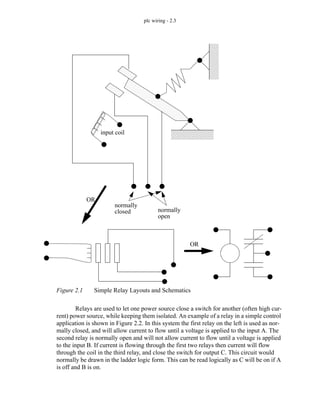
  • 226.
    plc design -10.1 10. STRUCTURED LOGIC DESIGN 10.1 INTRODUCTION Traditionally ladder logic programs have been written by thinking about the pro- cess and then beginning to write the program. This always leads to programs that require debugging. And, the final program is always the subject of some doubt. Structured design techniques, such as Boolean algebra, lead to programs that are predictable and reliable. The structured design techniques in this and the following chapters are provided to make ladder logic design routine and predictable for simple sequential systems. Topics: Objectives: • Know examples of applications to industrial problems. • Know how to design time base control programs. • Timing diagrams • Design examples • Designing ladder logic with process sequence bits and timing diagrams Note: Structured design is very important in engineering, but many engineers will write software without taking the time or effort to design it. This often comes from previous experience with programming where a program was written, and then debugged. This approach is not acceptable for mission critical systems such as industrial controls. The time required for a poorly designed program is 10% on design, 30% on writing, 40% debugging and testing, 10% documentation. The time required for a high quality pro- gram design is 30% design, 10% writing software, 10% debugging and testing, 10% documentation. Yes, a well designed program requires less time! Most beginners per- ceive the writing and debugging as more challenging and productive, and so they will rush through the design stage. If you are spending time debugging ladder logic pro- grams you are doing something wrong. Structured design also allows others to verify and modify your programs. Axiom: Spend as much time on the design of the program as possible. Resist the tempta- tion to implement an incomplete design.
  • 227.
    plc design -10.2 Most control systems are sequential in nature. Sequential systems are often described with words such as mode and behavior. During normal operation these systems will have multiple steps or states of operation. In each operational state the system will behave differently. Typical states include start-up, shut-down, and normal operation. Con- sider a set of traffic lights - each light pattern constitutes a state. Lights may be green or yellow in one direction and red in the other. The lights change in a predictable sequence. Sometimes traffic lights are equipped with special features such as cross walk buttons that alter the behavior of the lights to give pedestrians time to cross busy roads. Sequential systems are complex and difficult to design. In the previous chapter timing charts and process sequence bits were discussed as basic design techniques. But, more complex systems require more mature techniques, such as those shown in Figure 10.1. For simpler controllers we can use limited design techniques such as process sequence bits and flow charts. More complex processes, such as traffic lights, will have many states of operation and controllers can be designed using state diagrams. If the con- trol problem involves multiple states of operation, such as one controller for two indepen- dent traffic lights, then Petri net or SFC based designs are preferred. Figure 10.1 Sequential Design Techniques 10.2 PROCESS SEQUENCE BITS A typical machine will use a sequence of repetitive steps that can be clearly identi- sequential problem simple/small steps with complex/large single process STATE DIAGRAM EQUATIONS BLOCK LOGIC shorter development time performance is important multiple SFC/GRAFSET PETRI NET processes buffered (waiting) state triggers no waiting with single states SEQUENCE BITS FLOW CHART some deviations very clear steps
  • 228.
    plc design -10.3 fied. Ladder logic can be written that follows this sequence. The steps for this design method are; 1. Understand the process. 2. Write the steps of operation in sequence and give each step a number. 3. For each step assign a bit. 4. Write the ladder logic to turn the bits on/off as the process moves through its states. 5. Write the ladder logic to perform machine functions for each step. 6. If the process is repetitive, have the last step go back to the first. Consider the example of a flag raising controller in Figure 10.2 and Figure 10.3. The problem begins with a written description of the process. This is then turned into a set of numbered steps. Each of the numbered steps is then converted to ladder logic.
  • 229.
    plc design -10.4 Figure 10.2 A Process Sequence Bit Design Example Description: A flag raiser that will go up when an up button is pushed, and down when a down button is pushed, both push buttons are momentary. There are limit switches at the top and bottom to stop the flag pole. When turned on at first the flag should be lowered until it is at the bottom of the pole. Steps: 1. The flag is moving down the pole waiting for the bottom limit switch. 2. The flag is idle at the bottom of the pole waiting for the up button. 3. The flag moves up, waiting for the top limit switch. 4. The flag is idle at the top of the pole waiting for the down button. L U U U step 1 step 2 step 3 step 4 first scan This section of ladder logic forces the flag raiser to start with only one state on, in this case it should be the first one, step 1. Ladder Logic: down step 1 The ladder logic for step 1 turns on the motor to lower the flag and when the bottom limit switch is hit it goes to step 2. motor L U step 2 step 1 step 1 bottom limit switch The ladder logic for step 2 only waits for the push button to raise the flag. L U step 3 step 2 step 2 flag up button
  • 230.
    plc design -10.5 Figure 10.3 A Process Sequence Bit Design Example (continued) The previous method uses latched bits, but the use of latches is sometimes discour- aged. A more common method of implementation, without latches, is shown in Figure 10.4. up step 3 The ladder logic for step 3 turns on the motor to raise the flag and when the top limit switch is hit it goes to step 4. motor L U step 4 step 3 step 3 top limit switch The ladder logic for step 4 only waits for the push button to lower the flag. L U step 1 step 4 step 4 flag down button
  • 231.
    plc design -10.6 Figure 10.4 Process Sequence Bits Without Latches Similar methods are explored in further detail in the book Cascading Logic (Kirckof, 2003). 10.3 TIMING DIAGRAMS Timing diagrams can be valuable when designing ladder logic for processes that are only dependant on time. The timing diagram is drawn with clear start and stop times. Ladder logic is constructed with timers that are used to turn outputs on and off at appropri- down step 1 motor step1 step4 step1 step2 bottom LS step2 step1 step2 step3 flag up button up step 3 motor step3 step2 step3 step4 top LS step4 step3 step4 step1 flag down button FS
  • 232.
    plc design -10.7 ate times. The basic method is; 1. Understand the process. 2. Identify the outputs that are time dependant. 3. Draw a timing diagram for the outputs. 4. Assign a timer for each time when an output turns on or off. 5. Write the ladder logic to examine the timer values and turn outputs on or off. Consider the handicap door opener design in Figure 10.5 that begins with a verbal description. The verbal description is converted to a timing diagram, with t=0 being when the door open button is pushed. On the timing diagram the critical times are 2s, 10s, 14s. The ladder logic is constructed in a careful order. The first item is the latch to seal-in the open button, but shut off after the last door closes. auto is used to turn on the three timers for the critical times. The logic for opening the doors is then written to use the timers.
  • 233.
    plc design -10.8 Figure 10.5 Design With a Timing Diagram Description: A handicap door opener has a button that will open two doors. When the but- ton is pushed (momentarily) the first door will start to open immediately, the second door will start to open 2 seconds later. The first door power will stay open for a total of 10 seconds, and the second door power will stay on for 14 seconds. Use a timing dia- gram to design the ladder logic. door 1 door 2 2s 10s 14s Timing Diagram: Ladder Logic: open button auto auto t_14.DN TON Timer t_2 Delay 2s TON Timer t_10 Delay 10s TON Timer t_14 Delay 14s auto t_10.TT door 1 t_2.TT door 2 t_2.DN
  • 234.
    plc design -10.9 10.4 DESIGN CASES 10.5 SUMMARY • Timing diagrams can show how a system changes over time. • Process sequence bits can be used to design a process that changes over time. • Timing diagrams can be used for systems with a time driven performance. 10.6 PRACTICE PROBLEMS 1. Write ladder logic that will give the following timing diagram for B after input A is pushed. After A is pushed any changes in the state of A will be ignored. 2. Design ladder logic for the timing diagram below. When an input A becomes active the sequence should start. 3. A wrapping process is to be controlled with a PLC. The general sequence of operations is described below. Develop the ladder logic using process sequence bits. 1. The folder is idle until a part arrives. 2. When a part arrives it triggers the part sensor and the part is held in place by actuating the hold actuator. true false 0 2 5 6 8 9 t(sec) 100 300 500 700 900 1100 1900 t (ms) X Y Z
  • 235.
    plc design -10.10 3. The first wrap is done by turning on output paper for 1 second. 4. The paper is then folded by turning on the crease output for 0.5 seconds. 5. An adhesive is applied by turning on output tape for 0.75 seconds. 6. The part is release by turning off output hold. 7. The process pauses until the part sensors goes off, and then the machine returns to idle. 10.7 PRACTICE PROBLEM SOLUTIONS 1. TON Timer t_a Base 1s Preset 2 on TON Timer t_b Base 1s Preset 3 t_a.DN TON Timer t_c Base 1s Preset 1 t_b.DN TON Timer t_d Base 1s Preset 2 t_c.DN TON Timer t_e Base 1s Preset 1 t_d.DN t_a.TT output t_c.TT t_e.TT
  • 236.
    plc design -10.11 2. TON t_1 0.100 s TON t_3 0.300 s TON t_5 0.500 s TON t_7 0.700 s TON t_9 0.900 s TON t_11 1.100 s TON t_19 1.900 s A t_1.TT t_5.DN t_19.DN X t_1.EN stop t_1.DN t_3.DN t_5.DN t_7.DN t_9.DN t_11.DN t_11.TT Y Z
  • 237.
    plc design -10.12 3. (for both solutions step2 hold paper step3 crease step4 tape step3 step4 step5 step2
  • 238.
    plc design -10.13 (without latches first pass step1 step1 stop part part step2 step2 paper_delay.DN stop paper_delay.DN step3 step3 crease_delay.DN stop TON paper_delay delay 1 s step2 crease_delay.DN step4 step4 tape_delay.DN stop TON crease_delay delay 0.5 s step3 tape_delay.DN step5 step5 part stop TON tape_delay delay 0.75 s step4 part
  • 239.
    plc design -10.14 10.8 ASSIGNMENT PROBLEMS 1. Convert the following timing diagram to ladder logic. It should begin when input ‘A’ becomes (with latches first pass step1 step1 stop part step2 TON paper_delay delay 1 s step2 L step2 U step3 U step4 U step5 U L step1 U step3 TON crease_delay delay 0.5 s step3 L step2 U paper_delay.DN step4 TON tape_delay delay 0.75 s step4 L step3 U crease_delay.DN step5 L step4 U tape_delay.DN step1 L step5 U step5 part
  • 240.
    plc design -10.15 true. 2. Use the timing diagram below to design ladder logic. The sequence should start when input X turns on. X may only be on momentarily, but the sequence should continue to execute until it ends at 26 seconds. 3. Use the timing diagram below to design ladder logic. The sequence should start when input X turns on. X may only be on momentarily, but the sequence should execute anyway. 4. Write a program that will execute the following steps. When in steps b) or d), output C will be true. Output X will be true when in step c). a) Start in an idle state. If input G becomes true go to b) b) Wait until P becomes true before going to step c). c) Wait for 3 seconds then go to step d). d) Wait for P to become false, and then go to step b). 5. Write a program that will execute the following steps. When in steps b) or d), output C will be true. Output X will be true when in step c). X t(sec) 0 0.2 0.5 1.2 1.3 1.4 1.6 2.0 A B 3 5 11 22 26 t (sec) 0 A B 2 3 5 7 11 16 22 26 t (sec)
  • 241.
    plc design -10.16 a) Start in an idle state. If input G becomes true go to b) b) Wait until P becomes true before going to step c). If input S becomes true then go to step a). c) Wait for 3 seconds then go to step d). d) Wait for P to become false, and then go to step b). 6. A PLC is to control an amusement park water ride. The ride will fill a tank of water and splash a tour group. 10 seconds later a water jet will be ejected at another point. Develop ladder logic for the process that follows the steps listed below. 1. The process starts in ‘idle’. 2. The ‘cart_detect’ opens the ‘filling’ valve. 3. After a delay of 30 seconds from the start of the filling of the tank the tank ‘out- let’ valve opens. When the tank is ‘full’ the ‘filling’ valve closes. 4. When the tank is empty the ‘outlet’ valve is closed. 5. After a 10 second delay, from the tank outlet valve opening, a water ‘jet’ is opened. 6. After ‘2’ seconds the water ‘jet’ is closed and the process returns to the ‘idle state. 7. Write a ladder logic program to extend and retract a cylinder after a start button is pushed. There are limit switches at the ends of travel. If the cylinder is extending if more than 5 sec- onds the machine should shut down and turn on a fault light. If it is retracting for more than 3 seconds it should also shut down and turn on the fault light. It can be reset with a reset button. 8. Design a program with sequence bits for a hydraulic press that will advance when two palm buttons are pushed. Top and bottom limit switches are used to reverse the advance and stop after a retract. At any time the hands removed from the palm button will stop an advance and retract the press. Include start and stop buttons to put the press in and out of an active mode. 9. A machine has been built for filling barrels. Use process sequence bits to design ladder logic for the sequential process as described below. 1. The process begins in an idle state. 2. If the ‘fluid_pressure’ and ‘barrel_present’ inputs are on, the system will open a flow valve for 2 seconds with output ‘flow’. 3. The ‘flow’ valve will then be turned off for 10 seconds. 4. The ‘flow’ valve will then be turned on until the ‘full’ sensor indicates the barrel is full. 5. The system will wait until the ‘barrel_present’ sensor goes off before going to the idle state. 10. Design ladder logic for an oven using process sequence bits. (Note: the solution will only be graded if the process sequence bit method is used.) The operations are as listed below. 1. The oven begins in an IDLE state. 2. An operator presses a start button and an ALARM output is turned on for 1 minute. 3. The ALARM output is turned off and the HEAT is turned on for 3 minutes to allow the tem- perature to rise to the acceptable range. 4. The CONVEYOR output is turned on. 5. If the STOP input is activated (turned off) the HEAT will be turned off, but the CON- VEYOR output will be kept on for two minutes. After this the oven returns to IDLE.
  • 242.
    plc design -10.17 11. We are developing a safety system (using a PLC-5) for a large industrial press. The press is activated by turning on the compressor power relay (R, connected to O:013/05). After R has been on for 30 seconds the press can be activated to move (P connected to O:013/06). The delay is needed for pressure to build up. After the press has been activated (with P for 1.0 sec- onds) the system must be shut down (R and P off), and then the cycle may begin again. For safety, there is a sensor that detects when a worker is inside the press (S, connected to I:011/ 02), which must be off before the press can be activated. There is also a button that must be pushed 5 times (B, connected to I:011/01) before the press cycle can begin. If at any time the worker enters the press (and S becomes active) the press will be shut down (P and R turned off). Develop the process sequence and sequence bits, and then ladder logic for the states. State all assumptions, and show all work. 12. A machine is being designed to wrap boxes of chocolate. The boxes arrive at the machine on a conveyor belt. The list below shows the process steps in sequence. 1. The box arrives and is detected by an optical sensor (P), after this the conveyor is stopped (C) and the box is clamped in place (H). 2. A wrapping mechanism (W) is turned on for 2 seconds. 3. A sticker cylinder (S) is turned on for 1 second to put consumer labelling on the box. 4. The clamp (H) is turned off and the conveyor (C) is turned on. 5. After the box leaves the system returns to an idle state. Develop ladder logic programs for the system using the following methods. Don’t forget to include regular start and stop inputs. i) a timing diagram ii) process sequence bits
  • 243.
    plc flowchart -11.1 11. FLOWCHART BASED DESIGN 11.1 INTRODUCTION A flowchart is ideal for a process that has sequential process steps. The steps will be executed in a simple order that may change as the result of some simple decisions. The symbols used for flowcharts are shown in Figure 11.1. These blocks are connected using arrows to indicate the sequence of the steps. The different blocks imply different types of program actions. Programs always need a start block, but PLC programs rarely stop so the stop block is rarely used. Other important blocks include operations and decisions. The other functions may be used but are not necessary for most PLC applications. Figure 11.1 Flowchart Symbols Topics: Objectives: • Ba able to describe a process with a flowchart. • Be able to convert a flowchart to ladder logic. • Describing process control using flowcharts • Conversion of flowcharts to ladder logic Start/Stop Operation Decision I/O Disk/Storage Subroutine
  • 244.
    plc flowchart -11.2 A flowchart is shown in Figure 11.2 for a control system for a large water tank. When a start button is pushed the tank will start to fill, and the flow out will be stopped. When full, or the stop button is pushed the outlet will open up, and the flow in will be stopped. In the flowchart the general flow of execution starts at the top. The first operation is to open the outlet valve and close the inlet valve. Next, a single decision block is used to wait for a button to be pushed. when the button is pushed the yes branch is followed and the inlet valve is opened, and the outlet valve is closed. Then the flow chart goes into a loop that uses two decision blocks to wait until the tank is full, or the stop button is pushed. If either case occurs the inlet valve is closed and the outlet valve is opened. The system then goes back to wait for the start button to be pushed again. When the controller is on the program should always be running, so only a start block is needed. Many begin- ners will neglect to put in checks for stop buttons.
  • 245.
    plc flowchart -11.3 Figure 11.2 A Flowchart for a Tank Filler The general method for constructing flowcharts is: 1. Understand the process. 2. Determine the major actions, these are drawn as blocks. 3. Determine the sequences of operations, these are drawn with arrows. START Open outlet valve start button pushed? Open inlet valve Close outlet valve Is tank full? stop button pushed? Open outlet valve Close inlet valve no no yes yes no yes Close inlet valve
  • 246.
    plc flowchart -11.4 4. When the sequence may change use decision blocks for branching. Once a flowchart has been created ladder logic can be written. There are two basic techniques that can be used, the first presented uses blocks of ladder logic code. The sec- ond uses normal ladder logic. 11.2 BLOCK LOGIC The first step is to name each block in the flowchart, as shown in Figure 11.3. Each of the numbered steps will then be converted to ladder logic
  • 247.
    plc flowchart -11.5 Figure 11.3 Labeling Blocks in the Flowchart Each block in the flowchart will be converted to a block of ladder logic. To do this we will use the MCR (Master Control Relay) instruction (it will be discussed in more detail later.) The instruction is shown in Figure 11.4, and will appear as a matched pair of outputs labelled MCR. If the first MCR line is true then the ladder logic on the following lines will be scanned as normal to the second MCR. If the first line is false the lines to the START Open outlet valve start button pushed? Open inlet valve Close outlet valve Is tank full? stop button pushed? Open outlet valve Close inlet valve no no yes yes no yes F1 F2 F3 F4 F5 F6 STEP 1: Add labels to each block in the flowchart Close inlet valve
  • 248.
    plc flowchart -11.6 next MCR block will all be forced off. If a normal output is used inside an MCR block, it may be forced off. Therefore latches will be used in this method. Figure 11.4 The MCR Function The first part of the ladder logic required will reset the logic to an initial condition, as shown in Figure 11.5. The line will only be true for the first scan of the PLC, and at that time it will turn on the flowchart block F1 which is the reset all values off operation. All other operations will be turned off. A MCR MCR If A is true then the MCR will cause the ladder in between to be executed. If A is false the outputs are forced off. Note: We will use MCR instructions to implement some of the state based programs. This allows us to switch off part of the ladder logic. The one significant note to remember is that any normal outputs (not latches and timers) will be FORCED OFF. Unless this is what you want, put the normal outputs outside MCR blocks.
  • 249.
    plc flowchart -11.7 Figure 11.5 Initial Reset of States The ladder logic for the first state is shown in Figure 11.6. When F1 is true the logic between the MCR lines will be scanned, if F1 is false the logic will be ignored. This logic turns on the outlet valve and turns off the inlet valve. It then turns off operation F1, and turns on the next operation F2. L U U U U U first scan F1 F2 F3 F4 F5 F6 STEP 2: Write ladder logic to force the PLC into the first state
  • 250.
    plc flowchart -11.8 Figure 11.6 Ladder Logic for the Operation F1 The ladder logic for operation F2 is simple, and when the start button is pushed, it will turn off F2 and turn on F3. The ladder logic for operation F3 opens the inlet valve and moves to operation F4. MCR F1 MCR L U outlet inlet U L F1 F2 STEP 3: Write ladder logic for each function in the flowchart
  • 251.
    plc flowchart -11.9 Figure 11.7 Ladder Logic for Flowchart Operations F2 and F3 The ladder logic for operation F4 turns off F4, and if the tank is full it turns on F6, otherwise F5 is turned on. The ladder logic for operation F5 is very similar. MCR F2 MCR U L F2 F3 start MCR F3 MCR U L outlet inlet U L F3 F4
  • 252.
    plc flowchart -11.10 Figure 11.8 Ladder Logic for Operations F4 and F5 The ladder logic for operation F6 turns the outlet valve on and turns off the inlet valve. It then ends operation F6 and returns to operation F2. MCR F4 MCR U F4 L F6 tank full L F5 tank full MCR F5 MCR U F5 L F6 stop L F4 stop
  • 253.
    plc flowchart -11.11 Figure 11.9 Ladder Logic for Operation F6 11.3 SEQUENCE BITS In general there is a preference for methods that do not use MCR statements or latches. The flowchart used in the previous example can be implemented without these instructions using the following method. The first step to this process is shown in Figure 11.10. As before each of the blocks in the flowchart are labelled, but now the connecting arrows (transitions) in the diagram must also be labelled. These transitions indicate when another function block will be activated. MCR F6 MCR L U outlet inlet U L F6 F2
  • 254.
    plc flowchart -11.12 Figure 11.10 Label the Flowchart Blocks and Arrows The first section of ladder logic is shown in Figure 11.11. This indicates when the transitions between functions should occur. All of the logic for the transitions should be kept together, and appear before the state logic that follows in Figure 11.12. START Open outlet valve start button pushed? Open inlet valve Close outlet valve Is tank full? stop button pushed? Open outlet valve Close inlet valve no no yes yes no yes F1 F2 F3 F4 F5 F6 T2 T3 T4 T5 T6 T1 Close inlet valve is the NO is the NC
  • 255.
    plc flowchart -11.13 Figure 11.11 The Transition Logic The logic shown in Figure 11.12 will keep a function on, or switch to the next function. Consider the first ladder rung for F1, it will be turned on by transition T1 and once function F1 is on it will keep itself on, unless T2 occurs shutting it off. If T2 has occurred the next line of ladder logic will turn on F2. The function logic is followed by output logic that relates output values to the active functions. FS T1 F1 T2 F2 T3 start F6 F2 start F3 T4 F5 stop F4 T5 full T6 F5 stop F4 full
  • 256.
    plc flowchart -11.14 Figure 11.12 The Function Logic and Outputs F1 T1 T2 F1 F2 T2 T3 F2 F3 T3 T4 F3 F4 T4 T5 F4 F5 T5 T4 F5 F6 T6 T2 F6 T6 T6 F1 outlet F2 F6 F3 inlet F4 F5
  • 257.
    plc flowchart -11.15 11.4 SUMMARY • Flowcharts are suited to processes with a single flow of execution. • Flowcharts are suited to processes with clear sequences of operation. 11.5 PRACTICE PROBLEMS 1. Convert the following flow chart to ladder logic. 2. Draw a flow chart for cutting the grass, then develop ladder logic for three of the actions/deci- sions. 3. Design a garage door controller using a flowchart. The behavior of the garage door controller is as follows, - there is a single button in the garage, and a single button remote control. - when the button is pushed the door will move up or down. - if the button is pushed once while moving, the door will stop, a second push will start motion again in the opposite direction. - there are top/bottom limit switches to stop the motion of the door. - there is a light beam across the bottom of the door. If the beam is cut while the door is closing the door will stop and reverse. - there is a garage light that will be on for 5 minutes after the door opens or closes. start A on is B on? A off yes no yes no is C on?
  • 258.
    plc flowchart -11.16 11.6 PRACTICE PROBLEM SOLUTIONS 1. start A on is B on? A off yes no yes no is C on? F1 F2 F3 F4 F1 F2 F3 F4 L U U U first scan MCR F1 A L F1 F2 L U MCR MCR F2 F2 U F3 L MCR B MCR F3 A U F3 F4 L U MCR MCR F4 F4 U F1 L MCR C F4 U F2 L C
  • 259.
    plc flowchart -11.17 2. Start Get mower and Is gas can gas can Fill mower Is Mower on? empty? Pull cord Is all lawn cut? Push Mower Stop mower Put gas and get gas mower away yes no no yes yes no F1 F2 F3 F4 F5 F6 F7 F8 F9 F10
  • 260.
    plc flowchart -11.18 FS F1 F2 F3 F4 F5 F6 F7 F8 F9 F10 F1 MCR MCR mower gas can L L F1 F2 U L F2 MCR MCR F3 F2 L U gas can empty F4 F2 L U gas can empty
  • 261.
    plc flowchart -11.19 F3 MCR MCR F4 F3 L U F4 MCR MCR F5 F4 L U t_0.DN pour gas t_0.DN fill gas tank gas can full TON Timer t_0 Delay 5s F5 MCR MCR F6 F5 L U pull cord cord pulled cord pulled F6 MCR MCR F7 L mower on F5 L mower on F6 U ETC.....................
  • 262.
    plc flowchart -11.20 3. ST1 start is remote or button pushed? yes no turn on door close is remote or button or bottom yes no is light beam on? no yes limit pushed? turn off door close is remote or button pushed? yes turn on door open is remote or button or top yes limit pushed? turn off door open no ST2 ST3 ST4 ST5 ST6 ST7 ST8 ST9
  • 263.
    plc flowchart -11.21 L U U U U U U U U first scan ST1 ST2 ST3 ST4 ST5 ST6 ST7 ST8 ST9 ST2 ST7 TOF t_st2 preset 300s t_st2.DN garage light U U door open door close
  • 264.
    plc flowchart -11.22 MCR ST1 MCR U button L remote ST1 ST2 MCR ST2 MCR U L ST2 ST3 L door close
  • 265.
    plc flowchart -11.23 MCR ST3 MCR U button L remote ST3 ST5 bottom limit U ST3 ST3 L ST4 MCR ST4 MCR U light beam L ST4 ST7 U light beam L ST4 ST3
  • 266.
    plc flowchart -11.24 MCR ST5 MCR U L ST5 ST6 U door close MCR ST6 MCR U button L remote ST6 ST7 MCR ST7 MCR U L ST7 ST8 L door open
  • 267.
    plc flowchart -11.25 MCR ST8 MCR U button L remote ST8 ST9 top limit MCR ST9 MCR U L ST9 ST1 U door open
  • 268.
    plc flowchart -11.26 11.7 ASSIGNMENT PROBLEMS 1. Develop ladder logic for the flowchart below. 2. Use a flow chart to design a parking gate controller. Start Turn A on Is B on? Turn A off Is C on? no yes yes no keycard entry gate car detector light cars enter/leave - the gate will be raised by one output and lowered by another. If the gate gets stuck an over current detector will make a PLC input true. If this is the case the gate should reverse and the light should be turned on indefinitely. - if a valid keycard is entered a PLC input will be true. The gate is to rise and stay open for 10 seconds. - when a car is over the car detector a PLC input will go true. The gate is to open while this detector is active. If it is active for more that 30 seconds the light should also turn on until the gate closes.
  • 269.
    plc flowchart -11.27 3. A welding station is controlled by a PLC. On the outside is a safety cage that must be closed while the cell is active. A belt moves the parts into the welding station and back out. An induc- tive proximity sensor detects when a part is in place for welding, and the belt is stopped. To weld, an actuator is turned on for 3 seconds. As normal the cell has start and stop push buttons. a) Draw a flow chart b) Implement the chart in ladder logic 4. Convert the following flowchart to ladder logic. 5. A machine is being designed to wrap boxes of chocolate. The boxes arrive at the machine on a conveyor belt. The list below shows the process steps in sequence. 1. The box arrives and is detected by an optical sensor (P), after this the conveyor is stopped (C) and the box is clamped in place (H). 2. A wrapping mechanism (W) is turned on for 2 seconds. 3. A sticker cylinder (S) is turned on for 1 second to put consumer labelling on the Inputs DOOR OPEN (NC) START (NO) STOP (NC) PART PRESENT Outputs CONVEYOR ON WELD Start Turn off motor Turn on motor start pushed no yes stop pushed no yes
  • 270.
    plc flowchart -11.28 box. 4. The clamp (H) is turned off and the conveyor (C) is turned on. 5. After the box leaves the system returns to an idle state. Develop ladder logic for the system using a flowchart. Don’t forget to include regular start and stop inputs.
  • 271.
    plc states -12.1 12. STATE BASED DESIGN 12.1 INTRODUCTION A system state is a mode of operation. Consider a bank machine that will go through very carefully selected states. The general sequence of states might be idle, scan card, get secret number, select transaction type, ask for amount of cash, count cash, deliver cash/return card, then idle. A State based system can be described with system states, and the transitions between those states. A state diagram is shown in Figure 12.1. The diagram has two states, State 1 and State 2. If the system is in state 1 and A happens the system will then go into state 2, otherwise it will remain in State 1. Likewise if the system is in state 2, and B hap- pens the system will return to state 1. As shown in the figure this state diagram could be used for an automatic light controller. When the power is turned on the system will go into the lights off state. If motion is detected or an on push button is pushed the system will go to the lights on state. If the system is in the lights on state and 1 hour has passed, or an off push button is pushed then the system will go to the lights off state. The else statements are omitted on the second diagram, but they are implied. Topics: Objectives: • Be able to construct state diagrams for a process. • Be able to convert a state diagram to ladder logic directly. • Be able to convert state diagrams to ladder logic using equations. • Describing process control using state diagrams • Conversion of state diagrams to ladder logic • MCR blocks
  • 272.
    plc states -12.2 Figure 12.1 A State Diagram The most essential part of creating state diagrams is identifying states. Some key questions to ask are, 1. Consider the system, What does the system do normally? Does the system behavior change? Can something change how the system behaves? Is there a sequence to actions? 2. List modes of operation where the system is doing one identifiable activity that will start and stop. Keep in mind that some activities may just be to wait. Consider the design of a coffee vending machine. The first step requires the identi- fication of vending machine states as shown in Figure 12.2. The main state is the idle state. There is an inserting coins state where the total can be displayed. When enough coins have been inserted the user may select their drink of choice. After this the make coffee state will State 1 State 2 A B else else This diagram could describe the operation of energy efficient lights in a room operated by two push buttons. State 1 might be lights off and state 2 might be lights on. The arrows between the states are called transitions and will be followed when the condi- tions are true. In this case if we were in state 1 and A occurred we would move to state 2. The else loop indicate that a state will stay active if a transition are is not fol- lowed. These are so obvious they are often omitted from state diagrams. Lights off Lights on on_pushbutton off_pushbutton OR 1 hour timer power on OR motion detector
  • 273.
    plc states -12.3 be active while coffee is being brewed. If an error is detected the service needed state will be activated. Figure 12.2 Definition of Vending Machine States The states are then drawn in a state diagram as shown in Figure 12.3. Transitions are added as needed between the states. Here we can see that when powered up the machine will start in an idle state. The transitions here are based on the inputs and sensors in the vending machine. The state diagram is quite subjective, and complex diagrams will differ from design to design. These diagrams also expose the controller behavior. Consider that if the machine needs maintenance, and it is unplugged and plugged back in, the ser- vice needed statement would not be reentered until the next customer paid for but did not receive their coffee. In a commercial design we would want to fix this oversight. STATES idle - the machine has no coins and is doing nothing inserting coins - coins have been entered and the total is displayed user choose - enough money has been entered and the user is making coffee selection make coffee - the selected type is being made service needed - the machine is out of coffee, cups, or another error has occurred Notes: 1. These states can be subjective, and different designers might pick others. 2. The states are highly specific to the machine. 3. The previous/next states are not part of the states. 4. There is a clean difference between states.
  • 274.
    plc states -12.4 Figure 12.3 State Diagram for a Coffee Machine 12.1.1 State Diagram Example Consider the traffic lights in Figure 12.4. The normal sequences for traffic lights are a green light in one direction for a long period of time, typically 10 or more seconds. This is followed by a brief yellow light, typically 4 seconds. This is then followed by a similar light pattern in the other direction. It is understood that a green or yellow light in one direction implies a red light in the other direction. Pedestrian buttons are provided so that when pedestrians are present a cross walk light can be turned on and the duration of the green light increased. power up idle inserting coins user choose make coffee service needed coin inserted coin return coin return right amount entered button pushed cup removed no cups OR no coffee OR jam sensor reset button
  • 275.
    plc states -12.5 Figure 12.4 Traffic Lights The first step for developing a controller is to define the inputs and outputs of the system as shown in Figure 12.5. First we will describe the system variables. These will vary as the system moves from state to state. Please note that some of these together can define a state (alone they are not the states). The inputs are used when defining the transi- tions. The outputs can be used to define the system state. Figure 12.5 Inputs and Outputs for Traffic Light Controller Red Yellow Green L1 L2 L3 Red Yellow Green L4 L5 L6 East/West North/South Walk Button - S2 Walk Button - S1 We have eight items that are ON or OFF L1 L2 L3 L4 L5 L6 S1 S2 OUTPUTS INPUTS A simple diagram can be drawn to show sequences for the lights Note that each state will lead to a different set of out- puts. The inputs are often part, or all of the transi- tions.
  • 276.
    plc states -12.6 Previously state diagrams were used to define the system, it is possible to use a state table as shown in Figure 12.6. Here the light sequences are listed in order. Each state is given a name to ease interpretation, but the corresponding output pattern is also given. The system state is defined as the bit pattern of the 6 lights. Note that there are only 4 pat- terns, but 6 binary bits could give as many as 64. Figure 12.6 System State Table for Traffic Lights Transitions can be added to the state table to clarify the operation, as shown in Fig- ure 12.7. Here the transition from Green E/W to Yellow E/W is S1. What this means is that a cross walk button must be pushed to end the green light. This is not normal, nor- mally the lights would use a delay. The transition from Yellow E/W to Green N/S is caused by a 4 second delay (this is normal.) The next transition is also abnormal, requiring that the cross walk button be pushed to end the Green N/S state. The last state has a 4 sec- ond delay before returning to the first state in the table. In this state table the sequence will always be the same, but the times will vary for the green lights. Step 1: Define the System States and put them (roughly) in sequence L1 L2 L3 L4 L5 L6 A binary number 0 = light off 1 = light on State Table L1 L2 L3 L4 L5 L6 1 1 0 0 0 0 0 1 0 0 1 0 0 0 1 1 0 1 0 0 1 0 0 0 System State # 1 2 3 4 Green North/South Yellow North/South Green East/West Yellow East/West State Description Here the four states determine how the 6 outputs are switched on/off.
  • 277.
    plc states -12.7 Figure 12.7 State Table with Transitions A state diagram for the system is shown in Figure 12.8. This diagram is equivalent to the state table in Figure 12.7, but it can be valuable for doing visual inspection. Figure 12.8 A Traffic Light State Diagram 12.1.2 Conversion to Ladder Logic 12.1.2.1 - Block Logic Conversion Step 2: Define State Transition Triggers, and add them to the list of states L1 L2 L3 L4 L5 L6 1 1 0 0 0 0 0 1 0 0 1 0 0 0 1 1 0 1 0 0 1 0 0 0 transition S1 delay S2 delay 4 sec 4sec # 1 2 3 4 Green North/South Yellow North/South Green East/West Yellow East/West Description Step 3: Draw the State Transition Diagram grn. EW yel. EW grn. NS yel. NS pushbutton NS (i.e., S1,S2 = 10) delay 4sec pushbutton EW (i.e. 01) delay 4sec first scan
  • 278.
    plc states -12.8 State diagrams can be converted directly to ladder logic using block logic. This technique will produce larger programs, but it is a simple method to understand, and easy to debug. The previous traffic light example is to be implemented in ladder logic. The inputs and outputs are defined in Figure 12.9, assuming it will be implemented on an Allen Bradley Micrologix. first scan is the address of the first scan in the PLC. The loca- tions state_1 to state_4 are internal memory locations that will be used to track which states are on. The behave like outputs, but are not available for connection outside the PLC. The input and output values are determined by the PLC layout. Figure 12.9 Inputs and Outputs for Traffic Light Controller The initial ladder logic block shown in Figure 12.10 will initialize the states of the PLC, so that only state 1 is on. The first scan indicator first scan will execute the MCR block when the PLC is first turned on, and the latches will turn on the value for state_1 and turn off the others. STATES state_1 - green E/W state_2 - yellow E/W state_3 - green N/S state_4 - yellow N/S OUTPUTS L1 - red N/S L2 - yellow N/S L3 - green N/S L4 - red E/W L5 - yellow E/W L6 - green E/W INPUTS S1 - cross S2 - cross S:FS - first scan
  • 279.
    plc states -12.9 Figure 12.10 Ladder Logic to Initialize Traffic Light Controller The next section of ladder logic only deals with outputs. For example the output O/ 1 is the N/S red light, which will be on for states 1 and 2, or B3/1 and B3/2 respectively. Putting normal outputs outside the MCR blocks is important. If they were inside the S:FS MCR state_1 state_2 state_3 state_4 MCR L U U U RESET THE STATES A MCR MCR If A is true then the MCR will cause the ladder in between to be executed. If A is false the outputs are forced off. Note: We will use MCR instructions to implement some of the state based programs. This allows us to switch off part of the ladder logic. The one significant note to remember is that any normal outputs (not latches and timers) will be FORCED OFF. Unless this is what you want, put the normal outputs outside MCR blocks.
  • 280.
    plc states -12.10 blocks they could only be on when the MCR block was active, otherwise they would be forced off. Note: Many beginners will make the careless mistake of repeating outputs in this section of the program. Figure 12.11 General Output Control Logic The first state is implemented in Figure 12.10. If state_1 is active this will be active. The transition is S1 which will end state_1 and start state_2. TURN ON LIGHTS AS REQUIRED state_1 state_2 state_4 state_3 state_3 state_4 state_2 state_1 L1 L2 L3 L4 L5 L6
  • 281.
    plc states -12.11 Figure 12.12 Ladder Logic for First State The second state is more complex because it involves a time delay, as shown in Figure 12.13. When the state is active the TON timer will be timing. When the timer is done state 2 will be unlatched, and state 3 will be latched on. The timer is nonretentive, so if state_2 if off the MCR block will force all of the outputs off, including the timer, caus- ing it to reset. state_1 MCR FIRST STATE WAIT FOR TRANSITIONS S1 L1 S1 L2 MCR U L
  • 282.
    plc states -12.12 Figure 12.13 Ladder Logic for Second State The third and fourth states are shown in Figure 12.14 and Figure 12.15. Their lay- out is very similar to that of the first two states. Figure 12.14 Ladder Logic for State Three state_2 MCR SECOND STATE WAIT FOR TRANSITIONS t_st2.DN state_2 t_st2.DN state_3 MCR U L t_st2 TON delay 4 s state_3 MCR THIRD STATE WAIT FOR TRANSITIONS S2 state_3 S2 state_4 MCR U L
  • 283.
    plc states -12.13 Figure 12.15 Ladder Logic for State Four The previous example only had one path through the state tables, so there was never a choice between states. The state diagram in Figure 12.16 could potentially have problems if two transitions occur simultaneously. For example if state STB is active and A and C occur simultaneously, the system could go to either STA or STC (or both in a poorly written program.) To resolve this problem we should choose one of the two transitions as having a higher priority, meaning that it should be chosen over the other transition. This decision will normally be clear, but if not an arbitrary decision is still needed. state_4 MCR FOURTH STATE WAIT FOR TRANSITIONS t_st4.DN state_4 t_st4.DN state_1 MCR U L t_st4 RTO delay 4s t_st4.DN t_st4 RST
  • 284.
    plc states -12.14 Figure 12.16 A State Diagram with Priority Problems The state diagram in Figure 12.16 is implemented with ladder logic in Figure 12.17 and Figure 12.18. The implementation is the same as described before, but for state STB additional ladder logic is added to disable transition A if transition C is active, there- fore giving priority to C. first scan STA STB STC A B C D
  • 285.
    plc states -12.15 first scan L U U STA STB STC MCR U L STB MCR STA STA B MCR U L STC MCR STB STB C U L STA STB C A Note: if A and C are true at the same time then C will have priority. PRIORITIZATION is impor- tant when simultaneous branches are possible.
  • 286.
    plc states -12.16 Figure 12.17 State Diagram for Prioritization Problem Figure 12.18 State Diagram for Prioritization Problem The Block Logic technique described does not require any special knowledge and the programs can be written directly from the state diagram. The final programs can be easily modified, and finding problems is easier. But, these programs are much larger and less efficient. 12.1.2.2 - State Equations State diagrams can be converted to Boolean equations and then to Ladder Logic. The first technique that will be described is state equations. These equations contain three main parts, as shown below in Figure 12.19. To describe them simply - a state will be on if it is already on, or if it has been turned on by a transition from another state, but it will be turned off if there was a transition to another state. An equation is required for each state in the state diagram. MCR U L STB MCR STC STC D
  • 287.
    plc states -12.17 Figure 12.19 State Equations The state equation method can be applied to the traffic light example in Figure 12.8. The first step in the process is to define variable names (or PLC memory locations) to keep track of which states are on or off. Next, the state diagram is examined, one state at a time. The first equation if for ST1, or state 1 - green NS. The start of the equation can be read as ST1 will be on if it is on, or if ST4 is on, and it has been on for 4s, or if it is the first scan of the PLC. The end of the equation can be read as ST1 will be turned off if it is on, but S1 has been pushed and S2 is off. As discussed before, the first half of the equation will turn the state on, but the second half will turn it off. The first scan is also used to turn on ST1 when the PLC starts. It is put outside the terms to force ST1 on, even if the exit conditions are true. STATEi STATEi Tj i , STATEj • ( ) j 1 = n ∑ + ⎝ ⎠ ⎜ ⎟ ⎛ ⎞ Ti k , STATEi • ( ) k 1 = m ∏ • = Informally, State X = (State X + just arrived from another state) and has not left for another state Formally, where, STATEi A variable that will reflect if state i is on = n the number of transitions to state i = m the number of transitions out of state i = Tj i , The logical condition of a transition from state j to i = Ti k , The logical condition of a transition out of state i to k =
  • 288.
    plc states -12.18 Figure 12.20 State Equations for the Traffic Light Example The equations in Figure 12.20 cannot be implemented in ladder logic because of the NOT over the last terms. The equations are simplified in Figure 12.21 so that all NOT operators are only over a single variable. ST1 state 1 - green NS = ST2 state 2 - yellow NS = ST3 state 3 - green EW = ST4 state 4 - yellow EW = ST1 ST1 ST4 TON2 ST4 4s , ( ) ⋅ + ( ) ST1 S1 S2 ⋅ ⋅ ⋅ FS + = ST2 ST2 ST1 S1 S2 ⋅ ⋅ + ( ) ST2 TON1 ST2 4s , ( ) ⋅ ⋅ = ST3 ST3 ST2 TON1 ST2 4s , ( ) ⋅ + ( ) ST3 S1 S2 ⋅ ⋅ ⋅ = ST4 ST4 ST3 S1 S2 ⋅ ⋅ + ( ) ST4 TON2 ST4 4s , ( ) ⋅ ⋅ = Defined state variables: The state entrance and exit condition equations: Note: Timers are represented in these equations in the form TONi(A, delay). TON indi- cates that it is an on-delay timer, A is the input to the timer, and delay is the timer delay value. The subscript i is used to differentiate timers.
  • 289.
    plc states -12.19 Figure 12.21 Simplified Boolean Equations These equations are then converted to the ladder logic shown in Figure 12.22 and Figure 12.23. At the top of the program the two timers are defined. (Note: it is tempting to combine the timers, but it is better to keep them separate.) Next, the Boolean state equa- tions are implemented in ladder logic. After this we use the states to turn specific lights on. Now, simplify these for implementation in ladder logic. ST1 ST1 ST4 TON2 ST4 4 , ( ) ⋅ + ( ) ST1 S1 S2 + + ( ) ⋅ FS + = ST2 ST2 ST1 S1 S2 ⋅ ⋅ + ( ) ST2 TON1 ST2 4 , ( ) + ( ) ⋅ = ST3 ST3 ST2 TON1 ST2 4 , ( ) ⋅ + ( ) ST3 S1 S2 + + ( ) ⋅ = ST4 ST4 ST3 S1 S2 ⋅ ⋅ + ( ) ST4 TON2 ST4 4 , ( ) + ( ) ⋅ =
  • 290.
    plc states -12.20 Figure 12.22 Ladder Logic for the State Equations first scan timer on t_st4 delay 4 sec ST4 ST1 ST4 t_st2.DN ST1X ST2 ST1 S1 S2 ST2X timer on t_st2 delay 4 sec ST2 ST3 ST2 t_st4.DN ST3X ST4 ST3 S1 S2 ST4X THE STATE EQUATIONS ST1 S1 S2 ST2 t_st4.DN ST3 S1 S2 ST4 t_st2.DN DEFINE THE TIMERS
  • 291.
    plc states -12.21 Figure 12.23 Ladder Logic for the State Equations This method will provide the most compact code of all techniques, but there are potential problems. Consider the example in Figure 12.23. If push button S1 has been pushed the line for ST1 should turn off, and the line for ST2 should turn on. But, the line for ST2 depends upon the value for ST1 that has just been turned off. This will cause a problem if the value of ST1 goes off immediately after the line of ladder logic has been scanned. In effect the PLC will get lost and none of the states will be on. This problem arises because the equations are normally calculated in parallel, and then all values are updated simultaneously. To overcome this problem the ladder logic could be modified to the form shown in Figure 12.24. Here some temporary variables are used to hold the new state values. After all the equations are solved the states are updated to their new values. ST1 ST2 ST4 ST3 ST3 ST4 ST2 ST1 L1 L2 L3 L4 L5 L6 OUTPUT LOGIC FOR THE LIGHTS
  • 292.
    plc states -12.22 Figure 12.24 Delayed State Updating When multiple transitions out of a state exist we must take care to add priorities. first scan ST1 ST4 t_st4.DN ST1X ST2 ST1 S1 S2 ST2X ST3 ST2 t_st2.DN ST3X ST4 ST3 S1 S2 ST4X THE STATE EQUATIONS ST1 S1 S2 ST2 t_st2.DN ST3 S1 S2 ST4 t_st4.DN ST1X ST1 ST2X ST2 ST3X ST3 ST4X ST4
  • 293.
    plc states -12.23 Each of the alternate transitions out of a state should be give a priority, from highest to lowest. The state equations can then be written to suppress transitions of lower priority when one or more occur simultaneously. The state diagram in Figure 12.25 has two transi- tions A and C that could occur simultaneously. The equations have been written to give A a higher priority. When A occurs, it will block C in the equation for STC. These equations have been converted to ladder logic in Figure 12.26. Figure 12.25 State Equations with Prioritization first scan STA STB STC A B C D STA STA STB A ⋅ + ( ) STA B ⋅ ⋅ = STB STB STA B ⋅ STC D ⋅ + + ( ) STB A ⋅ STB C ⋅ ⋅ ⋅ FS + = STC STC STB C A ⋅ ⋅ + ( ) STC D ⋅ ⋅ =
  • 294.
    plc states -12.24 Figure 12.26 Ladder Logic with Prioritization 12.1.2.3 - State-Transition Equations STA STB A FS STA B STAX STB STA B STC D STB A STB C STBX STC STB C A STC D STCX STAX STA STBX STB STCX STC
  • 295.
    plc states -12.25 A state diagram may be converted to equations by writing an equation for each state and each transition. A sample set of equations is seen in Figure 12.27 for the traffic light example of Figure 12.8. Each state and transition needs to be assigned a unique vari- able name. (Note: It is a good idea to note these on the diagram) These are then used to write the equations for the diagram. The transition equations are written by looking at the each state, and then determining which transitions will end that state. For example, if ST1 is true, and crosswalk button S1 is pushed, and S2 is not, then transition T1 will be true. The state equations are similar to the state equations in the previous State Equation method, except they now only refer to the transitions. Recall, the basic form of these equa- tions is that the state will be on if it is already on, or it has been turned on by a transition. The state will be turned off if an exiting transition occurs. In this example the first scan was given it’s own transition, but it could have also been put into the equation for T4. Figure 12.27 State-Transition Equations These equations can be converted directly to the ladder logic in Figure 12.28, Fig- ure 12.29 and Figure 12.30. It is very important that the transition equations all occur before the state equations. By updating the transition equations first and then updating the state equations the problem of state variable values changing is negated - recall this prob- lem was discussed in the State Equations section. ST1 state 1 - green NS = ST2 state 2 - yellow NS = ST3 state 3 - green EW = ST4 state 4 - yellow EW = T4 ST4 TON2 ST4 4 , ( ) ⋅ = T1 ST1 S1 S2 ⋅ ⋅ = T2 ST2 TON1 ST2 4 , ( ) ⋅ = T3 ST3 S1 S2 ⋅ ⋅ = defined state and transition variables: state and transition equations: ST1 ST1 T4 T5 + + ( ) T1 ⋅ = ST2 ST2 T1 + ( ) T2 ⋅ = ST3 ST3 T2 + ( ) T3 ⋅ = ST4 ST4 T3 + ( ) T4 ⋅ = T1 = transition from ST1 to ST2 T2 = transition from ST2 to ST3 T3 = transition from ST3 to ST4 T4 = transition from ST4 to ST1 T5 = transition to ST1 for first scan T5 FS =
  • 296.
    plc states -12.26 Figure 12.28 Ladder Logic for the State-Transition Equations timer on t_st4 delay 4 sec ST4 ST4 T4 ST1 S1 S2 T1 timer on t_st2 delay 4 sec ST2 ST2 t_st2.DN T2 CALCULATE TRANSITION EQUATIONS t_st4.DN ST3 S1 S2 T3 FS T5 UPDATE TIMERS
  • 297.
    plc states -12.27 Figure 12.29 Ladder Logic for the State-Transition Equations ST1 T4 T1 ST1 ST2 T1 T2 ST2 ST3 T2 T3 ST3 ST4 T3 T4 ST4 T5 CALCULATE STATE EQUATIONS
  • 298.
    plc states -12.28 Figure 12.30 Ladder Logic for the State-Transition Equations The problem of prioritization also occurs with the State-Transition equations. Equations were written for the State Diagram in Figure 12.31. The problem will occur if transitions A and C occur simultaneously. In the example transition T2 is given a higher priority, and if it is true, then the transition T3 will be suppressed when calculating STC. In this example the transitions have been considered in the state update equations, but they can also be used in the transition equations. ST1 ST2 ST4 ST3 ST3 ST4 ST2 ST1 L1 L2 L3 L4 L5 L6 UPDATE OUTPUTS
  • 299.
    plc states -12.29 Figure 12.31 Prioritization for State Transition Equations 12.2 SUMMARY • State diagrams are suited to processes with a single flow of execution. • State diagrams are suited to problems that has clearly defines modes of execu- tion. • Controller diagrams can be converted to ladder logic using MCR blocks • State diagrams can also be converted to ladder logic using equations • The sequence of operations is important when converting state diagrams to lad- der logic. 12.3 PRACTICE PROBLEMS 1. Draw a state diagram for a microwave oven. first scan (FS) STA STB STC A B C D T1 FS = T2 STB A ⋅ = T3 STB C ⋅ = STA STA T2 + ( ) T5 ⋅ = STB STB T5 T4 T1 + + + ( ) T2 T3 ⋅ ⋅ = STC STC T3 T2 ⋅ + ( ) T4 ⋅ = T1 T2 T3 T4 T5 T4 STC D ⋅ = T5 STA B ⋅ =
  • 300.
    plc states -12.30 2. Convert the following state diagram to equations. 3. Implement the following state diagram with equations. Inputs A B C D E F Outputs P Q R S0 S1 S2 state S0 S1 S2 P Q R 0 1 1 1 0 1 1 1 0 A C D + ( ) F E + BA E C D F + + ( ) FS FS ST1 ST2 ST3 ST4 A B C D E F
  • 301.
    plc states -12.31 4. Given the following state diagram, use equations to implement ladder logic. 5. Convert the following state diagram to logic using equations. 6. You have been asked to program a PLC that is controlling a handicapped access door opener. The client has provided the electrical wiring diagram below to show how the PLC inputs and outputs have been wired. Button A is located inside and button B is located outside. When either button is pushed the motor will be turned on to open the door. The motor is to be kept on for a total of 15 seconds to allow the person to enter. After the motor is turned off the door will fall closed. In the event that somebody gets caught in the door the thermal relay will go off, and the motor should be turned off. After 20,000 cycles the door should stop working and the light state 1 state 2 state 3 A C + B C * B B state 1 state 2 state 3 A B C D E F
  • 302.
    plc states -12.32 should go on to indicate that maintenance is required. 24 V DC Output Card rack ’machine’ slot 0 COM 00 01 02 03 04 05 06 07 24 V lamp Relay +24 V DC Power 120 V AC Power Motor Supply Supply COM. GND
  • 303.
    plc states -12.33 a) Develop a state diagram for the control of the door. b) Convert the state diagram to ladder logic. (list the input and the output addresses first) c) Convert the state diagram to Boolean equations. 7. Design a garage door controller using a) block logic, and b) state-transition equations. The behavior of the garage door controller is as follows, - there is a single button in the garage, and a single button remote control. - when the button is pushed the door will move up or down. - if the button is pushed once while moving, the door will stop, a second push will start motion again in the opposite direction. - there are top/bottom limit switches to stop the motion of the door. - there is a light beam across the bottom of the door. If the beam is cut while the door is closing the door will stop and reverse. - there is a garage light that will be on for 5 minutes after the door opens or closes. 24 V AC Power Supply button A thermal relay PLC Input Card 24V AC rack ’machine’ slot 1 00 01 02 03 04 05 06 07 COM button B
  • 304.
    plc states -12.34 12.4 PRACTICE PROBLEM SOLUTIONS 1. 2. IDLE COOK CLOCK COOK SET TIME SET Time Button Time Button Power Button Cancel Button Start Button Timer Done + Cancel Button + Door Open T1 FS = T2 S1 BA ( ) = T3 S2 E C D F + + ( ) ( ) = T4 S1 F E + ( ) = T5 S0 A C D + ( ) ( ) = S1 S1 T1 T3 T5 + + + ( )T2T4 = S2 S2 T2 + ( )T3 = S0 S0 T4T2 + ( )T5 = P S1 S2 + = Q S0 S2 + = R S0 S1 + =
  • 305.
    plc states -12.35 3. T1 ST1 A • = T2 ST2 B • = T3 ST1 C • = T4 ST3 D • = T5 ST1 E • = T6 ST4 F • = ST1 ST1 T2 T4 T6 + + + ( ) T1 T3 T5 ⋅ ⋅ ⋅ = ST2 ST2 T1 T3 T5 ⋅ ⋅ + ( ) T2 ⋅ = ST3 ST3 T3 T5 ⋅ + ( ) T4 ⋅ = ST4 ST4 T5 FS + + ( ) T6 ⋅ = ST1 A T1 ST2 B T2 ST1 C T3 ST3 D T4 ST1 E T5 ST4 F T6 ST1 T1 ST1 T3 T5 T2 T4 T6 ST2 T2 ST2 T1 T3 T5 ST3 T4 ST3 T3 T5 ST4 T6 ST4 T5 FS
  • 306.
    plc states -12.36 4. A C + B C * B B T1 ST2 A ⋅ = T1 T2 T3 T4 ST1 ST2 ST3 FS = first scan ST1 ST1 T1 + ( ) T2 ⋅ FS + = ST2 ST2 T2 T3 + + ( ) T1 T4 ⋅ ⋅ = ST3 ST3 T4 T1 ⋅ + ( ) T3 ⋅ = T2 ST1 B ⋅ = T3 ST3 C B ⋅ ( ) ⋅ = T4 ST2 C B + ( ) ⋅ = ST2 A ST1 B ST3 C B T1 T2 T3 T4 ST2 C B ST1 T2 ST1 T1 first scan ST2 T1 ST2 T2 T3 ST3 T3 ST3 T4 T4 T1
  • 307.
    plc states -12.37 5. TA ST2 A ⋅ = TB ST1 B ⋅ = TC ST3 C ⋅ = TD ST1 D B ⋅ ⋅ = TE ST2 E A ⋅ ⋅ = TF ST3 F C ⋅ ⋅ = ST1 ST1 TA TC + + ( ) TB TD ⋅ ⋅ = ST2 ST2 TB TF + + ( ) TA TE ⋅ ⋅ = ST3 ST3 TD TE + + ( ) TC TF ⋅ ⋅ = TA ST2 A TB ST1 B TC ST3 C TD ST1 D B TE ST2 E A TF ST3 F C ST1 ST1 TB TD TA TC ST2 ST2 TA TE TB TF ST3 ST3 TC TF TD TE
  • 308.
    plc states -12.38 6. door idle motor on door opening service mode button A + button B thermal relay + 15 sec delay counter > 20,000 reset button - assumed a) Legend button A button B motor thermal relay reset button state 1 state 2 state 3 Machine:0.I.Data.1 Machine:0.I.Data.2 Machine:1.O.Data.3 Machine:0.I.Data.3 Machine:0.I.Data.4 - assumed lamp Machine:1.O.Data.7 b)
  • 309.
    plc states -12.39 MCR MCR L U U first scan state 2 state 3 state 1 state 2 state 3 motor light MCR MCR L U state 1 state 2 state 1 button A button B
  • 310.
    plc states -12.40 MCR MCR L U state 2 state 1 state 2 t_st2.DN thermal relay TON t_st2 preset 15s CTU maintain preset 20000 L U state 3 state 2 maintain.DN U state 1
  • 311.
    plc states -12.41 MCR RES L U state 3 state 1 state 3 reset button ?? MCR counter S0 S0 S1 delay 15 ( ) thermal + ( ) + ( )S0 buttonA buttonB + ( ) = S1 S1 S0 buttonA buttonB + ( ) + ( )S1 delay 15 ( ) thermal + ( )S3 counter ( ) = S3 S3 S2 counter ( ) + ( )S3 reset ( ) = motor S1 = light S3 = c)
  • 312.
    plc states -12.42 7. a) block logic method door closing door opening door opened door closed remote OR button remote OR button light sensor remote OR button OR top limit remote OR button OR bottom limit (state 2) (state 3) (state 4) (state 1)
  • 313.
    plc states -12.43 L U U U FS state_1 state_2 state_3 state_4 state_2 close_door state_4 open_door state_2 state_4 TOF light_on preset 300s light_on.DN garage_light state_1 MCR MCR button remote L state_2 U state_1
  • 314.
    plc states -12.44 state 2 MCR MCR button remote L state_3 U state_2 bottom_limit light_beam L state_4 U state_2 state_3 MCR MCR button remote L state_4 U state_3
  • 315.
    plc states -12.45 state_4 MCR MCR button remote L state_1 U state_4 top_limit
  • 316.
    plc states -12.46 b) state-transition equations door closing door opening door opened door closed remote OR button remote OR button light sensor remote OR button OR top limit remote OR button OR bottom limit (state 2) (state 3) (state 4) (state 1) T1 = state 1 to state 2 T2 = state 2 to state 3 T3 = state 2 to state 4 T4 = state 3 to state 4 T5 = state 4 to state 1 ST1 = state 1 ST2 = state 2 ST3 = state 3 ST4 = state 4 using the previous state diagram. ST1 ST1 T5 + ( ) T1 ⋅ = ST2 ST2 T1 + ( ) T2 T3 ⋅ ⋅ = ST3 ST3 T2 + ( ) T4 ⋅ = ST4 ST4 T3 T4 + + ( ) T5 ⋅ = T1 ST1 remote button + ( ) ⋅ = T2 ST2 remote button bottomlimit + + ( ) ⋅ = T4 ST3 lighbeam ( ) ⋅ = T5 ST4 remote button toplimit + + ( ) FS + ⋅ = T3 ST2 remote button + ( ) ⋅ = FS = first scan
  • 317.
    plc states -12.47 remote button remote button ST1 ST2 ST3 bottom limit T1 T2 T3 remote button ST3 ST4 light_beam remote button top_limit first_scan T4 T5
  • 318.
    plc states -12.48 ST1 T5 T1 ST1 ST2 T1 T2 ST2 T3 ST3 T2 T4 ST3 ST4 T3 T5 ST4 T4 ST2 close do ST4 open doo ST2 ST4 TOF light_on preset 300s light_on.DN garage_light
  • 319.
    plc states -12.49 12.5 ASSIGNMENT PROBLEMS 1. Describe the difference between the block logic, delayed update, and transition equation meth- ods for converting state diagrams to ladder logic. 2. Write the ladder logic for the state diagram below using the block logic method. 3. Convert the following state diagram to ladder logic using the block logic method. Give the stop button higher priority. ST1 ST2 ST3 A B C D FS ST0: idle ST1: X on ST2: Y on ST3: Z on A B C D + STOP STOP STOP
  • 320.
    plc states -12.50 4. Convert the following state diagram to ladder logic using the delayed update method. 5. Use equations to develop ladder logic for the state diagram below using the delayed update method. Be sure to deal with the priority problems. idle active fault reset jam part part FS STA STB STC STD FS A B C D + E E E
  • 321.
    plc states -12.51 6. Implement the State-Transition equations.in the figure below with ladder logic. 7. Write ladder logic to implement the state diagram below using state transition equations. 8. Convert the following state diagram to ladder logic using a) an equation based method, b) a first scan (FS) STA STB STC A B C D T1 FS = T2 STB A ⋅ = T3 STB C ⋅ = STA STA T2 + ( ) T5 ⋅ = STB STB T5 T4 T1 + + + ( ) T2 T3 ⋅ ⋅ = STC STC T3 T2 ⋅ + ( ) T4 ⋅ = T1 T2 T3 T4 T5 T4 STC D ⋅ = T5 STA B ⋅ = FS A B C C STA STB STC
  • 322.
    plc states -12.52 method that is not based on equations. 9. The state diagram below is for a simple elevator controller. a) Develop a ladder logic program that implements it with Boolean equations. b) Develop the ladder logic using the block logic technique. c) Develop the ladder logic using the delayed update method. 10. Write ladder logic for the state diagram below a) using an equation based method. b) without FS STA STB STC STD STE START 5s delay STOP LIMIT FAULT DONE RESET move up pause up idle move down pause down up_request down_request at_floor door_closed at_floor up_request down_request door_closed FS
  • 323.
    plc states -12.53 using an equation based method. 11. For the state diagram for the traffic light example, add a 15 second green light timer and speed up signal for an emergency vehicle. A strobe light mounted on fire trucks will cause the lights to change so that the truck doesn’t need to stop. Modify the state diagram to include this option. Implement the new state diagram with ladder logic. 12. Design a program with a state diagram for a hydraulic press that will advance when two palm buttons are pushed. Top and bottom limit switches are used to reverse the advance and stop after a retract. At any time the hands removed from the palm button will stop an advance and retract the press. Include start and stop buttons to put the press in and out of an active mode. 13. In dangerous processes it is common to use two palm buttons that require a operator to use both hands to start a process (this keeps hands out of presses, etc.). To develop this there are two inputs (P1 and P2) that must both be turned on within 0.25s of each other before a machine cycle may begin. Develop ladder logic with a state diagram to control a process that has a start (START) and stop (STOP) button for the power. After the power is on the palm buttons (P1 and P2) may be used as described above to start a cycle. The cycle will consist of turning on an output (MOVE) for 2 seconds. After the press has been cycled 1000 times the press power should turn off and an output (LIGHT) should go on. IDLE DIALING CONNECTED RINGING OFFHOOK OFFHOOK OFFHOOK OFFHOOK DIALED ANSWERED FS
  • 324.
    plc states -12.54 14. Use a state diagram to design a parking gate controller. 15. This morning you received a call from Mr. Ian M. Daasprate at the Old Fashioned Widget Company. In the past when they built a new machine they would used punched paper cards for control, but their supplier of punched paper readers went out of business in 1972 and they have decided to try using PLCs this time. He explains that the machine will dip wooden parts in var- nish for 2 seconds, and then apply heat for 5 minutes to dry the coat, after this they are manu- ally removed from the machine, and a new part is put in. They are also considering a premium line of parts that would call for a dip time of 30 seconds, and a drying time of 10 minutes. He then refers you to the project manager, Ann Nooyed. You call Ann and she explains how the machine should operate. There should be start and stop buttons. The start button will be pressed when the new part has been loaded, and is ready to be coated. A light should be mounted to indicate when the machine is in operation. The part is mounted on a wheel that is rotated by a motor. To dip the part, the motor is turned on until a switch is closed. To remove the part from the dipping bath the motor is turned on until a second switch is closed. If the motor to rotate the wheel is on for more that 10 seconds before hitting a switch, the machine should be turned off, and a fault light turned on. The fault condition will be cleared by manually setting the machine back to its initial state, and hitting the start button twice. If the part has been dipped and dried properly, then a done light should be lit. To select a premium product you will use an input switch that needs to be pushed before the start button is pushed. She closes by saying she will be going on vacation and you need to have it done before she returns. You hang up the phone and, after a bit of thought, decide to use the following outputs and inputs, keycard entry gate car detector light cars enter/leave - the gate will be raised by one output and lowered by another. If the gate gets stuck an over current detector will make a PLC input true. If this is the case the gate should reverse and the light should be turned on indefinitely. - if a valid keycard is entered a PLC input will be true. The gate is to rise and stay open for 10 seconds. - when a car is over the car detector a PLC input will go true. The gate is to open while this detector is active. If it is active for more that 30 seconds the light should also turn on until the gate closes.
  • 325.
    plc states -12.55 a) Draw a state diagram for the process. b) List the variables needed to indicate when each state is on, and list any timers and counters used. c) Write a Boolean expression for each transition in the state diagram. d) Do a simple wiring diagram for the PLC. e) Write the ladder logic for the state that involves moving the part into the dipping bath. 16. Design ladder logic with a state diagram for the following process description. a) A toggle start switch (TS1) and a limit switch on a safety gate (LS1) must both be on before a solenoid (SOL1) can be energized to extend a stamping cylinder to the top of a part. Should a part detect sensor (PS1) also be considered? Explain your answer. b) While the stamping solenoid is energized, it must remain energized until a limit switch (LS2) is activated. This second limit switch indicates the end of a stroke. At this point the solenoid should be de-energized, thus retracting the cylinder. c) When the cylinder is fully retracted a limit switch (LS3) is activated. The cycle may not begin again until this limit switch is active. This is one way to ensure that a new part is present, is there another? d) A cycle counter should also be included to allow counts of parts produced. When this value exceeds some variable amount (from 1 to 5000) the machine should shut down, and a job done light lit up. e) A safety check should be included. If the cylinder solenoid has been on for more than 5 seconds, it suggests that the cylinder is jammed, or the machine has a fault. If this is the case the machine should be shut down, and a maintenance light turned on. f) Implement the ladder diagram on a PLC in the laboratory. g) Fully document the ladder logic and prepare a short report - This should be of use to another engineer that will be maintaining the system. I/1 - start push button I/2 - stop button I/3 - premium part push button I/4 - switch - part is in bath on wheel I/5 - switch - part is out of bath on wheel INPUTS O/1 - start button O/2 - in operation O/3 - fault light O/4 - part done light O/5 - motor on O/6 - heater power supply OUTPUTS
  • 326.
    plc numbers -13.1 13. NUMBERS AND DATA 13.1 INTRODUCTION Base 10 (decimal) numbers developed naturally because the original developers (probably) had ten fingers, or 10 digits. Now consider logical systems that only have wires that can be on or off. When counting with a wire the only digits are 0 and 1, giving a base 2 numbering system. Numbering systems for computers are often based on base 2 num- bers, but base 4, 8, 16 and 32 are commonly used. A list of numbering systems is give in Figure 13.1. An example of counting in these different numbering systems is shown in Figure 13.2. Figure 13.1 Numbering Systems Topics: Objectives: • To be familiar with binary, octal and hexadecimal numbering systems. • To be able to convert between different numbering systems. • To understand 2s compliment negative numbers. • To be able to convert ASCII and BCD values. • To be aware of basic error detection techniques. • Number bases; binary, octal, decimal, hexadecimal • Binary calculations; 2s compliments, addition, subtraction and Boolean opera- tions • Encoded values; BCD and ASCII • Error detection; parity, gray code and checksums Base 2 8 10 16 Name Binary Octal Decimal Hexadecimal Data Unit Bit Nibble Digit Byte
  • 327.
    plc numbers -13.2 Figure 13.2 Numbers in Decimal, Binary, Octal and Hexadecimal The effect of changing the base of a number does not change the actual value, only how it is written. The basic rules of mathematics still apply, but many beginners will feel disoriented. This chapter will cover basic topics that are needed to use more complex pro- gramming instructions later in the book. These will include the basic number systems, conversion between different number bases, and some data oriented topics. 13.2 NUMERICAL VALUES 13.2.1 Binary Binary numbers are the most fundamental numbering system in all computers. A single binary digit (a bit) corresponds to the condition of a single wire. If the voltage on the wire is true the bit value is 1. If the voltage is off the bit value is 0. If two or more wires are used then each new wire adds another significant digit. Each binary number will have an equivalent digital value. Figure 13.3 shows how to convert a binary number to a deci- mal equivalent. Consider the digits, starting at the right. The least significant digit is 1, and decimal 0 1 2 3 4 5 6 7 8 9 10 11 12 13 14 15 16 17 18 19 20 binary 0 1 10 11 100 101 110 111 1000 1001 1010 1011 1100 1101 1110 1111 10000 10001 10010 10011 10100 octal 0 1 2 3 4 5 6 7 10 11 12 13 14 15 16 17 20 21 22 23 24 hexadecimal 0 1 2 3 4 5 6 7 8 9 a b c d e f 10 11 12 13 14 most significant digits are at left, least significant digits are at right. Note: As with all numbering systems
  • 328.
    plc numbers -13.3 is in the 0th position. To convert this to a decimal equivalent the number base (2) is raised to the position of the digit, and multiplied by the digit. In this case the least significant digit is a trivial conversion. Consider the most significant digit, with a value of 1 in the 6th position. This is converted by the number base to the exponent 6 and multiplying by the digit value of 1. This method can also be used for converting the other number system to decimal. Figure 13.3 Conversion of a Binary Number to a Decimal Number Decimal numbers can be converted to binary numbers using division, as shown in Figure 13.4. This technique begins by dividing the decimal number by the base of the new number. The fraction after the decimal gives the least significant digit of the new number when it is multiplied by the number base. The whole part of the number is now divided again. This process continues until the whole number is zero. This method will also work for conversion to other number bases. 1 1 1 0 0 0 1 64 32 16 0 113 20 = 1 21 = 2 22 = 4 23 = 8 24 = 16 25 = 32 26 = 64 0 0 1 1(26) = 1(25) = 1(24) = 0(23) = 0(22 ) = 0(21 ) = 1(20 ) =
  • 329.
    plc numbers -13.4 Figure 13.4 Conversion from Decimal to Binary Most scientific calculators will convert between number bases. But, it is important to understand the conversions between number bases. And, when used frequently enough the conversions can be done in your head. Binary numbers come in three basic forms - a bit, a byte and a word. A bit is a sin- gle binary digit, a byte is eight binary digits, and a word is 16 digits. Words and bytes are start with decimal number 932 932 2 -------- - 466.0 = 2(0.0) = 0 for binary 466 2 -------- - 233.0 = 2(0.0) = 0 233 2 -------- - 116.5 = 2(0.5) = 1 116 2 -------- - 58.0 = 2(0.0) = 0 58 2 ----- - 29.0 = 2(0.0) = 0 29 2 ----- - 14.5 = 2(0.5) = 1 14 2 ----- - 7.0 = 2(0.0) = 0 7 2 -- - 3.5 = 2(0.5) = 1 3 2 -- - 1.5 = 2(0.5) = 1 1 2 -- - 0.5 = 2(0.5) = 1 multiply places after decimal by division base, in this case it is 2 because of the binary. 1110100100 * This method works for other number bases also, the divisor and multipliers should be changed to the new number bases. (base 2) done
  • 330.
    plc numbers -13.5 shown in Figure 13.5. Notice that on both numbers the least significant digit is on the right hand side of the numbers. And, in the word there are two bytes, and the right hand one is the least significant byte. Figure 13.5 Bytes and Words Binary numbers can also represent fractions, as shown in Figure 13.6. The conver- sion to and from binary is identical to the previous techniques, except that for values to the right of the decimal the equivalents are fractions. Figure 13.6 A Binary Decimal Number 13.2.1.1 - Boolean Operations In the next chapter you will learn that entire blocks of inputs and outputs can be used as a single binary number (typically a word). Each bit of the number would corre- spond to an output or input as shown in Figure 13.7. 0110 1011 0100 0010 0110 1011 BYTE WORD most least MSB significant byte significant byte LSB MSB LSB 101.011 1 2 2 ( ) 4 = 0 2 1 ( ) 0 = 1 2 0 ( ) 1 = 0 2 1 – ( ) 0 = 1 2 2 – ( ) 1 4 -- - = 1 2 3 – ( ) 1 8 -- - = 4 0 1 0 1 4 -- - 1 8 -- - + + + + + 5.375 = = binary: decimal
  • 331.
    plc numbers -13.6 Figure 13.7 Motor Outputs Represented with a Binary Number We can then manipulate the inputs or outputs using Boolean operations. Boolean algebra has been discussed before for variables with single values, but it is the same for multiple bits. Common operations that use multiple bits in numbers are shown in Figure 13.8. These operations compare only one bit at a time in the number, except the shift instructions that move all the bits one place left or right. Figure 13.8 Boolean Operations on Binary Numbers 13.2.1.2 - Binary Mathematics Negative numbers are a particular problem with binary numbers. As a result there are three common numbering systems used as shown in Figure 13.9. Unsigned binary numbers are common, but they can only be used for positive values. Both signed and 2s compliment numbers allow positive and negative values, but the maximum positive values is reduced by half. 2s compliment numbers are very popular because the hardware and software to add and subtract is simpler and faster. All three types of numbers will be found in PLCs. 100 = Motor 1 is the only one on 111 = All three motors are on in total there are 2n or 23 possible combinations of motors on. There are three motors M1, M2 and M3 represented with three bits in a binary number. When any bit is on the corresponding motor is on. Name AND OR NOT EOR NAND shift left shift right etc. Example 0010 * 1010 0010 + 1010 0010 0010 eor 1010 0010 * 1010 111000 111000 Result 0010 1010 1101 1000 1101 110001 011100 (other results are possible) (other results are possible)
  • 332.
    plc numbers -13.7 Figure 13.9 Binary (Integer) Number Types Examples of signed binary numbers are shown in Figure 13.10. These numbers use the most significant bit to indicate when a number is negative. Figure 13.10 Signed Binary Numbers An example of 2s compliment numbers are shown in Figure 13.11. Basically, if the number is positive, it will be a regular binary number. If the number is to be negative, we start the positive number, compliment it (reverse all the bits), then add 1. Basically when these numbers are negative, then the most significant bit is set. To convert from a negative 2s compliment number, subtract 1, and then invert the number. Type unsigned signed 2s compliment Description binary numbers can only have positive values. the most significant bit (MSB) of the binary number is used to indicate positive/negative. negative numbers are represented by complimenting the binary number and then adding 1. Range for Byte 0 to 255 -127 to 127 -128 to 127 2 1 0 -0 -1 00000010 00000001 00000000 10000000 10000001 decimal binary byte -2 10000010 Note: there are two zeros
  • 333.
    plc numbers -13.8 Figure 13.11 2s Compliment Numbers Using 2s compliments for negative numbers eliminates the redundant zeros of signed binaries, and makes the hardware and software easier to implement. As a result most of the integer operations in a PLC will do addition and subtraction using 2s compli- ment numbers. When adding 2s compliment numbers, we don’t need to pay special atten- tion to negative values. And, if we want to subtract one number from another, we apply the twos compliment to the value to be subtracted, and then apply it to the other value. Figure 13.12 shows the addition of numbers using 2s compliment numbers. The three operations result in zero, positive and negative values. Notice that in all three opera- tion the top number is positive, while the bottom operation is negative (this is easy to see because the MSB of the numbers is set). All three of the additions are using bytes, this is important for considering the results of the calculations. In the left and right hand calcula- tions the additions result in a 9th bit - when dealing with 8 bit numbers we call this bit the carry C. If the calculation started with a positive and negative value, and ended up with a carry bit, there is no problem, and the carry bit should be ignored. If doing the calculation on a calculator you will see the carry bit, but when using a PLC you must look elsewhere to find it. 2 1 0 -1 -2 00000010 00000001 00000000 11111111 11111110 decimal binary byte METHOD FOR MAKING A NEGATIVE NUMBER 1. write the binary number for the positive for -30 we write 30 = 00011110 2. Invert (compliment) the number 00011110 becomes 11100001 3. Add 1 11100001 + 00000001 = 11100010
  • 334.
    plc numbers -13.9 Figure 13.12 Adding 2s Compliment Numbers The integers have limited value ranges, for example a 16 bit word ranges from - 32,768 to 32,767 whereas a 32 bit word ranges from -2,147,483,648 to 2,147,483,647. In some cases calculations will give results outside this range, and the Overflow O bit will be set. (Note: an overflow condition is a major error, and the PLC will probably halt when this happens.) For an addition operation the Overflow bit will be set when the sign of both numbers is the same, but the sign of the result is opposite. When the signs of the numbers are opposite an overflow cannot occur. This can be seen in Figure 13.13 where the num- bers two of the three calculations are outside the range. When this happens the result goes from positive to negative, or the other way. Figure 13.13 Carry and Overflow Bits These bits also apply to multiplication and division operations. In addition the PLC will also have bits to indicate when the result of an operation is zero Z and negative N. 00000001 = 1 11111111 = -1 + C+00000000 = 0 ignore the carry bits 00000001 = 1 11111110 = -2 + 11111111 = -1 00000010 = 2 11111111 = -1 + C+00000001 = 1 Note: Normally the carry bit is ignored during the oper- ation, but some additional logic is required to make sure that the number has not overflowed and moved outside of the range of the numbers. Here the 2s com- pliment byte can have values from -128 to 127. 01111111 = 127 00000011 = 3 + 10000010 = -126 10000001 = -127 11111111 = -1 + 10000000 = -128 10000001 = -127 11111110 = -2 + 01111111 = 127 Note: If an overflow bit is set this indicates that a calculation is outside and acceptable range. When this error occurs the PLC will halt. Do not ignore the limitations of the numbers. C = 0 O = 1 (error) C = 1 O = 0 (no error) C = 1 O = 1 (error)
  • 335.
    plc numbers -13.10 13.2.2 Other Base Number Systems Other number bases are typically converted to and from binary for storage and mathematical operations. Hexadecimal numbers are popular for representing binary val- ues because they are quite compact compared to binary. (Note: large binary numbers with a long string of 1s and 0s are next to impossible to read.) Octal numbers are also popular for inputs and outputs because they work in counts of eight; inputs and outputs are in counts of eight. An example of conversion to, and from, hexadecimal is shown in Figure 13.14 and Figure 13.15. Note that both of these conversions are identical to the methods used for binary numbers, and the same techniques extend to octal numbers also. Figure 13.14 Conversion of a Hexadecimal Number to a Decimal Number Figure 13.15 Conversion from Decimal to Hexadecimal f 8 a 3 61440 63651 160 = 1 161 = 16 162 = 256 163 = 4096 2048 160 3 15(163) = 8(162 ) = 10(161) = 3(160 ) = 5724 16 ----------- - 357.75 = 16(0.75) = 12 ’c’ 357 16 -------- - 22.3125 = 16(0.3125) = 5 22 16 ----- - 1.375 = 16(0.375) = 6 1 16 ----- - 0.0625 = 16(0.0625) = 1 1 6 5 c
  • 336.
    plc numbers -13.11 13.2.3 BCD (Binary Coded Decimal) Binary Coded Decimal (BCD) numbers use four binary bits (a nibble) for each digit. (Note: this is not a base number system, but it only represents decimal digits.) This means that one byte can hold two digits from 00 to 99, whereas in binary it could hold from 0 to 255. A separate bit must be assigned for negative numbers. This method is very popular when numbers are to be output or input to the computer. An example of a BCD number is shown in Figure 13.16. In the example there are four digits, therefore 16 bits are required. Note that the most significant digit and bits are both on the left hand side. The BCD number is the binary equivalent of each digit. Figure 13.16 A BCD Encoded Number Most PLCs store BCD numbers in words, allowing values between 0000 and 9999. They also provide functions to convert to and from BCD. It is also possible to calculations with BCD numbers, but this is uncommon, and when necessary most PLCs have functions to do the calculations. But, when doing calculations you should probably avoid BCD and use integer mathematics instead. Try to be aware when your numbers are BCD values and convert them to integer or binary value before doing any calculations. 13.3 DATA CHARACTERIZATION 13.3.1 ASCII (American Standard Code for Information Interchange) When dealing with non-numerical values or data we can use plain text characters and strings. Each character is given a unique identifier and we can use these to store and interpret data. The ASCII (American Standard Code for Information Interchange) is a very common character encryption system is shown in Figure 13.17 and Figure 13.18. The table includes the basic written characters, as well as some special characters, and some control codes. Each one is given a unique number. Consider the letter A, it is readily recog- nized by most computers world-wide when they see the number 65. 1263 0001 0010 0110 0011 BCD decimal Note: this example shows four digits in two bytes. The hex values would also be 1263.
  • 337.
    plc numbers -13.12 Figure 13.17 ASCII Character Table 0 1 2 3 4 5 6 7 8 9 10 11 12 13 14 15 16 17 18 19 20 21 22 23 24 25 26 27 28 29 30 31 0 1 2 3 4 5 6 7 8 9 A B C D E F 10 11 12 13 14 15 16 17 18 19 1A 1B 1C 1D 1E 1F 00000000 00000001 00000010 00000011 00000100 00000101 00000110 00000111 00001000 00001001 00001010 00001011 00001100 00001101 00001110 00001111 00010000 00010001 00010010 00010011 00010100 00010101 00010110 00010111 00011000 00011001 00011010 00011011 00011100 00011101 00011110 00011111 NUL SOH STX ETX EOT ENQ ACK BEL BS HT LF VT FF CR S0 S1 DLE DC1 DC2 DC3 DC4 NAK SYN ETB CAN EM SUB ESC FS GS RS US decimal hexadecimal binary ASCII 32 33 34 35 36 37 38 39 40 41 42 43 44 45 46 47 48 49 50 51 52 53 54 55 56 57 58 59 60 61 62 63 20 21 22 23 24 25 26 27 28 29 2A 2B 2C 2D 2E 2F 30 31 32 33 34 35 36 37 38 39 3A 3B 3C 3D 3E 3F 00100000 00100001 00100010 00100011 00100100 00100101 00100110 00100111 00101000 00101001 00101010 00101011 00101100 00101101 00101110 00101111 00110000 00110001 00110010 00110011 00110100 00110101 00110110 00110111 00111000 00111001 00111010 00111011 00111100 00111101 00111110 00111111 space ! “ # $ % & ‘ ( ) * + , - . / 0 1 2 3 4 5 6 7 8 9 : ; < = > ? decimal hexadecimal binary ASCII
  • 338.
    plc numbers -13.13 Figure 13.18 ASCII Character Table This table has the codes from 0 to 127, but there are more extensive tables that contain special graphics symbols, international characters, etc. It is best to use the basic codes, as they are supported widely, and should suffice for all controls tasks. 64 65 66 67 68 69 70 71 72 73 74 75 76 77 78 79 80 81 82 83 84 85 86 87 88 89 90 91 92 93 94 95 40 41 42 43 44 45 46 47 48 49 4A 4B 4C 4D 4E 4F 50 51 52 53 54 55 56 57 58 59 5A 5B 5C 5D 5E 5F 01000000 01000001 01000010 01000011 01000100 01000101 01000110 01000111 01001000 01001001 01001010 01001011 01001100 01001101 01001110 01001111 01010000 01010001 01010010 01010011 01010100 01010101 01010110 01010111 01011000 01011001 01011010 01011011 01011100 01011101 01011110 01011111 @ A B C D E F G H I J K L M N O P Q R S T U V W X Y Z [ yen ] ^ _ decimal hexadecimal binary ASCII 96 97 98 99 100 101 102 103 104 105 106 107 108 109 110 111 112 113 114 115 116 117 118 119 120 121 122 123 124 125 126 127 60 61 62 63 64 65 66 67 68 69 6A 6B 6C 6D 6E 6F 70 71 72 73 74 75 76 77 78 79 7A 7B 7C 7D 7E 7F 01100000 01100001 01100010 01100011 01100100 01100101 01100110 01100111 01101000 01101001 01101010 01101011 01101100 01101101 01101110 01101111 01110000 01110001 01110010 01110011 01110100 01110101 01110110 01110111 01111000 01111001 01111010 01111011 01111100 01111101 01111110 01111111 ‘ a b c d e f g h i j k l m n o p q r s t u v w x y z { | } r arr. l arr. decimal hexadecimal binary ASCII
  • 339.
    plc numbers -13.14 An example of a string of characters encoded in ASCII is shown in Figure 13.19. Figure 13.19 A String of Characters Encoded in ASCII When the characters are organized into a string to be transmitted and LF and/or CR code are often put at the end to indicate the end of a line. When stored in a computer an ASCII value of zero is used to end the string. 13.3.2 Parity Errors often occur when data is transmitted or stored. This is very important when transmitting data in noisy factories, over phone lines, etc. Parity bits can be added to data as a simple check of transmitted data for errors. If the data contains error it can be retrans- mitted, or ignored. A parity bit is normally a 9th bit added onto an 8 bit byte. When the data is encoded the number of true bits are counted. The parity bit is then set to indicate if there are an even or odd number of true bits. When the byte is decoded the parity bit is checked to make sure it that there are an even or odd number of data bits true. If the parity bit is not satisfied, then the byte is judged to be in error. There are two types of parity, even or odd. These are both based upon an even or odd number of data bits being true. The odd parity bit is true if there are an odd number of bits on in a binary number. On the other hand the Even parity is set if there are an even number of true bits. This is illustrated in Figure 13.20. e.g. The sequence of numbers below will convert to A W e e T e s t A space W e e space T e s t 65 32 87 101 101 32 84 101 115 116
  • 340.
    plc numbers -13.15 Figure 13.20 Parity Bits on a Byte Parity bits are normally suitable for single bytes, but are not reliable for data with a number of bits. 13.3.3 Checksums Parity bits are suitable for a few bits of data, but checksums are better for larger data transmissions. These are simply an algebraic sum of all of the data transmitted. Before data is transmitted the numeric values of all of the bytes are added. This sum is then transmitted with the data. At the receiving end the data values are summed again, and the total is compared to the checksum. If they match the data is accepted as good. An example of this method is shown in Figure 13.21. Odd Parity Even Parity 10101110 10111000 00101010 10111101 1 0 0 1 parity bit data bits Note: Control systems perform important tasks that can be dangerous in certain circum- stances. If an error occurs there could be serious consequences. As a result error detection methods are very important for control system. When error detection occurs the system should either be robust enough to recover from the error, or the system should fail-safe. If you ignore these design concepts you will eventually cause an accident.
  • 341.
    plc numbers -13.16 Figure 13.21 A Simplistic Checksum Checksums are very common in data transmission, but these are also hidden from the average user. If you plan to transmit data to or from a PLC you will need to consider parity and checksum values to verify the data. Small errors in data can have major conse- quences in received data. Consider an oven temperature transmitted as a binary integer (1023d = 0000 0100 0000 0000b). If a single bit were to be changed, and was not detected the temperature might become (0000 0110 0000 0000b = 1535d) This small change would dramatically change the process. 13.3.4 Gray Code Parity bits and checksums are for checking data that may have any value. Gray code is used for checking data that must follow a binary sequence. This is common for devices such as angular encoders. The concept is that as the binary number counts up or down, only one bit changes at a time. Thus making it easier to detect erroneous bit changes. An example of a gray code sequence is shown in Figure 13.22. Notice that only one bit changes from one number to the next. If more than a single bit changes between numbers, then an error can be detected. DATA 124 43 255 9 27 47 CHECKSUM 505 ASIDE: When the signal level in a wire rises or drops, it induces a magnetic pulse that excites a signal in other nearby lines. This phenomenon is known as cross-talk. This signal is often too small to be noticed, but several simultaneous changes, coupled with background noise could result in erroneous values.
  • 342.
    plc numbers -13.17 Figure 13.22 Gray Code for a Nibble 13.4 SUMMARY • Binary, octal, decimal and hexadecimal numbers were all discussed. • 2s compliments allow negative binary numbers. • BCD numbers encode digits in nibbles. • ASCII values are numerical equivalents for common alphanumeric characters. • Gray code, parity bits and checksums can be used for error detection. 13.5 PRACTICE PROBLEMS 1. Why are binary, octal and hexadecimal used for computer applications? 2. Is a word is 3 nibbles? 3. What are the specific purpose for Gray code and parity? 4. Convert the following numbers to/from binary decimal 0 1 2 3 4 5 6 7 8 9 10 11 12 13 14 15 gray code 0000 0001 0011 0010 0110 0111 0101 0100 1100 1101 1111 1110 1010 1011 1001 1000
  • 343.
    plc numbers -13.18 5. Convert the BCD number below to a decimal number, 6. Convert the following binary number to a BCD number, 7. Convert the following binary number to a Hexadecimal value, 8. Convert the following binary number to a octal, 9. Convert the decimal value below to a binary byte, and then determine the odd parity bit, 10. Convert the following from binary to decimal, hexadecimal, BCD and octal. a) from base 10: 54,321 b) from base 2: 110000101101 0110 0010 0111 1001 0100 1011 0100 1011 0100 1011 97 a) 101101 b) 11011011 c) 10000000001 d) 0010110110101
  • 344.
    plc numbers -13.19 11. Convert the following from decimal to binary, hexadecimal, BCD and octal. 12. Convert the following from hexadecimal to binary, decimal, BCD and octal. 13. Convert the following from BCD to binary, decimal, hexadecimal and octal. 14. Convert the following from octal to binary, decimal, hexadecimal and BCD. 15. a) Represent the decimal value thumb wheel input, 3532, as a Binary Coded Deci- mal (BCD) and a Hexadecimal Value (without using a calculator). i) BCD ii) Hexadecimal b) What is the corresponding decimal value of the BCD value, 1001111010011011? 16. Add/subtract/multiply/divide the following numbers. a) 1 b) 17 c) 20456 d) -10 a) 1 b) 17 c) ABC d) -A a) 1001 b) 1001 0011 c) 0011 0110 0001 d) 0000 0101 0111 0100 a) 7 b) 17 c) 777 d) 32634 a) binary 101101101 + 01010101111011 b) hexadecimal 101 + ABC c) octal 123 + 777 d) binary 110110111 - 0101111 e) hexadecimal ABC - 123 f) octal 777 - 123 g) binary 0101111 - 110110111 h) hexadecimal 123-ABC i) octal 123 - 777 j) 2s complement bytes 10111011 + 00000011 k) 2s complement bytes 00111011 + 00000011 l) binary 101101101 * 10101 m) octal 123 * 777 n) octal 777 / 123 o) binary 101101101 / 10101 p) hexadecimal ABC / 123
  • 345.
    plc numbers -13.20 17. Do the following operations with 8 bit bytes, and indicate the condition of the overflow and carry bits. 18. Consider the three BCD numbers listed below. a) Convert these numbers to their decimal values. b) Convert the decimal values to binary. c) Calculate a checksum for all three binary numbers. d) What would the even parity bits be for the binary words found in b). 19. Is the 2nd bit set in the hexadecimal value F49? 20. Explain where grey code occurs when creating Karnaugh maps. 21. Convert the decimal number 1000 to a binary number, and then to hexadecimal. 13.6 PRACTICE PROBLEM SOLUTIONS 1. base 2, 4, 8, and 16 numbers translate more naturally to the numbers stored in the computer. 2. no, it is four nibbles 3. Both of these are coding schemes designed to increase immunity to noise. A parity bit can be used to check for a changed bit in a byte. Gray code can be used to check for a value error in a stream of continuous values. 4. a) 1101 0100 0011 0001, b) 3117 5. 6279 6. 0111 0101 7. 4B 8. 113 a) 10111011 + 00000011 b) 00111011 + 00000011 c) 11011011 + 11011111 d) 110110111 - 01011111 e) 01101011 + 01111011 f) 10110110 - 11101110 1001 0110 0101 0001 0010 0100 0011 1000 0100 0011 0101 0001
  • 346.
    plc numbers -13.21 9. 1100001 odd parity bit = 1 10. 11. 12. 13. 101101 11011011 10000000001 0010110110101 0100 0101 0010 0001 1001 0001 0000 0010 0101 0001 0100 0110 0001 45 219 1025 1461 2D DB 401 5B5 55 333 2001 2665 decimal binary hex octal BCD 1 17 20456 -10 0001 0001 0111 0010 0000 0100 0101 0110 -0001 0000 1 10001 0100 1111 1110 1000 1111 1111 1111 0110 1 11 4FE8 FFF6 1 21 47750 177766 binary decimal hex octal BCD 1 17 ABC -A 0001 0010 0011 0010 0111 0100 1000 -0001 0000 1 10111 0000 1010 1011 1100 1111 1111 1111 0110 1 23 2748 -10 1 27 5274 177766 binary hex decimal octal BCD 1001 1001 0011 0011 0110 0001 0000 0101 0111 0100 1001 101 1101 1 0110 1001 10 0011 1110 9 93 361 0574 9 5D 169 23E 11 135 551 1076 decimal BCD hex octal binary
  • 347.
    plc numbers -13.22 14. 15. a) 3532 = 0011 0101 0011 0010 = DCC, b0 the number is not a valid BCD 16. 17. 18. a) 9651, 2438, 4351, b) 0010 0101 1011 0011, 0000 1001 1000 0110, 0001 0000 1111 1111, c) 16440, d) 1, 0, 0 19. The binary value is 1111 0100 1001, so the second bit is 0 20. when selecting the sequence of bit changes for Karnaugh maps, only one bit is changed at a time. This is the same method used for grey code number sequences. By using the code the bits in the map are naturally grouped. 7 17 777 32634 111 1111 1 1111 1111 0011 0101 1001 1100 7 15 511 13724 7 F 1FF 359C 0111 0001 0101 0101 0001 0001 0001 0011 0111 0010 0100 decimal octal hex BCD binary a) 0001 0110 1110 1000 b) BBD c) 1122 d) 0000 0001 1000 1000 e) 999 f) 654 g) 1111 1110 0111 1000 h) -999 i) -654 j) 0000 0001 0111 1010 k) 0000 0000 0011 1110 l) 0001 1101 1111 0001 m) 122655 n) 6 o) 0000 0000 0001 0001 p) 9 a) 10111011 + 00000011=1011 1110 b) 00111011 + 00000011=0011 1110 c) 11011011 + 11011111=1011 1010+C+O d) 110110111 - 01011111=0101 1000+C+O e) 01101011 + 01111011=1110 0110 f) 10110110 - 11101110=1100 1000
  • 348.
    plc numbers -13.23 21. 13.7 ASSIGNMENT PROBLEMS 1. Why are hexadecimal numbers useful when working with PLCs? 100010 11111010002 3e816 = =
  • 349.
    plc memory -14.1 14. PLC MEMORY 14.1 INTRODUCTION Advanced ladder logic functions such as timers and counters allow controllers to perform calculations, make decisions and do other complex tasks. They are more complex than basic input contacts and output coils and they rely upon data stored in the memory of the PLC. The memory of the PLC is organized to hold different types of programs and data. This chapter will discuss these memory types. Functions that use them will be dis- cussed in following chapters. 14.2 PROGRAM VS VARIABLE MEMORY The memory in a PLC is divided into program and variable memory. The program memory contains the instructions to be executed and cannot be changed while the PLC is running. (Note: some PLCs allow on-line editing to make minor program changes while a program is running.) The variable memory is changed while the PLC is running. In Con- trolLogix the memory is defined using variable names (also called tags and aliases). Topics: Objectives: • To know the basic memory types available • To be able to use addresses for locations in memory • ControlLogix memory types; program and data • Data types; output, input, status, bit, timer, counter, integer, floating point, etc. • Memory addresses; words, bits, data files, expressions, literal values and indirect.
  • 350.
    plc memory -14.2 2 3 999 Outputs O0 Inputs I1 Status S2 Bits B3 Timers T4 Counters C5 Control R6 Integer N7 Program Files Data Files These are a collection of up to 1000 slots to store up to 1000 pro- grams. The main program will be stored in program file 2. SFC programs must be in file 1, and file 0 is used for program and password information. All other program files from 3 to 999 can be used for subroutines. This is where the variable data is stored that the PLC programs operate on. This is quite compli- cated, so a detailed explanation follows. Float F8 ASIDE: In older Allen Bradley PLCs the memory was often organized as files. There are two fundamental types of memory used in Allen-Bradley PLCs - Program and Data memory. Memory is organized into blocks of up to 1000 elements in an array called a file. The Program file holds programs, such as ladder logic. There are eight Data files defined by default, but additional data files can be added if they are needed.
  • 351.
    plc memory -14.3 14.3 PROGRAMS The PLC has a list of ’Main Tasks’ that contain the main program(s) run each scan of the PLC. Additional programs can be created that are called as subroutines. Valid pro- gram types include Ladder Logic, Structured Text, Sequential Function Charts, and Func- tion Block Diagrams. Program files can also be created for ’Power-Up Handling’ and ’Controller Faults’. The power-up programs are used to initialize the controller on the first scan. In previous chapters this was done in the main program using the ’S:FS’ bit. Fault programs are used to respond to specific failures or issues that may lead to failure of the control sys- tem. Normally these programs are used to recover from minor failures, or shut down a sys- tem safely. 14.4 VARIABLES (TAGS) Allen Bradley uses the terminology ’tags’ to describe variables, status, and input/ output (I/O) values for the controller. ’Controller Tags’ include status values and I/O defi- nitions. These are scoped, meaning that they can be global and used by all programs on the PLC. These can also be local, limiting their use to a program that owns it. Variable tags can be an alias for another tags, or be given a data type. Some of the common tag types are listed below. Figure 14.1 Selected ControlLogic Data Types Type BOOL CONTROL COUNTER DINT INT MESSAGE PID REAL SINT STRING TIMER Description Holds TRUE or FALSE values General purpose memory for complex instructions Counter memory 32 bit 2s compliment integer -2,147,483,648 to 2,147,483,647 16 bit 2s compliment integer -32,768 to 32,767 Used for communication with remote devices Used for PID control functions 32 bit floating point value +/-1.1754944e-38 to +/-3.4028237e38 8 bit 2s compliment integer -128 to 127 An ASCII string Timer memory
  • 352.
    plc memory -14.4 Data values do not always need to be stored in memory, they can be define liter- ally. Figure 14.2 shows an example of two different data values. The first is an integer, the second is a real number. Hexadecimal numbers can be indicated by following the number with H, a leading zero is also needed when the first digit is A, B, C, D, E or F. A binary number is indicated by adding a B to the end of the number. O:000 I:nnn S2:nnn B3:nnn T4:nnn C5:nnn R6:nnn N7:nnn outputs inputs processor status bits in words timers counters control words integer numbers Rack I/O slot number in rack Interface to Fixed types of outside world Data files F8:nnn floating point numbers Other files 9-999 can be created and used. The user defined data files can have different data types. For older Allen Bradley PLCs data files are used for storing different informa- tion types, as shown below. These locations are numbered from 0 to 999. The letter in front of the number indicates the data type. For example, F8: is read as floating point numbers in data file 8. Numbers are not given for O: and I:, but they are implied to be O0: and I1:. The number that follows the : is the location number. Each file may contain from 0 to 999 locations that may store values. For the input I: and output O: files the locations are con- verted to physical locations on the PLC using rack and slot numbers. The addresses that can be used will depend upon the hardware configuration. The status S2: file is more complex and is discussed later. The other mem- ory locations are simply slots to store data in. For example, F8:35 would indicate the 36th value in the 8th data file which is floating point numbers.
  • 353.
    plc memory -14.5 Figure 14.2 Literal Data Values Data types can be created in variable size 1D, 2D, or 3D arrays. Sometimes we will want to refer to an array of values, as shown in Figure 14.3. This data type is indicated by beginning the number with a pound or hash sign ’#’. The first example describes an array of floating point numbers staring in file 8 at location 5. The second example is for an array of integers in file 7 starting at location 0. The length of the array is determined elsewhere. Figure 14.3 Arrays Expressions allow addresses and functions to be typed in and interpreted when the program is run. The example in Figure 14.4 will get a floating point number from ’test’, perform a sine transformation, and then add 1.3. The text string is not interpreted until the PLC is running, and if there is an error, it may not occur until the program is running - so use this function cautiously. Figure 14.4 Expressions These data types and addressing modes will be discussed more as applicable func- tions are presented later in this chapter and book. 8 - an integer 8.5 - a floating point number 08FH - a hexadecimal value 8F 01101101B - a binary number 01101101 test[1, 4] - returns the value in the 2nd row and 5th column of array test “sin(test) + 1.3” - a simple calculation expression - a text string that describes a complex operation.
  • 354.
    plc memory -14.6 Figure 14.5 shows a simple example ladder logic with functions. The basic opera- tion is such that while input A is true the functions will be performed. The first statement will move (MOV) the literal value of 130 into integer memory X. The next move function will copy the value from X to Y. The third statement will add integers value in X and Y and store the results in Z. Figure 14.5 An Example of Ladder Logic Functions 14.4.1 Timer and Counter Memory Previous chapters have discussed the basic operation of timers and counters. The ability to address their memory directly allows some powerful tools. The bits and words for timers are; EN - timer enabled bit TT - timer timing bit DN - timer done bit FS - timer first scan LS - timer last scan OV - timer value overflowed ER - timer error PRE - preset word ACC - accumulated time word Counter have the following bits and words. MOV source 130 destination X MOV source X destination Y ADD sourceA X sourceB Y destination Z A
  • 355.
    plc memory -14.7 CU - count up bit CD - count down bit DN - counter done bit OV - overflow bit UN - underflow bit PRE - preset word ACC - accumulated count word As discussed before we can access timer and counter bits and words. Examples of these are shown in Figure 14.6. The bit values can only be read, and should not be changed. The presets and accumulators can be read and overwritten. Figure 14.6 Examples of Timer and Counter Addresses Consider the simple ladder logic example in Figure 14.7. It shows the use of a timer timing TT bit to seal on the timer when a door input has gone true. While the timer is counting, the bit will stay true and keep the timer counting. When it reaches the 10 second delay the TT bit will turn off. The next line of ladder logic will turn on a light while the timer is counting for the first 10 seconds. timer.PRE - the preset value for timer T4:0 timer.ACC - the accumulated value for timer T4:0 counter.PRE - the preset value for counter C5:0 counter.ACC - the accumulated value for counter C5:0 Bits Words timer.EN - indicates when the input to timer T4:0 is true timer.TT - indicates when the timer T4:0 is counting timer.DN - indicates when timer T4:0 has reached the maximum counter.CU - indicates when the count up instruction is true for C5:0 counter.CD - indicates when the count down instruction is true for C5:0 counter.DN - indicates when the counter C5:0 has reached the preset counter.OV - indicates when the counter C5:0 passes the maximum value (2,147,483,647) counter.UN - indicates when the counter C5:0 passes the minimum value (-2,147,483,648)
  • 356.
    plc memory -14.8 Figure 14.7 Door Light Example 14.4.2 PLC Status Bits Status memory allows a program to check the PLC operation, and also make some changes. A selected list of status bits is shown in Figure 14.8 for Allen-Bradley Control- Logix PLCs. More complete lists are available in the manuals. The first six bits are com- monly used and are given simple designations for use with simple ladder logic. More advanced instructions require the use of Get System Value (GSV) and Set System Value (SSV) functions. These functions can get/set different values depending upon the type of data object is being used. In the sample list given one data object is the ’WALLCLOCK- TIME’. One of the attributes of the class is the DateTime that contains the current time. It is also possible to use the ’PROGRAM’ object instance ’MainProgram’ attribute ’LastScanTime’ to determine how long the program took to run in the previous scan. DOOR example.TT example.TT TON example delay 10s LIGHT
  • 357.
    plc memory -14.9 Figure 14.8 Status Bits and Words for ControlLogix An example of getting and setting system status values is shown in Figure 14.9. The first line of ladder logic will get the current time from the class ’WALLCLOCK- TIME’. In this case the class does not have an instance so it is blank. The attribute being recalled is the DateTime that will be written to the DINT array time[0..6]. For example ’time[3]’ should give the current hour. In the second line the Watchdog time for the Main- Program is set to 200 ms. If the program MainProgram takes longer than 200ms to execute S:FS - First Scan Flag S:N - The last calculation resulted in a negative value S:Z - The last calculation resulted in a zero S:V - The last calculation resulted in an overflow S:C - The last calculation resulted in a carry S:MINOR - A minor (non-critical/recoverable) error has occurred CONTROLLERDEVICE - information about the PLC PROGRAM - information about the program running LastScanTime MaxScanTime TASK EnableTimeout LastScanTime MaxScanTime Priority StartTime Watchdog WALLCLOCKTIME - the current time DateTime DINT[0] - year DINT[1] - month 1=january DINT[2] - day 1 to 31 DINT[3] - hour 0 to 24 DINT[4] - minute 0 to 59 DINT[5] - second 0 to 59 DINT[6] - microseconds 0 to 999,999 Immediately accessible status values Examples of SOME values available using the GSV and SSV functions
  • 358.
    plc memory -14.10 a fault will be generated. Figure 14.9 Reading and Setting Status bits with GSV and SSV As always, additional classes and attributes for the status values can be found in the manuals for the processors and instructions being used. GSV Class Name: WALLCLOCKTIME Instance Name: Attribute Name: DateTime Dest: time[0] SSV Class Name: TASK Instance Name: MainProgram Attribute Name: Watchdog Source: 200
  • 359.
    plc memory -14.11 14.4.3 User Function Control Memory Simple ladder logic functions can complete operations in a single scan of ladder logic. Other functions such as timers and counters will require multiple ladder logic scans to finish. While timers and counters have their own memory for control, a generic type of control memory is defined for other function. This memory contains the bits and words in Figure 14.10. Any given function will only use some of the values. The meaning of partic- ular bits and words will be described later when discussing specific functions. S2:0/0 carry in math operation S2:0/1 overflow in math operation S2:0/2 zero in math operation S2:0/3 sign in math operation S2:1/15 first scan of program file S2:8 the scan time (ms) S2:18 year S2:19 month S2:20 day S2:21 hour S2:22 minute S2:23 second S2:28 watchdog setpoint S2:29 fault routine file number S2:30 STI (selectable timed interrupt) setpoint S2:31 STI file number S2:46-S2:54,S2:55-S2:56 PII (Programmable Input Interrupt) settings S2:55 STI last scan time (ms) S2:77 communication scan time (ms) A selected list of status bits is shown below for Allen-Bradley Micrologic and PLC- 5 PLCs. More complete lists are available in the manuals. For example the first four bits S2:0/x indicate the results of calculations, including carry, overflow, zero and negative/sign. The S2:1/15 will be true once when the PLC is turned on - this is the first scan bit. The time for the last scan will be stored in S2:8. The date and clock can be stored and read from locations S2:18 to S2:23.
  • 360.
    plc memory -14.12 Figure 14.10 Bits and Words for Control Memory 14.5 SUMMARY • Program are given unique names and can be for power-up, regular scans, and faults. • Tags and aliases are used for naming variables and I/O. • Files are like arrays and are indicated with []. • Expressions allow equations to be typed in. • Literal values for binary and hexadecimal values are followed by B and H. 14.6 PRACTICE PROBLEMS 1. How are timer and counter memory similar? 2. What types of memory cannot be changed? 3. Develop Ladder Logic for a car door/seat belt safety system. When the car door is open, or the seatbelt is not done up, a buzzer will sound for 5 seconds if the key has been switched on. A cabin light will be switched on when the door is open and stay on for 10 seconds after it is closed, unless a key has started the ignition power. 4. Write ladder logic for the following problem description. When button A is pressed a value of 1001 will be stored in X. When button B is pressed a value of -345 will be stored in Y, when it is not pressed a value of 99 will be stored in Y. When button C is pressed X and Y will be added, and the result will be stored in Z. 5. Using the status memory locations, write a program that will flash a light for the first 15 sec- EN - enable bit EU - enable unload DN - done bit EM - empty bit ER - error bit UL - unload bit IN - inhibit bit FD - found bit LEN - length word POS - position word
  • 361.
    plc memory -14.13 onds after it has been turned on. The light should flash once a second. 6. How many words are required for timer and counter memory? 14.7 PRACTICE PROBLEM SOLUTIONS 1. both are similar. The timer and counter memories both use double words for the accumulator and presets, and they use bits to track the status of the functions. These bits are somewhat dif- ferent, but parallel in function. 2. Inputs cannot be changed by the program, and some of the status bits/words cannot be changed by the user. 3. Inputs door open seat belt connected key on Outputs buzzer light door open seat belt connected TON Timer t_remind Delay 5s key on t_remind.TT buzzer door open TOF Timer t_light Delay 10s t_light.DN light key on
  • 362.
    plc memory -14.14 4. MOV Source 1001 Dest X A MOV Source -345 Dest Y B MOV Source 99 Dest Y B ADD Source A X Source B Y C Dest Z
  • 363.
    plc memory -14.15 10. 11. three long words (3 * 32 bits) are used for a timer or a counter. 14.8 ASSIGNMENT PROBLEMS 1. Could timer ‘T’ and counter ‘C’ memory types be replaced with control ‘R’ memory types? Explain your answer. RTF t_initial delay 15 s RTO t_off delay 0.5 s RTO t_on delay 0.5 s RES RES first scan t_initial.DN t_off.DN t_on.DN t_on.DN t_off t_on t_initial.DN t_off.DN O/1
  • 364.
    plc basic functions- 15.1 15. LADDER LOGIC FUNCTIONS 15.1 INTRODUCTION Ladder logic input contacts and output coils allow simple logical decisions. Func- tions extend basic ladder logic to allow other types of control. For example, the addition of timers and counters allowed event based control. A longer list of functions is shown in Figure 15.1. Combinatorial Logic and Event functions have already been covered. This chapter will discuss Data Handling and Numerical Logic. The next chapter will cover Lists and Program Control and some of the Input and Output functions. Remaining func- tions will be discussed in later chapters. Topics: Objectives: • To understand basic functions that allow calculations and comparisons • To understand array functions using memory files • Functions for data handling, mathematics, conversions, array operations, statis- tics, comparison and Boolean operations. • Design examples
  • 365.
    plc basic functions- 15.2 Figure 15.1 Basic PLC Function Categories Most of the functions will use PLC memory locations to get values, store values and track function status. Most function will normally become active when the input is true. But, some functions, such as TOF timers, can remain active when the input is off. Other functions will only operate when the input goes from false to true, this is known as positive edge triggered. Consider a counter that only counts when the input goes from false to true, the length of time the input is true does not change the function behavior. A negative edge triggered function would be triggered when the input goes from true to false. Most functions are not edge triggered: unless stated assume functions are not edge triggered. Combinatorial Logic - relay contacts and coils Events - timer instructions - counter instructions Data Handling - moves - mathematics - conversions Numerical Logic - boolean operations - comparisons Lists - shift registers/stacks - sequencers Program Control - branching/looping - immediate inputs/outputs - fault/interrupt detection Input and Output - PID - communications - high speed counters - ASCII string functions
  • 366.
    plc basic functions- 15.3 15.2 DATA HANDLING 15.2.1 Move Functions There are two basic types of move functions; MOV(value,destination) - moves a value to a memory location MVM(value,mask,destination) - moves a value to a memory location, but with a mask to select specific bits. The simple MOV will take a value from one location in memory and place it in another memory location. Examples of the basic MOV are given in Figure 15.2. When A is true the MOV function moves a floating point number from the source to the destination address. The data in the source address is left unchanged. When B is true the floating point number in the source will be converted to an integer and stored in the destination address in integer memory. The floating point number will be rounded up or down to the nearest integer. When C is true the integer value of 123 will be placed in the integer file test_int. NOTE: I do not draw functions exactly as they appear in manuals and programming soft- ware. This helps save space and makes the instructions somewhat easier to read. All of the necessary information is given.
  • 367.
    plc basic functions- 15.4 Figure 15.2 Examples of the MOV Function A more complex example of move functions is given in Figure 15.3. When A becomes true the first move statement will move the value of 130 into int_0. And, the sec- ond move statement will move the value of -9385 from int_1 to int_2. (Note: The number is shown as negative because we are using 2s compliment.) For the simple MOVs the binary values are not needed, but for the MVM statement the binary values are essential. The statement moves the binary bits from int_3 to int_5, but only those bits that are also on in the mask int_4, other bits in the destination will be left untouched. Notice that the first bit int_5.0 is true in the destination address before and after, but it is not true in the mask. The MVM function is very useful for applications where individual binary bits are to be manipulated, but they are less useful when dealing with actual number values. MOV Source test_real_1 Destination test_real_2 A MOV Source test_real_1 Destination test_int B MOV Source 123 Destination test_int C NOTE: when a function changes a value, except for inputs and outputs, the value is changed immediately. Consider Figure 15.2, if A, B and C are all true, then the value in test_real_2 will change before the next instruction starts. This is different than the input and output scans that only happen before and after the logic scan.
  • 368.
    plc basic functions- 15.5 Figure 15.3 Example of the MOV and MVM Statement with Binary Values 15.2.2 Mathematical Functions Mathematical functions will retrieve one or more values, perform an operation and MOV source 130 dest int_0 MOV source int_1 dest int_2 MVM source int_3 mask int_4 dest int_5 0000000000000000 1101101101010111 1000000000000000 0101100010111011 0010101010101010 0000000000000001 1101110111111111 int_0 int_1 int_2 int_3 int_4 int_5 int_6 before 0000000010000010 1101101101010111 1101101101010111 0101100010111011 0010101010101010 0000100010101011 1101110111111111 after A binary binary 0 -9385 -32768 22715 10922 1 decimal 130 -9385 -9385 22715 10922 2219 decimal becomes MVM source int_3 mask int_4 dest int_6 NOTE: the concept of a mask is very useful, and it will be used in other functions. Masks allow instructions to change a couple of bits in a binary number without hav- ing to change the entire number. You might want to do this when you are using bits in a number to represent states, modes, status, etc.
  • 369.
    plc basic functions- 15.6 store the result in memory. Figure 15.4 shows an ADD function that will retrieve values from int_1 and real_1, convert them both to the type of the destination address, add the floating point numbers, and store the result in real_2. The function has two sources labelled source A and source B. In the case of ADD functions the sequence can change, but this is not true for other operations such as subtraction and division. A list of other simple arithmetic function follows. Some of the functions, such as the negative function are unary, so there is only one source. Figure 15.4 Arithmetic Functions An application of the arithmetic function is shown in Figure 15.5. Most of the operations provide the results we would expect. The second ADD function retrieves a value from int_3, adds 1 and overwrites the source - this is normally known as an incre- ment operation. The first DIV statement divides the integer 25 by 10, the result is rounded to the nearest integer, in this case 3, and the result is stored in int_6. The NEG instruction takes the new value of -10, not the original value of 0, from int_4 inverts the sign and stores it in int_7. ADD source A int_1 source B real_1 destination real_2 A ADD(value,value,destination) - add two values SUB(value,value,destination) - subtract MUL(value,value,destination) - multiply DIV(value,value,destination) - divide NEG(value,destination) - reverse sign from positive/negative CLR(value) - clear the memory location NOTE: To save space the function types are shown in the shortened notation above. For example the function ADD(value, value, destination) requires two source val- ues and will store it in a destination. It will use this notation in a few places to reduce the bulk of the function descriptions.
  • 370.
    plc basic functions- 15.7 Figure 15.5 Arithmetic Function Example A list of more advanced functions are given in Figure 15.6. This list includes basic trigonometry functions, exponents, logarithms and a square root function. The last func- tion CPT will accept an expression and perform a complex calculation. ADD source A int_0 source B int_1 dest. int_2 ADD source A 1 source B int_3 dest. int_3 SUB source A int_1 source B int_2 dest. int_4 MULT source A int_0 source B int_1 dest. int_5 DIV source A int_1 source B int_0 dest. int_6 NEG source A int_4 dest. int_7 CLR dest. int_8 DIV source A flt_1 source B flt_0 dest. flt_2 DIV source A int_1 source B int_0 dest. flt_3 int_0 int_1 int_2 int_3 int_4 int_5 int_6 int_7 int_8 flt_0 flt_1 flt_2 flt_3 10 25 0 0 0 0 0 0 100 10.0 25.0 0 0 10 25 35 1 -10 250 3 10 0 10.0 25.0 2.5 2.5 addr. before after Note: recall, integer values are limited to ranges between - 32768 and 32767, and there are no fractions.
  • 371.
    plc basic functions- 15.8 Figure 15.6 Advanced Mathematical Functions Figure 15.7 shows an example where an equation has been converted to ladder logic. The first step in the conversion is to convert the variables in the equation to unused memory locations in the PLC. The equation can then be converted using the most nested calculations in the equation, such as the LN function. In this case the results of the LN function are stored in another memory location, to be recalled later. The other operations are implemented in a similar manner. (Note: This equation could have been implemented in other forms, using fewer memory locations.) ACS(value,destination) - inverse cosine COS(value,destination) - cosine ASN(value,destination) - inverse sine SIN(value,destination) - sine ATN(value,destination) - inverse tangent TAN(value,destination) - tangent XPY(value,value,destination) - X to the power of Y LN(value,destination) - natural log LOG(value,destination) - base 10 log SQR(value,destination) - square root CPT(destination,expression) - does a calculation
  • 372.
    plc basic functions- 15.9 Figure 15.7 An Equation in Ladder Logic The same equation in Figure 15.7 could have been implemented with a CPT func- tion as shown in Figure 15.8. The equation uses the same memory locations chosen in Fig- ure 15.7. The expression is typed directly into the PLC programming software. A B ln e C D ( ) acos + = given LN Source B Dest. temp_1 XPY SourceA 2.718 SourceB C Dest temp_2 ACS SourceA D Dest. temp_3 MUL SourceA temp_2 SourceB temp_3 Dest temp_4 ADD SourceA temp_1 SourceB temp_4 Dest temp_5 SQR SourceA temp_5 Dest. A
  • 373.
    plc basic functions- 15.10 Figure 15.8 Calculations with a Compute Function Math functions can result in status flags such as overflow, carry, etc. care must be taken to avoid problems such as overflows. These problems are less common when using floating point numbers. Integers are more prone to these problems because they are lim- ited to the range. 15.2.3 Conversions Ladder logic conversion functions are listed in Figure 15.9. The example function will retrieve a BCD number from the D type (BCD) memory and convert it to a floating point number that will be stored in F8:2. The other function will convert from 2s compli- ment binary to BCD, and between radians and degrees. Figure 15.9 Conversion Functions Examples of the conversion functions are given in Figure 15.10. The functions load in a source value, do the conversion, and store the results. The TOD conversion to BCD could result in an overflow error. CPT Dest. A Expression SQR(LN(B)+XPY(2.718,C)*ACS(D)) go TOD(value,destination) - convert from BCD to 2s compliment FRD(value,destination) - convert from 2s compliment to BCD DEG(value,destination) - convert from radians to degrees RAD(value,destination) - convert from degrees to radians FRD Source A D10:5 Dest. F8:2 A
  • 374.
    plc basic functions- 15.11 Figure 15.10 Conversion Example 15.2.4 Array Data Functions Arrays allow us to store multiple data values. In a PLC this will be a sequential series of numbers in integer, floating point, or other memory. For example, assume we are measuring and storing the weight of a bag of chips in floating point memory starting at weight[0]. We could read a weight value every 10 minutes, and once every hour find the average of the six weights. This section will focus on techniques that manipulate groups of data organized in arrays, also called blocks in the manuals. FRD Source bcd_1 Dest. int_0 TOD Source int_1 Dest. bcd_0 DEG Source real_0 Dest. real_2 RAD Source real_1 Dest. real_3 Addr. int_0 int_1 real_0 real_1 real_2 real_3 bcd_0 bcd_1 Before 0 548 3.141 45 0 0 0000 0000 0000 0000 0001 0111 1001 0011 after 1793 548 3.141 45 180 0.785 0000 0101 0100 1000 0001 0111 1001 0011 these are shown in binary BCD form
  • 375.
    plc basic functions- 15.12 15.2.4.1 - Statistics Functions are available that allow statistical calculations. These functions are listed in Figure 15.11. When A becomes true the average (AVE) conversion will start at memory location weight[0] and average a total of 4 values. The control word weight_control is used to keep track of the progress of the operation, and to determine when the operation is complete. This operation, and the others, are edge triggered. The operation may require multiple scans to be completed. When the operation is done the average will be stored in weight_avg and the weight_control.DN bit will be turned on. Figure 15.11 Statistic Functions Examples of the statistical functions are given in Figure 15.12 for an array of data that starts at weight[0] and is 4 values long. When done the average will be stored in weight_avg, and the standard deviation will be stored in weight_std. The set of values will also be sorted in ascending order from weight[0] to weight[3]. Each of the function should have their own control memory to prevent overlap. It is not a good idea to activate the sort and the other calculations at the same time, as the sort may move values during the calcu- lation, resulting in incorrect calculations. AVE(start value,destination,control,length) - average of values STD(start value,destination,control,length) - standard deviation of values SRT(start value,control,length) - sort a list of values AVE File weight[0] Dest weight_avg Control weight_control length 4 position 0 A
  • 376.
    plc basic functions- 15.13 Figure 15.12 Statistical Calculations 15.2.4.2 - Block Operations A basic block function is shown in Figure 15.13. This COP (copy) function will AVE File weight[0] Dest weight_avg Control c_1 length 4 position 0 STD File weight[0] Dest weight_std Control c_2 length 4 position 0 SRT File weight[0] Control c_3 length 4 position 0 Addr. weight[0] weight[1] weight[2] weight[3] weight_avg weight_std before 3 1 2 4 0 0 after A 3 1 2 4 2.5 0 A B C after B 3 1 2 4 2.5 1.29 after C 1 2 3 4 2.5 1.29 ASIDE: These function will allow a real-time calculation of SPC data for con- trol limits, etc. The only PLC function missing is a random function that would allow random sample times.
  • 377.
    plc basic functions- 15.14 copy an array of 10 values starting at n[50] to n[40]. The FAL function will perform math- ematical operations using an expression string, and the FSC function will allow two arrays to be compared using an expression. The FLL function will fill a block of memory with a single value. Figure 15.13 Block Operation Functions Figure 15.14 shows an example of the FAL function with different addressing modes. The first FAL function will do the following calculations n[5]=n[0]+5, n[6]=n[1]+5, n[7]=n[2]+5, n[7]=n[3]+5, n[9]=n[4]+5. The second FAL statement will be n[5]=n[0]+5, n[6]=n[0]+5, n[7]=n[0]+5, n[7]=n[0]+5, n[9]=n[0]+5. With a mode of 2 the instruction will do two of the calculations when there is a positive edge from B (i.e., a transition from false to true). The result of the last FAL statement will be n[5]=n[0]+5, n[5]=n[1]+5, n[5]=n[2]+5, n[5]=n[3]+5, n[5]=n[4]+5. The last opera- tion would seem to be useless, but notice that the mode is incremental. This mode will do one calculation for each positive transition of C. The all mode will perform all five calcu- lations in a single scan whenever there is a positive edge on the input. It is also possible to put in a number that will indicate the number of calculations per scan. The calculation time can be long for large arrays and trying to do all of the calculations in one scan may lead to a watchdog time-out fault. COP(start value,destination,length) - copies a block of values FAL(control,length,mode,destination,expression) - will perform basic math operations to multiple values. FSC(control,length,mode,expression) - will do a comparison to multiple values FLL(value,destination,length) - copies a single value to a block of memory COP Source n[50] Dest n[40] Length 10 A
  • 378.
    plc basic functions- 15.15 Figure 15.14 File Algebra Example 15.3 LOGICAL FUNCTIONS 15.3.1 Comparison of Values Comparison functions are shown in Figure 15.15. Previous function blocks were outputs, these replace input contacts. The example shows an EQU (equal) function that compares two floating point numbers. If the numbers are equal, the output bit light is true, otherwise it is false. Other types of equality functions are also listed. FAL Control c_0 length 5 position 0 Mode all Destination n[c_0.POS + 5] Expression n[c_0.POS] + 5 FAL Control R6:1 length 5 position 0 Mode 2 Destination n[c_0.POS + 5] Expression n[0] + 5 array to array element to array array to element FAL Control R6:2 length 5 position 0 Mode incremental Destination n[5] Expression n[c_0.POS] + 5 array to element A B C
  • 379.
    plc basic functions- 15.16 Figure 15.15 Comparison Functions The example in Figure 15.16 shows the six basic comparison functions. To the right of the figure are examples of the comparison operations. EQU(value,value) - equal NEQ(value,value) - not equal LES(value,value) - less than LEQ(value,value) - less than or equal GRT(value,value) - greater than GEQ(value,value) - greater than or equal CMP(expression) - compares two values for equality MEQ(value,mask,threshold) - compare for equality using a mask LIM(low limit,value,high limit) - check for a value between limits EQU A B light
  • 380.
    plc basic functions- 15.17 Figure 15.16 Comparison Function Examples The ladder logic in Figure 15.16 is recreated in Figure 15.17 with the CMP func- tion that allows text expressions. EQU A int_3 B int_2 O_0 NEQ A int_3 B int_2 O_1 LES A int_3 B int_2 O_2 LEQ A int_3 B int_2 O_3 GRT A int_3 B int_2 O_4 GEQ A int_3 B int_2 O_5 O_0=0 O_1=1 O_2=0 O_3=0 O_4=1 O_5=1 int_3=5 int_2=3 O_0=1 O_1=0 O_2=0 O_3=1 O_4=0 O_5=1 int_3=3 int_2=3 O_0=0 O_1=1 O_2=1 O_3=1 O_4=0 O_5=0 int_3=1 int_2=3
  • 381.
    plc basic functions- 15.18 Figure 15.17 Equivalent Statements Using CMP Statements Expressions can also be used to do more complex comparisons, as shown in Figure 15.18. The expression will determine if B is between A and C. Figure 15.18 A More Complex Comparison Expression The LIM and MEQ functions are shown in Figure 15.19. The first three functions will compare a test value to high and low limits. If the high limit is above the low limit and the test value is between or equal to one limit, then it will be true. If the low limit is above CMP expression int_3 = int_2 O_0 CMP expression int_3 <> int_2 O_1 CMP expression int_3 < int_2 O_2 CMP expression int_3 <= int_2 O_3 CMP expression int_3 > int_2 O_4 CMP expression int_3 >= int_2 O_5 CMP expression (B > A) & (B < C) X
  • 382.
    plc basic functions- 15.19 the high limit then the function is only true for test values outside the range. The masked equal will compare the bits of two numbers, but only those bits that are true in the mask. Figure 15.19 Complex Comparison Functions LIM low limit int_0 test value int_1 high limit int_2 int_5.0 LIM low limit int_2 test value int_1 high limit int_0 int_5.1 LIM low limit int_2 test value int_3 high limit int_0 int_5.2 MEQ source int_0 mask int_1 compare int_2 int_5.3 Addr. int_0 int_1 int_2 int_3 int_4 int_5 before (decimal) 1 5 11 15 0 after (binary) 0000000000000001 0000000000000101 0000000000001011 0000000000001111 0000000000001000 0000000000001101 before (binary) 0000000000000001 0000000000000101 0000000000001011 0000000000001111 0000000000001000 0000000000000000 MEQ source int_0 mask int_1 compare int_4 int_5.4
  • 383.
    plc basic functions- 15.20 Figure 15.20 shows a numberline that helps determine when the LIM function will be true. Figure 15.20 A Number Line for the LIM Function File to file comparisons are also permitted using the FSC instruction shown in Fig- ure 15.21. The instruction uses the control word c_0. It will interpret the expression 10 times, doing two comparisons per logic scan (the Mode is 2). The comparisons will be f[10]<f[0], f[11]<f[0] then f[12]<f[0], f[13]<f[0] then f[14]<f[0], f[15]<f[0] then f[16]<f[0], f[17]<f[0] then f[18]<f[0], f[19]<f[0]. The function will continue until a false statement is found, or the comparison completes. If the comparison completes with no false statements the output A will then be true. The mode could have also been All to execute all the comparisons in one scan, or Increment to update when the input to the function is true - in this case the input is a plain wire, so it will always be true. Figure 15.21 File Comparison Using Expressions high limit low limit low limit high limit FSC Control c_0 Length 10 Position 0 Mode 2 Expression f[10+c_0.POS] < f[0] A
  • 384.
    plc basic functions- 15.21 15.3.2 Boolean Functions Figure 15.22 shows Boolean algebra functions. The function shown will obtain data words from bit memory, perform an and operation, and store the results in a new loca- tion in bit memory. These functions are all oriented to word level operations. The ability to perform Boolean operations allows logical operations on more than a single bit. Figure 15.22 Boolean Functions The use of the Boolean functions is shown in Figure 15.23. The first three func- tions require two arguments, while the last function only requires one. The AND function will only turn on bits in the result that are true in both of the source words. The OR func- tion will turn on a bit in the result word if either of the source word bits is on. The XOR function will only turn on a bit in the result word if the bit is on in only one of the source words. The NOT function reverses all of the bits in the source word. AND(value,value,destination) - Binary and function OR(value,value,destination) - Binary or function NOT(value,value,destination) - Binary not function XOR(value,value,destination) - Binary exclusive or function AND source int_A source int_B dest. int_X A
  • 385.
    plc basic functions- 15.22 Figure 15.23 Boolean Function Example 15.4 DESIGN CASES 15.4.1 Simple Calculation Problem: A switch will increment a counter on when engaged. This counter can be reset by a second switch. The value in the counter should be multiplied by 2, and then dis- played as a BCD output using (O:0.0/0 - O:0.0/7) AND source A n[0] source B n[1] dest. n[2] OR source A n[0] source B n[1] dest. n[3] XOR source A n[0] source B n[1] dest. n[4] NOT source A n[0] dest. n[5] n[0] n[1] n[2] n[3] n[4] n[5] 0011010111011011 1010010011101010 0010010011001010 1011010111111011 1001000100110001 1100101000100100 addr. data (binary) after
  • 386.
    plc basic functions- 15.23 Figure 15.24 A Simple Calculation Example 15.4.2 For-Next Problem: Design a for-next loop that is similar to ones found in traditional pro- gramming languages. When A is true the ladder logic should be active for 10 scans, and the scan number from 1 to 10 should be stored in n0. Figure 15.25 A Simple Comparison Example CTU Counter cnt Preset 0 RES cnt MUL SourceA cnt.ACC SourceB 2 Dest. dbl MVM Source dbl Mask 00FFh Dest. output_word SW1 SW2 Solution: Solution: MOV Source 0 Dest n0 A GRT SourceA n0 SourceB 10 ADD SourceA n0 SourceB 1 LEQ SourceA n0 SourceB 10 Dest. n0
  • 387.
    plc basic functions- 15.24 As designed the program differs from traditional loops because it will only com- plete one ’loop’ each time the logic is scanned. 15.4.3 Series Calculation Problem: Create a ladder logic program that will start when input A is turned on and calculate the series below. The value of n will start at 1 and with each scan of the lad- der logic n will increase until n=100. While the sequence is being incremented, any change in A will be ignored. Figure 15.26 A Series Calculation Example x 2 n 1 – ( ) = MOV Source A 1 Dest. n A go A go go CPT Dest. x Expression go 2 * (n - 1) ADD Source A 1 Source B n go Dest. n LEQ Source A n Source B 100 Solution:
  • 388.
    plc basic functions- 15.25 15.4.4 Flashing Lights Problem: We are designing a movie theater marquee, and they want the traditional flashing lights. The lights have been connected to the outputs of the PLC from O[0] to O[17] - an INT. When the PLC is turned, every second light should be on. Every half sec- ond the lights should reverse. The result will be that in one second two lights side-by-side will be on half a second each. Figure 15.27 A Flashing Light Example 15.5 SUMMARY • Functions can get values from memory, do simple operations, and return the results to memory. • Scientific and statistics math functions are available. • Masked function allow operations that only change a few bits. • Expressions can be used to perform more complex operations. • Conversions are available for angles and BCD numbers. • Array oriented file commands allow multiple operations in one scan. TON timer t_a Delay 0.5s TON timer t_b Delay 0.5s t_b.DN t_a.DN MOV Source pattern Dest O t_a.TT NOT Source pattern Dest O t_a.TT pattern = 0101 0101 0101 0101 Solution:
  • 389.
    plc basic functions- 15.26 • Values can be compared to make decisions. • Boolean functions allow bit level operations. • Function change value in data memory immediately. 15.6 PRACTICE PROBLEMS 1. Do the calculation below with ladder logic, 2. Implement the following function, 3. A switch will increment a counter on when engaged. This counter can be reset by a second switch. The value in the counter should be multiplied by 5, and then displayed as a binary out- put using output integer ’O_lights’. 4. Create a ladder logic program that will start when input A is turned on and calculate the series below. The value of n will start at 0 and with each scan of the ladder logic n will increase by 2 until n=20. While the sequence is being incremented, any change in A will be ignored. 5. The following program uses indirect addressing. Indicate what the new values in memory will be when button A is pushed after the first and second instructions. 6. A thumbwheel input card acquires a four digit BCD count. A sensor detects parts dropping n_2 = -(5 - n_0 / n_1) x y y y ( ) log + y 1 + ------------------------ ⎝ ⎠ ⎛ ⎞ ⎝ ⎠ ⎛ ⎞ atan = x 2 n ( ) log 1 – ( ) = ADD Source A 1 Source B n[0] Dest. n[n[1]] n[0] n[1] n[2] 1 addr before after 1st 2 ADD Source A n[n[0]] Source B n[n[1]] Dest. n[n[0]] A A 3 after 2nd
  • 390.
    plc basic functions- 15.27 down a chute. When the count matches the BCD value the chute is closed, and a light is turned on until a reset button is pushed. A start button must be pushed to start the part feeding. Develop the ladder logic for this controller. Use a structured design technique such as a state diagram. 7. Describe the difference between incremental, all and a number for file oriented instruction, such as FAL. 8. What is the maximum number of elements that moved with a file instruction? What might hap- pen if too many are transferred in one scan? 9. Write a ladder logic program to do the following calculation. If the result is greater than 20.0, then the output ’solenoid’ will be turned on. 10. Write ladder logic to reset an RTO counter (timer) without using the RES instruction. 11. Write a program that will use Boolean operations and comparison functions to determine if bits 9, 4 and 2 are set in the input word input_card. If they are set, turn on output bit match. 12. Explain how the mask works in the following MVM function. Develop a Boolean equation. Inputs bcd_in - BCD input card part_detect start_button reset_button Outputs chute_open light A D Be T C --- - – – = MVM Source S Mask M Dest D
  • 391.
    plc basic functions- 15.28 15.7 PRACTICE PROBLEM SOLUTIONS 1. 2. DIV Source A n_0 Source B n_1 Dest N7:2 SUB Source A 5 Source B n_2 Dest N7:2 NEG Source n_2 Dest n_2 LOG Source y Dest temp_1 ADD Source A y Source B temp_1 Dest temp_2 ADD Source A y Source B 1 Dest temp_3 DIV Source A temp_2 Source B temp_3 Dest temp_4 MUL Source A y Source B temp_4 Dest temp_5 ATN Source temp_5 Dest x
  • 392.
    plc basic functions- 15.29 3. 4. CTU Counter cnt Preset 1234 RES cnt count reset MUL Source A 5 Source B cnt.ACC Dest O_lights MOV Source -2 Dest n A EQ Source A 20 Source B n LEQ Source A n Source B 20 SUB Source A x Source B 1 Dest x MUL Source A x Source B 2 Dest x ADD Source A n Source B 2 Dest n LOG Source n Dest x active active active A active
  • 393.
    plc basic functions- 15.30 5. 6. n[0] n[1] n[2] 1 addr before after 1st 2 3 after 2nd 1 1 2 2 4 2 first scan count reset waiting parts counting bin full start (chute open) exceeded (light on) S1 S2 S3
  • 394.
    plc basic functions- 15.31 L U U first scan S1 S2 S3 S2 chute S3 light L U start S2 S1 FRD Source A bcd_in Dest. cnt.ACC MCR S1 MCR
  • 395.
    plc basic functions- 15.32 7. an incremental mode will do one calculation when the input to the function is a positive edge - goes from false to true. The all mode will attempt to complete the calculation in a single scan. If a number is used, the function will do that many calculations per scan while the input is true. 8. The maximum number is 1000. If the instruction takes too long the instruction may be paused and continued the next scan, or it may lead to a PLC fault because the scan takes too long. part detect CTD counter cnt preset 0 L U C5:0/DN S3 S2 MCR S2 MCR L U reset S1 S3 MCR S3 MCR
  • 396.
    plc basic functions- 15.33 9. 10. NEG Source T Dest A DIV Source A Source C Dest A XPY Source A 2.718 Source A Dest A MUL Source B Source A Dest A SUB Source D Source A Dest A GRT Source A Source 20.0 solenoid MOV Source 0 Dest timer.ACC reset
  • 397.
    plc basic functions- 15.34 11. 12. 15.8 ASSIGNMENT PROBLEMS 1. Write a ladder logic program that will implement the function below, and if the result is greater than 100.5 then the output ’too_hot’ will be turned on. 2. Use an FAL instruction to average the values in n[0] to n[20] and store them in ’n_avg’. 3. Write some simple ladder logic to change the preset value of a counter. When the input ‘A’ is active the preset should be 13, otherwise it will be 9. 4. The 16 input bits from ’input_card_A’ are to be read and XORed with the inputs from ’input_card_B’. The result is to be written to the output card ’output_card’. If the binary pat- tern of the outputs is 1010 0101 0111 0110 then the output ’match_bell’ will be set. Write the ladder logic. 5. A machine ejects parts into three chutes. Three optical sensors (A, B and C) are positioned in each of the slots to count the parts. The count should start when the reset (R) button is pushed. The count will stop, and an indicator light (L) turned on when the average number of parts counted as 100 or greater. 6. Write ladder logic to calculate the average of the values from thickness[0] to thickness[99]. The operation should start after a momentary contact push button A is pushed. The result should be AND Source A input_card Source B 0000 0010 0001 0100 (binary) Dest temp EQU Source A 0000 0010 0001 0100 (binary) Source B temp match D = (S & M) + (D & M) The data in the source location will be moved bit by bit to the destination for every bit that is set in the mask. Every other bit in the destination will be retain the pre- vious value. The source address is not changed. X 6 Ae B C 5 + ( ) cos + =
  • 398.
    plc basic functions- 15.35 stored in ’thickness_avg’. If button B is pushed, all operations should be complete in a single scan. Otherwise, only ten values will be calculated each scan. (Note: this means that it will take 10 scans to complete the calculation if A is pushed.) 7. Write and simplify a Boolean equation that implements the masked move (MVM) instruction. The source is S, the mask is M and the destination is D. 8. a) Write ladder logic to calculate and store the binary sequence in 32 bit integer (DINT) mem- ory starting at n[0] up to n[200] so that n[0] = 1, n[1] = 2, n[2] = 4, n[3] = 8, n[4] = 16, etc. b) Will the program operate as expected?
  • 399.
    plc advanced functions- 16.1 16. ADVANCED LADDER LOGIC FUNCTIONS 16.1 INTRODUCTION This chapter covers advanced functions, but this definition is somewhat arbitrary. The array functions in the last chapter could be classified as advanced functions. The func- tions in this section tend to do things that are not oriented to simple data values. The list functions will allow storage and recovery of bits and words. These functions are useful when implementing buffered and queued systems. The program control functions will do things that don’t follow the simple model of ladder logic execution - these functions rec- ognize the program is executed left-to-right top-to-bottom. Finally, the input output func- tions will be discussed, and how they allow us to work around the normal input and output scans. 16.2 LIST FUNCTIONS 16.2.1 Shift Registers Shift registers are oriented to single data bits. A shift register can only hold so many bits, so when a new bit is put in, one must be removed. An example of a shift regis- Topics: Objectives: • To understand shift registers, stacks and sequencers. • To understand program control statements. • To understand the use of interrupts. • To understand the operation of immediate input and output instructions. • To be prepared to use the block transfer instruction later. • Be able to apply the advanced function in ladder logic design. • Shift registers, stacks and sequencers • Program control; branching, looping, subroutines, temporary ends and one shots • Interrupts; timed, fault and input driven • Immediate inputs and outputs • Block transfer • Conversion of State diagrams using program subroutines • Design examples
  • 400.
    plc advanced functions- 16.2 ter is given in Figure 16.1. The shift register is the word ’example’, and it is 5 bits long. When A becomes true the bits all shift right to the least significant bit. When they shift a new bit is needed, and it is taken from new_bit. The bit that is shifted out, on the right hand side, is moved to the control word UL (unload) bit c.UL. This function will not com- plete in a single ladder logic scan, so the control word c is used. The function is edge trig- gered, so A would have to turn on 5 more times before the bit just loaded from new_bit would emerge to the unload bit. When A has a positive edge the 5 bits in example will be shifted in memory. In this case it is taking the value of bit example.0 and putting it in the control word bit c.UL. It then shifts the bits once to the right, example.0 = example.1 then example.1 = example.2 then example.2 = example.3 then example.3 = example.4. Then the input bit is put into the most significant bit example.4 = new_bit. The bits in the shift register would be shifted to the left with the BSR function. Figure 16.1 Shift Register Functions There are other types of shift registers not implemented in the ControlLogix pro- cessors. These are shown in Figure 16.2. The primary difference is that the arithmetic shifts will put a zero into the shift register, instead of allowing an arbitrary bit. The rotate functions shift bits around in an endless circle. These functions can also be implemented using the BSR and BSL instructions when needed. 0 0 0 0 0 0 0 0 0 0 0 0 0 0 0 0 BSR File example Control c Bit address new_bit Length 5 example 31 LSB 00 5 bits shift right new_bit c.UL BSL - shifts left from the LSB to the MSB. The LSB must be supplied BSR - similar to the BSL, except the bit is input to the MSB and shifted to the LSB A
  • 401.
    plc advanced functions- 16.3 Figure 16.2 Shift Register Variations 16.2.2 Stacks Stacks store integer words in a two ended buffer. There are two basic types of stacks; first-on-first-out (FIFO) and last-in-first-out (LIFO). As words are pushed on the stack it gets larger, when words are pulled off it gets smaller. When you retrieve a word from a LIFO stack you get the word that is the entry end of the stack. But, when you get a word from a FIFO stack you get the word from the exit end of the stack (it has also been there the longest). A useful analogy is a pile of work on your desk. As new work arrives you drop it on the top of the stack. If your stack is LIFO, you pick your next job from the top of the pile. If your stack is FIFO, you pick your work from the bottom of the pile. Stacks are very helpful when dealing with practical situations such as buffers in produc- tion lines. If the buffer is only a delay then a FIFO stack will keep the data in order. If product is buffered by piling it up then a LIFO stack works better, as shown in Figure 16.3. In a FIFO stack the parts pass through an entry gate, but are stopped by the exit gate. In the LIFO stack the parts enter the stack and lower the plate, when more parts are needed the plate is raised. In this arrangement the order of the parts in the stack will be reversed. 0 0 0 0 0 0 0 0 0 0 0 0 0 0 0 0 0 0 0 0 0 0 0 0 0 0 0 0 0 0 0 0 0 0 0 0 0 0 carry carry Arithmetic Shift Right (ASR) Arithmetic Shift Left (ASL) Rotate Left (ROL) Rotate Right (ROR) carry carry msb lsb
  • 402.
    plc advanced functions- 16.4 Figure 16.3 Buffers and Stack Types The ladder logic functions are FFL to load the stack, and FFU to unload it. The example in Figure 16.4 shows two instructions to load and unload a FIFO stack. The first time this FFL is activated (edge triggered) it will grab the word (16 bits) from the input card word_in and store them on the stack, at stack[0]. The next value would be stored at stack[1], and so on until the stack length is reached at stack[4]. When the FFU is activated the word at stack[0] will be moved to the output card word_out. The values on the stack will be shifted up so that the value previously in stack[1] moves to stack[0], stack[2] moves to stack[1], etc. If the stack is full or empty, an a load or unload occurs the error bit will be set c.ER. FIFO LIFO entry gate exit gate
  • 403.
    plc advanced functions- 16.5 Figure 16.4 FIFO Stack Instructions The LIFO stack commands are shown in Figure 16.5. As values are loaded on the stack the will be added sequentially stack[0], stack[1], stack[2], stack[3] then stack[4]. When values are unloaded they will be taken from the last loaded position, so if the stack is full the value of stack[4] will be removed first. Figure 16.5 LIFO Stack Commands FFL source word_in FIFO stack[0] Control c length 5 position 0 FFU FIFO stack[0] destination word_out Control c length 5 position 0 A B LFL source word_in LIFO stack[0] Control c length 5 position 0 LFU LIFO stack[0] destination word_out Control c length 5 position 0 A B
  • 404.
    plc advanced functions- 16.6 16.2.3 Sequencers A mechanical music box is a simple example of a sequencer. As the drum in the music box turns it has small pins that will sound different notes. The song sequence is fixed, and it always follows the same pattern. Traffic light controllers are now controlled with electronics, but previously they used sequencers that were based on a rotating drum with cams that would open and close relay terminals. One of these cams is shown in Fig- ure 16.6. The cam rotates slowly, and the surfaces under the contacts will rise and fall to open and close contacts. For a traffic light controllers the speed of rotation would set the total cycle time for the traffic lights. Each cam will control one light, and by adjusting the circumferential length of rises and drops the on and off times can be adjusted. Figure 16.6 A Single Cam in a Drum Sequencer A PLC sequencer uses a list of words in memory. It recalls the words one at a time and moves the words to another memory location or to outputs. When the end of the list is reached the sequencer will return to the first word and the process begins again. A sequencer is shown in Figure 16.7. The SQO instruction will retrieve words from bit memory starting at sequence[0]. The length is 4 so the end of the list will be at sequence[0]+4 or sequence[4] (the total length of ’sequence’ is actually 5). The sequencer is edge triggered, and each time A becomes true the retrieve a word from the list and move it to output_lights. When the sequencer reaches the end of the list the sequencer will return to the second position in the list sequence[1]. The first item in the list is sequence[0], and it will only be sent to the output if the SQO instruction is active on the first scan of the PLC, otherwise the first word sent to the output is sequence[1]. The mask value is 000Fh, or 0000000000001111b so only the four least significant bits will be transferred to the out- put, the other output bits will not be changed. The other instructions allow words to be added or removed from the sequencer list. As the cam rotates it makes contact with none, one, or two terminals, as determined by the depressions and rises in the rotating cam.
  • 405.
    plc advanced functions- 16.7 Figure 16.7 The Basic Sequencer Instruction An example of a sequencer is given in Figure 16.8 for traffic light control. The light patterns are stored in memory (entered manually by the programmer). These are then moved out to the output card as the function is activated. The mask (003Fh = 0000000000111111b) is used so that only the 6 least significant bits are changed. SQO(start,mask,destination,control,length) - sequencer output from table to memory SQI(start,mask,source,control,length) - sequencer input from memory address to table SQL(start,source,control,length) - sequencer load to set up the sequencer parameters SQO File sequence[0] Mask 000F Destination output_lights Control c Length 4 Position 0 A
  • 406.
    plc advanced functions- 16.8 Figure 16.8 A Sequencer For Traffic Light Control Figure 16.9 shows examples of the other sequencer functions. When A goes from false to true, the SQL function will move to the next position in the sequencer list, for example sequence_rem[1], and load a value from input_word. If A then remains true the value in sequence_rem[1] will be overwritten each scan. When the end of the sequencer list is encountered, the position will reset to 1. The sequencer input (SQI) function will compare values in the sequence list to the source compare_word while B is true. If the two values match match_output will stay on while B remains true. The mask value is 0005h or 0000000000000101b, so only the first and third bits will be compared. This instruction does not automatically change the posi- tion, so logic is shown that will increment the position every scan while C is true. SQO File light_pattern Mask 003Fh Destination lights_output Control c Length 4 Position 0 0 0 0 0 0 0 0 0 0 0 0 0 1 1 0 0 0 0 0 0 0 0 0 0 0 0 0 0 1 0 1 0 0 0 0 0 0 0 0 0 0 0 1 0 0 0 0 1 0 0 0 0 0 0 0 0 0 0 0 1 0 0 0 1 light_pattern[0] light_pattern[1] NS - red NS - yellow NS - green EW - red EW - yellow EW - green 0 0 0 0 0 0 0 0 0 0 0 0 1 0 0 1 advance
  • 407.
    plc advanced functions- 16.9 Figure 16.9 Sequencer Instruction Examples These instructions are well suited to processes with a single flow of execution, such as traffic lights. 16.3 PROGRAM CONTROL 16.3.1 Branching and Looping These functions allow parts of ladder logic programs to be included or excluded from each program scan. These functions are similar to functions in other programming languages such as C, C++, Java, Pascal, etc. Entire sections of programs can be bypassed using the JMP instruction in Figure SQI File sequence_rem[0] Mask 0005 Source compare_word Control c_2 Length 9 Position 0 B SQL File sequence_rem[0] Source input_word Control c_1 Length 9 Position 0 A match_output ADD SourceA c_2.POS SourceB 1 Dest c_2.POS C MOV Source 1 Dest c_2.POS GT SourceA c_2.POS SourceB 9
  • 408.
    plc advanced functions- 16.10 16.10. If A is true the program will jump over the next three lines to the line with the LBL Label_01. If A is false the JMP statement will be ignored, and the program scan will con- tinue normally. If A is false X will have the same value as B, and Y can be turned on by C and off by D. If A is true then X and Y will keep their previous values, unlike the MCR statement. Any instructions that follow the LBL statement will not be affected by the JMP so Z will always be equal to E. If a jump statement is true the program will run faster. Figure 16.10 A JMP Instruction Subroutines jump to other programs, as is shown in Figure 16.11. When A is true the JSR function will jump to the subroutine program in file 3. The JSR instruction two arguments are passed, A and B. The subroutine (SBR) function receives these two argu- ments and puts them in X and Y. When B is true the subroutine will end and return to pro- gram file 2 where it was called (Note: a subroutine can have multiple returns). The RET function returns the value Z to the calling program where it is put in location C. By passing arguments (instead of having the subroutine use global memory locations) the subroutine can be used for more than one operation. For example, a subroutine could be given an angle in degrees and return a value in radians. A subroutine can be called more than once in a program, but if not called, it will be ignored. A LBL JMP Label_01 If A is true, the program will jump to LBL:01. If A is false the pro- gram goes to the next line. B C L D U X Y Y E Z Label_01
  • 409.
    plc advanced functions- 16.11 Figure 16.11 Subroutines The ’FOR’ function in Figure 16.12 will (within the same logic scan) call a sub- routine 5 times (from 0 to 9 in steps of 2) when A is true. In this example the subroutine contains an ADD function that will add 1 to the value of i. So when this ’FOR’ statement is complete the value of j will 5 larger. For-next loops can be put inside other for-next loops, this is called nesting. If A was false the program not call the subroutine. When A is true, all 5 loops will be completed in a single program scan. If B is true the NXT statement will return to the FOR instruction, and stop looping, even if the loop is not complete. Care must be used for this instruction so that the ladder logic does not get caught in an infinite, or long loop - if this happens the PLC will experience a fault and halt. A JSR (Jump subroutine) test MainProgram TestSubroutine Routine Name: TestSubroutine Input par A Input par B Return par C SBR (subroutine arguments) Input par X A separate ladder logic program is stored in program file 3. This fea- ture allows users to create their own functions. In this case if A is true, then the program below will be executed and then when done the ladder scan will continue after the subroutine instruction. The number of data values passed and returned is variable. If ’test’ is true the subroutine will return and the values listed will be returned to the return par. For this example the value that is in ’Z’ will be placed in ’C’. RET Return par Z Input par Y
  • 410.
    plc advanced functions- 16.12 Figure 16.12 A For-Next Loop Ladder logic programs always have an end statement, as shown in Figure 16.13. Most modern software automatically inserts this. PLCs will experience faults if this is not present. The temporary end (TND) statement will skip the remaining portion of a pro- gram. If C is true then the program will end, and the next line with D and Y will be ignored. If C is false then the TND will have no effect and Y will be equal to D. FOR Routine Name: LoopRoutine index i initial value 0 terminal value 9 step size 2 ADD Source 1 Source i Dest j A Note: if A is true then the loop will repeat 10 times, and the value of i will be increased by 10. If A is not true, then the subroutine will never be called. BRK B LoopRoutine SBR
  • 411.
    plc advanced functions- 16.13 Figure 16.13 End Statements The one shot contact in Figure 16.14 can be used to turn on a ladder run for a sin- gle scan. When A has a positive edge the oneshot will turn on the run for a single scan. Bit last_bit_value is used here to track to rung status. Figure 16.14 One Shot Instruction A END B X When the end (or End Of File) is encountered the PLC will stop scanning the ladder, and start updating the outputs. This will not be true if it is a subroutine or a step in an SFC. C TND D Y A ONS last_bit_value B A B
  • 412.
    plc advanced functions- 16.14 16.3.2 Fault Handling A fault condition can stop a PLC. If the PLC is controlling a dangerous process this could lead to significant damage to personnel and equipment. There are two types of faults that occur; terminal (major) and warnings (minor). A minor fault will normally set an error bit, but not stop the PLC. A major failure will normally stop the PLC, but an inter- rupt can be used to run a program that can reset the fault bit in memory and continue oper- ation (or shut down safely). Not all major faults are recoverable. A complete list of these faults is available in PLC processor manuals. The PLC can be set up to run a program when a fault occurs, such as a divide by zero. These routines are program files under ’Control Fault Handler’. These routines will be called when a fault occurs. Values are set in status memory to indicate the source of the faults. Figure 16.15 shows two example programs. The default program ’MainProgram’ will generate a fault, and the interrupt program called ’Recover’ will detect the fault and fix it. When A is true a compute function will interpret the expression, using indirect addressing. If B becomes true then the value in n[0] will become negative. If A becomes true after this then the expression will become n[10] +10. The negative value for the address will cause a fault, and program file ’Recover’ will be run. In the fault program the fault values are read with an GSV function and the fault code is checked. In this case the error will result in a status error of 0x2104. When this is the case the n[0] is set back to zero, and the fault code in fault_data[2] is cleared. This value is then written back to the status memory using an SSV function. If the fault was not cleared the PLC would enter a fault state and stop (the fault light on the front of the PLC will turn on).
  • 413.
    plc advanced functions- 16.15 Figure 16.15 A Fault Recovery Program 16.3.3 Interrupts The PLC can be set up to run programs automatically using interrupts. This is rou- tinely done for a few reasons; • to run a program at a regular timed interval (e.g. SPC calculations) CPT Dest n[1] Expression n[n[0]] + 10 A EQU SourceA fault_data[2] SourceB 0x2104 CLR Dest. fault_data[2] MainProgram Recover MOV Source 0 Dest N7:0 MOV Source -10 Dest n[0] B GSV Object: PROGRAM Instance: THIS Attribute: MAJORFAULTRECORD Dest: fault_data (Note: DINT[11]) SSV Object: PROGRAM Instance: THIS Attribute: MAJORFAULTRECORD Dest: fault_data
  • 414.
    plc advanced functions- 16.16 • to respond when a long instruction is complete (e.g. analog input) • when a certain input changed (e.g. panic button) Allen Bradley allows interrupts, but they are called periodic/event tasks. By default the main program is defined as a ’continuous’ task, meaning that it runs as often as possible, typically 10-100 times per second. Only one continuos task is allowed. A ’peri- odic’ task can be created that has a given update time. ’Event’ tasks can be triggered by a variety of actions, including input changes, tag changes, EVENT instructions, and servo control changes. A timed interrupt will run a program at regular intervals. To set a timed interrupt the program in file number should be put in S2:31. The program will be run every S2:30 times 1 milliseconds. In Figure 16.16 program 2 will set up an interrupt that will run pro- gram 3 every 5 seconds. Program 3 will add the value of I:000 to N7:10. This type of timed interrupt is very useful when controlling processes where a constant time interval is important. The timed interrupts are enabled by setting bit S2:2/1 in PLC-5s. When activated, interrupt routines will stop the PLC, and the ladder logic is inter- preted immediately. If multiple interrupts occur at the same time the ones with the higher priority will occur first. If the PLC is in the middle of a program scan when interrupted this can cause problems. To overcome this a program can disable interrupts temporarily using the UID and UIE functions. Figure 16.16 shows an example where the interrupts are disabled for a FAL instruction. Only the ladder logic between the UID and UIE will be disabled, the first line of ladder logic could be interrupted. This would be important if an interrupt routine could change a value between n[0] and n[4]. For example, an interrupt could occur while the FAL instruction was at n[7]=n[2]+5. The interrupt could change the values of n[1] and n[4], and then end. The FAL instruction would then complete the calculations. But, the results would be based on the old value for n[1] and the new value for n[4].
  • 415.
    plc advanced functions- 16.17 Figure 16.16 Disabling Interrupts 16.4 INPUT AND OUTPUT FUNCTIONS 16.4.1 Immediate I/O Instructions The input scan normally records the inputs before the program scan, and the output scan normally updates the outputs after the program scan, as shown in Figure 16.17. Immediate input and output instructions can be used to update some of the inputs or out- puts during the program scan. UID X A UIE FAL Control c length 5 position 0 Mode all Destination n[5 + c.POS] Expression n[c.POS] + 5 B
  • 416.
    plc advanced functions- 16.18 Figure 16.17 Input, Program and Output Scan Figure 16.18 shows a segment within a program that will update the input word input_value, determine a new value for output_value.1, and update the output word output_value immediately. The process can be repeated many times during the program scan allowing faster than normal response times. These instructions are less useful on newer PLCs with networked hardware and software, so Allen Bradley does not support IIN for newer PLCs such as ControlLogix, even though the IOT is supported. • The normal operation of the PLC is fast [input scan] slow [ladder logic is checked] fast [outputs updated] Input values scanned Outputs are updated in memory only, as the ladder logic is scanned Output values are updated to match values in memory
  • 417.
    plc advanced functions- 16.19 Figure 16.18 Immediate Inputs and Outputs 16.5 DESIGN TECHNIQUES 16.5.1 State Diagrams The block logic method was introduced in chapter 8 to implement state diagrams using MCR blocks. A better implementation of this method is possible using subroutines in program files. The ladder logic for each state will be put in separate subroutines. Consider the state diagram in Figure 16.19. This state diagram shows three states with four transitions. There is a potential conflict between transitions A and C. e.g. Check for nuclear reactor overheat input_value.03 overheat sensor output_value.01 reactor shutdown input_value IIN IOT output_value These added statements can allow the ladder logic to examine a critical input, and adjust a critical output many times during the execution of ladder logic that might take too long for safety. input_value.3 output_value.1 Note: When these instructions are used the normal assumption that all inputs and outputs are updated before and after the program scan is no longer valid.
  • 418.
    plc advanced functions- 16.20 Figure 16.19 A State Diagram The main program for the state diagram is shown in Figure 16.20. This program is stored in the MainProgram so that it is run by default. The first rung in the program resets the states so that the first scan state is on, while the other states are turned off. The follow- ing logic will call the subroutine for each state. The logic that uses the current state is placed in the main program. It is also possible to put this logic in the state subroutines. first scan STA STB STC A B C D light_0 = STA light_1 = STB light_2 = STC
  • 419.
    plc advanced functions- 16.21 Figure 16.20 The Main Program for the State Diagram (Program File 2) The ladder logic for each of the state subroutines is shown in Figure 16.21. These blocks of logic examine the transitions and change states as required. Note that state STB includes logic to give state C higher priority, by blocking A when C is active. S:FS L U U STA STB STC STA JSR sta_transitions STB JSR stb_transitions STC JSR stc_transitions L light_0 L light_1 L light_2 STA STB STC
  • 420.
    plc advanced functions- 16.22 Figure 16.21 Subroutines for the States The arrangement of the subroutines in Figure 16.20 and Figure 16.21 could experi- ence problems with racing conditions. For example, if STA is active, and both B and C are true at the same time the main program would jump to subroutine 3 where STB would be turned on. then the main program would jump to subroutine 4 where STC would be turned on. For the output logic STB would never have been on. If this problem might occur, the state diagram can be modified to slow down these race conditions. Figure 16.22 shows a technique that blocks race conditions by blocking a transition out of a state until the transi- tion into a state is finished. The solution may not always be appropriate. U L STB STC D stc_transitions U L STC STB C U L STA STB C A stb_transitions sta_transitions U L STB STA B
  • 421.
    plc advanced functions- 16.23 Figure 16.22 A Modified State Diagram to Prevent Racing Another solution is to force the transition to wait for one scan as shown in Figure 16.23 for state STA. A wait bit is used to indicate when a delay of at least one scan has occurred since the transition out of the state B became true. The wait bit is set by having the exit transition B true. The B3/0-STA will turn off the wait B3/10-wait when the transi- tion to state B3/1-STB has occurred. If the wait was not turned off, it would still be on the next time we return to this state. Figure 16.23 Subroutines for State STA to Prevent Racing first scan STA STB STC A*(B + D) B*A C*(B + D) D*C Program 3 for STA sta_wait B U L STB STA sta_wait STA
  • 422.
    plc advanced functions- 16.24 16.6 DESIGN CASES 16.6.1 If-Then Problem: Convert the following C/Java program to ladder logic. Solution: Figure 16.24 C Program Implementation void main(){ int A; for(A = 1; A < 10 ; A++){ if (A >= 5) then A = add(A); } } int add(int x){ x = x + 1; return x; } S:FS SBR MainProgram Increment RET ADD A 1 Dest A FOR function name: increment index A initial value 1 terminal value 10 step size 2 GEQ A 5
  • 423.
    plc advanced functions- 16.25 16.6.2 Traffic Light Problem: Design and write ladder logic for a simple traffic light controller that has a single fixed sequence of 16 seconds for both green lights and 4 second for both yellow lights. Use either stacks or sequencers. Solution: The sequencer is the best solution to this problem. Figure 16.25 An Example Traffic Light Controller 16.7 SUMMARY • Shift registers move bits through a queue. • Stacks will create a variable length list of words. • Sequencers allow a list of words to be stepped through. • Parts of programs can be skipped with jump and MCR statements, but MCR statements shut off outputs. OUTPUTS O.0 NSG - north south green O.1 NSY - north south yellow O.2 NSR - north south red O.3 EWG - east west green O.4 EWY - east west yellow O.5 EWR - east west red TON t preset 4.0 sec SQO File n[0] mask 0x003F t.DN t.DN Dest. O Control c Length 10 Addr. n[0] n[1] n[2] n[3] n[4] n[5] n[6] n[7] n[8] n[9] n[10] Contents (in binary) 0000000000001001 0000000000100001 0000000000100001 0000000000100001 0000000000100001 0000000000100010 0000000000001100 0000000000001100 0000000000001100 0000000000001100 0000000000010100
  • 424.
    plc advanced functions- 16.26 • Subroutines can be called in other program files, and arguments can be passed. • For-next loops allow parts of the ladder logic to be repeated. • Interrupts allow parts to run automatically at fixed times, or when some event happens. • Immediate inputs and outputs update I/O without waiting for the normal scans. 16.8 PRACTICE PROBLEMS 1. Design and write ladder logic for a simple traffic light controller that has a single fixed sequence of 16 seconds for both green lights and 4 seconds for both yellow lights. Use shift registers to implement it. 2. A PLC is to be used to control a carillon (a bell tower). Each bell corresponds to a musical note and each has a pneumatic actuator that will ring it. The table below defines the tune to be pro- grammed. Write a program that will run the tune once each time a start button is pushed. A stop button will stop the song. 3. Consider a conveyor where parts enter on one end. they will be checked to be in a left or right orientation with a vision system. If neither left nor right is found, the part will be placed in a reject bin. The conveyor layout is shown below. O:000/00 O:000/01 O:000/02 O:000/03 O:000/04 O:000/05 O:000/06 O:000/07 0 1 1 0 0 0 0 0 0 0 0 0 1 0 0 0 0 0 0 0 1 0 0 0 0 0 1 0 0 0 0 0 0 0 0 1 0 0 0 0 0 0 0 0 0 0 1 0 0 0 0 0 0 1 1 0 1 0 0 0 0 0 0 0 0 0 0 0 0 0 0 1 0 0 1 0 0 0 0 0 0 0 1 1 0 0 0 0 0 0 0 0 0 0 0 0 0 0 0 1 0 0 1 0 0 1 0 0 0 0 0 0 0 0 1 0 0 0 0 0 0 0 0 1 0 0 0 0 1 0 0 0 0 0 0 0 O:000/00 0 1 2 3 4 5 6 7 8 9 10 11 12 13 14 15 16 time sequence in seconds vision left right reject part movement part sensor along conveyor
  • 425.
    plc advanced functions- 16.27 4. Why are MCR blocks different than JMP statements? 5. What is a suitable reason to use interrupts? 6. When would immediate inputs and outputs be used? 7. Explain the significant differences between shift registers, stacks and sequencers. 8. Design a ladder logic program that will run once every 30 seconds using interrupts. It will check to see if a water tank is full with input tank_full. If it is full, then a shutdown value (’shutdown’) will be latched on. 9. At MOdern Manufacturing (MOMs), pancakes are made by multiple machines in three flavors; chocolate, blueberry and plain. When the pancakes are complete they travel along a single belt, in no specific order. They are buffered by putting them on the top of a stack. When they arrive at the stack the input ’detected’ becomes true, and the stack is loaded by making output ’stack’ high for one second. As the pancakes are put on the stack, a color detector is used to determine the pancakes type. A value is put in ’color_stack’ (1=chocolate, 2=blueberry, 3=plain) and bit ’unload’ is made true. A pancake can be requested by pushing a button (’chocolate’, ’blue- berry’, ’plain’). Pancakes are then unloaded from the stack, by making ’unload’ high for 1 sec- ond, until the desired flavor is removed. Any pancakes removed aren’t returned to the stack. Design a ladder logic program to control this stack. 10. a) What are the two fundamental types of interrupts? b) What are the advantages of interrupts in control programs? c) What potential problems can they create? d) Which instructions can prevent this problem? 11. Write a ladder logic program to drive a set of flashing lights. In total there are 10 lights con- nected to ’lights[0]’ to ’lights[9]’. At any time every one out of three lights should be on. Every second the pattern on the lights should shift towards ’lights[9]’. 12. Implement the following state diagram using subroutines. ST0 ST1 ST2 FS A B C D
  • 426.
    plc advanced functions- 16.28 16.9 PRACTICE PROBLEM SOLUTIONS 1. TON Timer t Delay 4s t.DN BSR File b[0] Control c0 Bit address c0.UL Length 10 t.DN BSR File b[1] Control c1 Bit address c1.UL Length 10 BSR File b[2] Control c2 Bit address c2.UL Length 10 BSR File b[3] Control c3 Bit address c3.UL Length 10 BSR File b[4] Control c4 Bit address c4.UL Length 10 BSR File b[5] Control c5 Bit address c5.UL Length 10 b[0] = 0000 0000 0000 1111 (grn EW) b[1] = 0000 0000 0001 0000 (yel EW) b[2] = 0000 0011 1110 0000 (red EW) b[3] = 0000 0011 1100 0000 (grn NS) b[4] = 0000 0000 0010 0000 (yel NS) b[5] = 0000 0000 0001 1111 (red NS)
  • 427.
    plc advanced functions- 16.29 grn_EW b[0].0 yel_EW b[1].0 red_EW b[2].0 grn_NS b[3].0 yel_NS b[4].0 red_NS b[5].0
  • 428.
    plc advanced functions- 16.30 2. n[1] = 0000 0000 0000 0110 n[2] = 0000 0000 0001 0000 n[3] = 0000 0000 0001 0000 n[4] = 0000 0000 0000 0100 n[5] = 0000 0000 0000 1000 n[6] = 0000 0000 0100 0000 n[7] = 0000 0000 0110 0000 n[8] = 0000 0000 0000 0001 n[9] = 0000 0000 1000 0000 n[10] = 0000 0000 0000 0100 n[11] = 0000 0000 0000 1100 n[12] = 0000 0000 0000 0000 n[13] = 0000 0000 0100 1000 n[14] = 0000 0000 0000 0010 n[15] = 0000 0000 0000 0100 n[16] = 0000 0000 0000 1000 n[17] = 0000 0000 0000 0001 start play play NEQ Source A c.POS Source B 17 TON Timer t Delay 4s t.DN stop t.DN n[0] = 0000 0000 0000 0000 SQO File n[0] Mask 0x00FF Destination lights Control c Length 17 Position 0
  • 429.
    plc advanced functions- 16.31 3. 4. In MCR blocks the outputs will all be forced off. This is not a problem for outputs such as retentive timers and latches, but it will force off normal outputs. JMP statements will skip over logic and not examine it or force it off. 5. Timed interrupts are useful for processes that must happen at regular time intervals. Polled interrupts are useful to monitor inputs that must be checked more frequently than the ladder scan time will permit. Fault interrupts are important for processes where the complete failure of the PLC could be dangerous. 6. These can be used to update inputs and outputs more frequently than the normal scan time per- mits. 7. The main differences are: Shift registers focus on bits, stacks and sequencers on words Shift registers and sequencers are fixed length, stacks are variable lengths BSR File b[0] Control c0 Bit address sensors.0 Length 4 sensors.3 BSR File b[1] Control c1 Bit address sensors.1 Length 4 assume: sensors.0 = left orientation sensors.1 = right orientation sensors.2 = reject b[0].2 left b[1].1 right sensors.3 = part sensor BSR File b[2] Control c2 Bit address sensors.2 Length 4 b[2].0 reject
  • 430.
    plc advanced functions- 16.32 8. 9. Checker L shutdown tank_full configuration periodic task update 30000ms Idle/ waiting pancake arrives (I:000/3) Wait for type detect Test Done (B3/0) Stacking 1 second delay (T4:1) Unloading pancakes Unloading pancakes 1 second delay (T4:0) pancake doesn’t match pancakes match pancake requested S1 S2 S3 S4 S5 T1 T2 T3 T4 T5 T6 T7 T1 S1 B3/1 • = (B3/1) (not B3/2) (B3/2) T2 S2 B3/2 • = T3 S2 B3/2 • = T4 S3 T4:0/DN • = T5 S5 T4:1/DN • = T6 S1 I:000/3 • = T7 S4 B3/0 • = S1 S1 T2 T5 FS + + + ( ) T1 T6 • • = S2 S2 T1 T6 T4 + • + ( ) T2 T3 • • = S3 S3 T3 + ( ) T4 • = S4 S4 T6 + ( ) T7 • = S5 S5 T7 + ( ) T5 • =
  • 431.
    plc advanced functions- 16.33 TON timer t_s3 delay 1s TON timer t_s5 delay 1s S3 S5 B3/0 S2 O:001/0 stack LFL source color_detect LIFO n[0] Control c length 10 position 0 LFU LIFO n[0] destination waiting_color Control c length 10 position 0 EQU SourceA waiting_color SourceB req_color pancakes_match chocolate pancake_requested blueberry plain chocolate MOV Source 1 Dest req_color blueberry MOV Source 2 Dest req_color plain MOV Source 3 Dest req_color
  • 432.
    plc advanced functions- 16.34 S1 pancake_requested T1 S2 pancakes_match T2 S2 pancakes_match T3 S3 t_s3.DN T4 S5 t_s5.DN T5 S1 detected T6 S4 unload T7 S1 T1 S1 T2 FS T6 S2 T2 S2 T1 T4 T3 T6 T5 S3 T4 S3 T3 S4 T7 S4 T6 S5 T5 S5 T7
  • 433.
    plc advanced functions- 16.35 10. a) Timed, polled and fault, b) They remove the need to check for times or scan for memory changes, and they allow events to occur more often than the ladder logic is scanned. c) A few rungs of ladder logic might count on a value remaining constant, but an interrupt might change the memory, thereby corrupting the logic. d) The UID and UIE 11. TON t 1 s t.DN MOV source 1001001001 B dest. B S:FS BSR File B Control c Bit c.UL Length 10 MVM source B mask 0x03FF dest lights t.DN
  • 434.
    plc advanced functions- 16.36 12. L U U JSR File 3 JSR File 4 JSR File 5 FS ST0 ST1 ST2 ST0 ST1 ST2 file 2 L U A ST1 ST0 file 3 L U C ST0 ST1 file 4 L U D ST1 ST2 file 5 L U B ST2 ST1 C RET RET RET
  • 435.
    plc advanced functions- 16.37 16.10 ASSIGNMENT PROBLEMS 1. Using 3 different methods write a program that will continuously cycle a pattern of 12 lights connected to a PLC output card. The pattern should have one out of every three lights set. The light patterns should appear to move endlessly in one direction. 2. Look at the manuals for the status memory in your PLC. a) Describe how to run program ’GetBetter’ when a divide by zero error occurs. b) Write the ladder logic needed to clear a PLC fault. c) Describe how to set up a timed interrupt to run ’Slowly’ every 2 seconds. 3. Write an interrupt driven program that will run once every 5 seconds and calculate the average of the numbers from ’f[0]’ to ’f[19]’, and store the result in ’f_avg’. It will also determine the median and store it in ’f_med’. 4. Write a program for SPC (Statistical Process Control) that will run once every 20 minutes using timed interrupts. When the program runs it will calculate the average of the data values in memory locations ’f[0]’ to ’f[39]’ (Note: these values are written into the PLC memory by another PLC using networking). The program will also find the range of the values by subtract- ing the maximum from the minimum value. The average will be compared to upper (f_ucl_x) and lower (f_lcl_x) limits. The range will also be compared to upper (f_ucl_r) and lower (f_lcl_r) limits. If the average, or range values are outside the limits, the process will stop, and an ‘out of control’ light will be turned on. The process will use start and stop buttons, and when running it will set memory bit ’in_control’. 5. Develop a ladder logic program to control a light display outside a theater. The display consists of a row of 8 lights. When a patron walks past an optical sensor the lights will turn on in sequence, moving in the same direction. Initially all lights are off. Once triggered the lights turn on sequentially until all eight lights are on 1.6 seconds latter. After a delay of another 0.4 seconds the lights start to turn off until all are off, again moving in the same direction as the patron. The effect is a moving light pattern that follows the patron as they walk into the theater. 6. Write the ladder logic diagram that would be required to execute the following data manipula- tion for a preventative maintenance program. i) Keep track of the number of times a motor was started with toggle switch #1. ii) After 2000 motor starts turn on an indicator light on the operator panel. iii) Provide the capability to change the number of motor starts being tracked, prior to triggering of the indicator light. HINT: This capability will only require the change of a value in a compare statement rather than the addition of new lines of logic. iv) Keep track of the number of minutes that the motor has run. v) After 9000 minutes of operation turn the motor off automatically and also turn on an indicator light on the operator panel. 7. Parts arrive at an oven on a conveyor belt and pass a barcode scanner. When the barcode scan- ner reads a valid barcode it outputs the numeric code as 32 bits to ’scanner_value’ and sets
  • 436.
    plc advanced functions- 16.38 input ’scanner_value_valid’. The PLC must store this code until the parts pass through the oven. When the parts leave the oven they are detected by a proximity sensor connected to ’part_leaving’. The barcode value read before must be output to ’barcode_output’. Write the ladder logic for the process. There can be up to ten parts inside the oven at any time. 8. Write the ladder logic for the state diagram below using subroutines for the states. 9. Convert the following state diagram to ladder logic using subroutines. ST1 ST2 ST3 A B C D FS FS A B C D E X Y Z
  • 437.
    plc iec61131 -17.1 17. OPEN CONTROLLERS 17.1 INTRODUCTION In previous decades (and now) PLC manufacturers favored “proprietary” or “closed” designs. This gave them control over the technology and customers. Essentially, a proprietary architecture kept some of the details of a system secret. This tended to limit customer choices and options. It was quite common to spend great sums of money to install a control system, and then be unable to perform some simple task because the man- ufacturer did not sell that type of solution. In these situations customers often had two choices; wait for the next release of the hardware/software and hope for a solution, or pay exorbitant fees to have custom work done by the manufacturer. “Open” systems have been around for decades, but only recently has their value been recognized. The most significant step occurred in 1981 when IBM broke from it’s corporate tradition and released a personal computer that could use hardware and software from other companies. Since that time IBM lost control of it’s child, but it has now adopted the open system philosophy as a core business strategy. All of the details of an open system are available for users and developers to use and modify. This has produced very stable, flexible and inexpensive solutions. Controls manufacturers are also moving toward open systems. One such effort involves Devicenet, which is discussed in a later chapter. A troubling trend that you should be aware of is that many manufacturers are mis- labeling closed and semi-closed systems as open. An easy acid test for this type of system is the question “does the system allow me to choose alternate suppliers for all of the com- ponents?” If even one component can only be purchased from a single source, the system is not open. When you have a choice you should avoid “not-so-open” solutions. Topics: Objectives: • To understand the decision between choosing proprietary and public standards. • To understand the basic concepts behind the IEC 61131 standards. • Open systems • IEC 61131 standards • Open architecture controllers
  • 438.
    plc iec61131 -17.2 17.2 IEC 61131 The IEC 1131 standards were developed to be a common and open framework for PLC architecture, agreed to by many standards groups and manufacturers. They were ini- tially approved in 1992, and since then they have been reviewed as the IEC-61131 stan- dards. The main components of the standard are; IEC 61131-1 Overview IEC 61131-2 Requirements and Test Procedures IEC 61131-3 Data types and programming IEC 61131-4 User Guidelines IEC 61131-5 Communications IEC 61131-7 Fuzzy control This standard is defined loosely enough so that each manufacturer will be able to keep their own look-and-feel, but the core data representations should become similar. The programming models (IEC 61131-3) have the greatest impact on the user. IL (Instruction List) - This is effectively mnemonic programming ST (Structured Text) - A BASIC like programming language LD (Ladder Diagram) - Relay logic diagram based programming FBD (Function Block Diagram) - A graphical dataflow programming method SFC (Sequential Function Charts) - A graphical method for structuring programs Most manufacturers already support most of these models, except Function Block programming. The programming model also describes standard functions and models. Most of the functions in the models are similar to the functions described in this book. The standard data types are shown in Figure 17.1.
  • 439.
    plc iec61131 -17.3 Figure 17.1 IEC 61131-3 Data Types Previous chapters have described Ladder Logic (LD) programming in detail, and Sequential Function Chart (SFC) programming briefly. Following chapters will discuss Instruction List (IL), Structured Test (ST) and Function Block Diagram (FBD) program- ming in greater detail. 17.3 OPEN ARCHITECTURE CONTROLLERS Personal computers have been driving the open architecture revolution. A personal computer is capable of replacing a PLC, given the right input and output components. As a result there have been many companies developing products to do control using the per- sonal computer architecture. Most of these devices use two basic variations; • a standard personal computer with a normal operating system, such as Windows NT, runs a virtual PLC. Name BOOL SINT INT DINT LINT USINT UINT UDINT ULINT REAL LREAL TIME DATE TIME_OF_DAY, TOD DATE_AND_TIME, DT STRING BYTE WORD DWORD LWORD Type boolean short integer integer double integer long integer unsigned short integer unsigned integer unsigned double integer unsigned long integer real numbers long reals duration date time date and time string 8 bits 16 bits 32 bits 64 bits Bits 1 8 16 32 64 8 16 32 64 32 64 not fixed not fixed not fixed not fixed variable 8 16 32 64 Range 0 to 1 -128 to 127 -32768 to 32767 -2.1e-9 to 2.1e9 -9.2e19 to 9.2e19 0 to 255 0 to 65536 0 to 4.3e9 0 to 1.8e20 not fixed not fixed not fixed not fixed variable NA NA NA NA
  • 440.
    plc iec61131 -17.4 - the computer is connected to a normal PLC rack - I/O cards are used in the computer to control input/output functions - the computer is networked to various sensors • a miniaturized personal computer is put into a PLC rack running a virtual PLC. In all cases the system is running a standard operating system, with some connec- tion to rugged input and output cards. The PLC functions are performed by a virtual PLC that interprets the ladder logic and simulates a PLC. These can be fast, and more capable than a stand alone PLC, but also prone to the reliability problems of normal computers. For example, if an employee installs and runs a game on the control computer, the control- ler may act erratically, or stop working completely. Solutions to these problems are being developed, and the stability problem should be solved in the near future. 17.4 SUMMARY • Open systems can be replaced with software or hardware from a third party. • Some companies call products open incorrectly. • The IEC 61131 standard encourages interchangeable systems. • Open architecture controllers replace a PLC with a computer. 17.5 PRACTICE PROBLEMS 1. Describe why traditional PLC racks are not ’open’. 2. Discuss why the IEC 61131 standards should lead to open architecture control systems. 17.6 PRACTICE PROBLEM SOLUTIONS 1. The hardware and software are only sold by Allen Bradley, and users are not given details to modify or change the hardware and software. 2. The IEC standards are a first step to make programming methods between PLCs the same. The standard does not make programming uniform across all programming platforms, so it is not yet ready to develop completely portable controller programs and hardware. 17.7 ASSIGNMENT PROBLEMS 1. Write a ladder logic program to perform the function outlined below. (Hint: use a structured
  • 441.
    plc iec61131 -17.5 technique.) i) when the input ‘part’ turns on, the value ‘weight’ should be added to an array in memory. ii) if any ‘weight’ value is greater than 15, and output ‘halt’ should be turned on, and the process should stop. A ‘reset’ input will be turned on to clear the array and start the process again. iii) when ‘part’ has been activated 10 times the median of the part weights should be found. If it is greater that 14 the process should be stopped as described in step ii). iv) if the median is less than or equal to 14, then a ‘dump’ output should be turned on for 2 seconds. After that the matrix should be reset and the process should begin again.
  • 442.
    plc il -18.1 18. INSTRUCTION LIST PROGRAMMING 18.1 INTRODUCTION Instruction list (IL) programming is defined as part of the IEC 61131 standard. It uses very simple instructions similar to the original mnemonic programming languages developed for PLCs. (Note: some readers will recognize the similarity to assembly lan- guage programming.) It is the most fundamental level of programming language - all other programming languages can be converted to IL programs. Most programmers do not use IL programming on a daily basis, unless they are using hand held programmers. 18.2 THE IEC 61131 VERSION To ease understanding, this chapter will focus on the process of converting ladder logic to IL programs. A simple example is shown in Figure 18.1 using the definitions found in the IEC standard. The rung of ladder logic contains four inputs, and one output. It can be expressed in a Boolean equation using parentheses. The equation can then be directly converted to instructions. The beginning of the program begins at the START: label. At this point the first value is loaded, and the rest of the expression is broken up into small segments. The only significant change is that AND NOT becomes ANDN. Topics: Objectives: • To learn the fundamentals of IL programming. • To understand the relationship between ladder logic and IL programs • Instruction list (IL) opcodes and operations • Converting from ladder logic to IL • Stack oriented instruction delay • The Allen Bradley version of IL Note: Allen Bradley does not offer IL programming as a standard option so this chapter may be considered optional.
  • 443.
    plc il -18.2 Figure 18.1 An Instruction List Example An important concept in this programming language is the stack. (Note: if you use a calculator with RPN you are already familiar with this.) You can think of it as a do later list. With the equation in Figure 18.1 the first term in the expression is LD I:000/00, but the first calculation should be ( I:000/02 AND NOT I:000/03). The instruction values are pushed on the stack until the most deeply nested term is found. Figure 18.2 illustrates how the expression is pushed on the stack. The LD instruction pushes the first value on the stack. The next instruction is an AND, but it is followed by a ’(’ so the stack must drop down. The OR( that follows also has the same effect. The ANDN instruction does not need to wait, so the calculation is done immediately and a result_1 remains. The next two ’)’ instructions remove the blocking ’(’ instruction from the stack, and allow the remaining OR I:000/1 and AND I:000/0 instructions to be done. The final result should be a single bit result_3. Two examples follow given different input conditions. If the final result in the stack is 0, then the output ST O:001/0 will set the output, otherwise it will turn it off. Label START: Opcode LD AND( OR( ANDN ) ) ST Operand %I:000/00 %I:000/01 %I:000/02 %I:000/03 %O:001/00 Comment (* Load input bit 00 *) (* Start a branch and load input bit 01 *) (* Load input bit 02 *) (* Load input bit 03 and invert *) (* SET the output bit 00 *) read as O:001/00 = I:000/00 AND ( I:000/01 OR ( I:000/02 AND NOT I:000/03) ) I:000/00 I:000/01 I:000/02 I:000/03 O:001/00
  • 444.
    plc il -18.3 Figure 18.2 Using a Stack for Instruction Lists A list of operations is given in Figure 18.3. The modifiers are; N - negates an input or output ( - nests an operation and puts it on a stack to be pulled off by ’)’ C - forces a check for the currently evaluated results at the top of the stack These operators can use multiple data types, as indicated in the data types column. This list should be supported by all vendors, but additional functions can be called using the CAL function. I:000/0 LD I:000/0 I:000/1 ( AND I:000/0 AND( I:000/1 I:000/2 ( OR I:000/1 ( AND I:000/0 OR( I:000/2 result_1 ( OR I:000/1 ( AND I:000/0 ANDN I:000/3 result_2 ( AND I:000/0 ) result_3 ) I:000/0 = 1 I:000/1 = 0 I:000/2 = 1 I:000/3 = 0 1 Given: 0 ( AND 1 1 ( OR 0 ( AND 1 1 ( OR 0 ( AND 1 1 ( AND 1 1 AND 1 1 I:000/0 = 0 I:000/1 = 1 I:000/2 = 0 I:000/3 = 1 0 Given: 1 ( AND 0 0 ( OR 1 ( AND 0 0 ( OR 1 ( AND 0 0 ( AND 1 0 AND 1 0
  • 445.
    plc il -18.4 Figure 18.3 IL Operations 18.3 THE ALLEN-BRADLEY VERSION Allen Bradley only supports IL programming on the Micrologix 1000, and does not plan to support it in the future. Examples of the equivalent ladder logic and IL pro- grams are shown in Figure 18.4 and Figure 18.5. The programs in Figure 18.4 show differ- ent variations when there is only a single output. Multiple IL programs are given where available. When looking at these examples recall the stack concept. When a LD or LDN instruction is encountered it will put a value on the top of the stack. The ANB and ORB instructions will remove the top two values from the stack, and replace them with a single value that is the result of an Boolean operation. The AND and OR functions take one value off the top of the stack, perform a Boolean operation and put the result on the top of the stack. The equivalent programs (to the right) are shorter and will run faster. Operator LD ST S, R AND, & OR XOR ADD SUB MUL DIV GT GE EQ NE LE LT JMP CAL RET ) Modifiers N N N, ( N, ( N, ( ( ( ( ( ( ( ( ( ( ( C, N C, N C, N Description set current result to value store current result to location set or reset a value (latches or flip-flops) boolean and boolean or boolean exclusive or mathematical add mathematical subtraction mathematical multiplication mathematical division comparison greater than > comparison greater than or equal >= comparison equals = comparison not equal <> comparison less than or equals <= comparison less than < jump to LABEL call subroutine NAME return from subroutine call get value from stack Data Types many many BOOL BOOL BOOL BOOL many many many many many many many many many many LABEL NAME
  • 446.
    plc il -18.5 Figure 18.4 IL Equivalents for Ladder Logic Figure 18.5 shows the IL programs that are generated when there are multiple out- puts. This often requires that the stack be used to preserve values that would be lost nor- A X Ladder Instruction List (IL) LD A ST X A X LDN A ST X A X LD A LD B ANB ST X B LD A AND B ST X A X LD A LDN B ANB ST X B LD A ANDN B ST X A X LD A LD B ORB LD C ANB ST X B LD A OR B AND C ST X A X LD A LD B LD C ORB ANB ST X LD A LD B OR C ANB ST X B C C A X LD A LD B ORB LD C LD D ORB ANB ST X LD A OR B LD C OR D ANB ST X C D B
  • 447.
    plc il -18.6 mally using the MPS, MPP and MRD functions. The MPS instruction will store the current value of the top of the stack. Consider the first example with two outputs, the value of A is loaded on the stack with LD A. The instruction ST X examines the top of the stack, but does not remove the value, so it is still available for ST Y. In the third example the value of the top of the stack would not be correct when the second output rung was examined. So, when the output branch occurs the value at the top of the stack is copied using MPS, and pushed on the top of the stack. The copy is then ANDed with B and used to set X. After this the value at the top is pulled off with the MPP instruction, leaving the value at the top what is was before the first output rung. The last example shows multiple output rungs. Before the first rung the value is copied on the stack using MPS. Before the last rung the value at the top of the stack is discarded with the MPP instruction. But, the two center instructions use MRD to copy the right value to the top of the stack - it could be replaced with MPP then MPS.
  • 448.
    plc il -18.7 Figure 18.5 IL Programs for Multiple Outputs Complex instructions can be represented in IL, as shown in Figure 18.6. Here the function are listed by their mnemonics, and this is followed by the arguments for the func- tions. The second line does not have any input contacts, so the stack is loaded with a true A X Ladder Instruction List (IL) LD A ST X ST Y Y A X LD A ST X LD B ANB ST Y Y B LD A ST X AND B ST Y A X LD A MPS LD B ANB ST X MPP LD C ANB ST Y Y C LD A MPS AND B ST X MPP AND C ST Y B A W LD A MPS LD B ANB ST W MRD LD C ANB ST X MRD STY MPP LD E ANB ST Z X C LD A MPS AND B ST W MRD AND C ST X MRD ST Y MPP AND E ST Z B Y Z E
  • 449.
    plc il -18.8 value. Figure 18.6 A Complex Ladder Rung and Equivalent IL An example of an instruction language subroutine is shown in Figure 18.7. This program will examine a BCD input on card I:000, and if it becomes higher than 100 then 2 seconds later output O:001/00 will turn on. TON Timer T4:0 Delay 5s I:001/0 ADD SourceA 3 SourceB T4:0.ACC Dest N7:0 START:LD I:001/0 TON(T4:0, 1.0, 5, 0) LD 1 ADD (3, T4:0.ACC, N7:0) END
  • 450.
    plc il -18.9 Figure 18.7 An Example of an IL Program 18.4 SUMMARY • Ladder logic can be converted to IL programs, but IL programs cannot always be converted to ladder logic. • IL programs use a stack to delay operations indicated by parentheses. Label TEST: ON: Opcode LD BCD_TO_INT ST GT JMPC CAL LD ST CAL LD ST RET Operand %I:000 %N7:0 100 ON RES(C5:0) 2 %C5:0.PR TON(C5:0) %C5:0.DN %O:001/00 Comment (* Load the word from input card 000 *) (* Convert the BCD value to an integer *) (* Store the value in N7:0 *) (* Check for the stored value (N7:0) > 100 *) (* If true jump to ON *) (* Reset the timer *) (* Load a value of 2 - for the preset *) (* Store 2 in the preset value *) (* Update the timer *) (* Get the timer done condition bit *) (* Set the output bit *) (* Return from the subroutine *) Program File 3: Label START: Opcode CAL Operand 3 Comment (* Jump to program file 3 *) Program File 2:
  • 451.
    plc il -18.10 • The Allen Bradley version is similar, but not identical to the IEC 61131 version of IL. 18.5 PRACTICE PROBLEMS 18.6 PRACTICE PROBLEM SOLUTIONS 18.7 ASSIGNMENT PROBLEMS 1. Explain the operation of the stack. 2. Convert the following ladder logic to IL programs. 3. Write the ladder diagram programs that correspond to the following Boolean programs. A C X B C D B C Y LD 001 OR 003 LD 002 OR 004 AND LD LD 005 OR 007 AND 006 OR LD OUT 204 LD 001 AND 002 LD 004 AND 005 OR LD OR 007 LD 003 OR NOT 006 AND LD LD NOT 001 AND 002 LD 004 OR 007 AND 005 OR LD LD 003 OR NOT 006 AND LD OR NOT 008 OUT 204 AND 009 OUT 206 AND NOT 010 OUT 201
  • 452.
    plc st -19.1 19. STRUCTURED TEXT PROGRAMMING 19.1 INTRODUCTION If you know how to program in any high level language, such as Basic or C, you will be comfortable with Structured Text (ST) programming. ST programming is part of the IEC 61131 standard. An example program is shown in Figure 19.1. The program is called main and is defined between the statements PROGRAM and END_PROGRAM. Every program begins with statements the define the variables. In this case the variable i is defined to be an integer. The program follows the variable declarations. This program counts from 0 to 10 with a loop. When the example program starts the value of integer memory i will be set to zero. The REPEAT and END_REPEAT statements define the loop. The UNTIL statement defines when the loop must end. A line is present to increment the value of i for each loop. Topics: Objectives: • To be able to write functions in Structured Text programs • To understand the parallels between Ladder Logic and Structured Text • To understand differences between Allen Bradley and the standard • Basic language structure and syntax • Variables, functions, values • Program flow commands and structures • Function names • Program Example
  • 453.
    plc st -19.2 Figure 19.1 A Structured Text Example Program One important difference between ST and traditional programming languages is the nature of program flow control. A ST program will be run from beginning to end many times each second. A traditional program should not reach the end until it is completely finished. In the previous example the loop could lead to a program that (with some modi- fication) might go into an infinite loop. If this were to happen during a control application the controller would stop responding, the process might become dangerous, and the con- troller watchdog timer would force a fault. ST has been designed to work with the other PLC programming languages. For example, a ladder logic program can call a structured text subroutine. 19.2 THE LANGUAGE The language is composed of written statements separated by semicolons. The statements use predefined statements and program subroutines to change variables. The variables can be explicitly defined values, internally stored variables, or inputs and out- puts. Spaces can be used to separate statements and variables, although they are not often necessary. Structured text is not case sensitive, but it can be useful to make variables lower case, and make statements upper case. Indenting and comments should also be used to increase readability and documents the program. Consider the example shown in Figure 19.2. PROGRAM main VAR i : INT; END_VAR i := 0; REPEAT i := i + 1; UNTIL i >= 10; END_REPEAT; END_PROGRAM Note: Allen Bradley does not implement the standard so that the programs can be written with text only. When program- ming in RSLogix, only the section indi- cated to the left would be entered. The variable ’i’ would be defined as a tag, and the program would be defined as a task.
  • 454.
    plc st -19.3 Figure 19.2 A Syntax and Structured Programming Example 19.2.1 Elements of the Language ST programs allow named variables to be defined. This is similar to the use of symbols when programming in ladder logic. When selecting variable names they must begin with a letter, but after that they can include combinations of letters, numbers, and some symbols such as ’_’. Variable names are not case sensitive and can include any com- bination of upper and lower case letters. Variable names must also be the same as other key words in the system as shown in Figure 19.3. In addition, these variable must not have the same name as predefined functions, or user defined functions. Figure 19.3 Acceptable Variable Names FUNCTION sample INPUT_VAR start : BOOL; (* a NO start input *) stop : BOOL; (* a NC stop input *) END_VAR OUTPUT_VAR motor : BOOL;(* a motor control relay *) END_VAR motor := (motor + start) * stop;(* get the motor output *) END_FUNCTION GOOD BAD FUNCTION sample INPUT_VAR START:BOOL;STOP:BOOL; END_VAR OUTPUT_VAR MOTOR:BOOL; END_VAR MOTOR:=(MOTOR+START)*STOP;END_FUNCTION Invalid variable names: START, DATA, PROJECT, SFC, SFC2, LADDER, I/O, ASCII, CAR, FORCE, PLC2, CONFIG, INC, ALL, YES, NO, STRUCTURED TEXT Valid memory/variable name examples: TESTER, I, I:000, I:000/00, T4:0, T4:0/DN, T4:0.ACC
  • 455.
    plc st -19.4 When defining variables one of the declarations in Figure 19.4 can be used. These define the scope of the variables. The VAR_INPUT, VAR_OUTPUT and VAR_IN_OUT declarations are used for variables that are passed as arguments to the program or function. The RETAIN declaration is used to retain a variable value, even when the PLC power has been cycled. This is similar to a latch application. As mentioned before these are not used when writing Allen Bradley programs, but they are used when defining tags to be used by the structured programs. Figure 19.4 Variable Declarations Examples of variable declarations are given in Figure 19.5. Declaration VAR VAR_INPUT VAR_OUTPUT VAR_IN_OUT VAR_EXTERNAL VAR_GLOBAL VAR_ACCESS RETAIN CONSTANT AT END_VAR Description the general variable declaration defines a variable list for a function defines output variables from a function defines variable that are both inputs and outputs from a function a global variable a value will be retained when the power is cycled a value that cannot be changed can tie a variable to a specific location in memory (without this vari- able locations are chosen by the compiler marks the end of a variable declaration
  • 456.
    plc st -19.5 Figure 19.5 Variable Declaration Examples Basic numbers are shown in Figure 19.6. Note the underline ‘_’ can be ignored, it can be used to break up long numbers, ie. 10_000 = 10000. These are the literal values dis- cussed for Ladder Logic. Figure 19.6 Literal Number Examples Text Program Line VAR AT %B3:0 : WORD; END_VAR VAR AT %N7:0 : INT; END_VAR VAR RETAIN AT %O:000 : WORD ; END_VAR VAR_GLOBAL A AT %I:000/00 : BOOL ; END_VAR VAR_GLOBAL A AT %N7:0 : INT ; END_VAR VAR A AT %F8:0 : ARRAY [0..14] OF REAL; END_VAR VAR A : BOOL; END_VAR VAR A, B, C : INT ; END_VAR VAR A : STRING[10] ; END_VAR VAR A : ARRAY[1..5,1..6,1..7] OF INT; END_VAR VAR RETAIN RTBT A : ARRAY[1..5,1..6] OF INT; END_VAR VAR A : B; END_VAR VAR CONSTANT A : REAL := 5.12345 ; END_VAR VAR A AT %N7:0 : INT := 55; END_VAR VAR A : ARRAY[1..5] OF INT := [5(3)]; END_VAR VAR A : STRING[10] := ‘test’; END_VAR VAR A : ARRAY[0..2] OF BOOL := [1,0,1]; END_VAR VAR A : ARRAY[0..1,1..5] OF INT := [5(1),5(2)]; END_VAR Description a word in bit memory an integer in integer memory makes output bits retentive variable ‘A’ as input bit variable ‘A’ as an integer an array ‘A’ of 15 real values a boolean variable ‘A’ integers variables ‘A’, ‘B’, ‘C’ a string ‘A’ of length 10 a 5x6x7 array ‘A’ of integers a 5x6 array of integers, filled with zeros after power off ‘A’ is data type ‘B’ a constant value ‘A’ ‘A’ starts with 55 ‘A’ starts with 3 in all 5 spots ‘A’ contains ‘test’ initially an array of bits an array of integers filled with 1 for [0,x] and 2 for [1,x] number type integers real numbers real with exponents binary numbers octal numbers hexadecimal numbers boolean examples -100, 0, 100, 10_000 -100.0, 0.0, 100.0, 10_000.0 -1.0E-2, -1.0e-2, 0.0e0, 1.0E2 2#111111111, 2#1111_1111, 2#1111_1101_0110_0101 8#123, 8#777, 8#14 16#FF, 16#ff, 16#9a, 16#01 0, FALSE, 1, TRUE
  • 457.
    plc st -19.6 Character strings defined as shown in Figure 19.7. Figure 19.7 Character String Data Basic time and date values are described in Figure 19.8 and Figure 19.9. Although it should be noted that for ControlLogix the GSV function is used to get the values. Figure 19.8 Time Duration Examples Figure 19.9 Time and Date Examples The math functions available for structured text programs are listed in Figure 19.10. It is worth noting that these functions match the structure of those available for lad- der logic. Other, more advanced, functions are also available - a general rule of thumb is if a function is available in one language, it is often available for others. example ‘’ ‘ ‘, ‘a’, ‘$’’, ‘$$’ ‘$R$L’, ‘$r$l’,‘$0D$0A’ ‘$P’, ‘$p’ ‘$T’, ‘4t’ ‘this%Tis a test$R$L’ description a zero length string a single character, a space, or ‘a’, or a single quote, or a dollar sign $ produces ASCII CR, LF combination - end of line characters form feed, will go to the top of the next page tab a string that results in ‘this<TAB>is a test<NEXT LINE>’ Time Value 25ms 5.5hours 3days, 5hours, 6min, 36sec Examples T#25ms, T#25.0ms, TIME#25.0ms, T#-25ms, t#25ms TIME#5.3h, T#5.3h, T#5h_30m, T#5h30m TIME#3d5h6m36s, T#3d_5h_6m_36s examples DATE#1996-12-25, D#1996-12-25 TIME_OF_DAY#12:42:50.92, TOD#12:42:50.92 DATE_AND_TIME#1996-12-25-12:42:50.92, DT#1996-12-25-12:42:50.92 description date values time of day date and time
  • 458.
    plc st -19.7 Figure 19.10 Math Functions Functions for logical comparison are given in Figure 19.11. These will be used in expressions such as IF-THEN statements. Figure 19.11 Comparisons Boolean algebra functions are available, as shown in Figure 19.12. The can be applied to bits or integers. := + - / * MOD(A,B) SQR(A) FRD(A) TOD(A) NEG(A) LN(A) LOG(A) DEG(A) RAD(A) SIN(A) COS(A) TAN(A) ASN(A) ACS(A) ATN(A) XPY(A,B) A**B assigns a value to a variable addition subtraction division multiplication modulo - this provides the remainder for an integer divide A/B square root of A from BCD to decimal to BCD from decimal reverse sign +/- natural logarithm base 10 logarithm from radians to degrees to radians from degrees sine cosine tangent arcsine, inverse sine arccosine - inverse cosine arctan - inverse tangent A to the power of B A to the power of B > >= = <= < <> greater than greater than or equal equal less than or equal less than not equal
  • 459.
    plc st -19.8 Figure 19.12 Boolean Functions The precedence of operations are listed in Figure 19.13 from highest to lowest. As normal expressions that are the most deeply nested between brackets will be solved first. (Note: when in doubt use brackets to ensure you get the sequence you expect.) Figure 19.13 Operator Precedence Common language structures include those listed in Figure 19.14. Figure 19.14 Flow Control Functions AND(A,B) OR(A,B) XOR(A,B) NOT(A) ! logical and logical or exclusive or logical not logical not (note: not implemented on AB controllers) ! - (Note: not available on AB controllers) () functions XPY, ** negation SQR, TOD, FRD, NOT, NEG, LN, LOG, DEG, RAD, SIN, COS, TAN, ASN, ACS, ATN *, /, MOD +, - >, >=, =, <=, <, <> AND (for word) XOR (for word) OR (for word) AND (bit) XOR (bit) OR (bit) ladder instructions highest priority IF-THEN-ELSIF-ELSE-END_IF; CASE-value:-ELSE-END_CASE; FOR-TO-BY-DO-END_FOR; WHILE-DO-END_WHILE; normal if-then structure a case switching function for-next loop
  • 460.
    plc st -19.9 Special instructions include those shown in Figure 19.15. Figure 19.15 Special Instructions 19.2.2 Putting Things Together in a Program Consider the program in Figure 19.16 to find the average of five values in a real array ’f[]’. The FOR loop in the example will loop five times adding the array values. After that the sum is divided to get the average. Figure 19.16 A Program To Average Five Values In Memory With A For-Loop The previous example is implemented with a WHILE loop in Figure 19.17. The main differences is that the initial value and update for ’i’ must be done manually. Figure 19.17 A Program To Average Five Values In Memory With A While-Loop RETAIN(); IIN(); EXIT; EMPTY causes a bit to be retentive immediate input update will quit a FOR or WHILE loop avg := 0; FOR (i := 0 TO 4) DO avg := avg + f[i]; END_FOR; avg := avg / 5; avg := 0; i := 0; WHILE (i < 5) DO avg := avg + f[i]; i := i + 1; END_WHILE; avg := avg / 5;
  • 461.
    plc st -19.10 The example in Figure 19.18 shows the use of an IF statement. The example begins with a timer. These are handled slightly differently in ST programs. In this case if ’b’ is true the timer will be active, if it is false the timer will reset. The second instruction calls ’TONR’ to update the timer. (Note: ST programs use the FBD_TIMER type, instead of the TIMER type.) The IF statement works as normal, only one of the three cases will occur with the ELSE defining the default if the other two fail. Figure 19.18 Example With An If Statement Figure 19.19 shows the use of a CASE statement to set bits 0 to 3 of ’a’ based upon the value of ’test’. In the event none of the values are matched, ’a’ will be set to zero, turn- ing off all bits. t.TimerEnable := b; TONR(t); IF (a = 1) THEN x := 1; ELSIF (b = 1 AND t.DN = 1) THEN y := 1; IF (I:000/02 = 0) THEN z := 1; END_IF; ELSE x := 0; y := 0; z := 0; END_IF; CASE test OF 0: a.0 := 1; 1: a.1 := 1; 2: a.2 := 1; 3: a.3 := 1; ELSE a := 0; END_CASE;
  • 462.
    plc st -19.11 Figure 19.19 Use of a Case Statement The example in Figure 19.20 accepts a BCD input from ’bcd_input’ and uses it to change the delay time for TON delay time. When the input ’test_input’ is true the time will count. When the timer is done ’set’ will become true. Figure 19.20 Function Data Conversions Most of the IEC61131-3 defined functions with arguments are given in Figure 19.21. Some of the functions can be overloaded, for example ADD could have more than two values to add, and others have optional arguments. In most cases the optional argu- ments are things like preset values for timers. When arguments are left out they default to values, typically 0. ControlLogix uses many of the standard function names and argu- ments but does not support the overloading part of the standard. FRD (bcd_input, delay_time); t.PRE := delay_time; IF (test_input) THEN t.EnableTimer := 1; ELSE t.EnableTimer := 0; END_IF; TONR(t); set := t.DN;
  • 463.
    plc st -19.12 Function ABS(A); ACOS(A); ADD(A,B,...); AND(A,B,...); ASIN(A); ATAN(A); BCD_TO_INT(A); CONCAT(A,B,...); COS(A); CTD(CD:=A,LD:=B,PV:=C); CTU(CU:=A,R:=B,PV:=C); CTUD(CU:=A,CD:=B,R:=C,LD: =D,PV:=E); DELETE(IN:=A,L:=B,P:=C); DIV(A,B); EQ(A,B,C,...); EXP(A); EXPT(A,B); FIND(IN1:=A,IN2:=B); F_TRIG(A); GE(A,B,C,...); GT(A,B,C,...); INSERT(IN1:=A,IN2:=B,P:=C); INT_TO_BCD(A); INT_TO_REAL(A); LE(A,B,C,...); LEFT(IN:=A,L:=B); LEN(A); LIMIT(MN:=A,IN:=B,MX:=C); LN(A); LOG(A); LT(A,B,C,...); MAX(A,B,...); MID(IN:=A,L:=B,P:=C); MIN(A,B,...); MOD(A,B); MOVE(A); MUL(A,B,...); MUX(A,B,C,...); NE(A,B); NOT(A); OR(A,B,...); Description absolute value of A the inverse cosine of A add A+B+... logical and of inputs A,B,... the inverse sine of A the inverse tangent of A converts a BCD to an integer will return strings A,B,... joined together finds the cosine of A down counter active <=0, A decreases, B loads preset up counter active >=C, A decreases, B resets up/down counter combined functions of the up and down counters will delete B characters at position C in string A A/B will compare A=B=C=... finds e**A where e is the natural number A**B will find the start of string B in string A a falling edge trigger will compare A>=B, B>=C, C>=... will compare A>B, B>C, C>... will insert string B into A at position C converts an integer to BCD converts A from integer to real will compare A<=B, B<=C, C<=... will return the left B characters of string A will return the length of string A checks to see if B>=A and B<=C natural log of A base 10 log of A will compare A<B, B<C, C<... outputs the maximum of A,B,... will return B characters starting at C of string A outputs the minimum of A,B,... the remainder or fractional part of A/B outputs the input, the same as := multiply values A*B*.... the value of A will select output B,C,... will compare A <> B logical not of A logical or of inputs A,B,...
  • 464.
    plc st -19.13 Figure 19.21 Structured Text Functions Control programs can become very large. When written in a single program these become confusing, and hard to write/debug. The best way to avoid the endless main pro- gram is to use subroutines to divide the main program. The IEC61131 standard allows the definition of subroutines/functions as shown in Figure 19.22. The function will accept up to three inputs and perform a simple calculation. It then returns one value. As mentioned before ControlLogix does not support overloading, so the function would not be able to have a variable size argument list. Function REAL_TO_INT(A); REPLACE(IN1:=A,IN2:=B,L:= C,P:=D); RIGHT(IN:=A,L:=B); ROL(IN:=A,N:=B); ROR(IN:=A,N:=B); RS(A,B); RTC(IN:=A,PDT:=B); R_TRIG(A); SEL(A,B,C); SHL(IN:=A,N:=B); SHR(IN:=A,N:=B); SIN(A); SQRT(A); SR(S1:=A,R:=B); SUB(A,B); TAN(A); TOF(IN:=A,PT:=B); TON(IN:=A,PT:=B); TP(IN:=A,PT:=B); TRUNC(A); XOR(A,B,...); Description converts A from real to integer will replace C characters at position D in string A with string B will return the right A characters of string B rolls left value A of length B bits rolls right value A of length B bits RS flip flop with input A and B will set and/or return current system time a rising edge trigger if a=0 output B if A=1 output C shift left value A of length B bits shift right value A of length B bits finds the sine of A square root of A SR flipflop with inputs A and B A-B finds the tangent of A off delay timer on delay timer pulse timer - a rising edge fires a fixed period pulse converts a real to an integer, no rounding logical exclusive or of inputs A,B,...
  • 465.
    plc st -19.14 Figure 19.22 Declaration of a Function 19.3 AN EXAMPLE The example beginning in Figure 19.24 shows a subroutine implementing traffic lights in ST for the ControlLogix processor. The variable ’state’ is used to keep track of the current state of the lights. Timer enable bits are used to determine which transition should be checked. Finally the value of ’state’ is used to set the outputs. (Note: this is pos- sible because ’=’ and ’:=’ are not the same.) This subroutine would be stored under a name such as ’TrafficLights’. It would then be called from the main program as shown in Figure 19.23. Figure 19.23 The Main Traffic Light Program .... D := TEST(1.3, 3.4); (* sample calling program, here C will default to 3.14 *) E := TEST(1.3, 3.4, 6.28); (* here C will be given a new value *) .... FUNCTION TEST : REAL VAR_INPUT A, B : REAL; C : REAL := 3.14159; END VAR TEST := (A + B) / C; END_FUNCTION JSR Function Name: TrafficLights
  • 466.
    plc st -19.15 Figure 19.24 Traffic Light Subroutine SBR(); IF S:FS THEN state := 0; green_EW.TimerEnable := 1; yellow_EW.TimerEnable := 0; green_NS.TimerEnable := 0; yellow_NS.TimerEnable := 0; END_IF; TONR(green_EW); TONR(yellow_EW); TONR(green_NS); TONR(yellow_NS); CASE state OF 0: IF green_EW.DN THEN state :=1; green_EW.TimerEnable := 0; yellow_EW.TimerEnable := 1; END_IF 1: IF yellow_EW.DN THEN state :=2; yellow_EW.TimerEnable := 0; green_NS.TimerEnable := 1; END_IF 2: IF green_NS.DN THEN state :=3; green_NS.TimerEnable := 0; yellow_NS.TimerEnable := 1; END_IF 3: IF yellow_NS.DN THEN state :=0; yellow_NS.TimerEnable := 0; green_EW.TimerEnable := 1; END_IF light_EW_green := (state = 0); light_EW_yellow := (state = 1); light_EW_red := (state = 2) OR (state = 3); light_NS_green := (state = 2); light_NS_yellow := (state = 3); light_NS_red := (state = 0) OR (state = 1); RET(); Note: This example is for the AB ControlLogix platform, so it does not show the normal function and tag definitions. These are done separately in the tag editor. state : DINT green_EW : FBD_TIMER yellow_EW : FBD_TIMER green_NS : FBD_TIMER yellow_NS : FBD_TIMER light_EW_green : BOOL alias = rack:1:O.Data.0 light_EW_yellow : BOOL alias = rack:1:O.Data.1 light_EW_red : BOOL alias = rack:1:O.Data.2 light_NS_green : BOOL alias = rack:1:O.Data.3 light_NS_yellow : BOOL alias = rack:1:O.Data.4 light_NS_red : BOOL alias = rack:1:O.Data.5
  • 467.
    plc st -19.16 19.4 SUMMARY • Structured text programming variables, functions, syntax were discussed. • The differences between the standard and the Allen Bradley implementation were indicated as appropriate. • A traffic light example was used to illustrate a ControlLogix application 19.5 PRACTICE PROBLEMS 1. 19.6 PRACTICE PROBLEM SOLUTIONS 1. 19.7 ASSIGNMENT PROBLEMS 1. Implement the following Boolean equations in a Structured Text program. If the program was for a state machine what changes would be required to make it work? 2. Convert the following state diagram to ladder logic using Structured Text programming. 3. Write logic for a traffic light controller using structured text. 4. A temperature value is stored in F8:0. When it rises above 40 the following sequence should occur once. Write a ladder logic program that implement this function with a Structured Text light light dark switch • + ( ) switch light • • = dark dark light switch • + ( ) switch dark • • = FS A B C D E X Y Z
  • 468.
    plc st -19.17 program. 5. Write a structured text program to control a press that has an advance and retract with limit switches. The press is started and stopped with start and stop buttons. 6. Write a structured text program to sort a set of ten integer numbers and then find the median value. 2 5 11 15 t (s) horn
  • 469.
    plc sfc -20.1 20. SEQUENTIAL FUNCTION CHARTS 20.1 INTRODUCTION All of the previous methods are well suited to processes that have a single state active at any one time. This is adequate for simpler machines and processes, but more complex machines are designed perform simultaneous operations. This requires a control- ler that is capable of concurrent processing - this means more than one state will be active at any one time. This could be achieved with multiple state diagrams, or with more mature techniques such as Sequential Function Charts. Sequential Function Charts (SFCs) are a graphical technique for writing concur- rent control programs. (Note: They are also known as Grafcet or IEC 848.) SFCs are a subset of the more complex Petri net techniques that are discussed in another chapter. The basic elements of an SFC diagram are shown in Figure 20.1 and Figure 20.2. Topics: Objectives: • Learn to recognize parallel control problems. • Be able to develop SFCs for a process. • Be able to convert SFCs to ladder logic. • Describing process control SFCs • Conversion of SFCs to ladder logic
  • 470.
    plc sfc -20.2 Figure 20.1 Basic Elements in SFCs flowlines - connects steps and transitions (these basically indicate sequence) transition - causes a shift between steps, acts as a point of coordination Allows control to move to the next step when con- ditions met (basically an if or wait instruction) initial step - the first step step - basically a state of operation. A state often has an associated action step action macrostep - a collection of steps (basically a subroutine
  • 471.
    plc sfc -20.3 Figure 20.2 Basic Elements in SFCs The example in Figure 20.3 shows a SFC for control of a two door security system. One door requires a two digit entry code, the second door requires a three digit entry code. The execution of the system starts at the top of the diagram at the Start block when the power is turned on. There is an action associated with the Start block that locks the doors. (Note: in practice the SFC uses ladder logic for inputs and outputs, but this is not shown on the diagram.) After the start block the diagram immediately splits the execution into two processes and both steps 1 and 6 are active. Steps are quite similar to states in state diagrams. The transitions are similar to transitions in state diagrams, but they are drawn with thick lines that cross the normal transition path. When the right logical conditions are satisfied the transition will stop one step and start the next. While step 1 is active there are two possible transitions that could occur. If the first combination digit is correct then step 1 will become inactive and step 2 will become active. If the digit is incorrect then the tran- sition will then go on to wait for the later transition for the 5 second delay, and after that step 5 will be active. Step 1 does not have an action associated, so nothing should be done while waiting for either of the transitions. The logic for both of the doors will repeat once the cycle of combination-unlock-delay-lock has completed. selection branch - an OR - only one path is followed simultaneous branch - an AND - both (or more) paths are followed
  • 472.
    plc sfc -20.4 Figure 20.3 SFC for Control of Two Doors with Security Codes A simple SFC for controlling a stamping press is shown in Figure 20.4. (Note: this controller only has a single thread of execution, so it could also be implemented with state diagrams, flowcharts, or other methods.) In the diagram the press starts in an idle state. when an automatic button is pushed the press will turn on the press power and lights. When a part is detected the press ram will advance down to the bottom limit switch. The 2 Start Parallel/Concurrent because things happen separately, but at same time (this can also be done with state transition diagrams) 1 3 4 1st digit 1st digit wrong OK 2st digit OK 2nd digit wrong 3rd digit wrong 3rd digit OK unlock#1 5 sec. delay 5 relock#1 7 6 8 1st digit 1st digit wrong OK 2st digit OK 2nd digit wrong unlock#2 5 sec. delay 9 relock#2 lock doors
  • 473.
    plc sfc -20.5 press will then retract the ram until the top limit switch is contacted, and the ram will be stopped. A stop button can stop the press only when it is advancing. (Note: normal designs require that stops work all the time.) When the press is stopped a reset button must be pushed before the automatic button can be pushed again. After step 6 the press will wait until the part is not present before waiting for the next part. Without this logic the press would cycle continuously. Figure 20.4 SFC for Controlling a Stamping Press 1 2 power on 3 advance on 4 advance off 6 retract off light off part hold off retract on part hold on light on advance off reset automatic part not detected part detect bottom top stop 1 button button limit button limit 2 3 4 5 6 7 power off 5
  • 474.
    plc sfc -20.6 The SFC can be converted directly to ladder logic with methods very similar to those used for state diagrams as shown in Figure 20.5 to Figure 20.9. The method shown is patterned after the block logic method. One significant difference is that the transitions must now be considered separately. The ladder logic begins with a section to initialize the states and transitions to a single value. The next section of the ladder logic considers the transitions and then checks for transition conditions. If satisfied the following step or tran- sition can be turned on, and the transition turned off. This is followed by ladder logic to turn on outputs as requires by the steps. This section of ladder logic corresponds to the actions for each step. After that the steps are considered, and the logic moves to the fol- lowing transitions or steps. The sequence examine transitions, do actions then do steps is very important. If other sequences are used outputs may not be actuated, or steps missed entirely.
  • 475.
    plc sfc -20.7 Figure 20.5 SFC Implemented in Ladder Logic first scan L U U U U U U U U U U U U step 1 step 2 step 3 step 4 step 5 step 6 transition 1 transition 2 transition 3 transition 4 transition 5 transition 6 transition 7 INITIALIZE STEPS AND TRANSITIONS
  • 476.
    plc sfc -20.8 Figure 20.6 SFC Implemented in Ladder Logic transition 1 CHECK TRANSITIONS automatic on transition 7 reset button transition 2 part detect L U L U L U step 2 transition 1 step 1 transition 7 step 3 transition 2 transition 3 bottom limit L U step 4 transition 3 U transition 4 transition 4 stop button L U step 5 transition 3 U transition 4
  • 477.
    plc sfc -20.9 Figure 20.7 SFC Implemented in Ladder Logic transition 5 top limit transition 6 part detected L U L U step 6 transition 5 step 2 transition 6 PERFORM ACTIVITIES FOR STEPS step 2 step 3 L L L L power light advance part hold step 4 step 5 L U U U retract advance light advance U power
  • 478.
    plc sfc -20.10 Figure 20.8 SFC Implemented in Ladder Logic ENABLE TRANSITIONS step 6 U U retract part hold step 1 U L step 1 transition 1 step 2 U L step 2 transition 2 step 3 U L step 3 transition 3 L transition 4 step 4 U L step 4 transition 5 step 5 U L step 5 transition 7
  • 479.
    plc sfc -20.11 Figure 20.9 SFC Implemented in Ladder Logic Many PLCs also allow SFCs to entered be as graphic diagrams. Small segments of ladder logic must then be entered for each transition and action. Each segment of ladder logic is kept in a separate program. If we consider the previous example the SFC diagram would be numbered as shown in Figure 20.10. The numbers are sequential and are for both transitions and steps. step 6 U L step 6 transition 6
  • 480.
    plc sfc -20.12 Figure 20.10 SFC Renumbered Some of the ladder logic for the SFC is shown in Figure 20.11. Each program cor- responds to the number on the diagram. The ladder logic includes a new instruction, EOT, that will tell the PLC when a transition has completed. When the rung of ladder logic with the EOT output becomes true the SFC will move to the next step or transition. when devel- oping graphical SFCs the ladder logic becomes very simple, and the PLC deals with turn- ing states on and off properly. 2 3 power on 4 advance on 5 advance off 6 retract off 7 light off part hold off retract on part hold on light on advance off reset automatic part not detected part detect bottom top stop 8 button button limit button limit 10 11 12 14 15 13 power off
  • 481.
    plc sfc -20.13 Figure 20.11 Sample Ladder Logic for a Graphical SFC Program SFCs can also be implemented using ladder logic that is not based on latches, or built in SFC capabilities. The previous SFC example is implemented below. The first seg- ment of ladder logic in Figure 20.12 is for the transitions. The logic for the steps is shown in Figure 20.13. Program 3 (for step #3) L L power light part detect Program 10 (for transition #10) EOT step 2 Program 4 (for step #3) L L advance part hold bottom limit Program 11 (for transition #10) EOT step 2
  • 482.
    plc sfc -20.14 Figure 20.12 Ladder logic for transitions ST7 reset button TR13 ST2 automatic button TR8 ST6 part not detected TR15 ST3 part detect TR10 ST4 bottom limit TR11 ST4 stop button TR12 ST5 top limit TR14
  • 483.
    plc sfc -20.15 Figure 20.13 Step logic ST2 TR13 TR8 FS ST2 ST3 TR8 TR10 ST3 TR15 ST4 TR10 TR11 ST4 ST5 TR11 TR14 ST5 ST6 TR14 TR13 ST6 ST7 TR12 TR13 ST7 TR12 TR12
  • 484.
    plc sfc -20.16 Figure 20.14 Implementing SFCs with High Level Languages 20.2 A COMPARISON OF METHODS These methods are suited to different controller designs. The most basic control- lers can be developed using process sequence bits and flowcharts. More complex control problems should be solved with state diagrams. If the controller needs to control concur- rent processes the SFC methods could be used. It is also possible to mix methods together. For example, it is quite common to mix state based approaches with normal conditional logic. It is also possible to make a concurrent system using two or more state diagrams. 20.3 SUMMARY • Sequential function charts are suited to processes with parallel operations • Controller diagrams can be converted to ladder logic using MCR blocks • The sequence of operations is important when converting SFCs to ladder logic. autoon = 1; detect=2; bottom=3; top=4; stop=5;reset=6 ‘define input pins input autoon; input detect; input button; input top; input stop; input reset s1=1; s2=0; s3=0; s4=0; s5=0; s6=0 ‘set to initial step advan=7;onlite=8; hold=9;retrac=10 ‘define outputs output advan; output onlite; output hold; output retrac step1: if s1<>1 then step2; s1=2 step2: if s2<>1 then step3; s2=2 step3: if s3<>1 then step4; s3=2 step4: if s4<>1 then step5; s4=2 step5: if s5<>1 then step6; s5=2 step6: if s6<>1 then trans1; s6=2 trans1: if (in1<>1 or s1<>2) then trans2;s1=0;s2=1 trans2: (if in2<>1 or s2<>2) then trans3;s2=0;s3=1 trans3: ................... stepa1: if (st2<>1) then goto stepa2: high onlite ................. goto step1 Aside: The SFC approach can also be implemented with traditional programming lan- guages. The example below shows the previous example implemented for a Basic Stamp II microcontroller.
  • 485.
    plc sfc -20.17 20.4 PRACTICE PROBLEMS 1. Develop an SFC for a two person assembly station. The station has two presses that may be used at the same time. Each press has a cycle button that will start the advance of the press. A bottom limit switch will stop the advance, and the cylinder must then be retracted until a top limit switch is hit. 2. Create an SFC for traffic light control. The lights should have cross walk buttons for both direc- tions of traffic lights. A normal light sequence for both directions will be green 16 seconds and yellow 4 seconds. If the cross walk button has been pushed, a walk light will be on for 10 sec- onds, and the green light will be extended to 24 seconds. 3. Draw an SFC for a stamping press that can advance and retract when a cycle button is pushed, and then stop until the button is pushed again. 4. Design a garage door controller using an SFC. The behavior of the garage door controller is as follows, - there is a single button in the garage, and a single button remote control. - when the button is pushed the door will move up or down. - if the button is pushed once while moving, the door will stop, a second push will start motion again in the opposite direction. - there are top/bottom limit switches to stop the motion of the door. - there is a light beam across the bottom of the door. If the beam is cut while the door is closing the door will stop and reverse. - there is a garage light that will be on for 5 minutes after the door opens or closes.
  • 486.
    plc sfc -20.18 20.5 PRACTICE PROBLEM SOLUTIONS 1. start press #1 adv. press #1 retract press #1 off start button #1 bottom limit switch #1 top limit switch #1 press #2 adv. press #2 retract press #2 off start button #2 bottom limit switch #2 top limit switch #2
  • 487.
    plc sfc -20.19 2. Start red NS, green EW red NS, yellow EW red NS, green EW walk light on for 10s EW crosswalk button 24s delay NO EW crosswalk button 16s delay 4s delay red NS, green EW red NS, yellow EW red NS, green EW walk light on for 10s EW crosswalk button 24s delay NO EW crosswalk button 16s delay 4s delay
  • 488.
    plc sfc -20.20 3. start idle cycle button advance advance limit switch retract retract limit switch
  • 489.
    plc sfc -20.21 4. step 1 step 2 step 3 step 4 step 5 T1 T2 T3 T4 T5 open door close door button + remote button + remote button + remote + bottom limit button + remote + top limit light beam
  • 490.
    plc sfc -20.22 L U U U U U U U U U first scan step 1 step 2 step 3 step 4 step 5 T1 T2 T3 T4 T5
  • 491.
    plc sfc -20.23 T1 L U remote button T1 step 3 T2 L U remote button T2 step 4 T3 L U light beam T2 step 5 T4 L U remote button T4 step 5 T5 L U remote button T5 step 2 bottom limit U T3 U T3 top limit
  • 492.
    plc sfc -20.24 U U door open door close step 2 step 4 L door close step 3 L door open step 5 step 3 step 5 TOF T4:0 preset 300s T4:0/DN garage light
  • 493.
    plc sfc -20.25 20.6 ASSIGNMENT PROBLEMS 1. Develop an SFC for a vending machine and expand it into ladder logic. U L step 1 step 2 step 1 U L step 2 T1 step 2 U L step 3 T2 step 3 L T3 U L step 4 T4 step 4 U L step 5 T5 step 5
  • 494.
    plc fb -21.1 21. FUNCTION BLOCK PROGRAMMING 21.1 INTRODUCTION Function Block Diagrams (FBDs) are another part of the IEC 61131-3 standard. The primary concept behind a FBD is data flow. In these types of programs the values flow from the inputs to the outputs, through function blocks. A sample FBD is shown in Figure 21.1. In this program the inputs N7:0 and N7:1 are used to calculate a value sin(N7:0) * ln(N7:1). The result of this calculation is compared to N7:2. If the calculated value is less than N7:2 then the output O:000/01 is turned on, otherwise it is turned off. Many readers will note the similarity of the program to block diagrams for control sys- tems. Figure 21.1 A Simple Comparison Program Topics: Objectives: • To be able to write simple FBD programs • The basic construction of FBDs • The relationship between ST and FBDs • Constructing function blocks with structured text • Design case N7:0 N7:1 SIN LN * A < B O:000/01 N7:2 A B
  • 495.
    plc fb -21.2 A FBD program is constructed using function blocks that are connected together to define the data exchange. The connecting lines will have a data type that must be compat- ible on both ends. The inputs and outputs of function blocks can be inverted. This is nor- mally shown with a small circle at the point where the line touches the function block, as shown in Figure 21.2. Figure 21.2 Inverting Inputs and Outputs on Function Blocks The basic functions used in FBD programs are equivalent to the basic set used in Structured Text (ST) programs. Consider the basic addition function shown in Figure 21.3. The ST function on the left adds A and B, and stores the result in O. The function block on the right is equivalent. By convention the inputs are on the left of the function blocks, and the outputs on the right. Figure 21.3 A Simple Function Block Some functions allow a variable number of arguments. In Figure 21.4 there is a third value input to the ADD block. This is known as overloading. input output input output inverted input inverted output A B O ADD O := ADD(A, B); Structural Text Function Function Block Equivalent
  • 496.
    plc fb -21.3 Figure 21.4 A Function with A Variable Argument List The ADD function in the previous example will add all of the arguments in any order and get the same result, but other functions are more particular. Consider the circular limit function shown in Figure 21.5. In the first ST function the maximum MX, minimum MN and test IN values are all used. In the second function the MX value is not defined and will default to 0. Both of the ST functions relate directly to the function blocks on the right side of the figure. Figure 21.5 Function Argument Lists 21.2 CREATING FUNCTION BLOCKS When developing a complex system it is desirable to create additional function blocks. This can be done with other FBDs, or using other IEC 61131-3 program types. A B C O ADD O := ADD(A, B, C); Structural Text Function Function Block Equivalent A B C O LIM O := LIM(MN := A, IN := B, MX := C); Structural Text Function Function Block Equivalent A B O LIM O := LIM(MN := A, IN := B); MN IN MN IN MX
  • 497.
    plc fb -21.4 Figure 21.6 shows a divide function block created using ST. In this example the first state- ment declares it as a FUNCTION_BLOCK called divide. The input variables a and b, and the output variable c are declared. In the function the denominator is checked to make sure it is not 0. If not, the division will be performed, otherwise the output will be zero. Figure 21.6 Function Block Equivalencies 21.3 DESIGN CASE 21.4 SUMMARY • FBDs use data flow from left to right through function blocks • Inputs and outputs can be inverted • Function blocks can have variable argument list sizes • When arguments are left off default values are used • Function blocks can be created with ST FUNCTION_BLOCK divide VAR_INPUT a: INT; b: INT; END_VAR VAR_OUTPUT c: INT; END_VAR IF b <> 0 THEN c := a / b; ELSE c := 0; END_IF; END_FUNCTION_BLOCK divide a b c
  • 498.
    plc fb -21.5 21.5 PRACTICE PROBLEMS 21.6 PRACTICE PROBLEM SOLUTIONS 21.7 ASSIGNMENT PROBLEMS 1. Develop a FBD for a system that will monitor a high temperature salt bath. The systems has start and stop buttons as normal. The temperature for the salt bath is available in temp. If the bath is above 250 C then the heater should be turned off. If the temperature is below 220 C then the heater should be turned on. Once the system has been in the acceptable range for 10 minutes the system should shut off. 2. Write a Function Block Diagram program to implement the following timing diagram. The sequence should begin when a variable ‘temp’ rises above 80. 3. Convert the following state diagram to ladder logic using Function Block Diagrams. 2 5 11 15 t (s) horn FS A B C D E X Y Z
  • 499.
    plc analog -22.1 22. ANALOG INPUTS AND OUTPUTS 22.1 INTRODUCTION An analog value is continuous, not discrete, as shown in Figure 22.1. In the previ- ous chapters, techniques were discussed for designing logical control systems that had inputs and outputs that could only be on or off. These systems are less common than the logical control systems, but they are very important. In this chapter we will examine ana- log inputs and outputs so that we may design continuous control systems in a later chapter. Figure 22.1 Logical and Continuous Values Typical analog inputs and outputs for PLCs are listed below. Actuators and sensors that can be used with analog inputs and outputs will be discussed in later chapters. Inputs: • oven temperature • fluid pressure • fluid flow rate Topics: Objectives: • To understand the basics of conversion to and from analog values. • Be able to use analog I/O on a PLC. • Analog inputs and outputs • Sampling issues; aliasing, quantization error, resolution • Analog I/O with a PLC Voltage t continuous logical
  • 500.
    plc analog -22.2 Outputs: • fluid valve position • motor position • motor velocity This chapter will focus on the general principles behind digital-to-analog (D/A) and analog-to-digital (A/D) conversion. The chapter will show how to output and input analog values with a PLC. 22.2 ANALOG INPUTS To input an analog voltage (into a PLC or any other computer) the continuous volt- age value must be sampled and then converted to a numerical value by an A/D converter. Figure 22.2 shows a continuous voltage changing over time. There are three samples shown on the figure. The process of sampling the data is not instantaneous, so each sample has a start and stop time. The time required to acquire the sample is called the sampling time. A/D converters can only acquire a limited number of samples per second. The time between samples is called the sampling period T, and the inverse of the sampling period is the sampling frequency (also called sampling rate). The sampling time is often much smaller than the sampling period. The sampling frequency is specified when buying hard- ware, but for a PLC a maximum sampling rate might be 20Hz. Figure 22.2 Sampling an Analog Voltage voltage time Voltage is sampled during these time periods T = (Sampling Frequency)-1 Sampling time
  • 501.
    plc analog -22.3 A more realistic drawing of sampled data is shown in Figure 22.3. This data is noisier, and even between the start and end of the data sample there is a significant change in the voltage value. The data value sampled will be somewhere between the voltage at the start and end of the sample. The maximum (Vmax) and minimum (Vmin) voltages are a function of the control hardware. These are often specified when purchasing hardware, but reasonable ranges are; 0V to 5V 0V to 10V -5V to 5V -10V to 10V The number of bits of the A/D converter is the number of bits in the result word. If the A/D converter is 8 bit then the result can read up to 256 different voltage levels. Most A/D converters have 12 bits, 16 bit converters are used for precision measurements.
  • 502.
    plc analog -22.4 Figure 22.3 Parameters for an A/D Conversion The parameters defined in Figure 22.3 can be used to calculate values for A/D con- verters. These equations are summarized in Figure 22.4. Equation 1 relates the number of bits of an A/D converter to the resolution. In a normal A/D converter the minimum range value, Rmin, is zero, however some devices will provide 2’s compliment negative num- bers for negative voltages. Equation 2 gives the error that can be expected with an A/D converter given the range between the minimum and maximum voltages, and the resolu- tion (this is commonly called the quantization error). Equation 3 relates the voltage range and resolution to the voltage input to estimate the integer that the A/D converter will record. Finally, equation 4 allows a conversion between the integer value from the A/D converter, and a voltage in the computer. V t ( ) t τ where, V t ( ) the actual voltage over time = τ sample interval for A/D converter = t time = t1 t2 V t1 ( ) V t2 ( ) Vmax Vmin t1 t2 , time at start,end of sample = V t1 ( ) V t2 ( ) , voltage at start, end of sample = Vmin Vmax , input voltage range of A/D converter = N number of bits in the A/D converter =
  • 503.
    plc analog -22.5 Figure 22.4 A/D Converter Equations Consider a simple example, a 10 bit A/D converter can read voltages between - 10V and 10V. This gives a resolution of 1024, where 0 is -10V and 1023 is +10V. Because there are only 1024 steps there is a maximum error of ±9.8mV. If a voltage of 4.564V is input into the PLC, the A/D converter converts the voltage to an integer value of 745. When we convert this back to a voltage the result is 4.565V. The resulting quantization error is 4.565V-4.564V=+0.001V. This error can be reduced by selecting an A/D converter with more bits. Each bit halves the quantization error. R 2 N Rmax Rmin – = = where, R Rmin Rmax , , absolute and relative resolution of A/D converter = VI INT Vin Vmin – Vmax Vmin – ---------------------------- - ⎝ ⎠ ⎛ ⎞ R 1 – ( ) Rmin + = VI the integer value representing the input voltage = VC VI Rmin – R 1 – ( ) --------------------- - ⎝ ⎠ ⎛ ⎞ Vmax Vmin – ( ) Vmin + = VC the voltage calculated from the integer value = VERROR Vmax Vmin – 2R ---------------------------- - ⎝ ⎠ ⎛ ⎞ = VERROR the maximum quantization error = (1) (3) (4) (2)
  • 504.
    plc analog -22.6 Figure 22.5 Sample Calculation of A/D Values If the voltage being sampled is changing too fast we may get false readings, as shown in Figure 22.6. In the upper graph the waveform completes seven cycles, and 9 samples are taken. The bottom graph plots out the values read. The sampling frequency was too low, so the signal read appears to be different that it actually is, this is called alias- ing. N 10 = Rmin , 0 = R Rmax 2 N 1024 = = = VI INT Vin Vmin – Vmax Vmin – ---------------------------- - ⎝ ⎠ ⎛ ⎞ R 1 – ( ) 0 + 745 = = VC VI 0 – R 1 – ------------- - ⎝ ⎠ ⎛ ⎞ Vmax Vmin – ( ) Vmin + 4.565V = = VERROR Vmax Vmin – 2R ---------------------------- - ⎝ ⎠ ⎛ ⎞ 0.0098V = = Vmax 10V = Vmin 10V – = Vin 4.564V = Given, Calculate,
  • 505.
    plc analog -22.7 Figure 22.6 Low Sampling Frequencies Cause Aliasing The Nyquist criterion specifies that sampling frequencies should be at least twice the frequency of the signal being measured, otherwise aliasing will occur. The example in Figure 22.6 violated this principle, so the signal was aliased. If this happens in real appli- cations the process will appear to operate erratically. In practice the sample frequency should be 4 or more times faster than the system frequency. There are other practical details that should be considered when designing applica- tions with analog inputs; • Noise - Since the sampling window for a signal is short, noise will have added effect on the signal read. For example, a momentary voltage spike might result in a higher than normal reading. Shielded data cables are commonly used to reduce the noise levels. • Delay - When the sample is requested, a short period of time passes before the final sample value is obtained. • Multiplexing - Most analog input cards allow multiple inputs. These may share the A/D converter using a technique called multiplexing. If there are 4 channels fAD 2fsignal > where, fAD sampling frequency = fsignal maximum frequency of the input =
  • 506.
    plc analog -22.8 using an A/D converter with a maximum sampling rate of 100Hz, the maximum sampling rate per channel is 25Hz. • Signal Conditioners - Signal conditioners are used to amplify, or filter signals coming from transducers, before they are read by the A/D converter. • Resistance - A/D converters normally have high input impedance (resistance), so they affect circuits they are measuring. • Single Ended Inputs - Voltage inputs to a PLC can use a single common for mul- tiple inputs, these types of inputs are called single ended inputs. These tend to be more prone to noise. • Double Ended Inputs - Each double ended input has its own common. This reduces problems with electrical noise, but also tends to reduce the number of inputs by half.
  • 507.
    plc analog -22.9 Figure 22.7 A Successive Approximation A/D Converter 22.2.1 Analog Inputs With a PLC-5 The PLC 5 ladder logic in Figure 22.8 will control an analog input card. The Block Transfer Write (BTW) statement will send configuration data from integer memory to the analog card in rack 0, slot 0. The data from N7:30 to N7:66 describes the configuration for different input channels. Once the analog input card receives this it will start doing analog D to A converter successive approximation logic 8 8 + - clock reset data out +Vref -Vref Vin Ve Vin above (+ve) or below (-ve) Ve ASIDE: This device is an 8 bit A/D converter. The main concept behind this is the succes- sive approximation logic. Once the reset is toggled the converter will start by setting the most significant bit of the 8 bit number. This will be converted to a voltage Ve that is a function of the +/-Vref values. The value of Ve is compared to Vin and a simple logic check determines which is larger. If the value of Ve is larger the bit is turned off. The logic then repeats similar steps from the most to least significant bits. Once the last bit has been set on/off and checked the conversion will be complete, and a done bit can be set to indicate a valid conversion value. done Quite often an A/D converter will multiplex between various inputs. As it switches the voltage will be sampled by a sample and hold circuit. This will then be converted to a digital value. The sample and hold circuits can be used before the multiplexer to collect data values at the same instant in time.
  • 508.
    plc analog -22.10 conversions. The instruction is edge triggered, so it is run with the first scan, but the input is turned off while it is active, BT10:0/EN. This instruction will require multiple scans before all of the data has been written to the card. The update input is only needed if the configuration for the input changes, but this would be unusual. The Block Transfer Read (BTR) will retrieve data from the card and store it in memory N7:10 to N7:29. This data will contain the analog input values. The function is edge triggered, so the enable bits pre- vent it from trying to read data before the card is configured BT10:0/EN. The BT10:1/EN bit will prevent if from starting another read until the previous one is complete. Without these the instructions experience continuous errors. The MOV instruction will move the data value from one analog input to another memory location when the BTR instruction is done. Figure 22.8 Ladder Logic to Control an Analog Input Card The data to configure a 1771-IFE Analog Input Card is shown in Figure 22.9. BTR Rack: 0 Group: 0 Module: 0 BT Array: BT10:1 Data File: N7:10 Length: 20 Continuous: no BTW Rack: 0 Group: 0 Module: 0 BT Array: BT10:0 Data File: N7:30 Length: 37 Continuous: no BT10:0/EN BT10:0/EN S2:1/15 update Note: The basic operation is that the BTW will send the control block to the input card. The inputs are used because the BTR and BTW commands may take longer than one scan. BT10:1/EN MOV Source N7:15 Dest N7:0 BT10:1/DN note: analog channel #2
  • 509.
    plc analog -22.11 (Note: each type of card will be different, and you need to refer to the manuals for this information.) The 1771-IFE is a 12 bit card, so the range will have up to 2**12 = 4096 values. The card can have 8 double ended inputs, or 16 single ended inputs (these are set with jumpers on the board). To configure the card a total of 37 data words are needed. The voltage range of different inputs are set using the bits in word 0 (N7:30) and 1 (N7:31). For example, to set the voltage range on channel 10 to -5V to 5V we would need to set the bits, N7:31/3 = 1 and N7:31/2 = 0. Bits in data word 2 (N7:32) are set to determine the general configuration of the card. For example, if word 2 was 0001 0100 0000 0000b the card would be set for; a delay of 00010 between samples, to return 2s compliment results, using single ended inputs, and no filtering. The remaining data words, from 3 to 36, allow data values to be scaled to a new range. Words 3 and 4 are for channel 1, words 5 and 6 are for channels 2 and so on. To scale the data, the new minimum value is put in the first word (word 3 for channel 1), and the maximum value is put in the second word (word 4 for channel 1). The card then automatically converts the actual data reading between 0 and 4095 to the new data range indicated in word 3 and 4. One oddity of this card is that the data values for scaling must always be BCD, regardless of the data type setting. The man- ual for this card claims that putting zeros in the scaling values will cause the card to leave the data unscaled, but in practice it is better to enter values of 0 for the minimum and 4095 for the maximum.
  • 510.
    plc analog -22.12 Figure 22.9 Configuration Data for an 1771-IFE Analog Input Card The block of data returned by the BTR statement is shown in Figure 22.10. Bits 0- 2 in word 0 (N7:10) will indicate the status of the card, such as error conditions. Words 1 to 4 will reflect status values for each channel. Words 1 and 2 indicate if the input voltage is outside the set range (e.g., -5V to 5V). Word 3 gives the sign of the data, which is R8 R8 R7 R7 R6 R6 R5 R5 R4 R4 R3 R3 R2 R2 R1 R1 R16 R16 R15 R15 R14 R14 R13 R13 R12 R12 R11 R11 R10 R10 R9 R9 S S S S S N N T F F F F F F F F 0 L1 R1,R2,...R16 - range values 00 01 10 11 1 to 5V 0 to 5V -5 to 5V -10 to 10V 1 2 3 T - input type - (0) gives single ended, (1) gives double ended N - data format - 00 01 10 11 BCD not used 2’s complement binary signed magnitude binary F - filter function - a value of (0) will result in no filtering, up to a value of (99BCD) S - real time sampling mode - (0) samples always, (11111binary) gives long delays. N7:30 U1 4 L2 5 U2 6 L15 33 U15 34 L16 35 U16 36 L1,L2,...L16 - lower input scaling word values U1,U2,...,U16 - upper input scaling word values
  • 511.
    plc analog -22.13 important if the data is not in 2s compliment form. Word 4 indicates when data has been read from a channel. The data values for the analog inputs are stored in words from 5 to 19. In this example, the status for channel 9 are N7:11/8 (under range), N7:12/8 (over range), N7:13/8 (sign) and N7:14/8 (data read). The data value for channel 9 is in N7:13. Figure 22.10 Data Returned by the 1771-IFE Analog Input Card Most new PLC programming software provides tools, such as dialog boxes to help set up the data parameters for the card. If these aids are not available, the values can be set manually in the PLC memory. 22.3 ANALOG OUTPUTS Analog outputs are much simpler than analog inputs. To set an analog output an integer is converted to a voltage. This process is very fast, and does not experience the timing problems with analog inputs. But, analog outputs are subject to quantization errors. Figure 22.11 gives a summary of the important relationships. These relationships are almost identical to those of the A/D converter. D D D u16 u15 u14 u13 u12 u11 u10 u9 u8 u7 u6 u5 u4 u3 u2 u1 v16 v15 v14 v13 v12 v11 v10 v9 v8 v7 v6 v5 v4 v3 v2 v1 s16 s15 s14 s13 s12 s11 s10 s9 s8 s7 s6 s5 s4 s3 s2 s1 d1 d1 d1 d1 d1 d1 d1 d1 d1 d1 d1 d1 d1 d1 d1 d1 d16 d16 d16 d16 d16 d16 d16 d16 d16 d16 d16 d16 d16 d16 d16 d16 0 1 2 3 4 19 D - diagnostics u - under range for input channels v - over range for input channels s - sign of data d - data values read from inputs N7:10
  • 512.
    plc analog -22.14 Figure 22.11 Analog Output Relationships Assume we are using an 8 bit D/A converter that outputs values between 0V and 10V. We have a resolution of 256, where 0 results in an output of 0V and 255 results in 10V. The quantization error will be 20mV. If we want to output a voltage of 6.234V, we would specify an output integer of 159, this would result in an output voltage of 6.235V. The quantization error would be 6.235V-6.234V=0.001V. R 2 N Rmax Rmin – = = where, R Rmin Rmax , , absolute and relative resolution of A/D converter = VI INT Vdesired Vmin – Vmax Vmin – ----------------------------------- ⎝ ⎠ ⎛ ⎞ R 1 – ( ) Rmin + = VI the integer value representing the desired voltage = Voutput VI Rmin – R 1 – ( ) --------------------- - ⎝ ⎠ ⎛ ⎞ Vmax Vmin – ( ) Vmin + = Voutput the voltage output using the integer value = VERROR Vmax Vmin – 2R ---------------------------- - ⎝ ⎠ ⎛ ⎞ = VERROR the maximum quantization error = (5) (7) (8) (6) Vdesired the desired analog output value =
  • 513.
    plc analog -22.15 The current output from a D/A converter is normally limited to a small value, typi- cally less than 20mA. This is enough for instrumentation, but for high current loads, such as motors, a current amplifier is needed. This type of interface will be discussed later. If the current limit is exceeded for 5V output, the voltage will decrease (so don’t exceed the rated voltage). If the current limit is exceeded for long periods of time the D/A output may be damaged. N 8 = Rmin , 0 = R Rmax 2 N 256 = = = VI INT Vin Vmin – Vmax Vmin – ---------------------------- - ⎝ ⎠ ⎛ ⎞ R 1 – ( ) 0 + 159 = = VC VI 0 – R 1 – ------------- - ⎝ ⎠ ⎛ ⎞ Vmax Vmin – ( ) Vmin + 6.235V = = VERROR Vmax Vmin – 2R ---------------------------- - ⎝ ⎠ ⎛ ⎞ 0.020V = = Vmax 10V = Vmin 0V = Vdesired 6.234V = Given, Calculate,
  • 514.
    plc analog -22.16 Figure 22.12 A Digital-To-Analog Converter 22.3.1 Analog Outputs With A PLC-5 The PLC-5 ladder logic in Figure 22.13 can be used to set analog output voltages with a 1771-OFE Analog Output Card. The BTW instruction will write configuration memory to the card (the contents are described later). Values can also be read back from the card using a BTR, but this is only valuable when checking the status of the card and detecting errors. The BTW is edge triggered, so the BT10:0/EN input prevents the BTW from restarting the instruction until the previous block has been sent. The MOV instruc- Computer bit 3 bit 2 bit 1 bit 0 MSB LSB - + 20KΩ 10KΩ 40KΩ 80KΩ 5KΩ Vo + - 0 Vss V + V– V + 0 V– = = First we write the obvious, Next, sum the currents into the inverting input as a function of the output voltage and the input voltages from the computer, Vb3 10KΩ -------------- - Vb2 20KΩ -------------- - Vb1 40KΩ -------------- - Vb0 80KΩ -------------- - + + + Vo 5KΩ ----------- - = V ∴ o 0.5Vb3 0.25Vb2 0.125Vb1 0.0625Vb0 + + + = Consider an example where the binary output is 1110, with 5V for on, V ∴ o 0.5 5V ( ) 0.25 5V ( ) 0.125 5V ( ) 0.625 0V ( ) + + + 4.375V = = ASIDE:
  • 515.
    plc analog -22.17 tion will change the output value for channel 1 on the card. Figure 22.13 Controlling a 1771-OFE Analog Output Card The configuration memory structure for the 1771-OFE Analog Output Card is shown in Figure 22.14. The card has four 12 bit output channels. The first four words set the output values for the card. Word 0 (N9:0) sets the value for channel 1, word 1 (N9:1) sets the value for channel 2, etc. Word 4 configures the card. Bit 16 (N9:4/15) will set the data format, bits 5 to 12 (/4 to /11) will enable scaling factors for channels, and bits 1 to 4 (/0 to /3) will provide signs for the data in words 0 to 3. The words from 5 to 13 allow scaling factors, so that the values in words 0 to 3 can be provided in another range of val- ues, and then converted to the appropriate values. Good default values for the scaling fac- tors are 0 for the lower limit and 4095 for the upper limit. Block Transfer Write Module Type Generic Block Transfer Rack 000 Group 3 Module 0 Control Block BT10:0 Data File N9:0 Length 13 Continuous No BT10:0/EN MOV Source 300 Dest N9:0 update
  • 516.
    plc analog -22.18 Figure 22.14 Configuration Data for a 1771-OFE Output Card 22.3.2 Pulse Width Modulation (PWM) Outputs An equivalent analog output voltage can be generated using pulse width modula- tion, as shown in Figure 22.15. In this method the output circuitry is only capable of out- puting a fixed voltage (in the figure ’A’) or 0V. To obtain an analog voltage between the maximum and minimum the voltage is turned on and off quickly to reduce the effective voltage. The output is a square wave voltage at a high frequency, typically over 20Khz, above the hearing range. The duty cycle of the wave determines the effective voltage of the output. It is the percentage of time the output is on relative to the time it is off. If the duty cycle is 100% the output is always on. If the wave is on for the same time it is off the duty cycle is 50%. If the wave is always off, the duty cycle is 0%. D1 D2 D3 D4 f s s s s s s s s p4 p3 p2 p1 0 1 2 3 4 D - data value words for channels 1, 2, 3 or 4 f - data format bit (1) binary, (0) BCD s - scaling factor bits p - data sign bits for the four output channels N9:0 L1 U1 5 6 L2 U2 7 8 L3 U3 9 10 L4 U4 11 12 L - lower scaling limit words for output channels 1, 2, 3 or 4 U - upper scaling limit words for output channels 1, 2, 3 or 4
  • 517.
    plc analog -22.19 Figure 22.15 Pulse Width Modulated (PWM) Signals PWM is commonly used in power electronics, such as servo motor control sys- tems. In this case the response time of the motor is slow enough that the motor effectively filters the high frequency of the signal. The PWM signal can also be put through a low pass filter to produce an analog DC voltage. A t Veff A = A t Veff 3A 4 ------ - = A t Veff A 2 -- - = A t Veff A 4 -- - = A t Veff 0 =
  • 518.
    plc analog -22.20 Figure 22.16 Converting a PWM Signal to an Analog Voltage In some cases the frequency of the output is not fixed, but the duty cycle of the out- put is maintained. 22.3.3 Shielding When a changing magnetic field cuts across a conductor, it will induce a current Aside: A basic low pass RC filter is shown below. This circuit is suitable for an analog output that does not draw much current. (drawing too much current will result in large losses across the resistor.) The corner frequency can be easily found by looking at the circuit as a voltage divider. R C VPWM Vanalog Vanalog VPWM 1 jωC --------- - R 1 jωC --------- - + -------------------- ⎝ ⎠ ⎜ ⎟ ⎜ ⎟ ⎜ ⎟ ⎛ ⎞ VPWM 1 jωCR 1 + ----------------------- ⎝ ⎠ ⎛ ⎞ = = Vanalog VPWM --------------- 1 jωCR 1 + ----------------------- = corner frequency ω 1 CR ------- - = As an example consider that the PWM signal is used at a frequency of 100KHz, an it is to be used with a system that has a response time (time constant) of 0.1seconds. Therefore the corner frequency should be between 10Hz (1/0.1s) and 100KHz. This can be put at the mid point of 1000Hz, or 6.2Krad/s. This system also requires the arbitrary selection of a resistor or capacitor value. We will pick the capacitor value to be 0.1uF so that we don’t need an electrolytic. R 1 Cω ------- - 1 10 7 – 2π10 3 ------------------------- - 10 4 2π ------- - 1.59KΩ = = = =
  • 519.
    plc analog -22.21 flow. The resistance in the circuits will convert this to a voltage. These unwanted voltages result in erroneous readings from sensors, and signal to outputs. Shielding will reduce the effects of the interference. When shielding and grounding are done properly, the effects of electrical noise will be negligible. Shielding is normally used for; all logical signals in noisy environments, high speed counters or high speed circuitry, and all analog signals. There are two major approaches to reducing noise; shielding and twisted pairs. Shielding involves encasing conductors and electrical equipment with metal. As a result electrical equipment is normally housed in metal cases. Wires are normally put in cables with a metal sheath surrounding both wires. The metal sheath may be a thin film, or a woven metal mesh. Shielded wires are connected at one end to "drain" the unwanted sig- nals into the cases of the instruments. Figure 22.17 shows a thermocouple connected with a thermocouple. The cross section of the wire contains two insulated conductors. Both of the wires are covered with a metal foil, and final covering of insulation finishes the cable. The wires are connected to the thermocouple as expected, but the shield is only connected on the amplifier end to the case. The case is then connected to the shielding ground, shown here as three diagonal lines. Figure 22.17 Shielding for a Thermocouple A twisted pair is shown in Figure 22.18. The two wires are twisted at regular inter- vals, effectively forming small loops. In this case the small loops reverse every twist, so any induced currents are cancel out for every two twists. Insulated wires Metal sheath Insulating cover Two conductor shielded cable cross section
  • 520.
    plc analog -22.22 Figure 22.18 A Twisted Pair When designing shielding, the following design points will reduce the effects of electromagnetic interference. • Avoid “noisy” equipment when possible. • Choose a metal cabinet that will shield the control electronics. • Use shielded cables and twisted pair wires. • Separate high current, and AC/DC wires from each other when possible. • Use current oriented methods such as sourcing and sinking for logical I/O. • Use high frequency filters to eliminate high frequency noise. • Use power line filters to eliminate noise from the power supply. 22.4 DESIGN CASES 22.4.1 Process Monitor Problem: Design ladder logic that will monitor the dimension of a part in a die. If the Solution: 22.5 SUMMARY • A/D conversion will convert a continuous value to an integer value. • D/A conversion is easier and faster and will convert a digital value to an analog value. • Resolution limits the accuracy of A/D and D/A converters. • Sampling too slowly will alias the real signal. • Analog inputs are sensitive to noise. • The analog I/O cards are configured with a few words of memory. • BTW and BTR functions are needed to communicate with the analog I/O cards. 1" or less typical
  • 521.
    plc analog -22.23 • Analog shielding should be used to improve the quality of electrical signals. 22.6 PRACTICE PROBLEMS 1. Analog inputs require: a) A Digital to Analog conversion at the PLC input interface module b) Analog to Digital conversion at the PLC input interface module c) No conversion is required d) None of the above 2. You need to read an analog voltage that has a range of -10V to 10V to a precision of +/-0.05V. What resolution of A/D converter is needed? 3. We are given a 12 bit analog input with a range of -10V to 10V. If we put in 2.735V, what will the integer value be after the A/D conversion? What is the error? What voltage can we calcu- late? 4. Use manuals on the web for an analog input card, and describe the process that would be needed to set up the card to read an input voltage between -2V and 7V. This description should include jumper settings, configuration memory and ladder logic. 5. We need to select a digital to analog converter for an application. The output will vary from -5V to 10V DC, and we need to be able to specify the voltage to within 50mV. What resolution will be required? How many bits will this D/A converter need? What will the accuracy be? 6. Write a program that will input an analog voltage, do the calculation below, and output an ana- log voltage. 7. The following calculation will be made when input A is true. If the result x is between 1 and 10 then the output B will be turned on. The value of x will be output as an analog voltage. Create a ladder logic program to perform these tasks. 8. You are developing a controller for a game that measures hand strength. To do this a START button is pushed, 3 seconds later a LIGHT is turned on for one second to let the user know when to start squeezing. The analog value is read at 0.3s after the light is on. The value is con- verted to a force F with the equation below. The force is displayed by converting it to BCD and Vout Vin ( ) ln = x 5 y 1 y sin + = A = I:000/00 B = O:001/00 x = F8:0 y = F8:1
  • 522.
    plc analog -22.24 writing it to an output card (O:001). If the value exceeds 100 then a BIG_LIGHT and SIREN are turned on for 5sec. Use a structured design technique to develop ladder logic.. 22.7 PRACTICE PROBLEM SOLUTIONS 1. b) 2. 3. 4. for the 1771-IFE card you would put keying in the back of the card, because voltage is being measured, jumpers inside the card are already in the default position. Calibration might be required, this can be done using jumper settings and suppling known voltages, then adjusting trim potentiometers on the card. The card can then be installed in the rack - it is recommended that they be as close to the CPU as possible. After the programming software is running the card is added to the IO configuration, and automatic settings can be used - these change the memory values to set values in integer memory. F Vin 6 ------ - = R 10V 10V – ( ) – 0.1V --------------------------------- - 200 = = 7 bits = 128 8 bits = 256 The minimum number of bits is 8. N 12 = R 4096 = Vmin 10V – = Vmax 10V = VI INT Vin Vmin – Vmax Vmin – ---------------------------- - ⎝ ⎠ ⎛ ⎞ R 2608 = = VC VI R ---- - ⎝ ⎠ ⎛ ⎞ Vmax Vmin – ( ) Vmin + 2.734V = = Vin 2.735V =
  • 523.
    plc analog -22.25 5. A card with a voltage range from -10V to +10V will be selected to cover the entire range. R 10V 10V – ( ) – 0.050V --------------------------------- - 400 = = minimum resolution 8 bits = 256 9 bits = 512 10 bits = 1024 The A/D converter needs a minimum of 9 bits, but this number of bits is not commonly available, but 10 bits is, so that will be selected. VERROR Vmax Vmin – 2R ---------------------------- - ⎝ ⎠ ⎛ ⎞ 10V 10V – ( ) – 2 1024 ( ) --------------------------------- - 0.00976V ± = = =
  • 524.
    plc analog -22.26 6. BTW Rack 0 Group 0 Module 0 FS Control Block BT9:0 Data N7:0 Length 37 Continuous No BTR Rack 0 Group 0 Module 0 BT9:1/EN Control Block BT9:1 Data N7:37 Length 20 Continuous No BTW Rack 0 Group 1 Module 0 BT9:1/EN Control Block BT9:2 Data N7:57 Length 13 Continuous No BT9:0/EN CPT Dest N7:57 Expression "LN (N7:41)" BT9:1/DN
  • 525.
    plc analog -22.27 7. SIN Source A F8:1 Dest. F8:0 ADD Source A 1 Source B F8:0 Dest. F8:0 A SQR Source A F8:0 Dest. F8:0 XPY Source A 5 Source B F8:1 Dest. F8:2 MUL Source A F8:0 Source B F8:2 Dest. F8:0 LIM lower lim. 1 value F8:0 upper lim. 10 B MOV Source A F8:0 Dest. N7:0 A BTW Rack 0 Group 0 Module 0 A BT9:0/EN Control Block BT9:0 Data N7:0 Length 13 Continuous No
  • 526.
    plc analog -22.28 8. waiting sampling winner TON(S1,START) FS TON(S2, 1sec) TON(S3, 5sec) F>100 S1 S2 S3 L ST1 U ST2 U ST3 FS LIGHT ST2 BIG_LIGHT ST3 SIREN BTW Device Analog Input location 000 Control BT10:0 Data N9:0 Length 37 MCR ST1 ST1 T4:0/DN ST2 U L MCR MOV Source 0.0 Dest F8:0 MCR ST2 TON T4:0 preset 0.3s TON T4:1 preset 1s T4:0/DN BTR Device Analog Input location 000 Control BT10:1 Data N9:40 Length 20 DIV Source A N9:40 Source B 6 Dest. N7:0 BT10:1/DN GRT Source A N7:0 Source B 100 T4:1/DN U ST2 L ST1 T4:1/DN U ST1 L ST3 T4:1/DN MCR MCR ST3 TON T4:2 preset 5s U ST3 L ST1 T4:2/DN MCR TOD Source A N7:0 Dest. O:001 TON T4:0 preset 3s START T4:0/TT
  • 527.
    plc analog -22.29 22.8 ASSIGNMENT PROBLEMS 1 In detail, describe the process of setting up analog inputs and outputs for a range of -10V to 10V in 2s compliment in realtime sampling mode. 2. A machine is connected to a load cell that outputs a voltage proportional to the mass on a plat- form. When unloaded the cell outputs a voltage of 1V. A mass of 500Kg results in a 6V output. Write a program that will measure the mass when an input sensor (M) becomes true. If the mass is not between 300Kg and 400Kg and alarm output (A) will be turned on. Write ladder logic and indicate the general settings for the analog IO. 3. Develop a program to sample analog data values and calculate the average, standard deviation, and the control limits. The general steps are listed below. 1. Read ’m’ sampled inputs. 2. Randomly select values and calculate the average and store in memory. Calcu- late the standard deviation of the ’n’ stored values. 3. Compare the inputs to the standard deviation. If it is larger than 3 deviations from the mean, halt the process. 4. If it is larger than 2 then increase a counter A, or if it is larger than 1 increase a second counter B. If it is less than 1 reset the counters. 5. If counter A is =3 or B is =5 then shut down. 6. Goto 1. X Xj j 1 = n ∑ = UCL X 3σX + = LCL X 3σX – = σX Xi Xj – ( ) i 1 = m ∑ n 1 – ------------------------------ = Xj Xi i 1 = m ∑ n ------------- - =
  • 528.
    continuous sensors -23.1 23. CONTINUOUS SENSORS 23.1 INTRODUCTION Continuous sensors convert physical phenomena to measurable signals, typically voltages or currents. Consider a simple temperature measuring device, there will be an increase in output voltage proportional to a temperature rise. A computer could measure the voltage, and convert it to a temperature. The basic physical phenomena typically mea- sured with sensors include; - angular or linear position - acceleration - temperature - pressure or flow rates - stress, strain or force - light intensity - sound Most of these sensors are based on subtle electrical properties of materials and devices. As a result the signals often require signal conditioners. These are often amplifi- ers that boost currents and voltages to larger voltages. Sensors are also called transducers. This is because they convert an input phenom- ena to an output in a different form. This transformation relies upon a manufactured device with limitations and imperfection. As a result sensor limitations are often charac- Topics: Objectives: • To understand the common continuous sensor types. • To understand interfacing issues. • Continuous sensor issues; accuracy, resolution, etc. • Angular measurement; potentiometers, encoders and tachometers • Linear measurement; potentiometers, LVDTs, Moire fringes and accelerometers • Force measurement; strain gages and piezoelectric • Liquid and fluid measurement; pressure and flow • Temperature measurement; RTDs, thermocouples and thermistors • Other sensors • Continuous signal inputs and wiring • Glossary
  • 529.
    continuous sensors -23.2 terized with; Accuracy - This is the maximum difference between the indicated and actual read- ing. For example, if a sensor reads a force of 100N with a ±1% accuracy, then the force could be anywhere from 99N to 101N. Resolution - Used for systems that step through readings. This is the smallest increment that the sensor can detect, this may also be incorporated into the accuracy value. For example if a sensor measures up to 10 inches of linear dis- placements, and it outputs a number between 0 and 100, then the resolution of the device is 0.1 inches. Repeatability - When a single sensor condition is made and repeated, there will be a small variation for that particular reading. If we take a statistical range for repeated readings (e.g., ±3 standard deviations) this will be the repeatability. For example, if a flow rate sensor has a repeatability of 0.5cfm, readings for an actual flow of 100cfm should rarely be outside 99.5cfm to 100.5cfm. Linearity - In a linear sensor the input phenomenon has a linear relationship with the output signal. In most sensors this is a desirable feature. When the relation- ship is not linear, the conversion from the sensor output (e.g., voltage) to a cal- culated quantity (e.g., force) becomes more complex. Precision - This considers accuracy, resolution and repeatability or one device rel- ative to another. Range - Natural limits for the sensor. For example, a sensor for reading angular rotation may only rotate 200 degrees. Dynamic Response - The frequency range for regular operation of the sensor. Typ- ically sensors will have an upper operation frequency, occasionally there will be lower frequency limits. For example, our ears hear best between 10Hz and 16KHz. Environmental - Sensors all have some limitations over factors such as tempera- ture, humidity, dirt/oil, corrosives and pressures. For example many sensors will work in relative humidities (RH) from 10% to 80%. Calibration - When manufactured or installed, many sensors will need some cali- bration to determine or set the relationship between the input phenomena, and output. For example, a temperature reading sensor may need to be zeroed or adjusted so that the measured temperature matches the actual temperature. This may require special equipment, and need to be performed frequently. Cost - Generally more precision costs more. Some sensors are very inexpensive, but the signal conditioning equipment costs are significant. 23.2 INDUSTRIAL SENSORS This section describes sensors that will be of use for industrial measurements. The sections have been divided by the phenomena to be measured. Where possible details are provided.
  • 530.
    continuous sensors -23.3 23.2.1 Angular Displacement 23.2.1.1 - Potentiometers Potentiometers measure the angular position of a shaft using a variable resistor. A potentiometer is shown in Figure 23.1. The potentiometer is resistor, normally made with a thin film of resistive material. A wiper can be moved along the surface of the resistive film. As the wiper moves toward one end there will be a change in resistance proportional to the distance moved. If a voltage is applied across the resistor, the voltage at the wiper interpolate the voltages at the ends of the resistor. Figure 23.1 A Potentiometer The potentiometer in Figure 23.2 is being used as a voltage divider. As the wiper rotates the output voltage will be proportional to the angle of rotation. schematic physical resistive wiper film V1 V2 Vw V1 Vw V2
  • 531.
    continuous sensors -23.4 Figure 23.2 A Potentiometer as a Voltage Divider Potentiometers are popular because they are inexpensive, and don’t require special signal conditioners. But, they have limited accuracy, normally in the range of 1% and they are subject to mechanical wear. Potentiometers measure absolute position, and they are calibrated by rotating them in their mounting brackets, and then tightening them in place. The range of rotation is nor- mally limited to less than 360 degrees or multiples of 360 degrees. Some potentiometers can rotate without limits, and the wiper will jump from one end of the resistor to the other. Faults in potentiometers can be detected by designing the potentiometer to never reach the ends of the range of motion. If an output voltage from the potentiometer ever reaches either end of the range, then a problem has occurred, and the machine can be shut down. Two examples of problems that might cause this are wires that fall off, or the poten- tiometer rotates in its mounting. 23.2.2 Encoders Encoders use rotating disks with optical windows, as shown in Figure 23.3. The encoder contains an optical disk with fine windows etched into it. Light from emitters passes through the openings in the disk to detectors. As the encoder shaft is rotated, the light beams are broken. The encoder shown here is a quadrature encode, and it will be dis- cussed later. V2 V1 Vout Vout V2 V1 – ( ) θw θmax ---------- - ⎝ ⎠ ⎛ ⎞ V1 + = θmax θw
  • 532.
    continuous sensors -23.5 Figure 23.3 An Encoder Disk There are two fundamental types of encoders; absolute and incremental. An abso- lute encoder will measure the position of the shaft for a single rotation. The same shaft angle will always produce the same reading. The output is normally a binary or grey code number. An incremental (or relative) encoder will output two pulses that can be used to determine displacement. Logic circuits or software is used to determine the direction of rotation, and count pulses to determine the displacement. The velocity can be determined by measuring the time between pulses. Encoder disks are shown in Figure 23.4. The absolute encoder has two rings, the outer ring is the most significant digit of the encoder, the inner ring is the least significant digit. The relative encoder has two rings, with one ring rotated a few degrees ahead of the other, but otherwise the same. Both rings detect position to a quarter of the disk. To add accuracy to the absolute encoder more rings must be added to the disk, and more emitters and detectors. To add accuracy to the relative encoder we only need to add more windows to the existing two rings. Typical encoders will have from 2 to thousands of windows per ring. light emitters light detectors Shaft rotates Note: this type of encoder is commonly used in com- puter mice with a roller ball.
  • 533.
    continuous sensors -23.6 Figure 23.4 Encoder Disks When using absolute encoders, the position during a single rotation is measured directly. If the encoder rotates multiple times then the total number of rotations must be counted separately. When using a relative encoder, the distance of rotation is determined by counting the pulses from one of the rings. If the encoder only rotates in one direction then a simple count of pulses from one ring will determine the total distance. If the encoder can rotate both directions a second ring must be used to determine when to subtract pulses. The quadrature scheme, using two rings, is shown in Figure 23.5. The signals are set up so that one is out of phase with the other. Notice that for different directions of rotation, input B either leads or lags A. relative encoder absolute encoder (quadrature) sensors read across a single radial line
  • 534.
    continuous sensors -23.7 Figure 23.5 Quadrature Encoders Interfaces for encoders are commonly available for PLCs and as purchased units. Newer PLCs will also allow two normal inputs to be used to decode encoder inputs. Quad input A Quad Input B total displacement can be determined Quad input A Quad Input B Note the change as direction is reversed by adding/subtracting pulse counts (direction determines add/subtract) Note: To determine direction we can do a simple check. If both are off or on, the first to change state determines direction. Consider a point in the graphs above where both A and B are off. If A is the first input to turn on the encoder is rotating clockwise. If B is the first to turn on the rotation is counterclockwise. clockwise rotation counterclockwise rotation Aside: A circuit (or program) can be built for this circuit using an up/down counter. If the positive edge of input A is used to trigger the clock, and input B is used to drive the up/down count, the counter will keep track of the encoder position.
  • 535.
    continuous sensors -23.8 Normally absolute and relative encoders require a calibration phase when a con- troller is turned on. This normally involves moving an axis until it reaches a logical sensor that marks the end of the range. The end of range is then used as the zero position. Machines using encoders, and other relative sensors, are noticeable in that they normally move to some extreme position before use. 23.2.2.1 - Tachometers Tachometers measure the velocity of a rotating shaft. A common technique is to mount a magnet to a rotating shaft. When the magnetic moves past a stationary pick-up coil, current is induced. For each rotation of the shaft there is a pulse in the coil, as shown in Figure 23.6. When the time between the pulses is measured the period for one rotation can be found, and the frequency calculated. This technique often requires some signal conditioning circuitry. Figure 23.6 A Magnetic Tachometer Another common technique uses a simple permanent magnet DC generator (note: you can also use a small DC motor). The generator is hooked to the rotating shaft. The rotation of a shaft will induce a voltage proportional to the angular velocity. This tech- nique will introduce some drag into the system, and is used where efficiency is not an issue. Both of these techniques are common, and inexpensive. 23.2.3 Linear Position 23.2.3.1 - Potentiometers rotating shaft magnet pickup coil Vout Vout t 1/f
  • 536.
    continuous sensors -23.9 Rotational potentiometers were discussed before, but potentiometers are also available in linear/sliding form. These are capable of measuring linear displacement over long distances. Figure 23.7 shows the output voltage when using the potentiometer as a voltage divider. Figure 23.7 Linear Potentiometer Linear/sliding potentiometers have the same general advantages and disadvantages of rotating potentiometers. 23.2.3.2 - Linear Variable Differential Transformers (LVDT) Linear Variable Differential Transformers (LVDTs) measure linear displacements over a limited range. The basic device is shown in Figure 23.8. It consists of outer coils with an inner moving magnetic core. High frequency alternating current (AC) is applied to the center coil. This generates a magnetic field that induces a current in the two outside coils. The core will pull the magnetic field towards it, so in the figure more current will be induced in the left hand coil. The outside coils are wound in opposite directions so that when the core is in the center the induced currents cancel, and the signal out is zero (0Vac). The magnitude of the signal out voltage on either line indicates the position of the core. Near the center of motion the change in voltage is proportional to the displacement. But, further from the center the relationship becomes nonlinear. L a V1 V2 Vout Vout V1 V2 V1 – ( ) a L -- - ⎝ ⎠ ⎛ ⎞ + =
  • 537.
    continuous sensors -23.10 Figure 23.8 An LVDT Figure 23.9 A Simple Signal Conditioner for an LVDT These devices are more accurate than linear potentiometers, and have less friction. Typical applications for these devices include measuring dimensions on parts for quality AC input signal out A rod drives the sliding core ∆x ∆V K∆x = where, ∆V output voltage = K constant for device = ∆x core displacement = LVDT Vac in Vac out Vdc out Aside: The circuit below can be used to produce a voltage that is proportional to position. The two diodes convert the AC wave to a half wave DC wave. The capacitor and resis- tor values can be selected to act as a low pass filter. The final capacitor should be large enough to smooth out the voltage ripple on the output.
  • 538.
    continuous sensors -23.11 control. They are often used for pressure measurements with Bourdon tubes and bellows/ diaphragms. A major disadvantage of these sensors is the high cost, often in the thousands. 23.2.3.3 - Moire Fringes High precision linear displacement measurements can be made with Moire Fringes, as shown in Figure 23.10. Both of the strips are transparent (or reflective), with black lines at measured intervals. The spacing of the lines determines the accuracy of the position measurements. The stationary strip is offset at an angle so that the strips interfere to give irregular patterns. As the moving strip travels by a stationary strip the patterns will move up, or down, depending upon the speed and direction of motion. Figure 23.10 The Moire Fringe Effect A device to measure the motion of the moire fringes is shown in Figure 23.11. A light source is collimated by passing it through a narrow slit to make it one slit width. This is then passed through the fringes to be detected by light sensors. At least two light sensors are needed to detect the bright and dark locations. Two sensors, close enough, can act as a quadrature pair, and the same method used for quadrature encoders can be used to deter- mine direction and distance of motion. Note: you can recreate this effect with the strips below. Photocopy the pattern twice, overlay the sheets and hold them up to the light. You will notice that shifting one sheet will cause the stripes to move up or down. Moving Stationary
  • 539.
    continuous sensors -23.12 Figure 23.11 Measuring Motion with Moire Fringes These are used in high precision applications over long distances, often meters. They can be purchased from a number of suppliers, but the cost will be high. Typical applications include Coordinate Measuring Machines (CMMs). 23.2.3.4 - Accelerometers Accelerometers measure acceleration using a mass suspended on a force sensor, as shown in Figure 23.12. When the sensor accelerates, the inertial resistance of the mass will cause the force sensor to deflect. By measuring the deflection the acceleration can be determined. In this case the mass is cantilevered on the force sensor. A base and housing enclose the sensor. A small mounting stud (a threaded shaft) is used to mount the acceler- ometer. Figure 23.12 A Cross Section of an Accelerometer Accelerometers are dynamic sensors, typically used for measuring vibrations on off on off Mass Force Sensor Base Mounting Stud Housing
  • 540.
    continuous sensors -23.13 between 10Hz to 10KHz. Temperature variations will affect the accuracy of the sensors. Standard accelerometers can be linear up to 100,000 m/s**2: high shock designs can be used up to 1,000,000 m/s**2. There is often a trade-off between a wide frequency range and device sensitivity (note: higher sensitivity requires a larger mass). Figure 23.13 shows the sensitivity of two accelerometers with different resonant frequencies. A smaller reso- nant frequency limits the maximum frequency for the reading. The smaller frequency results in a smaller sensitivity. The units for sensitivity is charge per m/s**2. Figure 23.13 Piezoelectric Accelerometer Sensitivities The force sensor is often a small piece of piezoelectric material (discussed later in this chapter). The piezoelectic material can be used to measure the force in shear or com- pression. Piezoelectric based accelerometers typically have parameters such as, -100 to 250°C operating range 1mV/g to 30V/g sensitivity operate well below one forth of the natural frequency The accelerometer is mounted on the vibration source as shown in Figure 23.14. The accelerometer is electrically isolated from the vibration source so that the sensor may be grounded at the amplifier (to reduce electrical noise). Cables are fixed to the surface of the vibration source, close to the accelerometer, and are fixed to the surface as often as possible to prevent noise from the cable striking the surface. Background vibrations can be detected by attaching control electrodes to non-vibrating surfaces. Each accelerometer is different, but some general application guidelines are; • The control vibrations should be less than 1/3 of the signal for the error to be less than 12%). • Mass of the accelerometers should be less than a tenth of the measurement mass. • These devices can be calibrated with shakers, for example a 1g shaker will hit a peak velocity of 9.81 m/s**2. sensitivity 4.5 pC/(m/s**2) .004 resonant freq. (Hz) 22 KHz 180KHz
  • 541.
    continuous sensors -23.14 Figure 23.14 Mounting an Accelerometer Equipment normally used when doing vibration testing is shown in Figure 23.15. The sensor needs to be mounted on the equipment to be tested. A pre-amplifier normally converts the charge generated by the accelerometer to a voltage. The voltage can then be analyzed to determine the vibration frequencies. Figure 23.15 Typical Connection for Accelerometers Accelerometers are commonly used for control systems that adjust speeds to reduce vibration and noise. Computer Controlled Milling machines now use these sensors to actively eliminate chatter, and detect tool failure. The signal from accelerometers can be accelerometer isolated isolated surface hookup wire wafer stud Sealant to prevent moisture pre- amp signal processor/ recorder Source of vibrations, or site for vibration measurement Sensor control system
  • 542.
    continuous sensors -23.15 integrated to find velocity and acceleration. Currently accelerometers cost hundreds or thousands per channel. But, advances in micromachining are already beginning to provide integrated circuit accelerometers at a low cost. Their current use is for airbag deployment systems in automobiles. 23.2.4 Forces and Moments 23.2.4.1 - Strain Gages Strain gages measure strain in materials using the change in resistance of a wire. The wire is glued to the surface of a part, so that it undergoes the same strain as the part (at the mount point). Figure 23.16 shows the basic properties of the undeformed wire. Basi- cally, the resistance of the wire is a function of the resistivity, length, and cross sectional area. Figure 23.16 The Electrical Properties of a Wire + - V I t w L R V I -- - ρ L A -- - ρ L wt ----- - = = = where, R resistance of wire = V I , voltage and current = L length of wire = w t , width and thickness = A cross sectional area of conductor = ρ resistivity of material =
  • 543.
    continuous sensors -23.16 After the wire in Figure 23.16 has been deformed it will take on the new dimen- sions and resistance shown in Figure 23.17. If a force is applied as shown, the wire will become longer, as predicted by Young’s modulus. But, the cross sectional area will decrease, as predicted by Poison’s ratio. The new length and cross sectional area can then be used to find a new resistance. Figure 23.17 The Electrical and Mechanical Properties of the Deformed Wire t’ w’ L’ R' ρ L' w't' ------- - ρ L 1 ε + ( ) w 1 νε – ( )t 1 νε – ( ) --------------------------------------------- - ⎝ ⎠ ⎛ ⎞ = = where, ν poissons ratio for the material = F applied force = E Youngs modulus for the material = σ ε , stress and strain of material = F σ F A -- - F wt ----- - Eε = = = ∆R ∴ R' R – R 1 ε + ( ) 1 νε – ( ) 1 νε – ( ) --------------------------------------- - 1 – = = ε ∴ F Ewt --------- - = Aside: Gauge factor, as defined below, is a commonly used measure of stain gauge sensitivity. GF ∆R R ------ - ⎝ ⎠ ⎛ ⎞ ε ------------ - =
  • 544.
    continuous sensors -23.17 Figure 23.18 Measuring Strain with a Wheatstone Bridge A strain gage must be small for accurate readings, so the wire is actually wound in a uniaxial or rosette pattern, as shown in Figure 23.19. When using uniaxial gages the direction is important, it must be placed in the direction of the normal stress. (Note: the gages cannot read shear stress.) Rosette gages are less sensitive to direction, and if a shear force is present the gage will measure the resulting normal force at 45 degrees. These gauges are sold on thin films that are glued to the surface of a part. The process of mount- ing strain gages involves surface cleaning. application of adhesives, and soldering leads to the strain gages. R4 R5 R1 R3 R2 Rstrain Vo V+ - + Aside: Changes in strain gauge resistance are typically small (large values would require strains that would cause the gauges to plastically deform). As a result, Wheatstone bridges are used to amplify the small change. In this circuit the variable resistor R2 would be tuned until Vo = 0V. Then the resistance of the strain gage can be calculated using the given equation. Rstrain R2R1 R3 ------------- - = when Vo = 0V
  • 545.
    continuous sensors -23.18 Figure 23.19 Wire Arrangements in Strain Gages A design techniques using strain gages is to design a part with a narrowed neck to mount the strain gage on, as shown in Figure 23.20. In the narrow neck the strain is pro- portional to the load on the member, so it may be used to measure force. These parts are often called load cells. Figure 23.20 Using a Narrow to Increase Strain Strain gauges are inexpensive, and can be used to measure a wide range of stresses with accuracies under 1%. Gages require calibration before each use. This often involves making a reading with no load, or a known load applied. An example application includes using strain gages to measure die forces during stamping to estimate when maintenance is needed. 23.2.4.2 - Piezoelectric When a crystal undergoes strain it displaces a small amount of charge. In other words, when the distance between atoms in the crystal lattice changes some electrons are forced out or drawn in. This also changes the capacitance of the crystal. This is known as uniaxial rosette stress direction F F mounted in narrow section to increase strain effect
  • 546.
    continuous sensors -23.19 the Piezoelectric effect. Figure 23.21 shows the relationships for a crystal undergoing a linear deformation. The charge generated is a function of the force applied, the strain in the material, and a constant specific to the material. The change in capacitance is propor- tional to the change in the thickness. Figure 23.21 The Piezoelectric Effect These crystals are used for force sensors, but they are also used for applications such as microphones and pressure sensors. Applying an electrical charge can induce strain, allowing them to be used as actuators, such as audio speakers. When using piezoelectric sensors charge amplifiers are needed to convert the small amount of charge to a larger voltage. These sensors are best suited to dynamic measure- ments, when used for static measurements they tend to drift or slowly lose charge, and the signal value will change. b c a F F + q - where, C εab c -------- - = C capacitance change = a b c , , geometry of material = ε dielectric constant (quartz typ. 4.06*10**-11 F/m) = i current generated = F force applied = g constant for material (quartz typ. 50*10**-3 Vm/N) = E Youngs modulus (quartz typ. 8.6*10**10 N/m**2) = i εg d dt ---- -F =
  • 547.
    continuous sensors -23.20 23.2.5 Liquids and Gases There are a number of factors to be considered when examining liquids and gasses. • Flow velocity • Density • Viscosity • Pressure There are a number of differences factors to be considered when dealing with flu- ids and gases. Normally a fluid is considered incompressible, while a gas normally fol- lows the ideal gas law. Also, given sufficiently high enough temperatures, or low enough pressures a fluid can be come a gas. When flowing, the flow may be smooth, or laminar. In case of high flow rates or unrestricted flow, turbulence may result. The Reynold’s number is used to determine the transition to turbulence. The equation below is for calculation the Reynold’s number for fluid flow in a pipe. A value below 2000 will result in laminar flow. At a value of about 3000 the fluid flow will become uneven. At a value between 7000 and 8000 the flow will become turbulent. PV nRT = where, P the gas pressure = V the volume of the gas = n the number of moles of the gas = R the ideal gas constant = = T the gas temperature =
  • 548.
    continuous sensors -23.21 23.2.5.1 - Pressure Figure 23.22 shows different two mechanisms for pressure measurement. The Bourdon tube uses a circular pressure tube. When the pressure inside is higher than the surrounding air pressure (14.7psi approx.) the tube will straighten. A position sensor, con- nected to the end of the tube, will be elongated when the pressure increases. Figure 23.22 Pressure Transducers R VDρ u ----------- - = where, R Reynolds number = V velocity = D pipe diameter = ρ fluid density = u viscosity = pressure a) Bourdon Tube position sensor position sensor pressure b) Baffle pressure increase pressure increase
  • 549.
    continuous sensors -23.22 These sensors are very common and have typical accuracies of 0.5%. 23.2.5.2 - Venturi Valves When a flowing fluid or gas passes through a narrow pipe section (neck) the pres- sure drops. If there is no flow the pressure before and after the neck will be the same. The faster the fluid flow, the greater the pressure difference before and after the neck. This is known as a Venturi valve. Figure 23.23 shows a Venturi valve being used to measure a fluid flow rate. The fluid flow rate will be proportional to the pressure difference before and at the neck (or after the neck) of the valve. Figure 23.23 A Venturi Valve differential fluid flow pressure transducer
  • 550.
    continuous sensors -23.23 Figure 23.24 The Pressure Relationship for a Venturi Valve Venturi valves allow pressures to be read without moving parts, which makes them very reliable and durable. They work well for both fluids and gases. It is also common to use Venturi valves to generate vacuums for actuators, such as suction cups. 23.2.5.3 - Coriolis Flow Meter Fluid passes through thin tubes, causing them to vibrate. As the fluid approaches the point of maximum vibration it accelerates. When leaving the point it decelerates. The Aside: Bernoulli’s equation can be used to relate the pressure drop in a venturi valve. where, p ρ -- - v 2 2 ---- - gz + + C = p pressure = ρ density = v velocity = g gravitational constant = z height above a reference = C constant = pbefore ρ --------------- - vbefore 2 2 ----------------- - gz + + C pafter ρ ------------ vafter 2 2 -------------- gz + + = = Consider the centerline of the fluid flow through the valve. Assume the fluid is incompress- ible, so the density does not change. And, assume that the center line of the valve does not change. This gives us a simpler equation, as shown below, that relates the velocity and pressure before and after it is compressed. pbefore ρ --------------- - vbefore 2 2 ----------------- - + pafter ρ ------------ vafter 2 2 -------------- + = pbefore pafter – ρ vafter 2 2 -------------- vbefore 2 2 ----------------- - – ⎝ ⎠ ⎜ ⎟ ⎛ ⎞ = The flow velocity v in the valve will be larger than the velocity in the larger pipe sec- tion before. So, the right hand side of the expression will be positive. This will mean that the pressure before will always be higher than the pressure after, and the differ- ence will be proportional to the velocity squared.
  • 551.
    continuous sensors -23.24 result is a distributed force that causes a bending moment, and hence twisting of the pipe. The amount of bending is proportional to the velocity of the fluid flow. These devices typ- ically have a large constriction on the flow, and result is significant loses. Some of the devices also use bent tubes to increase the sensitivity, but this also increases the flow resis- tance. The typical accuracy for a Coriolis flowmeter is 0.1%. 23.2.5.4 - Magnetic Flow Meter A magnetic sensor applies a magnetic field perpendicular to the flow of a conduc- tive fluid. As the fluid moves, the electrons in the fluid experience an electromotive force. The result is that a potential (voltage) can be measured perpendicular to the direction of the flow and the magnetic field. The higher the flow rate, the greater the voltage. The typ- ical accuracy for these sensors is 0.5%. These flowmeters don’t oppose fluid flow, and so they don’t result in pressure drops. 23.2.5.5 - Ultrasonic Flow Meter A transmitter emits a high frequency sound at point on a tube. The signal must then pass through the fluid to a detector where it is picked up. If the fluid is flowing in the same direction as the sound it will arrive sooner. If the sound is against the flow it will take longer to arrive. In a transit time flow meter two sounds are used, one traveling forward, and the other in the opposite direction. The difference in travel time for the sounds is used to determine the flow velocity. A doppler flowmeter bounces a soundwave off particle in a flow. If the particle is moving away from the emitter and detector pair, then the detected frequency will be low- ered, if it is moving towards them the frequency will be higher. The transmitter and receiver have a minimal impact on the fluid flow, and there- fore don’t result in pressure drops. 23.2.5.6 - Vortex Flow Meter Fluid flowing past a large (typically flat) obstacle will shed vortices. The fre- quency of the vortices will be proportional to the flow rate. Measuring the frequency allows an estimate of the flow rate. These sensors tend be low cost and are popular for low accuracy applications.
  • 552.
    continuous sensors -23.25 23.2.5.7 - Positive Displacement Meters In some cases more precise readings of flow rates and volumes may be required. These can be obtained by using a positive displacement meter. In effect these meters are like pumps run in reverse. As the fluid is pushed through the meter it produces a measur- able output, normally on a rotating shaft. 23.2.5.8 - Pitot Tubes Gas flow rates can be measured using Pitot tubes, as shown in Figure 23.25. These are small tubes that project into a flow. The diameter of the tube is small (typically less than 1/8") so that it doesn’t affect the flow. Figure 23.25 Pitot Tubes for Measuring Gas Flow Rates 23.2.6 Temperature Temperature measurements are very common with control systems. The tempera- ture ranges are normally described with the following classifications. very low temperatures <-60 deg C - e.g. superconductors in MRI units low temperature measurement -60 to 0 deg C - e.g. freezer controls fine temperature measurements 0 to 100 deg C - e.g. environmental controls high temperature measurements <3000 deg F - e.g. metal refining/processing gas flow pitot connecting hose pressure sensor tube
  • 553.
    continuous sensors -23.26 very high temperatures > 2000 deg C - e.g. plasma systems 23.2.6.1 - Resistive Temperature Detectors (RTDs) When a metal wire is heated the resistance increases. So, a temperature can be measured using the resistance of a wire. Resistive Temperature Detectors (RTDs) nor- mally use a wire or film of platinum, nickel, copper or nickel-iron alloys. The metals are wound or wrapped over an insulator, and covered for protection. The resistances of these alloys are shown in Figure 23.26. Figure 23.26 RTD Properties These devices have positive temperature coefficients that cause resistance to increase linearly with temperature. A platinum RTD might have a resistance of 100 ohms at 0C, that will increase by 0.4 ohms/°C. The total resistance of an RTD might double over the temperature range. A current must be passed through the RTD to measure the resistance. (Note: a volt- age divider can be used to convert the resistance to a voltage.) The current through the RTD should be kept to a minimum to prevent self heating. These devices are more linear than thermocouples, and can have accuracies of 0.05%. But, they can be expensive 23.2.6.2 - Thermocouples Each metal has a natural potential level, and when two different metals touch there is a small potential difference, a voltage. (Note: when designing assemblies, dissimilar metals should not touch, this will lead to corrosion.) Thermocouples use a junction of dis- similar metals to generate a voltage proportional to temperature. This principle was dis- covered by T.J. Seebeck. The basic calculations for thermocouples are shown in Figure 23.27. This calcula- tion provides the measured voltage using a reference temperature and a constant specific Material Platinum Nickel Copper Typical 100 120 10 Temperature -200 - 850 (-328 - 1562) -80 - 300 (-112 - 572) -200 - 260 (-328 - 500) Resistance (ohms) Range C (F)
  • 554.
    continuous sensors -23.27 to the device. The equation can also be rearranged to provide a temperature given a volt- age. Figure 23.27 Thermocouple Calculations The list in Table 1 shows different junction types, and the normal temperature ranges. Both thermocouples, and signal conditioners are commonly available, and rela- tively inexpensive. For example, most PLC vendors sell thermocouple input cards that will allow multiple inputs into the PLC. Table 1: Thermocouple Types ANSI Type Materials Temperature Range (°F) Voltage Range (mV) T copper/constantan -200 to 400 -5.60 to 17.82 J iron/constantan 0 to 870 0 to 42.28 E chromel/constantan -200 to 900 -8.82 to 68.78 K chromel/aluminum -200 to 1250 -5.97 to 50.63 R platinum-13%rhodium/platinum 0 to 1450 0 to 16.74 S platinum-10%rhodium/platinum 0 to 1450 0 to 14.97 C tungsten-5%rhenium/tungsten-26%rhenium 0 to 2760 0 to 37.07 Vout α T Tref – ( ) = where, α constant (V/C) = T Tref , current and reference temperatures = 50 µV °C ------ - (typical) measuring device + - Vout T ∴ Vout α --------- - Tref + =
  • 555.
    continuous sensors -23.28 Figure 23.28 Thermocouple Temperature Voltage Relationships (Approximate) The junction where the thermocouple is connected to the measurement instrument is normally cooled to reduce the thermocouple effects at those junctions. When using a thermocouple for precision measurement, a second thermocouple can be kept at a known temperature for reference. A series of thermocouples connected together in series pro- duces a higher voltage and is called a thermopile. Readings can approach an accuracy of 0.5%. 23.2.6.3 - Thermistors Thermistors are non-linear devices, their resistance will decrease with an increase in temperature. (Note: this is because the extra heat reduces electron mobility in the semi- conductor.) The resistance can change by more than 1000 times. The basic calculation is shown in Figure 23.29. often metal oxide semiconductors The calculation uses a reference temperature and resistance, with a constant for the device, to predict the resistance at another tempera- ture. The expression can be rearranged to calculate the temperature given the resistance. 20 40 60 80 0 0 500 1000 1500 2000 2500 E J K T C R S °F ( ) mV
  • 556.
    continuous sensors -23.29 Figure 23.29 Thermistor Calculations Figure 23.30 Thermistor Signal Conditioning Circuit Rt Roe β 1 T -- - 1 To ---- - – ⎝ ⎠ ⎛ ⎞ = where, Ro Rt , resistances at reference and measured temps. = To T , reference and actual temperatures = β constant for device = T ∴ βTo To Rt Ro ----- - ⎝ ⎠ ⎛ ⎞ ln β + -------------------------------- - = +V Vout + - R1 R2 R3 R4 R5 Aside: The circuit below can be used to convert the resistance of the thermistor to a volt- age using a Wheatstone bridge and an inverting amplifier.
  • 557.
    continuous sensors -23.30 Thermistors are small, inexpensive devices that are often made as beads, or metal- lized surfaces. The devices respond quickly to temperature changes, and they have a higher resistance, so junction effects are not an issue. Typical accuracies are 1%, but the devices are not linear, have a limited temperature/resistance range and can be self heating. 23.2.6.4 - Other Sensors IC sensors are becoming more popular. They output a digital reading and can have accuracies better than 0.01%. But, they have limited temperature ranges, and require some knowledge of interfacing methods for serial or parallel data. Pyrometers are non-contact temperature measuring devices that use radiated heat. These are normally used for high temperature applications, or for production lines where it is not possible to mount other sensors to the material. 23.2.7 Light 23.2.7.1 - Light Dependant Resistors (LDR) Light dependant resistors (LDRs) change from high resistance (>Mohms) in bright light to low resistance (<Kohms) in the dark. The change in resistance is non-linear, and is also relatively slow (ms).
  • 558.
    continuous sensors -23.31 Figure 23.31 A Light Level Detector Circuit 23.2.8 Chemical 23.2.8.1 - pH The pH of an ionic fluid can be measured over the range from a strong base (alka- line) with pH=14, to a neutral value, pH=7, to a strong acid, pH=0. These measurements are normally made with electrodes that are in direct contact with the fluids. 23.2.8.2 - Conductivity Conductivity of a material, often a liquid is often used to detect impurities. This can be measured directly be applying a voltage across two plates submerged in the liquid and measuring the current. High frequency inductive fields is another alternative. Vhigh Vout Vlow Aside: an LDR can be used in a voltage divider to convert the change in resistance to a measurable voltage. These are common in low cost night lights.
  • 559.
    continuous sensors -23.32 23.2.9 Others A number of other detectors/sensors are listed below, Combustion - gases such as CO2 can be an indicator of combustion Humidity - normally in gases Dew Point - to determine when condensation will form 23.3 INPUT ISSUES Signals from transducers are typically too small to be read by a normal analog input card. Amplifiers are used to increase the magnitude of these signals. An example of a single ended signal amplifier is shown in Figure 23.32. The amplifier is in an inverting configuration, so the output will have an opposite sign from the input. Adjustments are provided for gain and offset adjustments. Note: op-amps are used in this section to implement the amplifiers because they are inexpensive, common, and well suited to simple design and construction projects. When purchasing a commercial signal conditioner, the circuitry will be more com- plex, and include other circuitry for other factors such as temperature compensation.
  • 560.
    continuous sensors -23.33 Figure 23.32 A Single Ended Signal Amplifier A differential amplifier with a current input is shown in Figure 23.33. Note that Rc converts a current to a voltage. The voltage is then amplified to a larger voltage. Figure 23.33 A Current Amplifier Vin +V -V Ro Ri Rf Rg gain Vout - + offset Vout Rf Rg + Ri ---------------- - ⎝ ⎠ ⎛ ⎞ Vin offset + = - + Iin Vout Rc R1 R2 Rf R3 R4
  • 561.
    continuous sensors -23.34 The circuit in Figure 23.34 will convert a differential (double ended) signal to a single ended signal. The two input op-amps are used as unity gain followers, to create a high input impedance. The following amplifier amplifies the voltage difference. Figure 23.34 A Differential Input to Single Ended Output Amplifier The Wheatstone bridge can be used to convert a resistance to a voltage output, as shown in Figure 23.35. If the resistor values are all made the same (and close to the value of R3) then the equation can be simplified. Vin Vout - + - + - + CMRR adjust
  • 562.
    continuous sensors -23.35 Figure 23.35 A Resistance to Voltage Amplifier 23.4 SENSOR GLOSSARY Ammeter - A meter to indicate electrical current. It is normally part of a DMM Bellows - This is a flexible volumed that will expand or contract with a pressure change. This often looks like a cylinder with a large radius (typ. 2") but it is very thin (type 1/4"). It can be set up so that when pressure changes, the dis- placement of one side can be measured to determine pressure. Bourdon tube - Widely used industrial gage to measure pressure and vacuum. It resembles a crescent moon. When the pressure inside changes the moon shape will tend to straighten out. By measuring the displacement of the tip the pres- sure can be measured. Chromatographic instruments - laboratory-type instruments used to analyze chem- ical compounds and gases. Inductance-coil pulse generator - transducer used to measure rotational speed. Out- +V Vout + - R1 R2 R3 R4 R5 Vout V R5 ( ) R2 R1 R2 + ----------------- - ⎝ ⎠ ⎛ ⎞ 1 R3 ----- - 1 R4 ----- - 1 R5 ----- - + + ⎝ ⎠ ⎛ ⎞ 1 R3 ----- - – ⎝ ⎠ ⎛ ⎞ = or if R R1 R2 R4 R5 = = = = Vout V R 2R3 -------- - ⎝ ⎠ ⎛ ⎞ =
  • 563.
    continuous sensors -23.36 put is pulse train. Interferometers - These use the interference of light waves 180 degrees out of phase to determine distances. Typical sources of the monochromatic light required are lasers. Linear-Variable-Differential transformer (LVDT) electromechanical transducer used to measure angular or linear displacement. Output is Voltage Manometer - liquid column gage used widely in industry to measure pressure. Ohmmeter - meter to indicate electrical resistance Optical Pyrometer - device to measure temperature of an object at high tempera- tures by sensing the brightness of an objects surface. Orifice Plate - widely used flowmeter to indicate fluid flow rates Photometric Transducers - a class of transducers used to sense light, including phototubes, photodiodes, phototransistors, and photoconductors. Piezoelectric Accelerometer - Transducer used to measure vibration. Output is emf. Pitot Tube - Laboratory device used to measure flow. Positive displacement Flowmeter - Variety of transducers used to measure flow. Typical output is pulse train. Potentiometer - instrument used to measure voltage Pressure Transducers - A class of transducers used to measure pressure. Typical output is voltage. Operation of the transducer can be based on strain gages or other devices. Radiation pyrometer - device to measure temperature by sensing the thermal radia- tion emitted from the object. Resolver - this device is similar to an incremental encoder, except that it uses coils to generate magnetic fields. This is like a rotary transformer. Strain Gage - Widely used to indicate torque, force, pressure, and other variables. Output is change in resistance due to strain, which can be converted into volt- age. Thermistor - Also called a resistance thermometer; an instrument used to measure temperature. Operation is based on change in resistance as a function of temper- ature. Thermocouple - widely used temperature transducer based on the Seebeck effect, in which a junction of two dissimilar metals emits emf related to temperature. Turbine Flowmeter - transducer to measure flow rate. Output is pulse train. Venturi Tube - device used to measure flow rates. 23.5 SUMMARY • Selection of continuous sensors must include issues such as accuracy and resolu- tion. • Angular positions can be measured with potentiometers and encoders (more accurate). • Tachometers are useful for measuring angular velocity.
  • 564.
    continuous sensors -23.37 • Linear positions can be measured with potentiometers (limited accuracy), LVDTs (limited range), moire fringes (high accuracy). • Accelerometers measure acceleration of masses. • Strain gauges and piezoelectric elements measure force. • Pressure can be measured indirectly with bellows and Bourdon tubes. • Flow rates can be measured with Venturi valves and pitot tubes. • Temperatures can be measured with RTDs, thermocouples, and thermistors. • Input signals can be single ended for more inputs or double ended for more accu- racy. 23.6 REFERENCES Bryan, L.A. and Bryan, E.A., Programmable Controllers; Theory and Implementation, Industrial Text Co., 1988. Swainston, F., A Systems Approach to Programmable Controllers, Delmar Publishers Inc., 1992. 23.7 PRACTICE PROBLEMS 1. Name two types of inputs that would be analog input values (versus a digital value). 2. Search the web for common sensor manufacturers for 5 different types of continuous sensors. If possible identify prices for the units. Sensor manufacturers include (hyde park, banner, allen bradley, omron, etc.) 3. What is the resolution of an absolute optical encoder that has six binary tracks? nine tracks? twelve tracks? 4. Suggest a couple of methods for collecting data on the factory floor 5. If a thermocouple generates a voltage of 30mV at 800F and 40mV at 1000F, what voltage will be generated at 1200F? 6. A potentiometer is to be used to measure the position of a rotating robot link (as a voltage divider). The power supply connected across the potentiometer is 5.0 V, and the total wiper travel is 300 degrees. The wiper arm is directly connected to the rotational joint so that a given rotation of the joint corresponds to an equal rotation of the wiper arm. a) If the joint is at 42 degrees, what voltage will be output from the potentiometer? b) If the joint has been moved, and the potentiometer output is 2.765V, what is the position of the potentiometer? 7. A motor has an encoder mounted on it. The motor is driving a reducing gear box with a 50:1
  • 565.
    continuous sensors -23.38 ratio. If the position of the geared down shaft needs to be positioned to 0.1 degrees, what is the minimum resolution of the incremental encoder? 8. What is the difference between a strain gauge and an accelerometer? How do they work? 9. Use the equations for a permanent magnet DC motor to explain how it can be used as a tachom- eter. 10. What are the trade-offs between encoders and potentiometers? 11. A potentiometer is connected to a PLC analog input card. The potentiometer can rotate 300 degrees, and the voltage supply for the potentiometer is +/-10V. Write a ladder logic program to read the voltage from the potentiometer and convert it to an angle in radians stored in F8:0. 23.8 PRACTICE PROBLEM SOLUTIONS 1. Temperature and displacement 2. Sensors can be found at www.ab.com, www.omron.com, etc 3. 360°/64steps, 360°/512steps, 360°/4096steps 4. data bucket, smart machines, PLCs with analog inputs and network connections 5. Vout α T Tref – ( ) = 0.030 α 800 Tref – ( ) = 0.040 α 1000 Tref – ( ) = 1 α -- - 800 Tref – 0.030 ----------------------- - 1000 Tref – 0.040 -------------------------- - = = 800 Tref – 750 0.75Tref – = 50 0.25Tref = Tref 200F = α 0.040 1000 200 – -------------------------- - 50µV F ------------- = = Vout 0.00005 1200 200 – ( ) 0.050V = =
  • 566.
    continuous sensors -23.39 6. 7. 8. 9. a) Vout V2 V1 – ( ) θw θmax ---------- - ⎝ ⎠ ⎛ ⎞ V1 + 5V 0V – ( ) 42deg 300deg ----------------- - ⎝ ⎠ ⎛ ⎞ 0V + 0.7V = = = b) 2.765V 5V 0V – ( ) θw 300deg ----------------- - ⎝ ⎠ ⎛ ⎞ 0V + = 2.765V 5V 0V – ( ) θw 300deg ----------------- - ⎝ ⎠ ⎛ ⎞ 0V + = θw 165.9deg = θoutput 0.1 deg count ------------- - = θinput θoutput --------------- - 50 1 ----- - = θinput 50 0.1 deg count ------------- - ⎝ ⎠ ⎛ ⎞ 5 deg count ------------- - = = R 360 deg rot -------- - 5 deg count ------------- - ------------------ 72 count rot ------------- - = = strain gauge measures strain in a material using a stretching wire that increases resis- tance - accelerometers measure acceleration with a cantilevered mass on a piezoelec- tric element. + - R DMM V Ksω = When the motor shaft is turned by another torque source a voltage is gener- ated that is proportional to the angular velocity. This is the reverse emf. A dmm, or other high impedance instrument can be used to measure this, thus minizing the loses in resistor R. ω · ω K 2 JR ----- - ⎝ ⎠ ⎛ ⎞ + Vs K JR ----- - ⎝ ⎠ ⎛ ⎞ = Vs ω K ( ) ω · JR K ----- - ⎝ ⎠ ⎛ ⎞ + =
  • 567.
    continuous sensors -23.40 10. 11. 23.9 ASSIGNMENT PROBLEMS 1. Write a simple C program to read incremental encoder inputs (A and B) to determine the cur- rent position of the encoder. Note: use the quadrature encoding to determine the position of the motor. encoders cost more but can have higher resolutions. Potentiometers have limited ranges of motion BTW Rack: 0 Group: 0 Module: 0 BT Array: BT9:0 Data File: N7:0 Length: 37 Continuous: no FS BTR Rack: 0 Group: 0 Module: 0 BT Array: BT9:1 Data File: N7:37 Length: 20 Continuous: no BT9:0/EN BT9:1/EN CPT Dest F8:0 Expression "20.0 * N7:41 / 4095.0 - 10" BT9:1/DN CPT Dest F8:0 Expression "300.0 * (F8:0 + 10) / 20" RAD Source F8:0 Dest F8:1
  • 568.
    continuous sensors -23.41 2. A high precision potentiometer has an accuracy of +/- 0.1% and can rotate 300degrees and is used as a voltage divider with a of 0V and 5V. The output voltage is being read by an A/D con- verter with a 0V to 10V input range. How many bits does the A/D converter need to accommodate the accuracy of the potentiometer? 3. The table of position and voltage values below were measured for an inexpensive potentiome- ter. Write a C subroutine that will accept a voltage value and interpolate the position value. theta (deg) 0 67 145 195 213 296 315 V 0.1 0.6 1.6 2.4 3.4 4.2 5.0
  • 569.
    continuous actuators -24.1 24. CONTINUOUS ACTUATORS 24.1 INTRODUCTION Continuous actuators allow a system to position or adjust outputs over a wide range of values. Even in their simplest form, continuous actuators tend to be mechanically complex devices. For example, a linear slide system might be composed of a motor with an electronic controller driving a mechanical slide with a ball screw. The cost for such actuators can easily be higher than for the control system itself. These actuators also require sophisticated control techniques that will be discussed in later chapters. In general, when there is a choice, it is better to use discrete actuators to reduce costs and complexity. 24.2 ELECTRIC MOTORS An electric motor is composed of a rotating center, called the rotor, and a station- ary outside, called the stator. These motors use the attraction and repulsion of magnetic fields to induce forces, and hence motion. Typical electric motors use at least one electro- magnetic coil, and sometimes permanent magnets to set up opposing fields. When a volt- age is applied to these coils the result is a torque and rotation of an output shaft. There are a variety of motor configuration the yields motors suitable for different applications. Most notably, as the voltages supplied to the motors will vary the speeds and torques that they will provide. Topics: Objectives: • To understand the main differences between continuous actuators • Be able to select a continuous actuator • To be able to plan a motion for a single servo actuator • Servo Motors; AC and DC • Stepper motors • Single axis motion control • Hydraulic actuators
  • 570.
    continuous actuators -24.2 • Motor Categories • AC motors - rotate with relatively constant speeds proportional to the fre- quency of the supply power induction motors - squirrel cage, wound rotor - inexpensive, effi- cient. synchronous - fixed speed, efficient • DC motors - have large torque and speed ranges permanent magnet - variable speed wound rotor and stator - series, shunt and compound (universal) • Hybrid brushless permanent magnet - stepper motors • Contactors are used to switch motor power on/off • Drives can be used to vary motor speeds electrically. This can also be done with mechanical or hydraulic machines. • Popular drive categories • Variable Frequency Drives (VFD) - vary the frequency of the power delivered to the motor to vary speed. • DC motor controllers - variable voltage or current to vary the motor speed • Eddy Current Clutches for AC motors - low efficiency, uses a moving iron drum and windings • Wound rotor AC motor controllers - low efficiency, uses variable resistors to adjust the winding currents A control system is required when a motor is used for an application that requires continuous position or velocity. A typical controller is shown in Figure 24.1. In any con- trolled system a command generator is required to specify a desired position. The control- ler will compare the feedback from the encoder to the desired position or velocity to determine the system error. The controller will then generate an output, based on the sys- tem error. The output is then passed through a power amplifier, which in turn drives the motor. The encoder is connected directly to the motor shaft to provide feedback of posi- tion.
  • 571.
    continuous actuators -24.3 Figure 24.1 A Typical Feedback Motor Controller 24.2.1 Basic Brushed DC Motors In a DC motor there is normally a set of coils on the rotor that turn inside a stator populated with permanent magnets. Figure 24.2 shows a simplified model of a motor. The magnets provide a permanent magnetic field for the rotor to push against. When current is run through the wire loop it creates a magnetic field. command generator (e.g., PLC) controller power amp desired position or velocity voltage/ current motor amplified voltage/ current encoder I I magnetic axis of rotation ω field
  • 572.
    continuous actuators -24.4 Figure 24.2 A Simplified Rotor The power is delivered to the rotor using a commutator and brushes, as shown in Figure 24.3. In the figure the power is supplied to the rotor through graphite brushes rub- bing against the commutator. The commutator is split so that every half revolution the polarity of the voltage on the rotor, and the induced magnetic field reverses to push against the permanent magnets. Figure 24.3 A Split Ring Commutator The direction of rotation will be determined by the polarity of the applied voltage, and the speed is proportional to the voltage. A feedback controller is used with these motors to provide motor positioning and velocity control. These motors are losing popularity to brushless motors. The brushes are subject to motor split commutator brushes motor split commutator brushes shaft shaft Top Front V+ V- power supply
  • 573.
    continuous actuators -24.5 wear, which increases maintenance costs. In addition, the use of brushes increases resis- tance, and lowers the motors efficiency. Figure 24.4 Pulse Width Modulation (PWM) For Control ASIDE: The controller to drive a servo motor normally uses a Pulse Width Modulated (PWM) signal. As shown below the signal produces an effective voltage that is rela- tive to the time that the signal is on. The percentage of time that the signal is on is called the duty cycle. When the voltage is on all the time the effective voltage deliv- ered is the maximum voltage. So, if the voltage is only on half the time, the effective voltage is half the maximum voltage. This method is popular because it can pro- duce a variable effective voltage efficiently. The frequency of these waves is nor- mally above 20KHz, above the range of human hearing. Vmax 0 t Veff 50 100 -------- -Vmax = 50% duty cycle Vmax 0 t Veff 20 100 -------- -Vmax = 20% duty cycle Vmax 0 t Veff 100 100 -------- -Vmax = 100% duty cycle Vmax 0 t Veff 0 100 -------- -Vmax = 0% duty cycle
  • 574.
    continuous actuators -24.6 Figure 24.5 PWM Unidirectional Motor Control Circuit ASIDE: A PWM signal can be used to drive a motor with the circuit shown below. The PWM signal switches the NPN transistor, thus switching power to the motor. In this case the voltage polarity on the motor will always be the same direction, so the motor may only turn in one direction. signal source V+ com power supply V+ V- DC motor
  • 575.
    continuous actuators -24.7 Figure 24.6 PWM Bidirectional Motor Control Circuit 24.2.2 AC Motors • Power is normally generated as 3-phase AC, so using this increases the efficiency of electrical drives. • In AC motors the AC current is used to create changing fields in the motor. • Typically AC motors have windings on the stator with multiple poles. Each pole is a pair of windings. As the AC current reverses, the magnetic field in the rotor appears to rotate. ASIDE: When a motor is to be con- trolled with PWM in two directions the H-bridge circuit (shown below) is a popular choice. These can be built with individual components, or purchased as integrated circuits for smaller motors. To turn the motor in one direction the PWM signal is applied to the Va inputs, while the Vb inputs are held low. In this arrangement the positive voltage is at the left side of the motor. To reverse the direction the PWM sig- nal is applied to the Vb inputs, while the Va inputs are held low. This applies the positive voltage to the right side of the motor. +Vs -Vs Va Va Vb Vb
  • 576.
    continuous actuators -24.8 Figure 24.7 A 2 Pole Single Phase AC Motor rotor stator windings L1 Neut.
  • 577.
    continuous actuators -24.9 Figure 24.8 A 6 Pole 3-Phase AC Motor • The number of windings (poles) can be an integer multiple of the number of phases of power. More poles results in a lower rotational speed of the motor. • Rotor types for induction motors are listed below. Their function is to intersect changing magnetic fields from the stator. The changing field induces currents in the rotor. These currents in turn set up magnetic fields that oppose fields from the stator, generating a torque. Squirrel cage - has the shape of a wheel with end caps and bars Wound Rotor - the rotor has coils wound. These may be connected to exter- nal contacts via commutator • Induction motors require slip. If the motor turns at the precise speed of the stator field, it will not see a changing magnetic field. The result would be a collapse of the rotor magnetic field. As a result an induction motor always turns slightly slower than the stator field. The difference is called the slip. This is typically a few percent. As the motor is loaded the slip will increase until the motor stalls. L1 Neut. L2 L3 Neut. Neut.
  • 578.
    continuous actuators -24.10 An induction motor has the windings on the stator. The rotor is normally a squirrel cage design. The squirrel cage is a cast aluminum core that when exposed to a changing magnetic field will set up an opposing field. When an AC voltage is applied to the stator coils an AC magnetic field is created, the squirrel cage sets up an opposing magnetic field and the resulting torque causes the motor to turn. The motor will turn at a frequency close to that of the applied voltage, but there is always some slip. It is possible to control the speed of the motor by controlling the fre- quency of the AC voltage. Synchronous motor drives control the speed of the motors by synthesizing a variable frequency AC waveform, as shown in Figure 24.9. Figure 24.9 AC Motor Speed Control These drives should be used for applications that only require a single rotational direction. The torque speed curve for a typical induction motor is shown in Figure 24.10. When the motor is used with a fixed frequency AC source the synchronous speed of the motor will be the frequency of AC voltage divided by the number of poles in the motor. The motor actually has the maximum torque below the synchronous speed. For example a 2 pole motor might have a synchronous speed of (2*60*60/2) 3600 RPM, but be rated for 3520 RPM. When a feedback controller is used the issue of slip becomes insignificant. Controller
  • 579.
    continuous actuators -24.11 Figure 24.10 Torque Speed Curve for an Induction Motor Figure 24.11 NEMA Squirrel Cage Torque Speed Curves torque speed synchronous speed operating range torque speed torque speed torque speed torque speed Class A Class B Class C Class D
  • 580.
    continuous actuators -24.12 • Wound rotor induction motors use external resistors. varying the resistance allows the motors torque speed curve to vary. As the resistance value is increased the motor torque speed curve shifts from the Class A to Class D shapes. • The figure below shows the relationship between the motor speed and applied power, slip, and number of poles. An ideal motor with no load would have a slip of 0%. • Single phase AC motors can run in either direction. To compensate for this a shading pole is used on the stator windings. It basically acts as an inductor to one side of the field which slows the filed buildup and collapse. The result is that the field strength seems to naturally rotate. • Thermal protection is normally used in motors to prevent overheating. • Universal motors were presented earlier for DC applications, but they can also be used for AC power sources. This is because the field polarity in the rotor and stator both reverse as the AC current reverses. • Synchronous motors are different from induction motors in that they are designed to rotate at the frequency of the fields, in other words there is no slip. • Synchronous motors use generated fields in the rotor to oppose the stators field. • Starting AC motors can be hard because of the low torque at low speeds. To deal with this a switching arrangement is often used. At low speeds other coils or capacitors are connected into the circuits. At higher speeds centrifugal switches disconnect these and the motor behavior switches. RPM f120 p ---------- - 1 S 100% ------------- - – ⎝ ⎠ ⎛ ⎞ = where, f power frequency (60Hz typ.) = p number of poles (2, 4, 6, etc...) = RPM motor speed in rotations per minute = S motor slip =
  • 581.
    continuous actuators -24.13 • Single phase induction motors are typically used for loads under 1HP. Various types (based upon their starting and running modes) are, - split phase - there are two windings on the motor. A starting winding is used to provide torque at lower speeds. - capacitor run - - capacitor start - capacitor start and run - shaded pole - these motors use a small offset coil (such as a single copper winding) to encourage the field buildup to occur asymmetrically. These motors are for low torque applications much less than 1HP. - universal motors (also used with DC) have a wound rotor and stator that are connected in series.
  • 582.
    continuous actuators -24.14 Figure 24.12 Single Phase Motor Configurations squirrel cage rotor Vin running winding starting winding squirrel cage rotor Vin running winding starting winding starting capacitor Split Winding Capacitor Start squirrel cage rotor Vin running winding capacitor winding capacitor Capacitor Run
  • 583.
    continuous actuators -24.15 Figure 24.13 Single Phase Motor Configurations 24.2.3 Brushless DC Motors Brushless motors use a permanent magnet on the rotor, and use windings on the stator. Therefore there is no need to use brushes and a commutator to switch the polarity of the voltage on the coil. The lack of brushes means that these motors require less mainte- nance than the brushed DC motors. A typical Brushless DC motor could have three poles, each corresponding to one power input, as shown in Figure 24.14. Each of coils is separately controlled. The coils are switched on to attract or repel the permanent magnet rotor. squirrel cage rotor Vin running winding starting winding running capacitor starting capacitor Capacitor Start and Capacitor Run Motor
  • 584.
    continuous actuators -24.16 Figure 24.14 A Brushless DC Motor To continuously rotate these motors the current in the stator coils must alternate continuously. If the power supplied to the coils was a 3-phase AC sinusoidal waveform, the motor will rotate continuously. The applied voltage can also be trapezoidal, which will give a similar effect. The changing waveforms are controller using position feedback from the motor to select switching times. The speed of the motor is proportional to the fre- quency of the signal. A typical torque speed curve for a brushless motor is shown in Figure 24.15. N S V1 V2 V3
  • 585.
    continuous actuators -24.17 Figure 24.15 Torque Speed Curve for a Brushless DC Motor 24.2.4 Stepper Motors Stepper motors are designed for positioning. They move one step at a time with a typical step size of 1.8 degrees giving 200 steps per revolution. Other motors are designed for step sizes of 1.8, 2.0, 2.5, 5, 15 and 30 degrees. There are two basic types of stepper motors, unipolar and bipolar, as shown in Fig- ure 24.16. The unipolar uses center tapped windings and can use a single power supply. The bipolar motor is simpler but requires a positive and negative supply and more com- plex switching circuitry. torque speed 1 2 a a b b unipolar 1a 2a 1b 2b bipolar
  • 586.
    continuous actuators -24.18 Figure 24.16 Unipolar and Bipolar Stepper Motor Windings The motors are turned by applying different voltages at the motor terminals. The voltage change patterns for a unipolar motor are shown in Figure 24.17. For example, when the motor is turned on we might apply the voltages as shown in line 1. To rotate the motor we would then output the voltages on line 2, then 3, then 4, then 1, etc. Reversing the sequence causes the motor to turn in the opposite direction. The dynamics of the motor and load limit the maximum speed of switching, this is normally a few thousand steps per second. When not turning the output voltages are held to keep the motor in position. Figure 24.17 Stepper Motor Control Sequence for a Unipolar Motor Stepper motors do not require feedback except when used in high reliability appli- cations and when the dynamic conditions could lead to slip. A stepper motor slips when the holding torque is overcome, or it is accelerated too fast. When the motor slips it will move a number of degrees from the current position. The slip cannot be detected without position feedback. Stepper motors are relatively weak compared to other motor types. The torque speed curve for the motors is shown in Figure 24.18. In addition they have different static and dynamic holding torques. These motors are also prone to resonant conditions because of the stepped motion control. controller stepper motor Step 1 2 3 4 1a 1 0 0 1 2a 0 1 1 0 1b 1 1 0 0 2b 0 0 1 1 1a 2a 1b 2b To turn the motor the phases are stepped through 1, 2, 3, 4, and then back to 1. To reverse the direction of the motor the sequence of steps can be reversed, eg. 4, 3, 2, 1, 4, ..... If a set of outputs is kept on constantly the motor will be held in position.
  • 587.
    continuous actuators -24.19 Figure 24.18 Stepper Motor Torque Speed Curve The motors are used with controllers that perform many of the basic control func- tions. At the minimum a translator controller will take care of switching the coil voltages. A more sophisticated indexing controller will accept motion parameters, such as distance, and convert them to individual steps. Other types of controllers also provide finer step res- olutions with a process known as microstepping. This effectively divides the logical steps described in Figure 24.17 and converts them to sinusoidal steps. translators - the user indicates maximum velocity and acceleration and a distance to move indexer - the user indicates direction and number of steps to take microstepping - each step is subdivided into smaller steps to give more resolution 24.2.5 Wound Field Motors • Uses DC power on the rotor and stator to generate the magnetic field (i.e., no per- manent magnets) • Shunt motors - have the rotor and stator coils connected in parallel. - when the load on these motors is reduced the current flow increases slightly, increasing the field, and slowing the motor. - these motors have a relatively small variation in speed as they are varied, and are considered to have a relatively constant speed. - the speed of the motor can be controlled by changing the supply voltage, or by putting a rheostat/resistor in series with the stator windings. torque speed
  • 588.
    continuous actuators -24.20 • Series motors - have the rotor and stator coils connected in series. - as the motor speed increases the current increases, the motor can theoreti- Ia Va Ra ----- - = T KtIaφ = where, Ia Va Ra , , Armature current, voltage and resistance = T Torque on motor shaft = Kt Motor speed constant = φ motor field flux = ω T operating range
  • 589.
    continuous actuators -24.21 cally accelerate to infinite speeds if unloaded. This makes the dangerous when used in applications where they are potentially unloaded. - these motors typically have greater starting torques that shunt motors Ia Va Ra Rf + ---------------- - = T KtIaφ KtIa 2 = = where, Ia Va , Armature current, voltage = T Torque on motor shaft = Kt Motor speed constant = φ motor field flux = Ra Rf , Armature and field coil resistance = ω T stall torque
  • 590.
    continuous actuators -24.22 The XXXXXXX Figure 24.19 Equations for an armature controlled DC motor • Compound motors - have the rotor and stator coils connected in series. - differential compound motors have the shunt and series winding field aligned so that they oppose each other. - cumulative compound motors have the shunt and series winding fields aligned so that they add ef raia Dlaia em + + = em KeθD = ea ra laD + ( )ia KeDθ + = T KTia = ea ra laD + ( ) T KT ----- - ⎝ ⎠ ⎛ ⎞ KeDθ + = ω T cumulative differential
  • 591.
    continuous actuators -24.23 Figure 24.20 Equations for a controlled field motor 24.3 HYDRAULICS Hydraulic systems are used in applications requiring a large amount of force and slow speeds. When used for continuous actuation they are mainly used with position feed- back. An example system is shown in Figure 24.21. The controller examines the position of the hydraulic system, and drivers a servo valve. This controls the flow of fluid to the actuator. The remainder of the provides the hydraulic power to drive the system. ef rfif lfifD + = T KTif = θ T -- - 1 JD 2 BD + ----------------------- - = T θ -- - JD 2 BD + = θ if -- - θ T -- - T if -- - KT JD 2 BD + ----------------------- - = = T ef --- - T if -- - if ef --- - KT 1 rf lfD + ----------------- - ⎝ ⎠ ⎛ ⎞ = = θ ef --- - θ if -- - if ef --- - KT JD 2 BD + ----------------------- - ⎝ ⎠ ⎜ ⎟ ⎛ ⎞ 1 rf lfD + ----------------- - ⎝ ⎠ ⎛ ⎞ = =
  • 592.
    continuous actuators -24.24 Figure 24.21 Hydraulic Servo System The valve used in a hydraulic system is typically a solenoid controlled valve that is simply opened or closed. Newer, more expensive, valve designs use a scheme like pulse with modulation (PWM) which open/close the valve quickly to adjust the flow rate. 24.4 OTHER SYSTEMS The continuous actuators discussed earlier in the chapter are the more common types. For the purposes of completeness additional actuators are listed and described briefly below. Heaters - to control a heater with a continuous temperature a PWM scheme can be used to limit a DC voltage, or an SCR can be used to supply part of an AC waveform. Pneumatics - air controlled systems can be used for positioning with suitable feed- back. Velocities can also be controlled using fast acting valves. Linear Motors - a linear motor works on the same principles as a normal rotary motor. The primary difference is that they have a limited travel and their cost is typically much higher than other linear actuators. Ball Screws - rotation is converted to linear motion using balls screws. These are low friction screws that drive nuts filled with ball bearings. These are normally used with slides to bear mechanical loads. valve hydraulic power supply hydraulic actuator sump position controller position sensor
  • 593.
    continuous actuators -24.25 24.5 SUMMARY • AC motors work at higher speeds • DC motors work over a range of speeds • Motion control introduces velocity and acceleration limits to servo control • Hydraulics make positioning easy 24.6 PRACTICE PROBLEMS 1. A stepping motor is to be used to drive each of the three linear axes of a cartesian coordinate robot. The motor output shaft will be connected to a screw thread with a screw pitch of 0.125”. It is desired that the control resolution of each of the axes be 0.025” a) to achieve this control resolution how many step angles are required on the step- per motor? b) What is the corresponding step angle? c) Determine the pulse rate that will be required to drive a given joint at a velocity of 3.0”/sec. 2. For the stepper motor in the previous question, a pulse train is to be generated by the robot con- troller. a) How many pulses are required to rotate the motor through three complete revo- lutions? b) If it is desired to rotate the motor at a speed of 25 rev/min, what pulse rate must be generated by the robot controller? 3. Explain the differences between stepper motors, variable frequency induction motors and DC motors using tables. 4. 5. Short answer, a) Compare the various types of motors discussed in the class using a detailed table. b) When using a motor there are the static and kinetic friction limits. Will deadband correction allow the motor to move slower than both, one, or neither? Explain your answer. c) What is the purpose of a calibration curve?
  • 594.
    continuous actuators -24.26 24.7 PRACTICE PROBLEM SOLUTIONS 1. 2. 3. 4. a) P 0.125 in rot ------ - ⎝ ⎠ ⎛ ⎞ = R 0.025 in step --------- - = θ R P -- - 0.025 in step --------- - 0.125 in rot ------ - ⎝ ⎠ ⎛ ⎞ -------------------------- - 0.2 rot step --------- - = = = Thus 1 0.2 rot step --------- - ------------------ 5 step rot --------- - = b) θ 0.2 rot step --------- - 72 deg step --------- - = = c) PPS 3 in s ---- - 0.025 in step --------- - ------------------------ 120 steps s ------------ - = = a) pulses 3rot ( ) 5 step rot --------- - ⎝ ⎠ ⎛ ⎞ 15steps = = b) pulses s --------------- - 25 rot min -------- - ⎝ ⎠ ⎛ ⎞ 5 step rot --------- - ⎝ ⎠ ⎛ ⎞ 125 steps min ------------ - 125 1min 60s ------------ - ⎝ ⎠ ⎛ ⎞ steps min ------------ - 2.08 step s --------- - = = = = stepper motor vfd dc motor speed torque very low speeds limited speed range wide range low torque good at rated speed decreases at higher speeds
  • 595.
    continuous actuators -24.27 a) b) Deadband correction allows the motor to break free of the statis friction. Once moving freely the torque required to ‘stick’ the motor is determined by the lower kinetic friction. Generally this means that the motor can move slightly slower than the static friction minimum speed, but not the kinetic friction minimum speed. c) Calibration is a process where instrumentation outputs are related to inputs. These results are then used later to relate measurement equipment outputs with actual phenomenon. For example, in the laboratory, tachometers are calibrated by turning them at a steady speed. The speed is mea- sured with a strobe tachometer and the voltage output is also recorded. These are then used to make a graph relating voltage and speed. Later the strobe tachometer is not used and the voltage output of the tach. is used to calculate the speed. 24.8 ASSIGNMENT PROBLEMS 1. A stepper motor is to be used to actuate one joint of a robot arm in a light duty pick and place application. The step angle of the motor is 10 degrees. For each pulse received from the pulse train source the motor rotates through a distance of one step angle. a) What is the resolution of the stepper motor? b) Relate this value to the definitions of control resolution, spatial resolution, and accuracy, as discussed in class. c) For the stepper motor, a pulse train is to be generated by a motion controller. How many pulses are required to rotate the motor through three complete revo- lutions? If it is desired to rotate the motor at a speed of 25 rev/min, what pulse rate must be generated by the robot controller? 2. Describe the voltage ripple that would occur when using a permanent magnet DC motor as a tachometer. Hint: consider the use of the commutator to switch the polarity of the coil. 3. Compare the advantages/disadvantages of DC permanent magnet motors and AC induction motors. Motor Type AC/Inuction DC Brushed DC Brushless Stepper Shunt Series Cost low low/med high low/med med med Torque med med med low med high Speed limited variable variable low varies varies Applications consumer applications/large power short life high precision positioning large break away torques (ans.
  • 596.
    plc pid -25.1 25. CONTINUOUS CONTROL 25.1 INTRODUCTION Continuous processes require continuous sensors and/or actuators. For example, an oven temperature can be measured with a thermocouple. Simple decision-based control schemes can use continuous sensor values to control logical outputs, such as a heating ele- ment. Linear control equations can be used to examine continuous sensor values and set outputs for continuous actuators, such as a variable position gas valve. Two continuous control systems are shown in Figure 25.1. The water tank can be controlled valves. In a simple control scheme, one of the valves is set by the process, but we control the other to maximize some control object. If the water tank was actually a city water tank, the outlet valve would be the domestic and industrial water users. The inlet valve would be set to keep the tank level at maximum. If the level drops there will be a reduced water pressure at the outlet, and if the tank becomes too full it could overflow. The conveyor will move boxes between stations. Two common choices are to have it move continuously, or to move the boxes between positions, and then stop. When starting and stopping the boxes should be accelerated quickly, but not so quickly that they slip. And, the conveyor should stop at precise positions. In both of these systems, a good con- trol system design will result in better performance. Topics: Objectives: • To understand the concepts behind continuous control • Be able to control a system with logical actuators • Be able to analyze and control system with a PID controller • Feedback control of continuous systems • Control of systems with logical actuators • PID control with continuous actuators • Analysis of PID controlled systems • PID control with a PLC • Design examples
  • 597.
    plc pid -25.2 Figure 25.1 Continuous Systems A mechanical control system is pictured in Figure 25.2 that could be used for the water tank in Figure 25.1. This controller will adjust the valve position, therefore control- ling the flow rate into the tank. The height of the fluid in the tank will change the hydro- static pressure at the bottom of the tank. A pressure line is connected to a pressure cell. As the pressure inside the cell changes, the cell will expand and contract, opening and closing the valve. As the tank fills the pressure becomes higher, the cell expands, and the valve closes, reducing the flow in. The desired height of the tank can be adjusted by sliding the pressure cell up/down a distance x. In this example the height x is called the setpoint. The control variable is the position of the valve, and, the feedback variable is the water pres- sure from the tank. The controller is the pressure cell. q1 valve q2 valve h Vin motor controller a) Water Tank b) Motor Driven Conveyor
  • 598.
    plc pid -25.3 Figure 25.2 A Feedback Controller Continuous control systems typically need a target value, this is called a setpoint. The controller should be designed with some objective in mind. Typical objectives are listed below. fastest response - reach the setpoint as fast as possible (e.g., hard drive speed) smooth response - reduce acceleration and jerks (e.g., elevators) energy efficient - minimize energy usage (e.g., industrial oven) noise immunity - ignores disturbances in the system (e.g., variable wind gusts) An engineer can design a controller mathematically when performance and stabil- ity are important issues. A common industrial practice is to purchase a PID unit, connect it For control add, feedback setpoint system error 1. Some means of measuring the water height (system state) 2. Some input for desired control height 3. Some error compensation 4. An actuator to change the system input q1 q2 Main water supply x 1. Feedback of hydrostatic pressure through a rubber tube. 2. This input slider adjusts the position of the bellows (can be adjusted with a screwdriver). 3. Bellows expand/contract as pressure increases/decreases, and move the rod that closes/opens the valve 4. The valve changes the flow into the tank, thus changing the water height.
  • 599.
    plc pid -25.4 to a process, and tune it through trial and error. This is suitable for simpler systems, but these systems are less efficient and prone to instability. In other words it is quick and easy, but these systems can go out-of-control. 25.2 CONTROL OF LOGICAL ACTUATOR SYSTEMS Many continuous systems will be controlled with logical actuators. Common examples include building HVAC (Heating, Ventilation and Air Conditioning) systems. The system setpoint is entered on a thermostat. The controller will then attempt to keep the temperature within a few degrees as shown in Figure 25.3. If the temperature is below the bottom limit the heater is turned on. When it passes the upper limit it is turned off, and it will stay off until if passes the lower limit. If the gap between the upper and lower the boundaries is larger, the heater will turn on less often, but be on for longer, and the temper- ature will vary more. This technique is not exact, and time lags will often lead to over- shoot above and below the temperature limits. Figure 25.3 Continuous Control with a Logical Actuator Figure 25.4 shows a controller that will keep the temperature between 72 and 74 room temp. upper temp. limit lower temp. limit set temp. (nominal) overshoot heater on heater off heater on heater off heater on time Note: This system turns on/off continuously. This behavior is known hunting. If the limits are set too close to the nominal value, the system will hunt at a faster rate. Therefore, to prevent wear and improve efficiency we normally try to set the limits as far away from nominal as possible.
  • 600.
    plc pid -25.5 (degrees presumably). The temperature will be read and stored in temp, and the output to turn the heater on is connected to heater. Figure 25.4 A Ladder Logic Controller for a Logical Actuator 25.3 CONTROL OF CONTINUOUS ACTUATOR SYSTEMS 25.3.1 Block Diagrams Figure 25.5 shows a simple block diagram for controlling arm position. The sys- tem setpoint, or input, is the desired position for the arm. The arm position is expressed with the joint angles. The input enters a summation block, shown as a circle, where the actual joint angles are subtracted from the desired joint angles. The resulting difference is called the error. The error is transformed to joint torques by the first block labeled neural system and muscles. The next block, arm structure and dynamics, converts the torques to new arm positions. The new arm positions are converted back to joint angles by the eyes. GRT SourceA temp SourceB 74 U heater LES SourceA temp SourceB 72 L heater
  • 601.
    plc pid -25.6 Figure 25.5 A Block Diagram The blocks in block diagrams represent real systems that have inputs and outputs. The inputs and outputs can be real quantities, such as fluid flow rates, voltages, or pres- sures. The inputs and outputs can also be calculated as values in computer programs. In continuous systems the blocks can be described using differential equations. Laplace transforms and transfer functions are often used for linear systems. 25.3.2 Feedback Control Systems As introduced in the previous section, feedback control systems compare the desired and actual outputs to find a system error. A controller can use the error to drive an actuator to minimize the error. When a system uses the output value for control, it is called a feedback control system. When the feedback is subtracted from the input, the system has negative feedback. A negative feedback system is desirable because it is generally more stable, and will reduce system errors. Systems without feedback are less accurate and may become unstable. A car is shown in Figure 25.6, without and with a velocity control system. First, consider the car by itself, the control variable is the gas pedal angle. The output is the velocity of the car. The negative feedback controller is shown inside the dashed line. Nor- mally the driver will act as the control system, adjusting the speed to get a desired veloc- ity. But, most automobile manufacturers offer cruise control systems that will automatically control the speed of the system. The driver will activate the system and set neural system and muscles arm structure eyes θdesired θactual θerror τapplied + - real world arm position ** This block diagram shows a system that has dynamics, actuators, feedback sensors, error determination, and objectives and dynamics
  • 602.
    plc pid -25.7 the desired velocity for the cruise controller with buttons. When running, the cruise con- trol system will observe the velocity, determine the speed error, and then adjust the gas pedal angle to increase or decrease the velocity. Figure 25.6 Addition of a Control System to a Car The control system must perform some type of calculation with Verror, to select a new θgas. This can be implemented with mechanical mechanisms, electronics, or soft- ware. Figure 25.7 lists a number of rules that a person would use when acting as the con- troller. The driver will have some target velocity (that will occasionally be based on speed limits). The driver will then compare the target velocity to the actual velocity, and deter- mine the difference between the target and actual. This difference is then used to adjust the gas pedal angle. Figure 25.7 Human Control Rules for Car Speed Mathematical rules are required when developing an automatic controller. The INPUT (e.g. θgas) SYSTEM (e.g. a car) OUTPUT (e.g. velocity) Control vdesired verror + _ Driver or cruise control car vactual θgas variable 1. If verror is a little positive/negative, increase/decrease θgas a little. 2. If verror is very big/small, increase/decrease θgas a lot. 3. If verror is near zero, keep θgas the same. 4. If verror suddenly becomes bigger/smaller, then increase/decrease θgas quickly.
  • 603.
    plc pid -25.8 next two sections describe different approaches to controller design. 25.3.3 Proportional Controllers Figure 25.8 shows a block diagram for a common servo motor controlled position- ing system. The input is a numerical position for the motor, designated as C. (Note: The relationship between the motor shaft angle and C is determined by the encoder.) The dif- ference between the desired and actual C values is the system error. The controller then converts the error to a control voltage V. The current amplifier keeps the voltage V the same, but increases the current (and power) to drive the servomotor. The servomotor will turn in response to a voltage, and drive an encoder and a ball screw. The encoder is part of the negative feedback loop. The ball screw converts the rotation into a linear displacement x. In this system, the position x is not measured directly, but it is estimated using the motor shaft angle. Figure 25.8 A Servomotor Feedback Controller The blocks for the system in Figure 25.8 could be described with the equations in Figure 25.9. The summation block becomes a simple subtraction. The control equation is the simplest type, called a proportional controller. It will simply multiply the error by a constant Kp. A larger value for Kp will give a faster response. The current amplifier keeps the voltage the same. The motor is assumed to be a permanent magnet DC servo motor, and the ideal equation for such a motor is given. In the equation J is the polar mass moment of inertia, R is the resistance of the motor coils, and Km is a constant for the motor. The velocity of the motor shaft must be integrated to get position. The ball screw will convert the rotation into a linear position if the angle is divided by the Threads Per Inch (TPI) on the screw. The encoder will count a fixed number of Pulses Per Revolution (PPR). Controller Current Amplifier DC Servomotor Ball Screw Cdesired V ω θactual , x Encoder + - V Cactual e
  • 604.
    plc pid -25.9 Figure 25.9 A Servomotor Feedback Controller The system equations can be combined algebraically to give a single equation for the entire system as shown in Figure 25.10. The resulting equation (12) is a second order non-homogeneous differential equation that can be solved to model the performance of the system. e Cdesired Cactual – = Summation Block: Vc Kpe = Controller: Vm Vc = Current Amplifier: Servomotor: x θactual TPI ------------- - = Ball Screw: Cactual PPR θactual ( ) = Encoder: ω d dt ---- -θactual = d dt ---- - ⎝ ⎠ ⎛ ⎞ ω Km 2 JR --------- ⎝ ⎠ ⎜ ⎟ ⎛ ⎞ ω + Km JR ------ - ⎝ ⎠ ⎛ ⎞ Vm = (1) (2) (3) (4) (5) (6) (7) d dt ---- - ⎝ ⎠ ⎛ ⎞ 2 θactual Km 2 JR --------- ⎝ ⎠ ⎜ ⎟ ⎛ ⎞ d dt ---- - ⎝ ⎠ ⎛ ⎞ θactual + Km JR ------ - ⎝ ⎠ ⎛ ⎞ Vm = (21.4), (21.5) (21.8) Vm Kpe = (21.2), (21.3) (21.9) Vm Kp Cdesired Cactual – ( ) = (21.1), (21.9) (21.10) d dt ---- - ⎝ ⎠ ⎛ ⎞ 2 θactual Km 2 JR --------- ⎝ ⎠ ⎜ ⎟ ⎛ ⎞ d dt ---- - ⎝ ⎠ ⎛ ⎞ θactual + Km JR ------ - ⎝ ⎠ ⎛ ⎞ Kp Cdesired Cactual – ( ) = (21.8), (21.10) (21.11) d dt ---- - ⎝ ⎠ ⎛ ⎞ 2 θactual Km 2 JR --------- ⎝ ⎠ ⎜ ⎟ ⎛ ⎞ d dt ---- - ⎝ ⎠ ⎛ ⎞ θactual + Km JR ------ - ⎝ ⎠ ⎛ ⎞ Kp Cdesired PPRθactual – ( ) = (21.7), (21.11) d dt ---- - ⎝ ⎠ ⎛ ⎞ 2 θactual Km 2 JR --------- ⎝ ⎠ ⎜ ⎟ ⎛ ⎞ d dt ---- - ⎝ ⎠ ⎛ ⎞ θactual Km PPR ( )Kp JR ------------------------------ - ⎝ ⎠ ⎛ ⎞ θactual + + KpKm JR ------------- - ⎝ ⎠ ⎛ ⎞ Cdesired = (21.12)
  • 605.
    plc pid -25.10 Figure 25.10 A Combined System Model A proportional control system can be implemented with the ladder logic shown in Figure 25.11 and Figure 25.12. The first ladder logic sections setup and read the analog input value, this is the feedback value. Figure 25.11 Implementing a Proportional Controller with PLC-5 Ladder Logic The control system has a start/stop button. When the system is active B3/0 will be on, and the proportional controller calculation will be performed with the SUB and MUL functions. When the system is inactive the MOV function will set the output to zero. The last BTW function will continually output the calculated controller voltage. BTR Rack: 0 Group: 0 Module: 0 BT Array: BT9:1 Data File: N7:37 Length: 20 Continuous: no BTW Rack: 0 Group: 0 Module: 0 BT Array: BT9:0 Data File: N7:0 Length: 37 Continuous: no BT9:0/EN S2:1/15 - first scan BT9:1/EN MOV Source 0000 0000 0000 0001 Dest N7:0 MOV Source 0000 0101 0000 0000 Dest N7:2
  • 606.
    plc pid -25.11 Figure 25.12 Implementing a Proportional Controller with PLC-5 Ladder Logic This controller may be able to update a few times per second. This is an important design consideration - recall that the Nyquist Criterion requires that the actual system response be much slower than the controller. This controller will only be suitable for sys- tems that don’t change faster than once per second. (Note: The speed limitation is a practi- cal limitation for a PLC-5 processor based upon the update times for analog inputs and outputs.) This must also be considered if you choose to do a numerical analysis of the con- trol system. I:001/1 - START I:001/0 - ESTOP B3/0 - ON B3/0 - ON Block Transfer Write Module Type Generic Block Transfer Rack 000 Group 1 Module 0 Control Block BT9:2 Data File N9:60 Length 13 Continuous No BT9:2/EN SUB SourceA N7:80 SourceB N7:42 B3/0 BT9:1/DN MUL SourceA N7:81 SourceB 2 Dest N7:81 Dest N9:60 B3/0 - ON MOV Source 0 Dest N9:60
  • 607.
    plc pid -25.12 25.3.4 PID Control Systems Proportional-Integral-Derivative (PID) controllers are the most common controller choice. The basic controller equation is shown in Figure 25.13. The equation uses the sys- tem error e, to calculate a control variable u. The equation uses three terms. The propor- tional term, Kp, will push the system in the right direction. The derivative term, Kd will respond quickly to changes. The integral term, Ki will respond to long-term errors. The values of Kc, Ki and Kp can be selected, or tuned, to get a desired system response. Figure 25.13 PID Equation Figure 25.14 shows a (partial) block diagram for a system that includes a PID con- troller. The desired setpoint for the system is a potentiometer set up as a voltage divider. A summer block will subtract the input and feedback voltages. The error then passes through terms for the proportional, integral and derivative terms; the results are summed together. An amplifier increases the power of the control variable u, to drive a motor. The motor then turns the shaft of another potentiometer, which will produce a feedback voltage pro- portional to shaft position. Figure 25.14 A PID Control System u Kce Ki edt ∫ Kd de dt ----- - ⎝ ⎠ ⎛ ⎞ + + = Kc Ki Kd Relative weights of components V V + - amp motor + + + proportional integral derivative Ki e ∫ ( ) Kp e ( ) Kd d dt ---- -e ⎝ ⎠ ⎛ ⎞ PID Controller u e +V -V
  • 608.
    plc pid -25.13 Recall the cruise control system for a car. Figure 25.15 shows various equations that could be used as the controller. Figure 25.15 Different Controllers When implementing these equations in a computer program the equations can be rewritten as shown in Figure 25.16. To do this calculation, previous error and control val- ues must be stored. The calculation also require the scan time T between updates. Figure 25.16 A PID Calculation The PID calculation is available as a ladder logic function, as shown in Figure 25.17. This can be used in place of the SUB and MUL functions in Figure 25.12. In this example the calculation uses the feedback variable stored in Proc Location (as read from the analog input). The result is stored in N7:2 (to be an analog output). The control block uses the parameters stored in PD12:0 to perform the calculations. Most PLC programming software will provide dialogues to set these value. θgas Kpverror Ki verrordt ∫ Kd dverror dt ---------------- ⎝ ⎠ ⎛ ⎞ + + = θgas Kpverror Ki verrordt ∫ + = θgas Kpverror = θgas Kpverror Kd dverror dt ---------------- ⎝ ⎠ ⎛ ⎞ + = PI Controller P Controller PD Controller PID Controller un un 1 – en Kp KiT Kd T ----- - + + ⎝ ⎠ ⎛ ⎞ en 1 – Kp – 2 Kd T ----- - – ⎝ ⎠ ⎛ ⎞ en 2 – Kd T ----- - ⎝ ⎠ ⎛ ⎞ + + + =
  • 609.
    plc pid -25.14 Figure 25.17 PLC-5 PID Control Block PID controllers can also be purchased as cards or stand-alone modules that will perform the PID calculations in hardware. These are useful when the response time must be faster than is possible with a PLC and ladder logic. 25.4 DESIGN CASES 25.4.1 Oven Temperature Control Problem: Design an analog controller that will read an oven temperature between 1200F and 1500F. When it passes 1500 degrees the oven will be turned off, when it falls below 1200F it will be turned on again. The voltage from the thermocouple is passed through a signal conditioner that gives 1V at 500F and 3V at 1500F. The controller should have a start button and E-stop. Solution: PID Control Block: PD12:0 Proc Variable: N7:0 Tieback: N7:1 Control Output: N7:2 Note: When entering the ladder logic program into the computer you will be able to enter the PID parameters on a popup screen.
  • 610.
    plc pid -25.15 Select a 12 bit 1771-IFE card and use the 0V to 5V range on channel 1 with R 2 N 4096 = = V1V INT Vin Vmin – Vmax Vmin – ---------------------------- - ⎝ ⎠ ⎛ ⎞ R 819 = = V3V INT Vin Vmin – Vmax Vmin – ---------------------------- - ⎝ ⎠ ⎛ ⎞ R 2458 = = double ended inputs. Cards: I:000 - Analog Input I:001 - DC Inputs I:002 - DC Outputs
  • 611.
    plc pid -25.16 Figure 25.18 Oven Control Program with PLC-5 BTR Rack: 0 Group: 0 Module: 0 BT Array: BT9:1 Data File: N7:37 Length: 20 Continuous: no BTW Rack: 0 Group: 0 Module: 0 BT Array: BT9:0 Data File: N7:0 Length: 37 Continuous: no BT9:0/EN S2:1/15 - first scan BT9:1/EN GRT SourceA N7:42 SourceB 2458 BT9:0/DN MOV Source 0000 0000 0000 0001 Dest N7:0 MOV Source 0000 0101 0000 0000 Dest N7:2 I:001/1 - START I:001/0 - ESTOP B3/0 - ON B3/0 - ON BT9:1/DN U LES SourceA N7:42 SourceB 819 L B3/0 - ON B3/1 - HEAT O:002/0 B3/1 - HEAT B3/1 - HEAT HEATER
  • 612.
    plc pid -25.17 25.4.2 Water Tank Level Control Problem: The system in Figure 25.19 will control the height of the water in a tank. The input from the pressure transducer, Vp, will vary between 0V (empty tank) and 5V (full tank). A voltage output, Vo, will position a valve to change the tank fill rate. Vo varies between 0V (no water flow) and 5V (maximum flow). The system will always be on: the emergency stop is connected electrically. The desired height of a tank is specified by another voltage, Vd. The output voltage is calculated using Vo = 0.5 (Vd - Vp). If the out- put voltage is greater than 5V is will be made 5V, and below 0V is will be made 0V. Figure 25.19 Water Tank Level Controller PLC Running Control Program Water Tank Digital to Analog Converter Analog to Digital Converter Water Supply Amp Amp pressure transducer
  • 613.
    plc pid -25.18 Analog Input: R 2 N 4096 = = Cards: I:000 - Analog Input I:001 - Analog Output Select a 12 bit 1771-IFE card and use the 0V to 5V range on channel 1 with double ended inputs. Analog Output: R 2 N 4096 = = Select a 12 bit 1771-OFE card and use the 0V to 5V range on channel 1. Memory: N7:80 - Vd SOLUTION
  • 614.
    plc pid -25.19 Figure 25.20 A Water Tank Level Control Program BTW Rack: 0 Group: 0 Module: 0 BT Array: BT9:0 Data File: N7:0 Length: 37 Continuous: no S2:1/15 - first scan MOV Source 0000 0000 0000 0001 Dest N7:0 MOV Source 0000 0101 0000 0000 Dest N7:2 BTR Rack: 0 Group: 0 Module: 0 BT Array: BT9:1 Data File: N7:37 Length: 20 Continuous: no BT9:0/EN BT9:1/EN MOV Source 1000 0000 0000 0000 Dest N7:64
  • 615.
    plc pid -25.20 Figure 25.21 A Water Tank Level Control Program 25.4.3 Position Measurement - A touch sensor combined with a servo mechanism to measure a dimension - the sensor must be compliant. The servo axis speed must be slow enough so that the motion can stop within the compliance of the sensor - move until the sensor touches then stop and backup slowly until it releases - used for CMMs 25.5 SUMMARY • Negative feedback controllers make a continuous system stable. • When controlling a continuous system with a logical actuator set points can be used. Block Transfer Write Module Type Generic Block Transfer Rack 000 Group 1 Module 0 Control Block BT9:2 Data File N9:60 Length 13 Continuous No BT9:2/EN SUB SourceA N7:80 SourceB N7:42 BT9:0/DN BT9:1/DN DIV SourceA N7:81 SourceB 2 Dest N7:81 Dest N7:60
  • 616.
    plc pid -25.21 • Block diagrams can be used to describe controlled systems. • Block diagrams can be converted to equations for analysis. • Continuous actuator systems can use P, PI, PD, PID controllers. 25.6 PRACTICE PROBLEMS 1. What is the advantage of feedback in a control system? 2. Can PID control solve problems of inaccuracy in a machine? 3. If a control system should respond to long term errors, but not respond to sudden changes, what type of control equation should be used? 4. Develop a ladder logic program that implements a PID controller using the discrete equation. 5. Why is logical control so popular when continuous control allows more precision? 6. Design the complete ladder logic for a control system that implements the control equation below for motor speed control. Assume that the motor speed is read from a tachometer, into an analog input card in rack 0, slot 0, input 1. The tachometer voltage will be between 0 and 8Vdc, for speeds between 0 and 1000rpm. The voltage output to drive the motor controller is output from an analog output card in rack 0, slot 1, output 1. Assume the desired RPM is stored in N7:0. 7. Write a ladder logic control program to keep a water tank at a given height. The control system will be active after the Start button is pushed, but it can be stopped by a Stop button. The water height in the tank is measured with an ultrasonic sensor that will output 10V at 1m depth, and 1V at 10cm depth. A solenoid controlled valve will open and close to allow water to enter. The water height setpoint is put in N7:0, in centimeters, and the actual height should be +/-5cm. 8. Implement a program that will input (from I:000) an analog voltage Vi and output (to O:001) half that voltage, Vi/2. If the input voltage is between 3V and 5V the output O:002/0 will be turned on. Include start and stop buttons that will force the output voltage to zero when not running. Do not show the bits that would be set in memory, but list the settings that should be made for the cards (e.g. voltage range). Vmotor rpmmoter rpmdesired – ( )0.02154 = Vmotor The voltage output to the motor = rpmmoter The RPM of the motor = rpmdesired The desired RPM of the motor = where,
  • 617.
    plc pid -25.22 25.7 PRACTICE PROBLEM SOLUTIONS 1. Feedback control, more specifically negative feedback, can improve the stability and accuracy of a control system. 2. A PID controller will compare a setpoint and output variable. If there is a persistent error, the integral part of the controller will adjust the output to reduce long term errors. 3. A PI controller 4. Assume the values: N7:0 = Analog input value N7:1 = Analog output value F8:0 = Kp F8:1 = Kd F8:2 = Ki F8:3 = ei F8:4 = ei-1 F8:5 = ei-2 F8:6 = T (Scan Time) CPT Dest F8:10 Expression "F8:0 + F8:2 * F8:6 + F8:1 | F8:6" CPT Dest F8:11 Expression "-F8:0 - 2 * F8:1 | F8:6" CPT Dest F8:12 Expression "F8:1 | F8:6" CPT Dest N7:1 Expression "N7:1+F8:3*F8:10+F8:4*F8:11+F8:5*F8:12" N7:2 = Setpoint MOV Source F8:4 Dest F8:5 MOV Source F8:3 Dest F8:4 SUB Source A N7:2 Source B N7:0 Dest F8:3 update
  • 618.
    plc pid -25.23 5. Logical control is more popular because the system is more controllable. This means either happen, or they don’t happen. If a system requires a continuous control system then it will tend to be unstable, and even when controlled a precise values can be hard to obtain. The need for control also implies that the system requires some accuracy, thus the process will tend to vary, and be a source of quality control problems. 6. BTW Rack 0 Group 0 Module 0 FS Control Block BT9:0 Data N7:0 Length 37 Continuous No BTR Rack 0 Group 0 Module 0 BT9:1/EN Control Block BT9:1 Data N7:37 Length 20 Continuous No BTW Rack 0 Group 1 Module 0 BT9:2/EN Control Block BT9:2 Data N7:57 Length 13 Continuous No BT9:0/EN CPT Dest N7:57 Expression "0.02154*(N7:41-F8:0)" BT9:1/DN
  • 619.
    plc pid -25.24 7. BTR Rack: 0 Group: 0 Module: 0 BT Array: BT9:1 Data File: N7:38 Length: 20 Continuous: no BTW Rack: 0 Group: 0 Module: 0 BT Array: BT9:0 Data File: N7:1 Length: 37 Continuous: no BT9:0/EN S2:1/15 - first scan BT9:1/EN GRT SourceA F8:2 SourceB F8:1 BT9:0/DN START ESTOP B3/0 - ON B3/0 - ON BT9:1/DN U LES SourceA F8:2 SourceB F8:0 L B3/0 - ON B3/1 - VALVE O:002/0 B3/1 - VALVE B3/1 - VALVE VALVE ADD Source A N7:0 Source B 5 Dest F8:0 SUB Source A N7:0 Source B 5 Dest F8:1 DIV Source A N7:43 Source B 409.5 Dest F8:2 Note: Assume that a 12 bit ana- log input card is set for 0 to 10V input. Thus giving a range of 0V(0)
  • 620.
    plc pid -25.25 8. BTW Rack 0 Group 0 Module 0 FS Control Block BT9:0 Data N7:0 Length 37 Continuous No BTR Rack 0 Group 0 Module 0 BT9:1/EN Control Block BT9:1 Data N7:37 Length 20 Continuous No BTW Rack 0 Group 1 Module 0 BT9:1/EN Control Block BT9:2 Data N7:57 Length 13 Continuous No BT9:0/EN DIV sourceA N7:41 sourceB 2 dest N7:57 BT9:1/DN active active start stop MOV source 0 dest N7:57 active LIM upper 2048 lower 1229 test N7:41 active assume: 12 bit input and output 2s complement values -10V to 10V range constant update no filtering scale from -4095 to 4095 3V 3 10 ----- -4095 → 1229 = 5V 5 10 ----- -4095 → 2048 = O:002/0
  • 621.
    plc pid -25.26 25.8 ASSIGNMENT PROBLEMS 1. Design a basic feedback control system for temperature control of an oven. Indicate major components, and where they are used. 2. Develop ladder logic for a system that adjusts the height of a box of plastic pellets. An ultra- sonic sensor detects the top surface of the plastic pellets. The ultrasonic sensor has been cali- brated so that when the output is above 5V the box is in the right height range. When it is less than 5V, a motor should be turned on until the box height results in an input of 6V. 3. Write a program that implements a simple proportional controller. The analog input card is in slot 0 of the PLC rack, and the analog output card is in slot 1. The setpoint for the controller is stored in N7:0. The gain constant is stored in F8:0. 4. A conveyor line is to be controlled with either a variable frequency drive, or a brushless servo motor. Workers will place boxes on the inlet side of the conveyor, these will be detected with a ‘box present’ sensor. The box position is also detected with an ultrasonic sensor with a range from 10cm to 1m . When present, boxes on the conveyor will be moved until they are 55cm from the sensor. Once in place, the system will stop until the box is removed. After this, the process can begin again when a new box is detected. Design all of the required ladder logic for the process. 5. A temperature control system is being developed to control the water flow rate for cooling a mold set. Unfortunately the sensor in the dies doesn’t allow us to measure the temperature. But it does provide a set of bimetallic contacts that close when the die is above 110C. Luckily a Variable Frequency Drive (VFD) is available for controlling the flow rate of the water. The control scheme will increase the water flow rate when the die temperature input, HOT, is active. When the HOT input if off the flow rate will be decreased, until the flow rate is zero. In other words, when the HOT input is on, a timer will start. The time accumulated, DELAY, will be proportional to a voltage output to control the VFD. If the HOT sensors turns off the DELAY value will be decreased until it has a value of zero. Write the ladder logic for this con- troller. 6. Implement the system in the block diagram below in ladder logic. Indicate all of the settings required for the analog IO cards. The calculations are to be done with voltage values, therefore
  • 622.
    plc pid -25.27 input values must be converted from their integer values. A/D input D/A output 5.0 F8:0 0.2 + -
  • 623.
    plc fuzzy -26.1 26. FUZZY LOGIC <TODO - Find an implementation platform and add section> 26.1 INTRODUCTION Fuzzy logic is well suited to implementing control rules that can only be expressed verbally, or systems that cannot be modelled with linear differential equations. Rules and membership sets are used to make a decision. A simple verbal rule set is shown in Figure 26.1. These rules concern how fast to fill a bucket, based upon how full it is. Figure 26.1 A Fuzzy Logic Rule Set The outstanding question is "What does it mean when the bucket is empty, half full, or full?" And, what is meant by filling the bucket slowly or quickly. We can define sets that indicate when something is true (1), false (0), or a bit of both (0-1), as shown in Figure 26.2. Consider the bucket is full set. When the height is 0, the set membership is 0, so nobody would think the bucket is full. As the height increases more people think the bucket is full until they all think it is full. There is no definite line stating that the bucket is full. The other bucket states have similar functions. Notice that the angle function relates the valve angle to the fill rate. The sets are shifted to the right. In reality this would proba- bly mean that the valve would have to be turned a large angle before flow begins, but after that it increases quickly. Topics: Objectives: • To understand fuzzy logic control. • Be able to implement a fuzzy logic controller. • Fuzzy logic theory; sets, rules and solving • 1. If (bucket is full) then (stop filling) 2. If (bucket is half full) then (fill slowly) 3. If (bucket is empty) then (fill quickly)
  • 624.
    plc fuzzy -26.2 Figure 26.2 Fuzzy Sets Now, if we are given a height we can examine the rules, and find output values, as shown in Figure 26.3. This begins be comparing the bucket height to find the membership for bucket is full at 0.75, bucket is half full at 1.0 and bucket is empty at 0. Rule 3 is ignored because the membership was 0. The result for rule 1 is 0.75, so the 0.75 member- ship value is found on the stop filling and a value of a1 is found for the valve angle. For rule 2 the result was 1.0, so the fill slowly set is examined to find a value. In this case there is a range where fill slowly is 1.0, so the center point is chosen to get angle a2. These two results can then be combined with a weighted average to get . height angle 1 0 1 0 1 0 1 0 1 0 1 0 stop filling fill slowly fill quickly bucket is full bucket is half full bucket is empty angle 0.75 a1 ( ) 1.0 a2 ( ) + 0.75 1.0 + --------------------------------------------- - =
  • 625.
    plc fuzzy -26.3 Figure 26.3 Fuzzy Rule Solving An example of a fuzzy logic controller for controlling a servomotor is shown in Figure 26.4 [Lee and Lau, 1988]. This controller rules examines the system error, and the rate of error change to select a motor voltage. In this example the set memberships are defined with straight lines, but this will have a minimal effect on the controller perfor- mance. height angle 1 0 1 0 1 0 1 0 1 0 1 0 stop filling fill slowly fill quickly bucket is full bucket is half full bucket is empty angle 1. If (bucket is full) then (stop filling) 2. If (bucket is half full) then (fill slowly) 3. If (bucket is empty) then (fill quickly) angle height height a1 a2
  • 626.
    plc fuzzy -26.4 Figure 26.4 A Fuzzy Logic Servo Motor Controller Consider the case where verror = 30 rps and d/dt verror = 1 rps/s. Rule 1to 6 are calcu- lated in Figure 26.5. vdesired verror Vmotor vactual Fuzzy Logic Controller Servo Motor Motor Power Amplifier + - Imotor The rules for the fuzzy logic controller are; 1. If verror is LP and d /dtverror is any then Vmotor is LP. 2. If verror is SP and d/dtverror is SP or ZE then Vmotor is SP. 3. If verror is ZE and d /dtverror is SP then Vmotor is ZE. 4. If verror is ZE and d/dtverror is SN then Vmotor is SN. 5. If verror is SN and d/dtverror is SN then Vmotor is SN. 6. If verror is LN and d /dtverror is any then Vmotor is LN. The sets for verror, d /dtverror, and Vmotor are; verror 0 1 -100 -50 0 50 100 rps 0 1 -100 -50 0 50 100 rps 0 1 -100 -50 0 50 100 rps 0 1 -100 -50 0 50 100 rps d/dtverror 0 1 -6 -3 0 3 6 rps/s 0 1 -6 -3 0 3 6 rps/s 0 1 -6 -3 0 3 6 rps/s 0 1 -6 -3 0 3 6 rps/s Vmotor 0 1 0 6 12 18 24 V 0 1 0 6 12 18 24 V 0 1 0 6 12 18 24 V 0 1 0 6 12 18 24 V LN SN ZE SP LP 0 1 -100 -50 0 50 100 rps 0 1 -6 -3 0 3 6 rps/s 0 1 0 6 12 18 24 V
  • 627.
    plc fuzzy -26.5 1. If verror is LP and d /dtverror is any then Vmotor is LP. 0 1 -100 -50 0 50 100 rps 0 1 -6 -3 0 3 6 rps/s 0 1 0 6 12 18 24 V 30rps ANY VALUE 17V This has about 0.6 (out of 1) membership (so ignore) (could also have chosen some value above 17V) 30rps 1rps/s 14V This has about 0.4 (out of 1) membership 2. If verror is SP and d /dtverror is SP or ZE then Vmotor is SP. 0 1 -100-50 0 50 100 rps 0 1 -6 -3 0 3 6 rps/s 0 1 0 6 12 18 24 V 0 1 -6 -3 0 3 6 rps/s 1rps/s the OR means take the highest of the two memberships the AND means take the lowest of the two memberships 30rps 1rps/s This has about 0.0 (out of 1) membership 3. If verror is ZE and d /dtverror is SP then Vmotor is ZE. 0 1 -100 -50 0 50 100 rps 0 1 0 6 12 18 24 V 0 1 -6 -3 0 3 6 rps/s the lowest results in 0 set membership
  • 628.
    plc fuzzy -26.6 Figure 26.5 Rule Calculation The results from the individual rules can be combined using the calculation in Fig- ure 26.6. In this case only two of the rules matched, so only two terms are used, to give a 30rps 1rps/s This has about 0.0 (out of 1) membership 4. If verror is ZE and d /dtverror is SN then Vmotor is SN. 0 1 -100 -50 0 50 100 rps 0 1 -6 -3 0 3 6 rps/s 0 1 0 6 12 18 24 V the lowest results in 0 set membership 30rps 1rps This has about 0.0 (out of 1) membership 5. If verror is SN and d /dtverror is SN then Vmotor is SN. 0 1 -100 -50 0 50 100 rps 0 1 -6 -3 0 3 6 rps/s 0 1 0 6 12 18 24 V 0 1 -6 -3 0 3 6 rps/s 30rps ANY VALUE This has about 0 (out of 1) membership 6. If verror is LN and d /dtverror is any then Vmotor is LN. 0 1 -100 -50 0 50 100 rps 0 1 0 6 12 18 24 V
  • 629.
    plc fuzzy -26.7 final motor control voltage of 15.8V. Figure 26.6 Rule Results Calculation 26.2 COMMERCIAL CONTROLLERS At the time of writing Allen Bradley did not offer any Fuzzy Logic systems for their PLCs. But, other vendors such as Omron offer commercial controllers. Their control- ler has 8 inputs and 2 outputs. It will accept up to 128 rules that operate on sets defined with polygons with up to 7 points. It is also possible to implement a fuzzy logic controller manually, possible in struc- tured text. 26.3 REFERENCES Li, Y.F., and Lau, C.C., “Application of Fuzzy Control for Servo Systems”, IEEE International Conference on Robotics and Automation, Philadelphia, 1988, pp. 1511-1519. 26.4 SUMMARY • Fuzzy rules can be developed verbally to describe a controller. • Fuzzy sets can be developed statistically or by opinion. • Solving fuzzy logic involves finding fuzzy set values and then calculating a value for each rule. These values for each rule are combined with a weighted average. Vmotor 0.6 17V ( ) 0.4 14V ( ) + 0.6 0.4 + --------------------------------------------------- 15.8V = = Vmotor Vmotori ( ) membershipi ( ) i 1 = n ∑ membershipi ( ) i 1 = n ∑ --------------------------------------------------------------------- - =
  • 630.
    plc fuzzy -26.8 26.5 PRACTICE PROBLEMS 26.6 PRACTICE PROBLEM SOLUTIONS 26.7 ASSIGNMENT PROBLEMS 1. Find products that include fuzzy logic controllers in their designs. 2. Suggest 5 control problems that might be suitable for fuzzy logic control. 3. Two fuzzy rules, and the sets they use are given below. If verror = 30rps, and d/dtverror = 3rps/s, find Vmotor. 4. Develop a set of fuzzy control rules adjusting the water temperature in a sink. 5. Develop a fuzzy logic control algorithm and implement it in structured text. The fuzzy rule set below is to be used to control the speed of a motor. When the error (difference between desired and actual speeds) is large the system will respond faster. When the difference is smaller the 1. If (verror is ZE) and (d /dtverror is ZE) then (Vmotor is ZE). 2. If (verror is SP) or (d /dtverror is SP) then (Vmotor is SP). verror 0 1 -100 -50 0 50 100 rps 0 1 -100 -50 0 50 100 rps 0 1 -100 -50 0 50 100 rps d /dtverror 0 1 -6 -3 0 3 6 rps/s 0 1 -6 -3 0 3 6 rps/s 0 1 -6 -3 0 3 6 rps/s Vmotor 0 1 0 6 12 18 24 V 0 1 0 6 12 18 24 V 0 1 0 6 12 18 24 V SN ZE SP
  • 631.
    plc fuzzy -26.9 response will be smaller. Calculate the outputs for the system given errors of 5, 20 and 40. error Big Error error Small Error error Big Output error Small Output if (big error) then (big output) if (small error) then (small output) 10 30 50 10 30 50 100% 0% 100% 0% 20 5
  • 632.
    plc serial -27.1 27. SERIAL COMMUNICATION 27.1 INTRODUCTION Multiple control systems will be used for complex processes. These control sys- tems may be PLCs, but other controllers include robots, data terminals and computers. For these controllers to work together, they must communicate. This chapter will discuss com- munication techniques between computers, and how these apply to PLCs. The simplest form of communication is a direct connection between two comput- ers. A network will simultaneously connect a large number of computers on a network. Data can be transmitted one bit at a time in series, this is called serial communication. Data bits can also be sent in parallel. The transmission rate will often be limited to some maximum value, from a few bits per second, to billions of bits per second. The communi- cations often have limited distances, from a few feet to thousands of miles/kilometers. Data communications have evolved from the 1800’s when telegraph machines were used to transmit simple messages using Morse code. This process was automated with teletype machines that allowed a user to type a message at one terminal, and the results would be printed on a remote terminal. Meanwhile, the telephone system began to emerge as a large network for interconnecting users. In the late 1950s Bell Telephone introduced data communication networks, and Texaco began to use remote monitoring and control to automate a polymerization plant. By the 1960s data communications and the phone system were being used together. In the late 1960s and 1970s modern data com- munications techniques were developed. This included the early version of the Internet, called ARPAnet. Before the 1980s the most common computer configuration was a cen- tralized mainframe computer with remote data terminals, connected with serial data line. In the 1980s the personal computer began to displace the central computer. As a result, high speed networks are now displacing the dedicated serial connections. Serial communi- cations and networks are both very important in modern control applications. Topics: Objectives: • To understand serial communications with RS-232 • Be able to use serial communications with a PLC • Serial communication and RS-232c • ASCII ladder logic functions • Design case
  • 633.
    plc serial -27.2 An example of a networked control system is shown in Figure 27.1. The computer and PLC are connected with an RS-232 (serial data) connection. This connection can only connect two devices. Devicenet is used by the Computer to communicate with various actuators and sensors. Devicenet can support up to 63 actuators and sensors. The PLC inputs and outputs are connected as normal to the process. Figure 27.1 A Communication Example 27.2 SERIAL COMMUNICATIONS Serial communications send a single bit at a time between computers. This only requires a single communication channel, as opposed to 8 channels to send a byte. With only one channel the costs are lower, but the communication rates are slower. The commu- nication channels are often wire based, but they may also be can be optical and radio. Fig- ure 27.2 shows some of the standard electrical connections. RS-232c is the most common standard that is based on a voltage change levels. At the sending computer an input will either be true or false. The line driver will convert a false value in to a Txd voltage between +3V to +15V, true will be between -3V to -15V. A cable connects the Txd and com on the sending computer to the Rxd and com inputs on the receiving computer. The receiver converts the positive and negative voltages back to logic voltage levels in the receiving computer. The cable length is limited to 50 feet to reduce the effects of electrical noise. When RS-232 is used on the factory floor, care is required to reduce the effects of electrical noise - careful grounding and shielded cables are often used. PLC Process Computer Devicenet Actuators Process Process Sensors Process Actuators Process Sensors RS-232 Normal I/O on PLC
  • 634.
    plc serial -27.3 Figure 27.2 Serial Data Standards The RS-422a cable uses a 20 mA current loop instead of voltage levels. This makes the systems more immune to electrical noise, so the cable can be up to 3000 feet long. The RS-423a standard uses a differential voltage level across two lines, also making the system more immune to electrical noise, thus allowing longer cables. To provide serial communication in two directions these circuits must be connected in both directions. To transmit data, the sequence of bits follows a pattern, like that shown in Figure 27.3. The transmission starts at the left hand side. Each bit will be true or false for a fixed period of time, determined by the transmission speed. RS-232c RS-422a RS-423a 50 ft 3000 ft 3000 ft Txd Rxd com In Out In Out In Out
  • 635.
    plc serial -27.4 A typical data byte looks like the one below. The voltage/current on the line is made true or false. The width of the bits determines the possible bits per second (bps). The value shown before is used to transmit a single byte. Between bytes, and when the line is idle, the Txd is kept true, this helps the receiver detect when a sender is present. A single start bit is sent by making the Txd false. In this example the next eight bits are the trans- mitted data, a byte with the value 17. The data is followed by a parity bit that can be used to check the byte. In this example there are two data bits set, and even parity is being used, so the parity bit is set. The parity bit is followed by two stop bits to help separate this byte from the next one. Figure 27.3 A Serial Data Byte Some of the byte settings are optional, such as the number of data bits (7 or 8), the parity bit (none, even or odd) and the number of stop bits (1 or 2). The sending and receiv- ing computers must know what these settings are to properly receive and decode the data. Most computers send the data asynchronously, meaning that the data could be sent at any time, without warning. This makes the bit settings more important. Another method used to detect data errors is half-duplex and full-duplex transmis- sion. In half-duplex transmission the data is only sent in one direction. But, in full-duplex true false before start data parity stop idle before - this is a period where no bit is being sent and the line is true. start - a single bit to help get the systems synchronized. data - this could be 7 or 8 bits, but is almost always 8 now. The value shown here is a byte with the binary value 00010010 (the least significant bit is sent first). parity - this lets us check to see if the byte was sent properly. The most common choices here are no parity bit, an even parity bit, or an odd parity bit. In this case there are two bits set in the data byte. If we are using even parity the bit would be true. If we are using odd parity the bit would be false. stop - the stop bits allow a pause at the end of the data. One or two stop bits can be used. idle - a period of time where the line is true before the next byte. Descriptions:
  • 636.
    plc serial -27.5 transmission a copy of any byte received is sent back to the sender to verify that it was sent and received correctly. (Note: if you type and nothing shows up on a screen, or char- acters show up twice you may have to change the half/full duplex setting.) The transmission speed is the maximum number of bits that can be sent per sec- ond. The units for this is baud. The baud rate includes the start, parity and stop bits. For example a 9600 baud transmission of the data in Figure 27.3 would transfer up to bytes each second. Lower baud rates are 120, 300, 1.2K, 2.4K and 9.6K. Higher speeds are 19.2K, 28.8K and 33.3K. (Note: When this is set improperly you will get many transmission errors, or garbage on your screen.) Serial lines have become one of the most common methods for transmitting data to instruments: most personal computers have two serial ports. The previous discussion of serial communications techniques also applies to devices such as modems. 27.2.1 RS-232 The RS-232c standard is based on a low/false voltage between +3 to +15V, and an high/true voltage between -3 to -15V (+/-12V is commonly used). Figure 27.4 shows some of the common connection schemes. In all methods the txd and rxd lines are crossed so that the sending txd outputs are into the listening rxd inputs when communicating between computers. When communicating with a communication device (modem), these lines are not crossed. In the modem connection the dsr and dtr lines are used to control the flow of data. In the computer the cts and rts lines are connected. These lines are all used for handshaking, to control the flow of data from sender to receiver. The null-modem con- figuration simplifies the handshaking between computers. The three wire configuration is a crude way to connect to devices, and data can be lost. 9600 1 8 1 2 + + + ( ) ----------------------------------- - 800 =
  • 637.
    plc serial -27.6 Figure 27.4 Common RS-232 Connection Schemes Common connectors for serial communications are shown in Figure 27.5. These connectors are either male (with pins) or female (with holes), and often use the assigned pins shown. The DB-9 connector is more common now, but the DB-25 connector is still in use. In any connection the RXD and TXD pins must be used to transmit and receive data. The COM must be connected to give a common voltage reference. All of the remaining pins are used for handshaking. Computer Modem com txd rxd dsr dtr com txd rxd dsr dtr Computer A Computer B com txd rxd cts rts com txd rxd cts rts Computer A Computer B com txd rxd cts rts com txd rxd cts rts Modem Computer Three wire Computer A Computer B com txd rxd cts rts com txd rxd cts rts dsr dtr dsr dtr Null-Modem
  • 638.
    plc serial -27.7 Figure 27.5 Typical RS-232 Pin Assignments and Names The handshaking lines are to be used to detect the status of the sender and receiver, and to regulate the flow of data. It would be unusual for most of these pins to be connected in any one application. The most common pins are provided on the DB-9 connector, and are also described below. TXD/RXD - (transmit data, receive data) - data lines DCD - (data carrier detect) - this indicates when a remote device is present 1 2 3 4 5 6 7 8 9 10 11 12 13 14 15 16 17 18 19 20 21 22 23 24 25 1 2 3 4 5 6 7 8 9 DB-25 DB-9 Commonly used pins 1 - GND (chassis ground) 2 - TXD (transmit data) 3 - RXD (receive data) 4 - RTS (request to send) 5 - CTS (clear to send) 6 - DSR (data set ready) 7 - COM (common) 8 - DCD (Data Carrier Detect) 20 - DTR (data terminal ready) Other pins 9 - Positive Voltage 10 - Negative Voltage 11 - not used 12 - Secondary Received Line Signal Detector 13 - Secondary Clear to Send 14 - Secondary Transmitted Data 15 - Transmission Signal Element Tim- ing (DCE) 16 - Secondary Received Data 17 - Receiver Signal Element Timing (DCE) 18 - not used 19 - Secondary Request to Send 21 - Signal Quality Detector 22 - Ring Indicator (RI) 1 - DCD 2 - RXD 3 - TXD 4 - DTR 5 - COM 6 - DSR 7 - RTS 8 - CTS 9 - RI Note: these connec- tors often have very small num- bers printed on them to help you identify the pins.
  • 639.
    plc serial -27.8 RI - (ring indicator) - this is used by modems to indicate when a connection is about to be made. CTS/RTS - (clear to send, ready to send) DSR/DTR - (data set ready, data terminal ready) these handshaking lines indicate when the remote machine is ready to receive data. COM - a common ground to provide a common reference voltage for the TXD and RXD. When a computer is ready to receive data it will set the CTS bit, the remote machine will notice this on the RTS pin. The DSR pin is similar in that it indicates the modem is ready to transmit data. XON and XOFF characters are used for a software only flow control scheme. Many PLC processors have an RS-232 port that is normally used for programming the PLC. Figure 27.6 shows a PLC-5 processor connected to a personal computer with a Null-Modem line. It is connected to the channel 0 serial connector on the PLC-5 proces- sor, and to the com 1 port on the computer. In this example the terminal could be a per- sonal computer running a terminal emulation program. The ladder logic below will send a string to the serial port channel 0 when A goes true. In this case the string is stored is string memory ST9:0 and has a length of 4 characters. If the string stored in ST9:0 is HALFLIFE, the terminal program will display the string HALF. Figure 27.6 Serial Output Using Ladder Logic The AWT (Ascii WriTe) function below will write to serial ports on the CPU only. PLC5 RS-232 Cable Terminal AWT Channel 0 String Location ST9:0 Length 4 Emulator com 1 channel 0 A
  • 640.
    plc serial -27.9 To write to other serial ports the message function in Figure 27.7 must be used. In this example the message block will become active when A goes true. It will use the message parameters stored in message memory MG9:0. The parameters set indicate that the mes- sage is to Write data stored at N7:50, N7:51 and N7:52. This will write the ASCII string ABC to the serial port. Figure 27.7 Message Function for Serial Communication 27.2.1.1 - ASCII Functions ASCII functions allow programs to manipulate strings in the memory of the PLC. The basic functions are listed in Figure 27.8. MSG Control Block MG9:0 Memory Values: Read/Write Data Table Size Local/Remote Remote Station Link ID Remote Link type Local Node Addr. Processor Type Dest. Addr. Write N7:50 3 Local N/A N/A N/A 20 ASCII N/A N7:50 N7:51 N7:52 65 66 67 setup stored in MG9:0 Data Stored in memory A
  • 641.
    plc serial -27.10 Figure 27.8 PLC-5 ASCII Functions In the example in Figure 27.9, the characters "Hi " are placed into string memory ST10:1. The ACB function checks to see how many characters have been received, and are waiting in channel 0. When the number of characters equals 2, the ARD (Ascii ReaD) function will then copy those characters into memory ST10:0, and bit R6:0/DN will be set. This done bit will cause the two characters to be concatenated to the "Hi ", and the result written back to the serial port. So, if I typed in my initial "HJ", I would get the response "HI HJ". ABL(channel, control)- reports the number of ASCII characters including line endings ACB(channel, control) - reports the numbers of ASCII characters in buffer ACI(string, dest) - convert ASCII string to integer ACN(string, string,dest) - concatenate strings AEX(string, start, length, dest) - this will cut a segment of a string out of a larger string AIC(integer, string) - convert an integer to a string AHL(channel, mask, mask, control) - does data handshaking ARD(channel, dest, control, length) - will get characters from the ASCII buffer ARL(channel, dest, control, length) - will get characters from an ASCII buffer ASC(string, start, string, result) - this will look for one string inside another ASR(string, string) - compares two strings AWT(channel, string, control, length) - will write characters to an ASCII output
  • 642.
    plc serial -27.11 Figure 27.9 An ASCII String Example The ASCII functions can also be used to support simple number conversions. The example in Figure 27.10 will convert the strings in ST9:10 and ST9:11 to integers, add the numbers, and store the result as a string in ST9:12. ARL Channel 0 Dest ST10:0 Control R6:0 Length 2 AWT Channel 0 String ST10:2 Length 7 R6:0/DN ACN StringA ST10:1 StringB ST10:0 Dest ST10:2 ST10:1 = "HI " ACB Channel 0 Control R6:1 R6:1/EN GEQ Source A R6:1.POS Source B 2
  • 643.
    plc serial -27.12 Figure 27.10 A String to Integer Conversion Example Many of the remaining string functions are illustrated in Figure 27.11. When A is true the ABL and ACB functions will check for characters that have arrived on channel 1, but have not been retrieved with an ARD function. If the characters "ABC<CR>" have arrived (<CR> is an ASCII carriage return) the ACB would count the three characters, and store the value in R6:0.POS. The ABL function would also count the <CR> and store a value of four in R6:1.POS. If B is true, and the string in ST9:0 is "ABCDEFGHIJKL", then "EF" will be stored in ST9:1. The last function will compare the strings in ST9:2 and ST9:3, and if they are equal, output O:001/2 will be turned on. ACI String ST9:10 Dest N7:0 ACI String ST9:11 Dest N7:1 ADD SourceA N7:0 SourceB N7:1 Dest N7:2 AIC Source N7:2 String ST9:12
  • 644.
    plc serial -27.13 Figure 27.11 String Manipulation Functions The AHL function can be used to do handshaking with a remote serial device. 27.3 PARALLEL COMMUNICATIONS Parallel data transmission will transmit multiple bits at the same time over multiple wires. This does allow faster data transmission rates, but the connectors and cables become much larger, more expensive and less flexible. These interfaces still use hand- shaking to control data flow. These interfaces are common for computer printer cables and short interface cables, but they are uncommon on PLCs. A list of common interfaces follows. Centronics printer interface - These are the common printer interface used on most personal computers. It was made popular by the now defunct Centronics printer company. GPIB/IEEE-488 - (General Purpose Instruments Bus) This bus was developed by Hewlett Packard Inc. for connecting instruments. It is still available as an option ACB Channel 1 Control R6:0 ABL Channel 1 Control R6:1 AEX Source ST9:0 Index 5 Length 2 ASR StringA ST9:2 StringB ST9:3 A Dest ST9:1 O:001/2 B
  • 645.
    plc serial -27.14 on many new instruments. 27.4 DESIGN CASES 27.4.1 PLC Interface To a Robot Problem: A robot will be loading parts into a box until the box reaches a prescribed weight. A PLC will feed parts into a pickup fixture when it is empty. The PLC will tell the robot when to pick up a part and load it into the box by passing it an ASCII string, "pickup". Figure 27.12 Box Loading System Solution: The following ladder logic will implement part of the control system for the system in Figure 27.12. PLC Robot Box and RS-232 Parts "pickup" = pickup part Feeder Parts Pickup Fixture feed part part waiting box full Weigh Scale
  • 646.
    plc serial -27.15 Figure 27.13 A Box Loading System 27.5 SUMMARY • Serial communications pass data one bit at a time. • RS-232 communications use voltage levels for short distances. A variety of com- munications cables and settings were discussed. • ASCII functions are available of PLCs making serial communications possible. 27.6 PRACTICE PROBLEMS 1. Describe what the bits would be when an A (ASCII 65) is transmitted in an RS-232 interface with 8 data bits, even parity and 1 stop bit. 2. Divide the string in ST10:0 by the string in ST10:1 and store the results in ST10:2. Check for a divide by zero error. 3. How long would it take to transmit an ASCII file over a serial line with 8 data bits, no parity, 1 stop bit? What if the data were 7 bits long? 4. Write a number guessing program that will allow a user to enter a number on a terminal that transmits it to a PLC where it is compared to a value in N7:0. If the guess is above "Hi" will be returned. If below "Lo" will be returned. When it matches "ON" will be returned. part waiting box full feed part ONS Bit B3:0 AWT Channel 0 String ST10:0 Length 6 part waiting ST10:0 = "pickup" ST10:0 “100” ST10:1 “10” ST10:2
  • 647.
    plc serial -27.16 5. Write a program that will convert a numerical value stored in F8:0 and write it out the RS-232 output on a PLC-5 processor. 27.7 PRACTICE PROBLEM SOLUTIONS 1. 2. 3. If we assume 9600 baud, for (1start+8data+0parity+1stop)=10 bits/byte we get 960 bytes per second. If there are only 7 data bits per byte this becomes 9600/9 = 1067 bytes per second. before start data parity stop ACI Source ST10:0 Dest N7:0 ACI Source ST10:1 Dest N7:1 NEQ Source A 0 Source B N7:1 DIV Source A N7:0 Source B N7:1 AIC Source N7:2 Dest ST10:2 Dest N7:2
  • 648.
    plc serial -27.17 4. ARL Channel 0 Dest ST9:0 Control R6:0 Length 3 ACI Source ST9:0 Dest N7:1 AWT Channel 0 Source ST9:1 LES Source A N7:1 Source B N7:0 Control R6:1 Length 2 AWT Channel 0 Source ST9:2 EQ Source A N7:1 Source B N7:0 Control R6:2 Length 2 AWT Channel 0 Source ST9:3 GRT Source A N7:1 Source B N7:0 Control R6:3 Length 2 ST9:1="Lo" ST9:2="ON" ST9:3="Hi" R6:0/DN ACB Channel 0 Control R6:4 R6:4/EN EQU SourceA R6:4.POS Source B 2
  • 649.
    plc serial -27.18 5. 27.8 ASSIGNMENT PROBLEMS 1. Describe an application of ASCII communications. 2. Write a ladder logic program to output an ASCII warning message on channel 1 when the value in N7:0 is less than 10, or greater than 20. The message should be "out of temp range". 3. Write a program that will send an ASCII message every minute. The message should begin with the word ‘count’, followed by a number. The number will be 1 on the first scan of the PLC, and increment once each minute. 4. A PLC will be controlled by ASCII commands received through the RS-232C communications port. The commands will cause the PLC to move between the states shown in the state dia- MOV Source F8:0 Dest N7:0 AIC Source N7:0 Dest ST9:0 AWT ASCII WRITE Channel Source Control 0 ST9:0 String Length Characters Sent R6:0 5 R6:0/EN
  • 650.
    plc serial -27.19 gram. Implement the ladder logic. 5. A program is to be written to control a robot through an RS-232c interface. The robot has already been programmed to respond to two ASCII strings. When the robot receives the string ‘start’ it will move a part from a feeder to a screw machine. When the robot receives an ‘idle’ command it will become inactive (safe). The PLC has ‘start’ and ‘end’ inputs to control the process. The PLC also has two other inputs that indicate when the parts feeder has parts avail- able (‘part present’) and when the screw machine is done (‘machine idle’). The ‘start’ button will start a cycle where the robot repeatedly loads parts into the screw machine whenever the ‘machine idle’ input is true. If the ‘part present’ sensor is off (i.e., no parts), or the ‘end’ input is off (a stop requested), the screw machine will be allowed to finish, but then the process will stop and the robot will be sent the idle command. Use a structured design method (e.g., state diagrams) to develop a complete ladder logic program to perform the task. 6. A PLC-5 is connected to a scale that measures weights and then sends an ASCII string. The string format is ‘XXXX.XX’. So a weight of 29.9 grams would result in a string of ‘0029.90’. The PLC is to read the string and then check to see if the weight is between 18.23 and 18.95 grams. If it is not then an error output light should be set until a reset button is pushed. FS “start” “estop” “error” “reset” ACTIVE IDLE FAULT
  • 651.
    plc network -28.1 28. NETWORKING <TODO - get AB ethernet specs for MSG instruction> <TODO - clean up internet materials> 28.1 INTRODUCTION A computer with a single network interface can communicate with many other computers. This economy and flexibility has made networks the interface of choice, eclipsing point-to-point methods such as RS-232. Typical advantages of networks include resource sharing and ease of communication. But, networks do require more knowledge and understanding. Small networks are often called Local Area Networks (LANs). These may connect a few hundred computers within a distance of hundreds of meters. These networks are inexpensive, often costing $100 or less per network node. Data can be transmitted at rates of millions of bits per second. Many controls system are using networks to communicate with other controllers and computers. Typical applications include; • taking quality readings with a PLC and sending the data to a database computer. • distributing recipes or special orders to batch processing equipment. • remote monitoring of equipment. Larger Wide Area Networks (WANs) are used for communicating over long dis- tances between LANs. These are not common in controls applications, but might be needed for a very large scale process. An example might be an oil pipeline control system that is spread over thousands of miles. Topics: Objectives: • To understand network types and related issues • Be able to network using Devicenet, Ethernet and DH+ • Networks; topology, OSI model, hardware and design issues • Network types; Devicenet, CANbus, Controlnet, Ethernet, and DH+ • Design case
  • 652.
    plc network -28.2 28.1.1 Topology The structure of a network is called the topology. Figure 28.1 shows the basic net- work topologies. The Bus and Ring topologies both share the same network wire. In the Star configuration each computer has a single wire that connects it to a central hub. Figure 28.1 Network Topologies In the Ring and Bus topologies the network control is distributed between all of the computers on the network. The wiring only uses a single loop or run of wire. But, because there is only one wire, the network will slow down significantly as traffic increases. This also requires more sophisticated network interfaces that can determine when a computer is allowed to transmit messages. It is also possible for a problem on the network wires to halt the entire network. The Star topology requires more wire overall to connect each computer to an intel- ligent hub. But, the network interfaces in the computer become simpler, and the network becomes more reliable. Another term commonly used is that it is deterministic, this means that performance can be predicted. This can be important in critical applications. For a factory environment the bus topology is popular. The large number of wires required for a star configuration can be expensive and confusing. The loop of wire required for a ring topology is also difficult to connect, and it can lead to ground loop problems. Figure 28.2 shows a tree topology that is constructed out of smaller bus net- works. Repeaters are used to boost the signal strength and allow the network to be larger. ... A Wire Loop Central Connection LAN Star Ring Bus
  • 653.
    plc network -28.3 Figure 28.2 The Tree Topology 28.1.2 OSI Network Model The Open System Interconnection (OSI) model in Figure 28.3 was developed as a tool to describe the various hardware and software parts found in a network system. It is most useful for educational purposes, and explaining the things that should happen for a successful network application. The model contains seven layers, with the hardware at the bottom, and the software at the top. The darkened arrow shows that a message originating in an application program in computer #1 must travel through all of the layers in both computers to arrive at the application in computer #2. This could be part of the process of reading email. ... R R R R Repeater
  • 654.
    plc network -28.4 Figure 28.3 The OSI Network Model The Physical layer describes items such as voltage levels and timing for the trans- mission of single bits. The Data Link layer deals with sending a small amount of data, such as a byte, and error correction. Together, these two layers would describe the serial byte shown in the previous chapter. The Network layer determines how to move the mes- sage through the network. If this were for an internet connection this layer would be responsible for adding the correct network address. The Transport layer will divide small amounts of data into smaller packets, or recombine them into one larger piece. This layer also checks for data integrity, often with a checksum. The Session layer will deal with issues that go beyond a single block of data. In particular it will deal with resuming trans- mission if it is interrupted or corrupted. The Session layer will often make long term con- nections to the remote machine. The Presentation layer acts as an application interface so 7 6 5 4 3 2 1 Application Presentation Session Transport Network Data Link Physical Message Message Message Message Packet Frame Bit Layer Computer #1 Unit of Transmission Application Presentation Session Transport Network Data Link Physical Interconnecting Medium Computer #2 Application - This is high level software on the computer. Presentation - Translates application requests into network operations. Session - This deals with multiple interactions between computers. Transport - Breaks up and recombines data to small packets. Network - Network addresses and routing added to make frame. Data Link - The encryption for many bits, including error correction added to a frame. Physical - The voltage and timing for a single bit in a frame. Interconnecting Medium - (not part of the standard) The wires or transmission medium of the network.
  • 655.
    plc network -28.5 that syntax, formats and codes are consistent between the two networked machines. For example this might convert ’’ to ’/’ in HTML files. This layer also provides subroutines that the user may call to access network functions, and perform functions such as encryp- tion and compression. The Application layer is where the user program resides. On a com- puter this might be a web browser, or a ladder logic program on a PLC. Most products can be described with only a couple of layers. Some networking products may omit layers in the model. 28.1.3 Networking Hardware The following is a description of most of the hardware that will be needed in the design of networks. • Computer (or network enabled equipment) • Network Interface Hardware - The network interface may already be built into the computer/PLC/sensor/etc. These may cost $15 to over $1000. • The Media - The physical network connection between network nodes. 10baseT (twisted pair) is the most popular. It is a pair of twisted copper wires terminated with an RJ-45 connector. 10base2 (thin wire) is thin shielded coaxial cable with BNC connectors 10baseF (fiber optic) is costly, but signal transmission and noise properties are very good. • Repeaters (Physical Layer) - These accept signals and retransmit them so that longer networks can be built. • Hub/Concentrator - A central connection point that network wires will be con- nected to. It will pass network packets to local computers, or to remote net- works if they are available. • Router (Network Layer) - Will isolate different networks, but redirect traffic to other LANs. • Bridges (Data link layer) - These are intelligent devices that can convert data on one type of network, to data on another type of network. These can also be used to isolate two networks. • Gateway (Application Layer) - A Gateway is a full computer that will direct traf- fic to different networks, and possibly screen packets. These are often used to create firewalls for security. Figure 28.4 shows the basic OSI model equivalents for some of the networking hardware described before.
  • 656.
    plc network -28.6 Figure 28.4 Network Devices and the OSI Model Figure 28.5 The OSI Network Model with a Router 1 - physical 2 - data link 3 - network 4 - transport 5 - session 6 - presentation 7 - application repeater bridge/ gateway router switch 7 6 5 4 3 2 1 Application Presentation Session Transport Network Data Link Physical Layer Computer #1 Interconnecting Medium Computer #2 Application Presentation Session Transport Network Data Link Physical Network Data Link Physical Router
  • 657.
    plc network -28.7 28.1.4 Control Network Issues A wide variety of networks are commercially available, and each has particular strengths and weaknesses. The differences arise from their basic designs. One simple issue is the use of the network to deliver power to the nodes. Some control networks will also supply enough power to drive some sensors and simple devices. This can eliminate sepa- rate power supplies, but it can reduce the data transmission rates on the network. The use of network taps or tees to connect to the network cable is also important. Some taps or tees are simple passive electrical connections, but others involve sophisticated active tees that are more costly, but allow longer networks. The transmission type determines the communication speed and noise immunity. The simplest transmission method is baseband, where voltages are switched off and on to signal bit states. This method is subject to noise, and must operate at lower speeds. RS-232 is an example of baseband transmission. Carrierband transmission uses FSK (Frequency Shift Keying) that will switch a signal between two frequencies to indicate a true or false bit. This technique is very similar to FM (Frequency Modulation) radio where the fre- quency of the audio wave is transmitted by changing the frequency of a carrier frequency about 100MHz. This method allows higher transmission speeds, with reduced noise effects. Broadband networks transmit data over more than one channel by using multiple carrier frequencies on the same wire. This is similar to sending many cable television channels over the same wire. These networks can achieve very large transmission speeds, and can also be used to guarantee real time network access. The bus network topology only uses a single transmission wire for all nodes. If all of the nodes decide to send messages simultaneously, the messages would be corrupted (a collision occurs). There are a variety of methods for dealing with network collisions, and arbitration. CSMA/CD (Collision Sense Multiple Access/Collision Detection) - if two nodes start talking and detect a collision then they will stop, wait a random time, and then start again. CSMA/BA (Collision Sense Multiple Access/Bitwise Arbitration) - if two nodes start talking at the same time the will stop and use their node addresses to deter- mine which one goes first. Master-Slave - one device one the network is the master and is the only one that may start communication. slave devices will only respond to requests from the master. Token Passing - A token, or permission to talk, is passed sequentially around a net- work so that only one station may talk at a time. The token passing method is deterministic, but it may require that a node with an urgent message wait to receive the token. The master-slave method will put a single
  • 658.
    plc network -28.8 machine in charge of sending and receiving. This can be restrictive if multiple controllers are to exist on the same network. The CSMA/CD and CSMA/BA methods will both allow nodes to talk when needed. But, as the number of collisions increase the network perfor- mance degrades quickly. 28.2 NETWORK STANDARDS Bus types are listed below. Low level busses - these are low level protocols that other networks are built upon. RS-485, Bitbus, CAN bus, Lonworks, Arcnet General open buses - these are complete network types with fully published stan- dards. ASI, Devicenet, Interbus-S, Profibus, Smart Distributed System (SDS), Seriplex Specialty buses - these are buses that are proprietary. Genius I/O, Sensoplex 28.2.1 Devicenet Devicenet has become one of the most widely supported control networks. It is an open standard, so components from a variety of manufacturers can be used together in the same control system. It is supported and promoted by the Open Devicenet Vendors Asso- ciation (ODVA) (see http://www.odva.org). This group includes members from all of the major controls manufacturers. This network has been designed to be noise resistant and robust. One major change for the control engineer is that the PLC chassis can be eliminated and the network can be connected directly to the sensors and actuators. This will reduce the total amount of wiring by moving I/O points closer to the application point. This can also simplify the connection of complex devices, such as HMIs. Two way communications inputs and outputs allow diagnosis of network problems from the main controller. Devicenet covers all seven layers of the OSI standard. The protocol has a limited number of network address, with very small data packets. But this also helps limit network traffic and ensure responsiveness. The length of the network cables will limit the maxi- mum speed of the network. The basic features of are listed below. • A single bus cable that delivers data and power. • Up to 64 nodes on the network.
  • 659.
    plc network -28.9 • Data packet size of 0-8 bytes. • Lengths of 500m/250m/100m for speeds of 125kbps/250kbps/500kbps respec- tively. • Devices can be added/removed while power is on. • Based on the CANbus (Controller Area Network) protocol for OSI levels 1 and 2. • Addressing includes peer-to-peer, multicast, master/slave, polling or change of state. An example of a Devicenet network is shown in Figure 28.6. The dark black lines are the network cable. Terminators are required at the ends of the network cable to reduce electrical noise. In this case the PC would probably be running some sort of software based PLC program. The computer would have a card that can communicate with Devicenet devices. The FlexIO rack is a miniature rack that can hold various types of input and output modules. Power taps (or tees) split the signal to small side branches. In this case one of the taps connects a power supply, to provide the 24Vdc supply to the net- work. Another two taps are used to connect a smart sensor and another FlexIO rack. The Smart sensor uses power from the network, and contains enough logic so that it is one node on the network. The network uses thin trunk line and thick trunk line which may limit network performance. Figure 28.6 A Devicenet Network The network cable is important for delivering power and data. Figure 28.7 shows a basic cable with two wires for data and two wires for the power. The cable is also shielded to reduce the effects of electrical noise. The two basic types are thick and thin trunk line. The cables may come with a variety of connections to devices. Smart FlexIO rack power FlexIO rack PC terminator terminator sensor supply tap power tap tap drop line drop line thick trunk line thin trunk line thin trunk line
  • 660.
    plc network -28.10 • bare wires • unsealed screw connector • sealed mini connector • sealed micro connector • vampire taps Figure 28.7 Shielded Network Cable Some of the design issues for this network include; • Power supplies are directly connected to the network power lines. • Length to speed is 156m/78m/39m to 125Kbps/250Kbps/500Kbps respectively. • A single drop is limited to 6m. • Each node on the network will have its own address between 0 and 63. If a PLC-5 was to be connected to Devicenet a scanner card would need to be placed in the rack. The ladder logic in Figure 28.8 would communicate with the sensors through a scanner card in slot 3. The read and write blocks would read and write the Devicenet input values to integer memory from N7:40 to N7:59. The outputs would be copied from the integer memory between N7:20 to N7:39. The ladder logic to process inputs and outputs would need to examine and set bits in integer memory. power (24Vdc) data drain/shield Thick trunk - carries up to 8A for power up to 500m Thin trunk - up to 3A for power up to 100m
  • 661.
    plc network -28.11 Figure 28.8 Communicating with Devicenet Inputs and Outputs On an Allen Bradley Softlogix PLC the I/O will be copied into blocks of integer memory. These blocks are selected by the user in setup software. The ladder logic would then using integer memory for inputs and outputs, as shown in Figure 28.9. Here the inputs are copied into N9 integer memory, and the outputs are set by copying the N10 block of memory back to the outputs. MSG Send/Rec Message Read/Write Data Table Size Local/Remote Remote Station Link ID Remote Link type Local Node Addr. Processor Type Dest. Addr. Write N7:20 20 Remote ?? ?? ?? N/A ???? ???? Control Block MG9:0 (EN) (DN) (ER) Read/Write Data Table Size Local/Remote Remote Station Link ID Remote Link type Local Node Addr. Processor Type Dest. Addr. Read N7:40 20 Remote ?? ?? ?? N/A ???? ???? MG9:0/EN Note: Get exact settings for these parametersXXXXXXXXXXXXXXXXX MSG Send/Rec Message Control Block MG9:1 (EN) (DN) (ER) MG9:1/EN MG9:0 MG9:1
  • 662.
    plc network -28.12 Figure 28.9 Devicenet Inputs and Outputs in Software Based PLCs 28.2.2 CANbus The CANbus (Controller Area Network bus) standard is part of the Devicenet standard. Integrated circuits are now sold by many of the major vendors (Motorola, Intel, etc.) that support some, or all, of the standard on a single chip. This section will discuss many of the technical details of the standard. CANbus covers the first two layers of the OSI model. The network has a bus topol- ogy and uses bit wise resolution for collisions on the network (i.e., the lower the network identifier, the higher the priority for sending). A data frame is shown in Figure 28.10. The frame is like a long serial byte, like that seen in the previous chapter. The frame begins with a start bit. This is then followed with a message identifier. For Devicenet this is a 5 bit address code (for up to 64 nodes) and a 6 bit command code. The ready to receive it bit will be set by the receiving machine. (Note: both the sender and listener share the same wire.) If the receiving machine does not set this bit the remainder of the message is aborted, and the message is resent later. While sending the first few bits, the sender moni- tors the bits to ensure that the bits send are heard the same way. If the bits do not agree, then another node on the network has tried to write a message at the same time - there was a collision. The two devices then wait a period of time, based on their identifier and then start to resend. The second node will then detect the message, and wait until it is done. The next 6 bits indicate the number of bytes to be sent, from 0 to 8. This is followed by two sets of bits for CRC (Cyclic Redundancy Check) error checking, this is a checksum of ear- lier bits. The next bit ACK slot is set by the receiving node if the data was received cor- rectly. If there was a CRC error this bit would not be set, and the message would be resent. The remaining bits end the transmission. The end of frame bits are equivalent to stop bits. There must be a delay of at least 3 bits before the next message begins. N9:0 N10:23
  • 663.
    plc network -28.13 Figure 28.10 A CANbus Data Frame Because of the bitwise arbitration, the address with the lowest identifier will get the highest priority, and be able to send messages faster when there is a conflict. As a result the controller is normally put at address 0. And, lower priority devices are put near the end of the address range. 28.2.3 Controlnet Controlnet is complimentary to Devicenet. It is also supported by a consortium of companies, (http://www.controlnet.org) and it conducts some projects in cooperation with the Devicenet group. The standard is designed for communication between controllers, and permits more complex messages than Devicenet. It is not suitable for communication with individual sensors and actuators, or with devices off the factory floor. Controlnet is more complicated method than Devicenet. Some of the key features >= 3 bits 7 bits 1 bit 1 bit 1 bit 15 bits 0-8 bytes 6 bits 1 bit 11 bits 1 bit delay before next frame end of frame ACK delimiter ACK slot - other listeners turn this on to indicate frame received CRC delimiter CRC sequence data - the information to be passed control field - contains number of data bytes ready to receive it identifier start of frame arbitration field
  • 664.
    plc network -28.14 of this network include, • Multiple controllers and I/O on one network • Deterministic • Data rates up to 5Mbps • Multiple topologies (bus, star, tree) • Multiple media (coax, fiber, etc.) • Up to 99 nodes with addresses, up to 48 without a repeater • Data packets up to 510 bytes • Unlimited I/O points • Maximum length examples 1000m with coax at 5Mbps - 2 nodes 250m with coax at 5Mbps - 48 nodes 5000m with coax at 5Mbps with repeaters 3000m with fiber at 5Mbps 30Km with fiber at 5Mbps and repeaters • 5 repeaters in series, 48 segments in parallel • Devices powered individually (no network power) • Devices can be removed while network is active This control network is unique because it supports a real-time messaging scheme called Concurrent Time Domain Multiple Access (CTDMA). The network has a sched- uled (high priority) and unscheduled (low priority) update. When collisions are detected, the system will wait a time of at least 2ms, for unscheduled messages. But, scheduled mes- sages will be passed sooner, during a special time window. 28.2.4 Ethernet Ethernet has become the predominate networking format. Version I was released in 1980 by a consortium of companies. In the 1980s various versions of ethernet frames were released. These include Version II and Novell Networking (IEEE 802.3). Most modern ethernet cards will support different types of frames. The ethernet frame is shown in Figure 28.11. The first six bytes are the destination address for the message. If all of the bits in the bytes are set then any computer that receives the message will read it. The first three bytes of the address are specific to the card manufacturer, and the remaining bytes specify the remote address. The address is common for all versions of ethernet. The source address specifies the message sender. The first three bytes are specific to the card manufacturer. The remaining bytes include the source address. This is also identical in all versions of ethernet. The ethernet type identi- fies the frame as a Version II ethernet packet if the value is greater than 05DChex. The other ethernet types use these to bytes to indicate the datalength. The data can be between
  • 665.
    plc network -28.15 46 to 1500 bytes in length. The frame concludes with a checksum that will be used to ver- ify that the data has been transmitted correctly. When the end of the transmission is detected, the last four bytes are then used to verify that the frame was received correctly. Figure 28.11 Ethernet Version II Frame 28.2.5 Profibus Another control network that is popular in europe, but also available world wide. It is also promoted by a consortium of companies (http://www.profibus.com). General fea- tures include; • A token passing between up to three masters • Maximum of 126 nodes • Straight bus topology • Length from 9600m/9.6Kbps with 7 repeaters to 500m/12Mbps with 4 repeaters • With fiber optic cable lengths can be over 80Km • 2 data lines and shield • Power needed at each station • Uses RS-485, ethernet, fiber optics, etc. • 2048 bits of I/O per network frame 28.2.6 Sercos The SErial Real-time COmmunication System (SERCOS) is an open standard designed for multi-axis motion control systems. The motion controller and axes can be 6 bytes destination address 6 bytes source address 2 bytes ethernet type 46-1500 bytes data 4 bytes checksum
  • 666.
    plc network -28.16 implemented separately and then connected using the SERCOS network. Many vendors offer cards that allow PLCs to act as clients and/or motion controllers. • Deterministic with response times as small as a few nanoseconds • Data rates of 2, 4, 8 and 16 Mbaud • Documented with IEC 61491 in 1995 and 2002 • Uses a fiber optic rings, RS-485 and buses 28.3 PROPRIETARY NETWORKS 28.3.1 Data Highway Allen-Bradley has developed the Data Highway II (DH+) network for passing data and programs between PLCs and to computers. This bus network allows up to 64 PLCs to be connected with a single twisted pair in a shielded cable. Token passing is used to con- trol traffic on the network. Computers can also be connected to the DH+ network, with a network card to download programs and monitor the PLC. The network will support data rates of 57.6Kbps and 230 Kbps The DH+ basic data frame is shown in Figure 28.12. The frame is byte oriented. The first byte is the DLE or delimiter byte, which is always $10. When this byte is received the PLC will interpret the next byte as a command. The SOH identifies the mes- sage as a DH+ message. The next byte indicates the destination station - each node one the network must have a unique number. This is followed by the DLE and STX bytes that iden- tify the start of the data. The data follows, and its’ length is determined by the command type - this will be discussed later. This is then followed by a DLE and ETX pair that mark the end of the message. The last byte transmitted is a checksum to determine the correct- ness of the message.
  • 667.
    plc network -28.17 Figure 28.12 The Basic DH+ Data Frame The general structure for the data is shown in Figure 28.13. This packet will change for different commands. The first two bytes indicate the destination, DST, and source, SRC, for the message. The next byte is the command, CMD, which will determine the action to be taken. Sometimes, the function, FNC, will be needed to modify the com- mand. The transaction, TNS, field is a unique message identifier. The two address, ADDR, bytes identify a target memory location. The DATA fields contain the information to be passed. Finally, the SIZE of the data field is transmitted. 1 byte 1 byte 1 byte 1 byte 1 byte 1 byte 1 byte 1 byte block check - a 2s compliment checksum of the DATA and STN values ETX = 03H DLE = 10H data STX = 02H DLE = 10H STN - the destination number SOH = 01H DLE = 10H start fields termination fields header fields
  • 668.
    plc network -28.18 Figure 28.13 Data Filed Values Examples of commands are shown in Figure 28.14. These focus on moving mem- ory and status information between the PLC, and remote programming software, and other PLCs. More details can be found in the Allen-Bradley DH+ manuals. 1 byte variable 2 byte 1 byte 2 byte 1 byte 1 byte 1 byte 1 byte SIZE - size of a data field DATA - a variable length set of data ADDR - a memory location FNC may be required with some CMD values TNS - transaction field (a unique message ID) STS - message send/receive status CMD - network command - sometime FNC is required SRC - the node that sent the message DST - destination node for the message optional optional optional optional
  • 669.
    plc network -28.19 Figure 28.14 DH+ Commands for a PLC-5 (all numbers are hexadecimal) The ladder logic in Figure 28.15 can be used to copy data from the memory of one PLC to another. Unlike other networking schemes, there are no login procedures. In this example the first MSG instruction will write the message from the local memory N7:20 - N7:39 to the remote PLC-5 (node 2) into its memory from N7:40 to N7:59. The second CMD 00 01 02 05 06 06 06 06 06 06 06 06 08 0F 0F 0F 0F 0F 0F 0F 0F 0F 0F 0F 0F 0F 0F 0F 0F 0F 0F 0F 0F FNC 00 01 02 03 04 05 06 07 00 01 02 11 17 18 26 29 3A 41 50 52 53 55 57 5E 67 68 A2 AA Description Protected write Unprotected read Protected bit write Unprotected bit write Echo Read diagnostic counters Set variables Diagnostic status Set timeout Set NAKs Set ENQs Read diagnostic counters Unprotected write Word range write Word range read Bit write Get edit resource Read bytes physical Write bits physical Read-modify-write Read section size Set CPU mode Disable forces Download all request Download completed Upload all request Upload completed Initialize memory Modify PLC-2 compatibility file typed write typed read Protected logical read - 3 address fields Protected logical write - 3 addr. fields
  • 670.
    plc network -28.20 MSG instruction will copy the memory from the remote PLC-5 memory N7:40 to N7:59 to the remote PLC-5 memory N7:20 to N7:39. This transfer will require many scans of ladder logic, so the EN bits will prevent a read or write instruction from restarting until the previous MSG instruction is complete. Figure 28.15 Ladder Logic for Reading and Writing to PLC Memory The DH+ data packets can be transmitted over other data links, including ethernet and RS-232. 28.4 NETWORK COMPARISONS MSG Send/Rec Message Read/Write Data Table Size Local/Remote Remote Station Link ID Remote Link type Local Node Addr. Processor Type Dest. Addr. Write N7:20 20 Local N/A N/A N/A 2 PLC-5 N7:40 Control Block MG9:0 (EN) (DN) (ER) Read/Write Data Table Size Local/Remote Remote Station Link ID Remote Link type Local Node Addr. Processor Type Dest. Addr. Read N7:40 20 Local N/A N/A N/A 2 PLC-5 N7:20 MG9:0/EN MSG Send/Rec Message Control Block MG9:1 (EN) (DN) (ER) MG9:1/EN MG9:0 MG9:1
  • 671.
    plc network -28.21 Table 1: Network Comparison Network topology addresses length speed packet size Bluetooth wireless 8 10 64Kbps continuous CANopen bus 127 25m-1000m 1Mbps- 10Kbps 8 bytes ControlNet bus or star 99 250m- 1000m wire, 3- 30km fiber 5Mbps 0-510 bytes Devicenet bus 64 500m 125- 500Kbps 8 bytes Ethernet bus, star 1024 85m coax, 100m twisted pair, 400m-50km fiber 10- 1000Gbps 46- 1500bytes Foundation Fieldbus star unlimited 100m twisted pair, 2km fiber 100Mbps <=1500 bytes Interbus bus 512 12.8km with 400m segments 500-2000 Kbps 0-246 bytes Lonworks bus, ring, star 32,000 <=2km 78Kbps- 1.25Mbps 228 bytes Modbus bus, star 250 350m 300bps- 38.4Kbps 0-254 bytes Profibus bus, star, ring 126 100-1900m 9.6Kbps- 12Mbps 0-244bytes Sercos rings 254 800m 2-16Mbps 32bits USB star 127 5m >100Mbps 1-1000bytes
  • 672.
    plc network -28.22 28.5 DESIGN CASES 28.5.1 Devicenet Problem: A robot will be loading parts into a box until the box reaches a prescribed weight. A PLC will feed parts into a pickup fixture when it is empty. The PLC will tell the robot when to pick up a part and load it using Devicenet. Figure 28.16 Box Loading System Solution: The following ladder logic will implement part of the control system for the system in Figure 28.16. PLC Robot Box and RS-232 Parts "pickup" = pickup part Feeder Parts Pickup Fixture feed part part waiting box full Weigh Scale
  • 673.
    plc network -28.23 Figure 28.17 A Box Loading System 28.6 SUMMARY • Networks come in a variety of topologies, but buses are most common on factory floors. • The OSI model can help when describing network related hardware and software. • Networks can be connected with a variety of routers, bridges, gateways, etc. • Devicenet is designed for interfacing to a few inputs and outputs. • Controlnet is designed for interfacing between controllers. • Controlnet and devicenet are based on CANbus. • Ethernet is common, and can be used for high speed communication. • Profibus is another control network. 28.7 PRACTICE PROBLEMS 1. Explain why networks are important in manufacturing controls. 2. We will use a PLC to control a cereal box filling machine. For single runs the quantities of cereal types are controlled using timers. There are 6 different timers that control flow, and these result in different ratios of product. The values for the timer presets will be downloaded from another PLC using the DH+ network. Write the ladder logic for the PLC. 3. a) We are developing ladder logic for an oven to be used in a baking facility. A PLC is controlling the temperature of an oven using an analog voltage output. The oven must be started with a push button and can be stopped at any time with a stop push button. A recipe is used to control the times at each tempera-
  • 674.
    plc network -28.24 ture (this is written into the PLC memory by another PLC). When idle, the out- put voltage should be 0V, and during heating the output voltages, in sequence, are 5V, 7.5V, 9V. The timer preset values, in sequence, are in N7:0, N7:1, N7:2. When the oven is on, a value of 1 should be stored in N7:3, and when the oven is off, a value of 0 should be stored in N7:3. Draw a state diagram and write the ladder logic for this station. b) We are using a PLC as a master controller in a baking facility. It will update rec- ipes in remote PLCs using DH+. The master station is #1, the remote stations are #2 and #3. When an operator pushes one of three buttons, it will change the recipes in two remote PLCs if both of the remote PLCs are idle. While the remote PLCs are running they will change words in their internal memories (N7:3=0 means idle and N7:3=1 means active). The new recipe values will be written to the remote PLCs using DH+. The table below shows the values for each PLC. Write the ladder logic for the master controller. 4. A controls network is to be 1500m long. Suggest three different types of networks that would meet the specifications. 5 How many data bytes (maximum) could be transferred in one second with DH+? 6. Is the OSI model able to describe all networked systems? 7. What are the different methods for resolving collisions on a bus network? 28.8 PRACTICE PROBLEM SOLUTIONS 1. These networks allow us to pass data between devices so that individually controlled systems can be integrated into a more complex manufacturing facility. An example might be a serial connection to a PLC so that SPC data can be collected as product is made, or recipes down- loaded as they are needed. button A 13 690 45 76 345 987 345 764 87 button B 17 72 button C 14 56 PLC #2 PLC #3 235 75 745 34 234 12 34 456 67 645 23 456 568 8
  • 675.
    plc network -28.25 2. MSG MG9:0 Read Message Remote station #1 Remote Addr. N7:0 Length 6 Destination N7:0 MG9:0/EN FAL DEST. #T4:0.PRE MG9:0/DN EXPR. #N7:0 start stop on on box present on TON T4:0 TON T4:1 TON T4:2 TON T4:3 TON T4:4 TON T4:5 T4:0/TT fill hearts T4:1/TT fill moons ETC... on on
  • 676.
    plc network -28.26 3. a) stop start on N7:3/0 on N7:3/0 Block Transfer Write Module Type Generic Block Transfer Rack 000 Group 3 Module 0 Control Block BT10:0 Data File N9:0 Length 13 Continuous No BT10:0/EN MOV Source 2095 Dest N9:0 T4:0/TT TON Timer T4:0 Delay 0s MOV Source N7:0 Dest T4:0.PRE MOV Source N7:1 Dest T4:1.PRE MOV Source N7:2 Dest T4:2.PRE T4:2/DN on TON Timer T4:1 Delay 0s T4:0/DN TON Timer T4:2 Delay 0s T4:1/DN MOV Source 3071 Dest N9:0 T4:1/TT MOV Source 3686 Dest N9:0 T4:2/TT MOV Source 0 Dest N9:0 on
  • 677.
    plc network -28.27 b) MSG Send/Rec Message Read/Write Data Table Size Local/Remote Remote Link ID Remote Link Local Node Processor Dest. Addr. Write N7:40 3 Local N/A N/A N/A 2 PLC-5 N7:0 Control Block MG9:0 (EN) (DN) (ER) MG9:0/EN MSG Send/Rec Message Control Block MG9:1 (EN) (DN) (ER) MG9:1/EN MG9:0 MSG Send/Rec Message Control Block MG9:2 (EN) (DN) (ER) MG9:2/EN Read/Write Data Table Size Local/Remote Remote Link ID Remote Link Local Node Processor Dest. Addr. Read N7:3 1 Local N/A N/A N/A 2 PLC-5 N7:0 MG9:2 Read/Write Data Table Size Local/Remote Remote Link ID Remote Link Local Node Processor Dest. Addr. Write N7:43 6 Local N/A N/A N/A 3 PLC-5 N7:0 MG9:1 MSG Send/Rec Message Control Block MG9:3 (EN) (DN) (ER) MG9:3/EN Read/Write Data Table Size Local/Remote Remote Link ID Remote Link Local Node Processor Dest. Addr. Read N7:3 1 Local N/A N/A N/A 3 PLC-5 N7:1 MG9:3 A COP N7:0/0 N7:0/1 Source N7:10 Dest N7:40 Length 9 N7:10 N7:20 N7:30 13 17 14 690 235 745 45 75 34 76 72 56 345 234 645 987 12 23 345 34 456 764 456 568 87 67 8 0 0 0 B COP N7:0/0 N7:0/1 Source N7:20 Dest N7:40 Length 9 C COP N7:0/0 N7:0/1 Source N7:30 Dest N7:40 Length 9
  • 678.
    plc network -28.28 4. Controlnet, Profibus, Ethernet with multiple subnets 5 the maximum transfer rate is 230 Kbps, with 11 bits per byte (1start+8data+2+stop) for 20909 bytes per second. Each memory write packet contains 17 overhead bytes, and as many as 2000 data bytes. Therefore as many as 20909*2000/(2000+17) = 20732 bytes could be transmitted per second. Note that this is ideal, the actual maximum rates would be actually be a fraction of this value. 6. The OSI model is just a model, so it can be used to describe parts of systems, and what their functions are. When used to describe actual networking hardware and software, the parts may only apply to one or two layers. Some parts may implement all of the layers in the model. 7. When more than one client tries to start talking simultaneously on a bus network they interfere, this is called a collision. When this occurs they both stop, and will wait a period of time before starting again. If they both wait different amounts of time the next one to start talking will get priority, and the other will have to wait. With CSMA/CD the clients wait a random amount of time. With CSMA/BA the clients wait based upon their network address, so their priority is related to their network address. Other networking methods prevent collisions by limiting communications. Master-slave networks require that client do not less talk, unless they are responding to a request from a master machine. Token passing only permits the holder of the token to talk. 28.9 ASSIGNMENT PROBLEMS 1. Describe an application for DH networking. 2. The response times of hydraulic switches is being tested in a PLC controlled station. When the units arrive a ‘part present’ sensor turns on. The part is then clamped in place by turning on a ‘clamp’ output. 1 seconds after clamping, a ‘flow’ output is turned on to start the test. The response time is the delay between when ‘flow’ is turned on, and the ‘engaged’ input turns on. When the unit has responded, up to 10 seconds later, the ‘flow’ output is turned off, and the system is allowed to sit for 5 seconds to discharge before unclamping. The result of the test is written to one of the memory locations from F8:0 to F8:39, for a total of 40 separate tests. When 40 tests have been done, the memory block from F8:0 to F8:39 is sent to another PLC using DH+, and the process starts again. Write the ladder logic to control the station. 3. a) Controls are to be developed for a machine that packages golf tees. Each container will nor- mally hold 1000 tees filled from three different hoppers, each containing a different color. For marketing purposes the ratio of colors is changed frequently. To make the controller easy to reconfigure, the number of tees from each hopper are stored in the memory locations N7:0, N7:1 and N7:2. The process is activated when an empty package arrives, activating a PRESENT input. When filling the package, the machine opens a single hopper with a solenoid, and counts the tees with an optical sensor, until the specified count has been surpassed. It then repeats the operation with the two other hoppers. When done, it activates a SEAL for 2 seconds
  • 679.
    plc network -28.29 to advance a heated ram that seals the package. After that, the DONE output is turned on until the PRESENT sensor turns off. Write the ladder logic for this process. b) Write a ladder logic program that will read and parse values from an RS-232 input. The format of the input will be an eleven character line with three integer numbers separated by commas. The integers will be padded to three characters by padding with zeros. The line will be termi- nated with a CR and a LF. The three integers are to be parsed and stored in the memory loca- tions N7:0, N7:1 and N7:2 to be used in a golf tee packaging machine. 4. A master PLC is located at the top of a mine shaft and controls an elevator system. A second PLC is located half a mile below to monitor the bottom of the elevator shaft. At the top of the mine shaft the PLC has inputs for the door (D), a top limit switch (T), and start (G) and stop (S) pushbuttons. The PLC has two outputs to apply power (P) to the motor, or reverse (R) the motor direction. The PLC at the bottom of the elevator shaft checks a bottom limit switch (B) and a door closed (C) sensor. The two PLCs are connected using DH+. Write ladder logic for both PLCs and indicate the communication settings. Use structured design techniques.
  • 680.
    plc internet -29.1 29. INTERNET <TODO - clean up internet materials> 29.1 INTRODUCTION • The Internet is just a lot of LANs and WANs connected together. If your com- puter is on one LAN that is connected to the Internet, you can reach computers on other LANs. • The information that networks typically communicate includes, email - text files, binary files (MIME encoded) programs - binary, or uuencoded web pages - (HTML) Hyper Text Markup Language • To transfer this information we count on access procedures that allow agreement about when computers talk and listen, and what they say. email - (SMTP) Simple Mail Transfer Protocol, POP3, IMAP programs - (FTP) File Transfer Protocol login sessions - Telnet web access - (HTTP) Hyper Text Transfer Protocol Topics: Objectives: • To understand the Internet topics related to shop floor monitoring and control • Internet; addressing, protocols, formats, etc. • Design case
  • 681.
    plc internet -29.2 29.1.1 Computer Addresses • Computers are often given names, because names are easy to remember. • In truth the computers are given numbers. • When we ask for a computer by name, your computer must find the number. It does this using a DNS (Domain Name Server). On campus we have two ‘148.61.1.10’ and ‘148.61.1.15’. • The number has four parts. The first two digits ‘148.61’ indicate to all of the internet that the computer is at ‘gvsu.edu’, or on campus here (we actually pay a yearly fee of about $50 to reg- ister this internationally). The third number indicates what LAN the computer is located on (Basically each hub has its own number). Finally the last digit is specific to a machine. Aside: Open a Dos window and type ‘telnet river.it.gvsu.edu 25’. this will connect you to the main student computer. But instead of the normal main door, you are talking to a program that delivers mail. Type the following to send an email message. ehlo northpole.com mail from: santa rcpt to: jackh data Subject: Bogus mail this is mail that is not really from santa Machine Name: IP Number: Alternate Name: claymore.engineer.gvsu.edu 148.61.104.215 www.eod.gvsu.edu EXERCISE: In netscape go to the location above using the name, and using the IP number (148.61.104.215).
  • 682.
    plc internet -29.3 • Netmask, name servers, gateway 29.1.1.1 - IPV6 29.1.2 Phone Lines • The merit dialup network is a good example. It is an extension of the internet that you can reach by phone. • The phone based connection is slower (about 5 MB/hour peak) • There are a few main types, SLIP - most common PPP - also common ISDN - an faster, more expensive connection, geared to permanent connections • You need a modem in your computer, and you must dial up to another computer that has a modem and is connected to the Internet. The slower of the two modems determines the speed of the connection. Typical modem speeds are, - 52.4 kbps - very fast - 28.8/33.3 kbps - moderate speed, inexpensive - 14.4 kbps - a bit slow for internet access - 2.4, 9.6 kpbs - ouch - 300 bps - just shoot me 29.1.3 Mail Transfer Protocols • Popular email methods include, EXERCISE: Run the program ‘winipcfg’. You will see numbers come up, including an IP number, and gateway. The IP number has been temporarily assigned to your computer. The gateway number is the IP address for the router. The router is a small computer that con- trols traffic between local computers (it is normally found in a locked cabinet/closet).
  • 683.
    plc internet -29.4 SMTP (Simple Mail Transfer Protocol) - for sending mail POP3 - for retrieving mail IMAP - for retrieving mail • Note that the campus mail system ‘ccmail’ is not standard. It will communicate with other mail programs using standard services, but internally special software must be used. Soon ccmail will be available using the POP3 standard, so that you will be able to view your ccmail using Netscape, but some of the features of ccmail will not be available. • Listservers allow you to send mail to a single address, and it will distribute it to many users (IT can set this up for you). 29.1.4 FTP - File Transfer Protocol • This is a method for retrieving or sending files to remote computers. 29.1.5 HTTP - Hypertext Transfer Protocol • This is the protocol used for talking to a web server. 29.1.6 Novell • Allows us to share files stored on a server. EXERCISE: In netscape go to the ‘edit-preferences’ selection. Choose the ‘mail and groups’ option. Notice how there is a choice for mail service type under ‘Mail Server’. It should be set for ‘POP3’ and refer to ‘mailhost.gvsu.edu’. This is where one of the campus mail serv- ers lives. Set it up for your river account, and check to see if you have any mail. Aside: In Netscape ask for the location ‘ftp://sunsite.unc.edu’ This will connect you via ftp the same way as with the windows and the dos software.
  • 684.
    plc internet -29.5 29.1.7 Security • Security problems usually arise through protocols. For example it is common for a hacker to gain access through the mail system. • The system administrator is responsible for security, and if you are using the campus server, security problems will normally be limited to a single user. • Be careful with passwords, this is your own protection again hacking. General rules include, 1. Don’t leave yourself logged in when somebody else has access to your com- puter. 2. Don’t give your password to anybody (even the system administrator). 3. Pick a password that is not, - in the dictionary - some variation of your name - all lower case letters - found in television - star trek, the bible - pet/children/spouse/nick names - swear words - colloquial phrases - birthdays - etc. 4. Watch for unusual activity in you computer account. 5. Don’t be afraid to call information technology and ask questions. 6. Don’t run software that comes from suspect or unknown sources. 7. Don’t write your password down or give it to others. 29.1.7.1 - Firewall 29.1.7.2 - IP Masquerading 29.1.8 HTML - Hyper Text Markup Language • This is a format that is invisible to the user on the web. It allows documents to be formatted to fit the local screen.
  • 685.
    plc internet -29.6 • Editors are available that allow users to update HTML documents the same way they use word processors. • Keep in mind that the website is just another computer. You have directories and files there too. To create a web site that has multiple files we need to create other files or directory names. • Note that some web servers do not observe upper/lower case and cut the ‘html’ extension to ‘htm’. Microsoft based computers are notorious for this, and this will be the most common source of trouble. 29.1.9 URLs • In HTML documents we need to refer to resources. To do this we use a label to identify the type of resource, followed by a location. • Universal Resource Locators (URLs) - http:WEB_SITE_NAME - ftp:FTP_SITE_NAME - mailto:USER@MAIL_SERVER - news:NEWSGROUP_NAME 29.1.10 Encryption • Allows some degree of privacy, but this is not guaranteed. Aside: While looking at a home page in Netscape select ‘View - Page Source’. You will see a window that includes the actual HTML file - This file was interpreted by Netscape to make the page you saw previously. Look through the file to see if you can find any text that was on the original page. EXERCISE: In netscape type in ‘mailto:YOUR_NAME@river.it.gvsu.edu’. After you are done try ‘news:gvsu’.
  • 686.
    plc internet -29.7 • Basically, if you have something you don’t want seen, don’t do it on the computer. 29.1.11 Compression • We can make a file smaller by compressing it (unless it is already compressed, then it gets larger) • File compression can make files harder to use in Web documents, but the smaller size makes them faster to download. A good rule of thumb is that when the file is MB is size, compression will have a large impact. • Many file formats have compression built in, including, images - JPG, GIF video - MPEG, AVI programs - installation programs are normally compressed • Typical compression formats include, zip - zip, medium range compression gz - g-zip - good compression Z - unix compression Stuffit - A Mac compression format • Some files, such as text, will become 1/10 of their original size. 29.1.12 Clients and Servers • Some computers are set up to serve others as centers of activity, sort of like a campus library. Other computers are set up only as users, like bookshelves in a closed office. The server is open to all, while the private bookshelf has very limited access. • A computer server will answer requests from other computers. These requests may be, - to get/put files with FTP - to send email - to provide web pages
  • 687.
    plc internet -29.8 • A client does not answer requests. • Both clients and servers can generate requests. • Any computer that is connected to the network Client or Server must be able to generate requests. You can see this as the Servers have more capabilities than the Clients. • Microsoft and Apple computers have limited server capabilities, while unix and other computer types generally have more. Windows 3.1 - No client or server support without special software Windows 95 - No server support without special software Windows NT - Limited server support with special versions MacOS - Some server support with special software Unix - Both client and server models built in • In general you are best advised to use the main campus servers. But in some cases the extra effort to set up and maintain your own server may also be useful. • To set up your own server machine you might, 1. Purchase a computer and network card. A Pentium class machine will actually provide more than enough power for a small web site. 2. Purchase of copy of Windows NT server version. 3. Choose a name for your computer that is easy to remember. An example is ‘art- site’. 4. Call the Information technology people on campus, and request an IP address. Also ask for the gateway number, netmask, and nameserver numbers. They will add your machine to the campus DNS so that others may find it by name (the number will always work if chosen properly). 5. Connect the computer to the network, then turn it on. 6. Install Windows NT, and when asked provide the network information. Indicate that web serving will be permitted. 7. Modify web pages as required. EXERCISE: Using Netscape try to access the IP number of the machine beside you. You will get a message that says the connection was refused. This is because the machine is a client. You have already been using servers to get web pages.
  • 688.
    plc internet -29.9 29.1.13 Java • This is a programming language that is supported on most Internet based computers. • These programs will run on any computer - there is no need for a Mac, PC and Unix version. • Most users don’t need to program in Java, but the results can be used in your web pages 29.1.14 Javascript • Simple programs can be written as part of an html file that will add abilities to the HTML page. 29.1.15 CGI • CGI (Common Gateway Interface) is a very popular technique to allow the html page on the cli- ent to run programs on the server. • Typical examples of these include, - counters - feedback forms - information requests 29.1.16 ActiveX • This is a programming method proposed by Microsoft to reduce the success of Java - It has been part of the antitrust suit against Microsoft by the Justice Department. • It will only work on IBM PC computers running the ‘Internet Explorer’ browser from Microsoft. • One major advantage of ActiveX is that it allows users to take advantage of programs written for EXERCISE: Go to ‘www.javasoft.com’ and look at some sample java programs.
  • 689.
    plc internet -29.10 Windows machines. • Note: Unless there is no choice avoid this technique. If similar capabilities are needed, use Java instead. 29.1.17 Graphics • Two good formats are, GIF - well suited to limited color images - no loss in compression. Use these for line images, technical drawings, etc JPG - well suited to photographs - image can be highly compressed with minimal distortion. Use these for photographs. • Digital cameras will permit image capture and storage - images in JPG format are best. • Scanners will capture images, but this is a poor alternative as the image sizes are larger and image quality is poorer - Photographs tend to become grainy when scanned. - Line drawings become blurred. • Screen captures are also possible, but do these with a lower color resolution on the screen (256 color mode). 29.2 DESIGN CASES 29.2.1 Remote Monitoring System Problem: A system is to be designed to allow engineeers and managers to monitor the shop floor conditions in real time. A network system and architecture must be designed to allow this system to work effectively without creating the potential for secutiry breaches.
  • 690.
    plc internet -29.11 Solution: 29.3 SUMMARY • The internet can be use to monitor and control shop floor activities. 29.4 PRACTICE PROBLEMS 29.5 PRACTICE PROBLEM SOLUTIONS 29.6 ASSIGNMENT PROBLEMS 1.
  • 691.
    plc hmi -30.1 30. HUMAN MACHINE INTERFACES (HMI) <TODO - Find an implementation platform and write text> 30.1 INTRODUCTION • These allow control systems to be much more interactive than before. • The basic purpose of an HMI is to allow easy graphical interface with a process. • These devices have been known by a number of names, - touch screens - displays - Man Machine Interface (MMI) - Human Machine Interface (HMI) • These allow an operator to use simple displays to determine machine condition and make simple settings. • The most common uses are, - display machine faults - display machine status - allow the operator to start and stop cycles - monitor part counts Topics: Objectives: • • • • •
  • 692.
    plc hmi -30.2 • These devices allow certain advantages such as, - color coding allows for easy identification (eg. red for trouble) - pictures/icons allow fast recognition - use of pictures eases problems of illiteracy - screen can be changed to allow different levels of information and access • The general implementation steps are, 1. Layout screens on PC based software. 2. Download the screens to the HMI unit. 3. Connect the unit to a PLC. 4. Read and write to the HMI using PLC memory locations to get input and update screens. • To control the HMI from a PLC the user inputs set bits in the PLC memory, and other bits in the PLC memory can be set to turn on/off items on the HMI screen. 30.2 HMI/MMI DESIGN • The common trend is to adopt a user interface which often have, - Icons - A pointer device (such as a mouse) - Full color - Support for multiple windows, which run programs simultaneously - Popup menus - Windows can be moved, scaled, moved forward/back, etc. • The current demands on user interfaces are, - on-line help - adaptive dialog/response - feedback to the user - ability to interrupt processes - consistent modules - a logical display layout - deal with many processes simultaneously • To design an HMI interface, the first step is to identify,
  • 693.
    plc hmi -30.3 1. Who needs what information? 2. How do they expect to see it presented? 3. When does information need to be presented? 4. Do the operators have any special needs? 5. Is sound important? 6. What choices should the operator have? 30.3 DESIGN CASES • Design an HMI for a press controller. The two will be connected by a Devicenet network. Figure 30.1 A PLC With Connected HMI 30.4 SUMMARY Press and PLC HMI
  • 694.
    plc hmi -30.4 30.5 PRACTICE PROBLEMS 30.6 PRACTICE PROBLEM SOLUTIONS 30.7 ASSIGNMENT PROBLEMS 1.
  • 695.
    plc electrical -31.1 31. ELECTRICAL DESIGN AND CONSTRUCTION 31.1 INTRODUCTION It is uncommon for engineers to build their own controller designs. For example, once the electrical designs are complete, they must be built by an electrician. Therefore, it is your responsibility to effectively communicate your design intentions to the electricians through drawings. In some factories, the electricians also enter the ladder logic and do debugging. This chapter discusses the design issues in implementation that must be con- sidered by the designer. 31.2 ELECTRICAL WIRING DIAGRAMS In an industrial setting a PLC is not simply "plugged into a wall socket". The elec- trical design for each machine must include at least the following components. transformers - to step down AC supply voltages to lower levels power contacts - to manually enable/disable power to the machine with e-stop but- tons terminals - to connect devices fuses or breakers - will cause power to fail if too much current is drawn grounding - to provide a path for current to flow when there is an electrical fault enclosure - to protect the equipment, and users from accidental contact A control system will normally use AC and DC power at different voltage levels. Control cabinets are often supplied with single phase AC at 220/440/550V, or two phase AC at 220/440Vac, or three phase AC at 330/550V. This power must be dropped down to a Topics: Objectives: • To learn the major issues in designing controllers including; electrical schemat- ics, panel layout, grounding, shielding, enclosures. • Electrical wiring issues; cabinet wiring and layout, grounding, shielding and inductive loads • Enclosures
  • 696.
    plc electrical -31.2 lower voltage level for the controls and DC power supplies. 110Vac is common in North America, and 220Vac is common in Europe and the Commonwealth countries. It is also common for a controls cabinet to supply a higher voltage to other equipment, such as motors. An example of a wiring diagram for a motor controller is shown in Figure 31.1 (note: the symbols are discussed in detail later). Dashed lines indicate a single purchased component. This system uses 3 phase AC power (L1, L2 and L3) connected to the termi- nals. The three phases are then connected to a power interrupter. Next, all three phases are supplied to a motor starter that contains three contacts, M, and three thermal overload relays (breakers). The contacts, M, will be controlled by the coil, M. The output of the motor starter goes to a three phase AC motor. Power is supplied by connecting a step down transformer to the control electronics by connecting to phases L2 and L3. The lower voltage is then used to supply power to the left and right rails of the ladder below. The neutral rail is also grounded. The logic consists of two push buttons. The start push button is normally open, so that if something fails the motor cannot be started. The stop push but- ton is normally closed, so that if a wire or connection fails the system halts safely. The sys- tem controls the motor starter coil M, and uses a spare contact on the starter, M, to seal in the motor stater.
  • 697.
    plc electrical -31.3 Figure 31.1 A Motor Controller Schematic The diagram also shows numbering for the wires in the device. This is essential for industrial control systems that may contain hundreds or thousands of wires. These num- bering schemes are often particular to each facility, but there are tools to help make wire labels that will appear in the final controls cabinet. L1 L2 L3 terminals power interrupter motor starter M M M 3 phase AC motor start stop M M step down transformer Aside: The voltage for the step down transformer is connected between phases L2 and L3. This will increase the effective voltage by 50% of the magnitude of the voltage on a single phase. 0010 0020 0030
  • 698.
    plc electrical -31.4 Once the electrical design is complete, a layout for the controls cabinet is devel- oped, as shown in Figure 31.2. The physical dimensions of the devices must be consid- ered, and adequate space is needed to run wires between components. In the cabinet the AC power would enter at the terminal block, and be connected to the main breaker. It would then be connected to the contactors and overload relays that constitute the motor starter. Two of the phases are also connected to the transformer to power the logic. The start and stop buttons are at the left of the box (note: normally these are mounted else- where, and a separate layout drawing would be needed). Figure 31.2 A Physical Layout for the Control Cabinet The final layout in the cabinet might look like the one shown in Figure 31.3. Terminal Block Overload Contactors Start Stop Transformer Main Breaker
  • 699.
    plc electrical -31.5 Figure 31.3 Final Panel Wiring L1 L2 L3 start 3 phase AC motor stop 3 phase AC
  • 700.
    plc electrical -31.6 When being built the system will follow certain standards that may be company policy, or legal requirements. This often includes items such as; hold downs - the will secure the wire so they don’t move labels - wire labels help troubleshooting strain reliefs - these will hold the wire so that it will not be pulled out of screw ter- minals grounding - grounding wires may be needed on each metal piece for safety A photograph of an industrial controls cabinet is shown in Figure 31.4. Figure 31.4 An Industrial Controls Cabinet When including a PLC in the ladder diagram still remains. But, it does tend to become more complex. Figure 31.5 shows a schematic diagram for a PLC based motor control system, similar to the previous motor control example. XXXXXXXXXXXXXX This figure shows the E-stop wired to cutoff power to all of the devices in the circuit, including the PLC. All critical safety functions should be hardwired this way. Get a photo of a controls cabinet with wire runs, terminal strip, buttons on panel front, etc
  • 701.
    plc electrical -31.7 Figure 31.5 An Electrical Schematic with a PLC L1 L2 L3 M M M PLC ADD TO DIAGRAM.................
  • 702.
    plc electrical -31.8 31.2.1 Selecting Voltages When selecting voltage ranges and types for inputs and outputs of a PLC some care can save time, money and effort. Figure 31.6 that shows three different voltage levels being used, therefore requiring three different input cards. If the initial design had selected a standard supply voltage for the system, then only one power supply, and PLC input card would have been required. Figure 31.6 Standardized Voltages 24Vdc + - I0 I1 I2 I3 com PLC Input Card + - 24Vdc + - 5Vdc + I0 com I0 com I0 com - PLC Input Cards 48Vdc
  • 703.
    plc electrical -31.9 31.2.2 Grounding The terms ground and common are often interchanged (I do this often), but they do mean different things. The term, ground, comes from the fact that most electrical systems find a local voltage level by placing some metal in the earth (ground). This is then con- nected to all of the electrical outlets in the building. If there is an electrical fault, the cur- rent will be drawn off to the ground. The term, common, refers to a reference voltage that components of a system will use as common zero voltage. Therefore the function of the ground is for safety, and the common is for voltage reference. Sometimes the common and ground are connected. The most important reason for grounding is human safety. Electrical current run- ning through the human body can have devastating effects, especially near the heart. Fig- ure 31.7 shows some of the different current levels, and the probable physiological effects. The current is dependant upon the resistance of the body, and the contacts. A typical sce- nario is, a hand touches a high voltage source, and current travels through the body and out a foot to ground. If the person is wearing rubber gloves and boots, the resistance is high and very little current will flow. But, if the person has a sweaty hand (salty water is a good conductor), and is standing barefoot in a pool of water their resistance will be much lower. The voltages in the table are suggested as reasonable for a healthy adult in normal circumstances. But, during design, you should assume that no voltage is safe. Figure 31.7 Current Levels current in body (mA) 0-1 1-5 10-20 20-50 50-100 100-300 300+ effect negligible (normal circumstances, 5VDC) uncomfortable (normal circumstances, 24VDC) possibility for harm (normal circumstances, 120VAC) muscles contract (normal circumstances, 220VAC) pain, fainting, physical injuries heart fibrillates burns, breathing stops, etc.
  • 704.
    plc electrical -31.10 Figure 31.8 shows a grounded system with a metal enclosures. The left-hand enclosure contains a transformer, and the enclosure is connected directly to ground. The wires enter and exit the enclosure through insulated strain reliefs so that they don’t contact the enclosure. The second enclosure contains a load, and is connected in a similar manner to the first enclosure. In the event of a major fault, one of the "live" electrical conductors may come loose and touch the metal enclosure. If the enclosure were not grounded, any- body touching the enclosure would receive an electrical shock. When the enclosure is grounded, the path of resistance between the case and the ground would be very small (about 1 ohm). But, the resistance of the path through the body would be much higher (thousands of ohms or more). So if there were a fault, the current flow through the ground might "blow" a fuse. If a worker were touching the case their resistance would be so low that they might not even notice the fault. Figure 31.8 Grounding for Safety Aside: Step potential is another problem. Electron waves from a fault travel out in a radial direction through the ground. If a worker has two feet on the ground at different radial distances, there will be a potential difference between the feet that will cause a current to flow through the legs. The gist of this is - if there is a fault, don’t run/walk away/ towards. Current can flow two ways, but most will follow the path of least resistance, good grounding will keep the worker relatively safe in the case of faults. wire break off and touches case
  • 705.
    plc electrical -31.11 When improperly grounded a system can behave erratically or be destroyed. Ground loops are caused when too many separate connections to ground are made creat- ing loops of wire. Figure 31.9 shows ground wires as darker lines. A ground loop caused because an extra ground was connected between device A and ground. The last connection creates a loop. If a current is induced, the loop may have different voltages at different points. The connection on the right is preferred, using a tree configuration. The grounds for devices A and B are connected back to the power supply, and then to the ground. Figure 31.9 Eliminating Ground Loops Problems often occur in large facilities because they may have multiple ground points at different end of large buildings, or in different buildings. This can cause current to flow through the ground wires. As the current flows it will create different voltages at different points along the wire. This problem can be eliminated by using electrical isola- tion systems, such as optocouplers. Note: Always ground systems first before applying power. The first time a system is activated it will have a higher chance of failure. device A device B power +V -V supply gnd device A device B power +V -V supply gnd Preferred ground loop extra ground creates a loop
  • 706.
    plc electrical -31.12 When designing and building electrical control systems, the following points should prove useful. • Avoid ground loops - Connect the enclosure to the ground bus. - Each PLC component should be grounded back to the main PLC chassis. The PLC chassis should be grounded to the backplate. - The ground wire should be separated from power wiring inside enclo- sures. - Connect the machine ground to the enclosure ground. • Ensure good electrical connection - Use star washers to ensure good electrical connection. - Mount ground wires on bare metal, remove paint if needed. - Use 12AWG stranded copper for PLC equipment grounds and 8AWG stranded copper for enclosure backplate grounds. - The ground connection should have little resistance (<0.1 ohms is good). 31.2.3 Wiring As the amount of current carried by a wire increases, it is important to use a wire with a larger cross section. A larger cross section results in a lower resistance, and less heating of the wire. The standard wire gages are listed in Figure 31.10. Figure 31.10 American Wire Gage (AWG) Copper Wire Sizes AWG # 4 6 8 10 12 14 16 18 20 22 24 Dia. (mil) 204 162 128 102 81 64 51 40 32 25 20 Res. 25C (ohm/1000 ft) 0.25 0.40 0.64 1.0 1.6 2.6 4.1 6.5 10 17 26 Rated Current (A)
  • 707.
    plc electrical -31.13 31.2.4 Suppressors Most of us have seen a Vandegraaf generator, or some other inductive device that can generate large sparks using inductive coils. On the factory floor there are some mas- sive inductive loads that make this a significant design problem. This includes devices such as large motors and inductive furnaces. The root of the problem is that coils of wire act as inductors and when current is applied they build up magnetic fields, requiring energy. When the applied voltage is removed and the fields collapse the energy is dumped back out into the electrical system. As a result, when an inductive load is turned on it draws an excess amount of current (and lights dim), and when it is turn it off there is a power surge. In practical terms this means that large inductive loads will create voltage spikes that will damage our equipment. Surge suppressors can be used to protect equipment from voltage spikes caused by inductive loads. Figure 31.11 shows the schematic equivalent of an uncompensated induc- tive load. For this to work reliably we would need to over design the system above the rated loads. The second schematic shows a technique for compensating for an AC induc- tive load using a resistor capacitor pair. It effectively acts as a high pass filter that allows a high frequency voltage spike to be short circuited. The final surge suppressor is common for DC loads. The diode allows current to flow from the negative to the positive. If a neg- ative voltage spike is encountered it will short circuit through the diode.
  • 708.
    plc electrical -31.14 Figure 31.11 Surge Suppressors 31.2.5 PLC Enclosures PLCs are well built and rugged, but they are still relatively easy to damage on the factory floor. As a result, enclosures are often used to protect them from the local environ- ment. Some of the most important factors are listed below with short explanations. output common inductive load VDC+/VAC VDC-/COM. Power supply Control Relay (PLC) output common inductive load VAC COM. Power supply Relay or Triac L C R Vs Compensating for AC loads + - R = Vs*(.5 to 1) ohms C = (.5 to 1)/Adc (microfarads) Vcapacitor = 2(Vswitching) + (200 to 300) V Adc is the rated amperage of the load Vs is the voltage of the load/power supply Vswitching may be up to 10*Vs Uncompensated output common inductive load + - Power supply Relay or Transistor Compensating for DC loads where,
  • 709.
    plc electrical -31.15 Dirt - Dust and grime can enter the PLC through air ventilation ducts. As dirt clogs internal circuitry, and external circuitry, it can effect operation. A storage cabi- net such as Nema 4 or 12 can help protect the PLC. Humidity - Humidity is not a problem with many modern materials. But, if the humidity condenses, the water can cause corrosion, conduct current, etc. Con- densation should be avoided at all costs. Temperature - The semiconductor chips in the PLC have operating ranges where they are operational. As the temperature is moved out of this range, they will not operate properly, and the PLC will shut down. Ambient heat generated in the PLC will help keep the PLC operational at lower temperatures (generally to 0°C). The upper range for the devices is about 60°C, which is generally suffi- cient for sealed cabinets, but warm temperatures, or other heat sources (e.g. direct irradiation from the sun) can raise the temperature above acceptable lim- its. In extreme conditions heating, or cooling units may be required. (This includes “cold-starts” for PLCs before their semiconductors heat up). Shock and Vibration - The nature of most industrial equipment is to apply energy to change workpieces. As this energy is applied, shocks and vibrations are often produced. Both will travel through solid materials with ease. While PLCs are designed to withstand a great deal of shock and vibration, special elastomer/ spring or other mounting equipment may be required. Also note that careful consideration of vibration is also required when wiring. Interference - Electromagnetic fields from other sources can induce currents. Power - Power will fluctuate in the factory as large equipment is turned on and off. To avoid this, various options are available. Use an isolation transformer. A UPS (Uninterruptable Power Supply) is also becoming an inexpensive option, and are widely available for personal computers. A standard set of enclosures was developed by NEMA (National Electric Manu- facturers Association). These enclosures are intended for voltage ratings below 1000Vac. Figure 31.12 shows some of the rated cabinets. Type 12 enclosures are a common choice for factory floor applications.
  • 710.
    plc electrical -31.16 Figure 31.12 NEMA Enclosures 31.2.6 Wire and Cable Grouping In a controls cabinet the conductors are passed through channels or bundled. When dissimilar conductors are run side-by-side problems can arise. The basic categories of con- ductors are shown in Figure 31.13. In general category 1 conductors should not be grouped with other conductor categories. Care should be used when running category 2 and 3 conductors together. Factor Prevent human contact falling dirt liquid drop/light splash airborne dust/particles wind blown dust liquid heavy stream/splash oil/coolant seepage oil/coolant spray/splash corrosive environment temporarily submerged prolonged submersion 1 x x 2 x x x 3 x x x 3R x x 3S x x x 4 x x x x x x 4X x x x x x x x 5 x x x 6 x x x x x x x 6P x x x x x x x x x 11 x x x x 12 x x x x x 12K x x x x x 13 x x x x x x Type 1 - General purpose - indoors Type 2 - Dirt and water resistant - indoors Type 3 - Dust-tight, rain-tight and sleet (ice) resistant - outdoors Type 3R- Rainproof and sleet (ice) resistant - outdoors Type 3S- Rainproof and sleet (ice) resistant - outdoors Type 4 - Water-tight and dust-tight - indoors and outdoors Type 4X - Water-tight and Dust-tight - indoors and outdoors Type 5 - Dust-tight and dirt resistant - indoors Type 6 - Waterproof - indoors and outdoors Type 6P - Waterproof submersible - indoors and outdoors Type 7 - Hazardous locations - class I Type 8 - Hazardous locations - class I Type 9 - Hazardous locations - class II Type 10 - Hazardous locations - class II Type 11 - Gas-tight, water-tight, oiltight - indoors Type 12 - Dust-tight and drip-tight - indoors Type 13 - Oil-tight and dust-tight - indoors
  • 711.
    plc electrical -31.17 Figure 31.13 Wire and Cable Categories • Types of wire pathways - channels - raceways/trays - conduit • Conductor types enter and exit the controls cabinet separately • When conductors mst be near incompatible types, they should cross at right angles • 31.3 FAIL-SAFE DESIGN All systems will fail eventually. A fail-safe design will minimize the damage to people and equipment. Consider the selection electrical connections. If wires are cut or connections fail, the equipment should still be safe. For example, if a normally closed stop button is used, and the connector is broken, it will cause the machine to stop as if the stop button has been pressed. NO (Normally open) - When wiring switches or sensors that start actions, use nor- more noisy more sensitive category 3 low voltage dc power local communications category 2 analog IO signals low power AC/DC IO category 1 AC power lines high power AC/DC IO remote communications
  • 712.
    plc electrical -31.18 mally open switches so that if there is a problem the process will not start. NC (Normally Closed) - When wiring switches that stop processes use normally closed so that if they fail the process will stop. E-Stops must always be NC, and they must cut off the master power, not just be another input to the PLC. Hardware • Use redundancy in hardware. • Directly connect emergency stops to the PLC, or the main power supply. • Use well controlled startup procedures that check for problems. • Shutdown buttons must be easily accessible from all points around the machine. 31.4 SAFETY RULES SUMMARY A set of safety rules was developed by Jim Rowell (http://www.mrplc.com, "Industrial Control Safety; or How to Scare the Bejesus Out of Me"). These are summa- rized below. Grounding and Fuses • Always ground power supplies and transformers. • Ground all metal enclosures, casings, etc. • All ground connections should be made with dedicated wires that are exposed so that their presence is obvious. • Use fuses for all AC power lines, but not on the neutrals or grounds. • If ground fault interrupts are used they should respond faster than the con- trol system. Hot vs. Neutral Wiring • Use PNP wiring schemes for systems, especially for inputs that can ini- tiate actions. • Loads should be wired so that the ground/neutral is always connected, and the power is switched. • Sourcing and sinking are often confused, so check the diagrams or look for PNP/NPN markings. AC / DC • Use lower voltages when possible, preferably below 50V. • For distant switches and sensors use DC. Devices • Use properly rated isolation transformers and power supplies for control systems. Beware autotransformers. • Use Positive or Force-Guided Relays and contacts can fail safely and pre- vent operation in the event of a failure. • Some ’relay replacement’ devices do not adequately isolate the inputs and output and should not be used in safety critical applications. Starts
  • 713.
    plc electrical -31.19 • Use NO buttons and wiring for inputs that start processes. • Select palm-buttons, and other startup hardware carefully to ensure that they are safety rated and will ensure that an operator is clear of the machine. • When two-hand start buttons are used, use both the NO and NC outputs for each button. The ladder logic can then watch both for a completed actuation. Stops • E-stop buttons should completely halt all parts of a machine that are not needed for safety. • E-stops should be hard-wired to kill power to electrically actuated sys- tems. • Use many red mushroom head E-stop buttons that are easy to reach. • Use red non-mushroom head buttons for regular stops. • A restart sequence should be required after a stop button is released. • E-stop buttons should release pressure in machines to allow easy ’escape’. • An ’extraction procedure’ should be developed so that trapped workers can be freed. • If there are any power storage devices (such as a capacitor bank) make sure they are disabled by the E-stops. • Use NC buttons and wiring for inputs that stop processes. • Use guards that prevent operation when unsafe, such as door open detec- tion. • If the failure of a stop input could cause a catastrophic failure, add a backup. Construction • Wire so that the power enters at the top of a device. • Take special care to review regulations when working with machines that are like presses or brakes. • Check breaker ratings for overload cases and supplemental protection. • A power disconnect should be located on or in a control cabinet. • Wires should be grouped by the power/voltage ratings. Run separate con- duits or raceways for different voltages. • Wire insulation should be rated for the highest voltage in the cabinet. • Use colored lights to indicate operational states. Green indicates in opera- tion safely, red indicates problems. • Construct cabinets to avoid contamination from materials such as oils. • Conduits should be sealed with removable compounds if they lead to spaces at different temperatures and humidity levels. • Position terminal strips and other components above 18" for ergonomic reasons. • Cabinets should be protected with suitably rated fuses. • Finger sized objects should not be able to reach any live voltages in a fin- ished cabinet, however DMM probes should be able to measure voltages.
  • 714.
    plc electrical -31.20 31.5 REFERENCES 31.6 SUMMARY • Electrical schematics used to layout and wire controls cabinets. • JIC wiring symbols can be used to describe electrical components. • Grounding and shielding can keep a system safe and running reliably. • Failsafe designs ensure that a controller will cause minimal damage in the event of a failure. • PLC enclosure are selected to protect a PLC from its environment. 31.7 PRACTICE PROBLEMS 1. What steps are required to replace a defective PLC? 31.8 PRACTICE PROBLEM SOLUTIONS 1. in a rack the defective card is removed and replaced. If the card has wiring terminals these are removed first, and connected to the replacement card. 31.9 ASSIGNMENT PROBLEMS 1. Where is the best location for a PLC enclosure? 2. What is a typical temperature and humidity range for a PLC? 3. Draw the electrical schematic and panel layout for the relay logic below. The system will be connected to 3 phase power. Be sure to include a master power disconnect. A B C B
  • 715.
    plc electrical -31.21 4. Why are nodes and wires labelled on a schematic, and in the controls cabinet? 5. Locate at least 10 JIC symbols for the sensors and actuators in earlier chapters. 6. How are shielding and grounding alike? Are shields and grounds connected? 7. What are significant grounding problems? 8. Why should grounds be connected in a tree configuration?
  • 716.
    plc software -32.1 32. SOFTWARE ENGINEERING 32.1 INTRODUCTION A careful, structured approach to designing software will cut the total development time, and result in a more reliable system. 32.1.1 Fail Safe Design It is necessary to predict how systems will fail. Some of the common problems that will occur are listed below. Component jams - An actuator or part becomes jammed. This can be detected by adding sensors for actuator positions and part presence. Operator detected failure - Some unexpected failures will be detected by the oper- ator. In those cases the operator must be able to shut down the machine easily. Erroneous input - An input could be triggered unintentionally. This could include something falling against a start button. Unsafe modes - Some systems need to be entered by the operators or maintenance crew. People detectors can be used to prevent operation while people are present. Programming errors - A large program that is poorly written can behave erratically when an unanticipated input is encountered. This is also a problem with assumed startup conditions. Topics: Objectives: • To learn the major issues in program design. • Be able to document a process with a process diagram. • Be able to document a design project. • Be able to develop a project strategy for large programs. • Electrical wiring issues; cabinet wiring and layout, grounding, shielding and inductive loads • Controller design; failsafe, debugging, troubleshooting, forcing • Process modelling with the ANSI/ISA-S5.1-1984 standard • Programming large systems • Documentation
  • 717.
    plc software -32.2 Sabotage - For various reasons, some individuals may try to damage a system. These problems can be minimized preventing access. Random failure - Each component is prone to random failure. It is worth consider- ing what would happen if any of these components were to fail. Some design rules that will help improve the safety of a system are listed below. Programs • A fail-safe design - Programs should be designed so that they check for problems, and shut down in safe ways. Most PLC’s also have imminent power failure sensors, use these whenever danger is present to shut down the system safely. • Proper programming techniques and modular programming will help detect possible problems on paper instead of in operation. • Modular well designed programs. • Use predictable, non-configured programs. • Make the program inaccessible to unauthorized persons. • Check for system OK at start-up. • Use PLC built in functions for error and failure detection. People • Provide clear and current documentation for maintenance and operators. • Provide training for new users and engineers to reduce careless and unin- formed mistakes. 32.2 DEBUGGING Most engineers have taken a programming course where they learned to write a program and then debug it. Debugging involves running the program, testing it for errors, and then fixing them. Even for an experienced programmer it is common to spend more time debugging than writing software. For PLCs this is not acceptable! If you are running the program and it is operating irrationally it will often damage hardware. Also, if the error is not obvious, you should go back and reexamine the program design. When a pro- gram is debugged by trial and error, there are probably errors remaining in the logic, and the program is very hard to trust. Remember, a bug in a PLC program might kill some- body. Note: when running a program for the first time it can be a good idea to keep one hand on the E-stop button.
  • 718.
    plc software -32.3 32.2.1 Troubleshooting After a system is in operation it will eventually fail. When a failure occurs it is important to be able to identify and solve problems quickly. The following list of steps will help track down errors in a PLC system. 1. Look at the process and see if it is in a normal state. i.e. no jammed actuators, broken parts, etc. If there are visible problems, fix them and restart the process. 2. Look at the PLC to see which error lights are on. Each PLC vendor will provide documents that indicate which problems correspond to the error lights. Com- mon error lights are given below. If any off the warning lights are on, look for electrical supply problems to the PLC. HALT - something has stopped the CPU RUN - the PLC thinks it is OK (and probably is) ERROR - a physical problem has occurred with the PLC 3. Check indicator lights on I/O cards, see if they match the system. i.e., look at sensors that are on/off, and actuators on/off, check to see that the lights on the PLC I/O cards agree. If any of the light disagree with the physical reality, then interface electronics/mechanics need inspection. 4. Consult the manuals, or use software if available. If no obvious problems exist the problem is not simple, and requires a technically skilled approach. 5. If all else fails call the vendor (or the contractor) for help. 32.2.2 Forcing Most PLCs will allow a user to force inputs and outputs. This means that they can be turned on, regardless of the physical inputs and program results. This can be convenient for debugging programs, and, it makes it easy to break and destroy things! When forces are used they can make the program perform erratically. They can also make outputs occur out of sequence. If there is a logic problem, then these don’t help a programmer identify these problems. Many companies will require extensive paperwork and permissions before forces can be used. I don’t recommend forcing inputs or outputs, except in the most extreme cir- cumstances. 32.3 PROCESS MODELLING There are many process modeling techniques, but only a few are suited to process control. The ANSI/ISA-S5.1-1984 Piping and Instrumentation Diagram (P&ID) standard
  • 719.
    plc software -32.4 provides good tools for documenting processes. A simple example is shown in Figure 32.1. Figure 32.1 A Process Model The symbols used on the diagrams are shown in the figure below XXXXXXXXXXXXX. Note that the modifier used for the instruments can be applied to other discrete devices. FV 11 control valve
  • 720.
    plc software -32.5 Figure 32.2 Symbols for Functions and Instruments The process model is carefully labeled to indicate the function of each of the func- tion on the diagram. Table 2 shows a list of the different instrumentation letter codes. XXXXXXXXXXXXXXXXXXXXX Table 1: ANSI/ISA-S5.1-1984 Instrumentation Symbols and Identification LETTER FIRST LETTER SECOND LETTER A Analysis Alarm B Burner, Combustion User’s Choice field mounted Discrete Device Symbols Shared Display/Control Computer Function PLC panel mounted auxilliary location, operator accessible unaccessible or embedded Instruments Controls
  • 721.
    plc software -32.6 The line symbols also describe the type of flow. Figure 32.3 shows a few of the popular flow lines. C User’s Choice Control D User’s Choice E Voltage Sensor (Primary Element) F Flow Rate G User’s Choice Glass (Sight Tube) H Hand (Manually Initiated) I Current (Electric) Indicate J Power K Time or Time Schedule Control Station L Level Light (pilot) M User’s Choice N User’s Choice User’s Choice O User’s Choice Orifice, Restriction P Pressure, Vacuum Point (Test Connection) Q Quantity R Radiation Record or Print S Speed or Frequency Switch T Temperature Transmit U Multivariable Multifunction V Vibration, Mechanical Analysis Valve, Damper, Louver W Weight, Force Well X Unclassified Unclassified Y Event, State or Presence Relay, Compute Z Position, Dimension Driver, Actuator, Unclassified Table 1: ANSI/ISA-S5.1-1984 Instrumentation Symbols and Identification LETTER FIRST LETTER SECOND LETTER
  • 722.
    plc software -32.7 Figure 32.3 Flow Line Symbols and Types Figure 32.4 shows some of the more popular sensor and actuator symbols. Capillary Tube Electric Signal EM, Sonic, Radioactive Hydraulic Pneumatic Connection to process Instrument Supply Mechanical Connection Software Connection
  • 723.
    plc software -32.8 Figure 32.4 Sensor and Actuator Symbols and Types 32.4 PROGRAMMING FOR LARGE SYSTEMS Previous chapters have explored design techniques to solve large problems using techniques such as state diagrams and SFCs. Large systems may contain hundreds of those types of problems. This section will attempt to lay a philosophical approach that will help you approach these designs. The most important concepts are clarity and simplicity. 32.4.1 Developing a Program Structure Understanding the process will simplify the controller design. When the system is only partially understood, or vaguely defined the development process becomes iterative. Programs will be developed, and modified until they are acceptable. When information and events are clearly understood the program design will become obvious. Questions that can help clarify the system include; "What are the inputs?" "What are the outputs?" "What are the sequences of inputs and outputs?" "Can a diagram of the system operation be drawn?" orifice plate venturi or nozzle rotameter magnetic control valve (pneumatic activated)
  • 724.
    plc software -32.9 "What information does the system need?" "What information does the system produce?" When possible a large controls problems should be broken down into smaller prob- lems. This often happens when parts of the system operate independent of each other. This may also happen when operations occur in a fixed sequence. If this is the case the controls problem can be divided into the two smaller (and simpler) portions. The questions to ask are; "Will these operations ever occur at the same time?" "Will this operation happen regardless of other operations?" "Is there a clear sequence of operations?" "Is there a physical division in the process or machine?" After examining the system the controller should be broken into operations. This can be done with a tree structure as shown in Figure 32.5. This breaks control into smaller tasks that need to be executed. This technique is only used to divide the programming tasks into smaller sections that are distinct. Figure 32.5 Functional Diagram for Press Control Press Conveyor in Press Pickup bin full detect bin replaced advance part detected idle adv./retract part detect retracting advancing
  • 725.
    plc software -32.10 Each block in the functional diagram can be written as a separate subroutine. A higher level executive program will call these subroutines as needed. The executive pro- gram can also be broken into smaller parts. This keeps the main program more compact, and reduces the overall execution time. And, because the subroutines only run when they should, the change of unexpected operation is reduced. This is the method promoted by methods such as SFCs and FBDs. Each functional program should be given its’ own block of memory so that there are no conflicts with shared memory. System wide data or status information can be kept in common areas. Typical examples include a flag to indicate a certain product type, or a recipe oriented system. Testing should be considered during software planning and writing. The best sce- nario is that the software is written in small pieces, and then each piece is tested. This is important in a large system. When a system is written as a single large piece of code, it becomes much more difficult to identify the source of errors. The most disregarded statement involves documentation. All documentation should be written when the software is written. If the documentation can be written first, the software is usually more reliable and easier to write. Comments should be entered when ladder logic is entered. This often helps to clarify thoughts and expose careless errors. Documentation is essential on large projects where others are likely to maintain the system. Even if you maintain it, you are likely to forget what your original design inten- tion was. Some of the common pitfalls encountered by designers on large projects are listed below. • Amateur designers rush through design to start work early, but details they missed take much longer to fix when they are half way implemented. • Details are not planned out and the project becomes one huge complex task instead of groups of small simple tasks. • Designers write one huge program, instead of smaller programs. This makes proof reading much harder, and not very enjoyable. • Programmers sit at the keyboard and debug by trial and error. If a programmer is testing a program and an error occurs, there are two possible scenarios. First, the programmer knows what the problem is, and can fix it immediately. Second, the programmer only has a vague idea, and often makes no progress doing trial- and-error debugging. If trial-and-error programming is going on the program is not understood, and it should be fixed through replanning. • Small details are left to be completed later. These are sometimes left undone, and lead to failures in operation. • The design is not frozen, and small refinements and add-ons take significant
  • 726.
    plc software -32.11 amounts of time, and often lead to major design changes. • The designers use unprofessional approaches. They tend to follow poor designs, against the advice of their colleagues. This is often because the design is their child • Designers get a good dose of the not invented here syndrome. Basically, if we didn’t develop it, it must not be any good. • Limited knowledge will cause problems. The saying goes “If the only tool you know how to use is a hammer every problem looks like a nail.” • Biting off more than you can chew. some projects are overly ambitious. Avoid adding wild extras, and just meet the needs of the project. Sometimes an unnec- essary extra can take more time than the rest of the project. 32.4.2 Program Verification and Simulation After a program has been written it is important to verify that it works as intended, before it is used in production. In a simple application this might involve running the pro- gram on the machine, and looking for improper operation. In a complex application this approach is not suitable. A good approach to software development involves the following steps in approximate order: 1. Structured design - design and write the software to meet a clear set of objec- tives. 2. Modular testing - small segments of the program can be written, and then tested individually. It is much easier to debug and verify the operation of a small pro- gram. 3. Code review - review the code modules for compliance to the design. This should be done by others, but at least you should review your own code. 4. Modular building - the software modules can then be added one at a time, and the system tested again. Any problems that arise can then be attributed to inter- actions with the new module. 5. Design confirmation - verify that the system works as the design requires. 6. Error proofing - the system can be tested by trying expected and unexpected failures. When doing this testing, irrational things should also be considered. This might include unplugging sensors, jamming actuators, operator errors, etc. 7. Burn-in - a test that last a long period of time. Some errors won’t appear until a machine has run for a few thousand cycles, or over a period of days. Program testing can be done on machines, but this is not always possible or desire- able. In these cases simulators allow the programs to be tested without the actual machine. The use of a simulator typically follows the basic steps below. 1. The machine inputs and outputs are identified.
  • 727.
    plc software -32.12 2. A basic model of the system is developed in terms of the inputs and outputs. This might include items such as when sensor changes are expected, what effects actuators should have, and expected operator inputs. 3. A system simulator is constructed with some combination of specialized soft- ware and hardware. 4. The system is verified for the expect operation of the system. 5. The system is then used for testing software and verifying the operation. A detailed description of simulator usage is available [Kinner, 1992]. 32.5 DOCUMENTATION Poor documentation is a common complaint lodged against control system design- ers. Good documentation is developed as a project progresses. Many engineers will leave the documentation to the end of a project as an afterthought. But, by that point many of the details have been forgotten. So, it takes longer to recall the details of the work, and the report is always lacking. A set of PLC design forms are given in Figure 32.6 to Figure 32.12. These can be used before, during and after a controls project. These forms can then be kept in design or maintenance offices so that others can get easy access and make updates at the controller is changed. Figure 32.6 shows a design cover page. This should be completed with infor- mation such as a unique project name, contact person, and controller type. The list of changes below help to track design, redesign and maintenance that has been done to the machine. This cover sheet acts as a quick overview on the history of the machine. Figure 32.7 to Figure 32.9 show sheets that allow free form planning of the design. Figure 32.10 shows a sheet for planning the input and output memory locations. Figure 32.11 shows a sheet for planning internal memory locations, and finally Figure 32.12 shows a sheet for planning the ladder logic. The sheets should be used in the order they are given, but they do not all need to be used. When the system has been built and tested, a copy of the work- ing ladder logic should be attached to the end of the bundle of pages.
  • 728.
    plc software -32.13 Figure 32.6 Design Cover Page Project ID: Start Date: PLC Project Sheet Contact Person: PLC Model: Attached Materials/Revisions: Date Name # Sheets Reason
  • 729.
    plc software -32.14 Figure 32.7 Project Note Page Project ID: Date: Page of System Description I/O Notes Project Notes Power Notes Other Notes Name:
  • 730.
    plc software -32.15 Figure 32.8 Project Diagramming Page Project ID: Date: Page of State Diagram Flow Chart Sequential Function Chart Boolean Equations Truth Table Safety Communications Other Notes Design Notes Name:
  • 731.
    plc software -32.16 Figure 32.9 Project Diagramming and Notes Page Project ID: Date: Page of Test Plan Electrical I/O PLC Modules Other Notes Application Notes Name:
  • 732.
    plc software -32.17 Figure 32.10 IO Planning Page Input/Output Card Project I.D. Name Date Page input/output JIC symbol Description of Vin 00 01 02 03 04 05 06 07 08/10 09/11 10/12 11/13 12/14 13/15 14/16 15/17 com Card Type Rack # Slot # Notes:
  • 733.
    plc software -32.18 Figure 32.11 Internal Memory Locations Page Internal Locations Page of Project I.D. Name Date Register or Word Internal Word Description
  • 734.
    plc software -32.19 Figure 32.12 Ladder Logic Page Program Listing Project I.D. Name Page of Date rung# comments
  • 735.
    plc software -32.20 These design sheets are provided as examples. PLC vendors often supply similar sheets. Many companies also have their own internal design documentation procedures. If you are in a company without standardized design formats, you should consider imple- menting such a system. 32.6 COMMISIONING When a new machine is being prepared for production, or has been delivered by a supplier, it is normal to go through a set of commissioning procedures. Some typical steps are listed below. 1. Visual inspection • verify that the machine meets internal and external safety codes - electrical codes - worker safety codes (e.g., OSHA) • determine if all components are present 2. Mechanical installation • physically located the machine • connect to adjacent machines • connect water, air and other required services 3. Electrical installation • connect grounds and power • high potential and ground fault tests • verify sensor inputs to the PLC 4. Functional tests • start the machine and test the emergency stops • test for basic functionality 5. Process verification • run the machine and make adjustments to produce product • collect process capability data • determine required maintenance procedures 6. Contract/specification verification • review the contact requirements and check off individually on each one • review the specification requirements and check off each one individually • request that any non-compliant requirements are corrected 7. Put into production • start the process in the production environment and begin normal use 32.7 SAFETY -
  • 736.
    plc software -32.21 32.7.1 IEC 61508/61511 safety standards REF: McCrea-Steele, R., "Proven-in-Use: Making the right choices for process safety", Hotlinks, Invensys, Summer 2003. REF: Eberhard, A, "Safety in Programmable Applications", Automation World, Nov., 2004. - these standards cover electrical, electronic, and programmable electronic sys- tems. - three categories of software languages covered by the standard - FPL (Fixed Programming Language) - a very limited approach to pro- gramming. For example the system is programmed by setting parame- ters. - LVL (Limited Variability Language) - a language with a strict program- ming model, such as ladder logic. - FVL (Full Variability Language) - a language that gives full access to a systems, such as C. - Safety Integrity Level (SIL) - the safety requirements for a function in a system Low demand: level 4: P = 10^-4 to 10^-5 level 3: P = 10^-3 to 10^-4 level 2: P = 10^-2 to 10^-3 level 1: P = 10^-1 to 10^-2 High Demand or continuous mode: level 4: P = 10^-8 to 10^-9 level 3: P = 10^-7 to 10^-8 level 2: P = 10^-6 to 10^-7 level 1: P = 10^-5 to 10^-6 - System safety levels are defined as, SIF (Safety Instrumented Function) - The SIL for each function is chosen to ensure an overall system functionality. SIS (Safety Instrumented System) - A combined system with one or more logic processors. SFF (Safe Failure Fraction) - the ratio of safe and dangerous detected fail-
  • 737.
    plc software -32.22 ures to the total failures. - To calculate the SFF - do an FMEA for each system component in the system - classify failure modes as safe or dangerous - calculate the probabilities of safe/dangerous failures (S/D [0, 1]) - estimate the fraction of the failures that can be detected (F [0, 1]) - SFF = .... - 32.8 LEAN MANUFACTURING - lean manufacturing has received attention lately, but it embodies many common sense machine design concepts. - In simple terms lean manufacturing involves eliminating waste from a system. - Some general concepts to use when designing lean machines include, - setups should be minimized or eliminated - product changeovers should be minimized or eliminated - make the tool fit the job, not the other way. If necessary, design a new tool - design the machine be faster than the needed cycle time to allow flexibil- ity and excess capacity - this does seem contradictory, but it allows better use of other resources. For example, if a worker takes a bathroom break, the production can continue with fewer workers. - allow batches with a minimum capacity of one. - people are part of the process and should integrate smoothly - the motions or workers are often described as dance like. - eliminate wasted steps, all should go into making the part - work should flow smoothly to avoid wasted motion - do not waste motion by spacing out machines - make-one, check-one - design "decouplers" to allow operations to happen independantly. - eliminate material waste that does not go into the product - pull work through the cell
  • 738.
    plc software -32.23 - design the product so that it is easy to manufacture - use methods that are obvious, so that anybody can understand - this makes workers portable and able to easily cover for others. - use poke-yoke - design tools to reduce the needs for guards. 32.9 REFERENCES Kenner, R. H., “The Use of Simulation Within a PLC to Improve Program Development and Test- ing”, Proceedings of the First Automation Fair, Philadelphia, 1990. Paques, Joseph-Jean, “Basic Safety Rules for Using Programmable Controllers”, ISA Transac- tions, Vol. 29, No. 2, 1990. 32.10 SUMMARY • Debugging and forcing are signs of a poorly written program. • Process models can be used to completely describe a process. • When programming large systems, it is important to subdivide the project into smaller parts. • Documentation should be done at all phases of the project. 32.11 PRACTICE PROBLEMS 1. List 5 advantages of using structured design and documentation techniques. 32.12 PRACTICE PROBLEM SOLUTIONS 1. more reliable programs - less debugging time - more routine - others can pick up where you left off - reduces confusion 32.13 ASSIGNMENT PROBLEMS 1. What documentation is requires for a ladder logic based controller? Are comments important? Why?
  • 739.
    plc software -32.24 2. When should inputs and outputs be assigned when planning a control system? 3. Discuss when I/O placement and wiring documentation should be updated? 4. Should you use output forces? 5. Find web addresses for 10 PLC vendors. Investigate their web sites to determine how they would be as suppliers.
  • 740.
    plc selection -33.1 33. SELECTING A PLC 33.1 INTRODUCTION After the planning phase of the design, the equipment can be ordered. This deci- sion is usually based upon the required inputs, outputs and functions of the controller. The first decision is the type of controller; rack, mini, micro, or software based. This decision will depend upon the basic criteria listed below. • Number of logical inputs and outputs. • Memory - Often 1K and up. Need is dictated by size of ladder logic program. A ladder element will take only a few bytes, and will be specified in manufactur- ers documentation. • Number of special I/O modules - When doing some exotic applications, a large number of special add-on cards may be required. • Scan Time - Big programs or faster processes will require shorter scan times. And, the shorter the scan time, the higher the cost. Typical values for this are 1 microsecond per simple ladder instruction • Communications - Serial and networked connections allow the PLC to be pro- grammed and talk to other PLCs. The needs are determined by the application. • Software - Availability of programming software and other tools determines the programming and debugging ease. The process of selecting a PLC can be broken into the steps listed below. 1. Understand the process to be controlled (Note: This is done using the design sheets in the previous chapter). • List the number and types of inputs and outputs. • Determine how the process is to be controlled. Topics: Objectives: • Be able to select a hardware and software vendor. • Be able to size a PLC to an application • Be able to select needed hardware and software. • The PLC selection process • Estimating program memory and time requirements • Selecting hardware
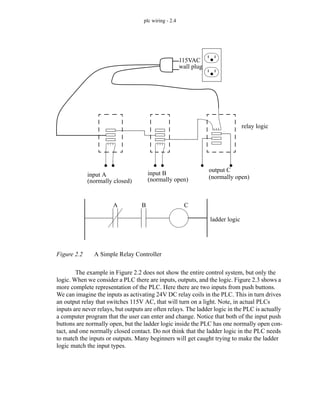
  • 741.
    plc selection -33.2 • Determine special needs such as distance between parts of the process. 2. If not already specified, a single vendor should be selected. Factors that might be considered are, (Note: Vendor research may be needed here.) • Manuals and documentation • Support while developing programs • The range of products available • Support while troubleshooting • Shipping times for emergency replacements • Training • The track record for the company • Business practices (billing, upgrades/obsolete products, etc.) 3. Plan the ladder logic for the controls. (Note: Use the standard design sheets.) 4. Count the program instructions and enter the values into the sheets in Figure 33.1 and Figure 33.2. Use the instruction times and memory requirements for each instruction to determine if the PLC has sufficient memory, and if the response time will be adequate for the process. Samples of scan times and memory are given in Figure 33.3 and Figure 33.4.
  • 742.
    plc selection -33.3 Figure 33.1 Memory and Time Tally Sheet Project ID: Name: Date: Instruction Type contacts outputs timers counter Time Max (us) Time Min. (us) Instruction Memory (words) Instruction Data (words) Instruction Count (number) Total Memory (words) Min. Time (us) Max. Time (us) Total PLC MEMORY TIME ESTIMATES - Part A
  • 743.
    plc selection -33.4 Figure 33.2 Memory and Timer Requirement Sheet Project ID: Name: Date: PLC MEMORY TIME REQUIREMENTS - Part B TIME Input Scan Time us Output Scan Time us Overhead Time us Program Scan Time us Communication Time us Other Times us TOTAL us MEMORY Total Memory words Other Memory words TOTAL bytes words
  • 744.
    plc selection -33.5 Figure 33.3 Typical Instruction Times and Memory Usage for a Micrologix Controller Instruction Type CTD - count down CTU- count up XIC - normally open contact XIO - normally closed contact OSR - one shot relay OTE - output enable OTL - output latch OTU - output unlatch RES - reset RTO - retentive on time TOF - off timer TON - on timer Time Max (us) 27.22 26.67 1.72 1.72 11.48 4.43 3.16 3.16 4.25 27.49 31.65 30.38 Time Min. (us) 32.19 29.84 1.54 1.54 13.02 4.43 4.97 4.97 15.19 38.34 39.42 38.34 Instruction Memory (words) 1 1 .75 .75 1 .75 .75 .75 1 1 1 1 Instruction Data (words) 3 3 0 0 0 0 0 0 0 3 3 3 Typical values for an Allen-Bradley micrologix controller are, input scan time 8us output scan times 8us housekeeping 180us overhead memory for controller 280 words
  • 745.
    plc selection -33.6 Figure 33.4 Typical Instruction Times and Memory Usage for a PLC-5 Controller 5. Look for special program needs and check the PLC model. (e.g. PID) 6. Estimate the cost for suitable hardware, programming software, cables, manu- als, training, etc., or ask for a quote from a vendor. 33.2 SPECIAL I/O MODULES Many different special I/O modules are available. Some module types are listed below for illustration, but the commercial selection is very large. Generally most vendors offer competitive modules. Some modules, such as fuzzy logic and vision, are only offered by a few supplier, such as Omron. This may occasionally drive a decision to pur- chase a particular type of controller. PLC CPU’s • A wide variety of CPU’s are available, and can often be used interchange- ably in the rack systems. the basic formula is price/performance. The table below compares a few CPU units in various criteria. Instruction Type CTD - count down CTU- count up XIC - normally open contact XIO - normally closed contact OSR - one shot relay OTE - output enable OTL - output latch OTU - output unlatch RES - reset RTO - retentive on time TOF - off timer TON - on timer Time Max (us) 3.3 3.4 0.32 0.32 6.2 0.48 0.48 0.48 2.2 4.1 2.6 4.1 Time Min. (us) 3.4 3.4 0.16 0.16 6.0 0.48 0.16 0.16 1.0 2.4 3.2 2.6 Instruction Memory (words) 3 3 1 1 6 1 1 1 3 3 3 3 Instruction Data (words) 3 3 0 0 0 0 0 0 0 3 3 3 Typical values for an Allen-Bradley PLC-5 controller are, input scan time ?us output scan times ?us housekeeping ?us overhead memory for controller ? words
  • 746.
    plc selection -33.7 Figure 33.5 CPU Comparison Chart Programmers • There are a few basic types of programmers in use. These tend to fall into 3 categories, 1. PLC Software for Personal Computers - Similar to the special- FEATURE RAM (KB) I/O - Digital on board maximum I/O - Analog on board maximum Package Communication Power Supply Maximum Cards Maximum Racks Maximum Drops Distance Scan times (us) per basic instruc. overhead Counters Timers Flags Functions PID Siemens 4 16 208 0 16 mini-module 24 VDC 6 with addon N/A Siemens <= 20 0 448 0 32 mini-module 24 VDC Siemens 96 0 1024 0 64 card 24 VDC 2.5m or 3km 0.8 2000 128 128 2048 option network line human other Sinec-L1 Sinec-L1 Sinec-L1, prop. printer, ASCII Legend: prop. - proprietary technology used by a single vendor option - the vendor will offer the feature at an additional cost (CPU 944) PLC S5-90U S5-100U S5-115U Siemens 20 0 256 0 32 card 115/230VAC option Sinec-L1 CPU03 AEG 8 0 256 5 option Modbus/Modubs+ PC-A984-145
  • 747.
    plc selection -33.8 ized programming units, but the software runs on a multi-use, user supplied computer. This approach is typically preferred. 2. Hand held units (or integrated) - Allow programming of PLC using a calculator type interface. Often done using mnemonics. 3. Specialized programming units - Effectively a portable computer that allows graphical editing of the ladder logic, and fast upload- ing/downloading/monitoring of the PLC. Ethernet/modem • For communication with remote computers. This is now an option on many CPUs. TTL input/outputs • When dealing with lower TTL voltages (0-5Vdc) most input cards will not recognize these. These cards allow switching of these voltages. Encoder counter module • Takes inputs from an encoder and tracks position. This allows encoder changes that are much faster than the PLC can scan. Human Machine Interface (HMI) • A-B/Siemens/Omron/Modicon/etc offer human interface systems. The user can use touch screens, screen and buttons, LCD/LED and a keypad. ASCII module • Adds an serial port for communicating with standard serial ports RS-232/ 422. IBM PC computer cards • An IBM compatible computer card that plugs into a PLC bus, and allows use of common software. • For example, Siemens CP580 the Simatic AT; - serial ports: RS-232C, RS-422, TTY - RGB monitor driver (VGA) - keyboard and mouse interfaces - 3.5” disk Counters • Each card will have 1 to 16 counters at speeds up to 200KHz. • The counter can be set to zero, or up/down, or gating can occur with an external input. Thermocouple • Thermocouples can be used to measure temperature, but these low volt- age devices require sensitive electronics to get accurate temperature readings. Analog Input/Output • These cards measure voltages in various ranges, and allow monitoring of continuous processes. These cards can also output analog voltages to help control external processes, etc. PID modules • There are 2 types of PID modules. In the first the CPU does the calcula- tion, in the second, a second controller card does the calculation. - when the CPU does the calculation the PID loop is slower.
  • 748.
    plc selection -33.9 - when a specialized card controls the PID loop, it is faster, but it costs less. • Typical applications - positioning workpieces. Stepper motor • Allows control of a stepper motor from a PLC rack. Servo control module • Has an encoder and amplifier pair built in to the card. Diagnostic Modules • Plug in and they monitor the CPU status. Specialty cards for IBM PC interface • Siemens/Allen-Bradley/etc. have cards that fit into IBM buses, and will communicate with PLC’s. Communications • This allows communications or networks protocols in addition to what is available on the PLC. This includes DH+, etc. Thumb Wheel Module • Numbers can be dialed in on wheels with digits from 0 to 9. BCD input/output module • Allows numbers to be output/input in BCD. BASIC module • Allows the user to write programs in the BASIC programming language. Short distance RF transmitters • e.g., Omron V600/V620 ID system • ID Tags - Special “tags” can be attached to products, and as they pass within range of pickup sensors, they transmit an ID number, or a packet of data. This data can then be used, updated, and rewritten to the tags by the PLC. Messages are stored as ASCII text. Voice Recognition/Speech • In some cases verbal I/O can be useful. Speech recognition methods are still very limited, the user must control their speech, and background noise causes problems. 33.3 SUMMARY • Both suppliers and products should be evaluated. • A single supplier can be advantageous in simplifying maintenance. • The time and memory requirements for a program can be estimated using design work. • Special I/O modules can be selected to suit project needs.
  • 749.
    plc selection -33.10 33.4 PRACTICE PROBLEMS 33.5 PRACTICE PROBLEM SOLUTIONS 33.6 ASSIGNMENT PROBLEMS 1. What is the most commonly used type of I/O interface? 2. What is a large memory size for a PLC? 3. What factors affect the selection of the size of a PLC.
  • 750.
    plc function ref- 34.1 34. FUNCTION REFERENCE The function references that follow are meant to be an aid for programming. There are some notes that should be observed, especially because this list discusses instructions for more than one type of PLC. • The following function descriptions are for both the Micrologix and PLC-5 pro- cessor families. There are some differences between PLC models and families. - Floating point operations are not available on the micrologix. - Some instruction names, definition and terminologies have been changed from older to newer models. I attempt to point these out, or provide a general description that is true for all. - Details for specific instructions can be found in the manuals available at (http://www.ab.com) • Many flags in status memory can be used with functions, including; S2:0/0 carry in math operation S2:0/1 overflow in math operation S2:0/2 zero in math operation S2:0/3 sign in math operation 34.1 FUNCTION DESCRIPTIONS 34.1.1 General Functions AFI Status Bits: Putting this instruction in a line will force the line to be false. This is prima- rily designed for debugging programs. Description: none Registers: none Available on: Micrologix, PLC-5 AFI - Always False Instruction
  • 751.
    plc function ref- 34.2 Status Bits: These functions update a few inputs and outputs during a program scan, instead of the beginning and end. In this example the IIN function will update the input values on ’I:001’ if ’A’ is true. If ’B’ is true then the output values will be updated for ’O:002’. Description: none Registers: none Available on: Micrologix, PLC-5 IIN, IOT - Immediate INput, Immediate OuTput A B I:001 O:002 IIN IOT Status Bits: The OTL ’L’ will latch on an output or memory bit, and the ’OTL’ ’U’ will unlatch it. If a value has been changed with a latch its value will stay fixed even if the PLC has been restarted. Description: none Registers: none Available on: Micrologix, PLC-5 OTL, OTU - OutpuT Latch, OutpuT Unlatch A B X X L U
  • 752.
    plc function ref- 34.3 34.1.2 Program Control Status Bits: These are the three most basic and common instructions. The input ’A’ is a normally open contact (XIC), the input ’B’ is a normally closed contact (XIO). Both of the outputs are normally off (OTE). Description: none Registers: none Available on: Micrologix, PLC-5 XIC, XIO, OTE - eXamine If Closed, eXamine If Open, OuTput Enable A I:001/0 B I:001/1 Status Bits: The JMP instruction will allow the PLC to bypass some ladder logic instructions. When ’A’ is true in this example the JMP will go to label ’2’, after which the program scan will continue normally. If ’A’ is false the JMP will be ignored and program execution will continue normally. In either case, ’X’ will be equal to ’B’. Description: none Registers: none Available on: Micrologix, PLC-5 JMP, LBL - JuMP, LaBeL X A JMP JUMP Label 2 B LBL 2
  • 753.
    plc function ref- 34.4 Status Bits: MCR instructions need to be used in pairs. If the first MCR line is true the instructions up to the next MCR will be examined normally. If the first MCR line is not true the outputs on the lines after will be FORCED OFF. Be careful when using normal outputs in these blocks. Description: none Registers: none Available on: Micrologix, PLC-5 MCR - Master Control Relay MCR MCR A Status Bits: This instruction will allow a line to be true for only one scan. If ’A’ becomes true then output of the ’ONS’ instruction will turn on for only one scan. ’A’ must be turned off for one scan before the ’ONS’ can be triggered again. The bit is used to track the previous input state, it is similar to an enabled bit. Description: none Registers: none Available on: Micrologix, PLC-5 ONS - ONe Shot X A ONS B3/10
  • 754.
    plc function ref- 34.5 34.1.3 Timers and Counters Counter memory instructions can share the same memory location, so some redun- dant bits are mentioned here. Status Bits: This instruction will convert a single positive edge and convert it to a bit that is on for only one scan. When ’A’ goes from false to true a positive (or rising) edge occurs, and bit ’O:001/2’ will be on for one scan. Bit ’B3:4/5’ is used to track the state of the input to the function, and it can be considered equivalent to an enable bit. The OSF function is similar to the OSR function, except it is triggered on a negative edge where the input falls from true to false. Description: none Registers: none Available on: Micrologix, PLC-5 OSR, OSF - One Shot Rising, One Shot Falling A OSR ONE SHOT RISING Storage Bit B3:4/5 Output Bit 2 Output Word O:001 Status Bits: When ’A’ is true this statement will cause the PLC to stop examining the ladder logic program, as if it has encountered the normal end-of-pro- gram statement. Description: none Registers: none Available on: Micrologix, PLC-5 TND - Temporary eND TND A
  • 755.
    plc function ref- 34.6 CTD COUNT DOWN Counter Preset Accum. C5:0 50 0 A Status Bits: The counter accumulator will decrease once each time the input goes from false to true. If the accumulator value reaches the preset the done bit, DN, will be set. The accumulator value will still decrease even when the done bit is set Description: CU CD DN OV UN Not used for this instruction Will be true when the input is true Will be set when ACC < PRE Not used for this instruction Will be set if the counter value has gone below -32,768 Registers: ACC PRE The time that has passed since the input went true The maximum time delay before the timer goes on Available on: Micrologix, PLC-5 CTD - CounT Down
  • 756.
    plc function ref- 34.7 CTU COUNT UP Counter Preset Accum. C5:0 50 0 A Status Bits: The counter accumulator will increase once each time the input goes from false to true. If the accumulator value reaches the preset the done bit, DN, will be set. The accumulator value will still increase even when the done bit is set Description: CU CD DN OV UN Will be true when the input is true Not used for this instruction Will be set when ACC >= PRE Will be set if the counter value has gone above 32,767 Not used for this instruction Registers: ACC PRE The total count The maximum count before the counter goes on Available on: Micrologix, PLC-5 CTU - CounT Up
  • 757.
    plc function ref- 34.8 TOF TIMER OFF DELAY Timer Time Base Preset Accum. T4:0 1.0 10 0 A Status Bits: This timer will delay turning off (the done bit, DN, will turn on immedi- ately). Once the input turns off the accumulated value (ACC) will start to increase from zero. When the preset (PRE) value is reached the DN bit is turned off and the accumulator will reset to zero. If the input turns on before the off delay is complete the accumulator will reset to zero. Description: EN TT DN This bit is true while the input to the timer is true This bit is true while the accumulator value is increasing This bit is true when the accumulator value is less than the preset value and the input is true, or the accumulator is changing Registers: ACC PRE The time that has passed since the input went false The maximum time delay before the timer goes off Available on: Micrologix, PLC-5 TOF - Timer OFf
  • 758.
    plc function ref- 34.9 TON TIMER ON DELAY Timer Time Base Preset Accum. T4:0 1.0 10 0 A Status Bits: This timer will delay turning on, but will turn off immediately. Once the input turns on the accumulated value (ACC) will start to increase from zero. When the preset (PRE) value is reached the DN bit is set. The done bit will turn off and the accumulator will reset to zero if the input goes false. Description: EN TT DN This bit is true while the input to the timer is true This bit is true while the accumulator value is increasing This bit is true when the accumulator value is equal to the preset value Registers: ACC PRE The time that has passed since the input went true The maximum time delay before the timer goes on Available on: Micrologix, PLC-5 TON - Timer ON
  • 759.
    plc function ref- 34.10 34.1.4 Compare RTO RETENTIVE TIMER ON Timer Time Base Preset Accum. T4:0 1.0 10 0 A Status Bits: This timer will delay turning on. When the input turns on the accumulated value (ACC) will start to increase from zero. When the preset (PRE) value is reached the DN bit is set. If the input goes false the accumulator value is not reset to zero. To reset the timer and turn off the timer the RES instruction should be used. Description: EN TT DN This bit is true while the input to the timer is true This bit is true while the accumulator value is increasing This bit is true when the accumulator value is less than the preset value Registers: ACC PRE The time that has passed since the input went true The maximum time delay before the timer goes on Available on: Micrologix, PLC-5 RTO - RetentiveTimer On CMP COMPARE Expression “(N7:0 + 8) > N7:1” A Status Bits: This function uses a free form expression to compare the two values. The comparison values that are allowed include =, >, >=, <>, <, <=. The expression must not be more than 80 characters long. Description: none Registers: none Available on: PLC-5 CMP - CoMPare
  • 760.
    plc function ref- 34.11 DTR DATA TRANSITION Source Mask Reference N7:0 00FF N7:1 A Status Bits: This function will examine the source value and mask out bits using the mask. The value will be compared to the Reference value, and if the values agree, then the function will be true for one scan, after that it will be false. Description: none Registers: none Available on: Micrologix, PLC-5 DTR - Data TRansition EQU EQUALS Source A Source B N7:0 N7:1 A Status Bits: The basic compare has six variations. Each of these will look at the val- ues in source A and B and check for the comparison case. If the com- parison case is true, the output will be true. The types are, EQU - Equals GEQ - Greater than or equals GRT - Greater than LEQ - Less than or equals LES - Less than NEQ - Not equal Description: none Registers: none Available on: Micrologix, PLC-5 EQU, GEQ, GRT, LEQ, LES, NEQ - EQUals, Greater than or EQuals, GReater Than, Less than or EQuals, LESs than, Not EQuals
  • 761.
    plc function ref- 34.12 FBC FILE BIT COMPARE Source Reference Result Cmp Control #B3:0 A Status Bits: This instruction will compare the bits in two files and store the positions of differences in a result file. In this example the files compared when ’A’ goes true. Both files start at ’B3:0’ and ’B9:0’ and 10 bits are to be compared. When differences are found the bit numbers will be stored in a list starting at ’N10:0’, the list can have up to three values (integer words). The ’Cmp Control’ word is for the bits being compared. The ’Result Control’ word is for the list of differences. The manual recom- mends clearing ’S:24’ before running this instruction to avoid a possi- ble processor fault. The DDT instruction is the same as the FBC instruction, except that when a different bit is found the source bit overwrites the reference bit. It is useful for storing a reference pattern for later use by a FBC. Description: EN (Cmp) DN (Cmp) ER (Cmp) IN (Cmp) FD (Cmp) DN (Result) ER (Result) enable - enabled when the instruction input is active done - enabled when the operation is complete error - set if an error occurred during the operation inhibit - set when mismatch found, must be cleared to continue the comparison found - set when a mismatch is found done - set when the result list is full error - set if an error occurred with the results list Registers: LEN (Cmp) POS (Cmp) LEN (Result) POS (Result) length - the number of bits to be compared position - the position of the current bit being compared length - the number of result positions allowed position - the location of the last result added Available on: Micrologix, PLC-5 FBC, DDT - File Bit Compare, Diagnostic DetecT Length Position Result Control Length Position #B9:0 #N10:0 R6:0 10 0 R6:1 3 0 CLR Dest S2:24
  • 762.
    plc function ref- 34.13 LIM LIMIT TEST (CIRC) Low limit Test High Limit N7:0 N7:1 N7:2 A Status Bits: This function will check to see if a value is between two limits. If the high limit is larger than the low limit and the test value is >= low limit or <= high limit, then the output is true. If the low limit is higher than the high limit, then a value not between the low and high limits will be true. Description: none Registers: none Available on: Micrologix, PLC-5 LIM - LIMit MEQ MASKED EQUAL Source Mask Compare N7:0 N7:1 N7:2 A Status Bits: The Source and Mask values are ANDed together. This will screenout bits not on in the mask. The value is then compared to the ‘Compare’ value. If the values are equal, the output is true. Description: none Registers: none Available on: Micrologix, PLC-5 MEQ - Masked EQual
  • 763.
    plc function ref- 34.14 34.1.5 Calculation and Conversion ACS ARCCOSINE Source Dest N7:0 N7:1 A Status Bits: These are unary math functions that will load a value from the source, do the calculation indicated, and store the results in the destination. Func- tions possible include ACS - Arccosine (inverse cosine) in radians ASN - Arcsine (inverse sine) in radians ATN - Arctangent (inverse tangent) in radians COS - Cosine using radians LN - Natural Logarithm LOG - Base 10 logarithm NEG - Sign change from positive to negative, or reverse SIN - Sine using radians SQR - Square root TAN - Tangent using radians Description: C V Z S Carry - set if a carry is generated Overflow - only set if value exceeds maximum for number type Zero - sets if the result is zero. Sign - set if result is negative Registers: none Available on: Micrologix, PLC-5 ACS, ASN, ATN, COS, LN, LOG, NEG, SIN, SQR, TAN - ArcCosine, ArcSiNe, ArcTaNgent, COSine, Logarythm Natural, LOGarythm, NEGative, SINe, SQuare Root, TANgent
  • 764.
    plc function ref- 34.15 ADD ADD Source A Source B N7:0 N7:1 A Status Bits: These are binary math functions that will load two values from sources A and B, do the calculation indicated, and store the results in the destina- tion. Functions possible include ADD - Add two numbers DIV - Divide source A by source B MUL - Multiply A and B SUB - Subtract B from A XPY - Raise X to the power of Y Description: C V Z S Carry - sets if a carry is generated Overflow - only set if value exceeds maximum for number type Zero - sets if the result is zero. Sign - sets if the result is negative Registers: none Available on: Micrologix, PLC-5 ADD, DIV, MUL, SUB, XPY - ADDition, DIVision, MULtiplication, Dest N7:2 SUBtraction, X to the Power of Y
  • 765.
    plc function ref- 34.16 AVE AVERAGE FILE File Dest #N7:0 N7:10 A Status Bits: These functions do the basic statistical calculations, average (AVE) and standard deviation (STD). When the input goes from false to true the calculation is begun. The values to be used for the calculation are taken from the memory starting at the start of the file location, for the length indicated. The final result is stored in the Dest. The control file is used for the calculation to keep track of position, and indicate when the calculation is done (it may take more than one PLC scan). Description: C V Z S EN DN ER Carry - always 0 Overflow - only set if value exceeds maximum for number type Zero - sets if the result is zero. Sign - sets if the result is negative Enable - on when the instruction input is on Done - set when the calculation is complete Error - set if an error was encountered during calculation Registers: none Available on: Micrologix, PLC-5 AVE, STD - AVErage, STandard Deviation Control R6:0 10 0 Length Postion
  • 766.
    plc function ref- 34.17 CLR CLR Dest N7:0 A Status Bits: This value will clear a memory location by putting a zero in it when the input to the function is true. Description: none Registers: none Available on: Micrologix, PLC-5 CLR - CLeaR CPT COMPUTE Dest Expression “N7:1 - N7:3” N7:0 A Status Bits: This expression allows free-form entry of equations. A maximum of 80 characters is permitted. Operations allowed include +, -, | (divide), *, FRD, BCD, SQR, AND, OR, NOT, XOR, ** (x**y = x to power y), RAD, DEG, LOG, LN, SIN, COS, TAN, ASN, ACS, ATN Description: none Registers: none Available on: PLC-5 CPT - ComPuTe
  • 767.
    plc function ref- 34.18 FRD FROM BCD Source Dest N7:0 N7:1 A Status Bits: This function will convert the value in the source location and store the result in the Dest location. The functions possible include, FRD - From BCD to a 2s compliment integer number TOD - From 2s compliment integer number to BCD DEG - Convert from radians to degrees RAD - Convert from degrees to radians Description: C V Z S Carry - always 0 Overflow - sets if an overflow as generated during conversion Zero - sets if the result is zero. Sign - sets if the MSB of the result is set Registers: none Available on: Micrologix, PLC-5 FRD, TOD, DEG, RAD - FRom bcD to integer, TO bcD from integer, DEGrees from radians, RADians from degrees
  • 768.
    plc function ref- 34.19 SRT SORT File Control #N7:0 R6:0 A Status Bits: This functions sort the values in memory from lowest value in the first location to the highest value. When the input goes from false to true the calculation is begun. The values to be used for the calculation are sorted in the memory starting at the start of the file location, for the length indicated. The control file is used for the calculation to keep track of position, and indicate when the calculation is done (it may take more than one PLC scan). Description: EN DN ER Enable - on when the instruction input is on Done - set when the calculation is complete Error - set if an error was encountered during calculation Registers: none Available on: Micrologix, PLC-5 SRT - SoRT Length 10 0 Position
  • 769.
    plc function ref- 34.20 34.1.6 Logical AND BITWISE AND Source A Source B N7:0 N7:1 A Status Bits: These functions do basic boolean operations to the numbers in locations A and B. The results of the operation are stored in Dest. These calcu- lations will be perform whenever the input is true. The functions are, AND - Bitwise and OR - Bitwise or XOR - Bitwise exclusive or Description: C V Z S Carry - always 0 Overflow - always 0 Zero - sets if the result is zero. Sign - sets if the MSB of the result is set Registers: none Available on: Micrologix, PLC-5 AND, OR, XOR - AND, OR, eXclusive OR Dest N7:2 NOT NOT Source Dest N7:0 N7:1 A Status Bits: This function will invert all of the bits in a word in memory whenever the input is true. Description: C V Z S Carry - always 0 Overflow - always 0 Zero - sets if the result is zero. Sign - sets if the MSB of the result is set Registers: none Available on: Micrologix, PLC-5 NOT - NOT
  • 770.
    plc function ref- 34.21 34.1.7 Move BTD BIT FIELD DISTRIB Source Source bit N7:0 0 A Status Bits: This function will copy the bits starting at N7:0/0 to N7:1/4 for a length of 5 bits. Description: none Registers: none Available on: Micrologix, PLC-5 BTD - BiT Distribute Dest N7:1 Dest bit Length 4 5 MOV MOVE Source Dest N7:0 N7:1 A Status Bits: This instruction will move values from one location to another, and if necessary change value types, such as integer to a floating point. Description: C V Z S Carry - always 0 Overflow - Sets if an overflow occurred during conversion Zero - sets if the result is zero. Sign - sets if the MSB of the result is set Registers: none Available on: Micrologix, PLC-5 MOV - MOVe
  • 771.
    plc function ref- 34.22 34.1.8 File Most file instructions will contain Mode options. The user may choose these with the implications listed below. All - All of the operations will be completed in a single scan when the input to the function is edge triggered. Care must be used not to create an operation so long it causes a watchdog fault in the PLC Incremental - Each time there is a positive input edge the function will advance the file operation by one. ’number’ - when a number is supplied the function will perform that many itera- tions while the input rung is true. MVM MAKSED MOVE Source Mask N7:0 N7:1 A Status Bits: This function will retrieve the values from the source and mask memory and AND them together. Only the bits that are true in the mask will be copied to the new location. Description: C V Z S Carry - always 0 Overflow - always 0 Zero - sets if the result is zero. Sign - sets if the MSB of the result is set Registers: none Available on: Micrologix, PLC-5 MVM - MoVe Masked Dest N7:2
  • 772.
    plc function ref- 34.23 COP COPY FILE Source Dest Length #N7:50 #N7:20 4 A Status Bits: This instruction copies from one list to another. When ’A’ is true the instruction will copy the entire source list to the destination location in a single scan. In this example this would mean N7:20=N7:50, N7:21=N7:51, N7:22=N7:52 and N7:23=N7:53. The source values are not changed. This instruction will not convert data types. Description: none Registers: none Available on: Micrologix, PLC-5 COP - file COPy
  • 773.
    plc function ref- 34.24 FAL FILE ARITH/LOGICAL Control Length Position Mode R6:0 10 0 ALL A Status Bits: This function will evaluate the expression over a range of values. The length specifies the number of positions in the expression and destina- tion files. The position value will be updated to indicate the current position in the calculation. See earlier in this section for a description of the Mode variable. This example would perform all of the calcula- tions in a single scan. These calculations would be N7:10=N7:0- N7:21, N7:11=N7:1-N7:21, ......N7:19=N7:9-N7:21. More complex mathematical expressions can be used with the following operators; +, -, *, | - basic math BCD/FRD - BCD conversion SQR - square root AND, OR, NOT, XOR - Boolean operators Note: advanced math operators are also available Description: EN DN ER enable - this will be on while the function is active done - this will be on when a calculation has completed error - this will be set if there was an error during calculation Registers: POS LEN position - tracks the current position in the list length - the length of the file Available on: Micrologix, PLC-5 FAL - File Arithmetic and Logic Dest Expression #N7:10 #N7:0 - N7:21
  • 774.
    plc function ref- 34.25 FLL FILE FILL Source Destination Length F8:0 #F8:30 10 A Status Bits: The contents of a single memory location are copied into a list. In this example the value in ’F8:0’ is copied into locations ’F8:30’ to ’F8:39’ each scan when ’A’ is true. The source value is not changed. This instruction will not convert data types. Description: none Registers: none Available on: Micrologix, PLC-5 FLL - file FiLL
  • 775.
    plc function ref- 34.26 FSC FILE SEARCH/COMPARE Control Length Position Mode R6:36 14 0 3 A Status Bits: lists of numbers can be compared using the FSC command. When ’A’ becomes true the function will start to compare values as determined by the ’Mode’ (see the beginning of this section for details on the mode). The expression will be evaluated from the initial locations in the expression. The end of the list is determined by the Length. In this example 3 values will be evaluated for each scan. The comparison in the first scan will be F8:5>F8:0, F8:6>F8:0 and F8:7>F8:0. This instruction will continue until all 14 values have been compared, and all are true, at which time X will turn on and stay on while A is on. If any values are false the compare will stop, and the output will stay off. Description: EN DN ER IN FD enable - will be on while the instruction input is on done - will be on when the length is reached, or a false compare occurred error - will occur if there is an error in the expression or range inhibit - if a false statement is found the inhibit bit will be set. if this is turned off (i.e., R6:36/IN=0) the search will continue found - this bit will be set when a false condition is found Registers: LEN POS length - the number of the comparison list position - the current position in the comparison list Available on: Micrologix, PLC-5 FSC - File Search and Compare Expression #F8:5 > F8:0 X
  • 776.
    plc function ref- 34.27 34.1.9 List BSL BIT SHIFT LEFT File Control Bit Address Length #B3:0 R6:0 I:0.0/0 6 A Status Bits: These functions will shift bits through left or right through a string of bits starting at #B3:0 with a length of 6 in the example above. As the bits shift the bit shifted out will be put in the UL bit. A new bit will be shifted into the vacant spot from the Bit Address. When the bits are shifted they are moved in the memory locations starting at file #B3:0. The two options available are: BSR - Bit Shift Right BSL - Bit Shift Left Description: EN DN ER UL Enable - is on when the input to the function is on Done - is on when the shift operation is complete Error - indicates when an error has occurred Unload - the unloaded value is stored in this bit Registers: none Available on: Micrologix, PLC-5 BSL, BSR - Bit Shift Left, Bit Shift Right
  • 777.
    plc function ref- 34.28 FFL FIFO LOAD Source FIFO Control Length N7:0 N7:10 R6:0 10 A Status Bits: Stack instructions will take integer words and store them, and then allow later retrieval. The load instructions will store a value on the stack on a false to true input change. The Unload instructions will remove a value from that stack and store it in the Dest location. A Last On First Off stack will return the last value pushed on. A First On First Off stack will give the oldest value on the stack. If an attempt to load more than the stack length, the values will be ignored. The instructions available are: FFL - FIFO stack load FFU - FIFO stack unload LFL - LIFO stack load LFU - LIFO stack unload Description: EN DN ER UL Enable - is on when the input to the function is on Done - is on when the shift operation is complete Error - indicates when an error has occurred Unload - the unloaded value is stored in this bit Registers: none Available on: Micrologix, PLC-5 FFL, FFU, LFL, LFU - FiFo Load, FiFo Unload, LiFo Load, LiFo Unload Position 0 FFU FIFO UNLOAD FIFO Dest Control Length N7:10 N7:11 R6:0 10 B Position 0
  • 778.
    plc function ref- 34.29 SQI SEQUENCER INPUT File Mask Source Control #N7:10 FF00 N7:0 R6:0 A Status Bits: This will compare a source value to a set of values in a sequencer table. In this example the 8 most significant bits of ’N7:0’ will be loaded each time ’A’ goes from false to true. The sequencer will load words from ’N7:10’ to ’N7:17’. Description: EN DN ER enable - true when the function is enabled done - set when the sequencer is full error - set if an error has occured Registers: POS LEN position - the current location in the sequencer length - the total length of the sequencer Available on: Micrologix, PLC-5 SQI - SeQuencer Input Length Position 7 0 SQL SEQUENCER LOAD File Source Control Length #N7:10 N7:0 R6:0 6 A Status Bits: When the input goes from false to true the value at the source will be loaded into the sequencer. After the position has reached the length the following values will be ignored, and the done bit will be set. Description: EN DN ER Enable - will be true when the input to the function is true Done - will be set when the sequencer is fully loaded Error - will be set when there has been an error Registers: none Available on: Micrologix, PLC-5 SQL - SeQuencer Load Position 0
  • 779.
    plc function ref- 34.30 34.1.10 Program Control SQO SEQUENCER OUTPUT File #N7:10 A Status Bits: When the input goes from false to true the sequencer will output a value from a new position in the sequencer table. After the position has reached the length the sequencer will reset to position 1. Note that the first entry in the sequencer table will only be output the first time the function is un, or if reset has been used. Description: EN DN ER Enable - will be true when the input to the function is true Done - will be set when the sequencer is fully loaded Error - will be set when there has been an error Registers: none Available on: Micrologix, PLC-5 SQO - SeQuencer Output Mask Dest Control Length Position FF00 N7:0 R6:0 6 0 EOT A Status Bits: This function will cause a transition in an SFC. This will be in a program file for an SFC step. When ’A’ becomes true the transition will end and the SFC will move to the next step and transitions. Description: none Registers: none Available on: PLC-5 EOT - End Of Transition
  • 780.
    plc function ref- 34.31 FOR FOR Label Number Index Initial Value Terminal Value 0 N7:0 0 10 A Status Bits: This instruction will create a loop like traditional programming lan- guages with a start and end value with a step size for each loop. Instructions between the FOR and NXT will be repeated. If the line with the BRK statement becomes true, the NXT command will be ignored. Description: none Registers: none Available on: Micrologix, PLC-5 FOR, NXT, BRK - For, Next, Break NXT NEXT Label Number 0 C Step Size 2 B BRK
  • 781.
    plc function ref- 34.32 JSR JUMP TO SUBROUTINE Program File Input par Input par Return par 3 N7:0 N7:1 N7:10 A Status Bits: The JSR will jump to another program file and pass a list of arguments that can be a variable length. The first statement in the subroutine pro- gram file should be SBR to retrieve the arguments passed. The sub- routine will end with the RET command that will go back to where the JSR function was encountered. The RET function can return a vari- able number of arguments. Description: none Registers: none Available on: Micrologix, PLC-5 JSR/SBR/RET - Jump Subroutine / Subroutine / Return RET RETURN() Return par N7:22 C Return par N7:11 Return par N7:12 SBR SUBROUTINE Input par Input par N7:20 N7:21 B Return par N7:23 N7:24 Return par
  • 782.
    plc function ref- 34.33 SFR SFC RESET Prog File Number Restart Step At 3 A Status Bits: This function will reset a SFC. In this example when ’A’ goes true the SFC main program stored in program file 3 will be examined. All sub programs will be examined, and then the SFC will be reset to the ini- tial position. Description: none Registers: none Available on: PLC-5 SFR - Sequential Function chart Reset UID A Status Bits: This instruction is used to turn of interrupts. If ’A’ is true, then the fol- lowing ladder logic will be run without interrupts. If ’B’ is true the interrupts will be reenabled. These instructions will only be of concern when using user programmed interrupt functions. These are normally only used when a critical process may be completed within a given time, or when the ladder logic between the UID and UIE conflicts with one of the interrupt programs. Description: none Registers: none Available on: PLC-5 UID, UIE - User Interrupt Disable, User Interrupt Enable UIE B
  • 783.
    plc function ref- 34.34 34.1.11 Advanced Input/Output BTR BLOCK TRANSFER READ Rack Group Module Control Block 2 3 0 BT10:2 A Status Bits: These instructions communicate with complex input-output cards in a PLC rack. The instruction is needed when a card requires more than one word of input and/or output data. The rack and group indicate the location of the card as ’O:023’. The module number is needed when using two slot addressing for larger racks (this is not needed for racks with less than 8 cards). The control memory is ’BT’, although integer memory could also be used. The data file indicates the location of the data to be sent, in this case it is from ’N9:10’ to ’N9:22’. The length and contents of the data file are dependant upon the card type. If the instruction is continuous, it will send out the data as soon as the last transmission is complete. If it is not continuous ’A’ must go from false to true to trigger a transmission. Description: EN ST DN ER CO EW NR TO RW enable - start - done - error - continuous - enable waiting - no response - time out - read write - Registers: RLEN DLEN FILE ELEM RGS requested data length - transmitted data length - file number - element number - rack, group, slot - card address Available on: Micrologix, PLC-5 BTR, BTW - Block Transfer Read, Block Transfer Write Data File Length Continuous N9:10 13 N
  • 784.
    plc function ref- 34.35 MSG SEND/RECEIVE MESSAGE Control Block MG9:0 A Status Bits: This is a multipurpose instruction that deals with communications in gen- eral. The instruction is controlled by the contents of the control block, which is normally set up using the programming software. The instruction can send and receive data across most interfaces including DH, DH+, Ethernet, RS-232, RS-422 and RS-485. The message blocks ’MG’ are preferred for storing the configuration, but integer memory may also be used. The messages are segments of PLC mem- ory. These can be read from, or written to a remote destination. Description: EN ST DN ER CO EW NR TO enable - indicates when the instruction is active start - done - indicates when the instruction is complete error - an error occurred continuous - when set the instruction doesn’t need a true input enabled waiting - no response - the remote destination was not detected time out - the remote destination did not respond in time Registers: many refer to manuals Available on: Micrologix, PLC-5 MSG - MeSsaGe
  • 785.
    plc function ref- 34.36 PID PID PID File Process Variable Control Variable PD9:0 N10:0 N10:30 A Status Bits: This function calculates a value for a control output based on a feedback value. When ’A’ is true the instruction will do a PID calculation. In this example the PID calculation is based on the parameters stored in ’PD9:0’. It will use the setpoint ’PD9:0.SP’, and the feedback value ’N10:0’ to calculate a new control output ’N10:30’. The control vari- ables are normally set using the programming software, although it is possible to set up this instruction using MOV instructions. Description: EN DN enable - indicates when the input is active done - this indicates when the instruction is done (not available when using the ’PD’ control block. Registers: KC TI TD MAXS MINS SP controller gain - the overall gain for the controller reset time - this gives a relative time for integration rate time - this gives a relative time for the derivative maximum setpoint - the largest value for the setpoint minimum setpoint - the smallest value for the setpoint setpoint - the setpoint for the process Note: This is only a partial list, see the manuals for additional status bits and registers. Available on: PLC-5 PID - Proportional Integral Derivative controller
  • 786.
    plc function ref- 34.37 34.1.12 String ABL ASCII TEST FOR LINE Channel Control Characters 0 R6:0 A Status Bits: The ABL instruction checks for available characters in the input buffer. In this example, when ’A’ goes true the function will check the input buffer for channel ’0’ and put characters in ’R6:0.POS’. The count will include end of line characters such as ’CR’ and ’LF’. The ACB instruction is the same, except that it does not include the end of line characters. Description: none Registers: POS the number of characters waiting in the buffer. Available on: Micrologix, PLC-5 ABL, ACB - Ascii availaBle Line, Ascii Characters in Buffer
  • 787.
    plc function ref- 34.38 ACI STRING TO INTEGER CONVERSION Source Dest ST10:2 N9:5 A Status Bits: The ACI instruction will convert a string to an integer value. In this example it retrieve the string in ’ST10:2’, convert it to an integer and store it in ’N9:5’. When converting to an integer it is possible to have an overflow error. The AIC function will convert an integer to a string. Description: C V Z N Carry - sets if a carry is generated Overflow - only set if value exceeds maximum for number type Zero - sets if the result is zero. Sign - sets if the result is negative Registers: POS the number of characters waiting in the buffer. Available on: Micrologix, PLC-5 ACI, AIC - Ascii string Convert to Integer, Ascii Integer to string Conversion ACN STRING CONCATENATE SourceA SourceB Dest ST10:0 ST10:1 A Status Bits: This will concatenate two strings together into one combined string. In this example while ’A’ is true the strings in ’ST10:0’ and ’ST10:1’ will be added together and stored in ’ST10:2’. Description: none Registers: none Available on: Micrologix, PLC-5 ACN - Ascii string CoNcatenate ST10:2
  • 788.
    plc function ref- 34.39 AEX STRING EXTRACT Source Index Number ST9:4 11 A Status Bits: This function will remove part of a string. In this example the characters in the 12th, 13th and 14th positions (’3’ charaters starting at the 11th position), are copied to the location ST9:0. The original string is not changed. Description: none Registers: none Available on: Micrologix, PLC-5 AEX - Ascii string EXtract Dest 3 ST9:0 AHL ASCII HANDSHAKE LINE Channel AND Mask OR Mask 1 0000 A Status Bits: This instruction will check the serial interface using the DTR and RTS send bits. Bit 0 is DTR and bit 1 is the RTS. If a bit is set in the AND mask the bits will be turned off, otherwise they will be left alone. If a bit is set in the OR word a bit will be turned on, otherwise they will be left alone. In this example the DTR and RTS bits will be turned on for channel 1. Description: EN DN ER enable - this is set when the instruction is active done - when the bits have been reset this bit is on error - this bit is set if an error has occurred Registers: none Available on: Micrologix, PLC-5 AHL - Ascii Handshake Line Control Channel Status 0003 R6:1
  • 789.
    plc function ref- 34.40 ARD ASCII READ Channel Dest Control 0 ST10:0 A Status Bits: The ARD instruction will read characters and write them to a string. In this example the characters are read from channel 0 and written to ’ST10:0’. All of the characters in the buffer, up to 15 in total, will be removed and written to the string memory. The number of characters will be stored in ’R6:10.POS’. The ARL function is similar to the ARD function, except that the end-of- line values ’CR’ or ’LF’ will mark the end of a line. With the parame- ters above the string will be copied until 15 characters are reached, or there are fewer than 15 characters, or an end-of-line character is found. Description: EN DN ER UL EM EU enable - will be set while the instruction is enabled done - will be set when then string has been read error - will be set if an error has occurred unload - empty - will be set if no characters were found queue - Registers: POS the number of characters copied Available on: Micrologix, PLC-5 ARD, ARL - Ascii ReaD, Ascii Read Line String Length Characters Read R6:10 15
  • 790.
    plc function ref- 34.41 ASC STRING SEARCH Source Index Search ST9:0 20 A Status Bits: This function will search a string for a character. In this example the character will look for the character in string ’ST9:0’ in position 20 (21st) in string ’ST9:1’. If a match is NOT found the bit ’S2:17/8’ will be turned on. Description: S2:17/8 ascii minor fault bit - this bit will be set if there was no match Registers: none Available on: Micrologix, PLC-5 ASC - Ascii string Search for Character Result ST9:1 ASR ASCII STRING COMPARE SourceA SourceB ST10:10 ST10:11 X Status Bits: This instruction will compare two strings. In this example, if ’A’ is true then the strings ’ST10:10’ and ’ST10:11’ will be compared. If they are equal then ’X’ will be true, otherwise it will be false. If the strings are different lengths then the bit ’S2:17/8’ will be set. Description: S2:17/8 ascii minor fault bit - this bit will be set if the string lengths don’t match. Registers: none Available on: Micrologix, PLC-5 ASR - Ascii StRing compare A
  • 791.
    plc function ref- 34.42 34.2 DATA TYPES The following table describes the arguments and return values for functions. Some notes are; • ’immediate’ values are numerical, not memory addresses. • ’returns’ indicates that the function returns that data value. • numbers between ’[’ and ’]’ indicate a range of values. • values such as ’yes’ and ’no’ are typed in literally. AWT ASCII WRITE Channel Source Control 0 ST11:9 A Status Bits: The AWT instruction will send a character string. In this example, when ’A’ goes from false to true, up to 14 characters will be sent from ’ST11:9’ to channel 0. This does not append any end of line charac- ters. The AWA function has a similar operation, except that the channel con- figuration characters are added - by default these are ’CR’ and ’LF’. Description: EN DN ER UL EM EU enable - this will be set while the instruction is active done - this will be set after the string has been sent error bit - set when an error has occurred unload - empty - set if no string was found queue - Registers: POS the number of characters sent instructions Available on: Micrologix, PLC-5 AWT, AWA - Ascii WriTe, Ascii Write Append String Length Characters Sent R6:3 14
  • 792.
    plc function ref- 34.43 Table 1: Instruction Data Types Function Argument Data Types Edge Triggered ABL channel control characters immediate int [0-4] R returns N yes ACB channel control characters immediate int [0-4] R returns N yes ACI source destination ST N no ACN source A source B ST ST no ACS source destination N,F,immediate N,F no ADD source A source B destination N,F,immediate N,F,immediate N,F no AEX source index number destination ST immediate int [0-82] immediate int [0-82] ST no AFI no AHL channel AND mask OR mask control immediate int [0-4] immediate hex [0000-ffff] immediate hex [0000-ffff] R yes AIC source destination N, immediate int ST no ARD channel destination control string length characters read immediate int [0-4] ST R immediate int [0-83] returns N yes
  • 793.
    plc function ref- 34.44 ARL channel destination control string length characters read immediate int [0-4] ST R immediate int [0-83] returns N yes ASC source index search result ST N, immediate ST R no ASN source destination N,F,immediate N,F no ASR source A source B ST ST no ATN source destination N,F,immediate N,F no AVE file destination control length position #F,#N F,N R N,immediate int returns N yes AWA channel source control string length characters sent immediate int [0-4] ST R immediate int [0-82] returns N yes AWT channel source control length characters sent N, immediate int ST R immediate int [0-82] returns N yes BSL file control bit address length #B,#N R any bit immediate int [0-16000] yes Table 1: Instruction Data Types Function Argument Data Types Edge Triggered
  • 794.
    plc function ref- 34.45 BSR file control bit address length #B,#N R any bit immediate int [0-16000] yes BTD source source bit destination destination bit length N,B,immediate N,immediate int [0-15] N immediate int [0-15] immediate int [0-15] no BTR rack group module control block data file length continuous immediate octal [000-277] immediate octal [0-7] immediate octal [0-1] BT,N N immediate int [0-64] ’yes’,’no’ yes BTW rack group module control block data file length continuous immediate octal [000-277] immediate octal [0-7] immediate octal [0-1] BT,N N immediate int [0-64] ’yes’,’no’ yes CLR destination N,F no CMP expression expression no COP source destination length #any #any immediate int [0-1000] no COS source destination F,immediate F no CPT destination expression N,F expression no CTD counter preset accumulated C returns N returns N yes Table 1: Instruction Data Types Function Argument Data Types Edge Triggered
  • 795.
    plc function ref- 34.46 CTU counter preset accumulated C returns N returns N yes DDT source reference result compare control length position result control length position binary Table 1: Instruction Data Types Function Argument Data Types Edge Triggered
  • 796.
    plc function ref- 34.47 Table 1: Instruction Data Types Function Argument Data Types Edge Triggered
  • 797.
    plc function ref- 34.48 Table 1: Instruction Data Types Function Argument Data Types Edge Triggered
  • 798.
    plc glossary -35.1 35. COMBINED GLOSSARY OF TERMS 35.1 A abort - the disrupption of normal operation. absolute pressure - a pressure measured relative to zero pressure. absorption loss - when sound or vibration energy is lost in a transmitting or reflecting medium. This is the result of generation of other forms of energy such as heat. absorbtive law - a special case of Boolean algebra where A(A+B) becomes A. AC (Alternating Current) - most commonly an electrical current and voltage that changes in a sinusoidal pattern as a function of time. It is also used for voltages and currents that are not steady (DC). Electrical power is normally distributed at 60Hz or 50Hz. AC contactor - a contactor designed for AC power. acceptance test - a test for evaluating a newly purchased system’s performance, capabilities, and conformity to specifications, before accepting, and paying the supplier. accumulator - a temporary data register in a computer CPU. accuracy - the difference between an ideal value and a physically realizable value. The companion to accuracy is repeatability. acidity - a solution that has an excessive number of hydrogen atoms. Acids are normally corrosive. acoustic - another term for sound. acknowledgement (ACK) - a response that indicates that data has been transmitted correctly. actuator - a device that when activated will result in a mechanical motion. For example a motor, a solenoid valve, etc. A/D - Analog to digital converter (see ADC). ADC (Analog to Digital Converter) - a circuit that will convert an analog voltage to a digital value, also refered to as A/D. ADCCP (Advanced Data Communications Procedure) - ANSI standard for synchronous communication links with primary and secondary functions. address - a code (often a number) that specifies a location in a computers memory. address register - a pointer to memory locations. adsorption - the ability of a material or apparatus to adsorb energy. agitator - causes fluids or gases to mix. AI (Artificial Intelligence) - the use of computer software to mimic some of the cognitive human processes. air dump valve - this valve will open to release system pressure when system power is removed. algorithms - a software procedure to solve a particular problem. aliasing - in digital systems there are natural limits to resolution and time that can be exceeded, thus aliasing the data. For example. an event may happen too fast to be noticed, or a point may be too small to be displayed on a monitor. alkaline - a solution that has an excess of HO pairs will be a base. This is the compliment to an acid. alpha rays - ions that are emitted as the result of atomic fission or fusion. alphanumeric - a sequence of characters that contains both numbers and letters. ALU (Arithmetic Logic Unit) - a part of a computer that is dedicated to mathematical operations. AM (Amplitude Modulation) - a fixed frequency carrier signal that is changed in amplitude to encode a change in a signal. ambient - normal or current environmental conditions. ambient noise - a sort of background noise that is difficult to isolate, and tends to be present throughout the volume of interest. ambient temperature - the normal temperature of the design environment. amplifier - increased (or possibly decreases) the magnitude or power of a signal. analog signal - a signal that has continuous values, typically voltage.
  • 799.
    plc glossary -35.2 analysis - the process of review to measure some quality. and - a Boolean operation that requires all arguments to be true before the result is true. annealing - heating of metal to relieve internal stresses. In many cases this may soften the material. annotation - a special note added to a design for explanatory purposes. ANSI (American National Standards Institute) - a developer of standards, and a member of ISO. APF (All Plastic Fibre cable) - fiber optic cable that is made of plastic, instead of glass. API (Application Program Interface) - a set of functions, and procedures that describes how a program will use another service/library/program/etc. APT (Automatically Programmed Tools) - a language used for directing computer controlled machine tools. application - the task which a tool is put to, This normally suggets some level of user or real world interaction. application layer - the top layer in the OSI model that includes programs the user would run, such as a mail reader. arc - when the electric field strength exceeds the dielectric breakdown voltage, electrons will flow. architecture - they general layout or design at a higher level. armature - the central rotating portion of a DC motor or generator, or a moving part of a relay. ARPA (Advanced Research Projects Agency) - now DARPA. Originally funded ARPANET. ARPANET - originally sponsored by ARPA. A packet switching network that was in service from the early 1970s, until 1990. ASCII (American Standard Code for Information Interchange) - a set of numerical codes that correspond to numbers, letters, special characters, and control codes. The most popular standard ASIC (Application Specific Integrated Circuit) - a specially designed and programmed logic circuit. Used for medium to low level production of complex functions. aspirator - a device that moves materials with suction. assembler - converts assembly language into machine code. assembly language - a mnemonic set of commands that can be directly converted into commands for a CPU. associative dimensioning - a method for linking dimension elements to elements in a drawing. associative laws - Boolean algebra laws A+(B+C) = (A+B)+C or A(BC) = (AB)C asynchronous - events that happen on an irregular basis, and are not predictable. asynchronous communications (serial) - strings of characters (often ASCII) are broken down into a series of on/off bits. These are framed with start/stop bits, and parity checks for error detection, and then send out one character at a time. The use of start bits allows the characters to be sent out at irregular times. attenuation - to decrease the magnitude of a signal. attenuation - as the sound/vibration energy propagates, it will undergo losses. The losses are known as attenuation, and are often measured in dB. For general specifications, the attenuation may be tied to units of dB/ft. attribute - a nongraphical feature of a part, such as color. audible range - the range of frequencies that the human ear can normally detect from 16 to 20,000 Hz. automatic control - a feedback of a system state is compared to a desired value and the control value for the system is adjusted by electronics, mechanics and/or computer to compensate for differences. automated - a process that operates without human intervention. auxiliary power - secondary power supplies for remote or isolated systems. AWG (American Wire Gauge) - specifies conductor size. As the number gets larger, the conductors get smaller. 35.2 B B-spline - a fitted curve/surface that is commonly used in CAD and graphic systems. backbone - a central network line that ties together distributed networks. background - in multitasking systems, processes may be running in the background while the user is
  • 800.
    plc glossary -35.3 working in the foreground, giving the user the impression that they are the only user of the machine (except when the background job is computationally intensive). background suppression - the ability of a sensing system to discriminate between the signal of interest, and background noise or signals. backplane - a circuit board located at the back of a circuit board cabinet. The backplane has connectors that boards are plugged into as they are added. backup - a redundant system to replace a system that has failed. backward chaining - an expert system looks at the results and looks at the rules to see logically how to get there. band pressure Level - when measuring the spectrum of a sound, it is generally done by looking at frequencies in a certain bandwidth. This bandwidth will have a certain pressure value that is an aggregate for whatever frequencies are in the bandwidth. base - 1. a substance that will have an excess of HO ions in solution form. This will react with an acid. 2. the base numbering system used. For example base 10 is decimal, base 2 is binary baseband - a network strategy in which there is a single carrier frequency, that all connected machines must watch continually, and participate in each transaction. BASIC (Beginner’s All-purpose Symbolic Instruction Code) - a computer language designed to allow easy use of the computer. batch processing - an outdated method involving running only one program on a computer at once, sequentially. The only practical use is for very intensive jobs on a supercomputer. battery backup - a battery based power supply that keeps a computer (or only memory) on when the master power is off. BAUD - The maximum number of bits that may be transmitted through a serial line in one second. This also includes some overhead bits. baudot code - an old code similar to ASCII for teleprinter machines. BCC (Block Check Character) - a character that can check the validity of the data in a block. BCD (Binary Coded Decimal) - numerical digits (0 to 9) are encoded using 4 bits. This allows two numerical digits to each byte. beam - a wave of energy waves such as light or sound. A beam implies that it is not radiating in all directions, and covers an arc or cone of a few degrees. bearing - a mechanical support between two moving surfaces. Common types are ball bearings (light weight) and roller bearings (heavy weight), journal bearings (rotating shafts). beats - if two different sound frequencies are mixed, they will generate other frequencies. if a 1000Hz and 1001Hz sound are heard, a 1Hz (=1000-1001) sound will be perceived. benchmark - a figure to compare with. If talking about computers, these are often some numbers that can be use to do relative rankings of speeds, etc. If talking about design, we can benchmark our products against our competitors to determine our weaknesses. Bernoulli’s principle - a higher fluid flow rate will result in a lower pressure. beta ratio - a ratio of pipe diameter to orifice diameter. beta rays - electrons are emitted from a fission or fusion reaction. beta site - a software tester who is actually using the software for practical applications, while looking for bugs. After this stage, software will be released commercially. big-endian - a strategy for storing or transmitting the most significant byte first. BIOS (Basic Input Output System) - a set of basic system calls for accessing hardware, or software services in a computer. This is typically a level lower than the operating system. binary - a base 2 numbering system with the digits 0 and 1. bit - a single binary digit. Typically the symbols 0 and 1 are used to represent the bit value. bit/nibble/byte/word - binary numbers use a 2 value number system (as opposed to the decimal 0-9, binary uses 0-1). A bit refers to a single binary digit, and as we add digits we get larger numbers. A bit is 1 digit, a nibble is 4 digits, a byte is 8 digits, and a word is 16 digits.
  • 801.
    plc glossary -35.4 BITNET (Because It’s Time NET) - An academic network that has been merged with CSNET. blackboard - a computer architecture when different computers share a common memory area (each has its own private area) for sharing/passing information. block - a group of bytes or words. block diagrams - a special diagram for illustrating a control system design. binary - specifies a number system that has 2 digits, or two states. binary number - a collection of binary values that allows numbers to be constructed. A binary number is base 2, whereas normal numbering systems are base 10. blast furnace - a furnace that generates high temperatures by blowing air into the combustion. bleed nozzle - a valve or nozzle for releasing pressure from a system. block diagram - a symbolic diagram that illustrates a system layout and connection. This can be ued for analysis, planning and/or programming. BOC (Bell Operating Company) - there are a total of 7 regional telephone companies in the U.S.A. boiler - a device that will boil water into steam by burning fuel. BOM (Bills Of Materials) - list of materials needed in the production of parts, assemblies, etc. These lists are used to ensure all required materials are available before starting an operation. Boolean - a system of numbers based on logic, instead of real numbers. There are many similarities to normal mathematics and algebra, but a separate set of operators, axioms, etc. are used. decimal(base 10) 0 1 2 3 4 5 6 7 8 9 10 11 . . . binary(base 2) 0 1 10 11 100 101 110 111 1000 1001 1010 1011 . . . octal(base 8) 0 1 2 3 4 5 6 7 10 11 12 13 . . . e.g. differences decimal 15 ... tens 3,052 ... thousands 1,000,365 ... millions binary 1 ... bit 0110 .... nibble (up to 16 values) 10011101 ... byte (up to 256 values) 0101000110101011 ... work (up to 64,256 values) Most significant bit least significant bit
  • 802.
    plc glossary -35.5 bottom-up design - the opposite of top-down design. In this methodology the most simple/basic functions are designed first. These simple elements are then combined into more complex elements. This continues until all of the hierarchical design elements are complete. bounce - switch contacts may not make absolute contact when switching. They make and break contact a few times as they are coming into contact. Bourdon tube - a pressure tube that converts pressure to displacement. BPS (Bits Per Second) - the total number of bits that can be passed between a sender and listener in one second. This is also known as the BAUD rate. branch - a command in a program that can cause it to start running elsewhere. bread board - a term used to describe a temporary electronic mounting board. This is used to prototype a circuit before doing final construction. The main purpose is to verify the basic design. breadth first search - an AI search technique that examines all possible decisions before making the next move. breakaway torque - the start-up torque. The value is typically high, and is a function of friction, inertia, deflection, etc. breakdown torque - the maximum torque that an AC motor can produce at the rated voltage and frequency. bridge - 1. an arrangement of (typically 4) balanced resistors used for measurement. 2. A network device that connects two different networks, and sorts out packets to pass across. broadband networks - multiple frequencies are used with multiplexing to increase the transmission rates in networks. broad-band noise - the noise spectrum for a particular noise source is spread over a large range of frequencies. broadcast - a network term that describes a general broadcast that should be delivered to all clients on a network. For example this is how Ethernet sends all of its packets. brush - a sliding electrical conductor that conducts power to/from a rotor. BSC (Binary Synchronous Communication) - a byte oriented synchronous communication protocol developed by IBM. BSD (Berkeley Software Distribution) - one of the major versions of UNIX. buffer - a temporary area in which data is stored on its way from one place to another. Used for communication bottlenecks and asynchronous connections. bugs - hardware or software problems that prevent desired components operation. bumpless transfer - a smooth transition between manual and automatic modes. burn-in - a high temperature pre-operation to expose system problems. burner - a term often used for a device that programs EPROMs, PALs, etc. or a bad cook. bus - a computer has buses (collections of conductors) to move data, addresses, and control signals between components. For example to get a memory value, the address value provided the binary memory address, the control bus instructs all the devices to read/write, and to examine the address. If the address is valid for one part of the computer, it will put a value on the data bus that the CPU can then read. byte - an 8 bit binary number. The most common unit for modern computers. 35.3 C C - A programming language that followed B (which followed A). It has been widely used in software development in the 80s and 90s. It has grown up to become C++ and Java. CAA (Computer Aided Analysis) - allows the user to input the definition of a part and calculate the performance variables. cable - a communication wire with electrical and mechanical shielding for harsh environments. CAD (Computer Aided Design) - is the creation and optimization of the design itself using the computer as a productivity tool. Components of CAD include computer graphics, a user interface, and geometric modelling.
  • 803.
    plc glossary -35.6 CAD (Computer Aided Drafting) - is one component of CAD which allows the user to input engineering drawings on the computer screen and print them out to a plotter or other device. CADD (Computer Aided Design Drafting) - the earliest forms of CAD systems were simple electronic versions of manual drafting, and thus are called CADD. CAE (Computer Aided Engineering) - the use of computers to assist in engineering. One example is the use of Finite Element Analysis (FEA) to verify the strength of a design. CAM (Computer Aided Manufacturing) - a family of methods that involves computer supported manufacturing on the factory floor. capacitor - a device for storing energy or mass. capacitance - referring to the ability of a device to store energy. This is used for electrical capacitors, thermal masses, gas cylinders, etc. capacity - the ability to absorb something else. carrier - a high/low frequency signal that is used to transmit another signal. carry flag - an indication when a mathematical operator has gone past the limitations of the hardware/ software. cascade - a method for connecting devices to increase their range, or connecting things so that they operate in sequence. This is also called chaining. CASE (Computer Aided Software Engineering) - software tools are used by the developer/programmer to generate code, track changes, perform testing, and a number of other possible functions. cassette - a holder for audio and data tapes. CCITT (Consultative Committee for International Telegraph and Telephone) - recommended X25. A member of the ITU of the United Nations. CD-ROM (Compact Disc Read Only Memory) - originally developed for home entertainment, these have turned out to be high density storage media available for all platforms at very low prices (< $100 at the bottom end). The storage of these drives is well over 500 MB. CE (Concurrent Engineering) - an engineering method that involves people from all stages of a product design, from marketing to shipping. CE - a mark placed on products to indicate that they conform to the standards set by the European Common Union. Celsius - a temperature scale the uses 0 as the freezing point of water and 100 as the boiling point. centrifugal force - the force on an orbiting object the would cause it to accelerate outwards. centripetal force - the force that must be applied to an orbiting object so that it will not fly outwards. channel - an independent signal pathway. character - a single byte, that when displayed is some recognizable form, such as a letter in the alphabet, or a punctuation mark. checksum - when many bytes of data are transmitted, a checksum can be used to check the validity of the data. It is commonly the numerical sum of all of the bytes transmitted. chip - a loose term for an integrated circuit. chromatography - gases or liquids can be analyzed by how far their constituent parts can migrate through a porous material. CIM (Computer Integrated Manufacturing) - computers can be used at a higher level to track and guide products as they move through the facility. CIM may or may not include CAD/CAM. CL (Cutter Location) - an APT program is converted into a set of x-y-z locations stored in a CL file. In turn these are sent to the NC machine via tapes, etc. clear - a signal or operation to reset data and status values. client-server - a networking model that describes network services, and user programs. clipping - the automatic cutting of lines that project outside the viewing area on a computer screen. clock - a signal from a digital oscillator. This is used to make all of the devices in a digital system work synchronously. clock speed - the rate at which a computers main time clock works at. The CPU instruction speed is usually some multiple or fraction of this number, but true program execution speeds are loosely related at best. closed loop - a system that measures system performance and trims the operation. This is also known as feedback. If there is no feedback the system is called open loop.
  • 804.
    plc glossary -35.7 CMOS (Complimentary Metal Oxide Semi-conductor) - a low power microchip technology that has high noise immunity. CNC (Computer Numerical Control) - machine tools are equipped with a control computer, and will perform a task. The most popular is milling. coalescing - a process for filtering liquids suspended in air. The liquid condenses on glass fibers. coaxial cable - a central wire contains a signal conductor, and an outer shield provides noise immunity. This configuration is limited by its coaxial geometry, but it provides very high noise immunity. coax - see coaxial cable. cogging - a machine steps through motions in a jerking manner. The result may be low frequency vibration. coil - wire wound into a coil (tightly packed helix) used to create electromagnetic attraction. Used in relays, motors, solenoids, etc. These are also used alone as inductors. collisions - when more than one network client tries to send a packet at any one time, they will collide. Both of the packets will be corrupted, and as a result special algorithms and hardware are used to abort the write, wait for a random time, and retry the transmission. Collisions are a good measure of network overuse. colorimetry - a method for identifying chemicals using their colors. combustion - a burning process generating heat and light when certain chemicals are added. command - a computer term for a function that has an immediate effect, such as listing the files in a directory. commision - the typical name for getting equipment operational after delivery/installation. communication - the transfer of data between computing systems. commutative laws - Booleans algebra laws A+B = B+A and AB=BA. compare - a computer program element that examines one or more variables, determines equality/inequality, and then performs some action, sometimes a branch. compatibility - a measure of the similarity of a design to a standard. This is often expressed as a percentage for software. Anything less than 100% is not desirable. compiler - a tool to change a high level language such as C into assembler. compliment - to take the logical negative. TRUE becomes false and vice versa. component - an interchangeable part of a larger system. Components can be used to cut down manufacturing and maintenance difficulties. compressor - a device that will decrease the volume of a gas - and increase the pressure. computer - a device constructed about a central instruction processor. In general the computer can be reconfigured (software/firmware/hardware) to perform alternate tasks. Computer Graphics - is the use of the computer to draw pictures using an input device to specify geometry and other attributes and an output device to display a picture. It allows engineers to communicate with the computer through geometry. concentric - a shared center between two or more objects. concurrent - two or more activities occur at the same time, but are not necessarily the same. concurrent engineering - all phases of the products life are considered during design, and not later during design review stages. condenser - a system component that will convert steam to water. Typically used in power generators. conduction - the transfer of energy through some medium. configuration - a numbers of multifunction components can be connected in a variety of configurations. connection - a network term for communication that involves first establishing a connection, second data transmission, and third closing the connection. Connectionless networking does not require connection. constant - a number with a value that should not vary. constraints - are performance variables with limits. Constraints are used to specify when a design is feasible. If constraints are not met, the design is not feasible. contact - 1. metal pieces that when touched will allow current to pass, when separated will stop the flow of current. 2. in PLCs contacts are two vertical lines that represent an input, or internal memory location. contactor - a high current relay. continuous Noise - a noise that is ongoing, and present. This differentiates from instantaneous, or
  • 805.
    plc glossary -35.8 intermittent noise sources. continuous Spectrum - a noise has a set of components that are evenly distributed on a spectral graph. control relay - a relay that does not control any external devices directly. It is used like a variable in a high level programming language. control variable - a system parameter that we can set to change the system operation. controls - a system that is attached to a process. Its purpose is to direct the process to some set value. convection - the transfer of heat energy to liquid or gas that is moving past the surface of an object. cook’s constant - another name for the fudge factor. core memory - an outdated term describing memory made using small torii that could be polarized magnetically to store data bits. The term lives on when describing some concepts, for example a ‘core dump’ in UNIX. Believe it or not this has not been used for decades but still appears in many new textbooks. coriolis force - a force that tends to cause spinning in moving frames of reference. Consider the direction of the water swirl down a drain pipe, it changes from the north to the south of the earth. correction factor - a formal version of the ‘fudge factor’. Typically a value used to multiply or add another value to account for hard to quantify values. This is the friend of the factor of safety. counter - a system to count events. This can be either software or hardware. cps (characters per second) - This can be a good measure of printing or data transmission speed, but it is not commonly used, instead the more confusing ‘baud’ is preferred. CPU (Central Processing Unit) - the main computer element that examines machine code instructions and executes results. CRC (Cyclic Redundancy Check) - used to check transmitted blocks of data for validity. criteria - are performance variables used to measure the quality of a design. Criteria are usually defined in terms of degree - for example, lowest cost or smallest volume or lowest stress. Criteria are used to optimize a design. crosstalk - signals in one conductor induce signals in other conductors, possibly creating false signals. CRT (Cathode Ray Tubes) - are the display device of choice today. A CRT consists of a phosphor-coated screen and one or more electron guns to draw the screen image. crucible - 1. a vessel for holding high temperature materials 2. CSA (Canadian Standards Association) - an association that develops standards and does some product testing. CSMA/CD (Carrier Sense Multiple Access with Collision Detection) - a protocol that causes computers to use the same communication line by waiting for turns. This is used in networks such as Ethernet. CSNET (Computer+Science NETwork) - a large network that was merged with BITNET. CTS (Clear To Send) - used to prevent collisions in asynchronous serial communications. current loop - communications that use a full electronic loop to reduce the effects of induced noise. RS-422 uses this. current rating - this is typically the maximum current that a designer should expect from a system, or the maximum current that an input will draw. Although some devices will continue to work outside rated values, not all will, and thus this limit should be observed in a robust system. Note: exceeding these limits is unsafe, and should be done only under proper engineering conditions. current sink - a device that allow current to flow through to ground when activated. current source - a device that provides current from another source when activated. cursors - are movable trackers on a computer screen which indicate the currently addressed screen position, or the focus of user input. The cursor is usually represented by an arrow, a flashing character or cross-hair. customer requirements - the qualitative and quantitative minimums and maximums specified by a customer. These drive the product design process. cycle - one period of a periodic function. cylinder - a piston will be driven in a cylinder for a variety of purposes. The cylinder guides the piston, and provides a seal between the front and rear of the piston.
  • 806.
    plc glossary -35.9 35.4 D daisy chain - allows serial communication of devices to transfer data through each (and every) device between two points. darlington coupled - two transistors are ganged together by connecting collectors to bases to increase the gain. These increase the input impedance, and reduce the back propagation of noise from loads. DARPA (Defense Advanced Research Projects Agency) - replaced ARPA. This is a branch of the US department of defence that has participated in a large number of research projects. data acquisition - refers to the automated collection of information collected from a process or system. data highway - a term for a communication bus between two separated computers, or peripherals. This term is mainly used for PLC’s. data link layer - an OSI model layer data logger - a dedicated system for data acquisition. data register - stores data values temporarily in a CPU. database - a software program that stores and recalls data in an organized way. DARPA (Defense Advanced Research Projects Agency) - DC (Direct Current) - a current that flows only in one direction. The alternative is AC. DCA (Defense Communications Agency) - developed DDN. DCD (Data Carrier Detect) - used as a handshake in asynchronous communication. DCE (Data Communications Equipment) - A term used when describing unintelligent serial communications clients. An example of this equipment is a modem. The complement to this is DTE. DCE (Distributed Computing Environment) - applications can be distributed over a number of computers because of the use of standards interfaces, functions, and procedures. DDN (Defense Data Network) - a group of DoD networks, including MILNET. dead band - a region for a device when it no longer operates. dead time - a delay between an event occurring and the resulting action. debounce - a switch may not make sudden and complete contact as it is closes, circuitry can be added to remove a few on-off transitions as the switch mechanically bounces. debug - after a program has been written it undergoes a testing stage called debugging that involves trying to locate and eliminate logic and other errors. This is also a time when most engineers deeply regret not spending more time on the initial design. decibel (dB) - a logarithmic compression of values that makes them more suited to human perception (for both scaleability and reference) decision support - the use of on-line data, and decision analysis tools are used when making decisions. One example is the selection of electronic components based on specifications, projected costs, etc. DECnet (Digital Equipment Corporation net) - a proprietary network architecture developed by DEC. decrement - to decrease a numeric value. dedicated computer - a computer with only one task. default - a standard condition. demorgan’s laws - Boolean laws great for simplifying equations ~(AB) = ~A + ~B, or ~(A+B) = ~A~B. density - a mass per unit volume. depth first search - an artificial intelligence technique that follows a single line of reasoning first. derivative control - a control technique that uses changes in the system of setpoint to drive the system. This control approach gives fast response to change. design - creation of a new part/product based on perceived needs. Design implies a few steps that are ill defined, but generally include, rough conceptual design, detailed design, analysis, redesign, and testing. design capture - the process of formally describing a design, either through drafted drawings, schematic drawings, etc. design cycle - the steps of the design. The use of the word cycle implies that it never ends, although we must at some point decide to release a design. design Variables - are the parameters in the design that describe the part. Design variables usually include
  • 807.
    plc glossary -35.10 geometric dimensions, material type, tolerances, and engineering notes. detector - a device to determine when a certain condition has been met. device driver - controls a hardware device with a piece of modular software. DFA (Design For Assembly) - a method that guides product design/redesign to ease assembly times and difficulties. DFT (Design for Testability) - a set of design axioms that generally calls for the reduction of test steps, with the greatest coverage for failure modes in each test step. diagnostic - a system or set of procedures that may be followed to identify where systems may have failed. These are most often done for mission critical systems, or industrial machines where the user may not have the technical capability to evaluate the system. diaphragm - used to separate two materials, while allowing pressure to be transmitted. differential - refers to a relative difference between two values. Also used to describe a calculus derivative operator. differential amplifier - an amplifier that will subtract two or more input voltages. diffuse field - multiple reflections result in a uniform and high sound pressure level. digital - a system based on binary on-off values. DIN (the Deutsches Institut for Normung) - a German standards institute. diode - a semiconductor device that will allow current to flow in one direction. DIP switches - small banks of switches designed to have the same footprint as an integrated circuit. distributed - suggests that computer programs are split into parts or functions and run on different computers distributed system - a system can be split into parts. Typical components split are mechanical, computer, sensors, software, etc. DLE (Data Link Escape) - An RS-232 communications interface line. DMA (Direct Memory Access) - used as a method of transferring memory in and out of a computer without slowing down the CPU. DNS (Domain Name System) - an internet method for name and address tracking. documentation - (don’t buy equipment without it) - one or more documents that instruct in the use, installation, setup, maintenance, troubleshooting, etc. for software or machinery. A poor design supported by good documentation can often be more useful than a good design unsupported by poor documentation. domain - the basic name for a small or large network. For example (unc.edu) is the general extension for the University on North Carolina. doppler shift - as objects move relative to each other, a frequency generated by one will be perceived at another frequency by the other. DOS (Disk Operating System) - the portion of an operating system that handles basic I/O operations. The most common example is Microsoft MS-DOS for IBM PCs. dotted decimal notation - the method for addressing computers on the internet with IP numbers such as ‘129.100.100.13’. double pole - a double pole switch will allow connection between two contacts. These are useful when making motor reversers. see also single pole. double precision - a real number is represented with 8 bytes (single precision is 4) to give more precision for calculations. double throw - a switch or relay that has two sets of contacts. download - to retrieve a program from a server or higher level computer. downtime - a system is removed from production for a given amount of downtime. drag - a force that is the result of a motion of an object in a viscous fluid. drop - a term describing a short connection to peripheral I/O. drum sequencer - a drum has raised/lowered sections and as it rotates it opens/closes contacts and will give sequential operation. dry contact - an isolated output, often a relay switched output. DSP (Digital Signal Processor) - a medium complexity microcontroller that has a build in floating point unit. These are very common in devices such as modems. DSR (Data Set Ready) - used as a data handshake in asynchronous communications.
  • 808.
    plc glossary -35.11 DTE (Data Terminal Equipment) - a serial communication line used in RS-232 DTR (Data Terminal Ready) - used as a data handshake in asynchronous communications to indicate a listener is ready to receive data. dump - a large block of memory is moved at once (as a sort of system snapshot). duplex - serial communication that is in both directions between computers at the same time. dynamic braking - a motor is used as a brake by connecting the windings to resistors. In effect the motor becomes a generator, and the resistors dissipate the energy as heat. dynamic variable - a variable with a value that is constantly changing. dyne - a unit of force 35.5 E EBCDIC (Extended Binary-Coded Decimal Information Code) - a code for representing keyboard and control characters. eccentric - two or more objects do not have a common center. echo - a reflected sound wave. ECMA (European Computer Manufacturer’s Associated) - eddy currents - small currents that circulate in metals as currents flow in nearby conductors. Generally unwanted. EDIF (Electronic Design Interchange Format) - a standard to allow the interchange of graphics and data between computers so that it may be changed, and modifications tracked. EEPROM (Electrically Erasable Programmable Read Only Memory) - effective sound pressure - the RMS pressure value gives the effective sound value for fluctuating pressure values. This value is some fraction of the peak pressure value. EIA (Electronic Industries Association) - A common industry standards group focusing on electrical standards. electro-optic isolator - uses optical emitter, and photo sensitive switches for electrical isolation. electromagnetic - a broad range term reering to magnetic waves. This goes from low frequenc signals such as AM radio, up to very high frequency waves such as light and X-rays. electrostatic - devices that used trapped charge to apply forces and caused distribution. An example is droplets of paint that have been electrically charged can be caused to disperse evenly over a surface that is oppositely charged. electrostatics discharge - a sudden release of static electric charge (in nongrounded systems). This can lead to uncomfortable electrical shocks, or destruction of circuitry. email (electronic mail) - refers to messages passed between computers on networks, that are sent from one user to another. Almost any modern computer will support some for of email. EMI (ElectroMagnetic Interference) - transient magnetic fields cause noise in other systems. emulsify - to mix two materials that would not normally mix. for example an emulsifier can cause oil and water to mix. enable - a digital signal that allows a device to work. encoding - a conversion between different data forms. energize - to apply power to a circuit or component. energy - the result of work. This concept underlies all of engineering. Energy is shaped, directed and focused to perform tasks. engineering work stations - are self contained computer graphics systems with a local CPU which can be networked to larger computers if necessary. The engineering work station is capable of performing engineering synthesis, analysis, and optimization operations locally. Work stations typically have more than 1 MByte of RAM, and a high resolution screen greater than 512 by 512 pixels. EOH (End of Header) - A code in a message header that marks the end of the header block. EOT (End Of Transmission) - an ASCII code to indicate the end of a communications.
  • 809.
    plc glossary -35.12 EPROM (Erasable Programmable Read Only Memory) - a memory type that can be programmed with voltages, and erased with ultraviolet light. EPS (Encapsulated PostScript) - a high quality graphics description language understood by high end printers. Originally developed by Adobe Systems Limited. This standard is becoming very popular. error signal - a control signal that is the difference between a desired and actual position. ESD - see electrostatic discharge. esters - a chemical that was formed by a reaction between alcohol and an acid. ETX (End Of Text) - a marker to indicate the end of a text block in data transmission. even parity - a checksum bit used to verify data in other bits of a byte. execution - when a computer is under the control of a program, the program is said to be executing. expansion principle - when heat is applied a liquid will expand. expert systems - is a branch of artificial intelligence designed to emulate human expertise with software. Expert systems are in use in many arenas and are beginning to be seen in CAD systems. These systems use rules derived from human experts. 35.6 F fail safe - a design concept where system failure will bring the system to an idle or safe state. false - a logical negative, or zero. Faraday’s electromagnetic induction law - if a conductor moves through a magnetic field a current will be induced. The angle between the motion and the magnetic field needs to be 90 deg for maximum current. Farenheit - a temperature system that has 180 degrees between the freezing and boiling point of water. fatal error - an error so significant that a software/hardware cannot continue to operate in a reliable manner. fault - a small error that may be recoverable, or may result in a fatal error. FAX (facsimile) - an image is scanned and transmitted over phone lines and reconstructed at the other end. FCS (Frame Check Sequence) - data check flag for communications. FDDI (Fibre Distributed Data Interface) - a fibre optic token ring network scheme in which the control tokens are counter rotating. FDX (Full Duplex) - all characters that are transmitted are reflected back to the sender. FEA (Finite Element Analysis) - is a numerical technique in which the analysis of a complex part is subdivided into the analysis of small simple subdivisions. feedback - a common engineering term for a system that examines the output of a system and uses is to tune the system. Common forms are negative feedback to make systems stable, and positive feedback to make systems unstable (e.g. oscillators). fetch - when the CPU gets a data value from memory. fiberoptics - data can be transmitted by switching light on/off, and transmitting the signal through an optical fiber. This is becoming the method of choice for most long distance data lines because of the low losses and immunity to EMI. FIFO (First In First Out) - items are pushed on a stack. The items can then be pulled back off last first. file - a concept of a serial sequence of bytes that the computer can store information in, normally on the disk. This is a ubiquitous concept, but file is also used by Allen Bradley to describe an array of data. filter - a device that will selectively pass matter or energy. firmware - software stored on ROM (or equivalent). flag - a single binary bit that indicates that an event has/has not happened. flag - a single bit variable that is true or not. The concept is that if a flag is set, then some event has happened, or completed, and the flag should trigger some other event. flame - an email, or netnews item that is overtly critical of another user, or an opinion. These are common because of the ad-hoc nature of the networks. flange - a thick junction for joining two pipes.
  • 810.
    plc glossary -35.13 floating point - uses integer math to represent real numbers. flow chart - a schematic diagram for representing program flow. This can be used during design of software, or afterwards to explain its operation. flow meter - a device for measuring the flow rate of fluid. flow rate - the volume of fluid moving through an area in a fixed unit of time. fluorescence - incoming UV light or X-ray strike a material and cause the emission of a different frequency light. FM (Frequency Modulation) - transmits a signal using a carrier of constant magnitude but changing frequency. The frequency shift is proportional to the signal strength. force - a PLC output or input value can be set on artificially to test programs or hardware. This method is not suggested. format - 1. a physical and/or data structure that makes data rereadable, 2. the process of putting a structure on a disk or other media. forward chaining - an expert system approach to examine a set of facts and reason about the probable outcome. fragmentation - the splitting of an network data packet into smaller fragments to ease transmission. frame buffers - store the raster image in memory locations for each pixel. The number of colors or shades of gray for each pixel is determined by the number of bits of information for each pixel in the frame buffer. free field - a sound field where none of the sound energy is reflected. Generally there aren’t any nearby walls, or they are covered with sound absorbing materials. frequency - the number of cycles per second for a sinusoidally oscillating vibration/sound. friction - the force resulting from the mechanical contact between two masses. FSK (Frequency Shift Keying) - uses two different frequencies, shifting back and forth to transmit bits serially. FTP (File Transfer Protocol) - a popular internet protocol for moving files between computers. fudge factor - a number that is used to multiply or add to other values to make the experimental and theoretical values agree. full duplex - a two way serial communication channel can carry information both ways, and each character that is sent is reflected back to the sender for verification. fuse - a device that will destruct when excessive current flows. It is used to protect the electrical device, humans, and other devices when abnormally high currents are drawn. Note: fuses are essential devices and should never be bypassed, or replaced with fuses having higher current rating. 35.7 G galvonometer - a simple device used to measure currents. This device is similar to a simple DC motor. gamma rays - high energy electromagnetic waves resulting from atomic fission or fusion. gate - 1. a circuit that performs on of the Boolean algebra function (i.e., and, or, not, etc.) 2. a connection between a runner and a part, this can be seen on most injection molded parts as a small bump where the material entered the main mold cavity. gateway - translates and routes packets between dissimilar networks. Geiger-Mueller tube - a device that can detect ionizing particles (eg, atomic radiation) using a gas filled tube. global optimum - the absolute best solution to a problem. When found mathematically, the maximum or minimum cost/utility has been obtained. gpm (gallons per minute) - a flow rate. grafcet - a method for programming PLCs that is based on Petri nets. This is now known as SFCs and is part of the IEC 1131-3 standard. gray code - a modified binary code used for noisy environments. It is devised to only have one bit change at any time. Errors then become extremely obvious when counting up or down.
  • 811.
    plc glossary -35.14 ground - a buried conductor that acts to pull system neutral voltage values to a safe and common level. All electrical equipment should be connected to ground for safety purposes. GUI (Graphical User Interface) - the user interacts with a program through a graphical display, often using a mouse. This technology replaces the older systems that use menus to allow the user to select actions. 35.8 H half cell - a probe that will generate a voltage proportional to the hydrogen content in a solution. half duplex - see HDX handshake - electrical lines used to establish and control communications. hard copy - a paper based printout. hardware - a mechanical or electrical system. The ‘functionality’ is ‘frozen’ in hardware, and often difficult to change. HDLC (High-level Data Link Control) - an ISO standard for communications. HDX (Half Duplex) - a two way serial connection between two computer. Unlike FDX, characters that are sent are not reflected back to the sender. head - pressure in a liquid that is the result of gravity. hermetic seal - an airtight seal. hertz - a measure of frequency in cycles per second. The unit is Hz. hex - see hexadecimal. hexadecimal - a base 16 number system where the digits are 0 to 9 then A to F, to give a total of 16 digits. This is commonly used when providing numbers to computers. high - another term used to describe a Boolean true, logical positive, or one. high level language - a language that uses very powerful commands to increase programming productivity. These days almost all applications use some form of high level language (i.e., basic, fortran, pascal, C, C++, etc.). horsepower - a unit for measuring power host - a networked (fully functional) computer. hot backup - a system on-line that can quickly replace a failed system. hydraulic - 1. a study of water 2. systems that use fluids to transmit power. hydrocarbon - a class of molecules that contain carbon and hydrogen. Examples are propane, octane. hysteresis - a sticking or lagging phenomenon that occurs in many systems. For example, in magnetic systems this is a small amount of magnetic repolarization in a reversing field, and in friction this is an effect based on coulomb friction that reverses sticking force. Hz - see hertz 35.9 I IAB (internet Activities Board) - the developer of internet standards. IC (Integrated Circuit) - a microscopic circuit placed on a thin wafer of semiconductor. IEC (International Electrical Commission) - A Swiss electrical standards group. IEEE (Institute of Electrical and Electronics Engineers) - IEEE802 - a set of standards for LANs and MANs. IGES (Initial Graphics Exchange Specification) - a standard for moving data between various CAD systems. In particular the format can handle basic geometric entities, such as NURBS, but it is expected to be replaced by PDES/STEP in the near future. impact instrument - measurements are made based by striking an object. This generally creates an impulse
  • 812.
    plc glossary -35.15 function. impedance - In electrical systems this is both reactive and real resistance combined. This also applies to power transmission and flows in other types of systems. impulse Noise - a short duration, high intensity noise. This type of noise is often associated with explosions. increment - increase a numeric value. inductance - current flowing through a coil will store energy in a magnetic field. inductive heating - a metal part is placed inside a coil. A high frequency AC signal is passed through the coil and the resulting magnetic field melts the metal. infrared - light that has a frequency below the visible spectrum. inertia - a property where stored energy will keep something in motion unless there is energy added or released. inference - to make a decision using indirect logic. For example if you are wearing shoes, we can infer that you had to put them on. Deduction is the complementary concept. inference engine - the part of an expert system that processes rules and facts using forward or backward chaining. Insertion Loss - barriers, hoods, enclosures, etc. can be placed between a sound source, and listener, their presence increases reverberant sound levels and decreases direct sound energy. The increase in the reverberant sound is the insertion loss. instruction set - a list of all of the commands that available in a programmable system. This could be a list of PLC programming mnemonics, or a list of all of the commands in BASIC. instrument - a device that will read values from external sensors or probes, and might make control decision. intake stroke - in a piston cylinder arrangement this is the cycle where gas or liquid is drawn into the cylinder. integral control - a control method that looks at the system error over a long period of time. These controllers are relatively immune to noise and reduce the steady state error, but the do not respond quickly. integrate - to combine two components with clearly separable functions to obtain a new single component capable of more complex functions. intelligence - systems will often be able to do simple reasoning or adapt. This can mimic some aspects of human intelligence. These techiques are known as artificial intelligence. intelligent device - a device that contains some ability to control itself. This reduces the number of tasks that a main computer must perform. This is a form of distributed system. interface - a connection between a computer and another electrical device, or the real world. interlock - a device that will inhibit system operation until certain cnditions are met. These are often required for safety on industrial equipment to protect workers. intermittent noise - when sounds change level fluctuate significantly over a measurement time period. internet - an ad-hoc collection of networks that has evolved over a number of years to now include millions of computers in every continent, and by now every country. This network will continue to be the defacto standard for personal users. (commentary: The information revolution has begun already, and the internet has played a role previously unheard of by overcoming censorship and misinformation, such as that of Intel about the Pentium bug, a military coup in Russia failed because they were not able to cut off the flow of information via the internet, the Tianneman square massacre and related events were widely reported via internet, etc. The last stage to a popular acceptance of the internet will be the World Wide Web accessed via Mosiac/Netscape.) internet address - the unique identifier assigned to each machine on the internet. The address is a 32 bit binary identifier commonly described with the dotted decimal notation. interlacing - is a technique for saving memory and time in displaying a raster image. Each pass alternately displays the odd and then the even raster lines. In order to save memory, the odd and even lines may also contain the same information. interlock - a flag that ensures that concurrent streams of execution do not conflict, or that they cooperate. interpreter - programs that are not converted to machine language, but slowly examined one instruction at a time as they are executed. interrupt - a computer mechanism for temporarily stopping a program, and running another. inverter - a logic gate that will reverse logic levels from TRUE to/from FALSE. I/O (Input/Output) - a term describing anything that goes into or out of a computer.
  • 813.
    plc glossary -35.16 IOR (Inclusive OR) - a normal OR that will be true when any of the inputs are true in any combinations. also see Exclusive OR (EOR). ion - an atom, molecule or subatomic particle that has a positive or negative charge. IP (internet Protocol) - the network layer (OSI model) definitions that allow internet use. IP datagram - a standard unit of information on the internet. ISDN (Integrated Services Digital Network) - a combined protocol to carry voice, data and video over 56KB lines. ISO (International Standards Organization) - a group that develops international standards in a wide variety of areas. isolation - electrically isolated systems have no direct connection between two halves of the isolating device. Sound isolation uses barriers to physically separate rooms. isolation transformer - a transformer for isolating AC systems to reduce electrical noise. 35.10 J JEC (Japanese Electrotechnical Committee) - A regional standards group. JIC (Joint International Congress) - an international standards group that focuses on electrical standards. They drafted the relay logic standards. JIT (Just in Time) - a philosophy when setting up and operating a manufacturing system such that materials required arrive at the worksite just in time to be used. This cuts work in process, storage space, and a number of other logistical problems, but requires very dependable supplies and methods. jog - a mode where a motor will be advanced while a button is held, but not latched on. It is often used for clearing jams, and loading new material. jump - a forced branch in a program jumper - a short wire, or connector to make a permanent setting of hardware parameters. 35.11 K k, K - specifies magnitudes. 1K = 1024, 1k = 1000 for computers, otherwise 1K = 1k = 1000. Note - this is not universal, so double check the meanings when presented. Kelvin - temperature units that place 0 degrees at absolute zero. The magnitude of one degree is the same as the Celsius scale. KiloBaud, KBaud, KB, Baud - a transmission rate for serial communications (e.g. RS-232C, TTY, RS-422). A baud = 1bit/second, 1 Kilobaud = 1KBaud = 1KB = 1000 bits/second. In serial communication each byte typically requires 11 bits, so the transmission rate is about 1Kbaud/11 = 91 Bytes per second when using a 1KB transmission. Karnaugh maps - a method of graphically simplifying logic. kermit - a popular tool for transmitting binary and text files over text oriented connections, such as modems or telnet sessions. keying - small tabs, prongs, or fillers are used to stop connectors from mating when they are improperly oriented. kinematics/kinetics - is the measure of motion and forces of an object. This analysis is used to measure the performance of objects under load and/or in motion.
  • 814.
    plc glossary -35.17 35.12 L label - a name associated with some point in a program to be used by branch instructions. ladder diagram - a form of circuit diagram normally used for electrical control systems. ladder logic - a programming language for PLCs that has been developed to look like relay diagrams from the preceding technology of relay based controls. laminar flow - all of the particles of a fluid or gas are travelling in parallel. The complement to this is turbulent flow. laptop - a small computer that can be used on your lap. It contains a monitor ad keyboard. LAN (Local Area Network) - a network that is typically less than 1km in distance. Transmission rates tend to be high, and costs tend to be low. latch - an element that can have a certain input or output lock in. In PLCs these can hold an output on after an initial pulse, such as a stop button. LCD (Liquid Crystal Display) - a fluid between two sheets of light can be polarized to block light. These are commonly used in low power displays, but they require backlighting. leakage current - a small amount of current that will be present when a device is off. LED (Light Emitting Diode) - a semiconductor light that is based on a diode. LIFO (Last In First Out) - similar to FIFO, but the last item pushed onto the stack is the first pulled off. limit switch - a mechanical switch actuated by motion in a process. line printer - an old printer style that prints single lines of text. Most people will be familiar with dot matrix style of line printers. linear - describes a mathematical characteristic of a system where the differential equations are simple linear equations with coefficients. little-endian - transmission or storage of data when the least significant byte/bit comes first. load - In electrical system a load is an output that draws current and consumes power. In mechanical systems it is a mass, or a device that consumes power, such as a turbine. load cell - a device for measuring large forces. logic - 1. the ability to make decisions based on given values. 2. digital circuitry. loop - part of a program that is executed repeatedly, or a cable that connects back to itself. low - a logic negative, or zero. LRC (Linear Redundancy Check) - a block check character LSB (Least Significant Bit) - This is the bit with the smallest value in a binary number. for example if the number 10 is converted to binary the result is 1010. The most significant bit is on the left side, with a value of 8, and the least significant bit is on the right with a value of 1 - but it is not set in this example. LSD (Least Significant Digit) - This is the least significant digit in a number, found on the right side of a number when written out. For example, in the number $1,234,567 the digit 7 is the least significant. LSI (Large Scale Integration) - an integrated circuit that contains thousands of elements. LVDT (Linear Variable Differential Transformer) - a device that can detect linear displacement of a central sliding core in the transformer. 35.13 M machine language - CPU instructions in numerical form. macro - a set of commands grouped for convenience. magnetic field - a field near flowing electrons that will induce other electrons nearby to flow in the opposite direction. MAN (Metropolitan Area Network) - a network designed for municipal scale connections. manifold - 1. a connectors that splits the flow of fluid or gas. These are used commonly in hydraulic and
  • 815.
    plc glossary -35.18 pneumatic systems. 2. a description for a geometry that does not have any infinitely small points or lines of contact or separation. Most solid modelers deal only with manifold geometry. MAP (Manufacturers Automation Protocol) - a network type designed for the factory floor that was widely promoted in the 1980s, but was never widely implemented due to high costs and complexity. mask - one binary word (or byte, etc) is used to block out, or add in digits to another binary number. mass flow rate - instead of measuring flow in terms of volume per unit of time we use mass per unit time. mass spectrometer - an instrument that identifies materials and relative proportions at the atomic level. This is done by observing their deflection as passed through a magnetic field. master/slave - a control scheme where one computer will control one or more slaves. This scheme is used in interfaces such as GPIB, but is increasingly being replaced with peer-to-peer and client/server networks. mathematical models - of an object or system predict the performance variable values based upon certain input conditions. Mathematical models are used during analysis and optimization procedures. matrix - an array of numbers MB MByte, KB, KByte - a unit of memory commonly used for computers. 1 KiloByte = 1 KByte = 1 KB = 1024 bytes. 1 MegaByte = 1 MByte = 1MB = 1024*1024 bytes. MCR (Master Control Relay) - a relay that will shut down all power to a system. memory - binary numbers are often stored in memory for fast recall by computers. Inexpensive memory can be purchased in a wide variety of configurations, and is often directly connected to the CPU. memory - memory stores binary (0,1) patterns that a computer can read or write as program or data. Various types of memories can only be read, some memories lose their contents when power is off. RAM (Random Access Memory) - can be written to and read from quickly. It requires power to preserve the contents, and is often coupled with a battery or capacitor when long term storage is required. Storage available is over 1MByte ROM (Read Only Memory) - Programs and data are permanently written on this low cost ship. Storage available is over 1 MByte. EPROM (ELECTRICALLY Programmable Read Only Memory) - A pro- gram can be written to this memory using a special programmer, and erased with ultraviolet light. Storage available over 1MByte. After a pro- gram is written, it does not require power for storage. These chips have small windows for ultraviolet light. EEPROM/E2PROM (Electronically Erasable Programmable Read Only Memory) - These chips can be erased and programmed while in use with a computer, and store memory that is not sensitive to power. These can be slower, more expensive and with lower capacity (measured in Kbytes) than other memories. But, their permanent storage allows system config- urations/data to be stored indefinitely after a computer is turned off. memory map - a listing of the addresses of different locations in a computer memory. Very useful when programming. menu - a multiple choice method of selecting program options. message - a short sequence of data passed between processes. microbar - a pressure unit (1 dyne per sq. cm) microphone - an audio transducer (sensor) used for sound measurements. microprocessor - the central control chip in a computer. This chip will execute program instructions to direct the computer. MILNET (MILitary NETwork) - began as part of ARPANET. MMI (Man Machine Interface) - a user interface terminal. mnemonic - a few characters that describe an operation. These allow a user to write programs in an intuitive manner, and have them easily converted to CPU instructions. MODEM (MOdulator/DEModulator) - a device for bidirectional serial communications over phone lines,
  • 816.
    plc glossary -35.19 etc. module - a part o a larger system that can be interchanged with others. monitor - an operation mode where the compuer can be watched in detail from step to step. This can also refer to a computer screen. motion detect flow meter - a fluid flow induces measurement. MRP (Material Requirements Planning) - a method for matching material required by jobs, to the equipment available in the factory. MSD (Most Significant Digit) - the larget valued digit in a number (eg. 6 is the MSD in 63422). This is often used for binary numbers. MTBF (Mean Time Between Failure) - the average time (hours usually) between the last repair of a product, and the next expected failure. MTTR (Mean Time To Repair) - The average time that a device will out of use after failure before it is repaired. This is related to the MTBF. multicast - a broadcast to some, but not necessarily all, hosts on a network. multiplexing - a way to efficiently use transmission media by having many signals run through one conductor, or one signal split to run through multiple conductors and rejoined at the receiving end. multiprocessor - a computer or system that uses more than one computer. Normally this term means a single computer with more than one CPU. This scheme can be used to increase processing speed, or increase reliability. multivibrator - a digital oscillator producing square or rectangular waveforms. 35.14 N NAK (Negative AKnowledgement) - an ASCII control code. NAMUR - A european standards organization. NAND (Not AND) - a Boolean AND operation with the result inverted. narrowband - uses a small data transmission rate to reduce spectral requirements. NC - see normally opened/closed NC (Numerical Control) - a method for controlling machine tools, such as mills, using simple programs. negative logic - a 0 is a high voltage, and 1 is a low voltage. In Boolean terms it is a duality. NEMA (National Electrical Manufacturers Association) - this group publishes numerous standards for electrical equipment. nephelometry - a technique for determining the amount of solids suspended in water using light. nesting - a term that describes loops (such as FOR-NEXT loops) within loops in programs. network - a connection of typically more than two computers so that data, email, messages, resources and files may be shared. The term network implies, software, hardware, wires, etc. NFS (Network File System) - a protocol developed by Sun Microsystems to allow dissimilar computers to share files. The effect is that the various mounted remote disk drives act as a single local disk. NIC (Network Interace Card) - a computer card that allows a computer to communicate on a network, such as ethernet. NIH (Not Invented Here) - a short-lived and expensive corporate philosophy in which employees believe that if idea or technology was not developed in-house, it is somehow inferior. NIST (National Institute of Standards and Technology) - formerly NBS. NO - see normally opened node - one computer connected to a network. noise - 1. electrical noise is generated mainly by magnetic fields (also electric fields) that induce currents and voltages in other conductors, thereby decreasing the signals present. 2. a sound of high intensity that can be perceived by the human ear. non-fatal error - a minor error that might indicate a problem, but it does not seriously interfere with the program execution.
  • 817.
    plc glossary -35.20 nonpositive displacement pump - a pump that does not displace a fixed volume of fluid or gas. nonretentive - when power is lost values will be set back to 0. NOR (Not OR) - a Boolean function OR that has the results negated. normally opened/closed - refers to switch types. when in their normal states (not actuated) the normally open (NO) switch will not conduct current. When not actuated the normally closed (NC) switch will conduct current. NOT - a Boolean function that inverts values. A 1 will become a 0, and a 0 will become a 1. NOVRAM (NOn Volatile Random Access Memory) - memory that does not lose its contents when turned off. NPN - a bipolar junction transistor type. When referring to switching, these can be used to sink current to ground. NPSM - American national standard straight pipe thread for mechanical parts. NPT - American national standard taper pipe thread. NSF (National Science Foundation) - a large funder of science projects in USA. NSFNET (National Science Foundation NETwork) - funded a large network(s) in USA, including a high speed backbone, and connection to a number of super computers. NTSC (National Television Standards Committee) - a Red-Green-Blue based transmission standard for video, and audio signals. Very popular in North America, Competes with other standards internationally, such as PAL. null modem - a cable that connects two RS-232C devices. 35.15 O OCR (Optical Character Recognition) - Images of text are scanned in, and the computer will try to interpret it, much as a human who is reading a page would. These systems are not perfect, and often rely on spell checkers, and other tricks to achieve reliabilities up to 99% octal - a base 8 numbering system that uses the digits 0 to 7. Octave - a doubling of frequency odd parity - a bit is set during communication to indicate when the data should have an odd number of bits. OEM (Original Equipment Manufacturer) - a term for a manufacturer that builds equipment for consumers, but uses major components from other manufacturers. off-line - two devices are connected, but not communicating. offset - a value is shifted away or towards some target value. one-shot - a switch that will turn on for one cycle. on-line - two devices are put into communications, and will stay in constant contact to pass information as required. opcode (operation code) - a single computer instruction. Typically followed by one or more operands. open collector - this refers to using transistors for current sourcing or sicking. open loop - a system that does monitor the result. open loop control systems are common when the process is well behaved. open-system - a computer architecture designed to encourage interconnection between various vendors hardware and software. operand - an operation has an argument (operand) with the mnemonic command. operating system - software that existing on a computer to allow a user to load/execute/develop their own programs, to interact with peripherals, etc. Good examples of this is UNIX, MS-DOS, OS/2. optimization - occurs after synthesis and after a satisfactory design is created. The design is optimized by iteratively proposing a design and using calculated design criteria to propose a better design. optoisolators - devices that use a light emitter to control a photoswitch. The effect is that inputs and outputs are electrically separate, but connected. These are of particular interest when an interface between very noisy environments are required. OR - the Boolean OR function.
  • 818.
    plc glossary -35.21 orifice - a small hole. Typically this is places in a fluid/gas flow to create a pressure difference and slow the flow. It will increase the flow resistance in the system. oscillator - a device that produces a sinusoidal output. oscilloscope - a device that can read and display voltages as a function for time. OSF (Open Software Foundation) - a consortium of large corporations (IBM, DEC, HP) that are promoting DCE. They have put forth a number of popular standards, such as the Motif Widget set for X- Windows programming. OSHA (Occupational safety and Health Act) - these direct what is safe in industrial and commercial operations. OSI (Open System Interconnect) - an international standards program to promote computer connectivity, regardless of computer type, or manufacturer. overshoot - the inertia of a controlled system will cause it to pass a target value and then return. overflow - the result of a mathematical operation passes by the numerical limitations of the hardware logic, or algorithm. 35.16 P parallel communication - bits are passed in parallel conductors, thus increasing the transmission rates dramatically. parallel design process - evaluates all aspects of the design simultaneously in each iteration. The design itself is sent to all analysis modules including manufacturability, inspectibility, and engineering analysis modules; redesign decisions are based on all results at once. parallel programs - theoretically, these computer programs do more than one thing simultaneously. parity - a parity bit is often added to bytes for error detection purposes. The two typical parity methods are even and odd. Even parity bits are set when an even number of bits are present in the transmitted data (often 1 byte = 8 bits). particle velocity - the instantaneous velocity of a single molecule. Pascal - a basic unit of pressure Pascal’s law - any force applied to a fluid will be transmitted through the fluid and act on all enclosing surfaces. PC (Programmable Controller) - also called PLC. PCB (Printed Circuit Board) - alternate layers of insulating materials, with wire layout patterns are built up (sometimes with several layers). Holes thought the layers are used to connect the conductors to each other, and components inserted into the boards and soldered in place. PDES (Product Data Exchange using Step) - a new product design method that has attempted to include all needed information for all stages of a products life, including full solids modeling, tolerances, etc. peak level - the maximum pressure level for a cyclic variation peak-to-peak - the distance between the top and bottom of a sinusoidal variation. peer-to-peer - a communications form where connected devices to both read and write messages at any time. This is opposed to a master slave arrangement. performance variables - are parameters which define the operation of the part. Performance variables are used by the designer to measure whether the part will perform satisfactorily. period - the time for a repeating pattern to go from beginning to end. peripheral - devices added to computers for additional I/O. permanent magnet - a magnet that retains a magnetic field when the original magnetizing force is removed. petri-net - an enhanced state space diagram that allows concurrent execution flows. pH - a scale for determining is a solution is an acid or a base. 0-7 is acid, 7-4 is a base. photocell - a device that will convert photons to electrical energy. photoconductive cell - a device that has a resistance that will change as the number of incident photons changes. photoelectric cell - a device that will convert photons to electrical energy.
  • 819.
    plc glossary -35.22 photon - a single unit of light. Light is electromagnetic energy emitted as an electron orbit decays. physical layer - an OSI network model layer. PID (Proportional Integral Derivative) - a linear feedback control scheme that has gained popularity because of it’s relative simplicity. piezoelectric - a material (crystals/ceramics) that will generate a charge when a force is applied. A common transducer material. ping - an internet utility that makes a simple connection to a remote machine to see if it is reachable, and if it is operating. pink noise - noise that has the same amount of energy for each octave. piston - it will move inside a cylinder to convert a pressure to a mechanical motion or vice versa. pitch - a perceptual term for describing frequency. Low pitch means low frequency, high pitch means a higher frequency. pitot tube - a tube that is placed in a flow stream to measure flow pressure. pixels - are picture elements in a digitally generated and displayed picture. A pixel is the smallest addressable dot on the display device. PLA (Programmable Logic Array) - an integrated circuit that can be programmed to perform different logic functions. plane sound wave - the sound wave lies on a plane, not on a sphere. PLC (Programmable Logic Controller) - A rugged computer designs for control on the factory floor. pneumatics - a technique for control and actuation that uses air or gases. PNP - a bipolar junction transistor type. When referring to switching, these can be used to source current from a voltage source. poise - a unit of dynamic viscosity. polling - various inputs are checked in sequence for waiting inputs. port - 1. an undedicated connector that peripherals may be connected to. 2. a definable connection number for a machine, or a predefined value. positive displacement pump - a pump that displaces a fixed volume of fluid. positive logic - the normal method for logic implementation where 1 is a high voltage, and 0 is a low voltage. potentiometer - displacement or rotation is measured by a change in resistance. potting - a process where an area is filled with a material to seal it. An example is a sensor that is filled with epoxy to protect it from humidity. power level - the power of a sound, relative to a reference level power rating - this is generally the maximum power that a device can supply, or that it will require. Never exceed these values, as they may result in damaged equipment, fires, etc. power supply - a device that converts power to a usable form. A typical type uses 115Vac and outputs a DC voltage to be used by circuitry. PPP (Point-to-Point Protocol) - allows router to router or host to network connections over other synchronous and asynchronous connections. For example a modem connection can be used to connect to the internet using PPP. presentation layer - an OSI network model layer. pressure - a force that is distributed over some area. This can be applied to solids and gases. pressure based flow meter - uses difference in fluid pressures to measure speeds. pressure switch - activated above/below a preset pressure level. prioritized control - control operations are chosen on the basic of priorities. procedural language - a computer language where instructions happen one after the other in a clear sequence. process - a purposeful set of steps for some purpose. In engineering a process is often a machine, but not necessarily. processor - a loose term for the CPU. program - a sequential set of computer instructions designed to perform some task. programmable controller - another name for a PLC, it can also refer to a dedicated controller that uses a custom programming language. PROM (Programmable Read Only Memory) -
  • 820.
    plc glossary -35.23 protocol - conventions for communication to ensure compatibility between separated computers. proximity sensor - a sensor that will detect the presence of a mass nearby without contact. These use a variety of physical techniques including capacitance and inductance. pull-up resistor - this is used to normally pull a voltage on a line to a positive value. A switch/circuit can be used to pull it low. This is commonly needed in CMOS devices. pulse - a brief change in a digital signal. purge bubbling - a test to determine the pressure needed to force a gas into a liquid. PVC - poly vinyl chloride - a tough plastic commonly used in electrical and other applications. pyrometer - a device for measuring temperature 35.17 Q QA (Quality Assurance) - a formal system that has been developed to improve the quality of a product. QFD (Quality Functional Deployment) - a matrix based method that focuses the designers on the significant design problems. quality - a measure of how well a product meets its specifications. Keep in mind that a product that exceeds its specifications may not be higher quality. quality circles - a team from all levels of a company that meets to discuss quality improvement. Each members is expected to bring their own perspective to the meeting. 35.18 R rack - a housing for holding electronics modules/cards. rack fault - cards in racks often have error indicator lights that turn on when a fault has occurred. This allows fast replacement. radar () - radio waves are transmitted and reflected. The time between emission and detection determines the distance to an object. radiation - the transfer of energy or small particles (e.g., neutrons) directly through space. radiation pyrometry - a technique for measuring temperature by detecting radiated heat. radix - the base value of a numbering system. For example the radix of binary is 2. RAID (Redundant Array of Inexpensive Disks) - a method for robust disk storage that would allow removal of any disk drive without the interruption of service, or loss of data. RAM (Random Access Memory) - Computer memory that can be read from, and written to. This memory is the main memory type in computers. The most common types are volatile - they lose their contents when power is removed. random noise - there are no periodic waveforms, frequency and magnitude vary randomly. random-scan devices - draw an image by refreshing one line or vector at a time; hence they are also called vector-scan or calligraphic devices. The image is subjected to flicker if there are more lines in the scene that can be refreshed at the refresh rate. Rankine - A temperature system that uses absolute 0 as the base, and the scale is the same as the Fahrenheit scale. raster devices - process pictures in parallel line scans. The picture is created by determining parts of the scene on each scan line and painting the picture in scan-line order, usually from top to bottom. Raster devices are not subject to flicker because they always scan the complete display on each refresh, independent of the number of lines in the scene. rated - this will be used with other terms to indicate suggested target/maximum/minimum values for successful and safe operation. RBOC (Regional Bell Operating Company) - A regional telephone company. These were originally created
  • 821.
    plc glossary -35.24 after a US federal court split up the phone company into smaller units. Read/Write (R/W) - a digital device that can store and retrieve data, such as RAM. reagent - an chemical used in one or more chemical reactions. these are often used for identifying other chemicals. real-time - suggests a system must be able to respond to events that are occurring outside the computer in a reasonable amount of time. reciprocating - an oscillating linear motion. redundancy - 1. added data for checking accuracy. 2. extra system components or mechanisms added to decrease the chance of total system failure. refreshing - is required of a computer screen to maintain the screen image. Phosphors, which glow to show the image, decay at a fast rate, requiring the screen to be redrawn or refreshed several times a second to prevent the image from fading. regenerative braking - the motor windings are reverse, and in effect return power to the power source. This is highly efficient when done properly. register - a high speed storage area that can typically store a binary word for fast calculation. Registers are often part of the CPU. regulator - a device to maintain power output conditions (such as voltage) regardless of the load. relay - an electrical switch that comes in may different forms. The switch is activated by a magnetic coil that causes the switch to open or close. relay - a magnetic coil driven switch. The input goes to a coil. When power is applied, the coil generates a magnetic field, and pulls a metal contact, overcoming a spring, and making contact with a terminal. The contact and terminal are separately wired to provide an output that is isolated from the input. reliability - the probability of failure of a device. relief valve - designed to open when a pressure is exceeded. In a hydraulic system this will dump fluid back in the reservoir and keep the system pressure constant. repeatability - the ability of a system to return to the same value time after time. This can be measured with a standard deviation. repeater - added into networks to boost signals, or reduce noise problems. In effect one can be added to the end of one wire, and by repeating the signals into another network, the second network wire has a full strength signal. reset - a signal to computers that restarts the processor. resistance - this is a measurable resistance to energy or mass transfer. resistance heating - heat is generated by passing a current through a resistive material. resolution - the smallest division or feature size in a system. resonant frequency - the frequency at which the material will have the greatest response to an applied vibration or signal. This will often be the most likely frequency of self destruction. response time - the time required for a system to respond to a directed change. return - at the end of a subroutine, or interrupt, the program execution will return to where it branched. reverberation - when a sound wave hits a surface, part is reflected, and part is absorbed. The reflected part will add to the general (reverberant) sound levels in the room. Reynolds number - a dimensionless flow value based on fluid density and viscosity, flow rate and pipe diameter. RF (Radio Frequency) - the frequency at which a magnetic field oscillates when it is used to transmit a signal. Normally this range is from about 1MHz up to the GHz. RFI (Radio Frequency Interference) - radio and other changing magnetic fields can generate unwanted currents (and voltages) in wires. The resulting currents and voltages can interfere with the normal operation of an electrical device. Filters are often used to block these signals. RFS (Remote File System) - allows shared file systems (similar to NFS), and has been developed for System V UNIX. RGB (Red Green Blue) - three additive colors that can be used to simulate the other colors of the spectrum. This is the most popular scheme for specifying colors on computers. The alternate is to use Cyan- Magenta-Yellow for the subtractive color scheme. ripple voltage - when an AC voltage is converted to DC it is passed through diodes that rectify it, and then
  • 822.
    plc glossary -35.25 through capacitors that smooth it out. A small ripple still remains. RISC (Reduced Instruction Set Computer) - the more standard computer chips were CISC (Complete Instruction Set Computers) but these had architecture problems that limited speed. To overcome this the total number of instructions were reduced, allowing RISC computers to execute faster, but at the cost of larger programs. rlogin - allows a text based connection to a remote computer system in UNIX. robustness - the ability of a system to deal with and recover from unexpected input conditions. ROM (Read Only Memory) - a permanent form of computer memory with contents that cannot be overwritten. All computers contain some ROM to store the basic operating system - often called the BIOS in personal computers. rotameter - for measuring flow rate with a plug inside a tapered tube. router - as network packets travel through a network, a router will direct them towards their destinations using algorithms. RPC (Remote Procedure Call) - a connection to a specific port on a remote computer will request that a specific program be run. Typical examples are ping, mail, etc. RS-232C - a serial communication standard for low speed voltage based signals, this is very common on most computers. But, it has a low noise immunity that suggests other standards in harsh environments. RS-422 - a current loop based serial communication protocol that tends to perform well in noisy environments. RS-485 - uses two current loops for serial communications. RTC (Real-Time Clock) - A clock that can be used to generate interrupts to keep a computer process or operating system running at regular intervals. RTD (Resistance Temperature Detector) - as temperature is changed the resistance of many materials will also change. We can measure the resistance to determine the temperature. RTS (Request To Send) - A data handshaking line that is used to indicate when a signal is ready for transmission, and clearance is requested. rung - one level of logic in a ladder logic program or ladder diagram. R/W (Read/Write) - A digital line that is used to indicate if data on a bus is to be written to, or read from memory. 35.19 S safety margin - a factor of safety between calculated maximums and rated maximums. SCADA (Supervisory Control And Data Acquisition) - computer remote monitoring and control of processes. scan-time - the time required for a PLC to perform one pass of the ladder logic. schematic - an abstract drawing showing components in a design as simple figures. The figures drawn are often the essential functional elements that must be considered in engineering calculations. scintillation - when some materials are high by high energy particles visible light or electromagnetic radiation is produced SCR (Silicon Controlled Rectifier) - a semiconductor that can switch AC loads. SDLC (Synchronous Data-Link Control) - IBM oriented data flow protocol with error checking. self-diagnosis - a self check sequence performed by many operation critical devices. sensitivity - the ability of a system to detect a change. sensor - a device that is externally connected to survey electrical or mechanical phenomena, and convert them to electrical or digital values for control or monitoring of systems. serial communication - elements are sent one after another. This method reduces cabling costs, but typically also reduces speed, etc. serial design - is the traditional design method. The steps in the design are performed in serial sequence. For example, first the geometry is specified, then the analysis is performed, and finally the
  • 823.
    plc glossary -35.26 manufacturability is evaluated. servo - a device that will take a desired operation input and amplify the power. session layer - an OSI network model layer. setpoint - a desired value for a controlled system. shield - a grounded conducting barrier that steps the propagation of electromagnetic waves. Siemens - a measure of electrical conductivity. signal conditioning - to prepare an input signal for use in a device through filtering, amplification, integration, differentiation, etc. simplex - single direction communication at any one time. simulation - a model of the product/process/etc is used to estimate the performance. This step comes before the more costly implementation steps that must follow. single-discipline team - a team assembled for a single purpose. single pole - a switch or relay that can only be opened or closed. See also single pole. single throw - a switch that will only switch one line. This is the simplest configuration. sinking - using a device that when active will allow current to flow through it to ground. This is complimented by sourcing. SLIP (Serial Line internet Protocol) - a method to run the internet Protocol (IP) over serial lines, such as modem connections. slip-ring - a connector that allows indefinite rotations, but maintains electrical contacts for passing power and electrical signals. slurry - a liquid with suspended particles. SMTP (Simple Mail Transfer Protocol) - the basic connection protocol for passing mail on the internet. snubber - a circuit that suppresses a sudden spike in voltage or current so that it will not damage other devices. software - a program, often stored on non-permanent media. solenoid - an actuator that uses a magnetic coil, and a lump of ferrous material. When the coil is energized a linear motion will occur. solid state - circuitry constructed entirely of semiconductors, and passive devices. (i.e., no gas as in tubes) sonar - sound waves are emitted and travel through gas/liquid. they are reflected by solid objects, and then detects back at the source. The travel time determines the distance to the object. sound - vibrations in the air travel as waves. As these waves strike the human ear, or other surfaces, the compression, and rarefaction of the air induces vibrations. In humans these vibrations induce perceived sound, in mechanical devices they manifest as distributed forces. sound absorption - as sound energy travels through, or reflects off a surface it must induce motion of the propagating medium. This induced motion will result in losses, largely heat, that will reduce the amplitude of the sound. sound analyzer - measurements can be made by setting the instrument for a certain bandwidth, and centre frequency. The measurement then encompasses the values over that range. sound level - a legally useful measure of sound, weighted for the human ear. Use dBA, dBB, dBC values. sound level meter - an instrument for measuring sound exposure values. source - an element in a system that supplies energy. sourcing - an output that when active will allow current to flow from a voltage source out to a device. It is complimented by sinking. specific gravity - the ratio between the density of a liquid/solid and water or a gas and air. spectrometer - determines the index of refraction of materials. spectrophotometer - measures the intensities of light at different points in the spectrum. spectrum - any periodic (and random) signal can be described as a collection of frequencies using a spectrum. The spectrum uses signal power, or intensity, plotted against frequency. spherical wave - a wave travels outward as if on the surface of an expanding sphere, starting from a point source. SQL (Structured Query Language) - a standard language for interrogating relational databases. standing wave - if a wave travels from a source, and is reflected back such that it arrives back at the source in phase, it can undergo superposition, and effectively amplify the sound from the source. static head - the hydrostatic pressure at the bottom of a water tank.
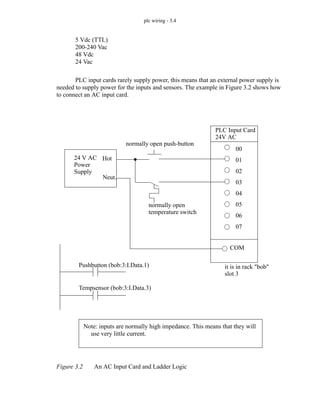
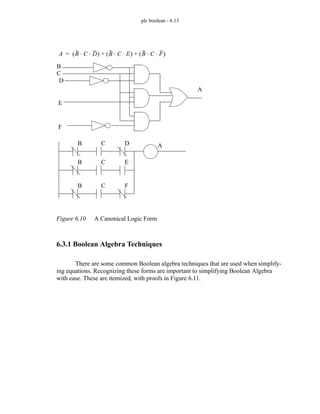
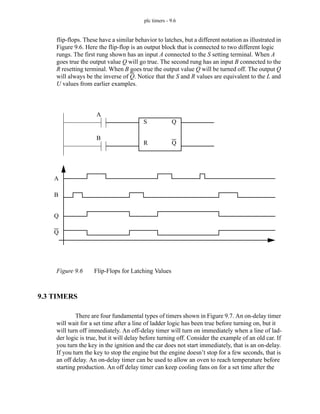
  • 824.
    plc glossary -35.27 steady state - describes a system response after a long period of time. In other words the transient effects have had time to dissipate. STEP (Standard for the Exchange of Product model data) - a standard that will allow transfer of solid model data (as well as others) between dissimilar CAD systems. step response - a typical test of system behavior that uses a sudden step input change with a measured response. stoichiometry - the general field that deals with balancing chemical equations. strain gauge - a wire mounted on a surface that will be stretched as the surface is strained. As the wire is stretched, the cross section is reduced, and the proportional change in resistance can be measured to estimate strain. strut - a two force structural member. subroutine - a reusable segment of a program that is called repeatedly. substrate - the base piece of a semiconductor that the layers are added to. switching - refers to devices that are purely on or off. Clearly this calls for discrete state devices. synchronous - two or more events happen at predictable times. synchronous motor - an AC motor. These motors tend to keep a near constant speed regardless of load. syntax error - an error that is fundamentally wrong in a language. synthesis - is the specification of values for the design variables. The engineer synthesizes a design and then evaluates its performance using analysis. system - a complex collection of components that performs a set of functions. 35.20 T T1 - a 1.54 Mbps network data link. T3 - a 45 Mbps network data link. This can be done with parallel T1 lines and packet switching. tap - a connection to a power line. tare - the ratio between unloaded and loaded weights. TCP (Transmission Control Protocol) - a transport layer protocol that ensures reliable data communication when using IP communications. The protocol is connection oriented, with full duplex streams. tee - a tap into a larger line that does not add any special compensation, or conditioning. These connectors ofen have a T-shape. telnet - a standard method for logging into remote computers and having access if connect by a dumb terminal. temperature - the heat stored in an object. The relationship between temperature and energy content is specific to a material and is called the specific heat. temperature dependence - as temperature varies, so do physical properties of materials. This makes many devices sensitive to temperatures. thermal conductivity - the ability of a material to transfer heat energy. thermal gradient - the change in temperature as we move through a material. thermal lag - a delay between the time heat energy is applied and the time it arrives at the load. thermistor - a resistance based temperature measurement device. thermocouple - a device using joined metals that will generate a junction potential at different temperatures, used for temperature measurement. thermopiles - a series of thermocouples in series. thermoresistors - a category including RTDs and thermistors. throughput - the speed that actual data is transmitted/processed, etc. through beam - a beam is projected over an opening. If the beam is broken the sensor is activated. thumbwheel - a mechanical switch with multiple positions that allow digits to be entered directly. TIFF (Tagged Image File Format) - an image format best suited to scanned pictures, such as Fax transmissions. time-division multiplex - a circuit is switched between different devices for communication.
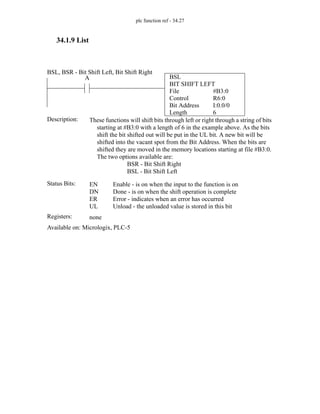
  • 825.
    plc glossary -35.28 time-proportional control - the amount of power delivered to an AC device is varied by changing the number of cycles delivered in a fixed period of time. timer - a device that can be set to have events happen at predetermined times. titration - a procedure for determining the strength of a solution using a reagent for detection. A chemical is added at a slow rate until the reagent detects a change. toggle switch - a switch with a large lever used for easy reviews of switch settings, and easy grasping. token - an indicator of control. Often when a process receives a token it can operate, when it is done it gives it up. TOP (Technical Office Protocol) - a network protocol designed for offices. It was promoted in conjunction with MAP in the 1980s, but never became widely used. top-down design - a design is done by first laying out the most abstract functions, and then filling in more of the details as they are required. topology - 1. The layout of a network. 2. a mathematical topic describing the connection of geometric entities. This is used for B-Rep models. torque - a moment or twisting action about an axis. torus - a donut shape toroidal core - a torus shaped magnetic core to increase magnetic conductivity. TPDDI (Twisted Pair Distributed Data Interface) - counter rotating token ring network connected with twisted pair medium. TQC (Total Quality Control) - a philosophical approach to developing quality methods that reach all levels and aspects of a company. transceiver (transmitter receiver) - a device to electrically interface between the computer network card, and the physical network medium. Packet collision hardware is present in these devices. transducer - a device that will convert energy from one form to another at proportional levels. transformations - include translation, rotation, and scaling of objects mathematically using matrix algebra. Transformations are used to move objects around in a scene. transformer - two separate coils wound about a common magnetic coil. Used for changing voltage, current and resistance levels. transient - a system response that occurs because of a change. These effects dissipate quickly and we are left with a steady state response. transmission path - a system component that is used for transmitting energy. transport layer - an OSI network model layer. TRIAC (TRIode Alternating Current) - a semiconductor switch suited to AC power. true - a logic positive, high, or 1. truth table - an exhaustive list of all possible logical input states, and the logical results. TTL (Transistor Transistor Logic) - a high speed for of transistor logic. TTY - a teletype terminal. turbine - a device that generates a rotational motion using gas or fluid pressure on fan blades or vanes. turbulent flow - fluids moving past an object, or changing direction will start to flow unevenly. This will occur when the Reynold’s number exceeds 4000. twisted pair - a sheme where wires are twisted to reduce the effects of EMI so that they may be used at higher frequencies. This is cassualy used to refer to 10b2 ethernet. TXD (Transmitted Data) - an output line for serial data transmission. It will be connected to an RXD input on a receiving station. 35.21 U UART (Universal Asynchronous Receiver/Transmitter) - UDP (User Datagram Protocol) - a connectionless method for transmitting packets to other hosts on the network. It is seen as a counterpart to TCP. ultrasonic - sound or vibration at a frequency above that of the ear (> 16KHz typ.)
  • 826.
    plc glossary -35.29 ultraviolet - light with a frequency above the visible spectrum. UNIX - a very powerful operating system used on most high end and mid-range computers. The predecessor was Multics. This operating system was developed at AT & T, and grew up in the academic environment. As a result a wealth of public domain software has been developed, and the operating system is very well debugged. UPS (Uninterruptable Power Supply) - user friendly - a design scheme that similifies interaction so that no knowledge is needed to operae a device and errors are easy to recover from. It is also a marketing term that is badly misused. user interfaces - are the means of communicating with the computer. For CAD applications, a graphical interface is usually preferred. User friendliness is a measure of the ease of use of a program and implies a good user interface. UUCP (Unix to Unix Copy Program) - a common communication method between UNIX systems. 35.22 V Vac - a voltage that is AC. vacuum - a pressure that is below another pressure. vane - a blade that can be extended to provide a good mechanical contact and/or seal. variable - a changeable location in memory. varistor - voltage applied changes resistance. valve - a system component for opening and closing mass/energy flow paths. An example is a water faucet or transistor. vapor - a gas. variable - it is typically a value that will change or can be changed. see also constant. VDT (Video Display Terminal) - also known as a dumb terminal velocity - a rate of change or speed. Venturi - an effect that uses an orifice in a flow to generate a differential pressure. These devices can generate small vacuums. viscosity - when moved a fluid will have some resistance proportional to internal friction. This determines how fast a liquid will flow. viscosity index - when heated fluid viscosity will decrease, this number is the relative rate of change with respect to temperature. VLSI (Very Large Scale Integration) - a measure of chip density. This indicates that there are over 100,000(?) transistors on a single integrated circuit. Modern microprocessors commonly have millions of transistors. volt - a unit of electrical potential. voltage rating - the range or a maximum/minimum limit that is required to prevent damage, and ensure normal operation. Some devices will work outside these ranges, but not all will, so the limits should be observed for good designs. volume - the size of a region of space or quantity of fluid. volatile memory - most memory will lose its contents when power is removed, making it volatile. vortex - a swirling pattern in fluid flow. vortex shedding - a solid object in a flow stream might cause vortices. These vortices will travel with the flow and appear to be shed. 35.23 W watchdog timer - a timer that expects to receive a pulse every fraction of a second. If a pulse is not received,
  • 827.
    plc glossary -35.30 it assumes the system is not operating normally, and a shutdown procedure is activated. watt - a unit of power that is commonly used for electrical systems, but applies to all. wavelength - the physical distance occupied by one cycle of a wave in a propagating medium. word - 1. a unit of 16 bits or two bytes. 2. a term used to describe a binary number in a computer (not limited to 16 bits). work - the transfer of energy. write - a digital value is stored in a memory location. WYSIWYG (What You See Is What You Get) - newer software allows users to review things on the screen before printing. In WYSIWYG mode, the layout on the screen matches the paper version exactly. 35.24 X X.25- a packet switching standard by the CCITT. X.400 - a message handling system standard by the CCITT. X.500 - a directory services standard by the CCITT. X rays - very high frequency electromagnetic waves. X Windows - a window driven interface system that works over networks. The system was developed at MIT, and is quickly becoming the standard windowed interface. Personal computer manufacturers are slowly evolving their windowed operating systems towards X-Windows like standards. This standard only specifies low level details, higher level standards have been developed: Motif, and Openlook. XFER - transfer. XMIT - transmit. xmodem - a popular protocol for transmitting files over text based connections. compression and error checking are included. 35.25 Y ymodem - a popular protocol for transmitting files over text based connections. compression and error checking are included. 35.26 Z zmodem - a protocol for transmitting data over text based connections.
  • 828.
    plc references -36.1 36. PLC REFERENCES 36.1 SUPPLIERS Asea Industrial Systems, 16250 West Glendale Dr., New Berlin, WI 53151, USA. Adaptek Inc., 1223 Michigan, Sandpoint, ID 83864, USA. Allen Bradley, 747 Alpha Drive, Highland Heights, OH 44143, USA. Automation Systems, 208 No. 12th Ave., Eldridge, IA 52748, USA. Bailey Controls Co., 29801 Euclid Ave., Wickliffe, OH 44092, USA. Cincinatti Milacron, Mason Rd. & Rte. 48, Lebanon, OH 45036, USA. Devilbiss Corp., 9776 Mt. Gilead Rd., Fredricktown, OH 43019, USA. Eagle Signal Controls, 8004 Cameron Rd., Austin, TX 78753, USA. Eaton Corp., 4201 North 27th St., Milwaukee, WI 53216, USA. Eaton Leonard Corp., 6305 ElCamino Real, Carlsbad, CA 92008, USA. Foxboro Co., Foxboro, MA 02035, USA. Furnas Electric, 1000 McKee St., Batavia, IL 60510, USA. GEC Automation Projects, 2870 Avondale Mill Rd., Macon, GA 31206, USA. General Electric, Automation Controls Dept., Box 8106, Charlottesville, VA 22906, USA. General Numeric, 390 Kent Ave., Elk Grove Village, IL 60007, USA. Giddings & Lewis, Electrical Division, 666 South Military Rd., Fond du Lac, WI 54935-7258, USA. Gould Inc., Programmable Control Division, PO Box 3083, Andover, MA 01810, USA. Guardian/Hitachi, 1550 W. Carroll Ave., Chicago, IL 60607, USA. Honeywell, IPC Division, 435 West Philadelphia St., York, PA 17404, USA. International Cybernetics Corp., 105 Delta Dr., Pittsburgh, Pennsylvania, 15238, USA, (412) 963-1444. Keyence Corp. of America, 3858 Carson St., Suite 203, Torrance, CA 90503, USA, (310) 540-2254. McGill Mfg. Co., Electrical Division, 1002 N. Campbell St., Valparaiso, IN 46383, USA. Mitsubishi Electric, 799 N. Bierman CircleMt. Prospect, IL 60056-2186, USA. Modicon (AEG), 6630 Campobello Rd., Mississauga, Ont., Canada L5N 2L8, (905) 821-8200. Modular Computer Systems Inc., 1650 W. McNabb Rd., Fort Lauderdale, FL 33310, USA. Omron Electric, Control Division, One East Commerce Drive, Schaumburg, IL 60195, USA. Reliance Electric, Centrl. Systems Division, 4900 Lewis Rd., Stone Mountain, GA 30083, USA. Siemens, 10 Technology Drive, Peabody, MA 01960, USA. Square D Co., 4041 N. Richards St., Milwaukee, WI 53201, USA. Struthers-Dunn Systems Division, 4140 Utica Ridge Rd., Bettendorf, IA 52722,
  • 829.
    plc references -36.2 USA. Telemechanique, 901 Baltimore Blvd., Westminster, MD 21157, USA. Texas Instruments, Industrial Control Dept., PO Drawer 1255, Johnson City, IN 37605-1255, USA. Toshiba, 13131 West Little York Rd., Houston, TX 77041, USA. Transduction Ltd., Airport Corporate Centre, 5155 Spectrum Way Bldg., No. 23, Mississauga, Ont., Canada, L4W 5A1, (905) 625-1907. Triconex, 16800 Aston St., Irvine, CA 92714, USA. Westinghouse Electric, 1512 Avis Drive, Madison Heights, MI 48071. 36.2 PROFESSIONAL INTEREST GROUPS American National Standards Committee (ANSI), 1420 Broadway, Ney York, NY 10018, USA. Electronic Industries Association (EIA), 2001 I Street NW, Washington, DC 20006, USA. Institute of Electrical and Electronic Engineers (IEEE), 345 East 47th St., New York, NY 10017, USA. Instrument Society of America (ISA), 67 Alexander Drive, Research Triangle Park, NC 27709, USA. International Standards Organization (ISO), 1430 Broadway, New York, NY 10018, USA. National Electrical Manufacturers Association (NEMA), 2101 L. Street NW, Washington, DC 20037, USA. Society of Manufacturing Engineers (SME), PO Box 930, One SME Drive, Dear- born, MI 48121, USA. 36.3 PLC/DISCRETE CONTROL REFERENCES - The table below gives a topic-by-topic comparison of some PLC books. (H=Good coverage, M=Medium coverage, L=Low coverage, Blank=little/no coverage).
  • 830.
    plc references -36.3 Asfahl, C.R., “Robots and Manufacturing Automation”, second edition, Wiley, 1992. Batten, G.L., Programmable Controllers: Hardware, Software, and Applications, Table 1: Author Introduction/Overview Wiring Discrete Sensors/Actuators Conditional Logic Numbering Timers/Counters/Latches Sequential Logic Design Advanced Functions Structured Text Programming Analog I/O Continuous Sensors/Actuators Continuous Control Fuzzy Control Data Interfacing/Networking Implementation/Selection Function Block Programming pages on PLC topics Filer... H M L H M H M H M M 303 Chang... M L L L L M M L 80 Petruzela H H M H H H L H L L L L 464 Swainston H L L L L M H M M M M M 294 Clements H M L L L L L L L L M H 197 Asfahl L H L L L L 86 Bollinger.. L M M M M M H H H 52 Boucher M L M L M M H L L M M H 59 Kirckof L L L M L M H L M 202
  • 831.
    plc references -36.4 Second Edition, McGraw-Hill, 1994. Batten, G.L., Batten, G.J., Programmable Controllers: Hardware, Software, and Applications, *Bertrand, R.M., “Programmable Controller Circuits”, Delmar, 1996. Bollinger, J.G., Duffie, N.A., “Computer Control of Machines and Processes”, Addison-Wesley, 1989. Bolton, w., Programmable Logic Controllers: An Introduction, Butterworth-Heine- mann, 1997. Bryan, L.A., Bryan, E.A., Programmable Controllers, Industrial Text and Video- Company, 1997. Boucher, T.O., “Computer Automation in Manufacturing; An Introduction”, Chap- man and Hall, 1996. *Bryan, L.A., Bryan, E.A., Programmable Controllers, Industrial Text Company, 19??. *Carrow, R.A., “Soft Logic: A Guide to Using a PC As a Programmable Logic Controller”, McGraw Hill, 1997. Chang, T-C, Wysk, R.A., Wang, H-P, “Computer-Aided Manufacturing”, second edition, Prentice Hall, 1998. Clements-Jewery, K., Jeffcoat, W., “The PLC Workbook; Programmable Logic Controllers made easy”, Prentice Hall, 1996. *Cox, R., Technician’s Guide to Programmable Controllers, Delmar Publishing, 19??. ?Crispin, A.J., “Programmable Logic Controllers and Their Engineering Applica- tions”, Books Britain, 1996. *Dropka, E., Dropka, E., “Toshiba Medium PLC Primer”, Butterworth-Heine- mann, 1995. *Dunning, G., “Introduction to Programmable Logic Controllers”, Delmar, 1998. Filer, R., Leinonen, G., “Programmable Controllers and Designing Sequential Logic“, Saunders College Publishing, 1992. **Hughes, T.A., “Programmable Controllers (Resources for Measuremwnt and Control Series)”, Instrument Society of America, 1997. ?Johnson, D.G., “Programmable Controllers for Factory Automation”, Marcel Dekker, 1987. Kirckof, G., Cascading Logic; A Machine Control Methodology for Programmable Logic Controllers, The Instrumentation, Systems, and Automation Society, 2003. *Lewis, R.W., “Programming Industrial Control Systems using IES1131-3”, *Lewis, R.W., Antsaklis, P.J., “Programming Industrial Control Systems Using IEC 1131-3 (Iee Control Engineering, No. 59)”, Inspec/IEE, 1995. *Michel, G., Duncan, F., “Programmable Logic Controllers: Architecture and Application”, John Wiley & Sons, 1990. ?Morriss, S.B., “Programmable Logic Controllers”, pub??, 2000. ?Otter, J.D., “Programmable Logic Controllers: Operation, Interfacing and Pro- gramming”, ??? Parr, E.A., Parr, A., Programmable Controllers: An Engineer’s Guide, Butter- worth-Heinemann, 1993.
  • 832.
    plc references -36.5 *Parr, E.A., “Programmable Controllers”, Butterworth-Heinemann, 1999. Petruzella, F., Programmable Logic Controllers, Second Edition, McGraw-Hill Publishing Co., 1998. *Ridley, J.E., “Introduction to Programmable Logic Controllers: The Mitsubishi Fx”, John Wiley & Sons, 1997. Rohner, P., PLC: Automation With Programmable Logic Controllers, International Specialized Book Service, 1996. *Rosandich, R.G., “Fundamentals of Programmable Logic Controllers”, EC&M Books, 1997. *Simpson, C.D., “Programmable Logic Controllers”, Regents/Prentice Hall, 1994. Sobh, M., Owen, J.C., Valvanis, K.P., Gracanin, S., “A Subject-Indexed Bibliogra- phy of Discrete Event Dynamic Systems”, IEEE Robotics and Applications Magazine, June 1994, pp. 14-20. **Stenerson, J., “Fundamentals of Programmable Logic Controllers, Sensors and Communications”, Prentice Hall, 1998. Sugiyama, H., Umehara, Y., Smith, E., “A Sequential Function Chart (SFC) Lan- guage for Batch Control”, ISA Transactions, Vol. 29, No. 2, 1990, pp. 63-69. Swainston, F., “A Systems Approach to Programmable Controllers”, Delmar, 1992. Teng, S.H., Black, J. T., “Cellular Manufacturing Systems Modelling: The Petri Net Approach”, Journal of Manufacturing Systems, Vol. 9, No. 1, 1988, pp. 45- 54. Warnock, I., Programmable Controllers: Operation and Application, Prentice Hall, 19??. **Webb, J.W., Reis, R.A., “Programmable Logic Controllers, Principles and Applications”, Prentice Hall, 1995. Wright, C.P., Applied Measurement Engineering, Prentice-Hall, New Jersey, 1995.
  • 833.
    gfdl - 37.1 37.GNU Free Documentation License Version 1.2, November 2002 Copyright (C) 2000,2001,2002 Free Software Foundation, Inc. 59 Temple Place, Suite 330, Boston, MA 02111-1307 USA Everyone is permitted to copy and distribute verbatim copies of this license document, but changing it is not allowed. 37.1 PREAMBLE The purpose of this License is to make a manual, textbook, or other functional and useful docu- ment "free" in the sense of freedom: to assure everyone the effective freedom to copy and redistribute it, with or without modifying it, either commercially or noncommercially. Second- arily, this License preserves for the author and publisher a way to get credit for their work, while not being considered responsible for modifications made by others. This License is a kind of "copyleft", which means that derivative works of the document must themselves be free in the same sense. It complements the GNU General Public License, which is a copyleft license designed for free software. We have designed this License in order to use it for manuals for free software, because free soft- ware needs free documentation: a free program should come with manuals providing the same freedoms that the software does. But this License is not limited to software manuals; it can be used for any textual work, regardless of subject matter or whether it is published as a printed book. We recommend this License principally for works whose purpose is instruction or refer- ence. 37.2 APPLICABILITY AND DEFINITIONS This License applies to any manual or other work, in any medium, that contains a notice placed by the copyright holder saying it can be distributed under the terms of this License. Such a notice grants a world-wide, royalty-free license, unlimited in duration, to use that work under the con- ditions stated herein. The "Document", below, refers to any such manual or work. Any member of the public is a licensee, and is addressed as "you". You accept the license if you copy, mod- ify or distribute the work in a way requiring permission under copyright law. A "Modified Version" of the Document means any work containing the Document or a portion of it, either copied verbatim, or with modifications and/or translated into another language. A "Secondary Section" is a named appendix or a front-matter section of the Document that deals exclusively with the relationship of the publishers or authors of the Document to the Docu- ment's overall subject (or to related matters) and contains nothing that could fall directly within that overall subject. (Thus, if the Document is in part a textbook of mathematics, a Secondary Section may not explain any mathematics.) The relationship could be a matter of historical connection with the subject or with related matters, or of legal, commercial, philosophical, eth-
  • 834.
    gfdl - 37.2 icalor political position regarding them. The "Invariant Sections" are certain Secondary Sections whose titles are designated, as being those of Invariant Sections, in the notice that says that the Document is released under this License. If a section does not fit the above definition of Secondary then it is not allowed to be designated as Invariant. The Document may contain zero Invariant Sections. If the Document does not identify any Invariant Sections then there are none. The "Cover Texts" are certain short passages of text that are listed, as Front-Cover Texts or Back- Cover Texts, in the notice that says that the Document is released under this License. A Front- Cover Text may be at most 5 words, and a Back-Cover Text may be at most 25 words. A "Transparent" copy of the Document means a machine-readable copy, represented in a format whose specification is available to the general public, that is suitable for revising the document straightforwardly with generic text editors or (for images composed of pixels) generic paint programs or (for drawings) some widely available drawing editor, and that is suitable for input to text formatters or for automatic translation to a variety of formats suitable for input to text formatters. A copy made in an otherwise Transparent file format whose markup, or absence of markup, has been arranged to thwart or discourage subsequent modification by readers is not Transparent. An image format is not Transparent if used for any substantial amount of text. A copy that is not "Transparent" is called "Opaque". Examples of suitable formats for Transparent copies include plain ASCII without markup, Tex- info input format, LaTeX input format, SGML or XML using a publicly available DTD, and standard-conforming simple HTML, PostScript or PDF designed for human modification. Examples of transparent image formats include PNG, XCF and JPG. Opaque formats include proprietary formats that can be read and edited only by proprietary word processors, SGML or XML for which the DTD and/or processing tools are not generally available, and the machine- generated HTML, PostScript or PDF produced by some word processors for output purposes only. The "Title Page" means, for a printed book, the title page itself, plus such following pages as are needed to hold, legibly, the material this License requires to appear in the title page. For works in formats which do not have any title page as such, "Title Page" means the text near the most prominent appearance of the work's title, preceding the beginning of the body of the text. A section "Entitled XYZ" means a named subunit of the Document whose title either is precisely XYZ or contains XYZ in parentheses following text that translates XYZ in another language. (Here XYZ stands for a specific section name mentioned below, such as "Acknowledgements", "Dedications", "Endorsements", or "History".) To "Preserve the Title" of such a section when you modify the Document means that it remains a section "Entitled XYZ" according to this definition. The Document may include Warranty Disclaimers next to the notice which states that this License applies to the Document. These Warranty Disclaimers are considered to be included by refer- ence in this License, but only as regards disclaiming warranties: any other implication that these Warranty Disclaimers may have is void and has no effect on the meaning of this License. 37.3 VERBATIM COPYING You may copy and distribute the Document in any medium, either commercially or noncommer-
  • 835.
    gfdl - 37.3 cially,provided that this License, the copyright notices, and the license notice saying this License applies to the Document are reproduced in all copies, and that you add no other condi- tions whatsoever to those of this License. You may not use technical measures to obstruct or control the reading or further copying of the copies you make or distribute. However, you may accept compensation in exchange for copies. If you distribute a large enough number of copies you must also follow the conditions in section 3. You may also lend copies, under the same conditions stated above, and you may publicly display copies. 37.4 COPYING IN QUANTITY If you publish printed copies (or copies in media that commonly have printed covers) of the Doc- ument, numbering more than 100, and the Document's license notice requires Cover Texts, you must enclose the copies in covers that carry, clearly and legibly, all these Cover Texts: Front- Cover Texts on the front cover, and Back-Cover Texts on the back cover. Both covers must also clearly and legibly identify you as the publisher of these copies. The front cover must present the full title with all words of the title equally prominent and visible. You may add other material on the covers in addition. Copying with changes limited to the covers, as long as they preserve the title of the Document and satisfy these conditions, can be treated as verbatim copying in other respects. If the required texts for either cover are too voluminous to fit legibly, you should put the first ones listed (as many as fit reasonably) on the actual cover, and continue the rest onto adjacent pages. If you publish or distribute Opaque copies of the Document numbering more than 100, you must either include a machine-readable Transparent copy along with each Opaque copy, or state in or with each Opaque copy a computer-network location from which the general network-using public has access to download using public-standard network protocols a complete Transpar- ent copy of the Document, free of added material. If you use the latter option, you must take reasonably prudent steps, when you begin distribution of Opaque copies in quantity, to ensure that this Transparent copy will remain thus accessible at the stated location until at least one year after the last time you distribute an Opaque copy (directly or through your agents or retail- ers) of that edition to the public. It is requested, but not required, that you contact the authors of the Document well before redis- tributing any large number of copies, to give them a chance to provide you with an updated version of the Document. 37.5 MODIFICATIONS You may copy and distribute a Modified Version of the Document under the conditions of sec- tions 2 and 3 above, provided that you release the Modified Version under precisely this License, with the Modified Version filling the role of the Document, thus licensing distribution and modification of the Modified Version to whoever possesses a copy of it. In addition, you must do these things in the Modified Version:
  • 836.
    gfdl - 37.4 *A. Use in the Title Page (and on the covers, if any) a title distinct from that of the Document, and from those of previous versions (which should, if there were any, be listed in the History section of the Document). You may use the same title as a previous version if the original publisher of that version gives permis- sion. * B. List on the Title Page, as authors, one or more persons or entities responsible for authorship of the modifications in the Modified Version, together with at least five of the principal authors of the Document (all of its principal authors, if it has fewer than five), unless they release you from this requirement. * C. State on the Title page the name of the publisher of the Modified Version, as the publisher. * D. Preserve all the copyright notices of the Document. * E. Add an appropriate copyright notice for your modifications adjacent to the other copyright notices. * F. Include, immediately after the copyright notices, a license notice giving the public permission to use the Modified Version under the terms of this License, in the form shown in the Addendum below. * G. Preserve in that license notice the full lists of Invariant Sections and required Cover Texts given in the Document's license notice. * H. Include an unaltered copy of this License. * I. Preserve the section Entitled "History", Preserve its Title, and add to it an item stating at least the title, year, new authors, and publisher of the Modified Ver- sion as given on the Title Page. If there is no section Entitled "History" in the Document, create one stating the title, year, authors, and publisher of the Docu- ment as given on its Title Page, then add an item describing the Modified Ver- sion as stated in the previous sentence. * J. Preserve the network location, if any, given in the Document for public access to a Transparent copy of the Document, and likewise the network locations given in the Document for previous versions it was based on. These may be placed in the "History" section. You may omit a network location for a work that was published at least four years before the Document itself, or if the origi- nal publisher of the version it refers to gives permission. * K. For any section Entitled "Acknowledgements" or "Dedications", Preserve the Title of the section, and preserve in the section all the substance and tone of each of the contributor acknowledgements and/or dedications given therein. * L. Preserve all the Invariant Sections of the Document, unaltered in their text and in their titles. Section numbers or the equivalent are not considered part of the section titles. * M. Delete any section Entitled "Endorsements". Such a section may not be included in the Modified Version. * N. Do not retitle any existing section to be Entitled "Endorsements" or to conflict in title with any Invariant Section. * O. Preserve any Warranty Disclaimers. If the Modified Version includes new front-matter sections or appendices that qualify as Second- ary Sections and contain no material copied from the Document, you may at your option desig- nate some or all of these sections as invariant. To do this, add their titles to the list of Invariant
  • 837.
    gfdl - 37.5 Sectionsin the Modified Version's license notice. These titles must be distinct from any other section titles. You may add a section Entitled "Endorsements", provided it contains nothing but endorsements of your Modified Version by various parties--for example, statements of peer review or that the text has been approved by an organization as the authoritative definition of a standard. You may add a passage of up to five words as a Front-Cover Text, and a passage of up to 25 words as a Back-Cover Text, to the end of the list of Cover Texts in the Modified Version. Only one passage of Front-Cover Text and one of Back-Cover Text may be added by (or through arrangements made by) any one entity. If the Document already includes a cover text for the same cover, previously added by you or by arrangement made by the same entity you are act- ing on behalf of, you may not add another; but you may replace the old one, on explicit permis- sion from the previous publisher that added the old one. The author(s) and publisher(s) of the Document do not by this License give permission to use their names for publicity for or to assert or imply endorsement of any Modified Version. 37.6 COMBINING DOCUMENTS You may combine the Document with other documents released under this License, under the terms defined in section 4 above for modified versions, provided that you include in the combi- nation all of the Invariant Sections of all of the original documents, unmodified, and list them all as Invariant Sections of your combined work in its license notice, and that you preserve all their Warranty Disclaimers. The combined work need only contain one copy of this License, and multiple identical Invariant Sections may be replaced with a single copy. If there are multiple Invariant Sections with the same name but different contents, make the title of each such section unique by adding at the end of it, in parentheses, the name of the original author or publisher of that section if known, or else a unique number. Make the same adjustment to the section titles in the list of Invariant Sections in the license notice of the combined work. In the combination, you must combine any sections Entitled "History" in the various original doc- uments, forming one section Entitled "History"; likewise combine any sections Entitled "Acknowledgements", and any sections Entitled "Dedications". You must delete all sections Entitled "Endorsements." 37.7 COLLECTIONS OF DOCUMENTS You may make a collection consisting of the Document and other documents released under this License, and replace the individual copies of this License in the various documents with a sin- gle copy that is included in the collection, provided that you follow the rules of this License for verbatim copying of each of the documents in all other respects. You may extract a single document from such a collection, and distribute it individually under this License, provided you insert a copy of this License into the extracted document, and follow this License in all other respects regarding verbatim copying of that document.
  • 838.
    gfdl - 37.6 37.8AGGREGATION WITH INDEPENDENT WORKS A compilation of the Document or its derivatives with other separate and independent documents or works, in or on a volume of a storage or distribution medium, is called an "aggregate" if the copyright resulting from the compilation is not used to limit the legal rights of the compila- tion's users beyond what the individual works permit. When the Document is included an aggregate, this License does not apply to the other works in the aggregate which are not them- selves derivative works of the Document. If the Cover Text requirement of section 3 is applicable to these copies of the Document, then if the Document is less than one half of the entire aggregate, the Document's Cover Texts may be placed on covers that bracket the Document within the aggregate, or the electronic equivalent of covers if the Document is in electronic form. Otherwise they must appear on printed covers that bracket the whole aggregate. 37.9 TRANSLATION Translation is considered a kind of modification, so you may distribute translations of the Docu- ment under the terms of section 4. Replacing Invariant Sections with translations requires spe- cial permission from their copyright holders, but you may include translations of some or all Invariant Sections in addition to the original versions of these Invariant Sections. You may include a translation of this License, and all the license notices in the Document, and any War- rany Disclaimers, provided that you also include the original English version of this License and the original versions of those notices and disclaimers. In case of a disagreement between the translation and the original version of this License or a notice or disclaimer, the original version will prevail. If a section in the Document is Entitled "Acknowledgements", "Dedications", or "History", the requirement (section 4) to Preserve its Title (section 1) will typically require changing the actual title. 37.10 TERMINATION You may not copy, modify, sublicense, or distribute the Document except as expressly provided for under this License. Any other attempt to copy, modify, sublicense or distribute the Docu- ment is void, and will automatically terminate your rights under this License. However, parties who have received copies, or rights, from you under this License will not have their licenses terminated so long as such parties remain in full compliance. 37.11 FUTURE REVISIONS OF THIS LICENSE The Free Software Foundation may publish new, revised versions of the GNU Free Documenta-
  • 839.
    gfdl - 37.7 tionLicense from time to time. Such new versions will be similar in spirit to the present ver- sion, but may differ in detail to address new problems or concerns. See http://www.gnu.org/ copyleft/. Each version of the License is given a distinguishing version number. If the Document specifies that a particular numbered version of this License "or any later version" applies to it, you have the option of following the terms and conditions either of that specified version or of any later version that has been published (not as a draft) by the Free Software Foundation. If the Docu- ment does not specify a version number of this License, you may choose any version ever pub- lished (not as a draft) by the Free Software Foundation. 37.12 How to use this License for your documents To use this License in a document you have written, include a copy of the License in the docu- ment and put the following copyright and license notices just after the title page: Copyright (c) YEAR YOUR NAME. Permission is granted to copy, distribute and/or modify this document under the terms of the GNU Free Documentation License, Version 1.2 or any later version published by the Free Software Foundation; with no Invariant Sections, no Front-Cover Texts, and no Back-Cover Texts. A copy of the license is included in the section entitled "GNU Free Documentation License". If you have Invariant Sections, Front-Cover Texts and Back-Cover Texts, replace the "with...Texts." line with this: with the Invariant Sections being LIST THEIR TITLES, with the Front-Cover Texts being LIST, and with the Back-Cover Texts being LIST. If you have Invariant Sections without Cover Texts, or some other combination of the three, merge those two alternatives to suit the situation. If your document contains nontrivial examples of program code, we recommend releasing these examples in parallel under your choice of free software license, such as the GNU General Pub- lic License, to permit their use in free software.