Design of column at bottom and top face of beam                New Feature


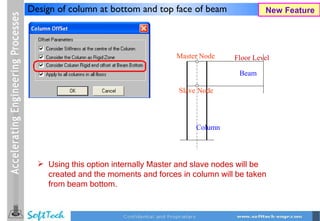
                                       Master Node    Floor Level

                                                       Beam

                                       Slave Node


                                            Column


   Using this option internally Master and slave nodes will be
    created and the moments and forces in column will be taken
    from beam bottom.
Design and detailing of bottom extra steel in beams       New Feature


                                                 Option provided to
                                                  design and give
                                                  detailing of bottom
                                                  extra steel in beams.
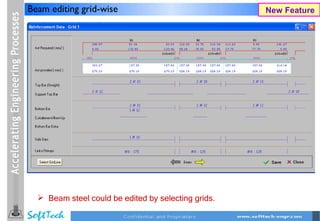
Beam editing grid-wise                               New Feature


   Beam steel could be edited by selecting grids.
DXF Import Layer-wise and unit wise in New GUI                 New Feature


   This option is given under View -> Floor Plan -> Import -> DXF.
   Using this user can import the center line plan layer wise and
    unit wise with and without shifting the base point.
Setting default path for AutoCAD and Excel                    Enhancement


   This option is given under tools menu.
   Using this user can set the path for Excel and AutoCAD so that
    all his reports and drawings could be opened in any version of
    office and CAD.
Saving general / created load combinations in                  Enhancement
Postprocessor and Design


   Using this option the load combinations created by user will be
    saved in file and on reopening of file same combinations could
    be seen.
Creation of slab by selection of region by window or      Enhancement
By point


                              In case of CAD imported files
                               using this option user can create
                               the slabs in single command over
                               the selected area
3D View Editing and translucent rendering                      Enhancement


     Creation and deletion of element in 3D view made easy.
     Redo and Undo feature in 3D editing
Creation of predefined trusses in NEW GUI           Enhancement


      Modeling of predefined trusses in new GUI.
In postprocessor by default space frame view      Enhancement
with all floors and all levels


                                         Post processor
                                          opens with 3D
                                          isometric view.
                                         If floors are
                                          selected then those
                                          are displayed in
                                          isometric view.

13 struds 2010 (Jan. release)

  • 2.
    Design of columnat bottom and top face of beam New Feature Master Node Floor Level Beam Slave Node Column  Using this option internally Master and slave nodes will be created and the moments and forces in column will be taken from beam bottom.
  • 3.
    Design and detailingof bottom extra steel in beams New Feature  Option provided to design and give detailing of bottom extra steel in beams.
  • 4.
    Beam editing grid-wise New Feature  Beam steel could be edited by selecting grids.
  • 5.
    DXF Import Layer-wiseand unit wise in New GUI New Feature  This option is given under View -> Floor Plan -> Import -> DXF.  Using this user can import the center line plan layer wise and unit wise with and without shifting the base point.
  • 6.
    Setting default pathfor AutoCAD and Excel Enhancement  This option is given under tools menu.  Using this user can set the path for Excel and AutoCAD so that all his reports and drawings could be opened in any version of office and CAD.
  • 7.
    Saving general /created load combinations in Enhancement Postprocessor and Design  Using this option the load combinations created by user will be saved in file and on reopening of file same combinations could be seen.
  • 8.
    Creation of slabby selection of region by window or Enhancement By point  In case of CAD imported files using this option user can create the slabs in single command over the selected area
  • 9.
    3D View Editingand translucent rendering Enhancement  Creation and deletion of element in 3D view made easy.  Redo and Undo feature in 3D editing
  • 10.
    Creation of predefinedtrusses in NEW GUI Enhancement  Modeling of predefined trusses in new GUI.
  • 11.
    In postprocessor bydefault space frame view Enhancement with all floors and all levels  Post processor opens with 3D isometric view.  If floors are selected then those are displayed in isometric view.