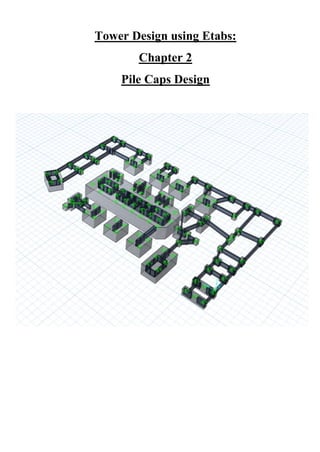
Tower Design using Etabs:
Chapter 2
Pile Caps Design
1 | P a g e
ABSTRACT
“Chapter 1 of Tower Design using Etabs” produced a full model with the
needed loads and parameters thus this series will discuss about
transferring the loads from the vertical structural elements to the
foundation. Our aim is to clarify why we are using piles, when they are
used and how to use them as a foundation for our structure.
Written by: Nada Zarrak
Checked by: Ahmed Sameer Zarrak
2 | P a g e
Table of Contents:
ABSTRACT.............................................................................................................. 1
*Piles Concept:...................................................................................................... 3
-Definition of Pile:............................................................................................. 3
-When Piles are used?........................................................................................ 3
-Number of piles:............................................................................................... 3
-Load Applied on pile:....................................................................................... 4
-Capacity of pile due to soil: .............................................................................. 4
*Pile caps and Piles first Assumption: ................................................................... 6
*AutoCAD Stage:.................................................................................................. 9
-AutoCAD Drawing Steps: ...............................................................................11
*Etabs Stage:........................................................................................................13
*Safe2016 Stage:..................................................................................................14
*Modal Analysis: .................................................................................................26
-Piles Reaction Check:......................................................................................26
-Pile Caps Design: ............................................................................................29
1. Punching Shear Check: .......................................................................29
2. Pile Caps Reinforcement:....................................................................30
3. Pile Caps Typical detail Plan:..............................................................35
Conclusion: ..............................................................................................................36
3 | P a g e
Piles Concept:
Definition of Pile:
Piles are vertical elements used mainly to transfer loads of the structure to the soil or
rock. Piles material could be reinforced concrete, steel or timber and it depends on the
situation of the site or the decision of the structural engineer. The design of piles are
divided into two sections, short pile and long pile. When length of pile (L) over its
diameter (D) is less than 4, it is considered as a short pile and when its length (L) over
its diameter (D) is more than 4, it is considered as a long pile. It is the job of the sub-
contractor to classify the pile design in order to design it as per requirements.
When Piles are used?
Piles are used in areas where the bearing capacity of the soil is very low when
compared to the load applied from the structure. To illustrate, when the applied
vertical load (Reaction from the vertical super structural elements-walls or columns)
over the area of the structure is greater than the bearing capacity of the soil
(
𝑃 𝑎𝑝𝑝𝑙𝑖𝑒𝑑
𝐴 𝑜𝑓 𝑠𝑡𝑢𝑟𝑐𝑡𝑢𝑟𝑒
≥ 𝜎s). Thus, deeper foundation is required to reach to a higher
bearing capacity 𝜎s.
Number of piles:
When the structural engineer determines to use the Piles as a foundation type for the
super structure, he has to determine the number of piles required. The piles number
are determined by dividing the load applied over the pile’s capacity. 𝑁 =
𝑃 𝑎𝑝𝑝𝑙𝑖𝑒𝑑
𝑃 𝑐𝑎𝑝𝑎𝑐𝑖𝑡𝑦
4 | P a g e
From Etabs we can get the load applied on each column thus we can determine how
many number of piles needed under each column. The pile capacity is divided into
two capacities. First is due to its material and second due to soil. Since the pile
capacity due to material is more than the capacity due to soil, we have to take the
smallest value to ensure a safer design. To get the pile’s capacity due to soil we have
to check the technical soil report.
Load Applied on pile:
As we know, we have the factored load and the service state however, which one we
should consider in the design stage! We might think it is proper to take the factorized
loads but in case of pile caps and piles, the safest among these two is the SERVICE
LOAD STATE. The reason behind it is the difference between the Safety Factor of
loads applied and pile’s capacity. The average factor of safety considered for piles is
2.5 however, for the Ultimate Load Combination we have 1.2DL+1.6 LL. Such
noticable difference will reduce the amount of Safety Factor and in such cases; the
Service Load State should be taken into account.
Capacity of pile due to soil:
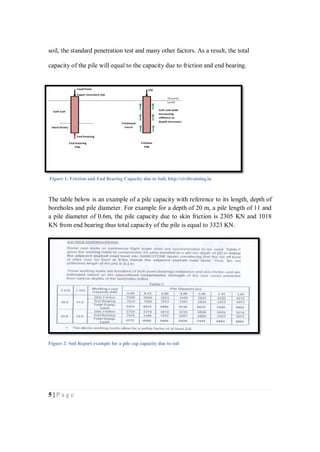
The relationship between the pile and the soil are friction and end bearing. Both
relationships gives the pile a capacity to handle the vertical load applied. There are
several theories to calculate the friction and the end bearing forces but as a structural
engineer, the soil laboratories will provide both forces depending on the type of the
5 | P a g e
soil, the standard penetration test and many other factors. As a result, the total
capacity of the pile will equal to the capacity due to friction and end bearing.
The table below is an example of a pile capacity with reference to its length, depth of
boreholes and pile diameter. For example for a depth of 20 m, a pile length of 11 and
a pile diameter of 0.6m, the pile capacity due to skin friction is 2305 KN and 1018
KN from end bearing thus total capacity of the pile is equal to 3323 KN.
Figure 2: Soil Report example for a pile cap capacity due to soil
Figure 1: Friction and End Bearing Capacity due to Soil, http://civiltraining.in
6 | P a g e
Pile caps and Piles first Assumption:
In general, the Soil Report confirm about using Piles as a Foundation. As a result, the
first step is to draw the first assumption of the arrangement of the Piles and the Pile
Caps depths.
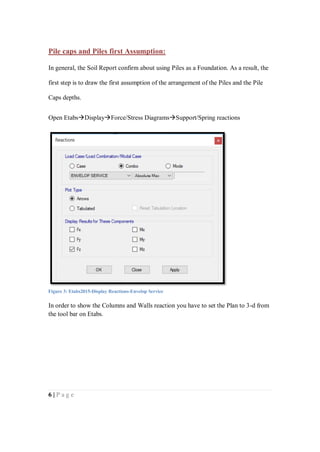
Open EtabsDisplayForce/Stress DiagramsSupport/Spring reactions
In order to show the Columns and Walls reaction you have to set the Plan to 3-d from
the tool bar on Etabs.
Figure 3: Etabs2015-Display Reactions-Envelop Service
7 | P a g e
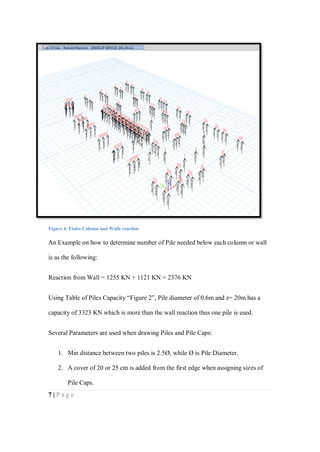
An Example on how to determine number of Pile needed below each column or wall
is as the following:
Reaction from Wall = 1255 KN + 1121 KN = 2376 KN
Using Table of Piles Capacity “Figure 2”, Pile diameter of 0.6m and z= 20m has a
capacity of 3323 KN which is more than the wall reaction thus one pile is used.
Several Parameters are used when drawing Piles and Pile Caps:
1. Min distance between two piles is 2.5Ø, while Ø is Pile Diameter.
2. A cover of 20 or 25 cm is added from the first edge when assigning sizes of
Pile Caps.
Figure 4: Etabs-Column and Walls reaction
8 | P a g e
3. The center of mass of Pile should be located at the center of mass of the
Column.
4. Tie Beams should be added in order to link the Pile Caps together.
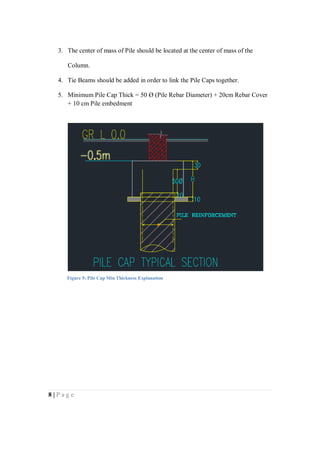
5. Minimum Pile Cap Thick = 50 Ø (Pile Rebar Diameter) + 20cm Rebar Cover
+ 10 cm Pile embedment
Figure 5: Pile Cap Min Thickness Explanation
9 | P a g e
AutoCAD Stage:
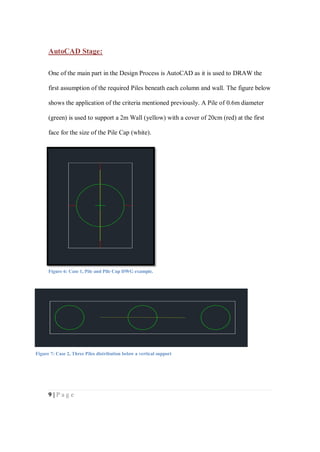
One of the main part in the Design Process is AutoCAD as it is used to DRAW the
first assumption of the required Piles beneath each column and wall. The figure below
shows the application of the criteria mentioned previously. A Pile of 0.6m diameter
(green) is used to support a 2m Wall (yellow) with a cover of 20cm (red) at the first
face for the size of the Pile Cap (white).
Figure 6: Case 1, Pile and Pile Cap DWG example.
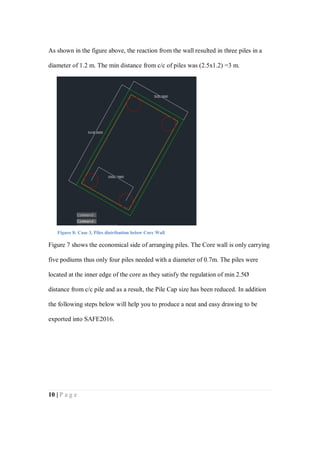
Figure 7: Case 2, Three Piles distribution below a vertical support
10 | P a g e
As shown in the figure above, the reaction from the wall resulted in three piles in a
diameter of 1.2 m. The min distance from c/c of piles was (2.5x1.2) =3 m.
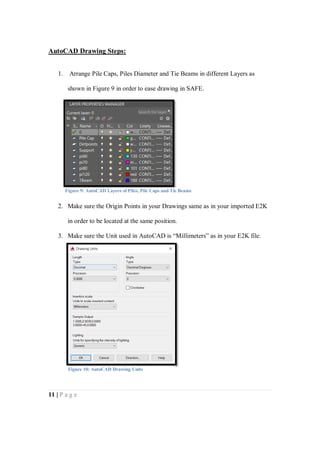
Figure 7 shows the economical side of arranging piles. The Core wall is only carrying
five podiums thus only four piles needed with a diameter of 0.7m. The piles were
located at the inner edge of the core as they satisfy the regulation of min 2.5Ø
distance from c/c pile and as a result, the Pile Cap size has been reduced. In addition
the following steps below will help you to produce a neat and easy drawing to be
exported into SAFE2016.
Figure 8: Case 3, Piles distribution below Core Wall
11 | P a g e
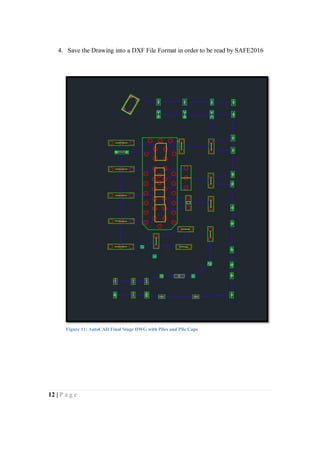
AutoCAD Drawing Steps:
1. Arrange Pile Caps, Piles Diameter and Tie Beams in different Layers as
shown in Figure 9 in order to ease drawing in SAFE.
2. Make sure the Origin Points in your Drawings same as in your imported E2K
in order to be located at the same position.
3. Make sure the Unit used in AutoCAD is “Millimeters” as in your E2K file.
Figure 9: AutoCAD Layers of Piles, Pile Caps and Tie Beams
Figure 10: AutoCAD Drawing Units
12 | P a g e
4. Save the Drawing into a DXF File Format in order to be read by SAFE2016
Figure 11: AutoCAD Final Stage DWG with Piles and Pile Caps
13 | P a g e
Etabs Stage:
The first chapter of Tower design using Etabs modeled and analyzed a residential
tower. Our next aim is to design the foundation “Pile Caps” in order to support our
structure. The main step of the whole process is to export the reactions from the
vertical elements “Columns and Walls”.
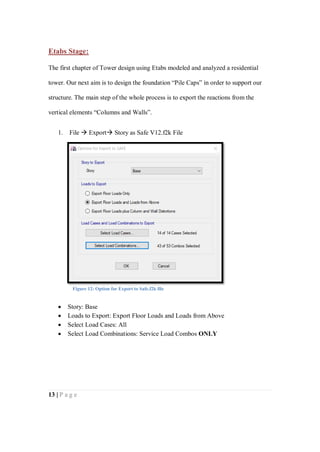
1. File  Export Story as Safe V12.f2k File
 Story: Base
 Loads to Export: Export Floor Loads and Loads from Above
 Select Load Cases: All
 Select Load Combinations: Service Load Combos ONLY
Figure 12: Option for Export to Safe.f2k file
14 | P a g e
Safe2016 Stage:
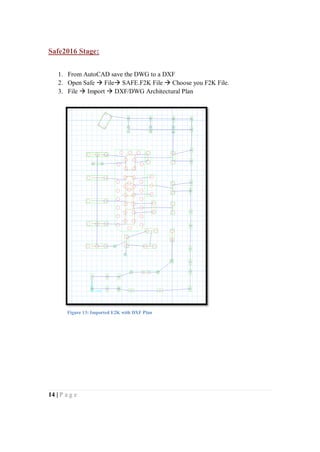
1. From AutoCAD save the DWG to a DXF
2. Open Safe  File SAFE.F2K File  Choose you F2K File.
3. File  Import  DXF/DWG Architectural Plan
Figure 13: Imported E2K with DXF Plan
15 | P a g e
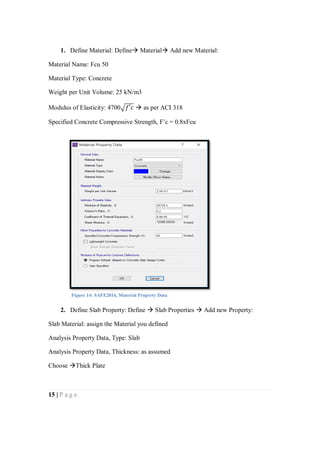
1. Define Material: Define Material Add new Material:
Material Name: Fcu 50
Material Type: Concrete
Weight per Unit Volume: 25 kN/m3
Modulus of Elasticity: 4700√𝑓′𝑐  as per ACI 318
Specified Concrete Compressive Strength, F’c = 0.8xFcu
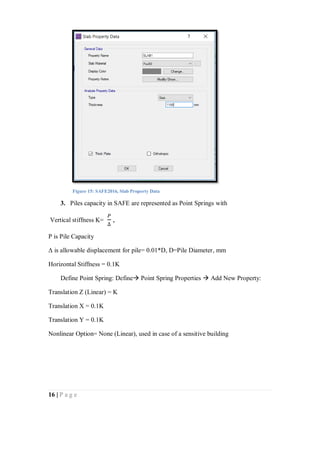
2. Define Slab Property: Define  Slab Properties  Add new Property:
Slab Material: assign the Material you defined
Analysis Property Data, Type: Slab
Analysis Property Data, Thickness: as assumed
Choose Thick Plate
Figure 14: SAFE2016, Material Property Data
16 | P a g e
3. Piles capacity in SAFE are represented as Point Springs with
Vertical stiffness K=
𝑃
∆
,
P is Pile Capacity
Δ is allowable displacement for pile= 0.01*D, D=Pile Diameter, mm
Horizontal Stiffness = 0.1K
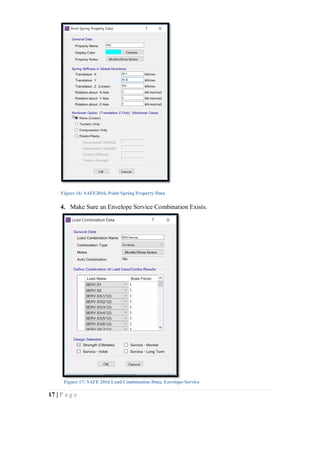
Define Point Spring: Define Point Spring Properties  Add New Property:
Translation Z (Linear) = K
Translation X = 0.1K
Translation Y = 0.1K
Nonlinear Option= None (Linear), used in case of a sensitive building
Figure 15: SAFE2016, Slab Property Data
17 | P a g e
4. Make Sure an Envelope Service Combination Exists.
Figure 16: SAFE2016, Point Spring Property Data
Figure 17: SAFE 2016 Load Combination Data, Envelope-Service
18 | P a g e
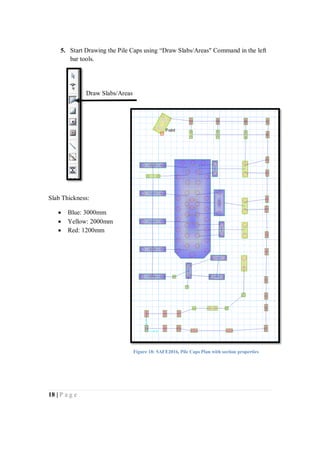
5. Start Drawing the Pile Caps using “Draw Slabs/Areas" Command in the left
bar tools.
Slab Thickness:
 Blue: 3000mm
 Yellow: 2000mm
 Red: 1200mm
Draw Slabs/Areas
Figure 18: SAFE2016, Pile Caps Plan with section properties
19 | P a g e
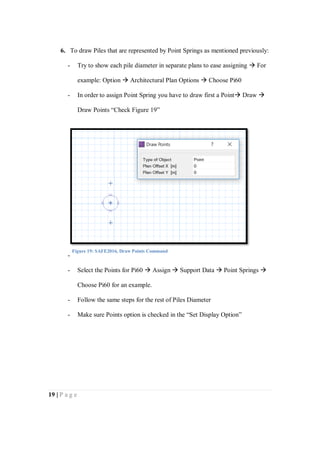
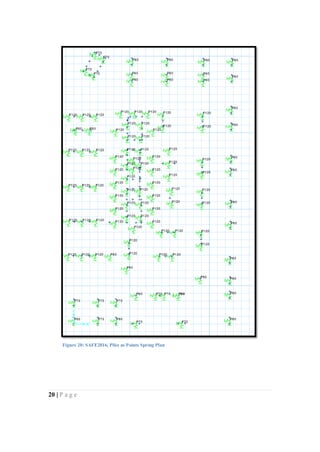
6. To draw Piles that are represented by Point Springs as mentioned previously:
- Try to show each pile diameter in separate plans to ease assigning  For
example: Option  Architectural Plan Options  Choose Pi60
- In order to assign Point Spring you have to draw first a Point Draw 
Draw Points “Check Figure 19”
-
- Select the Points for Pi60  Assign  Support Data  Point Springs 
Choose Pi60 for an example.
- Follow the same steps for the rest of Piles Diameter
- Make sure Points option is checked in the “Set Display Option”
Figure 19: SAFE2016, Draw Points Command
20 | P a g e
Figure 20: SAFE2016, Piles as Points Spring Plan
21 | P a g e
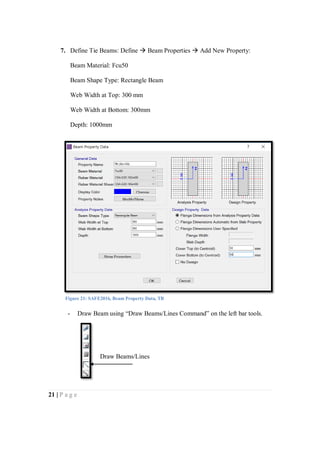
7. Define Tie Beams: Define  Beam Properties  Add New Property:
Beam Material: Fcu50
Beam Shape Type: Rectangle Beam
Web Width at Top: 300 mm
Web Width at Bottom: 300mm
Depth: 1000mm
- Draw Beam using “Draw Beams/Lines Command” on the left bar tools.
Figure 21: SAFE2016, Beam Property Data, TB
Draw Beams/Lines
22 | P a g e
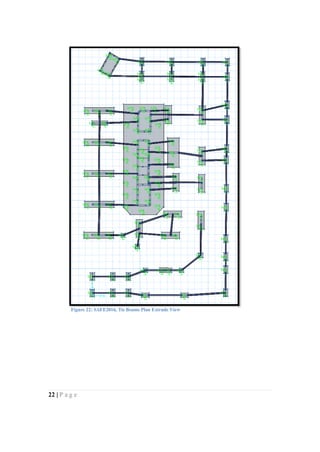
Figure 22: SAFE2016, Tie Beams Plan Extrude View
23 | P a g e
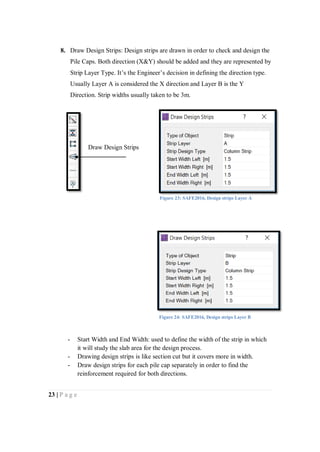
8. Draw Design Strips: Design strips are drawn in order to check and design the
Pile Caps. Both direction (X&Y) should be added and they are represented by
Strip Layer Type. It’s the Engineer’s decision in defining the direction type.
Usually Layer A is considered the X direction and Layer B is the Y
Direction. Strip widths usually taken to be 3m.
- Start Width and End Width: used to define the width of the strip in which
it will study the slab area for the design process.
- Drawing design strips is like section cut but it covers more in width.
- Draw design strips for each pile cap separately in order to find the
reinforcement required for both directions.
Draw Design Strips
Figure 23: SAFE2016, Design strips Layer A
Figure 24: SAFE2016, Design strips Layer B
24 | P a g e
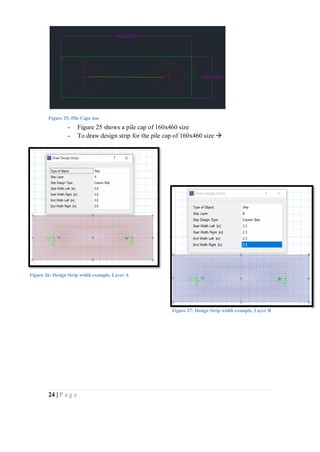
- Figure 25 shows a pile cap of 160x460 size
- To draw design strip for the pile cap of 160x460 size 
Figure 25: Pile Caps size
Figure 26: Design Strip width example, Layer A
Figure 27: Design Strip width example, Layer B
25 | P a g e
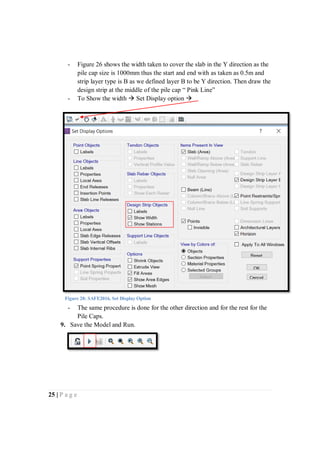
- Figure 26 shows the width taken to cover the slab in the Y direction as the
pile cap size is 1000mm thus the start and end with as taken as 0.5m and
strip layer type is B as we defined layer B to be Y direction. Then draw the
design strip at the middle of the pile cap “ Pink Line”
- To Show the width  Set Display option 
- The same procedure is done for the other direction and for the rest for the
Pile Caps.
9. Save the Model and Run.
Figure 28: SAFE2016, Set Display Option
26 | P a g e
Modal Analysis:
Piles Reaction Check:
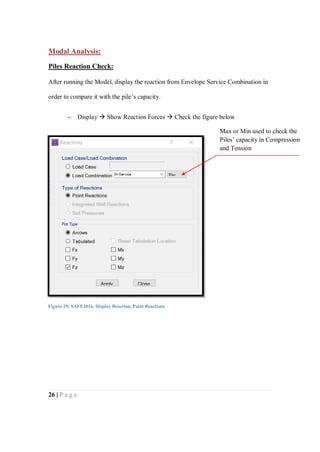
After running the Model, display the reaction from Envelope Service Combination in
order to compare it with the pile’s capacity.
- Display  Show Reaction Forces  Check the figure below
Figure 29: SAFE2016, Display Reaction, Point Reactions
Max or Min used to check the
Piles’ capacity in Compression
and Tension
27 | P a g e
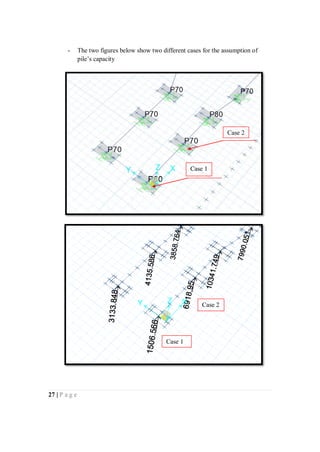
- The two figures below show two different cases for the assumption of
pile’s capacity
Case 1
Case 2
Case 1
Case 2
28 | P a g e
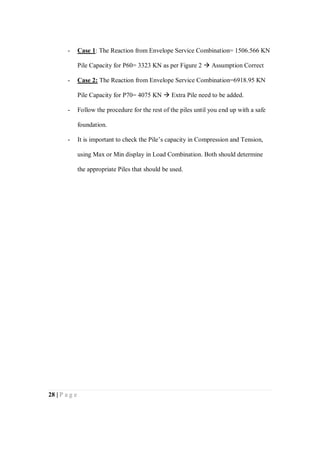
- Case 1: The Reaction from Envelope Service Combination= 1506.566 KN
Pile Capacity for P60= 3323 KN as per Figure 2  Assumption Correct
- Case 2: The Reaction from Envelope Service Combination=6918.95 KN
Pile Capacity for P70= 4075 KN  Extra Pile need to be added.
- Follow the procedure for the rest of the piles until you end up with a safe
foundation.
- It is important to check the Pile’s capacity in Compression and Tension,
using Max or Min display in Load Combination. Both should determine
the appropriate Piles that should be used.
29 | P a g e
Pile Caps Design:
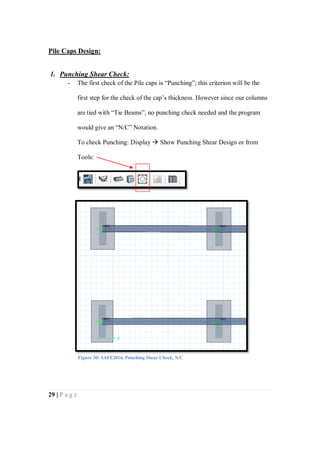
1. Punching Shear Check:
- The first check of the Pile caps is “Punching”; this criterion will be the
first step for the check of the cap’s thickness. However since our columns
are tied with “Tie Beams”, no punching check needed and the program
would give an “N/C” Notation.
To check Punching: Display  Show Punching Shear Design or from
Tools:
Figure 30: SAFE2016, Punching Shear Check, N/C
30 | P a g e
2. Pile Caps Reinforcement:
To design the Pile Caps:
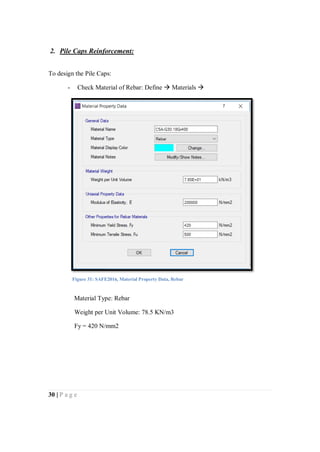
- Check Material of Rebar: Define  Materials 
Material Type: Rebar
Weight per Unit Volume: 78.5 KN/m3
Fy = 420 N/mm2
Figure 31: SAFE2016, Material Property Data, Rebar
31 | P a g e
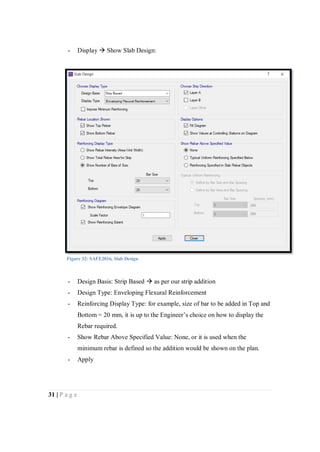
- Display  Show Slab Design:
- Design Basis: Strip Based  as per our strip addition
- Design Type: Enveloping Flexural Reinforcement
- Reinforcing Display Type: for example, size of bar to be added in Top and
Bottom = 20 mm, it is up to the Engineer’s choice on how to display the
Rebar required.
- Show Rebar Above Specified Value: None, or it is used when the
minimum rebar is defined so the addition would be shown on the plan.
- Apply
Figure 32: SAFE2016, Slab Design
32 | P a g e
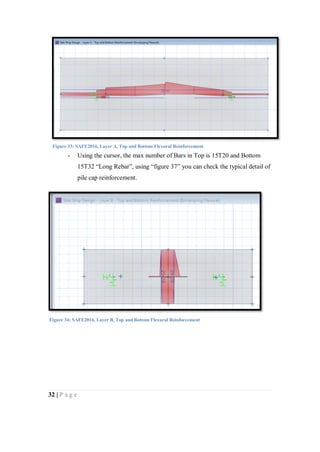
- Using the cursor, the max number of Bars in Top is 15T20 and Bottom
15T32 “Long Rebar”, using “figure 37” you can check the typical detail of
pile cap reinforcement.
Figure 33: SAFE2016, Layer A, Top and Bottom Flexural Reinforcement
Figure 34: SAFE2016, Layer B, Top and Bottom Flexural Reinforcement
33 | P a g e
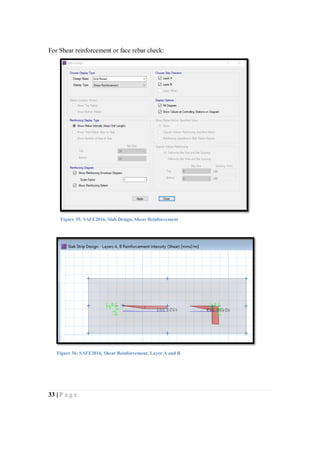
For Shear reinforcement or face rebar check:
Figure 35: SAFE2016, Slab Design, Shear Reinforcement
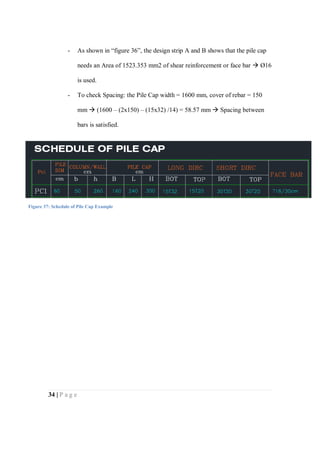
Figure 36: SAFE2016, Shear Reinforcement, Layer A and B
34 | P a g e
- As shown in “figure 36”, the design strip A and B shows that the pile cap
needs an Area of 1523.353 mm2 of shear reinforcement or face bar  Ø16
is used.
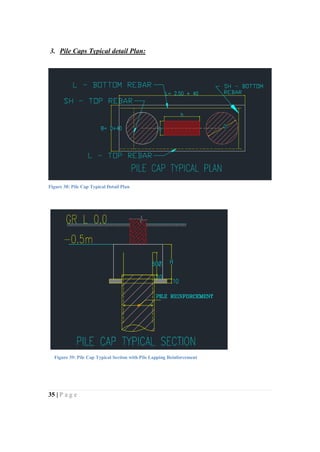
- To check Spacing: the Pile Cap width = 1600 mm, cover of rebar = 150
mm  (1600 – (2x150) – (15x32) /14) = 58.57 mm  Spacing between
bars is satisfied.
Figure 37: Schedule of Pile Cap Example
35 | P a g e
3. Pile Caps Typical detail Plan:
Figure 38: Pile Cap Typical Detail Plan
Figure 39: Pile Cap Typical Section with Pile Lapping Reinforcement
36 | P a g e
Conclusion:
The Manual explains the concept of transferring the load from the super
structure up to the soil throughout Piles, which has a capacity of (End bearing,
and Skin friction). Specialized Technical laboratories provide the capacities’
value from working loads that are estimated based on the unconfined
compressive strength of the rock cores extracted from various depths of the
drilled Boreholes in addition to its capacity in tension. At the end of this report,
you will be able to extract number of piles needed, sufficient pile cap
thicknesses and an appropriate finalized foundation.
Special Thanks to my Father..
For any Information, Questions or Doubts please contact:
Nada.Zarrak@hotmail.com

Tower design-Chapter 2-pile caps design

  • 1.
    Tower Design usingEtabs: Chapter 2 Pile Caps Design
  • 2.
    1 | Pa g e ABSTRACT “Chapter 1 of Tower Design using Etabs” produced a full model with the needed loads and parameters thus this series will discuss about transferring the loads from the vertical structural elements to the foundation. Our aim is to clarify why we are using piles, when they are used and how to use them as a foundation for our structure. Written by: Nada Zarrak Checked by: Ahmed Sameer Zarrak
  • 3.
    2 | Pa g e Table of Contents: ABSTRACT.............................................................................................................. 1 *Piles Concept:...................................................................................................... 3 -Definition of Pile:............................................................................................. 3 -When Piles are used?........................................................................................ 3 -Number of piles:............................................................................................... 3 -Load Applied on pile:....................................................................................... 4 -Capacity of pile due to soil: .............................................................................. 4 *Pile caps and Piles first Assumption: ................................................................... 6 *AutoCAD Stage:.................................................................................................. 9 -AutoCAD Drawing Steps: ...............................................................................11 *Etabs Stage:........................................................................................................13 *Safe2016 Stage:..................................................................................................14 *Modal Analysis: .................................................................................................26 -Piles Reaction Check:......................................................................................26 -Pile Caps Design: ............................................................................................29 1. Punching Shear Check: .......................................................................29 2. Pile Caps Reinforcement:....................................................................30 3. Pile Caps Typical detail Plan:..............................................................35 Conclusion: ..............................................................................................................36
  • 4.
    3 | Pa g e Piles Concept: Definition of Pile: Piles are vertical elements used mainly to transfer loads of the structure to the soil or rock. Piles material could be reinforced concrete, steel or timber and it depends on the situation of the site or the decision of the structural engineer. The design of piles are divided into two sections, short pile and long pile. When length of pile (L) over its diameter (D) is less than 4, it is considered as a short pile and when its length (L) over its diameter (D) is more than 4, it is considered as a long pile. It is the job of the sub- contractor to classify the pile design in order to design it as per requirements. When Piles are used? Piles are used in areas where the bearing capacity of the soil is very low when compared to the load applied from the structure. To illustrate, when the applied vertical load (Reaction from the vertical super structural elements-walls or columns) over the area of the structure is greater than the bearing capacity of the soil ( 𝑃 𝑎𝑝𝑝𝑙𝑖𝑒𝑑 𝐴 𝑜𝑓 𝑠𝑡𝑢𝑟𝑐𝑡𝑢𝑟𝑒 ≥ 𝜎s). Thus, deeper foundation is required to reach to a higher bearing capacity 𝜎s. Number of piles: When the structural engineer determines to use the Piles as a foundation type for the super structure, he has to determine the number of piles required. The piles number are determined by dividing the load applied over the pile’s capacity. 𝑁 = 𝑃 𝑎𝑝𝑝𝑙𝑖𝑒𝑑 𝑃 𝑐𝑎𝑝𝑎𝑐𝑖𝑡𝑦
  • 5.
    4 | Pa g e From Etabs we can get the load applied on each column thus we can determine how many number of piles needed under each column. The pile capacity is divided into two capacities. First is due to its material and second due to soil. Since the pile capacity due to material is more than the capacity due to soil, we have to take the smallest value to ensure a safer design. To get the pile’s capacity due to soil we have to check the technical soil report. Load Applied on pile: As we know, we have the factored load and the service state however, which one we should consider in the design stage! We might think it is proper to take the factorized loads but in case of pile caps and piles, the safest among these two is the SERVICE LOAD STATE. The reason behind it is the difference between the Safety Factor of loads applied and pile’s capacity. The average factor of safety considered for piles is 2.5 however, for the Ultimate Load Combination we have 1.2DL+1.6 LL. Such noticable difference will reduce the amount of Safety Factor and in such cases; the Service Load State should be taken into account. Capacity of pile due to soil: The relationship between the pile and the soil are friction and end bearing. Both relationships gives the pile a capacity to handle the vertical load applied. There are several theories to calculate the friction and the end bearing forces but as a structural engineer, the soil laboratories will provide both forces depending on the type of the
  • 6.
    5 | Pa g e soil, the standard penetration test and many other factors. As a result, the total capacity of the pile will equal to the capacity due to friction and end bearing. The table below is an example of a pile capacity with reference to its length, depth of boreholes and pile diameter. For example for a depth of 20 m, a pile length of 11 and a pile diameter of 0.6m, the pile capacity due to skin friction is 2305 KN and 1018 KN from end bearing thus total capacity of the pile is equal to 3323 KN. Figure 2: Soil Report example for a pile cap capacity due to soil Figure 1: Friction and End Bearing Capacity due to Soil, http://civiltraining.in
  • 7.
    6 | Pa g e Pile caps and Piles first Assumption: In general, the Soil Report confirm about using Piles as a Foundation. As a result, the first step is to draw the first assumption of the arrangement of the Piles and the Pile Caps depths. Open EtabsDisplayForce/Stress DiagramsSupport/Spring reactions In order to show the Columns and Walls reaction you have to set the Plan to 3-d from the tool bar on Etabs. Figure 3: Etabs2015-Display Reactions-Envelop Service
  • 8.
    7 | Pa g e An Example on how to determine number of Pile needed below each column or wall is as the following: Reaction from Wall = 1255 KN + 1121 KN = 2376 KN Using Table of Piles Capacity “Figure 2”, Pile diameter of 0.6m and z= 20m has a capacity of 3323 KN which is more than the wall reaction thus one pile is used. Several Parameters are used when drawing Piles and Pile Caps: 1. Min distance between two piles is 2.5Ø, while Ø is Pile Diameter. 2. A cover of 20 or 25 cm is added from the first edge when assigning sizes of Pile Caps. Figure 4: Etabs-Column and Walls reaction
  • 9.
    8 | Pa g e 3. The center of mass of Pile should be located at the center of mass of the Column. 4. Tie Beams should be added in order to link the Pile Caps together. 5. Minimum Pile Cap Thick = 50 Ø (Pile Rebar Diameter) + 20cm Rebar Cover + 10 cm Pile embedment Figure 5: Pile Cap Min Thickness Explanation
  • 10.
    9 | Pa g e AutoCAD Stage: One of the main part in the Design Process is AutoCAD as it is used to DRAW the first assumption of the required Piles beneath each column and wall. The figure below shows the application of the criteria mentioned previously. A Pile of 0.6m diameter (green) is used to support a 2m Wall (yellow) with a cover of 20cm (red) at the first face for the size of the Pile Cap (white). Figure 6: Case 1, Pile and Pile Cap DWG example. Figure 7: Case 2, Three Piles distribution below a vertical support
  • 11.
    10 | Pa g e As shown in the figure above, the reaction from the wall resulted in three piles in a diameter of 1.2 m. The min distance from c/c of piles was (2.5x1.2) =3 m. Figure 7 shows the economical side of arranging piles. The Core wall is only carrying five podiums thus only four piles needed with a diameter of 0.7m. The piles were located at the inner edge of the core as they satisfy the regulation of min 2.5Ø distance from c/c pile and as a result, the Pile Cap size has been reduced. In addition the following steps below will help you to produce a neat and easy drawing to be exported into SAFE2016. Figure 8: Case 3, Piles distribution below Core Wall
  • 12.
    11 | Pa g e AutoCAD Drawing Steps: 1. Arrange Pile Caps, Piles Diameter and Tie Beams in different Layers as shown in Figure 9 in order to ease drawing in SAFE. 2. Make sure the Origin Points in your Drawings same as in your imported E2K in order to be located at the same position. 3. Make sure the Unit used in AutoCAD is “Millimeters” as in your E2K file. Figure 9: AutoCAD Layers of Piles, Pile Caps and Tie Beams Figure 10: AutoCAD Drawing Units
  • 13.
    12 | Pa g e 4. Save the Drawing into a DXF File Format in order to be read by SAFE2016 Figure 11: AutoCAD Final Stage DWG with Piles and Pile Caps
  • 14.
    13 | Pa g e Etabs Stage: The first chapter of Tower design using Etabs modeled and analyzed a residential tower. Our next aim is to design the foundation “Pile Caps” in order to support our structure. The main step of the whole process is to export the reactions from the vertical elements “Columns and Walls”. 1. File  Export Story as Safe V12.f2k File  Story: Base  Loads to Export: Export Floor Loads and Loads from Above  Select Load Cases: All  Select Load Combinations: Service Load Combos ONLY Figure 12: Option for Export to Safe.f2k file
  • 15.
    14 | Pa g e Safe2016 Stage: 1. From AutoCAD save the DWG to a DXF 2. Open Safe  File SAFE.F2K File  Choose you F2K File. 3. File  Import  DXF/DWG Architectural Plan Figure 13: Imported E2K with DXF Plan
  • 16.
    15 | Pa g e 1. Define Material: Define Material Add new Material: Material Name: Fcu 50 Material Type: Concrete Weight per Unit Volume: 25 kN/m3 Modulus of Elasticity: 4700√𝑓′𝑐  as per ACI 318 Specified Concrete Compressive Strength, F’c = 0.8xFcu 2. Define Slab Property: Define  Slab Properties  Add new Property: Slab Material: assign the Material you defined Analysis Property Data, Type: Slab Analysis Property Data, Thickness: as assumed Choose Thick Plate Figure 14: SAFE2016, Material Property Data
  • 17.
    16 | Pa g e 3. Piles capacity in SAFE are represented as Point Springs with Vertical stiffness K= 𝑃 ∆ , P is Pile Capacity Δ is allowable displacement for pile= 0.01*D, D=Pile Diameter, mm Horizontal Stiffness = 0.1K Define Point Spring: Define Point Spring Properties  Add New Property: Translation Z (Linear) = K Translation X = 0.1K Translation Y = 0.1K Nonlinear Option= None (Linear), used in case of a sensitive building Figure 15: SAFE2016, Slab Property Data
  • 18.
    17 | Pa g e 4. Make Sure an Envelope Service Combination Exists. Figure 16: SAFE2016, Point Spring Property Data Figure 17: SAFE 2016 Load Combination Data, Envelope-Service
  • 19.
    18 | Pa g e 5. Start Drawing the Pile Caps using “Draw Slabs/Areas" Command in the left bar tools. Slab Thickness:  Blue: 3000mm  Yellow: 2000mm  Red: 1200mm Draw Slabs/Areas Figure 18: SAFE2016, Pile Caps Plan with section properties
  • 20.
    19 | Pa g e 6. To draw Piles that are represented by Point Springs as mentioned previously: - Try to show each pile diameter in separate plans to ease assigning  For example: Option  Architectural Plan Options  Choose Pi60 - In order to assign Point Spring you have to draw first a Point Draw  Draw Points “Check Figure 19” - - Select the Points for Pi60  Assign  Support Data  Point Springs  Choose Pi60 for an example. - Follow the same steps for the rest of Piles Diameter - Make sure Points option is checked in the “Set Display Option” Figure 19: SAFE2016, Draw Points Command
  • 21.
    20 | Pa g e Figure 20: SAFE2016, Piles as Points Spring Plan
  • 22.
    21 | Pa g e 7. Define Tie Beams: Define  Beam Properties  Add New Property: Beam Material: Fcu50 Beam Shape Type: Rectangle Beam Web Width at Top: 300 mm Web Width at Bottom: 300mm Depth: 1000mm - Draw Beam using “Draw Beams/Lines Command” on the left bar tools. Figure 21: SAFE2016, Beam Property Data, TB Draw Beams/Lines
  • 23.
    22 | Pa g e Figure 22: SAFE2016, Tie Beams Plan Extrude View
  • 24.
    23 | Pa g e 8. Draw Design Strips: Design strips are drawn in order to check and design the Pile Caps. Both direction (X&Y) should be added and they are represented by Strip Layer Type. It’s the Engineer’s decision in defining the direction type. Usually Layer A is considered the X direction and Layer B is the Y Direction. Strip widths usually taken to be 3m. - Start Width and End Width: used to define the width of the strip in which it will study the slab area for the design process. - Drawing design strips is like section cut but it covers more in width. - Draw design strips for each pile cap separately in order to find the reinforcement required for both directions. Draw Design Strips Figure 23: SAFE2016, Design strips Layer A Figure 24: SAFE2016, Design strips Layer B
  • 25.
    24 | Pa g e - Figure 25 shows a pile cap of 160x460 size - To draw design strip for the pile cap of 160x460 size  Figure 25: Pile Caps size Figure 26: Design Strip width example, Layer A Figure 27: Design Strip width example, Layer B
  • 26.
    25 | Pa g e - Figure 26 shows the width taken to cover the slab in the Y direction as the pile cap size is 1000mm thus the start and end with as taken as 0.5m and strip layer type is B as we defined layer B to be Y direction. Then draw the design strip at the middle of the pile cap “ Pink Line” - To Show the width  Set Display option  - The same procedure is done for the other direction and for the rest for the Pile Caps. 9. Save the Model and Run. Figure 28: SAFE2016, Set Display Option
  • 27.
    26 | Pa g e Modal Analysis: Piles Reaction Check: After running the Model, display the reaction from Envelope Service Combination in order to compare it with the pile’s capacity. - Display  Show Reaction Forces  Check the figure below Figure 29: SAFE2016, Display Reaction, Point Reactions Max or Min used to check the Piles’ capacity in Compression and Tension
  • 28.
    27 | Pa g e - The two figures below show two different cases for the assumption of pile’s capacity Case 1 Case 2 Case 1 Case 2
  • 29.
    28 | Pa g e - Case 1: The Reaction from Envelope Service Combination= 1506.566 KN Pile Capacity for P60= 3323 KN as per Figure 2  Assumption Correct - Case 2: The Reaction from Envelope Service Combination=6918.95 KN Pile Capacity for P70= 4075 KN  Extra Pile need to be added. - Follow the procedure for the rest of the piles until you end up with a safe foundation. - It is important to check the Pile’s capacity in Compression and Tension, using Max or Min display in Load Combination. Both should determine the appropriate Piles that should be used.
  • 30.
    29 | Pa g e Pile Caps Design: 1. Punching Shear Check: - The first check of the Pile caps is “Punching”; this criterion will be the first step for the check of the cap’s thickness. However since our columns are tied with “Tie Beams”, no punching check needed and the program would give an “N/C” Notation. To check Punching: Display  Show Punching Shear Design or from Tools: Figure 30: SAFE2016, Punching Shear Check, N/C
  • 31.
    30 | Pa g e 2. Pile Caps Reinforcement: To design the Pile Caps: - Check Material of Rebar: Define  Materials  Material Type: Rebar Weight per Unit Volume: 78.5 KN/m3 Fy = 420 N/mm2 Figure 31: SAFE2016, Material Property Data, Rebar
  • 32.
    31 | Pa g e - Display  Show Slab Design: - Design Basis: Strip Based  as per our strip addition - Design Type: Enveloping Flexural Reinforcement - Reinforcing Display Type: for example, size of bar to be added in Top and Bottom = 20 mm, it is up to the Engineer’s choice on how to display the Rebar required. - Show Rebar Above Specified Value: None, or it is used when the minimum rebar is defined so the addition would be shown on the plan. - Apply Figure 32: SAFE2016, Slab Design
  • 33.
    32 | Pa g e - Using the cursor, the max number of Bars in Top is 15T20 and Bottom 15T32 “Long Rebar”, using “figure 37” you can check the typical detail of pile cap reinforcement. Figure 33: SAFE2016, Layer A, Top and Bottom Flexural Reinforcement Figure 34: SAFE2016, Layer B, Top and Bottom Flexural Reinforcement
  • 34.
    33 | Pa g e For Shear reinforcement or face rebar check: Figure 35: SAFE2016, Slab Design, Shear Reinforcement Figure 36: SAFE2016, Shear Reinforcement, Layer A and B
  • 35.
    34 | Pa g e - As shown in “figure 36”, the design strip A and B shows that the pile cap needs an Area of 1523.353 mm2 of shear reinforcement or face bar  Ø16 is used. - To check Spacing: the Pile Cap width = 1600 mm, cover of rebar = 150 mm  (1600 – (2x150) – (15x32) /14) = 58.57 mm  Spacing between bars is satisfied. Figure 37: Schedule of Pile Cap Example
  • 36.
    35 | Pa g e 3. Pile Caps Typical detail Plan: Figure 38: Pile Cap Typical Detail Plan Figure 39: Pile Cap Typical Section with Pile Lapping Reinforcement
  • 37.
    36 | Pa g e Conclusion: The Manual explains the concept of transferring the load from the super structure up to the soil throughout Piles, which has a capacity of (End bearing, and Skin friction). Specialized Technical laboratories provide the capacities’ value from working loads that are estimated based on the unconfined compressive strength of the rock cores extracted from various depths of the drilled Boreholes in addition to its capacity in tension. At the end of this report, you will be able to extract number of piles needed, sufficient pile cap thicknesses and an appropriate finalized foundation. Special Thanks to my Father.. For any Information, Questions or Doubts please contact: Nada.Zarrak@hotmail.com