Modular Programming
Chapter 10
Modular Programming
 The process of breaking a large program into small manageable
tasks and design them independently is called modular
programming.
 QBASIC is called modular programming because it allows to
break the large and complex program into small and manageable
part by using sub procedure and functional procedure.
 A small, manageable and logical part of the program is called
MODULE.
Advantages of Modular Programming
1. Debugging of program become easier and faster.
2. Easy to design code
3. It is possible to use a single module in different places, which
reduces program codes.
4. The procedure(module) can be tested separately.
5. Many programmers can write different program modules
independently.
 Note: The idea of divide, solve and conquer is what modular
programming approach is all about.
MODULE
Main Module:
 The module which comprises of many sub-modules and control
the entire module used in that program.
 It may top of one or more than one sub module
Sub Module:
 It is a program which is written under the main module.
 It is controlled by main module.
 It may have one or more sub modules
PROCEDURE
 A procedure also called a “module” is a “mini-program” or an
isolated part inside the program. In other words, it is a collection
of commands and can be executed anywhere in the program.
 It is a block of statements that solves a particular problem given
by the user.
 It is self-contained and independent manageable part of the
program.
2 types:
1. Sub procedure
2. Function procedure
SUB PROCEDURE
 It is a small manageable and functional part of the program that
performs specific tasks and does not return any value to the
calling module.
 It is a block of statements (code) that performs specific task in
the program
Sub procedure is created by:
1. Declaring a sub procedure
2. Defining a sub procedure
3. Calling a sub procedure
SUB PROCEDURE
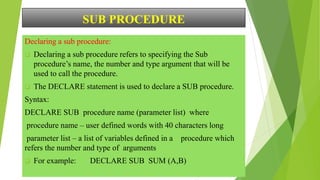
Declaring a sub procedure:
 Declaring a sub procedure refers to specifying the Sub
procedure’s name, the number and type argument that will be
used to call the procedure.
 The DECLARE statement is used to declare a SUB procedure.
Syntax:
DECLARE SUB procedure name (parameter list) where
procedure name – user defined words with 40 characters long
parameter list – a list of variables defined in a procedure which
refers the number and type of arguments
 For example: DECLARE SUB SUM (A,B)
SUB PROCEDURE
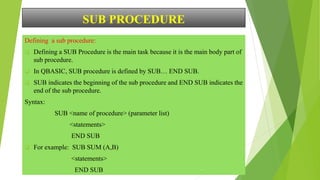
Defining a sub procedure:
 Defining a SUB Procedure is the main task because it is the main body part of
sub procedure.
 In QBASIC, SUB procedure is defined by SUB… END SUB.
 SUB indicates the beginning of the sub procedure and END SUB indicates the
end of the sub procedure.
Syntax:
SUB <name of procedure> (parameter list)
<statements>
END SUB
 For example: SUB SUM (A,B)
<statements>
END SUB
SUB PROCEDURE
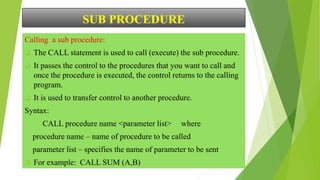
Calling a sub procedure:
 The CALL statement is used to call (execute) the sub procedure.
 It passes the control to the procedures that you want to call and
once the procedure is executed, the control returns to the calling
program.
 It is used to transfer control to another procedure.
Syntax:
CALL procedure name <parameter list> where
procedure name – name of procedure to be called
parameter list – specifies the name of parameter to be sent
 For example: CALL SUM (A,B)
SUB PROCEDURE
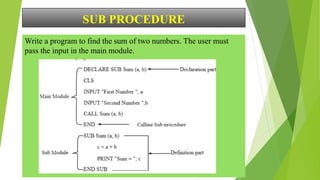
Write a program to find the sum of two numbers. The user must
pass the input in the main module.
SUB PROCEDURE
Write a program to find the area of rectangle. The user must pass the input
in the main module. [A = l x b]
DECLARE SUB Area (l , b)
CLS
INPUT “Enter a length” ; l
INPUT “Enter a breadth” ; b
CALL Area (l , b)
END
SUB Area (l , b)
A = l * b
PRINT “The area is ”; A
END SUB
Thank You!

10.-Modular-Programming-with function and Sub Procedure.pptx

  • 2.
  • 3.
    Modular Programming  Theprocess of breaking a large program into small manageable tasks and design them independently is called modular programming.  QBASIC is called modular programming because it allows to break the large and complex program into small and manageable part by using sub procedure and functional procedure.  A small, manageable and logical part of the program is called MODULE.
  • 4.
    Advantages of ModularProgramming 1. Debugging of program become easier and faster. 2. Easy to design code 3. It is possible to use a single module in different places, which reduces program codes. 4. The procedure(module) can be tested separately. 5. Many programmers can write different program modules independently.  Note: The idea of divide, solve and conquer is what modular programming approach is all about.
  • 5.
    MODULE Main Module:  Themodule which comprises of many sub-modules and control the entire module used in that program.  It may top of one or more than one sub module Sub Module:  It is a program which is written under the main module.  It is controlled by main module.  It may have one or more sub modules
  • 6.
    PROCEDURE  A procedurealso called a “module” is a “mini-program” or an isolated part inside the program. In other words, it is a collection of commands and can be executed anywhere in the program.  It is a block of statements that solves a particular problem given by the user.  It is self-contained and independent manageable part of the program. 2 types: 1. Sub procedure 2. Function procedure
  • 7.
    SUB PROCEDURE  Itis a small manageable and functional part of the program that performs specific tasks and does not return any value to the calling module.  It is a block of statements (code) that performs specific task in the program Sub procedure is created by: 1. Declaring a sub procedure 2. Defining a sub procedure 3. Calling a sub procedure
  • 8.
    SUB PROCEDURE Declaring asub procedure:  Declaring a sub procedure refers to specifying the Sub procedure’s name, the number and type argument that will be used to call the procedure.  The DECLARE statement is used to declare a SUB procedure. Syntax: DECLARE SUB procedure name (parameter list) where procedure name – user defined words with 40 characters long parameter list – a list of variables defined in a procedure which refers the number and type of arguments  For example: DECLARE SUB SUM (A,B)
  • 9.
    SUB PROCEDURE Defining asub procedure:  Defining a SUB Procedure is the main task because it is the main body part of sub procedure.  In QBASIC, SUB procedure is defined by SUB… END SUB.  SUB indicates the beginning of the sub procedure and END SUB indicates the end of the sub procedure. Syntax: SUB <name of procedure> (parameter list) <statements> END SUB  For example: SUB SUM (A,B) <statements> END SUB
  • 10.
    SUB PROCEDURE Calling asub procedure:  The CALL statement is used to call (execute) the sub procedure.  It passes the control to the procedures that you want to call and once the procedure is executed, the control returns to the calling program.  It is used to transfer control to another procedure. Syntax: CALL procedure name <parameter list> where procedure name – name of procedure to be called parameter list – specifies the name of parameter to be sent  For example: CALL SUM (A,B)
  • 11.
    SUB PROCEDURE Write aprogram to find the sum of two numbers. The user must pass the input in the main module.
  • 12.
    SUB PROCEDURE Write aprogram to find the area of rectangle. The user must pass the input in the main module. [A = l x b] DECLARE SUB Area (l , b) CLS INPUT “Enter a length” ; l INPUT “Enter a breadth” ; b CALL Area (l , b) END SUB Area (l , b) A = l * b PRINT “The area is ”; A END SUB
  • 13.