Linux File Systems and File

                        Minsuk Lee
               Hansung University, Seoul, Korea
                   minsuk@hansung.ac.kr


NEAOSS MC2.0       CC-BY 2.0 KR, © Korea OSS Promotion Forum, NIPA
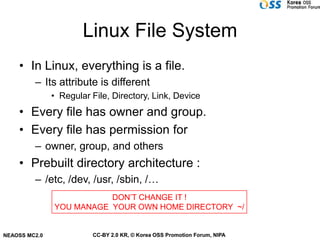
Linux File System
    • In Linux, everything is a file.
         – Its attribute is different
               • Regular File, Directory, Link, Device
    • Every file has owner and group.
    • Every file has permission for
         – owner, group, and others
    • Prebuilt directory architecture :
         – /etc, /dev, /usr, /sbin, /…
                          DON’T CHANGE IT !
               YOU MANAGE YOUR OWN HOME DIRECTORY ~/


NEAOSS MC2.0             CC-BY 2.0 KR, © Korea OSS Promotion Forum, NIPA
Attribute of a File
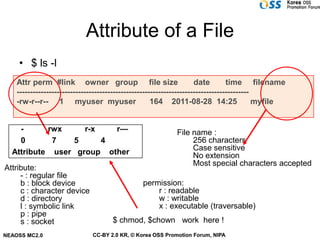
    • $ ls -l
    Attr perm #link owner group file size                             date        time filename
    ---------------------------------------------------------------------------------------
    -rw-r--r-- 1 myuser myuser                        164 2011-08-28 14:25                  myfile


    -      rwx     r-x   r—                                 File name :
    0       7   5      4                                         256 characters
                                                                 Case sensitive
  Attribute user group other                                     No extension
                                                                 Most special characters accepted
Attribute:
     - : regular file
     b : block device                           permission:
     c : character device                           r : readable
     d : directory                                  w : writable
     l : symbolic link                              x : executable (traversable)
     p : pipe
     s : socket                      $ chmod, $chown work here !
NEAOSS MC2.0                  CC-BY 2.0 KR, © Korea OSS Promotion Forum, NIPA
Inode (metadata for a File)
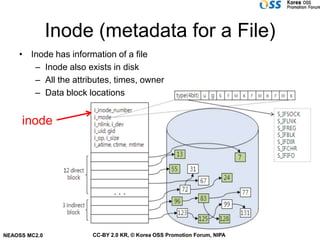
    • Inode has information of a file
       – Inode also exists in disk
       – All the attributes, times, owner
       – Data block locations


     inode


NEAOSS MC2.0          CC-BY 2.0 KR, © Korea OSS Promotion Forum, NIPA
File link
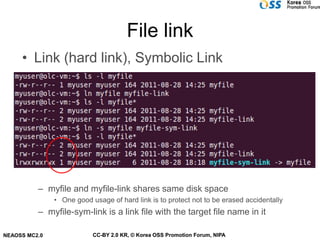
     • Link (hard link), Symbolic Link

                      디렉토리                  Inode 블럭                   Data 블럭


          – myfile and myfile-link shares same disk space
               • One good usage of hard link is to protect not to be erased accidentally
          – myfile-sym-link is a link file with the target file name in it

NEAOSS MC2.0               CC-BY 2.0 KR, © Korea OSS Promotion Forum, NIPA
Permission Masking
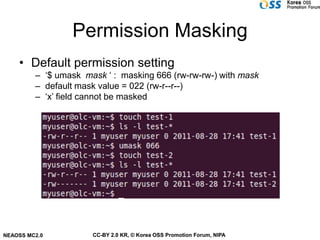
    • Default permission setting
         – ‘$ umask mask ‘ : masking 666 (rw-rw-rw-) with mask
         – default mask value = 022 (rw-r--r--)
         – ‘x’ field cannot be masked


NEAOSS MC2.0          CC-BY 2.0 KR, © Korea OSS Promotion Forum, NIPA
Set UID option !
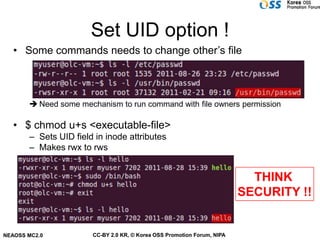
   • Some commands needs to change other’s file


        Need some mechanism to run command with file owners permission

   • $ chmod u+s <executable-file>
       – Sets UID field in inode attributes
       – Makes rwx to rws


                                                                           THINK
                                                                         SECURITY !!


NEAOSS MC2.0           CC-BY 2.0 KR, © Korea OSS Promotion Forum, NIPA
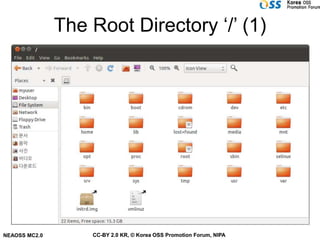
The Root Directory ‘/’ (1)


NEAOSS MC2.0       CC-BY 2.0 KR, © Korea OSS Promotion Forum, NIPA
The Root directory (2)
    • / : the root directory (top most directory in the system)
       – All absolute directory path starts with ‘/’

         – There is NO ‘C:’, ‘D:’,
         – every storage is mounted somewhere in directory hierarchy
               • /cdrom, /mnt/floppy, …


NEAOSS MC2.0           CC-BY 2.0 KR, © Korea OSS Promotion Forum, NIPA
/dev (1)
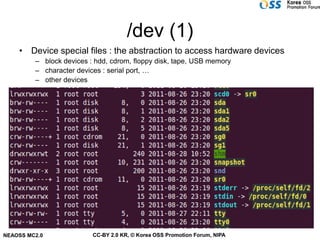
    • Device special files : the abstraction to access hardware devices
         – block devices : hdd, cdrom, floppy disk, tape, USB memory
         – character devices : serial port, …
         – other devices


NEAOSS MC2.0              CC-BY 2.0 KR, © Korea OSS Promotion Forum, NIPA
/dev (2)


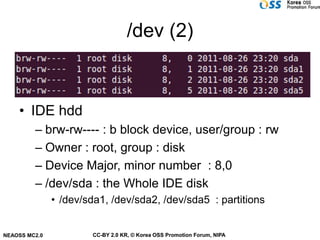
    • IDE hdd
         – brw-rw---- : b block device, user/group : rw
         – Owner : root, group : disk
         – Device Major, minor number : 8,0
         – /dev/sda : the Whole IDE disk
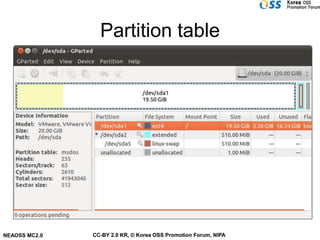
               • /dev/sda1, /dev/sda2, /dev/sda5 : partitions


NEAOSS MC2.0           CC-BY 2.0 KR, © Korea OSS Promotion Forum, NIPA
Partition table


NEAOSS MC2.0   CC-BY 2.0 KR, © Korea OSS Promotion Forum, NIPA
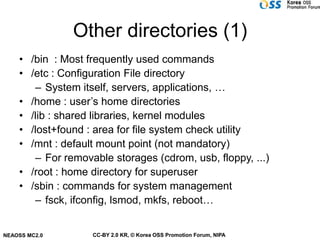
Other directories (1)
    • /bin : Most frequently used commands
    • /etc : Configuration File directory
       – System itself, servers, applications, …
    • /home : user’s home directories
    • /lib : shared libraries, kernel modules
    • /lost+found : area for file system check utility
    • /mnt : default mount point (not mandatory)
       – For removable storages (cdrom, usb, floppy, ...)
    • /root : home directory for superuser
    • /sbin : commands for system management
       – fsck, ifconfig, lsmod, mkfs, reboot…


NEAOSS MC2.0       CC-BY 2.0 KR, © Korea OSS Promotion Forum, NIPA
Other directories (2)
    • /tmp : directory for temporary data
    • /var : directory for frequently changed data
         – Logs, mail spool, print spool, lock files
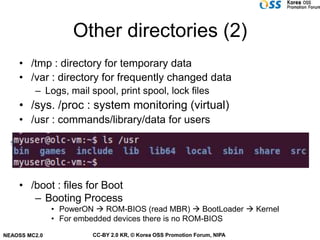
    • /sys. /proc : system monitoring (virtual)
    • /usr : commands/library/data for users


    • /boot : files for Boot
       – Booting Process
               • PowerON  ROM-BIOS (read MBR)  BootLoader  Kernel
               • For embedded devices there is no ROM-BIOS
NEAOSS MC2.0            CC-BY 2.0 KR, © Korea OSS Promotion Forum, NIPA
Locating files
       • $ which <filename>
               – Search execution file in PATH

       • $ whereis <filename>
               – Search Execution file, source, man page file

       • $ locate <filename-pattern>
               – Search system for the pattern
                   • Works like ‘$ find ./ -name *pattern*’
               – Needs ‘$ updatedb’ to refresh database


NEAOSS MC2.0                 CC-BY 2.0 KR, © Korea OSS Promotion Forum, NIPA
Let’s practice !
    • Make link and symbolic link for a file
         – See what happen if erase files
               • Erasing the link file, erasing the original file


    • Apply umask and generate file with $vi


NEAOSS MC2.0            CC-BY 2.0 KR, © Korea OSS Promotion Forum, NIPA

08.file system

  • 1.
    Linux File Systemsand File Minsuk Lee Hansung University, Seoul, Korea minsuk@hansung.ac.kr NEAOSS MC2.0 CC-BY 2.0 KR, © Korea OSS Promotion Forum, NIPA
  • 2.
    Linux File System • In Linux, everything is a file. – Its attribute is different • Regular File, Directory, Link, Device • Every file has owner and group. • Every file has permission for – owner, group, and others • Prebuilt directory architecture : – /etc, /dev, /usr, /sbin, /… DON’T CHANGE IT ! YOU MANAGE YOUR OWN HOME DIRECTORY ~/ NEAOSS MC2.0 CC-BY 2.0 KR, © Korea OSS Promotion Forum, NIPA
  • 3.
    Attribute of aFile • $ ls -l Attr perm #link owner group file size date time filename --------------------------------------------------------------------------------------- -rw-r--r-- 1 myuser myuser 164 2011-08-28 14:25 myfile - rwx r-x r— File name : 0 7 5 4 256 characters Case sensitive Attribute user group other No extension Most special characters accepted Attribute: - : regular file b : block device permission: c : character device r : readable d : directory w : writable l : symbolic link x : executable (traversable) p : pipe s : socket $ chmod, $chown work here ! NEAOSS MC2.0 CC-BY 2.0 KR, © Korea OSS Promotion Forum, NIPA
  • 4.
    Inode (metadata fora File) • Inode has information of a file – Inode also exists in disk – All the attributes, times, owner – Data block locations inode NEAOSS MC2.0 CC-BY 2.0 KR, © Korea OSS Promotion Forum, NIPA
  • 5.
    File link • Link (hard link), Symbolic Link 디렉토리 Inode 블럭 Data 블럭 – myfile and myfile-link shares same disk space • One good usage of hard link is to protect not to be erased accidentally – myfile-sym-link is a link file with the target file name in it NEAOSS MC2.0 CC-BY 2.0 KR, © Korea OSS Promotion Forum, NIPA
  • 6.
    Permission Masking • Default permission setting – ‘$ umask mask ‘ : masking 666 (rw-rw-rw-) with mask – default mask value = 022 (rw-r--r--) – ‘x’ field cannot be masked NEAOSS MC2.0 CC-BY 2.0 KR, © Korea OSS Promotion Forum, NIPA
  • 7.
    Set UID option! • Some commands needs to change other’s file  Need some mechanism to run command with file owners permission • $ chmod u+s <executable-file> – Sets UID field in inode attributes – Makes rwx to rws THINK SECURITY !! NEAOSS MC2.0 CC-BY 2.0 KR, © Korea OSS Promotion Forum, NIPA
  • 8.
    The Root Directory‘/’ (1) NEAOSS MC2.0 CC-BY 2.0 KR, © Korea OSS Promotion Forum, NIPA
  • 9.
    The Root directory(2) • / : the root directory (top most directory in the system) – All absolute directory path starts with ‘/’ – There is NO ‘C:’, ‘D:’, – every storage is mounted somewhere in directory hierarchy • /cdrom, /mnt/floppy, … NEAOSS MC2.0 CC-BY 2.0 KR, © Korea OSS Promotion Forum, NIPA
  • 10.
    /dev (1) • Device special files : the abstraction to access hardware devices – block devices : hdd, cdrom, floppy disk, tape, USB memory – character devices : serial port, … – other devices NEAOSS MC2.0 CC-BY 2.0 KR, © Korea OSS Promotion Forum, NIPA
  • 11.
    /dev (2) • IDE hdd – brw-rw---- : b block device, user/group : rw – Owner : root, group : disk – Device Major, minor number : 8,0 – /dev/sda : the Whole IDE disk • /dev/sda1, /dev/sda2, /dev/sda5 : partitions NEAOSS MC2.0 CC-BY 2.0 KR, © Korea OSS Promotion Forum, NIPA
  • 12.
    Partition table NEAOSS MC2.0 CC-BY 2.0 KR, © Korea OSS Promotion Forum, NIPA
  • 13.
    Other directories (1) • /bin : Most frequently used commands • /etc : Configuration File directory – System itself, servers, applications, … • /home : user’s home directories • /lib : shared libraries, kernel modules • /lost+found : area for file system check utility • /mnt : default mount point (not mandatory) – For removable storages (cdrom, usb, floppy, ...) • /root : home directory for superuser • /sbin : commands for system management – fsck, ifconfig, lsmod, mkfs, reboot… NEAOSS MC2.0 CC-BY 2.0 KR, © Korea OSS Promotion Forum, NIPA
  • 14.
    Other directories (2) • /tmp : directory for temporary data • /var : directory for frequently changed data – Logs, mail spool, print spool, lock files • /sys. /proc : system monitoring (virtual) • /usr : commands/library/data for users • /boot : files for Boot – Booting Process • PowerON  ROM-BIOS (read MBR)  BootLoader  Kernel • For embedded devices there is no ROM-BIOS NEAOSS MC2.0 CC-BY 2.0 KR, © Korea OSS Promotion Forum, NIPA
  • 15.
    Locating files • $ which <filename> – Search execution file in PATH • $ whereis <filename> – Search Execution file, source, man page file • $ locate <filename-pattern> – Search system for the pattern • Works like ‘$ find ./ -name *pattern*’ – Needs ‘$ updatedb’ to refresh database NEAOSS MC2.0 CC-BY 2.0 KR, © Korea OSS Promotion Forum, NIPA
  • 16.
    Let’s practice ! • Make link and symbolic link for a file – See what happen if erase files • Erasing the link file, erasing the original file • Apply umask and generate file with $vi NEAOSS MC2.0 CC-BY 2.0 KR, © Korea OSS Promotion Forum, NIPA