SERVER
HARDENING
METHEDOLOGIES
BY: SHREYA POHEKAR
TABLE OF
CONTENTS
What is Server Hardening
Why Server Hardening
Linux Servers Hardening
Luks Encryption and NBDE
Filesystem configuration
AIDE
Users
Introduction to OpenSCAP
What is Server Hardening?
Server Hardening is the process of enhancing server security through a
variety of means which results in a much more secure server operating
environment.
What to harden?
1 Hardware Security
Encrypting the hard disks of the
whole infrastructure
2 Software Securtiy
Having in place, the right configurations
and exercising best security practices.
DISK ENCRYPTION
WITH LUKS
It stands for Linux Unified Key Setup-on-
disk-format
LUKS provides passphrase strengthening
LUKS devices contain multiple key slots,
allowing backup keys/passphrases.
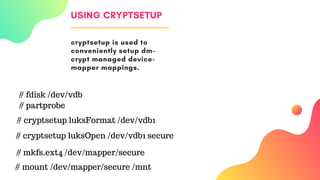
USING CRYPTSETUP
cryptsetup is used to
conveniently setup dm-
crypt managed device-
mapper mappings.
# fdisk /dev/vdb
# cryptsetup luksFormat /dev/vdb1
# cryptsetup luksOpen /dev/vdb1 secure
# mkfs.ext4 /dev/mapper/secure
# mount /dev/mapper/secure /mnt
# partprobe
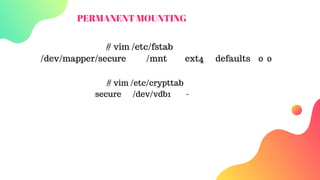
PERMANENT MOUNTING
# vim /etc/fstab
/dev/mapper/secure /mnt ext4 defaults 0 0
# vim /etc/crypttab
secure /dev/vdb1 -
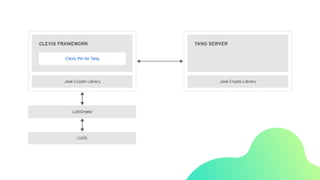
The Network-Bound Disk Encryption (NBDE) allows the user to
encrypt root volumes of hard drives on physical and virtual
machines without requiring to manually enter a password when
systems are restarted.
Controlling file system decryption using
NBDE (Network Bound Disk Encryption)
CONFIGURING
TANG SERVER
# yum install tang
# systemctl enable tangd.socket -
-now
[enabling socket activation]
# firewall-cmd --zone=public --
add-service=http --permanent
[setting up the firewall]
# firewall-cmd --reload
CONFIGURING
CLEVIS
What's in a Name?
In NBDE, Clevis provides automated
unlocking of LUKS volumes.
C L E V I S
C L E V I S - L U K S
C L E V I S - D R A C U T
PACKAGES
Configuring clevis
# yum  install clevis clevis-luks clevis-dracut -y
# cfg = $'{"t"=1,"pins":{"tang":[{"url":"http://192.168.0.5"}]}}'
# clevis luks bind -d /dev/vdb1 sss "$cfg"
or #clevis bind luks -d /dev/vdb1 tang '{"url":"http://tang.srv"}'
# systemctl enable clevis-luks-askpass.path
# vim /etc/crypttab
encryptedvdb1 /dev/vdb1 none _netdev
# vim /etc/fstab
/dev/mapper/encryptedvdb1 /encrypt xfs _netdev 1 2
Configurational settings
Filesystem
Check for the
suid on different
partitions
AIDE
AIDE takes a
filesystem snapshot
that can be used to
check for any
modifications
Users and
Groups
Ensure 0 is UID
of root. User
should own
their home dir.
Logging
Configure logging
on a remote server
so that any system
compromise can be
reviewed
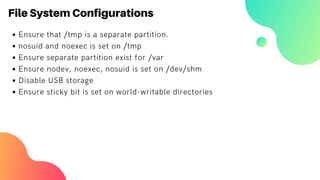
File System Configurations
Ensure that /tmp is a separate partition.
nosuid and noexec is set on /tmp
Ensure separate partition exist for /var
Ensure nodev, noexec, nosuid is set on /dev/shm
Disable USB storage
Ensure sticky bit is set on world-writable directories
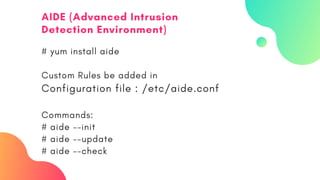
# yum install aide
Custom Rules be added in
Configuration file : /etc/aide.conf
Commands:
# aide --init
# aide --update
# aide --check
AIDE (Advanced Intrusion
Detection Environment)
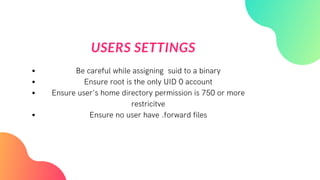
USERS SETTINGS
Be careful while assigning suid to a binary
Ensure root is the only UID 0 account
Ensure user's home directory permission is 750 or more
restricitve
Ensure no user have .forward files
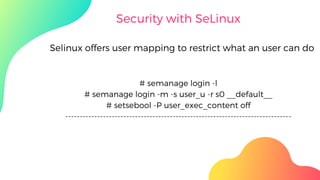
Security with SeLinux
# semanage login -l
# semanage login -m -s user_u -r s0 __default__
# setsebool -P user_exec_content off
------------------------------------------------------------------------------
Selinux offers user mapping to restrict what an user can do
BUT THAT
SEEMS A LOT
OF WORK!!!
The Solution
is
OpenSCAP
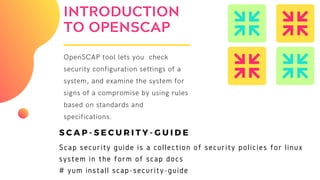
INTRODUCTION
TO OPENSCAP
OpenSCAP tool lets you  check
security configuration settings of a
system, and examine the system for
signs of a compromise by using rules
based on standards and
specifications.
S C A P - S E C U R I T Y - G U I D E
Scap security guide is a collection of security policies for linux
system in the form of scap docs
# yum install scap-security-guide
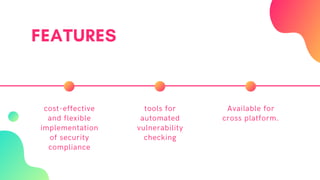
FEATURES
cost-effective
and flexible
implementation
of security
compliance
tools for
automated
vulnerability
checking
Available for
cross platform.
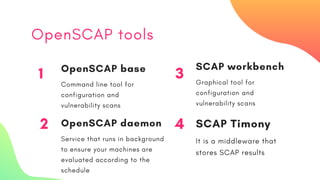
OpenSCAP tools
1 OpenSCAP base
Command line tool for
configuration and
vulnerability scans
3
SCAP workbench
Graphical tool for
configuration and
vulnerability scans
2 OpenSCAP daemon
Service that runs in background
to ensure your machines are
evaluated according to the
schedule
4 SCAP Timony
It is a middleware that
stores SCAP results
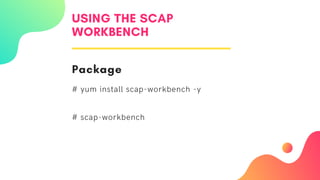
USING THE SCAP
WORKBENCH
Package
# yum install scap-workbench -y
# scap-workbench
REFERENCES
.. https://access.redhat.com/documentation/en-
us/red_hat_enterprise_linux/7/html/security_guide/sec-encryption#sec-
Using_LUKS_Disk_Encryption
https://access.redhat.com/documentation/en-
US/Red_Hat_Enterprise_Linux/7/html/Security_Guide/sec-Using_Network-
Bound_Disk_Encryption.html
https://www.cisecurity.org/benchmark/red_hat_linux/
https://access.redhat.com/documentation/en-
us/red_hat_enterprise_linux/7/html/security_guide/sec-using-aide

Server hardening methedologies