Solution to Wireshark Lab: IP 
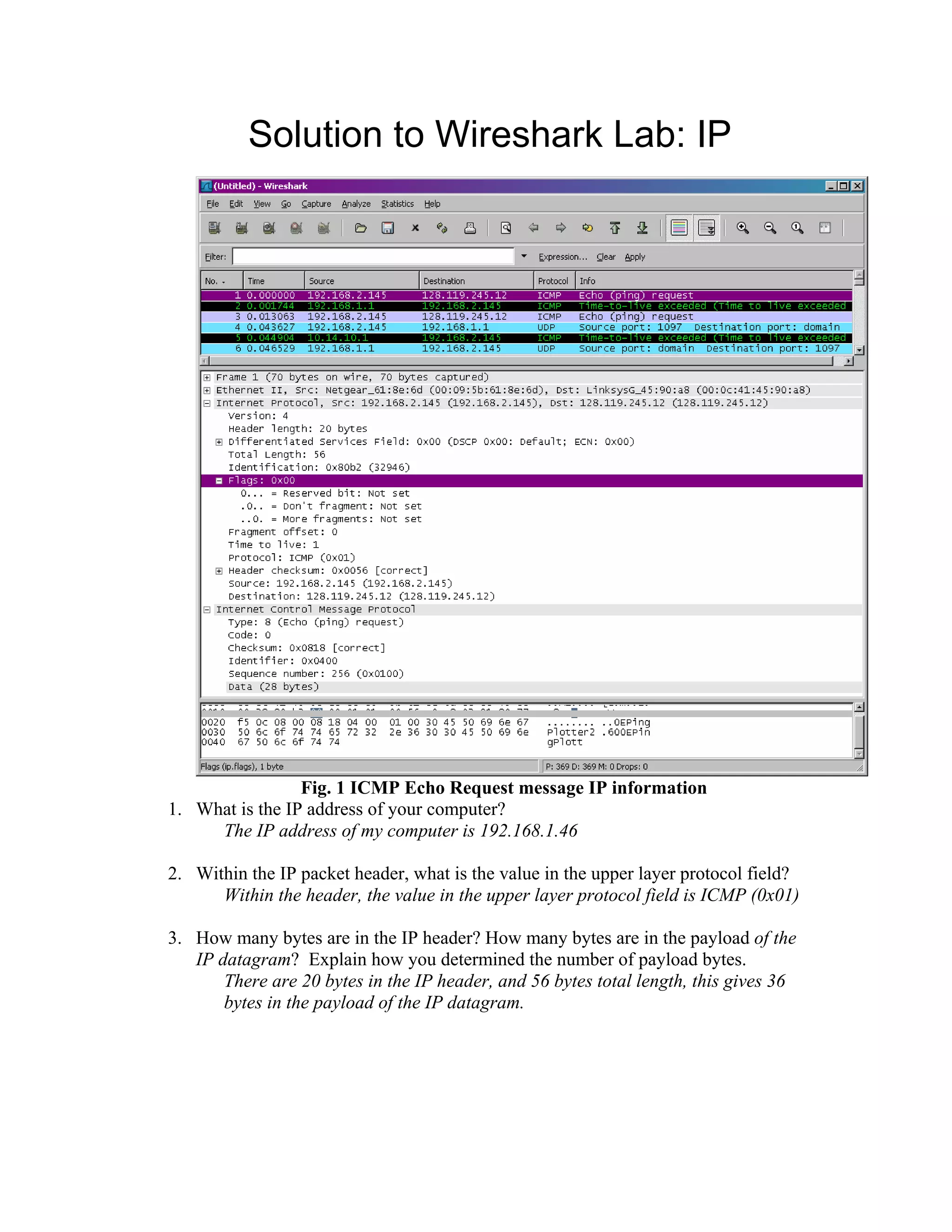
Fig. 1 ICMP Echo Request message IP information 
1. What is the IP address of your computer? 
The IP address of my computer is 192.168.1.46 
2. Within the IP packet header, what is the value in the upper layer protocol field? 
Within the header, the value in the upper layer protocol field is ICMP (0x01) 
3. How many bytes are in the IP header? How many bytes are in the payload of the 
IP datagram? Explain how you determined the number of payload bytes. 
There are 20 bytes in the IP header, and 56 bytes total length, this gives 36 
bytes in the payload of the IP datagram.
4. Has this IP datagram been fragmented? Explain how you determined whether or 
not the datagram has been fragmented. 
The more fragments bit = 0, so the data is not fragmented. 
5. Which fields in the IP datagram always change from one datagram to the next 
within this series of ICMP messages sent by your computer? 
Identification, Time to live and Header checksum always change. 
6. Which fields stay constant? Which of the fields must stay constant? Which fields 
must change? Why? 
The fields that stay constant across the IP datagrams are: 
• Version (since we are using IPv4 for all packets) 
• header length (since these are ICMP packets) 
• source IP (since we are sending from the same source) 
• destination IP (since we are sending to the same dest) 
• Differentiated Services (since all packets are ICMP they use the same 
Type of Service class) 
• Upper Layer Protocol (since these are ICMP packets) 
The fields that must stay constant are: 
• Version (since we are using IPv4 for all packets) 
• header length (since these are ICMP packets) 
• source IP (since we are sending from the same source) 
• destination IP (since we are sending to the same dest) 
• Differentiated Services (since all packets are ICMP they use the same 
Type of Service class) 
• Upper Layer Protocol (since these are ICMP packets) 
The fields that must change are: 
• Identification(IP packets must have different ids) 
• Time to live (traceroute increments each subsequent packet) 
• Header checksum (since header changes, so must checksum) 
7. Describe the pattern you see in the values in the Identification field of the IP 
datagram 
The pattern is that the IP header Identification fields increment with each 
ICMP Echo (ping) request.
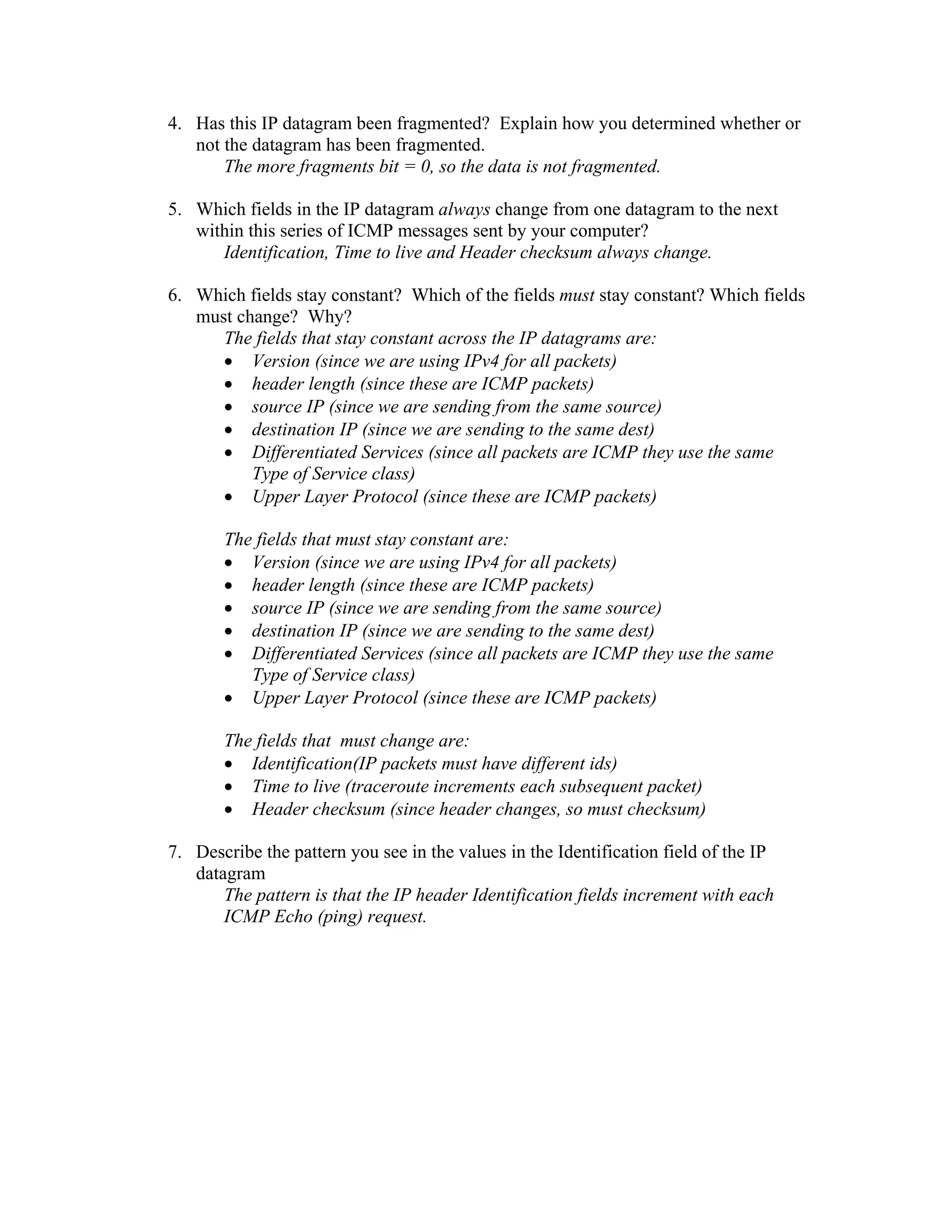
Fig. 2 ICMP TTL exceeded reply, IP information 
8. What is the value in the Identification field and the TTL field? 
Identification: 30767 
TTL: 64 
9. Do these values remain unchanged for all of the ICMP TTL-exceeded replies sent 
to your computer by the nearest (first hop) router? Why? 
The identification field changes for all the ICMP TTL-exceeded replies 
because the identification field is a unique value. When two or more IP 
datagrams have the same identification value, then it means that these IP 
datagrams are fragments of a single large IP datagram. 
The TTL field remains unchanged because the TTL for the first hop router is 
always the same.
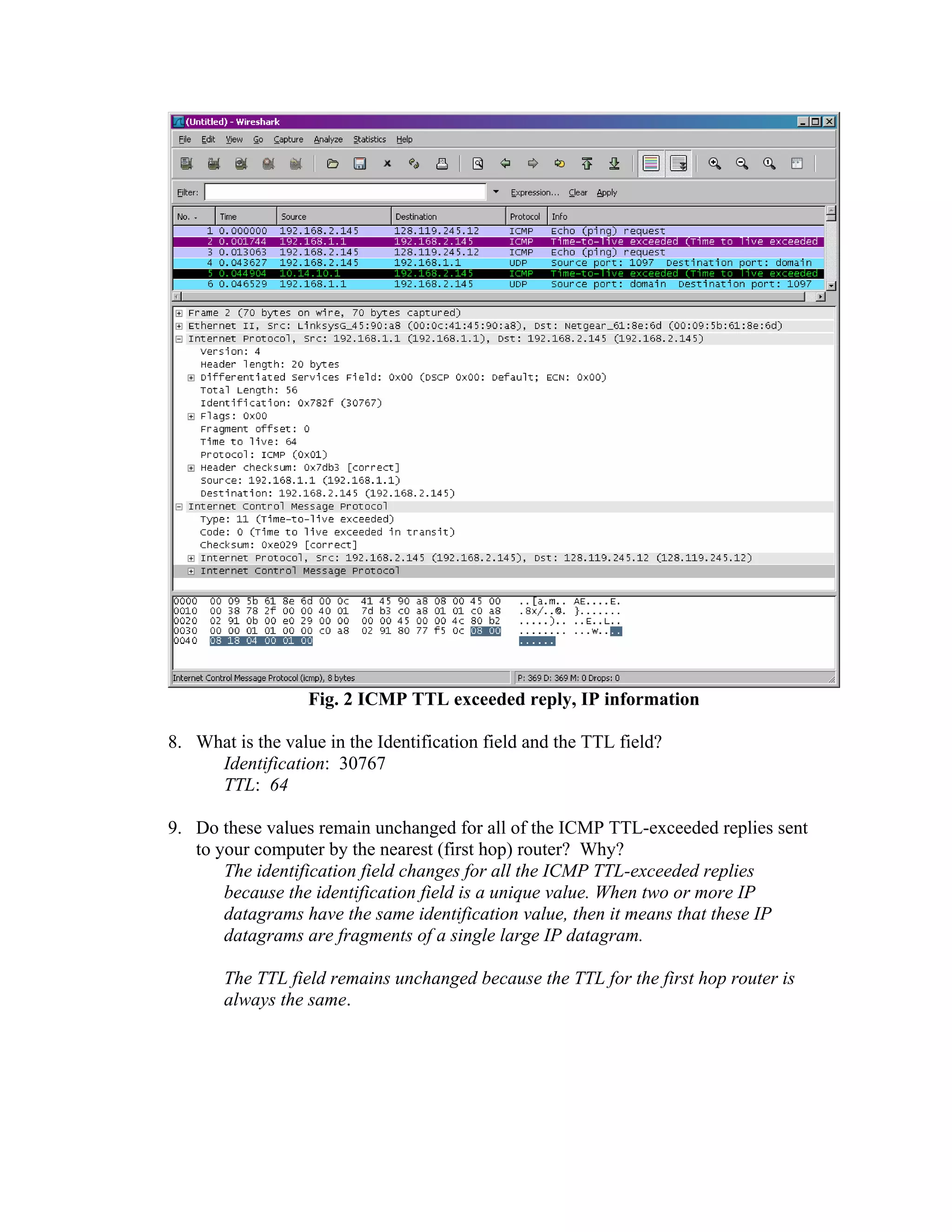
Fig. 3 ICMP Echo Request pkt size = 2000, first fragment 
10. Find the first ICMP Echo Request message that was sent by your computer after 
you changed the Packet Size in pingplotter to be 2000. Has that message been 
fragmented across more than one IP datagram? 
Yes, this packet has been fragmented across more than one IP datagram 
11. Print out the first fragment of the fragmented IP datagram. What information in 
the IP header indicates that the datagram been fragmented? What information in 
the IP header indicates whether this is the first fragment versus a latter fragment? 
How long is this IP datagram? 
The Flags bit for more fragments is set, indicating that the datagram has been 
fragmented. Since the fragment offset is 0, we know that this is the first 
fragment. This first datagram has a total length of 1500, including the 
header.
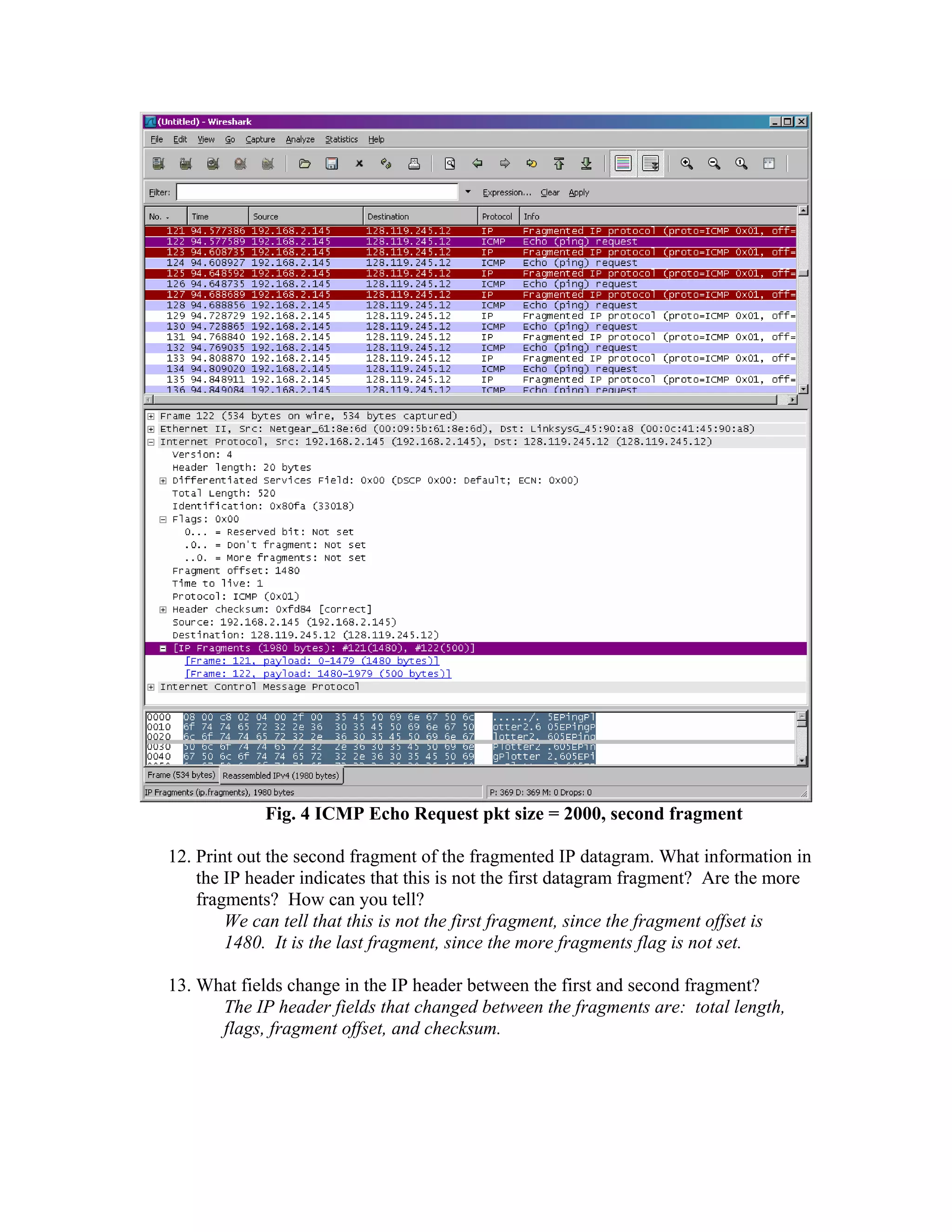
Fig. 4 ICMP Echo Request pkt size = 2000, second fragment 
12. Print out the second fragment of the fragmented IP datagram. What information in 
the IP header indicates that this is not the first datagram fragment? Are the more 
fragments? How can you tell? 
We can tell that this is not the first fragment, since the fragment offset is 
1480. It is the last fragment, since the more fragments flag is not set. 
13. What fields change in the IP header between the first and second fragment? 
The IP header fields that changed between the fragments are: total length, 
flags, fragment offset, and checksum.
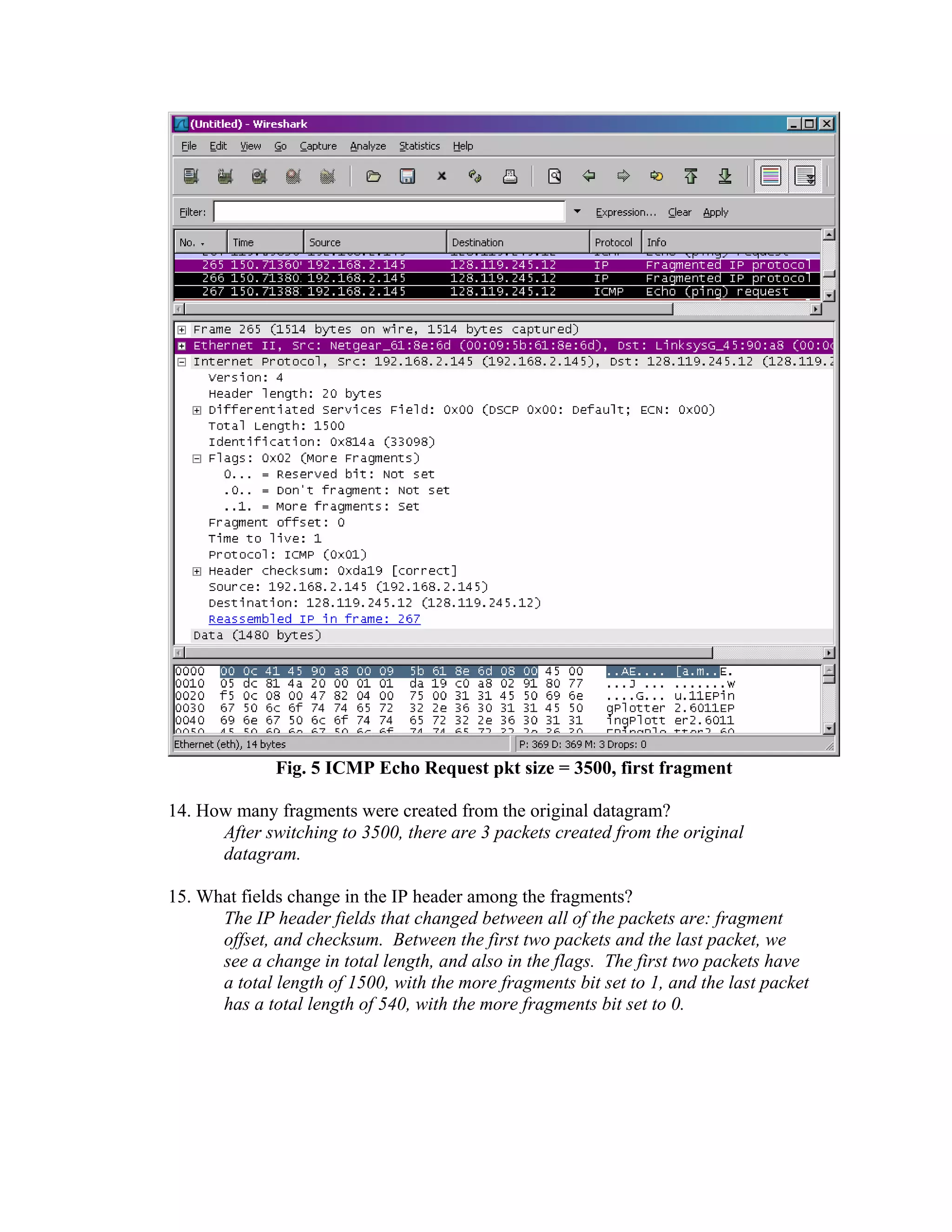
Fig. 5 ICMP Echo Request pkt size = 3500, first fragment 
14. How many fragments were created from the original datagram? 
After switching to 3500, there are 3 packets created from the original 
datagram. 
15. What fields change in the IP header among the fragments? 
The IP header fields that changed between all of the packets are: fragment 
offset, and checksum. Between the first two packets and the last packet, we 
see a change in total length, and also in the flags. The first two packets have 
a total length of 1500, with the more fragments bit set to 1, and the last packet 
has a total length of 540, with the more fragments bit set to 0.

06 wireshark ip-solution_july_22

  • 1.
    Solution to WiresharkLab: IP Fig. 1 ICMP Echo Request message IP information 1. What is the IP address of your computer? The IP address of my computer is 192.168.1.46 2. Within the IP packet header, what is the value in the upper layer protocol field? Within the header, the value in the upper layer protocol field is ICMP (0x01) 3. How many bytes are in the IP header? How many bytes are in the payload of the IP datagram? Explain how you determined the number of payload bytes. There are 20 bytes in the IP header, and 56 bytes total length, this gives 36 bytes in the payload of the IP datagram.
  • 2.
    4. Has thisIP datagram been fragmented? Explain how you determined whether or not the datagram has been fragmented. The more fragments bit = 0, so the data is not fragmented. 5. Which fields in the IP datagram always change from one datagram to the next within this series of ICMP messages sent by your computer? Identification, Time to live and Header checksum always change. 6. Which fields stay constant? Which of the fields must stay constant? Which fields must change? Why? The fields that stay constant across the IP datagrams are: • Version (since we are using IPv4 for all packets) • header length (since these are ICMP packets) • source IP (since we are sending from the same source) • destination IP (since we are sending to the same dest) • Differentiated Services (since all packets are ICMP they use the same Type of Service class) • Upper Layer Protocol (since these are ICMP packets) The fields that must stay constant are: • Version (since we are using IPv4 for all packets) • header length (since these are ICMP packets) • source IP (since we are sending from the same source) • destination IP (since we are sending to the same dest) • Differentiated Services (since all packets are ICMP they use the same Type of Service class) • Upper Layer Protocol (since these are ICMP packets) The fields that must change are: • Identification(IP packets must have different ids) • Time to live (traceroute increments each subsequent packet) • Header checksum (since header changes, so must checksum) 7. Describe the pattern you see in the values in the Identification field of the IP datagram The pattern is that the IP header Identification fields increment with each ICMP Echo (ping) request.
  • 3.
    Fig. 2 ICMPTTL exceeded reply, IP information 8. What is the value in the Identification field and the TTL field? Identification: 30767 TTL: 64 9. Do these values remain unchanged for all of the ICMP TTL-exceeded replies sent to your computer by the nearest (first hop) router? Why? The identification field changes for all the ICMP TTL-exceeded replies because the identification field is a unique value. When two or more IP datagrams have the same identification value, then it means that these IP datagrams are fragments of a single large IP datagram. The TTL field remains unchanged because the TTL for the first hop router is always the same.
  • 4.
    Fig. 3 ICMPEcho Request pkt size = 2000, first fragment 10. Find the first ICMP Echo Request message that was sent by your computer after you changed the Packet Size in pingplotter to be 2000. Has that message been fragmented across more than one IP datagram? Yes, this packet has been fragmented across more than one IP datagram 11. Print out the first fragment of the fragmented IP datagram. What information in the IP header indicates that the datagram been fragmented? What information in the IP header indicates whether this is the first fragment versus a latter fragment? How long is this IP datagram? The Flags bit for more fragments is set, indicating that the datagram has been fragmented. Since the fragment offset is 0, we know that this is the first fragment. This first datagram has a total length of 1500, including the header.
  • 5.
    Fig. 4 ICMPEcho Request pkt size = 2000, second fragment 12. Print out the second fragment of the fragmented IP datagram. What information in the IP header indicates that this is not the first datagram fragment? Are the more fragments? How can you tell? We can tell that this is not the first fragment, since the fragment offset is 1480. It is the last fragment, since the more fragments flag is not set. 13. What fields change in the IP header between the first and second fragment? The IP header fields that changed between the fragments are: total length, flags, fragment offset, and checksum.
  • 6.
    Fig. 5 ICMPEcho Request pkt size = 3500, first fragment 14. How many fragments were created from the original datagram? After switching to 3500, there are 3 packets created from the original datagram. 15. What fields change in the IP header among the fragments? The IP header fields that changed between all of the packets are: fragment offset, and checksum. Between the first two packets and the last packet, we see a change in total length, and also in the flags. The first two packets have a total length of 1500, with the more fragments bit set to 1, and the last packet has a total length of 540, with the more fragments bit set to 0.