Core Java
Exception
• Unwanted, unexpected event that disturbs the
flow of program is called an exception.
• Runtime Stack Mechanism
• Default exception handling in Java: If an
exception is raised, the method in which it is
raised is responsible to create exception
object by including following information:
Name of the exception, description, location
of exception(Stack Trace)
Exception
• Exception Hierarchy:
• Throwable class acts as a root for entire Java Exception
hierarchy. It has 2 child classes: Exception and Error.
• Exception: Most of the cases, these are caused by our
program and are recoverable.
• Error: Most of the cases, these are caused due to lack
of system resources and are non-recoverable.
• Checked Vs Un-checked exceptions:
• The exceptions which are checked by compiler during
runtime are checked exceptions. Ex. FileNotFound.
• Unchecked Ex. ArithmeticException
• Runtime Exception & its child classes, Errors & its child
classes are unchecked, others are checked.
Exception
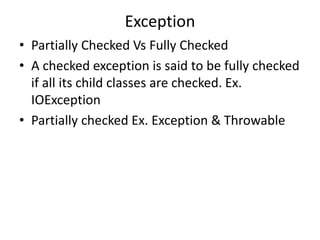
• Partially Checked Vs Fully Checked
• A checked exception is said to be fully checked
if all its child classes are checked. Ex.
IOException
• Partially checked Ex. Exception & Throwable
Exception
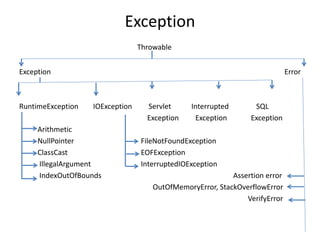
Throwable
Exception Error
RuntimeException IOException Servlet Interrupted SQL
Exception Exception Exception
Arithmetic
NullPointer FileNotFoundException
ClassCast EOFException
IllegalArgument InterruptedIOException
IndexOutOfBounds Assertion error
OutOfMemoryError, StackOverflowError
VerifyError
Exception
Exception Handling using try-catch:
Syntax: try{
risky code;
}
catch( xxx e){
handling code;
}
Ex.
Class Test{
public static void main(String[] args){
try{
System.out.println(10/0);
}
catch(ArithmeticException e){
System.out.println(10/2);
}
System.out.println(“Hello”);
}
}
Exception
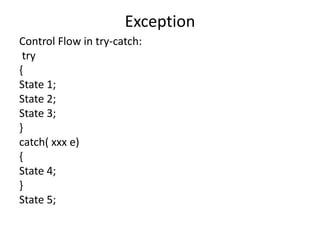
Control Flow in try-catch:
try
{
State 1;
State 2;
State 3;
}
catch( xxx e)
{
State 4;
}
State 5;
Exception
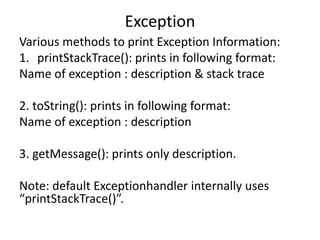
Various methods to print Exception Information:
1. printStackTrace(): prints in following format:
Name of exception : description & stack trace
2. toString(): prints in following format:
Name of exception : description
3. getMessage(): prints only description.
Note: default Exceptionhandler internally uses
“printStackTrace()”.
Exception
Try with multiple catch blocks:
Order of catch blocks is very important. It should be
from child to parent.
Ex.
try{ risky code;}
catch(AE e) { code; }
catch(fileNotFoundException e){code;}
catch(NPE e){code;}
catch(Exception e){code;} //default exception
handler
Exception
finally block:
Main purpose of finally block is to maintain
clean-up code which should be executed always.
Syntax:
try{ risky code;}
catch(xxx e){handing code;}
finally{ clean-up code;}
Exception
finally Vs return :
Finally block dominates return statement. Hence, if there is any return statement present inside try or
catch block first finally will be executed & then return statement will be considered.
Ex.
class Test{
public static void main(String[] args){
try{
System.out.println(“try”);
return;
}
catch(AE e){
System.out.println(“catch”);
}
finally{
System.out.println(“finally”);
}
}
}
Only when we use System.exit(0), finally block will not be executed.
Exception
Difference between final, finally & finalize:
final:
• It is a modifier applicable for classes, methods & variables.
• If a class is declared as final then child class creation is not possible.
• A final method cannot be overriden.
• Reassignment of final variable is not allowed.
finally:
• Associated with try-catch block to maintain clean-up code which is
always executed irrespective of exception raised or not.
finalize():
• It is a method which should be executed by garbage collector
before destroying any object to perform clean-up activities.
Exception
Control Flow in try-catch-finally:
try
{
State 1;
State 2;
State 3;
}
catch( xxx e)
{
State 4;
}
finally
{
State 5;
}
State 6;
Exception
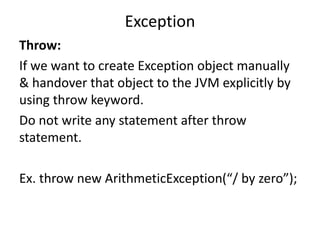
Throw:
If we want to create Exception object manually
& handover that object to the JVM explicitly by
using throw keyword.
Do not write any statement after throw
statement.
Ex. throw new ArithmeticException(“/ by zero”);
Exception
Throws:
If our program has a chance of raising checked exception then we have to
handle it.
This can be handled in 2 ways
1. Using try-catch
2. Using throws
class Test
{
public static void main(String[] args) throws IE
{
thread.sleep(5000);
}
}
Exception Propagation: the process of delegating the responsibility of
exception handling from one method to another method by using throws
keyword.
Exception
Customized Exceptions:
Ex.
class TooYoungException extends RuntimeException{
TooYoungException(String s){
super(s);
}
}
class TooOldException extends RuntimeException{
TooOldException(String s){
super(s);
}
}
class Test{
public static void main(String[] args){
int age=Integer.parseInt(args[0]);
if(age>65){
throw new TooOldException(“You have retired”);}
else if (age<18){
throw new TooYoungException(“You’re a child, go to school”)}
else{ System.out.println(“You’re eligible for a job”); }
}
}
Exception
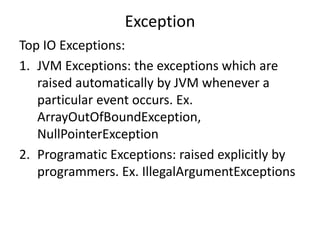
Top IO Exceptions:
1. JVM Exceptions: the exceptions which are
raised automatically by JVM whenever a
particular event occurs. Ex.
ArrayOutOfBoundException,
NullPointerException
2. Programatic Exceptions: raised explicitly by
programmers. Ex. IllegalArgumentExceptions
Exception
Different Exceptions:
1. ArrayOutOfBounsException: child class of
RuntimeException; unchecked; raised
automatically by JVM when we try to access an
array element whose index is not present. Ex.
int[] a=new int[10]; System.out.println(a[100]);
2. NullPointerException: child class of
RuntimeException; unchecked; raised
automatically by JVM when we try to perform
any operation on null. Ex. String s=null;
System.out.println(s.length());
Exception
Different Exceptions:
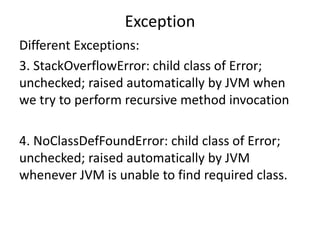
3. StackOverflowError: child class of Error;
unchecked; raised automatically by JVM when
we try to perform recursive method invocation
4. NoClassDefFoundError: child class of Error;
unchecked; raised automatically by JVM
whenever JVM is unable to find required class.
Exception
Different Exceptions:
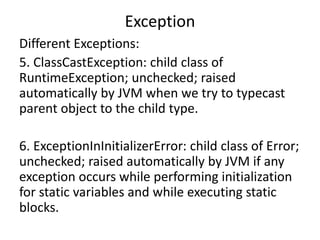
5. ClassCastException: child class of
RuntimeException; unchecked; raised
automatically by JVM when we try to typecast
parent object to the child type.
6. ExceptionInInitializerError: child class of Error;
unchecked; raised automatically by JVM if any
exception occurs while performing initialization
for static variables and while executing static
blocks.
Exception
Different Exceptions:
7. IllegalArgumentException: child class of
RuntimeException; unchecked; raised explicitly
by the programmer to indicate that a method
has been invoked with invalid argument.
8. NumberFormatException: child class of
RuntimeException; unchecked; raised explicitly
by the programmer to indicate that we are
trying to convert String to number type but
String is not properly formatted.
Exception
Different Exceptions:
9. IllegalStateException: child class of
RuntimeException; unchecked; raised explicitly by
the programmer to indicate that a method has been
invoked at inappropriate time. Ex.
Thread t = new Thread();
t.start()
t.start()
10. AssertionError : child class of Error; unchecked;
raised explicitly by the programmer to indicate that
assert statement fails.
Exception
Assertions:
There are 2 types of assert statement:
1. Simple version: assert(b); //b is boolean
Ex.
class Test{
public static void main(String[] args){
int x=10;
assert(x>10);
System.out.println(x);
}}  AssertionError
If b is true, then program is executed successfully.
2. Augmented version: assert(b) : d
class Test{
public static void main(String[] args){
int x=10;
assert(x>10) : “Value is not greater than 10”;
System.out.println(x);
}}  AssertionError: Value is not greater than 10
Hence, d will be executed if b is false.
Exception
Write a program to divide 2 numbers.
Write a program to find the value of an index of
an array.
Inner Classes
• A class declared inside another class – inner
class.
• For ex. Account class cannot exist without a
Bank class, so we can declare it as inner class.
1. Normal or Regular Inner class:
A class inside a class without a static modifier.
We cannot declare static method inside inner
classes, so we cannot declare main method &
hence inner classes cannot be directly invoked
from command prompt.
Inner Classes
• Accessing inner class from static area of outer class:
class Outer{
class Inner{
public void m1(){
System.out.println(“Inner class method”);
}
}
public static void main(String[] args){
Outer o= new Outer();
Outer.Inner i = o.new Inner(); Outer.Inner i=new Outer().new Inner();
i.m1();
}
}
Inner Classes
• Accessing inner class from instance area of outer class:
class Outer{
class Inner{
public void m1(){
System.out.println(“Inner class method”);
}
}
public void m2(){
Inner i=new Inner();
i.m1();
}
public static void main(String[] args){
Outer o=new Outer();
o.m2();
}
}
Inner Classes
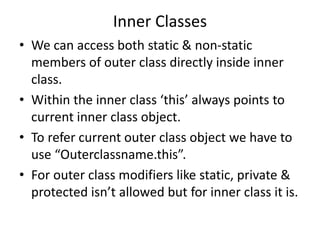
• We can access both static & non-static
members of outer class directly inside inner
class.
• Within the inner class ‘this’ always points to
current inner class object.
• To refer current outer class object we have to
use “Outerclassname.this”.
• For outer class modifiers like static, private &
protected isn’t allowed but for inner class it is.
Inner Classes
2. Method Local Inner class: A class declared inside a method.
The scope of these inner classes lies within the method. It cannot be static.
Ex.
class Test{
public void m1(){
class Inner{
public void sum(int x, int y){
System.out.println(x+y);
}
}
Inner i=new Inner();
i.sum(10,20);
}
public static void main(String[] a){
new Test().m1();
}
}
We cannot access local variable of m1() inside Inner class unless the variable if final.
Inner Classes
3. Anonymous inner class: nameless inner class.
a) Anonymous inner class that extends a class:
Ex.
class Popcorn{
public void taste(){
System.out.println(“Salty”);
}
}
class Test{
public static void main(String[] args){
Popcorn p = new Popcorn{
public void taste(){
System.out.println(“Sweet”);
}
};
p.taste(); Sweet
Popcorn p1=new Popcorn();
p1.taste(); Salty
}
}
We are creating child class for the Popcorn class & for that child class we are creating an object with
parent reference.
Inner Classes
3. Anonymous inner class: nameless inner class.
b) Anonymous inner class that implements an Interface:
Ex.
class Test{
public static void main(String[] args){
Runnable r = new Runnable()
{
public void run(){
for(int i=0;i<10;i++){
System.out.println(“child thread”);
}
}
};
Thread t=new Thread( r ) ; //r is the object of Runnable
t.start();
for (int i=0; i<10; i++){
System.out.println(“main thread”);
}
}
}
Inner Classes
3. Anonymous inner class: nameless inner class.
c) Anonymous inner class that defines inside method arguments:
Ex.
class Test{
public static void main(String[] args){
new Thread( new Runnable()
{
public void run(){
for(int i=0;i<10;i++){
System.out.println(“child thread”);
}
}
}).start();
for (int i=0; i<10; i++){
System.out.println(“main thread”);
}
}
}
Inner Classes
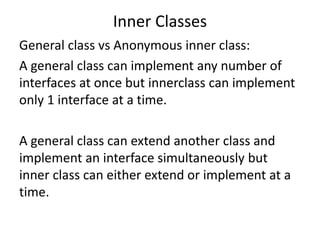
General class vs Anonymous inner class:
A general class can implement any number of
interfaces at once but innerclass can implement
only 1 interface at a time.
A general class can extend another class and
implement an interface simultaneously but
inner class can either extend or implement at a
time.
Inner Classes
4. Static Nested Classes:
Inner class declared with static modifier.
These class objects can exist without the existence of outer class object.
Ex.
class Outer{
static class Nested{ //can access only static members of Outer
public void m1(){
System.out.println(“Static nested class”);
}
}
public static void main(String[] args){
Outer.Nested n=new Outer.Nested();
n.m1();
}
}
We can declare static methods, hence main() can be declared. So it is possible to
invoke nested class directly from command prompt.
Inner Classes
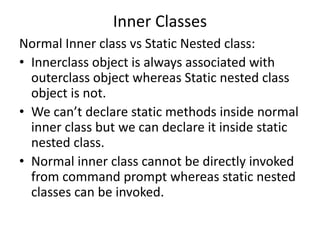
Normal Inner class vs Static Nested class:
• Innerclass object is always associated with
outerclass object whereas Static nested class
object is not.
• We can’t declare static methods inside normal
inner class but we can declare it inside static
nested class.
• Normal inner class cannot be directly invoked
from command prompt whereas static nested
classes can be invoked.
Inner Classes
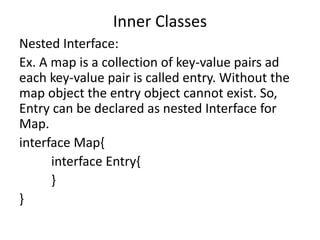
Nested Interface:
Ex. A map is a collection of key-value pairs ad
each key-value pair is called entry. Without the
map object the entry object cannot exist. So,
Entry can be declared as nested Interface for
Map.
interface Map{
interface Entry{
}
}
Threads
Executing several tasks simultaneously where
each task is a separate independent part of the
same program is called ‘thread-based
multitasking’. The independent parts are called
‘thread’.
It improves performance of the system by
reducing response time.
Main application areas: video games,
multimedia graphics, animations and so on.
Threads
The ways to define & start a new thread:
1. By extending Thread class.
class MyThread extends Thread{
public void run(){
for (int i=0;i<=10;i++){
System.out.println(“child thread”);
}
}
}
class ThreadDemo {
public static void main(String[] args){
MyThread t= new MyThread();
t.start();
for (int i=0; i<=10;i++ ){
System.out.println(“main thread”);
}
}
}
Threads
Thread Scheduler: which thread will execute first
is decided by this.
start() : registers the thread with thread
scheduler and calls run().
run()
Threads
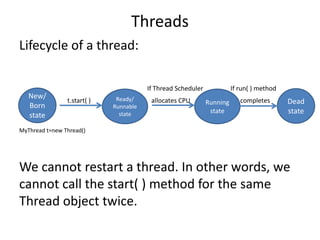
Lifecycle of a thread:
If Thread Scheduler If run( ) method
t.start( ) allocates CPU completes
MyThread t=new Thread()
We cannot restart a thread. In other words, we
cannot call the start( ) method for the same
Thread object twice.
New/
Born
state
Ready/
Runnable
state
Dead
state
Running
state
Threads
The ways to define & start a new thread:
2. By implementing Runnable Interface:
class MyRunnable implements Runnable{
public void run(){
for (int i=0;i<=10;i++){
System.out.println(“child thread”);
}
}
}
class ThreadDemo {
public static void main(String[] args){
MyRunnable r = new MyRunnable();
Thread t=new Thread( r );
t.start();
for (int i=0; i<=10;i++ ){
System.out.println(“main thread”);
}
}
}
t1.start(); t1.run(); t2.start() ; t2.run(); r.start() ; r.run();
Threads
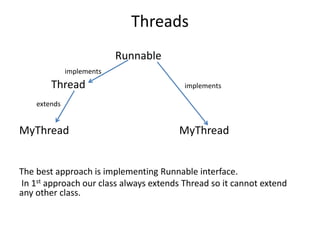
Runnable
implements
Thread implements
extends
MyThread MyThread
The best approach is implementing Runnable interface.
In 1st approach our class always extends Thread so it cannot extend
any other class.
Threads
Getting & Setting name of a thread:
class Test{
public static void main(String[] args){
System.out.println(thread.currentThread().getName());
Thread.currentThread().setName(“thread-1”);
System.out.println(thread.currentThread().getName());
}
}
So the methods public final String getName() and public final
void setName(String name) are used to get and set the thread
names.
public static thread CurrentThread()  gives current
executing thread reference.
Threads
Thread Priority:
Range of thread priorities is “1 to 10”. (10 being
the highest)
Thread.MIN_PRIORITY  1
Thread.MAX_PRIORITY 10
Thread.NORM_PRIORITY  5
The thread having highest priority will be
allocated CPU first by thread scheduler.
The main thread has priority 5 by default.
Threads
To set & get the priority:
public final int getPriority();
public final void setPriority();
class MyThread extends Thread{
public void run(){
for(int i=0; i<10; i++){
System.out.println(“child thread”);
}
}
}
class threadPriorityDemo{
public static void main(String[] args){
MyThread t=new MyThread();
t.setPriority(10);
t.start()
for(int i=0;i<10;i++){
System.out.println(“main thread”);
}
}
}
Threads
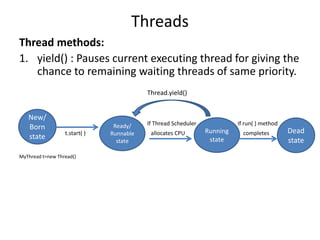
Thread methods:
1. yield() : Pauses current executing thread for giving the
chance to remaining waiting threads of same priority.
Thread.yield()
If Thread Scheduler If run( ) method
t.start( ) allocates CPU completes
MyThread t=new Thread()
New/
Born
state
Ready/
Runnable
state
Dead
state
Running
state
class MyThread extends Thread{
public void run(){
for(int i=0; i<10;i++){
Thread.yield();
System.out.println(“child thread”);
}
}
}
class ThreadYieldDemo{
public static void main(String[] args){
MyThread t=new MyThread();
t.start();
for(int i=0; i<10;i++){
System.out.println(“main thread”);
}
}
}
Main thread will complete first in this case.
Threads
Threads
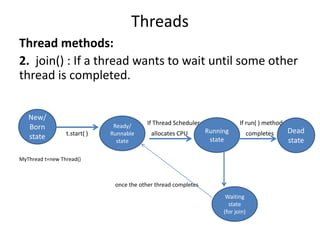
Thread methods:
2. join() : If a thread wants to wait until some other
thread is completed.
If Thread Scheduler If run( ) method
t.start( ) allocates CPU completes
MyThread t=new Thread()
once the other thread completes
New/
Born
state
Ready/
Runnable
state
Dead
state
Running
state
Waiting
state
(for join)
class MyThread extends Thread{
public void run(){
for(int i=0; i<10;i++){
System.out.println(“child thread”);
try{ Thread.sleep(2000);}
catch(IE e){ }
}
}
}
class ThreadJoinDemo{
public static void main(String[] args){
MyThread t=new MyThread();
t.start();
t.join();
for(int i=0; i<10;i++){
System.out.println(“main thread”);
}
}
}
Main thread will wait until the completion of child thread.
Threads
Threads
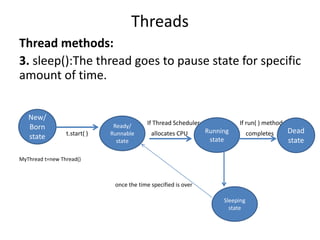
Thread methods:
3. sleep():The thread goes to pause state for specific
amount of time.
If Thread Scheduler If run( ) method
t.start( ) allocates CPU completes
MyThread t=new Thread()
once the time specified is over
New/
Born
state
Ready/
Runnable
state
Dead
state
Running
state
Sleeping
state
Interruption of a thread:
interrupt(): a thread can interrupt another sleeping or waiting thread.
class MyThread extends Thread{
public void run(){
for(int i=0; i<100;i++){
System.out.println(“Lazy thread”);
try{ Thread.sleep(5000);}
catch(IE e){
System.out.println(“I got Interrupted”);}
}
}
}
class InterruptDemo{
public static void main(String[] args){
MyThread t=new MyThread();
t.start();
t.interrupt();
}
}
}
Threads
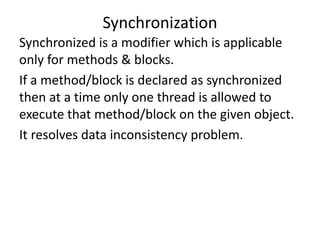
Synchronized is a modifier which is applicable
only for methods & blocks.
If a method/block is declared as synchronized
then at a time only one thread is allowed to
execute that method/block on the given object.
It resolves data inconsistency problem.
Synchronization
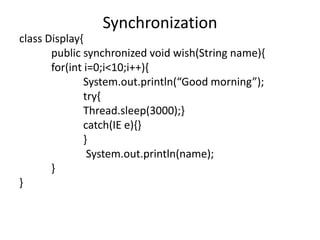
class Display{
public synchronized void wish(String name){
for(int i=0;i<10;i++){
System.out.println(“Good morning”);
try{
Thread.sleep(3000);}
catch(IE e){}
}
System.out.println(name);
}
}
Synchronization
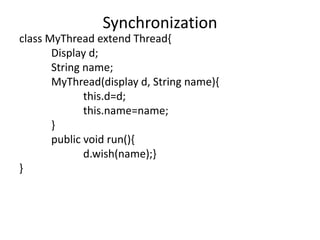
class MyThread extend Thread{
Display d;
String name;
MyThread(display d, String name){
this.d=d;
this.name=name;
}
public void run(){
d.wish(name);}
}
Synchronization
class SynchronizedDemo{
public static void main(String[] args){
Display d1=new Display();
MyThread t1=new MyThread(d1, “Dhoni”);
MyThread t2=new MyThread(d1, “Kohli”);
t1.start();
t2.start();
}
}
Synchronization
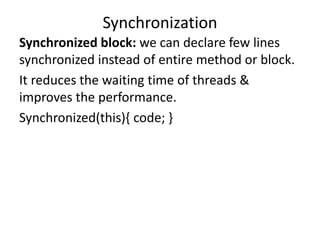
Synchronized block: we can declare few lines
synchronized instead of entire method or block.
It reduces the waiting time of threads &
improves the performance.
Synchronized(this){ code; }
Synchronization
Deadlock: situation where two threads are
waiting for each other forever.
Threads
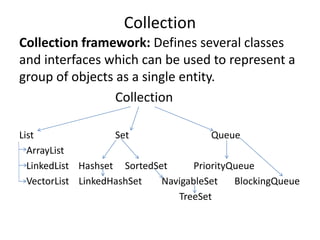
Collection framework: Defines several classes
and interfaces which can be used to represent a
group of objects as a single entity.
Collection
List Set Queue
ArrayList
LinkedList Hashset SortedSet PriorityQueue
VectorList LinkedHashSet NavigableSet BlockingQueue
TreeSet
Collection
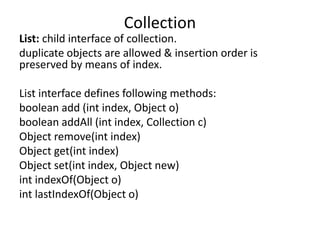
List: child interface of collection.
duplicate objects are allowed & insertion order is
preserved by means of index.
List interface defines following methods:
boolean add (int index, Object o)
boolean addAll (int index, Collection c)
Object remove(int index)
Object get(int index)
Object set(int index, Object new)
int indexOf(Object o)
int lastIndexOf(Object o)
Collection
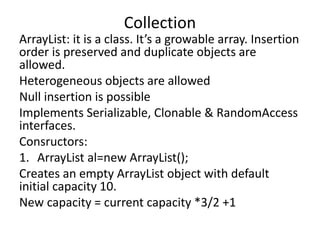
ArrayList: it is a class. It’s a growable array. Insertion
order is preserved and duplicate objects are
allowed.
Heterogeneous objects are allowed
Null insertion is possible
Implements Serializable, Clonable & RandomAccess
interfaces.
Consructors:
1. ArrayList al=new ArrayList();
Creates an empty ArrayList object with default
initial capacity 10.
New capacity = current capacity *3/2 +1
Collection
2. ArrayList al=new ArrayList(int initialCapacity);
Creates an empty ArrayList object with the
specified initial capacity.
3. ArrayList al=new ArrayList(Collection c);
Creates an equivalent ArrayList object for the
given Collection object.
Collection
import java.util.*;
class ArrayListDemo{
public static void main(String[] args){
ArrayList a = new ArrayList();
a.add(‘A’);
a.add(10);
a.add(null);
System.out.println(a);
a.remove(2);
System.out.println(a);
a.add(2, ‘M’);
System.out.println(a);
a.add(‘N’);
System.out.println(a);
}}
Collection
If the frequent operation is retrieval then
ArrayList is the best choice but for
insertion/deletion it is not.
No method in ArrayList is synchronized.
Threads are not required to wait, hence
performance is high.
Collection
LinkedList: If the frequent operation is
insertion/deletion, LinkedList is the best.
The underlying datastructure is double
LinkedList.
Insertion order is preserved.
Duplicates are allowed
Heterogeneous objects are allowed
Null insertion is possible
Implements Serializable & Clonable interfaces.
Collection
Constructors:
1. Linkedlist l = new LinkedList();
2. LinkedList l= new LinkedList(Collection c);
LinkedList specific methods:
void addFirst(Object o);
void addLast(Object o);
Object removeFirst();
Object removeLast();
Object getFirst();
Object getLast();
It is suitable to implement Stack & Queue.
Collection
import java.util.*;
class LinkedListDemo{
public static void main(String[] args){
LinkedList l= new LinkedList();
l.add(“Nalinee”);
l.set(1);
l.add(null);
l.add(“Nalinee”);
l.set(0,”Software”);
l.add(0,”zekeLabs”);
l.removeLast();
l.addFirst(“edYoda”);
System.out.println(l);
}
}
Collection
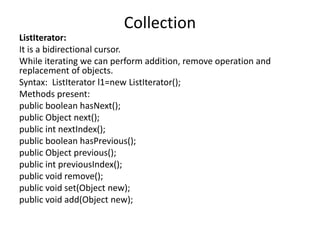
ListIterator:
It is a bidirectional cursor.
While iterating we can perform addition, remove operation and
replacement of objects.
Syntax: ListIterator l1=new ListIterator();
Methods present:
public boolean hasNext();
public Object next();
public int nextIndex();
public boolean hasPrevious();
public Object previous();
public int previousIndex();
public void remove();
public void set(Object new);
public void add(Object new);
Collection
import java.util.*;
class ListIteratorDemo{
public static void main(String[] args){
LinkedList l = new LinkedList();
l.add(“Nalinee”);
l.add(“Choudhary”);
l.add(“zekeLabs”);
l.add(“Training”);
System.out.println(l);
ListIterator lr = new ListIterator();
while(lr.hasNext()){
String s = (String) lr.next();
if(s.equals(“zekeLabs”)){
lr.remove();
}
if(s.equals(“Nalinee”)){
lr.set(“Miss Nalinee”);
}
if(s.equals(“Training”)){
lr.add(“Software”);
}
}
System.out.println(l);
}
}
Collection
import java.util.*;
class IteratorDemo{
public static void main(String[] args){
ArrayList l = new ArrayList();
for(int i=0; i<=10; i++){
l.add(i);
}
System.out.println(l);
Iterator itr=new Iterator();
while(itr.hasNext()){
Integer i = (Integer) itr.next();
if(i%2==0){
System.out.println(i);
}
else{
itr.remove();
}
} System.out.println(l);
Collection
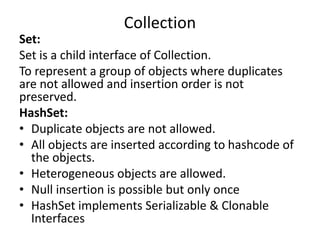
Set:
Set is a child interface of Collection.
To represent a group of objects where duplicates
are not allowed and insertion order is not
preserved.
HashSet:
• Duplicate objects are not allowed.
• All objects are inserted according to hashcode of
the objects.
• Heterogeneous objects are allowed.
• Null insertion is possible but only once
• HashSet implements Serializable & Clonable
Interfaces
Collection
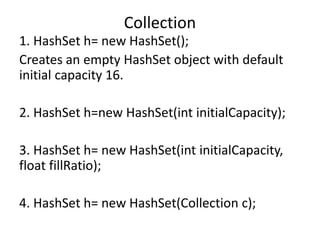
1. HashSet h= new HashSet();
Creates an empty HashSet object with default
initial capacity 16.
2. HashSet h=new HashSet(int initialCapacity);
3. HashSet h= new HashSet(int initialCapacity,
float fillRatio);
4. HashSet h= new HashSet(Collection c);
Collection
import java.util.*;
class HashDemo{
public static void main(String[] args){
Hashset h=new HashSet();
h.add(“B”);
h.add(“C”);
h.add(“D”);
h.add(“null”);
h.add(10);
System.out.println(h);
}
}
Collection
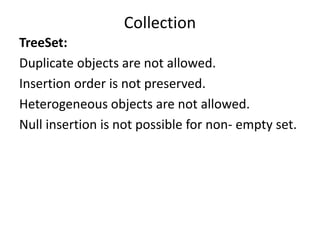
TreeSet:
Duplicate objects are not allowed.
Insertion order is not preserved.
Heterogeneous objects are not allowed.
Null insertion is not possible for non- empty set.
Collection
1. TreeSet t = new TreeSet();
Creates an empty TreeSet object where the
sorting order is default natural sorting order.
2. TreeSet t = new TreeSet(Comparator c);
Creates an empty Treeset object where the
sorting order is customized sorting order
specified by Comparator object.
3. TreeSet t = new TreeSet(Collection c);
Collection
import java.util.*;
class TreeSetDemo{
public static void main(String[] args){
TreeSet h=new TreeSet();
t.add(“A”);
t.add(“a”);
t.add(“Z”);
t.add(“L”);
t.add(“null”); // NPE
t.add(10); // CCE
System.out.println(t);
}
}
Collection
Comparable Interface:
Present in java.lang package & contains only 1
method:
public int compareTo(Object obj)
obj1.comparTo(obj2);
Returns –ve if obj1 has to come before obj2.
Returns +ve if obj1 has to come after obj2.
 Returns zero if obj1 & obj2 are
equal(duplicates).
Collection
import java.util.*;
class Test{
public static void main(String[] args){
System.out.println(“A”.compareTo(“Z”);
System.out.println(“Z”.compareTo(“A”);
System.out.println(“A”.compareTo(“A”);
}
}
Collection
• When we depend on natural sorting order,
internally JVM calls compareTo();
• String class implements comparable but
StringBuffer doesn’t.
Collection
Comparator:
We can customize our sorting by using Comparator.
Present in java.util and contains 2 methods:
1. public int compare(Object o1, Object o2)
returns –ve if o1 has to come before o2.
returns +ve if o1 has to come after o2.
returns zero if o1 & o2 are equal.
o1 object which we are trying to add.
o2  object that already exists.
Whenever we implement Comparator interface, we should
provide implementation for compare(). equals() is already
available for our class from Object class through inheritance.
Collection
import java.util.*;
class TreeSetDemo{
public static void main(String[] args){
TreeSet h=new TreeSet(new MyComparator());
t.add(20);
t.add(0);
t.add(15);
t.add(5);
t.add(10);
System.out.println(t);
}
}
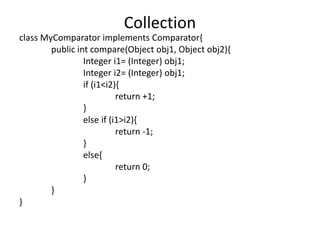
Collection
class MyComparator implements Comparator{
public int compare(Object obj1, Object obj2){
Integer i1= (Integer) obj1;
Integer i2= (Integer) obj1;
if (i1<i2){
return +1;
}
else if (i1>i2){
return -1;
}
else{
return 0;
}
}
}
Collection
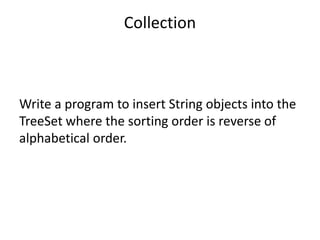
Write a program to insert String objects into the
TreeSet where the sorting order is reverse of
alphabetical order.
Collection
import java.util.*;
class TreeSetDemo2{
public static void main(String[] args){
TreeSet h=new TreeSet(new MyComparator());
t.add(“A”);
t.add(“Z”);
t.add(“K”);
t.add(“B”);
t.add(“a”);
System.out.println(t);
}
}
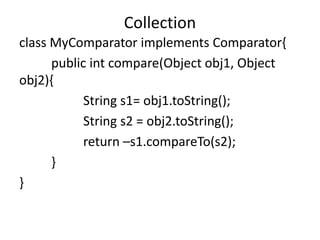
Collection
class MyComparator implements Comparator{
public int compare(Object obj1, Object
obj2){
String s1= obj1.toString();
String s2 = obj2.toString();
return –s1.compareTo(s2);
}
}
Collection
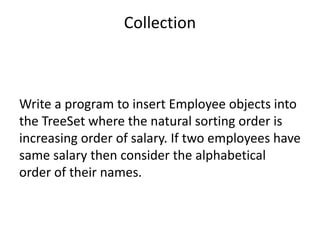
Write a program to insert Employee objects into
the TreeSet where the natural sorting order is
increasing order of salary. If two employees have
same salary then consider the alphabetical
order of their names.
Collection
Map:
Group of objects represented as key-value pairs
where both key and value are objects.
Duplicate keys are not allowed.
Each key-value pair is called Entry.
Map Interface is not a child interface of
Collection.
Collection
Methods of Map:
1. Object put(Object kry, Object value)
2. void putAll(Map m)
3. Object get(Object key)
4. Object remove(Object key)
5. boolean containsKey(Object key)
6. boolean containsValue(Object Value)
7. int size()
8. boolean isEmpty()
9. void clear()
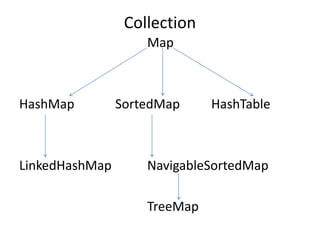
Collection
Map
HashMap SortedMap HashTable
LinkedHashMap NavigableSortedMap
TreeMap
Collection
HashMap:
Heterogeneous objects are allowed for both
keys and values.
Duplicate keys are not allowed.
Insertion order is not preserved because it is
based on hash code of keys.
Null key is allowed but only once
Multiple null values are allowed
Collection
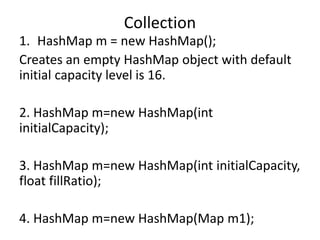
1. HashMap m = new HashMap();
Creates an empty HashMap object with default
initial capacity level is 16.
2. HashMap m=new HashMap(int
initialCapacity);
3. HashMap m=new HashMap(int initialCapacity,
float fillRatio);
4. HashMap m=new HashMap(Map m1);
Collection
import java.util.HashMap;
class HashMapDemo{
public static void main(String[] args){
HashMap m= new HashMap();
m.put(“Nalinee”,500);
m.put(“zekeLabs”,1000);
m.put(“Tom”, 200);
m.put(“Jerry”, 800);
System.out.println(m);
System.out.println(m.put(“John”,1200));
Set s=m.keySet();
System.out.println(s);
Collection c= m.values();
System.out.println(c);
Collection
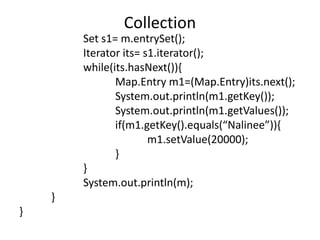
Set s1= m.entrySet();
Iterator its= s1.iterator();
while(its.hasNext()){
Map.Entry m1=(Map.Entry)its.next();
System.out.println(m1.getKey());
System.out.println(m1.getValues());
if(m1.getKey().equals(“Nalinee”)){
m1.setValue(20000);
}
}
System.out.println(m);
}
}
Collection
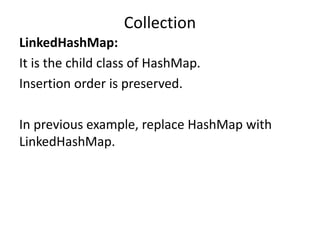
LinkedHashMap:
It is the child class of HashMap.
Insertion order is preserved.
In previous example, replace HashMap with
LinkedHashMap.
Collection
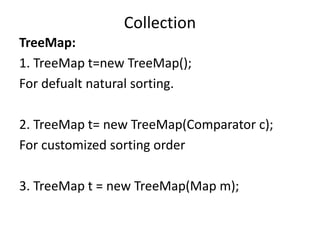
TreeMap:
1. TreeMap t=new TreeMap();
For defualt natural sorting.
2. TreeMap t= new TreeMap(Comparator c);
For customized sorting order
3. TreeMap t = new TreeMap(Map m);
Collection
import java.util.TreeMap;
class TreeMapDemo3{
public static void main(String[] args){
TreeMap m=new TreeMap();
m.put(100,”zzz”);
m.put(103, “yyy”);
m.put(101,”xxx”);
m.put(104,106);
m.put(107, null);
m.put(“FFFF”, “xxx”);//CCE
m.put(null,”xxx”); //NPE
System.out.println(m);
}
}
Collection
import java.util.TreeMap;
class TreeMapDemo3{
public static void main(String[] args){
TreeMap t=new TreeMap(new MyComparator());
t.put(”zzz”,10);
m.put(“AAA”,20);
m.put(”xxx”,30);
m.put(“LLL”,40);
System.out.println(m);
}
}
class MyComparator implements Comparator(){
public int compare(Object obj1, Object obj2){
String s1=obj1.toString();
String s2=obj2.toString();
return s2.compareTo(s1);
}
}
Collection
HashTable:
Heterogeneous objects are allowed for both
keys & values.
Insertion order is not preserved and it is based
on hashcode of the keys.
Null is not allowed for both keys & values.
Duplicate keys are not allowed.
Collection
HashTable h= new HashTable();
Creates an empty HashTable with default initial
capacity as 11.
HashTable h= new HashTable(int initialCapacity);
HashTable h= new HashTable(int initialCapacity,
float fillRatio);
HashTable h= new HashTable(Map m);
Collection
import java.util.HashTable;
class HashTableDemo{
public static void main(String[] args){
HashTable h=new HashTable();
h.put( new Temp(5), “A”);
h.put(new Temp(2), “B”);
h.put(new Temp(6), “C”);
h.put(new Temp(15), “D”);
h.put(new Temp(23), “E”);
System.out.println(m);
}
}
class Temp{
int I;
Temp(int i){
this.i=i;
}
public int hashCode(){
return i;
}
public String toString(){
return i+ “ “;
}
}
Collection
Collections class:
Sorting the elements of a list:
public static void sort(List l)
public static void sort(List l, Comparator c)
Collection
File I/O:
1. File: File f=new File(“abc.txt”);
System.out.println(f.exists());
f.createNewFile();
File: File f=new File(“Nalinee”);
System.out.println(f.exists());
f.mkdir();
IO Package
Constructors:
1. File f=new File(String name);
Create a java file object to represent name of a
file or directory.
2. File f = new File(String subdir, String name);
To create a file or directory present in some
other sub-directory.
3. File f=new File(FileSubdir, String name);
IO Package
To create a file in current working directory:
File f=new File(“abc.txt”);
f.createNewFile();
To create a directory in current working directory:
File f=new File(“NewFolder”);
f.mkdir();
To create a file in the new directory created above
File f1=new File(f, “abc.txt”);
f1.createNewFile();
IO Package
Important methods of File class:
boolean exists();
boolean createNewFile();
boolean mkdir();
boolean isFile();
boolean isDirectory();
String[] list();
boolean delete();
long length();
IO Package
FileWriter:
We can use this to writ character data to the file.
FileWriter fw=new FileWriter(String name);
FileWriter fw=new FileWriter(File f);
These 2 will override the file.
FileWriter fw=new FileWriter(String name, boolean
append);
FileWriter fw=new FileWriter(File f, boolean
append);
These are for append.
IO Package
Methods of FileWriter:
write(int ch); to write a single character
write(char[] ch); to write an array of characters
write(String s); to write a string
flush(); to return the last character of the data to
the file.
close();
IO Package
import java.io.FileWriter;
class FileWriterDemo{
public static void main(String[] args){
FileWriter fw=new FileWriter(“wc.txt”,true);
fw.write(100); //will add ‘d’
fw.write(“HinHow are you?”);
char[] ch1={‘a’,’b’,’c’};
fw.write(‘n’);
fw.write(ch1);
fw.write(‘n’);
fw.flush();
fw.close();
}
}
IO Package
FileReader:
To read character data from the file
FileReader fr= new FileReader(String name);
FileReader fr= new FileReader(File f);
Methods :
int read()
int read(char[] ch)
close()
IO Package
import java.io.FileReader;
class FileReaderDemo throws IOExceptions{
public static void main(String[] args){
File f=new File(“wc.text”);
FileReader fr=new FileReader(f);
System.out.println(fr.read()); //unicode of the first character
char[] ch1=new char[(int)(f.length())];
fr.read(ch2);
for (char c1 : ch2){
System.out.println(c1);
}
FileReader fr1= new FileReader(f);
int i=fr1.read();
while(i!= -1){
System.out.println((char) i);
i=fr1.read();
}
}
}
IO Package
BufferedWriter:
To write write on file
BufferedWriter bw=new BufferedWriter(Writer
w);
BufferedWriter bw=new BufferedWriter(Writer
w, int bufferSize);
BufferedWriter never communicates with the
file directly, they communicate via writer objects
BufferedWriter bw= new BufferedWriter(new
FileWriter(“abc.txt”));
IO Package
Methods:
write(int ch)
write(char[] ch)
write(String s)
flush()
close()
newLine()
IO Package
import java.io.BufferedWriter;
class BufferedWriterDemo{
public static void main(String[] args){
File f=new File(“wc.txt”);
FileWriter fw=new FileWriter(f);
BufferedWriter bw=new BufferedWriter(fw);
bw.write(100);
bw.newLine();
char[] ch1={‘a’,’b’,’c’,’d’};
bw.write(ch1);
bw.newLine();
bw.write(“zekeLabs”);
bw.flush();
bw.close();
}
}
IO Package
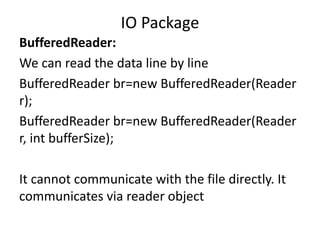
BufferedReader:
We can read the data line by line
BufferedReader br=new BufferedReader(Reader
r);
BufferedReader br=new BufferedReader(Reader
r, int bufferSize);
It cannot communicate with the file directly. It
communicates via reader object
IO Package
Methods:
int read();
int read(char[] ch);
close();
String readLine();
IO Package
import java.io.BufferedReader;
class BufferedReaderDemo{
public static void main(String[] args) throws Exception{
FileReader fr= new FileReader(“wc.txt”);
BufferedReader br=new BufferedReader(fr);
String line=br.readLine();
while(line != null){
System.out.println(line);
line=br.readLine();
}
br.close();
}
}
IO Package
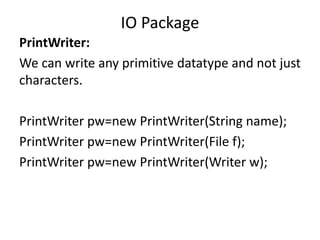
PrintWriter:
We can write any primitive datatype and not just
characters.
PrintWriter pw=new PrintWriter(String name);
PrintWriter pw=new PrintWriter(File f);
PrintWriter pw=new PrintWriter(Writer w);
IO Package
Methods:
write(int ch);
write(char[] ch);
write(String s);
flush()
close()
print(char ch)
print(int/long/double/String/char[] i)
println(char/int/long/double/String/char[] ch)
IO Package
import java.io.PrintWriter;
class PrintWriterDemo{
public static void main(string[] args) throws
IOException{
FileWriter fw=new FileWriter(“wc.txt”);
PrintWriter pw=new PrintWriter(fw);
pw.write(100); //d
pw.println(100); //100
pw.println(true);
pw.flush();
pw.close();
}
}
IO Package
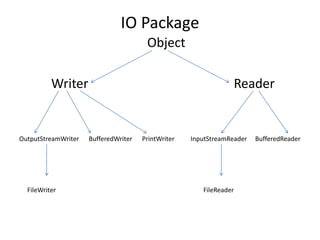
Object
Writer Reader
OutputStreamWriter BufferedWriter PrintWriter InputStreamReader BufferedReader
FileWriter FileReader
IO Package
Write a program to merge data from 2 files into
a 3rd file.
IO Package
Serialization:
The process of writing state of an object to a file.
It is a process of converting an object from a java supported
form to either a file supported form or network supported
form.
This is done by using FileOutputStream and
ObjectOutputStream classes.
Deserialization:
The process of reading state of an object from a file.
It is a process of converting an object from either a file
supported form or network supported form to java supported
form.
This is done by FileInputStream and ObjectInputStream
classes.
IO Package
import java.io.*;
class Dog implements Serializable{
int i=10, j=20;
}
class SerializableDemo{
public static void main(String[] args){
Dog d1=new Dog();
FileOutputStream fos=new FileOutputStream(“abc.txt”);
ObjectOutputStream oos=new ObjectOutputStream(fos);
oos.writeObject(d1);
FileInputStream fis=new FileInputStream(“abc.txt”);
ObjectInputStream ois=new ObjectInputStream(fis);
Dog d2=(Dog) ois.readObject();
System.out.println(d2.i + d2.j);
}
}
IO Package
Transient:
If we don’t want to serialize any variable,
declare it transient.
IO Package

Nalinee java

  • 1.
  • 2.
    Exception • Unwanted, unexpectedevent that disturbs the flow of program is called an exception. • Runtime Stack Mechanism • Default exception handling in Java: If an exception is raised, the method in which it is raised is responsible to create exception object by including following information: Name of the exception, description, location of exception(Stack Trace)
  • 3.
    Exception • Exception Hierarchy: •Throwable class acts as a root for entire Java Exception hierarchy. It has 2 child classes: Exception and Error. • Exception: Most of the cases, these are caused by our program and are recoverable. • Error: Most of the cases, these are caused due to lack of system resources and are non-recoverable. • Checked Vs Un-checked exceptions: • The exceptions which are checked by compiler during runtime are checked exceptions. Ex. FileNotFound. • Unchecked Ex. ArithmeticException • Runtime Exception & its child classes, Errors & its child classes are unchecked, others are checked.
  • 4.
    Exception • Partially CheckedVs Fully Checked • A checked exception is said to be fully checked if all its child classes are checked. Ex. IOException • Partially checked Ex. Exception & Throwable
  • 5.
    Exception Throwable Exception Error RuntimeException IOExceptionServlet Interrupted SQL Exception Exception Exception Arithmetic NullPointer FileNotFoundException ClassCast EOFException IllegalArgument InterruptedIOException IndexOutOfBounds Assertion error OutOfMemoryError, StackOverflowError VerifyError
  • 6.
    Exception Exception Handling usingtry-catch: Syntax: try{ risky code; } catch( xxx e){ handling code; } Ex. Class Test{ public static void main(String[] args){ try{ System.out.println(10/0); } catch(ArithmeticException e){ System.out.println(10/2); } System.out.println(“Hello”); } }
  • 7.
    Exception Control Flow intry-catch: try { State 1; State 2; State 3; } catch( xxx e) { State 4; } State 5;
  • 8.
    Exception Various methods toprint Exception Information: 1. printStackTrace(): prints in following format: Name of exception : description & stack trace 2. toString(): prints in following format: Name of exception : description 3. getMessage(): prints only description. Note: default Exceptionhandler internally uses “printStackTrace()”.
  • 9.
    Exception Try with multiplecatch blocks: Order of catch blocks is very important. It should be from child to parent. Ex. try{ risky code;} catch(AE e) { code; } catch(fileNotFoundException e){code;} catch(NPE e){code;} catch(Exception e){code;} //default exception handler
  • 10.
    Exception finally block: Main purposeof finally block is to maintain clean-up code which should be executed always. Syntax: try{ risky code;} catch(xxx e){handing code;} finally{ clean-up code;}
  • 11.
    Exception finally Vs return: Finally block dominates return statement. Hence, if there is any return statement present inside try or catch block first finally will be executed & then return statement will be considered. Ex. class Test{ public static void main(String[] args){ try{ System.out.println(“try”); return; } catch(AE e){ System.out.println(“catch”); } finally{ System.out.println(“finally”); } } } Only when we use System.exit(0), finally block will not be executed.
  • 12.
    Exception Difference between final,finally & finalize: final: • It is a modifier applicable for classes, methods & variables. • If a class is declared as final then child class creation is not possible. • A final method cannot be overriden. • Reassignment of final variable is not allowed. finally: • Associated with try-catch block to maintain clean-up code which is always executed irrespective of exception raised or not. finalize(): • It is a method which should be executed by garbage collector before destroying any object to perform clean-up activities.
  • 13.
    Exception Control Flow intry-catch-finally: try { State 1; State 2; State 3; } catch( xxx e) { State 4; } finally { State 5; } State 6;
  • 14.
    Exception Throw: If we wantto create Exception object manually & handover that object to the JVM explicitly by using throw keyword. Do not write any statement after throw statement. Ex. throw new ArithmeticException(“/ by zero”);
  • 15.
    Exception Throws: If our programhas a chance of raising checked exception then we have to handle it. This can be handled in 2 ways 1. Using try-catch 2. Using throws class Test { public static void main(String[] args) throws IE { thread.sleep(5000); } } Exception Propagation: the process of delegating the responsibility of exception handling from one method to another method by using throws keyword.
  • 16.
    Exception Customized Exceptions: Ex. class TooYoungExceptionextends RuntimeException{ TooYoungException(String s){ super(s); } } class TooOldException extends RuntimeException{ TooOldException(String s){ super(s); } } class Test{ public static void main(String[] args){ int age=Integer.parseInt(args[0]); if(age>65){ throw new TooOldException(“You have retired”);} else if (age<18){ throw new TooYoungException(“You’re a child, go to school”)} else{ System.out.println(“You’re eligible for a job”); } } }
  • 17.
    Exception Top IO Exceptions: 1.JVM Exceptions: the exceptions which are raised automatically by JVM whenever a particular event occurs. Ex. ArrayOutOfBoundException, NullPointerException 2. Programatic Exceptions: raised explicitly by programmers. Ex. IllegalArgumentExceptions
  • 18.
    Exception Different Exceptions: 1. ArrayOutOfBounsException:child class of RuntimeException; unchecked; raised automatically by JVM when we try to access an array element whose index is not present. Ex. int[] a=new int[10]; System.out.println(a[100]); 2. NullPointerException: child class of RuntimeException; unchecked; raised automatically by JVM when we try to perform any operation on null. Ex. String s=null; System.out.println(s.length());
  • 19.
    Exception Different Exceptions: 3. StackOverflowError:child class of Error; unchecked; raised automatically by JVM when we try to perform recursive method invocation 4. NoClassDefFoundError: child class of Error; unchecked; raised automatically by JVM whenever JVM is unable to find required class.
  • 20.
    Exception Different Exceptions: 5. ClassCastException:child class of RuntimeException; unchecked; raised automatically by JVM when we try to typecast parent object to the child type. 6. ExceptionInInitializerError: child class of Error; unchecked; raised automatically by JVM if any exception occurs while performing initialization for static variables and while executing static blocks.
  • 21.
    Exception Different Exceptions: 7. IllegalArgumentException:child class of RuntimeException; unchecked; raised explicitly by the programmer to indicate that a method has been invoked with invalid argument. 8. NumberFormatException: child class of RuntimeException; unchecked; raised explicitly by the programmer to indicate that we are trying to convert String to number type but String is not properly formatted.
  • 22.
    Exception Different Exceptions: 9. IllegalStateException:child class of RuntimeException; unchecked; raised explicitly by the programmer to indicate that a method has been invoked at inappropriate time. Ex. Thread t = new Thread(); t.start() t.start() 10. AssertionError : child class of Error; unchecked; raised explicitly by the programmer to indicate that assert statement fails.
  • 23.
    Exception Assertions: There are 2types of assert statement: 1. Simple version: assert(b); //b is boolean Ex. class Test{ public static void main(String[] args){ int x=10; assert(x>10); System.out.println(x); }}  AssertionError If b is true, then program is executed successfully. 2. Augmented version: assert(b) : d class Test{ public static void main(String[] args){ int x=10; assert(x>10) : “Value is not greater than 10”; System.out.println(x); }}  AssertionError: Value is not greater than 10 Hence, d will be executed if b is false.
  • 24.
    Exception Write a programto divide 2 numbers. Write a program to find the value of an index of an array.
  • 25.
    Inner Classes • Aclass declared inside another class – inner class. • For ex. Account class cannot exist without a Bank class, so we can declare it as inner class. 1. Normal or Regular Inner class: A class inside a class without a static modifier. We cannot declare static method inside inner classes, so we cannot declare main method & hence inner classes cannot be directly invoked from command prompt.
  • 26.
    Inner Classes • Accessinginner class from static area of outer class: class Outer{ class Inner{ public void m1(){ System.out.println(“Inner class method”); } } public static void main(String[] args){ Outer o= new Outer(); Outer.Inner i = o.new Inner(); Outer.Inner i=new Outer().new Inner(); i.m1(); } }
  • 27.
    Inner Classes • Accessinginner class from instance area of outer class: class Outer{ class Inner{ public void m1(){ System.out.println(“Inner class method”); } } public void m2(){ Inner i=new Inner(); i.m1(); } public static void main(String[] args){ Outer o=new Outer(); o.m2(); } }
  • 28.
    Inner Classes • Wecan access both static & non-static members of outer class directly inside inner class. • Within the inner class ‘this’ always points to current inner class object. • To refer current outer class object we have to use “Outerclassname.this”. • For outer class modifiers like static, private & protected isn’t allowed but for inner class it is.
  • 29.
    Inner Classes 2. MethodLocal Inner class: A class declared inside a method. The scope of these inner classes lies within the method. It cannot be static. Ex. class Test{ public void m1(){ class Inner{ public void sum(int x, int y){ System.out.println(x+y); } } Inner i=new Inner(); i.sum(10,20); } public static void main(String[] a){ new Test().m1(); } } We cannot access local variable of m1() inside Inner class unless the variable if final.
  • 30.
    Inner Classes 3. Anonymousinner class: nameless inner class. a) Anonymous inner class that extends a class: Ex. class Popcorn{ public void taste(){ System.out.println(“Salty”); } } class Test{ public static void main(String[] args){ Popcorn p = new Popcorn{ public void taste(){ System.out.println(“Sweet”); } }; p.taste(); Sweet Popcorn p1=new Popcorn(); p1.taste(); Salty } } We are creating child class for the Popcorn class & for that child class we are creating an object with parent reference.
  • 31.
    Inner Classes 3. Anonymousinner class: nameless inner class. b) Anonymous inner class that implements an Interface: Ex. class Test{ public static void main(String[] args){ Runnable r = new Runnable() { public void run(){ for(int i=0;i<10;i++){ System.out.println(“child thread”); } } }; Thread t=new Thread( r ) ; //r is the object of Runnable t.start(); for (int i=0; i<10; i++){ System.out.println(“main thread”); } } }
  • 32.
    Inner Classes 3. Anonymousinner class: nameless inner class. c) Anonymous inner class that defines inside method arguments: Ex. class Test{ public static void main(String[] args){ new Thread( new Runnable() { public void run(){ for(int i=0;i<10;i++){ System.out.println(“child thread”); } } }).start(); for (int i=0; i<10; i++){ System.out.println(“main thread”); } } }
  • 33.
    Inner Classes General classvs Anonymous inner class: A general class can implement any number of interfaces at once but innerclass can implement only 1 interface at a time. A general class can extend another class and implement an interface simultaneously but inner class can either extend or implement at a time.
  • 34.
    Inner Classes 4. StaticNested Classes: Inner class declared with static modifier. These class objects can exist without the existence of outer class object. Ex. class Outer{ static class Nested{ //can access only static members of Outer public void m1(){ System.out.println(“Static nested class”); } } public static void main(String[] args){ Outer.Nested n=new Outer.Nested(); n.m1(); } } We can declare static methods, hence main() can be declared. So it is possible to invoke nested class directly from command prompt.
  • 35.
    Inner Classes Normal Innerclass vs Static Nested class: • Innerclass object is always associated with outerclass object whereas Static nested class object is not. • We can’t declare static methods inside normal inner class but we can declare it inside static nested class. • Normal inner class cannot be directly invoked from command prompt whereas static nested classes can be invoked.
  • 36.
    Inner Classes Nested Interface: Ex.A map is a collection of key-value pairs ad each key-value pair is called entry. Without the map object the entry object cannot exist. So, Entry can be declared as nested Interface for Map. interface Map{ interface Entry{ } }
  • 37.
    Threads Executing several taskssimultaneously where each task is a separate independent part of the same program is called ‘thread-based multitasking’. The independent parts are called ‘thread’. It improves performance of the system by reducing response time. Main application areas: video games, multimedia graphics, animations and so on.
  • 38.
    Threads The ways todefine & start a new thread: 1. By extending Thread class. class MyThread extends Thread{ public void run(){ for (int i=0;i<=10;i++){ System.out.println(“child thread”); } } } class ThreadDemo { public static void main(String[] args){ MyThread t= new MyThread(); t.start(); for (int i=0; i<=10;i++ ){ System.out.println(“main thread”); } } }
  • 39.
    Threads Thread Scheduler: whichthread will execute first is decided by this. start() : registers the thread with thread scheduler and calls run(). run()
  • 40.
    Threads Lifecycle of athread: If Thread Scheduler If run( ) method t.start( ) allocates CPU completes MyThread t=new Thread() We cannot restart a thread. In other words, we cannot call the start( ) method for the same Thread object twice. New/ Born state Ready/ Runnable state Dead state Running state
  • 41.
    Threads The ways todefine & start a new thread: 2. By implementing Runnable Interface: class MyRunnable implements Runnable{ public void run(){ for (int i=0;i<=10;i++){ System.out.println(“child thread”); } } } class ThreadDemo { public static void main(String[] args){ MyRunnable r = new MyRunnable(); Thread t=new Thread( r ); t.start(); for (int i=0; i<=10;i++ ){ System.out.println(“main thread”); } } } t1.start(); t1.run(); t2.start() ; t2.run(); r.start() ; r.run();
  • 42.
    Threads Runnable implements Thread implements extends MyThread MyThread Thebest approach is implementing Runnable interface. In 1st approach our class always extends Thread so it cannot extend any other class.
  • 43.
    Threads Getting & Settingname of a thread: class Test{ public static void main(String[] args){ System.out.println(thread.currentThread().getName()); Thread.currentThread().setName(“thread-1”); System.out.println(thread.currentThread().getName()); } } So the methods public final String getName() and public final void setName(String name) are used to get and set the thread names. public static thread CurrentThread()  gives current executing thread reference.
  • 44.
    Threads Thread Priority: Range ofthread priorities is “1 to 10”. (10 being the highest) Thread.MIN_PRIORITY  1 Thread.MAX_PRIORITY 10 Thread.NORM_PRIORITY  5 The thread having highest priority will be allocated CPU first by thread scheduler. The main thread has priority 5 by default.
  • 45.
    Threads To set &get the priority: public final int getPriority(); public final void setPriority(); class MyThread extends Thread{ public void run(){ for(int i=0; i<10; i++){ System.out.println(“child thread”); } } } class threadPriorityDemo{ public static void main(String[] args){ MyThread t=new MyThread(); t.setPriority(10); t.start() for(int i=0;i<10;i++){ System.out.println(“main thread”); } } }
  • 46.
    Threads Thread methods: 1. yield(): Pauses current executing thread for giving the chance to remaining waiting threads of same priority. Thread.yield() If Thread Scheduler If run( ) method t.start( ) allocates CPU completes MyThread t=new Thread() New/ Born state Ready/ Runnable state Dead state Running state
  • 47.
    class MyThread extendsThread{ public void run(){ for(int i=0; i<10;i++){ Thread.yield(); System.out.println(“child thread”); } } } class ThreadYieldDemo{ public static void main(String[] args){ MyThread t=new MyThread(); t.start(); for(int i=0; i<10;i++){ System.out.println(“main thread”); } } } Main thread will complete first in this case. Threads
  • 48.
    Threads Thread methods: 2. join(): If a thread wants to wait until some other thread is completed. If Thread Scheduler If run( ) method t.start( ) allocates CPU completes MyThread t=new Thread() once the other thread completes New/ Born state Ready/ Runnable state Dead state Running state Waiting state (for join)
  • 49.
    class MyThread extendsThread{ public void run(){ for(int i=0; i<10;i++){ System.out.println(“child thread”); try{ Thread.sleep(2000);} catch(IE e){ } } } } class ThreadJoinDemo{ public static void main(String[] args){ MyThread t=new MyThread(); t.start(); t.join(); for(int i=0; i<10;i++){ System.out.println(“main thread”); } } } Main thread will wait until the completion of child thread. Threads
  • 50.
    Threads Thread methods: 3. sleep():Thethread goes to pause state for specific amount of time. If Thread Scheduler If run( ) method t.start( ) allocates CPU completes MyThread t=new Thread() once the time specified is over New/ Born state Ready/ Runnable state Dead state Running state Sleeping state
  • 51.
    Interruption of athread: interrupt(): a thread can interrupt another sleeping or waiting thread. class MyThread extends Thread{ public void run(){ for(int i=0; i<100;i++){ System.out.println(“Lazy thread”); try{ Thread.sleep(5000);} catch(IE e){ System.out.println(“I got Interrupted”);} } } } class InterruptDemo{ public static void main(String[] args){ MyThread t=new MyThread(); t.start(); t.interrupt(); } } } Threads
  • 52.
    Synchronized is amodifier which is applicable only for methods & blocks. If a method/block is declared as synchronized then at a time only one thread is allowed to execute that method/block on the given object. It resolves data inconsistency problem. Synchronization
  • 53.
    class Display{ public synchronizedvoid wish(String name){ for(int i=0;i<10;i++){ System.out.println(“Good morning”); try{ Thread.sleep(3000);} catch(IE e){} } System.out.println(name); } } Synchronization
  • 54.
    class MyThread extendThread{ Display d; String name; MyThread(display d, String name){ this.d=d; this.name=name; } public void run(){ d.wish(name);} } Synchronization
  • 55.
    class SynchronizedDemo{ public staticvoid main(String[] args){ Display d1=new Display(); MyThread t1=new MyThread(d1, “Dhoni”); MyThread t2=new MyThread(d1, “Kohli”); t1.start(); t2.start(); } } Synchronization
  • 56.
    Synchronized block: wecan declare few lines synchronized instead of entire method or block. It reduces the waiting time of threads & improves the performance. Synchronized(this){ code; } Synchronization
  • 57.
    Deadlock: situation wheretwo threads are waiting for each other forever. Threads
  • 58.
    Collection framework: Definesseveral classes and interfaces which can be used to represent a group of objects as a single entity. Collection List Set Queue ArrayList LinkedList Hashset SortedSet PriorityQueue VectorList LinkedHashSet NavigableSet BlockingQueue TreeSet Collection
  • 59.
    List: child interfaceof collection. duplicate objects are allowed & insertion order is preserved by means of index. List interface defines following methods: boolean add (int index, Object o) boolean addAll (int index, Collection c) Object remove(int index) Object get(int index) Object set(int index, Object new) int indexOf(Object o) int lastIndexOf(Object o) Collection
  • 60.
    ArrayList: it isa class. It’s a growable array. Insertion order is preserved and duplicate objects are allowed. Heterogeneous objects are allowed Null insertion is possible Implements Serializable, Clonable & RandomAccess interfaces. Consructors: 1. ArrayList al=new ArrayList(); Creates an empty ArrayList object with default initial capacity 10. New capacity = current capacity *3/2 +1 Collection
  • 61.
    2. ArrayList al=newArrayList(int initialCapacity); Creates an empty ArrayList object with the specified initial capacity. 3. ArrayList al=new ArrayList(Collection c); Creates an equivalent ArrayList object for the given Collection object. Collection
  • 62.
    import java.util.*; class ArrayListDemo{ publicstatic void main(String[] args){ ArrayList a = new ArrayList(); a.add(‘A’); a.add(10); a.add(null); System.out.println(a); a.remove(2); System.out.println(a); a.add(2, ‘M’); System.out.println(a); a.add(‘N’); System.out.println(a); }} Collection
  • 63.
    If the frequentoperation is retrieval then ArrayList is the best choice but for insertion/deletion it is not. No method in ArrayList is synchronized. Threads are not required to wait, hence performance is high. Collection
  • 64.
    LinkedList: If thefrequent operation is insertion/deletion, LinkedList is the best. The underlying datastructure is double LinkedList. Insertion order is preserved. Duplicates are allowed Heterogeneous objects are allowed Null insertion is possible Implements Serializable & Clonable interfaces. Collection
  • 65.
    Constructors: 1. Linkedlist l= new LinkedList(); 2. LinkedList l= new LinkedList(Collection c); LinkedList specific methods: void addFirst(Object o); void addLast(Object o); Object removeFirst(); Object removeLast(); Object getFirst(); Object getLast(); It is suitable to implement Stack & Queue. Collection
  • 66.
    import java.util.*; class LinkedListDemo{ publicstatic void main(String[] args){ LinkedList l= new LinkedList(); l.add(“Nalinee”); l.set(1); l.add(null); l.add(“Nalinee”); l.set(0,”Software”); l.add(0,”zekeLabs”); l.removeLast(); l.addFirst(“edYoda”); System.out.println(l); } } Collection
  • 67.
    ListIterator: It is abidirectional cursor. While iterating we can perform addition, remove operation and replacement of objects. Syntax: ListIterator l1=new ListIterator(); Methods present: public boolean hasNext(); public Object next(); public int nextIndex(); public boolean hasPrevious(); public Object previous(); public int previousIndex(); public void remove(); public void set(Object new); public void add(Object new); Collection
  • 68.
    import java.util.*; class ListIteratorDemo{ publicstatic void main(String[] args){ LinkedList l = new LinkedList(); l.add(“Nalinee”); l.add(“Choudhary”); l.add(“zekeLabs”); l.add(“Training”); System.out.println(l); ListIterator lr = new ListIterator(); while(lr.hasNext()){ String s = (String) lr.next(); if(s.equals(“zekeLabs”)){ lr.remove(); } if(s.equals(“Nalinee”)){ lr.set(“Miss Nalinee”); } if(s.equals(“Training”)){ lr.add(“Software”); } } System.out.println(l); } } Collection
  • 69.
    import java.util.*; class IteratorDemo{ publicstatic void main(String[] args){ ArrayList l = new ArrayList(); for(int i=0; i<=10; i++){ l.add(i); } System.out.println(l); Iterator itr=new Iterator(); while(itr.hasNext()){ Integer i = (Integer) itr.next(); if(i%2==0){ System.out.println(i); } else{ itr.remove(); } } System.out.println(l); Collection
  • 70.
    Set: Set is achild interface of Collection. To represent a group of objects where duplicates are not allowed and insertion order is not preserved. HashSet: • Duplicate objects are not allowed. • All objects are inserted according to hashcode of the objects. • Heterogeneous objects are allowed. • Null insertion is possible but only once • HashSet implements Serializable & Clonable Interfaces Collection
  • 71.
    1. HashSet h=new HashSet(); Creates an empty HashSet object with default initial capacity 16. 2. HashSet h=new HashSet(int initialCapacity); 3. HashSet h= new HashSet(int initialCapacity, float fillRatio); 4. HashSet h= new HashSet(Collection c); Collection
  • 72.
    import java.util.*; class HashDemo{ publicstatic void main(String[] args){ Hashset h=new HashSet(); h.add(“B”); h.add(“C”); h.add(“D”); h.add(“null”); h.add(10); System.out.println(h); } } Collection
  • 73.
    TreeSet: Duplicate objects arenot allowed. Insertion order is not preserved. Heterogeneous objects are not allowed. Null insertion is not possible for non- empty set. Collection
  • 74.
    1. TreeSet t= new TreeSet(); Creates an empty TreeSet object where the sorting order is default natural sorting order. 2. TreeSet t = new TreeSet(Comparator c); Creates an empty Treeset object where the sorting order is customized sorting order specified by Comparator object. 3. TreeSet t = new TreeSet(Collection c); Collection
  • 75.
    import java.util.*; class TreeSetDemo{ publicstatic void main(String[] args){ TreeSet h=new TreeSet(); t.add(“A”); t.add(“a”); t.add(“Z”); t.add(“L”); t.add(“null”); // NPE t.add(10); // CCE System.out.println(t); } } Collection
  • 76.
    Comparable Interface: Present injava.lang package & contains only 1 method: public int compareTo(Object obj) obj1.comparTo(obj2); Returns –ve if obj1 has to come before obj2. Returns +ve if obj1 has to come after obj2.  Returns zero if obj1 & obj2 are equal(duplicates). Collection
  • 77.
    import java.util.*; class Test{ publicstatic void main(String[] args){ System.out.println(“A”.compareTo(“Z”); System.out.println(“Z”.compareTo(“A”); System.out.println(“A”.compareTo(“A”); } } Collection
  • 78.
    • When wedepend on natural sorting order, internally JVM calls compareTo(); • String class implements comparable but StringBuffer doesn’t. Collection
  • 79.
    Comparator: We can customizeour sorting by using Comparator. Present in java.util and contains 2 methods: 1. public int compare(Object o1, Object o2) returns –ve if o1 has to come before o2. returns +ve if o1 has to come after o2. returns zero if o1 & o2 are equal. o1 object which we are trying to add. o2  object that already exists. Whenever we implement Comparator interface, we should provide implementation for compare(). equals() is already available for our class from Object class through inheritance. Collection
  • 80.
    import java.util.*; class TreeSetDemo{ publicstatic void main(String[] args){ TreeSet h=new TreeSet(new MyComparator()); t.add(20); t.add(0); t.add(15); t.add(5); t.add(10); System.out.println(t); } } Collection
  • 81.
    class MyComparator implementsComparator{ public int compare(Object obj1, Object obj2){ Integer i1= (Integer) obj1; Integer i2= (Integer) obj1; if (i1<i2){ return +1; } else if (i1>i2){ return -1; } else{ return 0; } } } Collection
  • 82.
    Write a programto insert String objects into the TreeSet where the sorting order is reverse of alphabetical order. Collection
  • 83.
    import java.util.*; class TreeSetDemo2{ publicstatic void main(String[] args){ TreeSet h=new TreeSet(new MyComparator()); t.add(“A”); t.add(“Z”); t.add(“K”); t.add(“B”); t.add(“a”); System.out.println(t); } } Collection
  • 84.
    class MyComparator implementsComparator{ public int compare(Object obj1, Object obj2){ String s1= obj1.toString(); String s2 = obj2.toString(); return –s1.compareTo(s2); } } Collection
  • 85.
    Write a programto insert Employee objects into the TreeSet where the natural sorting order is increasing order of salary. If two employees have same salary then consider the alphabetical order of their names. Collection
  • 86.
    Map: Group of objectsrepresented as key-value pairs where both key and value are objects. Duplicate keys are not allowed. Each key-value pair is called Entry. Map Interface is not a child interface of Collection. Collection
  • 87.
    Methods of Map: 1.Object put(Object kry, Object value) 2. void putAll(Map m) 3. Object get(Object key) 4. Object remove(Object key) 5. boolean containsKey(Object key) 6. boolean containsValue(Object Value) 7. int size() 8. boolean isEmpty() 9. void clear() Collection
  • 88.
    Map HashMap SortedMap HashTable LinkedHashMapNavigableSortedMap TreeMap Collection
  • 89.
    HashMap: Heterogeneous objects areallowed for both keys and values. Duplicate keys are not allowed. Insertion order is not preserved because it is based on hash code of keys. Null key is allowed but only once Multiple null values are allowed Collection
  • 90.
    1. HashMap m= new HashMap(); Creates an empty HashMap object with default initial capacity level is 16. 2. HashMap m=new HashMap(int initialCapacity); 3. HashMap m=new HashMap(int initialCapacity, float fillRatio); 4. HashMap m=new HashMap(Map m1); Collection
  • 91.
    import java.util.HashMap; class HashMapDemo{ publicstatic void main(String[] args){ HashMap m= new HashMap(); m.put(“Nalinee”,500); m.put(“zekeLabs”,1000); m.put(“Tom”, 200); m.put(“Jerry”, 800); System.out.println(m); System.out.println(m.put(“John”,1200)); Set s=m.keySet(); System.out.println(s); Collection c= m.values(); System.out.println(c); Collection
  • 92.
    Set s1= m.entrySet(); Iteratorits= s1.iterator(); while(its.hasNext()){ Map.Entry m1=(Map.Entry)its.next(); System.out.println(m1.getKey()); System.out.println(m1.getValues()); if(m1.getKey().equals(“Nalinee”)){ m1.setValue(20000); } } System.out.println(m); } } Collection
  • 93.
    LinkedHashMap: It is thechild class of HashMap. Insertion order is preserved. In previous example, replace HashMap with LinkedHashMap. Collection
  • 94.
    TreeMap: 1. TreeMap t=newTreeMap(); For defualt natural sorting. 2. TreeMap t= new TreeMap(Comparator c); For customized sorting order 3. TreeMap t = new TreeMap(Map m); Collection
  • 95.
    import java.util.TreeMap; class TreeMapDemo3{ publicstatic void main(String[] args){ TreeMap m=new TreeMap(); m.put(100,”zzz”); m.put(103, “yyy”); m.put(101,”xxx”); m.put(104,106); m.put(107, null); m.put(“FFFF”, “xxx”);//CCE m.put(null,”xxx”); //NPE System.out.println(m); } } Collection
  • 96.
    import java.util.TreeMap; class TreeMapDemo3{ publicstatic void main(String[] args){ TreeMap t=new TreeMap(new MyComparator()); t.put(”zzz”,10); m.put(“AAA”,20); m.put(”xxx”,30); m.put(“LLL”,40); System.out.println(m); } } class MyComparator implements Comparator(){ public int compare(Object obj1, Object obj2){ String s1=obj1.toString(); String s2=obj2.toString(); return s2.compareTo(s1); } } Collection
  • 97.
    HashTable: Heterogeneous objects areallowed for both keys & values. Insertion order is not preserved and it is based on hashcode of the keys. Null is not allowed for both keys & values. Duplicate keys are not allowed. Collection
  • 98.
    HashTable h= newHashTable(); Creates an empty HashTable with default initial capacity as 11. HashTable h= new HashTable(int initialCapacity); HashTable h= new HashTable(int initialCapacity, float fillRatio); HashTable h= new HashTable(Map m); Collection
  • 99.
    import java.util.HashTable; class HashTableDemo{ publicstatic void main(String[] args){ HashTable h=new HashTable(); h.put( new Temp(5), “A”); h.put(new Temp(2), “B”); h.put(new Temp(6), “C”); h.put(new Temp(15), “D”); h.put(new Temp(23), “E”); System.out.println(m); } } class Temp{ int I; Temp(int i){ this.i=i; } public int hashCode(){ return i; } public String toString(){ return i+ “ “; } } Collection
  • 100.
    Collections class: Sorting theelements of a list: public static void sort(List l) public static void sort(List l, Comparator c) Collection
  • 101.
    File I/O: 1. File:File f=new File(“abc.txt”); System.out.println(f.exists()); f.createNewFile(); File: File f=new File(“Nalinee”); System.out.println(f.exists()); f.mkdir(); IO Package
  • 102.
    Constructors: 1. File f=newFile(String name); Create a java file object to represent name of a file or directory. 2. File f = new File(String subdir, String name); To create a file or directory present in some other sub-directory. 3. File f=new File(FileSubdir, String name); IO Package
  • 103.
    To create afile in current working directory: File f=new File(“abc.txt”); f.createNewFile(); To create a directory in current working directory: File f=new File(“NewFolder”); f.mkdir(); To create a file in the new directory created above File f1=new File(f, “abc.txt”); f1.createNewFile(); IO Package
  • 104.
    Important methods ofFile class: boolean exists(); boolean createNewFile(); boolean mkdir(); boolean isFile(); boolean isDirectory(); String[] list(); boolean delete(); long length(); IO Package
  • 105.
    FileWriter: We can usethis to writ character data to the file. FileWriter fw=new FileWriter(String name); FileWriter fw=new FileWriter(File f); These 2 will override the file. FileWriter fw=new FileWriter(String name, boolean append); FileWriter fw=new FileWriter(File f, boolean append); These are for append. IO Package
  • 106.
    Methods of FileWriter: write(intch); to write a single character write(char[] ch); to write an array of characters write(String s); to write a string flush(); to return the last character of the data to the file. close(); IO Package
  • 107.
    import java.io.FileWriter; class FileWriterDemo{ publicstatic void main(String[] args){ FileWriter fw=new FileWriter(“wc.txt”,true); fw.write(100); //will add ‘d’ fw.write(“HinHow are you?”); char[] ch1={‘a’,’b’,’c’}; fw.write(‘n’); fw.write(ch1); fw.write(‘n’); fw.flush(); fw.close(); } } IO Package
  • 108.
    FileReader: To read characterdata from the file FileReader fr= new FileReader(String name); FileReader fr= new FileReader(File f); Methods : int read() int read(char[] ch) close() IO Package
  • 109.
    import java.io.FileReader; class FileReaderDemothrows IOExceptions{ public static void main(String[] args){ File f=new File(“wc.text”); FileReader fr=new FileReader(f); System.out.println(fr.read()); //unicode of the first character char[] ch1=new char[(int)(f.length())]; fr.read(ch2); for (char c1 : ch2){ System.out.println(c1); } FileReader fr1= new FileReader(f); int i=fr1.read(); while(i!= -1){ System.out.println((char) i); i=fr1.read(); } } } IO Package
  • 110.
    BufferedWriter: To write writeon file BufferedWriter bw=new BufferedWriter(Writer w); BufferedWriter bw=new BufferedWriter(Writer w, int bufferSize); BufferedWriter never communicates with the file directly, they communicate via writer objects BufferedWriter bw= new BufferedWriter(new FileWriter(“abc.txt”)); IO Package
  • 111.
    Methods: write(int ch) write(char[] ch) write(Strings) flush() close() newLine() IO Package
  • 112.
    import java.io.BufferedWriter; class BufferedWriterDemo{ publicstatic void main(String[] args){ File f=new File(“wc.txt”); FileWriter fw=new FileWriter(f); BufferedWriter bw=new BufferedWriter(fw); bw.write(100); bw.newLine(); char[] ch1={‘a’,’b’,’c’,’d’}; bw.write(ch1); bw.newLine(); bw.write(“zekeLabs”); bw.flush(); bw.close(); } } IO Package
  • 113.
    BufferedReader: We can readthe data line by line BufferedReader br=new BufferedReader(Reader r); BufferedReader br=new BufferedReader(Reader r, int bufferSize); It cannot communicate with the file directly. It communicates via reader object IO Package
  • 114.
    Methods: int read(); int read(char[]ch); close(); String readLine(); IO Package
  • 115.
    import java.io.BufferedReader; class BufferedReaderDemo{ publicstatic void main(String[] args) throws Exception{ FileReader fr= new FileReader(“wc.txt”); BufferedReader br=new BufferedReader(fr); String line=br.readLine(); while(line != null){ System.out.println(line); line=br.readLine(); } br.close(); } } IO Package
  • 116.
    PrintWriter: We can writeany primitive datatype and not just characters. PrintWriter pw=new PrintWriter(String name); PrintWriter pw=new PrintWriter(File f); PrintWriter pw=new PrintWriter(Writer w); IO Package
  • 117.
    Methods: write(int ch); write(char[] ch); write(Strings); flush() close() print(char ch) print(int/long/double/String/char[] i) println(char/int/long/double/String/char[] ch) IO Package
  • 118.
    import java.io.PrintWriter; class PrintWriterDemo{ publicstatic void main(string[] args) throws IOException{ FileWriter fw=new FileWriter(“wc.txt”); PrintWriter pw=new PrintWriter(fw); pw.write(100); //d pw.println(100); //100 pw.println(true); pw.flush(); pw.close(); } } IO Package
  • 119.
    Object Writer Reader OutputStreamWriter BufferedWriterPrintWriter InputStreamReader BufferedReader FileWriter FileReader IO Package
  • 120.
    Write a programto merge data from 2 files into a 3rd file. IO Package
  • 121.
    Serialization: The process ofwriting state of an object to a file. It is a process of converting an object from a java supported form to either a file supported form or network supported form. This is done by using FileOutputStream and ObjectOutputStream classes. Deserialization: The process of reading state of an object from a file. It is a process of converting an object from either a file supported form or network supported form to java supported form. This is done by FileInputStream and ObjectInputStream classes. IO Package
  • 122.
    import java.io.*; class Dogimplements Serializable{ int i=10, j=20; } class SerializableDemo{ public static void main(String[] args){ Dog d1=new Dog(); FileOutputStream fos=new FileOutputStream(“abc.txt”); ObjectOutputStream oos=new ObjectOutputStream(fos); oos.writeObject(d1); FileInputStream fis=new FileInputStream(“abc.txt”); ObjectInputStream ois=new ObjectInputStream(fis); Dog d2=(Dog) ois.readObject(); System.out.println(d2.i + d2.j); } } IO Package
  • 123.
    Transient: If we don’twant to serialize any variable, declare it transient. IO Package