Exception handling in java-
Mrs.S.S.Patil Assistant Professor
SITCOE,Yadrav
• Exception handling is the abnormal condition that occur during execution of program to stop the entire flow of application
called as “Exception handling.”
• Why?
• package com.test;
•
• public class Test {
•
• public static void main(String[] args) {
•
• System.out.println("First line");
• System.out.println("Second line");
• System.out.println("Third line");
•
• }
•
• }
•
• Output-
• First line
• Second line
• Third line
• Now we add one exception line code as below
• package com.test;
• public class Test {
• public static void main(String[] args) {
•
• System.out.println("First line");
• System.out.println("Second line");
• System.out.println("Third line");
• int a = 10 / 0;
• System.out.println("Fourth line");
• System.out.println("Fifth line");
•
• }
• }
• Output-
• First lineException in thread "main"
• Second line
• Third line
• java.lang.ArithmeticException: / by zero
• at com.test.Test.main(Test.java:10)
•
• In this example, two statements are not executed, if you want to execute that two statements then how to do it in java? Then you should go
for exception handling.
• package com.test;
• public class Test {
• public static void main(String[] args) {
• System.out.println("First line");
• System.out.println("Second line");
• System.out.println("Third line");
• try
• {
• int a = 10 / 0;
• } catch (Exception e)
• {
• System.out.println(e);
• }
•
• System.out.println("Fourth line");
• System.out.println("Fifth line");
•
• }
• }
• Output-
• First line
• Second line
• Third line
• java.lang.ArithmeticException: / by zero
• Fourth line
• Fifth line
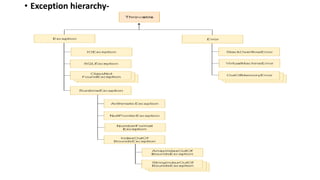
• Exception hierarchy-
• Throwable-
• In the above given Hierarchy Throwable is a class which is at the top of the exception hierarchy, from which all exception classes are derived.
• It is the super class of all Exceptions in Java.
• Both Exception and Errors are java classes which are derived from the Throwable class.
• Error-
• Error is subclass of throwable class.
• Errors are mostly the abnormal conditions.
• Error does not occur because of the programmer’s mistakes, but when system is not working properly or a resource is not allocated properly.
• Memory out of bound exception, stack overflow etc., are examples of Error.
• Difference between Checked and Unchecked Exceptions
• 1) Checked Exception
• The classes which directly inherit Throwable class except RuntimeException and Error are known as checked exceptions.
• The exceptions which are checked by the compiler whether programmer handling or not, for smooth execution of the program at runtime, are called
checked exceptions.
• Checked exceptions are checked at compile-time.
• Example-
• IOException
• SQLException
• 2) Unchecked Exception
• The classes which inherit RuntimeException are known as unchecked exceptions.
• Unchecked exceptions are not checked by the compiler whether programmer handing or not, but they are checked at runtime.
• Example-
• ArithmeticException-
• 3) Error
• Error is irrecoverable e.g. OutOfMemoryError, VirtualMachineError, AssertionError etc.
•
• StackOverFlowError:
• It is the child class of Error and hence it is unchecked. Whenever we are trying to invoke recursive method call JVM will
raise StackOverFlowError automatically. Example:
• class Test {
• public static void methodOne() {
• methodTwo();
• }
•
• public static void methodTwo() {
• methodOne();
• }
•
• public static void main(String[] args) {
• methodOne();
• }
• }
•
• Output: Run time error: StackOverFlowError
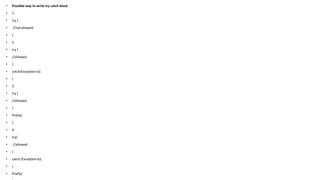
• Possible way to write try catch block
• 1.
• try {
• //not allowed
• }
• 2.
• try {
• //allowed
• }
• catch(Exception e){
• }
• 3.
• try {
• //allowed
• }
• finally{
• }
• 4.
• try{
• //allowed
• }
• catch (Exception e){
• }
• finally{
• 5.
• try {
• //allowed
• }
• Catch(ArithmaticException e1){
• }
• Catch(Exception e){
• }
•
• 6.
• try {
• //not allowed
• }
• Catch(Exception e){
• }
• Catch(ArithmaticException e1){
• }
• Not allowed – Reason: The bigger exception cannot be in the first catch because it will accommodate all exceptions and there will
be no chance to reach the second catch of NullpointerException
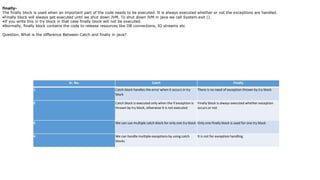
Sr. No. Catch Finally
1 Catch block handles the error when it occurs in try
block
There is no need of exception thrown by try block
2 Catch block is executed only when the if exception is
thrown by try block, otherwise it is not executed
Finally block is always executed whether exception
occurs or not
3 We can use multiple catch block for only one try block Only one finally block is used for one try block
4 We can handle multiple exceptions by using catch
blocks
It is not for exception handling
finally-
The finally block is used when an important part of the code needs to be executed. It is always executed whether or not the exceptions are handled.
•Finally block will always get executed until we shut down JVM. To shut down JVM in java we call System.exit ().
•If you write this in try block in that case finally block will not be executed.
•Normally, finally block contains the code to release resources like DB connections, IO streams etc
Question. What is the difference Between Catch and finally in java?
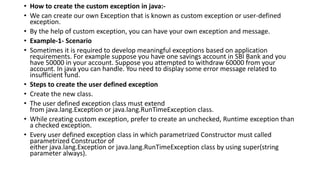
• How to create the custom exception in java:-
• We can create our own Exception that is known as custom exception or user-defined
exception.
• By the help of custom exception, you can have your own exception and message.
• Example-1- Scenario
• Sometimes it is required to develop meaningful exceptions based on application
requirements. For example suppose you have one savings account in SBI Bank and you
have 50000 in your account. Suppose you attempted to withdraw 60000 from your
account. In java you can handle. You need to display some error message related to
insufficient fund.
• Steps to create the user defined exception
• Create the new class.
• The user defined exception class must extend
from java.lang.Exception or java.lang.RunTimeException class.
• While creating custom exception, prefer to create an unchecked, Runtime exception than
a checked exception.
• Every user defined exception class in which parametrized Constructor must called
parametrized Constructor of
either java.lang.Exception or java.lang.RunTimeException class by using super(string
parameter always).
• package com.Test;
•
• public class InsufficientFundException extends RuntimeException {
•
• private String message;
•
• public InsufficientFundException(String message) {
• //this.message = message;
• super(message);
• }
• }
•
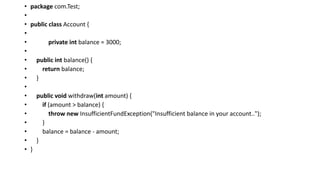
• package com.Test;
•
• public class Account {
•
• private int balance = 3000;
•
• public int balance() {
• return balance;
• }
•
• public void withdraw(int amount) {
• if (amount > balance) {
• throw new InsufficientFundException("Insufficient balance in your account..");
• }
• balance = balance - amount;
• }
• }
• package com.Test;
•
• public class MainTest {
•
• public static void main(String[] args) {
•
• Account account = new Account();
• System.out.println("Current balance : " + account.balance());
• account.withdraw(3500);
• System.out.println("Current balance : " + account.balance());
• }
• }
•

Exception handling in java-PPT.pptx

  • 1.
    Exception handling injava- Mrs.S.S.Patil Assistant Professor SITCOE,Yadrav
  • 2.
    • Exception handlingis the abnormal condition that occur during execution of program to stop the entire flow of application called as “Exception handling.” • Why? • package com.test; • • public class Test { • • public static void main(String[] args) { • • System.out.println("First line"); • System.out.println("Second line"); • System.out.println("Third line"); • • } • • } • • Output- • First line • Second line • Third line
  • 3.
    • Now weadd one exception line code as below • package com.test; • public class Test { • public static void main(String[] args) { • • System.out.println("First line"); • System.out.println("Second line"); • System.out.println("Third line"); • int a = 10 / 0; • System.out.println("Fourth line"); • System.out.println("Fifth line"); • • } • } • Output- • First lineException in thread "main" • Second line • Third line • java.lang.ArithmeticException: / by zero • at com.test.Test.main(Test.java:10) • • In this example, two statements are not executed, if you want to execute that two statements then how to do it in java? Then you should go for exception handling.
  • 4.
    • package com.test; •public class Test { • public static void main(String[] args) { • System.out.println("First line"); • System.out.println("Second line"); • System.out.println("Third line"); • try • { • int a = 10 / 0; • } catch (Exception e) • { • System.out.println(e); • } • • System.out.println("Fourth line"); • System.out.println("Fifth line"); • • } • } • Output- • First line • Second line • Third line • java.lang.ArithmeticException: / by zero • Fourth line • Fifth line
  • 5.
  • 6.
    • Throwable- • Inthe above given Hierarchy Throwable is a class which is at the top of the exception hierarchy, from which all exception classes are derived. • It is the super class of all Exceptions in Java. • Both Exception and Errors are java classes which are derived from the Throwable class. • Error- • Error is subclass of throwable class. • Errors are mostly the abnormal conditions. • Error does not occur because of the programmer’s mistakes, but when system is not working properly or a resource is not allocated properly. • Memory out of bound exception, stack overflow etc., are examples of Error. • Difference between Checked and Unchecked Exceptions • 1) Checked Exception • The classes which directly inherit Throwable class except RuntimeException and Error are known as checked exceptions. • The exceptions which are checked by the compiler whether programmer handling or not, for smooth execution of the program at runtime, are called checked exceptions. • Checked exceptions are checked at compile-time. • Example- • IOException • SQLException • 2) Unchecked Exception • The classes which inherit RuntimeException are known as unchecked exceptions. • Unchecked exceptions are not checked by the compiler whether programmer handing or not, but they are checked at runtime. • Example- • ArithmeticException-
  • 7.
    • 3) Error •Error is irrecoverable e.g. OutOfMemoryError, VirtualMachineError, AssertionError etc. • • StackOverFlowError: • It is the child class of Error and hence it is unchecked. Whenever we are trying to invoke recursive method call JVM will raise StackOverFlowError automatically. Example: • class Test { • public static void methodOne() { • methodTwo(); • } • • public static void methodTwo() { • methodOne(); • } • • public static void main(String[] args) { • methodOne(); • } • } • • Output: Run time error: StackOverFlowError
  • 8.
    • Possible wayto write try catch block • 1. • try { • //not allowed • } • 2. • try { • //allowed • } • catch(Exception e){ • } • 3. • try { • //allowed • } • finally{ • } • 4. • try{ • //allowed • } • catch (Exception e){ • } • finally{
  • 9.
    • 5. • try{ • //allowed • } • Catch(ArithmaticException e1){ • } • Catch(Exception e){ • } • • 6. • try { • //not allowed • } • Catch(Exception e){ • } • Catch(ArithmaticException e1){ • } • Not allowed – Reason: The bigger exception cannot be in the first catch because it will accommodate all exceptions and there will be no chance to reach the second catch of NullpointerException
  • 10.
    Sr. No. CatchFinally 1 Catch block handles the error when it occurs in try block There is no need of exception thrown by try block 2 Catch block is executed only when the if exception is thrown by try block, otherwise it is not executed Finally block is always executed whether exception occurs or not 3 We can use multiple catch block for only one try block Only one finally block is used for one try block 4 We can handle multiple exceptions by using catch blocks It is not for exception handling finally- The finally block is used when an important part of the code needs to be executed. It is always executed whether or not the exceptions are handled. •Finally block will always get executed until we shut down JVM. To shut down JVM in java we call System.exit (). •If you write this in try block in that case finally block will not be executed. •Normally, finally block contains the code to release resources like DB connections, IO streams etc Question. What is the difference Between Catch and finally in java?
  • 11.
    • How tocreate the custom exception in java:- • We can create our own Exception that is known as custom exception or user-defined exception. • By the help of custom exception, you can have your own exception and message. • Example-1- Scenario • Sometimes it is required to develop meaningful exceptions based on application requirements. For example suppose you have one savings account in SBI Bank and you have 50000 in your account. Suppose you attempted to withdraw 60000 from your account. In java you can handle. You need to display some error message related to insufficient fund. • Steps to create the user defined exception • Create the new class. • The user defined exception class must extend from java.lang.Exception or java.lang.RunTimeException class. • While creating custom exception, prefer to create an unchecked, Runtime exception than a checked exception. • Every user defined exception class in which parametrized Constructor must called parametrized Constructor of either java.lang.Exception or java.lang.RunTimeException class by using super(string parameter always).
  • 12.
    • package com.Test; • •public class InsufficientFundException extends RuntimeException { • • private String message; • • public InsufficientFundException(String message) { • //this.message = message; • super(message); • } • } •
  • 13.
    • package com.Test; • •public class Account { • • private int balance = 3000; • • public int balance() { • return balance; • } • • public void withdraw(int amount) { • if (amount > balance) { • throw new InsufficientFundException("Insufficient balance in your account.."); • } • balance = balance - amount; • } • }
  • 14.
    • package com.Test; • •public class MainTest { • • public static void main(String[] args) { • • Account account = new Account(); • System.out.println("Current balance : " + account.balance()); • account.withdraw(3500); • System.out.println("Current balance : " + account.balance()); • } • } •