Operation Manual
•English in December 2017
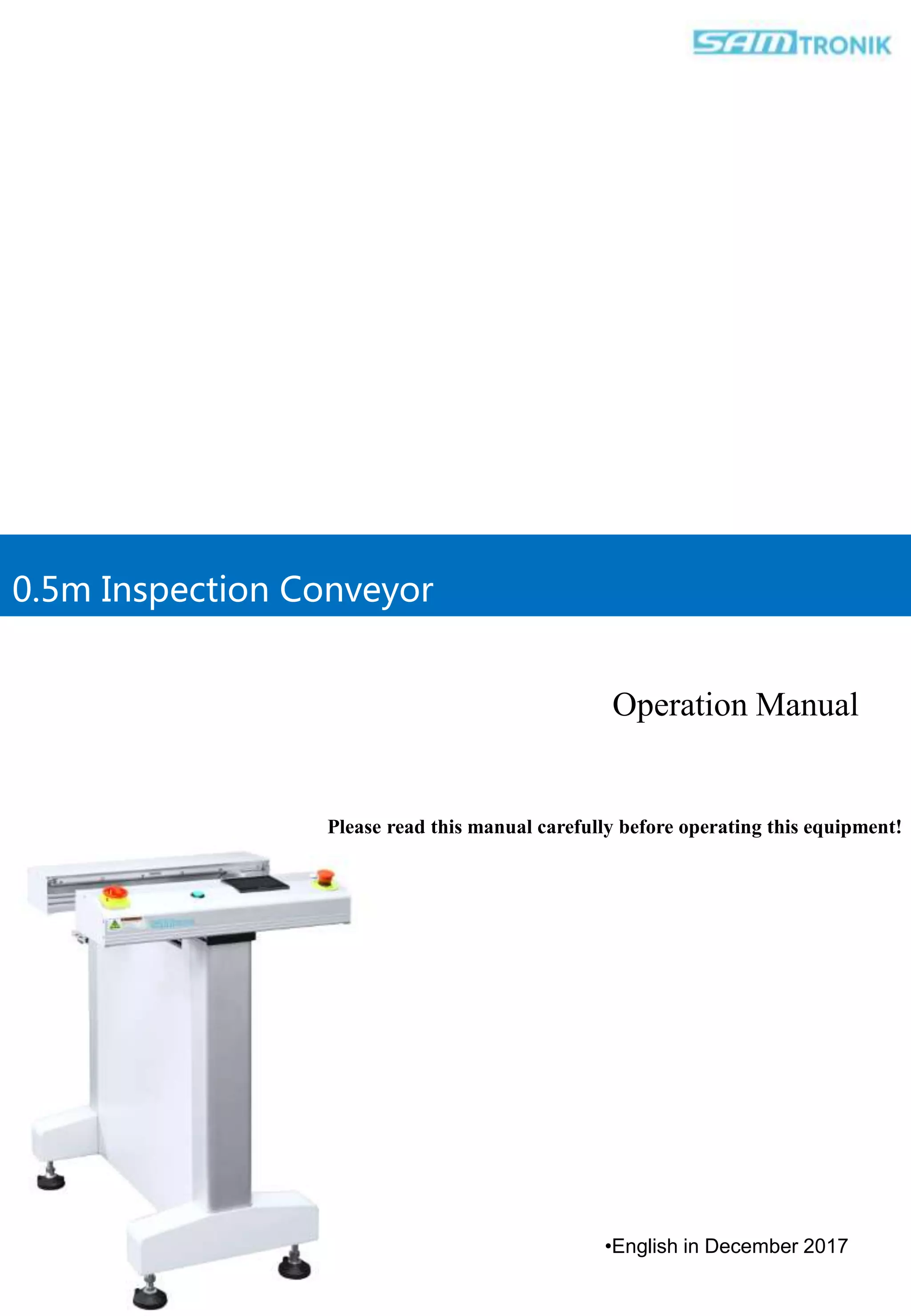
0.5m Inspection Conveyor
Please read this manual carefully before operating this equipment!
•To ensure the consistency of the hardware and software described in this manual, we have carefully reviewed the
content of this manual. However, differences cannot be completely ruled out, so we cannot guarantee complete
consistency. However, the information provided in this manual will be reviewed periodically and revised accordingly as
required in subsequent versions
•If in going through this manual should you: - discover incorrectness - encounter unclear statements - meet with
parts that in your opinion needs further explanation,
•please inform us. We will appreciate any comments which will help us to improve this document.
•Technical data may be subject to change without notice.
•All rights reserved © Samtronik International Limited
由 Samtronik international limited 印刷
Samtronik International Limited
Address:Rm B306, Build A, RunFengYuan Business Center,
Block 74, Baoan District, Shenzhen, China.
Tel:+86-755-2778 8210 Fax:+86-755-2346 2890
Website:www.sam-smt.com www.samtronik.com
1. Preface
Thank you very munch for your choosing and purchasing SMT peripheral
devices produced by Samtronik International Limited
Before operating the device, please read this manual carefully as it
describes the precautions for proper use.
If the equipment fault can not be removed promptly, please promptly
contact the engineers or the company’s After-sales Service Department.
Do not disassemble the equipment without authorization.
Samtronik International Limited was founded since gqp, 1997 ,
registered in 2011, then applied for the registered trademark as
SAMTRONIK. The company was mainly engaged in electronic
equipment development. Until now the company has developed as a
combination of research production sale service company has developed
as a combination of research, production, sale, service enterprise in SMT
automatic equipment industry。
Samtronik, after so many years of learning international brands, has
become the world's leading PCBA electronic manufacturing automatic
transmission system and solution provider.
Samtronik attaches great importance to the world-class quality products,
with flexibility and agile production. Customers has all over: more than
forty countries and regions in Europe, North America, Asia, even the
whole world.
•Professional Electronic Production Equipment Manufacturer
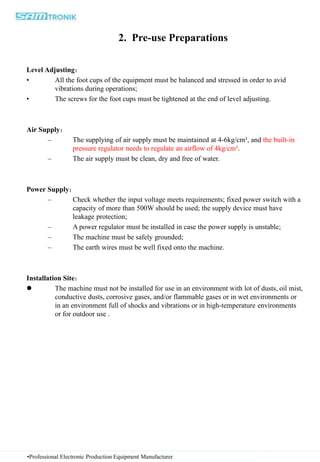
2. Pre-use Preparations
Level Adjusting:
• All the foot cups of the equipment must be balanced and stressed in order to avid
vibrations during operations;
• The screws for the foot cups must be tightened at the end of level adjusting.
Air Supply:
– The supplying of air supply must be maintained at 4-6kg/cm², and the built-in
pressure regulator needs to regulate an airflow of 4kg/cm².
– The air supply must be clean, dry and free of water.
Power Supply:
– Check whether the input voltage meets requirements; fixed power switch with a
capacity of more than 500W should be used; the supply device must have
leakage protection;
– A power regulator must be installed in case the power supply is unstable;
– The machine must be safely grounded;
– The earth wires must be well fixed onto the machine.
Installation Site:
 The machine must not be installed for use in an environment with lot of dusts, oil mist,
conductive dusts, corrosive gases, and/or flammable gases or in wet environments or
in an environment full of shocks and vibrations or in high-temperature environments
or for outdoor use .
•Professional Electronic Production Equipment Manufacturer
Workgroup: (this will be mainly debugged by the installer)
1. After connecting the equipment to electricity, check whether the power supply meets
the requirements and whether the power switch works properly. The equipment could
be connected to the electricity after all these work properly.
2. After connecting the equipment to electricity, firstly check whether the emergency
stop switch and the protective devices work properly.
3. The moving parts will mainly depend on constant speed motor and the cylinder. The
location test of each moving part will be sensed by travel switch or electric eyes.
4. The cylinder should not run two fast.
5. The positions of sensors should be adjusted well.
6. The conditions at each position of sensors could be tested by PLC input indicator light.
7. All output status could be tested by PLC output indicator light.
8. The running program is controlled by built-in programming and cannot be changed by
user.
•Professional Electronic Production Equipment Manufacturer
1.Set the machine to horizontal before use
2.Check whether the power supply is in accordance with the specification of the transmitter
before starting up (single-phase AC220V/60HZ).
3.If the power supply is unstable, a power stabilizer must be installed.
4The machine must be grounded safely and the ground wire must be well fixed on the fuselage.
5.To ensure the normal operation of the machine, do not download or change the PLC program.
6.The machine is not in use for a long time, the power should be cut off.
7.Do not install machinery in places where there is dirt, oil and dirt, conductive powder,
corrosive gas and combustible gas
8.Shock, high temperature and outdoor environment.
•Professional Electronic Production Equipment Manufacturer
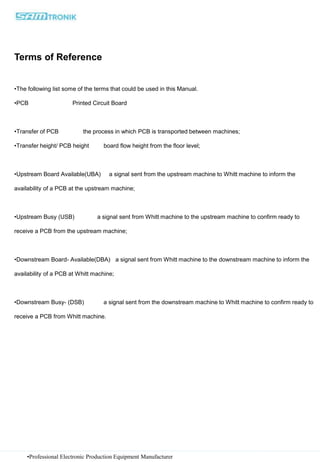
Terms of Reference
•The following list some of the terms that could be used in this Manual.
•PCB Printed Circuit Board
•Transfer of PCB the process in which PCB is transported between machines;
•Transfer height/ PCB height board flow height from the floor level;
•Upstream Board Available(UBA) a signal sent from the upstream machine to Whitt machine to inform the
availability of a PCB at the upstream machine;
•Upstream Busy (USB) a signal sent from Whitt machine to the upstream machine to confirm ready to
receive a PCB from the upstream machine;
•Downstream Board- Available(DBA) a signal sent from Whitt machine to the downstream machine to inform the
availability of a PCB at Whitt machine;
•Downstream Busy- (DSB) a signal sent from the downstream machine to Whitt machine to confirm ready to
receive a PCB from Whitt machine.
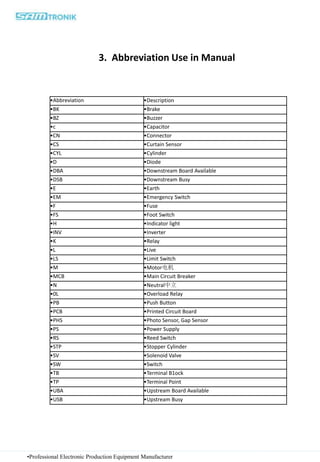
3. Abbreviation Use in Manual
•Professional Electronic Production Equipment Manufacturer
•Abbreviation •Description
•BK •Brake
•BZ •Buzzer
•c •Capacitor
•CN •Connector
•CS •Curtain Sensor
•CYL •Cylinder
•D •Diode
•DBA •Downstream Board Available
•DSB •Downstream Busy
•E •Earth
•EM •Emergency Switch
•F •Fuse
•FS •Foot Switch
•H •Indicator light
•INV •Inverter
•K •Relay
•L •Live
•LS •Limit Switch
•M •Motor电机
•MCB •Main Circuit Breaker
•N •Neutral中立
•0L •Overload Relay
•PB •Push Button
•PCB •Printed Circuit Board
•PHS •Photo Sensor, Gap Sensor
•PS •Power Supply
•RS •Reed Switch
•STP •Stopper Cylinder
•SV •Solenoid Valve
•SW •Switch
•TB •Terminal B1ock
•TP •Terminal Point
•UBA •Upstream Board Available
•USB •Upstream Busy
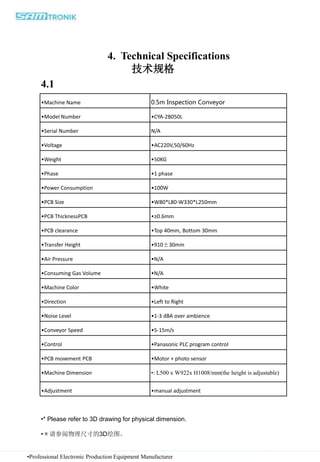
4. Technical Specifications
技术规格
•Professional Electronic Production Equipment Manufacturer
•Machine Name 0.5m Inspection Conveyor
•Model Number •CYA-2B050L
•Serial Number N/A
•Voltage •AC220V,50/60Hz
•Weight •50KG
•Phase •1 phase
•Power Consumption •100W
•PCB Size •W80*L80-W330*L250mm
•PCB ThicknessPCB •≥0.6mm
•PCB clearance •Top 40mm, Bottom 30mm
•Transfer Height •910±30mm
•Air Pressure •N/A
•Consuming Gas Volume •N/A
•Machine Color •White
•Direction •Left to Right
•Noise Level •1-3 dBA over ambience
•Conveyor Speed •5-15m/s
•Control •Panasonic PLC program control
•PCB movement PCB •Motor + photo sensor
•Machine Dimension •: L500 x W922x H1008/mm(the height is adjustable)
•Adjustment •manual adjustment
•* Please refer to 3D drawing for physical dimension.
•*请参阅物理尺寸的3D绘图。
4.1
•Professional Electronic Production Equipment Manufacturer
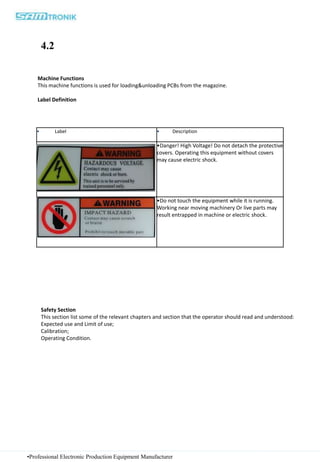
• Label • Description
•Danger! High Voltage! Do not detach the protective
covers. Operating this equipment without covers
may cause electric shock.
•
•Do not touch the equipment while it is running.
Working near moving machinery Or live parts may
result entrapped in machine or electric shock.
Machine Functions
This machine functions is used for loading&unloading PCBs from the magazine.
Label Definition
Safety Section
This section list some of the relevant chapters and section that the operator should read and understood:
Expected use and Limit of use;
Calibration;
Operating Condition.
4.2
•Professional Electronic Production Equipment Manufacturer
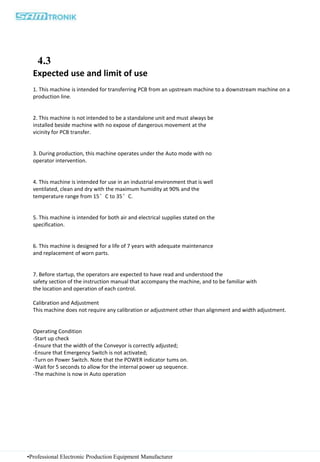
Expected use and limit of use
1. This machine is intended for transferring PCB from an upstream machine to a downstream machine on a
production line.
2. This machine is not intended to be a standalone unit and must always be
installed beside machine with no expose of dangerous movement at the
vicinity for PCB transfer.
3. During production, this machine operates under the Auto mode with no
operator intervention.
4. This machine is intended for use in an industrial environment that is well
ventilated, clean and dry with the maximum humidity at 90% and the
temperature range from 15°C to 35°C.
5. This machine is intended for both air and electrical supplies stated on the
specification.
6. This machine is designed for a life of 7 years with adequate maintenance
and replacement of worn parts.
7. Before startup, the operators are expected to have read and understood the
safety section of the instruction manual that accompany the machine, and to be familiar with
the location and operation of each control.
Calibration and Adjustment
This machine does not require any calibration or adjustment other than alignment and width adjustment.
Operating Condition
-Start up check
-Ensure that the width of the Conveyor is correctly adjusted;
-Ensure that Emergency Switch is not activated;
-Turn on Power Switch. Note that the POWER indicator tums on.
-Wait for 5 seconds to allow for the internal power up sequence.
-The machine is now in Auto operation
4.3
•Professional Electronic Production Equipment Manufacturer
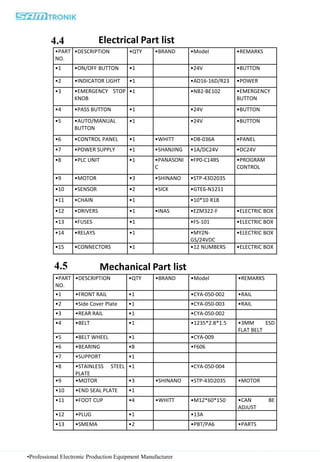
•PART
NO.
•DESCRIPTION •QTY •BRAND •Model •REMARKS
•1 •ON/OFF BUTTON •1 •24V •BUTTON
•2 •INDICATOR LIGHT •1 •AD16-16D/R23 •POWER
•3 •EMERGENCY STOP
KNOB
•1 •NB2-BE102 •EMERGENCY
BUTTON
•4 •PASS BUTTON •1 •24V •BUTTON
•5 •AUTO/MANUAL
BUTTON
•1 •24V •BUTTON
•6 •CONTROL PANEL •1 •WHITT •DB-036A •PANEL
•7 •POWER SUPPLY •1 •SHANJING •1A/DC24V •DC24V
•8 •PLC UNIT •1 •PANASONI
C
•FP0-C14RS •PROGRAM
CONTROL
•9 •MOTOR •3 •SHINANO •STP-43D2035
•10 •SENSOR •2 •SICK •GTE6-N1211
•11 •CHAIN •1 •10*10 R18
•12 •DRIVERS •1 •INAS •EZM322-F •ELECTRIC BOX
•13 •FUSES •1 •FS-101 •ELECTRIC BOX
•14 •RELAYS •1 •MY2N-
GS/24VDC
•ELECTRIC BOX
•15 •CONNECTORS •1 •12 NUMBERS •ELECTRIC BOX
Electrical Part list
•PART
NO.
•DESCRIPTION •QTY •BRAND •Model •REMARKS
•1 •FRONT RAIL •1 •CYA-050-002 •RAIL
•2 •Side Cover Plate •1 •CYA-050-003 •RAIL
•3 •REAR RAIL •1 •CYA-050-002
•4 •BELT •1 •1235*2.8*1.5 •3MM ESD
FLAT BELT
•5 •BELT WHEEL •1 •CYA-009
•6 •BEARING •8 •F606
•7 •SUPPORT •1
•8 •STAINLESS STEEL
PLATE
•1 •CYA-050-004
•9 •MOTOR •3 •SHINANO •STP-43D2035 •MOTOR
•10 •END SEAL PLATE •1
•11 •FOOT CUP •4 •WHITT •M12*60*150 •CAN BE
ADJUST
•12 •PLUG •1 •13A
•13 •SMEMA •2 •PBT/PA6 •PARTS
Mechanical Part list
4.4
4.5
•Professional Electronic Production Equipment Manufacturer
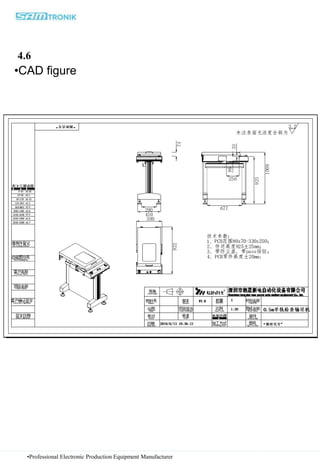
•CAD figure
4.6
•Professional Electronic Production Equipment Manufacturer
5. Electrical wiring diagram
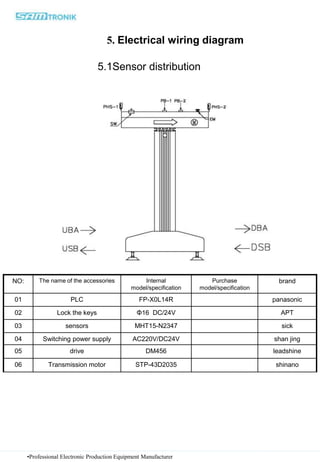
5.1Sensor distribution
NO: The name of the accessories Internal
model/specification
Purchase
model/specification
brand
01 PLC FP-X0L14R panasonic
02 Lock the keys Φ16 DC/24V APT
03 sensors MHT15-N2347 sick
04 Switching power supply AC220V/DC24V shan jing
05 drive DM456 leadshine
06 Transmission motor STP-43D2035 shinano
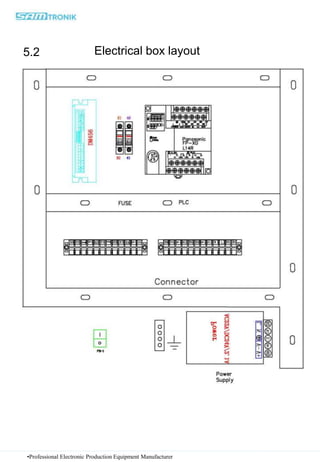
Electrical box layout
5.2
•Professional Electronic Production Equipment Manufacturer
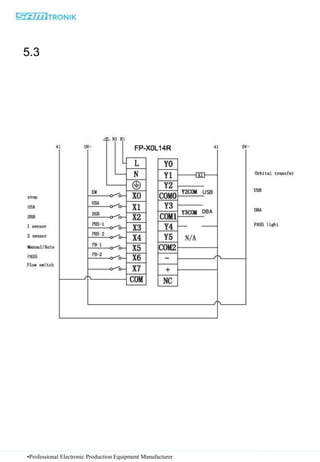
5.3
•Professional Electronic Production Equipment Manufacturer
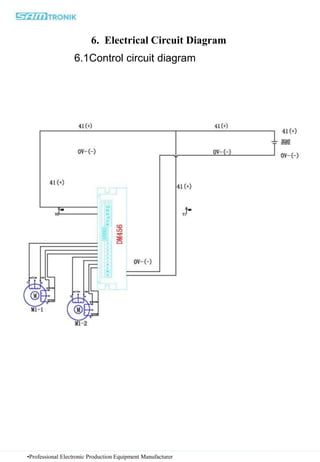
6.1Control circuit diagram
6. Electrical Circuit Diagram
•Professional Electronic Production Equipment Manufacturer
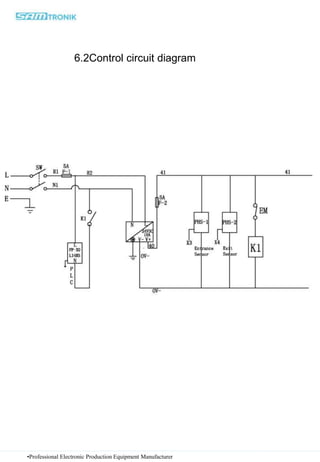
6.2Control circuit diagram
•Professional Electronic Production Equipment Manufacturer
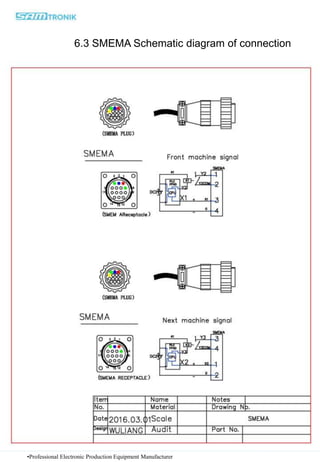
6.3 SMEMA Schematic diagram of connection
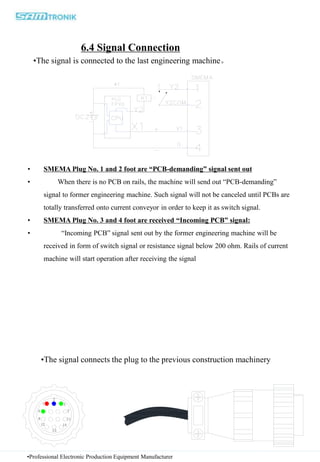
6.4 Signal Connection
•The signal is connected to the last engineering machine。
•The signal connects the plug to the previous construction machinery
• SMEMA Plug No. 1 and 2 foot are “PCB-demanding” signal sent out
• When there is no PCB on rails, the machine will send out “PCB-demanding”
signal to former engineering machine. Such signal will not be canceled until PCBs are
totally transferred onto current conveyor in order to keep it as switch signal.
• SMEMA Plug No. 3 and 4 foot are received “Incoming PCB” signal:
• “Incoming PCB” signal sent out by the former engineering machine will be
received in form of switch signal or resistance signal below 200 ohm. Rails of current
machine will start operation after receiving the signal
1
2
3
14
13
12
11
7
4
8
•Professional Electronic Production Equipment Manufacturer
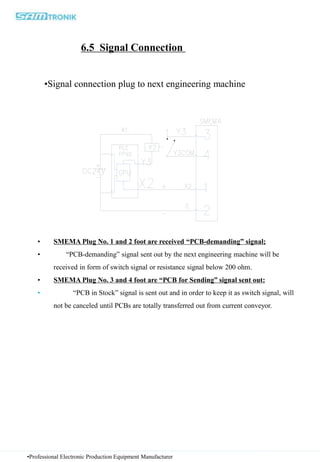
• SMEMA Plug No. 1 and 2 foot are received “PCB-demanding” signal;
• “PCB-demanding” signal sent out by the next engineering machine will be
received in form of switch signal or resistance signal below 200 ohm.
• SMEMA Plug No. 3 and 4 foot are “PCB for Sending” signal sent out:
• “PCB in Stock” signal is sent out and in order to keep it as switch signal, will
not be canceled until PCBs are totally transferred out from current conveyor.
•Signal connection plug to next engineering machine
•Professional Electronic Production Equipment Manufacturer
6.5 Signal Connection
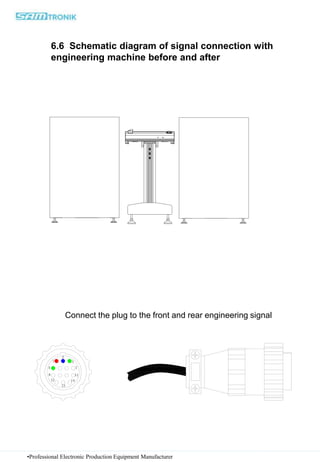
6.6 Schematic diagram of signal connection with
engineering machine before and after
Connect the plug to the front and rear engineering signal
8
4 7
11
12
13
14
3
2
1
•Professional Electronic Production Equipment Manufacturer
7. Matters needing attention
7.1 Maintenance
This section provides general information on our recommended maintenance of this machine. In order for this machine to function at
its optimum performance level, it is recommended to have routine servicing of parts that may be subjected to wear or environmental
stress. This list is not exhaustive and final but should be adapted and modified to suit the rate of usage and environment.
7.2 Daily
• Safety Cover: Check to ensure that safety cover are in place and secured.
• Emergency Switch: Please ensure there is nothing around that could interfere with its use. If there is any object in its way, the
operator will not be able to stop the machine quickly.
7.3 Weekly
• Fail Safe Brake: Switch off the power with the lifter at the top position and check that the fail safe brake is effectively holding the
lifter in place.
• Chain: Check for correct tensioning and its cleanliness. This will ensure a smooth and trouble-free operation. Oil the chain if
necessary.
• Conveyor endless belt: Check for signs of wear and tear.
• Guide shaft: Check the cleanliness of the lifter’s guide shaft. Remove any dirt or contaminant found with a clean cloth. Lightly
regrease after cleaning.
• Motor: Feel the body surface lightly to check if it is operating at a high temperature (hot to touch). This could be an indication of a
faulty motor brake or link to some associated part like a gearhead unit.
• Gearhead: Listen for any abnormal sound eminating from the unit. This could be a sign of excessive gear wear. Replace the unit if
found to be so.
• Timing belt: Check for signs of wear and tear and also the correct tensioning of the belt.
•Professional Electronic Production Equipment Manufacturer
7.4 Monthly 每月一次
• Pneumatic components: Check for their proper operations and also for possible air leakages from the pneumatic components.
Check the quality of the air supply and the machine’s upstream air filter condition. To replace if its condition calls for it.
• Motor brake: Check that the gap of the DC brake is within 0.2mm to 0.4mm tolerance and for signs of excessive wear.
• Ballscrew and nut: Check for any contaminants adhering to the ballscrew Remove with a clean cloth if found to be so. Regrease the
ballscrew with an even layer of grease with a grease gun or with a piece of clean cloth.
• Leadscrew and nut: same procedure as per ballscrew and nut.
• Chain guide: Check for signs of wear. To replace if necessary.
• Sensors, limit switches and safety switches: Check for their proper operations. Replace any part that is defective.
• Constant moving components: Check for possible loosening of these parts (example: motor pulleys)
7.5 Annually
• Gearhead: Check the condition of the grease on the gears to see if the existing grease need to be cleaned up and be given a fresh
layer instead.
• Spur gears: Check for signs of excessive wear. Replace if necessary.
• Chain: Check for excessive wear. Replace if necessary.
•Professional Electronic Production Equipment Manufacturer
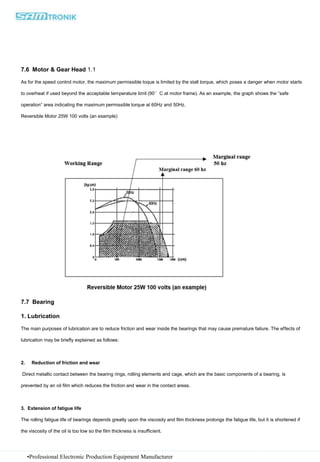
7.6 Motor & Gear Head 1.1
As for the speed control motor, the maximum permissible toque is limited by the stall torque, which poses a danger when motor starts
to overheat if used beyond the acceptable temperature limit (90°C at motor frame). As an example, the graph shows the “safe
operation” area indicating the maximum permissible torque at 60Hz and 50Hz.
Reversible Motor 25W 100 volts (an example)
7.7 Bearing
1. Lubrication
The main purposes of lubrication are to reduce friction and wear inside the bearings that may cause premature failure. The effects of
lubrication may be briefly explained as follows:
2. Reduction of friction and wear
Direct metallic contact between the bearing rings, rolling elements and cage, which are the basic components of a bearing, is
prevented by an oil film which reduces the friction and wear in the contact areas.
3. Extension of fatigue life
The rolling fatigue life of bearings depends greatly upon the viscosity and film thickness prolongs the fatigue life, but it is shortened if
the viscosity of the oil is too low so the film thickness is insufficient.
•Professional Electronic Production Equipment Manufacturer
8. Handling
8.1 Precautions for Proper Handling of Bearings
Since rolling bearings are high precision machine parts, they must be handled accordingly. Even if high quality bearings are used,
their expected performance cannot be achieved if they are not handled properly. The main precautions to be observed are as follows:
8.2 Keep Bearings and Surrounding Area Clean
Dust and dirt even if invisible to the naked eye, have harmful effects on bearings. It is necessary to prevent the entry of dust and
dirt by keeping the bearings and their environment as clean as possible.
8.3 Careful Handling
Heavy shocks during handling may cause bearings to be scratched or otherwise damaged possibly resulting in their failure.
Excessively strong impacts may cause brinelling, breaking, or cracking.
8. 4 Use Proper Tools
Always use the proper equipment when handling bearings and avoid general purpose tools.
8. 5 Prevent Corrosion
Since perspiration on the hands and various other contaminants may cause corrosion, keep the hands clean when handling bearings.
Wear gloves if possible. Pay attention to rust of bearing caused by corrosive gasses.
• Malfunction •Cause and solution
•The main power supply is
not on
•Please check whether the plug is properly inserted in the socket of
220V/AC. And make sure the socket is charged. There is no electricity into
the light, the switch indicator is broken.
•The low voltage power
supply lamp is not on
•
•Please check whether the power is turned on and whether the internal low-
voltage fuse is connected properly. Whether the power supply has a voltage
of 220V/AC coming in and the power indicator is on green light, with a dc
voltage output of 24V
•conveyor PCB not run
•Check whether the signals of the two machines are properly connected
(carefully check the signal wiring diagram), whether the track adjustment is
balanced and aligned, and whether the emergency stop is pressed. All the
previous ones have been checked to see that there is no problem, please
check that the PLC has corresponding Y point output, no output please check
whether the sensor has failed, there is output check whether the plug on the
drive, the cable of the interface is loose. The multimeter measures whether
there is 24V dc supply to the driver, and whether there is 24V dc at the Y
point on the driver
9. Fault Removal & Fault Code Query
Note: if the failure of equipment cannot be solved, we will contact the equipment engineer or our company in case of emergency
After - sales service department contact, do not disassemble
•Professional Electronic Production Equipment Manufacturer
Samtronik International Limited
Address:Rm B306, Build A, RunFengYuan Business Center, Block 74, Baoan District, Shenzhen, China.
Tel:+86-755-2778 8210 Fax:+86-755-2346 2890
Website:www.sam-smt.com www.samtronik.com

0.5m inspection conveyor user manual

  • 1.
    Operation Manual •English inDecember 2017 0.5m Inspection Conveyor Please read this manual carefully before operating this equipment!
  • 2.
    •To ensure theconsistency of the hardware and software described in this manual, we have carefully reviewed the content of this manual. However, differences cannot be completely ruled out, so we cannot guarantee complete consistency. However, the information provided in this manual will be reviewed periodically and revised accordingly as required in subsequent versions •If in going through this manual should you: - discover incorrectness - encounter unclear statements - meet with parts that in your opinion needs further explanation, •please inform us. We will appreciate any comments which will help us to improve this document. •Technical data may be subject to change without notice. •All rights reserved © Samtronik International Limited 由 Samtronik international limited 印刷 Samtronik International Limited Address:Rm B306, Build A, RunFengYuan Business Center, Block 74, Baoan District, Shenzhen, China. Tel:+86-755-2778 8210 Fax:+86-755-2346 2890 Website:www.sam-smt.com www.samtronik.com
  • 3.
    1. Preface Thank youvery munch for your choosing and purchasing SMT peripheral devices produced by Samtronik International Limited Before operating the device, please read this manual carefully as it describes the precautions for proper use. If the equipment fault can not be removed promptly, please promptly contact the engineers or the company’s After-sales Service Department. Do not disassemble the equipment without authorization. Samtronik International Limited was founded since gqp, 1997 , registered in 2011, then applied for the registered trademark as SAMTRONIK. The company was mainly engaged in electronic equipment development. Until now the company has developed as a combination of research production sale service company has developed as a combination of research, production, sale, service enterprise in SMT automatic equipment industry。 Samtronik, after so many years of learning international brands, has become the world's leading PCBA electronic manufacturing automatic transmission system and solution provider. Samtronik attaches great importance to the world-class quality products, with flexibility and agile production. Customers has all over: more than forty countries and regions in Europe, North America, Asia, even the whole world. •Professional Electronic Production Equipment Manufacturer
  • 4.
    2. Pre-use Preparations LevelAdjusting: • All the foot cups of the equipment must be balanced and stressed in order to avid vibrations during operations; • The screws for the foot cups must be tightened at the end of level adjusting. Air Supply: – The supplying of air supply must be maintained at 4-6kg/cm², and the built-in pressure regulator needs to regulate an airflow of 4kg/cm². – The air supply must be clean, dry and free of water. Power Supply: – Check whether the input voltage meets requirements; fixed power switch with a capacity of more than 500W should be used; the supply device must have leakage protection; – A power regulator must be installed in case the power supply is unstable; – The machine must be safely grounded; – The earth wires must be well fixed onto the machine. Installation Site:  The machine must not be installed for use in an environment with lot of dusts, oil mist, conductive dusts, corrosive gases, and/or flammable gases or in wet environments or in an environment full of shocks and vibrations or in high-temperature environments or for outdoor use . •Professional Electronic Production Equipment Manufacturer
  • 5.
    Workgroup: (this willbe mainly debugged by the installer) 1. After connecting the equipment to electricity, check whether the power supply meets the requirements and whether the power switch works properly. The equipment could be connected to the electricity after all these work properly. 2. After connecting the equipment to electricity, firstly check whether the emergency stop switch and the protective devices work properly. 3. The moving parts will mainly depend on constant speed motor and the cylinder. The location test of each moving part will be sensed by travel switch or electric eyes. 4. The cylinder should not run two fast. 5. The positions of sensors should be adjusted well. 6. The conditions at each position of sensors could be tested by PLC input indicator light. 7. All output status could be tested by PLC output indicator light. 8. The running program is controlled by built-in programming and cannot be changed by user. •Professional Electronic Production Equipment Manufacturer
  • 6.
    •Professional Electronic ProductionEquipment Manufacturer 1.Set the machine to horizontal before use 2.Check whether the power supply is in accordance with the specification of the transmitter before starting up (single-phase AC220V/60HZ). 3.If the power supply is unstable, a power stabilizer must be installed. 4The machine must be grounded safely and the ground wire must be well fixed on the fuselage. 5.To ensure the normal operation of the machine, do not download or change the PLC program. 6.The machine is not in use for a long time, the power should be cut off. 7.Do not install machinery in places where there is dirt, oil and dirt, conductive powder, corrosive gas and combustible gas 8.Shock, high temperature and outdoor environment.
  • 7.
    •Professional Electronic ProductionEquipment Manufacturer Terms of Reference •The following list some of the terms that could be used in this Manual. •PCB Printed Circuit Board •Transfer of PCB the process in which PCB is transported between machines; •Transfer height/ PCB height board flow height from the floor level; •Upstream Board Available(UBA) a signal sent from the upstream machine to Whitt machine to inform the availability of a PCB at the upstream machine; •Upstream Busy (USB) a signal sent from Whitt machine to the upstream machine to confirm ready to receive a PCB from the upstream machine; •Downstream Board- Available(DBA) a signal sent from Whitt machine to the downstream machine to inform the availability of a PCB at Whitt machine; •Downstream Busy- (DSB) a signal sent from the downstream machine to Whitt machine to confirm ready to receive a PCB from Whitt machine.
  • 8.
    3. Abbreviation Usein Manual •Professional Electronic Production Equipment Manufacturer •Abbreviation •Description •BK •Brake •BZ •Buzzer •c •Capacitor •CN •Connector •CS •Curtain Sensor •CYL •Cylinder •D •Diode •DBA •Downstream Board Available •DSB •Downstream Busy •E •Earth •EM •Emergency Switch •F •Fuse •FS •Foot Switch •H •Indicator light •INV •Inverter •K •Relay •L •Live •LS •Limit Switch •M •Motor电机 •MCB •Main Circuit Breaker •N •Neutral中立 •0L •Overload Relay •PB •Push Button •PCB •Printed Circuit Board •PHS •Photo Sensor, Gap Sensor •PS •Power Supply •RS •Reed Switch •STP •Stopper Cylinder •SV •Solenoid Valve •SW •Switch •TB •Terminal B1ock •TP •Terminal Point •UBA •Upstream Board Available •USB •Upstream Busy
  • 9.
    4. Technical Specifications 技术规格 •ProfessionalElectronic Production Equipment Manufacturer •Machine Name 0.5m Inspection Conveyor •Model Number •CYA-2B050L •Serial Number N/A •Voltage •AC220V,50/60Hz •Weight •50KG •Phase •1 phase •Power Consumption •100W •PCB Size •W80*L80-W330*L250mm •PCB ThicknessPCB •≥0.6mm •PCB clearance •Top 40mm, Bottom 30mm •Transfer Height •910±30mm •Air Pressure •N/A •Consuming Gas Volume •N/A •Machine Color •White •Direction •Left to Right •Noise Level •1-3 dBA over ambience •Conveyor Speed •5-15m/s •Control •Panasonic PLC program control •PCB movement PCB •Motor + photo sensor •Machine Dimension •: L500 x W922x H1008/mm(the height is adjustable) •Adjustment •manual adjustment •* Please refer to 3D drawing for physical dimension. •*请参阅物理尺寸的3D绘图。 4.1
  • 10.
    •Professional Electronic ProductionEquipment Manufacturer • Label • Description •Danger! High Voltage! Do not detach the protective covers. Operating this equipment without covers may cause electric shock. • •Do not touch the equipment while it is running. Working near moving machinery Or live parts may result entrapped in machine or electric shock. Machine Functions This machine functions is used for loading&unloading PCBs from the magazine. Label Definition Safety Section This section list some of the relevant chapters and section that the operator should read and understood: Expected use and Limit of use; Calibration; Operating Condition. 4.2
  • 11.
    •Professional Electronic ProductionEquipment Manufacturer Expected use and limit of use 1. This machine is intended for transferring PCB from an upstream machine to a downstream machine on a production line. 2. This machine is not intended to be a standalone unit and must always be installed beside machine with no expose of dangerous movement at the vicinity for PCB transfer. 3. During production, this machine operates under the Auto mode with no operator intervention. 4. This machine is intended for use in an industrial environment that is well ventilated, clean and dry with the maximum humidity at 90% and the temperature range from 15°C to 35°C. 5. This machine is intended for both air and electrical supplies stated on the specification. 6. This machine is designed for a life of 7 years with adequate maintenance and replacement of worn parts. 7. Before startup, the operators are expected to have read and understood the safety section of the instruction manual that accompany the machine, and to be familiar with the location and operation of each control. Calibration and Adjustment This machine does not require any calibration or adjustment other than alignment and width adjustment. Operating Condition -Start up check -Ensure that the width of the Conveyor is correctly adjusted; -Ensure that Emergency Switch is not activated; -Turn on Power Switch. Note that the POWER indicator tums on. -Wait for 5 seconds to allow for the internal power up sequence. -The machine is now in Auto operation 4.3
  • 12.
    •Professional Electronic ProductionEquipment Manufacturer •PART NO. •DESCRIPTION •QTY •BRAND •Model •REMARKS •1 •ON/OFF BUTTON •1 •24V •BUTTON •2 •INDICATOR LIGHT •1 •AD16-16D/R23 •POWER •3 •EMERGENCY STOP KNOB •1 •NB2-BE102 •EMERGENCY BUTTON •4 •PASS BUTTON •1 •24V •BUTTON •5 •AUTO/MANUAL BUTTON •1 •24V •BUTTON •6 •CONTROL PANEL •1 •WHITT •DB-036A •PANEL •7 •POWER SUPPLY •1 •SHANJING •1A/DC24V •DC24V •8 •PLC UNIT •1 •PANASONI C •FP0-C14RS •PROGRAM CONTROL •9 •MOTOR •3 •SHINANO •STP-43D2035 •10 •SENSOR •2 •SICK •GTE6-N1211 •11 •CHAIN •1 •10*10 R18 •12 •DRIVERS •1 •INAS •EZM322-F •ELECTRIC BOX •13 •FUSES •1 •FS-101 •ELECTRIC BOX •14 •RELAYS •1 •MY2N- GS/24VDC •ELECTRIC BOX •15 •CONNECTORS •1 •12 NUMBERS •ELECTRIC BOX Electrical Part list •PART NO. •DESCRIPTION •QTY •BRAND •Model •REMARKS •1 •FRONT RAIL •1 •CYA-050-002 •RAIL •2 •Side Cover Plate •1 •CYA-050-003 •RAIL •3 •REAR RAIL •1 •CYA-050-002 •4 •BELT •1 •1235*2.8*1.5 •3MM ESD FLAT BELT •5 •BELT WHEEL •1 •CYA-009 •6 •BEARING •8 •F606 •7 •SUPPORT •1 •8 •STAINLESS STEEL PLATE •1 •CYA-050-004 •9 •MOTOR •3 •SHINANO •STP-43D2035 •MOTOR •10 •END SEAL PLATE •1 •11 •FOOT CUP •4 •WHITT •M12*60*150 •CAN BE ADJUST •12 •PLUG •1 •13A •13 •SMEMA •2 •PBT/PA6 •PARTS Mechanical Part list 4.4 4.5
  • 13.
    •Professional Electronic ProductionEquipment Manufacturer •CAD figure 4.6
  • 14.
    •Professional Electronic ProductionEquipment Manufacturer 5. Electrical wiring diagram 5.1Sensor distribution NO: The name of the accessories Internal model/specification Purchase model/specification brand 01 PLC FP-X0L14R panasonic 02 Lock the keys Φ16 DC/24V APT 03 sensors MHT15-N2347 sick 04 Switching power supply AC220V/DC24V shan jing 05 drive DM456 leadshine 06 Transmission motor STP-43D2035 shinano
  • 15.
    Electrical box layout 5.2 •ProfessionalElectronic Production Equipment Manufacturer
  • 16.
    •Professional Electronic ProductionEquipment Manufacturer 5.3
  • 17.
    •Professional Electronic ProductionEquipment Manufacturer 6.1Control circuit diagram 6. Electrical Circuit Diagram
  • 18.
    •Professional Electronic ProductionEquipment Manufacturer 6.2Control circuit diagram
  • 19.
    •Professional Electronic ProductionEquipment Manufacturer 6.3 SMEMA Schematic diagram of connection
  • 20.
    6.4 Signal Connection •Thesignal is connected to the last engineering machine。 •The signal connects the plug to the previous construction machinery • SMEMA Plug No. 1 and 2 foot are “PCB-demanding” signal sent out • When there is no PCB on rails, the machine will send out “PCB-demanding” signal to former engineering machine. Such signal will not be canceled until PCBs are totally transferred onto current conveyor in order to keep it as switch signal. • SMEMA Plug No. 3 and 4 foot are received “Incoming PCB” signal: • “Incoming PCB” signal sent out by the former engineering machine will be received in form of switch signal or resistance signal below 200 ohm. Rails of current machine will start operation after receiving the signal 1 2 3 14 13 12 11 7 4 8 •Professional Electronic Production Equipment Manufacturer
  • 21.
    • SMEMA PlugNo. 1 and 2 foot are received “PCB-demanding” signal; • “PCB-demanding” signal sent out by the next engineering machine will be received in form of switch signal or resistance signal below 200 ohm. • SMEMA Plug No. 3 and 4 foot are “PCB for Sending” signal sent out: • “PCB in Stock” signal is sent out and in order to keep it as switch signal, will not be canceled until PCBs are totally transferred out from current conveyor. •Signal connection plug to next engineering machine •Professional Electronic Production Equipment Manufacturer 6.5 Signal Connection
  • 22.
    6.6 Schematic diagramof signal connection with engineering machine before and after Connect the plug to the front and rear engineering signal 8 4 7 11 12 13 14 3 2 1 •Professional Electronic Production Equipment Manufacturer
  • 23.
    •Professional Electronic ProductionEquipment Manufacturer 7. Matters needing attention 7.1 Maintenance This section provides general information on our recommended maintenance of this machine. In order for this machine to function at its optimum performance level, it is recommended to have routine servicing of parts that may be subjected to wear or environmental stress. This list is not exhaustive and final but should be adapted and modified to suit the rate of usage and environment. 7.2 Daily • Safety Cover: Check to ensure that safety cover are in place and secured. • Emergency Switch: Please ensure there is nothing around that could interfere with its use. If there is any object in its way, the operator will not be able to stop the machine quickly. 7.3 Weekly • Fail Safe Brake: Switch off the power with the lifter at the top position and check that the fail safe brake is effectively holding the lifter in place. • Chain: Check for correct tensioning and its cleanliness. This will ensure a smooth and trouble-free operation. Oil the chain if necessary. • Conveyor endless belt: Check for signs of wear and tear. • Guide shaft: Check the cleanliness of the lifter’s guide shaft. Remove any dirt or contaminant found with a clean cloth. Lightly regrease after cleaning. • Motor: Feel the body surface lightly to check if it is operating at a high temperature (hot to touch). This could be an indication of a faulty motor brake or link to some associated part like a gearhead unit. • Gearhead: Listen for any abnormal sound eminating from the unit. This could be a sign of excessive gear wear. Replace the unit if found to be so. • Timing belt: Check for signs of wear and tear and also the correct tensioning of the belt.
  • 24.
    •Professional Electronic ProductionEquipment Manufacturer 7.4 Monthly 每月一次 • Pneumatic components: Check for their proper operations and also for possible air leakages from the pneumatic components. Check the quality of the air supply and the machine’s upstream air filter condition. To replace if its condition calls for it. • Motor brake: Check that the gap of the DC brake is within 0.2mm to 0.4mm tolerance and for signs of excessive wear. • Ballscrew and nut: Check for any contaminants adhering to the ballscrew Remove with a clean cloth if found to be so. Regrease the ballscrew with an even layer of grease with a grease gun or with a piece of clean cloth. • Leadscrew and nut: same procedure as per ballscrew and nut. • Chain guide: Check for signs of wear. To replace if necessary. • Sensors, limit switches and safety switches: Check for their proper operations. Replace any part that is defective. • Constant moving components: Check for possible loosening of these parts (example: motor pulleys) 7.5 Annually • Gearhead: Check the condition of the grease on the gears to see if the existing grease need to be cleaned up and be given a fresh layer instead. • Spur gears: Check for signs of excessive wear. Replace if necessary. • Chain: Check for excessive wear. Replace if necessary.
  • 25.
    •Professional Electronic ProductionEquipment Manufacturer 7.6 Motor & Gear Head 1.1 As for the speed control motor, the maximum permissible toque is limited by the stall torque, which poses a danger when motor starts to overheat if used beyond the acceptable temperature limit (90°C at motor frame). As an example, the graph shows the “safe operation” area indicating the maximum permissible torque at 60Hz and 50Hz. Reversible Motor 25W 100 volts (an example) 7.7 Bearing 1. Lubrication The main purposes of lubrication are to reduce friction and wear inside the bearings that may cause premature failure. The effects of lubrication may be briefly explained as follows: 2. Reduction of friction and wear Direct metallic contact between the bearing rings, rolling elements and cage, which are the basic components of a bearing, is prevented by an oil film which reduces the friction and wear in the contact areas. 3. Extension of fatigue life The rolling fatigue life of bearings depends greatly upon the viscosity and film thickness prolongs the fatigue life, but it is shortened if the viscosity of the oil is too low so the film thickness is insufficient.
  • 26.
    •Professional Electronic ProductionEquipment Manufacturer 8. Handling 8.1 Precautions for Proper Handling of Bearings Since rolling bearings are high precision machine parts, they must be handled accordingly. Even if high quality bearings are used, their expected performance cannot be achieved if they are not handled properly. The main precautions to be observed are as follows: 8.2 Keep Bearings and Surrounding Area Clean Dust and dirt even if invisible to the naked eye, have harmful effects on bearings. It is necessary to prevent the entry of dust and dirt by keeping the bearings and their environment as clean as possible. 8.3 Careful Handling Heavy shocks during handling may cause bearings to be scratched or otherwise damaged possibly resulting in their failure. Excessively strong impacts may cause brinelling, breaking, or cracking. 8. 4 Use Proper Tools Always use the proper equipment when handling bearings and avoid general purpose tools. 8. 5 Prevent Corrosion Since perspiration on the hands and various other contaminants may cause corrosion, keep the hands clean when handling bearings. Wear gloves if possible. Pay attention to rust of bearing caused by corrosive gasses.
  • 27.
    • Malfunction •Causeand solution •The main power supply is not on •Please check whether the plug is properly inserted in the socket of 220V/AC. And make sure the socket is charged. There is no electricity into the light, the switch indicator is broken. •The low voltage power supply lamp is not on • •Please check whether the power is turned on and whether the internal low- voltage fuse is connected properly. Whether the power supply has a voltage of 220V/AC coming in and the power indicator is on green light, with a dc voltage output of 24V •conveyor PCB not run •Check whether the signals of the two machines are properly connected (carefully check the signal wiring diagram), whether the track adjustment is balanced and aligned, and whether the emergency stop is pressed. All the previous ones have been checked to see that there is no problem, please check that the PLC has corresponding Y point output, no output please check whether the sensor has failed, there is output check whether the plug on the drive, the cable of the interface is loose. The multimeter measures whether there is 24V dc supply to the driver, and whether there is 24V dc at the Y point on the driver 9. Fault Removal & Fault Code Query Note: if the failure of equipment cannot be solved, we will contact the equipment engineer or our company in case of emergency After - sales service department contact, do not disassemble •Professional Electronic Production Equipment Manufacturer
  • 28.
    Samtronik International Limited Address:RmB306, Build A, RunFengYuan Business Center, Block 74, Baoan District, Shenzhen, China. Tel:+86-755-2778 8210 Fax:+86-755-2346 2890 Website:www.sam-smt.com www.samtronik.com