
How Enterprises Go
Mobile: An Introduction to
MobileIT
Josh Sirota, Principal Architect, Office of the CTO,
MobileIron
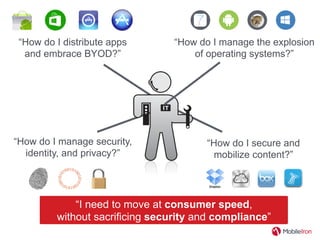
“How do I distribute apps
and embrace BYOD?”
“How do I secure and
mobilize content?”
“How do I manage security,
identity, and privacy?”
“I need to move at consumer speed,
without sacrificing security and compliance”
“How do I manage the explosion
of operating systems?”
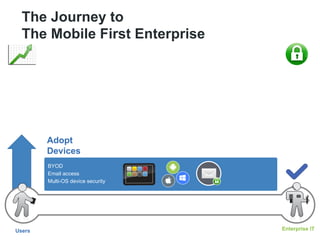
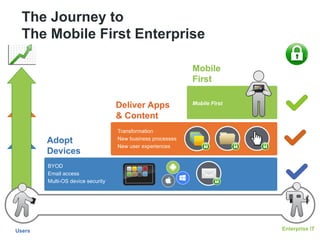
The Journey to
The Mobile First Enterprise
Users Enterprise IT
Adopt
Devices
BYOD
Email access
Multi-OS device security
The Journey to
The Mobile First Enterprise
Users Enterprise IT
Adopt
Devices
BYOD
Email access
Multi-OS device security
Deliver Apps
& Content
Transformation
New business processes
New user experiences
Mobile
First
Mobile First
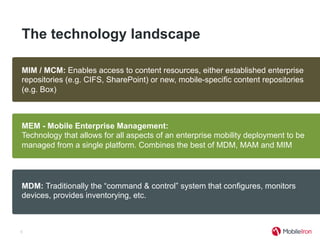
The technology landscape
5
MDM: Traditionally the “command & control” system that configures, monitors
devices, provides inventorying, etc.
MAM: Provides an application store and the ability to extend MDM functions into
enterprise and commercially developed apps. Standalone options exist, but lack
of integration with MDM and devices makes for challenging implementations.
MIM / MCM: Enables access to content resources, either established enterprise
repositories (e.g. CIFS, SharePoint) or new, mobile-specific content repositories
(e.g. Box)
MEM - Mobile Enterprise Management:
Technology that allows for all aspects of an enterprise mobility deployment to be
managed from a single platform. Combines the best of MDM, MAM and MIM
Phase 1: Designing your
BYOD & Multi-OS Strategy
6
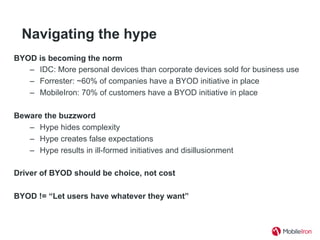
Navigating the hype
BYOD is becoming the norm
–  IDC: More personal devices than corporate devices sold for business use
–  Forrester: ~60% of companies have a BYOD initiative in place
–  MobileIron: 70% of customers have a BYOD initiative in place
Beware the buzzword
–  Hype hides complexity
–  Hype creates false expectations
–  Hype results in ill-formed initiatives and disillusionment
Driver of BYOD should be choice, not cost
BYOD != “Let users have whatever they want”
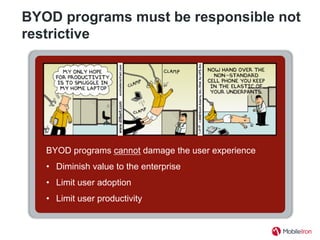
BYOD programs must be responsible not
restrictive
BYOD programs cannot damage the user experience
•  Diminish value to the enterprise
•  Limit user adoption
•  Limit user productivity
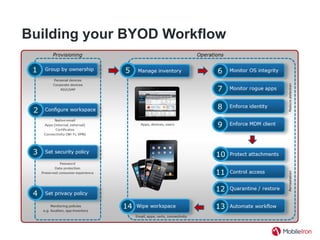
Building your BYOD Workflow
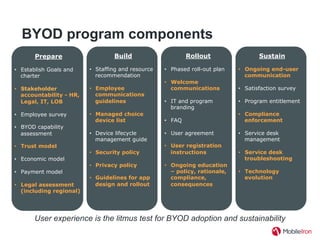
BYOD program components
Prepare
•  Establish Goals and
charter
•  Stakeholder
accountability - HR,
Legal, IT, LOB
•  Employee survey
•  BYOD capability
assessment
•  Trust model
•  Economic model
•  Payment model
•  Legal assessment
(including regional)
User experience is the litmus test for BYOD adoption and sustainability
Build
•  Staffing and resource
recommendation
•  Employee
communications
guidelines
•  Managed choice
device list
•  Device lifecycle
management guide
•  Security policy
•  Privacy policy
•  Guidelines for app
design and rollout
Rollout
•  Phased roll-out plan
•  Welcome
communications
•  IT and program
branding
•  FAQ
•  User agreement
•  User registration
instructions
•  Ongoing education
– policy, rationale,
compliance,
consequences
Sustain
•  Ongoing end-user
communication
•  Satisfaction survey
•  Program entitlement
•  Compliance
enforcement
•  Service desk
management
•  Service desk
troubleshooting
•  Technology
evolution
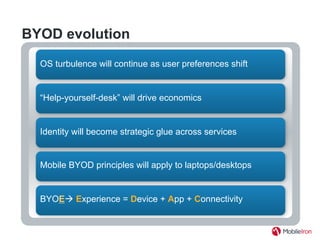
BYOD evolution
“Help-yourself-desk” will drive economics
Identity will become strategic glue across services
BYOEà Experience = Device + App + Connectivity
Mobile BYOD principles will apply to laptops/desktops
OS turbulence will continue as user preferences shift
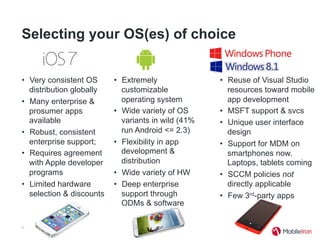
Selecting your OS(es) of choice
•  Very consistent OS
distribution globally
•  Many enterprise &
prosumer apps
available
•  Robust, consistent
enterprise support;
•  Requires agreement
with Apple developer
programs
•  Limited hardware
selection & discounts
12
•  Reuse of Visual Studio
resources toward mobile
app development
•  MSFT support & svcs
•  Unique user interface
design
•  Support for MDM on
smartphones now.
Laptops, tablets coming
•  SCCM policies not
directly applicable
•  Few 3rd-party apps
•  Extremely
customizable
operating system
•  Wide variety of OS
variants in wild (41%
run Android <= 2.3)
•  Flexibility in app
development &
distribution
•  Wide variety of HW
•  Deep enterprise
support through
ODMs & software
Phase 2: Design & Build
Mobile Apps
13
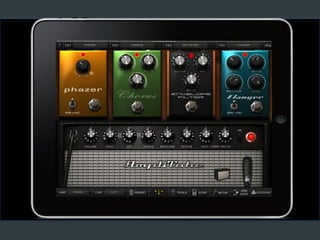
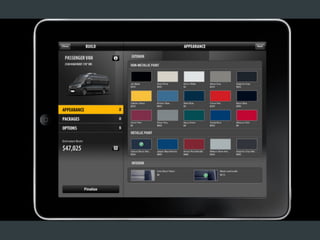
I. Experience
•  Singular function … not comprehensive features
•  Fast cycles … 8 week dev, 9 month life, 3 platforms
•  High expectations … UX litmus test for adoption
Consumer apps for the employee
... not …
Business apps for the enterprise
II. Architecture
• Services architecture
• Content sources and access
• Lessons from the e-commerce experience
“If I had more time, I would have written a
shorter letter.”
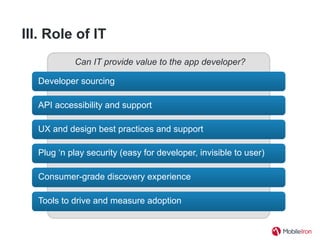
III. Role of IT
API accessibility and support
UX and design best practices and support
Consumer-grade discovery experience
Plug ‘n play security (easy for developer, invisible to user)
Developer sourcing
Can IT provide value to the app developer?
Tools to drive and measure adoption
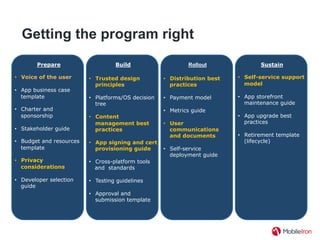
Getting the program right
Prepare
•  Voice of the user
•  App business case
template
•  Charter and
sponsorship
•  Stakeholder guide
•  Budget and resources
template
•  Privacy
considerations
•  Developer selection
guide
Build
•  Trusted design
principles
•  Platforms/OS decision
tree
•  Content
management best
practices
•  App signing and cert
provisioning guide
•  Cross-platform tools
and standards
•  Testing guidelines
•  Approval and
submission template
Rollout
•  Distribution best
practices
•  Payment model
•  Metrics guide
•  User
communications
and documents
•  Self-service
deployment guide
Sustain
•  Self-service support
model
•  App storefront
maintenance guide
•  App upgrade best
practices
•  Retirement template
(lifecycle)
Phase 3: Go Mobile First
21
22
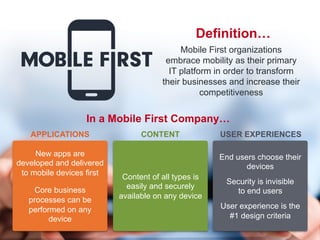
Definition…
Mobile First organizations
embrace mobility as their primary
IT platform in order to transform
their businesses and increase their
competitiveness
Content of all types is
easily and securely
available on any device
CONTENT
End users choose their
devices
Security is invisible
to end users
User experience is the
#1 design criteria
USER EXPERIENCES
New apps are
developed and delivered
to mobile devices first
Core business
processes can be
performed on any
device
APPLICATIONS
In a Mobile First Company…
23

CIS13: How Enterprises Go Mobile: An Introduction to MobileIT

  • 1.
    How Enterprises Go Mobile:An Introduction to MobileIT Josh Sirota, Principal Architect, Office of the CTO, MobileIron
  • 2.
    “How do Idistribute apps and embrace BYOD?” “How do I secure and mobilize content?” “How do I manage security, identity, and privacy?” “I need to move at consumer speed, without sacrificing security and compliance” “How do I manage the explosion of operating systems?”
  • 3.
    The Journey to TheMobile First Enterprise Users Enterprise IT Adopt Devices BYOD Email access Multi-OS device security
  • 4.
    The Journey to TheMobile First Enterprise Users Enterprise IT Adopt Devices BYOD Email access Multi-OS device security Deliver Apps & Content Transformation New business processes New user experiences Mobile First Mobile First
  • 5.
    The technology landscape 5 MDM:Traditionally the “command & control” system that configures, monitors devices, provides inventorying, etc. MAM: Provides an application store and the ability to extend MDM functions into enterprise and commercially developed apps. Standalone options exist, but lack of integration with MDM and devices makes for challenging implementations. MIM / MCM: Enables access to content resources, either established enterprise repositories (e.g. CIFS, SharePoint) or new, mobile-specific content repositories (e.g. Box) MEM - Mobile Enterprise Management: Technology that allows for all aspects of an enterprise mobility deployment to be managed from a single platform. Combines the best of MDM, MAM and MIM
  • 6.
    Phase 1: Designingyour BYOD & Multi-OS Strategy 6
  • 7.
    Navigating the hype BYODis becoming the norm –  IDC: More personal devices than corporate devices sold for business use –  Forrester: ~60% of companies have a BYOD initiative in place –  MobileIron: 70% of customers have a BYOD initiative in place Beware the buzzword –  Hype hides complexity –  Hype creates false expectations –  Hype results in ill-formed initiatives and disillusionment Driver of BYOD should be choice, not cost BYOD != “Let users have whatever they want”
  • 8.
    BYOD programs mustbe responsible not restrictive BYOD programs cannot damage the user experience •  Diminish value to the enterprise •  Limit user adoption •  Limit user productivity
  • 9.
  • 10.
    BYOD program components Prepare • Establish Goals and charter •  Stakeholder accountability - HR, Legal, IT, LOB •  Employee survey •  BYOD capability assessment •  Trust model •  Economic model •  Payment model •  Legal assessment (including regional) User experience is the litmus test for BYOD adoption and sustainability Build •  Staffing and resource recommendation •  Employee communications guidelines •  Managed choice device list •  Device lifecycle management guide •  Security policy •  Privacy policy •  Guidelines for app design and rollout Rollout •  Phased roll-out plan •  Welcome communications •  IT and program branding •  FAQ •  User agreement •  User registration instructions •  Ongoing education – policy, rationale, compliance, consequences Sustain •  Ongoing end-user communication •  Satisfaction survey •  Program entitlement •  Compliance enforcement •  Service desk management •  Service desk troubleshooting •  Technology evolution
  • 11.
    BYOD evolution “Help-yourself-desk” willdrive economics Identity will become strategic glue across services BYOEà Experience = Device + App + Connectivity Mobile BYOD principles will apply to laptops/desktops OS turbulence will continue as user preferences shift
  • 12.
    Selecting your OS(es)of choice •  Very consistent OS distribution globally •  Many enterprise & prosumer apps available •  Robust, consistent enterprise support; •  Requires agreement with Apple developer programs •  Limited hardware selection & discounts 12 •  Reuse of Visual Studio resources toward mobile app development •  MSFT support & svcs •  Unique user interface design •  Support for MDM on smartphones now. Laptops, tablets coming •  SCCM policies not directly applicable •  Few 3rd-party apps •  Extremely customizable operating system •  Wide variety of OS variants in wild (41% run Android <= 2.3) •  Flexibility in app development & distribution •  Wide variety of HW •  Deep enterprise support through ODMs & software
  • 13.
    Phase 2: Design& Build Mobile Apps 13
  • 14.
    I. Experience •  Singularfunction … not comprehensive features •  Fast cycles … 8 week dev, 9 month life, 3 platforms •  High expectations … UX litmus test for adoption Consumer apps for the employee ... not … Business apps for the enterprise
  • 18.
    II. Architecture • Services architecture • Contentsources and access • Lessons from the e-commerce experience “If I had more time, I would have written a shorter letter.”
  • 19.
    III. Role ofIT API accessibility and support UX and design best practices and support Consumer-grade discovery experience Plug ‘n play security (easy for developer, invisible to user) Developer sourcing Can IT provide value to the app developer? Tools to drive and measure adoption
  • 20.
    Getting the programright Prepare •  Voice of the user •  App business case template •  Charter and sponsorship •  Stakeholder guide •  Budget and resources template •  Privacy considerations •  Developer selection guide Build •  Trusted design principles •  Platforms/OS decision tree •  Content management best practices •  App signing and cert provisioning guide •  Cross-platform tools and standards •  Testing guidelines •  Approval and submission template Rollout •  Distribution best practices •  Payment model •  Metrics guide •  User communications and documents •  Self-service deployment guide Sustain •  Self-service support model •  App storefront maintenance guide •  App upgrade best practices •  Retirement template (lifecycle)
  • 21.
    Phase 3: GoMobile First 21
  • 22.
    22 Definition… Mobile First organizations embracemobility as their primary IT platform in order to transform their businesses and increase their competitiveness Content of all types is easily and securely available on any device CONTENT End users choose their devices Security is invisible to end users User experience is the #1 design criteria USER EXPERIENCES New apps are developed and delivered to mobile devices first Core business processes can be performed on any device APPLICATIONS In a Mobile First Company…
  • 23.