




© 2014 VMware Inc. All rights reserved.
SSO for Mobile and Web Apps
Ashish Jain
@itickr
CIS 2015
What we will cover in this Session ?
2
1 Why is this important ?
2 What’s the current experience?
3 What’s the desired experience ?
What are my options ?
What’s the challenge ?
Q & A
4
5
6
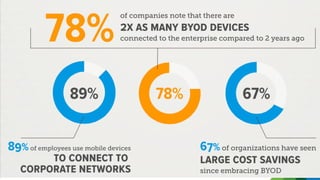
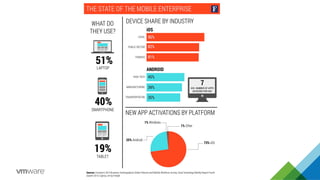
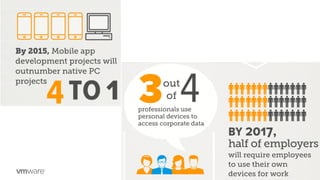
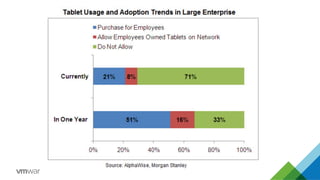
Why is this important?
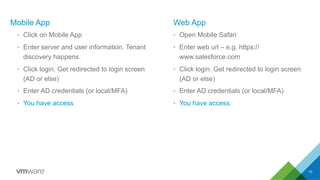
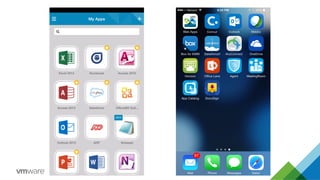
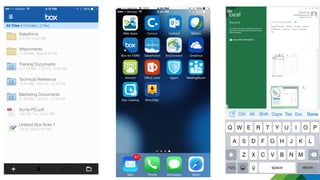
What’s the current experience ?
Mobile App
•  Click on Mobile App
•  Enter server and user information. Tenant
discovery happens.
•  Click login. Get redirected to login screen
(AD or else)
•  Enter AD credentials (or local/MFA)
•  You have access
Web App
•  Open Mobile Safari
•  Enter web url – e.g. https://
www.salesforce.com
•  Click login. Get redirected to login screen
(AD or else)
•  Enter AD credentials (or local/MFA)
•  You have access.
10
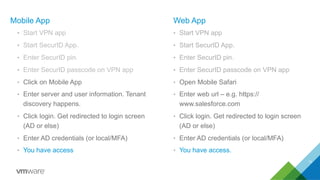
Mobile App
•  Start VPN app
•  Start SecurID App.
•  Enter SecurID pin.
•  Enter SecurID passcode on VPN app
•  Click on Mobile App
•  Enter server and user information. Tenant
discovery happens.
•  Click login. Get redirected to login screen
(AD or else)
•  Enter AD credentials (or local/MFA)
•  You have access
Web App
•  Start VPN app
•  Start SecurID App.
•  Enter SecurID pin.
•  Enter SecurID passcode on VPN app
•  Open Mobile Safari
•  Enter web url – e.g. https://
www.salesforce.com
•  Click login. Get redirected to login screen
(AD or else)
•  Enter AD credentials (or local/MFA)
•  You have access.
11
What’s the desired experience ?
What’s the challenge?
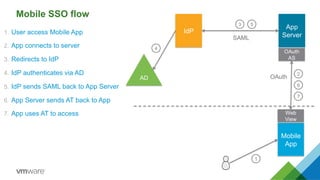
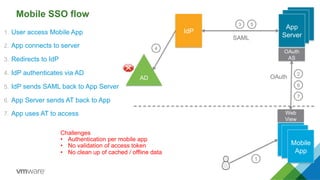
Mobile SSO flow
1.  User access Mobile App
2.  App connects to server
3.  Redirects to IdP
4.  IdP authenticates via AD
5.  IdP sends SAML back to App Server
6.  App Server sends AT back to App
7.  App uses AT to access
1
Mobile
App
Web
View
2
3
4
5
IdP
AD
6
7
App
Server
OAuth
AS
SAML
OAuth
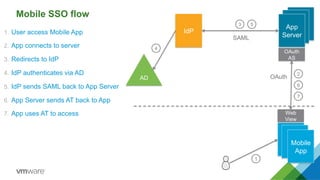
Mobile SSO flow
1.  User access Mobile App
2.  App connects to server
3.  Redirects to IdP
4.  IdP authenticates via AD
5.  IdP sends SAML back to App Server
6.  App Server sends AT back to App
7.  App uses AT to access
Mobile
App
Web
View
2
3
4
5
IdP
AD
6
7
Mobile
App
OAuth
AS
App
ServerSAML
OAuth
1
Mobile SSO flow
1.  User access Mobile App
2.  App connects to server
3.  Redirects to IdP
4.  IdP authenticates via AD
5.  IdP sends SAML back to App Server
6.  App Server sends AT back to App
7.  App uses AT to access
Mobile
App
Web
View
2
3
4
5
IdP
AD
6
7
Mobile
App
OAuth
AS
App
Server
Challenges
•  Authentication per mobile app
•  No validation of access token
•  No clean up of cached / offline data
OAuth
SAML
1
What are my options ?
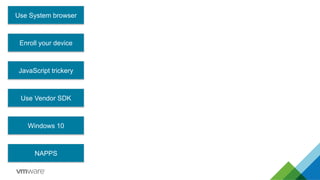
Use System browser
Enroll your device
JavaScript trickery
Windows 10
NAPPS
Use Vendor SDK
1
Mobile
App
2
3
4
5
IdP
AD
6
7
App
Server
OAuth
AS
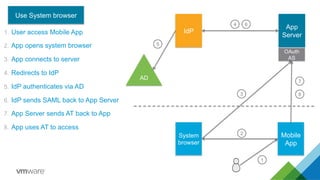
Use System browser
System
browser
8
1.  User access Mobile App
2.  App opens system browser
3.  App connects to server
4.  Redirects to IdP
5.  IdP authenticates via AD
6.  IdP sends SAML back to App Server
7.  App Server sends AT back to App
8.  App uses AT to access
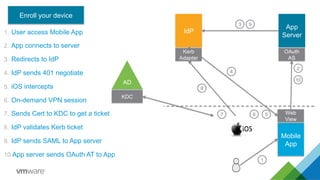
1.  User access Mobile App
2.  App connects to server
3.  Redirects to IdP
4.  IdP sends 401 negotiate
5.  iOS intercepts
6.  On-demand VPN session
7.  Sends Cert to KDC to get a ticket
8.  IdP validates Kerb ticket
9.  IdP sends SAML to App server
10. App server sends OAuth AT to App
Mobile
App
Web
View
2
3
4
5
IdP
Kerb
Adapter
AD
KDC
67
8
9
10
App
Server
OAuth
AS
Enroll your device
1
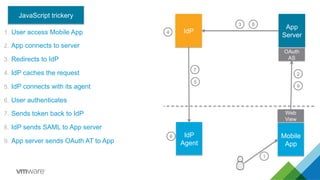
1.  User access Mobile App
2.  App connects to server
3.  Redirects to IdP
4.  IdP caches the request
5.  IdP connects with its agent
6.  User authenticates
7.  Sends token back to IdP
8.  IdP sends SAML to App server
9.  App server sends OAuth AT to App
1
Mobile
App
Web
View
2
3
4
5
IdP
6
7
8
App
Server
OAuth
AS
IdP
Agent
9
JavaScript trickery
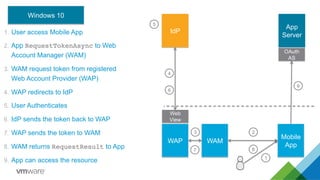
1.  User access Mobile App
2.  App RequestTokenAsync to Web
Account Manager (WAM)
3.  WAM request token from registered
Web Account Provider (WAP)
4.  WAP redirects to IdP
5.  User Authenticates
6.  IdP sends the token back to WAP
7.  WAP sends the token to WAM
8.  WAM returns RequestResult to App
9.  App can access the resource 1
Mobile
App
23
4
5
IdP
6
7 8
App
Server
OAuth
AS
WAP
9
WAM
Web
View
Windows 10
1
Mobile
App
2
4
5
IdP
AD
6
7
App
Server
OAuth
AS
NAPPS
Token
Agent
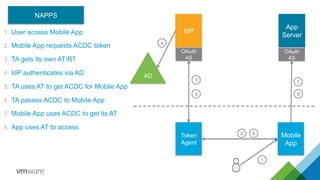
1.  User access Mobile App
2.  Mobile App requests ACDC token
3.  TA gets its own AT/RT
4.  IdP authenticates via AD
5.  TA uses AT to get ACDC for Mobile App
6.  TA passes ACDC to Mobile App
7.  Mobile App uses ACDC to get its AT
8.  App uses AT to access
OAuth
AS
3
8
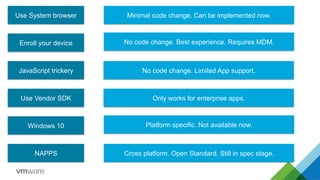
Summary
Everything will be amazing but no one will be happy
Use System browser
Enroll your device
JavaScript trickery
Windows 10
NAPPS
Use Vendor SDK
Minimal code change. Can be implemented now.
No code change. Best experience. Requires MDM.
Cross platform. Open Standard. Still in spec stage.
No code change. Limited App support.
Only works for enterprise apps.
Platform specific. Not available now.
Q & A
Ashish Jain
@itickr

CIS 2015 SSO for Mobile and Web Apps Ashish Jain

  • 1.
    © 2014 VMwareInc. All rights reserved. SSO for Mobile and Web Apps Ashish Jain @itickr CIS 2015
  • 2.
    What we willcover in this Session ? 2 1 Why is this important ? 2 What’s the current experience? 3 What’s the desired experience ? What are my options ? What’s the challenge ? Q & A 4 5 6
  • 3.
    Why is thisimportant?
  • 9.
  • 10.
    Mobile App •  Clickon Mobile App •  Enter server and user information. Tenant discovery happens. •  Click login. Get redirected to login screen (AD or else) •  Enter AD credentials (or local/MFA) •  You have access Web App •  Open Mobile Safari •  Enter web url – e.g. https:// www.salesforce.com •  Click login. Get redirected to login screen (AD or else) •  Enter AD credentials (or local/MFA) •  You have access. 10
  • 11.
    Mobile App •  StartVPN app •  Start SecurID App. •  Enter SecurID pin. •  Enter SecurID passcode on VPN app •  Click on Mobile App •  Enter server and user information. Tenant discovery happens. •  Click login. Get redirected to login screen (AD or else) •  Enter AD credentials (or local/MFA) •  You have access Web App •  Start VPN app •  Start SecurID App. •  Enter SecurID pin. •  Enter SecurID passcode on VPN app •  Open Mobile Safari •  Enter web url – e.g. https:// www.salesforce.com •  Click login. Get redirected to login screen (AD or else) •  Enter AD credentials (or local/MFA) •  You have access. 11
  • 12.
  • 15.
  • 16.
    Mobile SSO flow 1. User access Mobile App 2.  App connects to server 3.  Redirects to IdP 4.  IdP authenticates via AD 5.  IdP sends SAML back to App Server 6.  App Server sends AT back to App 7.  App uses AT to access 1 Mobile App Web View 2 3 4 5 IdP AD 6 7 App Server OAuth AS SAML OAuth
  • 17.
    Mobile SSO flow 1. User access Mobile App 2.  App connects to server 3.  Redirects to IdP 4.  IdP authenticates via AD 5.  IdP sends SAML back to App Server 6.  App Server sends AT back to App 7.  App uses AT to access Mobile App Web View 2 3 4 5 IdP AD 6 7 Mobile App OAuth AS App ServerSAML OAuth 1
  • 18.
    Mobile SSO flow 1. User access Mobile App 2.  App connects to server 3.  Redirects to IdP 4.  IdP authenticates via AD 5.  IdP sends SAML back to App Server 6.  App Server sends AT back to App 7.  App uses AT to access Mobile App Web View 2 3 4 5 IdP AD 6 7 Mobile App OAuth AS App Server Challenges •  Authentication per mobile app •  No validation of access token •  No clean up of cached / offline data OAuth SAML 1
  • 19.
    What are myoptions ?
  • 20.
    Use System browser Enrollyour device JavaScript trickery Windows 10 NAPPS Use Vendor SDK
  • 21.
    1 Mobile App 2 3 4 5 IdP AD 6 7 App Server OAuth AS Use System browser System browser 8 1. User access Mobile App 2.  App opens system browser 3.  App connects to server 4.  Redirects to IdP 5.  IdP authenticates via AD 6.  IdP sends SAML back to App Server 7.  App Server sends AT back to App 8.  App uses AT to access
  • 22.
    1.  User accessMobile App 2.  App connects to server 3.  Redirects to IdP 4.  IdP sends 401 negotiate 5.  iOS intercepts 6.  On-demand VPN session 7.  Sends Cert to KDC to get a ticket 8.  IdP validates Kerb ticket 9.  IdP sends SAML to App server 10. App server sends OAuth AT to App Mobile App Web View 2 3 4 5 IdP Kerb Adapter AD KDC 67 8 9 10 App Server OAuth AS Enroll your device 1
  • 23.
    1.  User accessMobile App 2.  App connects to server 3.  Redirects to IdP 4.  IdP caches the request 5.  IdP connects with its agent 6.  User authenticates 7.  Sends token back to IdP 8.  IdP sends SAML to App server 9.  App server sends OAuth AT to App 1 Mobile App Web View 2 3 4 5 IdP 6 7 8 App Server OAuth AS IdP Agent 9 JavaScript trickery
  • 24.
    1.  User accessMobile App 2.  App RequestTokenAsync to Web Account Manager (WAM) 3.  WAM request token from registered Web Account Provider (WAP) 4.  WAP redirects to IdP 5.  User Authenticates 6.  IdP sends the token back to WAP 7.  WAP sends the token to WAM 8.  WAM returns RequestResult to App 9.  App can access the resource 1 Mobile App 23 4 5 IdP 6 7 8 App Server OAuth AS WAP 9 WAM Web View Windows 10
  • 25.
    1 Mobile App 2 4 5 IdP AD 6 7 App Server OAuth AS NAPPS Token Agent 1.  User accessMobile App 2.  Mobile App requests ACDC token 3.  TA gets its own AT/RT 4.  IdP authenticates via AD 5.  TA uses AT to get ACDC for Mobile App 6.  TA passes ACDC to Mobile App 7.  Mobile App uses ACDC to get its AT 8.  App uses AT to access OAuth AS 3 8
  • 26.
  • 27.
    Everything will beamazing but no one will be happy
  • 28.
    Use System browser Enrollyour device JavaScript trickery Windows 10 NAPPS Use Vendor SDK Minimal code change. Can be implemented now. No code change. Best experience. Requires MDM. Cross platform. Open Standard. Still in spec stage. No code change. Limited App support. Only works for enterprise apps. Platform specific. Not available now.
  • 29.
    Q & A AshishJain @itickr