Chapter 01
COURSE CODE: CEB 40403
USE OF MATLAB IN PROBLEM SOLVING
4/5/2016 DR. MOHAMMED DANISH/UNIKL-MICET 1
Learning
outcomes
4/5/2016
Simple calculations through MATLAB
Use of variables and functions
Matrices and Vectors
Plotting and visualization in MATLAB
DR. MOHAMMED DANISH/UNIKL-MICET 2
Introduction
High level language for technical computing
Stands for MATrix LABoratory
Everything is a matrix - easy to do linear algebra
4/5/2016 DR. MOHAMMED DANISH/UNIKL-MICET 3
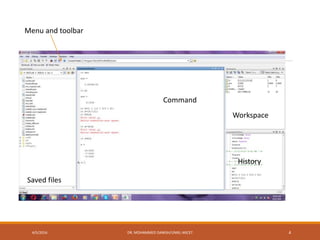
Menu and toolbar
Workspace
History
Command
Saved files
4/5/2016 DR. MOHAMMED DANISH/UNIKL-MICET 4
Simple calculations
a= b+c
If b=4, c=7
Then a=11
Similarly, a= z+b(c+d)
If z=-2, b=3, c=2 and d=6
Then, a=-2+3(2+6)=16
4/5/2016 DR. MOHAMMED DANISH/UNIKL-MICET 5
Use of Variables and
functions
f(x)=a.x+b
Where x=independent variable and ‘a’
and ‘b’ are constants, and f(x) is
dependent variable.
If, a=2, and b=3, and x=-1, 0, 1
Then f(x)=1, 2, and 5
4/5/2016 DR. MOHAMMED DANISH/UNIKL-MICET 6
Variable names
MATLAB legal names consist of any combination of letters and digits,
starting with a letter. Eg. NetCost, Left2Pay, X3, x3 Z25c5 etc.
These are not allowed as variable names in MATLAB eg., Net-Cost,
2Pay, %x, @sign, sin cos, tan etc.
Special names: you should avoid using eps, pi, I, j (both represents
imaginary number
1
4/5/2016 DR. MOHAMMED DANISH/UNIKL-MICET 7
Functions
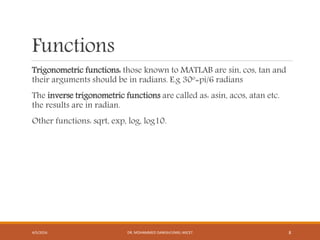
Trigonometric functions: those known to MATLAB are sin, cos, tan and
their arguments should be in radians. E.g 30o=pi/6 radians
The inverse trigonometric functions are called as: asin, acos, atan etc.
the results are in radian.
Other functions: sqrt, exp, log, log10.
4/5/2016 DR. MOHAMMED DANISH/UNIKL-MICET 8
Vectors
Vectors are classified as in two types:
Row vector: they are list of numbers separated by either commas or
spaces. The number of entries is known as the length of the vector and
the entries are often referred as “elements” or “components” of the
vector.
>>v=[1 3, sqrt(5)]
Column vector: to create a column vector type the left square bracket[
and then enter the element with a semicolon between them.
>>cv=[1; 2; 3; 4]
4/5/2016 DR. MOHAMMED DANISH/UNIKL-MICET 9
Matrices and Vectors
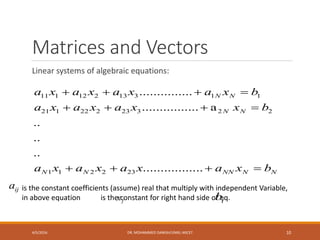
Linear systems of algebraic equations:
11 1 12 2 13 3 1 1
21 1 22 2 23 3 2 2
1 1 2 2 23
...............
................ a
..
..
..
.................
N N
N N
N N NN N N
a x a x a x a x b
a x a x a x x b
a x a x a x a x b
   
   
   
is the constant coefficients (assume) real that multiply with independent Variable,
in above equation is the constant for right hand side of eq.
ija
jx ib
4/5/2016 DR. MOHAMMED DANISH/UNIKL-MICET 10
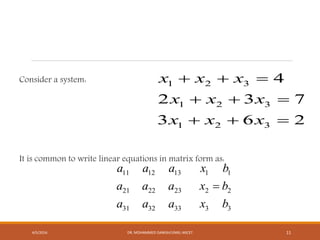
Consider a system:
It is common to write linear equations in matrix form as:
1 2 3
1 2 3
1 2 3
4
2 3 7
3 6 2
x x x
x x x
x x x
  
  
  
11 12 13 1 1
21 22 23 2 2
31 32 33 3 3
a a a x b
a a a x b
a a a x b

4/5/2016 DR. MOHAMMED DANISH/UNIKL-MICET 11
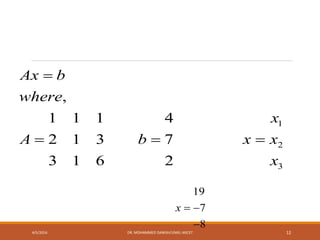
1
2
3
,
1 1 1 4
2 1 3 7
3 1 6 2
Ax b
where
x
A b x x
x

  
19
7
8
x  

4/5/2016 DR. MOHAMMED DANISH/UNIKL-MICET 12
Plotting and visualization
MATLAB used plot command to create two dimensional plots.
The instruction can be written in following way: plot(x,y)
The arguments x and y are each a vector (one-dimensional array). The
two vectors must have the same number of elements.
The x-values on the abscissa (horizontal axis) and the y-values on the
ordinate (vertical axis)
4/5/2016 DR. MOHAMMED DANISH/UNIKL-MICET 13
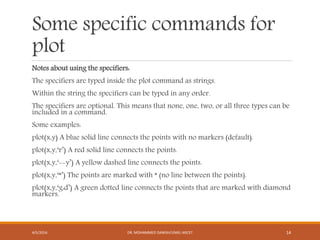
Some specific commands for
plot
Notes about using the specifiers:
The specifiers are typed inside the plot command as strings.
Within the string the specifiers can be typed in any order.
The specifiers are optional. This means that none, one, two, or all three types can be
included in a command.
Some examples:
plot(x,y) A blue solid line connects the points with no markers (default).
plot(x,y,‘r’) A red solid line connects the points.
plot(x,y,‘--y’) A yellow dashed line connects the points.
plot(x,y,‘*’) The points are marked with * (no line between the points).
plot(x,y,‘g:d’) A green dotted line connects the points that are marked with diamond
markers.
4/5/2016 DR. MOHAMMED DANISH/UNIKL-MICET 14
Example plot
Year 1988 1989 1990 1991 1992 1993 1994
Sales
(millions)
8 12 20 22 18 24 27
To plot this data, the list of years is assigned to one vector (namely yr),
and the corresponding sales data is assigned to a second vector (named sle). The
command window where the vectors are created and the plot command is used is
shown below:
>> yr=[1988:1:1994];
>> sle=[8 12 20 22 18 24 27];
>> plot(yr,sle,'--r*','linewidth',2,'markersize',12)
4/5/2016 DR. MOHAMMED DANISH/UNIKL-MICET 15
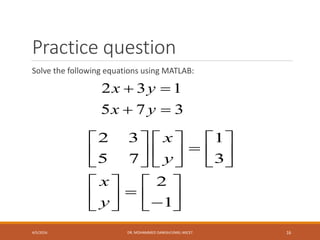
Practice question
Solve the following equations using MATLAB:
2 3 1
5 7 3
x y
x y
 
 
2 3 1
5 7 3
2
1
x
y
x
y
     
     
     
   
      
4/5/2016 DR. MOHAMMED DANISH/UNIKL-MICET 16
Summary of topic
Simple calculation using MATLAB
Difference between function and variable, Row vector and column
vector, vector and matrices.
Formation of matrices from linear equations
Use MATLAB in plot and visualization.
4/5/2016 DR. MOHAMMED DANISH/UNIKL-MICET 17
End of slides for
chapter one
Dr. Mohammed Danish
Sr. Lecturer, Malaysian Institute of Chemical and
bioengineering Technology (MICET)-Universiti
Kuala Lumpur, Alor Gajah, Melaka, Malaysia
4/5/2016 DR. MOHAMMED DANISH/UNIKL-MICET 18

01 Chapter MATLAB introduction

  • 1.
    Chapter 01 COURSE CODE:CEB 40403 USE OF MATLAB IN PROBLEM SOLVING 4/5/2016 DR. MOHAMMED DANISH/UNIKL-MICET 1
  • 2.
    Learning outcomes 4/5/2016 Simple calculations throughMATLAB Use of variables and functions Matrices and Vectors Plotting and visualization in MATLAB DR. MOHAMMED DANISH/UNIKL-MICET 2
  • 3.
    Introduction High level languagefor technical computing Stands for MATrix LABoratory Everything is a matrix - easy to do linear algebra 4/5/2016 DR. MOHAMMED DANISH/UNIKL-MICET 3
  • 4.
    Menu and toolbar Workspace History Command Savedfiles 4/5/2016 DR. MOHAMMED DANISH/UNIKL-MICET 4
  • 5.
    Simple calculations a= b+c Ifb=4, c=7 Then a=11 Similarly, a= z+b(c+d) If z=-2, b=3, c=2 and d=6 Then, a=-2+3(2+6)=16 4/5/2016 DR. MOHAMMED DANISH/UNIKL-MICET 5
  • 6.
    Use of Variablesand functions f(x)=a.x+b Where x=independent variable and ‘a’ and ‘b’ are constants, and f(x) is dependent variable. If, a=2, and b=3, and x=-1, 0, 1 Then f(x)=1, 2, and 5 4/5/2016 DR. MOHAMMED DANISH/UNIKL-MICET 6
  • 7.
    Variable names MATLAB legalnames consist of any combination of letters and digits, starting with a letter. Eg. NetCost, Left2Pay, X3, x3 Z25c5 etc. These are not allowed as variable names in MATLAB eg., Net-Cost, 2Pay, %x, @sign, sin cos, tan etc. Special names: you should avoid using eps, pi, I, j (both represents imaginary number 1 4/5/2016 DR. MOHAMMED DANISH/UNIKL-MICET 7
  • 8.
    Functions Trigonometric functions: thoseknown to MATLAB are sin, cos, tan and their arguments should be in radians. E.g 30o=pi/6 radians The inverse trigonometric functions are called as: asin, acos, atan etc. the results are in radian. Other functions: sqrt, exp, log, log10. 4/5/2016 DR. MOHAMMED DANISH/UNIKL-MICET 8
  • 9.
    Vectors Vectors are classifiedas in two types: Row vector: they are list of numbers separated by either commas or spaces. The number of entries is known as the length of the vector and the entries are often referred as “elements” or “components” of the vector. >>v=[1 3, sqrt(5)] Column vector: to create a column vector type the left square bracket[ and then enter the element with a semicolon between them. >>cv=[1; 2; 3; 4] 4/5/2016 DR. MOHAMMED DANISH/UNIKL-MICET 9
  • 10.
    Matrices and Vectors Linearsystems of algebraic equations: 11 1 12 2 13 3 1 1 21 1 22 2 23 3 2 2 1 1 2 2 23 ............... ................ a .. .. .. ................. N N N N N N NN N N a x a x a x a x b a x a x a x x b a x a x a x a x b             is the constant coefficients (assume) real that multiply with independent Variable, in above equation is the constant for right hand side of eq. ija jx ib 4/5/2016 DR. MOHAMMED DANISH/UNIKL-MICET 10
  • 11.
    Consider a system: Itis common to write linear equations in matrix form as: 1 2 3 1 2 3 1 2 3 4 2 3 7 3 6 2 x x x x x x x x x          11 12 13 1 1 21 22 23 2 2 31 32 33 3 3 a a a x b a a a x b a a a x b  4/5/2016 DR. MOHAMMED DANISH/UNIKL-MICET 11
  • 12.
    1 2 3 , 1 1 14 2 1 3 7 3 1 6 2 Ax b where x A b x x x     19 7 8 x    4/5/2016 DR. MOHAMMED DANISH/UNIKL-MICET 12
  • 13.
    Plotting and visualization MATLABused plot command to create two dimensional plots. The instruction can be written in following way: plot(x,y) The arguments x and y are each a vector (one-dimensional array). The two vectors must have the same number of elements. The x-values on the abscissa (horizontal axis) and the y-values on the ordinate (vertical axis) 4/5/2016 DR. MOHAMMED DANISH/UNIKL-MICET 13
  • 14.
    Some specific commandsfor plot Notes about using the specifiers: The specifiers are typed inside the plot command as strings. Within the string the specifiers can be typed in any order. The specifiers are optional. This means that none, one, two, or all three types can be included in a command. Some examples: plot(x,y) A blue solid line connects the points with no markers (default). plot(x,y,‘r’) A red solid line connects the points. plot(x,y,‘--y’) A yellow dashed line connects the points. plot(x,y,‘*’) The points are marked with * (no line between the points). plot(x,y,‘g:d’) A green dotted line connects the points that are marked with diamond markers. 4/5/2016 DR. MOHAMMED DANISH/UNIKL-MICET 14
  • 15.
    Example plot Year 19881989 1990 1991 1992 1993 1994 Sales (millions) 8 12 20 22 18 24 27 To plot this data, the list of years is assigned to one vector (namely yr), and the corresponding sales data is assigned to a second vector (named sle). The command window where the vectors are created and the plot command is used is shown below: >> yr=[1988:1:1994]; >> sle=[8 12 20 22 18 24 27]; >> plot(yr,sle,'--r*','linewidth',2,'markersize',12) 4/5/2016 DR. MOHAMMED DANISH/UNIKL-MICET 15
  • 16.
    Practice question Solve thefollowing equations using MATLAB: 2 3 1 5 7 3 x y x y     2 3 1 5 7 3 2 1 x y x y                              4/5/2016 DR. MOHAMMED DANISH/UNIKL-MICET 16
  • 17.
    Summary of topic Simplecalculation using MATLAB Difference between function and variable, Row vector and column vector, vector and matrices. Formation of matrices from linear equations Use MATLAB in plot and visualization. 4/5/2016 DR. MOHAMMED DANISH/UNIKL-MICET 17
  • 18.
    End of slidesfor chapter one Dr. Mohammed Danish Sr. Lecturer, Malaysian Institute of Chemical and bioengineering Technology (MICET)-Universiti Kuala Lumpur, Alor Gajah, Melaka, Malaysia 4/5/2016 DR. MOHAMMED DANISH/UNIKL-MICET 18