VIRTUALIZATION: BACK BONE
OF CLOUD COMPUTING
Rajinder Sandhu
Researcher in Cloud Computing and
Virtualization
Blog:- errajindersandhu.blogspot.com
OUTLINE
 Introduction
 Flavor of Virtualization
 Server Virtualization
 Properties of Virtualization
 Benefits of Virtualization
INTRODUCTION
 Used by IBM for Mainframe Computers.
 According to Wikipedia:
 Virtualization in computing, is the creation of a
virtual (rather than actual) version of something,
such as a hardware platform, operating system, a
storage device or network resources.
 According to Gartner:
 Virtualization is the abstraction of IT resources in a
way that masks the physical nature and boundaries
of those resources from resource users. An IT
resource can be a server, a client, storage, networks,
applications or operating systems
FLAVOR OF VIRTUALIZATION
 Hardware or Server Virtualization
 Storage Virtualization
 Network Virtualization
 Desktop Virtualization
 Operating System Virtualization
 Application Virtualization
SERVER VIRTUALIZATION
 Server virtualization divides a physical server
into multiple virtual servers, known as virtual
machines (VMs), using a hypervisor such as
VMware vSphere, Microsoft Hyper-V or Citrix
XenServer.
 Type of Server Virtualization:
 Full Virtualization
 OS Assistance or Para Virtualization
 Hardware Assistance Virtualization.
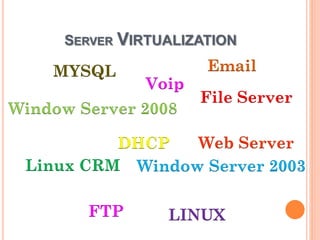
SERVER VIRTUALIZATION
MYSQL
File Server
DHCP
Window Server 2003
LINUX
Linux CRM
Window Server 2008
Voip
Web Server
FTP
Email
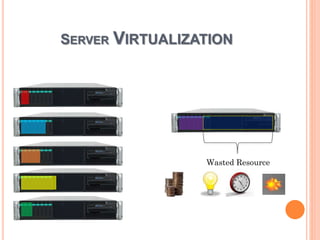
SERVER VIRTUALIZATION
Wasted Resource
SERVER VIRTUALIZATION
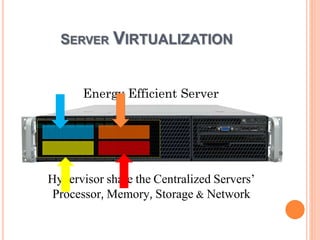
Hypervisor share the Centralized Servers’
Processor, Memory, Storage & Network
Energy Efficient Server
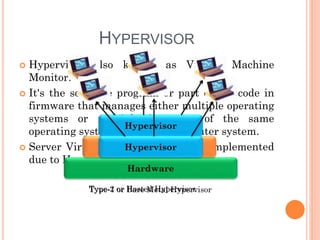
HYPERVISOR
 Hypervisor also known as Virtual Machine
Monitor.
 It's the software program or part of the code in
firmware that manages either multiple operating
systems or multiple instances of the same
operating system on a single computer system.
 Server Virtualization technology is implemented
due to Hypervisors.
Hardware
Type-2 or Hosted Hypervisor
Operating System
Hypervisor
Type-1 or Bare Metal Hypervisor
Hypervisor
VIRTUAL APPLIANCE
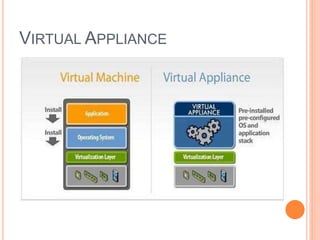
 Virtual Appliances are:
 Pre- Installed.
 Pre- Configured.
 Ready to run.
 Virtual appliances are fundamentally changing
how software is developed, distributed, deployed,
and managed.
 Customers can instantly leverage key capabilities
such as high availability, scalability, backup, and
live migration.
VIRTUAL MACHINE & VIRTUAL
APPLIANCE
 Virtual machine has four key virtualized
resources (CPU, RAM, Storage, and Networking);
but requires the installation of an Operating
System and runs on one or more applications.
 Virtual appliances are a unified offering of JeOS
(Just enough Operating System) and application.
 Software used to create Appliance:
 Vmware Studio
 rPath
 vKernal
 LAMP (Linux Apache MySql Php) stack
 WordPress appliance
 Blog running in Minutes
 Domain Controller appliance (Samba
Based)
 Support netlogon, network attached storage for
domain users, roaming profiles, and PnP printing
services.
 Zimbra appliance
 Groupware Software- email, calendar services
 FOG Project
 Let to clone any Operating System
EXAMPLES
 Pros:
 Resource Sharing and Allocation.
 Virtual Machine Portability.
 Load Balancing.
 Easier Backup and Restore.
 Simplified Disaster Recovery.
 Cons:
 Estimate resources in advance.
 Required new skills.
 Complex root cause analysis.
 Virtual habits.
PROS & CONS OF SERVER VIRTUALIZATION
PROPERTIES OF VIRTUALIZATION
 Partitioning: In virtualization, many applications
and operating systems are supported in a single
physical system by partitioning the available
resources.
 Isolation: Each virtual machine is isolated from its
host physical system and other virtualized machines.
Because of this isolation, if one virtual instance
crashes, it doesn’t affect the other virtual machines.
 Encapsulation: A virtual machine can be
represented (and even stored) as a single file, so you
can identify it easily based on the service it provides.
Therefore, encapsulation can protect each application
so that it doesn’t interfere with another application.
WHY USE VIRTUALIZATION
 Save Money.
 Optimize IT Center Assets
 Green Computing.
 Simplify Disaster Recovery.
 Portability & Maintainability
 Scalability & Consolidation
 Reliability & Protection
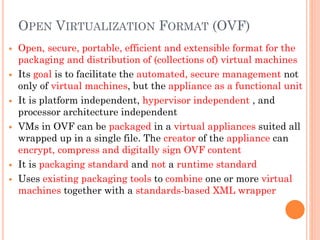
 Open, secure, portable, efficient and extensible format for the
packaging and distribution of (collections of) virtual machines
 Its goal is to facilitate the automated, secure management not
only of virtual machines, but the appliance as a functional unit
 It is platform independent, hypervisor independent , and
processor architecture independent
 VMs in OVF can be packaged in a virtual appliances suited all
wrapped up in a single file. The creator of the appliance can
encrypt, compress and digitally sign OVF content
 It is packaging standard and not a runtime standard
 Uses existing packaging tools to combine one or more virtual
machines together with a standards-based XML wrapper
OPEN VIRTUALIZATION FORMAT (OVF)
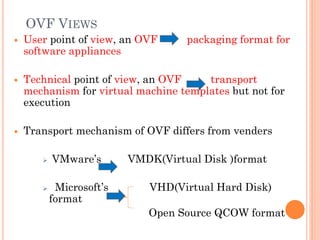
 User point of view, an OVF packaging format for
software appliances
 Technical point of view, an OVF transport
mechanism for virtual machine templates but not for
execution
 Transport mechanism of OVF differs from venders
 VMware’s VMDK(Virtual Disk )format
 Microsoft’s VHD(Virtual Hard Disk)
format
Open Source QCOW format
OVF VIEWS
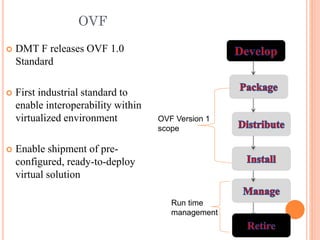
 DMT F releases OVF 1.0
Standard
 First industrial standard to
enable interoperability within
virtualized environment
 Enable shipment of pre-
configured, ready-to-deploy
virtual solution
OVF Version 1
scope
Run time
management
OVF
DD
RR
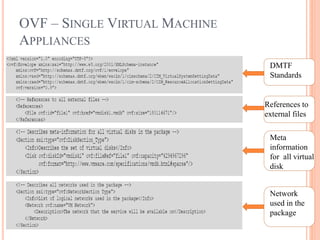
References to
external files
DMTF
Standards
DD
Meta
information
for all virtual
disk
DD
Network
used in the
package
OVF – SINGLE VIRTUAL MACHINE
APPLIANCES
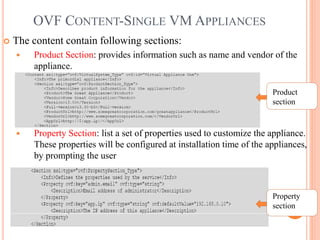
 The content contain following sections:
 Product Section: provides information such as name and vendor of the
appliance.
 Property Section: list a set of properties used to customize the appliance.
These properties will be configured at installation time of the appliances,
by prompting the user
DD
Product
section
DD
Property
section
OVF CONTENT-SINGLE VM APPLIANCES
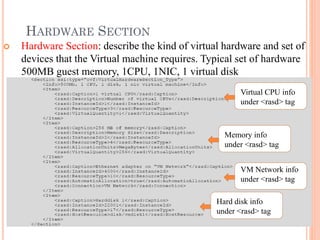
 Hardware Section: describe the kind of virtual hardware and set of
devices that the Virtual machine requires. Typical set of hardware
500MB guest memory, 1CPU, 1NIC, 1 virtual disk
DDA
Virtual CPU info
under <rasd> tag
DDA
Memory info
under <rasd> tag
DDA
VM Network info
under <rasd> tag
DDA
Hard disk info
under <rasd> tag
HARDWARE SECTION
 OVF package does not guarantee successful installation of entire
system on every hardware /CPU
 Success of system deployment depends on the target hypervisor
support for the virtual disk format
 Not all the available hypervisor are OVF complaint
 OVF support all newer virtual disk formats but not all available
hypervisors are compatible with newer virtual disk formats
 OVF package deployed system may not be able to access all
peripheral hardware devices due limited hardware support by the
target hypervisor
 Installation of business application will fail ,if an OVF package is
installed on a platform that does not offer the same hardware
devices that are required by the guest OS of the business
application that is include in the appliances
LIMITATION OF OVF
Virtualization and Open Virtualization Format (OVF)

Virtualization and Open Virtualization Format (OVF)

  • 1.
    VIRTUALIZATION: BACK BONE OFCLOUD COMPUTING Rajinder Sandhu Researcher in Cloud Computing and Virtualization Blog:- errajindersandhu.blogspot.com
  • 2.
    OUTLINE  Introduction  Flavorof Virtualization  Server Virtualization  Properties of Virtualization  Benefits of Virtualization
  • 3.
    INTRODUCTION  Used byIBM for Mainframe Computers.  According to Wikipedia:  Virtualization in computing, is the creation of a virtual (rather than actual) version of something, such as a hardware platform, operating system, a storage device or network resources.  According to Gartner:  Virtualization is the abstraction of IT resources in a way that masks the physical nature and boundaries of those resources from resource users. An IT resource can be a server, a client, storage, networks, applications or operating systems
  • 4.
    FLAVOR OF VIRTUALIZATION Hardware or Server Virtualization  Storage Virtualization  Network Virtualization  Desktop Virtualization  Operating System Virtualization  Application Virtualization
  • 5.
    SERVER VIRTUALIZATION  Servervirtualization divides a physical server into multiple virtual servers, known as virtual machines (VMs), using a hypervisor such as VMware vSphere, Microsoft Hyper-V or Citrix XenServer.  Type of Server Virtualization:  Full Virtualization  OS Assistance or Para Virtualization  Hardware Assistance Virtualization.
  • 6.
    SERVER VIRTUALIZATION MYSQL File Server DHCP WindowServer 2003 LINUX Linux CRM Window Server 2008 Voip Web Server FTP Email
  • 7.
  • 8.
    SERVER VIRTUALIZATION Hypervisor sharethe Centralized Servers’ Processor, Memory, Storage & Network Energy Efficient Server
  • 9.
    HYPERVISOR  Hypervisor alsoknown as Virtual Machine Monitor.  It's the software program or part of the code in firmware that manages either multiple operating systems or multiple instances of the same operating system on a single computer system.  Server Virtualization technology is implemented due to Hypervisors. Hardware Type-2 or Hosted Hypervisor Operating System Hypervisor Type-1 or Bare Metal Hypervisor Hypervisor
  • 10.
    VIRTUAL APPLIANCE  VirtualAppliances are:  Pre- Installed.  Pre- Configured.  Ready to run.  Virtual appliances are fundamentally changing how software is developed, distributed, deployed, and managed.  Customers can instantly leverage key capabilities such as high availability, scalability, backup, and live migration.
  • 11.
    VIRTUAL MACHINE &VIRTUAL APPLIANCE  Virtual machine has four key virtualized resources (CPU, RAM, Storage, and Networking); but requires the installation of an Operating System and runs on one or more applications.  Virtual appliances are a unified offering of JeOS (Just enough Operating System) and application.  Software used to create Appliance:  Vmware Studio  rPath  vKernal
  • 12.
     LAMP (LinuxApache MySql Php) stack  WordPress appliance  Blog running in Minutes  Domain Controller appliance (Samba Based)  Support netlogon, network attached storage for domain users, roaming profiles, and PnP printing services.  Zimbra appliance  Groupware Software- email, calendar services  FOG Project  Let to clone any Operating System EXAMPLES
  • 13.
     Pros:  ResourceSharing and Allocation.  Virtual Machine Portability.  Load Balancing.  Easier Backup and Restore.  Simplified Disaster Recovery.  Cons:  Estimate resources in advance.  Required new skills.  Complex root cause analysis.  Virtual habits. PROS & CONS OF SERVER VIRTUALIZATION
  • 14.
    PROPERTIES OF VIRTUALIZATION Partitioning: In virtualization, many applications and operating systems are supported in a single physical system by partitioning the available resources.  Isolation: Each virtual machine is isolated from its host physical system and other virtualized machines. Because of this isolation, if one virtual instance crashes, it doesn’t affect the other virtual machines.  Encapsulation: A virtual machine can be represented (and even stored) as a single file, so you can identify it easily based on the service it provides. Therefore, encapsulation can protect each application so that it doesn’t interfere with another application.
  • 15.
    WHY USE VIRTUALIZATION Save Money.  Optimize IT Center Assets  Green Computing.  Simplify Disaster Recovery.  Portability & Maintainability  Scalability & Consolidation  Reliability & Protection
  • 16.
     Open, secure,portable, efficient and extensible format for the packaging and distribution of (collections of) virtual machines  Its goal is to facilitate the automated, secure management not only of virtual machines, but the appliance as a functional unit  It is platform independent, hypervisor independent , and processor architecture independent  VMs in OVF can be packaged in a virtual appliances suited all wrapped up in a single file. The creator of the appliance can encrypt, compress and digitally sign OVF content  It is packaging standard and not a runtime standard  Uses existing packaging tools to combine one or more virtual machines together with a standards-based XML wrapper OPEN VIRTUALIZATION FORMAT (OVF)
  • 17.
     User pointof view, an OVF packaging format for software appliances  Technical point of view, an OVF transport mechanism for virtual machine templates but not for execution  Transport mechanism of OVF differs from venders  VMware’s VMDK(Virtual Disk )format  Microsoft’s VHD(Virtual Hard Disk) format Open Source QCOW format OVF VIEWS
  • 18.
     DMT Freleases OVF 1.0 Standard  First industrial standard to enable interoperability within virtualized environment  Enable shipment of pre- configured, ready-to-deploy virtual solution OVF Version 1 scope Run time management OVF
  • 19.
    DD RR References to external files DMTF Standards DD Meta information forall virtual disk DD Network used in the package OVF – SINGLE VIRTUAL MACHINE APPLIANCES
  • 20.
     The contentcontain following sections:  Product Section: provides information such as name and vendor of the appliance.  Property Section: list a set of properties used to customize the appliance. These properties will be configured at installation time of the appliances, by prompting the user DD Product section DD Property section OVF CONTENT-SINGLE VM APPLIANCES
  • 21.
     Hardware Section:describe the kind of virtual hardware and set of devices that the Virtual machine requires. Typical set of hardware 500MB guest memory, 1CPU, 1NIC, 1 virtual disk DDA Virtual CPU info under <rasd> tag DDA Memory info under <rasd> tag DDA VM Network info under <rasd> tag DDA Hard disk info under <rasd> tag HARDWARE SECTION
  • 22.
     OVF packagedoes not guarantee successful installation of entire system on every hardware /CPU  Success of system deployment depends on the target hypervisor support for the virtual disk format  Not all the available hypervisor are OVF complaint  OVF support all newer virtual disk formats but not all available hypervisors are compatible with newer virtual disk formats  OVF package deployed system may not be able to access all peripheral hardware devices due limited hardware support by the target hypervisor  Installation of business application will fail ,if an OVF package is installed on a platform that does not offer the same hardware devices that are required by the guest OS of the business application that is include in the appliances LIMITATION OF OVF