VMWare Studio &VMWare Studio &
vAPP-svAPP-s
VMUG - Bratislava - 21.05.2013VMUG - Bratislava - 21.05.2013
What is OVF?What is OVF?
Open Virtualization Format (OVF) is an
open standard for packaging and distributing
virtual appliances or more generally software to be run
in virtual machines
http://www.vmware.com/pdf/ovf_whitepaper_shttp://www.vmware.com/pdf/ovf_whitepaper_s
What is OVF?What is OVF?
• open standard VM Files and OVF DESCRIPTOR
• OVF descriptor - XML CFG file
• Actual standard 2.0
• Usually used 0.9, 1.0
http://www.dmtf.org/standards/ovfhttp://www.dmtf.org/standards/ovf
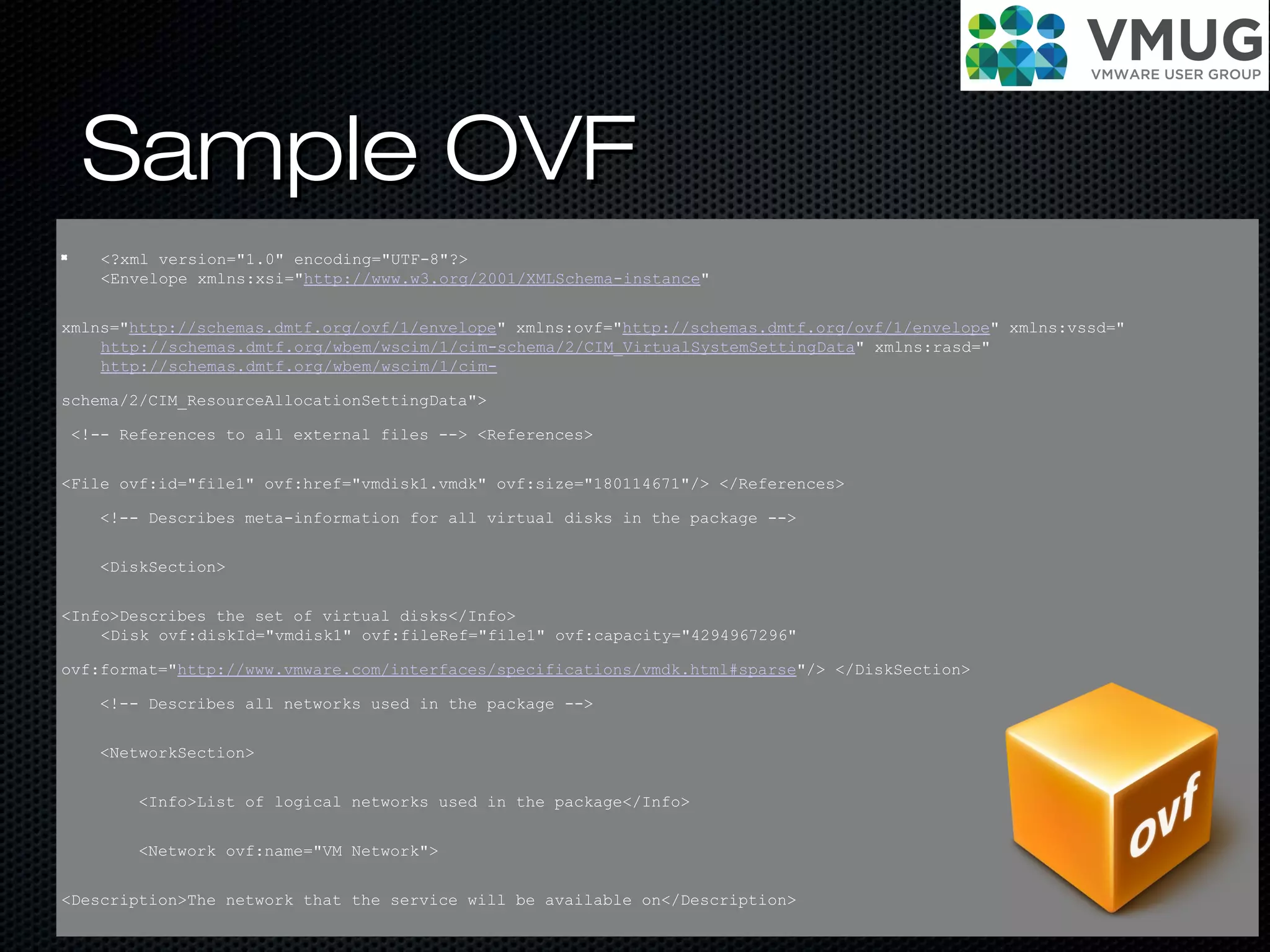
Sample OVFSample OVF
<?xml version="1.0" encoding="UTF-8"?>
<Envelope xmlns:xsi="http://www.w3.org/2001/XMLSchema-instance"
xmlns="http://schemas.dmtf.org/ovf/1/envelope" xmlns:ovf="http://schemas.dmtf.org/ovf/1/envelope" xmlns:vssd="
http://schemas.dmtf.org/wbem/wscim/1/cim-schema/2/CIM_VirtualSystemSettingData" xmlns:rasd="
http://schemas.dmtf.org/wbem/wscim/1/cim-
schema/2/CIM_ResourceAllocationSettingData">
<!-- References to all external files --> <References>
<File ovf:id="file1" ovf:href="vmdisk1.vmdk" ovf:size="180114671"/> </References>
<!-- Describes meta-information for all virtual disks in the package -->
<DiskSection>
<Info>Describes the set of virtual disks</Info>
<Disk ovf:diskId="vmdisk1" ovf:fileRef="file1" ovf:capacity="4294967296"
ovf:format="http://www.vmware.com/interfaces/specifications/vmdk.html#sparse"/> </DiskSection>
<!-- Describes all networks used in the package -->
<NetworkSection>
<Info>List of logical networks used in the package</Info>
<Network ovf:name="VM Network">
<Description>The network that the service will be available on</Description>
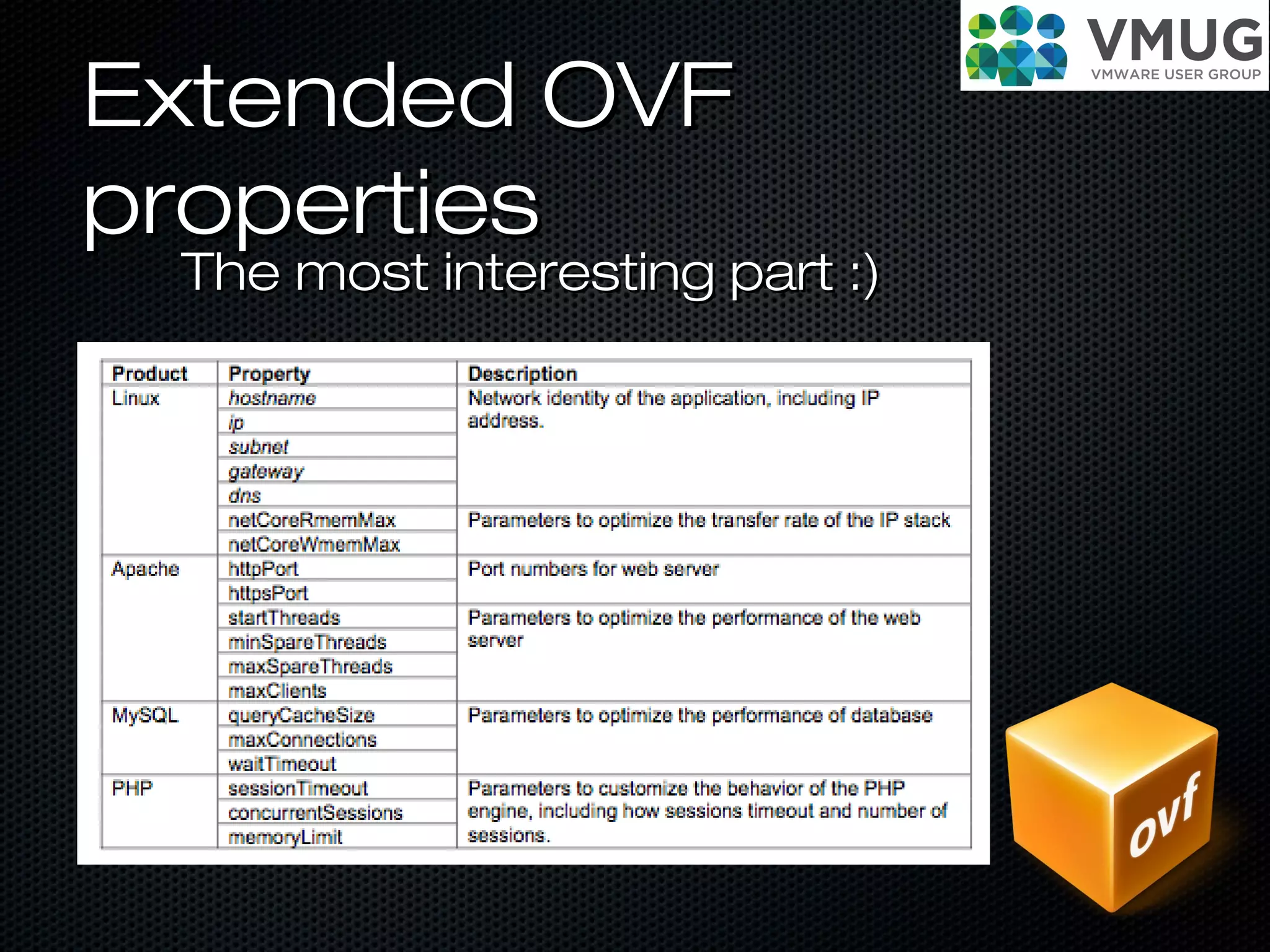
Extended OVFExtended OVF
propertiesproperties
The most interesting part :)The most interesting part :)
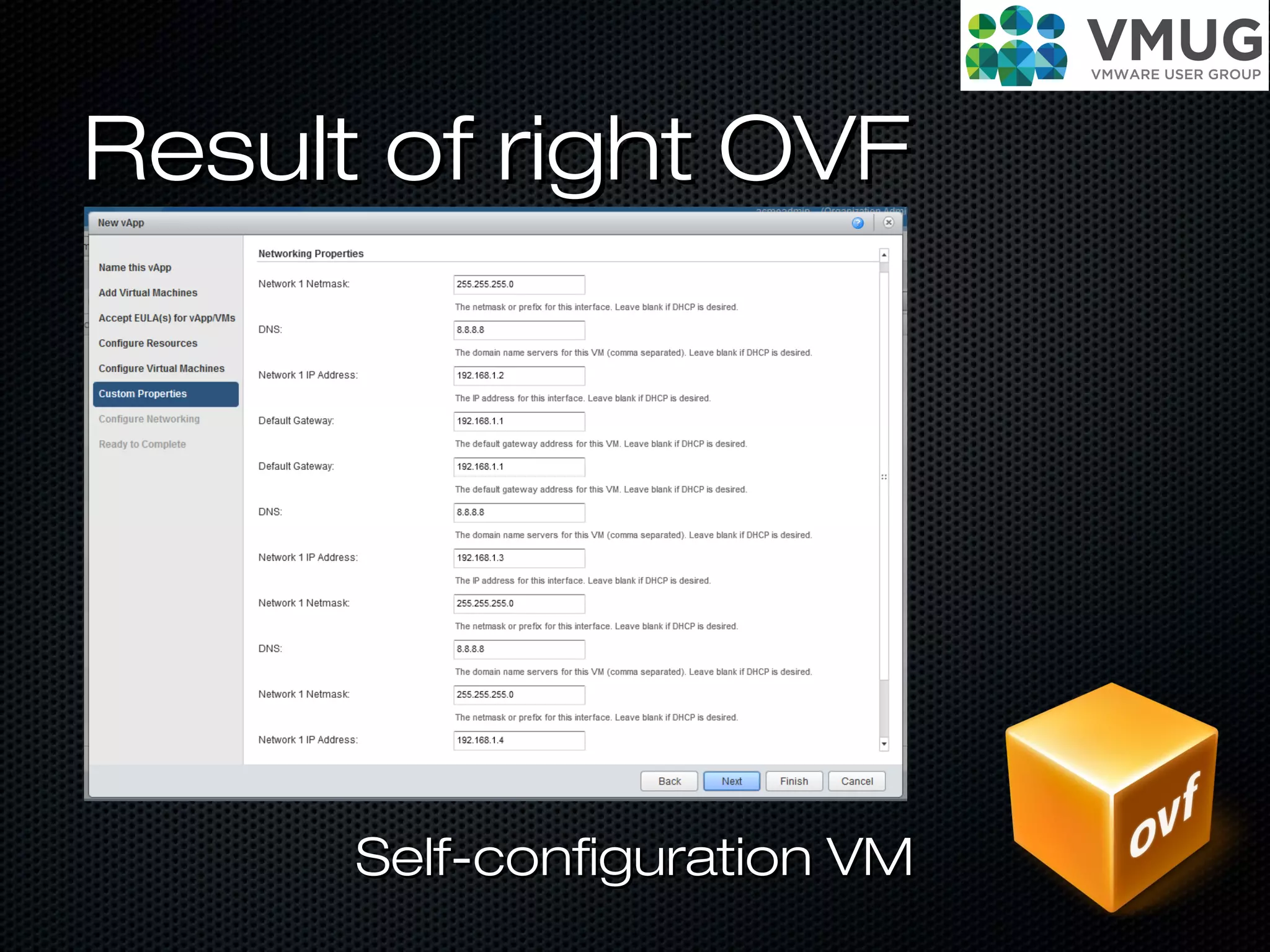
Result of right OVFResult of right OVF
Self-configuration VMSelf-configuration VM
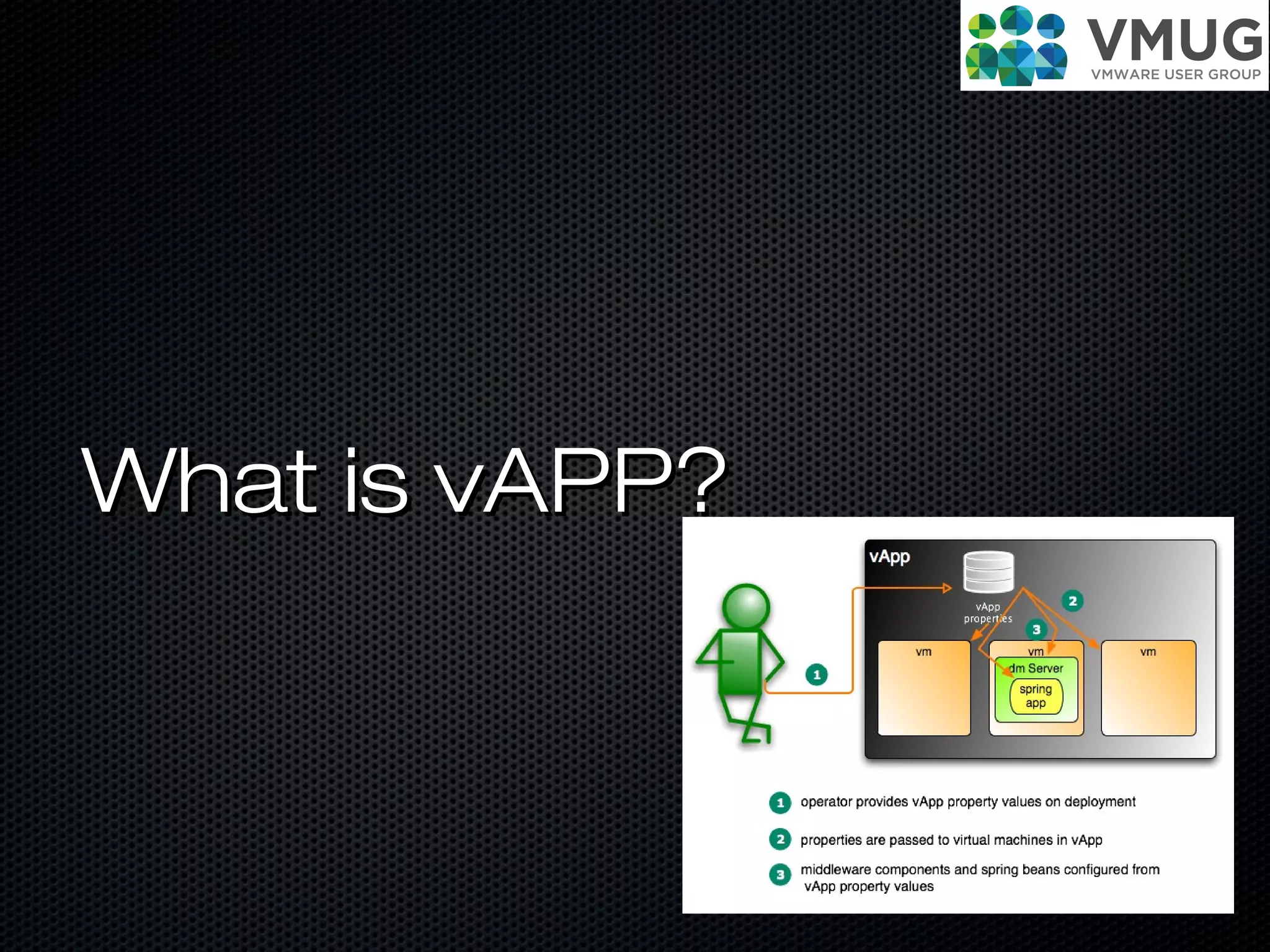
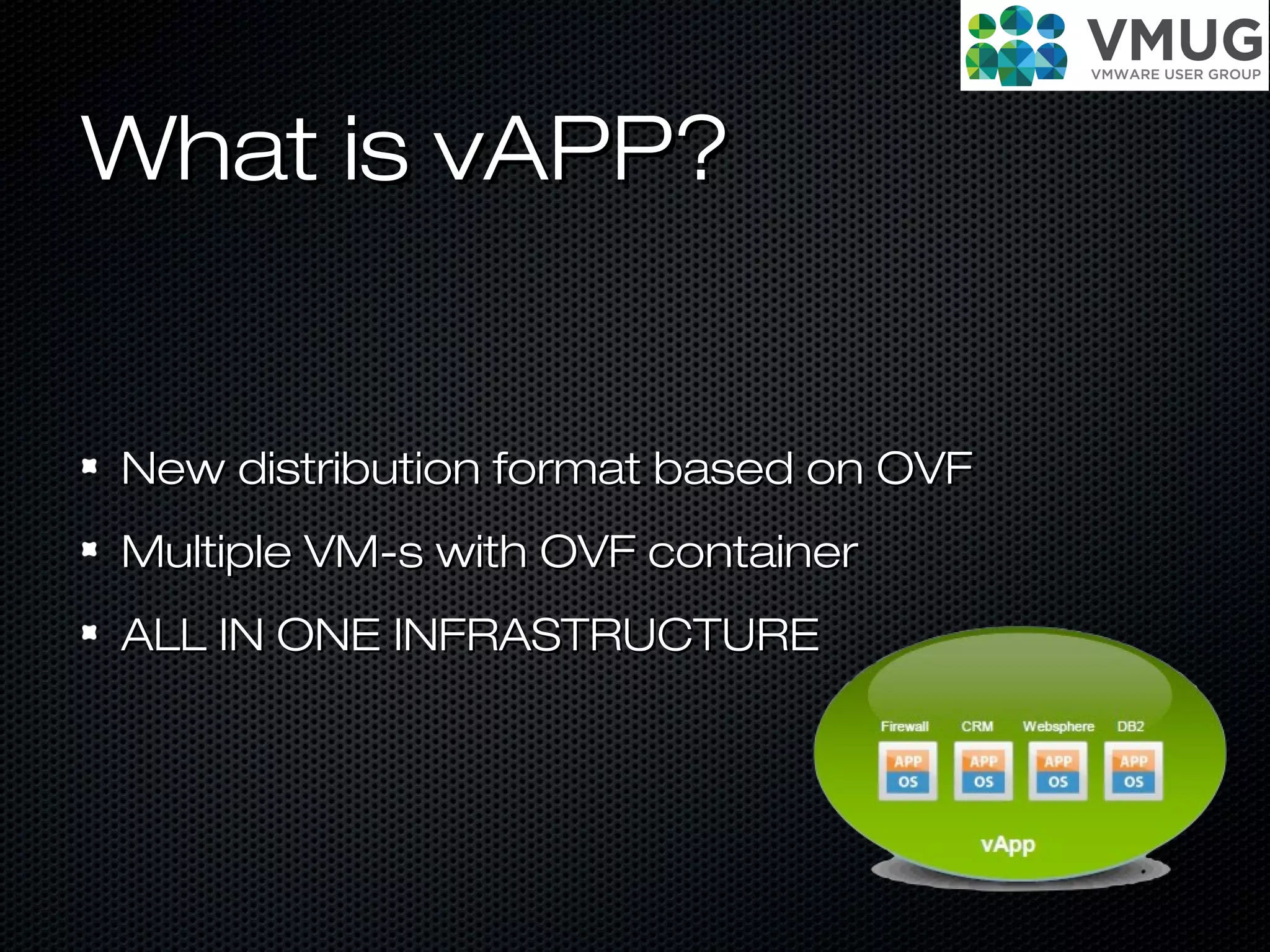
What is vAPP?What is vAPP?
New distribution format based on OVFNew distribution format based on OVF
Multiple VM-s with OVF containerMultiple VM-s with OVF container
ALL IN ONE INFRASTRUCTUREALL IN ONE INFRASTRUCTURE
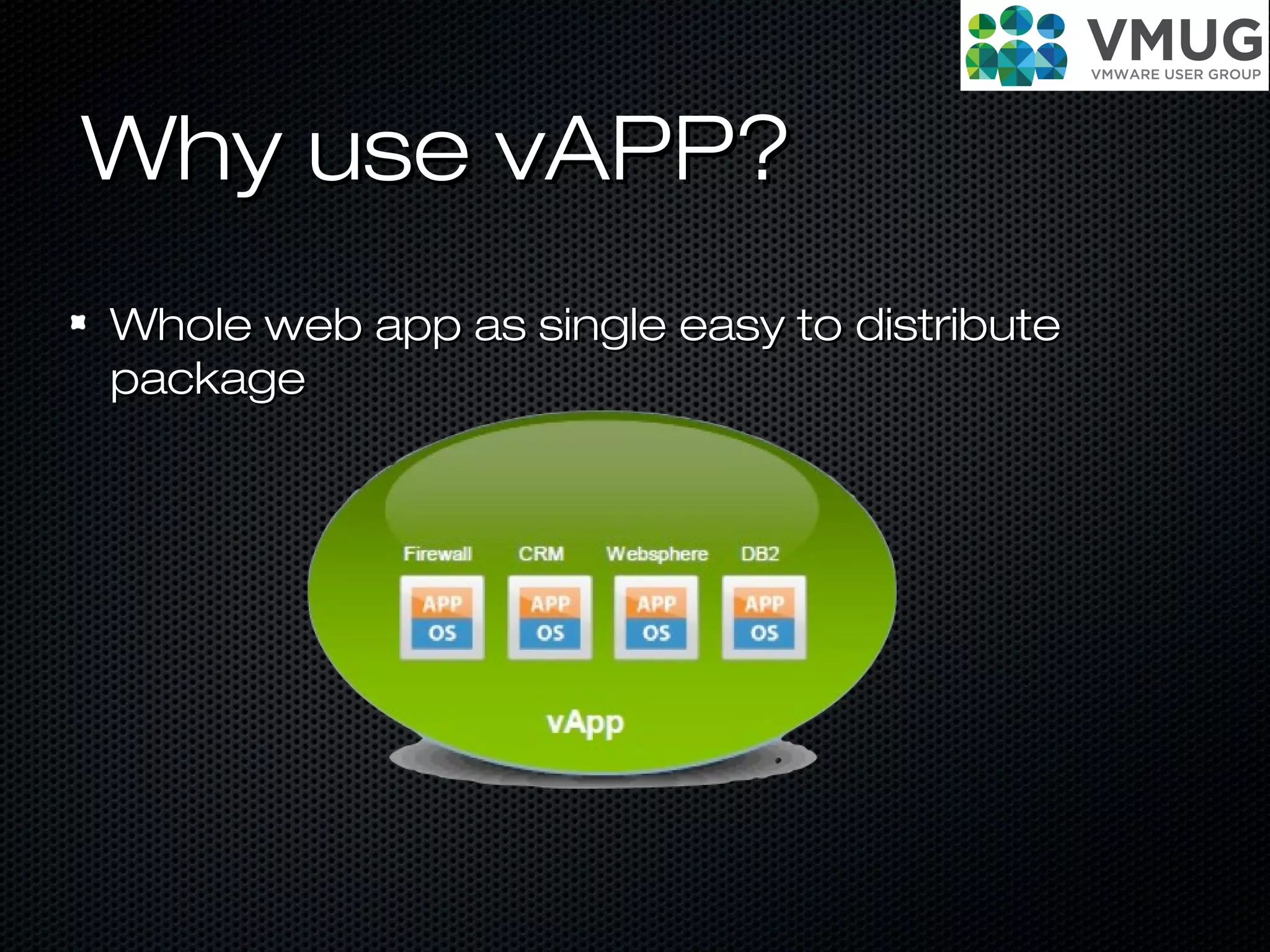
Why use vAPP?Why use vAPP?
Whole web app as single easy to distributeWhole web app as single easy to distribute
packagepackage
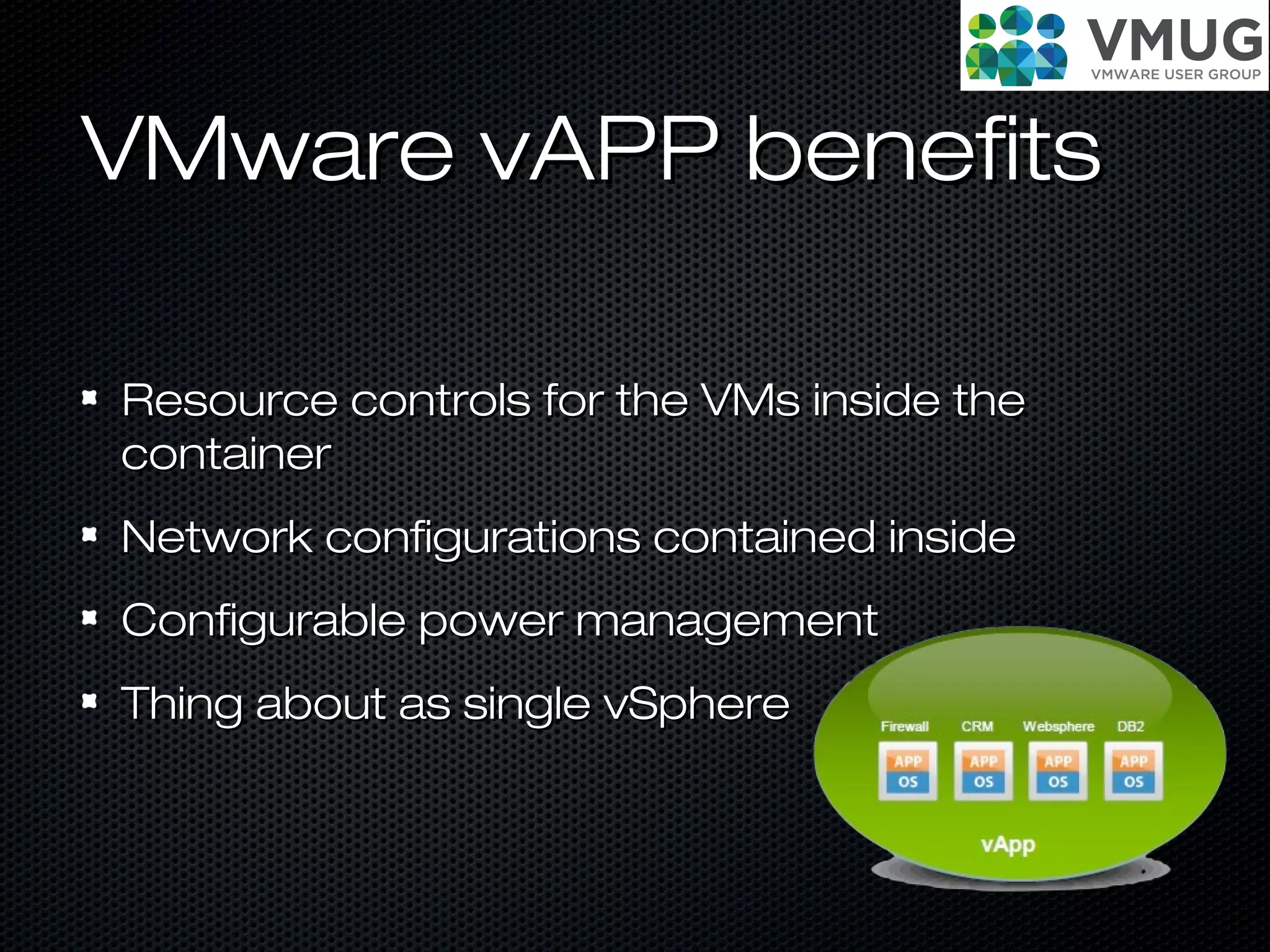
VMware vAPP benefitsVMware vAPP benefits
Resource controls for the VMs inside theResource controls for the VMs inside the
containercontainer
Network configurations contained insideNetwork configurations contained inside
Configurable power managementConfigurable power management
Thing about as single vSphereThing about as single vSphere
VMware studioVMware studio
VMWare StudioVMWare Studio
IntroductionIntroduction
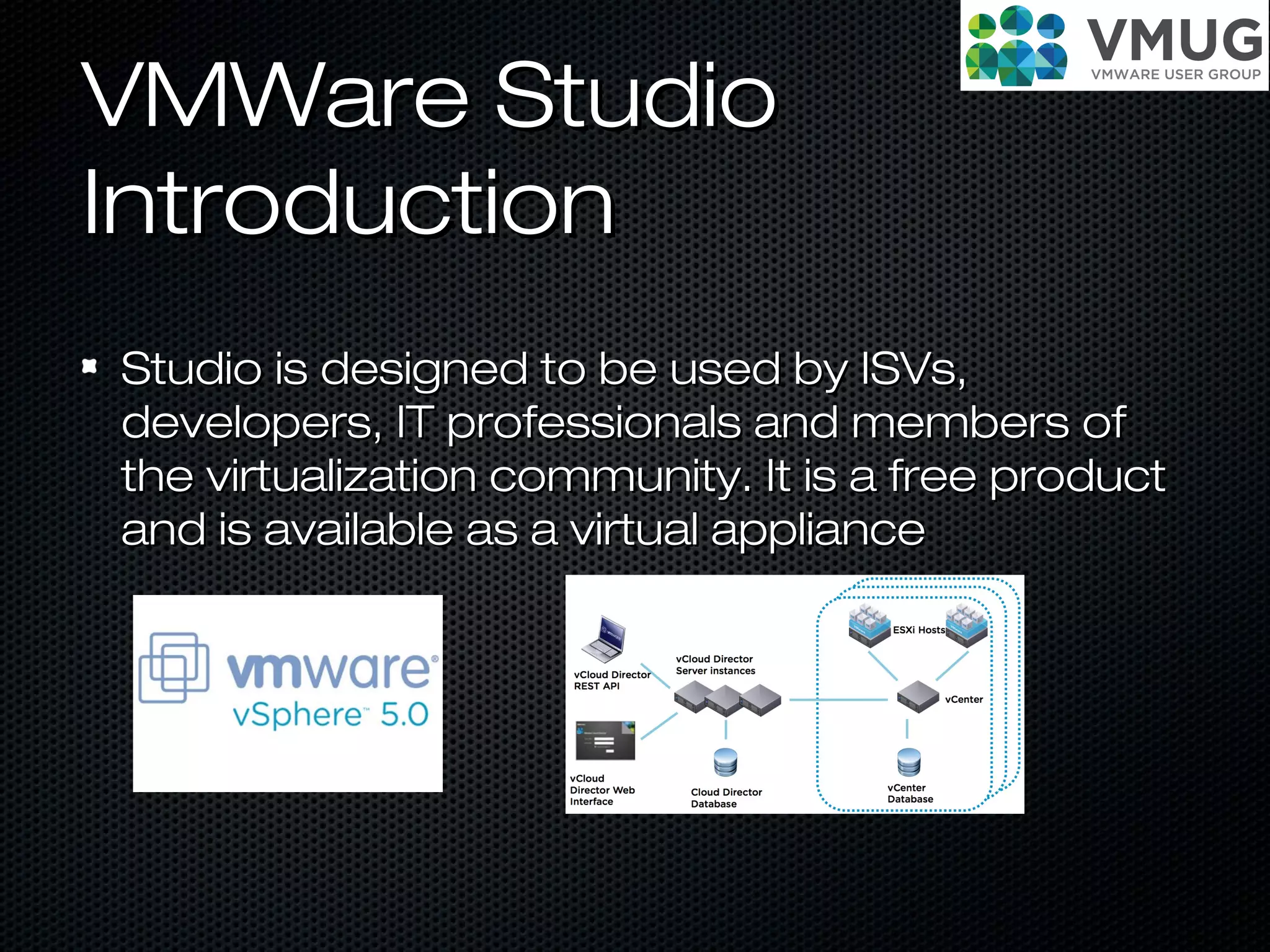
Author, configure, deploy and customize virtualAuthor, configure, deploy and customize virtual
machines, vApps and virtual appliances thatmachines, vApps and virtual appliances that
can be deployed oncan be deployed on VMware vSphereVMware vSphere, or, or
vCloud Director with VMware Studio.vCloud Director with VMware Studio.
VMWare StudioVMWare Studio
IntroductionIntroduction
Studio is designed to be used by ISVs,Studio is designed to be used by ISVs,
developers, IT professionals and members ofdevelopers, IT professionals and members of
the virtualization community. It is a free productthe virtualization community. It is a free product
and is available as a virtual applianceand is available as a virtual appliance
Create VMCreate VM
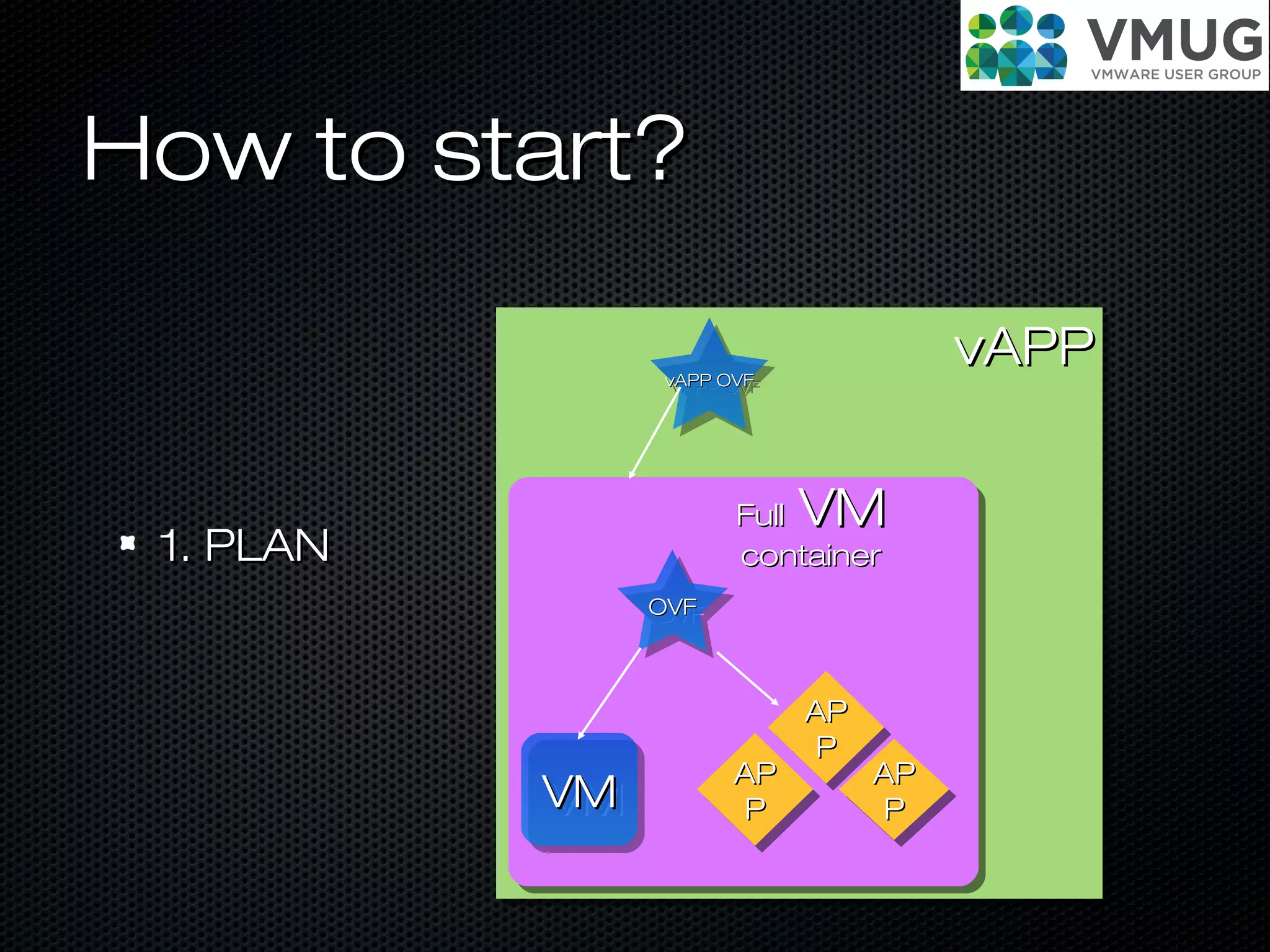
How to start?How to start?
1. PLAN1. PLAN
vAPPvAPP
VMVMVMVM
OVFOVFOVFOVF
APAP
PP
APAP
PP
APAP
PP
APAP
PP
APAP
PP
APAP
PP
FullFull VMVM
containercontainer
vAPP OVFvAPP OVFvAPP OVFvAPP OVF
How to start?How to start?
2. Prepare2. Prepare
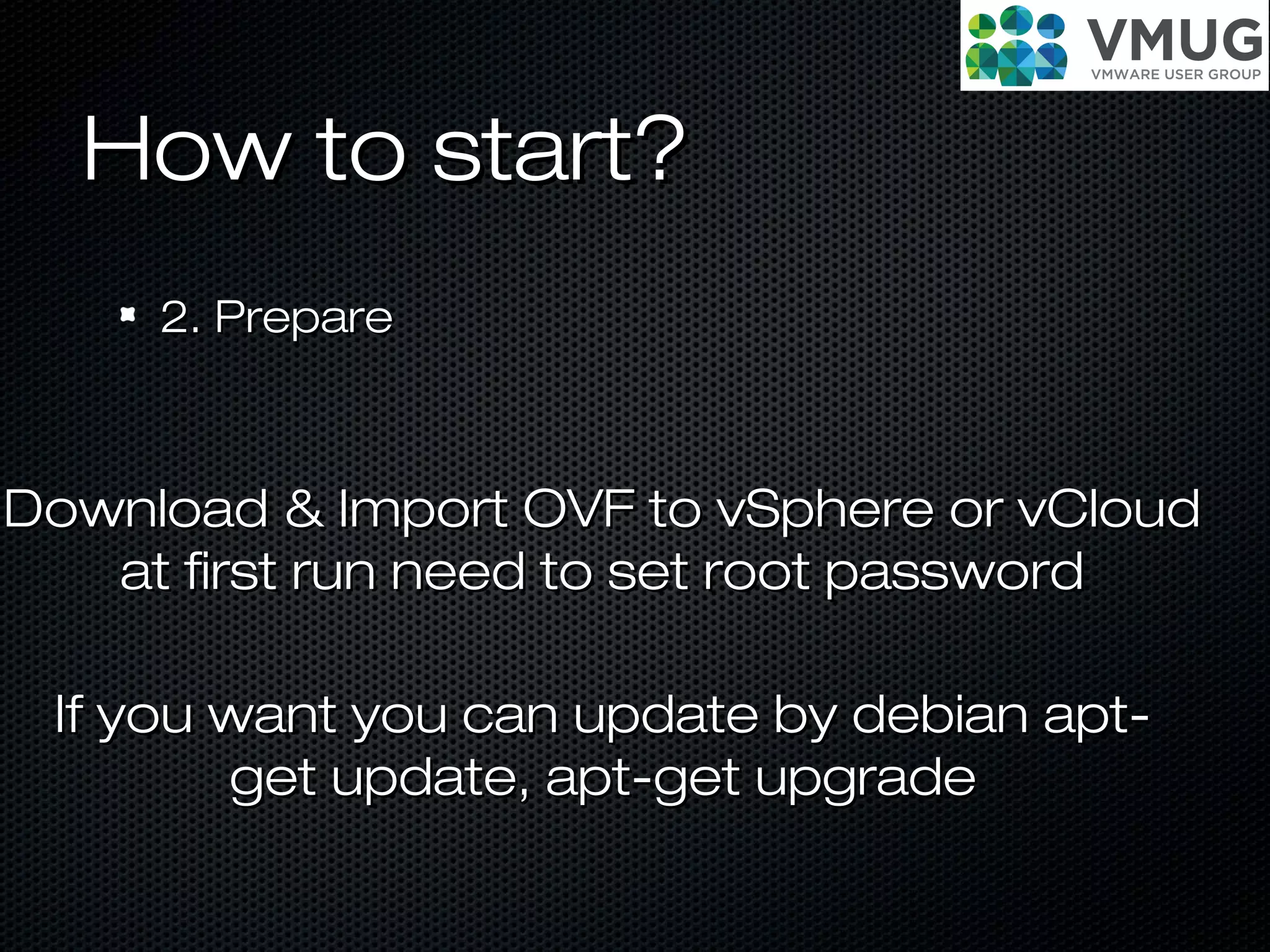
Download & Import OVF to vSphere or vCloudDownload & Import OVF to vSphere or vCloud
at first run need to set root passwordat first run need to set root password
If you want you can update by debian apt-If you want you can update by debian apt-
get update, apt-get upgradeget update, apt-get upgrade
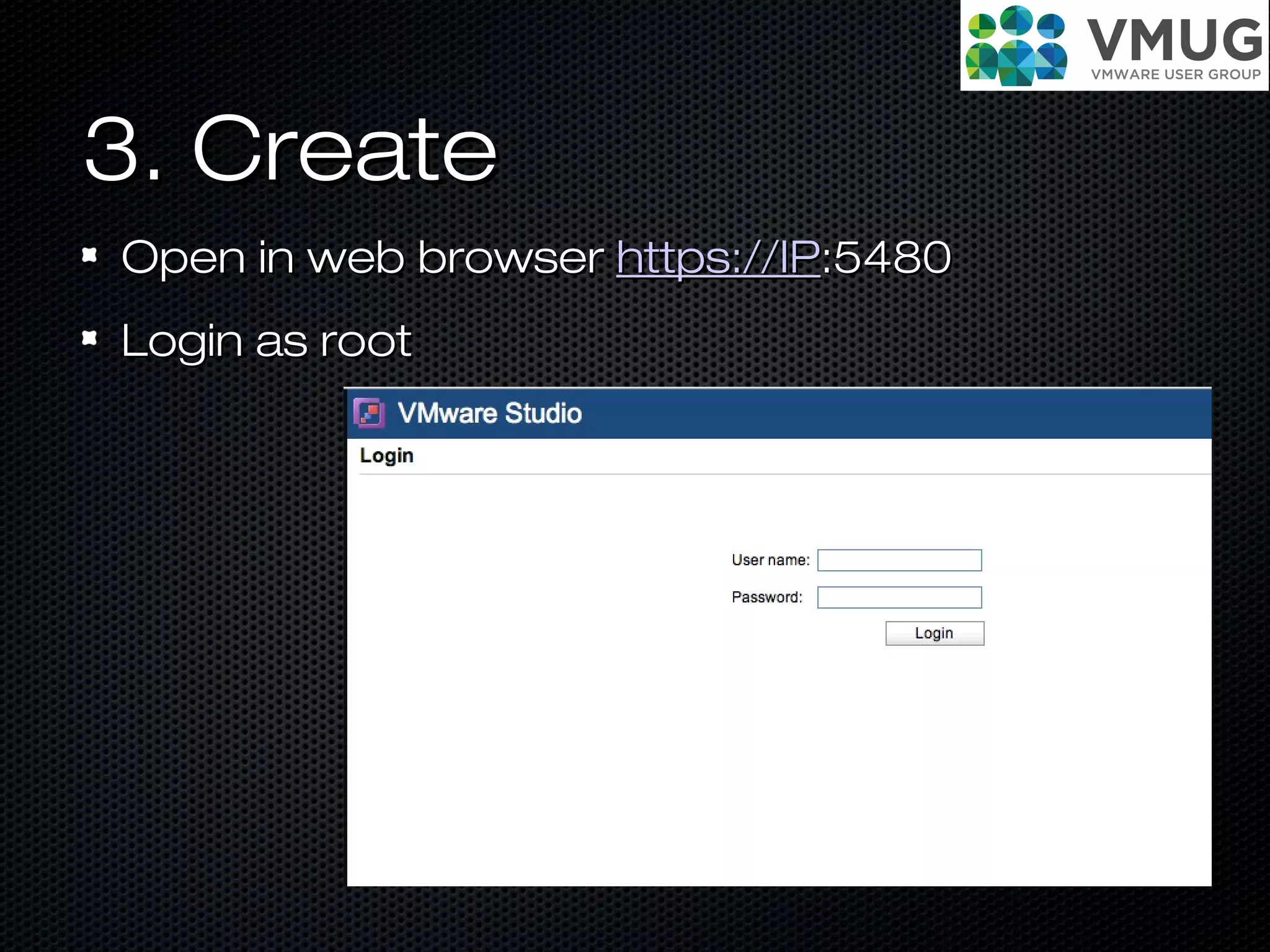
3. Create3. Create
Open in web browserOpen in web browser https://IPhttps://IP:5480:5480
Login as rootLogin as root
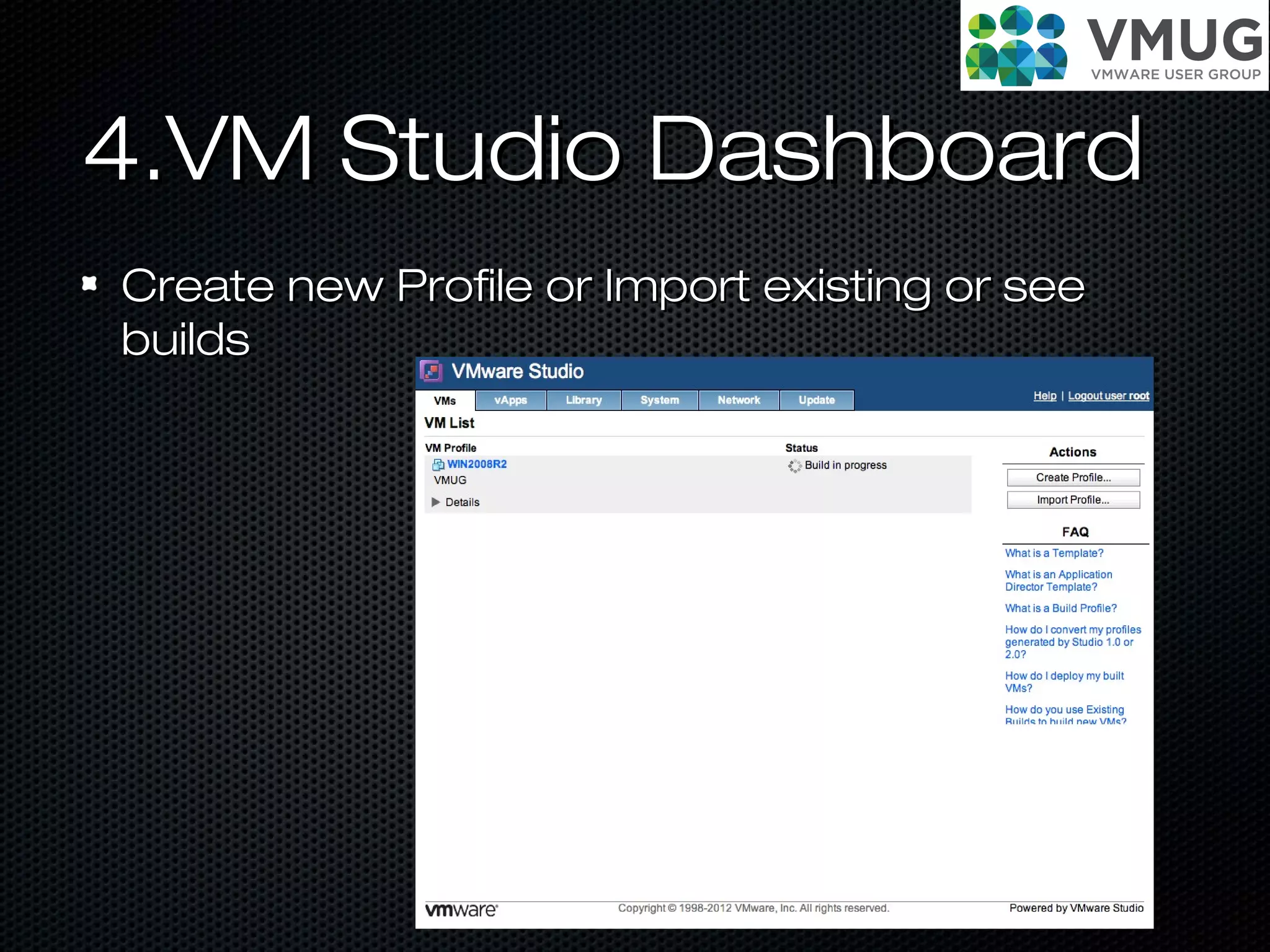
4.VM Studio Dashboard4.VM Studio Dashboard
Create new Profile or Import existing or seeCreate new Profile or Import existing or see
buildsbuilds
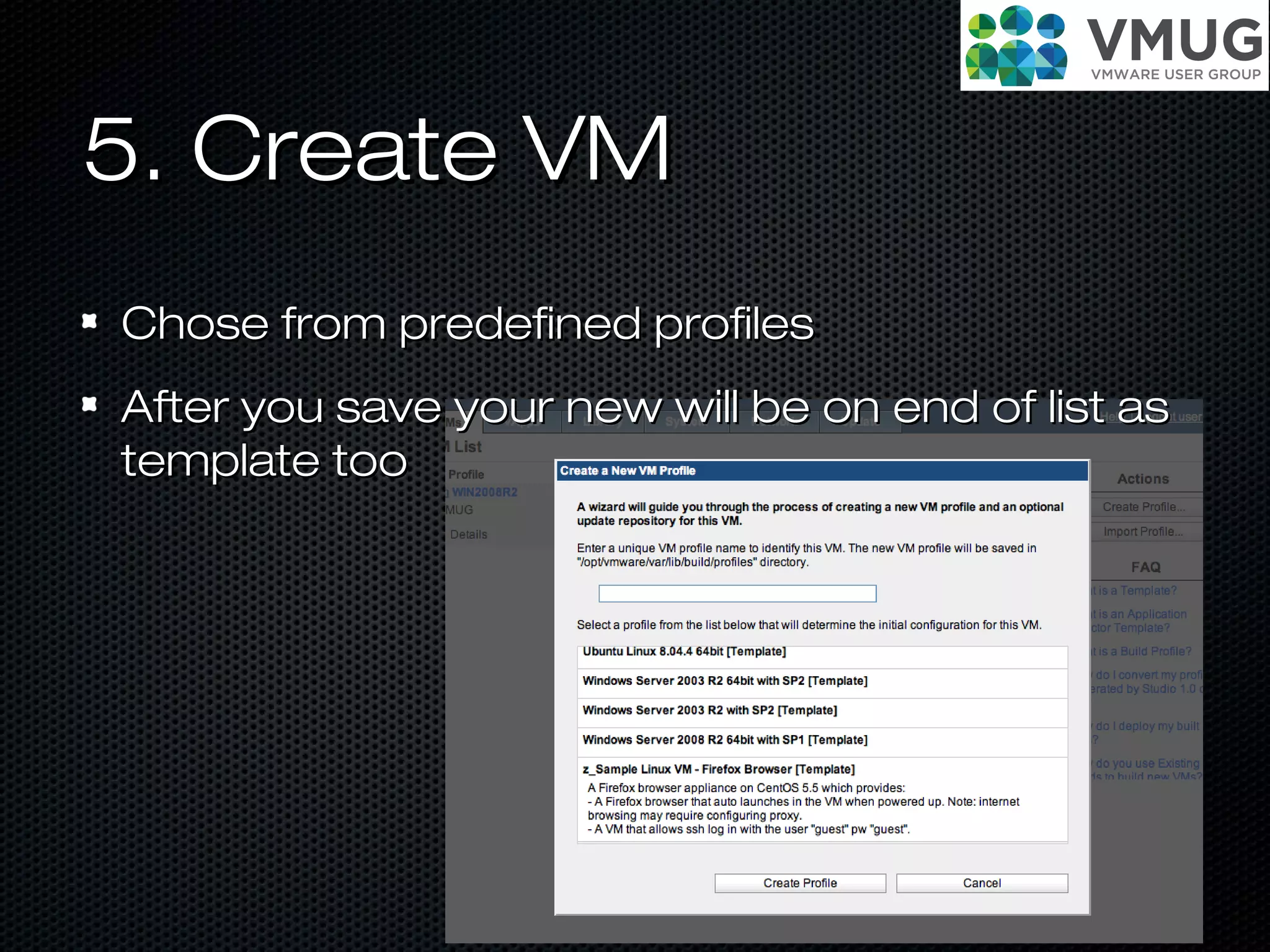
5. Create VM5. Create VM
Chose from predefined profilesChose from predefined profiles
After you save your new will be on end of list asAfter you save your new will be on end of list as
template tootemplate too
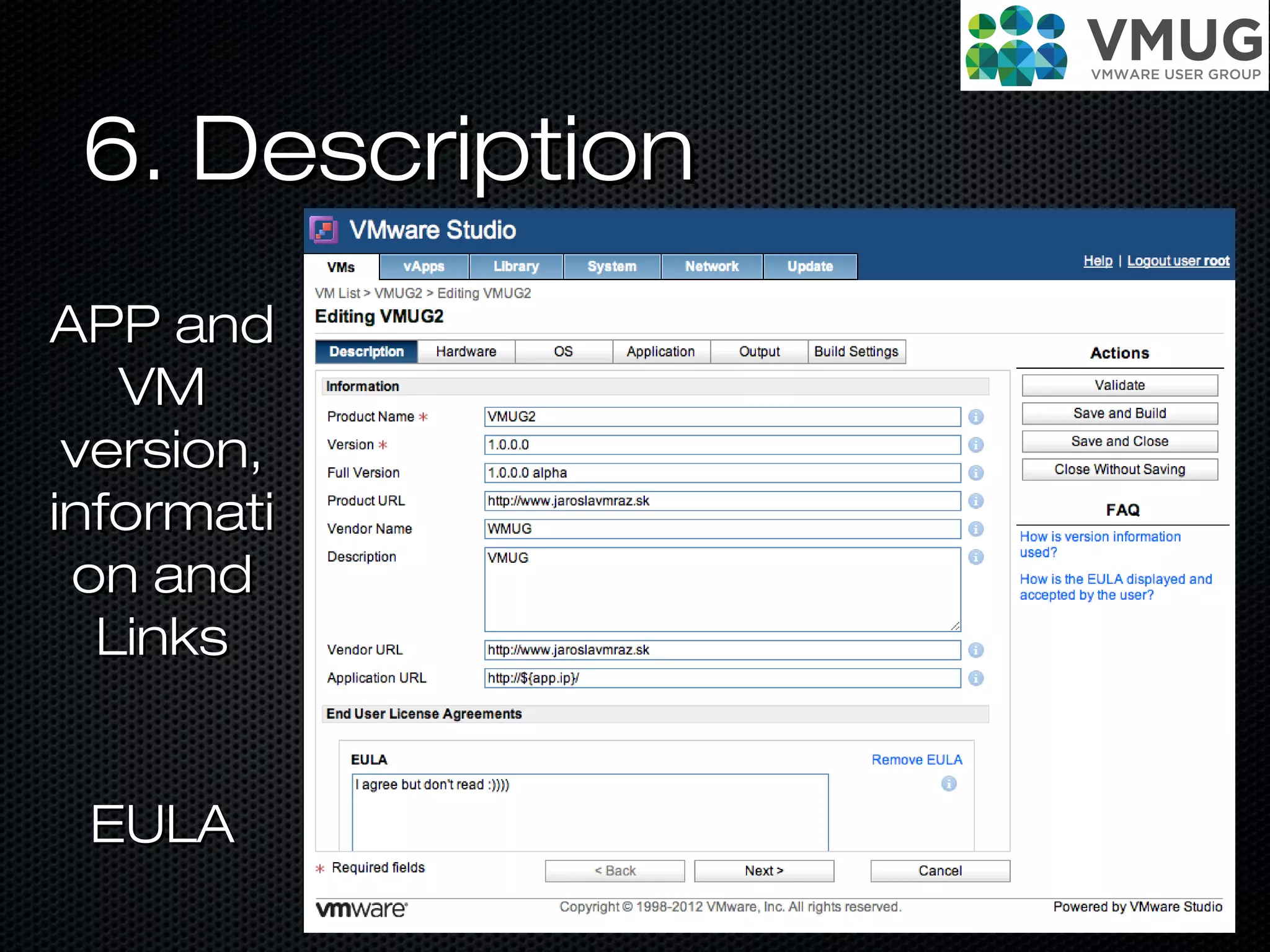
6. Description6. Description
APP andAPP and
VMVM
version,version,
informatiinformati
on andon and
LinksLinks
EULAEULA
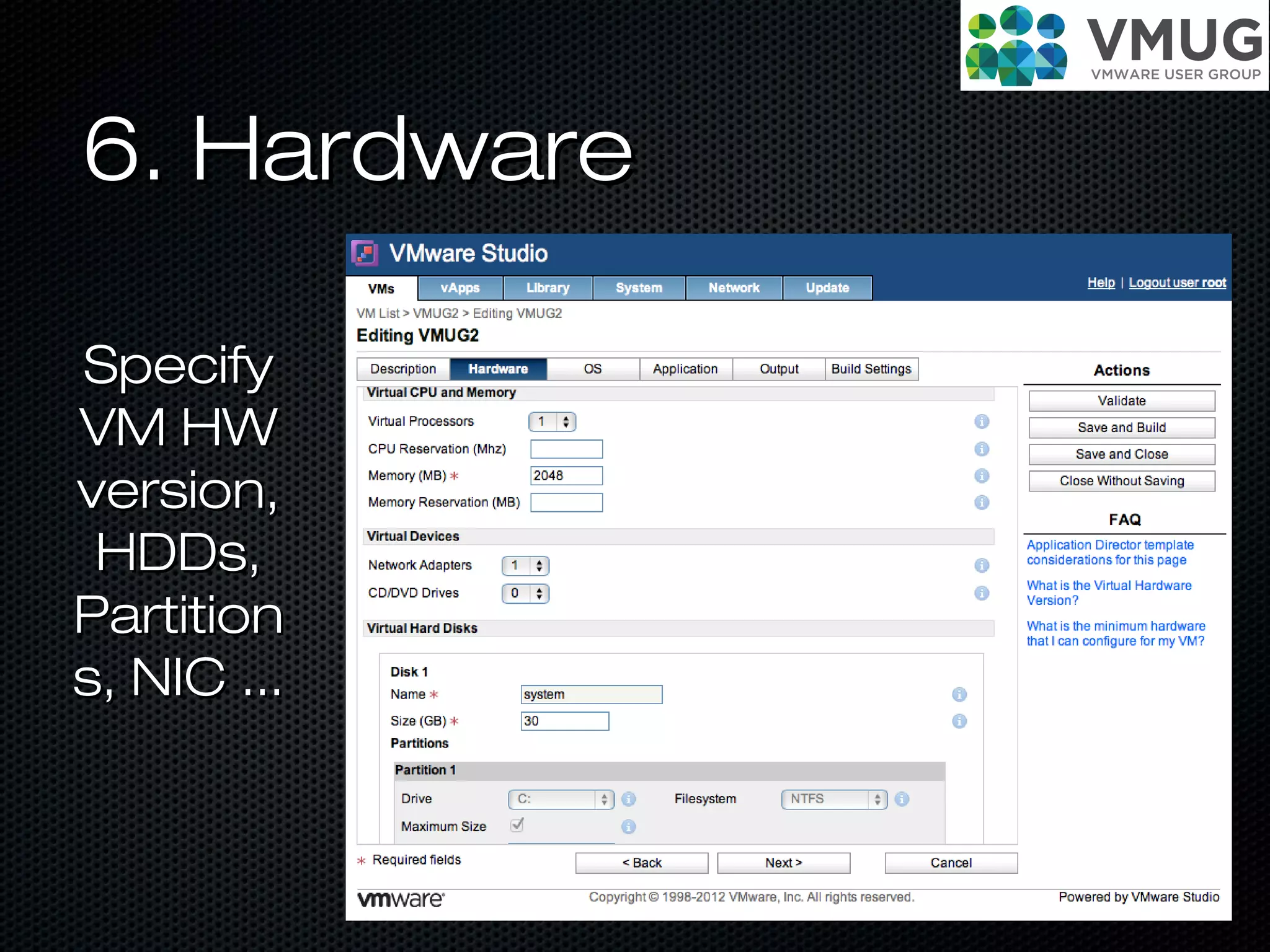
6. Hardware6. Hardware
SpecifySpecify
VM HWVM HW
version,version,
HDDs,HDDs,
PartitionPartition
s, NIC ...s, NIC ...
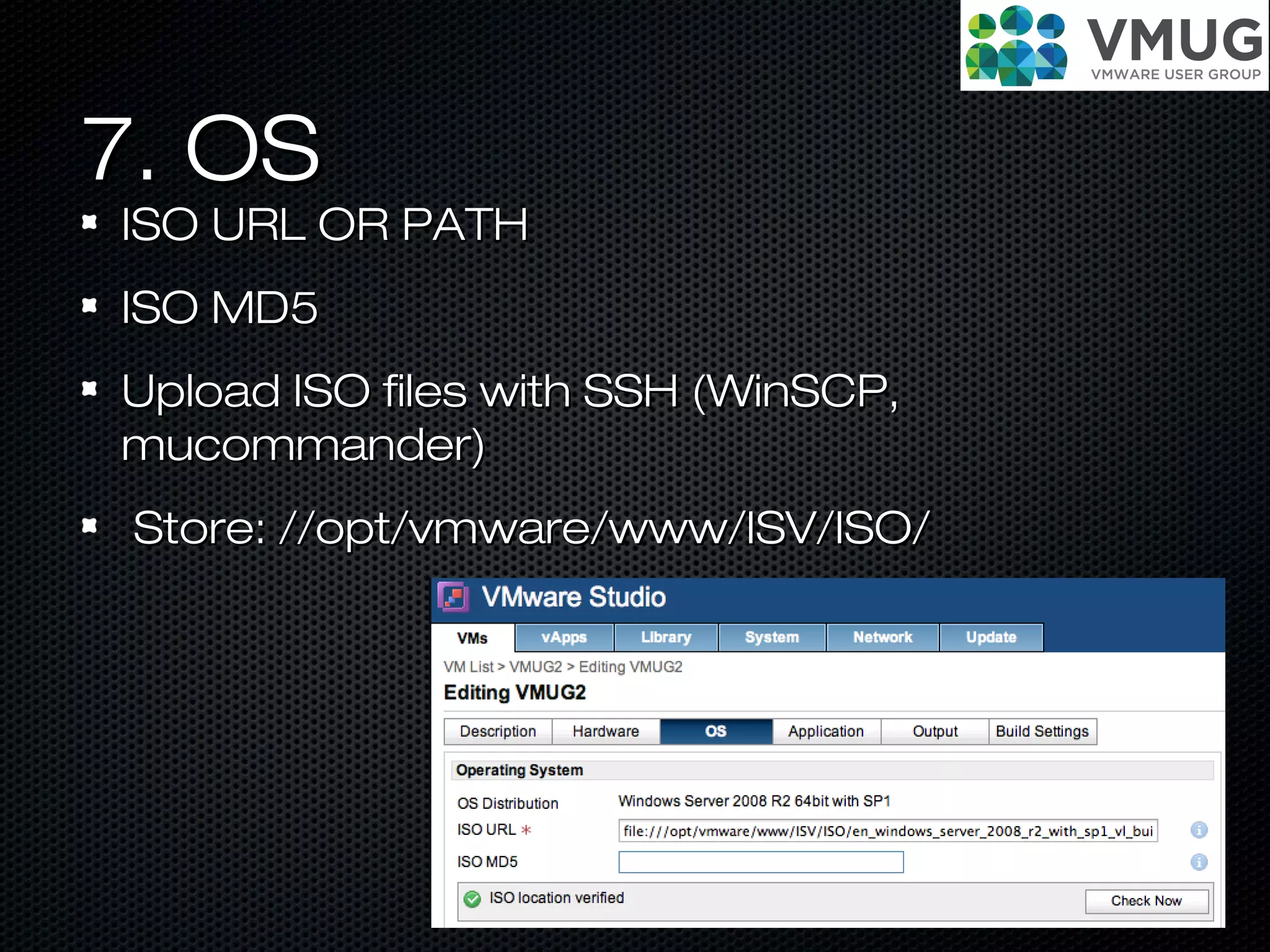
7. OS7. OS
ISO URL OR PATHISO URL OR PATH
ISO MD5ISO MD5
Upload ISO files with SSH (WinSCP,Upload ISO files with SSH (WinSCP,
mucommander)mucommander)
Store: //opt/vmware/www/ISV/ISO/Store: //opt/vmware/www/ISV/ISO/
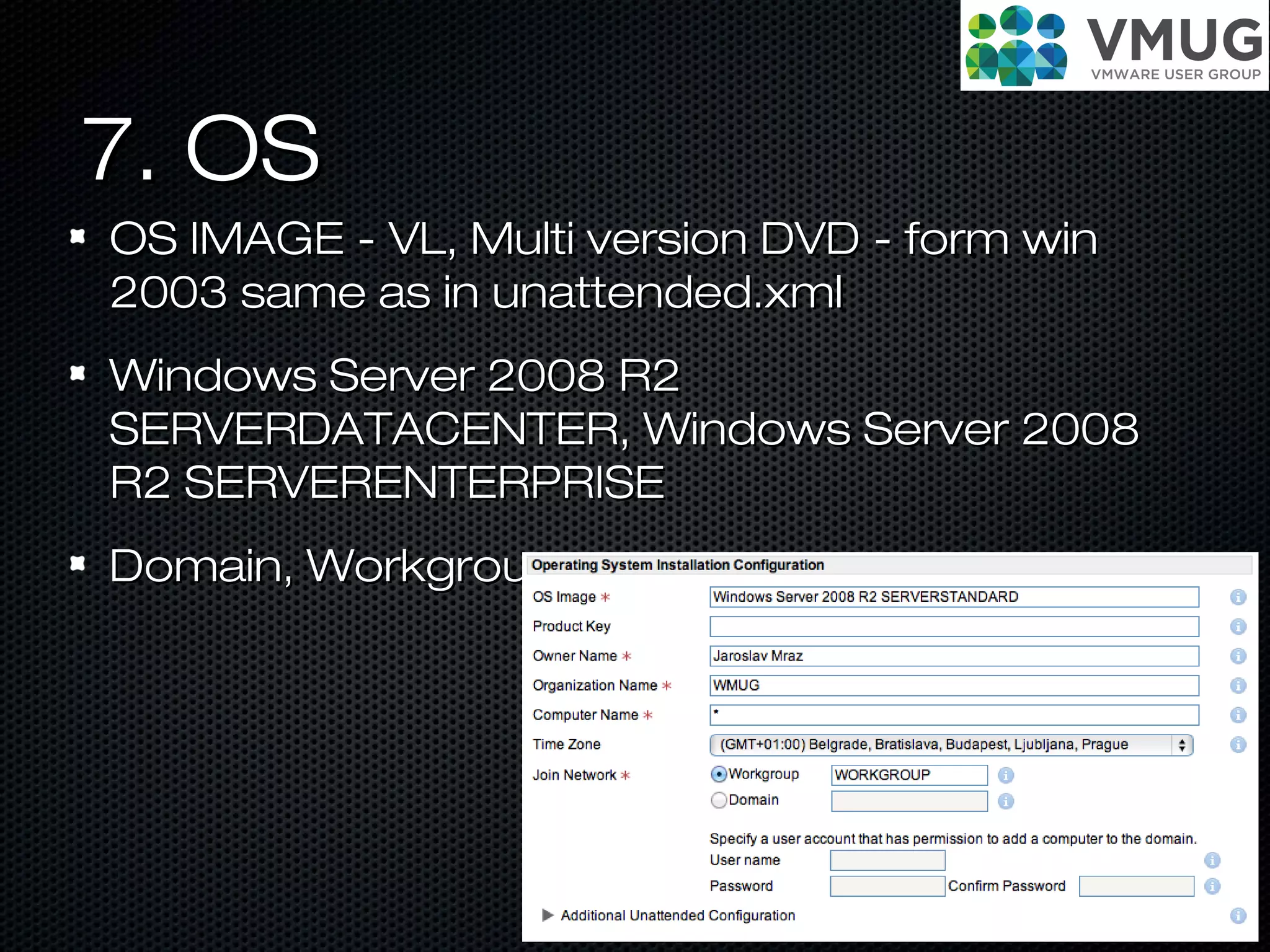
7. OS7. OS
OS IMAGE - VL, Multi version DVD - form winOS IMAGE - VL, Multi version DVD - form win
2003 same as in unattended.xml2003 same as in unattended.xml
Windows Server 2008 R2Windows Server 2008 R2
SERVERDATACENTER, Windows Server 2008SERVERDATACENTER, Windows Server 2008
R2 SERVERENTERPRISER2 SERVERENTERPRISE
Domain, WorkgroupDomain, Workgroup
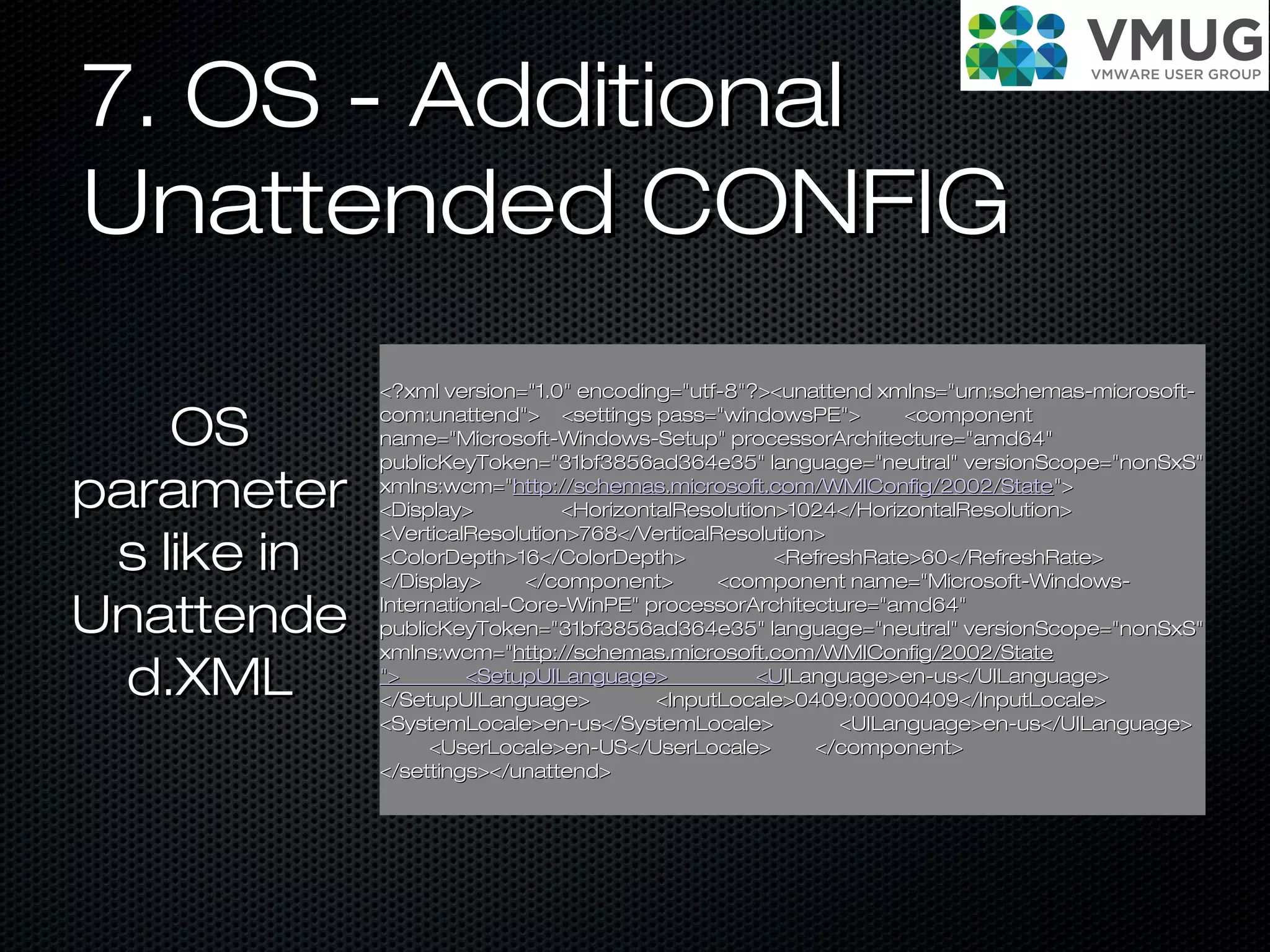
7. OS - Additional7. OS - Additional
Unattended CONFIGUnattended CONFIG
<?xml version="1.0" encoding="utf-8"?><unattend xmlns="urn:schemas-microsoft-<?xml version="1.0" encoding="utf-8"?><unattend xmlns="urn:schemas-microsoft-
com:unattend"> <settings pass="windowsPE"> <componentcom:unattend"> <settings pass="windowsPE"> <component
name="Microsoft-Windows-Setup" processorArchitecture="amd64"name="Microsoft-Windows-Setup" processorArchitecture="amd64"
publicKeyToken="31bf3856ad364e35" language="neutral" versionScope="nonSxS"publicKeyToken="31bf3856ad364e35" language="neutral" versionScope="nonSxS"
xmlns:wcm="xmlns:wcm="http://schemas.microsoft.com/WMIConfig/2002/Statehttp://schemas.microsoft.com/WMIConfig/2002/State">">
<Display> <HorizontalResolution>1024</HorizontalResolution><Display> <HorizontalResolution>1024</HorizontalResolution>
<VerticalResolution>768</VerticalResolution><VerticalResolution>768</VerticalResolution>
<ColorDepth>16</ColorDepth> <RefreshRate>60</RefreshRate><ColorDepth>16</ColorDepth> <RefreshRate>60</RefreshRate>
</Display> </component> <component name="Microsoft-Windows-</Display> </component> <component name="Microsoft-Windows-
International-Core-WinPE" processorArchitecture="amd64"International-Core-WinPE" processorArchitecture="amd64"
publicKeyToken="31bf3856ad364e35" language="neutral" versionScope="nonSxS"publicKeyToken="31bf3856ad364e35" language="neutral" versionScope="nonSxS"
xmlns:wcm="xmlns:wcm="http://schemas.microsoft.com/WMIConfig/2002/Statehttp://schemas.microsoft.com/WMIConfig/2002/State
"> <SetupUILanguage> <U"> <SetupUILanguage> <UILanguage>en-us</UILanguage>ILanguage>en-us</UILanguage>
</SetupUILanguage> <InputLocale>0409:00000409</InputLocale></SetupUILanguage> <InputLocale>0409:00000409</InputLocale>
<SystemLocale>en-us</SystemLocale> <UILanguage>en-us</UILanguage><SystemLocale>en-us</SystemLocale> <UILanguage>en-us</UILanguage>
<UserLocale>en-US</UserLocale> </component><UserLocale>en-US</UserLocale> </component>
</settings></unattend></settings></unattend>
OSOS
parameterparameter
s like ins like in
UnattendeUnattende
d.XMLd.XML
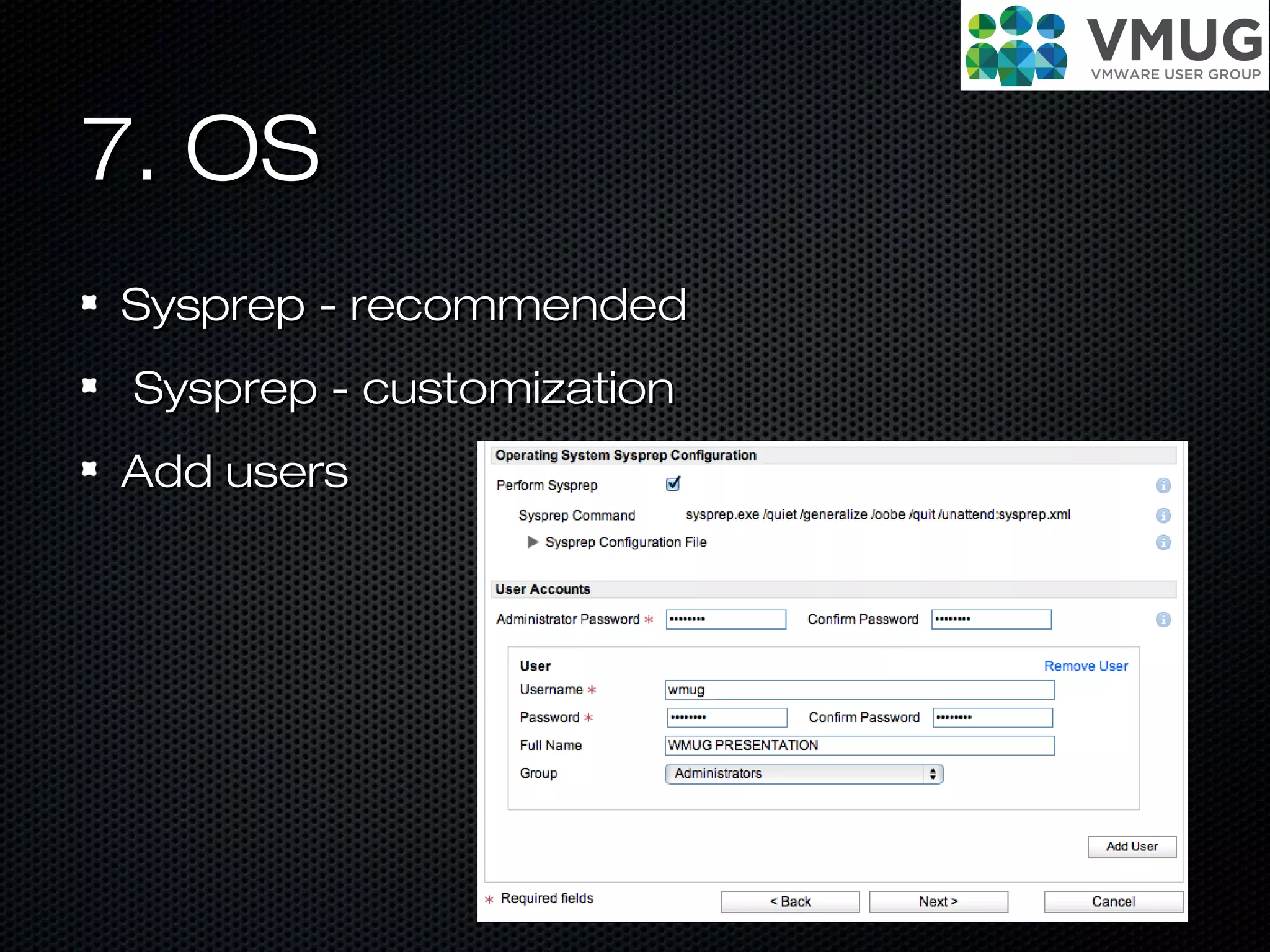
7. OS7. OS
Sysprep - recommendedSysprep - recommended
Sysprep - customizationSysprep - customization
Add usersAdd users
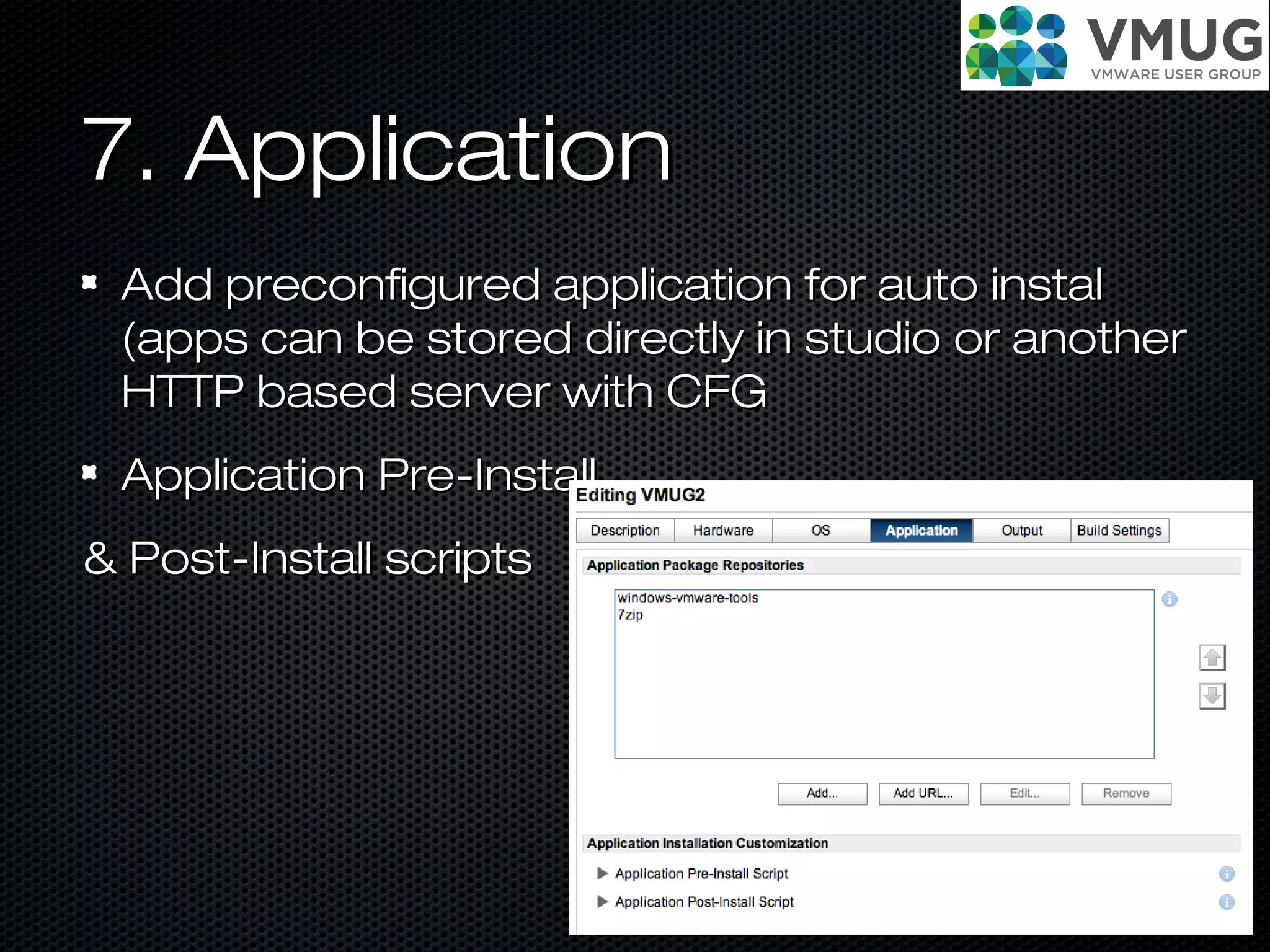
7. Application7. Application
Add preconfigured application for auto instalAdd preconfigured application for auto instal
(apps can be stored directly in studio or another(apps can be stored directly in studio or another
HTTP based server with CFGHTTP based server with CFG
Application Pre-InstallApplication Pre-Install
& Post-Install scripts& Post-Install scripts
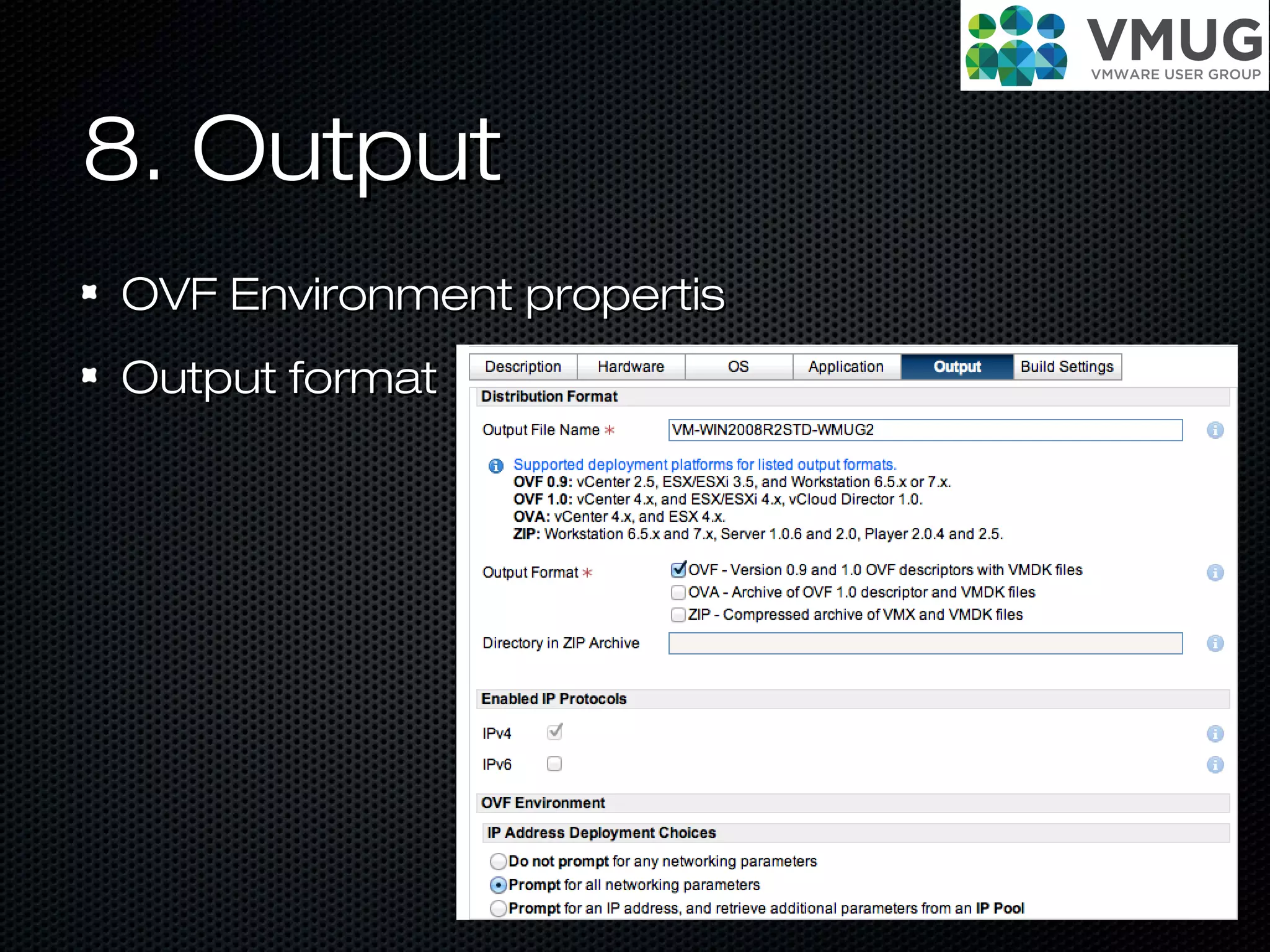
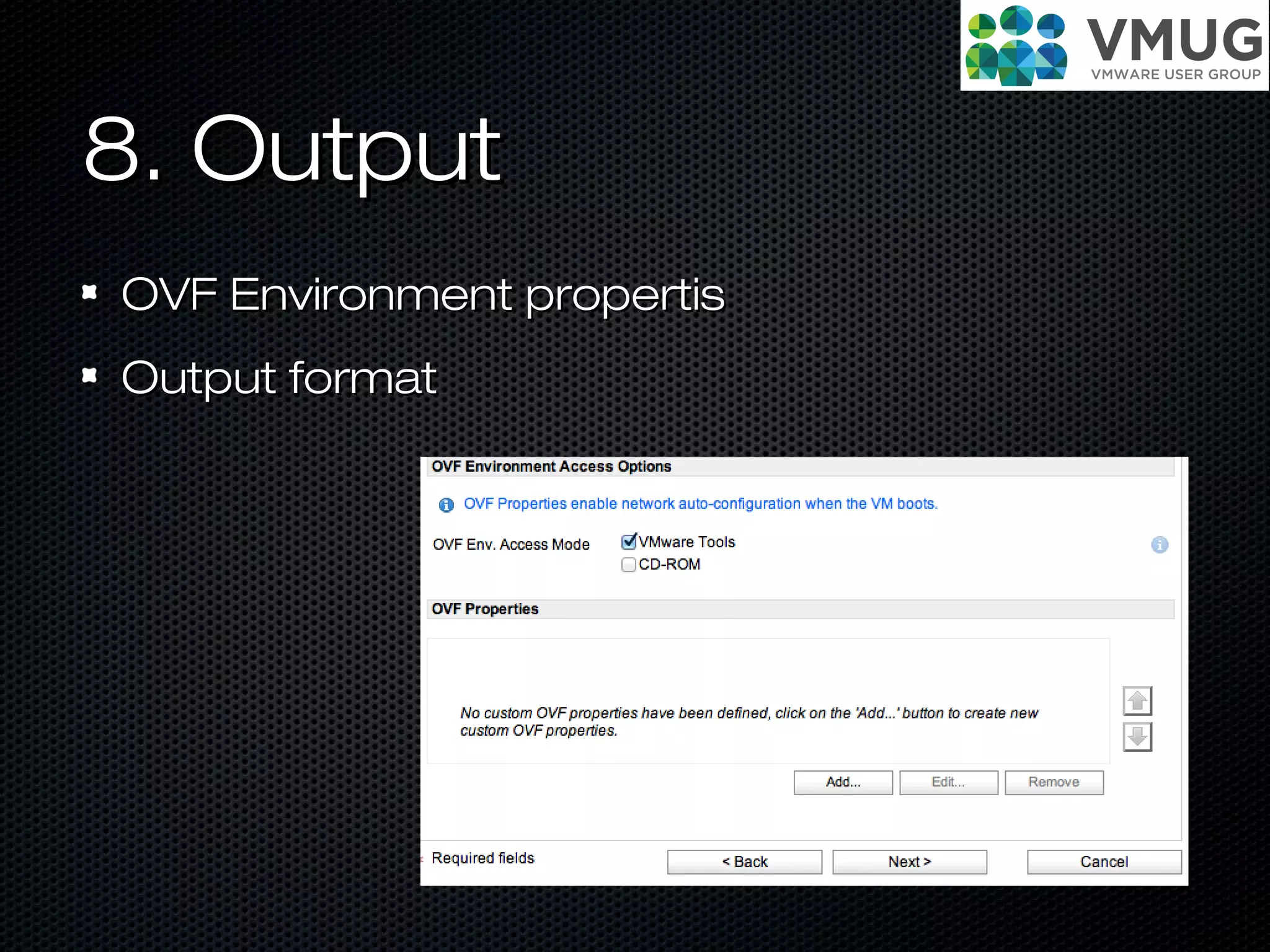
8. Output8. Output
OVF Environment propertisOVF Environment propertis
Output formatOutput format
8. Output8. Output
OVF Environment propertisOVF Environment propertis
Output formatOutput format
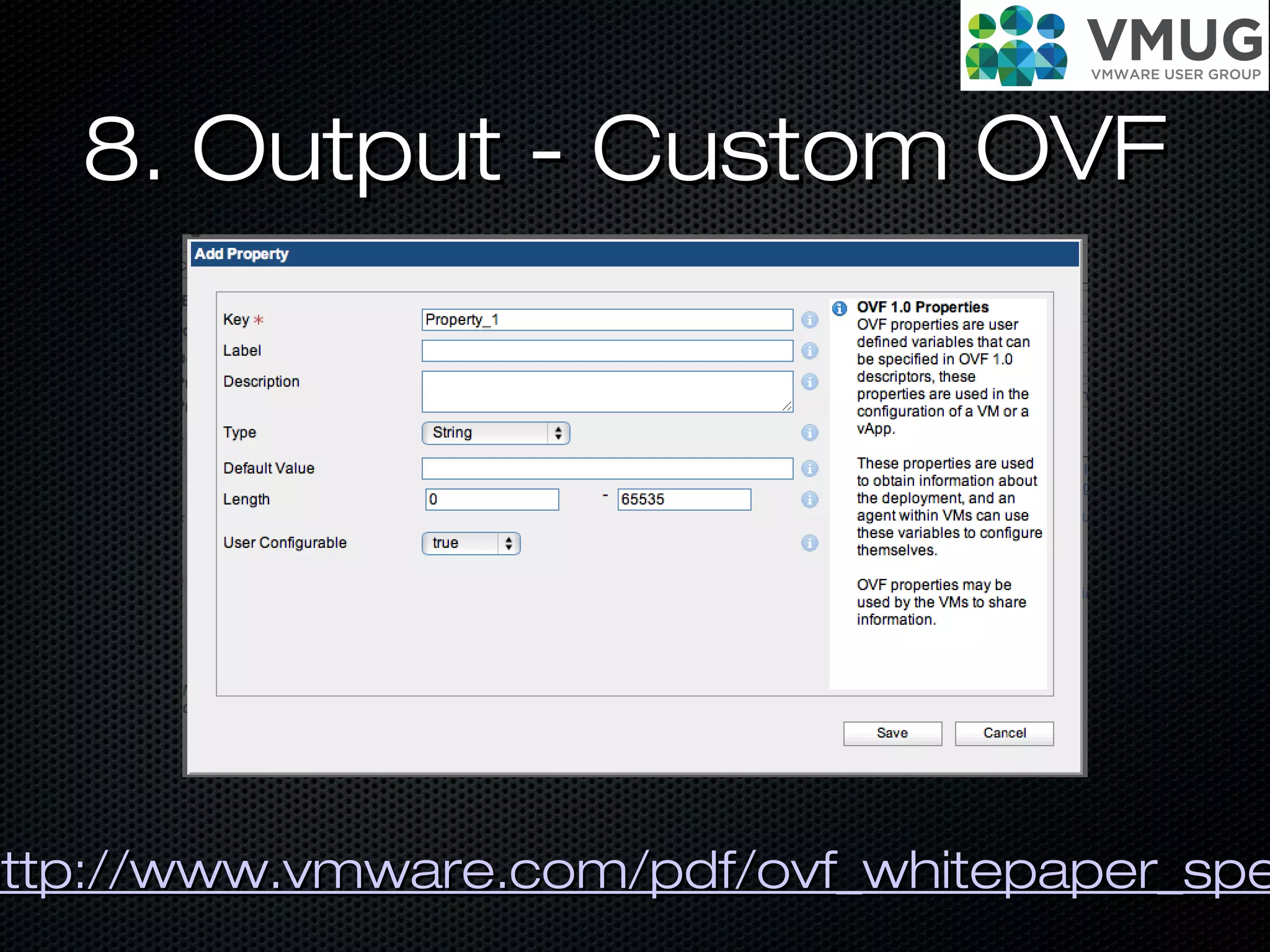
8. Output - Custom OVF8. Output - Custom OVF
http://www.vmware.com/pdf/ovf_whitepaper_spehttp://www.vmware.com/pdf/ovf_whitepaper_spe
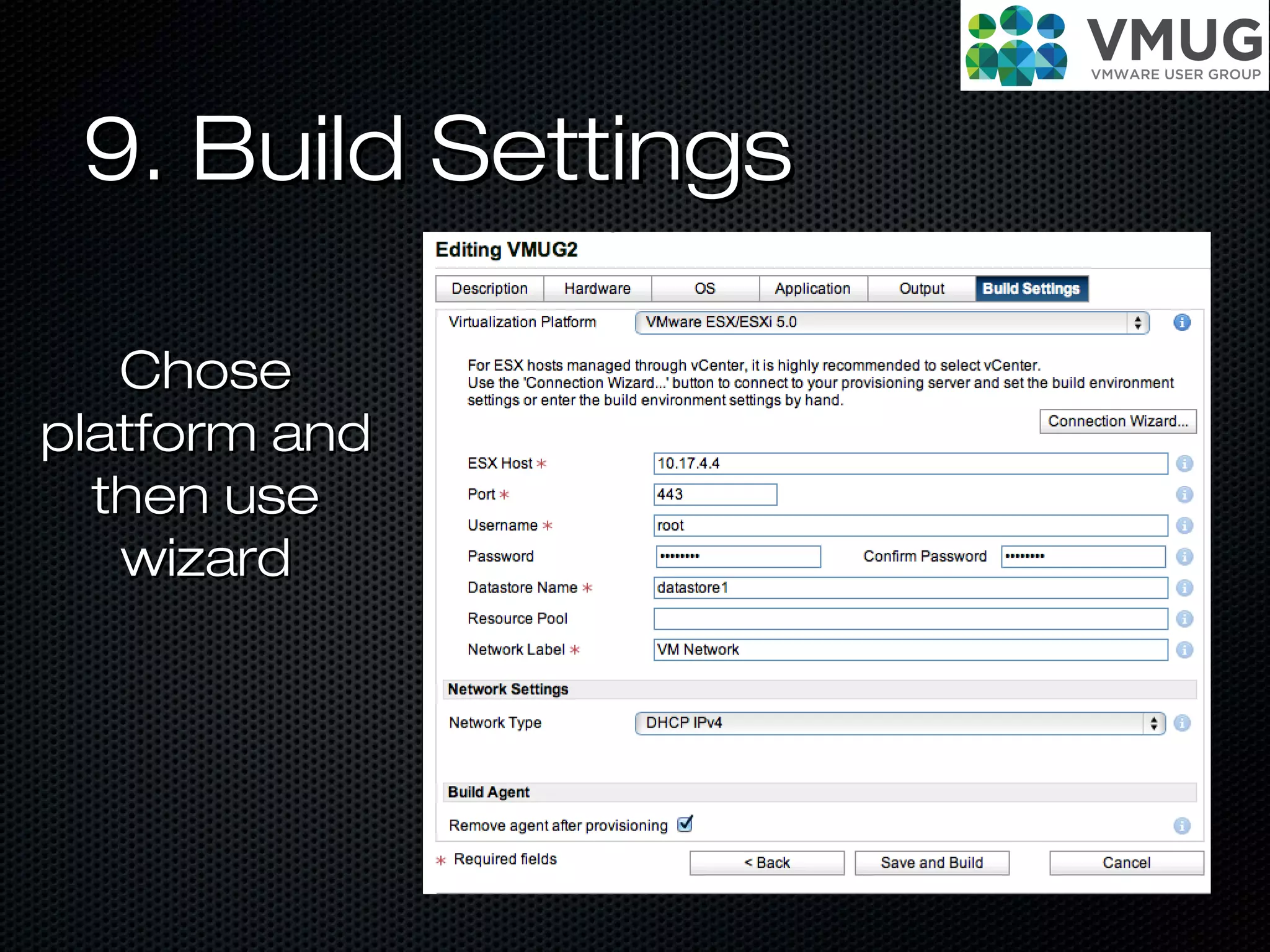
9. Build Settings9. Build Settings
ChoseChose
platform andplatform and
then usethen use
wizardwizard
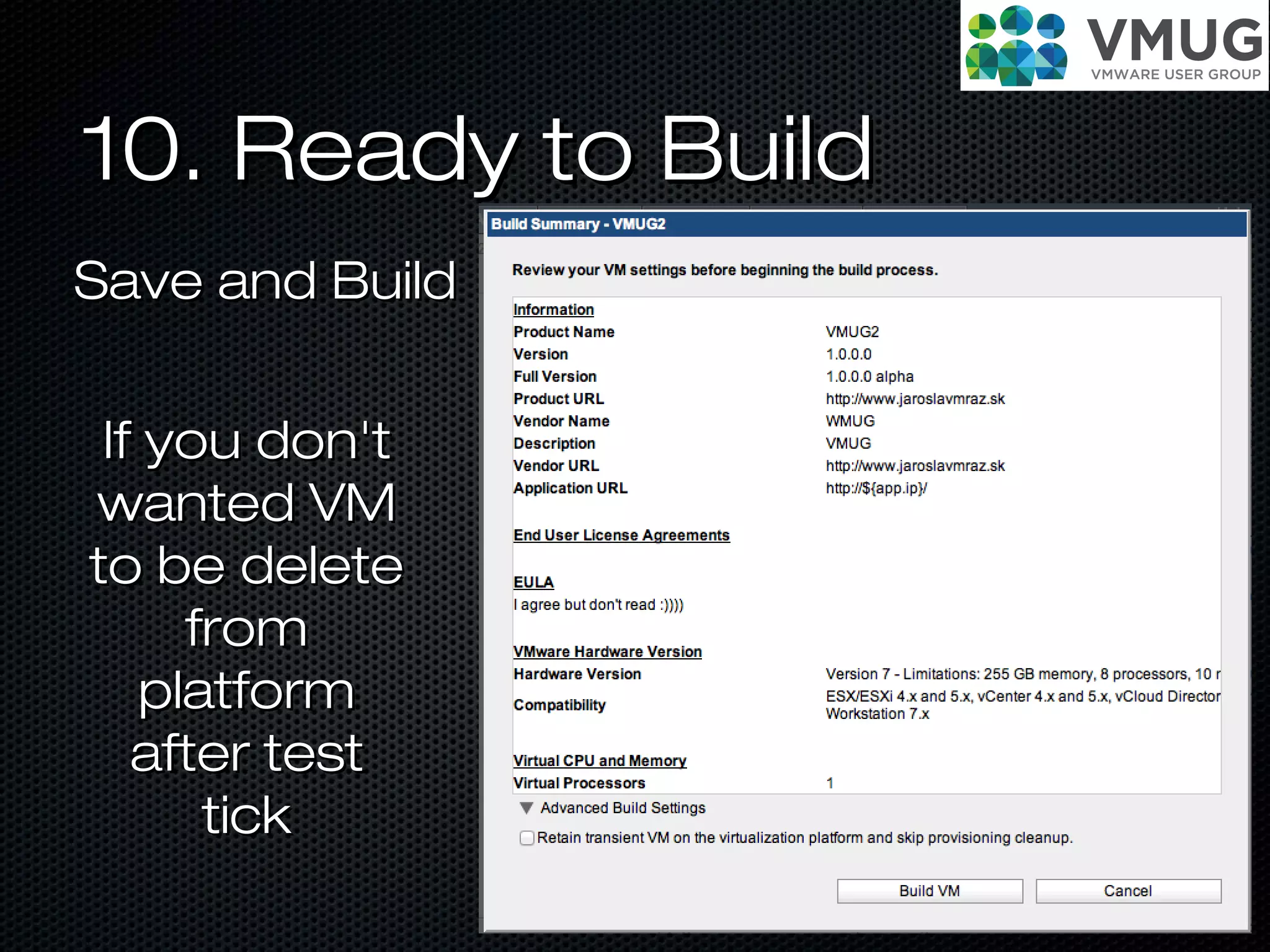
10. Ready to Build10. Ready to Build
Save and BuildSave and Build
If you don'tIf you don't
wanted VMwanted VM
to be deleteto be delete
fromfrom
platformplatform
after testafter test
ticktick
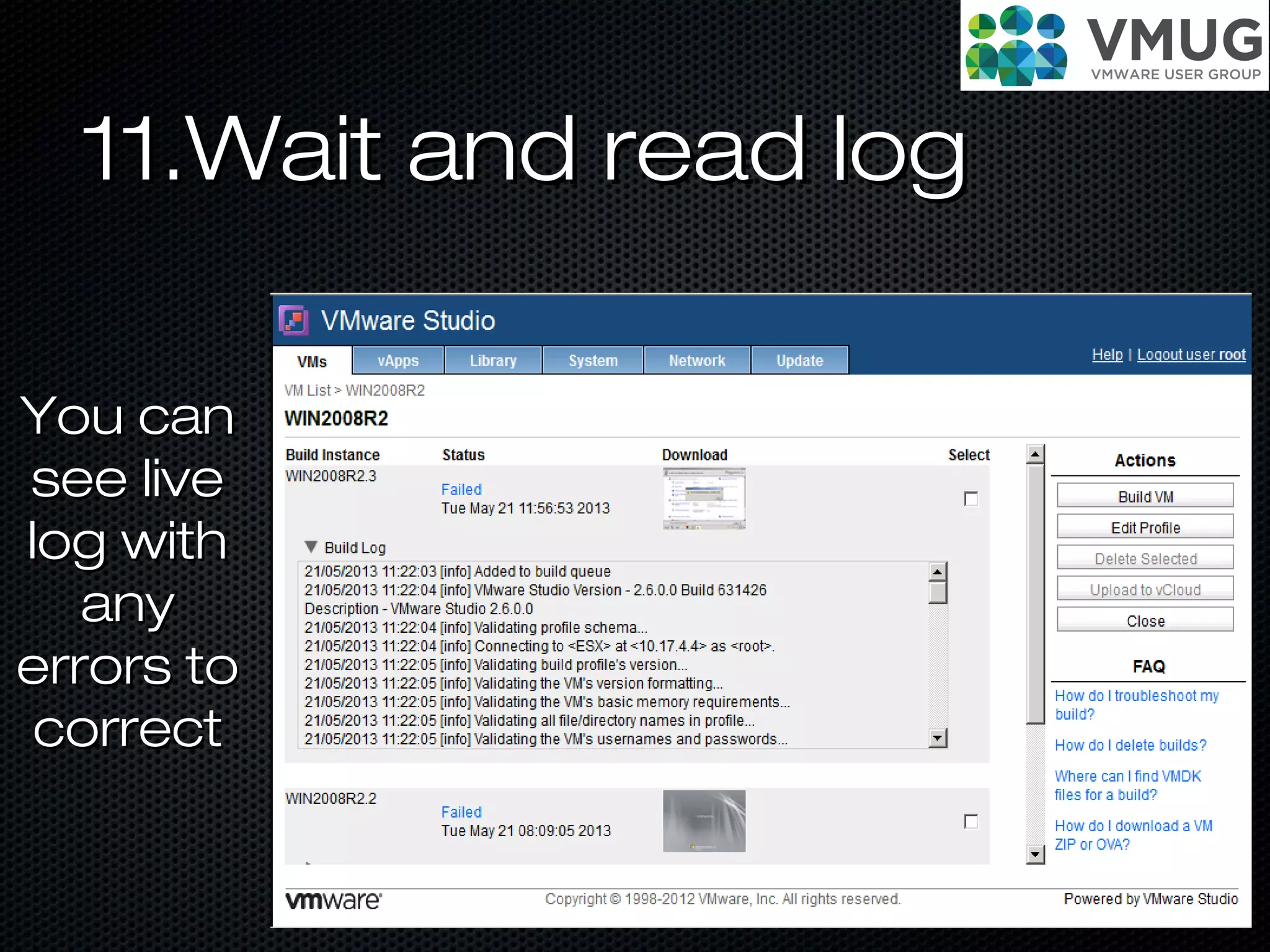
11.Wait and read log11.Wait and read log
You canYou can
see livesee live
log withlog with
anyany
errors toerrors to
correctcorrect
Create vAPPCreate vAPP
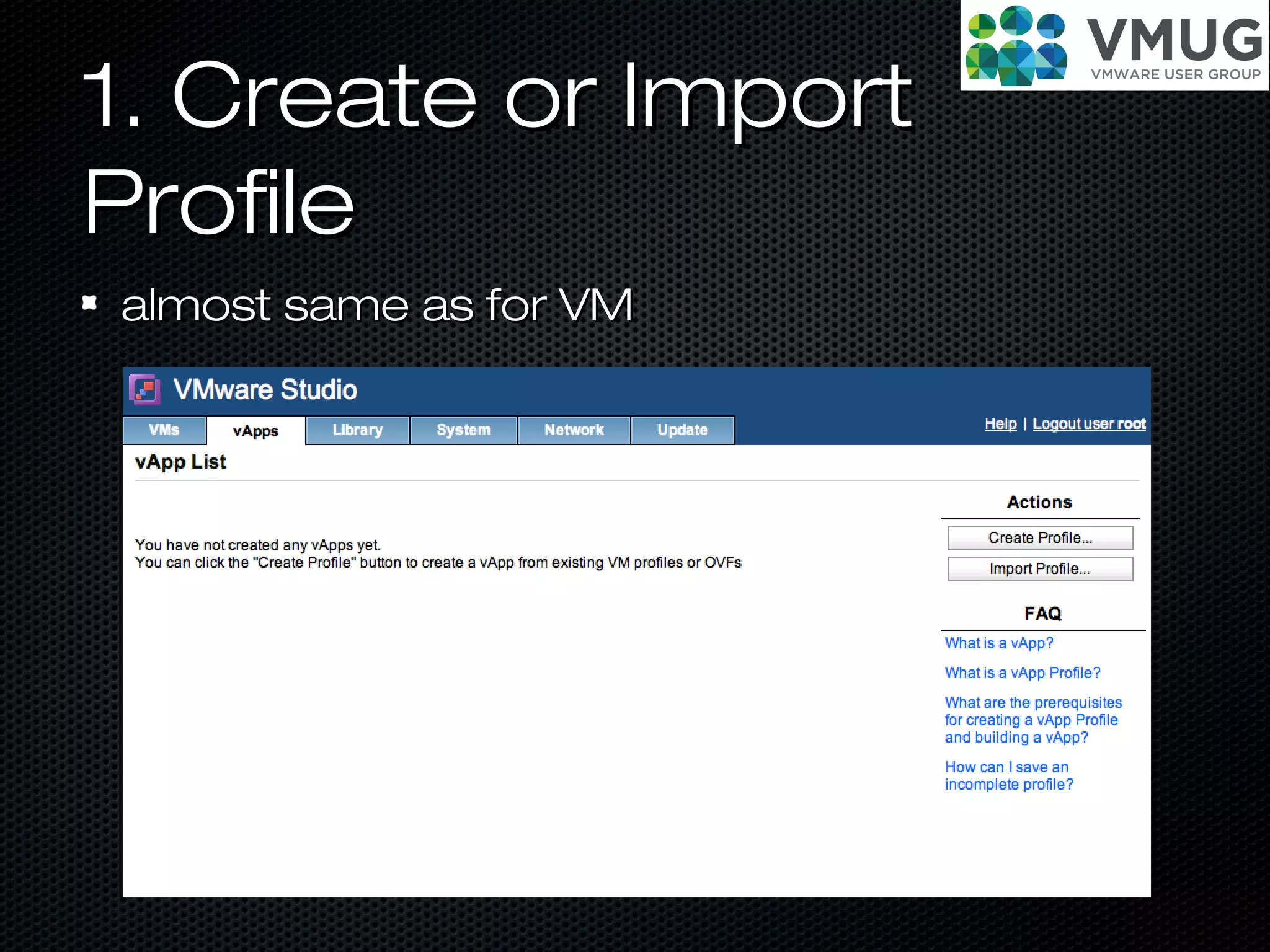
1. Create or Import1. Create or Import
ProfileProfile
almost same as for VMalmost same as for VM
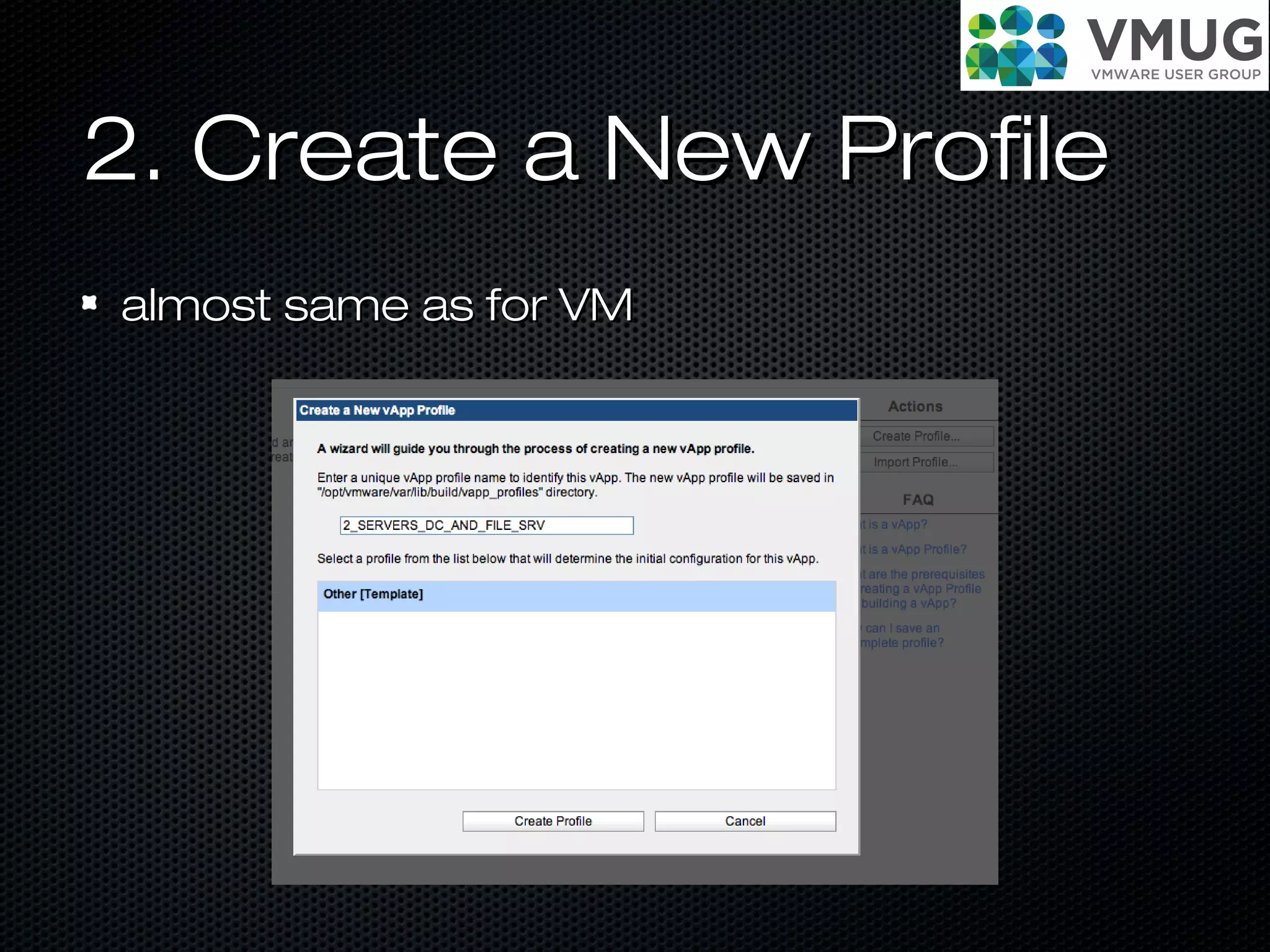
2. Create a New Profile2. Create a New Profile
almost same as for VMalmost same as for VM
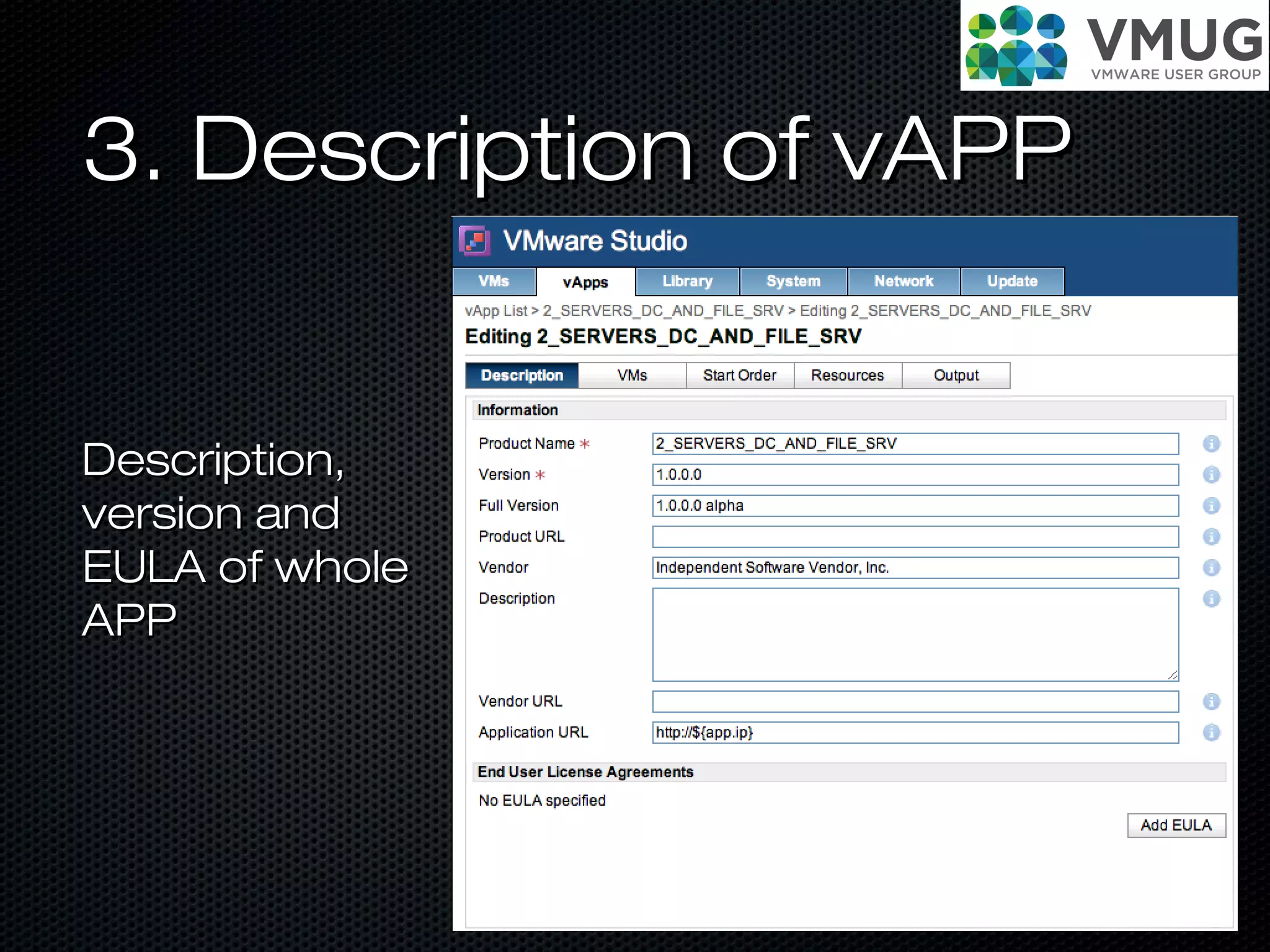
3. Description of vAPP3. Description of vAPP
Description,Description,
version andversion and
EULA of wholeEULA of whole
APPAPP
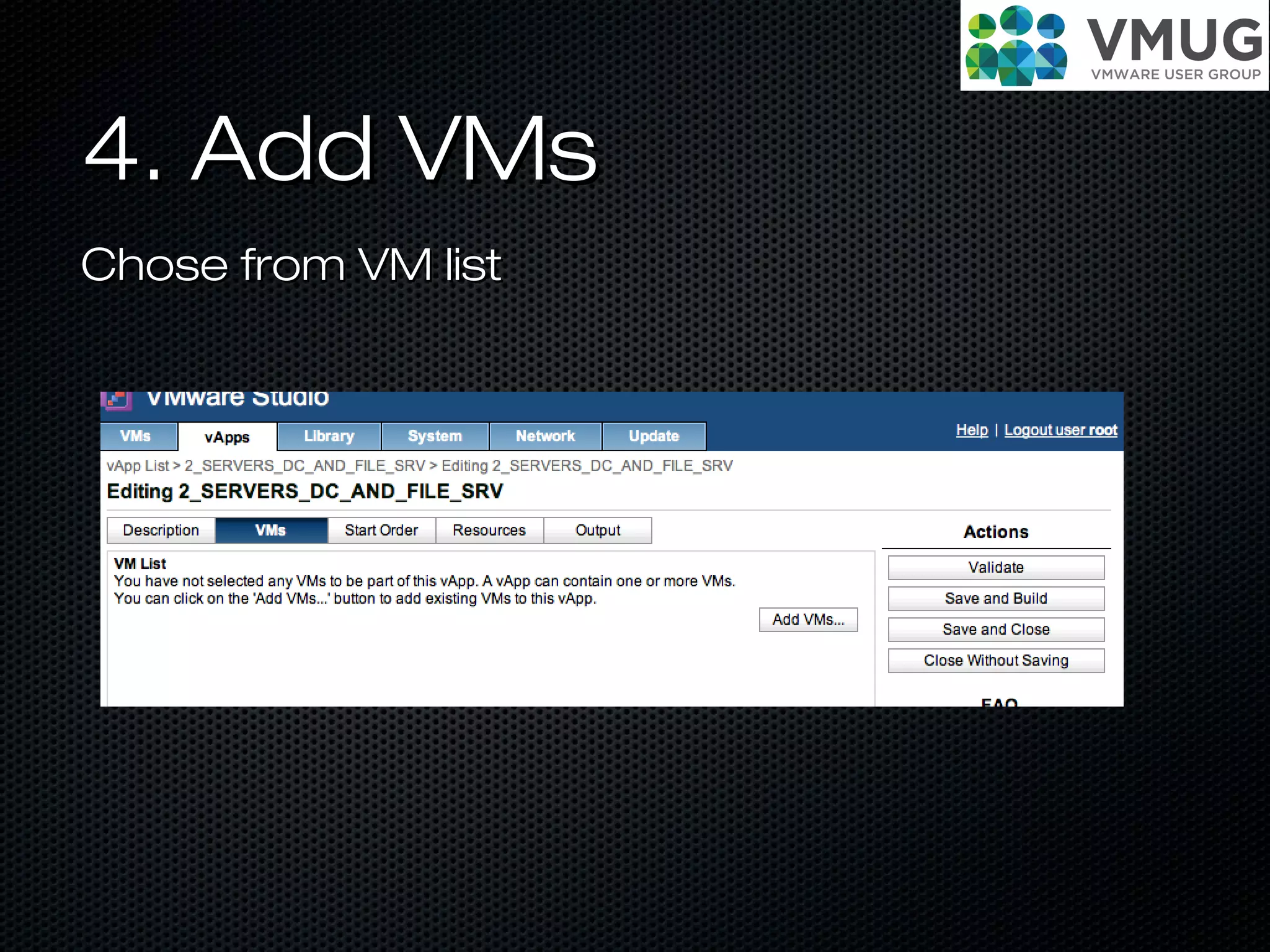
4. Add VMs4. Add VMs
Chose from VM listChose from VM list
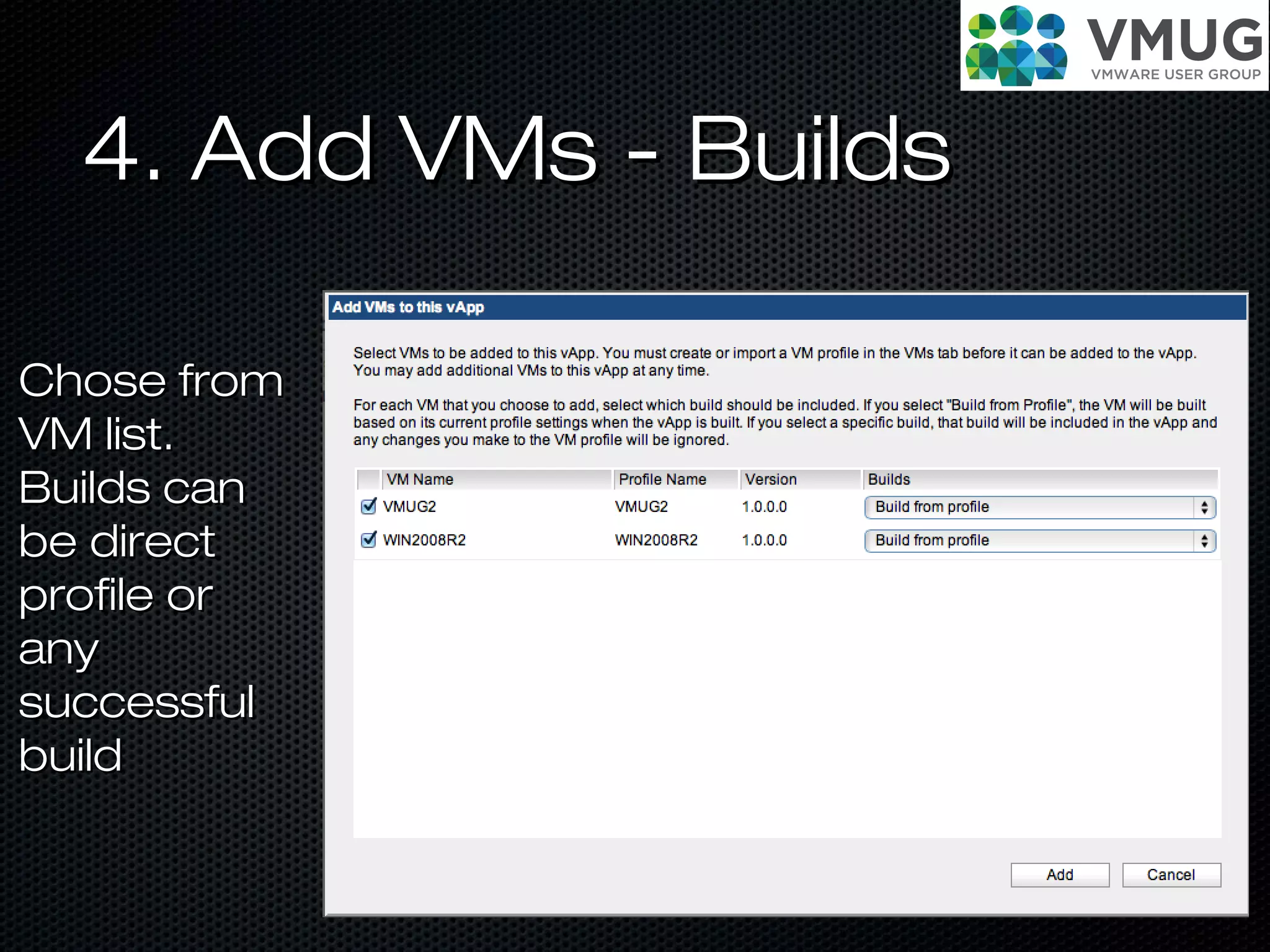
4. Add VMs - Builds4. Add VMs - Builds
Chose fromChose from
VM list.VM list.
Builds canBuilds can
be directbe direct
profile orprofile or
anyany
successfulsuccessful
buildbuild
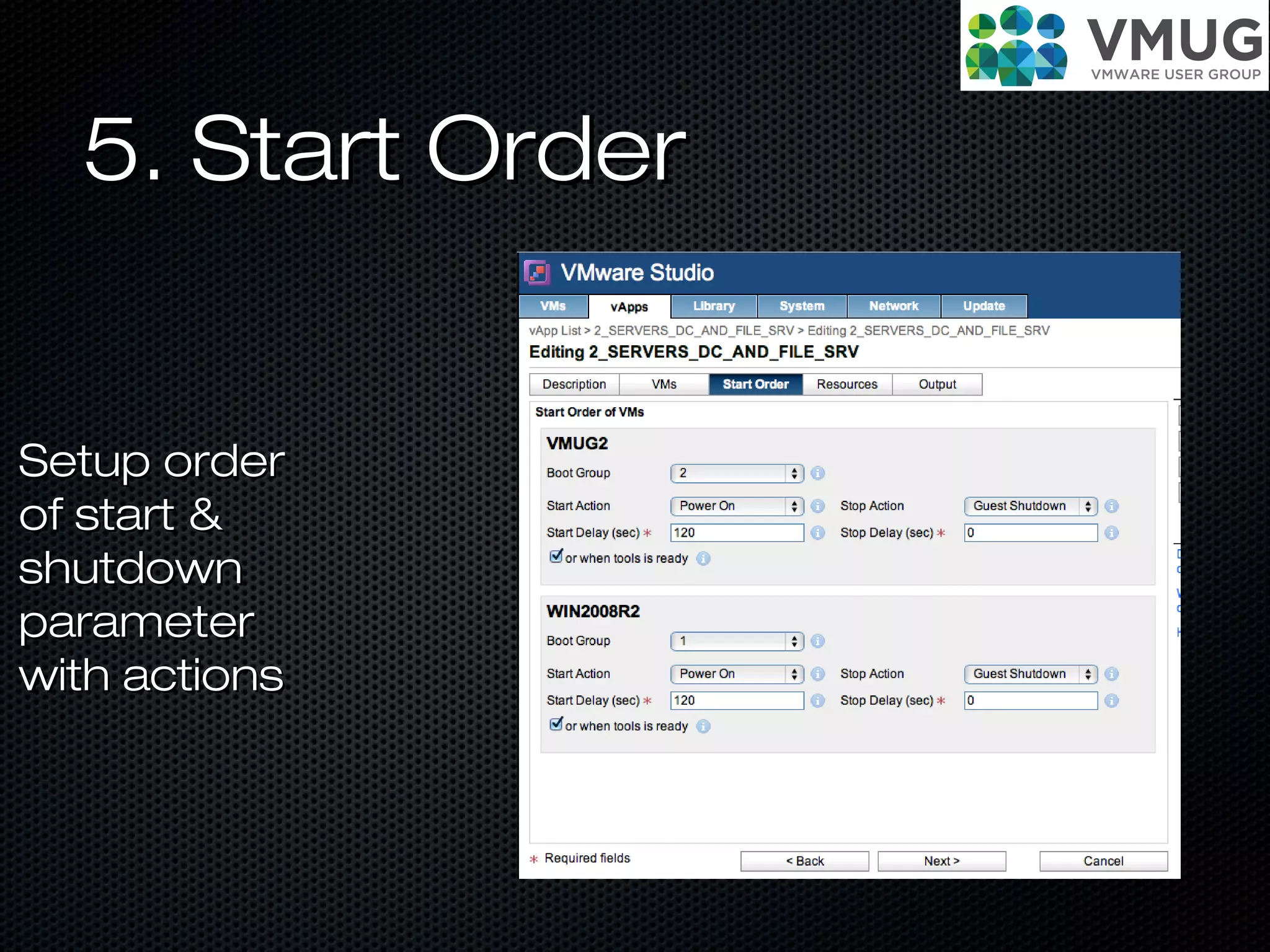
5. Start Order5. Start Order
Setup orderSetup order
of start &of start &
shutdownshutdown
parameterparameter
with actionswith actions
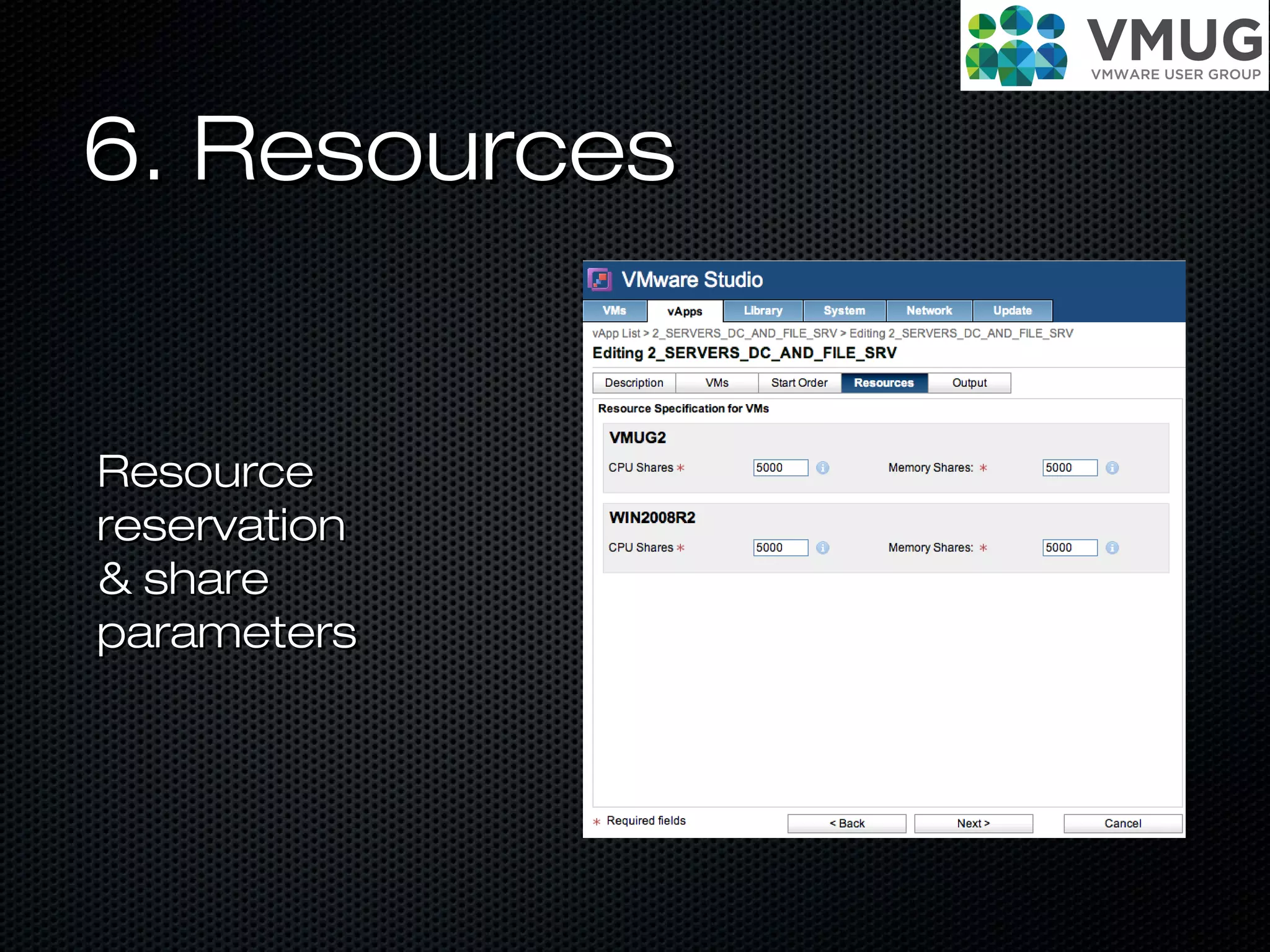
6. Resources6. Resources
ResourceResource
reservationreservation
& share& share
parametersparameters
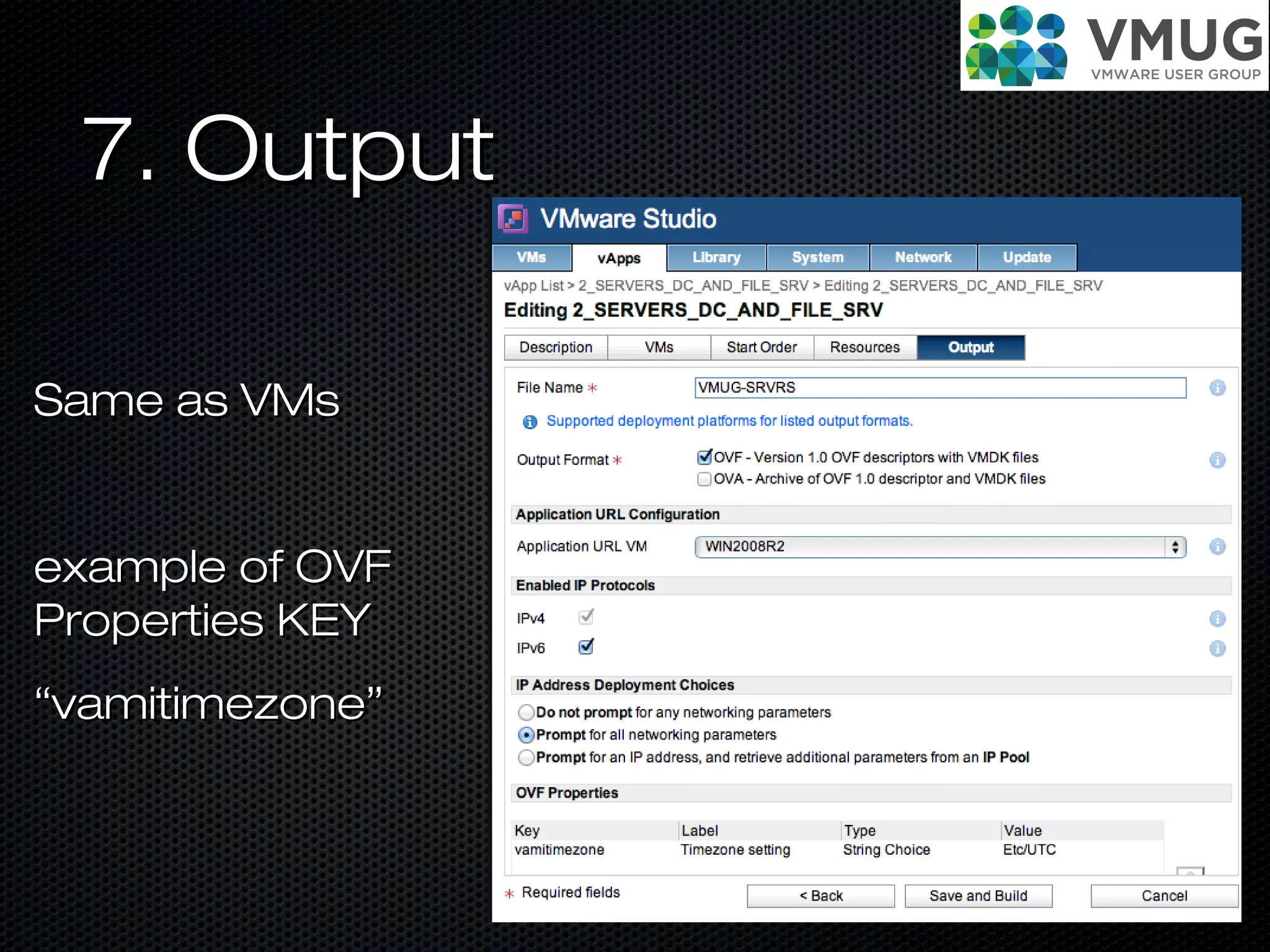
7. Output7. Output
Same as VMsSame as VMs
example of OVFexample of OVF
Properties KEYProperties KEY
““vamitimezone”vamitimezone”
Live DEMOLive DEMO
Benefits?Benefits?
A command line interface, typically used forA command line interface, typically used for
automationautomation
An Eclipse plug-in for developers usingAn Eclipse plug-in for developers using EclipseEclipse
Single point for ImagesSingle point for Images
Easy update of apps or generate newEasy update of apps or generate new
specialized VMsspecialized VMs
Easy to publish complete platform solutionsEasy to publish complete platform solutions
Where to get?Where to get?
Price: FreePrice: Free
download & more info:download & more info:
www.vmware.com/go/STUDIOwww.vmware.com/go/STUDIO
Q&Q&
AA
ThanksThanks
Jaroslav MrazJaroslav Mraz
E-mail: mraz@allycom.skE-mail: mraz@allycom.sk
www.jaroslavmraz.skwww.jaroslavmraz.sk
Social:Social:
Future questions:Future questions:

VMware Studio & vAPP-s

  • 1.
    VMWare Studio &VMWareStudio & vAPP-svAPP-s VMUG - Bratislava - 21.05.2013VMUG - Bratislava - 21.05.2013
  • 2.
  • 3.
    What is OVF?Whatis OVF? Open Virtualization Format (OVF) is an open standard for packaging and distributing virtual appliances or more generally software to be run in virtual machines http://www.vmware.com/pdf/ovf_whitepaper_shttp://www.vmware.com/pdf/ovf_whitepaper_s
  • 4.
    What is OVF?Whatis OVF? • open standard VM Files and OVF DESCRIPTOR • OVF descriptor - XML CFG file • Actual standard 2.0 • Usually used 0.9, 1.0 http://www.dmtf.org/standards/ovfhttp://www.dmtf.org/standards/ovf
  • 5.
    Sample OVFSample OVF <?xmlversion="1.0" encoding="UTF-8"?> <Envelope xmlns:xsi="http://www.w3.org/2001/XMLSchema-instance" xmlns="http://schemas.dmtf.org/ovf/1/envelope" xmlns:ovf="http://schemas.dmtf.org/ovf/1/envelope" xmlns:vssd=" http://schemas.dmtf.org/wbem/wscim/1/cim-schema/2/CIM_VirtualSystemSettingData" xmlns:rasd=" http://schemas.dmtf.org/wbem/wscim/1/cim- schema/2/CIM_ResourceAllocationSettingData"> <!-- References to all external files --> <References> <File ovf:id="file1" ovf:href="vmdisk1.vmdk" ovf:size="180114671"/> </References> <!-- Describes meta-information for all virtual disks in the package --> <DiskSection> <Info>Describes the set of virtual disks</Info> <Disk ovf:diskId="vmdisk1" ovf:fileRef="file1" ovf:capacity="4294967296" ovf:format="http://www.vmware.com/interfaces/specifications/vmdk.html#sparse"/> </DiskSection> <!-- Describes all networks used in the package --> <NetworkSection> <Info>List of logical networks used in the package</Info> <Network ovf:name="VM Network"> <Description>The network that the service will be available on</Description>
  • 6.
    Extended OVFExtended OVF propertiesproperties Themost interesting part :)The most interesting part :)
  • 7.
    Result of rightOVFResult of right OVF Self-configuration VMSelf-configuration VM
  • 8.
  • 9.
    What is vAPP?Whatis vAPP? New distribution format based on OVFNew distribution format based on OVF Multiple VM-s with OVF containerMultiple VM-s with OVF container ALL IN ONE INFRASTRUCTUREALL IN ONE INFRASTRUCTURE
  • 10.
    Why use vAPP?Whyuse vAPP? Whole web app as single easy to distributeWhole web app as single easy to distribute packagepackage
  • 11.
    VMware vAPP benefitsVMwarevAPP benefits Resource controls for the VMs inside theResource controls for the VMs inside the containercontainer Network configurations contained insideNetwork configurations contained inside Configurable power managementConfigurable power management Thing about as single vSphereThing about as single vSphere
  • 12.
  • 13.
    VMWare StudioVMWare Studio IntroductionIntroduction Author,configure, deploy and customize virtualAuthor, configure, deploy and customize virtual machines, vApps and virtual appliances thatmachines, vApps and virtual appliances that can be deployed oncan be deployed on VMware vSphereVMware vSphere, or, or vCloud Director with VMware Studio.vCloud Director with VMware Studio.
  • 14.
    VMWare StudioVMWare Studio IntroductionIntroduction Studiois designed to be used by ISVs,Studio is designed to be used by ISVs, developers, IT professionals and members ofdevelopers, IT professionals and members of the virtualization community. It is a free productthe virtualization community. It is a free product and is available as a virtual applianceand is available as a virtual appliance
  • 15.
  • 16.
    How to start?Howto start? 1. PLAN1. PLAN vAPPvAPP VMVMVMVM OVFOVFOVFOVF APAP PP APAP PP APAP PP APAP PP APAP PP APAP PP FullFull VMVM containercontainer vAPP OVFvAPP OVFvAPP OVFvAPP OVF
  • 17.
    How to start?Howto start? 2. Prepare2. Prepare Download & Import OVF to vSphere or vCloudDownload & Import OVF to vSphere or vCloud at first run need to set root passwordat first run need to set root password If you want you can update by debian apt-If you want you can update by debian apt- get update, apt-get upgradeget update, apt-get upgrade
  • 18.
    3. Create3. Create Openin web browserOpen in web browser https://IPhttps://IP:5480:5480 Login as rootLogin as root
  • 19.
    4.VM Studio Dashboard4.VMStudio Dashboard Create new Profile or Import existing or seeCreate new Profile or Import existing or see buildsbuilds
  • 20.
    5. Create VM5.Create VM Chose from predefined profilesChose from predefined profiles After you save your new will be on end of list asAfter you save your new will be on end of list as template tootemplate too
  • 21.
    6. Description6. Description APPandAPP and VMVM version,version, informatiinformati on andon and LinksLinks EULAEULA
  • 22.
    6. Hardware6. Hardware SpecifySpecify VMHWVM HW version,version, HDDs,HDDs, PartitionPartition s, NIC ...s, NIC ...
  • 23.
    7. OS7. OS ISOURL OR PATHISO URL OR PATH ISO MD5ISO MD5 Upload ISO files with SSH (WinSCP,Upload ISO files with SSH (WinSCP, mucommander)mucommander) Store: //opt/vmware/www/ISV/ISO/Store: //opt/vmware/www/ISV/ISO/
  • 24.
    7. OS7. OS OSIMAGE - VL, Multi version DVD - form winOS IMAGE - VL, Multi version DVD - form win 2003 same as in unattended.xml2003 same as in unattended.xml Windows Server 2008 R2Windows Server 2008 R2 SERVERDATACENTER, Windows Server 2008SERVERDATACENTER, Windows Server 2008 R2 SERVERENTERPRISER2 SERVERENTERPRISE Domain, WorkgroupDomain, Workgroup
  • 25.
    7. OS -Additional7. OS - Additional Unattended CONFIGUnattended CONFIG <?xml version="1.0" encoding="utf-8"?><unattend xmlns="urn:schemas-microsoft-<?xml version="1.0" encoding="utf-8"?><unattend xmlns="urn:schemas-microsoft- com:unattend"> <settings pass="windowsPE"> <componentcom:unattend"> <settings pass="windowsPE"> <component name="Microsoft-Windows-Setup" processorArchitecture="amd64"name="Microsoft-Windows-Setup" processorArchitecture="amd64" publicKeyToken="31bf3856ad364e35" language="neutral" versionScope="nonSxS"publicKeyToken="31bf3856ad364e35" language="neutral" versionScope="nonSxS" xmlns:wcm="xmlns:wcm="http://schemas.microsoft.com/WMIConfig/2002/Statehttp://schemas.microsoft.com/WMIConfig/2002/State">"> <Display> <HorizontalResolution>1024</HorizontalResolution><Display> <HorizontalResolution>1024</HorizontalResolution> <VerticalResolution>768</VerticalResolution><VerticalResolution>768</VerticalResolution> <ColorDepth>16</ColorDepth> <RefreshRate>60</RefreshRate><ColorDepth>16</ColorDepth> <RefreshRate>60</RefreshRate> </Display> </component> <component name="Microsoft-Windows-</Display> </component> <component name="Microsoft-Windows- International-Core-WinPE" processorArchitecture="amd64"International-Core-WinPE" processorArchitecture="amd64" publicKeyToken="31bf3856ad364e35" language="neutral" versionScope="nonSxS"publicKeyToken="31bf3856ad364e35" language="neutral" versionScope="nonSxS" xmlns:wcm="xmlns:wcm="http://schemas.microsoft.com/WMIConfig/2002/Statehttp://schemas.microsoft.com/WMIConfig/2002/State "> <SetupUILanguage> <U"> <SetupUILanguage> <UILanguage>en-us</UILanguage>ILanguage>en-us</UILanguage> </SetupUILanguage> <InputLocale>0409:00000409</InputLocale></SetupUILanguage> <InputLocale>0409:00000409</InputLocale> <SystemLocale>en-us</SystemLocale> <UILanguage>en-us</UILanguage><SystemLocale>en-us</SystemLocale> <UILanguage>en-us</UILanguage> <UserLocale>en-US</UserLocale> </component><UserLocale>en-US</UserLocale> </component> </settings></unattend></settings></unattend> OSOS parameterparameter s like ins like in UnattendeUnattende d.XMLd.XML
  • 26.
    7. OS7. OS Sysprep- recommendedSysprep - recommended Sysprep - customizationSysprep - customization Add usersAdd users
  • 27.
    7. Application7. Application Addpreconfigured application for auto instalAdd preconfigured application for auto instal (apps can be stored directly in studio or another(apps can be stored directly in studio or another HTTP based server with CFGHTTP based server with CFG Application Pre-InstallApplication Pre-Install & Post-Install scripts& Post-Install scripts
  • 28.
    8. Output8. Output OVFEnvironment propertisOVF Environment propertis Output formatOutput format
  • 29.
    8. Output8. Output OVFEnvironment propertisOVF Environment propertis Output formatOutput format
  • 30.
    8. Output -Custom OVF8. Output - Custom OVF http://www.vmware.com/pdf/ovf_whitepaper_spehttp://www.vmware.com/pdf/ovf_whitepaper_spe
  • 31.
    9. Build Settings9.Build Settings ChoseChose platform andplatform and then usethen use wizardwizard
  • 32.
    10. Ready toBuild10. Ready to Build Save and BuildSave and Build If you don'tIf you don't wanted VMwanted VM to be deleteto be delete fromfrom platformplatform after testafter test ticktick
  • 33.
    11.Wait and readlog11.Wait and read log You canYou can see livesee live log withlog with anyany errors toerrors to correctcorrect
  • 34.
  • 35.
    1. Create orImport1. Create or Import ProfileProfile almost same as for VMalmost same as for VM
  • 36.
    2. Create aNew Profile2. Create a New Profile almost same as for VMalmost same as for VM
  • 37.
    3. Description ofvAPP3. Description of vAPP Description,Description, version andversion and EULA of wholeEULA of whole APPAPP
  • 38.
    4. Add VMs4.Add VMs Chose from VM listChose from VM list
  • 39.
    4. Add VMs- Builds4. Add VMs - Builds Chose fromChose from VM list.VM list. Builds canBuilds can be directbe direct profile orprofile or anyany successfulsuccessful buildbuild
  • 40.
    5. Start Order5.Start Order Setup orderSetup order of start &of start & shutdownshutdown parameterparameter with actionswith actions
  • 41.
  • 42.
    7. Output7. Output Sameas VMsSame as VMs example of OVFexample of OVF Properties KEYProperties KEY ““vamitimezone”vamitimezone”
  • 43.
  • 44.
    Benefits?Benefits? A command lineinterface, typically used forA command line interface, typically used for automationautomation An Eclipse plug-in for developers usingAn Eclipse plug-in for developers using EclipseEclipse Single point for ImagesSingle point for Images Easy update of apps or generate newEasy update of apps or generate new specialized VMsspecialized VMs Easy to publish complete platform solutionsEasy to publish complete platform solutions
  • 45.
    Where to get?Whereto get? Price: FreePrice: Free download & more info:download & more info: www.vmware.com/go/STUDIOwww.vmware.com/go/STUDIO
  • 46.
  • 47.
    ThanksThanks Jaroslav MrazJaroslav Mraz E-mail:mraz@allycom.skE-mail: mraz@allycom.sk www.jaroslavmraz.skwww.jaroslavmraz.sk Social:Social: Future questions:Future questions: