
Company
LOGO
COMPUTER NETWORKS
Presented by-
Nasrin Irshad
Hussain
 M.Sc IT(2nd
semester)
04/21/14 1
Presentation Contents
 Introduction
 Computer Network
 Devices use to connect networks
 Type of network
a) LAN
b) MAN
c) WAN
d) Differences
 Models of network
a) Client/Server
b) Peer to Peer
c) Differences
 Application of networks
 References
04/21/14 2
 A network consists of two or more computers
that are linked in order to share resources,
exchange files or allow electronic
communications.
 The computers on a network may be linked
through cables, telephone lines, radio waves,
satellites or infrared light beams
Computer Networks
04/21/14 3
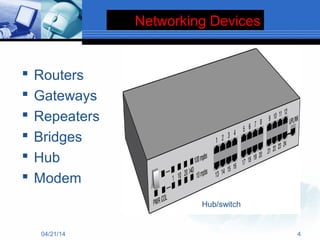
Networking Devices
 Routers
 Gateways
 Repeaters
 Bridges
 Hub
 Modem
04/21/14 4
Hub/switch
Types of network are:
 Local area network (LAN),
 Metropolitan area network (MAN)
 Wide area network (WAN)
Types of Network
04/21/14 5
Local Area Network(LAN)
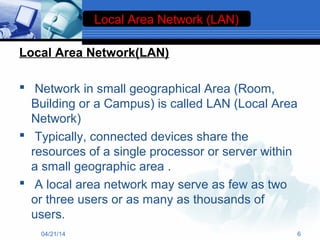
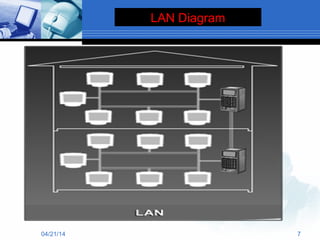
 Network in small geographical Area (Room,
Building or a Campus) is called LAN (Local Area
Network)
 Typically, connected devices share the
resources of a single processor or server within
a small geographic area .
 A local area network may serve as few as two
or three users or as many as thousands of
users.
Local Area Network (LAN)
04/21/14 6
04/21/14 7
LAN Diagram
Wide Area Network(WAN)
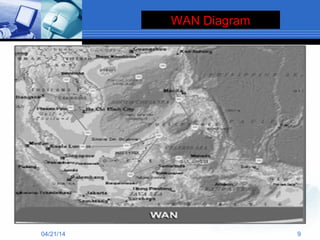
 The largest network of all network types.
 Internet is the largest WAN in the world.
 WAN generally covers large distances such as
states, countries or continents.
 WAN is a group of MANs or LANs or the mixture
of both networks.
04/21/14 8
04/21/14 9
WAN Diagram
Metropolitan Area Network
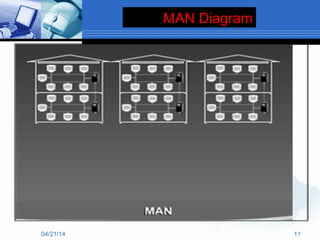
 A metropolitan area network (MAN) is a network
that interconnects users with computer
resources in a geographic area or region larger
than that covered by even a large local area
network but smaller than the area covered by a
wide area network (WAN).
 It is also used to mean the interconnection of
several local area networks by bridging them
with backbone lines
04/21/14 10
MAN Diagram
04/21/14 11
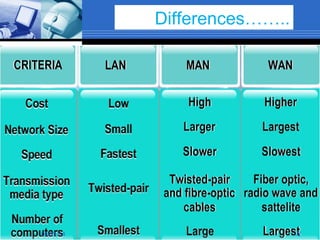
Differences……..
04/21/14 12
Models of Networking
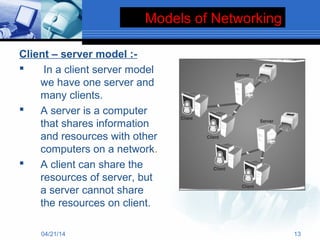
Client – server model :-
 In a client server model
we have one server and
many clients.
 A server is a computer
that shares information
and resources with other
computers on a network.
 A client can share the
resources of server, but
a server cannot share
the resources on client.
04/21/14 13
Models of Networking
04/21/14 14
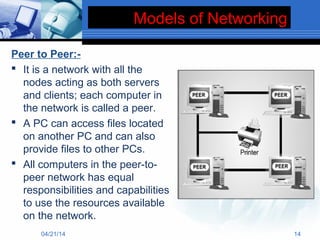
Peer to Peer:-
 It is a network with all the
nodes acting as both servers
and clients; each computer in
the network is called a peer.
 A PC can access files located
on another PC and can also
provide files to other PCs.
 All computers in the peer-to-
peer network has equal
responsibilities and capabilities
to use the resources available
on the network.
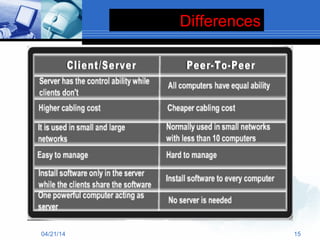
Differences
04/21/14 15
Application of Networks
 Resource Sharing

Hardware (computing resources, disks, printers)

Software (application software)
 Information Sharing

Easy accessibility from anywhere (files, databases)

Search Capability (WWW)
 Communication

Email

Message broadcase

Remote computing

The control of one or more computer systems by
another, which is at a different location
04/21/14
References……
 Computer Networks by Susan Shannon
 www.slideshare.com
 www.google.com
 www.google.com
04/21/14 17
04/21/14 18

Computer networks

  • 1.
    Company LOGO COMPUTER NETWORKS Presented by- NasrinIrshad Hussain  M.Sc IT(2nd semester) 04/21/14 1
  • 2.
    Presentation Contents  Introduction Computer Network  Devices use to connect networks  Type of network a) LAN b) MAN c) WAN d) Differences  Models of network a) Client/Server b) Peer to Peer c) Differences  Application of networks  References 04/21/14 2
  • 3.
     A networkconsists of two or more computers that are linked in order to share resources, exchange files or allow electronic communications.  The computers on a network may be linked through cables, telephone lines, radio waves, satellites or infrared light beams Computer Networks 04/21/14 3
  • 4.
    Networking Devices  Routers Gateways  Repeaters  Bridges  Hub  Modem 04/21/14 4 Hub/switch
  • 5.
    Types of networkare:  Local area network (LAN),  Metropolitan area network (MAN)  Wide area network (WAN) Types of Network 04/21/14 5
  • 6.
    Local Area Network(LAN) Network in small geographical Area (Room, Building or a Campus) is called LAN (Local Area Network)  Typically, connected devices share the resources of a single processor or server within a small geographic area .  A local area network may serve as few as two or three users or as many as thousands of users. Local Area Network (LAN) 04/21/14 6
  • 7.
  • 8.
    Wide Area Network(WAN) The largest network of all network types.  Internet is the largest WAN in the world.  WAN generally covers large distances such as states, countries or continents.  WAN is a group of MANs or LANs or the mixture of both networks. 04/21/14 8
  • 9.
  • 10.
    Metropolitan Area Network A metropolitan area network (MAN) is a network that interconnects users with computer resources in a geographic area or region larger than that covered by even a large local area network but smaller than the area covered by a wide area network (WAN).  It is also used to mean the interconnection of several local area networks by bridging them with backbone lines 04/21/14 10
  • 11.
  • 12.
  • 13.
    Models of Networking Client– server model :-  In a client server model we have one server and many clients.  A server is a computer that shares information and resources with other computers on a network.  A client can share the resources of server, but a server cannot share the resources on client. 04/21/14 13
  • 14.
    Models of Networking 04/21/1414 Peer to Peer:-  It is a network with all the nodes acting as both servers and clients; each computer in the network is called a peer.  A PC can access files located on another PC and can also provide files to other PCs.  All computers in the peer-to- peer network has equal responsibilities and capabilities to use the resources available on the network.
  • 15.
  • 16.
    Application of Networks Resource Sharing  Hardware (computing resources, disks, printers)  Software (application software)  Information Sharing  Easy accessibility from anywhere (files, databases)  Search Capability (WWW)  Communication  Email  Message broadcase  Remote computing  The control of one or more computer systems by another, which is at a different location 04/21/14
  • 17.
    References……  Computer Networksby Susan Shannon  www.slideshare.com  www.google.com  www.google.com 04/21/14 17
  • 18.