Windows PowerShell Basics – Get PSDrive Info
i | P a g e
Table of Contents
Overview.......................................................................................................................................................1
Applies To..................................................................................................................................................1
Pre-Requisites ...........................................................................................................................................1
PowerShell Script – PSDrive Info...................................................................................................................1
Code Snippet – PSDrive.............................................................................................................................2
PowerShell Output – PSDrive................................................................................................................3
Windows PowerShell Basics – Get PSDrive Info
1 | P a g e
Overview
A Windows PowerShell Drive (PSDrive) is a data store location that you can access like a file system drive
in Windows PowerShell.
The Windows PowerShell providers create some drives for you, such as;
 File System Drives (including C: and D:),
 The Registry Drives (HKCU: and HKLM:),
 The Certificate Drive (Cert:)
You can create your own Windows PowerShell drives as well. These drives are very useful, though they
are available only within Windows PowerShell.
You cannot access them by using other Windows tools, such as File Explorer or Cmd.exe.
Applies To
Tested on Windows 10, Windows 2008 R2 and Windows 2012.
Pre-Requisites
Launch PowerShell Command Console or PowerShell ISE.
To run this script, Execution Policy should be set to either of these “AllSigned” or “RemoteSigned” or
“Unrestricted”, you can get current execution policy by running the command; “Get-ExecutionPolicy”.
Each Policy type and its purpose is shown in the below table.
Policy Type Purpose
Restricted No scripts can be run. Windows PowerShell can be used only in interactive mode.
AllSigned Only scripts signed by a trusted publisher can be run.
RemoteSigned Downloaded scripts must be signed by a trusted publisher before they can be run.
Unrestricted No restrictions; all Windows PowerShell scripts can be run.
PowerShell Script – PSDrive Info
This PowerShell script demonstrates retrieving PowerShell Drive (PSDrive) Information in PowerShell
console.
Windows PowerShell uses the noun PSDrive, additional you can retrieve information as below;
Windows PowerShell Basics – Get PSDrive Info
2 | P a g e
Code Snippet – PSDrive
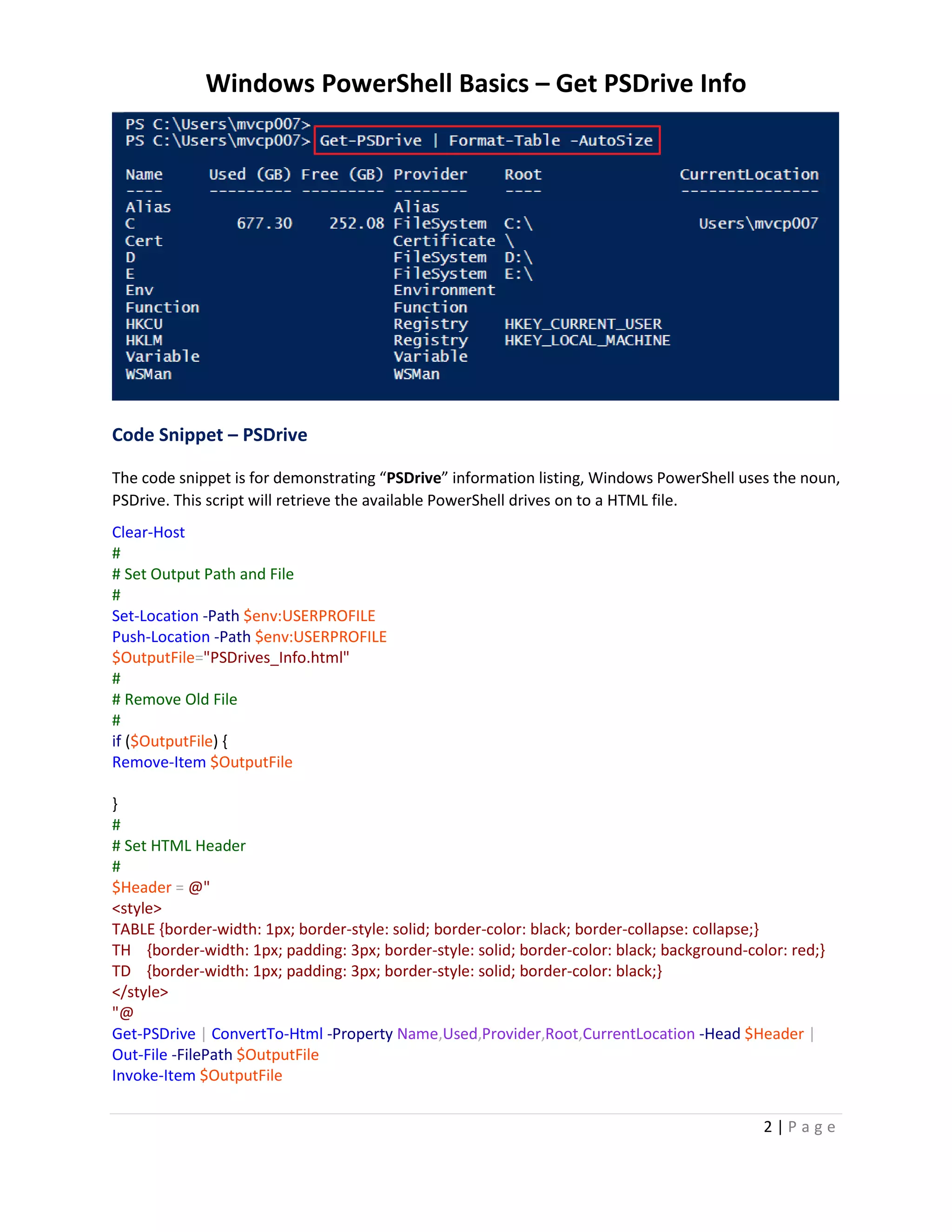
The code snippet is for demonstrating “PSDrive” information listing, Windows PowerShell uses the noun,
PSDrive. This script will retrieve the available PowerShell drives on to a HTML file.
Clear-Host
#
# Set Output Path and File
#
Set-Location -Path $env:USERPROFILE
Push-Location -Path $env:USERPROFILE
$OutputFile="PSDrives_Info.html"
#
# Remove Old File
#
if ($OutputFile) {
Remove-Item $OutputFile
}
#
# Set HTML Header
#
$Header = @"
<style>
TABLE {border-width: 1px; border-style: solid; border-color: black; border-collapse: collapse;}
TH {border-width: 1px; padding: 3px; border-style: solid; border-color: black; background-color: red;}
TD {border-width: 1px; padding: 3px; border-style: solid; border-color: black;}
</style>
"@
Get-PSDrive | ConvertTo-Html -Property Name,Used,Provider,Root,CurrentLocation -Head $Header |
Out-File -FilePath $OutputFile
Invoke-Item $OutputFile
Windows PowerShell Basics – Get PSDrive Info
3 | P a g e
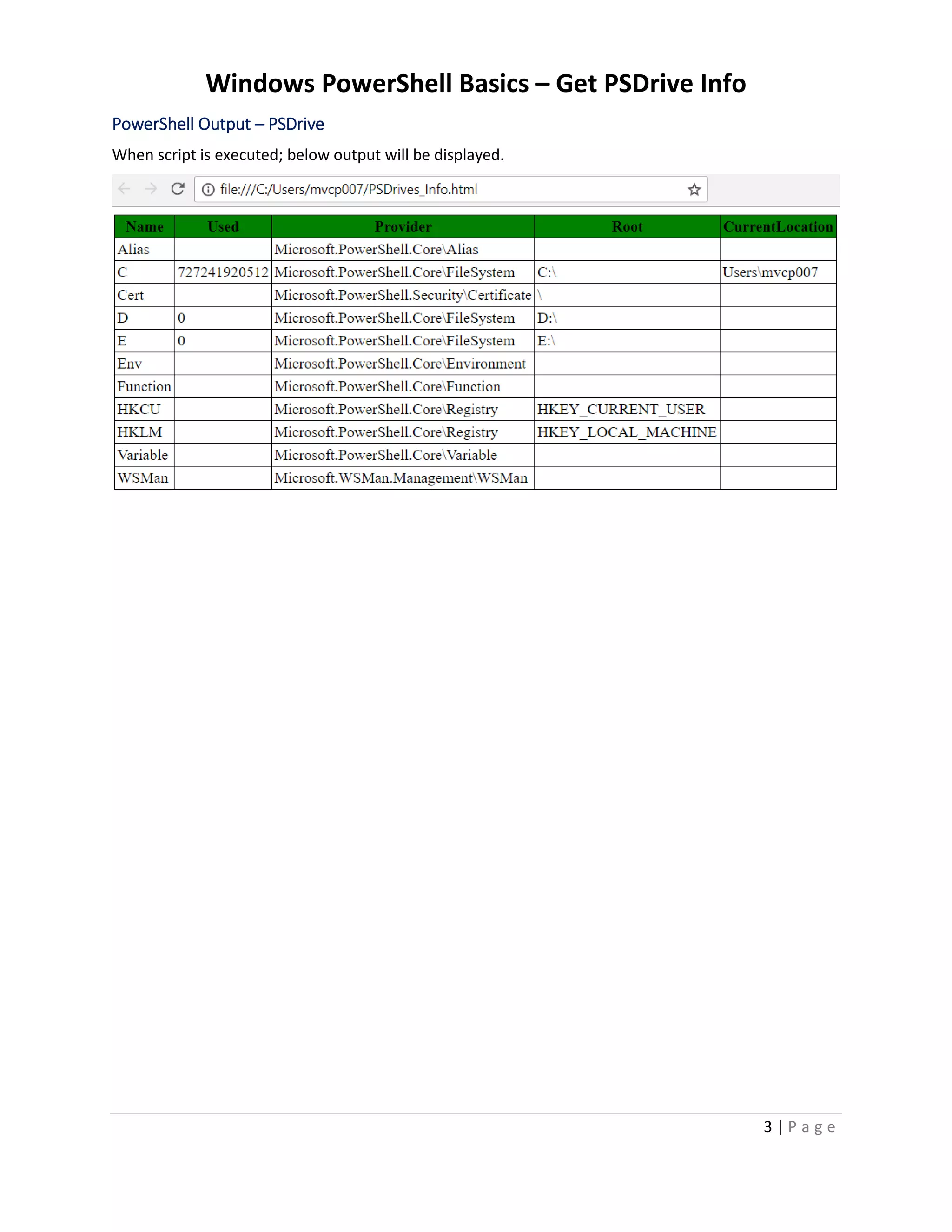
PowerShell Output – PSDrive
When script is executed; below output will be displayed.

Windows PowerShell Basics - How To List PSDrive Info

  • 1.
    Windows PowerShell Basics– Get PSDrive Info i | P a g e Table of Contents Overview.......................................................................................................................................................1 Applies To..................................................................................................................................................1 Pre-Requisites ...........................................................................................................................................1 PowerShell Script – PSDrive Info...................................................................................................................1 Code Snippet – PSDrive.............................................................................................................................2 PowerShell Output – PSDrive................................................................................................................3
  • 2.
    Windows PowerShell Basics– Get PSDrive Info 1 | P a g e Overview A Windows PowerShell Drive (PSDrive) is a data store location that you can access like a file system drive in Windows PowerShell. The Windows PowerShell providers create some drives for you, such as;  File System Drives (including C: and D:),  The Registry Drives (HKCU: and HKLM:),  The Certificate Drive (Cert:) You can create your own Windows PowerShell drives as well. These drives are very useful, though they are available only within Windows PowerShell. You cannot access them by using other Windows tools, such as File Explorer or Cmd.exe. Applies To Tested on Windows 10, Windows 2008 R2 and Windows 2012. Pre-Requisites Launch PowerShell Command Console or PowerShell ISE. To run this script, Execution Policy should be set to either of these “AllSigned” or “RemoteSigned” or “Unrestricted”, you can get current execution policy by running the command; “Get-ExecutionPolicy”. Each Policy type and its purpose is shown in the below table. Policy Type Purpose Restricted No scripts can be run. Windows PowerShell can be used only in interactive mode. AllSigned Only scripts signed by a trusted publisher can be run. RemoteSigned Downloaded scripts must be signed by a trusted publisher before they can be run. Unrestricted No restrictions; all Windows PowerShell scripts can be run. PowerShell Script – PSDrive Info This PowerShell script demonstrates retrieving PowerShell Drive (PSDrive) Information in PowerShell console. Windows PowerShell uses the noun PSDrive, additional you can retrieve information as below;
  • 3.
    Windows PowerShell Basics– Get PSDrive Info 2 | P a g e Code Snippet – PSDrive The code snippet is for demonstrating “PSDrive” information listing, Windows PowerShell uses the noun, PSDrive. This script will retrieve the available PowerShell drives on to a HTML file. Clear-Host # # Set Output Path and File # Set-Location -Path $env:USERPROFILE Push-Location -Path $env:USERPROFILE $OutputFile="PSDrives_Info.html" # # Remove Old File # if ($OutputFile) { Remove-Item $OutputFile } # # Set HTML Header # $Header = @" <style> TABLE {border-width: 1px; border-style: solid; border-color: black; border-collapse: collapse;} TH {border-width: 1px; padding: 3px; border-style: solid; border-color: black; background-color: red;} TD {border-width: 1px; padding: 3px; border-style: solid; border-color: black;} </style> "@ Get-PSDrive | ConvertTo-Html -Property Name,Used,Provider,Root,CurrentLocation -Head $Header | Out-File -FilePath $OutputFile Invoke-Item $OutputFile
  • 4.
    Windows PowerShell Basics– Get PSDrive Info 3 | P a g e PowerShell Output – PSDrive When script is executed; below output will be displayed.