www.afghanhost.af - info@afghanhost.af
Instructor: Mohammad Rafi Haidari25-May-2014
HTML (Day 3)
 Tables
 Blocks
 Layouts
HTML Tables
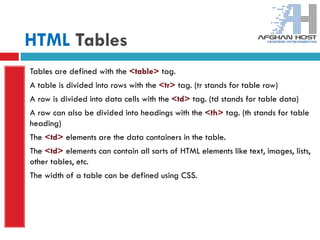
Tables are defined with the <table> tag.
A table is divided into rows with the <tr> tag. (tr stands for table row)
A row is divided into data cells with the <td> tag. (td stands for table data)
A row can also be divided into headings with the <th> tag. (th stands for table
heading)
The <td> elements are the data containers in the table.
The <td> elements can contain all sorts of HTML elements like text, images, lists,
other tables, etc.
The width of a table can be defined using CSS.
HTML Tables
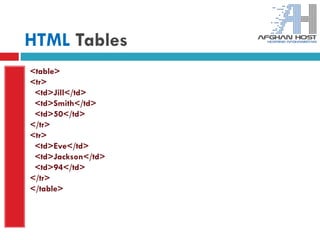
<table>
<tr>
<td>Jill</td>
<td>Smith</td>
<td>50</td>
</tr>
<tr>
<td>Eve</td>
<td>Jackson</td>
<td>94</td>
</tr>
</table>
HTML Tables(Border)
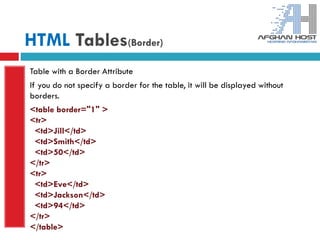
Table with a Border Attribute
If you do not specify a border for the table, it will be displayed without
borders.
<table border="1" >
<tr>
<td>Jill</td>
<td>Smith</td>
<td>50</td>
</tr>
<tr>
<td>Eve</td>
<td>Jackson</td>
<td>94</td>
</tr>
</table>
HTML Tables(Headings)
Table Headings
Table headings are defined with the <th> tag.
By default, all major browsers display table headings as bold and centered:
<table border="1" >
<tr>
<th>Firstname</th>
<th>Lastname</th>
<th>Points</th>
</tr>
<tr>
<td>Eve</td>
<td>Jackson</td>
<td>94</td>
</tr>
</table>
HTML Blocks
HTML <div> Element
The HTML <div> element is a block level element that can be used as a
container for grouping other HTML elements.
The <div> element has no special meaning. Except that, because it is a block
level element, the browser will display a line break before and after it.
When used together with CSS, the <div> element can be used to set style
attributes to large blocks of content.
Another common use of the <div> element, is for document layout. It replaces
the "old way" of defining layout using tables. Using <table> elements for
layout is not the correct use of <table> . The purpose of the <table> element is
to display tabular data.
<div style="color:gray">
<h3>This is a heading</h3>
<p>This is a paragraph.</p>
</div>
HTML Blocks
HTML <span> Element
The HTML <span> element is an inline element that can be used as a container
for text.
The <span> element has no special meaning.
When used together with CSS, the <span> element can be used to set style
attributes to parts of the text.
<p>My son has <span style="color:blue">blue</span> eyes.</p>
HTML Layouts
Most websites have put their content in multiple columns (formatted like a
magazine or newspaper).
Multiple columns are created by using <div> or <table> elements. CSS are
used to position elements, or to create backgrounds or colorful look for the
pages.
HTML Layouts - Using <div> Elements
The div element is a block level element used for grouping HTML elements.
The following example uses five div elements to create a multiple column
layout, creating the same result as in the previous example: (Next slide)
HTML Layouts
<html>
<body>
<div id="container" style="width:500px">
<div id="header" style="background-color:#FFA500;">
<h1 style="margin-bottom:0;">Main Title of Web Page</h1></div>
<div id="menu" style="background-
color:#FFD700;height:200px;width:100px;float:left;">
<b>Menu</b><br>
HTML<br>
CSS<br>
JavaScript</div>
<div id="content" style="background-
color:#EEEEEE;height:200px;width:400px;float:left;">
Content goes here</div>
<div id="footer" style="background-color:#FFA500;clear:both;text-align:center;">
Copyright © W3Schools.com</div>
</div>
</body>
</html>
HTML Layouts
The HTML code above will produce the following result:
HTML Layouts
HTML Layouts - Using Tables
A simple way of creating layouts is by using the HTML <table> tag.
Multiple columns are created by using <div> or <table> elements. CSS are used to
position elements, or
The following example uses a table with 3 rows and 2 columns - the first and last row
spans both columns using the colspan attribute: to create backgrounds or colorful look
for the pages.
HTML Layouts
<html>
<body>
<table width="500">
<tr>
<td colspan="2" style="background-color:#FFA500;">
<h1>Main Title of Web Page</h1>
</td>
</tr>
<tr>
<td style="background-color:#FFD700;width:100px;">
<b>Menu</b><br>
HTML<br>
CSS<br>
JavaScript
</td>
<td style="background-color:#EEEEEE;height:200px;width:400px;">Content goes here</td></tr>
<tr>
<td colspan="2" style="background-color:#FFA500;text-align:center;">Copyright ©
W3Schools.com</td></tr>
</table>
</body>
</html>
HTML Layouts
The HTML code above will produce the following result:
Html_Day_Three(W3Schools)

Html_Day_Three(W3Schools)

  • 1.
    www.afghanhost.af - info@afghanhost.af Instructor:Mohammad Rafi Haidari25-May-2014 HTML (Day 3)  Tables  Blocks  Layouts
  • 2.
    HTML Tables Tables aredefined with the <table> tag. A table is divided into rows with the <tr> tag. (tr stands for table row) A row is divided into data cells with the <td> tag. (td stands for table data) A row can also be divided into headings with the <th> tag. (th stands for table heading) The <td> elements are the data containers in the table. The <td> elements can contain all sorts of HTML elements like text, images, lists, other tables, etc. The width of a table can be defined using CSS.
  • 3.
  • 4.
    HTML Tables(Border) Table witha Border Attribute If you do not specify a border for the table, it will be displayed without borders. <table border="1" > <tr> <td>Jill</td> <td>Smith</td> <td>50</td> </tr> <tr> <td>Eve</td> <td>Jackson</td> <td>94</td> </tr> </table>
  • 5.
    HTML Tables(Headings) Table Headings Tableheadings are defined with the <th> tag. By default, all major browsers display table headings as bold and centered: <table border="1" > <tr> <th>Firstname</th> <th>Lastname</th> <th>Points</th> </tr> <tr> <td>Eve</td> <td>Jackson</td> <td>94</td> </tr> </table>
  • 6.
    HTML Blocks HTML <div>Element The HTML <div> element is a block level element that can be used as a container for grouping other HTML elements. The <div> element has no special meaning. Except that, because it is a block level element, the browser will display a line break before and after it. When used together with CSS, the <div> element can be used to set style attributes to large blocks of content. Another common use of the <div> element, is for document layout. It replaces the "old way" of defining layout using tables. Using <table> elements for layout is not the correct use of <table> . The purpose of the <table> element is to display tabular data. <div style="color:gray"> <h3>This is a heading</h3> <p>This is a paragraph.</p> </div>
  • 7.
    HTML Blocks HTML <span>Element The HTML <span> element is an inline element that can be used as a container for text. The <span> element has no special meaning. When used together with CSS, the <span> element can be used to set style attributes to parts of the text. <p>My son has <span style="color:blue">blue</span> eyes.</p>
  • 8.
    HTML Layouts Most websiteshave put their content in multiple columns (formatted like a magazine or newspaper). Multiple columns are created by using <div> or <table> elements. CSS are used to position elements, or to create backgrounds or colorful look for the pages. HTML Layouts - Using <div> Elements The div element is a block level element used for grouping HTML elements. The following example uses five div elements to create a multiple column layout, creating the same result as in the previous example: (Next slide)
  • 9.
    HTML Layouts <html> <body> <div id="container"style="width:500px"> <div id="header" style="background-color:#FFA500;"> <h1 style="margin-bottom:0;">Main Title of Web Page</h1></div> <div id="menu" style="background- color:#FFD700;height:200px;width:100px;float:left;"> <b>Menu</b><br> HTML<br> CSS<br> JavaScript</div> <div id="content" style="background- color:#EEEEEE;height:200px;width:400px;float:left;"> Content goes here</div> <div id="footer" style="background-color:#FFA500;clear:both;text-align:center;"> Copyright © W3Schools.com</div> </div> </body> </html>
  • 10.
    HTML Layouts The HTMLcode above will produce the following result:
  • 11.
    HTML Layouts HTML Layouts- Using Tables A simple way of creating layouts is by using the HTML <table> tag. Multiple columns are created by using <div> or <table> elements. CSS are used to position elements, or The following example uses a table with 3 rows and 2 columns - the first and last row spans both columns using the colspan attribute: to create backgrounds or colorful look for the pages.
  • 12.
    HTML Layouts <html> <body> <table width="500"> <tr> <tdcolspan="2" style="background-color:#FFA500;"> <h1>Main Title of Web Page</h1> </td> </tr> <tr> <td style="background-color:#FFD700;width:100px;"> <b>Menu</b><br> HTML<br> CSS<br> JavaScript </td> <td style="background-color:#EEEEEE;height:200px;width:400px;">Content goes here</td></tr> <tr> <td colspan="2" style="background-color:#FFA500;text-align:center;">Copyright © W3Schools.com</td></tr> </table> </body> </html>
  • 13.
    HTML Layouts The HTMLcode above will produce the following result: