1 / 6
NFS | LXC | K3S
2 / 6
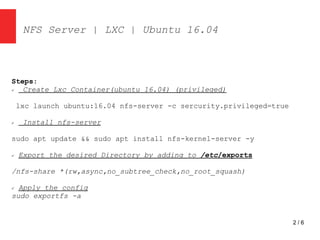
NFS Server | LXC | Ubuntu 16.04
- Share file and directories over network
Steps:
 Create Lxc Container(ubuntu 16.04) (privileged)
lxc launch ubuntu:16.04 nfs-server -c sercurity.privileged=true
 Install nfs-server
sudo apt update && sudo apt install nfs-kernel-server -y
 Export the desired Directory by adding to /etc/exports
/nfs-share *(rw,async,no_subtree_check,no_root_squash)
 Apply the config
sudo exportfs -a
3 / 6
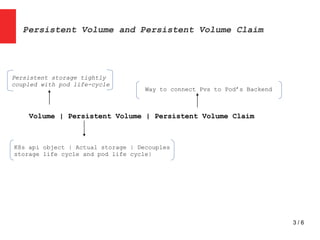
Persistent Volume and Persistent Volume Claim
Volume | Persistent Volume | Persistent Volume Claim
Persistent storage tightly
coupled with pod life-cycle
K8s api object | Actual storage | Decouples
storage life cycle and pod life cycle|
Way to connect Pvs to Pod’s Backend
4 / 6
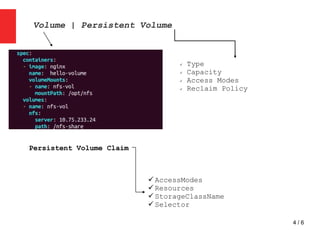
Volume | Persistent Volume
 Type
 Capacity
 Access Modes
 Reclaim Policy
Persistent Volume Claim
 AccessModes
 Resources
 StorageClassName
 Selector
5 / 6
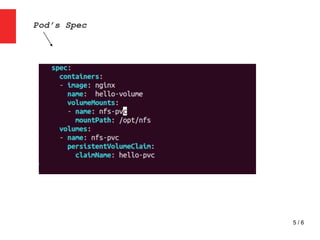
Pod’s Spec
6 / 6
Thank you !!!

Storage Simplified NFS LXC K3S

  • 1.
    1 / 6 NFS| LXC | K3S
  • 2.
    2 / 6 NFSServer | LXC | Ubuntu 16.04 - Share file and directories over network Steps:  Create Lxc Container(ubuntu 16.04) (privileged) lxc launch ubuntu:16.04 nfs-server -c sercurity.privileged=true  Install nfs-server sudo apt update && sudo apt install nfs-kernel-server -y  Export the desired Directory by adding to /etc/exports /nfs-share *(rw,async,no_subtree_check,no_root_squash)  Apply the config sudo exportfs -a
  • 3.
    3 / 6 PersistentVolume and Persistent Volume Claim Volume | Persistent Volume | Persistent Volume Claim Persistent storage tightly coupled with pod life-cycle K8s api object | Actual storage | Decouples storage life cycle and pod life cycle| Way to connect Pvs to Pod’s Backend
  • 4.
    4 / 6 Volume| Persistent Volume  Type  Capacity  Access Modes  Reclaim Policy Persistent Volume Claim  AccessModes  Resources  StorageClassName  Selector
  • 5.
  • 6.
    6 / 6 Thankyou !!!