HISTORY 
Windows 2000, which originally was Windows NT 
5, was introduced in Year 1999. It was a brand 
new operating system in the NT family. With its 
new design, Windows 2000 has become a 
popular operating system. 
Like its elder brother, Windows NT 4, Windows 
2000 is very stable and robust. Unlike Windows 
NT 4, Windows 2000 has many new features. 
Windows 2000 has new features that Windows 
98 has over Windows 95, and more
 Windows 2000 has a "My Documents" folder on 
the desktop. This feature lets the user find 
his/her documents fast. 
 The "My Network Places" folder on the desktop 
is like the original "Network Neighbourhood" 
folder, but has a new feature that allows you to 
create shortcuts to network places including 
LAN, FTP and web folders. 
 Windows 2000 has a new feature (System File 
Protection) that heals damaged files 
automatically. 
 USB support provides convenience 
with USB devices. Simply plug it in and use it.
 Windows 2000 is easier to troubleshoot and recover 
with its Safe Mode options and Recover Console . 
 Windows 2000 lets applications install more easily, thus 
fewer restarts are needed during installation and 
configuration. 
 Encrypted File System ensures security of your files. 
 Power Management helps you to save power with either 
a desktop computer or a laptop computer. 
 Automatic Infrared Support lets you connect wirelessly 
to another device by simply pointing it towards your 
computer. 
 The new "Add/Remove Programs " dialog can contain 
descriptions and support information for installed 
programs.
• Personalized Start menu feature allows you to have 
infrequently used program icons in the Start menu 
hidden. 
• The toolbar on every folder browsing window can 
be customized. You can add or delete buttons on it. 
• Active Desktop allows you to create personalized 
shortcuts to Web or intranet sites and/or schedule 
regular updates. 
• The Accessibility Wizard helps you to configure 
Windows for your vision, hearing and mobility 
needs. 
• New Windows 2000 Multilanguage 
Technology provides unparalleled multilingual 
options for end users and IT administrators.
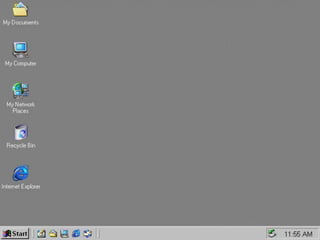
In windows operating system the user can 
easily accomplish different tasks right 
from the computer desktop. It is a screen 
work area that the user uses different 
icons and menu to stimulate the top of 
the desktop. A user can place shortcut 
of frequently used programs, web-pages 
and documents files. By default, the 
desktop contains following icons:
TASKBAR 
It is used as a link to easily open and close 
program. It also allows the user to switch 
between the open application programs or files, 
by default the taskbar is placed at the bottom of 
the desktop.
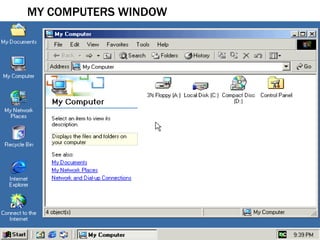
MY COMPUTER 
It displays documents and files. The user can 
access local drives and removable drives
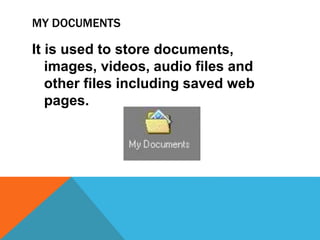
MY DOCUMENTS 
It is used to store documents, 
images, videos, audio files and 
other files including saved web 
pages.
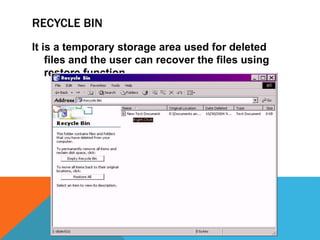
RECYCLE BIN 
It is a temporary storage area used for deleted 
files and the user can recover the files using 
restore function
INTERNET EXPLORER 
It provide access to internet browsing
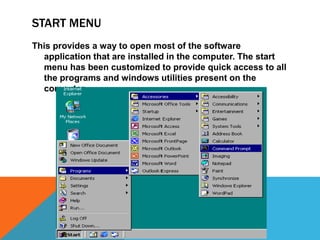
START MENU 
This provides a way to open most of the software 
application that are installed in the computer. The start 
menu has been customized to provide quick access to all 
the programs and windows utilities present on the 
computer
ITEMS IN START MENU 
Shut down: this item has different options such as shut 
down and restart computer, close all programs and log on 
for different user or shut down completely. 
Run: It starts a program by typing the program name and 
path there is a browse option to search for the programs 
to be opened. 
Help and support: it gives access to the help feature for the 
windows environment. 
Search: the user can search different types of files in 
various location. 
Settings (Control panel): it provides quick access to the 
control panel, printer options and taskbar properties.
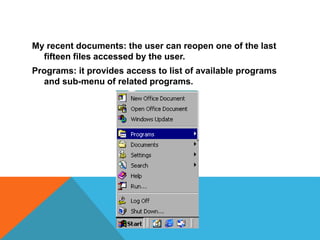
My recent documents: the user can reopen one of the last 
fifteen files accessed by the user. 
Programs: it provides access to list of available programs 
and sub-menu of related programs.
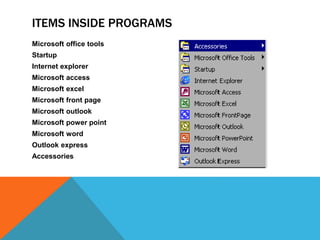
ITEMS INSIDE PROGRAMS 
Microsoft office tools 
Startup 
Internet explorer 
Microsoft access 
Microsoft excel 
Microsoft front page 
Microsoft outlook 
Microsoft power point 
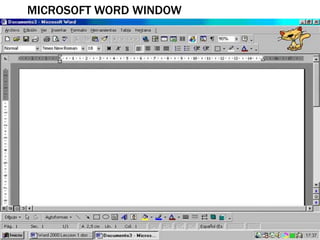
Microsoft word 
Outlook express 
Accessories
ITEMS INSIDE ACCESSORIES 
Accessibility 
Communications 
Entertainment 
Games 
System tools 
Address book 
Calculator 
Command prompt 
Imaging 
Notepad 
Paint 
Synchronize 
Windows explorer 
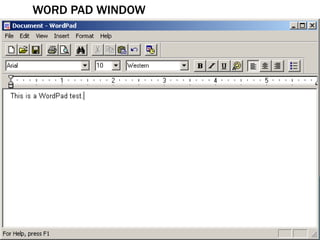
WordPad
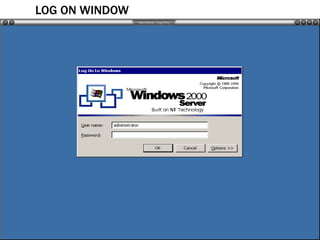
LOG ON WINDOW
GETTING STARTED WINDOW 2000
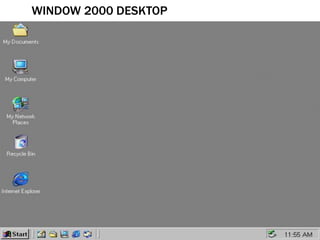
WINDOW 2000 DESKTOP
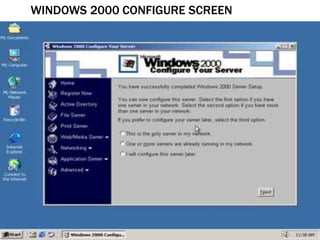
WINDOWS 2000 CONFIGURE SCREEN
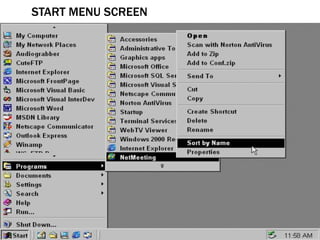
START MENU SCREEN
MY COMPUTERS WINDOW
LOCAL DISK C WINDOW
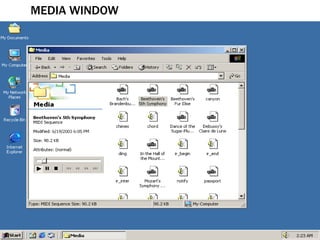
MEDIA WINDOW
RECYCLE BIN
WORD PAD WINDOW
MICROSOFT WORD WINDOW
MICROSOFT POWER POINT WINDOW
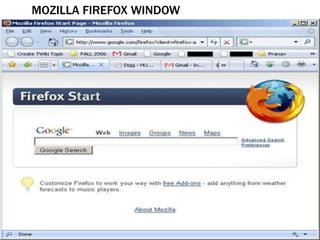
MOZILLA FIREFOX WINDOW
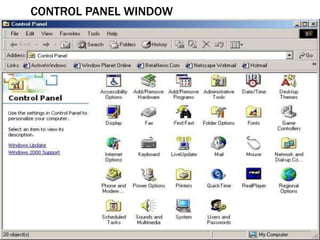
CONTROL PANEL WINDOW
CALCULATOR WINDOW

Windows 2000

  • 3.
    HISTORY Windows 2000,which originally was Windows NT 5, was introduced in Year 1999. It was a brand new operating system in the NT family. With its new design, Windows 2000 has become a popular operating system. Like its elder brother, Windows NT 4, Windows 2000 is very stable and robust. Unlike Windows NT 4, Windows 2000 has many new features. Windows 2000 has new features that Windows 98 has over Windows 95, and more
  • 5.
     Windows 2000has a "My Documents" folder on the desktop. This feature lets the user find his/her documents fast.  The "My Network Places" folder on the desktop is like the original "Network Neighbourhood" folder, but has a new feature that allows you to create shortcuts to network places including LAN, FTP and web folders.  Windows 2000 has a new feature (System File Protection) that heals damaged files automatically.  USB support provides convenience with USB devices. Simply plug it in and use it.
  • 6.
     Windows 2000is easier to troubleshoot and recover with its Safe Mode options and Recover Console .  Windows 2000 lets applications install more easily, thus fewer restarts are needed during installation and configuration.  Encrypted File System ensures security of your files.  Power Management helps you to save power with either a desktop computer or a laptop computer.  Automatic Infrared Support lets you connect wirelessly to another device by simply pointing it towards your computer.  The new "Add/Remove Programs " dialog can contain descriptions and support information for installed programs.
  • 7.
    • Personalized Startmenu feature allows you to have infrequently used program icons in the Start menu hidden. • The toolbar on every folder browsing window can be customized. You can add or delete buttons on it. • Active Desktop allows you to create personalized shortcuts to Web or intranet sites and/or schedule regular updates. • The Accessibility Wizard helps you to configure Windows for your vision, hearing and mobility needs. • New Windows 2000 Multilanguage Technology provides unparalleled multilingual options for end users and IT administrators.
  • 10.
    In windows operatingsystem the user can easily accomplish different tasks right from the computer desktop. It is a screen work area that the user uses different icons and menu to stimulate the top of the desktop. A user can place shortcut of frequently used programs, web-pages and documents files. By default, the desktop contains following icons:
  • 11.
    TASKBAR It isused as a link to easily open and close program. It also allows the user to switch between the open application programs or files, by default the taskbar is placed at the bottom of the desktop.
  • 12.
    MY COMPUTER Itdisplays documents and files. The user can access local drives and removable drives
  • 13.
    MY DOCUMENTS Itis used to store documents, images, videos, audio files and other files including saved web pages.
  • 14.
    RECYCLE BIN Itis a temporary storage area used for deleted files and the user can recover the files using restore function
  • 15.
    INTERNET EXPLORER Itprovide access to internet browsing
  • 16.
    START MENU Thisprovides a way to open most of the software application that are installed in the computer. The start menu has been customized to provide quick access to all the programs and windows utilities present on the computer
  • 17.
    ITEMS IN STARTMENU Shut down: this item has different options such as shut down and restart computer, close all programs and log on for different user or shut down completely. Run: It starts a program by typing the program name and path there is a browse option to search for the programs to be opened. Help and support: it gives access to the help feature for the windows environment. Search: the user can search different types of files in various location. Settings (Control panel): it provides quick access to the control panel, printer options and taskbar properties.
  • 18.
    My recent documents:the user can reopen one of the last fifteen files accessed by the user. Programs: it provides access to list of available programs and sub-menu of related programs.
  • 19.
    ITEMS INSIDE PROGRAMS Microsoft office tools Startup Internet explorer Microsoft access Microsoft excel Microsoft front page Microsoft outlook Microsoft power point Microsoft word Outlook express Accessories
  • 20.
    ITEMS INSIDE ACCESSORIES Accessibility Communications Entertainment Games System tools Address book Calculator Command prompt Imaging Notepad Paint Synchronize Windows explorer WordPad
  • 22.
  • 23.
  • 24.
  • 25.
  • 26.
  • 27.
  • 28.
  • 29.
  • 30.
  • 31.
  • 32.
  • 33.
  • 34.
  • 35.
  • 36.