Kicking Machine with a
Technology Twist!
STEM Activity
Introductions:
Website: www.STEMCrazyTeachers.com
Background
•Potential Energy
• Kinetic Energy
Create a Kicking Machine
Build a machine that kicks a Ping-Pong ball into a cup
lying on its side 12 inches away. Use either a pendulum,
rubber band, or a combination of the two to do this.
Use only the supplies you have been given!
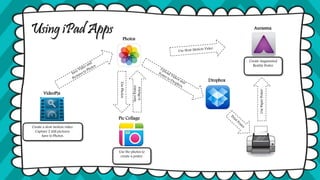
Using iPad Apps
VideoPix
Pic Collage
Aurasma
Dropbox
Create a slow motion video.
Capture 2 still pictures.
Save to Photos.
Use the photos to
create a poster.
Photos
UsePhotos
SavePoster
toPhotos
UsePaperPoster
Create Augmented
Reality Poster
VideoPix
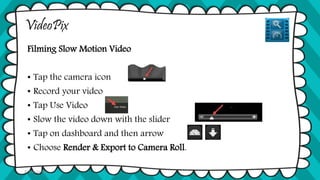
Filming Slow Motion Video
• Tap the camera icon
• Record your video
• Tap Use Video
• Slow the video down with the slider
• Tap on dashboard and then arrow
• Choose Render & Export to Camera Roll.
© Tina Coffey
VideoPix
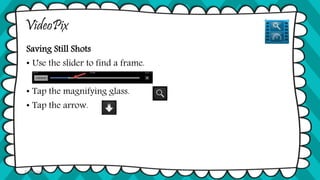
Saving Still Shots
• Use the slider to find a frame.
• Tap the magnifying glass.
• Tap the arrow.
© Tina Coffey
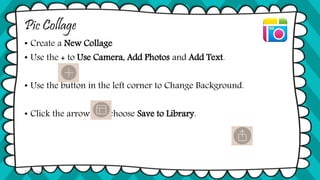
Pic Collage
• Create a New Collage
• Use the + to Use Camera, Add Photos and Add Text.
• Use the button in the left corner to Change Background.
• Click the arrow and choose Save to Library.
© Tina Coffey
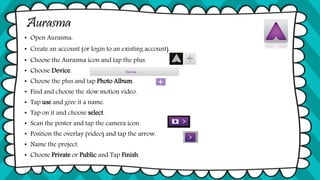
Aurasma
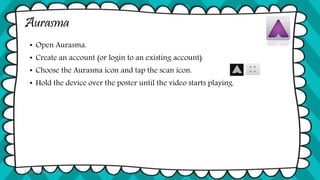
• Open Aurasma.
• Create an account (or login to an existing account).
• Choose the Aurasma icon and tap the plus.
• Choose Device.
• Choose the plus and tap Photo Album.
• Find and choose the slow motion video.
• Tap use and give it a name.
• Tap on it and choose select.
• Scan the poster and tap the camera icon.
• Position the overlay (video) and tap the arrow.
• Name the project.
• Choose Private or Public and Tap Finish.
© Tina Coffey
Aurasma
• Open Aurasma.
• Create an account (or login to an existing account).
• Choose the Aurasma icon and tap the scan icon.
• Hold the device over the poster until the video starts playing.
© Tina Coffey
Our Experience
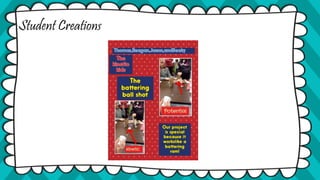
Student Creations
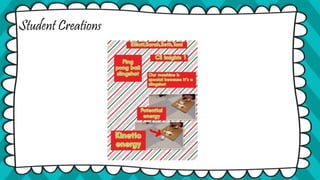
Student Creations
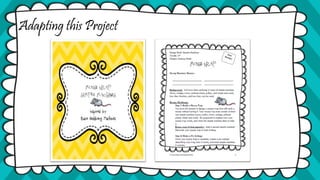
Adapting this Project
Questions?
Contact Info:
Download Presentation
And Design Briefs
www.stemcrazyteachers.com

Kicking Machine VCEC15

  • 1.
    Kicking Machine witha Technology Twist! STEM Activity
  • 2.
  • 3.
  • 4.
    Create a KickingMachine Build a machine that kicks a Ping-Pong ball into a cup lying on its side 12 inches away. Use either a pendulum, rubber band, or a combination of the two to do this. Use only the supplies you have been given!
  • 5.
    Using iPad Apps VideoPix PicCollage Aurasma Dropbox Create a slow motion video. Capture 2 still pictures. Save to Photos. Use the photos to create a poster. Photos UsePhotos SavePoster toPhotos UsePaperPoster Create Augmented Reality Poster
  • 6.
    VideoPix Filming Slow MotionVideo • Tap the camera icon • Record your video • Tap Use Video • Slow the video down with the slider • Tap on dashboard and then arrow • Choose Render & Export to Camera Roll. © Tina Coffey
  • 7.
    VideoPix Saving Still Shots •Use the slider to find a frame. • Tap the magnifying glass. • Tap the arrow. © Tina Coffey
  • 8.
    Pic Collage • Createa New Collage • Use the + to Use Camera, Add Photos and Add Text. • Use the button in the left corner to Change Background. • Click the arrow and choose Save to Library. © Tina Coffey
  • 9.
    Aurasma • Open Aurasma. •Create an account (or login to an existing account). • Choose the Aurasma icon and tap the plus. • Choose Device. • Choose the plus and tap Photo Album. • Find and choose the slow motion video. • Tap use and give it a name. • Tap on it and choose select. • Scan the poster and tap the camera icon. • Position the overlay (video) and tap the arrow. • Name the project. • Choose Private or Public and Tap Finish. © Tina Coffey
  • 10.
    Aurasma • Open Aurasma. •Create an account (or login to an existing account). • Choose the Aurasma icon and tap the scan icon. • Hold the device over the poster until the video starts playing. © Tina Coffey
  • 11.
  • 12.
  • 13.
  • 14.
  • 15.
  • 16.
    Contact Info: Download Presentation AndDesign Briefs www.stemcrazyteachers.com

Editor's Notes