Scratch
    Project Ideas
              From the Scratch Curriculum Guide Draft
                 developed by the ScratchEd Team

                               DRAFT
                     Friday, September 23, 2011

http://scratched.media.mit.edu/resources/scratch-curriculum-guide-draft
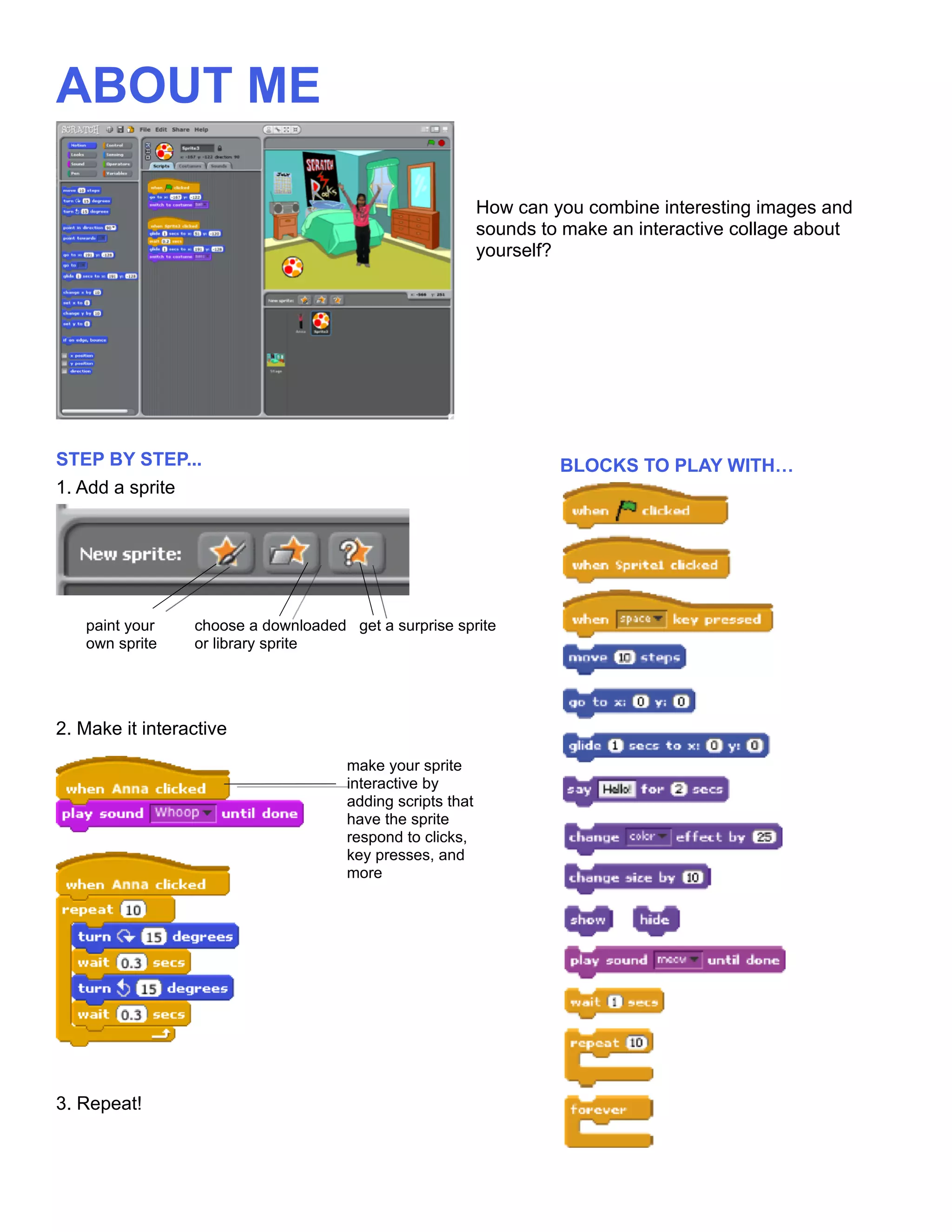
ABOUT ME

                                                           How can you combine interesting images and
                                                           sounds to make an interactive collage about
                                                           yourself?


STEP BY STEP...                                                     BLOCKS TO PLAY WITH…
1. Add a sprite


   paint your    choose a downloaded get a surprise sprite
   own sprite    or library sprite


2. Make it interactive
                                     make your sprite
                                     interactive by
                                     adding scripts that
                                     have the sprite
                                     respond to clicks,
                                     key presses, and
                                     more


3. Repeat!
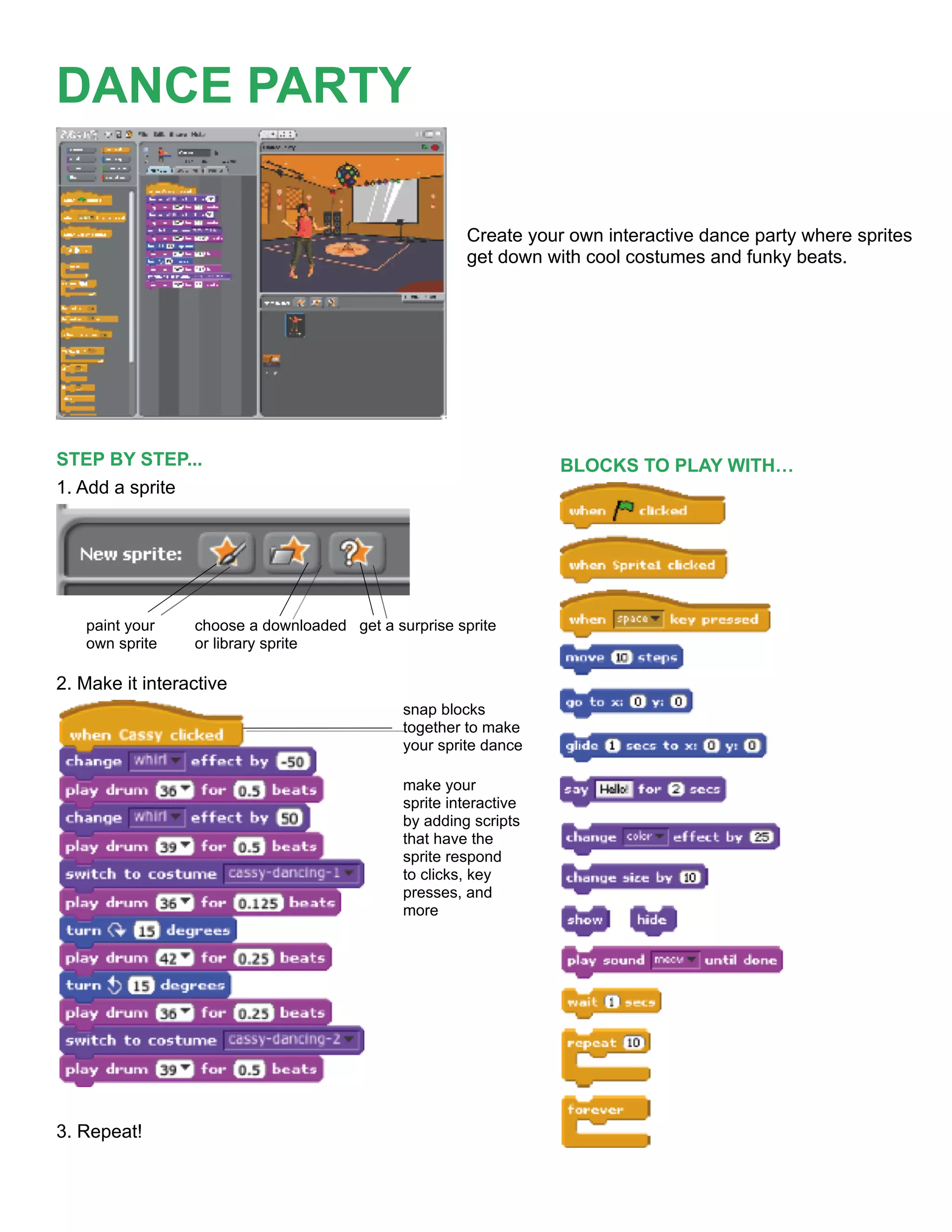
DANCE PARTY

                                                      Create your own interactive dance party where sprites
                                                      get down with cool costumes and funky beats.


STEP BY STEP...                                                   BLOCKS TO PLAY WITH…
1. Add a sprite


   paint your    choose a downloaded get a surprise sprite
   own sprite    or library sprite

2. Make it interactive
                                             snap blocks
                                             together to make
                                             your sprite dance

                                             make your
                                             sprite interactive
                                             by adding scripts
                                             that have the
                                             sprite respond
                                             to clicks, key
                                             presses, and
                                             more


3. Repeat!
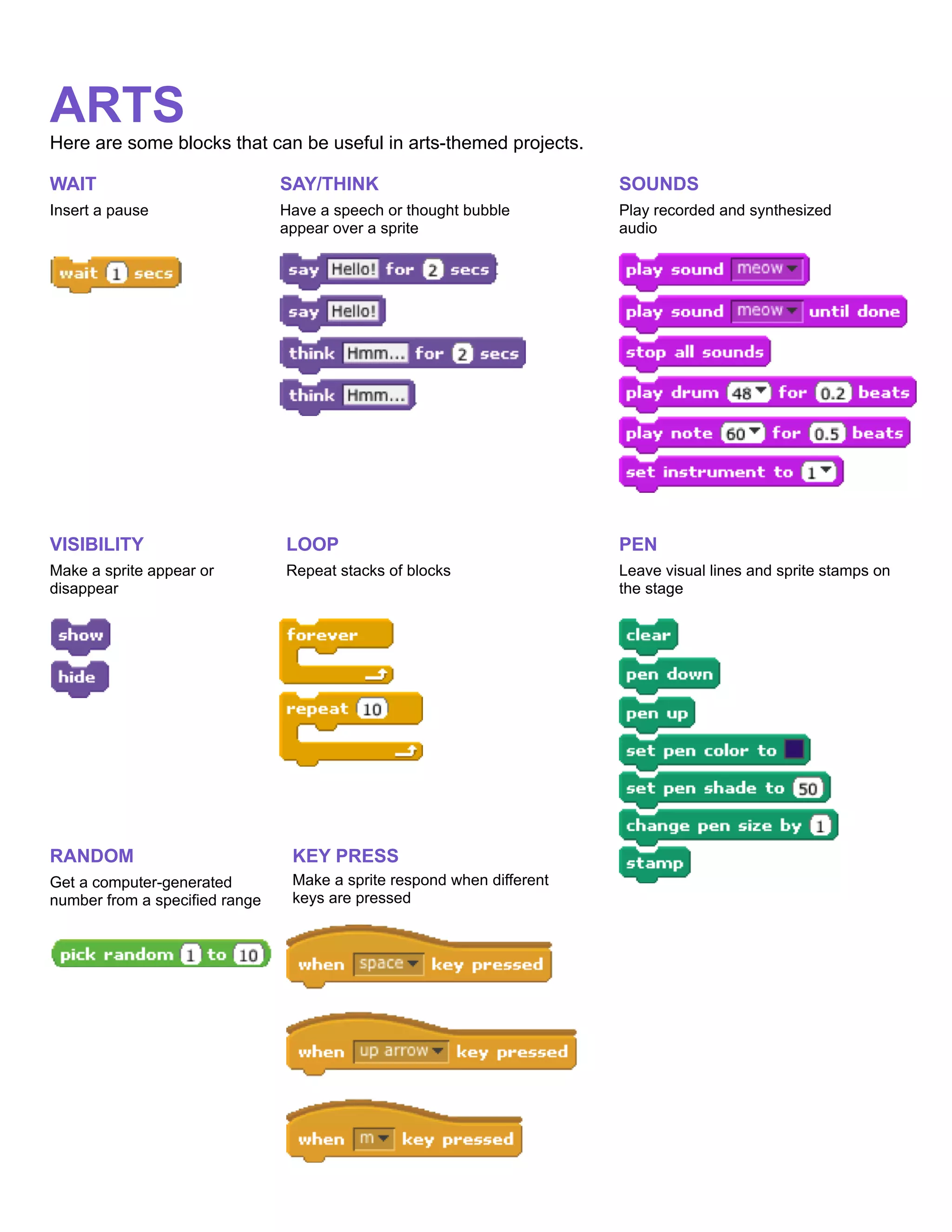
ARTS
Here are some blocks that can be useful in arts-themed projects.

WAIT                            SAY/THINK                               SOUNDS
Insert a pause                  Have a speech or thought bubble         Play recorded and synthesized
                                appear over a sprite                    audio


VISIBILITY                      LOOP                                    PEN
Make a sprite appear or         Repeat stacks of blocks                 Leave visual lines and sprite stamps on
disappear                                                               the stage


RANDOM                           KEY PRESS
Get a computer-generated         Make a sprite respond when different
number from a specified range    keys are pressed
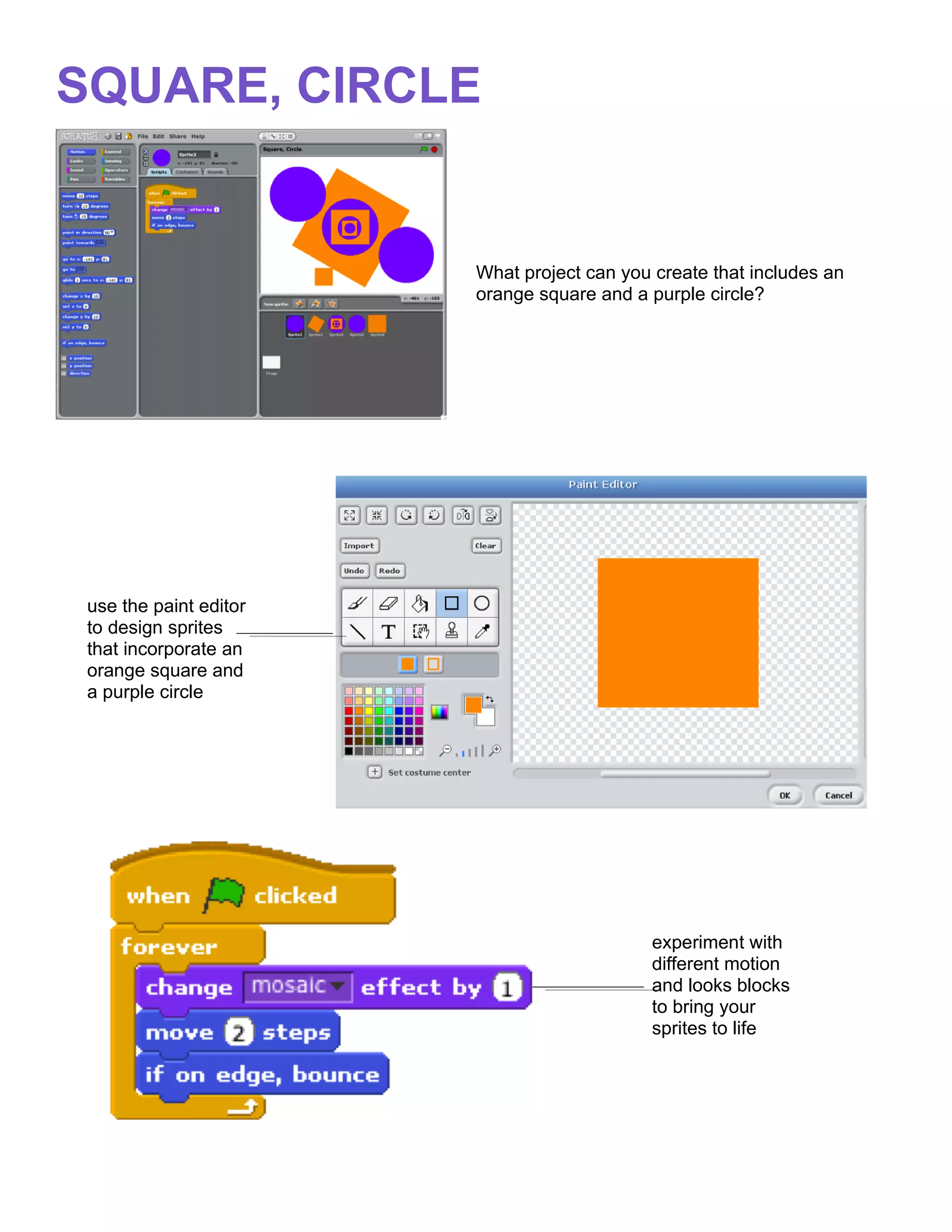
SQUARE, CIRCLE


                        What project can you create that includes an
                        orange square and a purple circle?


 use the paint editor
 to design sprites
 that incorporate an
 orange square and
 a purple circle


                                             experiment with
                                             different motion
                                             and looks blocks
                                             to bring your
                                             sprites to life
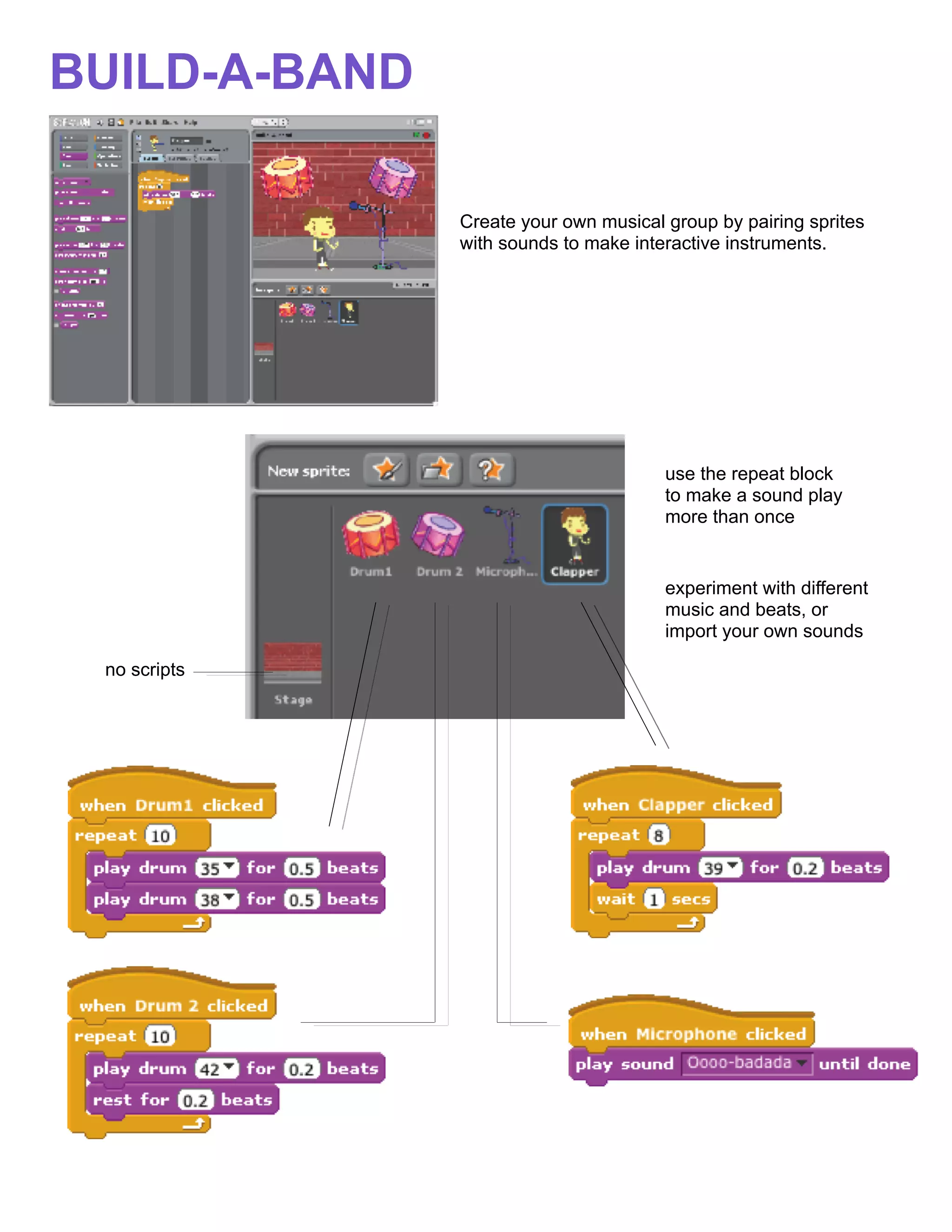
BUILD-A-BAND

               Create your own musical group by pairing sprites
               with sounds to make interactive instruments.


                                       use the repeat block
                                       to make a sound play
                                       more than once


                                       experiment with different
                                       music and beats, or
                                       import your own sounds

 no scripts
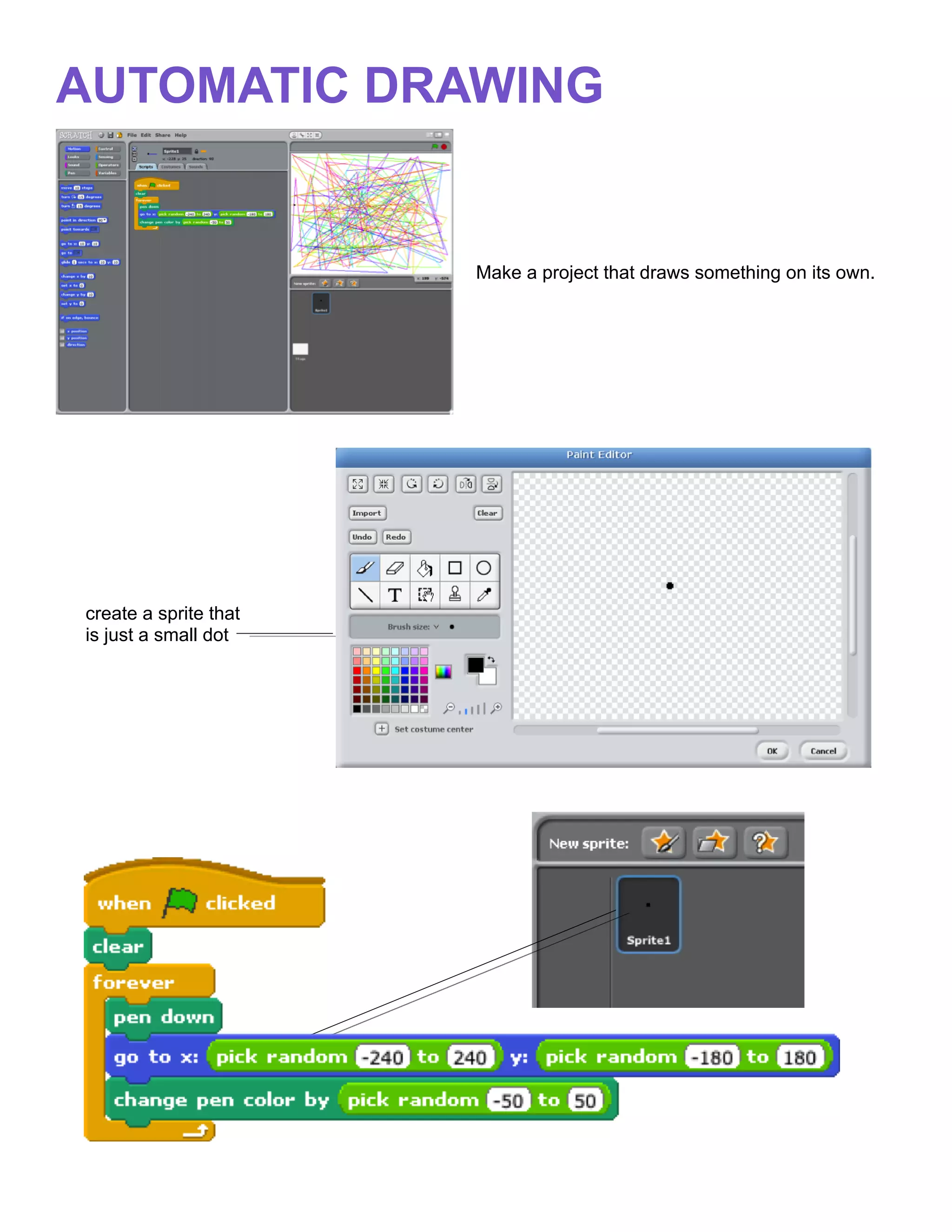
AUTOMATIC DRAWING


                       Make a project that draws something on its own.


create a sprite that
is just a small dot
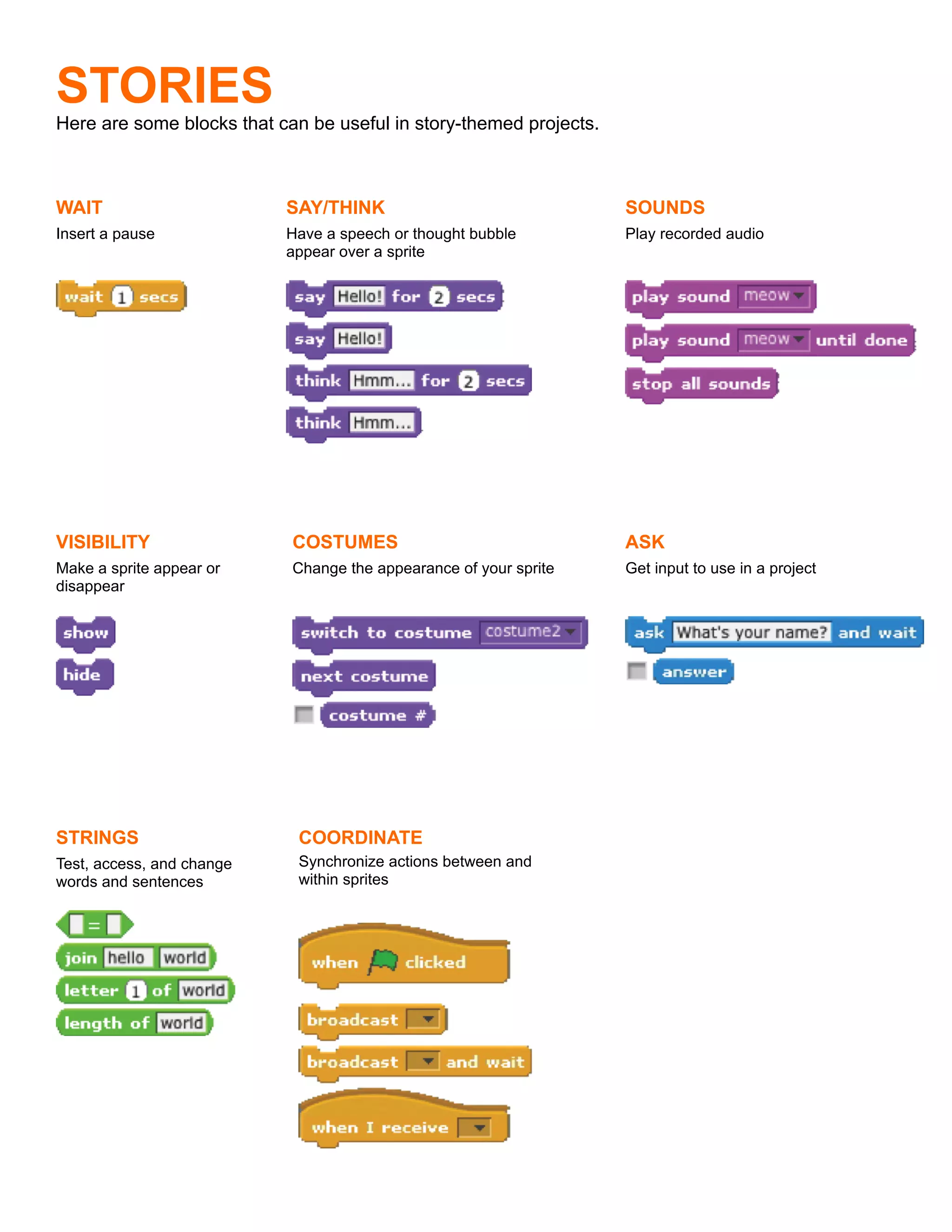
STORIES
Here are some blocks that can be useful in story-themed projects.


WAIT                       SAY/THINK                                SOUNDS
Insert a pause             Have a speech or thought bubble          Play recorded audio
                           appear over a sprite


VISIBILITY                  COSTUMES                                ASK
Make a sprite appear or     Change the appearance of your sprite    Get input to use in a project
disappear


STRINGS                      COORDINATE
Test, access, and change     Synchronize actions between and
words and sentences          within sprites
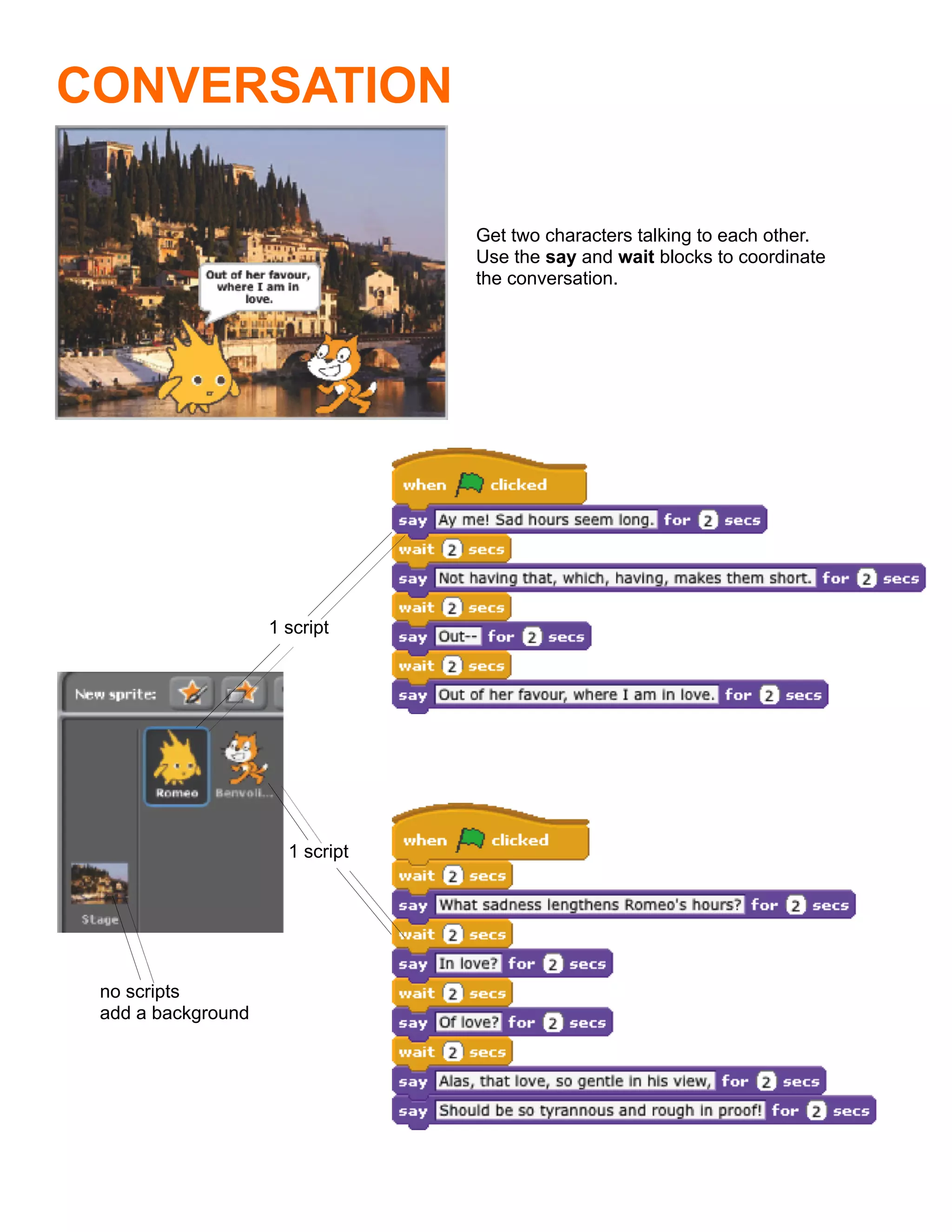
CONVERSATION

                                 Get two characters talking to each other.
                                 Use the say and wait blocks to coordinate
                                 the conversation.


                    1 script


                      1 script


 no scripts
 add a background
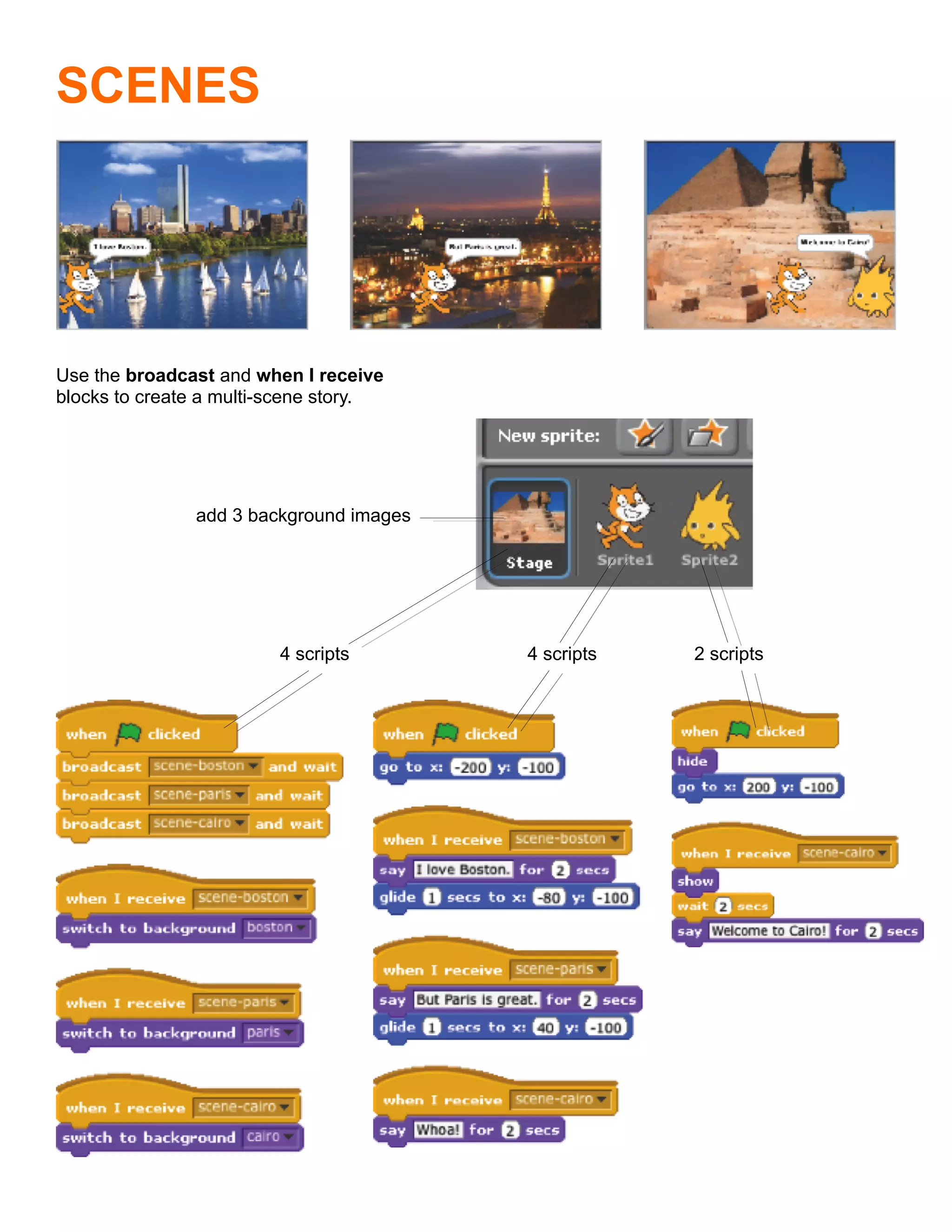
SCENES


Use the broadcast and when I receive
blocks to create a multi-scene story.


               add 3 background images


                         4 scripts       4 scripts   2 scripts
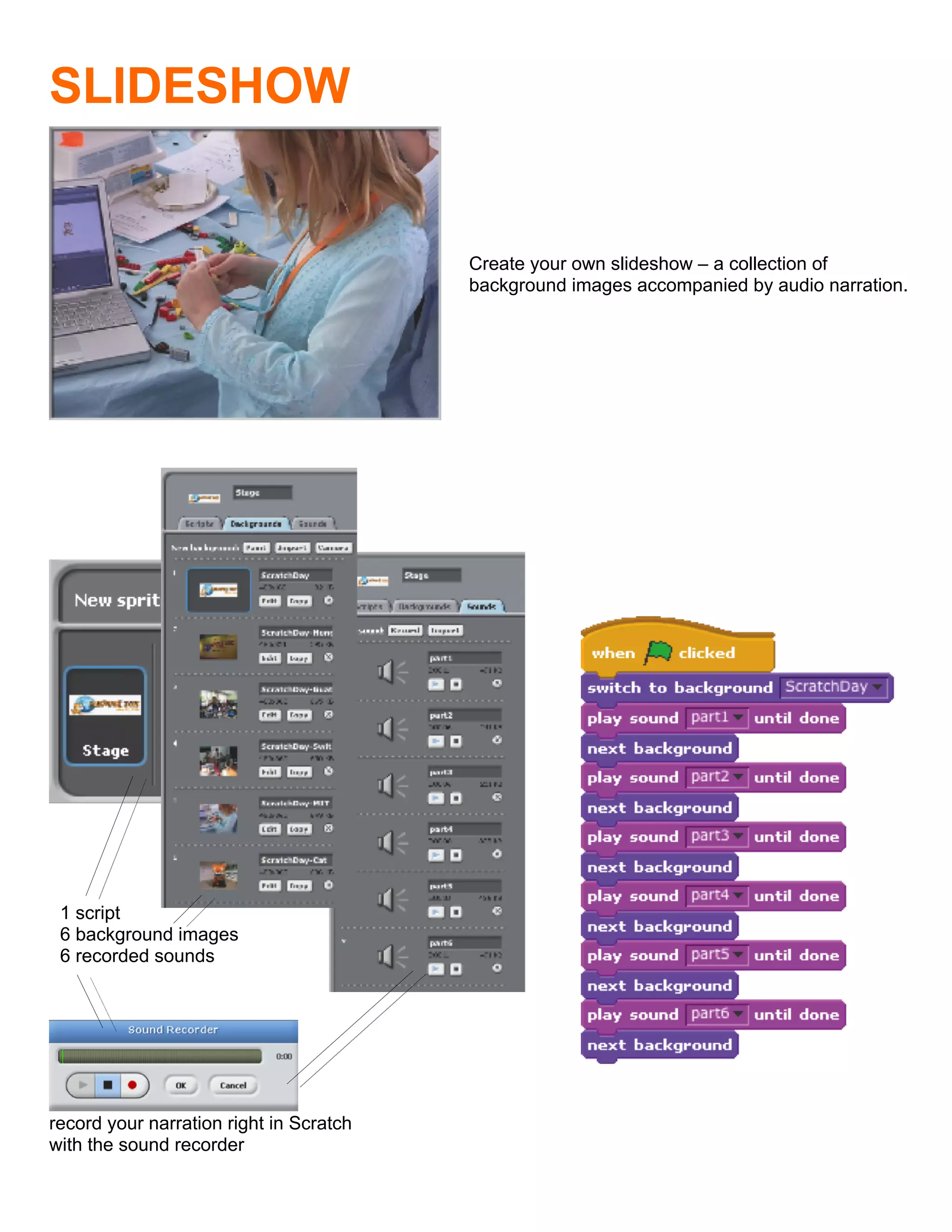
SLIDESHOW


                                         Create your own slideshow – a collection of
                                         background images accompanied by audio narration.


 1 script
 6 background images
 6 recorded sounds


record your narration right in Scratch
with the sound recorder
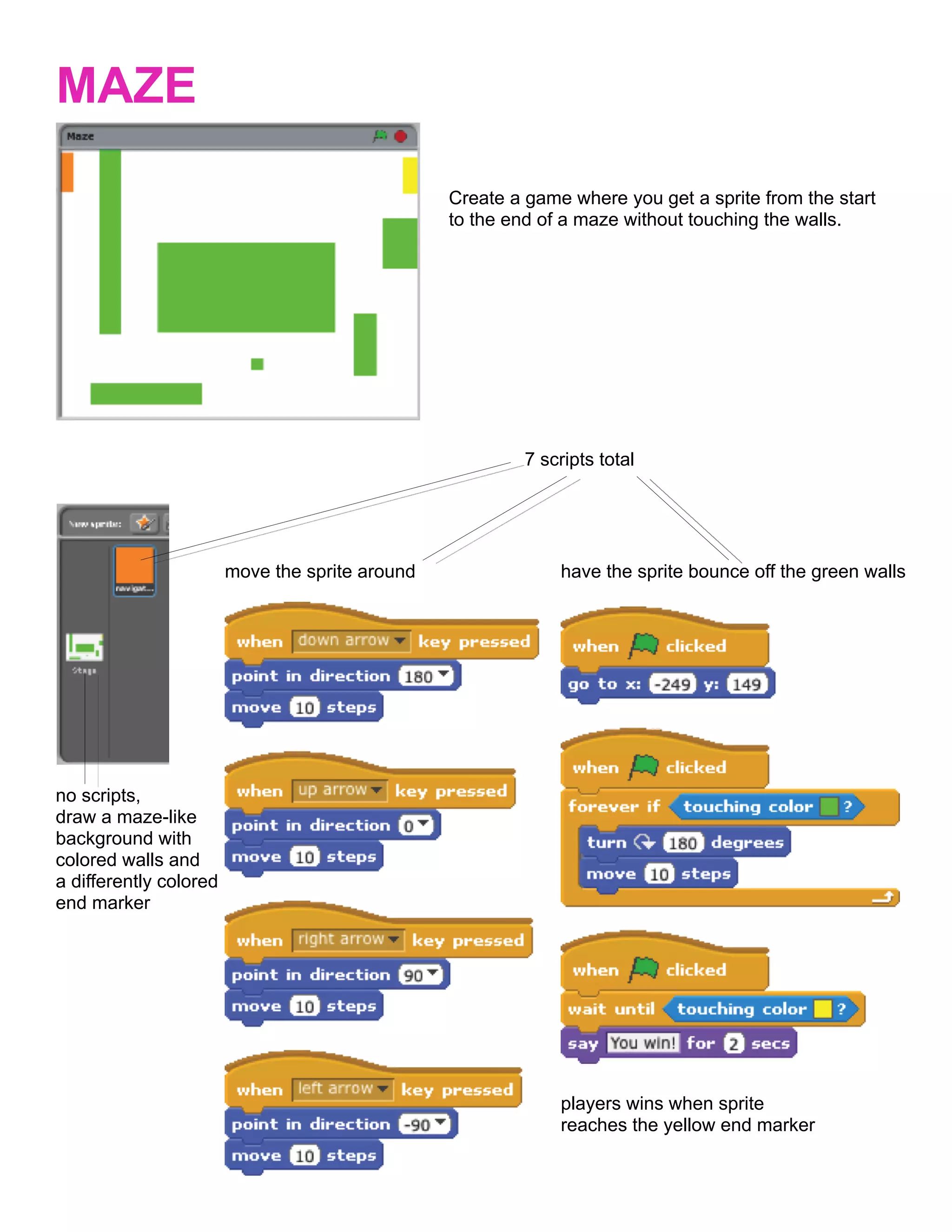
MAZE

                                                 Create a game where you get a sprite from the start
                                                 to the end of a maze without touching the walls.


                                                          7 scripts total


                        move the sprite around                have the sprite bounce off the green walls


no scripts,
draw a maze-like
background with
colored walls and
a differently colored
end marker


                                                              players wins when sprite
                                                              reaches the yellow end marker
GAMES
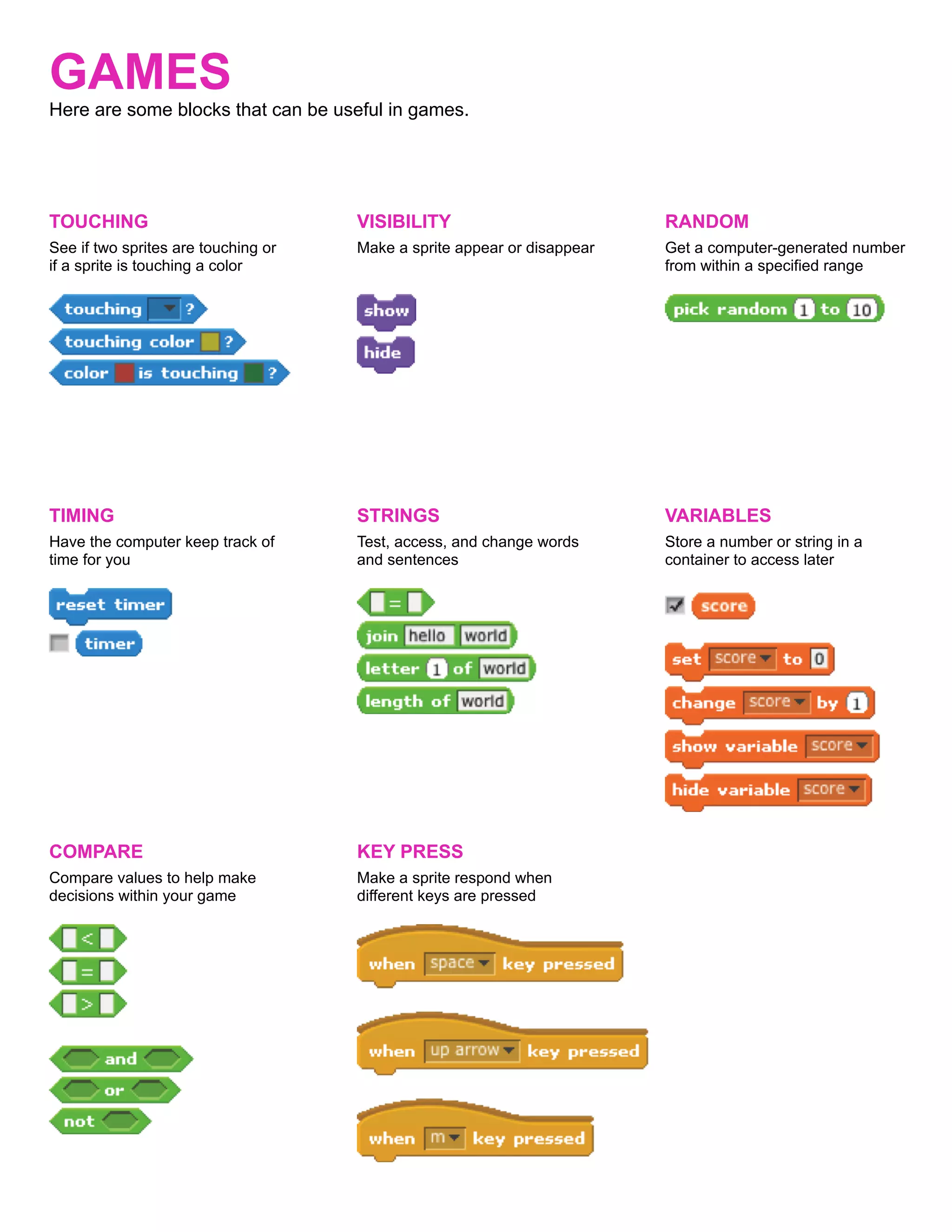
Here are some blocks that can be useful in games.


TOUCHING                             VISIBILITY                          RANDOM
See if two sprites are touching or   Make a sprite appear or disappear   Get a computer-generated number
if a sprite is touching a color                                          from within a specified range


TIMING                               STRINGS                             VARIABLES
Have the computer keep track of      Test, access, and change words      Store a number or string in a
time for you                         and sentences                       container to access later


COMPARE                              KEY PRESS
Compare values to help make          Make a sprite respond when
decisions within your game           different keys are pressed
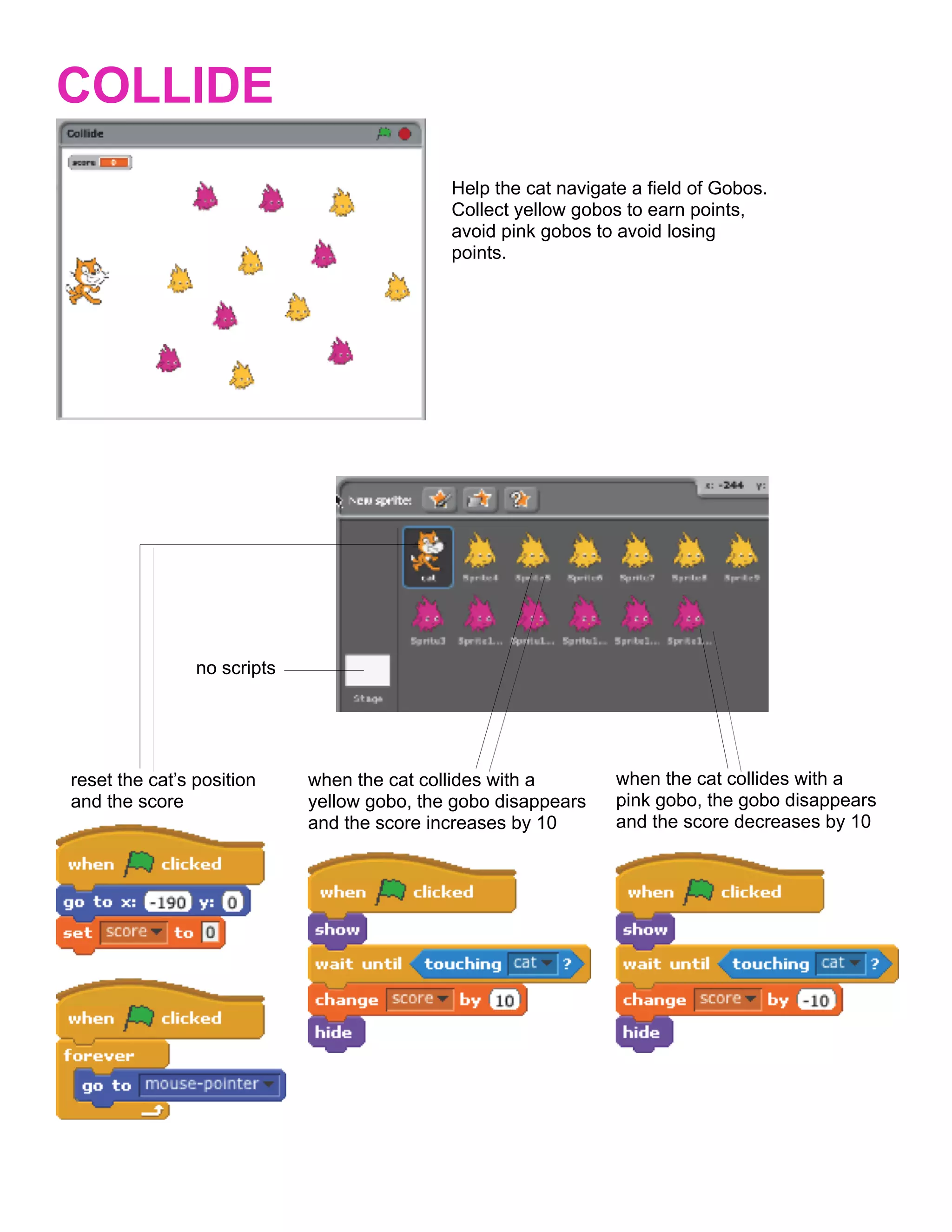
COLLIDE
                                             Help the cat navigate a field of Gobos.
                                             Collect yellow gobos to earn points,
                                             avoid pink gobos to avoid losing
                                             points.


                no scripts


reset the cat’s position     when the cat collides with a        when the cat collides with a
and the score                yellow gobo, the gobo disappears    pink gobo, the gobo disappears
                             and the score increases by 10       and the score decreases by 10
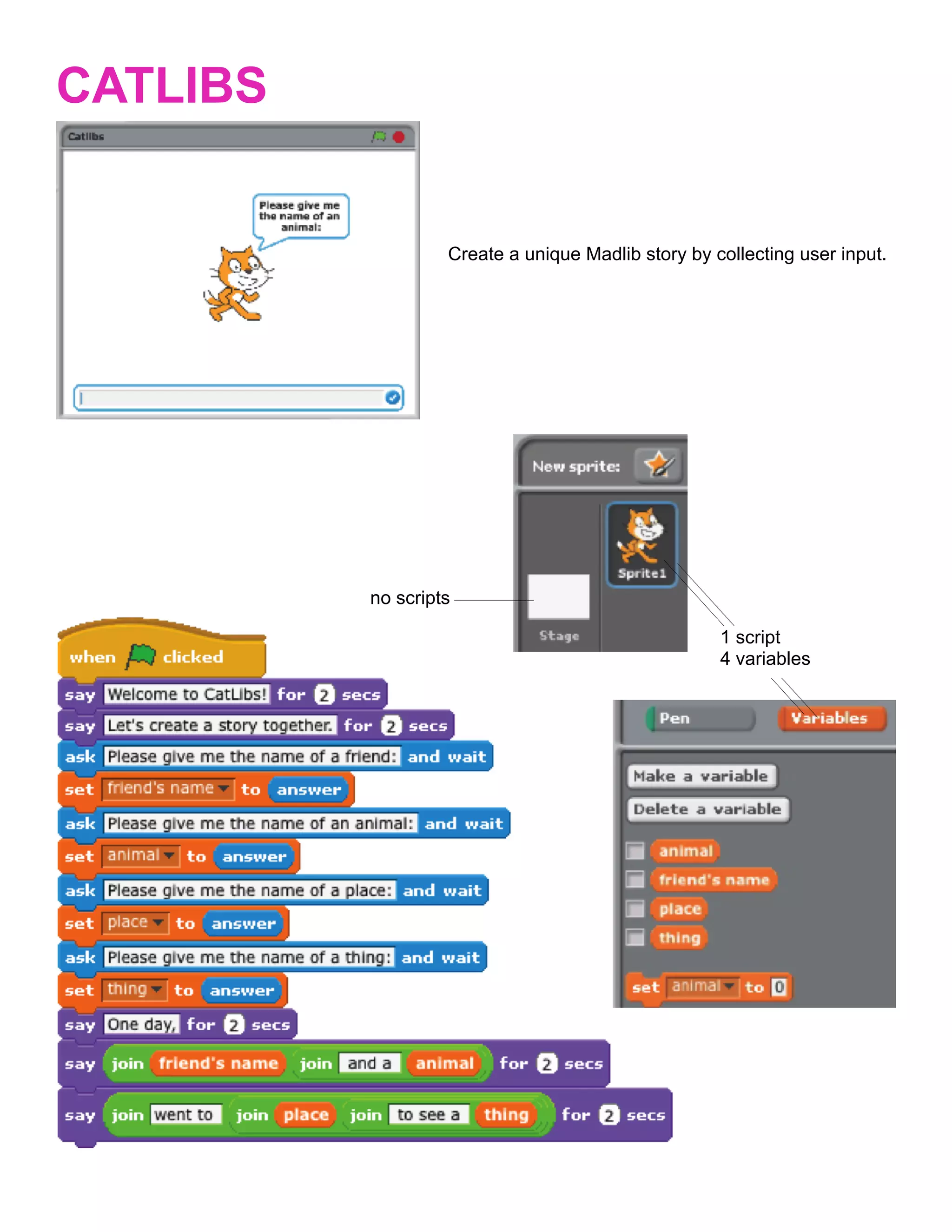
CATLIBS


                   Create a unique Madlib story by collecting user input.


          no scripts

                                                    1 script
                                                    4 variables
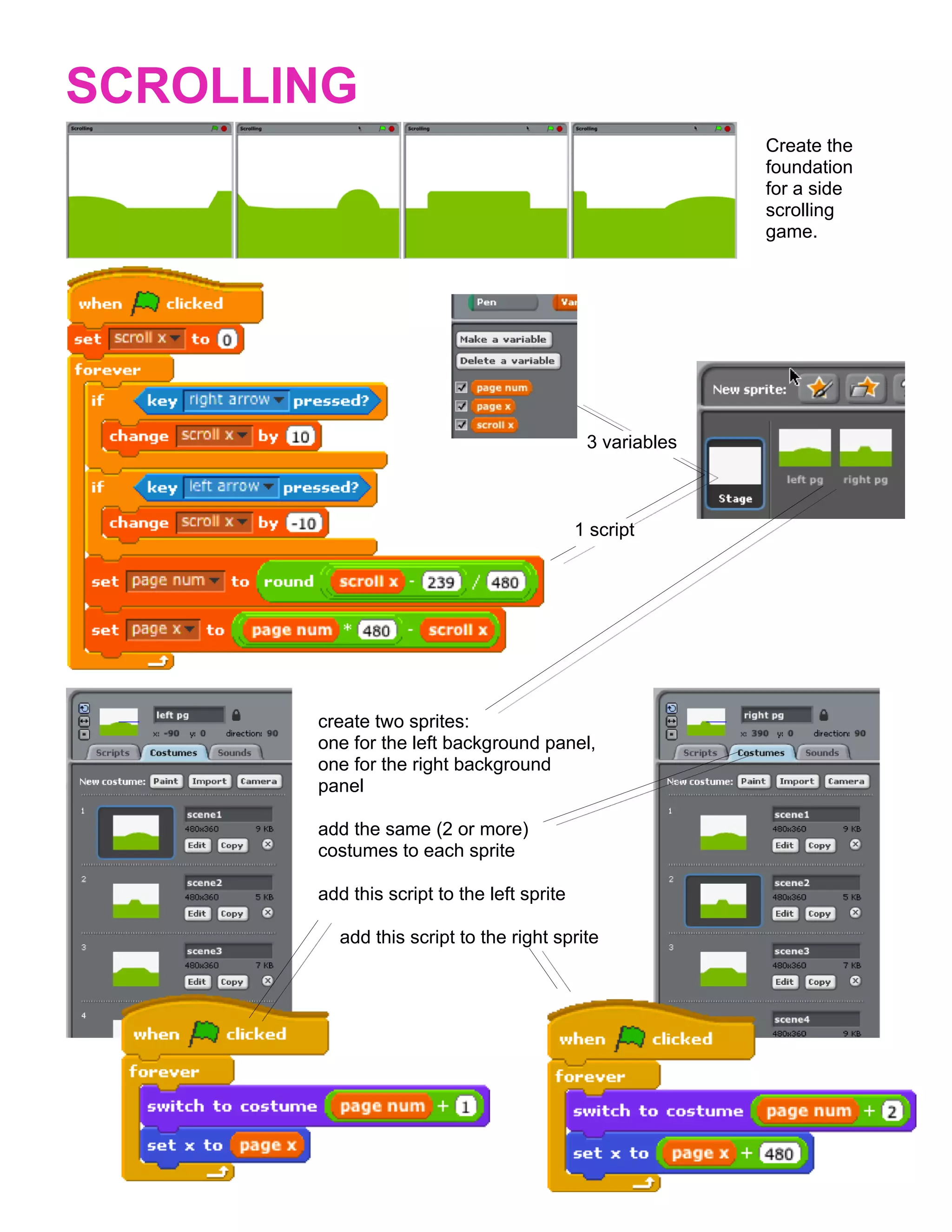
SCROLLING
                                                           Create the
                                                           foundation
                                                           for a side
                                                           scrolling
                                                           game.


                                             3 variables


                                            1 script


       create two sprites:
       one for the left background panel,
       one for the right background
       panel

       add the same (2 or more)
       costumes to each sprite

       add this script to the left sprite

         add this script to the right sprite
Developed by the ScratchEd team and released under a Creative Commons license.

Scratch project ideas

  • 1.
    Scratch Project Ideas From the Scratch Curriculum Guide Draft developed by the ScratchEd Team DRAFT Friday, September 23, 2011 http://scratched.media.mit.edu/resources/scratch-curriculum-guide-draft
  • 2.
    ABOUT ME How can you combine interesting images and sounds to make an interactive collage about yourself? STEP BY STEP... BLOCKS TO PLAY WITH… 1. Add a sprite paint your choose a downloaded get a surprise sprite own sprite or library sprite 2. Make it interactive make your sprite interactive by adding scripts that have the sprite respond to clicks, key presses, and more 3. Repeat!
  • 3.
    DANCE PARTY Create your own interactive dance party where sprites get down with cool costumes and funky beats. STEP BY STEP... BLOCKS TO PLAY WITH… 1. Add a sprite paint your choose a downloaded get a surprise sprite own sprite or library sprite 2. Make it interactive snap blocks together to make your sprite dance make your sprite interactive by adding scripts that have the sprite respond to clicks, key presses, and more 3. Repeat!
  • 4.
    ARTS Here are someblocks that can be useful in arts-themed projects. WAIT SAY/THINK SOUNDS Insert a pause Have a speech or thought bubble Play recorded and synthesized appear over a sprite audio VISIBILITY LOOP PEN Make a sprite appear or Repeat stacks of blocks Leave visual lines and sprite stamps on disappear the stage RANDOM KEY PRESS Get a computer-generated Make a sprite respond when different number from a specified range keys are pressed
  • 5.
    SQUARE, CIRCLE What project can you create that includes an orange square and a purple circle? use the paint editor to design sprites that incorporate an orange square and a purple circle experiment with different motion and looks blocks to bring your sprites to life
  • 6.
    BUILD-A-BAND Create your own musical group by pairing sprites with sounds to make interactive instruments. use the repeat block to make a sound play more than once experiment with different music and beats, or import your own sounds no scripts
  • 7.
    AUTOMATIC DRAWING Make a project that draws something on its own. create a sprite that is just a small dot
  • 8.
    STORIES Here are someblocks that can be useful in story-themed projects. WAIT SAY/THINK SOUNDS Insert a pause Have a speech or thought bubble Play recorded audio appear over a sprite VISIBILITY COSTUMES ASK Make a sprite appear or Change the appearance of your sprite Get input to use in a project disappear STRINGS COORDINATE Test, access, and change Synchronize actions between and words and sentences within sprites
  • 9.
    CONVERSATION Get two characters talking to each other. Use the say and wait blocks to coordinate the conversation. 1 script 1 script no scripts add a background
  • 10.
    SCENES Use the broadcastand when I receive blocks to create a multi-scene story. add 3 background images 4 scripts 4 scripts 2 scripts
  • 11.
    SLIDESHOW Create your own slideshow – a collection of background images accompanied by audio narration. 1 script 6 background images 6 recorded sounds record your narration right in Scratch with the sound recorder
  • 12.
    MAZE Create a game where you get a sprite from the start to the end of a maze without touching the walls. 7 scripts total move the sprite around have the sprite bounce off the green walls no scripts, draw a maze-like background with colored walls and a differently colored end marker players wins when sprite reaches the yellow end marker
  • 13.
    GAMES Here are someblocks that can be useful in games. TOUCHING VISIBILITY RANDOM See if two sprites are touching or Make a sprite appear or disappear Get a computer-generated number if a sprite is touching a color from within a specified range TIMING STRINGS VARIABLES Have the computer keep track of Test, access, and change words Store a number or string in a time for you and sentences container to access later COMPARE KEY PRESS Compare values to help make Make a sprite respond when decisions within your game different keys are pressed
  • 14.
    COLLIDE Help the cat navigate a field of Gobos. Collect yellow gobos to earn points, avoid pink gobos to avoid losing points. no scripts reset the cat’s position when the cat collides with a when the cat collides with a and the score yellow gobo, the gobo disappears pink gobo, the gobo disappears and the score increases by 10 and the score decreases by 10
  • 15.
    CATLIBS Create a unique Madlib story by collecting user input. no scripts 1 script 4 variables
  • 16.
    SCROLLING Create the foundation for a side scrolling game. 3 variables 1 script create two sprites: one for the left background panel, one for the right background panel add the same (2 or more) costumes to each sprite add this script to the left sprite add this script to the right sprite
  • 17.
    Developed by theScratchEd team and released under a Creative Commons license.