Raising ‘App-y’ Learners
Apps to support school-aged children
Clara Hendricks, Children’s Librarian
Wellesley Free Library
April 28, 2014
Technology and Children
• All screens are not created equal
• Tablets/smartphones are multi-functional: camera,
notepad, picture book, TV, arcade, etc.
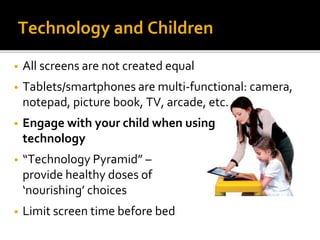
• Engage with your child when using
technology
• “Technology Pyramid” –
provide healthy doses of
‘nourishing’ choices
• Limit screen time before bed
Content, Context, Child
• Content
• Thoughtfully assess apps, rather than just setting time limits
• Anything can call itself ‘educational’
• Context
• In what context is the app being used?
• What role does technology play in the child’s life?
• Child
• Children have individual developmental needs
Guernsey, L. (2012). Screen time: How electronic media-from baby videos to educational
software-affects your young child. New York: Basic Books.
Technology and the Real World
• Quality apps give kids tools that they
can’t access in the “real-world”
• Make connections between
technology and real-life experiences
• Use technology to enhance, not
replace real-life experiences.
• https://www.youtube.com/watch?v=
UnyHMSz7JDE
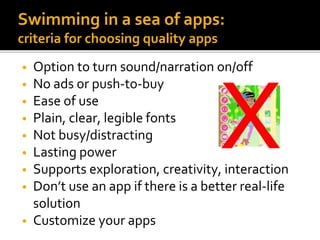
Swimming in a sea of apps:
criteria for choosing quality apps
• Option to turn sound/narration on/off
• No ads or push-to-buy
• Ease of use
• Plain, clear, legible fonts
• Not busy/distracting
• Lasting power
• Supports exploration, creativity, interaction
• Don’t use an app if there is a better real-life
solution
• Customize your apps
App Reviews
•Common Sense Media:
http://www.commonsensemedia.org/
•Reading Rockets:
http://www.readingrockets.org/teaching/reading101/literacyapps/
•Parents’ Choice:
http://www.parents-choice.org/
•Digital Storytime
http://digital-storytime.com/
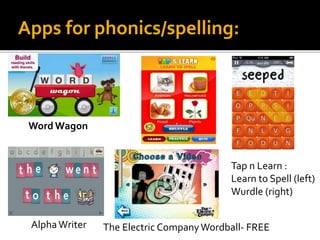
Apps for phonics/spelling:
Word Wagon
Tap n Learn :
Learn to Spell (left)
Wurdle (right)
AlphaWriter The Electric CompanyWordball- FREE
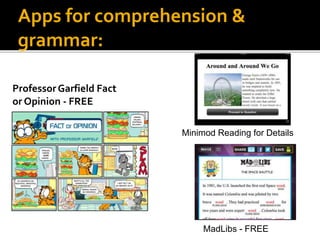
Apps for comprehension &
grammar:
Minimod Reading for Details
ProfessorGarfield Fact
or Opinion - FREE
MadLibs - FREE
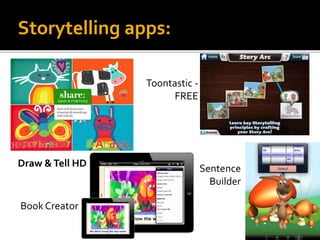
Storytelling apps:
Draw &Tell HD
Toontastic -
FREE
BookCreator
Sentence
Builder
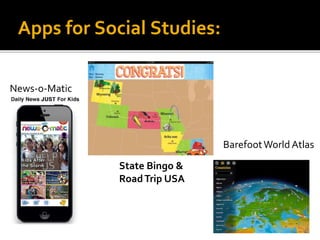
Apps for Social Studies:
BarefootWorld Atlas
State Bingo &
RoadTrip USA
News-o-Matic
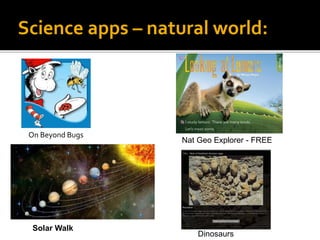
Science apps – natural world:
On Beyond Bugs
Dinosaurs
Solar Walk
Nat Geo Explorer - FREE
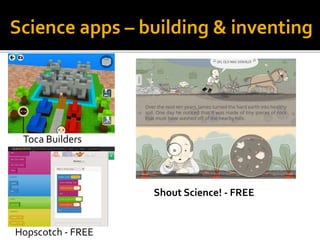
Science apps – building & inventing
Toca Builders
Hopscotch - FREE
Shout Science! - FREE
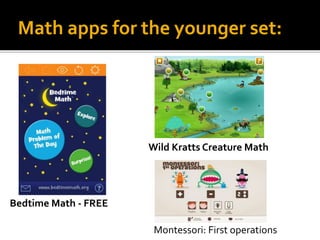
Math apps for the younger set:
Bedtime Math - FREE
Montessori: First operations
Wild Kratts Creature Math
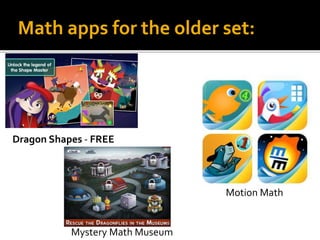
Math apps for the older set:
Dragon Shapes - FREE
Mystery Math Museum
Motion Math
Questions?
My contact information:
Clara Hendricks, Children’s Librarian
Wellesley Free Library
781-235-1610 x 1108
chendricks@minlib.net
www.wellesleyfreelibrary.org

Raising ‘app y’ learners 4.28.14

  • 1.
    Raising ‘App-y’ Learners Appsto support school-aged children Clara Hendricks, Children’s Librarian Wellesley Free Library April 28, 2014
  • 2.
    Technology and Children •All screens are not created equal • Tablets/smartphones are multi-functional: camera, notepad, picture book, TV, arcade, etc. • Engage with your child when using technology • “Technology Pyramid” – provide healthy doses of ‘nourishing’ choices • Limit screen time before bed
  • 3.
    Content, Context, Child •Content • Thoughtfully assess apps, rather than just setting time limits • Anything can call itself ‘educational’ • Context • In what context is the app being used? • What role does technology play in the child’s life? • Child • Children have individual developmental needs Guernsey, L. (2012). Screen time: How electronic media-from baby videos to educational software-affects your young child. New York: Basic Books.
  • 4.
    Technology and theReal World • Quality apps give kids tools that they can’t access in the “real-world” • Make connections between technology and real-life experiences • Use technology to enhance, not replace real-life experiences. • https://www.youtube.com/watch?v= UnyHMSz7JDE
  • 5.
    Swimming in asea of apps: criteria for choosing quality apps • Option to turn sound/narration on/off • No ads or push-to-buy • Ease of use • Plain, clear, legible fonts • Not busy/distracting • Lasting power • Supports exploration, creativity, interaction • Don’t use an app if there is a better real-life solution • Customize your apps
  • 6.
    App Reviews •Common SenseMedia: http://www.commonsensemedia.org/ •Reading Rockets: http://www.readingrockets.org/teaching/reading101/literacyapps/ •Parents’ Choice: http://www.parents-choice.org/ •Digital Storytime http://digital-storytime.com/
  • 7.
    Apps for phonics/spelling: WordWagon Tap n Learn : Learn to Spell (left) Wurdle (right) AlphaWriter The Electric CompanyWordball- FREE
  • 8.
    Apps for comprehension& grammar: Minimod Reading for Details ProfessorGarfield Fact or Opinion - FREE MadLibs - FREE
  • 9.
    Storytelling apps: Draw &TellHD Toontastic - FREE BookCreator Sentence Builder
  • 10.
    Apps for SocialStudies: BarefootWorld Atlas State Bingo & RoadTrip USA News-o-Matic
  • 11.
    Science apps –natural world: On Beyond Bugs Dinosaurs Solar Walk Nat Geo Explorer - FREE
  • 12.
    Science apps –building & inventing Toca Builders Hopscotch - FREE Shout Science! - FREE
  • 13.
    Math apps forthe younger set: Bedtime Math - FREE Montessori: First operations Wild Kratts Creature Math
  • 14.
    Math apps forthe older set: Dragon Shapes - FREE Mystery Math Museum Motion Math
  • 15.
    Questions? My contact information: ClaraHendricks, Children’s Librarian Wellesley Free Library 781-235-1610 x 1108 chendricks@minlib.net www.wellesleyfreelibrary.org