Chapter Presentation
    Hardware: Input, Processing, and Output
              Devices
                 Group Member
        Ben Piseth         Chin Putry
        Chan Sopov         Chan Piseth
        Chao Yorkchhive    Duch Mony
        Chea Sokhom


    Prepared By Group1                        1
Objectives

  Define the term Hardware
  Identify advantages of Hardware in
   organization.
  Describe Hardware Components, and
   explain each component.


Prepared By Group1                      2
What is hardware?

  Hardware refers to the physical
   components of a computer and devices
   that perform the input, processing,
   storage, and output activities of the
   computer.
  Hardware can support objective of the
   information system, and goal of
   organization.

Prepared By Group1                         3
Advantages of hardware in Organization

 Organization invest in computer
  hardware to improve worker
  productivity, increase revenue, reduce
  cost, and provide better customer
  service, Speed up time-to-market, and
  enable collaboration among employees.


Prepared By Group1                         4
Computer System: Integrating the Power
               of Technology
 Hardware Components
 Central Processing Unit (CPU):
  • CPU and memory cooperate to execute data processing.
  • Consist three elements: Arithmetic/logic unit, control
     unit, and register.
 Arithmetic/logic unit (ALU):
  • Parts of CPU used to perform mathematical calculation
     and make logical comparisons.
 Control Unit:
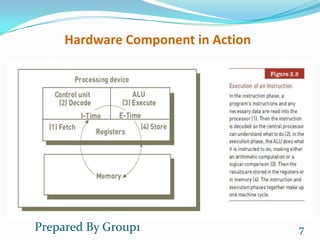
  • The part of CPU sequentially accesses program
     instructions, decodes them, and coordinates the flow of
     data in and out of the ALU, the register.
Prepared By Group1                                        5
Computer System: Integrating the Power
              of Technology
  Register:
   • High-speed storage areas used to temporarily
      hold small units of program instruction and data
      immediately before, during, and after execution
      by the CPU.
  Primary Storage:
   • Primary Storage, or Main memory, provides
      working storage for program instructions and data
      to be processed and provides them to the CPU.


Prepared By Group1                                        6
Hardware Component in Action


Prepared By Group1                  7
Processing and Memory Devices

  Processing characteristics and function:
    • Machine cycle: make up from both instruction
      phase and execution phase.
   • Machine cycle: can be measured how many
      instruction are executed in a second. It is measured
      in Nanosecond, Picosecond, MIPS
   • Clock Speed: Computer system processing speed is
      affected by clock speed, which is measured in
      gigahertz (GHz).


Prepared By Group1                                       8
Processing and Memory Devices

 Memory characteristics and function:
  • Main Memory: provides temporary working storages
     area for programs and data. It is measured in byte.
 Type of memory:
  • RAM (Random Access Memory)
     -> store data and instruction temporarily
  • ROM (Read Only Memory)
     -> instruction and data are stored permanently
  • Cache Memory
     -> a type of high-speed memory that CPU can access
     more rapidly than main memory.

Prepared By Group1                                     9
Multiprocessing

  Multiprocessing:
   • Refer to simultaneous execution of two or more
     instruction at the same time.
   • One form of multiprocessing uses coprocessor,
     which can speed up processing.
   • Multicore microprocessor combines two or more
     independent processors into a single computer so
     they can share the workload.


Prepared By Group1                                      10
Parallel Computing

  Parallel Computing:
   • Refer to simultaneous execution of the same task on
     multiple processors to obtain results faster.
   • Massively parallel processing involves linking many
     processors to work together to solve complex
     problems.
   • Grid computing is the use of a collection of
     computers to work in a coordinated manner to solve
     a common problem.


Prepared By Group1                                     11
Secondary Storage

  Secondary Storage:
   • Store a large amount of data and instruction safely
     and effectively.
  Access Methods:
   • Data and information access can be sequential or
     direct.
   • Sequential Access: data must be accessed in the
     order in which it is stored.
   • Direct Access: data can be accessed directly. Without
     the need to pass by other data in sequences.


Prepared By Group1                                      12
Secondary Storage
 Secondary Storage:
  • Magnetic storage devices
     - magnetic tape
     - magnetic disk
  • Optical storage devices
     - CD-ROM
     - DVD
  • Solid State Storage Devices
     - Store data in memory chips. Eg: flash drive.
  • Enterprise storage option
     - NAS
     - SAN
Prepared By Group1                                    13
Input and Output Devices
 Input Devices:
• A devices used to entry data to computer system.
• Input devices come in many forms.
  - Personal Computer Input Devices (Mouse, Keyboard..)
  - Speech recognition technology.
  - Digitals Cameras
  - Scanning devices
  - Bar-code scanners
 Output Devices:
• Provide output to user in many forms.
  - Display Monitor
  - Printer and plotter
  - Digital Audio Players
Prepared By Group1                                    14
Computer Systems

 Computer Systems
  • Generally divided into two categories: single user and
     multiple users.
 Single-Users
  • Systems include handheld, ultra laptop, portable, thin
     client, desktop, and workstation computers.
 Multi-Users
  • Systems include servers, blade servers, mainframes,
     and supercomputers.


Prepared By Group1                                       15
Green Computing

 Green Computing : is concerned with the efficient and
  environmentally responsible design, manufacture,
  operation, and disposal of IS –related products.
 Three main goal:
   • Reduce the use of hazardous material
   • Lower power-related costs
   • Enable the safe disposal or recycling of IT Products.


Prepared By Group1                                           16
Thank You
For paying attention

 Prepared By Group1    17

MIS Presentation Chapter III: Hardware

  • 1.
    Chapter Presentation Hardware: Input, Processing, and Output Devices Group Member  Ben Piseth  Chin Putry  Chan Sopov  Chan Piseth  Chao Yorkchhive  Duch Mony  Chea Sokhom Prepared By Group1 1
  • 2.
    Objectives  Definethe term Hardware  Identify advantages of Hardware in organization.  Describe Hardware Components, and explain each component. Prepared By Group1 2
  • 3.
    What is hardware?  Hardware refers to the physical components of a computer and devices that perform the input, processing, storage, and output activities of the computer.  Hardware can support objective of the information system, and goal of organization. Prepared By Group1 3
  • 4.
    Advantages of hardwarein Organization  Organization invest in computer hardware to improve worker productivity, increase revenue, reduce cost, and provide better customer service, Speed up time-to-market, and enable collaboration among employees. Prepared By Group1 4
  • 5.
    Computer System: Integratingthe Power of Technology  Hardware Components  Central Processing Unit (CPU): • CPU and memory cooperate to execute data processing. • Consist three elements: Arithmetic/logic unit, control unit, and register.  Arithmetic/logic unit (ALU): • Parts of CPU used to perform mathematical calculation and make logical comparisons.  Control Unit: • The part of CPU sequentially accesses program instructions, decodes them, and coordinates the flow of data in and out of the ALU, the register. Prepared By Group1 5
  • 6.
    Computer System: Integratingthe Power of Technology  Register: • High-speed storage areas used to temporarily hold small units of program instruction and data immediately before, during, and after execution by the CPU.  Primary Storage: • Primary Storage, or Main memory, provides working storage for program instructions and data to be processed and provides them to the CPU. Prepared By Group1 6
  • 7.
    Hardware Component inAction Prepared By Group1 7
  • 8.
    Processing and MemoryDevices  Processing characteristics and function: • Machine cycle: make up from both instruction phase and execution phase. • Machine cycle: can be measured how many instruction are executed in a second. It is measured in Nanosecond, Picosecond, MIPS • Clock Speed: Computer system processing speed is affected by clock speed, which is measured in gigahertz (GHz). Prepared By Group1 8
  • 9.
    Processing and MemoryDevices  Memory characteristics and function: • Main Memory: provides temporary working storages area for programs and data. It is measured in byte.  Type of memory: • RAM (Random Access Memory) -> store data and instruction temporarily • ROM (Read Only Memory) -> instruction and data are stored permanently • Cache Memory -> a type of high-speed memory that CPU can access more rapidly than main memory. Prepared By Group1 9
  • 10.
    Multiprocessing  Multiprocessing: • Refer to simultaneous execution of two or more instruction at the same time. • One form of multiprocessing uses coprocessor, which can speed up processing. • Multicore microprocessor combines two or more independent processors into a single computer so they can share the workload. Prepared By Group1 10
  • 11.
    Parallel Computing Parallel Computing: • Refer to simultaneous execution of the same task on multiple processors to obtain results faster. • Massively parallel processing involves linking many processors to work together to solve complex problems. • Grid computing is the use of a collection of computers to work in a coordinated manner to solve a common problem. Prepared By Group1 11
  • 12.
    Secondary Storage Secondary Storage: • Store a large amount of data and instruction safely and effectively.  Access Methods: • Data and information access can be sequential or direct. • Sequential Access: data must be accessed in the order in which it is stored. • Direct Access: data can be accessed directly. Without the need to pass by other data in sequences. Prepared By Group1 12
  • 13.
    Secondary Storage  SecondaryStorage: • Magnetic storage devices - magnetic tape - magnetic disk • Optical storage devices - CD-ROM - DVD • Solid State Storage Devices - Store data in memory chips. Eg: flash drive. • Enterprise storage option - NAS - SAN Prepared By Group1 13
  • 14.
    Input and OutputDevices  Input Devices: • A devices used to entry data to computer system. • Input devices come in many forms. - Personal Computer Input Devices (Mouse, Keyboard..) - Speech recognition technology. - Digitals Cameras - Scanning devices - Bar-code scanners  Output Devices: • Provide output to user in many forms. - Display Monitor - Printer and plotter - Digital Audio Players Prepared By Group1 14
  • 15.
    Computer Systems  ComputerSystems • Generally divided into two categories: single user and multiple users.  Single-Users • Systems include handheld, ultra laptop, portable, thin client, desktop, and workstation computers.  Multi-Users • Systems include servers, blade servers, mainframes, and supercomputers. Prepared By Group1 15
  • 16.
    Green Computing  GreenComputing : is concerned with the efficient and environmentally responsible design, manufacture, operation, and disposal of IS –related products.  Three main goal: • Reduce the use of hazardous material • Lower power-related costs • Enable the safe disposal or recycling of IT Products. Prepared By Group1 16
  • 17.
    Thank You For payingattention Prepared By Group1 17