Streamlining Your Template
Structures When Building Themes
Cameron Jones
Streamlining Your Template Structures
When Building Themes
I’ve been working with WordPress and I’ve encountered a
number of themes that are built in a really inefficient way.
I’m going to present an approach to building themes that I
believe is more efficient and easier to maintain than most of
what I’ve seen.
Streamlining Your Template Structures
When Building Themes
It will help if you:
● Know a little bit of PHP
● Have made some changes to a theme or child theme
● Understand different content types in WordPress
(posts, pages, categories etc)
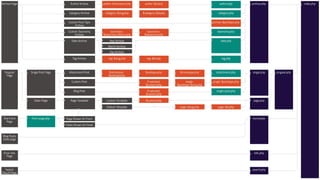
WordPress Template Hierarchy
Confusing, huh?
WordPress Template Hierarchy
Isn’t this a bit like the good ole days of having to create a
new HTML file for each new page???
That seems a little inefficient...
WordPress Template Hierarchy
To help mitigate this, WordPress has some reusable
template functions such as:
● get_header
● get_footer
● get_sidebar
Without these, you’d be adding the header, footer and
sidebar to every single page
WordPress Template Hierarchy
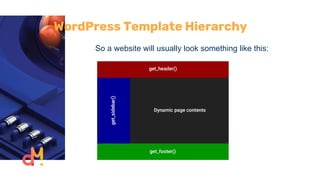
So a website will usually look something like this:
WordPress Template Hierarchy
But this seems a bit backwards to me.
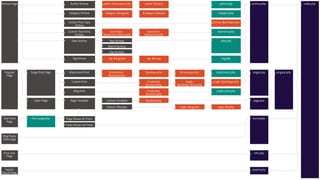
We’re using the rather complicated template hierarchy...
WordPress Template Hierarchy
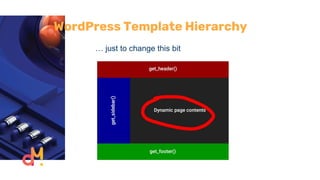
… just to change this bit
WordPress Template Hierarchy
One of the fundamental rules of programming is to write
DRY code.
Don’t Repeat Yourself
Needing to call the functions like get_header() on lots of
different templates isn’t really DRY code is it?
WordPress Template Hierarchy
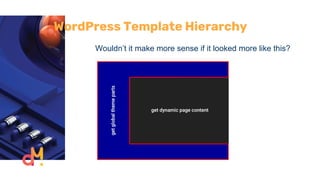
Wouldn’t it make more sense if it looked more like this?
WordPress Template Hierarchy
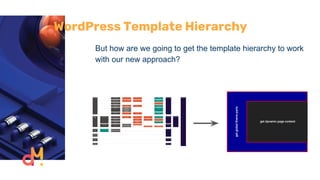
But how are we going to get the template hierarchy to work
with our new approach?
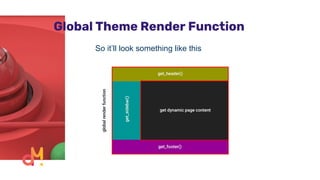
Global Theme Render Function
Remember how everything in the template hierarchy flowed
back to index.php?
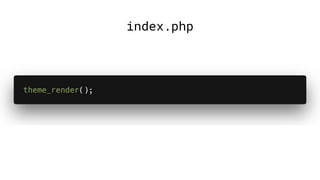
We’re going to only use index.php from the template
hierarchy and control all the logic inside where the dynamic
content goes
Global Theme Render Function
So it’ll look something like this
Global Theme Render Function
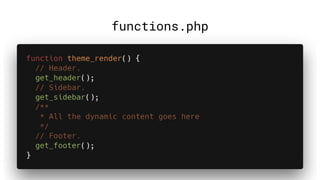
How do we achieve this with code?
functions.php
index.php
Global Theme Render Function
Now we don’t have to worry about any new page type not
having a header, footer or sidebar
Global Theme Render Function
But if we’re adding ALL of our conditional logic to our
render function, this one function will get really
complicated...
Global Theme Render Function
Let’s apply the template hierarchy logic to our render
function, but on a smaller level.
Global Theme Render Function
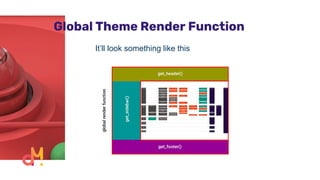
It’ll look something like this
Global Theme Render Function
Now instead of having to build out a whole page template
for each different type of page, we only need to change the
small part of the page that will be different.
But how?
Introducing get_template_part()
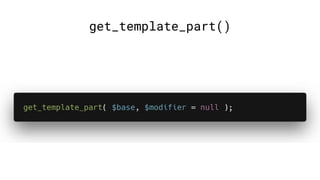
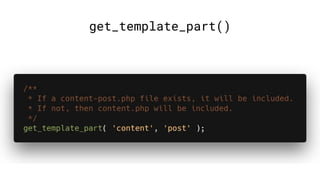
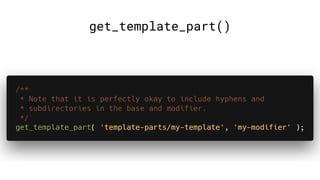
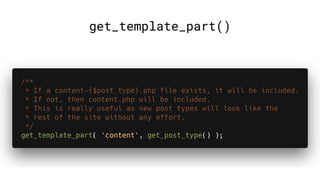
The get_template_part function allows us to pull in
specific template partials from the theme.
It will include the required template part, and can have
modifiers to change which template to get.
Searches the child theme first allowing for theme specific
overrides
get_template_part()
get_template_part()
get_template_part()
get_template_part()
Introducing get_template_part()
Now how do we use this with our render function?
Template Part Router
To help manage which template parts to pull in, we’re going
to use a router.
This will effectively replicate the logic of the template
hierarchy.
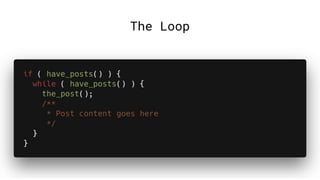
The Loop
Template Part Router
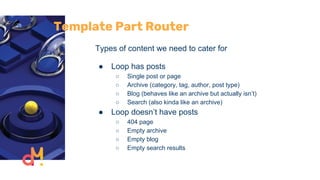
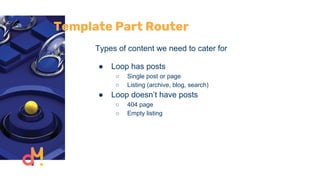
Types of content we need to cater for
● Loop has posts
○ Single post or page
○ Archive (category, tag, author, post type)
○ Blog (behaves like an archive but actually isn’t)
○ Search (also kinda like an archive)
● Loop doesn’t have posts
○ 404 page
○ Empty archive
○ Empty blog
○ Empty search results
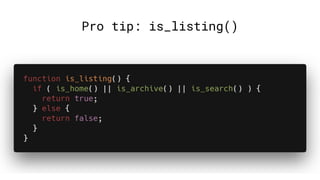
Pro tip: is_listing()
Template Part Router
Types of content we need to cater for
● Loop has posts
○ Single post or page
○ Listing (archive, blog, search)
● Loop doesn’t have posts
○ 404 page
○ Empty listing
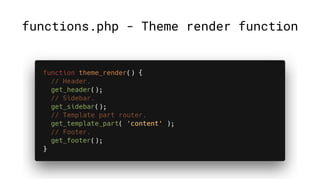
functions.php - Theme render function
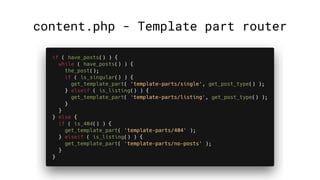
content.php - Template part router
Template Part Router
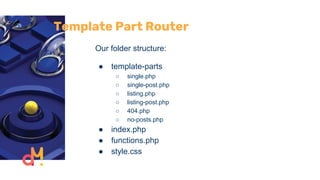
Our folder structure:
● template-parts
○ single.php
○ single-post.php
○ listing.php
○ listing-post.php
○ 404.php
○ no-posts.php
● index.php
● functions.php
● style.css
Template Part Router
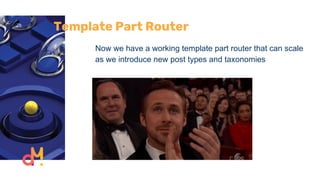
Now we have a working template part router that can scale
as we introduce new post types and taxonomies
Template Part Router
But the template hierarchy is much more complex.
What if you want to customise the template for a certain
page?
If you have a page at example.com/mypage, you can
create a custom template at page-mypage.php. You can’t
really do this now.
What we have is better because we don’t need to build a
whole template just for a small change, but what can we do
instead?
Template Part Router
1. Make our template part router more complicated
not really ideal
2. Put conditional logic in our template parts
really good for small changes
3. Use hooks
excellent idea!
Introducing The Hook System
WordPress has a great hook system that allows you to
jump in and change things at different places on your site.
Introducing The Hook System
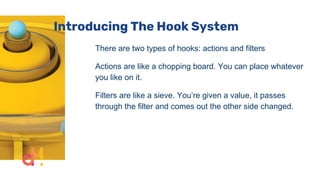
There are two types of hooks: actions and filters
Actions are like a chopping board. You can place whatever
you like on it.
Filters are like a sieve. You’re given a value, it passes
through the filter and comes out the other side changed.
Introducing The Hook System
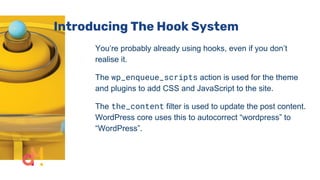
You’re probably already using hooks, even if you don’t
realise it.
The wp_enqueue_scripts action is used for the theme
and plugins to add CSS and JavaScript to the site.
The the_content filter is used to update the post content.
WordPress core uses this to autocorrect “wordpress” to
“WordPress”.
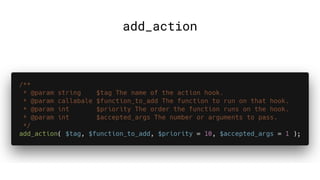
add_action
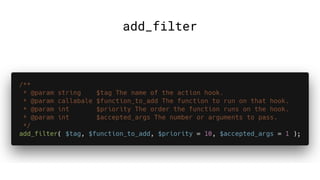
add_filter
Introducing The Hook System
Hooks are often better than using templates because it
guarantees more consistency between different content
types and as plugins and themes are updated.
Introducing The Hook System
We can use hooks to make small amendments based on
the conditions that the template hierarchy is based off
What are some examples?
Introducing The Hook System
Useful actions:
● loop_start - runs at the start of the loop
● loop_end - runs at the end of the loop
● loop_no_results - runs when the loop is empty
● template_redirect - runs just before the page
starts rendering
● wp_head - runs in the <head> tag
● wp_footer - runs right at the bottom of the page
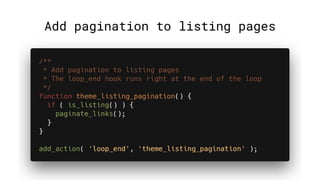
Add pagination to listing pages
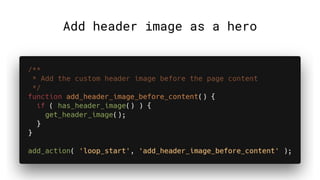
Add header image as a hero
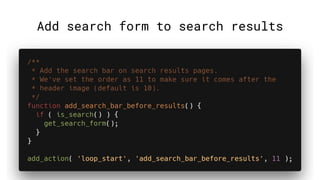
Add search form to search results
Introducing The Hook System
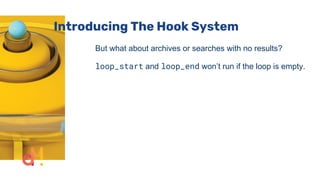
But what about archives or searches with no results?
loop_start and loop_end won’t run if the loop is empty.
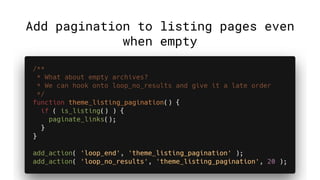
Add pagination to listing pages even
when empty
Introducing The Hook System
But this could get really complicated and repetitive if you
have lots of hooks onto loop_no_results.
Remember, Don’t Repeat Yourself.
Introducing The Hook System
We can add our own hooks, or call existing hooks at new
times
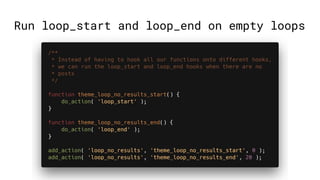
Run loop_start and loop_end on empty loops
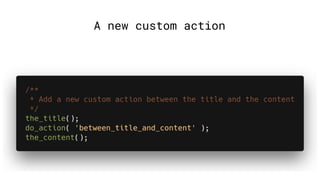
A new custom action
Introducing The Hook System
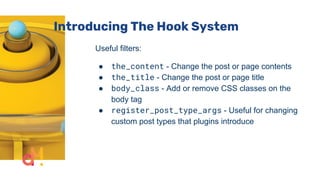
Useful filters:
● the_content - Change the post or page contents
● the_title - Change the post or page title
● body_class - Add or remove CSS classes on the
body tag
● register_post_type_args - Useful for changing
custom post types that plugins introduce
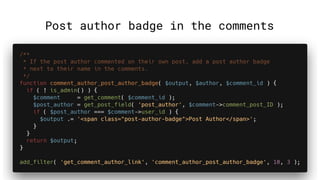
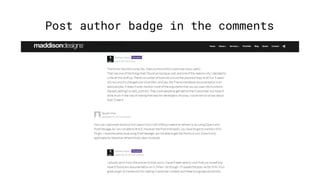
Post author badge in the comments
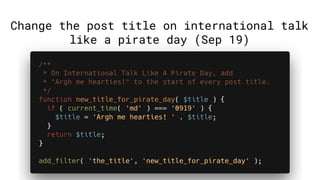
Change the post title on international talk
like a pirate day (Sep 19)
Resources
Resources
Some examples of this methodology in the wild include:
Resources
● Simple example theme:
https://github.com/cameronjonesweb/streamlining-tem
plating
● Slides: will be posted in the meetup group after tonight
In Summary
● Don’t Repeat Yourself
● There is no right or wrong way to build themes
● Use hooks where you can
Cameron Jones
cameronjonesweb.com.au
@cameronjonesweb
Digital Makers
We are a full-service agency, busy designing and
building beautiful digital products, platforms, and
experiments.
digitalmakers.io
Thank You!

Streamlining Your Template Structures When Building Themes

  • 1.
    Streamlining Your Template StructuresWhen Building Themes Cameron Jones
  • 2.
    Streamlining Your TemplateStructures When Building Themes I’ve been working with WordPress and I’ve encountered a number of themes that are built in a really inefficient way. I’m going to present an approach to building themes that I believe is more efficient and easier to maintain than most of what I’ve seen.
  • 3.
    Streamlining Your TemplateStructures When Building Themes It will help if you: ● Know a little bit of PHP ● Have made some changes to a theme or child theme ● Understand different content types in WordPress (posts, pages, categories etc)
  • 4.
  • 6.
  • 7.
    WordPress Template Hierarchy Isn’tthis a bit like the good ole days of having to create a new HTML file for each new page??? That seems a little inefficient...
  • 8.
    WordPress Template Hierarchy Tohelp mitigate this, WordPress has some reusable template functions such as: ● get_header ● get_footer ● get_sidebar Without these, you’d be adding the header, footer and sidebar to every single page
  • 9.
    WordPress Template Hierarchy Soa website will usually look something like this:
  • 10.
    WordPress Template Hierarchy Butthis seems a bit backwards to me. We’re using the rather complicated template hierarchy...
  • 12.
    WordPress Template Hierarchy …just to change this bit
  • 13.
    WordPress Template Hierarchy Oneof the fundamental rules of programming is to write DRY code. Don’t Repeat Yourself Needing to call the functions like get_header() on lots of different templates isn’t really DRY code is it?
  • 14.
    WordPress Template Hierarchy Wouldn’tit make more sense if it looked more like this?
  • 15.
    WordPress Template Hierarchy Buthow are we going to get the template hierarchy to work with our new approach?
  • 16.
  • 17.
    Global Theme RenderFunction Remember how everything in the template hierarchy flowed back to index.php? We’re going to only use index.php from the template hierarchy and control all the logic inside where the dynamic content goes
  • 18.
    Global Theme RenderFunction So it’ll look something like this
  • 19.
    Global Theme RenderFunction How do we achieve this with code?
  • 20.
  • 21.
  • 22.
    Global Theme RenderFunction Now we don’t have to worry about any new page type not having a header, footer or sidebar
  • 23.
    Global Theme RenderFunction But if we’re adding ALL of our conditional logic to our render function, this one function will get really complicated...
  • 24.
    Global Theme RenderFunction Let’s apply the template hierarchy logic to our render function, but on a smaller level.
  • 25.
    Global Theme RenderFunction It’ll look something like this
  • 26.
    Global Theme RenderFunction Now instead of having to build out a whole page template for each different type of page, we only need to change the small part of the page that will be different. But how?
  • 27.
  • 28.
    Introducing get_template_part() The get_template_partfunction allows us to pull in specific template partials from the theme. It will include the required template part, and can have modifiers to change which template to get. Searches the child theme first allowing for theme specific overrides
  • 29.
  • 30.
  • 31.
  • 32.
  • 33.
    Introducing get_template_part() Now howdo we use this with our render function?
  • 34.
  • 35.
    Template Part Router Tohelp manage which template parts to pull in, we’re going to use a router. This will effectively replicate the logic of the template hierarchy.
  • 36.
  • 37.
    Template Part Router Typesof content we need to cater for ● Loop has posts ○ Single post or page ○ Archive (category, tag, author, post type) ○ Blog (behaves like an archive but actually isn’t) ○ Search (also kinda like an archive) ● Loop doesn’t have posts ○ 404 page ○ Empty archive ○ Empty blog ○ Empty search results
  • 38.
  • 39.
    Template Part Router Typesof content we need to cater for ● Loop has posts ○ Single post or page ○ Listing (archive, blog, search) ● Loop doesn’t have posts ○ 404 page ○ Empty listing
  • 40.
    functions.php - Themerender function
  • 41.
  • 42.
    Template Part Router Ourfolder structure: ● template-parts ○ single.php ○ single-post.php ○ listing.php ○ listing-post.php ○ 404.php ○ no-posts.php ● index.php ● functions.php ● style.css
  • 43.
    Template Part Router Nowwe have a working template part router that can scale as we introduce new post types and taxonomies
  • 44.
    Template Part Router Butthe template hierarchy is much more complex. What if you want to customise the template for a certain page? If you have a page at example.com/mypage, you can create a custom template at page-mypage.php. You can’t really do this now. What we have is better because we don’t need to build a whole template just for a small change, but what can we do instead?
  • 45.
    Template Part Router 1.Make our template part router more complicated not really ideal 2. Put conditional logic in our template parts really good for small changes 3. Use hooks excellent idea!
  • 46.
  • 47.
    Introducing The HookSystem WordPress has a great hook system that allows you to jump in and change things at different places on your site.
  • 48.
    Introducing The HookSystem There are two types of hooks: actions and filters Actions are like a chopping board. You can place whatever you like on it. Filters are like a sieve. You’re given a value, it passes through the filter and comes out the other side changed.
  • 49.
    Introducing The HookSystem You’re probably already using hooks, even if you don’t realise it. The wp_enqueue_scripts action is used for the theme and plugins to add CSS and JavaScript to the site. The the_content filter is used to update the post content. WordPress core uses this to autocorrect “wordpress” to “WordPress”.
  • 50.
  • 51.
  • 52.
    Introducing The HookSystem Hooks are often better than using templates because it guarantees more consistency between different content types and as plugins and themes are updated.
  • 53.
    Introducing The HookSystem We can use hooks to make small amendments based on the conditions that the template hierarchy is based off What are some examples?
  • 54.
    Introducing The HookSystem Useful actions: ● loop_start - runs at the start of the loop ● loop_end - runs at the end of the loop ● loop_no_results - runs when the loop is empty ● template_redirect - runs just before the page starts rendering ● wp_head - runs in the <head> tag ● wp_footer - runs right at the bottom of the page
  • 55.
    Add pagination tolisting pages
  • 56.
  • 57.
    Add search formto search results
  • 58.
    Introducing The HookSystem But what about archives or searches with no results? loop_start and loop_end won’t run if the loop is empty.
  • 59.
    Add pagination tolisting pages even when empty
  • 60.
    Introducing The HookSystem But this could get really complicated and repetitive if you have lots of hooks onto loop_no_results. Remember, Don’t Repeat Yourself.
  • 61.
    Introducing The HookSystem We can add our own hooks, or call existing hooks at new times
  • 62.
    Run loop_start andloop_end on empty loops
  • 63.
  • 64.
    Introducing The HookSystem Useful filters: ● the_content - Change the post or page contents ● the_title - Change the post or page title ● body_class - Add or remove CSS classes on the body tag ● register_post_type_args - Useful for changing custom post types that plugins introduce
  • 65.
    Post author badgein the comments
  • 66.
    Post author badgein the comments
  • 67.
    Change the posttitle on international talk like a pirate day (Sep 19)
  • 68.
  • 69.
    Resources Some examples ofthis methodology in the wild include:
  • 70.
    Resources ● Simple exampletheme: https://github.com/cameronjonesweb/streamlining-tem plating ● Slides: will be posted in the meetup group after tonight
  • 71.
    In Summary ● Don’tRepeat Yourself ● There is no right or wrong way to build themes ● Use hooks where you can
  • 72.
  • 73.
    Digital Makers We area full-service agency, busy designing and building beautiful digital products, platforms, and experiments. digitalmakers.io
  • 74.