
How to create a
WordPress plugin.
WordCamp Toronto Dev 2012
@thisismyurl
What is a Plugin?
A WordPress plugin is a PHP based addition to the
WordPress blogging platform.

• Plugins are functions which interact with WordPress Core code;

• A Plugin changes what WordPress does;

• Plugins are stored external of the theme;
What can they do?
Since Plugins are executed as part of the WordPress platform,
they’re almost limitless.

• Plugins can interact with WordPress via Hooks and Actions;

• They can create, or interact with API’s in the WordPress system;

• Plugins can affect Posts, Pages, Users, or any part of the WordPress tool;
When should you use a
Plugin?
Plugin functions can be stored as a plugin, or in a theme
function.php file, why choose?

• Functions are specifically part of the theme;

• Plugins allow you to share code outside a theme, across multiple designs;

• Plugins can be activated in multisite environments;
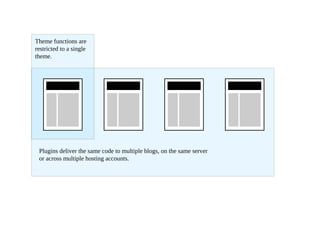
Theme functions are
restricted to a single
theme.


 Plugins deliver the same code to multiple blogs, on the same server
 or across multiple hosting accounts.
How WordPress finds a
Plugin
WordPress will automatically locate plugins on a standard
install, adding them to the admin

• /wp-content/plugins/filename.php

• /wp-content/plugins/folder-name/filename.php

• WordPress will search one level deep in the plugins folder;

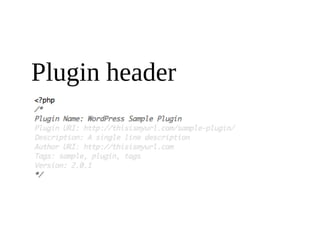
• Searches for .php files with a valid plugin header;
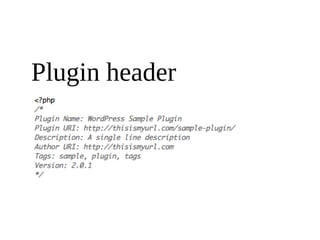
Plugin header
Plugin header
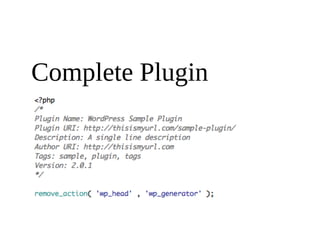
Complete Plugin
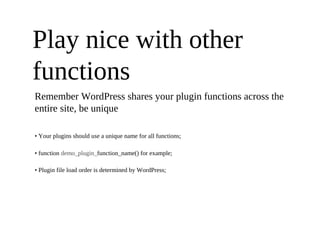
Play nice with other
functions
Remember WordPress shares your plugin functions across the
entire site, be unique

• Your plugins should use a unique name for all functions;

• function demo_plugin_function_name() for example;

• Plugin file load order is determined by WordPress;
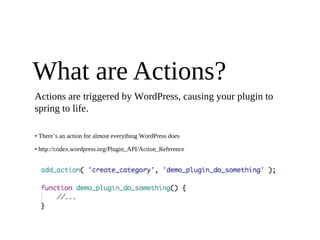
What are Actions?
Actions are triggered by WordPress, causing your plugin to
spring to life.

• There’s an action for almost everything WordPress does

• http://codex.wordpress.org/Plugin_API/Action_Reference
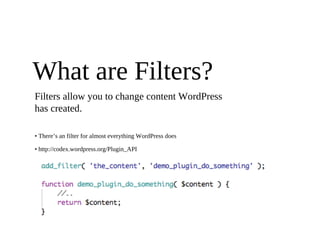
What are Filters?
Filters allow you to change content WordPress
has created.

• There’s an filter for almost everything WordPress does

• http://codex.wordpress.org/Plugin_API
Building a Plugin
Let’s get started with something basic.
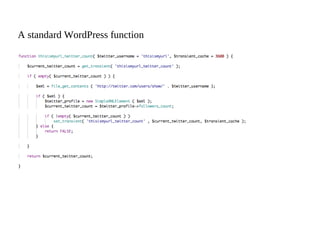
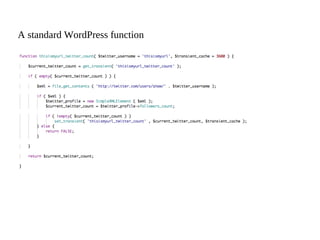
A standard WordPress function
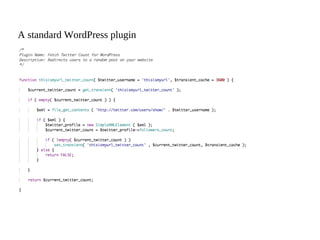
A standard WordPress plugin
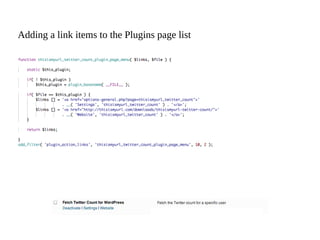
Adding a link items to the Plugins page list
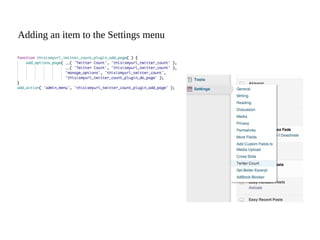
Adding an item to the Settings menu
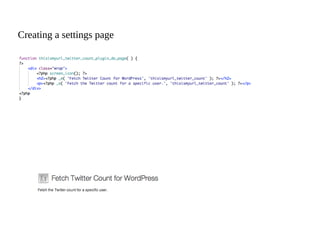
Creating a settings page
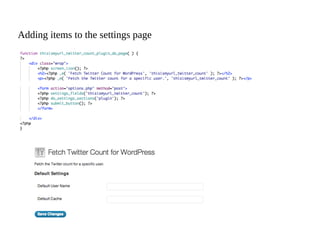
Adding items to the settings page
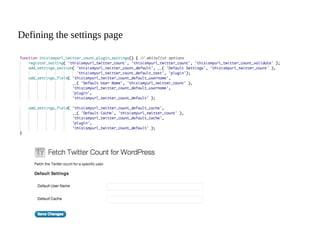
Defining the settings page
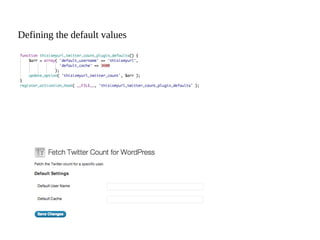
Defining the default values
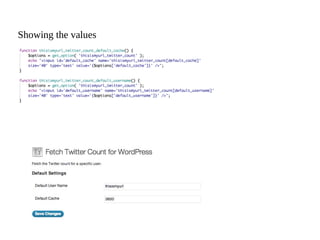
Showing the values
A standard WordPress function
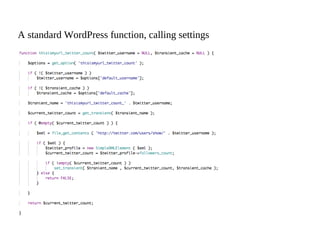
A standard WordPress function, calling settings
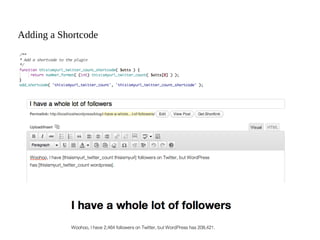
Adding a Shortcode
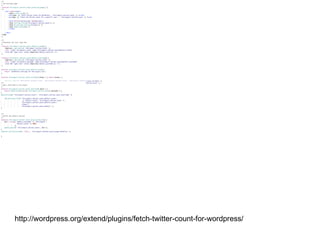
The entire plugin


http://wordpress.org/extend/plugins/fetch-twitter-count-for-wordpress/
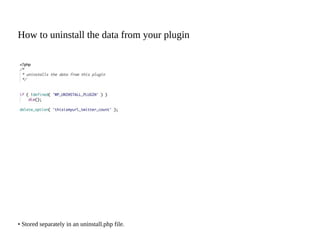
How to uninstall the data from your plugin


• Stored separately in an uninstall.php file.
Plugin Best Practises
Some ideas on how to do it right.
Be unique.
Remember Plugins interact will all the code on your
WordPress website, make sure you’re unique.


• Classes and Functions should use unique names;

• thisismyurl_plugin_name_function_name() for example;
Be descriptive.
Your Plugin is part of something else, make sure people can
easily understand your code.


• Elements should use verbose naming conventions, easy to understand;

• $i is bad;

• $loop_resume_posts is good;
Be consistent.
There are standards in the WordPress community, following
them makes it easy.


• The WordPress coding standards make coding easier in the long run;

• If you’re following your own coding standards, stick to them;

• http://codex.wordpress.org/WordPress_Coding_Standards
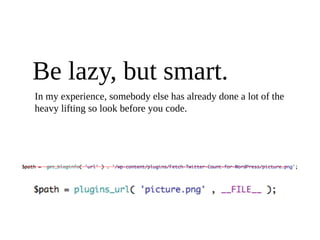
Be lazy, but smart.
In my experience, somebody else has already done a lot of the
heavy lifting so look before you code.
Contributing a Plugin.
How to help.
Be respectful.
Some authors like to work on their plugins alone. If you’d
like to help, ask.
Fork it.
All plugins on WordPress.org are released under the GNU
licensing terms, if you can’t collaborate, innovate.
Give Back.
If you’ve written a WordPress Plugin that you think the
community will benefit from, submit it to WordPress.org for
review and consideration.
@thisismyurl
Christopher Ross (info@thisismyurl.com)

WordPress plugins

  • 1.
    How to createa WordPress plugin. WordCamp Toronto Dev 2012 @thisismyurl
  • 2.
    What is aPlugin? A WordPress plugin is a PHP based addition to the WordPress blogging platform. • Plugins are functions which interact with WordPress Core code; • A Plugin changes what WordPress does; • Plugins are stored external of the theme;
  • 3.
    What can theydo? Since Plugins are executed as part of the WordPress platform, they’re almost limitless. • Plugins can interact with WordPress via Hooks and Actions; • They can create, or interact with API’s in the WordPress system; • Plugins can affect Posts, Pages, Users, or any part of the WordPress tool;
  • 4.
    When should youuse a Plugin? Plugin functions can be stored as a plugin, or in a theme function.php file, why choose? • Functions are specifically part of the theme; • Plugins allow you to share code outside a theme, across multiple designs; • Plugins can be activated in multisite environments;
  • 5.
    Theme functions are restrictedto a single theme. Plugins deliver the same code to multiple blogs, on the same server or across multiple hosting accounts.
  • 6.
    How WordPress findsa Plugin WordPress will automatically locate plugins on a standard install, adding them to the admin • /wp-content/plugins/filename.php • /wp-content/plugins/folder-name/filename.php • WordPress will search one level deep in the plugins folder; • Searches for .php files with a valid plugin header;
  • 7.
  • 8.
  • 9.
  • 10.
    Play nice withother functions Remember WordPress shares your plugin functions across the entire site, be unique • Your plugins should use a unique name for all functions; • function demo_plugin_function_name() for example; • Plugin file load order is determined by WordPress;
  • 11.
    What are Actions? Actionsare triggered by WordPress, causing your plugin to spring to life. • There’s an action for almost everything WordPress does • http://codex.wordpress.org/Plugin_API/Action_Reference
  • 12.
    What are Filters? Filtersallow you to change content WordPress has created. • There’s an filter for almost everything WordPress does • http://codex.wordpress.org/Plugin_API
  • 13.
    Building a Plugin Let’sget started with something basic.
  • 14.
  • 15.
  • 16.
    Adding a linkitems to the Plugins page list
  • 17.
    Adding an itemto the Settings menu
  • 18.
  • 19.
    Adding items tothe settings page
  • 20.
  • 21.
  • 22.
  • 23.
  • 24.
    A standard WordPressfunction, calling settings
  • 25.
  • 26.
  • 27.
    How to uninstallthe data from your plugin • Stored separately in an uninstall.php file.
  • 28.
    Plugin Best Practises Someideas on how to do it right.
  • 29.
    Be unique. Remember Pluginsinteract will all the code on your WordPress website, make sure you’re unique. • Classes and Functions should use unique names; • thisismyurl_plugin_name_function_name() for example;
  • 30.
    Be descriptive. Your Pluginis part of something else, make sure people can easily understand your code. • Elements should use verbose naming conventions, easy to understand; • $i is bad; • $loop_resume_posts is good;
  • 31.
    Be consistent. There arestandards in the WordPress community, following them makes it easy. • The WordPress coding standards make coding easier in the long run; • If you’re following your own coding standards, stick to them; • http://codex.wordpress.org/WordPress_Coding_Standards
  • 32.
    Be lazy, butsmart. In my experience, somebody else has already done a lot of the heavy lifting so look before you code.
  • 33.
  • 34.
    Be respectful. Some authorslike to work on their plugins alone. If you’d like to help, ask.
  • 35.
    Fork it. All pluginson WordPress.org are released under the GNU licensing terms, if you can’t collaborate, innovate.
  • 36.
    Give Back. If you’vewritten a WordPress Plugin that you think the community will benefit from, submit it to WordPress.org for review and consideration.
  • 37.