Austin WordPress Beginners Meetup
How WordPress
Themes Work
November 21, 2016
Presented by
Nick and Sandi Batik
How WordPress Works
❖ A simple overview of how WordPress themes work for
beginners
❖ With this knowledge under your belt, you can more
easily understand how your WordPress theme works
How WordPress Works
❖ A page on a WordPress website isn’t static; it’s
dynamic
❖ Than means each page is created on the fly — every
time it’s visited, built from bits and pieces pulled from
separate files and from your website’s database
How… Dynamic?
❖ All of your sites unique information (including your site name,
your blog posts, and every single comment) is stored in a MySQL
database
❖ That information is retrieved from the database using the
programming language PHP
❖ Then, the retrieved information is displayed via your theme’s
template files, using HTML and CSS
❖ Each page is created on the fly — every time it’s visited, built
from bits and pieces pulled from separate files and from your
website’s database
What is a WordPress Theme?
❖ A WordPress theme changes the appearance of your
website, often including its layout. Changing your theme
changes how what a visitor sees when they browse your
site on the web.
What can themes do?
❖ Themes take the content and data stored by WordPress
and display it in the browser.
❖ You decide how your site content looks and is
displayed, when you choose a WordPress theme.
❖ There are many options available when you are
choosing a theme for your site.
What can themes do?
❖ For example:
❖ Your theme can have different layouts, such as
fixed-width or responsive; using one column or two.
❖ Your theme may give you options for where and
how you want it to be displayed.
❖ Your theme can display content differently on
various sized devices (phones, tablets, PCs).
What can themes do?
❖ For example:
❖ Your theme may have custom typography and
design elements using CSS.
❖ Your theme may give you special areas for other
design elements like images and videos.
What can themes do?
❖ A WordPress theme is more than color and layout
❖ Good themes improve visitor engagement with your
website’s content
❖ …in addition to being beautiful
What are themes made of?
❖ At their most basic level, WordPress themes are
collections of different files that work together to create
what you see, as well as how your site behaves.
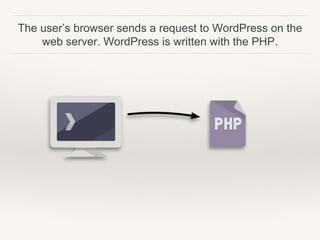
The user’s browser sends a request to WordPress on the
web server. WordPress is written with the PHP.
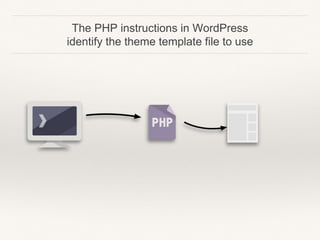
The PHP instructions in WordPress
identify the theme template file to use
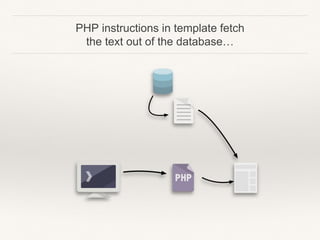
PHP instructions in template fetch
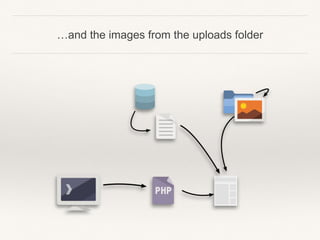
the text out of the database…
…and the images from the uploads folder
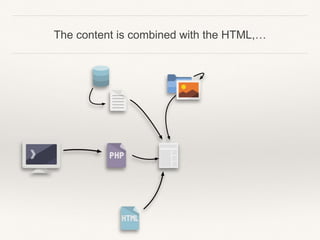
The content is combined with the HTML,…
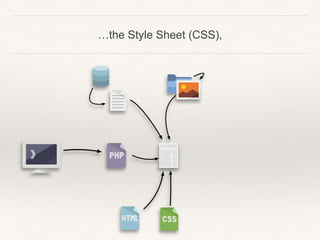
…the Style Sheet (CSS),
…and Javascript which is a special kind of programming
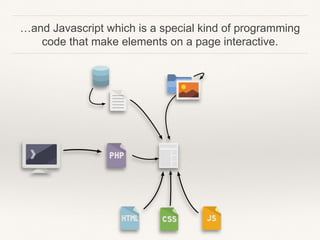
code that make elements on a page interactive.
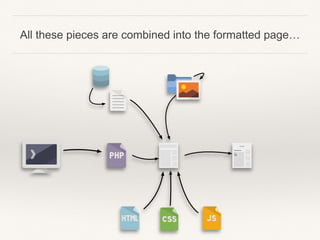
All these pieces are combined into the formatted page…
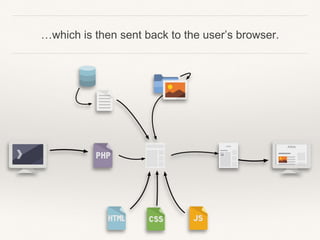
…which is then sent back to the user’s browser.
Can a Theme Be Changed?
❖ WordPress makes it very easy for users to change
themes.
❖ BUT…
❖ Every theme has its own unique set of features and
options, so it may take some time to set up.
What are the easy things to
change?
❖ Navigation Menus
❖ WordPress comes with a built-in navigation menu system
❖ Each WordPress theme defines theme locations where
menus are displayed
❖ That’s why when you switch your WordPress theme,
there will be new menu locations
❖ The menu you previously assigned to a theme location
might need to be reassigned
What are the easy things to
change?
❖ Widgets
❖ Widgets allow you to easily place different elements in your
WordPress theme’s sidebars
❖ When you change your WordPress theme can deactivate your
active widgets
❖ Some themes will automatically show default WordPress widgets
❖ Widgets with customizations will be placed under the inactive
widgets section and can be added back to your new theme’s
sidebars
What are the hard things to
Change?
❖ Your theme defines what is will display on different
types of pages (home page, blog page, list page, etc.),
and where that content goes on that page.
❖ If a theme does not have a page type or style that you
want, it can be done but you need to hire a programmer.
What are the things I can Change By
Myself?
❖ Many Themes have a WordPress Customizer
❖ This features allows WordPress Users to tweak theme
settings using a WYSIWYG interface to customize the
theme including changing the colors, fonts, text and
other customization options
Best Practices for Making Changes to
a Theme
❖ What is a Parent Theme?
❖ All themes – excluding child themes – are considered
parent themes.
❖ A parent theme is a complete theme which includes all
of the required Wordpress template files for the theme
to work
Best Practices for Making Changes to
a Theme
❖ A Child Theme is an extension to a theme that you create so you
can make changes to it.
❖ A child theme allows you to change small aspects of your site’s
appearance yet still preserve your theme’s look and functionality
❖ A child theme inherits the look and feel of the parent theme and all of
its functions, but can be used to make modifications to any part of the
theme
❖ This customizations are kept separate from the parent theme’s files
❖ Using a child theme lets you upgrade the parent theme without
affecting the customizations you’ve made to your site
Best Practices for Making Changes to
a Theme
❖ Child Themes
❖ Make your modifications portable and replicable
❖ Keep customization separate from parent theme functions
❖ Allow parent themes to be updated without destroying your
modifications
❖ Allow you to take advantage of the effort and testing put into
parent theme
❖ Save on development time since you are not recreating the
wheel
Themes vs Templates — What is the
Difference?
❖ A template defines the layout of a particular type of
page, such as your blog page, home page, and list
pages.
❖ All the pages that use a template will be formatted
exactly the same.
❖ A Theme is a collection of templates.
Theme Functionality vs Site
Functionality
❖ When you want to add functionality to your site, you do
so by installing a plugin.
❖ Plugins work regardless of your theme. Even if you
change themes, they still work.
❖ Some advanced themes include integrated, built-in
plugins. If you change themes, that functionality goes
away.
Content / Special Content
❖ How will your theme choice affect special content?
❖ Images
❖ Video
❖ Audio

How WordPress Themes Work

  • 1.
    Austin WordPress BeginnersMeetup How WordPress Themes Work November 21, 2016 Presented by Nick and Sandi Batik
  • 2.
    How WordPress Works ❖A simple overview of how WordPress themes work for beginners ❖ With this knowledge under your belt, you can more easily understand how your WordPress theme works
  • 3.
    How WordPress Works ❖A page on a WordPress website isn’t static; it’s dynamic ❖ Than means each page is created on the fly — every time it’s visited, built from bits and pieces pulled from separate files and from your website’s database
  • 4.
    How… Dynamic? ❖ Allof your sites unique information (including your site name, your blog posts, and every single comment) is stored in a MySQL database ❖ That information is retrieved from the database using the programming language PHP ❖ Then, the retrieved information is displayed via your theme’s template files, using HTML and CSS ❖ Each page is created on the fly — every time it’s visited, built from bits and pieces pulled from separate files and from your website’s database
  • 5.
    What is aWordPress Theme? ❖ A WordPress theme changes the appearance of your website, often including its layout. Changing your theme changes how what a visitor sees when they browse your site on the web.
  • 6.
    What can themesdo? ❖ Themes take the content and data stored by WordPress and display it in the browser. ❖ You decide how your site content looks and is displayed, when you choose a WordPress theme. ❖ There are many options available when you are choosing a theme for your site.
  • 7.
    What can themesdo? ❖ For example: ❖ Your theme can have different layouts, such as fixed-width or responsive; using one column or two. ❖ Your theme may give you options for where and how you want it to be displayed. ❖ Your theme can display content differently on various sized devices (phones, tablets, PCs).
  • 8.
    What can themesdo? ❖ For example: ❖ Your theme may have custom typography and design elements using CSS. ❖ Your theme may give you special areas for other design elements like images and videos.
  • 9.
    What can themesdo? ❖ A WordPress theme is more than color and layout ❖ Good themes improve visitor engagement with your website’s content ❖ …in addition to being beautiful
  • 10.
    What are themesmade of? ❖ At their most basic level, WordPress themes are collections of different files that work together to create what you see, as well as how your site behaves.
  • 11.
    The user’s browsersends a request to WordPress on the web server. WordPress is written with the PHP.
  • 12.
    The PHP instructionsin WordPress identify the theme template file to use
  • 13.
    PHP instructions intemplate fetch the text out of the database…
  • 14.
    …and the imagesfrom the uploads folder
  • 15.
    The content iscombined with the HTML,…
  • 16.
  • 17.
    …and Javascript whichis a special kind of programming code that make elements on a page interactive.
  • 18.
    All these piecesare combined into the formatted page…
  • 19.
    …which is thensent back to the user’s browser.
  • 20.
    Can a ThemeBe Changed? ❖ WordPress makes it very easy for users to change themes. ❖ BUT… ❖ Every theme has its own unique set of features and options, so it may take some time to set up.
  • 21.
    What are theeasy things to change? ❖ Navigation Menus ❖ WordPress comes with a built-in navigation menu system ❖ Each WordPress theme defines theme locations where menus are displayed ❖ That’s why when you switch your WordPress theme, there will be new menu locations ❖ The menu you previously assigned to a theme location might need to be reassigned
  • 22.
    What are theeasy things to change? ❖ Widgets ❖ Widgets allow you to easily place different elements in your WordPress theme’s sidebars ❖ When you change your WordPress theme can deactivate your active widgets ❖ Some themes will automatically show default WordPress widgets ❖ Widgets with customizations will be placed under the inactive widgets section and can be added back to your new theme’s sidebars
  • 23.
    What are thehard things to Change? ❖ Your theme defines what is will display on different types of pages (home page, blog page, list page, etc.), and where that content goes on that page. ❖ If a theme does not have a page type or style that you want, it can be done but you need to hire a programmer.
  • 24.
    What are thethings I can Change By Myself? ❖ Many Themes have a WordPress Customizer ❖ This features allows WordPress Users to tweak theme settings using a WYSIWYG interface to customize the theme including changing the colors, fonts, text and other customization options
  • 25.
    Best Practices forMaking Changes to a Theme ❖ What is a Parent Theme? ❖ All themes – excluding child themes – are considered parent themes. ❖ A parent theme is a complete theme which includes all of the required Wordpress template files for the theme to work
  • 26.
    Best Practices forMaking Changes to a Theme ❖ A Child Theme is an extension to a theme that you create so you can make changes to it. ❖ A child theme allows you to change small aspects of your site’s appearance yet still preserve your theme’s look and functionality ❖ A child theme inherits the look and feel of the parent theme and all of its functions, but can be used to make modifications to any part of the theme ❖ This customizations are kept separate from the parent theme’s files ❖ Using a child theme lets you upgrade the parent theme without affecting the customizations you’ve made to your site
  • 27.
    Best Practices forMaking Changes to a Theme ❖ Child Themes ❖ Make your modifications portable and replicable ❖ Keep customization separate from parent theme functions ❖ Allow parent themes to be updated without destroying your modifications ❖ Allow you to take advantage of the effort and testing put into parent theme ❖ Save on development time since you are not recreating the wheel
  • 28.
    Themes vs Templates— What is the Difference? ❖ A template defines the layout of a particular type of page, such as your blog page, home page, and list pages. ❖ All the pages that use a template will be formatted exactly the same. ❖ A Theme is a collection of templates.
  • 29.
    Theme Functionality vsSite Functionality ❖ When you want to add functionality to your site, you do so by installing a plugin. ❖ Plugins work regardless of your theme. Even if you change themes, they still work. ❖ Some advanced themes include integrated, built-in plugins. If you change themes, that functionality goes away.
  • 30.
    Content / SpecialContent ❖ How will your theme choice affect special content? ❖ Images ❖ Video ❖ Audio