









Clean, Learn and
Visualise data
with R
Barbara Fusinska
@BasiaFusinska
About me
Data Science Freelancer
Machine Learning
Programmer
@BasiaFusinska
BarbaraFusinska.com
Barbara@Fusinska.com
https://github.com/BasiaFusinska/RMachineLearning
Agenda
• Machine Learning
• R platform
• Machine Learning with R
• Classification problem
• Linear Regression
• Clustering
Machine Learning?
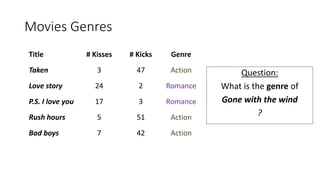
Movies Genres
Title # Kisses # Kicks Genre
Taken 3 47 Action
Love story 24 2 Romance
P.S. I love you 17 3 Romance
Rush hours 5 51 Action
Bad boys 7 42 Action
Question:
What is the genre of
Gone with the wind
?
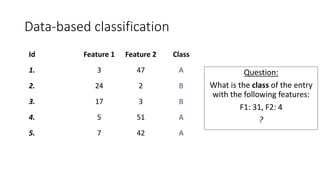
Data-based classification
Id Feature 1 Feature 2 Class
1. 3 47 A
2. 24 2 B
3. 17 3 B
4. 5 51 A
5. 7 42 A
Question:
What is the class of the entry
with the following features:
F1: 31, F2: 4
?
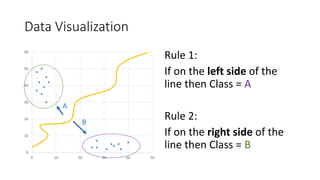
Data Visualization
0
10
20
30
40
50
60
0 10 20 30 40 50
Rule 1:
If on the left side of the
line then Class = A
Rule 2:
If on the right side of the
line then Class = B
A
B
Chick sexing
Supervised
learning
• Classification, regression
• Label, target value
• Training & Validation phases
Unsupervised
learning
• Clustering, feature selection
• Finding structure of data
• Statistical values describing the
data
R language
Why R?
• Ross Ihaka & Robert Gentleman
• Successor of S
• Open source
• Community driven
• #1 for statistical computing
• Exploratory Data Analysis
• Machine Learning
• Visualisation
Supervised Machine Learning workflow
Clean data Data split
Machine Learning
algorithm
Trained model Score
Preprocess
data
Training
data
Test data
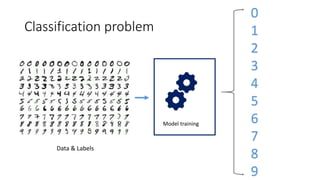
Classification problem
Model training
Data & Labels
0
1
2
3
4
5
6
7
8
9
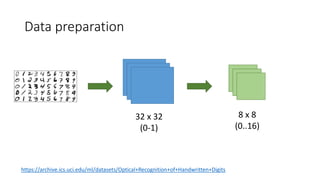
Data preparation
32 x 32
(0-1)
8 x 8
(0..16)
https://archive.ics.uci.edu/ml/datasets/Optical+Recognition+of+Handwritten+Digits
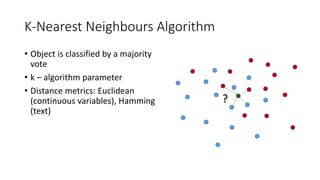
K-Nearest Neighbours Algorithm
• Object is classified by a majority
vote
• k – algorithm parameter
• Distance metrics: Euclidean
(continuous variables), Hamming
(text)
?
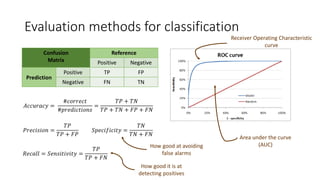
Evaluation methods for classification
Confusion
Matrix
Reference
Positive Negative
Prediction
Positive TP FP
Negative FN TN
Receiver Operating Characteristic
curve
Area under the curve
(AUC)
𝐴𝑐𝑐𝑢𝑟𝑎𝑐𝑦 =
#𝑐𝑜𝑟𝑟𝑒𝑐𝑡
#𝑝𝑟𝑒𝑑𝑖𝑐𝑡𝑖𝑜𝑛𝑠
=
𝑇𝑃 + 𝑇𝑁
𝑇𝑃 + 𝑇𝑁 + 𝐹𝑃 + 𝐹𝑁
𝑃𝑟𝑒𝑐𝑖𝑠𝑖𝑜𝑛 =
𝑇𝑃
𝑇𝑃 + 𝐹𝑃
𝑅𝑒𝑐𝑎𝑙𝑙 = 𝑆𝑒𝑛𝑠𝑖𝑡𝑖𝑣𝑖𝑡𝑦 =
𝑇𝑃
𝑇𝑃 + 𝐹𝑁
𝑆𝑝𝑒𝑐𝑖𝑓𝑖𝑐𝑖𝑡𝑦 =
𝑇𝑁
𝑇𝑁 + 𝐹𝑁
How good at avoiding
false alarms
How good it is at
detecting positives
# Read data
trainingSet <- read.csv(trainingFile, header = FALSE)
testSet <- read.csv(testFile, header = FALSE)
trainingSet$V65 <- factor(trainingSet$V65)
testSet$V65 <- factor(testSet$V65)
# Classify
library(caret)
knn.fit <- knn3(V65 ~ ., data=trainingSet, k=5)
# Predict new values
pred.test <- predict(knn.fit, testSet[,1:64], type="class")
# Confusion matrix
library(caret)
confusionMatrix(pred.test, testSet[,65])
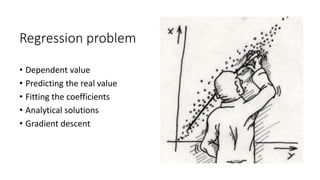
Regression problem
• Dependent value
• Predicting the real value
• Fitting the coefficients
• Analytical solutions
• Gradient descent
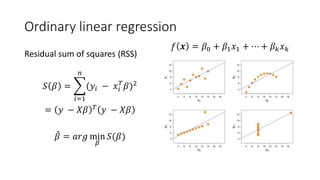
Ordinary linear regression
Residual sum of squares (RSS)
𝑆 𝛽 =
𝑖=1
𝑛
(𝑦𝑖 − 𝑥𝑖
𝑇
𝛽)2
= 𝑦 − 𝑋𝛽 𝑇
𝑦 − 𝑋𝛽
𝛽 = 𝑎𝑟𝑔 min
𝛽
𝑆(𝛽)
𝑓 𝒙 = 𝛽0 + 𝛽1 𝑥1 + ⋯ + 𝛽 𝑘 𝑥 𝑘
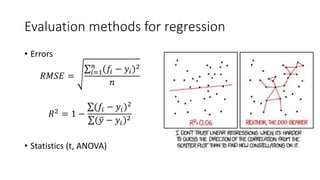
Evaluation methods for regression
• Errors
𝑅𝑀𝑆𝐸 = 𝑖=1
𝑛
(𝑓𝑖 − 𝑦𝑖)2
𝑛
𝑅2 = 1 −
(𝑓𝑖 − 𝑦𝑖)2
( 𝑦 − 𝑦𝑖)2
• Statistics (t, ANOVA)
Prestige dataset
Feature Data type Description
education continuous Average education (years)
income integer Average income (dollars)
women continuous Percentage of women
prestige continuous Pineo-Porter prestige score for
occupation
census integer Canadian Census occupational
code
type multi-valued
discrete
Type of occupation: bc, prof, wc
# Pairs for the numeric data
pairs(Prestige[,-c(5,6)], pch=21, bg=Prestige$type)
# Linear regression, numerical data
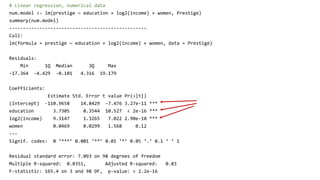
num.model <- lm(prestige ~ education + log2(income) + women, Prestige)
summary(num.model)
--------------------------------------------------
Call:
lm(formula = prestige ~ education + log2(income) + women, data = Prestige)
Residuals:
Min 1Q Median 3Q Max
-17.364 -4.429 -0.101 4.316 19.179
Coefficients:
Estimate Std. Error t value Pr(>|t|)
(Intercept) -110.9658 14.8429 -7.476 3.27e-11 ***
education 3.7305 0.3544 10.527 < 2e-16 ***
log2(income) 9.3147 1.3265 7.022 2.90e-10 ***
women 0.0469 0.0299 1.568 0.12
---
Signif. codes: 0 ‘***’ 0.001 ‘**’ 0.01 ‘*’ 0.05 ‘.’ 0.1 ‘ ’ 1
Residual standard error: 7.093 on 98 degrees of freedom
Multiple R-squared: 0.8351, Adjusted R-squared: 0.83
F-statistic: 165.4 on 3 and 98 DF, p-value: < 2.2e-16
Regression
Plots
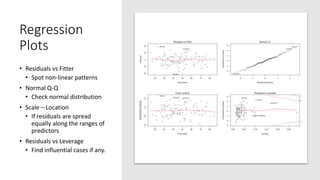
• Residuals vs Fitter
• Spot non-linear patterns
• Normal Q-Q
• Check normal distribution
• Scale – Location
• If residuals are spread
equally along the ranges of
predictors
• Residuals vs Leverage
• Find influential cases if any.
Categorical data for regression
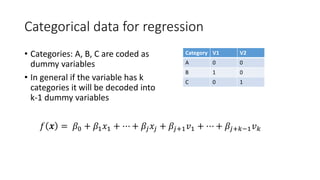
• Categories: A, B, C are coded as
dummy variables
• In general if the variable has k
categories it will be decoded into
k-1 dummy variables
Category V1 V2
A 0 0
B 1 0
C 0 1
𝑓 𝒙 = 𝛽0 + 𝛽1 𝑥1 + ⋯ + 𝛽𝑗 𝑥𝑗 + 𝛽𝑗+1 𝑣1 + ⋯ + 𝛽𝑗+𝑘−1 𝑣 𝑘
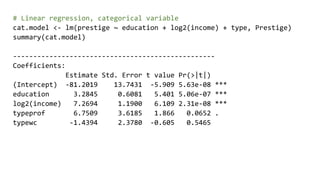
# Linear regression, categorical variable
cat.model <- lm(prestige ~ education + log2(income) + type, Prestige)
summary(cat.model)
--------------------------------------------------
Coefficients:
Estimate Std. Error t value Pr(>|t|)
(Intercept) -81.2019 13.7431 -5.909 5.63e-08 ***
education 3.2845 0.6081 5.401 5.06e-07 ***
log2(income) 7.2694 1.1900 6.109 2.31e-08 ***
typeprof 6.7509 3.6185 1.866 0.0652 .
typewc -1.4394 2.3780 -0.605 0.5465
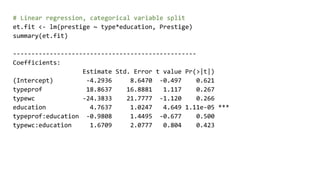
# Linear regression, categorical variable split
et.fit <- lm(prestige ~ type*education, Prestige)
summary(et.fit)
--------------------------------------------------
Coefficients:
Estimate Std. Error t value Pr(>|t|)
(Intercept) -4.2936 8.6470 -0.497 0.621
typeprof 18.8637 16.8881 1.117 0.267
typewc -24.3833 21.7777 -1.120 0.266
education 4.7637 1.0247 4.649 1.11e-05 ***
typeprof:education -0.9808 1.4495 -0.677 0.500
typewc:education 1.6709 2.0777 0.804 0.423
# Pairs for the numeric data
cf <- et.fit$coefficients
ggplot(prestige, aes(education, prestige)) + geom_point(aes(col=type)) +
geom_abline(slope=cf[4], intercept = cf[1], colour='red') +
geom_abline(slope=cf[4] + cf[5], intercept = cf[1] + cf[2], colour='green') +
geom_abline(slope=cf[4] + cf[6], intercept = cf[1] + cf[3], colour='blue')
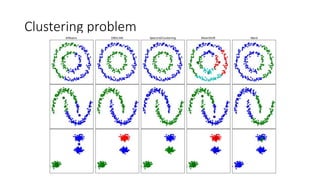
Clustering problem
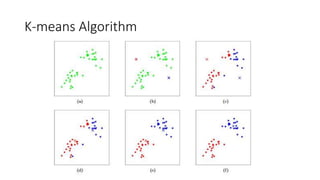
K-means Algorithm
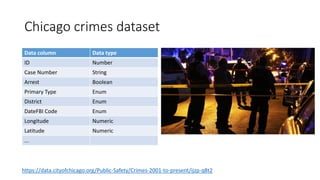
Chicago crimes dataset
Data column Data type
ID Number
Case Number String
Arrest Boolean
Primary Type Enum
District Enum
DateFBI Code Enum
Longitude Numeric
Latitude Numeric
...
https://data.cityofchicago.org/Public-Safety/Crimes-2001-to-present/ijzp-q8t2
# Read data
crimeData <- read.csv(crimeFilePath)
# Only data with location, only Assault or Burglary types
crimeData <- crimeData[
!is.na(crimeData$Latitude) & !is.na(crimeData$Longitude),]
selectedCrimes <- subset(crimeData,
Primary.Type %in% c(crimeTypes[2], crimeTypes[4]))
# Visualise
library(ggplot2)
library(ggmap)
# Get map from Google
map_g <- get_map(location=c(lon=mean(crimeData$Longitude, na.rm=TRUE), lat=mean(
crimeData$Latitude, na.rm=TRUE)), zoom = 11, maptype = "terrain", scale = 2)
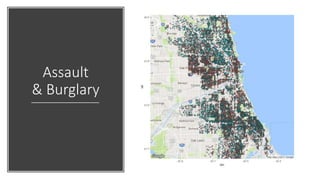
ggmap(map_g) + geom_point(data = selectedCrimes, aes(x = Longitude, y = Latitude,
fill = Primary.Type, alpha = 0.8), size = 1, shape = 21) +
guides(fill=FALSE, alpha=FALSE, size=FALSE)
Assault
& Burglary
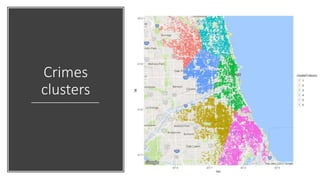
# k-means clustering (k=6)
clusterResult <- kmeans(selectedCrimes[, c('Longitude', 'Latitude')], 6)
# Get the clusters information
centers <- as.data.frame(clusterResult$centers)
clusterColours <- factor(clusterResult$cluster)
# Visualise
ggmap(map_g) +
geom_point(data = selectedCrimes, aes(x = Longitude, y = Latitude,
alpha = 0.8, color = clusterColours), size = 1) +
geom_point(data = centers, aes(x = Longitude, y = Latitude,
alpha = 0.8), size = 1.5) +
guides(fill=FALSE, alpha=FALSE, size=FALSE)
Crimes
clusters
Keep in touch
BarbaraFusinska.com
Barbara@Fusinska.com
@BasiaFusinska
https://github.com/BasiaFusinska/RMachineLearning

Clean, Learn and Visualise data with R

  • 1.
    Clean, Learn and Visualisedata with R Barbara Fusinska @BasiaFusinska
  • 2.
    About me Data ScienceFreelancer Machine Learning Programmer @BasiaFusinska BarbaraFusinska.com Barbara@Fusinska.com https://github.com/BasiaFusinska/RMachineLearning
  • 3.
    Agenda • Machine Learning •R platform • Machine Learning with R • Classification problem • Linear Regression • Clustering
  • 4.
  • 5.
    Movies Genres Title #Kisses # Kicks Genre Taken 3 47 Action Love story 24 2 Romance P.S. I love you 17 3 Romance Rush hours 5 51 Action Bad boys 7 42 Action Question: What is the genre of Gone with the wind ?
  • 6.
    Data-based classification Id Feature1 Feature 2 Class 1. 3 47 A 2. 24 2 B 3. 17 3 B 4. 5 51 A 5. 7 42 A Question: What is the class of the entry with the following features: F1: 31, F2: 4 ?
  • 7.
    Data Visualization 0 10 20 30 40 50 60 0 1020 30 40 50 Rule 1: If on the left side of the line then Class = A Rule 2: If on the right side of the line then Class = B A B
  • 8.
  • 9.
    Supervised learning • Classification, regression •Label, target value • Training & Validation phases
  • 10.
    Unsupervised learning • Clustering, featureselection • Finding structure of data • Statistical values describing the data
  • 11.
  • 12.
    Why R? • RossIhaka & Robert Gentleman • Successor of S • Open source • Community driven • #1 for statistical computing • Exploratory Data Analysis • Machine Learning • Visualisation
  • 13.
    Supervised Machine Learningworkflow Clean data Data split Machine Learning algorithm Trained model Score Preprocess data Training data Test data
  • 14.
    Classification problem Model training Data& Labels 0 1 2 3 4 5 6 7 8 9
  • 15.
    Data preparation 32 x32 (0-1) 8 x 8 (0..16) https://archive.ics.uci.edu/ml/datasets/Optical+Recognition+of+Handwritten+Digits
  • 16.
    K-Nearest Neighbours Algorithm •Object is classified by a majority vote • k – algorithm parameter • Distance metrics: Euclidean (continuous variables), Hamming (text) ?
  • 17.
    Evaluation methods forclassification Confusion Matrix Reference Positive Negative Prediction Positive TP FP Negative FN TN Receiver Operating Characteristic curve Area under the curve (AUC) 𝐴𝑐𝑐𝑢𝑟𝑎𝑐𝑦 = #𝑐𝑜𝑟𝑟𝑒𝑐𝑡 #𝑝𝑟𝑒𝑑𝑖𝑐𝑡𝑖𝑜𝑛𝑠 = 𝑇𝑃 + 𝑇𝑁 𝑇𝑃 + 𝑇𝑁 + 𝐹𝑃 + 𝐹𝑁 𝑃𝑟𝑒𝑐𝑖𝑠𝑖𝑜𝑛 = 𝑇𝑃 𝑇𝑃 + 𝐹𝑃 𝑅𝑒𝑐𝑎𝑙𝑙 = 𝑆𝑒𝑛𝑠𝑖𝑡𝑖𝑣𝑖𝑡𝑦 = 𝑇𝑃 𝑇𝑃 + 𝐹𝑁 𝑆𝑝𝑒𝑐𝑖𝑓𝑖𝑐𝑖𝑡𝑦 = 𝑇𝑁 𝑇𝑁 + 𝐹𝑁 How good at avoiding false alarms How good it is at detecting positives
  • 18.
    # Read data trainingSet<- read.csv(trainingFile, header = FALSE) testSet <- read.csv(testFile, header = FALSE) trainingSet$V65 <- factor(trainingSet$V65) testSet$V65 <- factor(testSet$V65) # Classify library(caret) knn.fit <- knn3(V65 ~ ., data=trainingSet, k=5) # Predict new values pred.test <- predict(knn.fit, testSet[,1:64], type="class")
  • 19.
  • 20.
    Regression problem • Dependentvalue • Predicting the real value • Fitting the coefficients • Analytical solutions • Gradient descent
  • 21.
    Ordinary linear regression Residualsum of squares (RSS) 𝑆 𝛽 = 𝑖=1 𝑛 (𝑦𝑖 − 𝑥𝑖 𝑇 𝛽)2 = 𝑦 − 𝑋𝛽 𝑇 𝑦 − 𝑋𝛽 𝛽 = 𝑎𝑟𝑔 min 𝛽 𝑆(𝛽) 𝑓 𝒙 = 𝛽0 + 𝛽1 𝑥1 + ⋯ + 𝛽 𝑘 𝑥 𝑘
  • 22.
    Evaluation methods forregression • Errors 𝑅𝑀𝑆𝐸 = 𝑖=1 𝑛 (𝑓𝑖 − 𝑦𝑖)2 𝑛 𝑅2 = 1 − (𝑓𝑖 − 𝑦𝑖)2 ( 𝑦 − 𝑦𝑖)2 • Statistics (t, ANOVA)
  • 23.
    Prestige dataset Feature Datatype Description education continuous Average education (years) income integer Average income (dollars) women continuous Percentage of women prestige continuous Pineo-Porter prestige score for occupation census integer Canadian Census occupational code type multi-valued discrete Type of occupation: bc, prof, wc
  • 24.
    # Pairs forthe numeric data pairs(Prestige[,-c(5,6)], pch=21, bg=Prestige$type)
  • 25.
    # Linear regression,numerical data num.model <- lm(prestige ~ education + log2(income) + women, Prestige) summary(num.model) -------------------------------------------------- Call: lm(formula = prestige ~ education + log2(income) + women, data = Prestige) Residuals: Min 1Q Median 3Q Max -17.364 -4.429 -0.101 4.316 19.179 Coefficients: Estimate Std. Error t value Pr(>|t|) (Intercept) -110.9658 14.8429 -7.476 3.27e-11 *** education 3.7305 0.3544 10.527 < 2e-16 *** log2(income) 9.3147 1.3265 7.022 2.90e-10 *** women 0.0469 0.0299 1.568 0.12 --- Signif. codes: 0 ‘***’ 0.001 ‘**’ 0.01 ‘*’ 0.05 ‘.’ 0.1 ‘ ’ 1 Residual standard error: 7.093 on 98 degrees of freedom Multiple R-squared: 0.8351, Adjusted R-squared: 0.83 F-statistic: 165.4 on 3 and 98 DF, p-value: < 2.2e-16
  • 26.
    Regression Plots • Residuals vsFitter • Spot non-linear patterns • Normal Q-Q • Check normal distribution • Scale – Location • If residuals are spread equally along the ranges of predictors • Residuals vs Leverage • Find influential cases if any.
  • 27.
    Categorical data forregression • Categories: A, B, C are coded as dummy variables • In general if the variable has k categories it will be decoded into k-1 dummy variables Category V1 V2 A 0 0 B 1 0 C 0 1 𝑓 𝒙 = 𝛽0 + 𝛽1 𝑥1 + ⋯ + 𝛽𝑗 𝑥𝑗 + 𝛽𝑗+1 𝑣1 + ⋯ + 𝛽𝑗+𝑘−1 𝑣 𝑘
  • 28.
    # Linear regression,categorical variable cat.model <- lm(prestige ~ education + log2(income) + type, Prestige) summary(cat.model) -------------------------------------------------- Coefficients: Estimate Std. Error t value Pr(>|t|) (Intercept) -81.2019 13.7431 -5.909 5.63e-08 *** education 3.2845 0.6081 5.401 5.06e-07 *** log2(income) 7.2694 1.1900 6.109 2.31e-08 *** typeprof 6.7509 3.6185 1.866 0.0652 . typewc -1.4394 2.3780 -0.605 0.5465
  • 29.
    # Linear regression,categorical variable split et.fit <- lm(prestige ~ type*education, Prestige) summary(et.fit) -------------------------------------------------- Coefficients: Estimate Std. Error t value Pr(>|t|) (Intercept) -4.2936 8.6470 -0.497 0.621 typeprof 18.8637 16.8881 1.117 0.267 typewc -24.3833 21.7777 -1.120 0.266 education 4.7637 1.0247 4.649 1.11e-05 *** typeprof:education -0.9808 1.4495 -0.677 0.500 typewc:education 1.6709 2.0777 0.804 0.423
  • 30.
    # Pairs forthe numeric data cf <- et.fit$coefficients ggplot(prestige, aes(education, prestige)) + geom_point(aes(col=type)) + geom_abline(slope=cf[4], intercept = cf[1], colour='red') + geom_abline(slope=cf[4] + cf[5], intercept = cf[1] + cf[2], colour='green') + geom_abline(slope=cf[4] + cf[6], intercept = cf[1] + cf[3], colour='blue')
  • 31.
  • 32.
  • 33.
    Chicago crimes dataset Datacolumn Data type ID Number Case Number String Arrest Boolean Primary Type Enum District Enum DateFBI Code Enum Longitude Numeric Latitude Numeric ... https://data.cityofchicago.org/Public-Safety/Crimes-2001-to-present/ijzp-q8t2
  • 34.
    # Read data crimeData<- read.csv(crimeFilePath) # Only data with location, only Assault or Burglary types crimeData <- crimeData[ !is.na(crimeData$Latitude) & !is.na(crimeData$Longitude),] selectedCrimes <- subset(crimeData, Primary.Type %in% c(crimeTypes[2], crimeTypes[4])) # Visualise library(ggplot2) library(ggmap) # Get map from Google map_g <- get_map(location=c(lon=mean(crimeData$Longitude, na.rm=TRUE), lat=mean( crimeData$Latitude, na.rm=TRUE)), zoom = 11, maptype = "terrain", scale = 2) ggmap(map_g) + geom_point(data = selectedCrimes, aes(x = Longitude, y = Latitude, fill = Primary.Type, alpha = 0.8), size = 1, shape = 21) + guides(fill=FALSE, alpha=FALSE, size=FALSE)
  • 35.
  • 36.
    # k-means clustering(k=6) clusterResult <- kmeans(selectedCrimes[, c('Longitude', 'Latitude')], 6) # Get the clusters information centers <- as.data.frame(clusterResult$centers) clusterColours <- factor(clusterResult$cluster) # Visualise ggmap(map_g) + geom_point(data = selectedCrimes, aes(x = Longitude, y = Latitude, alpha = 0.8, color = clusterColours), size = 1) + geom_point(data = centers, aes(x = Longitude, y = Latitude, alpha = 0.8), size = 1.5) + guides(fill=FALSE, alpha=FALSE, size=FALSE)
  • 37.
  • 39.