Machine Learning in R
Suja A. Alex,
Assistant Professor,
Dept. of Information Technology,
St.Xavier’s Catholic College of Engineering
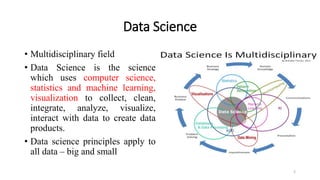
Data Science
• Multidisciplinary field
• Data Science is the science
which uses computer science,
statistics and machine learning,
visualization to collect, clean,
integrate, analyze, visualize,
interact with data to create data
products.
• Data science principles apply to
all data – big and small
2
5 Vs of Big Data:
• Raw Data: Volume
• Change over time: Velocity
• Data types: Variety
• Data Quality: Veracity
• Information for Decision Making: Value
3
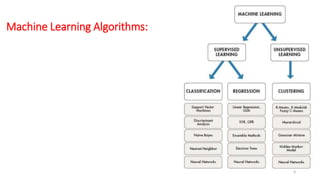
Machine Learning Algorithms:
4
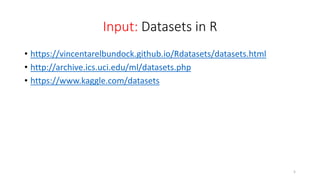
Input: Datasets in R
• https://vincentarelbundock.github.io/Rdatasets/datasets.html
• http://archive.ics.uci.edu/ml/datasets.php
• https://www.kaggle.com/datasets
5
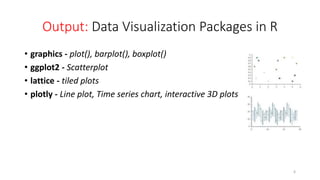
Output: Data Visualization Packages in R
• graphics - plot(), barplot(), boxplot()
• ggplot2 - Scatterplot
• lattice - tiled plots
• plotly - Line plot, Time series chart, interactive 3D plots
6
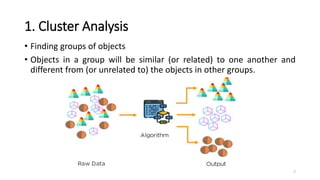
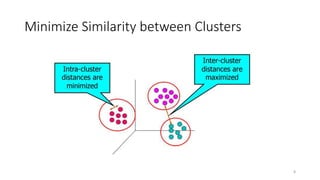
1. Cluster Analysis
• Finding groups of objects
• Objects in a group will be similar (or related) to one another and
different from (or unrelated to) the objects in other groups.
7
Minimize Similarity between Clusters
8
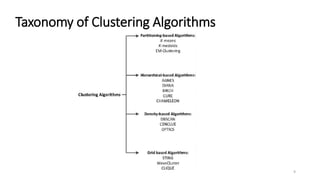
Taxonomy of Clustering Algorithms
9
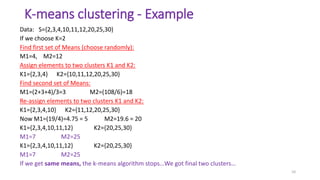
K-means clustering - Example
Data: S={2,3,4,10,11,12,20,25,30}
If we choose K=2
Find first set of Means (choose randomly):
M1=4, M2=12
Assign elements to two clusters K1 and K2:
K1={2,3,4} K2={10,11,12,20,25,30}
Find second set of Means:
M1=(2+3+4)/3=3 M2=(108/6)=18
Re-assign elements to two clusters K1 and K2:
K1={2,3,4,10} K2={11,12,20,25,30}
Now M1=(19/4)=4.75 = 5 M2=19.6 = 20
K1={2,3,4,10,11,12} K2={20,25,30}
M1=7 M2=25
K1={2,3,4,10,11,12} K2={20,25,30}
M1=7 M2=25
If we get same means, the k-means algorithm stops…We got final two clusters…
10
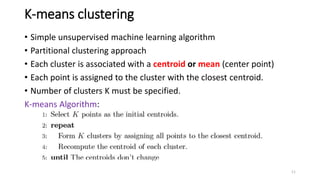
K-means clustering
• Simple unsupervised machine learning algorithm
• Partitional clustering approach
• Each cluster is associated with a centroid or mean (center point)
• Each point is assigned to the cluster with the closest centroid.
• Number of clusters K must be specified.
K-means Algorithm:
11
Clustering packages in R
1. Cluster
2. ClusterR
3. NbClust
Function for k-means in R:
kmeans(x, centers, nstart)
where x  numeric dataset (matrix or data frame)
centers  number of clusters to extract
nstart  generate number of initial configurations
12
K-means-clustering in R
// Before Clustering
// Explore data
library(datasets)
head(iris)
library(ggplot2)
ggplot(iris, aes(Petal.Length, Petal.Width, color = Species)) + geom_point()
// After K-means Clustering
set.seed(20)
irisCluster <- kmeans(iris[, 3:4], 3)
irisCluster
irisCluster$cluster <- as.factor(irisCluster$cluster)
ggplot(iris, aes(Petal.Length, Petal.Width, color = irisCluster$cluster)) + geom_point()
13
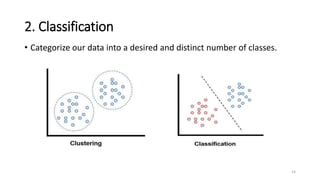
2. Classification
• Categorize our data into a desired and distinct number of classes.
14
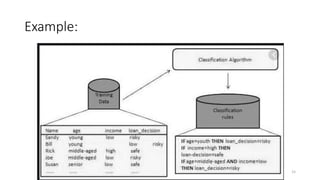
Example:
15
Classification Algorithm
• Decision Tree
• Bayes Classifier
• Nearest Neighbor
• Support Vector Machines
• Naive Linear Classifiers (or Logistic Regression)
16
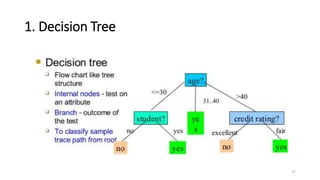
1. Decision Tree
17
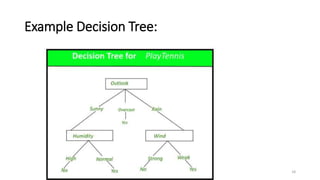
Example Decision Tree:
18
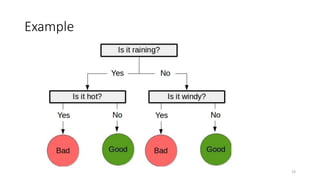
Example
19
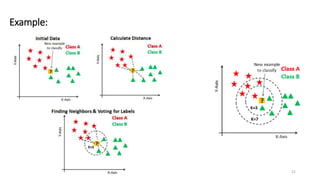
KNN classification:
• Supervised learning algorithm
• Lazy learning algorithm.
• Based on similarity measure (distance function)
Steps for KNN:
1. Calculate distance (e.g. Euclidean distance, Hamming distance, etc.)
2. Find k closest neighbors
3. Vote for labels or calculate the mean
20
Example:
21
KNN classification in R
df <- data(iris) ##load data
head(iris) ## see the stucture
##Generate a random number that is 90% of the total number of rows in dataset.
ran <- sample(1:nrow(iris), 0.9 * nrow(iris))
##the normalization function is created
nor <-function(x) { (x -min(x))/(max(x)-min(x)) }
##Run nomalization on first 4 coulumns of dataset because they are the predictors
iris_norm <- as.data.frame(lapply(iris[,c(1,2,3,4)], nor))
summary(iris_norm)
##extract training set
iris_train <- iris_norm[ran,]
##extract testing set
iris_test <- iris_norm[-ran,]
##extract 5th column of train dataset because it will be used as 'cl' argument in knn function.
iris_target_category <- iris[ran,5]
##extract 5th column if test dataset to measure the accuracy
iris_test_category <- iris[-ran,5]
##load the package class
library(class)
##run knn function
pr <- knn(iris_train,iris_test,cl=iris_target_category,k=13)
##create confusion matrix
tab <- table(pr,iris_test_category)
##this function divides the correct predictions by total number of predictions that tell us how accurate teh
model is.
accuracy <- function(x){sum(diag(x)/(sum(rowSums(x)))) * 100}
accuracy(tab)
22
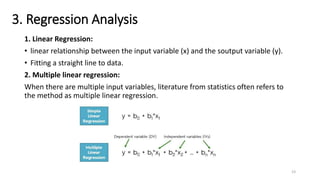
3. Regression Analysis
1. Linear Regression:
• linear relationship between the input variable (x) and the soutput variable (y).
• Fitting a straight line to data.
2. Multiple linear regression:
When there are multiple input variables, literature from statistics often refers to
the method as multiple linear regression.
23
Simple Linear Regression:
x <- c(151, 174, 138, 186, 128, 136, 179, 163, 152, 131)
y <- c(63, 81, 56, 91, 47, 57, 76, 72, 62, 48)
# Apply the lm() function.
relation <- lm(y~x)
print(relation)
summary(relation)
24
Multiple Linear Regression:
input <- mtcars[,c("mpg","disp","hp","wt")]
print(head(input))
// Create Relationship Model & get the Coefficients
input <- mtcars[,c("mpg","disp","hp","wt")]
# Create the relationship model.
model <- lm(mpg~disp+hp+wt, data = input)
# Show the model.
print(model)
# Get the Intercept and coefficients as vector elements.
cat("# # # # The Coefficient Values # # # ","n")
a <- coef(model)[1]
print(a)
Xdisp <- coef(model)[2]
Xhp <- coef(model)[3]
Xwt <- coef(model)[4]
print(Xdisp)
print(Xhp)
print(Xwt)
25

Machine Learning in R

  • 1.
    Machine Learning inR Suja A. Alex, Assistant Professor, Dept. of Information Technology, St.Xavier’s Catholic College of Engineering
  • 2.
    Data Science • Multidisciplinaryfield • Data Science is the science which uses computer science, statistics and machine learning, visualization to collect, clean, integrate, analyze, visualize, interact with data to create data products. • Data science principles apply to all data – big and small 2
  • 3.
    5 Vs ofBig Data: • Raw Data: Volume • Change over time: Velocity • Data types: Variety • Data Quality: Veracity • Information for Decision Making: Value 3
  • 4.
  • 5.
    Input: Datasets inR • https://vincentarelbundock.github.io/Rdatasets/datasets.html • http://archive.ics.uci.edu/ml/datasets.php • https://www.kaggle.com/datasets 5
  • 6.
    Output: Data VisualizationPackages in R • graphics - plot(), barplot(), boxplot() • ggplot2 - Scatterplot • lattice - tiled plots • plotly - Line plot, Time series chart, interactive 3D plots 6
  • 7.
    1. Cluster Analysis •Finding groups of objects • Objects in a group will be similar (or related) to one another and different from (or unrelated to) the objects in other groups. 7
  • 8.
  • 9.
  • 10.
    K-means clustering -Example Data: S={2,3,4,10,11,12,20,25,30} If we choose K=2 Find first set of Means (choose randomly): M1=4, M2=12 Assign elements to two clusters K1 and K2: K1={2,3,4} K2={10,11,12,20,25,30} Find second set of Means: M1=(2+3+4)/3=3 M2=(108/6)=18 Re-assign elements to two clusters K1 and K2: K1={2,3,4,10} K2={11,12,20,25,30} Now M1=(19/4)=4.75 = 5 M2=19.6 = 20 K1={2,3,4,10,11,12} K2={20,25,30} M1=7 M2=25 K1={2,3,4,10,11,12} K2={20,25,30} M1=7 M2=25 If we get same means, the k-means algorithm stops…We got final two clusters… 10
  • 11.
    K-means clustering • Simpleunsupervised machine learning algorithm • Partitional clustering approach • Each cluster is associated with a centroid or mean (center point) • Each point is assigned to the cluster with the closest centroid. • Number of clusters K must be specified. K-means Algorithm: 11
  • 12.
    Clustering packages inR 1. Cluster 2. ClusterR 3. NbClust Function for k-means in R: kmeans(x, centers, nstart) where x  numeric dataset (matrix or data frame) centers  number of clusters to extract nstart  generate number of initial configurations 12
  • 13.
    K-means-clustering in R //Before Clustering // Explore data library(datasets) head(iris) library(ggplot2) ggplot(iris, aes(Petal.Length, Petal.Width, color = Species)) + geom_point() // After K-means Clustering set.seed(20) irisCluster <- kmeans(iris[, 3:4], 3) irisCluster irisCluster$cluster <- as.factor(irisCluster$cluster) ggplot(iris, aes(Petal.Length, Petal.Width, color = irisCluster$cluster)) + geom_point() 13
  • 14.
    2. Classification • Categorizeour data into a desired and distinct number of classes. 14
  • 15.
  • 16.
    Classification Algorithm • DecisionTree • Bayes Classifier • Nearest Neighbor • Support Vector Machines • Naive Linear Classifiers (or Logistic Regression) 16
  • 17.
  • 18.
  • 19.
  • 20.
    KNN classification: • Supervisedlearning algorithm • Lazy learning algorithm. • Based on similarity measure (distance function) Steps for KNN: 1. Calculate distance (e.g. Euclidean distance, Hamming distance, etc.) 2. Find k closest neighbors 3. Vote for labels or calculate the mean 20
  • 21.
  • 22.
    KNN classification inR df <- data(iris) ##load data head(iris) ## see the stucture ##Generate a random number that is 90% of the total number of rows in dataset. ran <- sample(1:nrow(iris), 0.9 * nrow(iris)) ##the normalization function is created nor <-function(x) { (x -min(x))/(max(x)-min(x)) } ##Run nomalization on first 4 coulumns of dataset because they are the predictors iris_norm <- as.data.frame(lapply(iris[,c(1,2,3,4)], nor)) summary(iris_norm) ##extract training set iris_train <- iris_norm[ran,] ##extract testing set iris_test <- iris_norm[-ran,] ##extract 5th column of train dataset because it will be used as 'cl' argument in knn function. iris_target_category <- iris[ran,5] ##extract 5th column if test dataset to measure the accuracy iris_test_category <- iris[-ran,5] ##load the package class library(class) ##run knn function pr <- knn(iris_train,iris_test,cl=iris_target_category,k=13) ##create confusion matrix tab <- table(pr,iris_test_category) ##this function divides the correct predictions by total number of predictions that tell us how accurate teh model is. accuracy <- function(x){sum(diag(x)/(sum(rowSums(x)))) * 100} accuracy(tab) 22
  • 23.
    3. Regression Analysis 1.Linear Regression: • linear relationship between the input variable (x) and the soutput variable (y). • Fitting a straight line to data. 2. Multiple linear regression: When there are multiple input variables, literature from statistics often refers to the method as multiple linear regression. 23
  • 24.
    Simple Linear Regression: x<- c(151, 174, 138, 186, 128, 136, 179, 163, 152, 131) y <- c(63, 81, 56, 91, 47, 57, 76, 72, 62, 48) # Apply the lm() function. relation <- lm(y~x) print(relation) summary(relation) 24
  • 25.
    Multiple Linear Regression: input<- mtcars[,c("mpg","disp","hp","wt")] print(head(input)) // Create Relationship Model & get the Coefficients input <- mtcars[,c("mpg","disp","hp","wt")] # Create the relationship model. model <- lm(mpg~disp+hp+wt, data = input) # Show the model. print(model) # Get the Intercept and coefficients as vector elements. cat("# # # # The Coefficient Values # # # ","n") a <- coef(model)[1] print(a) Xdisp <- coef(model)[2] Xhp <- coef(model)[3] Xwt <- coef(model)[4] print(Xdisp) print(Xhp) print(Xwt) 25