


Hyperion 11.1.2.3 Installation Guide
Description:
BISP is committed to provide BEST learning material to the beginners
and advance learners. In the same series, we have prepared a complete
end-to end Hands-on Guides for Essbase, Planning, HFM, FDQD and
Reporting and Analysis. The document shows how to install Hyperion
11.1.2.3 in Oracle Linux. Join our professional training program and learn
from experts.
History:
Version Description Change Author Publish Date
0.1 Review#1 Amit Sharma 18th
May 2013
www.bispsolutions.com | www.hyperionguru.com | www.bisptrainings.com | Page 1
Contents
Contents........................................................................................................................................................................2
Software and Hardware Requirement...........................................................................................................................3
.....................................................................................................................................................................................3
EPMA Components to be Installed................................................................................................................................3
Download the installation files .....................................................................................................................................4
..............................................................................................................................................................................5
......................................................................................................................................................................................6
......................................................................................................................................................................................7
......................................................................................................................................................................................7
Start Installation once you ensure you meet all the prerequisites................................................................................8
Set Environment Variables..................................................................................................................................13
Install Database, Create schema and grant privileges.........................................................................................13
..................................................................................................................................................................................13
Configure EPMA..................................................................................................................................................14
....................................................................................................................................................................................14
Start WebLogic Services ..................................................................................................................................25
Start Hyperion Services ...................................................................................................................................25
Validate the Deployment.................................................................................................................................26
....................................................................................................................................................................................26
....................................................................................................................................................................................27
Validate all services are running......................................................................................................................27
Log files ...........................................................................................................................................................27
www.bispsolutions.com | www.hyperionguru.com | www.bisptrainings.com | Page 2
Software and Hardware Requirement
Operating System
o Solaris 2.9 Update 9+, "Solaris 10 Update 9+ ,Solaris 11",
o AIX 6.1 (TL6+), AIX 7.1 (TL0+)
o Red Hat EL 4 (UL7+), Red Hat EL 5 (UL5+), Red Hat EL 4 (UL7+), Red Hat EL 5 (UL5+), Red Hat EL
6 (UL1+)
o Oracle Linux 4 (UL7+), Oracle Linux 5 (UL5+), Oracle Linux 4 (UL7+), Oracle Linux 4 (UL7+), Oracle
Linux 5 (UL5+), Oracle Linux 6 (UL1+) with Unbreakable Enterprise Kernel (UEK), Oracle Linux 5.5 (UEK)
o ExaLogic X2-2 - Oracle Linux 5 (UL 5+)
o SLES 10 (SP4+), "Oracle Exalytics In-Memory Machine X2-4 1.0.0.3, SLES 10 (SP4+), SLES 10 (SP4+),
SLES 11 (all SP levels included), SLES 11 (all SP levels included),
o Windows Server 2003 with SP2/R2+,Windows Server 2008 with SP2+,
o HP-UX 11i (11.31) B.11.31.0803.318a Base Quality Pack Bundle for HP-UX 11i v3, March 2008+
Database :
o Oracle 10.2.0.4+,Oracle 11.1.0.7+,Oracle 11.2.0.1+
o Microsoft SQL Server 2005 (all SP levels included), Microsoft SQL Server 2008 (all SP levels included),
Microsoft SQL Server 2008 R2 (all SP levels included)
o Teradata 13, 14 (TTU 14)
o IBM DB2 9.7 and later FixPaks
o IBM DB2 9.5
o MySQL 5.5.14+
Supported Browser
o Internet Explorer 7.x, Internet Explorer 8.x, Internet Explorer 9.x, Firefox 17.x ESR
Microsoft Office
o Office 2007 (all SP levels included), Office 2010 (all SP levels included)
Application and WebServer Support
o "Oracle WebLogic Server 11gR1 (10.3.5 and 10.3.6)","Oracle HTTP Server 11gR1 (32-bit and 64-
bit)","Microsoft Internet Information Server (IIS) 6.0+
o Microsoft Internet Information Server (IIS) 7.x", IBM WebSphere 7.0.0.23+ AS, ND, IBM HTTP Server 7.0+
http://www.oracle.com/technetwork/middleware/bi-foundation/hyperion-supported-platforms-
085957.html
EPMA Components to be Installed
Oracle Hyperion Foundation Services
www.bispsolutions.com | www.hyperionguru.com | www.bisptrainings.com | Page 3
o Foundation Services (includes Oracle Hyperion Shared Services and Oracle Hyperion Enterprise
Performance Management Workspace)
o Optionally, Oracle HTTP Server
o Oracle WebLogic Server
o Oracle Hyperion EPM Architect
o Oracle Hyperion Calculation Manager
o Oracle Hyperion Smart View for Office
Oracle Essbase
o Oracle Essbase
o Oracle Essbase Administration Services
o Oracle Essbase Integration Services
o Oracle Hyperion Provider Services
o Oracle Essbase Studio
Oracle Hyperion Reporting and Analysis
o Oracle Hyperion Reporting and Analysis Framework
o Oracle Hyperion Interactive Reporting
o Oracle Hyperion Financial Reporting
o Oracle Hyperion SQR Production Reporting
o Oracle Hyperion Web Analysis
Oracle's Hyperion Financial Performance Management Applications
o Oracle Hyperion Planning (including Oracle Hyperion Capital Asset Planning, Oracle Hyperion Workforce
Planning, and Oracle Hyperion Public Sector Planning and Budgeting)
o Oracle Hyperion Financial Management
o Oracle Hyperion Performance Scorecard
o Oracle Hyperion Profitability and Cost Management
o Oracle Hyperion Disclosure Management
o Oracle Hyperion Financial Close Management
Note
Windows: Do not use the Administrator user to install and configure. Run EPM System Installer and
EPM System Configurator as a user with administrator rights.
Unix/Linux : Prepare a user account (not the root user). Install and configure as the same user for all
EPM System products. On UNIX machines, for all Oracle products, the user that is installing must be
part of the same group; the group must have write permission to the central inventory (oraInventory).
The database must be created using Unicode Transformation Format UTF-8 encoding (character set).
For complete details pl visit :
http://docs.oracle.com/cd/E40248_01/epm.1112/epm_install/frameset.htm?launch.html
Download the installation files
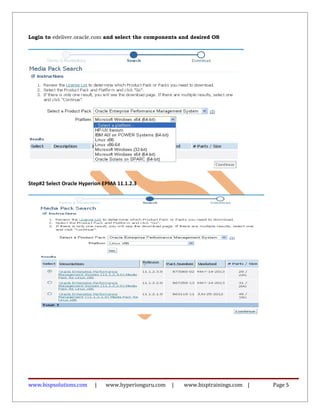
Step#1 Downloading the Installation Files
Create a directory to store the EPM System files.
Download the following files from the “Oracle Enterprise Performance Management System”.
www.bispsolutions.com | www.hyperionguru.com | www.bisptrainings.com | Page 4
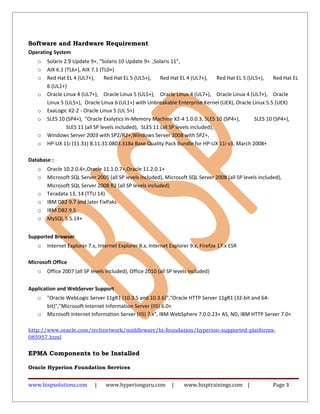
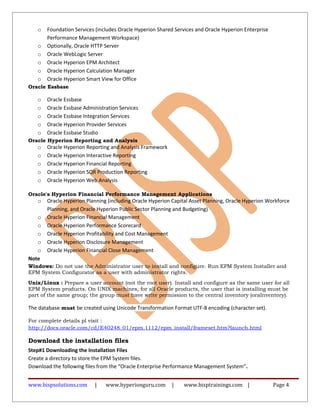
Login to edeliver.oracle.com and select the components and desired OS
Step#2 Select Oracle Hyperion EPMA 11.1.2.3
www.bispsolutions.com | www.hyperionguru.com | www.bisptrainings.com | Page 5
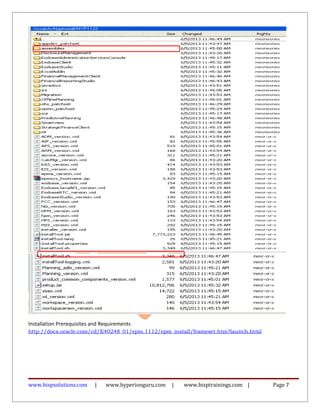
Unzip the downloaded files into the same directory
www.bispsolutions.com | www.hyperionguru.com | www.bisptrainings.com | Page 6
Installation Prerequisites and Requirements
http://docs.oracle.com/cd/E40248_01/epm.1112/epm_install/frameset.htm?launch.html
www.bispsolutions.com | www.hyperionguru.com | www.bisptrainings.com | Page 7
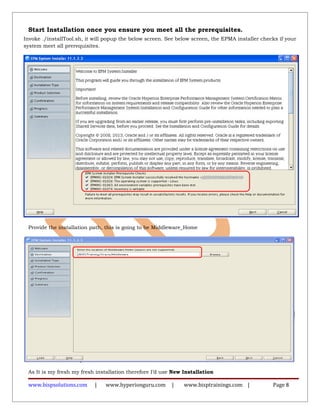
Start Installation once you ensure you meet all the prerequisites.
Invoke ./installTool.sh, it will popup the below screen. See below screen, the EPMA installer checks if your
system meet all prerequisites.
Provide the installation path, this is going to be Middleware_Home
As It is my fresh my fresh installation therefore I’d use New Installation
www.bispsolutions.com | www.hyperionguru.com | www.bisptrainings.com | Page 8
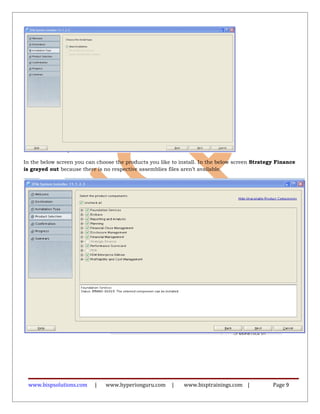
In the below screen you can choose the products you like to install. In the below screen Strategy Finance
is grayed out because there is no respective assemblies files aren’t available.
www.bispsolutions.com | www.hyperionguru.com | www.bisptrainings.com | Page 9
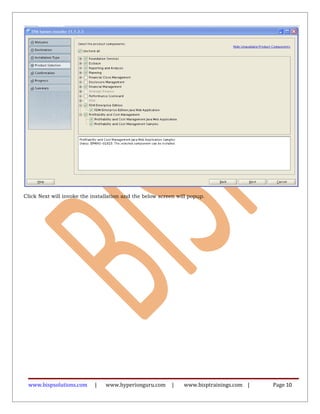
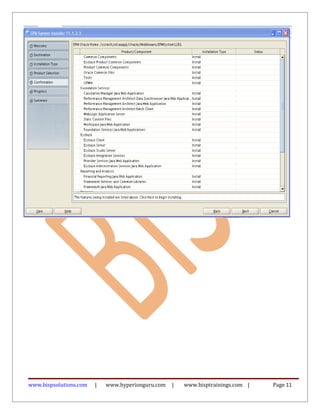
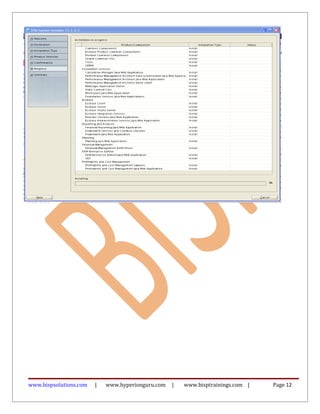
Click Next will invoke the installation and the below screen will popup.
www.bispsolutions.com | www.hyperionguru.com | www.bisptrainings.com | Page 10
www.bispsolutions.com | www.hyperionguru.com | www.bisptrainings.com | Page 11
www.bispsolutions.com | www.hyperionguru.com | www.bisptrainings.com | Page 12
Set Environment Variables
ORACLE_HOME, JAVA_HOME, EPM_ORACLE_HOME, MIDDLEWARE_HOME
o setenv ORACLE_HOME /scratch/oracle/app/product/11.2.0/dbhome_1
o setenv JAVA_HOME /scratch/Oracle/Middleware/jdk160_29
o setenv EPM_ORACLE_HOME /scratch/Oracle/Middleware/EPMSystem11R1
o setenv MIDDLEWARE_HOME /scratch/Oracle/Middleware
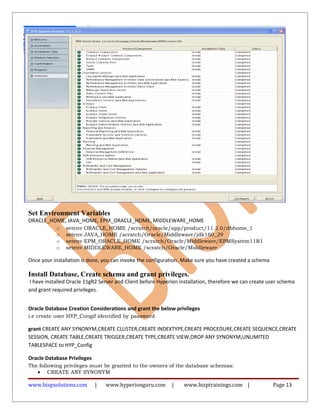
Once your installation is done, you can invoke the configuration. Make sure you have created a schema
Install Database, Create schema and grant privileges.
I have installed Oracle 11gR2 Server and Client before Hyperion installation, therefore we can create user schema
and grant required privileges.
Oracle Database Creation Considerations and grant the below privileges
i.e create user HYP_Congif identified by password
grant CREATE ANY SYNONYM,CREATE CLUSTER,CREATE INDEXTYPE,CREATE PROCEDURE,CREATE SEQUENCE,CREATE
SESSION, CREATE TABLE,CREATE TRIGGER,CREATE TYPE,CREATE VIEW,DROP ANY SYNONYM,UNLIMITED
TABLESPACE to HYP_Config
Oracle Database Privileges
The following privileges must be granted to the owners of the database schemas:
• CREATE ANY SYNONYM
www.bispsolutions.com | www.hyperionguru.com | www.bisptrainings.com | Page 13
• CREATE CLUSTER
• CREATE INDEXTYPE
• CREATE PROCEDURE
• CREATE SEQUENCE
• CREATE SESSION
• CREATE TABLE
• CREATE TRIGGER
• CREATE TYPE
• CREATE VIEW
• DROP ANY SYNONYM
• UNLIMITED TABLESPACE
Configure EPMA
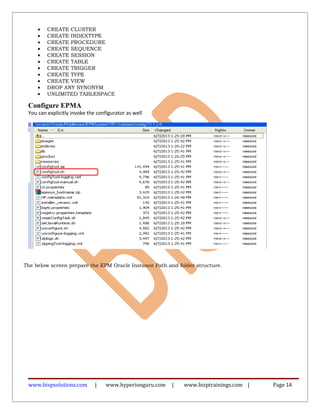
You can explicitly invoke the configurator as well
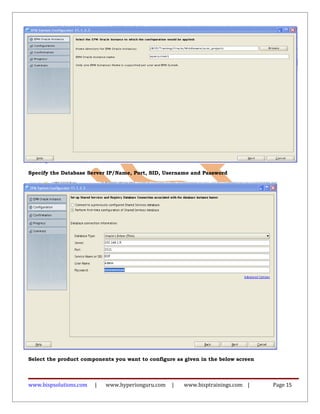
The below screen prepare the EPM Oracle Instance Path and folder structure.
www.bispsolutions.com | www.hyperionguru.com | www.bisptrainings.com | Page 14
Specify the Database Server IP/Name, Port, SID, Username and Password
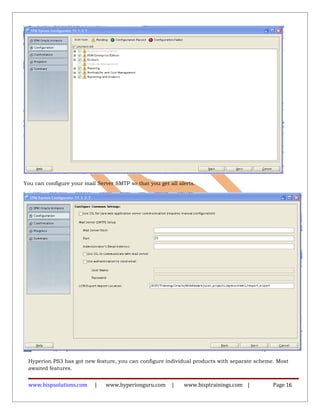
Select the product components you want to configure as given in the below screen
www.bispsolutions.com | www.hyperionguru.com | www.bisptrainings.com | Page 15
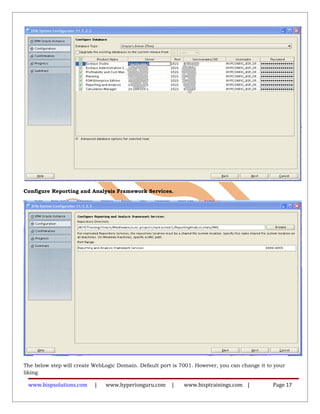
You can configure your mail Server SMTP so that you get all alerts.
Hyperion PS3 has got new feature, you can configure individual products with separate scheme. Most
awaited features.
www.bispsolutions.com | www.hyperionguru.com | www.bisptrainings.com | Page 16
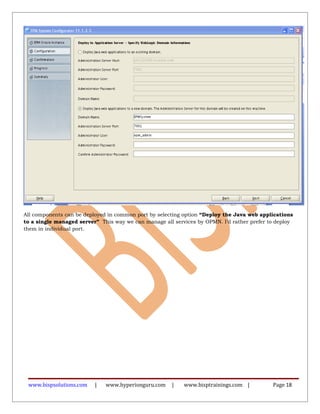
Configure Reporting and Analysis Framework Services.
The below step will create WebLogic Domain. Default port is 7001. However, you can change it to your
liking
www.bispsolutions.com | www.hyperionguru.com | www.bisptrainings.com | Page 17
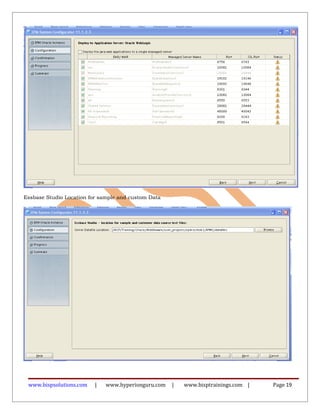
All components can be deployed in common port by selecting option “Deploy the Java web applications
to a single managed server” This way we can manage all services by OPMN. I’d rather prefer to deploy
them in individual port.
www.bispsolutions.com | www.hyperionguru.com | www.bisptrainings.com | Page 18
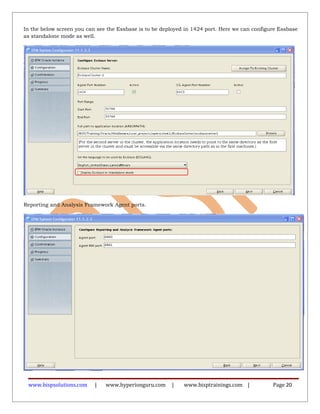
Essbase Studio Location for sample and custom Data
www.bispsolutions.com | www.hyperionguru.com | www.bisptrainings.com | Page 19
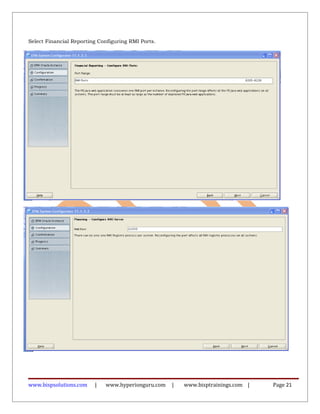
In the below screen you can see the Essbase is to be deployed in 1424 port. Here we can configure Essbase
as standalone mode as well.
Reporting and Analysis Framework Agent ports.
www.bispsolutions.com | www.hyperionguru.com | www.bisptrainings.com | Page 20
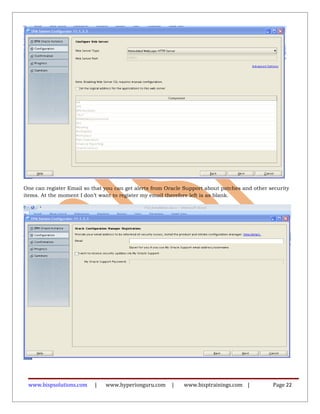
Select Financial Reporting Configuring RMI Ports.
www.bispsolutions.com | www.hyperionguru.com | www.bisptrainings.com | Page 21
One can register Email so that you can get alerts from Oracle Support about patches and other security
items. At the moment I don’t want to register my email therefore left is as blank.
www.bispsolutions.com | www.hyperionguru.com | www.bisptrainings.com | Page 22
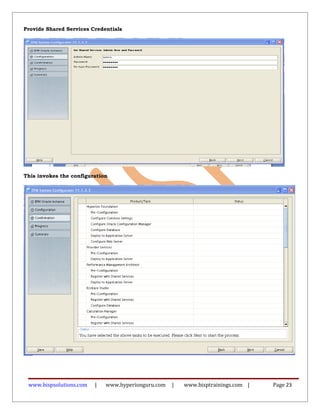
Provide Shared Services Credentials
This invokes the configuration
www.bispsolutions.com | www.hyperionguru.com | www.bisptrainings.com | Page 23
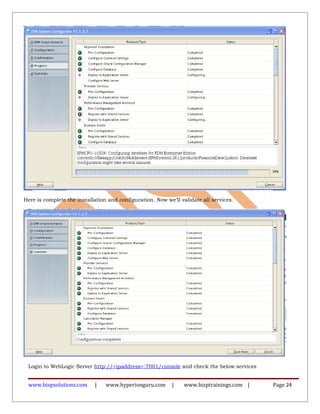
Here is complete the installation and configuration. Now we’ll validate all services.
Login to WebLogic Server http://<ipaddress>:7001/console and check the below services
www.bispsolutions.com | www.hyperionguru.com | www.bisptrainings.com | Page 24
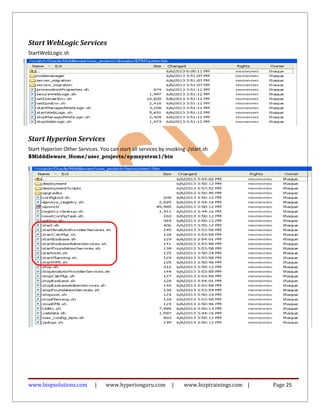
Start WebLogic Services
StartWebLogic.sh
Start Hyperion Services
Start Hyperion Other Services. You can start all services by invoking ./start.sh
$Midddleware_Home/user_projects/epmsystem1/bin
www.bispsolutions.com | www.hyperionguru.com | www.bisptrainings.com | Page 25
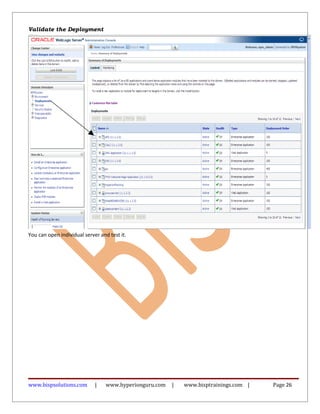
Validate the Deployment
You can open individual server and test it.
www.bispsolutions.com | www.hyperionguru.com | www.bisptrainings.com | Page 26
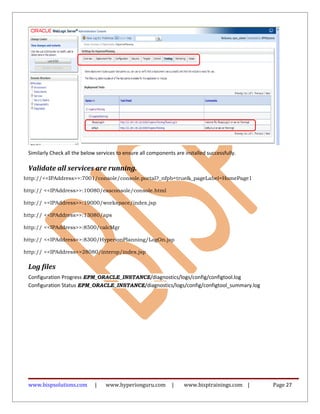
Similarly Check all the below services to ensure all components are installed successfully.
Validate all services are running.
http://<<IPAddress>>:7001/console/console.portal?_nfpb=true&_pageLabel=HomePage1
http:// <<IPAddress>>:10080/easconsole/console.html
http:// <<IPAddress>>:19000/workspace/index.jsp
http:// <<IPAddress>>:13080/aps
http:// <<IPAddress>>:8500/calcMgr
http:// <<IPAddress>>:8300/HyperionPlanning/LogOn.jsp
http:// <<IPAddress>>28080/interop/index.jsp
Log files
Configuration Progress EPM_ORACLE_INSTANCE/diagnostics/logs/config/configtool.log
Configuration Status EPM_ORACLE_INSTANCE/diagnostics/logs/config/configtool_summary.log
www.bispsolutions.com | www.hyperionguru.com | www.bisptrainings.com | Page 27

Hyperion 11-1-2-3-installation-guide-on-linux

  • 1.
    Hyperion 11.1.2.3 InstallationGuide Description: BISP is committed to provide BEST learning material to the beginners and advance learners. In the same series, we have prepared a complete end-to end Hands-on Guides for Essbase, Planning, HFM, FDQD and Reporting and Analysis. The document shows how to install Hyperion 11.1.2.3 in Oracle Linux. Join our professional training program and learn from experts. History: Version Description Change Author Publish Date 0.1 Review#1 Amit Sharma 18th May 2013 www.bispsolutions.com | www.hyperionguru.com | www.bisptrainings.com | Page 1
  • 2.
    Contents Contents........................................................................................................................................................................2 Software and HardwareRequirement...........................................................................................................................3 .....................................................................................................................................................................................3 EPMA Components to be Installed................................................................................................................................3 Download the installation files .....................................................................................................................................4 ..............................................................................................................................................................................5 ......................................................................................................................................................................................6 ......................................................................................................................................................................................7 ......................................................................................................................................................................................7 Start Installation once you ensure you meet all the prerequisites................................................................................8 Set Environment Variables..................................................................................................................................13 Install Database, Create schema and grant privileges.........................................................................................13 ..................................................................................................................................................................................13 Configure EPMA..................................................................................................................................................14 ....................................................................................................................................................................................14 Start WebLogic Services ..................................................................................................................................25 Start Hyperion Services ...................................................................................................................................25 Validate the Deployment.................................................................................................................................26 ....................................................................................................................................................................................26 ....................................................................................................................................................................................27 Validate all services are running......................................................................................................................27 Log files ...........................................................................................................................................................27 www.bispsolutions.com | www.hyperionguru.com | www.bisptrainings.com | Page 2
  • 3.
    Software and HardwareRequirement Operating System o Solaris 2.9 Update 9+, "Solaris 10 Update 9+ ,Solaris 11", o AIX 6.1 (TL6+), AIX 7.1 (TL0+) o Red Hat EL 4 (UL7+), Red Hat EL 5 (UL5+), Red Hat EL 4 (UL7+), Red Hat EL 5 (UL5+), Red Hat EL 6 (UL1+) o Oracle Linux 4 (UL7+), Oracle Linux 5 (UL5+), Oracle Linux 4 (UL7+), Oracle Linux 4 (UL7+), Oracle Linux 5 (UL5+), Oracle Linux 6 (UL1+) with Unbreakable Enterprise Kernel (UEK), Oracle Linux 5.5 (UEK) o ExaLogic X2-2 - Oracle Linux 5 (UL 5+) o SLES 10 (SP4+), "Oracle Exalytics In-Memory Machine X2-4 1.0.0.3, SLES 10 (SP4+), SLES 10 (SP4+), SLES 11 (all SP levels included), SLES 11 (all SP levels included), o Windows Server 2003 with SP2/R2+,Windows Server 2008 with SP2+, o HP-UX 11i (11.31) B.11.31.0803.318a Base Quality Pack Bundle for HP-UX 11i v3, March 2008+ Database : o Oracle 10.2.0.4+,Oracle 11.1.0.7+,Oracle 11.2.0.1+ o Microsoft SQL Server 2005 (all SP levels included), Microsoft SQL Server 2008 (all SP levels included), Microsoft SQL Server 2008 R2 (all SP levels included) o Teradata 13, 14 (TTU 14) o IBM DB2 9.7 and later FixPaks o IBM DB2 9.5 o MySQL 5.5.14+ Supported Browser o Internet Explorer 7.x, Internet Explorer 8.x, Internet Explorer 9.x, Firefox 17.x ESR Microsoft Office o Office 2007 (all SP levels included), Office 2010 (all SP levels included) Application and WebServer Support o "Oracle WebLogic Server 11gR1 (10.3.5 and 10.3.6)","Oracle HTTP Server 11gR1 (32-bit and 64- bit)","Microsoft Internet Information Server (IIS) 6.0+ o Microsoft Internet Information Server (IIS) 7.x", IBM WebSphere 7.0.0.23+ AS, ND, IBM HTTP Server 7.0+ http://www.oracle.com/technetwork/middleware/bi-foundation/hyperion-supported-platforms- 085957.html EPMA Components to be Installed Oracle Hyperion Foundation Services www.bispsolutions.com | www.hyperionguru.com | www.bisptrainings.com | Page 3
  • 4.
    o Foundation Services(includes Oracle Hyperion Shared Services and Oracle Hyperion Enterprise Performance Management Workspace) o Optionally, Oracle HTTP Server o Oracle WebLogic Server o Oracle Hyperion EPM Architect o Oracle Hyperion Calculation Manager o Oracle Hyperion Smart View for Office Oracle Essbase o Oracle Essbase o Oracle Essbase Administration Services o Oracle Essbase Integration Services o Oracle Hyperion Provider Services o Oracle Essbase Studio Oracle Hyperion Reporting and Analysis o Oracle Hyperion Reporting and Analysis Framework o Oracle Hyperion Interactive Reporting o Oracle Hyperion Financial Reporting o Oracle Hyperion SQR Production Reporting o Oracle Hyperion Web Analysis Oracle's Hyperion Financial Performance Management Applications o Oracle Hyperion Planning (including Oracle Hyperion Capital Asset Planning, Oracle Hyperion Workforce Planning, and Oracle Hyperion Public Sector Planning and Budgeting) o Oracle Hyperion Financial Management o Oracle Hyperion Performance Scorecard o Oracle Hyperion Profitability and Cost Management o Oracle Hyperion Disclosure Management o Oracle Hyperion Financial Close Management Note Windows: Do not use the Administrator user to install and configure. Run EPM System Installer and EPM System Configurator as a user with administrator rights. Unix/Linux : Prepare a user account (not the root user). Install and configure as the same user for all EPM System products. On UNIX machines, for all Oracle products, the user that is installing must be part of the same group; the group must have write permission to the central inventory (oraInventory). The database must be created using Unicode Transformation Format UTF-8 encoding (character set). For complete details pl visit : http://docs.oracle.com/cd/E40248_01/epm.1112/epm_install/frameset.htm?launch.html Download the installation files Step#1 Downloading the Installation Files Create a directory to store the EPM System files. Download the following files from the “Oracle Enterprise Performance Management System”. www.bispsolutions.com | www.hyperionguru.com | www.bisptrainings.com | Page 4
  • 5.
    Login to edeliver.oracle.comand select the components and desired OS Step#2 Select Oracle Hyperion EPMA 11.1.2.3 www.bispsolutions.com | www.hyperionguru.com | www.bisptrainings.com | Page 5
  • 6.
    Unzip the downloadedfiles into the same directory www.bispsolutions.com | www.hyperionguru.com | www.bisptrainings.com | Page 6
  • 7.
    Installation Prerequisites andRequirements http://docs.oracle.com/cd/E40248_01/epm.1112/epm_install/frameset.htm?launch.html www.bispsolutions.com | www.hyperionguru.com | www.bisptrainings.com | Page 7
  • 8.
    Start Installation onceyou ensure you meet all the prerequisites. Invoke ./installTool.sh, it will popup the below screen. See below screen, the EPMA installer checks if your system meet all prerequisites. Provide the installation path, this is going to be Middleware_Home As It is my fresh my fresh installation therefore I’d use New Installation www.bispsolutions.com | www.hyperionguru.com | www.bisptrainings.com | Page 8
  • 9.
    In the belowscreen you can choose the products you like to install. In the below screen Strategy Finance is grayed out because there is no respective assemblies files aren’t available. www.bispsolutions.com | www.hyperionguru.com | www.bisptrainings.com | Page 9
  • 10.
    Click Next willinvoke the installation and the below screen will popup. www.bispsolutions.com | www.hyperionguru.com | www.bisptrainings.com | Page 10
  • 11.
    www.bispsolutions.com | www.hyperionguru.com| www.bisptrainings.com | Page 11
  • 12.
    www.bispsolutions.com | www.hyperionguru.com| www.bisptrainings.com | Page 12
  • 13.
    Set Environment Variables ORACLE_HOME,JAVA_HOME, EPM_ORACLE_HOME, MIDDLEWARE_HOME o setenv ORACLE_HOME /scratch/oracle/app/product/11.2.0/dbhome_1 o setenv JAVA_HOME /scratch/Oracle/Middleware/jdk160_29 o setenv EPM_ORACLE_HOME /scratch/Oracle/Middleware/EPMSystem11R1 o setenv MIDDLEWARE_HOME /scratch/Oracle/Middleware Once your installation is done, you can invoke the configuration. Make sure you have created a schema Install Database, Create schema and grant privileges. I have installed Oracle 11gR2 Server and Client before Hyperion installation, therefore we can create user schema and grant required privileges. Oracle Database Creation Considerations and grant the below privileges i.e create user HYP_Congif identified by password grant CREATE ANY SYNONYM,CREATE CLUSTER,CREATE INDEXTYPE,CREATE PROCEDURE,CREATE SEQUENCE,CREATE SESSION, CREATE TABLE,CREATE TRIGGER,CREATE TYPE,CREATE VIEW,DROP ANY SYNONYM,UNLIMITED TABLESPACE to HYP_Config Oracle Database Privileges The following privileges must be granted to the owners of the database schemas: • CREATE ANY SYNONYM www.bispsolutions.com | www.hyperionguru.com | www.bisptrainings.com | Page 13
  • 14.
    • CREATE CLUSTER •CREATE INDEXTYPE • CREATE PROCEDURE • CREATE SEQUENCE • CREATE SESSION • CREATE TABLE • CREATE TRIGGER • CREATE TYPE • CREATE VIEW • DROP ANY SYNONYM • UNLIMITED TABLESPACE Configure EPMA You can explicitly invoke the configurator as well The below screen prepare the EPM Oracle Instance Path and folder structure. www.bispsolutions.com | www.hyperionguru.com | www.bisptrainings.com | Page 14
  • 15.
    Specify the DatabaseServer IP/Name, Port, SID, Username and Password Select the product components you want to configure as given in the below screen www.bispsolutions.com | www.hyperionguru.com | www.bisptrainings.com | Page 15
  • 16.
    You can configureyour mail Server SMTP so that you get all alerts. Hyperion PS3 has got new feature, you can configure individual products with separate scheme. Most awaited features. www.bispsolutions.com | www.hyperionguru.com | www.bisptrainings.com | Page 16
  • 17.
    Configure Reporting andAnalysis Framework Services. The below step will create WebLogic Domain. Default port is 7001. However, you can change it to your liking www.bispsolutions.com | www.hyperionguru.com | www.bisptrainings.com | Page 17
  • 18.
    All components canbe deployed in common port by selecting option “Deploy the Java web applications to a single managed server” This way we can manage all services by OPMN. I’d rather prefer to deploy them in individual port. www.bispsolutions.com | www.hyperionguru.com | www.bisptrainings.com | Page 18
  • 19.
    Essbase Studio Locationfor sample and custom Data www.bispsolutions.com | www.hyperionguru.com | www.bisptrainings.com | Page 19
  • 20.
    In the belowscreen you can see the Essbase is to be deployed in 1424 port. Here we can configure Essbase as standalone mode as well. Reporting and Analysis Framework Agent ports. www.bispsolutions.com | www.hyperionguru.com | www.bisptrainings.com | Page 20
  • 21.
    Select Financial ReportingConfiguring RMI Ports. www.bispsolutions.com | www.hyperionguru.com | www.bisptrainings.com | Page 21
  • 22.
    One can registerEmail so that you can get alerts from Oracle Support about patches and other security items. At the moment I don’t want to register my email therefore left is as blank. www.bispsolutions.com | www.hyperionguru.com | www.bisptrainings.com | Page 22
  • 23.
    Provide Shared ServicesCredentials This invokes the configuration www.bispsolutions.com | www.hyperionguru.com | www.bisptrainings.com | Page 23
  • 24.
    Here is completethe installation and configuration. Now we’ll validate all services. Login to WebLogic Server http://<ipaddress>:7001/console and check the below services www.bispsolutions.com | www.hyperionguru.com | www.bisptrainings.com | Page 24
  • 25.
    Start WebLogic Services StartWebLogic.sh StartHyperion Services Start Hyperion Other Services. You can start all services by invoking ./start.sh $Midddleware_Home/user_projects/epmsystem1/bin www.bispsolutions.com | www.hyperionguru.com | www.bisptrainings.com | Page 25
  • 26.
    Validate the Deployment Youcan open individual server and test it. www.bispsolutions.com | www.hyperionguru.com | www.bisptrainings.com | Page 26
  • 27.
    Similarly Check allthe below services to ensure all components are installed successfully. Validate all services are running. http://<<IPAddress>>:7001/console/console.portal?_nfpb=true&_pageLabel=HomePage1 http:// <<IPAddress>>:10080/easconsole/console.html http:// <<IPAddress>>:19000/workspace/index.jsp http:// <<IPAddress>>:13080/aps http:// <<IPAddress>>:8500/calcMgr http:// <<IPAddress>>:8300/HyperionPlanning/LogOn.jsp http:// <<IPAddress>>28080/interop/index.jsp Log files Configuration Progress EPM_ORACLE_INSTANCE/diagnostics/logs/config/configtool.log Configuration Status EPM_ORACLE_INSTANCE/diagnostics/logs/config/configtool_summary.log www.bispsolutions.com | www.hyperionguru.com | www.bisptrainings.com | Page 27