REMINDER
Check in on the
COLLABORATE mobile app
How to Turn New Recruits Into
Oracle EPM Infrastructure Gurus
Prepared by:
Nicholas King
Session ID#: 13888
Topics
■ Level 1 – Beginner
▪ What is Oracle EPM?
▪ What’s so Tough about EPM?
▪ EPM Modules
■ Level 2 - Intermediate
▪ Monitoring
▪ Patching
▪ SSL
■ Level 3 – Guru
▪ EPM Technology Stack
▪ Troubleshooting
-What is Oracle EPM Infrastructure?
-What’s so Tough about EPM?
------------------------------------------------------------------Level 1 - Beginner
Why is Infrastructure Support Critical?
■ Financial close is so critical that companies will spend
millions of dollars to streamline the process
■ Software issues during close can be catastrophic
■ Oracle EPM is a “best-of-breed” product representing some
of the most advanced tools in Finance
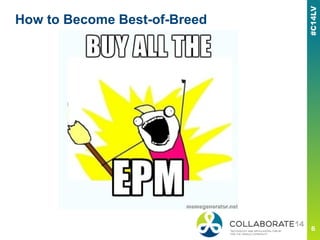
How to Become Best-of-Breed
■ Key to Understanding EPM Architecture
■ Acquisitions:
▪ 1998 - Hyperion Software merges with Arbor and the combined
company is renamed Hyperion Solutions (Essbase)
▪ 1999 - Hyperion acquires Sapling Corporation (Strategic
Finance)
▪ 2003 - BI Consolidation continues as Hyperion acquiers Brio
(Reporting)
▪ 2006 - Hyperion acquires UpStream (FDM)
▪ 2007 - Oracle buys Hyperion
How to Become Best-of-Breed
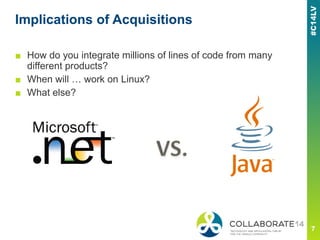
Implications of Acquisitions
■ How do you integrate millions of lines of code from many
different products?
■ When will … work on Linux?
■ What else?
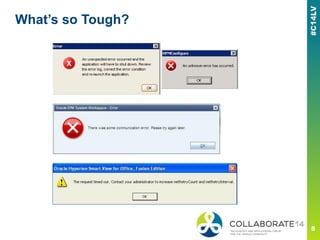
What’s so Tough?
What’s so Tough?
Helpful Background
■ Coding – Java, .NET,
Scripting
■ OS Administration
■ SSL
■ Web / Application Server
■ High Availability
■ Troubleshooting
Oracle EPM is:
- a conglomeration of many custom modules
- proprietary and learned only from experience
Absolutely Required
■ Time
■ Patience
■ Dedication to Learn
Proactively
Beginner’s Homework
■ Become familiar with EPM modules
■ Execute basic validation procedures
■ Install and configure EPM test environments
■ Internalize the Oracle documentation – Read up!
▪ http://docs.oracle.com/cd/E17236_01/index.htm
▪ EPM Module Admin Guides
▪ EPM Module User Guides
▪ Infrastructure:
— Support Matrix
— Installation and Configuration
— High Availability and Disaster Recovery
— Security and SSL
-Monitoring
-Patching
-SSL
------------------------------------------------------------------Level 2 - Intermediate
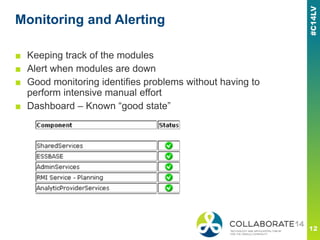
Monitoring and Alerting
■ Keeping track of the modules
■ Alert when modules are down
■ Good monitoring identifies problems without having to
perform intensive manual effort
■ Dashboard – Known “good state”
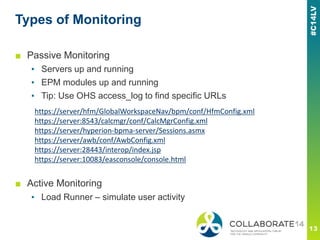
Types of Monitoring
■ Passive Monitoring
▪ Servers up and running
▪ EPM modules up and running
▪ Tip: Use OHS access_log to find specific URLs
■ Active Monitoring
▪ Load Runner – simulate user activity
https://server/hfm/GlobalWorkspaceNav/bpm/conf/HfmConfig.xml
https://server:8543/calcmgr/conf/CalcMgrConfig.xml
https://server/hyperion-bpma-server/Sessions.asmx
https://server/awb/conf/AwbConfig.xml
https://server:28443/interop/index.jsp
https://server:10083/easconsole/console.html
Patching – Why Patch?
■ Patches are NOT included with the installation media
■ Business needs and stability
■ Patches come out frequently
■ Proactively Patch
■ A typical install has about 20 separate patches to apply after
installation
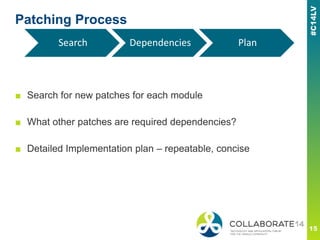
Patching Process
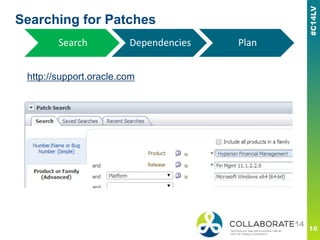
■ Search for new patches for each module
■ What other patches are required dependencies?
■ Detailed Implementation plan – repeatable, concise
Search Dependencies Plan
Searching for Patches
http://support.oracle.com
Search Dependencies Plan
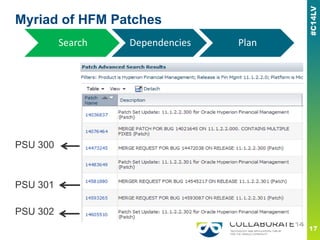
Myriad of HFM Patches
PSU 300
PSU 301
PSU 302
Search Dependencies Plan
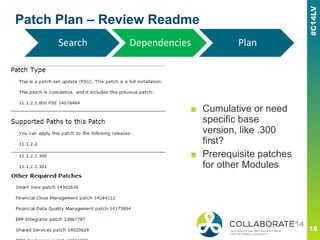
Patch Plan – Review Readme
■ Cumulative or need
specific base
version, like .300
first?
■ Prerequisite patches
for other Modules
Search Dependencies Plan
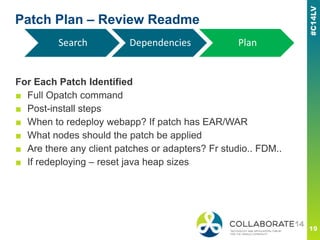
Patch Plan – Review Readme
For Each Patch Identified
■ Full Opatch command
■ Post-install steps
■ When to redeploy webapp? If patch has EAR/WAR
■ What nodes should the patch be applied
■ Are there any client patches or adapters? Fr studio.. FDM..
■ If redeploying – reset java heap sizes
Search Dependencies Plan
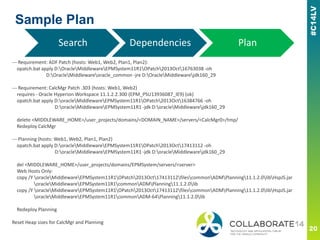
Sample Plan
--- Requirement: ADF Patch (hosts: Web1, Web2, Plan1, Plan2):
opatch.bat apply D:OracleMiddlewareEPMSystem11R1OPatch2013Oct16763038 -oh
D:OracleMiddlewareoracle_common -jre D:OracleMiddlewarejdk160_29
--- Requirement: CalcMgr Patch .303 (hosts: Web1, Web2)
requires - Oracle Hyperion Workspace 11.1.2.2.300 (EPM_PSU13936087_IE9) (ok)
opatch.bat apply D:oracleMiddlewareEPMSystem11R1OPatch2013Oct16384766 -oh
D:oracleMiddlewareEPMSystem11R1 -jdk D:oracleMiddlewarejdk160_29
delete <MIDDLEWARE_HOME>/user_projects/domains/<DOMAIN_NAME>/servers/<CalcMgr0>/tmp/
Redeploy CalcMgr
--- Planning (hosts: Web1, Web2, Plan1, Plan2)
opatch.bat apply D:oracleMiddlewareEPMSystem11R1OPatch2013Oct17413112 -oh
D:oracleMiddlewareEPMSystem11R1 -jdk D:oracleMiddlewarejdk160_29
del <MIDDLEWARE_HOME>/user_projects/domains/EPMSystem/servers/<server>
Web Hosts Only:
copy /Y oracleMiddlewareEPMSystem11R1OPatch2013Oct17413112filescommonADMPlanning11.1.2.0libHspJS.jar
oracleMiddlewareEPMSystem11R1commonADMPlanning11.1.2.0lib
copy /Y oracleMiddlewareEPMSystem11R1OPatch2013Oct17413112filescommonADMPlanning11.1.2.0libHspJS.jar
oracleMiddlewareEPMSystem11R1commonADM-64Planning11.1.2.0lib
Redeploy Planning
Reset Heap sizes for CalcMgr and Planning
Search Dependencies Plan
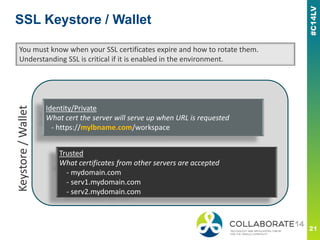
SSL Keystore / Wallet
Identity/Private
What cert the server will serve up when URL is requested
- https://mylbname.com/workspace
You must know when your SSL certificates expire and how to rotate them.
Understanding SSL is critical if it is enabled in the environment.
Keystore/Wallet
Trusted
What certificates from other servers are accepted
- mydomain.com
- serv1.mydomain.com
- serv2.mydomain.com
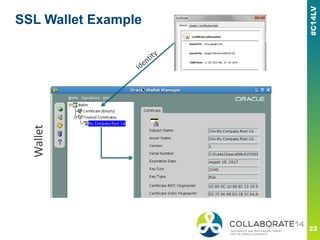
SSL Wallet Example
Wallet
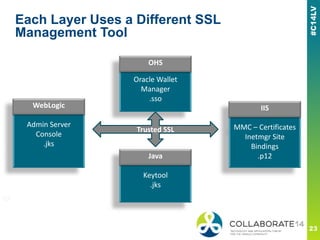
Each Layer Uses a Different SSL
Management Tool
OHS
Oracle Wallet
Manager
.sso
WebLogic
Admin Server
Console
.jks
IIS
MMC – Certificates
Inetmgr Site
Bindings
.p12Java
Keytool
.jks
WebLogic
OHS
Java
IIS
Trusted SSL
SSL Implementation
■ Installing and Configuring Oracle® Hyperion Enterprise
Performance Management System 11.1.2 with SSL Enabled
on All Layers
http://www.oracle.com/technetwork/middleware/performance-
management/tutorials/index-087654.html
■ Review each technology stack’s SSL documentation
▪ IIS
▪ WebLogic
▪ Java Keytool
▪ OHS
■ Tip: WLST can be used to script WebLogic SSL components
Intermediate Homework
■ Become familiar with operational tasks
▪ Patching
▪ Perform SSL certificate rotation
▪ Jobs - LCM exports, FDM loads, etc.
▪ Backup and Restore procedure
▪ Password changes – admin and database accounts
▪ Oracle Service Requests (SR) - follow tickets from beginning to
resolution
-EPM Technology Stack
-EPM Troubleshooting
- Approach
- Examples
------------------------------------------------------------------Level 3 – EPM Support Guru
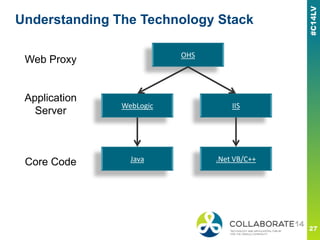
Understanding The Technology Stack
OHS
WebLogic IIS
Java .Net VB/C++
Web Proxy
Application
Server
Core Code
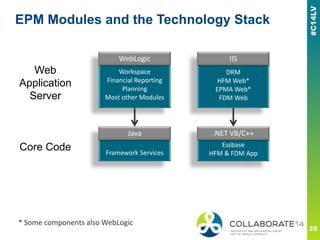
EPM Modules and the Technology Stack
WebLogic
Workspace
Financial Reporting
Planning
Most other Modules
DRM
HFM Web*
EPMA Web*
FDM Web
Java
Framework Services
.Net VB/C++
Essbase
HFM & FDM App
Web
Application
Server
Core Code
WebLogic
Java
IIS
.NET VB/C++
* Some components also WebLogic
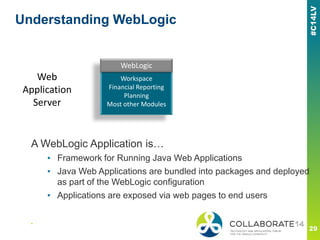
Understanding WebLogic
WebLogic
Workspace
Financial Reporting
Planning
Most other Modules
Web
Application
Server
WebLogic
A WebLogic Application is…
▪ Framework for Running Java Web Applications
▪ Java Web Applications are bundled into packages and deployed
as part of the WebLogic configuration
▪ Applications are exposed via web pages to end users
■
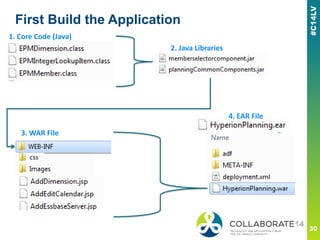
First Build the Application
1. Core Code (Java)
2. Java Libraries
3. WAR File
4. EAR File
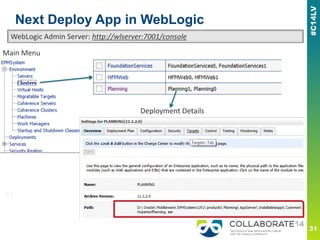
Next Deploy App in WebLogic
Main Menu
Deployment Details
WebLogic Admin Server: http://wlserver:7001/console
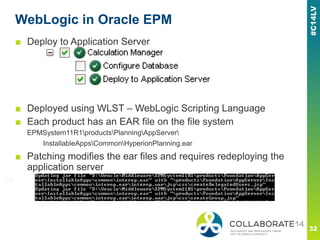
WebLogic in Oracle EPM
■ Deploy to Application Server
■ Deployed using WLST – WebLogic Scripting Language
■ Each product has an EAR file on the file system
EPMSystem11R1productsPlanningAppServer
InstallableAppsCommonHyperionPlanning.ear
■ Patching modifies the ear files and requires redeploying the
application server
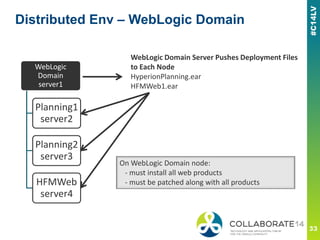
Distributed Env – WebLogic Domain
WebLogic
Domain
server1
Planning1
server2
Planning2
server3
HFMWeb
server4
WebLogic Domain Server Pushes Deployment Files
to Each Node
HyperionPlanning.ear
HFMWeb1.ear
On WebLogic Domain node:
- must install all web products
- must be patched along with all products
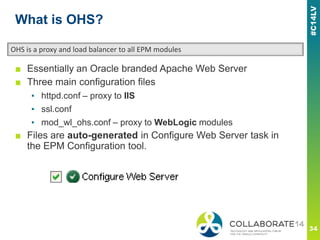
What is OHS?
■ Essentially an Oracle branded Apache Web Server
■ Three main configuration files
▪ httpd.conf – proxy to IIS
▪ ssl.conf
▪ mod_wl_ohs.conf – proxy to WebLogic modules
■ Files are auto-generated in Configure Web Server task in
the EPM Configuration tool.
OHS is a proxy and load balancer to all EPM modules
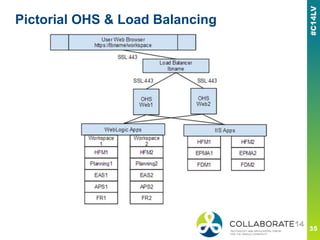
Pictorial OHS & Load Balancing
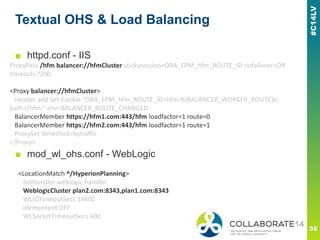
Textual OHS & Load Balancing
ProxyPass /hfm balancer://hfmCluster stickysession=ORA_EPM_hfm_ROUTE_ID nofailover=Off
timeout=7200
<Proxy balancer://hfmCluster>
Header add Set-Cookie "ORA_EPM_hfm_ROUTE_ID=hfm.%{BALANCER_WORKER_ROUTE}e;
path=/hfm;" env=BALANCER_ROUTE_CHANGED
BalancerMember https://hfm1.com:443/hfm loadfactor=1 route=0
BalancerMember https://hfm2.com:443/hfm loadfactor=1 route=1
ProxySet lbmethod=bytraffic
</Proxy>
<LocationMatch ^/HyperionPlanning>
SetHandler weblogic-handler
WeblogicCluster plan2.com:8343,plan1.com:8343
WLIOTimeoutSecs 14400
Idempotent OFF
WLSocketTimeoutSecs 600
■ httpd.conf - IIS
■ mod_wl_ohs.conf - WebLogic
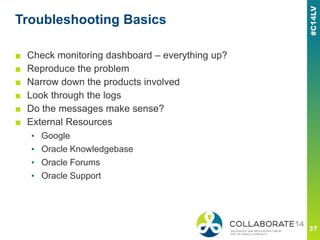
Troubleshooting Basics
■ Check monitoring dashboard – everything up?
■ Reproduce the problem
■ Narrow down the products involved
■ Look through the logs
■ Do the messages make sense?
■ External Resources
▪ Google
▪ Oracle Knowledgebase
▪ Oracle Forums
▪ Oracle Support
Sifting Through Logs
■ 100+ log files in EPM deployment
■ Types of logs
▪ WebLogic Application Logs
user_projectsdomainsEPMSystemservers
▪ EPM Application Logs
Oracle ODL logging framework
user_projectsepmsystem1diagnosticslogs
▪ Windows Event Viewer
▪ HFM Error Log Viewer
▪ FDM Logs in FDMData Folder
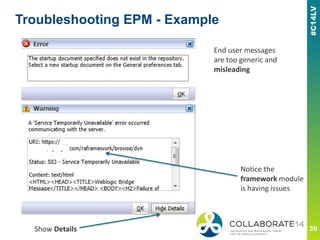
Troubleshooting EPM - Example
Show Details
End user messages
are too generic and
misleading
Notice the
framework module
is having issues
Troubleshooting EPM - Example
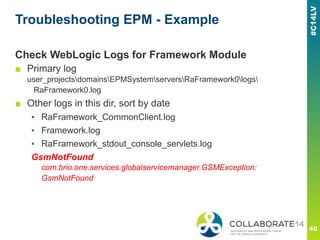
Check WebLogic Logs for Framework Module
■ Primary log
user_projectsdomainsEPMSystemserversRaFramework0logs
RaFramework0.log
■ Other logs in this dir, sort by date
▪ RaFramework_CommonClient.log
▪ Framework.log
▪ RaFramework_stdout_console_servlets.log
GsmNotFound
com.brio.one.services.globalservicemanager.GSMException:
GsmNotFound
Troubleshooting EPM - Example
Check Application Tier
■ Quick Port Test
telnet localhost 6800
Connecting To localhost...Could not open connection to the host, on port
6800: Connect failed
■ Primary EPM Application Log
user_projectsepmsystem1diagnosticslogsReportingAnalysis
stdout_console_RAF_AGENT_MODULE.log
[oracle.EPMRAF.stdout] Invoking Graceful shutdown...
■ agent.log
Caused by: com.oracle.cmc.agent.RTAgentException: Error While Loading LSM Info
Caused by: com.sqribe.transformer.DBConnectionException: Database Server error:
DBConnectionPool::get: ORA-28000: the account is locked
Guru Homework
■ Install and configure a new SSL, load balanced environment
■ Take responsibility for infrastructure issues
■ Troubleshoot EPM
▪ Quickly understand interactions between products and evaluate
error messages from logs to quickly resolve issues
■ Become Part of the Oracle Community
▪ Blog
▪ Forums
■ Begin to train others in the art of EPM infrastructure
Questions?
kingn@google.com
Hyperion Error of the Day
epm-errors.blogspot.com
------------------------------------------------------------------Thank you Gurus!
Please complete the session
evaluation
We appreciate your feedback and insight
You may complete the session evaluation either
on paper or online via the mobile app

How to Turn New Recruits Into Oracle EPM Infrastructure Gurus

  • 1.
    REMINDER Check in onthe COLLABORATE mobile app How to Turn New Recruits Into Oracle EPM Infrastructure Gurus Prepared by: Nicholas King Session ID#: 13888
  • 2.
    Topics ■ Level 1– Beginner ▪ What is Oracle EPM? ▪ What’s so Tough about EPM? ▪ EPM Modules ■ Level 2 - Intermediate ▪ Monitoring ▪ Patching ▪ SSL ■ Level 3 – Guru ▪ EPM Technology Stack ▪ Troubleshooting
  • 3.
    -What is OracleEPM Infrastructure? -What’s so Tough about EPM? ------------------------------------------------------------------Level 1 - Beginner
  • 4.
    Why is InfrastructureSupport Critical? ■ Financial close is so critical that companies will spend millions of dollars to streamline the process ■ Software issues during close can be catastrophic ■ Oracle EPM is a “best-of-breed” product representing some of the most advanced tools in Finance
  • 5.
    How to BecomeBest-of-Breed ■ Key to Understanding EPM Architecture ■ Acquisitions: ▪ 1998 - Hyperion Software merges with Arbor and the combined company is renamed Hyperion Solutions (Essbase) ▪ 1999 - Hyperion acquires Sapling Corporation (Strategic Finance) ▪ 2003 - BI Consolidation continues as Hyperion acquiers Brio (Reporting) ▪ 2006 - Hyperion acquires UpStream (FDM) ▪ 2007 - Oracle buys Hyperion
  • 6.
    How to BecomeBest-of-Breed
  • 7.
    Implications of Acquisitions ■How do you integrate millions of lines of code from many different products? ■ When will … work on Linux? ■ What else?
  • 8.
  • 9.
    What’s so Tough? HelpfulBackground ■ Coding – Java, .NET, Scripting ■ OS Administration ■ SSL ■ Web / Application Server ■ High Availability ■ Troubleshooting Oracle EPM is: - a conglomeration of many custom modules - proprietary and learned only from experience Absolutely Required ■ Time ■ Patience ■ Dedication to Learn Proactively
  • 10.
    Beginner’s Homework ■ Becomefamiliar with EPM modules ■ Execute basic validation procedures ■ Install and configure EPM test environments ■ Internalize the Oracle documentation – Read up! ▪ http://docs.oracle.com/cd/E17236_01/index.htm ▪ EPM Module Admin Guides ▪ EPM Module User Guides ▪ Infrastructure: — Support Matrix — Installation and Configuration — High Availability and Disaster Recovery — Security and SSL
  • 11.
  • 12.
    Monitoring and Alerting ■Keeping track of the modules ■ Alert when modules are down ■ Good monitoring identifies problems without having to perform intensive manual effort ■ Dashboard – Known “good state”
  • 13.
    Types of Monitoring ■Passive Monitoring ▪ Servers up and running ▪ EPM modules up and running ▪ Tip: Use OHS access_log to find specific URLs ■ Active Monitoring ▪ Load Runner – simulate user activity https://server/hfm/GlobalWorkspaceNav/bpm/conf/HfmConfig.xml https://server:8543/calcmgr/conf/CalcMgrConfig.xml https://server/hyperion-bpma-server/Sessions.asmx https://server/awb/conf/AwbConfig.xml https://server:28443/interop/index.jsp https://server:10083/easconsole/console.html
  • 14.
    Patching – WhyPatch? ■ Patches are NOT included with the installation media ■ Business needs and stability ■ Patches come out frequently ■ Proactively Patch ■ A typical install has about 20 separate patches to apply after installation
  • 15.
    Patching Process ■ Searchfor new patches for each module ■ What other patches are required dependencies? ■ Detailed Implementation plan – repeatable, concise Search Dependencies Plan
  • 16.
  • 17.
    Myriad of HFMPatches PSU 300 PSU 301 PSU 302 Search Dependencies Plan
  • 18.
    Patch Plan –Review Readme ■ Cumulative or need specific base version, like .300 first? ■ Prerequisite patches for other Modules Search Dependencies Plan
  • 19.
    Patch Plan –Review Readme For Each Patch Identified ■ Full Opatch command ■ Post-install steps ■ When to redeploy webapp? If patch has EAR/WAR ■ What nodes should the patch be applied ■ Are there any client patches or adapters? Fr studio.. FDM.. ■ If redeploying – reset java heap sizes Search Dependencies Plan
  • 20.
    Sample Plan --- Requirement:ADF Patch (hosts: Web1, Web2, Plan1, Plan2): opatch.bat apply D:OracleMiddlewareEPMSystem11R1OPatch2013Oct16763038 -oh D:OracleMiddlewareoracle_common -jre D:OracleMiddlewarejdk160_29 --- Requirement: CalcMgr Patch .303 (hosts: Web1, Web2) requires - Oracle Hyperion Workspace 11.1.2.2.300 (EPM_PSU13936087_IE9) (ok) opatch.bat apply D:oracleMiddlewareEPMSystem11R1OPatch2013Oct16384766 -oh D:oracleMiddlewareEPMSystem11R1 -jdk D:oracleMiddlewarejdk160_29 delete <MIDDLEWARE_HOME>/user_projects/domains/<DOMAIN_NAME>/servers/<CalcMgr0>/tmp/ Redeploy CalcMgr --- Planning (hosts: Web1, Web2, Plan1, Plan2) opatch.bat apply D:oracleMiddlewareEPMSystem11R1OPatch2013Oct17413112 -oh D:oracleMiddlewareEPMSystem11R1 -jdk D:oracleMiddlewarejdk160_29 del <MIDDLEWARE_HOME>/user_projects/domains/EPMSystem/servers/<server> Web Hosts Only: copy /Y oracleMiddlewareEPMSystem11R1OPatch2013Oct17413112filescommonADMPlanning11.1.2.0libHspJS.jar oracleMiddlewareEPMSystem11R1commonADMPlanning11.1.2.0lib copy /Y oracleMiddlewareEPMSystem11R1OPatch2013Oct17413112filescommonADMPlanning11.1.2.0libHspJS.jar oracleMiddlewareEPMSystem11R1commonADM-64Planning11.1.2.0lib Redeploy Planning Reset Heap sizes for CalcMgr and Planning Search Dependencies Plan
  • 21.
    SSL Keystore /Wallet Identity/Private What cert the server will serve up when URL is requested - https://mylbname.com/workspace You must know when your SSL certificates expire and how to rotate them. Understanding SSL is critical if it is enabled in the environment. Keystore/Wallet Trusted What certificates from other servers are accepted - mydomain.com - serv1.mydomain.com - serv2.mydomain.com
  • 22.
  • 23.
    Each Layer Usesa Different SSL Management Tool OHS Oracle Wallet Manager .sso WebLogic Admin Server Console .jks IIS MMC – Certificates Inetmgr Site Bindings .p12Java Keytool .jks WebLogic OHS Java IIS Trusted SSL
  • 24.
    SSL Implementation ■ Installingand Configuring Oracle® Hyperion Enterprise Performance Management System 11.1.2 with SSL Enabled on All Layers http://www.oracle.com/technetwork/middleware/performance- management/tutorials/index-087654.html ■ Review each technology stack’s SSL documentation ▪ IIS ▪ WebLogic ▪ Java Keytool ▪ OHS ■ Tip: WLST can be used to script WebLogic SSL components
  • 25.
    Intermediate Homework ■ Becomefamiliar with operational tasks ▪ Patching ▪ Perform SSL certificate rotation ▪ Jobs - LCM exports, FDM loads, etc. ▪ Backup and Restore procedure ▪ Password changes – admin and database accounts ▪ Oracle Service Requests (SR) - follow tickets from beginning to resolution
  • 26.
    -EPM Technology Stack -EPMTroubleshooting - Approach - Examples ------------------------------------------------------------------Level 3 – EPM Support Guru
  • 27.
    Understanding The TechnologyStack OHS WebLogic IIS Java .Net VB/C++ Web Proxy Application Server Core Code
  • 28.
    EPM Modules andthe Technology Stack WebLogic Workspace Financial Reporting Planning Most other Modules DRM HFM Web* EPMA Web* FDM Web Java Framework Services .Net VB/C++ Essbase HFM & FDM App Web Application Server Core Code WebLogic Java IIS .NET VB/C++ * Some components also WebLogic
  • 29.
    Understanding WebLogic WebLogic Workspace Financial Reporting Planning Mostother Modules Web Application Server WebLogic A WebLogic Application is… ▪ Framework for Running Java Web Applications ▪ Java Web Applications are bundled into packages and deployed as part of the WebLogic configuration ▪ Applications are exposed via web pages to end users ■
  • 30.
    First Build theApplication 1. Core Code (Java) 2. Java Libraries 3. WAR File 4. EAR File
  • 31.
    Next Deploy Appin WebLogic Main Menu Deployment Details WebLogic Admin Server: http://wlserver:7001/console
  • 32.
    WebLogic in OracleEPM ■ Deploy to Application Server ■ Deployed using WLST – WebLogic Scripting Language ■ Each product has an EAR file on the file system EPMSystem11R1productsPlanningAppServer InstallableAppsCommonHyperionPlanning.ear ■ Patching modifies the ear files and requires redeploying the application server
  • 33.
    Distributed Env –WebLogic Domain WebLogic Domain server1 Planning1 server2 Planning2 server3 HFMWeb server4 WebLogic Domain Server Pushes Deployment Files to Each Node HyperionPlanning.ear HFMWeb1.ear On WebLogic Domain node: - must install all web products - must be patched along with all products
  • 34.
    What is OHS? ■Essentially an Oracle branded Apache Web Server ■ Three main configuration files ▪ httpd.conf – proxy to IIS ▪ ssl.conf ▪ mod_wl_ohs.conf – proxy to WebLogic modules ■ Files are auto-generated in Configure Web Server task in the EPM Configuration tool. OHS is a proxy and load balancer to all EPM modules
  • 35.
    Pictorial OHS &Load Balancing
  • 36.
    Textual OHS &Load Balancing ProxyPass /hfm balancer://hfmCluster stickysession=ORA_EPM_hfm_ROUTE_ID nofailover=Off timeout=7200 <Proxy balancer://hfmCluster> Header add Set-Cookie "ORA_EPM_hfm_ROUTE_ID=hfm.%{BALANCER_WORKER_ROUTE}e; path=/hfm;" env=BALANCER_ROUTE_CHANGED BalancerMember https://hfm1.com:443/hfm loadfactor=1 route=0 BalancerMember https://hfm2.com:443/hfm loadfactor=1 route=1 ProxySet lbmethod=bytraffic </Proxy> <LocationMatch ^/HyperionPlanning> SetHandler weblogic-handler WeblogicCluster plan2.com:8343,plan1.com:8343 WLIOTimeoutSecs 14400 Idempotent OFF WLSocketTimeoutSecs 600 ■ httpd.conf - IIS ■ mod_wl_ohs.conf - WebLogic
  • 37.
    Troubleshooting Basics ■ Checkmonitoring dashboard – everything up? ■ Reproduce the problem ■ Narrow down the products involved ■ Look through the logs ■ Do the messages make sense? ■ External Resources ▪ Google ▪ Oracle Knowledgebase ▪ Oracle Forums ▪ Oracle Support
  • 38.
    Sifting Through Logs ■100+ log files in EPM deployment ■ Types of logs ▪ WebLogic Application Logs user_projectsdomainsEPMSystemservers ▪ EPM Application Logs Oracle ODL logging framework user_projectsepmsystem1diagnosticslogs ▪ Windows Event Viewer ▪ HFM Error Log Viewer ▪ FDM Logs in FDMData Folder
  • 39.
    Troubleshooting EPM -Example Show Details End user messages are too generic and misleading Notice the framework module is having issues
  • 40.
    Troubleshooting EPM -Example Check WebLogic Logs for Framework Module ■ Primary log user_projectsdomainsEPMSystemserversRaFramework0logs RaFramework0.log ■ Other logs in this dir, sort by date ▪ RaFramework_CommonClient.log ▪ Framework.log ▪ RaFramework_stdout_console_servlets.log GsmNotFound com.brio.one.services.globalservicemanager.GSMException: GsmNotFound
  • 41.
    Troubleshooting EPM -Example Check Application Tier ■ Quick Port Test telnet localhost 6800 Connecting To localhost...Could not open connection to the host, on port 6800: Connect failed ■ Primary EPM Application Log user_projectsepmsystem1diagnosticslogsReportingAnalysis stdout_console_RAF_AGENT_MODULE.log [oracle.EPMRAF.stdout] Invoking Graceful shutdown... ■ agent.log Caused by: com.oracle.cmc.agent.RTAgentException: Error While Loading LSM Info Caused by: com.sqribe.transformer.DBConnectionException: Database Server error: DBConnectionPool::get: ORA-28000: the account is locked
  • 42.
    Guru Homework ■ Installand configure a new SSL, load balanced environment ■ Take responsibility for infrastructure issues ■ Troubleshoot EPM ▪ Quickly understand interactions between products and evaluate error messages from logs to quickly resolve issues ■ Become Part of the Oracle Community ▪ Blog ▪ Forums ■ Begin to train others in the art of EPM infrastructure
  • 43.
    Questions? kingn@google.com Hyperion Error ofthe Day epm-errors.blogspot.com ------------------------------------------------------------------Thank you Gurus!
  • 44.
    Please complete thesession evaluation We appreciate your feedback and insight You may complete the session evaluation either on paper or online via the mobile app