www.bispsolutions.com
Working with HFM Calc Manager
Session#20 : Creating Consolidation and Elimination Rule
Presented By :Amit Sharma
www.bispsolutions.com
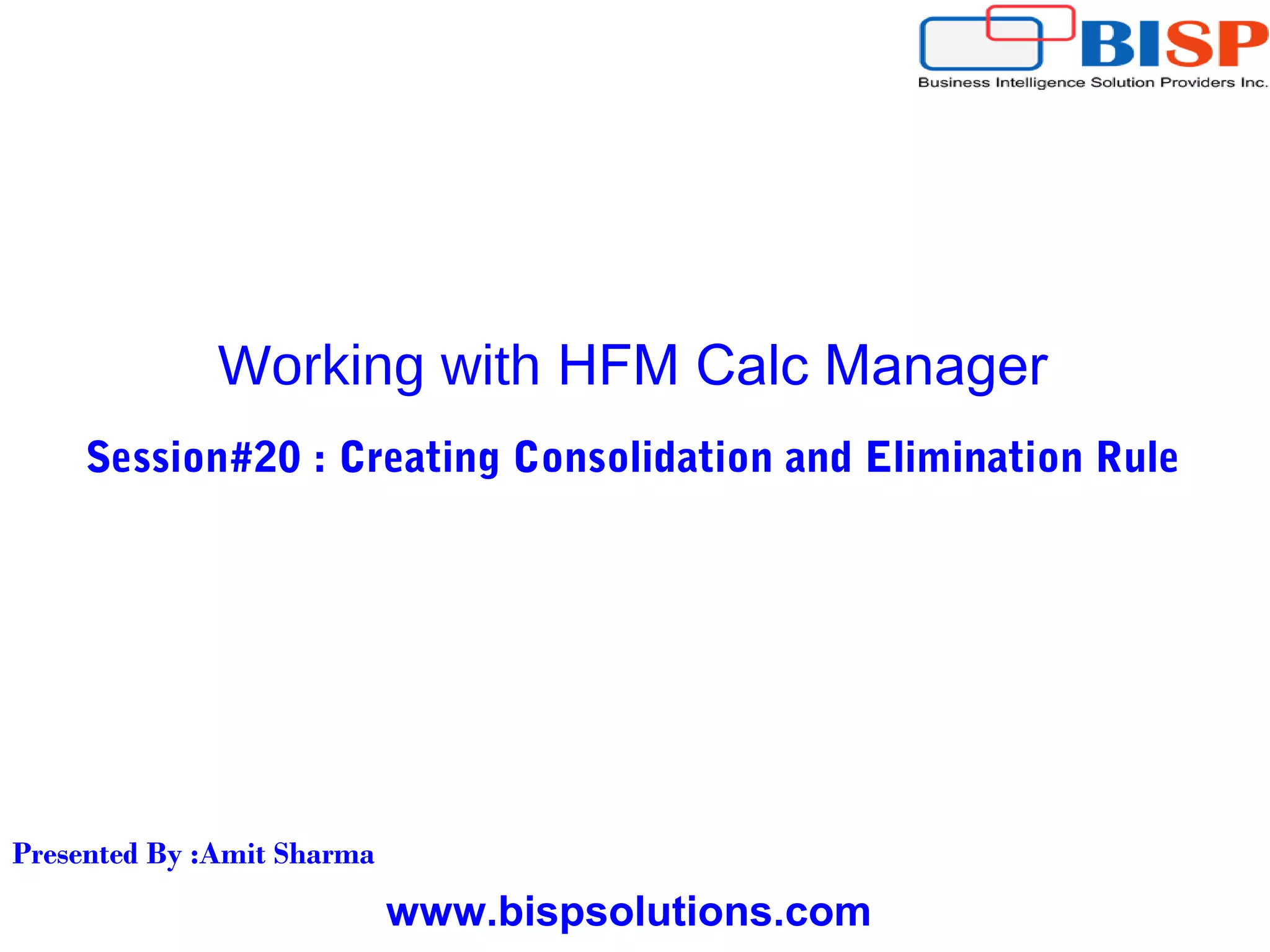
DataUnitItem
Returns the data unit item to process during consolidation, calculation, or translation.
This function can be used in these types of rules:
I. Calculation
II. Translation
III. Consolidation
Syntax
HS.OpenDataUnit("")
Set MyDataUnit = HS.OpenDataUnit("")
NumItems= MyDataUnit.GetNumItems
For i = 0 to NumItems - 1
Account = MyDataUnit.Item(i)Account.
ICP = MyDataUnit.Item(i).ICP
Flow = MyDataUnit.Item(i)Custom("Flows")
Nature = MyDataUnit.Item(i).Custom("Nature")
www.bispsolutions.com
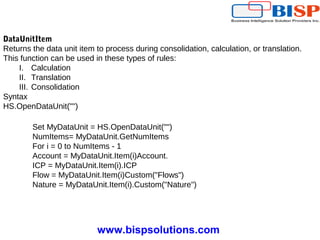
PCon
Gets the percentage of consolidation for the current member or a specified member.
This function can be used in these types of rules:
I. Calculation
II. Translation
III. Consolidation
IV. Allocation
Syntax
HS.Node.PCon("S#Scenario.Y#Year.P#Period.E#Entity")
HS.Node.PCon("")
Pcon = HS.Node.PCon("S#Actual.Y#2014.P#January.E#Regional.Connecticut")
www.bispsolutions.com
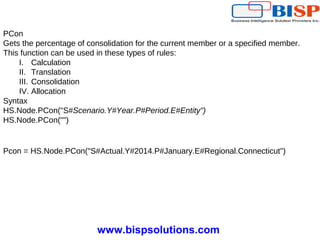
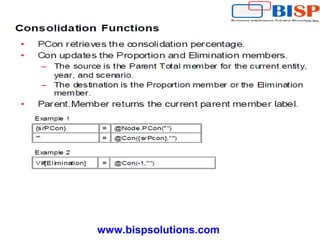
Con
Puts data into the [Proportion] and [Elimination] Value dimension members. This function
can be used in Consolidation rules.
Syntax
HS.Con ("DestPOV", Factor, "Nature")
Examples
Call HS.Con ("V#[Elimination]",-1*dPCon,"")
Call HS.Con ("V#[Elimination]",-1*dPCon,"Elimination")
Call HS.Con ("V#[Elimination]"PCON,"DefaultConsolidation")
www.bispsolutions.com
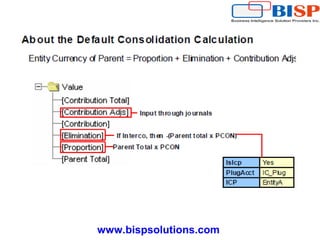
Consolidation is the process of gathering data from child entities and aggregating the
data to parent entities. When you run a consolidation, each child's contribution to the
parent is derived by using the default application calculations, and the results are written
to the Entity Currency member of the parent.
The following steps describe the procedure that Financial Management uses to
calculate the child's contribution to the parent for each account:
1 Verify that there is data in the account.
2 Apply the consolidation percentage in the PCON system account to the data in the
Parent Total member. (Th ePCON account stores the consolidation percentage for the
child.) The Parent Total member is the sum of the Parent Curr Total and Parent Curr
Adjs. If there is no data in the PCON account, use 100%.
3 Write the result to the Proportion member of the Value dimension.
4 Run Calculate rules for the Proportion member.
5 Determine whether an intercompany elimination is required. These four criteria must
be met.
1. The IsICP property of the account is selected.
2. The PlugAcct property of the account specifies a plug account.
3. The ICP member of the Value dimension specifies an intercompany partner.
4. The specified Intercompany partner is a descendant of the current parent.
About the Default Consolidation Calculation
www.bispsolutions.com
6. If the criteria listed instep 5 are met, perform the elimination
 Write a reversing entry to the Elimination member:-(Parent Total x PCON)
 Write an entry to the Elimination member of the Plug account: (Parent Total x
PCON)
7 Run Calculate rules for the Elimination member.
8 Run Calculate rules for the Contribution Adjs member.
9 Write the sum of the Proportion, Elimination, and Contribution Adjs membres of the
child to the Entity Currency member of the parent.
About the Default Consolidation Calculation
www.bispsolutions.com
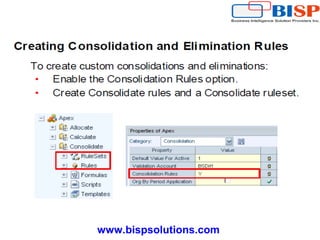
You can override the default consolidation calculations by creating your own
consolidation rules. To use consolidation rules, you must enable the Consolidation Rules
option in the application settings. When the Consolidation Rules option is enabled, the
default consolidation calculations are disabled. You must create a Consolidate ruleset
with the necessary rules for consolidation. Accounts for which you do not include rules in
the Consolidate ruleset are not consolidated.
You create consolidation rules to derive the values for the Proportion and Elimination
members of the value dimension. The aggregation of the Proportion, Elimination, and
Contribution Adjs members to the Entity Currency member of the parent takes place
automatically, even when the Consolidation Rules option is enabled.
Creating Consolidation and Elimination Rules
www.bispsolutions.com
PCON
The PCon function retrieves the consolidation percentage from the PCON system
account for a specified parent and child. It multiples the amount in the PCON account by
.01 to arrive at a percentage. For example, if the value in the PCON account is 80, the
PCON function returns .8.
Syntax
@Node.PCon(S#Scenario.Y#Year.P#Period.E#Parent.Child)
Parameters
Scenario, Year, Period
The point of view for which to retrieve the consolidation percentage. If a dimension is
omitted, the value from the current point of view is used.
Parent, Child
The parent and child for which to retrieve the consolidation percentage. If this parameter
is omitted, the current parent and child are used.
Consolidation Functions
www.bispsolutions.com
Factor
A factor by which to multiple the data in the Parent Total member. This factor can be a
variable, a constant, a function,or an expression using mathematical operators (+,-,*,/).
The PCon function is typically used to specify the factor.
Nature
A text string used for audit purposes. This string is stored and provides information
about the accounting purpose of the transaction. To allow users to view consolidation
source and destination transaction details after running a consolidation, you must include
test in this parameter. Otherwise, the transaction details is not stored.
www.bispsolutions.com
Remarks
You cannot specify a source member expression for the Con function. The source is
always the Parent Total member of the Value dimension for the current scenario, year,
period, and entity. The Con function is used within a loop that is created with a Data
Range component, and the source account for Con is always the account for the current
item in the data range.
You can use any valid combination of members for the Account, Intercompany, custom,
and Entity dimensions on the left(destination) side of the equal sign. You can use only
the Proportion and Elimination members of the Value dimension on the left side of the
equal sign. If no value dimension member is specified, the Proportion member is used
as the destination. To use the default destination, enter quotation marks on the left side
of the equal sign.
If the destination account has a different debit/credit attribute from the source account,
the system reverses the sign in the destination. For example, if the source is a Revenue
account and the destination is an Expense
www.bispsolutions.com
Examples
For example 1 on the slide, the Parent Total member is multiplied by the value returned
by the PCon function. If there is no data in the PCON system account for the current
point of view, a default of 100 percent is used. Because no destination point of view is
specified, the Proportion member, which is the default destination member, is updated
with the result.
If you are not using consolidation percentages in your application, you can use a factor
1 to consolidate all children at 100 percent, as in the following example:
@con(1,"")
For the second example on the slide, the Elimination member is specified as the
destination for the Value dimension. Because this entry is a reversing entry, a factor of -1
is used.
@Parent.Member
The @Parent.Member function returns the parent of the current entity
Example
The following example stores the current parent in a variable:
{vParent}=@Parent.Member()
www.bispsolutions.com
Standard Consolidation Template
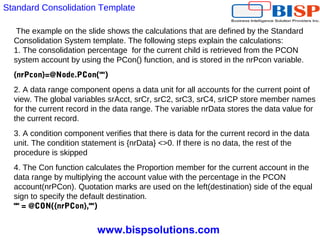
When you create a custom consolidation rule, you can use the calculation defined in the
Standard Consolidation system template as a starting point. You can modify the degault
calculations for those entities or accounts that you need special treatment.
www.bispsolutions.com
The example on the slide shows the calculations that are defined by the Standard
Consolidation System template. The following steps explain the calculations:
1. The consolidation percentage for the current child is retrieved from the PCON
system account by using the PCon() function, and is stored in the nrPcon variable.
{nrPcon}=@Node.PCon("")
2. A data range component opens a data unit for all accounts for the current point of
view. The global variables srAcct, srCr, srC2, srC3, srC4, srICP store member names
for the current record in the data range. The variable nrData stores the data value for
the current record.
3. A condition component verifies that there is data for the current record in the data
unit. The condition statement is {nrData} <>0. If there is no data, the rest of the
procedure is skipped
4. The Con function calculates the Proportion member for the current account in the
data range by multiplying the account value with the percentage in the PCON
account(nrPCon). Quotation marks are used on the left(destination) side of the equal
sign to specify the default destination.
"" = @CON({nrPCon},"")
Standard Consolidation Template
www.bispsolutions.com
5. The plug account for the current account member (srAcct) is retrieved by using the
@Account.PlugAccount function, and is stored in the srPlugAccount variable. The
srPlugAccount variable is used in a later step as part of the intercompany elimination.
{srPlugAccount} = @Account.PlugAcct({srAcct})
6. A condition component tests whether the current record contain intercompany data.
The condition statement is {srICT} <> [ICP None]. If the record does not contain
intercompany data, the rest of the procedure is skipped.
7. A condition component vertifies, for the records that contain intercompany data, that
the record meets the requirements for intercompany elimination: The account must be
an intercompany account, the partner entity must be a descendant of the current
parent, and the account must have a plug account. The following is the condition
statement:
@Account.IsICP(){srAcct}=True AND @Parent.IsDescendant(@Parent.Member,
{srICP})=True and {srPlugAcct} <> ""
Standard Consolidation Template
www.bispsolutions.com
8 If the current record meets the requirements for the intercompany elimination, the
Con function is used to create a reversing entry and a plug account entry.
a) To create the reversing entry, the Elimination member is specified as the
destination for the Value dimension, and the sign for the consolidation percentage is
reversed.
V#Elimination = @Con(-1 * {nrPCon},"")
b) To create the plug account entry, the Elimination member for the plug account
(srPlugAccount) is specified as the destination.
A#{srPlugAcct}.V#[Elimination] = @Con({nrPCon},"")
Standard Consolidation Template
www.bispsolutions.com
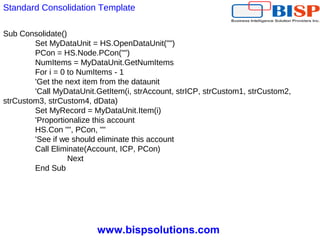
Standard Consolidation Template
Sub Consolidate()
Set MyDataUnit = HS.OpenDataUnit("")
PCon = HS.Node.PCon("")
NumItems = MyDataUnit.GetNumItems
For i = 0 to NumItems - 1
'Get the next item from the dataunit
'Call MyDataUnit.GetItem(i, strAccount, strICP, strCustom1, strCustom2,
strCustom3, strCustom4, dData)
Set MyRecord = MyDataUnit.Item(i)
'Proportionalize this account
HS.Con "", PCon, ""
'See if we should eliminate this account
Call Eliminate(Account, ICP, PCon)
Next
End Sub
www.bispsolutions.com
Standard Consolidation Template
Sub Eliminate (Account, ICP, PCon)
CanEliminate = True
If StrComp(ICP, "[ICP None]", vbTextCompare) = 0 Then
'If the ICP is [ICP None] don't eliminate
CanEliminate = False
ElseIf Not HS.Account.IsICP(Account) Then
'If the account is not an ICP account, don't eliminate
CanEliminate = False
ElseIf Not HS.Parent.IsDescendant(HS.Parent.Member, ICP) Then
'If the ICP is not a descendant of the entity's parent, don't eliminate
CanEliminate = False
Else
'If there is no Plug account, don't eliminate
Plug = HS.Account.PlugAcct(Account)
If (Plug = "") Then CanEliminate = False
End If
If CanEliminate Then
'Reverse the account
HS.Con "V#[Elimination]", -1 * PCon, ""
'Repost in the Plug account to balance
HS.Con "V#[Elimination].A#" & Plug, PCon, ""
End If
End Sub
www.bispsolutions.com
Any Question?

Hfm rule custom consolidation

  • 1.
    www.bispsolutions.com Working with HFMCalc Manager Session#20 : Creating Consolidation and Elimination Rule Presented By :Amit Sharma
  • 2.
    www.bispsolutions.com DataUnitItem Returns the dataunit item to process during consolidation, calculation, or translation. This function can be used in these types of rules: I. Calculation II. Translation III. Consolidation Syntax HS.OpenDataUnit("") Set MyDataUnit = HS.OpenDataUnit("") NumItems= MyDataUnit.GetNumItems For i = 0 to NumItems - 1 Account = MyDataUnit.Item(i)Account. ICP = MyDataUnit.Item(i).ICP Flow = MyDataUnit.Item(i)Custom("Flows") Nature = MyDataUnit.Item(i).Custom("Nature")
  • 3.
    www.bispsolutions.com PCon Gets the percentageof consolidation for the current member or a specified member. This function can be used in these types of rules: I. Calculation II. Translation III. Consolidation IV. Allocation Syntax HS.Node.PCon("S#Scenario.Y#Year.P#Period.E#Entity") HS.Node.PCon("") Pcon = HS.Node.PCon("S#Actual.Y#2014.P#January.E#Regional.Connecticut")
  • 4.
    www.bispsolutions.com Con Puts data intothe [Proportion] and [Elimination] Value dimension members. This function can be used in Consolidation rules. Syntax HS.Con ("DestPOV", Factor, "Nature") Examples Call HS.Con ("V#[Elimination]",-1*dPCon,"") Call HS.Con ("V#[Elimination]",-1*dPCon,"Elimination") Call HS.Con ("V#[Elimination]"PCON,"DefaultConsolidation")
  • 5.
  • 6.
    www.bispsolutions.com Consolidation is theprocess of gathering data from child entities and aggregating the data to parent entities. When you run a consolidation, each child's contribution to the parent is derived by using the default application calculations, and the results are written to the Entity Currency member of the parent. The following steps describe the procedure that Financial Management uses to calculate the child's contribution to the parent for each account: 1 Verify that there is data in the account. 2 Apply the consolidation percentage in the PCON system account to the data in the Parent Total member. (Th ePCON account stores the consolidation percentage for the child.) The Parent Total member is the sum of the Parent Curr Total and Parent Curr Adjs. If there is no data in the PCON account, use 100%. 3 Write the result to the Proportion member of the Value dimension. 4 Run Calculate rules for the Proportion member. 5 Determine whether an intercompany elimination is required. These four criteria must be met. 1. The IsICP property of the account is selected. 2. The PlugAcct property of the account specifies a plug account. 3. The ICP member of the Value dimension specifies an intercompany partner. 4. The specified Intercompany partner is a descendant of the current parent. About the Default Consolidation Calculation
  • 7.
    www.bispsolutions.com 6. If thecriteria listed instep 5 are met, perform the elimination  Write a reversing entry to the Elimination member:-(Parent Total x PCON)  Write an entry to the Elimination member of the Plug account: (Parent Total x PCON) 7 Run Calculate rules for the Elimination member. 8 Run Calculate rules for the Contribution Adjs member. 9 Write the sum of the Proportion, Elimination, and Contribution Adjs membres of the child to the Entity Currency member of the parent. About the Default Consolidation Calculation
  • 8.
  • 9.
    www.bispsolutions.com You can overridethe default consolidation calculations by creating your own consolidation rules. To use consolidation rules, you must enable the Consolidation Rules option in the application settings. When the Consolidation Rules option is enabled, the default consolidation calculations are disabled. You must create a Consolidate ruleset with the necessary rules for consolidation. Accounts for which you do not include rules in the Consolidate ruleset are not consolidated. You create consolidation rules to derive the values for the Proportion and Elimination members of the value dimension. The aggregation of the Proportion, Elimination, and Contribution Adjs members to the Entity Currency member of the parent takes place automatically, even when the Consolidation Rules option is enabled. Creating Consolidation and Elimination Rules
  • 10.
  • 11.
    www.bispsolutions.com PCON The PCon functionretrieves the consolidation percentage from the PCON system account for a specified parent and child. It multiples the amount in the PCON account by .01 to arrive at a percentage. For example, if the value in the PCON account is 80, the PCON function returns .8. Syntax @Node.PCon(S#Scenario.Y#Year.P#Period.E#Parent.Child) Parameters Scenario, Year, Period The point of view for which to retrieve the consolidation percentage. If a dimension is omitted, the value from the current point of view is used. Parent, Child The parent and child for which to retrieve the consolidation percentage. If this parameter is omitted, the current parent and child are used. Consolidation Functions
  • 12.
    www.bispsolutions.com Factor A factor bywhich to multiple the data in the Parent Total member. This factor can be a variable, a constant, a function,or an expression using mathematical operators (+,-,*,/). The PCon function is typically used to specify the factor. Nature A text string used for audit purposes. This string is stored and provides information about the accounting purpose of the transaction. To allow users to view consolidation source and destination transaction details after running a consolidation, you must include test in this parameter. Otherwise, the transaction details is not stored.
  • 13.
    www.bispsolutions.com Remarks You cannot specifya source member expression for the Con function. The source is always the Parent Total member of the Value dimension for the current scenario, year, period, and entity. The Con function is used within a loop that is created with a Data Range component, and the source account for Con is always the account for the current item in the data range. You can use any valid combination of members for the Account, Intercompany, custom, and Entity dimensions on the left(destination) side of the equal sign. You can use only the Proportion and Elimination members of the Value dimension on the left side of the equal sign. If no value dimension member is specified, the Proportion member is used as the destination. To use the default destination, enter quotation marks on the left side of the equal sign. If the destination account has a different debit/credit attribute from the source account, the system reverses the sign in the destination. For example, if the source is a Revenue account and the destination is an Expense
  • 14.
    www.bispsolutions.com Examples For example 1on the slide, the Parent Total member is multiplied by the value returned by the PCon function. If there is no data in the PCON system account for the current point of view, a default of 100 percent is used. Because no destination point of view is specified, the Proportion member, which is the default destination member, is updated with the result. If you are not using consolidation percentages in your application, you can use a factor 1 to consolidate all children at 100 percent, as in the following example: @con(1,"") For the second example on the slide, the Elimination member is specified as the destination for the Value dimension. Because this entry is a reversing entry, a factor of -1 is used. @Parent.Member The @Parent.Member function returns the parent of the current entity Example The following example stores the current parent in a variable: {vParent}=@Parent.Member()
  • 15.
    www.bispsolutions.com Standard Consolidation Template StandardConsolidation Template When you create a custom consolidation rule, you can use the calculation defined in the Standard Consolidation system template as a starting point. You can modify the degault calculations for those entities or accounts that you need special treatment.
  • 16.
    www.bispsolutions.com The example onthe slide shows the calculations that are defined by the Standard Consolidation System template. The following steps explain the calculations: 1. The consolidation percentage for the current child is retrieved from the PCON system account by using the PCon() function, and is stored in the nrPcon variable. {nrPcon}=@Node.PCon("") 2. A data range component opens a data unit for all accounts for the current point of view. The global variables srAcct, srCr, srC2, srC3, srC4, srICP store member names for the current record in the data range. The variable nrData stores the data value for the current record. 3. A condition component verifies that there is data for the current record in the data unit. The condition statement is {nrData} <>0. If there is no data, the rest of the procedure is skipped 4. The Con function calculates the Proportion member for the current account in the data range by multiplying the account value with the percentage in the PCON account(nrPCon). Quotation marks are used on the left(destination) side of the equal sign to specify the default destination. "" = @CON({nrPCon},"") Standard Consolidation Template
  • 17.
    www.bispsolutions.com 5. The plugaccount for the current account member (srAcct) is retrieved by using the @Account.PlugAccount function, and is stored in the srPlugAccount variable. The srPlugAccount variable is used in a later step as part of the intercompany elimination. {srPlugAccount} = @Account.PlugAcct({srAcct}) 6. A condition component tests whether the current record contain intercompany data. The condition statement is {srICT} <> [ICP None]. If the record does not contain intercompany data, the rest of the procedure is skipped. 7. A condition component vertifies, for the records that contain intercompany data, that the record meets the requirements for intercompany elimination: The account must be an intercompany account, the partner entity must be a descendant of the current parent, and the account must have a plug account. The following is the condition statement: @Account.IsICP(){srAcct}=True AND @Parent.IsDescendant(@Parent.Member, {srICP})=True and {srPlugAcct} <> "" Standard Consolidation Template
  • 18.
    www.bispsolutions.com 8 If thecurrent record meets the requirements for the intercompany elimination, the Con function is used to create a reversing entry and a plug account entry. a) To create the reversing entry, the Elimination member is specified as the destination for the Value dimension, and the sign for the consolidation percentage is reversed. V#Elimination = @Con(-1 * {nrPCon},"") b) To create the plug account entry, the Elimination member for the plug account (srPlugAccount) is specified as the destination. A#{srPlugAcct}.V#[Elimination] = @Con({nrPCon},"") Standard Consolidation Template
  • 19.
    www.bispsolutions.com Standard Consolidation Template SubConsolidate() Set MyDataUnit = HS.OpenDataUnit("") PCon = HS.Node.PCon("") NumItems = MyDataUnit.GetNumItems For i = 0 to NumItems - 1 'Get the next item from the dataunit 'Call MyDataUnit.GetItem(i, strAccount, strICP, strCustom1, strCustom2, strCustom3, strCustom4, dData) Set MyRecord = MyDataUnit.Item(i) 'Proportionalize this account HS.Con "", PCon, "" 'See if we should eliminate this account Call Eliminate(Account, ICP, PCon) Next End Sub
  • 20.
    www.bispsolutions.com Standard Consolidation Template SubEliminate (Account, ICP, PCon) CanEliminate = True If StrComp(ICP, "[ICP None]", vbTextCompare) = 0 Then 'If the ICP is [ICP None] don't eliminate CanEliminate = False ElseIf Not HS.Account.IsICP(Account) Then 'If the account is not an ICP account, don't eliminate CanEliminate = False ElseIf Not HS.Parent.IsDescendant(HS.Parent.Member, ICP) Then 'If the ICP is not a descendant of the entity's parent, don't eliminate CanEliminate = False Else 'If there is no Plug account, don't eliminate Plug = HS.Account.PlugAcct(Account) If (Plug = "") Then CanEliminate = False End If If CanEliminate Then 'Reverse the account HS.Con "V#[Elimination]", -1 * PCon, "" 'Repost in the Plug account to balance HS.Con "V#[Elimination].A#" & Plug, PCon, "" End If End Sub
  • 21.