SWENG3106
Operating Systems
Software Engineering Department
AASTU
2
Chapter One
Introduction
Objectives
At the end of this chapter you should be able to:
 Define operating system
 Explain services provided by operating system
 Describe evolution of operating system
 Describe various types of operating systems and their services
 Understand the structure of operating system
3
Outline
Definition of an Operating System
History of Operating Systems
Operating System Services
Types of Operating Systems
Operating System Structure
4
What is an Operating System?
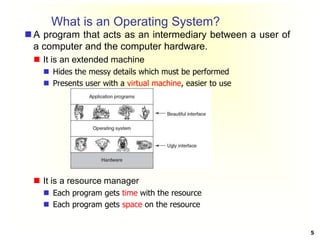
 A program that acts as an intermediary between a user of
a computer and the computer hardware.
 It is an extended machine
 Hides the messy details which must be performed
 Presents user with a virtual machine, easier to use
 It is a resource manager
 Each program gets time with the resource
 Each program gets space on the resource
5
Computer System Components
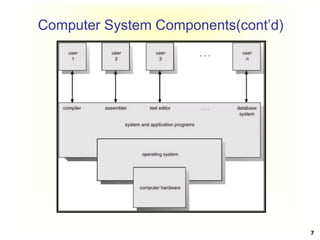
1. Hardware – provides basic computing resources
(CPU, memory, I/O devices).
2. Operating system – controls and coordinates the
use of the hardware among the various application
programs for the various users.
3. Applications programs – define the ways in which
the system resources are used to solve the computing
problems of the users (database systems, video
games, business programs).
4. Users (people, machines, other computers).
6
Computer System Components(cont’d)
7
Operating System Objectives
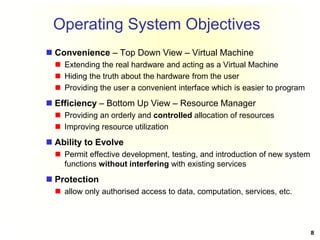
 Convenience – Top Down View – Virtual Machine
 Extending the real hardware and acting as a Virtual Machine
 Hiding the truth about the hardware from the user
 Providing the user a convenient interface which is easier to program
 Efficiency – Bottom Up View – Resource Manager
 Providing an orderly and controlled allocation of resources
 Improving resource utilization
 Ability to Evolve
 Permit effective development, testing, and introduction of new system
functions without interfering with existing services
 Protection
 allow only authorised access to data, computation, services, etc.
8
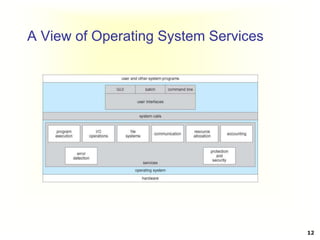
Operating System Services
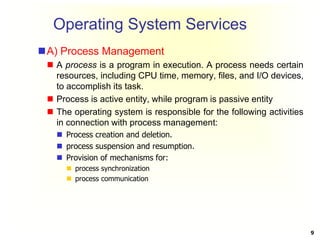
A) Process Management
 A process is a program in execution. A process needs certain
resources, including CPU time, memory, files, and I/O devices,
to accomplish its task.
 Process is active entity, while program is passive entity
 The operating system is responsible for the following activities
in connection with process management:
 Process creation and deletion.
 process suspension and resumption.
 Provision of mechanisms for:
 process synchronization
 process communication
9
Operating System Services(cont’d)
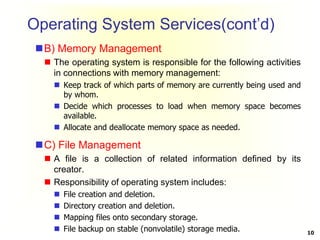
B) Memory Management
 The operating system is responsible for the following activities
in connections with memory management:
 Keep track of which parts of memory are currently being used and
by whom.
 Decide which processes to load when memory space becomes
available.
 Allocate and deallocate memory space as needed.
C) File Management
 A file is a collection of related information defined by its
creator.
 Responsibility of operating system includes:
 File creation and deletion.
 Directory creation and deletion.
 Mapping files onto secondary storage.
 File backup on stable (nonvolatile) storage media. 10
Operating System Services(cont’d)
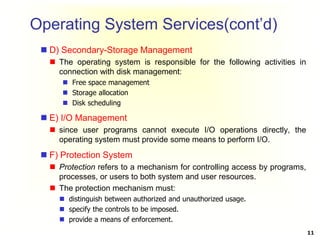
 D) Secondary-Storage Management
 The operating system is responsible for the following activities in
connection with disk management:
 Free space management
 Storage allocation
 Disk scheduling
 E) I/O Management
 since user programs cannot execute I/O operations directly, the
operating system must provide some means to perform I/O.
 F) Protection System
 Protection refers to a mechanism for controlling access by programs,
processes, or users to both system and user resources.
 The protection mechanism must:
 distinguish between authorized and unauthorized usage.
 specify the controls to be imposed.
 provide a means of enforcement.
11
A View of Operating System Services
12
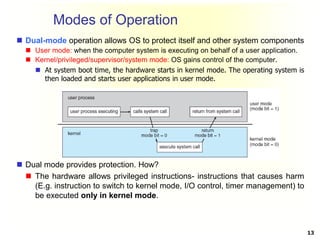
Modes of Operation
 Dual-mode operation allows OS to protect itself and other system components
 User mode: when the computer system is executing on behalf of a user application.
 Kernel/privileged/supervisor/system mode: OS gains control of the computer.
 At system boot time, the hardware starts in kernel mode. The operating system is
then loaded and starts user applications in user mode.
 Dual mode provides protection. How?
 The hardware allows privileged instructions- instructions that causes harm
(E.g. instruction to switch to kernel mode, I/O control, timer management) to
be executed only in kernel mode.
13
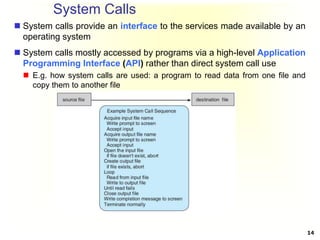
System Calls
 System calls provide an interface to the services made available by an
operating system
 System calls mostly accessed by programs via a high-level Application
Programming Interface (API) rather than direct system call use
 E.g. how system calls are used: a program to read data from one file and
copy them to another file
14
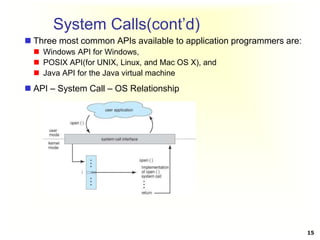
System Calls(cont’d)
 Three most common APIs available to application programmers are:
 Windows API for Windows,
 POSIX API(for UNIX, Linux, and Mac OS X), and
 Java API for the Java virtual machine
 API – System Call – OS Relationship
15
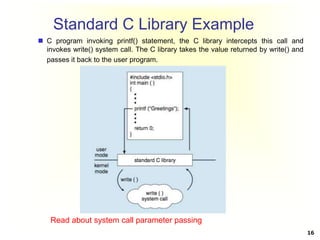
Standard C Library Example
 C program invoking printf() statement, the C library intercepts this call and
invokes write() system call. The C library takes the value returned by write() and
passes it back to the user program.
16
Read about system call parameter passing
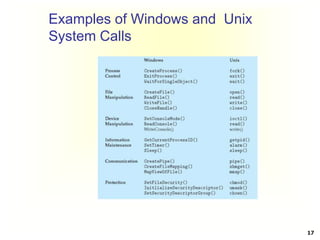
Examples of Windows and Unix
System Calls
17
Operating System Structure
General-purpose OS is very large program, therefore
need to be structured well.
 Partition the task into small components, or modules.
Various ways:
 Simple structure (monolithic)
 Layered
 Microkernel
 Module
 Hybrid
18
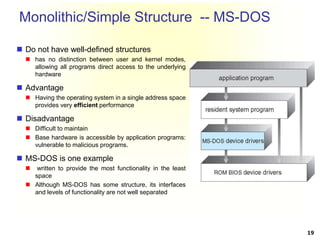
Monolithic/Simple Structure -- MS-DOS
 Do not have well-defined structures
 has no distinction between user and kernel modes,
allowing all programs direct access to the underlying
hardware
 Advantage
 Having the operating system in a single address space
provides very efficient performance
 Disadvantage
 Difficult to maintain
 Base hardware is accessible by application programs:
vulnerable to malicious programs.
 MS-DOS is one example
 written to provide the most functionality in the least
space
 Although MS-DOS has some structure, its interfaces
and levels of functionality are not well separated
19
Layered Approach
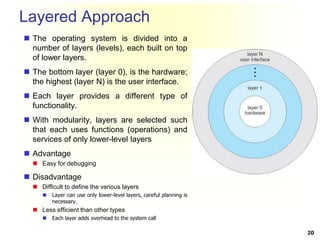
 The operating system is divided into a
number of layers (levels), each built on top
of lower layers.
 The bottom layer (layer 0), is the hardware;
the highest (layer N) is the user interface.
 Each layer provides a different type of
functionality.
 With modularity, layers are selected such
that each uses functions (operations) and
services of only lower-level layers
 Advantage
 Easy for debugging
 Disadvantage
 Difficult to define the various layers
 Layer can use only lower-level layers, careful planning is
necessary.
 Less efficient than other types
 Each layer adds overhead to the system call
20
Microkernel System Structure
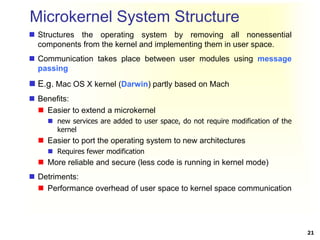
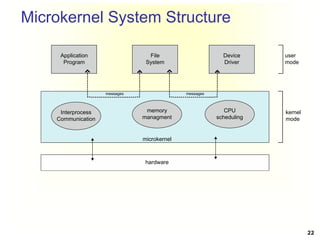
 Structures the operating system by removing all nonessential
components from the kernel and implementing them in user space.
 Communication takes place between user modules using message
passing
 E.g. Mac OS X kernel (Darwin) partly based on Mach
 Benefits:
 Easier to extend a microkernel
 new services are added to user space, do not require modification of the
kernel
 Easier to port the operating system to new architectures
 Requires fewer modification
 More reliable and secure (less code is running in kernel mode)
 Detriments:
 Performance overhead of user space to kernel space communication
21
Microkernel System Structure
Application
Program
File
System
Device
Driver
Interprocess
Communication
memory
managment
CPU
scheduling
messages
messages
microkernel
hardware
user
mode
kernel
mode
22
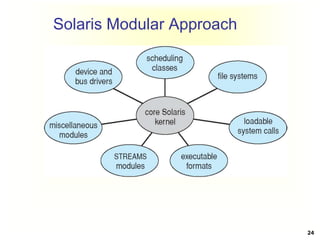
Modules
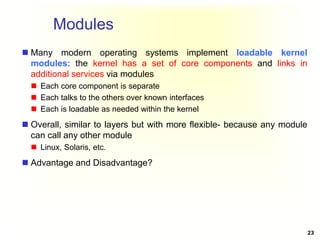
 Many modern operating systems implement loadable kernel
modules: the kernel has a set of core components and links in
additional services via modules
 Each core component is separate
 Each talks to the others over known interfaces
 Each is loadable as needed within the kernel
 Overall, similar to layers but with more flexible- because any module
can call any other module
 Linux, Solaris, etc.
 Advantage and Disadvantage?
23
Solaris Modular Approach
24
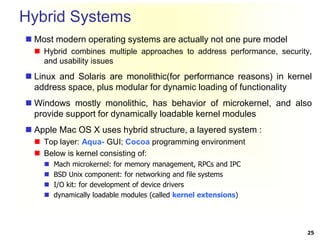
Hybrid Systems
 Most modern operating systems are actually not one pure model
 Hybrid combines multiple approaches to address performance, security,
and usability issues
 Linux and Solaris are monolithic(for performance reasons) in kernel
address space, plus modular for dynamic loading of functionality
 Windows mostly monolithic, has behavior of microkernel, and also
provide support for dynamically loadable kernel modules
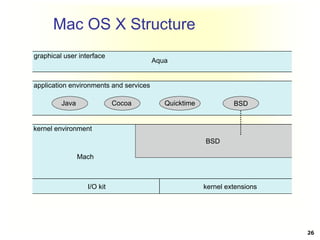
 Apple Mac OS X uses hybrid structure, a layered system :
 Top layer: Aqua- GUI; Cocoa programming environment
 Below is kernel consisting of:
 Mach microkernel: for memory management, RPCs and IPC
 BSD Unix component: for networking and file systems
 I/O kit: for development of device drivers
 dynamically loadable modules (called kernel extensions)
25
Mac OS X Structure
graphical user interface
Aqua
application environments and services
kernel environment
Java Cocoa Quicktime BSD
Mach
I/O kit kernel extensions
BSD
26
Reading Assignments
 A. History of operating systems
 B. Types of operating systems.
 Mainframe operating systems
 Distributed operating systems
 Personal computer operating systems
 Real-time operating systems
 Embedded operating systems
27

Chapter 1- Introduction.ppt

  • 1.
  • 2.
  • 3.
    Objectives At the endof this chapter you should be able to:  Define operating system  Explain services provided by operating system  Describe evolution of operating system  Describe various types of operating systems and their services  Understand the structure of operating system 3
  • 4.
    Outline Definition of anOperating System History of Operating Systems Operating System Services Types of Operating Systems Operating System Structure 4
  • 5.
    What is anOperating System?  A program that acts as an intermediary between a user of a computer and the computer hardware.  It is an extended machine  Hides the messy details which must be performed  Presents user with a virtual machine, easier to use  It is a resource manager  Each program gets time with the resource  Each program gets space on the resource 5
  • 6.
    Computer System Components 1.Hardware – provides basic computing resources (CPU, memory, I/O devices). 2. Operating system – controls and coordinates the use of the hardware among the various application programs for the various users. 3. Applications programs – define the ways in which the system resources are used to solve the computing problems of the users (database systems, video games, business programs). 4. Users (people, machines, other computers). 6
  • 7.
  • 8.
    Operating System Objectives Convenience – Top Down View – Virtual Machine  Extending the real hardware and acting as a Virtual Machine  Hiding the truth about the hardware from the user  Providing the user a convenient interface which is easier to program  Efficiency – Bottom Up View – Resource Manager  Providing an orderly and controlled allocation of resources  Improving resource utilization  Ability to Evolve  Permit effective development, testing, and introduction of new system functions without interfering with existing services  Protection  allow only authorised access to data, computation, services, etc. 8
  • 9.
    Operating System Services A)Process Management  A process is a program in execution. A process needs certain resources, including CPU time, memory, files, and I/O devices, to accomplish its task.  Process is active entity, while program is passive entity  The operating system is responsible for the following activities in connection with process management:  Process creation and deletion.  process suspension and resumption.  Provision of mechanisms for:  process synchronization  process communication 9
  • 10.
    Operating System Services(cont’d) B)Memory Management  The operating system is responsible for the following activities in connections with memory management:  Keep track of which parts of memory are currently being used and by whom.  Decide which processes to load when memory space becomes available.  Allocate and deallocate memory space as needed. C) File Management  A file is a collection of related information defined by its creator.  Responsibility of operating system includes:  File creation and deletion.  Directory creation and deletion.  Mapping files onto secondary storage.  File backup on stable (nonvolatile) storage media. 10
  • 11.
    Operating System Services(cont’d) D) Secondary-Storage Management  The operating system is responsible for the following activities in connection with disk management:  Free space management  Storage allocation  Disk scheduling  E) I/O Management  since user programs cannot execute I/O operations directly, the operating system must provide some means to perform I/O.  F) Protection System  Protection refers to a mechanism for controlling access by programs, processes, or users to both system and user resources.  The protection mechanism must:  distinguish between authorized and unauthorized usage.  specify the controls to be imposed.  provide a means of enforcement. 11
  • 12.
    A View ofOperating System Services 12
  • 13.
    Modes of Operation Dual-mode operation allows OS to protect itself and other system components  User mode: when the computer system is executing on behalf of a user application.  Kernel/privileged/supervisor/system mode: OS gains control of the computer.  At system boot time, the hardware starts in kernel mode. The operating system is then loaded and starts user applications in user mode.  Dual mode provides protection. How?  The hardware allows privileged instructions- instructions that causes harm (E.g. instruction to switch to kernel mode, I/O control, timer management) to be executed only in kernel mode. 13
  • 14.
    System Calls  Systemcalls provide an interface to the services made available by an operating system  System calls mostly accessed by programs via a high-level Application Programming Interface (API) rather than direct system call use  E.g. how system calls are used: a program to read data from one file and copy them to another file 14
  • 15.
    System Calls(cont’d)  Threemost common APIs available to application programmers are:  Windows API for Windows,  POSIX API(for UNIX, Linux, and Mac OS X), and  Java API for the Java virtual machine  API – System Call – OS Relationship 15
  • 16.
    Standard C LibraryExample  C program invoking printf() statement, the C library intercepts this call and invokes write() system call. The C library takes the value returned by write() and passes it back to the user program. 16 Read about system call parameter passing
  • 17.
    Examples of Windowsand Unix System Calls 17
  • 18.
    Operating System Structure General-purposeOS is very large program, therefore need to be structured well.  Partition the task into small components, or modules. Various ways:  Simple structure (monolithic)  Layered  Microkernel  Module  Hybrid 18
  • 19.
    Monolithic/Simple Structure --MS-DOS  Do not have well-defined structures  has no distinction between user and kernel modes, allowing all programs direct access to the underlying hardware  Advantage  Having the operating system in a single address space provides very efficient performance  Disadvantage  Difficult to maintain  Base hardware is accessible by application programs: vulnerable to malicious programs.  MS-DOS is one example  written to provide the most functionality in the least space  Although MS-DOS has some structure, its interfaces and levels of functionality are not well separated 19
  • 20.
    Layered Approach  Theoperating system is divided into a number of layers (levels), each built on top of lower layers.  The bottom layer (layer 0), is the hardware; the highest (layer N) is the user interface.  Each layer provides a different type of functionality.  With modularity, layers are selected such that each uses functions (operations) and services of only lower-level layers  Advantage  Easy for debugging  Disadvantage  Difficult to define the various layers  Layer can use only lower-level layers, careful planning is necessary.  Less efficient than other types  Each layer adds overhead to the system call 20
  • 21.
    Microkernel System Structure Structures the operating system by removing all nonessential components from the kernel and implementing them in user space.  Communication takes place between user modules using message passing  E.g. Mac OS X kernel (Darwin) partly based on Mach  Benefits:  Easier to extend a microkernel  new services are added to user space, do not require modification of the kernel  Easier to port the operating system to new architectures  Requires fewer modification  More reliable and secure (less code is running in kernel mode)  Detriments:  Performance overhead of user space to kernel space communication 21
  • 22.
  • 23.
    Modules  Many modernoperating systems implement loadable kernel modules: the kernel has a set of core components and links in additional services via modules  Each core component is separate  Each talks to the others over known interfaces  Each is loadable as needed within the kernel  Overall, similar to layers but with more flexible- because any module can call any other module  Linux, Solaris, etc.  Advantage and Disadvantage? 23
  • 24.
  • 25.
    Hybrid Systems  Mostmodern operating systems are actually not one pure model  Hybrid combines multiple approaches to address performance, security, and usability issues  Linux and Solaris are monolithic(for performance reasons) in kernel address space, plus modular for dynamic loading of functionality  Windows mostly monolithic, has behavior of microkernel, and also provide support for dynamically loadable kernel modules  Apple Mac OS X uses hybrid structure, a layered system :  Top layer: Aqua- GUI; Cocoa programming environment  Below is kernel consisting of:  Mach microkernel: for memory management, RPCs and IPC  BSD Unix component: for networking and file systems  I/O kit: for development of device drivers  dynamically loadable modules (called kernel extensions) 25
  • 26.
    Mac OS XStructure graphical user interface Aqua application environments and services kernel environment Java Cocoa Quicktime BSD Mach I/O kit kernel extensions BSD 26
  • 27.
    Reading Assignments  A.History of operating systems  B. Types of operating systems.  Mainframe operating systems  Distributed operating systems  Personal computer operating systems  Real-time operating systems  Embedded operating systems 27