©The McGraw-Hill Companies, 2005
1
An Introduction
Chapter 1
Software Project
Management
4th Edition
Robert Hughes and
Mike Cotterell
©The McGraw-Hill Companies, 2005
2
Outline of talk
In this introduction the main questions to be
addressed will be:
– What is software project management? Is it
really different from ‘ordinary’ project
management?
– How do you know when a project has been
successful? For example, do the expectations
of the customer/client match those of the
developers?
©The McGraw-Hill Companies, 2005
3
What is a project?
Some dictionary definitions:
“A specific plan or design”
“A planned undertaking”
“A large undertaking e.g. a public works
scheme”
Longmans dictionary
Key points above are planning and size
of task
©The McGraw-Hill Companies, 2005
4
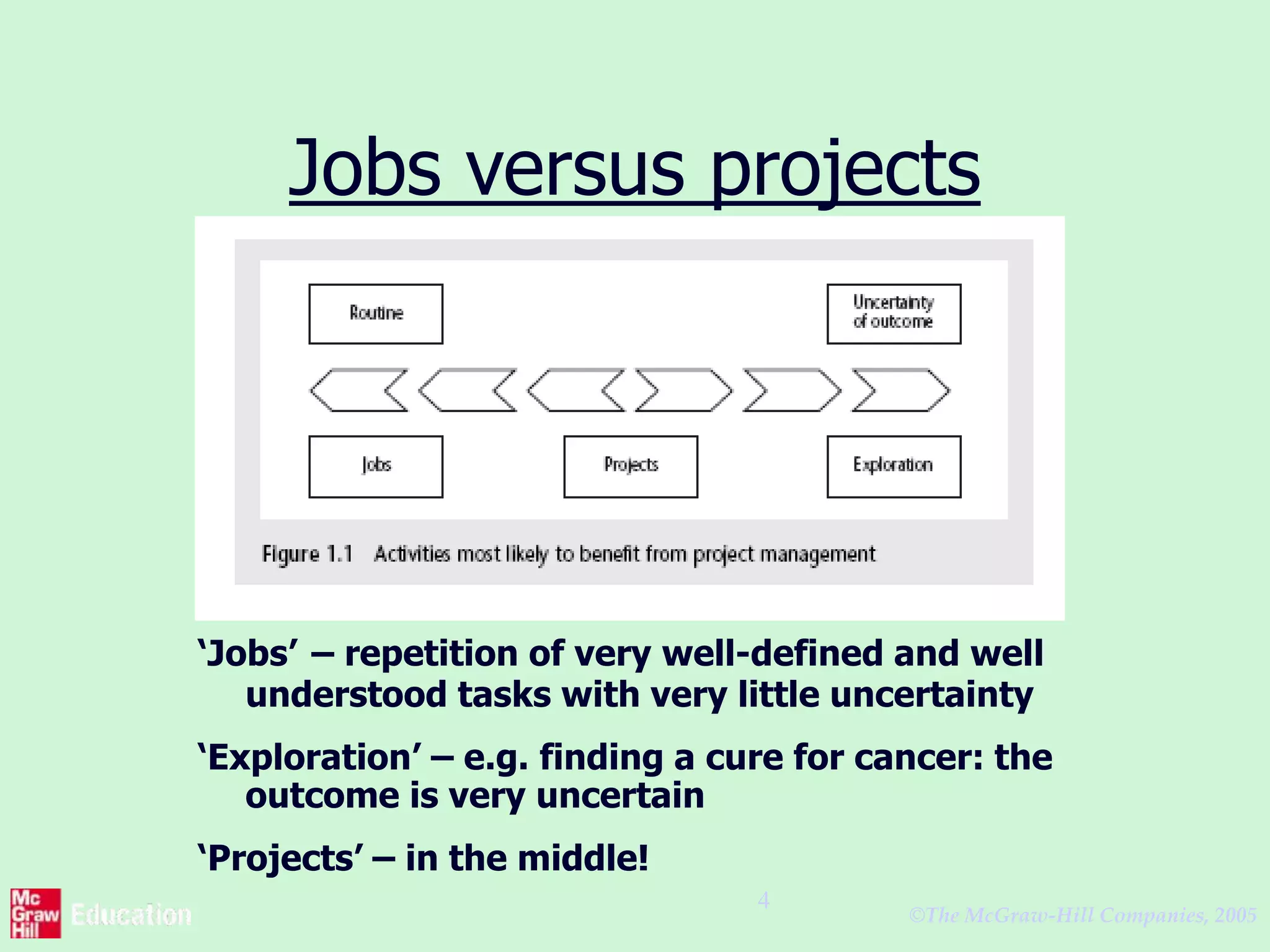
Jobs versus projects
‘Jobs’ – repetition of very well-defined and well
understood tasks with very little uncertainty
‘Exploration’ – e.g. finding a cure for cancer: the
outcome is very uncertain
‘Projects’ – in the middle!
©The McGraw-Hill Companies, 2005
5
Characteristics of projects
A task is more ‘project-like’ if it is:
• Non-routine
• Planned
• Aiming at a specific target
• Work carried out for a customer
• Involving several specialisms
• Made up of several different phases
• Constrained by time and resources
• Large and/or complex
©The McGraw-Hill Companies, 2005
6
Are software projects really
different from other projects?
Not really! …but…
• Invisibility
• Complexity
• Conformity
• Flexibility
make software more problematic to
build than other engineered artefacts.
©The McGraw-Hill Companies, 2005
7
Activities covered by project
management
Feasibility study
Is project technically feasible and worthwhile from a
business point of view?
Planning
Only done if project is feasible
Execution
Implement plan, but plan may be changed as we go along
©The McGraw-Hill Companies, 2005
8
The software development life-
cycle (ISO 12207)
©The McGraw-Hill Companies, 2005
9
ISO 12207 life-cycle
Requirements analysis
– Requirements elicitation: what does the
client need?
– Analysis: converting ‘customer-facing’
requirements into equivalents that
developers can understand
– Requirements will cover
• Functions
• Quality
• Resource constraints i.e. costs
©The McGraw-Hill Companies, 2005
10
ISO 12207 life-cycle
• Architecture design
– Based on system requirements
– Defines components of system: hardware,
software, organizational
– Software requirements will come out of
this
• Code and test
– Of individual components
• Integration
– Putting the components together
©The McGraw-Hill Companies, 2005
11
ISO12207 continued
• Qualification testing
– Testing the system (not just the software)
• Installation
– The process of making the system
operational
– Includes setting up standing data, setting
system parameters, installing on
operational hardware platforms, user
training etc
• Acceptance support
– Including maintenance and enhancement
©The McGraw-Hill Companies, 2005
12
Some ways of categorizing
projects
Distinguishing different types of project is
important as different types of task
need different project approaches e.g.
• Information systems versus embedded
systems
• Objective-based versus product-based
©The McGraw-Hill Companies, 2005
13
What is management?
This involves the following activities:
• Planning – deciding what is to be done
• Organizing – making arrangements
• Staffing – selecting the right people for
the job
• Directing – giving instructions
continued…
©The McGraw-Hill Companies, 2005
14
What is management?
(continued)
• Monitoring – checking on progress
• Controlling – taking action to remedy hold-
ups
• Innovating – coming up with solutions when
problems emerge
• Representing – liaising with clients, users,
developers and other stakeholders
©The McGraw-Hill Companies, 2005
15
Setting objectives
• Answering the question ‘What do we
have to do to have a success?’
• Need for a project authority
– Sets the project scope
– Allocates/approves costs
• Could be one person - or a group
– Project Board
– Project Management Board
– Steering committee
©The McGraw-Hill Companies, 2005
16
Objectives
Informally, the objective of a project can be
defined by completing the statement:
The project will be regarded as a
success if………………………………..
Rather like post-conditions for the project
Focus on what will be put in place, rather than
how activities will be carried out
©The McGraw-Hill Companies, 2005
17
Objectives should be SMART
S – specific, that is, concrete and well-defined
M – measurable, that is, satisfaction of the
objective can be objectively judged
A – achievable, that is, it is within the power of the
individual or group concerned to meet the target
R – relevant, the objective must relevant to the true
purpose of the project
T – time constrained: there is defined point in
time by which the objective should be achieved
©The McGraw-Hill Companies, 2005
18
Goals/sub-objectives
These are steps along the way to achieving
the objective. Informally, these can be
defined by completing the sentence…
Objective X will be achieved
IF the following goals are all achieved
A……………
B……………
C…………… etc
©The McGraw-Hill Companies, 2005
19
Goals/sub-objectives continued
Often a goal can be allocated to an individual.
Individual may have the capability of achieving
goal, but not the objective on their own e.g.
Objective – user satisfaction with software product
Analyst goal – accurate requirements
Developer goal – software that is reliable
©The McGraw-Hill Companies, 2005
20
Measures of effectiveness
How do we know that the goal or objective has
been achieved?
By a practical test, that can be objectively
assessed.
e.g. for user satisfaction with software product:
• Repeat business – they buy further products from
us
• Number of complaints – if low etc etc
©The McGraw-Hill Companies, 2005
21
Stakeholders
These are people who have a stake or
interest in the project
In general, they could be users/clients or
developers/implementers
They could be:
• Within the project team
• Outside the project team, but within the
same organization
• Outside both the project team and the
organization
©The McGraw-Hill Companies, 2005
22
The business case
Benefits of delivered
project must outweigh
costs
Costs include:
- Development
- Operation
Benefits
- Quantifiable
- Non-quantifiable
£
£
Benefits
Costs
©The McGraw-Hill Companies, 2005
23
Management control
©The McGraw-Hill Companies, 2005
24
Management control
Data – the raw details
e.g. ‘6,000 documents processed at location X’
Information – the data is processed to produce
something that is meaningful and useful
e.g. ‘productivity is 100 documents a day’
Comparison with objectives/goals
e.g. we will not meet target of processing all
documents by 31st March
continued…..
©The McGraw-Hill Companies, 2005
25
Management control -
continued
Modelling – working out the probable
outcomes of various decisions
e.g. if we employ two more staff at location X
how quickly can we get the documents
processed?
Implementation – carrying out the remedial
actions that have been decided upon
©The McGraw-Hill Companies, 2005
26
Key points in lecture
• Projects are non-routine - thus uncertain
• The particular problems of projects e.g. lack of
visibility
• Clear objectives are essential which can be
objectively assessed
• Stuff happens. Not usually possible to keep
precisely plan – need for control
• Communicate, communicate, communicate!

Spm chapter 1

  • 1.
    ©The McGraw-Hill Companies,2005 1 An Introduction Chapter 1 Software Project Management 4th Edition Robert Hughes and Mike Cotterell
  • 2.
    ©The McGraw-Hill Companies,2005 2 Outline of talk In this introduction the main questions to be addressed will be: – What is software project management? Is it really different from ‘ordinary’ project management? – How do you know when a project has been successful? For example, do the expectations of the customer/client match those of the developers?
  • 3.
    ©The McGraw-Hill Companies,2005 3 What is a project? Some dictionary definitions: “A specific plan or design” “A planned undertaking” “A large undertaking e.g. a public works scheme” Longmans dictionary Key points above are planning and size of task
  • 4.
    ©The McGraw-Hill Companies,2005 4 Jobs versus projects ‘Jobs’ – repetition of very well-defined and well understood tasks with very little uncertainty ‘Exploration’ – e.g. finding a cure for cancer: the outcome is very uncertain ‘Projects’ – in the middle!
  • 5.
    ©The McGraw-Hill Companies,2005 5 Characteristics of projects A task is more ‘project-like’ if it is: • Non-routine • Planned • Aiming at a specific target • Work carried out for a customer • Involving several specialisms • Made up of several different phases • Constrained by time and resources • Large and/or complex
  • 6.
    ©The McGraw-Hill Companies,2005 6 Are software projects really different from other projects? Not really! …but… • Invisibility • Complexity • Conformity • Flexibility make software more problematic to build than other engineered artefacts.
  • 7.
    ©The McGraw-Hill Companies,2005 7 Activities covered by project management Feasibility study Is project technically feasible and worthwhile from a business point of view? Planning Only done if project is feasible Execution Implement plan, but plan may be changed as we go along
  • 8.
    ©The McGraw-Hill Companies,2005 8 The software development life- cycle (ISO 12207)
  • 9.
    ©The McGraw-Hill Companies,2005 9 ISO 12207 life-cycle Requirements analysis – Requirements elicitation: what does the client need? – Analysis: converting ‘customer-facing’ requirements into equivalents that developers can understand – Requirements will cover • Functions • Quality • Resource constraints i.e. costs
  • 10.
    ©The McGraw-Hill Companies,2005 10 ISO 12207 life-cycle • Architecture design – Based on system requirements – Defines components of system: hardware, software, organizational – Software requirements will come out of this • Code and test – Of individual components • Integration – Putting the components together
  • 11.
    ©The McGraw-Hill Companies,2005 11 ISO12207 continued • Qualification testing – Testing the system (not just the software) • Installation – The process of making the system operational – Includes setting up standing data, setting system parameters, installing on operational hardware platforms, user training etc • Acceptance support – Including maintenance and enhancement
  • 12.
    ©The McGraw-Hill Companies,2005 12 Some ways of categorizing projects Distinguishing different types of project is important as different types of task need different project approaches e.g. • Information systems versus embedded systems • Objective-based versus product-based
  • 13.
    ©The McGraw-Hill Companies,2005 13 What is management? This involves the following activities: • Planning – deciding what is to be done • Organizing – making arrangements • Staffing – selecting the right people for the job • Directing – giving instructions continued…
  • 14.
    ©The McGraw-Hill Companies,2005 14 What is management? (continued) • Monitoring – checking on progress • Controlling – taking action to remedy hold- ups • Innovating – coming up with solutions when problems emerge • Representing – liaising with clients, users, developers and other stakeholders
  • 15.
    ©The McGraw-Hill Companies,2005 15 Setting objectives • Answering the question ‘What do we have to do to have a success?’ • Need for a project authority – Sets the project scope – Allocates/approves costs • Could be one person - or a group – Project Board – Project Management Board – Steering committee
  • 16.
    ©The McGraw-Hill Companies,2005 16 Objectives Informally, the objective of a project can be defined by completing the statement: The project will be regarded as a success if……………………………….. Rather like post-conditions for the project Focus on what will be put in place, rather than how activities will be carried out
  • 17.
    ©The McGraw-Hill Companies,2005 17 Objectives should be SMART S – specific, that is, concrete and well-defined M – measurable, that is, satisfaction of the objective can be objectively judged A – achievable, that is, it is within the power of the individual or group concerned to meet the target R – relevant, the objective must relevant to the true purpose of the project T – time constrained: there is defined point in time by which the objective should be achieved
  • 18.
    ©The McGraw-Hill Companies,2005 18 Goals/sub-objectives These are steps along the way to achieving the objective. Informally, these can be defined by completing the sentence… Objective X will be achieved IF the following goals are all achieved A…………… B…………… C…………… etc
  • 19.
    ©The McGraw-Hill Companies,2005 19 Goals/sub-objectives continued Often a goal can be allocated to an individual. Individual may have the capability of achieving goal, but not the objective on their own e.g. Objective – user satisfaction with software product Analyst goal – accurate requirements Developer goal – software that is reliable
  • 20.
    ©The McGraw-Hill Companies,2005 20 Measures of effectiveness How do we know that the goal or objective has been achieved? By a practical test, that can be objectively assessed. e.g. for user satisfaction with software product: • Repeat business – they buy further products from us • Number of complaints – if low etc etc
  • 21.
    ©The McGraw-Hill Companies,2005 21 Stakeholders These are people who have a stake or interest in the project In general, they could be users/clients or developers/implementers They could be: • Within the project team • Outside the project team, but within the same organization • Outside both the project team and the organization
  • 22.
    ©The McGraw-Hill Companies,2005 22 The business case Benefits of delivered project must outweigh costs Costs include: - Development - Operation Benefits - Quantifiable - Non-quantifiable £ £ Benefits Costs
  • 23.
    ©The McGraw-Hill Companies,2005 23 Management control
  • 24.
    ©The McGraw-Hill Companies,2005 24 Management control Data – the raw details e.g. ‘6,000 documents processed at location X’ Information – the data is processed to produce something that is meaningful and useful e.g. ‘productivity is 100 documents a day’ Comparison with objectives/goals e.g. we will not meet target of processing all documents by 31st March continued…..
  • 25.
    ©The McGraw-Hill Companies,2005 25 Management control - continued Modelling – working out the probable outcomes of various decisions e.g. if we employ two more staff at location X how quickly can we get the documents processed? Implementation – carrying out the remedial actions that have been decided upon
  • 26.
    ©The McGraw-Hill Companies,2005 26 Key points in lecture • Projects are non-routine - thus uncertain • The particular problems of projects e.g. lack of visibility • Clear objectives are essential which can be objectively assessed • Stuff happens. Not usually possible to keep precisely plan – need for control • Communicate, communicate, communicate!